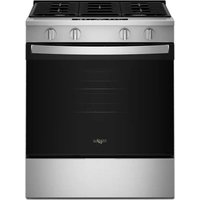
YWFC310S0EW - Cooker WHIRLPOOL - Free user manual and instructions
Find the device manual for free YWFC310S0EW WHIRLPOOL in PDF.


Frequently Asked Questions - YWFC310S0EW WHIRLPOOL
User questions about YWFC310S0EW WHIRLPOOL
0 question about this device. Answer the ones you know or ask your own.
Ask a new question about this device
Download the instructions for your Cooker in PDF format for free! Find your manual YWFC310S0EW - WHIRLPOOL and take your electronic device back in hand. On this page are published all the documents necessary for the use of your device. YWFC310S0EW by WHIRLPOOL.
USER MANUAL YWFC310S0EW WHIRLPOOL
THANK YOU for purchasing this high-quality product. If you should experience a problem not covered in TROUBLESHOOTING, please visit our website at www.whirlpool.ca for additional information. If you still need assistance, call us at 1-800-807-6777. You will need your model and serial number located on the oven frame behind the storage drawer panel.
Table of Contents
RANGE SAFETY....2
The Anti-Tip Bracket 2
FEATURE GUIDE 4
COOKTOP USE....5
Cookware 7
Home Canning 7
OVEN USE 8
Electronic Oven Controls 8
Sabbath Mode (on some models)....8
Aluminum Foil....9
Positioning Racks and Bakeware 9
Oven Vent....10
Baking and Roasting.... 10
Broiling....10
Cook Time (on some models) 10
RANGE CARE.... 11
Self-Cleaning Cycle (on some models).... 11
General Cleaning.... 12
Oven Light 13
Appliance Outlets (on some models).... 13
TROUBLESHOOTING.... 13
ACCESSORIES.... 14
WARRANTY....15
RANGE SAFETY
Your safety and the safety of others are very important.
We have provided many important safety messages in this manual and on your appliance. Always read and obey all safety messages.

This is the safety alert symbol.
This symbol alerts you to potential hazards that can kill or hurt you and others.
All safety messages will follow the safety alert symbol and either the word "DANGER" or "WARNING."
These words mean:
DANGER
You can be killed or seriously injured if you don't immediately follow instructions.
WARNING
You can be killed or seriously injured if you don't follow instructions.
All safety messages will tell you what the potential hazard is, tell you how to reduce the chance of injury, and tell you what can happen if the instructions are not followed.
The Anti-Tip Bracket
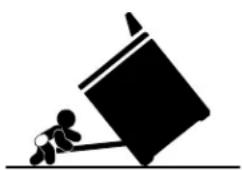
The range will not tip during normal use. However, the range can tip if you apply too much force or weight to the open door without having the anti-tip bracket fastened down properly.
natural_image
Silhouette of a person pushing a large block on a horizontal line (no text or symbols)WARNING
Tip Over Hazard
A child or adult can tip the range and be killed.
Verify the anti-tip bracket has been properly installed and engaged per installation instructions.
Re-engage anti-tip bracket if range is moved.
Do not operate range without anti-tip bracket installed and engaged.
Failure to follow these instructions can result in death or serious burns to children and adults.
text_image
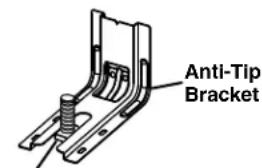
Anti-Tip BracketRange Foot
To verify the anti-tip bracket is installed and engaged:
- Slide range forward.
- Look for the anti-tip bracket securely attached to floor or wall.
- Slide range back so rear range foot is under anti-tip bracket.
• See installation instructions for details.
State of California Proposition 65 Warnings:
WARNING: This product contains one or more chemicals known to the State of California to cause cancer.
WARNING: This product contains one or more chemicals known to the State of California to cause birth defects or other reproductive harm.
IMPORTANT SAFETY INSTRUCTIONS
WARNING: To reduce the risk of fire, electrical shock, injury to persons, or damage when using the range, follow basic precautions, including the following:
■ WARNING: TO REDUCE THE RISK OF TIPPING OF THE RANGE, THE RANGE MUST BE SECURED BY PROPERLY INSTALLED ANTI-TIP DEVICES. TO CHECK IF THE DEVICES ARE INSTALLED PROPERLY, SLIDE RANGE FORWARD, LOOK FOR ANTI-TIP BRACKET SECURELY ATTACHED TO FLOOR OR WALL, AND SLIDE RANGE BACK SO REAR RANGE FOOT IS UNDER ANTI-TIP BRACKET.
■ CAUTION: Do not store items of interest to children in cabinets above a range or on the backguard of a range – children climbing on the range to reach items could be seriously injured.
■ Proper Installation – Be sure the range is properly installed and grounded by a qualified technician.
■ Never Use the Range for Warming or Heating the Room.
- Do Not Leave Children Alone – Children should not be left alone or unattended in area where the range is in use. They should never be allowed to sit or stand on any part of the range.
■ Wear Proper Apparel – Loose-fitting or hanging garments should never be worn while using the range.
■ User Servicing – Do not repair or replace any part of the range unless specifically recommended in the manual. All other servicing should be referred to a qualified technician.
■ Storage in or on the Range – Flammable materials should not be stored in an oven or near surface units.
■ Do Not Use Water on Grease Fires – Smother fire or flame or use dry chemical or foam-type extinguisher.
■ Use Only Dry Potholders – Moist or damp potholders on hot surfaces may result in burns from steam. Do not let potholder touch hot heating elements. Do not use a towel or other bulky cloth.
■ DO NOT TOUCH SURFACE UNITS OR AREAS NEAR UNITS – Surface units may be hot even though they are dark in color. Areas near surface units may become hot enough to cause burns. During and after use, do not touch, or let clothing or other flammable materials contact surface units or areas near units until they have had sufficient time to cool. Among those areas are the cooktop and surfaces facing the cooktop.
■ Use Proper Pan Size – The range is equipped with one or more surface units of different size. Select utensils having flat bottoms large enough to cover the surface unit heating element. The use of undersized utensils will expose a portion of the heating element to direct contact and may result in ignition of clothing. Proper relationship of utensil to burner will also improve efficiency.
- Never Leave Surface Units Unattended at High Heat Settings – Boilover causes smoking and greasy spillovers that may ignite.
■ Make Sure Reflector Pans or Drip Bowls Are in Place – Absence of these pans or bowls during cooking may subject wiring or components underneath to damage.
■ Protective Liners – Do not use aluminum foil to line surface unit drip bowls or oven bottoms, except as suggested in the manual. Improper installation of these liners may result in a risk of electric shock, or fire.
■ Glazed Cooking Utensils – Only certain types of glass, glass/ceramic, ceramic, earthenware, or other glazed utensils are suitable for range-top service without breaking due to the sudden change in temperature.
- Utensil Handles Should Be Turned Inward and Not Extend Over Adjacent Surface Units – To reduce the risk of burns, ignition of flammable materials, and spillage due to unintentional contact with the utensil, the handle of a utensil should be positioned so that it is turned inward, and does not extend over adjacent surface units.
- Do Not Soak Removable Heating Elements – Heating elements should never be immersed in water.
- Do Not Cook on Broken Cooktop – If cooktop should break, cleaning solutions and spillovers may penetrate the broken cooktop and create a risk of electric shock. Contact a qualified technician immediately.
- Clean Cooktop With Caution – If a wet sponge or cloth is used to wipe spills on a hot cooking area, be careful to avoid steam burn. Some cleaners can produce noxious fumes if applied to a hot surface.
■ Use Care When Opening Door – Let hot air or steam escape before removing or replacing food.
■ Do Not Heat Unopened Food Containers – Build-up of pressure may cause container to burst and result in injury.
- Keep Oven Vent Ducts Unobstructed.
- Placement of Oven Racks – Always place oven racks in desired location while oven is cool. If rack must be moved while oven is hot, do not let potholder contact hot heating element in oven.
■ DO NOT TOUCH HEATING ELEMENTS OR INTERIOR SURFACES OF OVEN – Heating elements may be hot even though they are dark in color. Interior surfaces of an oven become hot enough to cause burns. During and after use, do not touch, or let clothing or other flammable materials contact heating elements or interior surfaces of oven until they have had sufficient time to cool. Other surfaces of the appliance may become hot enough to cause burns – among these surfaces are oven vent openings and surfaces near these openings, oven doors, and windows of oven doors.
For self-cleaning ranges –
- Do Not Clean Door Gasket – The door gasket is essential for a good seal. Care should be taken not to rub, damage, or move the gasket.
- Do Not Use Oven Cleaners – No commercial oven cleaner or oven liner protective coating of any kind should be used in or around any part of the oven.
■ Clean Only Parts Listed in Manual.
■ Before Self-Cleaning the Oven – Remove broiler pan and other utensils.
For units with ventilating hood –
■ Clean Ventilating Hoods Frequently – Grease should not be allowed to accumulate on hood or filter.
■ When flambeing foods under the hood, turn the fan on.
SAVE THESE INSTRUCTIONS
FEATURE GUIDE
This manual covers several models. Your model may have some or all of the items listed. Refer to this manual or the Frequently Asked Questions (FAQs) section of our website at www.whirlpool.com for more detailed instructions. In Canada, refer to the Customer Service Section at www.whirlpool.ca.
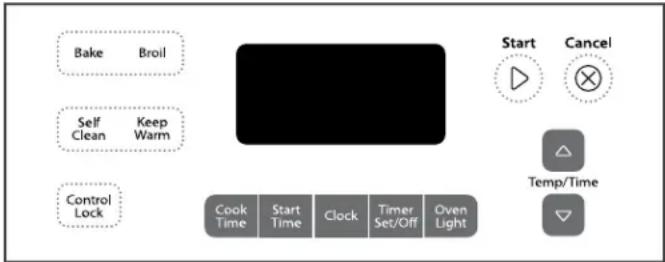
text_image
Bake Broil Self Clean Keep Warm Control Lock Cook Time Start Time Clock Timer Set/Off Oven Light Start Cancel Temp/TimeWARNING
Food Poisoning Hazard
Do not let food sit in oven more than one hour before or after cooking.
Doing so can result in food poisoning or sickness.
KEYPAD FEATURE INSTRUCTIONS
| CLOCK Clock The Clock uses a 12-hour cycle. | ||
| 1. Check that the oven is off.2. Press CLOCK.3. Press TEMP/TIME “up” or “down” arrow pads to set the time of day.4. Press CLOCK or START. | ||
| OVEN LIGHT | Oven cavity light | The oven light is controlled by a keypad on the oven control panel. While the oven door is closed, press the oven light keypad to turn the light on and off. On some models, the oven light will come on when the oven door is opened. |
| TIMER(Set/Off) | Oven timer The Timer can be set in hours or minutes up to 12 hours and 59 minutes. | |
| 1. Press TIMER.2. Press TEMP/TIME “up” or “down” arrow pads to set the length of time.3. Press START to begin the countdown. If enabled, end-of-cycle tones will sound at end of countdown.4. Press TIMER twice to cancel the Timer. Do not press the Cancel keypad because the oven will turn off.5. If the TIMER is running, but not in the display, press TIMER to display the countdown for 5 seconds. | ||
| START | Cooking start | The Start pad begins any oven function. If Start is not pressed within 5 seconds, “PUSH” appears in the display. If Start is not pressed within 1 minute after pressing a keypad, the function is canceled and the time of day is displayed. |
| CANCEL | Range function | The Cancel keypad stops any function except the Clock, Timer and Oven Control Lockout. |
| TEMP/TIME | Temperature and time adjust | The “up” or “down” arrow pads are used to adjust time and temperature settings. |
| BAKE | Baking and roasting | 1. Press BAKE.2. Press TEMP/TIME “up” or “down” arrow pads to set a temperature other than 350°F (175°C) in 5°F (5°C) increments between 170°F and 500°F (75°C and 260°C).3. Press START.4. To change the temperature, repeat Step 2. Press START or wait 5 seconds for the change to take effect.5. Press CANCEL when finished. |
| BROIL | Broiling | 1. Press BROIL.2. Press TEMP/TIME “up” or “down” arrow pads to change the temperature in 5°F (5°C) increments between 300°F and 500°F (150°C and 260°C).3. Press START, and allow oven to preheat for 5 minutes.4. Position cookware in the oven and close the oven door to the broil stop position so that the door is open approximately 6" (15 cm).5. Press CANCEL when finished. |
| KEEP WARM(on some models) | Hold warm | Food must be at serving temperature before placing it in the warmed oven.1. Press KEEP WARM.2. Temperature is set at 170°F (75°C) for 60 minutes (1.00 hour).3. Press START.4. Press CANCEL when finished.NOTE: The oven will automatically turn off after 60 minutes. |
KEYPAD FEATURE INSTRUCTIONS
| START TIME(on some models) | Delayed start | The Start Time keypad is used to enter the starting time for an oven function with a delayed start. Start Time should not be used for foods such as breads and cakes because they may not bake properly.To set a Timed Cook or a Delayed Timed Cook, see “Cook Time” section. |
| COOK TIME(on some models) | Timed cooking | Timed Cooking allows the oven to be set to turn on at a certain time of day, cook for a set length of time, and/or shut off automatically.To set a Timed Cook or a Delayed Timed Cook, see “Cook Time” section. |
| SELF CLEAN(on some models) | Self-Cleaning cycle | See the “Self-Cleaning Cycle” section. |
| CONTROL LOCK | Oven control lockout | 1. Check that the oven is off.2. Press and hold the CONTROL LOCK keypad for 3 seconds.3. A tone will sound, and “Loc” will be displayed.4. Repeat to unlock. Only the CLOCK, OVEN LIGHT and TIMER keypads will function with the controls locked. The cooktop functions are not affected by the oven control lockout. |
COOKTOP USE
WARNING

Fire Hazard
Turn off all controls when done cooking.
Failure to do so can result in death or fire.
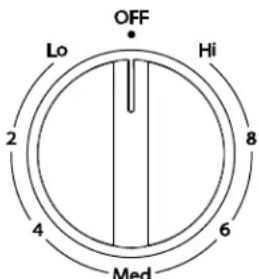
text_image
OFF Lo Hi 2 8 4 6 MedThe control knobs can be set to anywhere between Hi and Lo. Push in and turn to setting.
REMEMBER: When range is in use, the entire cooktop area may become hot.
Coil Elements and Burner Bowls (on some models)
Coil elements should be level for optimal cooking results. Burner bowls, when clean, reflect heat back to the cooktop. They also help catch spills.
Cookware should not extend move than 12 " (13 mm) over the coil element. If cookware is uneven or too large, it can produce excess heat, causing the burner bowl to change color.
Ceramic Glass (on some models)
The surface cooking area will glow red when an element is on. Some parts of the surface cooking area may not glow red when an element is on. This is normal operation. The burner will cycle on and off to maintain the selected heat level. It will also randomly cycle off and back on again even while in High to keep the cooktop from extreme temperatures.
It is normal for the surface of light colored ceramic glass to appear to change color when surface cooking areas are hot. As the glass cools, it will return to its original color.
Clean the cooktop after each use to help avoid scratches, pitting, abrasions and to condition the glass surface. Ceramic glass cooktop cleaner and a cooktop scraper are also recommended for stubborn soils. Do not use abrasive cleaners, cleaning pads or harsh chemicals for cleaning. The Cooktop Care Kit Part Number 31605B contains all of the items needed to clean and condition your ceramic glass cooktop. Refer to the "Range Care" section for additional information.
IMPORTANT: To avoid permanent damage to the cooktop surface and to make soils easier to remove, clean the cooktop after each use to remove all soils.
■ Avoid storing jars or cans above the cooktop. Dropping a heavy or hard object onto the cooktop could crack the cooktop.
■ To avoid damage to the cooktop, do not leave a hot lid on the cooktop. As the cooktop cools, air can become trapped between the lid and the cooktop, and the ceramic glass could break when the lid is removed.
For foods containing sugar in any form, clean up all spills and soils as soon as possible. Allow the cooktop to cool down slightly. Then, while wearing oven mitts, remove the spills using a scraper while the surface is still warm. If sugary spills are allowed to cool down, they can adhere to the cooktop and can cause pitting and permanent marks.
■ To avoid scratches, do not slide cookware or bakeware across the cooktop. Aluminum or copper bottoms and rough finishes on cookware or bakeware could leave scratches or marks on the cooktop.
- Do not cook popcorn in prepackaged aluminum containers on the cooktop. They could leave aluminum marks that cannot be removed completely.
■ To avoid damage to the cooktop, do not allow objects that could melt, such as plastic or aluminum foil, to touch any part of the entire cooktop.
■ To avoid damage to the cooktop, do not use the cooktop as a cutting board.
■ Use cookware about the same size as the surface cooking area. Cookware should not extend more than 12 " (13 mm) outside the area.
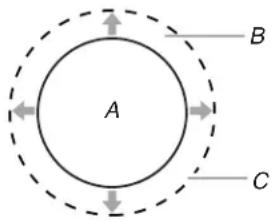
text_image
A B CA. Surface cooking area
B. Cookware/canner
C. 12 " (13 mm) maximum overhang
■ Use flat-bottomed cookware for best heat conduction and energy efficiency. Cookware with rounded, warped, ribbed or dented bottoms could cause uneven heating and poor cooking results.
■ Determine flatness by placing the straight edge of a ruler across the bottom of the cookware. While you rotate the ruler, no space or light should be visible between it and the cookware.
■ Cookware designed with slightly indented bottoms or small expansion channels can be used.
■ Make sure the bottoms of pots and pans are clean and dry before using them. Residue and water can leave deposits when heated.
■ To avoid damage to the cooktop, do not cook foods directly on the cooktop.
Ceramic Glass Cooktop Cleaning (on some models)
Clean the cooktop after each use to help avoid scratches, pitting, abrasions and to condition the glass surface. Ceramic glass cooktop cleaner and a cooktop scraper are also recommended for stubborn soils. Do not use abrasive cleaners, cleaning pads or harsh chemicals for cleaning. The Cooktop Care Kit Part Number 31605B contains all of the items needed to clean and condition your ceramic glass cooktop. Refer to the “Range Care” section for additional information.
IMPORTANT: To avoid permanent damage to the cooktop surface and to make soils easier to remove, clean the cooktop after each use to remove all soils.
Cooktop On Indicator Light
The Cooktop On indicator light is located on the console panel. When any control knob on the console panel is turned on, the Cooktop On indicator light will glow.
Hot Surface Indicator Light (on some models)
On ceramic glass models, the hot surface indicator light is located on the console panel.
The hot surface indicator light will glow as long as any surface cooking area is too hot to touch, even after the surface cooking area is turned off.
Dual Zone Cooking Element (on some models)
The Dual Zone Cooking Element offers flexibility depending on the size of the cookware. Single size can be used in the same way as a regular element. The dual size combines both the single and outer element and is recommended for larger size cookware.
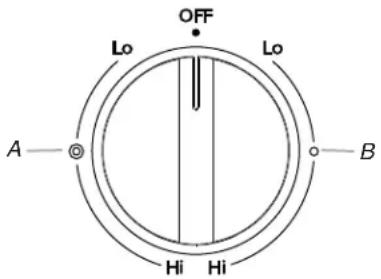
text_image
OFF Lo Lo A—◎ Hi Hi BA. Single
B. Dual
Cookware
IMPORTANT: Do not leave empty cookware on a hot surface cooking area, element or surface burner.
Ideal cookware should have a flat bottom, straight sides and a well-fitting lid, and the material should be of medium-to-heavy thickness.
Rough finishes may scratch the cooktop. Aluminum and copper may be used as a core or base in cookware. However, when used as a base they can leave permanent marks on the surfaces.
Cookware material is a factor in how quickly and evenly heat is transferred, which affects cooking results. A nonstick finish has the same characteristics as its base material. For example, aluminum cookware with a nonstick finish will take on the properties of aluminum.
Cookware with nonstick surfaces should not be used under the broiler.
Check for flatness by placing the straight edge of a ruler across the bottom of the cookware. While you rotate the ruler, no space or light should be visible between it and the cookware.
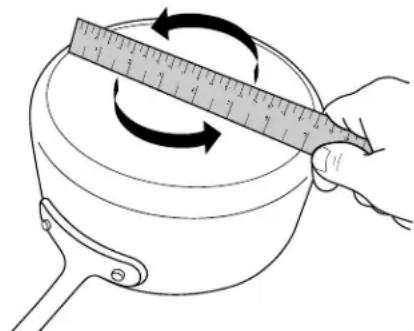
natural_image
Illustration of a hand measuring a rotating object with a ruler, no text or symbols presentUse the following chart as a guide for cookware material characteristics.
COOKWARE CHARACTERISTICS
| Aluminum | ■ Heats quickly and evenly. ■ Suitable for all types of cooking. ■ Medium or heavy thickness is best for most cooking tasks. ■ May leave aluminum residues, which may be diminished if cleaned immediately after cooking. |
| Cast iron | ■ Heats slowly and evenly. ■ Good for browning and frying. ■ Maintains heat for slow cooking. ■ Rough edges or burrs may scratch the cooktop. |
| Ceramic or Ceramic glass | ■ Follow manufacturer's instructions. ■ Heats slowly, but unevenly. ■ Ideal results on low to medium heat settings. ■ May scratch the cooktop. |
COOKWARE CHARACTERISTICS
| Copper | ■ Heats very quickly and evenly.■ May leave copper residues, which may be diminished if cleaned immediately after cooking.■ Can leave a permanent stain or bond to the cooktop if overheated. |
| Earthenware | ■ Follow manufacturer's instructions.■ Use on low heat settings.■ May scratch the cooktop. |
| Porcelain enamel-on-steel or cast iron | ■ See stainless steel or cast iron.■ Porcelain enamel bakeware without the metal base may bond to the cooktop if overheated. |
| Stainless steel | ■ Heats quickly, but unevenly.■ A core or base of aluminum or copper on stainless steel provides even heating. |
Use flat-bottomed cookware for best cooking results and energy efficiency. The cookware should be about the same size as the cooking area outlined on the cooktop. Cookware should not extend more than 12 " (13 mm) outside the area.
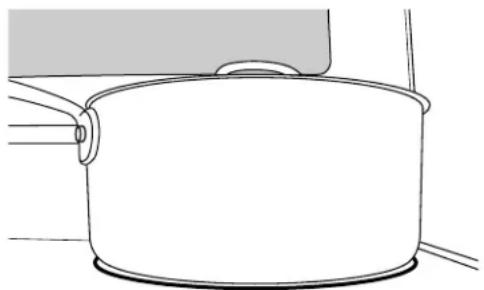
natural_image
Simple line drawing of a cooking pot with a lid and handle (no text or symbols)Home Canning
Canning can be performed on a glass smooth top cooking surface or traditional coil element cooktop. When canning for long periods, alternate the use of surface cooking areas or elements between batches. This allows time for the most recently used areas to cool.
■ Center the canner on the largest surface cooking area or element. On electric cooktops, canners should not extend more than 12 " (13 mm) beyond the surface cooking area or element.
■ Do not place canner on 2 surface cooking areas or elements at the same time.
■ On ceramic glass models, use only flat-bottomed canners to avoid damage to the cooktop and elements.
For more information, contact your local agricultural extension office, or refer to published home canning guides. Companies that manufacture home canning products can also offer assistance.
OVEN USE
Odors and smoke are normal when the oven is used the first few times, or when it is heavily soiled.
IMPORTANT: The health of some birds is extremely sensitive to the fumes given off. Exposure to the fumes may result in death to certain birds. Always move birds to another closed and well-ventilated room.
Electronic Oven Controls
Control Display
The display will flash when powered up or after a power loss. Press CANCEL to clear. When oven is not in use, the time of day is displayed.
Options Mode
Press and hold TIMER for 5 seconds, and "Opt" will appear. Use the Temp/Time "up" or "down" arrow pads to cycle through the following options. Press CANCEL to exit the mode.
The temperature is preset at Fahrenheit, but can be changed to Celsius. Press TIMER to toggle between Fahrenheit and Celsius. Press CANCEL to exit.
End of Cycle Tones
“b1” (beep once) or “b” (continue to beep) will be displayed. Press TIMER to toggle through selections. Press CANCEL to exit.
Oven Light with Door Open
“LOn” indicates that the oven light will turn on when the door is open. If “LOFF” is displayed, the oven light will turn on only with the oven light switch. Press TIMER to toggle through selection. Press CANCEL to exit.
12-Hour Shutoff
If "12 Hr" is displayed, the oven will automatically shut off after 12 hours. Press TIMER to toggle to "- - Hr" to disable the 12-hour shutoff. Press CANCEL to exit.
Tones
Tones are audible signals, indicating the following:
Basic Functions
One tone
■ Valid pad press
■ Oven is preheated (long tone)
■ Function has been entered
■ Reminder (on some models), repeating every 20 seconds after the end-of-cycle tones
Three tones
■ Invalid pad press
Four tones
■ End of cycle
Oven Temperature Control
IMPORTANT: Do not use a thermometer to measure oven temperature. Elements will cycle on and off as needed to provide consistent temperature but may run slightly hot or cool at any point in time due to this cycling. Most thermometers are slow to react to temperature change and will not provide an accurate reading due to this cycling.
The oven provides accurate temperatures; however, it may cook faster or slower than your previous oven, so the temperature can be adjusted to personalize it for your cooking needs. It can be changed in Fahrenheit or Celsius.
To Adjust Oven Temperature:
- Press and hold BAKE for 5 seconds until the oven display shows the current setting, for example "0°F CAL" or "00."
- Press the Temp/Time "up" or "down" arrow pads to increase or to decrease the temperature in 10°F (5°C or 6°C) amounts. The adjustment can be set between 30°F (17°C) and -30°F (-17°C).
- Press START.
Sabbath Mode (on some models)
The Sabbath Mode sets the oven to remain on in a Bake setting until turned off. A Timed Bake can also be set to keep the oven on for only part of the Sabbath. The Oven Control Lockout Feature (if present) will be disabled during the Sabbath Mode. After the Sabbath Mode is set no tones will sound, the display will not show the temperature, the Kitchen Timer Mode will be canceled (if active) and only the following pads will function:
■ "up" or "down" arrow pads
■ Cancel
When the oven door is opened or closed, the oven light will not turn on or off and the heating elements will not turn on or off immediately.
When power is restored after a power failure, the oven will return to Sabbath Mode and remain Sabbath compliant with the bake elements off until the Cancel keypad is pressed.
Pressing the Cancel keypad at any time returns the oven to the normal cooking mode (not Sabbath Mode compliant).
Before entering the Sabbath Mode, it must be decided if the oven light is to be on or off for the entire Sabbath Mode period. If the light is on when entering Sabbath Mode, it will remain on for the entire time Sabbath Mode is in use. If the light is off when entering Sabbath Mode, it will remain off for the entire time Sabbath Mode is in use. Opening the oven door or pressing the Oven Light keypad will not affect the oven light once Sabbath Mode has been entered.
If the oven has the Convection Bake feature, the oven light is controlled by a separate Oven Light switch on the console. If the oven light is on when entering the Sabbath Mode, it will remain on for the entire time Sabbath Mode is in use. For the oven light to be off during the Sabbath Mode, the light bulb must be removed from the oven prior to entering the Sabbath Mode. Not performing these steps will cause the oven light to turn on when the oven door is opened, resulting in the oven being not Sabbath compliant.
On the Holiday, the oven temperature can be changed once the oven is in Sabbath Mode by pressing the "up" or "down" arrow pads. The oven temperature will change 25^ F ( 14^ C) each time the keypad is pressed. The display will not change, and there will be no sounds during this adjustment.
To Bake Using Sabbath Mode:
- Press BAKE.
- Press the "up" or "down" arrow pads.
- Press START.
- Press and hold the TIMER keypad for 5 seconds. "SAb" will flash in the display.
- Press START within 5 seconds to enter Sabbath Mode; otherwise, the entire cycle cancels out. "SAb" will stop flashing and remain on in the display. The oven is now in Sabbath Mode and is Sabbath compliant.
Pressing the Cancel keypad at any time returns the oven to the normal cooking mode (not Sabbath Mode compliant).
To set a Timed Bake using Sabbath Mode (on some models):
WARNING
Food Poisoning Hazard
Do not let food sit in oven more than one hour before or after cooking.
Doing so can result in food poisoning or sickness.
- Press BAKE.
- Press the "up" or "down" arrow pads to enter a temperature other than the one displayed.
- Press COOK TIME. The Cook Time oven indicator light will light up.
- Press the "up" or "down" arrow pads to enter a cook time length.
- Press START.
- Press and hold the TIMER keypad for 5 seconds. "SAb" will flash in the display.
- Press START within 5 seconds to enter Sabbath Mode; otherwise, the entire cycle cancels out. "SAb" will stop flashing and remain on in the display. The oven is now in Sabbath Mode and is Sabbath compliant. The Bake, On and Cook Time indicator lights will be displayed.
When the set cook time ends, the oven will shut off automatically and the indicator lights will turn off, indicating the end of the cycle. Pressing the Cancel keypad at any time returns the oven to the normal cooking mode (not Sabbath Mode compliant).
To set a Delayed Timed Bake using Sabbath Mode (on some models):
- Press BAKE.
- Press the "up" or "down" arrow pads to enter a temperature other than the one displayed.
- Press COOK TIME. The Cook Time oven indicator light will light up.
- Press the "up" or "down" arrow pads to enter a cook time length.
- Press START TIME. The Start Time indicator light will light up.
- Press the "up" or "down" arrow pads to enter a start time.
- Press START.
- Press and hold the TIMER keypad for 5 seconds. "SAb" will flash in the display.
- Press START within 5 seconds to enter Sabbath Mode; otherwise, the entire cycle cancels out. "SAb" will stop flashing and remain on in the display. The oven is now in Sabbath Mode and is Sabbath compliant. The On and Delay indicator lights will be displayed.
When the start time is reached the Bake, On and Cook Time indicator lights will automatically turn on. When the set cook time ends, the oven will shut off automatically and the indicator lights will turn off, indicating the end of the cycle.
Pressing the Cancel keypad at any time returns the oven to the normal cooking mode (not Sabbath Mode compliant).
Aluminum Foil
IMPORTANT: To avoid permanent damage to the oven bottom finish, do not line the oven bottom with any type of foil or liner.
For best cooking results, do not cover entire oven rack with foil because air must be able to move freely.
Positioning Racks and Bakeware
IMPORTANT: To avoid permanent damage to the porcelain finish, do not place food or bakeware directly on the oven door or bottom.
Bakeware
To cook food evenly, hot air must be able to circulate. Allow 2" (5 cm) of space around bakeware and oven walls. Make sure that no bakeware piece is directly over another.
Racks
■ Position racks before turning on the oven.
■ Do not move racks with bakeware on them.
■ Make sure racks are level.
To move a rack, pull it out to the stop position, raise the front edge, and then lift out. Use the following illustration and charts as a guide.
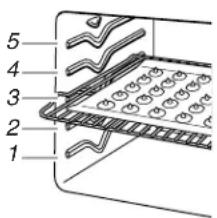
text_image
1 2 3 4 5Rack Positions
Rack 5: Toasting bread or broiling thin, non-fatty foods.
Rack 4: Use for 2-rack baking and broiling.
Rack 3: Most baked goods on a cookie sheet or jelly roll pan, layer cakes, frozen convenience foods. Broiling chicken pieces.
Rack 2: Roasting small cuts of meat, pies, casseroles, bundt cakes, and 2-rack baking.
Rack 1: Roasting large cuts of meat and poultry.
Multiple Rack Cooking
2-rack: Use rack positions 2 and 4.
Baking Layer Cakes on 2 Racks
For best results when baking cakes on 2 racks, use racks 2 and 4 for baking. Place the cakes on the racks as shown.
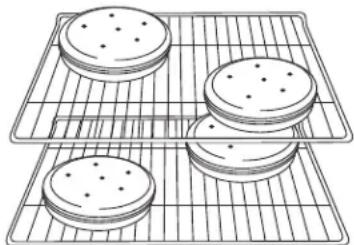
natural_image
Line drawing of four round cookies on a cooling rack (no text or symbols)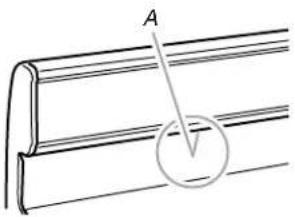
text_image
A VA. Oven vent
Oven Vent
The oven vent releases hot air and moisture from the oven, and should not be blocked or covered. Blocking or covering the vent will cause poor air circulation, affecting cooking and cleaning results. Do not set plastics, paper or other items that could melt or burn near the oven vent.
Baking and Roasting
ACCUBAKE™ Temperature Management System
The ACCUBAKE™ system electronically regulates the oven heat levels during preheat and bake to maintain a precise temperature range for optimal cooking results. The bake and broil elements cycle on and off in intervals. The bake element will glow red when cycling on; the broil element will not. This feature is automatically activated when the oven is in use.
Before baking and roasting, position racks according to "Positioning Racks and Bakeware" section. When roasting, it is not necessary to wait for the oven preheat cycle to end before putting food in unless it is recommended in the recipe.
Preheating
When START is pressed, the oven will begin preheating. Once 100^ F ( 38^ C) is reached, the display temperature will increase as the actual temperature of the oven increases. When the preheat temperature is reached, a tone will sound, and the selected temperature will appear on the display.
Broiling
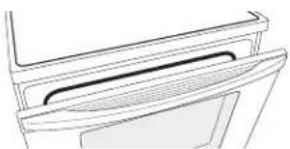
Leave the door open 6" (15 cm) at the broil stop position to ensure proper broiling temperature. Preheat the oven for 5 minutes before putting food in unless recommended otherwise in the recipe. Position food on grid in a broiler pan, then place it in the center of the oven rack.
natural_image
Line drawing of a door handle and lid (no text or symbols)NOTE: Odors and smoke are normal the first few times the oven is used or if the oven is heavily soiled.
Changing the temperature when broiling allows more precise control when cooking. The lower the broil setting, the slower the cooking. Thicker cuts and unevenly shaped pieces of meat, fish and poultry may cook better at lower broil settings. Use racks 4 or 5 for broiling. Refer to the "Positioning Racks and Bakeware" section for more information.
On lower settings, the broil element will cycle on and off to maintain the proper temperature.
■ For best results, use a broiler pan and grid. It is designed to drain juices and help avoid spatter and smoke.
If you would like to purchase a broiler pan, one may be ordered. Please refer to the "Accessories" section for more information.
Cook Time (on some models)
WARNING
Food Poisoning Hazard
Do not let food sit in oven more than one hour before or after cooking.
Doing so can result in food poisoning or sickness.
To Set a Timed Cook:
- Press BAKE. The bake indicator light will light up.
- Press the TEMP/TIME "up" or "down" arrow pads to enter a temperature other than the one displayed.
- Press COOK TIME. The cook time oven indicator light will light up.
- Press the TEMP/TIME "up" or "down" arrow pads to enter the length of time to cook.
- Press START. The display will count down the time. When the time ends, the oven will shut off automatically and "End" will appear on the display.
- Press CANCEL to clear the display.
To Set a Delayed Timed Cook:
Before setting, make sure the clock is set to the correct time of day. See the "Clock" keypad feature in the "Feature Guide" section.
- Press BAKE.
- Press the TEMP/TIME "up" or "down" arrow pads to enter a temperature other than the one displayed.
- Press COOK TIME. The cook time oven indicator light will light up.
- Press TEMP/TIME "up" or "down" arrow pads to enter the length of time to cook.
- Press START TIME. The start time/delay oven indicator light will light up.
-
Press TEMP/TIME "up" or "down" arrow pads to enter the time of day to start.
-
Press START.
When the start time is reached, the oven will automatically turn on. The temperature and/or time settings can be changed anytime after pressing Start by repeating steps 1-7. When the set cook time ends, the oven will shut off automatically and "End" will appear on the display.
- Press CANCEL to clear the display.
RANGE CARE
Self-Cleaning Cycle (on some models)
WARNING
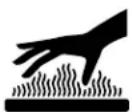
Burn Hazard
Do not touch the oven during the Self-Cleaning cycle.
Keep children away from oven during Self-Cleaning cycle.
Failure to follow these instructions can result in burns.
IMPORTANT: The health of some birds is extremely sensitive to the fumes given off during the Self-Cleaning cycle. Exposure to the fumes may result in death to certain birds. Always move birds to another closed and well-ventilated room.
Do not block the oven vent(s) during the Self-Cleaning cycle. Air must be able to move freely. Depending on your model, see “Oven Vent” section.
Do not clean, rub, damage or move the oven door gasket.
Prepare Range
■ Remove the broiler pan, grid, cookware and bakeware, all cooking utensils, oven racks and aluminum foil and, on some models, the temperature probe from the oven.
■ Use a damp cloth to clean inside door edge and the 1½" (3.8 cm) area around the inside oven cavity frame, being certain not to move or bend the gasket.
■ Remove plastic items from the cooktop because they may melt.
■ Remove all items from the storage drawer.
How the Cycle Works
IMPORTANT: The heating and cooling of porcelain on steel in the oven may result in discoloring, loss of gloss, hairline cracks and popping sounds.
Before self-cleaning, make sure the door is completely closed or the door will not lock and the self-cleaning cycle will not begin.
Once the oven has completely cooled, remove ash with a damp cloth. To avoid breaking the glass, do not apply a cool damp cloth to the inner door glass before it has completely cooled.
To stop the self-cleaning cycle at anytime, press the CANCEL keypad. If the temperature is too high, the oven door will remain locked and "cool" and "locked" will be displayed.
The oven light will not function during the self-cleaning cycle.
Style 1 - Electronic Oven Control with Adjustable Clean Time (on some models)
The SELF CLEAN self-cleaning cycle is time adjustable between 2 hours 30 minutes and 4 hours 30 minutes in 15-minute increments. Suggested clean times are 2 hours 30 minutes for light soil, and 4 hours 30 minutes for heavy soil. The last 30 minutes of the cycle is for cool down.
To Self-Clean:
- Press SELF CLEAN.
- Press the TEMP/TIME "+" or "-" arrow pads to enter the desired self-clean cycle time.
- Press START.
The oven door will automatically lock. The DOOR LOCKED and CLEAN indicator lights will be displayed. The time remaining will also be displayed.
- When the self-clean cycle is complete and the oven cools, the DOOR LOCKED and CLEAN indicator lights will turn off.
- When the oven is completely cooled, remove ash with a damp cloth.
Style 2 - Electronic Oven Control with Adjustable Self-Clean (HI - LO) (on some models)
The self-cleaning cycle can be set at HI self-clean time (4 hours 30 minutes) or LO self-clean time (3 hours 30 minutes). The suggested clean times are 3 hours 30 minutes for light soil, or 4 hours 30 minutes for heavy soil. The last 30 minutes of the cycles is for cool down.
To Self-Clean:
- Press SELF CLEAN to set the clean time to HI (4 hours 30 minutes).
- Press the TEMP/TIME “+” or “-” arrow pads to cycle between LO and HI clean time.
- Press START.
The oven door will automatically lock. The CLEAN indicator light will be displayed. The time remaining will also be displayed. - When the self-clean cycle is complete and the oven cools, the CLEAN indicator light will turn off.
- When the oven is completely cooled, remove ash with a damp cloth.
General Cleaning
IMPORTANT: Before cleaning, make sure all controls are off and the oven and cooktop are cool. Always follow label instructions on cleaning products. For additional information, you can visit the Customer Care section of our website at www.whirlpool.ca.
Soap, water and a soft cloth or sponge are suggested first unless otherwise noted.
EXTERIOR PORCELAIN ENAMEL SURFACES (on some models)
Food spills containing acids, such as vinegar and tomato, should be cleaned as soon as the entire range is cool. These spills may affect the finish.
Cleaning Method:
■ Glass cleaner, mild liquid cleaner or nonabrasive scrubbing pad:
Gently clean around the model and serial number plate because scrubbing may remove numbers.
■ affresh ^® Kitchen and Appliance Cleaner Part Number W10355010 (not included):
See the "Accessories" section for more information.
STAINLESS STEEL (on some models)
NOTE: To avoid damage to stainless steel surfaces, do not use soap-filled scouring pads, abrasive cleaners, Cooktop Cleaner, steel-wool pads, gritty washcloths or abrasive paper towels. Damage may occur to stainless steel surfaces, even with one-time or limited use.
Cleaning Method:
Rub in direction of grain to avoid damaging.
■ affresh ^® Stainless Steel Cleaner Part Number W10355016: See the “Accessories” section for more information.
Liquid detergent or all-purpose cleaner: Rinse with clean water and dry with soft, lint-free cloth.
METALLIC PAINT (on some models)
Do not use abrasive cleaners, cleaners with bleach, rust removers, ammonia or sodium hydroxide (lye) because paint surface may stain.
CERAMIC GLASS (on some models)
Cleaning Method:
Use affresh® Cooktop Cleaner Part Number W10355051 and Cooktop Scraper Part Number WA906B to clean and remove stains from the cooktop. Use Cooktop Protectant Part Number 31463B regularly to avoid stain buildup, pitting and scratching, while conditioning the cooktop for easier future cleaning. These can be ordered as accessories. See the “Accessories” section for more information. The Cooktop Scraper uses razor blades. Store razor blades out of the reach of children.
Do not use steel wool, abrasive powder cleansers, chlorine bleach, rust remover or ammonia because damage may occur.
Light to moderate soil
■ Can be cleaned with damp paper towels or sponge. Light stains should be addressed with cleaner and cleaning pad.
Sugary spills (jellies, candy, syrup)
■ Clean with cooktop scraper and cooktop cleaner. Scrape off sugary spills while the cooktop is still warm. You may want to wear oven mitts while cleaning the cooktop.
Heavy soil, dark streaks, specks and discoloration
■ Clean with Cooktop Cleaner or nonabrasive cleaner and cleaning pad.
Burned-on soil
■ Clean with Cooktop Cleaner, Cleaning Pad and Cooktop Scraper.
Metal marks from aluminum and copper
■ Clean with Cooktop Cleaner and Cleaning Pad as soon as cooktop has cooled down. The marks will not totally disappear, but after many cleanings they will become less noticeable.
Tiny scratches and abrasions
■ Use Cooktop Cleaner and Cleaning Pad for scratches. Scratches and abrasions do not affect cooking performance, and after many cleanings they will become less noticeable.
COOKTOP CONTROLS
To avoid damage to the cooktop controls, do not use steel wool, abrasive cleansers or oven cleaner.
To avoid damage, do not soak knobs.
When replacing knobs, make sure knobs are in the OFF position. On some models, do not remove seals under knobs.
Cleaning Method:
- Soap and water: Pull knobs straight away from control panel to remove.
CONTROL PANEL AND OVEN DOOR EXTERIOR
To avoid damage to the control panel, do not use abrasive cleaners, steel-wool pads, gritty washcloths or abrasive paper towels.
Cleaning Method:
■ Glass cleaner and soft cloth or sponge: Apply glass cleaner to soft cloth or sponge, not directly on panel.
■affresh® Kitchen and Appliance Cleaner Part Number W10355010 (not included): See the "Accessories" section for more information.
COIL ELEMENTS (on some models)
Cleaning Method:
■ Damp cloth: Make sure control knobs are off and elements are cool.
Do not clean or immerse in water. Soil will burn off when hot.
BURNER BOWLS (on some models)
Before removing or replacing coil elements and burner bowls, make sure they are cool and the control knobs are in the OFF position.
Remove the coil element by pushing the edge of the coil element toward the receptacle. Lift it enough to clear the burner bowl. Pull the coil element straight away from the receptacle to remove. Lift out the burner bowl.
Cleaning Method:
Chrome burner bowls
Wash frequently in warm, soapy water. (It is not recommended to wash chrome bowls in a dishwasher.) A mild abrasive cleaner and a plastic scrubber can be used to remove stubborn stains.
For heavily soiled bowls, place an ammonia soaked paper towel on the stains and allow to soak for a short time, then gently scrub with a plastic scrubber.
OVEN RACKS
Cleaning Method:
■ Steel-wool pad
■ For racks that have discolored and are harder to slide, a light coating of vegetable oil applied to the rack guides will help them slide.
STORAGE DRAWER OR WARMING DRAWER (on some models)
Check that storage drawer or warming drawer is cool and empty before cleaning.
Cleaning Method:
■ Mild detergent
OVEN CAVITY
Do not use oven cleaners on models with self-clean.
Food spills should be cleaned when oven cools. At high temperatures, foods react with porcelain and staining, etching, pitting or faint white spots can result.
Cleaning Method:
■ See the "Self-Cleaning Cycle" section, if available on your model.
Oven Light
The oven light is a standard 40-watt appliance bulb. Before replacing, make sure the oven and cooktop are cool and the control knobs are in the off position.
To Replace:
-
Unplug range or disconnect power.
-
Turn the glass bulb cover in the back of the oven counterclockwise to remove.
- Turn bulb counterclockwise to remove from socket.
- Replace bulb, then bulb cover by turning clockwise.
- Plug in range or reconnect power.
Appliance Outlets (on some models)
The 120-volt appliance outlet located on the control console may be used to run portable appliances placed on countertops beside the range.
The outlet operates independently and is not affected by range control settings.
NOTE: Do not place portable appliances on the cooktop. Damage to the portable appliance could result if the cooktop is hot.
Appliance Outlet Circuit Breaker:
The circuit breaker for the appliance outlet on your range is located next to the outlet. It is rated for 12 amps.
If the circuit breaker trips, it can be reset by pressing the switch. A delay of several minutes may be required for the circuit breaker to cool before it will reset.
TROUBLESHOOTING
First try the solutions suggested here or visit our website and reference FAQs (Frequently Asked Questions) to possibly avoid the cost of a service call.
www.whirlpool.com
In Canada, reference the Customer Service section at www.whirlpool.ca
Operation
| PROBLEM POSSIBLE CAUSES SOLUTIONS | ||
| Nothing will operate | Power supply cord is unplugged. | Plug into a grounded outlet. |
| Household fuse is blown, or a circuit breaker is tripped. | Replace the fuse or reset the circuit breaker. If the problem continues, call an electrician. | |
| The control displays an F9 or F9 E0 error code. | The electrical outlet in the home may be miswired. Contact a qualified electrician to verify the electrical supply. | |
| Cooktop will not operate The control knob is not set correctly. | Push in knob before turning to a setting. | |
| Excessive heat around cookware on cooktop | Cookware is not the proper size. Use cookware about the same size as the surface cooking area, element or surface burner. Cookware should not extend more than 1/2" (13 mm) outside the cooking area. | |
| Cooktop cooking results not what expected | Control knob set to incorrect heat level | See “Cooktop Use” section. |
| Range is not level. Level the range. See the Installation Instructions. | ||
| Cooktop element cycles on and off on High setting. | Element cycling due to a temperature limiter | This is normal operation. The element may cycle on and off to keep the cooktop from overheating. |
| Oven will not operate | Delay start is set. | See “Cook Time” section. |
| Control lock is on. | Press and hold START for 3 seconds to unlock. | |
| Control is in Demo Mode. | Press and hold START TIME for 10 seconds to exit Demo Mode. Demo Mode is used for display models in a showroom. | |
| Electronic oven control set incorrectly | See “Electronic Oven Controls” section. | |
| Oven temperature too high or too low | Oven temperature needs adjustment. | See “Oven Temperature Control” in the “Electronic Oven Controls” section. |
| Oven indicator lights flash | Power to range is turned on or restored. | See “Control Display” in the “Electronic Oven Controls” section. If the indicator lights keep flashing, call for service. See cover for contact information. |
| Display shows messages Power failure (display shows flashing time) | Clear the display. On some models, reset the clock, if needed.See “Clock” keypad feature in the “Feature Guide” section. | |
| Error code (display shows letter followed by number) Depending on your model, press CANCEL to clear the display.See “Control Display” in the “Electronic Oven Controls” section. If it reappears, call for service. See cover for contact information. | ||
| Start needs to be pressed so a cycle can begin (display shows “PUSH” or “PSH”). See the “Start” keypad feature in the “Feature Guide” section. | ||
| Self-Cleaning Cycle will not operate | The oven door is not closed. Make sure the oven door is fully closed. | |
| The Self-Cleaning function has not been entered correctly. See the “Self-Cleaning Cycle” section. | ||
| A Timed Cooking function has been entered. See the “Cook Time” section. | ||
| The range is in Sabbath Mode. See the “Sabbath Mode” section. | ||
| Oven cooking results not what expected | Range is not level. Level the range. See the Installation Instructions. | |
| The temperature set was incorrect. Double-check the recipe in a reliable cookbook. | ||
| Oven temperature needs adjustment. See “Oven Temperature Control” in the “Electronic Oven Controls” section. | ||
| Oven was not preheated. See “Baking and Roasting” section. | ||
| Racks were positioned improperly. See “Positioning Racks and Bakeware” section. | ||
| Not enough air circulation around bakeware. See “Positioning Racks and Bakeware” section. | ||
| Batter distributed unevenly in pan Check that batter is level in the pan. | ||
| Darker browning of food caused by dull or dark bakeware Lower oven temperature 25°F (15°C) or move rack to a higher position in the oven. | ||
| Lighter browning of food caused by shiny or light colored bakeware Move rack to a lower position in the oven. | ||
| Incorrect length of cooking time was used. Adjust cooking time. | ||
| Oven door was not closed. Be sure that the bakeware does not keep the door from closing. | ||
| Oven door was opened during cooking. Oven peeking releases oven heat and can result in longer cooking times. | ||
| Rack is too close to bake burner, making baked items too brown on bottom. Move rack to higher position in the oven. | ||
| Pie crusts browning too quickly. Use aluminum foil to cover the edge of the crust and/or reduce baking temperature. | ||
ACCESSORIES
For accessories, you can visit our website at www.whirlpool.com/cookingaccessories.
Cooktop Care Kit
(ceramic glass models)
(includes cleaner, protectant, scraper, and applicator pads)
Order Part Number 31605B
Cooktop Protectant
(ceramic glass models)
Order Part Number 31463B
affresh® Stainless Steel Cleaning Wipes
(stainless steel models)
Order Part Number W10355049
affresh® Cooktop Cleaner
(ceramic glass models)
Order Part Number W10355051
affresh® Stainless Steel Cleaner
(stainless steel models)
Order Part Number W10355016
affresh® Kitchen and Appliance Cleaner
Order Part Number W10355010
Cooktop Scraper
(ceramic glass models)
Order Part Number WA906B
Granite Cleaner and Polish
Order Part Number W10275756
Gas Grate and Drip Pan Cleaner
Order Part Number 31617A
Gourmet Griddle
Order Part Number 4396096RB
Standard Flat Oven Rack
Order Part Number W10268578
Porcelain Broiler Pan and Grid
Order Part Number 4396923
Premium Broil Pan and Roasting Rack
Order Part Number W10123240
www.whirlpool.com/broilerpan
WHIRLPOOL® MAJOR APPLIANCE LIMITED WARRANTY
ATTACH YOUR RECEIPT HERE. PROOF OF PURCHASE IS REQUIRED TO OBTAIN WARRANTY SERVICE.
Please have the following information available when you call the Customer eXperience Center:
■ Name, address and telephone number
■ Model number and serial number
■ A clear, detailed description of the problem
■ Proof of purchase including dealer or retailer name and address
IF YOU NEED SERVICE:
- Before contacting us to arrange service, please determine whether your product requires repair. Some questions can be addressed without service. Please take a few minutes to review the Troubleshooting or Problem Solver section of the Use and Care Guide, scan the QR code on the right to access additional resources, or visit www.whirlpool.com/product_help.
- All warranty service is provided exclusively by our authorized Whirlpool Service Providers. In the U.S. and Canada, direct all requests for warranty service to:
Whirlpool Customer eXperience Center
In the U.S.A., call 1-800-253-1301. In Canada, call 1-800-807-6777.
If outside the 50 United States or Canada, contact your authorized Whirlpool dealer to determine whether another warranty applies.

www.whirlpool.com/product_help
ONE YEAR LIMITED WARRANTY
WHAT IS COVERED WHAT IS NOT COVERED
For one year from the date of purchase, when this major appliance is installed, operated and maintained according to instructions attached to or furnished with the product, Whirlpool Corporation or Whirlpool Canada LP (hereafter "Whirlpool") will pay for Factory Specified Replacement Parts and repair labor to correct defects in materials or workmanship that existed when this major appliance was purchased, or at its sole discretion replace the product. In the event of product replacement, your appliance will be warranted for the remaining term of the original unit's warranty period.
YOUR SOLE AND EXCLUSIVE REMEDY UNDER THIS LIMITED WARRANTY SHALL BE PRODUCT REPAIR AS PROVIDED HEREIN. Service must be provided by a Whirlpool designated service company. This limited warranty is valid only in the United States or Canada and applies only when the major appliance is used in the country in which it was purchased. This limited warranty is effective from the date of original consumer purchase. Proof of original purchase date is required to obtain service under this limited warranty.
- Commercial, non-residential, multiple-family use, or use inconsistent with published user, operator or installation instructions.
- In-home instruction on how to use your product.
-
Service to correct improper product maintenance or installation, installation not in accordance with electrical or plumbing codes or correction of household electrical or plumbing (i.e. house wiring, fuses or water inlet hoses).
-
Consumable parts (i.e. light bulbs, batteries, air or water filters, preservation solutions, etc.).
-
Conversion of products from natural gas or L.P. gas.
-
Damage from accident, misuse, abuse, fire, floods, acts of God or use with products not approved by Whirlpool.
-
Repairs to parts or systems to correct product damage or defects caused by unauthorized service, alteration or modification of the appliance.
-
Cosmetic damage including scratches, dents, chips, and other damage to the appliance finishes unless such damage results from defects in materials and workmanship and is reported to Whirlpool within 30 days.
-
Discoloration, rust or oxidation of surfaces resulting from caustic or corrosive environments including but not limited to high salt concentrations, high moisture or humidity or exposure to chemicals.
-
Food or medicine loss due to product failure.
-
Pick-up or delivery. This product is intended for in-home repair.
-
Travel or transportation expenses for service in remote locations where an authorized Whirlpool servicer is not available.
-
Removal or reinstallation of inaccessible appliances or built-in fixtures (i.e. trim, decorative panels, flooring, cabinetry, islands, countertops, drywall, etc.) that interfere with servicing, removal or replacement of the product.
-
Service or parts for appliances with original model/serial numbers removed, altered or not easily determined.
The cost of repair or replacement under these excluded circumstances shall be borne by the customer.
DISCLAIMER OF IMPLIED WARRANTIES
IMPLIED WARRANTIES, INCLUDING ANY IMPLIED WARRANTY OF MERCHANTABILITY OR IMPLIED WARRANTY OF FITNESS FOR A PARTICULAR PURPOSE, ARE LIMITED TO ONE YEAR OR THE SHORTEST PERIOD ALLOWED BY LAW. Some states and provinces do not allow limitations on the duration of implied warranties of merchantability or fitness, so this limitation may not apply to you. This warranty gives you specific legal rights, and you also may have other rights that vary from state to state or province to province.
DISCLAIMER OF REPRESENTATIONS OUTSIDE OF WARRANTY
Whirlpool makes no representations about the quality, durability, or need for service or repair of this major appliance other than the representations contained in this warranty. If you want a longer or more comprehensive warranty than the limited warranty that comes with this major appliance, you should ask Whirlpool or your retailer about buying an extended warranty.
LIMITATION OF REMEDIES; EXCLUSION OF INCIDENTAL AND CONSEQUENTIAL DAMAGES
YOUR SOLE AND EXCLUSIVE REMEDY UNDER THIS LIMITED WARRANTY SHALL BE PRODUCT REPAIR AS PROVIDED HEREIN. WHIRLPOOL SHALL NOT BE LIABLE FOR INCIDENTAL OR CONSEQUENTIAL DAMAGES. Some states and provinces do not allow the exclusion or limitation of incidental or consequential damages, so these limitations and exclusions may not apply to you. This warranty gives you specific legal rights, and you also may have other rights that vary from state to state or province to province.
natural_image
Silhouette of a person pushing a large block on a horizontal line (no text or symbols)AVERTISSEMENT
natural_image
Illustration of a hand using a ruler to measure a rotating object, showing motion arrows (no text or symbols)natural_image
Simple line drawing of a cooking pot with a lid and handle (no text or symbols)■ Cancel (annulation)
natural_image
Line drawing of four round cookies on a cooling rack (no text or symbols)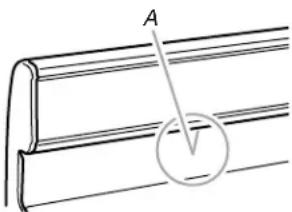
natural_image
Diagram of a mechanical component with labeled section A and circular detail (no text or symbols)A. Évent du four
Évent du four
natural_image
Line drawing of a door handle and seat (no text or symbols)PROBLÈME CAUSES POSSIBLES SOLUTIONS
www.whirlpool.com/broilerpan
GARANTIE LIMITÉE DES GROS APPAREILS MÉNAGERS WHIRLPOOL®
ATTACHEZ ICI VOTRE REÇU DE VENTE. UNE PREUVE D'ACHAT EST OBLIGATOIRE POUR OBTÉNIR L'APPLICATION DE LA GARANTIE.