9626510 - Vacuum Cleaner Shop-Vac - Free user manual and instructions
Find the device manual for free 9626510 Shop-Vac in PDF.



Frequently Asked Questions - 9626510 Shop-Vac
User questions about 9626510 Shop-Vac
0 question about this device. Answer the ones you know or ask your own.
Ask a new question about this device
Download the instructions for your Vacuum Cleaner in PDF format for free! Find your manual 9626510 - Shop-Vac and take your electronic device back in hand. On this page are published all the documents necessary for the use of your device. 9626510 by Shop-Vac.
USER MANUAL 9626510 Shop-Vac
The Shop-Vac® Wet/Dry vacuum cleaners are for vacuuming wet and dry non-volatile materials. Equipped with powerful, permanently lubricated, Single or Two-Stage By-Pass motors. Standard filtration systems to handle dry or wet pick up. Double filtration is available for most Shop-Vac® Vacs and is standard on Shop-Vac® Commercial Vacuums. Equipped with heavy duty dolly or easy roll caster system. Automatic float shut off prevents overflow during wet pick up. Includes versatile 1¼" (3.18cm), 1½" (3.81cm) or 2½" (6.35cm) diameter accessories. Tank styles include steel with rust resistant epoxy phenolic coated interiors, durable stainless steel and rugged dent resistant polypropylene tank. cULus listed.

ATTENTION!
Read all safety rules carefully before attempting to operate. Retain for future reference.

DANGER!

Never operate this unit when flammable materials or vapors are present because electrical devices produce arcs or sparks that can cause a fire or explosion. NEVER OPERATE UNATTENDED!
For your records, please record the following information and store this user manual in a safe location.
Catalog No.
(Located on the carton)
Model No.
(Located on top portion of the vacuum)
Purchase Date:
TABLE OF CONTENTS
SECTION PAGES
Important Safety Instructions .... 3
Grounding Instructions....3-4
Extension Cords....4
Unpacking 4
Assembly....5-9
Set Up and Operation....9-10
Filter Installation and Maintenance....10-13
Blower Feature 13
Empty Liquid Waste From the Tank 13
Automatic Suction Shut Off....13
Lubrication 13
Storage....14
Service....14
Troubleshooting....14
Warranty and Contact Information.... 14-15
TOOLS NEEDED
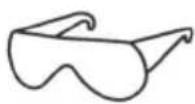
- Safety Glasses
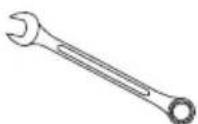
- 3/8 , 5/16 , (2) 7/16 and (2) 1/2 Wrench or socket (not needed with all vacuums)
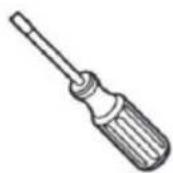
- Flathead Screwdriver
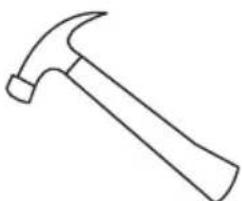
natural_image
Simple line drawing of a hammer (no text or symbols)- Hammer (Not needed with all vacuums)
IMPORTANT SAFETY INSTRUCTIONS
When using an electric appliance, basic precautions should always be followed, including the following: READ ALL INSTRUCTIONS BEFORE USING THIS APPLIANCE.

WARNING — TO REDUCE THE RISK OF FIRE, ELECTRIC SHOCK OR INJURY:
- Do not leave appliance when plugged in. Unplug from outlet when not in use and before servicing. Connect to a properly grounded outlet only. See Grounding Instructions.
- Do not expose to rain – store indoors.
- Do not allow to be used as a toy. Close attention is necessary when used by or near children.
- Use only as described in this manual. Use only Manufacturer's recommended attachments.
- Do not use with damaged cord or plug. If appliance is not working as it should, has been dropped, damaged, left outdoors or dropped into water, contact Shop-Vac Corporation for assistance.
- Do Not: pull or carry by cord, use cord as a handle, close a door on cord or pull cord around sharp edges or corners. Do not run appliance over cord. Keep cord away from heated surfaces.
- Do not unplug by pulling on cord. To unplug, grasp the plug; not the cord.
- Do not handle plug or appliance with wet hands.
- Do not put any object into openings. Do not use with any openings blocked; keep free of dust, lint, hair and anything that may reduce air flow.
- Keep hair, loose clothing, fingers and all parts of body away from openings and moving parts.
- Do not pick up anything that is burning or smoking, such as cigarettes, matches or hot ashes.
- Do not use without dust bag and/or filters in place.
- Turn off all controls before unplugging.
- Use extra care when cleaning on stairs.
- Do not use to pick up flammable or combustible liquids such as gasoline or use in areas where they may be present.
- Do not use your cleaner as a sprayer of flammable liquids such as oil base paints, lacquers, household cleaners, etc.
- Do not vacuum toxic, carcinogenic, combustible or other hazardous materials such as asbestos, arsenic, barium, beryllium, lead, pesticides or other health endangering materials. Specially designed units are available for these purposes.
- Do not pick up soot, cement, plaster or drywall dust without cartridge filter and collection filter bag in place. These are very fine particles that may pass through the foam and affect the performance of the motor or be exhausted back into the air. Additional collection filter bags are available.
- Do not leave the cord lying on the floor once you have finished the cleaning job. It can become a tripping hazard.
- Use special care when emptying heavily loaded tanks.
- To avoid spontaneous combustion, empty tank after each use.
- The operation of a utility vac can result in foreign objects being blown into eyes, which can result in eye damage. Always wear safety goggles when operating vacuum.
- STAY ALERT. Watch what you are doing and use common sense. Do not use vacuum cleaner when you are tired, distracted or under the influence of drugs, alcohol or medication causing diminished control.
- WARNING! Do NOT use this vacuum cleaner to vacuum lead paint debris because this may disperse fine lead particles into the air. This vacuum cleaner is not intended for use under EPA Regulation 40 CFR Part 745 for lead paint material cleanup.
SAVE THESE INSTRUCTIONS
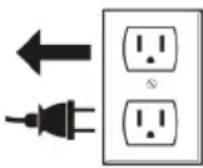
WARNING — DO NOT LEAVE VACUUM UNATTENDED WHEN IT IS PLUGGED IN AND/OR OPERATING. UNPLUG UNIT WHEN NOT IN USE.
GROUNDING INSTRUCTIONS
This appliance must be grounded. If it should malfunction or breakdown, grounding provides a path of least resistance for electric current to reduce the risk of electric shock. This appliance is equipped with a cord having an equipment-grounding conductor and grounding plug. The plug must be inserted into an appropriate outlet that is properly installed and grounded in accordance with all local codes and ordinances.
GROUNDING INSTRUCTIONS (CONT'D.)
WARNING — IMPROPER CONNECTION OF THE EQUIPMENT-GROUNDING CONDUCTOR CAN RESULT IN A RISK OF ELECTRIC SHOCK. CHECK WITH A QUALIFIED ELECTRICIAN OR SERVICE PERSON IF YOU ARE IN DOUBT AS TO WHETHER THE OUTLET IS PROPERLY GROUNDED. DO NOT MODIFY THE PLUG PROVIDED WITH THE APPLIANCE – IF IT WILL NOT FIT THE OUTLET, HAVE A PROPER OUTLET INSTALLED BY A QUALIFIED ELECTRICIAN.
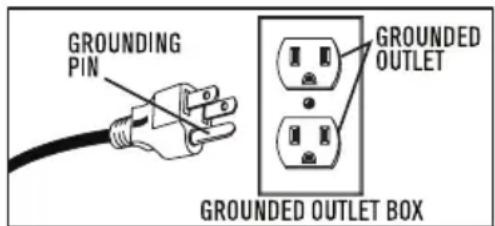
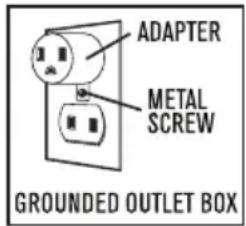
This appliance is for use on a nominal 120-volt circuit, and has a grounded plug that looks like the plug illustrated in sketch A. A temporary adaptor that looks like the adaptor illustrated in sketches B and C may be used to connect this plug to a 2-pole receptacle as shown in sketch B if a properly grounded outlet is not available. The temporary adaptor should be used only until a properly grounded outlet (sketch A) can be installed by a qualified electrician. The green colored rigid ear, lug or the like extending from the adaptor must be connected to a permanent ground such as a properly grounded outlet box cover. Whenever the adaptor is used, it must be held in place by a metal screw.
IN CANADA, THE USE OF A TEMPORARY ADAPTOR IS NOT PERMITTED BY THE CANADIAN ELECTRICAL CODE. Make sure that the appliance is connected to an outlet having the same configuration as the plug. No adaptor should be used with this appliance.
GROUNDING METHODS
text_image
GROUNDING PIN GROUNDED OUTLET GROUNDED OUTLET BOXSKETCH A SKETCH B SKETCH C
text_image
ADAPTER METAL SCREW GROUNDED OUTLET BOX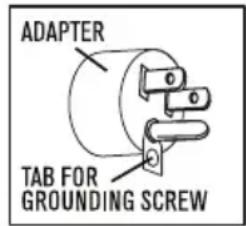
text_image
ADAPTER TAB FOR GROUNDING SCREWExTENSION CORDS
When using the appliance at a distance where an extension cord becomes necessary, a 3-conductor grounding cord of adequate size must be used for safety, and to prevent loss of power and overheating. Use Table A to determine A.W.G. wire size required. To determine ampere rating of your vacuum, refer to nameplate located on motor housing. Before using appliance, inspect power cord for loose or exposed wires and damaged insulation. Make any needed repairs or replacements before using your appliance. Use only three-wire outdoor extension cords which have three prong grounding-type plugs and three-pole receptacles which accept the extension cord's plug. When vacuuming liquids, be sure the extension cord connection does not come in contact with the liquid.
NOTE: STATIC SHOCKS ARE COMMON IN DRY AREAS OR WHEN THE RELATIVE HUMIDITY OF THE AIR IS LOW. THIS IS ONLY TEMPORARY AND DOES NOT AFFECT THE USE OF THE APPLIANCE. TO REDUCE THE FREQUENCY OF STATIC SHOCKS IN YOUR HOME, THE BEST REMEDY IS TO ADD MOISTURE TO THE AIR WITH A CONSOLE OR INSTALLED HUMIDIFIER.
TABLE A
| Volts | Total length of cord in feet | |||
| 120V | 25 50 100 | 150 | ||
| Ampere Rating More Not More Than Than | AWG | |||
| 0 - 6 | 18 | 16 | 16 | 14 |
| 6 - 10 | 18 | 16 | 14 | 12 |
| 10 - 12 | 16 | 16 | 14 | 12 |
| 12 - 16 | 14 | 12 | Not recommended | |
UNPACKING
Remove vacuum cleaner and all accessories from the carton. Important: Open tank cover by pushing latches or clamps outward with thumbs and remove any accessories that may have been shipped in the tank.
ASSEMBLY
TOP HANDLE
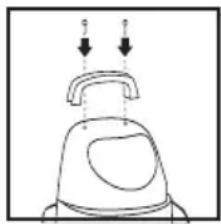
If the top handle is not installed on your unit, align holes in handle and holes in motor cover and secure with screws provided.
natural_image
Simple line drawing of a mechanical device with two arrows pointing to the top component (no text or symbols)CASTER SYSTEM
Follow the instructions for the caster system that came with your vacuum. METAL TANK WITH PLASTIC DOLLY AND FOUR CASTERS
You will find four casters with your wet/dry vacuum. Assemble as follows:
- With the cord disconnected from the receptacle and tank cover removed, turn tank upside down so that bottom is facing up.
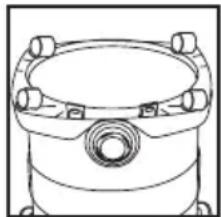
- Insert casters into bottom of dolly by placing stem of caster into holes provided. Apply pressure and twisting motion until casters snap into place.
natural_image
Technical line drawing of a mechanical component with mounting flanges and central bore (no text or symbols)- Return tank to upright position.
METAL TANK WITH PLASTIC DOLLY AND REAR WHEELS
You will find two casters, two large rear wheels, one axle, tool rack and two cap nuts. If your vacuum is 16 U.S. gallons (60.5 liters) or larger you will also find two screws, two metal flat washers and two square nuts with your wet/dry vacuum. Assemble as follows:
- Make sure the cord is disconnected from the receptacle then remove the tank cover.
- If your unit is 4 U.S. gallon (15.1 liter) to 14 U.S. gallon (53 liter), assemble as follows:
a. Turn tank upside down so the bottom is facing up.
b. Continue on to step 4 below.
- If your unit is 16 U.S. gallon (60.5 liter) or above, assemble as follows:
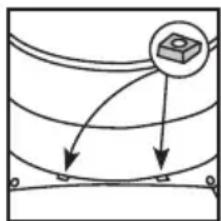
a. With the tank upright and back facing you, insert square nut into one of the two slots located in back of dolly.
flowchart
graph TD
    A["Input"] --> B["Process"]
    B --> C["Output"]
    style A fill:#f9f,stroke:#333
    style C fill:#bbf,stroke:#333
b. Place metal flat washer over stem of screw.
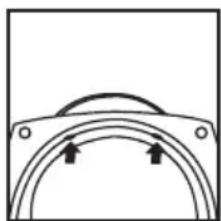
c. Tilt the tank forward slightly and locate the hole provided in the underside of the dolly directly below the slot containing the square nut.
natural_image
Simple line drawing of a curved mechanical component with two arrows indicating upward motion (no text or symbols)d. Place the screw, containing the flat washer, into the hole and turn clockwise until end of screw is connected to square nut. If you have difficulty getting the screw to connect to the square nut, push downward on the square nut with the eraser end of a pencil while turning the screw.
e. Finish tightening the screw using 7/16" socket, wrench or nut driver.
f. Repeat steps a to e with the second slot in dolly.
g. Turn tank upside down so bottom is facing up. Continue on to step 4 below.
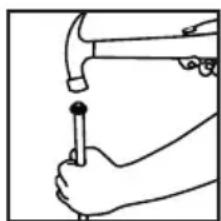
- Place axle upright on a hard surface and hammer on one cap nut.
natural_image
Line drawing of hands using a hammer to press or install a screwdriver (no text or symbols present)ASSEMBLY (CONT'D)
-
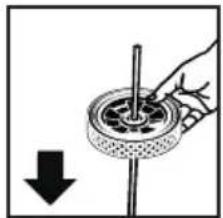
Place one wheel on axle and slide down to cap nut. Be sure flat side of wheel hub is facing outward. If metal spacers (not needed for all models) came in the hardware pack, place one on axle and slide down to wheel.
-
Slide axle through holes provided in tool rack. If included, slide second metal spacer (not needed for all models) over axle and slide down to tool rack.
-
Slide remaining wheel onto axle and hammer on second cap nut.
-
Install tool rack assembly onto dolly (already installed on tank) by placing large slot in tool rack over rim on back of dolly. Push tool rack onto dolly until the bottom of tool rack is flush with bottom of dolly.
NOTE: It is normal for tool rack to fit tightly onto dolly.
- Secure with four screws provided.
natural_image
Hand holding a rotating wheel with a pointer, showing mechanical components and a downward arrow (no text or symbols)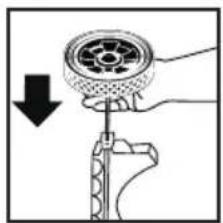
natural_image
Diagram of a hand using a tool to adjust a mechanical component, showing a circular component being lowered (no text or symbols present)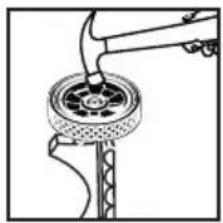
natural_image
Mechanical diagram showing a tool interacting with a circular component (no text or symbols visible)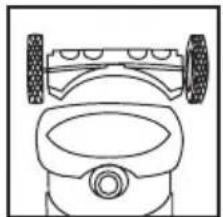
natural_image
Line drawing of a toy car with wheels and dashboard (no text or symbols)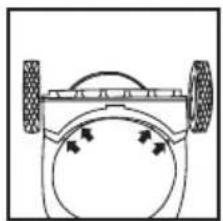
natural_image
Simple line drawing of a vehicle wheel and dashboard (no text or symbols)-
If plastic flat washers are included in hardware pack, place one flat washer over stem of each caster. NOTE: Flat washers are not required with all units.
-
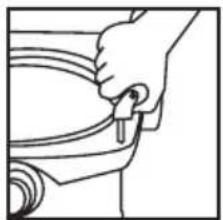
Insert casters into front of dolly by placing stem of casters into holes provided. Apply pressure and twisting motion until casters snap into place.
natural_image
Line drawing of a hand holding a tool near a curved object (no text or symbols)- Return tank to upright position.
METAL TANK WITH METAL DOLLY
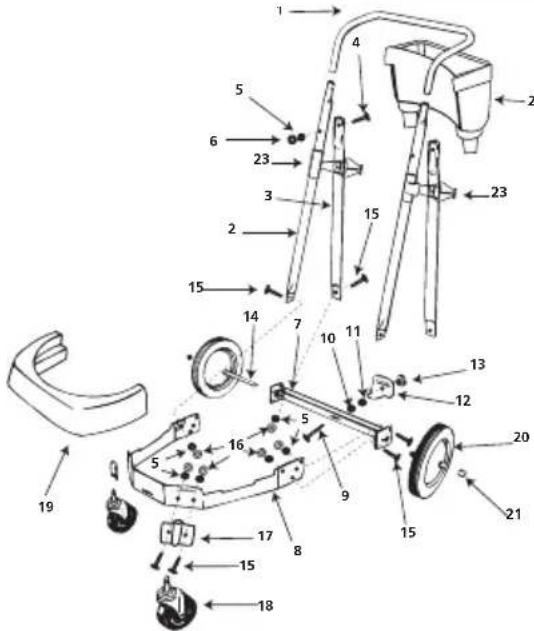
Refer to the item number and description chart at the end of these instructions to assist you in assembling the dolly.
Tools required: (2) 1/2 inch open end wrenches, (2) 7/16 inch open end wrenches, or a socket set and a hammer.
-
Insert 2½ inch long bolt through center hole in rear frame, attach split lock washer and nut and tighten securely.
-
Attach handle brace to back of rear frame with 5/8 inch long machine screws, lock washers, and nuts. (Finger tighten only.)
-
Position main frame inside rear frame. Attach (2) 5/8 inch long machine screws, lock washers and nuts in both sides. Tighten securely.
-
Attach handle uprights, inside main frame (make sure buttons at top face inward) using 5/8 inch long machine screws, lock washers and nuts. (Finger tighten only.) Align holes at top of handle braces with holes in handle uprights. Attach with 1 14 inch long machine screws, lock washers and nuts. (Tighten securely.)
ASSEMBLY (CONT'D)
- Go back and tighten machine screws at bottom of uprights and braces.
- Attach caster sockets (open end down) to front of main frame using 5/8 inch long machine screws, lock washers and nuts. Insert casters into sockets.
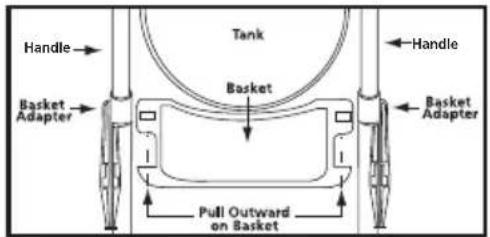
- Slide basket adapters on handle. See images below for correct installation of adapters.
For 14" diameter tanks
text_image
Handle Basket Adapter Tank Basket Pull Outward on Basket Handle Basket AdapterFor 16" diameter tanks
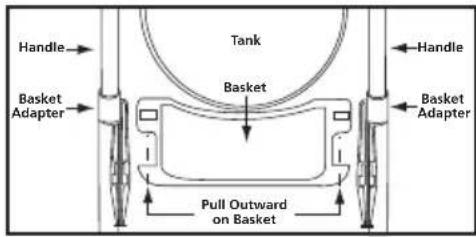
text_image
Handle Basket Adapter Tank Basket Pull Outward on Basket Handle Basket Adapter- Attach handle onto uprights by pushing down and holding buttons in on uprights.
- Place tank retaining bracket through slot and bolt in rear frame and screw on knob.
- Slide bumper down over main dolly frame until it bottoms out.
- Place axle upright on a hard surface and hammer on (1) cap nut. Place (1) wheel on axle and slide down to cap nut. Slide axle through rear of frame and slide on other wheel. Before assembling cap nut on other end of axle, be certain dolly is assembled correctly. (You may place tank on dolly and tighten knob of retaining bracket to be sure of correct assembly.)
- After ensuring dolly is assembled correctly remove tank and place dolly on side with installed cap nut on hard surface and hammer second cap nut on axle.
- Place accessory basket on adapters and pull out on outer rim of basket and snap into place.
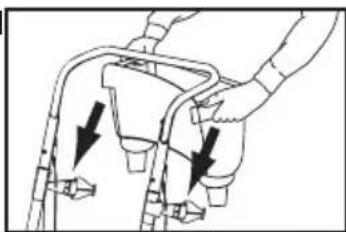
natural_image
Diagram of a hand holding a device with arrows indicating movement or force (no text or symbols present)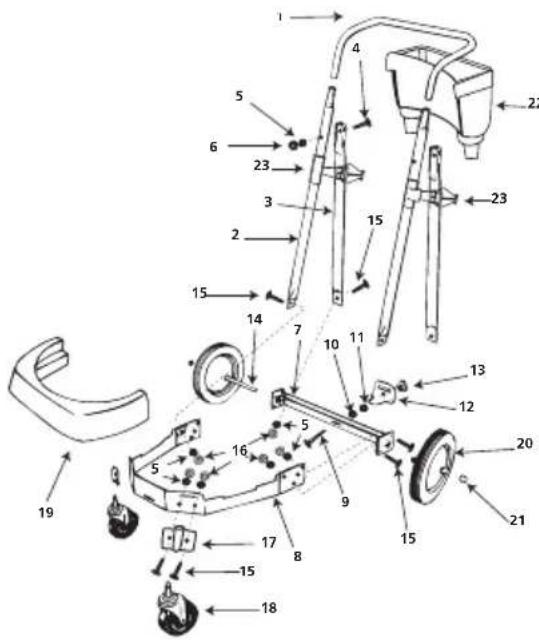
text_image
Technical diagram of a mechanical device with numbered components for identificationItem Number & DeScriptIoN
- Handle
- Handle upright
- Handle brace
- 14 - 20 x 1 14 " Hex head machine screw (Black)
- ¼" External tooth lockwasher
- ¼ - 20 Hex nut (Black)
- Rear dolly frame
- Main dolly frame
- 516 - 18 × 212" Hex head bolt
- 516 " Split lockwash
-
516 - 18 Hex nut
-
Tank retainer bracket
- Threaded knob
- Axle
- 14 - 20 x 58 " Hex head machine screw
- ¼ - 20 Hex nut
- Caster socket
- Caster
- Bumper
- 10" Wheel (25.4cm)
- Cap nut
- Accessory basket
- Basket adapter
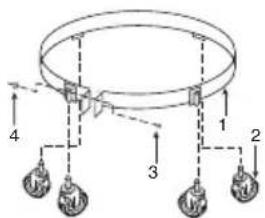
BAND DOLLY
- Place casters into sockets on band assembly.
- Place tank upside down and slip band assembly over lip on bottom of tank.
- Insert bolt and tighten nut until secure.
text_image
Diagram of a circular mechanical or electrical component with labeled parts 1 through 4, showing connections and hanging weights.Item Number & DeScriptIoN
- 55 Gal. band assembly
-
Caster
-
Hex head bolt, 14 - 20 x 134 4. Hex nut, 14 - 20
ASSEMBLY (CONT'D)
CARRIAGE HANDLE
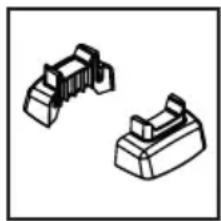
Follow the instructions for the carriage handle that came with your vacuum. If your side tank handles look like the ones pictured to the right, follow these instructions.
natural_image
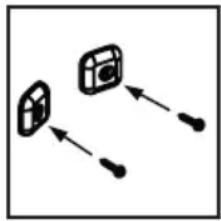
Two isometric mechanical component diagrams (no text or symbols)You will find one carriage handle and a handle pack containing two side tank handles, four handle supports and eight screws. Assemble as follows:
- Take two handle supports and two 1" screws. Place screws through the hole provided in center of each support.
flowchart
graph TD
    A["Input Box 1"] --> B["Output Box 2"]
    C["Input Box 3"] --> B
    D["Input Box 4"] --> B
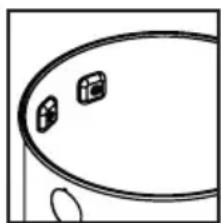
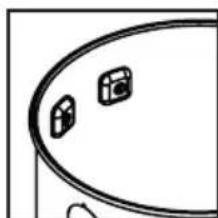
- Position the tank, in the upright position, with the inlet facing you. Put the support assemblies inside the tank, then place the screws through the holes provided on left side of the tank. Make sure the plastic portion is located inside the tank. Turn the supports until the back of the supports fit flush against the inside curve of the tank.
natural_image
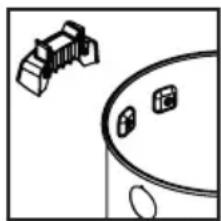
Simple line drawing of a circular object with two small icons, no text or symbols present- Remove any webbing that attaches the tank handles to each other. Take the side tank handle with the letter L and position it on the outside of the tank where the support assemblies are installed. The U-shaped cutout on the bottom end of the handle must face the rear of the tank. Secure the side tank handle to the tank with the screws in the support assemblies.
natural_image
Simple line drawing of a car with a roof and windows, no text or symbols present-
Repeat steps 1 to 3 using right side of tank and the remaining side tank handle marked with the letter R.
-
Position metal carriage handle outside of tank and under the tank handles. Be sure to spread ends of carriage handle when assembling to prevent damage to tank. Line up holes in ends of carriage handle with holes in bottom of tank handles. Make sure carriage handle is in the U-shaped cut on the tank handles (located towards rear of unit). Secure with 1½" screws provided.
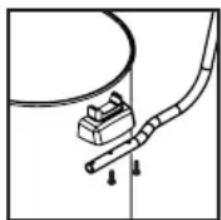
natural_image
Simple line drawing of a mechanical component with a curved pipe and base, no text or symbols presentAll other side tank handles, follow these instructions.
Attach carriage handle to tank by inserting bolt through the center hole of handle and tank, secure with nut provided. Attach side handles with screws provided. Be sure to spread ends of carriage handle when assembling to prevent damage to tank.
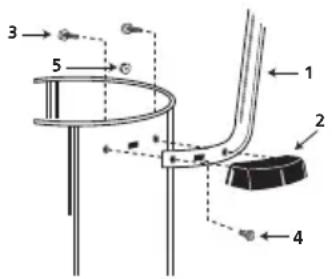
text_image
3 5 1 2 4| Item | Description | |
| 1 | Metal tank handle | |
| 2 | Side tank handle | |
| 3 | #10 x 3/4” Screw hex head | |
| 4 | Bolt 1/4 - 20 x 1/2” | |
| 5 | 1/4 - 20 Hex nut | |
ASSEMBLY (CONT'D)
BASKET
If your unit came with a basket, insert basket through center of carriage handle and slide into place. The basket does not come standard with all models.
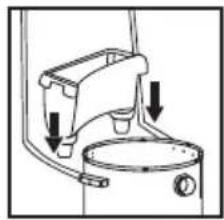
natural_image
Diagram of a kitchen sink with arrows indicating parts of the outlet (no text or labels)SIDE TANK HANDLES
If your unit came with side tank handles, attach handles to tank with screws provided.
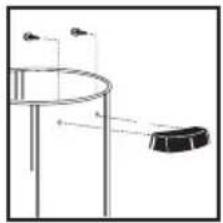
natural_image
Simple line drawing of a cylindrical object with a hanging rod and two small objects above it (no text or symbols)TOOL HOLDER
(Not standard with all models)
If your unit came with a tool holder, assemble as follows:
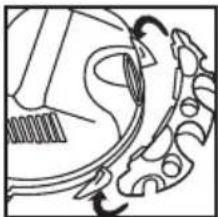
- Set tank cover onto the tank. Position with back of tank cover facing you.
- Take tool holder and place tabs on tool holder into slots on back of tank cover.
natural_image
Diagram of a mechanical component with gear and shafts, no visible text or symbols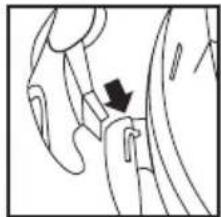
natural_image
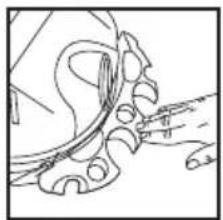
Diagram of a hand holding a small object with a black arrow pointing to it (no text or symbols present)- Press down until tabs snap into place. Remove tank cover from tank and refer to the set up and operation section.
natural_image
Line drawing of a mechanical component or tool interacting with a curved surface (no text or symbols)SET UP AND OPERATION
DANGER — This equipment incorporates parts such as switches, motors or the like that tend to produce arcs or sparks that can cause an explosion. Do not pick up flammable, combustible, or hot materials. Do not use around explosive liquids or vapors, as electrical devices produce arcs or sparks which can cause a fire or explosion - do not use at filling stations or anywhere gasoline is stored or dispensed.
- Refer to the filter installation and maintenance section to make sure the correct filters are installed for your cleaning operation.
- Replace tank cover. Make sure each latch or clamp is secured over the raised area of the tank cover. Failure to properly secure the latches could cause the tank cover to release from the tank.
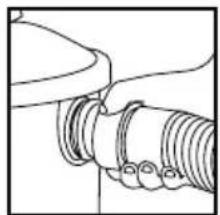
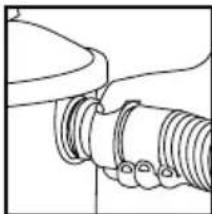
- Install machine hose end into inlet located on the front of the tank.
- Attach the desired cleaning accessory onto the accessory end of the hose. NOTE: Many more useful tools are available at your local dealer or the Shop-Vac® website.
- Plug the cord into the wall outlet. Your cleaner is ready for use.
$$ I = O N, O = O F F $$
natural_image
Pure mechanical diagram showing a pipe fitting with no text or symbolsSET UP AND OPERATION (CONT'D)
ACCESSORIES, HOSES AND WANDS
All Shop-Vac ^® vacuums covered in this manual come with accessories to cover wet and dry cleanup jobs. Not all vacs include all accessories shown.
Nozzles and Accessories
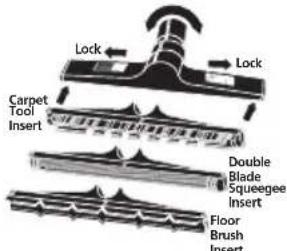
text_image
Lock Lock Carpet Tool Insert Double Blade Squeegee Insert Floor Brush Insert14" (35.56cm) ABS Plastic Master Nozzle Inserts lock into place by sliding red buttons. Elbow swivels.
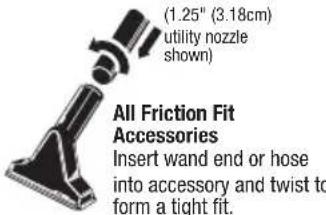
text_image
(1.25" (3.18cm) utility nozzle shown) All Friction Fit Accessories Insert wand end or hose into accessory and twist to form a tight fit.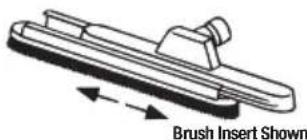
text_image
Brush Insert Shown14" (35.56cm) Metal Master Nozzle
Inserts lock into place by sliding insert onto nozzle.
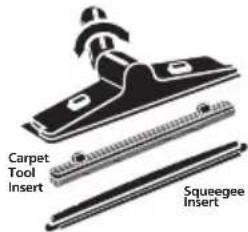
text_image
Carpet Tool Insert Squeegee InsertDeluxe 12" (30.48cm) Nozzle Inserts snap-in and out. Elbow swivels.
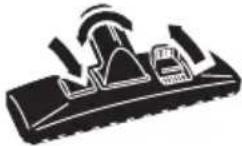
Dual Surface Selector Nozzle Levers control brush position for various types of cleaning.
Hoses
natural_image
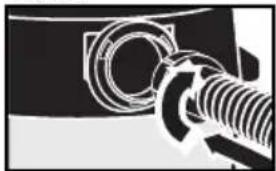
Close-up of a mechanical component with threaded shaft and circular housing (no visible text or symbols)All Friction Fit Hoses
Insert machine hose end into tank and twist to form a tight fit.
natural_image
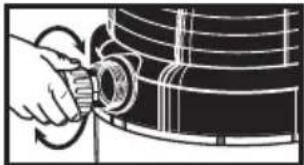
Illustration of a hand adjusting a cylindrical component on a curved surface (no text or symbols)Posi-Lock Hoses
Insert hose collar onto threaded tank inlet and tighten. Do not over-tighten.
Wands
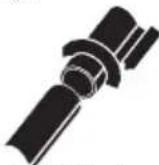
All Friction Fit Wands
Insert wand ends together
and twist to form a tight fit.
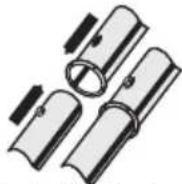
Positive Locking Wands
Insert wand ends together
until metal push button locks.
natural_image
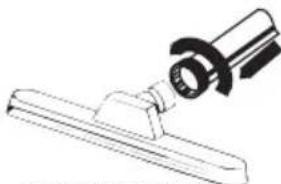
Technical line drawing of a mechanical clamp or bracket assembly (no text or symbols)Locking Nut Wand End Insert wand end over nozzle and tighten nut.
FILTER INSTALLATION AND MAINTENANCE
FILTRATION SYSTEM
There are a variety of filters available for your vacuum. There are cage filters that install onto the underside of the tank cover and tank filters that install into the tank. The filters are grouped into three filtration categories. General filtration is used for large debris; such as, wood chips, nails and gravel. Medium filtration is used for medium debris; such as, dirt, sand and sawdust. Fine filtration is used for fine debris; such as drywall dust, cold ash and cement dust. It is important to have the correct filters installed for your cleaning operation to protect your vacuum motor. THE MOST EFFICIENT FILTRATION FOR YOUR VACUUM IS A FINE FILTRATION CAGE FILTER WITH A FINE FILTRATION TANK FILTER.
NOTE: When using the vacuum to pick up very fine dust. It will be necessary to empty the tank and clean the cage filter at more frequent intervals to maintain maximum pick up power or add a disposable filter bag.
NOTE: Never use the vacuum for dry pick up without a dry use filter installed. Using the vacuum without a filter will cause dust to discharge from the blower port and cause damage to the motor.
WARNING — ALWAYS DISCONNECT THE PLUG FROM THE WALL OUTLET BEFORE REMOVING THE TANK COVER.
Follow the instructions for the filter that came with your vacuum. Some filters mentioned do not come standard with all vacuums. Additional filters are available at your local dealer or the Shop-Vac® website.
CARTRIDGE FILTER
The cartridge filter can be used for dry pick up and small quantities of wet pick up. Installation is the same for both. When picking up fine dust or powders a high efficiency filter bag must be used with the cartridge filter.
- If a foam sleeve is installed on the lid cage, remove it by sliding it off the lid cage. NOTE: If the cartridge filter has been used for wet pick up, it must be cleaned and dried before using it for dry pick up.
FILTER INSTALLATION AND MAINTENANCE (CONT'D)
-
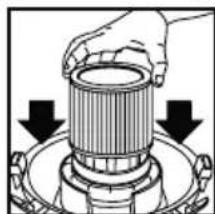
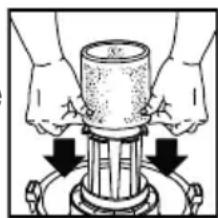
With the tank cover in an upside down position, slide the cartridge down over the lid cage, pushing until the filter seals against the cover.
-
Place the filter retainer into the top of the cartridge filter. Hold the tank cover with one hand, turn the handle on the filter retainer clockwise to lock the filter into place.
-
To remove the filter for cleaning, hold the tank cover and turn the filter retainer counter-clockwise to loosen and remove.
natural_image
Diagram of a hand holding a cylindrical component with two downward arrows indicating force or movement (no text or symbols present)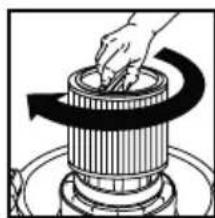
natural_image
Illustration of a hand pressing down on a cylindrical mechanical component (no text or symbols)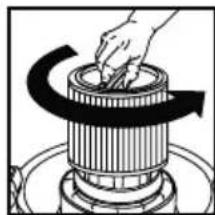
natural_image
Illustration of a hand pressing down on a cylindrical mechanical component with an arrow indicating rotation (no text or symbols)-
Slide the cartridge filter off the lid cage.
-
For standard cartridge filters and Ultra-Web® cartridge filters, clean the filter by shaking or gently brushing off excess dirt. Extremely dirty filters may be cleaned with water by rinsing from the inside of the filter. Dry completely (approximately 24 hours).
For CleanStream ^® Abrasive Resistant cartridge filter, tap end cap against hard surface to loosen debris. Additional debris can be removed by rinsing outside surface of the filter with running water. Avoid dampening inside of filter. Completely air dry after washing. IMPORTANT: DO NOT BRUSH. DO NOT clean filter with abrasive materials or scrub between pleats. This will permanently damage the filters ability to stop dust.
- Check the filter for tears or small holes. If none are found, reinstall the filter. To prevent damage to your vacuum, do not use a filter with a hole or tear.
NOTICE — This filter is made of high quality paper designed to stop small particles of dust. The filter can be used for wet or dry pick up. A dry filter is necessary to pick up dry material. If you use your vac to pick up dust when the filter is wet, the filter will clog quickly and be very difficult to clean. The filter may become saturated when picking up large quantities of liquid causing misting to appear in the exhaust air. At this time, you should dry or change the filter to eliminate this occurrence. Please handle the filter carefully when removing it for cleaning or when installing it. Check the filter for tears or small holes. Even a small hole can cause dust to be exhausted. Do not use a filter with holes or tears. Replace it immediately.
WARNING — KEEP FILTERS CLEAN. EFFICIENCY OF THE VACUUM IS LARGELY DEPENDENT ON THE FILTER. A CLOGGED FILTER CAN CAUSE OVERHEATING AND POSSIBLY DAMAGE THE CLEANER. CHECK THE FILTER PERIODICALLY AND REPLACE AS REQUIRED.
DISPOSABLE FILTER BAG
Use the disposable filter bag in conjunction with the cartridge filter for easy disposal of the debris. The bag is not required for normal dry pick up. When picking up fine dust or powders a high efficiency filter bag must be used. NOTE: For dry use only.
Follow the instructions that pertain to your vacuum.
TANK WITH STATIONARY INLET DEFLECTOR:
- Make sure the cord is disconnected from the receptacle, tank cover is removed and the hose is disconnected from tank inlet.
FILTER INSTALLATION AND MAINTENANCE (CONT'D)
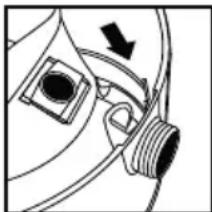
- Grasp the cardboard collar firmly and slide rubber guard onto inlet fitting as far as possible.
natural_image
Pure mechanical diagram showing a pipe fitting and a valve mechanism without any text or symbols- When secured in place, expand the filter bag and position around the inside of the tank.
TANK WITH REMOVABLE INLET DEFLECTOR:
- Make sure the cord is disconnected from the receptacle, tank cover is removed and the hose is disconnected from tank inlet.
-
Remove inlet deflector from deflector guide. NOTE: Hose must be removed before inlet deflector can be taken out.
-
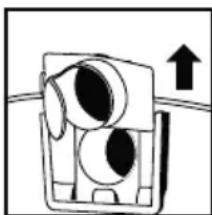
With the opening of the inlet deflector facing the left or right side of the filter bag, slide filter bag collar over deflector matching notches of bag collar to tabs on inlet deflector. Bag will only fit properly one way.
-
Slide deflector with filter bag attached into deflector guide.
natural_image
Simple line drawing of a mechanical component with an upward arrow, no text or symbols present.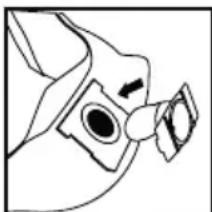
natural_image
Simple line drawing of a mechanical component with no text or symbols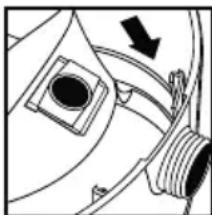
natural_image
Pure mechanical diagram showing a valve or pump assembly with no text, numbers, or symbols- Reinsert hose into inlet and tighten locking-nut. When secured in place expand bag and position around inside of tank.
- NOTE: When removing filter bag from tank, remove inlet deflector from filter bag collar and reinstall into deflector guide. Inlet deflector should always be in place for any type of cleaning.
WARNING — FOR FINE DUST AND POWDERS.
When vacuuming fine dust, or powders of any kind (plaster, drywall dust, cold ashes, concrete dust, etc.) a high efficiency drywall filter bag must be used. When vacuuming normal household dust and debris, standard household disposable filter bags may be used.
- Your vacuum can be used for wet pick up. Remove ALL dirt and debris found in the tank. Remove all dry use filters, including the filter bag, from the vacuum.
- A clean cartridge filter may be used to pick up small quantities of liquid. To use the cartridge filter; follow the instructions under dry pick up.
- For vacuuming large quantities of liquid use a foam sleeve. If a foam sleeve did not come standard with your unit, one may be purchased at your local dealer, the Shop-Vac® website or by contacting Shop-Vac® customer service. To use the foam sleeve; follow the instructions in this section.
- Misting in the exhaust air or dripping of liquid around the tank cover may occur if the filter becomes saturated during wet pick up. If this occurs, remove the filter and allow to dry, or replace with another dry filter.
- Turn the unit off immediately upon completing a wet pick up job or when tank is full and ready to be emptied. When the tank is full, suction will drastically reduce. Refer to the automatic suction shut off section for more information. Raise the hose to drain any excess liquid into the tank. Follow the instructions in the emptying liquid waste section.
- Before storing the vacuum cleaner or using for dry pick up, clean and dry the interior of the tank and the underside of the tank cover. Clean and allow the filters to dry completely.
FILTER INSTALLATION AND MAINTENANCE(CONT'D)
- Wet pick up accessories should be washed periodically; especially after picking up wet, sticky kitchen accidents. This can be accomplished with a warm solution of soap and water.
FOAM SLEEVE
- With the tank cover in an upside down position, slide the foam sleeve down over the lid cage, pulling until foam sleeve completely covers the lid cage.
- To clean the foam sleeve, slide it up and off the lid cage. Shake excess debris off of the foam sleeve with a rapid up and down movement.
- Hold foam sleeve under running water for a couple minutes, rinsing from the inside of the filter. A water wash is not always required, depending on the condition of the filter.
- Check the filter for tears. If any are found, replace with a new filter.
natural_image
Illustration of hands operating a cylindrical mechanical device with arrows indicating motion (no text or symbols)BLOWER FEATURE
Your vacuum can be used as a powerful blower. To use the blower feature, clear the hose of any debris or obstructions.
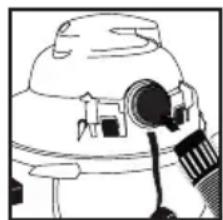
For vacuums with a blower port cover (not standard on all models), unscrew blower port cover located on the back of tank cover. The blower port cover is equipped with a retaining strap to prevent loss of the cover. NOTE: For maximum performance when vacuuming, remove the blower port cover.
Insert machine hose end into blower port located on the back of the tank cover.
Twist the hose end slightly to tighten the connection. Caution should be used when using as a blower due to the powerful force of air when using certain attachments.
natural_image
Simple line drawing of a mechanical device with no text or symbolsWARNING — ALWAYS WEAR EYE PROTECTION TO PREVENT ROCKS OR DEBRIS FROM BEING BLOWN OR RICOCHETING INTO THE EYES OR FACE WHICH CAN RESULT IN SERIOUS INJURY.
EMPTYING LIQUID WASTE FROM THE TANK
To empty liquid waste from the tank, turn the vacuum off and remove the plug from the wall outlet. Follow the instructions that pertain to your vacuum.
WITHOUT TANK DRAIN
Remove the tank cover and deposit the liquid waste in a suitable drain. Use side carry handles for lifting vac when draining tank into drains that are located above floor level. After tank is empty, return the tank cover to its original position.
WITH TANK DRAIN
Remove the drain cap and deposit the liquid waste in a suitable drain. Use side carry handles for lifting vac when draining tank into drains that are located above floor level. After the tank is empty, return the drain cap to its original position.
AUTOMATIC SUCTION SHUT OFF
The vacuum is equipped with an automatic suction shut-off that operates when picking up liquids. As the level of the liquid rises in the tank, an internal float rises until it seats itself against a seal at the intake of the motor, shutting off suction. When this happens, the motor will develop a higher than normal pitch noise and the suction is drastically reduced. If this occurs, turn unit off immediately. Failure to turn unit off after float rises and shuts off suction will result in extensive damage to the motor. To continue use, empty the liquid waste from the tank as outlined in the previous section.
NOTE: IF ACCIDENTALLY TIPPED OVER, THE VACUUM COULD LOSE SUCTION, IF THIS OCCURS, TURN UNIT OFF AND PLACE VAC IN UPRIGHT POSITION. THIS WILL ALLOW THE FLOAT TO RETURN TO ITS NORMAL POSITION AND YOU WILL BE ABLE TO CONTINUE OPERATION.
LUBRICATION
No lubrication is necessary as the motor is equipped with lifetime lubricated bearings.
STORAGE
Before storing your vacuum the tank should be emptied and cleaned. Never allow liquids to sit in the tank for any extended period of time. The vacuum should be stored indoors.
SERVICE
Do not attempt to service your Shop-Vac® wet/dry vacuum cleaner beyond that described in this manual. Refer all other servicing to a qualified service center.
TROUBLESHOOTING
| PROBLEM | POSSIBLE CAUSES | SOLUTION |
| Parts/accessories 1. missing | Packed in tank 1. Check in tank | |
| Vacuum cleaner 1. No power at receptacle 1. Check for will not start 2. Defective switch 2. Contact Shop-Vac customer service3. Defective motor 3. Contact Shop-Vac customer service | power®® | |
| Dust discharging 1. Filter not installed/not installed 1. Properly install filter from exhaust properly2. Filter damaged 2. Replace filter3. Filter clogged or dust is too fine 3. Use more efficient filter4. Filter not functional 4. Clean or replace filter | ||
| Loss of suction2. Filter clogged 1. Loose hose connection 1. Tighten hose connection2. Filter clogged 2. Clean or replace filter3. Full tank 3. Empty tank4. Hole in hose 4. Replace hose | ||
| Static shockor installed humidifier).2. Relative humidity of air is low and does not affect the use of the vacuum cleaner. | 1. Dry environment2. This situation is temporary | |
WARNING — IF ANY OF THE MOTOR HOUSING PARTS SHOULD BECOME DETACHED OR BROKEN, ExPOSING THE MOTOR OR ANY OTHER ELECTRICAL COMPONENTS, OPERATION SHOULD BE DISCONTINUED IMMEDIATELY TO AVOID PERSONAL INJURY OR FURTHER DAMAGE TO THE VACUUM. REPAIRS SHOULD BE MADE BEFORE REUSING THE VACUUM.
ONE YEAR INDUSTRIAL/COMMERCIAL WARRANTY
One year limited warranty
Shop-Vac® Corporation warrants the vacuum cleaner contained in this package for one year from the date of purchase to correct by repair or parts replacement without charge any product defect due to faulty material or workmanship. Should this product be used for rental service, a 90 day limited warranty will apply. THIS WARRANTY DOES NOT COVER ACCESSORIES. Shop-Vac® assumes no responsibility for damage or faulty performance caused by misuse or careless handling, or where repairs or modifications have been made or attempted by others. Proof of purchase date is required. This warranty gives you specific legal rights, and you may also have other rights which vary from state to state or province to province.
ONE YEAR INDUSTRIAL/COMMERCIAL WARRANTY (CONT'D)
Customers in the United States: for product service contact Shop-Vac® Corporation Customer Service, at (570) 326-3557 or go to www.shopvac.com/support. Visit www.shopvac.com for your vacuum's parts list schematic.
Customers in Canada: for product service return the complete unit, (transportation prepaid), to the Authorized Shop-Vac® Service Centre nearest you. A complete list of Authorized Service Centres is included with each vacuum cleaner.
Customers in Mexico: for product service see paperwork that came with your unit.
SHOP-VAC CORPORATION
2323 Reach Road, P.O. Box 3307
Williamsport, PA 17701-0307
(570) 326-3557
www.shopvac.com
SHOP-VAC CANADA
1770 Appleby Line
Burlington, Ontario L7L 5P8
(905) 335-9730
www.shopvac.ca
Shop Vac-México, S.A. de C.V.
Patents Issued and Pending.
© 2014 Shop-Vac Corporation. All Rights Reserved.
shop-vac®
Série :
610
6045
87MT
92M
92L
970
QPL
MANUEL D'UTILISATION
natural_image
Simple line drawing of a hammer (no text or symbols)natural_image
Simple line drawing of a washing machine with no text or symbolsSYSTÈME À ROULETTES
natural_image
Technical line drawing of a mechanical component with mounting flanges and central bore (no text or symbols)natural_image
Simple line drawing of a curved mechanical component with two arrows indicating direction (no text or symbols)natural_image
Line drawing of hands using a hammer to tighten a bolt (no text or symbols)natural_image
Hand holding a rotating wheel with a pointer, showing a downward arrow (no text or symbols)natural_image
Diagram showing a hand using a tool to press a circular component, with a downward arrow indicating motion (no text or symbols present)natural_image
Mechanical assembly diagram showing a rotating wheel and connecting rod (no text or symbols)natural_image
Line drawing of a mechanical device with wheels and a central body (no text or symbols)natural_image
Simple line drawing of a vehicle wheel and dashboard with no text or symbolsASSEMBLAGE (SUITE)
natural_image
Line drawing of a hand holding a tool near a mechanical component (no text or symbols)natural_image
Diagram of a mechanical device with arrows indicating motion or force direction (no text or symbols)ASSEMBLAGE (SUITE)
text_image
Technical diagram of a mechanical device with numbered components for identificationNumÉro D'ArtlcLe et DeScriptloN
text_image
Diagram of a mechanical or electrical component with numbered parts and hanging weights, likely illustrating a system or assembly.NumÉro D'ArtlcLe et DeScriptloN
natural_image
Two identical 3D mechanical component diagrams without any text or symbolsflowchart
graph TD
    A["Input Box 1"] --> C["Output Box 2"]
    B["Input Box 1"] --> C["Output Box 2"]
natural_image
Simple line drawing of a circular object with two small icons, no text or symbols presentASSEMBLAGE (SUITE)
natural_image
Simple line drawing of a container with a small box and three smaller boxes on top (no text or symbols)natural_image
Simple line drawing of a mechanical or electrical component with a curved pipe and a rectangular block, no text or symbols present.text_image
Technical diagram of a mechanical assembly with numbered components and directional arrows indicating motion or forceArticle
Description
natural_image
Diagram of a mechanical device with arrows indicating motion or force direction (no text or symbols)POIGNÉES DE RÉSERVOIR LATÉRALES
natural_image
Simple line drawing of a cylindrical object with a small black object attached, no text or symbols present.PORTE-OUTIL
natural_image
Line drawing of a guitar body with decorative patterns (no text or symbols)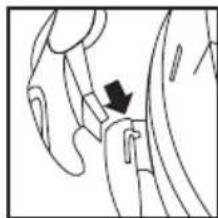
natural_image
Diagram of a hand holding a small object with an arrow indicating direction (no text or symbols present)ASSEMBLAGE (SUITE)
natural_image
Line drawing of a hand holding a curved object with no visible text or symbolsCONFIGURATION ET FONCTIONNEMENT

DANGER
I = EN MARCHE, O = À L'ARRÊT
natural_image
Pure mechanical diagram showing a pipe fitting with threaded ends and a curved pipe fitting (no text or symbols)ACCESSOIRES, TUYAUX, SOUPLES ET RALLONGES
natural_image
Pure mechanical diagram showing a bolt and nut assembly without any text, numbers, or symbolsnatural_image
Illustration of a hand adjusting a circular component on a curved surface (no text or symbols)natural_image
Diagram of a hand pressing down on a cylindrical component with arrows indicating downward motion (no text or symbols)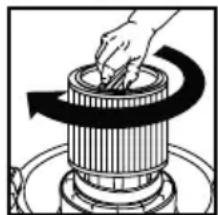
natural_image
Illustration of a hand turning a cylindrical component with a curved arrow indicating rotation (no text or symbols)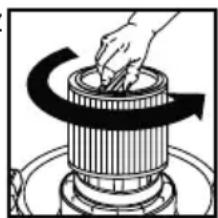
natural_image
Diagram of a hand turning a rotating cylindrical component with a curved arrow indicating rotation (no text or symbols)natural_image
Pure mechanical diagram showing a pipe fitting with a valve and arrow indicating direction (no text or symbols)natural_image
Simple line drawing of a mechanical component with an upward arrow, no text or symbols present.
natural_image
Simple line drawing of a bird's head and neck (no text or symbols)INSTALLATION ET ENTRETIEN DU FILTRE (SUITE)
natural_image
Pure mechanical diagram showing a component with a circular feature and a threaded end, no text or symbols present.natural_image
Illustration of hands operating a cylindrical mechanical device with arrows indicating motion (no text or symbols)CARACTÉRISTIQUES DU SOUFFLEUR
natural_image
Line drawing of a mechanical device with gears and a lens (no text or symbols)2323 Reach Road, P.O. Box 3307
Williamsport, PA 17701-0307
(570) 326-3557
www.shopvac.com
SHOP-VAC CANADA
1770 Appleby Line
Burlington, Ontario L7L 5P8
(905) 335-9730
www.shopvac.ca
Shop Vac-México, S.A. de C.V.
natural_image
Simple line drawing of a hammer (no text or symbols)natural_image
Simple line drawing of a showerhead with two arrows pointing to the top and side (no text or symbols)SISTEMA DE RUEDITAS
natural_image
Technical line drawing of a mechanical component with mounting flanges and central bore (no text or symbols)natural_image
Pure diagram of a curved mechanical component with two arrows indicating direction (no text or symbols)natural_image
Line drawing of hands using a hammer to press or install a screwdriver (no text or symbols present)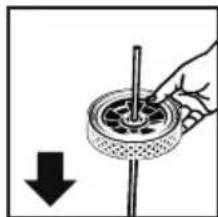
natural_image
Hand holding a rotating wheel with a pointer, showing a downward arrow (no text or symbols)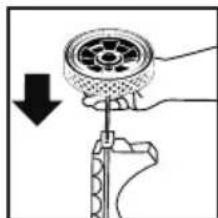
natural_image
Diagram of a hand using a tool to adjust a mechanical component, showing a circular component being lowered (no text or symbols present)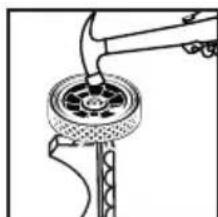
natural_image
Mechanical assembly diagram showing a wheel and lever mechanism (no text or symbols)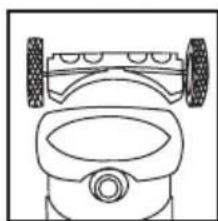
natural_image
Line drawing of a mechanical device with wheels and a central body (no text or symbols)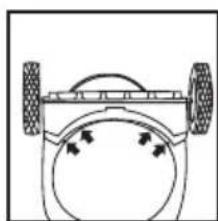
natural_image
Simple line drawing of a vehicle wheel system with two wheels and a circular head (no text or symbols)MONTAJE (CONT.)
DEPÓSITO DE METAL CON CARRETILLA DE METAL
natural_image
Line drawing of a hand holding a tool over a curved object (no text or symbols)natural_image
Diagram of a hand holding a mechanical device with two black arrows indicating direction (no text or symbols present)MONTAJE (CONT.)
text_image
Technical diagram of a mechanical device with numbered components for identification- Manija
- Soporte de manija
- Abrazadera de manija
- Tornillo maquinado de cabeza hexagonal 0,63cm (1/4") 20 x 3,17cm (1 1/4") (negro)
- Arandela de fijación de diente externo de 0,63cm (1/4").
- Tuerca hexagonal 20 x 0,63cm (1/4") (negra)
- Estructura posterior de carretilla
- Estructura principal de carretilla
- Perno de cabeza hexagonal 0,79cm (5/16") - 18 x 6,35cm (2 1/2")
- Arandela de fijación partida de 0,79cm (5/16")
- Tuerca hexagonal
18 x 0,79 cm (5/16")
text_image
Technical diagram of a mechanical assembly with numbered components and hanging weightsnatural_image
Two mechanical component diagrams shown in isometric view, no text or symbols presentflowchart
graph TD
    A["Device 1"] --> B["Output Device"]
    C["Device 2"] --> B["Output Device"]
natural_image
Simple line drawing of a curved pipe or tube with two small icons, no text or symbols present.MONTAJE (CONT.)
natural_image
Simple line drawing of a container with a small object on top, no text or symbols presentnatural_image
Pure technical diagram of a mechanical assembly without any text, numbers, or symbolstext_image
Technical diagram showing labeled components of a mechanical or fluid system with numbered parts and directional arrowsPieza
Descripción
1 Manija del depósito de metal
2 Manija del depósito lateral
3 Tornillo #10 x 0,19 cm (3/4")
4 Tuerca 0,63 cm (1/4") - 20 1,27 cm (1/2")
5 Tuerca hexagonal 0,63 cm (1/4") - 20
CESTA
natural_image
Diagram of a kitchen appliance with arrows indicating parts of the handle (no text or symbols present)MANIJAS LATERALES DE DEPÓSITO
natural_image
Simple line drawing of a cylindrical container with a hanging object and two small protrusions above it (no text or symbols)PORTAHERRAMIENTAS
natural_image
Line drawing of a guitar body with decorative patterns (no text or symbols)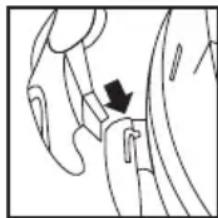
natural_image
Diagram of a hand holding a small object with a black arrow pointing to it, no text or symbols presentMONTAJE (CONT.)
natural_image
Line drawing of a mechanical component or tool with no visible text or symbolsnatural_image
Pure mechanical diagram showing a pipe fitting with no text or symbolsnatural_image
Close-up of a mechanical component with threaded end and circular features (no visible text or symbols)natural_image
Illustration of a hand adjusting a component on a curved surface (no text or symbols visible)natural_image
Technical illustration of a mechanical clamp or bracket assembly (no text or symbols)natural_image
Diagram of a hand holding a cylindrical mechanical component with two downward arrows indicating direction (no text or symbols present)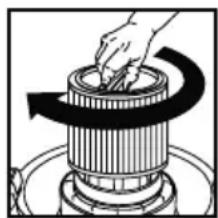
natural_image
Illustration of a hand using a tool to press or adjust a cylindrical component on a stovetop (no text or symbols visible)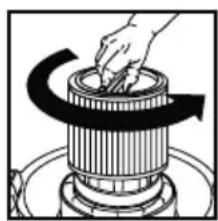
natural_image
Illustration of a hand turning a rotating mechanical component with a curved arrow indicating rotation (no text or symbols)natural_image
Pure mechanical diagram showing a pipe fitting with a valve and directional arrow (no text or symbols)natural_image
Simple line drawing of a mechanical component with an upward arrow, no text or symbols present.natural_image
Line drawing of a mechanical component with no visible text or symbols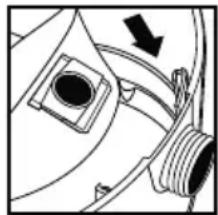
natural_image
Pure mechanical diagram showing a valve or connector with no text, numbers, or symbolsMANGA DE HULE-ESPUMA
natural_image
Illustration of hands operating a cylindrical mechanical device with arrows indicating motion (no text or symbols)natural_image
Line drawing of a mechanical device with a cylindrical component and attached parts (no text or symbols)2323 Reach Road, P.O. Box 3307
Williamsport, PA 17701-0307
(570) 326-3557
www.shopvac.com
SHOP-VAC CANADA
1770 Appleby Line
Burlington, Ontario L7L 5P8
(905) 335-9730
www.shopvac.ca