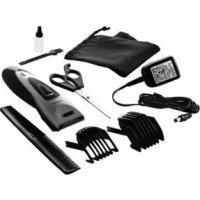
SHBS 500 B1 - Electric mower SILVERCREST - Free user manual and instructions
Find the device manual for free SHBS 500 B1 SILVERCREST in PDF.



| Product Type | Electric beard and hair trimmer |
| Brand | SilverCrest |
| Model | SHBS 500 B1 |
| Power supply | Mains adapter 100-240 V ~ 50/60 Hz, 0.2 A max, output 5 V, 600 mA |
| Battery type | Rechargeable lithium-ion, 3.7 V, 500 mAh |
| Battery life | Approx. 60 minutes cordless |
| Charging time | 10 hours |
| Charge indicator | Flashing red (charging), flashing green (charged), steady green (device on), steady red (low battery) |
| Cutting lengths | With attachments: 4/7/10/13/16 mm (attachment 1) and 18/21/24/27/30 mm (attachment 2); without attachment: 1-2 mm |
| Functions | Hair cutting, beard trimming, thinning, contour drawing |
| Use | On dry hair, for private domestic use, indoors only |
| Cleaning and maintenance | Clean blades with medical alcohol, oil after each use, do not use water |
| Safety | Automatic shutdown when battery low, moisture protection (do not use in bath/shower), sharp blades |
| Included accessories | 2 adjustable comb attachments, power supply, comb, scissors, cleaning brush, oil bottle, storage case, instruction manual |
| Dimensions and weight | Approx. 18 cm long, estimated weight 200 g |
| Warranty | 3 years from date of purchase |
| Blade material | High quality stainless steel |
| Color | Grey/black (SilverCrest design) |
Frequently Asked Questions - SHBS 500 B1 SILVERCREST
User questions about SHBS 500 B1 SILVERCREST
0 question about this device. Answer the ones you know or ask your own.
Ask a new question about this device
Download the instructions for your Electric mower in PDF format for free! Find your manual SHBS 500 B1 - SILVERCREST and take your electronic device back in hand. On this page are published all the documents necessary for the use of your device. SHBS 500 B1 by SILVERCREST.
USER MANUAL SHBS 500 B1 SILVERCREST
Operating instructions
IAN 93480
Deutsch 2
Français.... 16
Italiano.... 30
Nederlands...... 44
English....58
ID: SHBS 500 B1_13_Y1.1

Übersicht / Aperçu de l'appareil / Panoramica / Overzicht / Overview

Inhalt
- Overview ....58
- Intended purpose 60
- Safety information 60
- Items supplied 63
- Charging 63
- Operation 64
6.1 Pushing on/removing the comb attachments.... 64
6.2 Cutting hair.... 64
6.3 Thinning hair.... 65
6.4 Cutting hairlines and beard.... 65
-
Cleaning and care 66
-
Disposal 67
- Troubleshooting ....68
- Technical specifications ....69
- Warranty of the HOYER Handel GmbH ......69
1. Overview
1 Comb attachment, adjustable
2 Blades, part of the shaving head
3 Slider for thinning function
4 Comb attachment fastener
5 On/off switch
6 Charging indicator
lit green: device in operation
lit red: battery almost empty
flashing red during charging: battery is being charged
flashing green during charging: battery is charged
7 Connection for power unit
8 Marking of the cutting length in mm
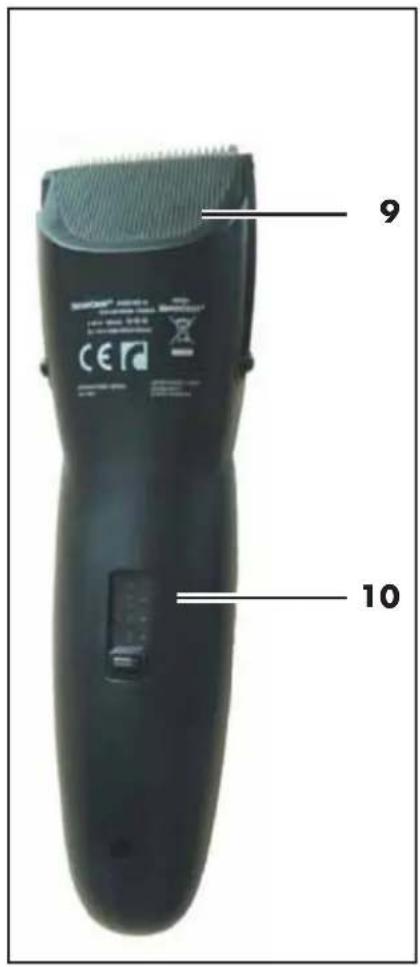
9 Shaving head
10 Slider for adjusting the cutting lengths of the comb attachment
Thank you for your trust!
Congratulations on your new hair and beard trimmer.
For a safe handling of the device and in order to get to know the entire scope of features:
- Thoroughly read these operating instructions prior to initial commissioning.
- Above all, observe the safety instructions!
- The device should only be used as described in these operating instructions.
- Keep these operating instructions for reference.
- If you pass the device on to someone else, please include these operating instructions.
We hope you enjoy your new hair and beard trimmer!
2. Intended purpose
The hair and beard trimmer is intended exclusively for trimming human hair. Only use the device for dry hair.
The device is designed for private home use and must not be used for commercial purposes. The device must only be used indoors.
Foreseeable misuse
WARNING! Risk of material damage!
Do not use the device to cut artificial hair or animal hair.
3. Safety information
Warnings
If necessary, the following warnings will be used in these operating instructions:

DANGER! High risk: failure to observe this warning may result in injury to life and limb.
WARNING! Moderate risk: failure to observe this warning may result in injury or serious material damage.
CAUTION: low risk: failure to observe this warning may result in minor injury or material damage.
NOTE: circumstances and specifics that must be observed when handling the device.
Instructions for safe operation
- This device can be used by children from the age of 8 and people with restricted physical, sensory or intellectual abilities or people without adequate experience and/or understanding, if they are supervised or instructed on how to use this device safely and if they are aware of the resulting risks. Children must not play with the device. Cleaning and user maintenance must not be performed by unsupervised children.
- Children under the age of 8 must be kept away from the device and the power cable.
60
GB


- Only use the included original power adaptor for mains operation.

DANGER for children
- Packing materials are not children's toys. Children should not be allowed to play with the plastic bags: There is a risk of suffocation.
- Keep the device out of the reach of children.

DANGER! Risk of electric shock due to moisture
- Do not use this device in the vicinity of bathtubs, showers, washbasins or other vessels containing water.
- Protect the device from moisture, water drops and water spray.
- Never touch the device with wet hands.
- The device, the cable and the power unit must not fall into water or other liquids and must not be rinsed under running water.
- If the device has fallen into water, pull out the power unit immediately, and only then remove the device from the water. Do not use the device again, but have this checked by a specialist.
- Should liquid enter the device, have it checked before starting the device up again.
- If the device is used in a bathroom, the power unit must be pulled out after use, as the proximity of water represents a hazard, even when the device is switched off.
- Installation of a residual current device (FI/RCD) with a rated residual operating current of no more than 30 mA is recommended to provide additional protection. Ask your electrician for advice. The installation should only be carried out by a qualified electrician.

DANGER! Risk of electric shock
- Never put the device into operation if there are visible damages to the device, the power unit or the cable or if the device has been dropped before.
- Connect the cable to the device before plugging the power unit into a wall socket.
- Only connect the power unit to a properly installed, easily accessible wall socket, the voltage of which corresponds to the specifications on the rating plate. The wall socket must continue to be easily accessible after the device is plugged in.
- Ensure that the cable cannot be damaged by sharp edges or hot surfaces.
- Ensure that the cable is not trapped or crushed.
- When removing the power unit from the wall socket, always pull the power unit and never the cable.
- Pull the power unit out of the wall socket ...
... after every use,
... after each charging process,
... if there is a fault,
... before connecting the device to the cable,
... before you clean the device, and
... during thunderstorms.
- To avoid any risk, do not make modifications to the device. Repairs must be carried out by a specialist workshop or the Service Centre.

DANGER from batteries
- Protect the battery against mechanical damages. Fire hazard!
- Do not expose the device to direct sunshine or heat. The ambient temperature should not be lower than -10 °C and higher than +40 °C.
- The charge contacts on the device must not be connected by metallic objects.
• T battery may only be charged with the original accessory (power unit). - The battery only removed for disposal must not be used again.
- Should the electrolyte solution leak out of the battery, avoid contact with eyes, mucous membranes and skin. Rinse immediately with plenty of clean water and consult a doctor. The electrolyte solution can cause irritation.
WARNING! Risk of injury from cutting
- The tips of the comb attachments and shaving head are sharp. Handle with care.
- Do not use the device if the attachment shows damages.
- Switch off the device before pinning up or changing the attachments and each time before cleaning.
WARNING! Risk of injury
- Place the cable in such a way that no one trips over it or steps on it.
- Do not use the device on open wounds, cuts, sunburn or blisters.
WARNING! Risk of material damage
- Only use the original accessories.
- Never place the device on hot surfaces (e.g. hob plates) or near heat sources or open fire.
62
GB
- Do not cover the power unit to prevent overheating.
- The blades of the shaving head may only be cleaned with medical alcohol. Do not use any water or other liquids.
- Do not use any astringent or abrasive cleaning agents.
4. Items supplied
1 hair and beard trimmer
1 power unit
2 adjustable comb attachments:
Attachment 1: 4/7/10/13/16 mm
Attachment 2: 18/21/24/27/30 mm
1 comb
1 scissors
1 cleaning brush
1 oil
1 storage pouch
1 set of operating instructions
5. Charging
NOTES:
- Before the device is used for the first time, and during the following three charging procedures, the device should be charged for 10 hours in each case.
-
When the battery is almost flat, the charging indicator changes colour from green to red during operation. The device can then only be used for a short time without being connected to the electricity supply.
-
Switch off the device with the on/off switch 5 if necessary.
- Connect the power unit to the connector 7 of the device.
- Insert the power unit into a readily accessible wall socket whose voltage matches the voltage stated on the rating plate.
- The charging indicator 6 flashes red and the battery is charged. When the battery is fully charged, the charging indicator flashes green. When the battery is fully charged, the device can be used for approximately 60 minutes without being connected to the power supply.
6. Operation
Regardless of the charging state of the battery, the hair and beard trimmer can always be mains-operated.
- Before switching to mains operation, ensure that the device is switched off.
- Connect the power unit to the connection 7 of the device.
- Insert the power unit into a readily accessible wall socket whose voltage matches the voltage stated on the rating plate.
- Switch on the device with the on/off switch 5.
6.1 Pushing on/removing the comb attachments
WARNING! Risk of injury!
Switch off the device before replacing or changing the comb attachments.
Pushing on
- In order to attach a comb attachment, push this over the guide rails on the side of the device onto the comb attachment fastener 4, until it is heard to click into place.
Removing
-
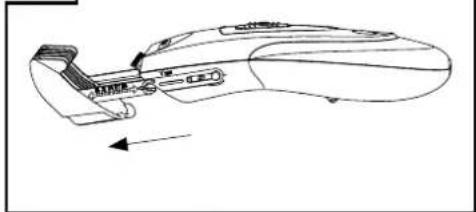
Figure A: To change the comb attachments, turn the device onto its back.
-
Figures B/C: Push the comb attachment 1 upwards together with the slider 10. Push the comb attachment carefully upwards with moderate force using your thumb and index finger beyond the side locking pins. The comb attachment is released from the comb attachment fastener 4.
-
Remove the comb attachment.
6.2 Cutting hair
NOTES:
• The hair to be dressed must be dry.
- The cutting length may deviate depending on the cutting angle.
- Place a sheet or cape around throat and neck to prevent cut-off hair from dropping into the collar.
- Comb the hair well.
- First, start with a comb attachment with a longer cutting length and then, in the course of the cutting process, use shorter cutting lengths step by step. Ad-
64 GB
just the cutting length with the slider 10 and read off the cutting lengths on the marking 8 on the side of the comb attachment 1.
- Start by cutting the hair in the neck or on the sides and cut towards the centre of the head. Then, cut the front section of the hair towards the centre of the head.
- Hold the device in such a way that the comb attachment lies as flat as possible on the head. Move the device evenly through the hair.
- If possible, cut against direction of hair growth.
- In order to catch all the hair, move the device several times through each section of the hair.
• Comb the hair repeatedly and well. - In order to achieve a straight cutting line for cutting lengths over 20 mm, the device should be passed through the hair several times from different directions.
6.3 Thinning hair
Use the thinning function to reduce the volume of the hair without changing its length.
- Push the slider 3 to the left. The thinning function integrated into the shaving head 9 is extended upwards.
6.4 Cutting hairlines and beard
WARNING! Risk of injury!
The points of the shaving head are sharp. Handle with care.
- Adjust the cutting length with the slider 10 according to the desired hair length and read off the cutting length using the marking 8 on the side of the comb attachment 1. Now, shorten your beard step-by-step.
- Use the device only with the shaving head 9 and without comb attachment, to cut hair very short or to cut beard and hairline. In this way you can cut hair lengths of 1-2 mm evenly.
- Adjust the cutting length with the slider 10 according to the desired hair length and read off the cutting length using the marking 8 on the side of the comb attachment 1. Now, shorten your beard step-by-step.
- Use the device only with the shaving head 9 and without comb attachment, to cut hair very short or to cut beard and hairline. In this way you can cut hair lengths of 1-2 mm evenly.
7. Cleaning and care

DANGER! Risk of electric shock!
Pull the power unit out of the wall socket before you clean the device.
WARNING! Risk of injury!
Always switch off the device before cleaning it.
WARNING! Risk of material damage!
- The blades 2 of the shaving head 9 may only be cleaned with medical alcohol. Do not use any water or other liquids. Oil the blades as described in the following chapter.
- Do not use any astringent or abrasive cleaning agents.
NOTE: clean and oil the device after every use.
- Remove the comb attachment 1. Rinse the comb attachment with water and let it dry before reattaching it to the device.
- Wipe down the housing of the device with a damp cloth.
Cleaning and oiling the shaving head
-
Figure D: remove the shaving head 9 from the device by pressing it with the thumb towards the rear.
-
Remove the hair remnants from the shaving head by using the cleaning brush included in the delivery.
-
Clean the blades 2 of the shaving head 9 with medical alcohol (not supplied). Do not use any water or other liquids. Let the shaving head dry.
-
Apply a few drops of the supplied oil to the blades 2 of the shaving head 9 and spread it out evenly. Using a soft cloth, wipe off the surplus oil, if necessary. Only use acid-free oil, such as e.g. sewing machine oil.
-
Figure E: guide the lug of the shaving head 9 under the edge of the housing and press the shaving head downwards onto the blades until it is heard to lock in place.
8. Disposal
The symbol showing a wheelie bin crossed through indicates that the product requires separate refuse collection in the European Union. This applies to the product and all accessories marked with this symbol. Products identified with this symbol may not be discarded with normal household waste, but must be taken to a collection point for recycling electric and electronic appliances. Recycling helps to reduce the consumption of raw materials and protect the environment.

Packaging
When disposing of the packaging, make sure you comply with the environmental regulations applicable in your country.
Removing the battery
- This device is operated with a rechargeable lithium-ion battery, which you must remove before disposing of the device.
- You must be technically minded to remove the battery, otherwise there is the danger of injuring yourself. If you do not have any experience with tools, you should have the batteries removed by a person who is qualified to do this.

DANGER from batteries!
- Ensure that the battery is not damaged as you remove it. Fire hazard!
- The removed battery must not be disassembled.
- Never short-circuit the battery. The contacts on the removed battery must not be connected by metallic objects. The battery may overheat and explode.
-
Only remove the battery to dispose of the device. The device is destroyed by removing the battery. Never try to operate a disassembled device.
-
Disconnect the device from the mains.
- Switch on the device and let it run until the battery is empty.
- Figure D: remove the shaving head 9 from the device (see "Cleaning and care" on page 66).
- Figure F: use a Phillips screwdriver to release the 3 screws on the back of the device.
-
Figure G: use a screwdriver to lever open the side seam and unfold the two halves of the housing apart.
-
Figures H+I: press the black fastening clips carefully away from the sides of the board and remove the board from its fastening.
- Figure J: release the connections between the battery and the board with a pair of pliers/wire cutters. Remove the exposed battery. Take the battery and the device separately to suitable disposal.
The lithium-ion battery used for this device may not be treated as household waste. The battery must be disposed of properly. Contact battery distributors or local waste disposal points for this.

Li-ions
9. Troubleshooting
If your device fails to function as required, please try this checklist first. Perhaps there is only a minor problem, and you can solve it yourself.

DANGER! Risk of electric shock!
Do not attempt to repair the device yourself under any circumstances.
| Fault Possible causes/Action | |
| No function | Has the device been connected to the power supply?Is the battery empty? |
| The blades 2 of the shaving head 9 are not running smoothly | Has the shaving head been cleaned and the blades oiled? |
10. Technical specifications
| Model: SHBS 500 B1 | |
| Device: Input: 5 V , , 600 mA | --- ⊖-⊕⊕ |
| Power unit(Model SW-050060EU-T): | Input: 100-240 V ~ 50/60 Hz, 0.2 A maxOutput: 5 V ——6⊕⊕⊕A⊕ |
| Protection class of the power unit: II | □ |
| Ambient conditions: only approved for indoor use | |
| Battery: 1x 3,7 V Li-ion, 500 mAh | |
| Operating temperature: -10 °C to +40 °C | |
Subject to technical modification.
CE
11. Warranty of the HOYER Handel GmbH
Dear Customer,
your device is provided with a 3 year warranty starting with the purchase date. In the event of product defects, you are entitled to statutory rights against the vendor. These statutory rights are not restricted by our warranty presented in the following.
Warranty conditions
The warranty period starts with the purchase date. Please keep the original purchase receipt in a safe place. This document is required to verify the purchase. If within three years from the purchase date of this product a material or factory defect occurs, the product will be repaired or replaced by us – at our discretion – free of charge to you. This warranty implies that within the period of three years the defective device and the purchase receipt are presented, including a brief written description of the defect and the time it occurred.
If the defect is covered by our warranty, the repaired or a new product will be returned to you. No new warranty period starts with a repair or replacement of the product.
Warranty period and statutory claims for defects
The warranty period is not extended when the warranty has been claimed. This also applies to replaced and repaired parts. Any damages and defects already existing at the time of purchase must be reported immediately upon unpacking. Repairs arising after the expiration of the warranty period are subject to a charge.
Warranty coverage
The device was produced carefully according to strict quality guidelines and tested diligently prior to delivery.
The warranty applies to material or factory defects. This warranty does not include product parts that are subject to standard wear and therefore can be considered wear parts; the same applies to damages at fragile parts, e.g. switches, rechargeable batteries or parts made of glass.
This warranty expires if the product is damaged, not used as intended or not serviced. For the proper operation of the product, all instructions listed in the operating instructions must be observed carefully. Any form of use and handling that is advised against in the operating instructions or warned against must always be avoided. The product is only intended for private and not for commercial use. In the case of incorrect and improper treatment, use of force and interventions not performed by our authorised Service Centre, the warranty shall cease.
Handling in case of a warranty claim
In order to ensure prompt processing of your matter, please observe the following notes:
- Please keep the article number IAN: 93480 and the purchase receipt as a purchase verification for all inquiries.
- If faulty operation or other defects occur, first contact the Service Centre listed in the following by telephone or email.
- Then, you are able to send a product reported as defective free of charge to the service address specified to you, including the purchase receipt and the information on the defect and when it occurred.

Please visit www.lidl-service.com to download this and many other manuals, product videos and software.


Service Centre
GB Service Great Britain
Tel.: 0871 5000 720 (£ 0.10/Min.)
E-Mail: hoyer@lidl.co.uk
IE Service Ireland
Tel.: 1890 930 034
(0,08 EUR/Min., (peak))
(0,06 EUR/Min., (off peak))
E-Mail: hoyer@lidl.ie
IAN: 93480

Supplier
Please note that the following address is no service address. First contact the aforementioned Service Centre.
HOYER Handel GmbH
Kühnehöfe 5
22761 Hamburg
Germany


GB
71


A

natural_image
Line drawing of a mechanical component with no visible text or symbolsB

natural_image
Line drawing of a mechanical component with no visible text or symbolsC
natural_image
Technical line drawing of a mechanical component with no visible text or symbolsD

natural_image
Line drawing of a hand holding a pen or stylus, with an arrow pointing to the pen tip (no text or symbols present)E

natural_image
Line drawing of a garment sleeve with a zipper and belt (no text or symbols)
G

natural_image
Technical line drawing of a mechanical component with internal parts and an upward arrow indicator (no text or symbols)
natural_image
Technical line drawing of a mechanical assembly with three circular insets showing internal components (no text or symbols)I

natural_image
Technical line drawing of a mechanical device with no visible text or symbols
natural_image
Line drawing of a mechanical device with no visible text or symbols
natural_image
Simple black curved arrow pointing right on white background (no text or symbols)




natural_image
Vertical dark gray bar with a small crosshair symbol at the bottom (no text or labels)
HOYER HANDEL GMBH
Kühnehöfe 5
D-22761 Hamburg



- Inhalt
- Overview
- Thank you for your trust!
- Intended purpose
- Foreseeable misuse
- WARNING! Risk of material damage!
- Safety information
- Warnings
- Instructions for safe operation
- DANGER for children
- DANGER! Risk of electric shock due to moisture
- DANGER! Risk of electric shock
- DANGER from batteries
- WARNING! Risk of injury from cutting
- WARNING! Risk of injury
- WARNING! Risk of material damage
- Items supplied
- Charging
- NOTES:
- Operation
- Pushing on/removing the comb attachments
- WARNING! Risk of injury!
- Pushing on
- Removing
- Cutting hair
- GB
- Thinning hair
- Cutting hairlines and beard
- Cleaning and care
- DANGER! Risk of electric shock!
- Cleaning and oiling the shaving head
- Disposal
- Packaging
- Removing the battery
- DANGER from batteries!
- Troubleshooting
- Technical specifications
- Warranty of the HOYER Handel GmbH
- Warranty conditions
- Warranty period and statutory claims for defects
- Warranty coverage
- Handling in case of a warranty claim
- Service Centre
- Supplier
Brand : SILVERCREST
Model : SHBS 500 B1
Category : Electric mower