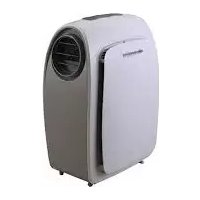
Fresco 1200 - Heating Sonnenkönig - Free user manual and instructions
Find the device manual for free Fresco 1200 Sonnenkönig in PDF.



| Product type | Reversible mobile air conditioner (heating and cooling) |
| Brand | Sonnenkönig |
| Model | Fresco 1200 |
| Dimensions (L x W x H) | 546 x 355 x 793 mm |
| Approximate weight | 35 kg |
| Power supply | 220-240 V ~ 50 Hz |
| Power consumption (cooling) | 1346 W |
| Power consumption (heating) | 1129 W |
| Cooling capacity | 3500 W |
| Heating capacity | 3500 W |
| Dehumidification | 60 litres/day |
| Refrigerant | R410A |
| Main functions | Cooling, heating, dehumidification, ventilation |
| Control panel | Touch panel with LED display and remote control |
| Fan speeds | Low, medium, high, Auto |
| Timer | 24 hours (programmed on/off) |
| Night mode (SLEEP) | Yes |
| Swivel castors | Yes, for mobility |
| Power cord length | 1.8 m |
| Maintenance and cleaning | Regular cleaning of the EVA air filter and condenser/evaporator |
| Safety | Overload protection, full water tank (code E4), automatic shutdown |
| Warranty | 24 months from date of purchase |
Frequently Asked Questions - Fresco 1200 Sonnenkönig
User questions about Fresco 1200 Sonnenkönig
0 question about this device. Answer the ones you know or ask your own.
Ask a new question about this device
Download the instructions for your Heating in PDF format for free! Find your manual Fresco 1200 - Sonnenkönig and take your electronic device back in hand. On this page are published all the documents necessary for the use of your device. Fresco 1200 by Sonnenkönig.
USER MANUAL Fresco 1200 Sonnenkönig
Festnetz 14 Cent/Minute
Modifications techniques
Festnetz 14 Cent/Minute
Festnetz 14 Cent/Minute
1 Safety Information 83
2 Vantage 86
3 Unpacking instructions 87
4 Name of the parts 88
5 Control panel & description of function 89
6 Remote control 91
7 Important informations. 92
8 Maintenance 93
9 Helpful hints. 94
10 Exhaust hose install 95
11 Use 96
12Trouble shooting 97
13 Specification 98
14 Warranty / Disposal / Technical change 99
Do not install or use your portable air conditioner unit before carefully reading these instructions. Please retain this manual brochure for your product warranty and future reference.
1 Safety Information
GB
Please read before first commissioning the safety instructions carefully and observe the safety instructions to prevent damage due to misuse, improper operation, and improper environmental conditions to be avoided. Keep these for later reference. Please make sure to place the device on a suitable and waterproof surfaces, so that spilled liquids can not cause harm.
Check the device after removing the packaging for damage. Do not put the unit in case of suspected corruption in operation and consult a specialist. The recyclable packaging material must not be stored or disposed accessible for young children, but must be disposed of properly.
This appliance is only for the purpose for which it was explicitly developed. Any other use is regarded as improper and therefore dangerous. The supplier is not liable for damage to persons and / or property damage due to an improper or incorrect use.
This appliance can be used by children aged from 8 years and above and persons with reduced physical, sensory or mental capabilities or lack of experience and knowledge if they have been given supervision or instruction concerning use of the appliance in a safe way and understand the hazards involved. Children shall not play with the appliance. Cleaning and user maintenance shall not be made by children without supervision. Please make sure to place the device on a suitable and waterproof surfaces, so that spilled liquids can not cause harm.
Repairs to electrical appliances must only be carried out by trained personnel only. Improperly performed repairs and alterations to the equipment can have dangerous consequences for the user according to what the warranty will be rejected.
GB
- Please make sure the product is properly ventilated at all the times. Please make sure the inlet and outlet ventilation are not blocked at all times.
- Operate this unit on a flat surface to avoid water leakage.
- Do not operate this unit in an explosive or corrosive environment.
- Operate this unit in an ambient temperature of 35^ C degree or below.
- When the heating function is in use, the unit should be operated in an indoor ambient temperature of between 7^ and 23^ .
- Clean the air filter periodically to enjoy the most efficient cooling.
- After switching the unit off, please wait at least 3.5 minutes before restarting it. This is to prevent damage to the compressor.
- This unit needs at least 7 amps of electricity for the compressor to operate. To avoid household power failures, please do not use any extension cords with this unit.
- This unit is for cooling, heating and dehumidifying indoor areas.
- After the unit is switched on, to operate the fan, the compressor will start up after the cooling alarm has flashed for three minutes. - In heating mode, the heating alarm will flash for 3.5 minutes before the compressor and fan start up.
- If the supply cord is damaged, it must be replaced by the manufacturer, its service agent or a similarly qualified person in order to avoid a hazard.
- In order to dispose of the appliance safely, please remove the batteries from the unit before discarding it.
- This appliance is not intended for use by persons (including children) with reduced physical, sensory or mental capabilities, or lack of experience and knowledge, unless they have been given supervision or instruction concerning use of the appliance by a person responsible for their safety. Children should be supervised to ensure that they do not play with the appliance.
- Please drain out water before moving the unit.
- Do not install the unit in a laundry room.
- The unit should be installed in compliance with national electrical wiring regulations.
Attention!
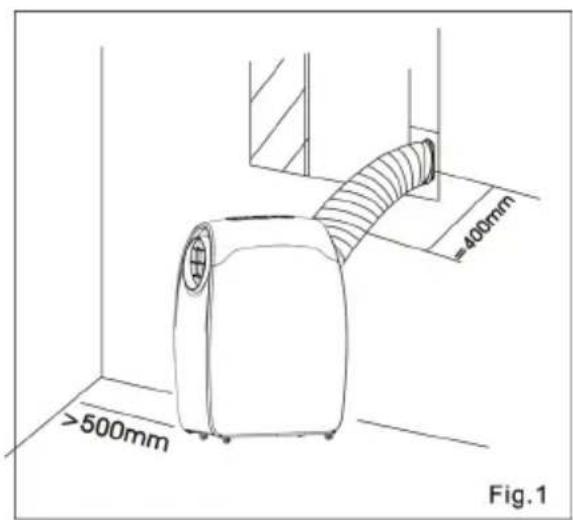
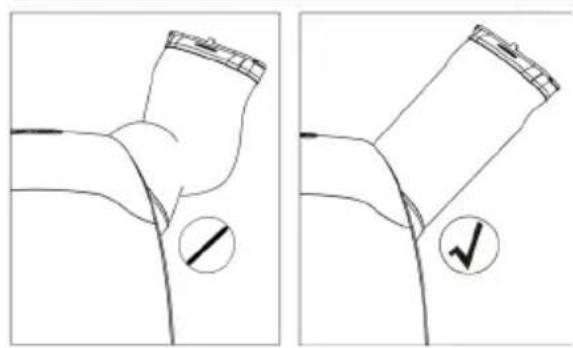
For effective heating and cooling, please ensure that the following steps are followed. Extend the exhaust hose to a maximum lenght of 400mm . The exhaust hose must be kept parallel and must not be bent up or down.
- A distance of at least 500mm must be kept between the filter side of the unit and any walls or other obstacles".
- When the appliance starts to defrost, "DF" will be displayed on the LED display
Congratulations on your choice of a quality portable air conditioner
GB
2 Vantage
GB
This air conditioner has been designed and manufactured to the highest standards of modern engineering. Our product not only provides you with a remote control for easy and convenient use of all functions but also has the following benefits:
- Easily transported from room to room on easy glide castors.
- No installation required just plug into any household.
Power outlet. - Powerful refrigerated air system instantly cool indoor areas whenever you want.
- Dehumidified and filtered air cycle improves the ambient air effectively.
- In addition to the remote control, the one touch electronic pad also provides easy manual operation.
- 24 hour programmable timer that can be used in either air conditioning or dehumidifying mode.
- Unique sleep control function
220-240 Volt / 50Hz operation
1.8 meter cord with plug
3 Unpacking instructions
IMPORTANT: Wait before you use at least 12 hours after unpacking the equipment it!
- Place the unit in the correct upright position before unpacking.
- Cut the two packing straps.
- Slide the carton upwards to release it from the base.
- Grip the carry handles located on either side of the unit and carefully lift until it slides out of the foam base.
- Remove the adapter and take out the exhaust hose as schown in the image.
- Attach the exhaust hose to the unit before operating the unit.
- The hot air outlet is connected at the base of unit
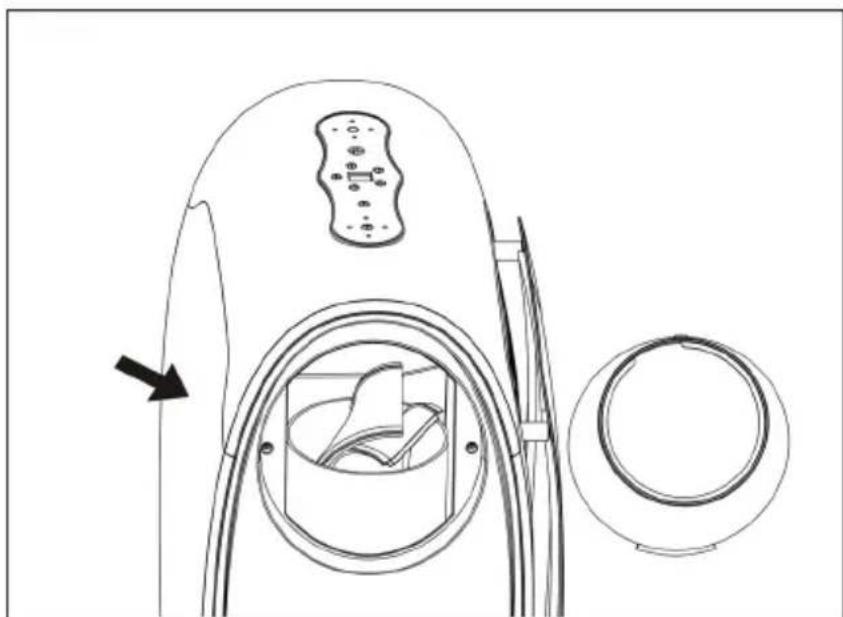
Contents: Air conditioner unit - Remote control - Batteries
4 Name of the parts
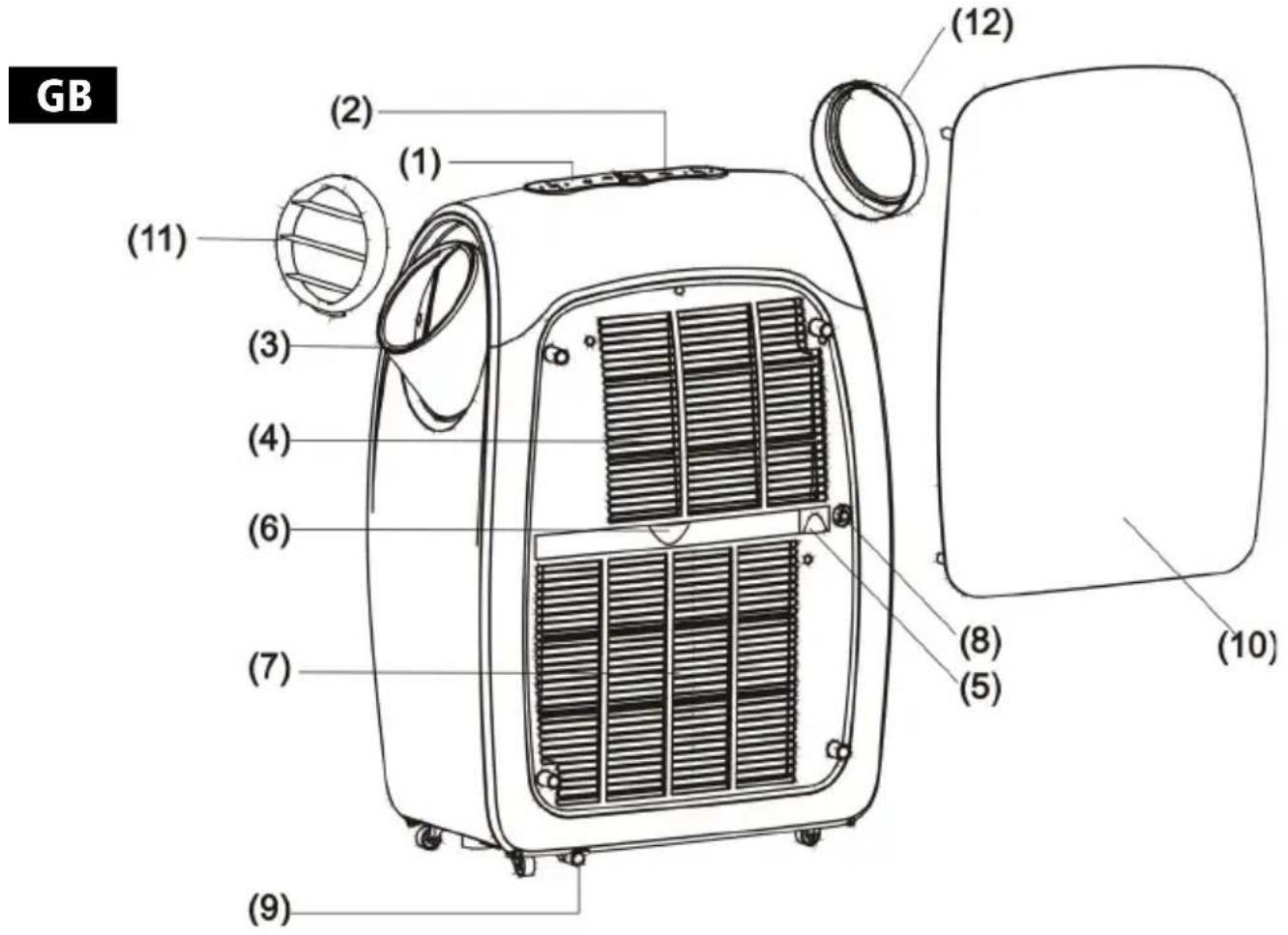
-
Control panel
-
Baffle plate
-
Remote control receiver
-
Hot air outlet
-
Adapter
-
Cool air outlet
-
Cool air inlet
-
Adapter
-
EVA filter
-
Exhaust hose
-
COND filter
-
Adjustable blade
-
Hot air inlet
-
Upper drainage hole
-
Lower drainage hole
5 Control panel & description of function
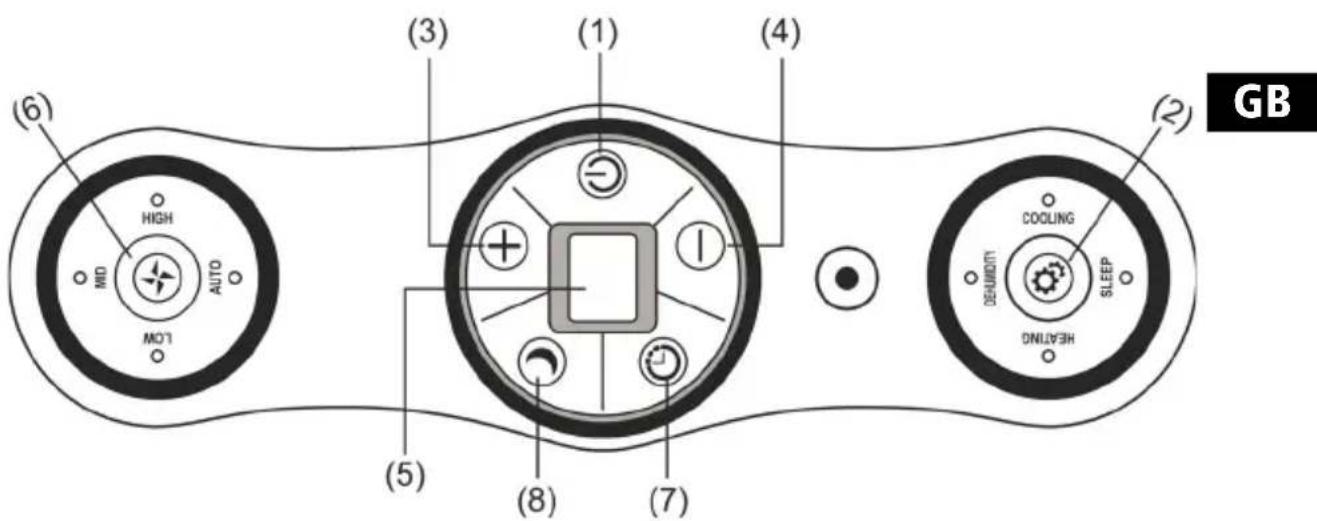
1.POwER BUTTON
Press to turn the unit «ON» or «OFF».
2.FUNCTION
Press this button to select cooling, heating, or dehumidifying.
3.TEMPERATURE ADJUSTMENT BUTTON (up)
In cooling mode: This button raises the preset temperature by 1^ each time it is pressed, the maximum limit is 30^ . In heating mode: this button raises the preset temperature by 1^ each time it is pressed, the maximum limit is 25^ .
4. TEMPERATURE ADJUSTMENT BUTTON (down)
In cooling mode: this button lowers the preset temperature by 1^ . Each time it is pressed, the minimum limit is 17^ . In heating mode: this button lowers the preset temperature by 1^ each time it is pressed, the minimum limit is 15^ .
5.L.E.D DISPLAY
The display indicates the current temperature setting or timer setting. When the set temperature or the timer are adjusted, the new setting is shown then the display reverts to the current set temperature.
The display is also used to display error codes should a fault occur, see ERROR CODES.
GB
6.SPEED
Press to select either LOW, MEDIUM, HIGH or AUTO fan speed. If «AUTO» is selected (in cooling mode), "HIGH" «MEDIUM» or "LOW" will be automatically selected according to the difference between the temperature setting and the ambient temperature.
Note: In heating mode and dehumidifying mode, this button can not be operated because the unit is preset to high speed in heating mode and low speed in dehumidifying mode.
7.PROGRAMMABLE TIMER
Programmable timer ON/OFF button.
TIMER ON: The unit switches on.
- Press the «TIMER» button in stand-by mode to set the time you desire.
- Once the set time has elapsed, the unit will turn on automatically.
- if you press the «POWER» button before the time has elapsed, the timer setting will be canceled and the unit will turn on.
- You can set the mode and fan speed while setting the timer.
TIMER OFF: The unit switches off automatically after the set has elapsed.
- Press the «TIMER» button when the unit is operating to set the time you desire.
- Once the set time has elapsed, the unit will turn off automatically.
- If you presse the «POWER» button before the time has elapsed, the timer setting will be canceled and the unit will turn off.
8.SLEEP CONTROL FUNCTION
- In cooling mode, press the SLEEP button to set the temperature. It increases by 1^ after an hour and at increases by a maximum 2^ after 2 hours.
- In heating mode, press the SLEEP button to set the temperature. It decreases by 1^ after an hour and decreases 2^ after 2 hours.
- Press the SLEEP button again to cancel the setting.
9.ALARM
When the water tank is full, E4 will be displayed on the display panel. To resume operation, please remove the rubber cap from the drainage hose to drain the water first. The E4 warning will disappear after draining, and then you can restart the unit by pressing the POWER button.
6 Remote control
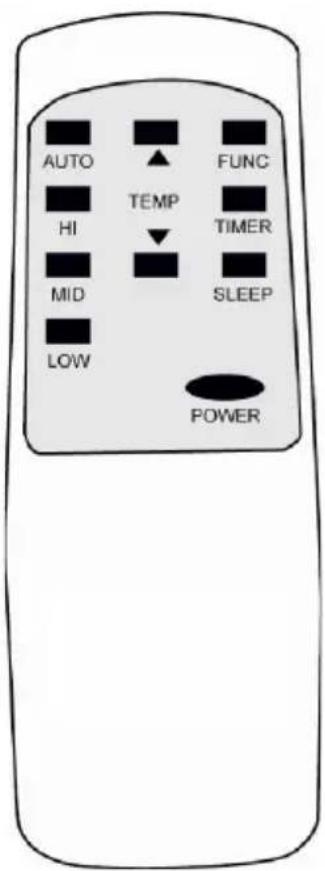
- POWER - On/Off switch
- FUNC - "MODE" selector
- TIMER-Timer programming
- AUTO - Automatic fan speed
- HI-High fan speed
- MID - Medium fan speed
- LOW - Low fan speed
- SLEEP - Night operation selector
- TEMP. - Temperature selector
GB
GB
7 Important informations
This unit can evaporate condensation and disperse it automatically through the exhaust hose.
- When the unit is in cooling mode, the drainage pipe does not need to be attached. Please make sure that the rubber cap is firmly inserted in the drainage hole, when the unit is running.
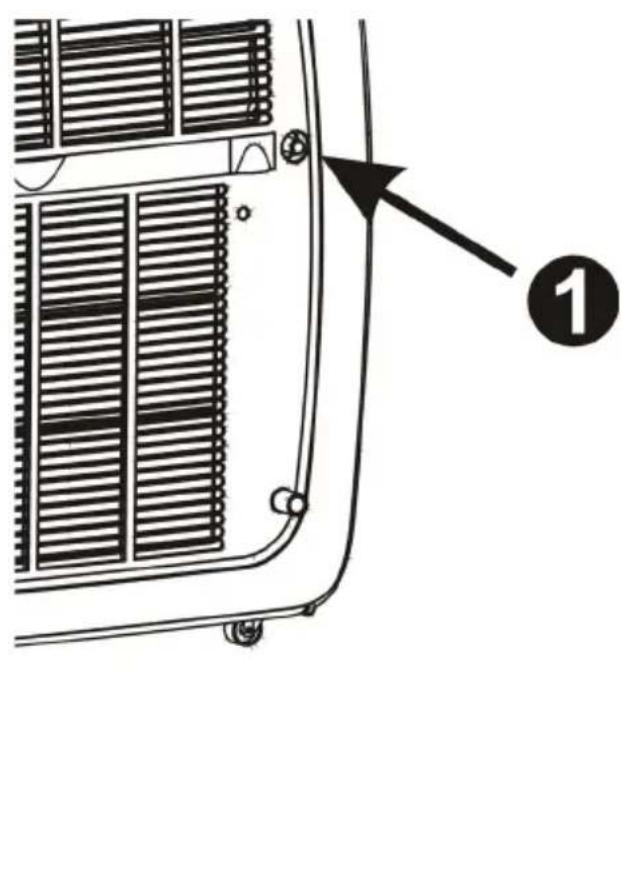
- When operating in heating mode, the rubber cap "1" should be removed from the drainage hole and a suitable drainage pipe attached in order to improve heating performance.
- When operating in dehumidifying mode the rubber cap "1" should be removed from the drainage hole and a suitable drainage attached.
- Please remove the air exhaust hose, connect a drainage pipe to the drainage hole and direct the water outside to improve dehumidifying performance.
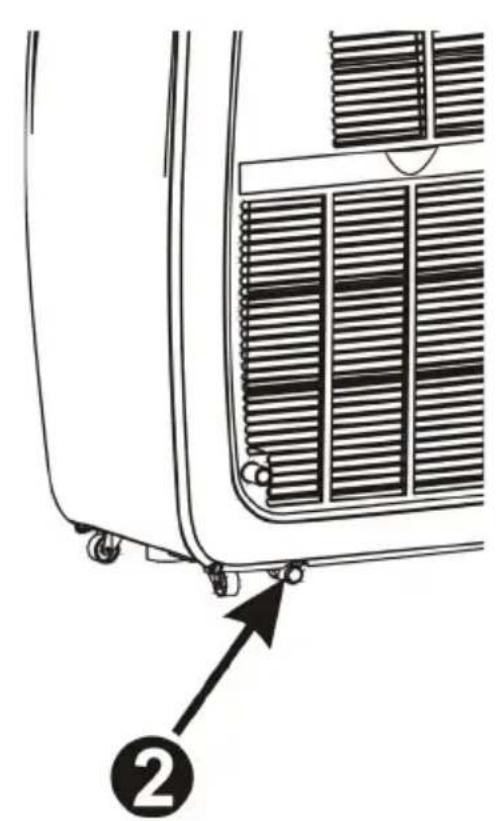
- When the water tank is full, E4 will be displayed on the display panel. Please remove the rubber cap "2" from the drainage hole to drain out the water. After the drainage has been fully drained, please restart the unit, and will then can operate normally..
8 Maintenance
Please disconnect the power cord before cleaning.
AIR FILTER
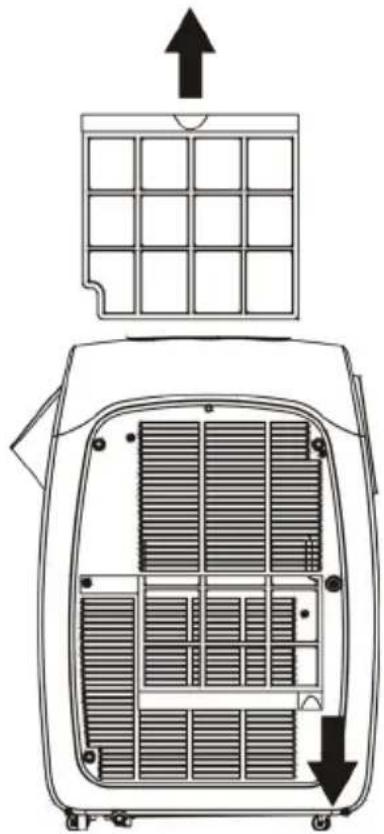
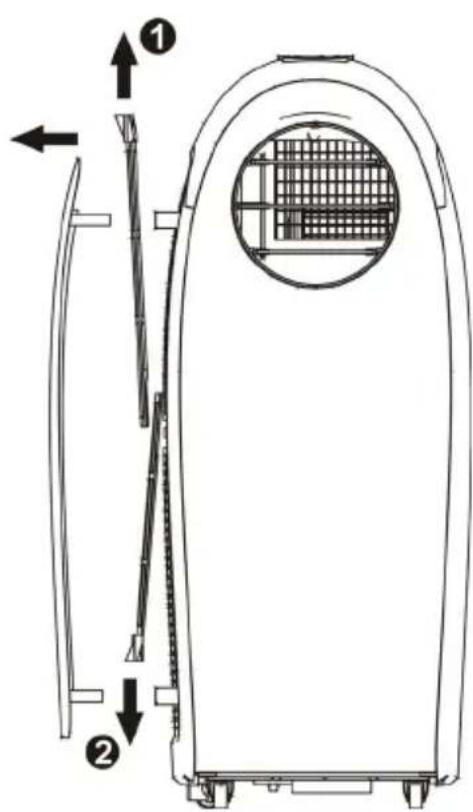
When cleaning the filters, please take out the baffle plate in the direction indicated by the arrow. Take out filter (1) by sliding upward and filter (2) by sliding downward as shown in the image. Be careful not to get the two filters confused.
CONDenser/EVAPORATOR
Use the brush attachment on a vacuum cleaner.
CASING
Wipe with a damp cloth and polish with a soft cloth. To remove the air filter, please follow the instructions above and slide in the direction indicated by the arrows. Pull the filter gently, and then remove the filter for cleaning.
9 Helpful hints
The unit is fitted with a special thermal cut off device. Please ensure that the unit is not placed against objects which may obstruct the air intake e.g. furniture or curtains as this will dramatically affect it's performance.
Power supply
- Check the power supply is correct.
- Insert the plug into the outlet firmly in order to prevent any dangerous leakage.
- Do not pull on the power supply cord force fully to remove it from the plug because this will damage the supply cord.
- As the appliance distributes hot air, please do not place or operate it in a narrow space.
- To avoid dangerous leakages, do not operate the unit in a humid place.
- Do not expose the unit to intense sunlight otherwise the unit may shut down due to overheating and the color of the unit may quickly fade.
10 Exhaust hose install
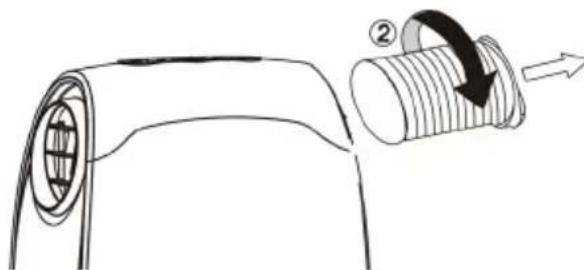
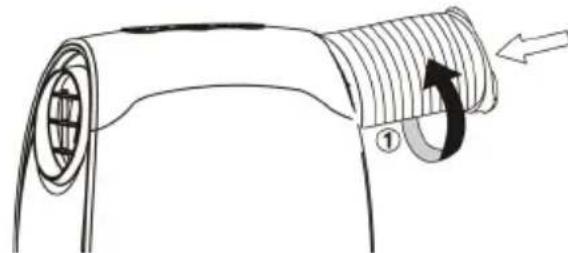
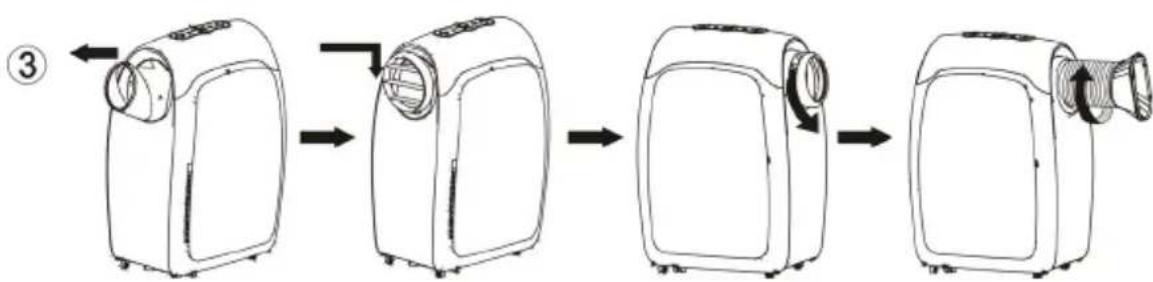
- Turn the exhaust hose in the direction indicated by arrow (1) and then connect it to the unit.
- Turn the exhaust hose in the direction indicated by arrow (2) and then the exhaust hose can be took outdetached from the unit.
How do I use the cooling/heating function?
11 Use
GB
When using the cooling function:
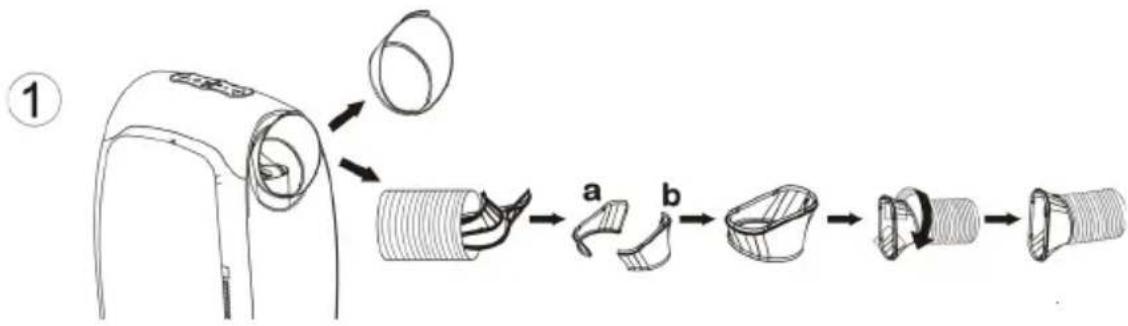
- Unpack the unit and fix part a and part b together as schown in Fig.1 Rotate the exhaust hose clockwise to attach to the adapter.
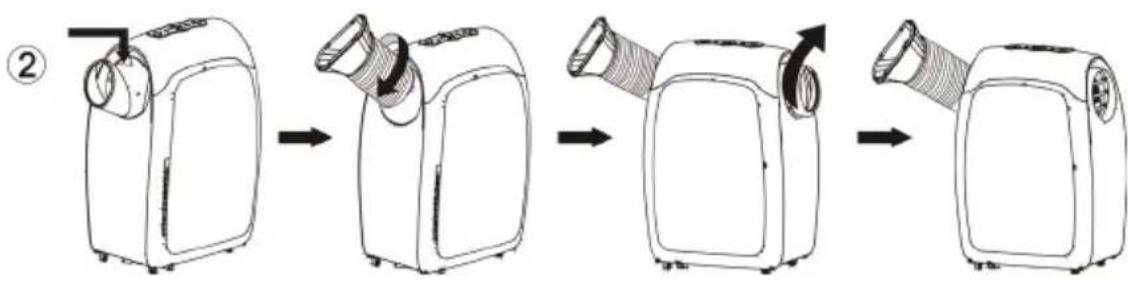
- Fix the adapter to the unit as schown in Fig.2, rotate the exhaust hose clockwise to attach to the adapter.
- Rotate the adapter clockwise until it stops, and then you can remove the adapter from the cool air outlet.
When operating heating function:
- Remove the outlet and the exhaust hose, then attach the two subassemblies
- Fix the adapter to the cool air outlet.
- Rotate the exhaust hose clockwise to attach to the adapter.
Note: For the best results in cooling/heating mode, please remove the baffle plate.
12 Trouble shooting
| Problem Cause Trouble sho | ||
| E1 | Electrical short on both temperature sensors and the PCB | Contact an electrician for repair |
| E2 | Electrical short of the temperature sensor, the copper tube or the PCB wiring | Contact an electrician for repair |
| E4 | Indicates that the water tank is full or the plug may be incorrectly wired | Pull out the rubber stopper that is located at the bottom of the unit, to drain the water. Check that the plug has been wired correctly. |
GB
13 Specification
| Model nr. FRESCO | 1000 FRESCO 1200 | |
| Power Supply 220-240V~50Hz | ||
| Rated Power (EN60335) Cooling Heating | 1153 W 967 W | 1346 W 1129 W |
| Cooling Capacity 3000 | W 3500 W | |
| Heating Capacity 3000 | W 3500 W | |
| Moisture Removed 50 liters/day 60 liters/day | ||
| Refrigerant R410A | ||
| Dimensions 546 x 3 | 55 x 793 mm | |
(CE) N 842/2006:
R410A is a fluorinated greenhouse gas covered by the Kyoto Protocol.
Its total global warming potential (GWP) is 2088.
14 Warranty / Disposal / Technical change
Warranty
All products are checked from our company before the delivery. In case that there is a lack on your product, please contact the vendor. Please bring your proof of purchase for guarantees.
Disposal
Please remove the heater properly. You can bring the product to any specialist dealer for he removal.
Technical changes
Technical changes in technique and design are possible.
Please save the packaging materials of the unit.
CE declaration of Conformity
This device complies with the following standards:
EN 55014-1:2006/A2:2011
EN 55014-2: 1997/A2:2008
EN 61000-3-2:2014
EN 61000-3-3:2013
EN 61000-3-11:2000
EN 60335-2-40:2003/A13:2012
EN 60335-1:2012/A11:2014
EN 62233:2008
Firma
Armin Schmid
Olensbachstrasse 9-15
CH-9631 Ulisbach
Tel. Int. +41 71 987 60 60
Tel.Nat.0848870850
Festnetz 14 Cent/Minute