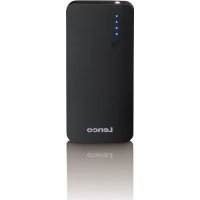
PBQ1050 - Power bank LENCO - Free user manual and instructions
Find the device manual for free PBQ1050 LENCO in PDF.


| Brand | Lenco |
| Model | PBQ1050 |
| Product type | Portable battery (power bank) |
| Battery technology | Lithium-ion |
| Battery capacity | 10,000 mAh (non-replaceable) |
| Input voltage | 5V / 2A (Micro USB) and 5V / 2.4A (USB-C) |
| Output voltage | 5V / 2.4A, 9V / 1.7A, 12V / 1.2A (USB-A) and 5V / 2.4A (USB-C) |
| Fast charging | Yes (up to 75% faster than standard USB ports) |
| Charging time (battery) | Approximately 4 hours |
| Charge indicator | 4 blue LEDs |
| Built-in LED flashlight | Yes |
| Protections | Overcharge, complete discharge, overvoltage, short circuit |
| Auto power-off | Yes (after a few seconds without load) |
| Operating temperature | 0°C to +45°C |
| Operating humidity | 40% to 70% |
| Connectivity | 1 USB-A port (output), 1 Micro USB port (input), 1 USB-C port (input/output) |
| Compatibility | Smartphones, tablets, MP3 players, cameras, etc. |
| Usage | Indoor only, private use |
| Cleaning | Soft dry cloth, without abrasive products |
| Safety | Do not expose to water, fire, or impacts. Do not disassemble. |
| Spare parts | Not available (battery and LED non-replaceable) |
| Package contents | Portable battery, USB cable |
Frequently Asked Questions - PBQ1050 LENCO
User questions about PBQ1050 LENCO
0 question about this device. Answer the ones you know or ask your own.
Ask a new question about this device
Download the instructions for your Power bank in PDF format for free! Find your manual PBQ1050 - LENCO and take your electronic device back in hand. On this page are published all the documents necessary for the use of your device. PBQ1050 by LENCO.
USER MANUAL PBQ1050 LENCO
Model:PQB-1050 10.000mah Power Bank with Quick Charge, USB-C Connector and Energy LEDS
Lenco
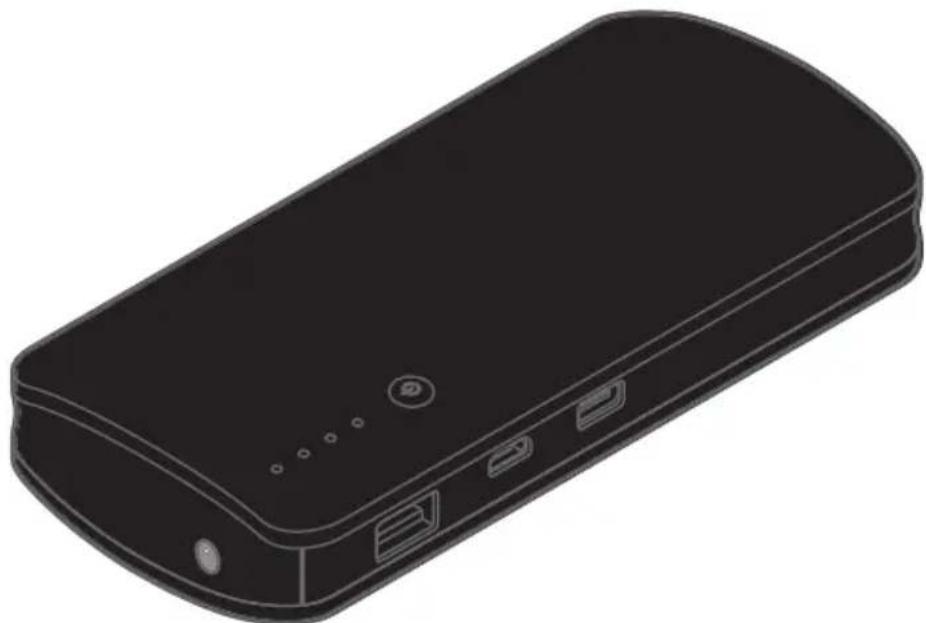
natural_image
Illustration of a black rectangular electronic device with ports and connectors (no text or symbols)User Manual 10.000mah power bank with quick charge, USB-C connector and LED light
Read the safety warnings carefully and only use the product as described in these instructions to avoid accidental injury or damage. Keep these instructions for future reference. If you pass this product on to another person, remember to give them these instructions.
Intended use
•The spare battery is designed to recharge various battery-operated mobile devices with a charging voltage of 5 V, such as mobile phones, smartphones, MP3/MP4 players, digital cameras, tablets, etc.
- The spare battery is designed for private use and is not suitable for commercial purposes.
•The spare battery is designed for indoor use.
- The spare battery can be charged via a USB port on a computer or a mains adapter (not included in delivery).
- Only use the device under moderate climatic conditions.
DANGER to children
•Children are not aware of the risks involved when handling electronic devices incorrectly. Therefore, keep children away from the product.
- Keep the packaging material out of the reach of children. There is a risk of suffocation!
WARNING - fire hazard
- The spare battery and mobile devices become warm while charging. Do not cover the devices.
- Do not use the spare battery in the vicinity of explosive gases.
WARNING-risk of injury
•The LED is very bright. Do not look directly at it. Do not shine it directly in anyone's eyes.
- Do not attempt to connect other devices or to charge batteries directly. Conventional batteries must not be charged!
- Do not expose the device to naked flames, water, damp surroundings, high temperatures, or direct sunlight, etc. There is the risk of overheating, exploding or short-circuiting.
- Protect the device from impacts, collisions, vibrations and other mechanical influences.
- Do not disassemble the device. Do not make any modifications to the device. Improper repairs can lead to a considerable risk
of injury to the user. Only have repairs to the device carried out by a specialist workshop, or contact the customer care service.
- The rechargeable battery is firmly built into the product and cannot be replaced. You should not attempt to replace it yourself. If the battery is defective, please contact the customer care service.
CAUTION - material damage
•The LED must not and cannot be replaced.
- Do not use any caustic, aggressive or abrasive products for cleaning.
- Only use the device in surrounding temperatures of 0^ to +45^ and with humidity of 40% to 70% .
Dear Customer
Your new spare battery is the perfect accessory when you spend an extended period of time without access to an electricity supply.
With a charging voltage of 5 V, you can use it to charge up various battery-operated end devices such as smartphones, digital cameras, MP3 players, tablets, etc. Depending on the battery capacity of the devices they can be charged multiple times, until the spare battery is empty.
The spare battery has the following advantages:
•smart protection against: overcharging, exhaustive discharging, overvoltage and short-circuiting
- low self-discharge
•one battery charge (10,000 mAh) is enough to charge, for example, a mobile device with a battery capacity of 500 mAh approx. 15 times or a mobile device with a battery capacity of 2,000 mAh approx. 4 times
- 1 USB connection (type A) with a "quick charge function" to charge mobile devices more quickly (up to 75% faster than standard USB connections)
- 1 micro USB connection to charge up the spare battery itself
- 1 USB connection (type C) for charging the new generation of smartphones and tablets as well as the spare battery itself. The type C USB connection has many advantages. For example, depending on the battery capacity you can fully charge the battery in under an hour.
The spare battery can be charged via a USB port on a computer or a mains adapter (not included in delivery).
We hope you will be fully satisfied with this product.
At a glance (features)
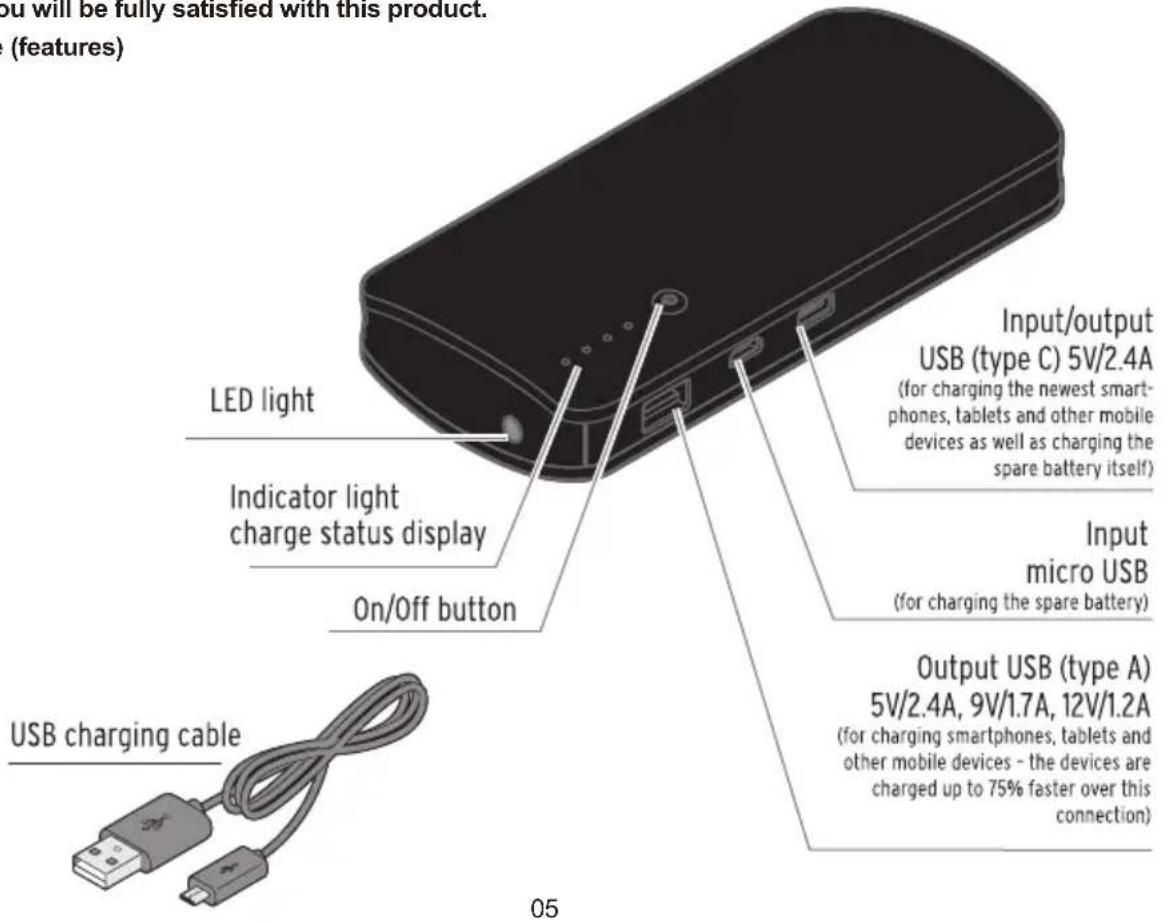
| EnglishEnglish | |
| LEDlight | LEDlight |
| Indicatorlightchargestatusdisplay | Indicatorlightchargestatusdisplay |
| USBchargingcable | USBchargingcable |
| On/Offbutton | On/Offbutton |
| Input/outputUSB(typeC)5V/2.4A | Input/outputUSB(typeC)5V/2.4A |
| (forchargingthenewestsmart-phones, tabletsandothermobiledevicesaswellas chargingthesparebatteryitself) | (forchargingthenewestsmart-phones, tabletsandothermobiledevicesaswellas chargingthesparebatteryitself) |
| InputmicroUSB | InputmicroUSB |
| (forchargingthesparebattery)(forchargingthesparebattery) | |
| OutputUSB(typeA)5V/2.4A,9V/1.7A, 12V/1.2A | OutputUSB(typeA)5V/2.4A,9V/1.7A, 12V/1.2A |
| (forchargingsmartphones,tabletsandother mobiledevices-thedevicesarechargedup to75%fasteroverthisconnection) | (forchargingsmartphones,tabletsandother mobiledevices-thedevicesarechargedup to75%fasteroverthisconnection) |
Use
• To ensure the spare battery functions smoothly it is best to charge it up regularly.
- If the internal capacity of the spare battery is too low or if it encounters electronic problems, the spare battery will switch itself off to protect your battery-operated device from any damage.
- If the spare battery is not connected to any device, it will automatically switch itself off after a few seconds.
EN
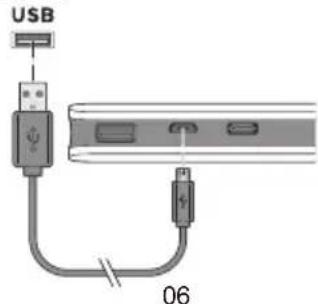
Charging the spare battery via USB
PC/Mac
NL
DE
FR
ES
| English | English |
| PC/MacUSBPC/MacUSB |
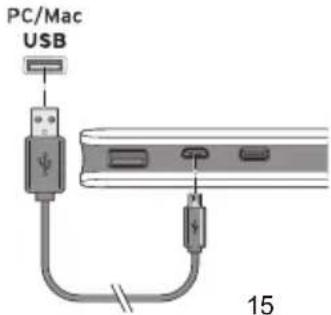
- Use the supplied USB charging cable to connect the spare battery as illustrated to a USB port on your computer or to a mains adapter with a USB socket (not included in delivery).
It will start charging immediately.
While charging, the blue indicator lights show the current battery capacity on the charging display (25%-50%-75%-100%):
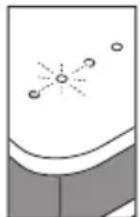
Indicator light lights up - capacity reached
Indicator light is flashing - being charged
Indicator light is off - charging capacity not yet reached
Once all four indicator lights are lit up, the spare battery is fully charged.
- After use, disconnect the USB charging cable from the USB port on your computer or the mains adapter, and from the micro USB socket on the spare battery.
Charging mobile devices with the spare battery
You should also refer to the instruction manual of your mobile device.
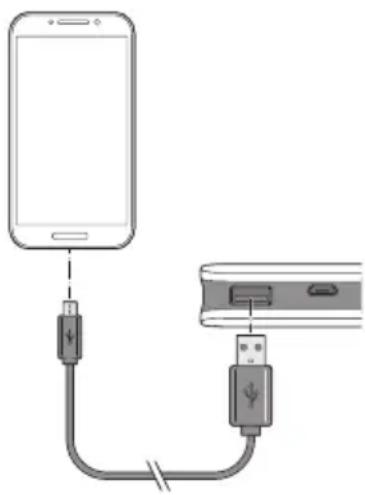
- Use the supplied USB charging cable or a USB (type C) charging cable (not included in delivery) to connect the spare battery to the device that you would like to charge.
natural_image
Diagram showing a smartphone connected to a USB cable via a connector (no text or symbols present)It will start charging immediately. The charging time depends on the battery capacity of the device that you would like to charge.
- If the device does not automatically start to charge, briefly press the On/Off button on the spare battery to activate charging.
- If you would like to stop the charging process early, press and hold the On/Off button on the spare battery until the indicator lights go out. Unplug the USB charging cable.
i
- The spare battery switches itself off automatically as soon as the connected device is fully charged.
- Once the device to be charged has been disconnected from the spare battery, the indicator lights on the spare battery continue to flash or light up for about 10 more seconds.
- If you connect mobile devices with a power consumption of less than 85 mA to be charged, the spare battery switches itself off automatically after a short time, because it does not recognise the device - see section "Problems/solutions".
Charge status display
While charging, the blue indicator lights show the current battery capacity on the charging display (25%-50%-75%-100%): If all four indicator lights are off, the spare battery is completely empty and must be charged again before the next use.
•To see the charge status of the spare battery, briefly press the On/Off button once. The charge status will be shown for approx. 30 seconds.
Resetting
Electromagnetic interference around the spare battery could lead to malfunctions. If the spare battery is not working properly, switch it off for a few seconds and then on again:
- If necessary, briefly press the On/Off button once to turn the spare battery on. The indicator lights light up.
- Briefly press the On/Off button twice in a row to turn the spare battery off. The indicator lights go out.
3.Briefly press the On/Off button once again to turn the spare battery on again. Done!
LED light
- To switch the light on, press and hold the On/Off button for approx. 2 seconds.
- To switch the light off, press and hold the On/Off button for approx. 2 seconds again.
Problems/solutions
The connected device is not charging
- Are the device and the spare battery connected correctly?
- Is the spare battery switched on? If necessary, briefly press the On/Off button once to turn the spare battery on.
- Is the spare battery charged? If none of the indicator lights flash or light up, the spare battery is empty.
- If you are using the spare battery near strong magnetic fields (e.g. from any television devices or speakers), the charging process may malfunction. Change the location, disconnect the spare battery from the device and then try connecting them again.
The spare battery switches itself off automatically after a short time
- Does the connected device have a power consumption of less than 85mA and therefore is not recognised? In this case, connect another device into the second output on the spare battery so that the current strength is above 85mA .
Technicalspecifications
| Model: | PBQ-1050 |
| Rechargeablebattery: | Lithium-ion,10,000mAh(notreplaceable) |
| Input: | DC5V/2Aand5V/2.4A(typeC) |
| Output: | DC5V/2.4A,9V/1.7A,12V/1.2AandDC5V/2.4A(typeC) |
| Chargingtime(sparebattery): | approx.4h(+/-0.5h) |
| Ambienttemperature: | 0to+45°C |
Guarantee
Lenco offers service and warranty in accordance with the European law, which means that in case of repairs (both during and after the warranty period) you should contact your local dealer.
Important note: It is not possible to send products that need repairs to Lenco directly.
Important note: If this unit is opened or accessed by a non-official service center in any way, the warranty expires.
This device is not suitable for professional use. In case of professional use, all warranty obligations of the manufacturer will be voided.
Disclaimer
Updates to Firmware and/or hardware components are made regularly. Therefore some of the instruction, specifications and pictures in this documentation may differ slightly from your particular situation. All items described in this guide for illustration purposes only and may not apply to particular situation. No legal right or entitlements may be obtained from the description made in this manual.
Disposal of the Old Device
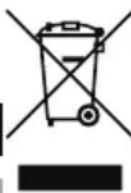
This symbol indicates that the relevant electrical product or battery should not be disposed of as general household waste in Europe. To ensure the correct waste treatment of the product and battery, please dispose them in accordance to any applicable local laws of requirement for disposal of electrical equipment or batteries. In so doing, you will help to conserve natural resources and improve standards of environmental protection in treatment and disposal of electrical waste (Waste Electrical and Electronic Equipment Directive).
CE Marking

Products with the CE marking comply with the EMC Directive (2014/30/EU) and the Low Voltage Directive (2014/35/EU) issued by the Commission of the European Community.
Hereby, Lenco Benelux BV; Thermiekstraat la, 6361 HB Nuth, The Netherlands, declares that this product is in compliance with the essential requirements and other relevant provisions of Directive 1999/5/EC.
The declaration of conformity may be consulted via techdoc@lenco.com
Service
For more information and helpdesk support, please visit www.lenco.com
Lenco Benelux BV; Thermiekstraat Ia, 6361 HB, Nuth, The Netherlands.
WAARSCHUWING - letselrisico
| English | Nederlands |
| LEDlight | LED-licht |
| Indicatorlightchargestatusdisplay | Indicatielichtjeweergaveoplaadstatus |
| USBchargingcable | USB-oplaadkabel |
| On/OffbuttonAan/uit-knop | |
| Input/outputUSB(typeC)5V/2.4A | Ingang/UitgangUSB(typeC)5V/2,4A |
| (forchargingthenewestsmart-phones, tabletsandothermobiledevicesaswellas chargingthesparebatteryitself) | (voorhetopladenvandenieuwste smartphones,tabletsenanderemobiele apparaten,evenalsvoorhetopladenvande externebatterijzelf) |
| InputmicroUSB | Ingangmicro-USB |
| (forchargingthesparebattery) | (voorhetopladenvandeexternebatterij) |
| OutputUSB(typeA)5V/2.4A,9V/1.7A, 12V/1.2A | UitgangUSB(typeA)5V/2,4A,9V/1,7A, 12V/1,2A |
| (forchargingsmartphones,tabletsandother mobiledevices-thedevicesarechargedup to75%fasteroverthisconnection) | (voorhetopladenvansmartphones,tablets enanderemobieleapparaten-apparaten wordenviadezeverbindingtot75%sneller opgeladen) |
Gebruik

Charging the spare battery via USB
| English | Nederlands |
| PC/MacUSB | PC/MacUSB |
natural_image
Diagram showing connection between a smartphone and a USB cable, no text or symbols presentnatural_image
Diagram showing a smartphone connected to a USB cable via a connector (no text or symbols present)| English | Français |
| LEDlight | TémoinàLED |
| Indicatorlightchargestatusdisplay | Affichagedel'étatdechargepartémoin lumineux |
| USBchargingcable | CâbledechargeUSB |
| On/Offbutton | BoutonMarche/arrêt |
| Input/outputUSB(typeC)5V/2.4A | Entrée/sortieUSB(typeC)5V/2,4A |
| (forchargingthenewestsmart-phones, tabletsandothermobiledevicesaswellas chargingthesparebatteryitself) | (pourchargerlessmartphones,tabletteset autresappareilsmobileslesplusrécents, ainsiquepourchargerlabatteriederechangeelle-même) |
| InputmicroUSB | EntréemicroUSB |
| (forchargingthesparebattery) | (pourchargerlabatteriederechange) |
| OutputUSB(typeA)5V/2.4A,9V/1.7A, 12V/1.2A | SortieUSB(typeA)5V/2,4A,9V/1,7A, 12V/1,2A |
| (forchargingsmartphones,tabletsandother mobiledevices-thedevicesarechargedup to75%fasteroverthisconnection) | (pourchargerdessmartphones,destablettes etd'autresappareilsmobiles—lesappareils sontchargésjusqu'à75%plusrapidement surcetteconnexion) |
Utilisation

natural_image
Diagram showing a smartphone connected to a USB cable via a cable connector (no text or symbols present)| English | Español |
| LEDlightLuzLED | |
| Indicatorlightchargestatusdisplay | Pantalladeestadodecargaconindicador lumínico |
| USBchargingcable | CabledecargaUSB |
| On/Offbutton | BotónON/OFF |
| Input/outputUSB(typeC)5V/2.4A | Entrada/salidaUSB(tipoC)5V/2.4A |
| (forchargingthenewestsmart-phones, tabletsandothermobiledevicesaswellas chargingthesparebatteryitself) | (paracargarlossmartphones,tabletasyotros dispositivosmóvilesmásnuevosasícomo paracargarlamismabateríaderepuesto) |
| InputmicroUSB | EntradamicroUSB |
| (forchargingthesparebattery)(paracargarlabateriaderepuesto) | |
| OutputUSB(typeA)5V/2.4A,9V/1.7A, 12V/1.2A | SalidaUSB(tipoA)5V/2.4A,9V/1.7A, 12V/1.2A |
| (forchargingsmartphones,tabletsandother mobiledevices-thedevicesarechargedup to75%fasteroverthisconnection) | (paracargarsmartphones,tabletasyotros dispositivosmóviles-losdispositivosse carganhastaun75%másrápidoconesta conexión) |
Uso
EN
NL
DE
FR
ES

natural_image
Diagram showing a smartphone connected to a USB cable via a cable connector (no text or symbols present)
- Intended use
- DANGER to children
- WARNING - fire hazard
- WARNING-risk of injury
- CAUTION - material damage
- Dear Customer
- Use
- Charging mobile devices with the spare battery
- i
- Charge status display
- Resetting
- LED light
- Problems/solutions
- The connected device is not charging
- The spare battery switches itself off automatically after a short time
- Guarantee
- Disclaimer
- Disposal of the Old Device
- CE Marking
- Service
- WAARSCHUWING - letselrisico
- Gebruik
- Utilisation
- Uso
Brand : LENCO
Model : PBQ1050
Category : Power bank