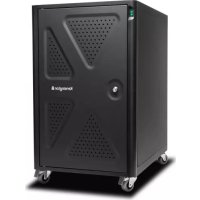
KENSINGTON K64415NA - Secure charging cabinet

K64415NA - Secure charging cabinet KENSINGTON - Free user manual and instructions

Find the device manual for free K64415NA KENSINGTON in PDF.

📄 63 pages English EN 💬 AI Question ⚙️ Specs
Notice KENSINGTON K64415NA - page 3
SKIP

Frequently Asked Questions - K64415NA KENSINGTON

User questions about K64415NA KENSINGTON

0 question about this device. Answer the ones you know or ask your own.

Ask a new question about this device

L'email reste privé : il sert seulement à vous prévenir si quelqu'un répond à votre question.

No questions yet. Be the first to ask one.

Download the instructions for your Secure charging cabinet in PDF format for free! Find your manual K64415NA - KENSINGTON and take your electronic device back in hand. On this page are published all the documents necessary for the use of your device. K64415NA by KENSINGTON.

USER MANUAL K64415NA KENSINGTON

AC12 Security Charging Cabinet

INSTRUCTION GUIDE ISTRUZIONI

GUIDE D'INSTRUCTIONS MANUAL DE INSTRUCCIONES

natural_image Line drawing of a portable electrical cabinet with various cable and connectors, including a 40X and 12X12X labels (no text or symbols on main objects)

Register Now!

text_image ntents A B C D E F G H I J

Components
KENSINGTON K64415NA - AC12 Security Charging Cabinet - 1

text_image K L M P Q N O R S

A Security Charging Cabinet

B Cable Ties (40X)

C Instruction Guide

D Warranty Card

E Shelf Labels

F UK Adapter (12x)

G EU Adapter (12x)

H UK Power Cable

I EU Power Cable

J Keys (2X)

K Power Switch

L Cable Grommets

M Shelves for Devices

N Wheel

- Wheel Brake (Front Wheels)

P Rear Door Lock

Q Thumb Screws

R Power Connector

S Side Door Panel

Getting Started

KENSINGTON K64415NA - Getting Started - 1

Important Safeguards - We want you to be safe!

These cabinets are electrical devices. Use care with them and follow these important safeguards:

  • Electrical devices are not toys. Children are often unaware of the hazards associated with electrical devices, so this unit must always be used by adults or with adult supervision.
  • Do not use this unit outdoors.
  • Liquids should not be stored in, set on or placed inside this unit.
  • Never unplug this product from the outlet when your hands are wet.
  • Set the power switch to the down OFF position before you unplug the unit from the wall, plug the unit into the wall, or plug in devices.
  • Be careful with the power cord. Do not jam the power cord against sharp edges. Do not use the unit if the cord appears to be damaged or if the ground prong is missing. When the unit is not plugged in, wrap the power cord and store in the IT area.
  • Do not use an extension cord with this unit.
  • Inadequate repair can create significant hazards to users and is not covered by the warranty. Repairs should always be performed by a qualified electrician.
  • Do not sit, stand or ride trolley. Do not run over cable. If cable is damaged unplug it.

Electrical Testing

  • If you are concerned about electric surges in your building and have decided to use a surge protector, choose one that is 10 Amps continuous or greater.
  • Before using your new charging cabinet, have a qualified electrician verify the current draw does not exceed the rating of the unit when all the devices are installed.
  • Test the contact integrity of the wall outlet using a receptacle tension tester such as a Woodhead 1760 or a Safeplug 1700.
  • Test the branch circuit for ground integrity and branch circuit protection.
  • Do not plug in the unit if the switch, receptacles, or power cord have been damaged or if the ground prong is missing from the plug. If repairs are ever needed, they should be performed by a qualified electrician.

Locks

Use the same key for both the front and rear locks.

KENSINGTON K64415NA - Locks - 1

text_image Technical diagram showing three views of a mechanical device with labeled components and directional arrows indicating motion or assembly.

Loading Devices, Cable Management

1 Make sure power switch is in the off position and the external AC power cable is unplugged before installing power adapters.

KENSINGTON K64415NA - Loading Devices, Cable Management - 1

text_image Diagram showing two electrical connection setups: one with a switch and arrow, the other with a plug inserted into a motor terminal.

2 Unlock the rear door and remove the two thumbscrews.

KENSINGTON K64415NA - Loading Devices, Cable Management - 2

text_image Diagram illustrating mechanical assembly with labeled components and directional arrows indicating motion or movement.

3 Remove the rear door panel, remove the side door panel screw, then remove the side door panel.

KENSINGTON K64415NA - Loading Devices, Cable Management - 3

text_image Technical diagram showing a device interior with labeled components and directional arrows, including a magnified view of the internal structure.

4 Plug the appropriate regional adapter into the power strip.

UKEU
KENSINGTON K64415NA - Loading Devices, Cable Management - 4

natural_image Diagram showing a cable being inserted into a rack-mounted device, with no visible text or symbols.

KENSINGTON K64415NA - Loading Devices, Cable Management - 5

natural_image Diagram showing a cable connector inserted into a panel with three socket outlets, no text or symbols present

5 Plug your device power adapter to the regional adapter.

EUUK
KENSINGTON K64415NA - Loading Devices, Cable Management - 6

natural_image Diagram showing connections between a wall-mounted power plug and an electrical outlet with a plug, no text or symbols present

KENSINGTON K64415NA - Loading Devices, Cable Management - 7

natural_image Diagram of two connected electrical connectors with power outlets, showing wiring and connection (no text or symbols)

6 Store the power adapter in bay (if applicable).

KENSINGTON K64415NA - Loading Devices, Cable Management - 8

natural_image Diagram of a cable installation or power strip connection between two wall-mounted devices, showing plug and socket connections (no text or symbols present)

* Remove tray if necessary.

7 Route the cable through the cable hole.

KENSINGTON K64415NA - Loading Devices, Cable Management - 9

natural_image Diagram of an electrical cabinet interior showing wiring and a hanging device (no text or symbols)

8 Route the cable through the desired front grommet.

KENSINGTON K64415NA - Loading Devices, Cable Management - 10

natural_image Technical diagram of an electrical cabinet with wiring and a cable inserted into a socket (no text or symbols)

9 Optional: Use cable ties to secure cables to chassis as desired.

KENSINGTON K64415NA - Loading Devices, Cable Management - 11

natural_image Pure diagram of a curved pipe or conduit with circular ends, no text or symbols present

10 Plug into personal computing device.

KENSINGTON K64415NA - Loading Devices, Cable Management - 12

natural_image Diagram of a heating unit with airflow indicators and a central device (no text or symbols)

11 Repeat steps 4 through 10 for each device.

12 Replace the side and rear door panels.

KENSINGTON K64415NA - Loading Devices, Cable Management - 13

text_image Technical diagram showing internal components of a server rack with labeled parts (a, b) and directional arrows indicating movement or assembly.

13 Plug in external AC power cable.

KENSINGTON K64415NA - Loading Devices, Cable Management - 14

text_image UKEU

14 Turn on power switch to start charging. Check charging status on personal computing device.

KENSINGTON K64415NA - Loading Devices, Cable Management - 15

text_image Diagram showing a device panel with an open button and a close-up of its internal structure, including labeled buttons and connectors.

15 Close the front door and lock cabinet using key.

KENSINGTON K64415NA - Loading Devices, Cable Management - 16

text_image Diagram showing a door-mounted device with two inset views of the door mechanism and a close-up of its internal components.

Securing the Cabinet

Use a cable lock (K64615 – sold separately) to lock the cabinet and tether it to an anchor.

KENSINGTON K64415NA - Securing the Cabinet - 1

text_image Technical diagram showing a device setup with labeled components and an inset view of a mechanical component being inserted.

Wheel Locks

KENSINGTON K64415NA - Wheel Locks - 1

natural_image Diagram of a wheeled cart with wheels and two lock icons showing mechanical adjustment (no text or symbols)

Troubleshooting

How do I know if my devices will draw more than the allowed current?

Total wattage for all devices attached must be below cabinet's maximum rating of 2400 watts. Have a qualified electrician verify the unit's current draw. Perform this test with devices installed and batteries discharged.

The devices are all plugged in, but they won't charge. What do I do?

First Check the cabinet: With the switch in the down OFF position, inspect the main power cord, and plug to make sure they're undamaged. Unplug the cabinet, and plug the cord into a working power outlet.

Unlock and open the rear door. Check the internal circuit breaker located on the power strip, press the button to reset.

KENSINGTON K64415NA - Troubleshooting - 1

natural_image Technical line drawing of a mechanical assembly with a valve and housing (no text or symbols)

Next, check the devices: Verify that each device is connected to its power adapter and that each brick is plugged into the power column. Move the switch to the up ON position to direct power to the devices. Still need some help? Call Kensington at 1-800-535-4242 for assistance.

My power cord/plug is damaged. Is it covered under warranty?

No, it is not covered under warranty. If the plug is damaged, have a qualified electrician replace it. If you need a replacement cord, contact Kensington at 1-800-535-4242.

When I plug in the unit it trips the circuit breaker. What is wrong?

The cabinets are designed to run on a 10 amp circuit. If you have other equipment or appliances plugged into the same circuit you may be overloading it. Have a qualified electrician check that adequate power is available in the circuit.

My unit was damaged during shipment. What should I do?

Kensington has a program established with our freight carriers to address ship damage. Please contact Kensington at 1-800-535-4242 and we'll work with you.

How do I find the unit's serial number?

The serial number label is located on back of the unit.

KENSINGTON K64415NA - Troubleshooting - 2

text_image SN

Technical Support

Technical support is available to all registered users of Kensington products. Technical Support contact information can be found on the back page of this manual.

Web Support

You may find the answer to your problem in the Frequently Asked Questions (FAQ) section of the Support area on the Kensington Website: www.support.kensington.com.

Telephone Support

There is no charge for technical support except long-distance charges where applicable. Please visit www.kensington.com for telephone support hours. In Europe, technical support is available by telephone Monday to Friday 09:00 to 18:00 (Central European time).

Please note the following when calling support:

  • Call from a phone where you have access to your device.
  • Be prepared to provide the following information:
    – Name, address, and telephone number
    – Name of the Kensington product
  • Make and model of your computer
    – Symptoms of the problem and what led to them

CE DECLARATION OF CONFORMITY

Kensington declares that this product is in compliance with the essential requirements and other relevant provisions of applicable EC directives.

For Europe, a copy of the Declaration of Conformity for this product may be obtained by clicking on the ‘Compliance Documentation’ link at www.support.kensington.com.

INFORMATION FOR EU MEMBER-STATES ONLY

KENSINGTON K64415NA - INFORMATION FOR EU MEMBER-STATES ONLY - 1

The use of the symbol indicates that this product may not be treated as household waste. By ensuring this product is disposed of correctly, you will help prevent potential negative consequences for the environment and human health, which could otherwise be caused by inappropriate waste handling of this product. For more detailed information about recycling of this product, please contact your local city office, your household waste disposal service, or the shop where you purchased the product.

Kensington and the ACCO name and design are registered trademarks of ACCO Brands. All other registered and unregistered trademarks are the property of their respective owners.

© 2016 Kensington Computer Products Group, a division of ACCO Brands USA LLC. Any unauthorized copying, duplicating, or other reproduction of the contents hereof is prohibited without written consent from Kensington Computer Products Group. All rights reserved. 04/16

Sommaire
KENSINGTON K64415NA - INFORMATION FOR EU MEMBER-STATES ONLY - 2

text_image mmaire A B C D E F G H I J

Composants
KENSINGTON K64415NA - INFORMATION FOR EU MEMBER-STATES ONLY - 3

text_image K L M P Q N O R S
text_image Technical diagram of a mechanical device with labeled components and directional arrows indicating motion or assembly.

KENSINGTON K64415NA - INFORMATION FOR EU MEMBER-STATES ONLY - 4

text_image Diagram showing a device with labeled components and directional arrows indicating rotation or adjustment.
text_image Diagram showing two electrical connection setups: one with a switch and arrow, the other with a plug and plug inserted into a motor.
text_image Diagram illustrating mechanical assembly with labeled components and directional arrows indicating motion or movement.
text_image Technical diagram showing internal components of a server rack with labeled parts (a, b) and directional arrows indicating movement or assembly.
natural_image Diagram showing a cable being inserted into a rack-mounted device, with no visible text or symbols.

KENSINGTON K64415NA - INFORMATION FOR EU MEMBER-STATES ONLY - 5

natural_image Diagram showing a cable connector inserted into a panel, with an arrow indicating direction (no text or symbols present)
natural_image Diagram showing connections between a wall-mounted power plug, socket, and cable (no text or symbols)

KENSINGTON K64415NA - INFORMATION FOR EU MEMBER-STATES ONLY - 6

natural_image Diagram of two connected electrical connectors with power outlets, showing wiring and connection (no text or symbols)
natural_image Diagram of a cable installation with two connectors and a power plug, showing connections without any text or symbols.
natural_image Technical diagram of an electrical cabinet with internal components and wiring, showing a cable being inserted into a wall (no text or symbols present)
natural_image Technical diagram of an electrical cabinet with wiring and a cable inserted into a socket (no text or symbols)
natural_image Line drawing of a curved pipe with circular ends and a loop, connected to vertical reference lines (no text or symbols)
natural_image Diagram of a heating unit with airflow indicators and ventilation system (no text or labels)
text_image Diagram illustrating the internal structure and rotation of a device, labeled with components a, b, and c.
text_image Diagram showing a device panel with an open button and a close-up of the internal portion, labeled in Chinese.
text_image Diagram showing a door-mounted device with two inset views of the handle mechanism, illustrating mechanical adjustment or assembly.

Fixation du coffre

text_image Technical diagram showing a mechanical device connected to a control unit, with an inset illustrating the assembly process.
natural_image Diagram of a car wheel pulley system with two lock states and directional arrows indicating motion (no text or symbols)
natural_image Technical line drawing of a mechanical assembly with a downward arrow indicating a component (no text or symbols present)

Assistance technique

text_image nalt A B C D E F G H I J

Komponenten
KENSINGTON K64415NA - Assistance technique - 1

text_image K L M P Q N O R S
text_image Warning sign depicting a lightning bolt symbol inside a triangle

KENSINGTON K64415NA - Assistance technique - 2

natural_image Prohibition sign showing a person sitting on a bench (no text or symbols)

KENSINGTON K64415NA - Assistance technique - 3

natural_image Prohibition sign showing a person crossing stairs (no text or symbols)

KENSINGTON K64415NA - Assistance technique - 4

text_image Warning symbol image with exclamation mark inside a triangle
text_image Technical diagram showing three views of a mechanical device with labeled components and directional arrows indicating motion or assembly.
text_image Diagram showing two electrical connection setups: one with a power outlet and arrow, the other with a plug inserted into a motor terminal.
text_image Diagram illustrating mechanical assembly with labeled components and directional arrows indicating motion or movement.
text_image Technical diagram showing a device interior with labeled components and directional arrows, including a close-up of the component being rotated.
natural_image Diagram showing a cable being inserted into a rack-mounted device, with no visible text or symbols.

KENSINGTON K64415NA - Assistance technique - 5

natural_image Diagram showing a cable connector inserted into a panel with three socket outlets, no text or symbols present
natural_image Diagram showing connections between a wall-mounted power plug and an electrical outlet with a plug, no text or symbols present

KENSINGTON K64415NA - Assistance technique - 6

natural_image Diagram of two connected electrical connectors with power outlets, showing wiring and connection (no text or symbols)
natural_image Diagram of a cable installation or power strip connection between two wall-mounted devices, showing plug and socket connections (no text or labels)
natural_image Technical diagram of an electrical cabinet interior showing wiring and a hanging device (no text or symbols)
natural_image Technical diagram of an electrical cabinet with wiring and a cable inserted into a panel (no text or symbols)
natural_image Pure diagram of a curved pipe with circular ends and a loop, no text or symbols present
natural_image Diagram of a heating unit with airflow indicators and a central device (no text or symbols)
text_image Technical diagram showing a device interior with labeled components and directional arrows, including a magnified view of the internal structure.
text_image Diagram showing a device with an icon and a magnified view of the interior panel, likely illustrating a system or installation procedure.
text_image Diagram showing a door-mounted device with two inset views of the mechanism: clockwise and clockwise rotation, illustrating mechanical or electrical motion.
text_image Technical diagram showing a device setup with labeled components and directional arrows indicating assembly or connection.

Feststeller

KENSINGTON K64415NA - Feststeller - 1

natural_image Diagram of a car wheel pulley system with two lock states and directional arrows indicating motion (no text or symbols)

Fehlerbehebung

natural_image Technical line drawing of a mechanical assembly with a downward arrow indicating a component (no text or symbols present)
text_image ntenuto A B C D E F G H I J

Componenti
KENSINGTON K64415NA - Fehlerbehebung - 1

text_image K L M P Q N O R S
text_image Warning sign depicting a lightning bolt symbol inside a triangle

KENSINGTON K64415NA - Fehlerbehebung - 2

natural_image Prohibition sign showing a person sitting on a bench (no text or symbols)

KENSINGTON K64415NA - Fehlerbehebung - 3

natural_image Prohibition sign showing a person crossing stairs (no text or symbols)

KENSINGTON K64415NA - Fehlerbehebung - 4

text_image Warning symbol image with exclamation mark inside a triangle
text_image Technical diagram showing three views of a mechanical device with labeled components and directional arrows indicating motion or assembly.
text_image Diagram showing two electrical connection setups: one with a power outlet and arrow, the other with a plug inserted into a motor terminal.
text_image Diagram illustrating mechanical assembly with labeled components and directional arrows indicating motion or movement.
text_image Technical diagram showing a device interior with labeled components and directional arrows, including a close-up of the component being rotated.
natural_image Diagram showing a cable being inserted into a rack-mounted device, with no visible text or symbols.

KENSINGTON K64415NA - Fehlerbehebung - 5

natural_image Diagram showing a cable connector inserted into a panel with three socket outlets, no text or symbols present
natural_image Diagram showing connections between a wall-mounted power plug and an electrical outlet with a plug, no text or symbols present

KENSINGTON K64415NA - Fehlerbehebung - 6

natural_image Diagram of two connected electrical connectors with power outlets, showing wiring and connection (no text or symbols)
natural_image Diagram of a cable installation with two connectors and power outlets, no text or symbols present
natural_image Technical diagram of an electrical cabinet interior showing wiring and a hanging device (no text or symbols)
natural_image Technical diagram of an electrical cabinet with wiring and a cable inserted into a socket (no text or symbols)
natural_image Line drawing of a curved pipe with circular ends and a loop, connected to vertical lines (no text or symbols)
natural_image Diagram of a heating unit with airflow indicators and a central device (no text or symbols)
text_image Technical diagram showing internal components of a server rack with labeled parts (a, b) and directional arrows indicating movement or assembly.
text_image Diagram showing a device panel with an open button and a close-up of its internal structure, labeled in Chinese.
text_image Diagram showing a door-mounted device with clockwise adjustment arrows and a close-up of its internal mechanism.
text_image Technical diagram showing a device setup with labeled components and an inset view of a mechanical component being inserted.

Blocchi delle ruote

KENSINGTON K64415NA - Blocchi delle ruote - 1

natural_image Diagram of a car wheel pulley system with two lock states and directional arrows indicating motion (no text or symbols)
natural_image Technical line drawing of a mechanical assembly with a downward arrow indicating a component (no text or symbols present)
text_image K L M P Q N O R S
text_image Technical diagram showing three views of a mechanical device with labeled components and directional arrows indicating motion or assembly.
text_image Diagram showing two electrical connection setups: one with a switch and arrow, the other with a plug inserted into a motor terminal.
text_image Diagram illustrating mechanical assembly with labeled components and directional arrows indicating motion or movement.
text_image Technical diagram showing a device interior with labeled components and directional arrows, including a close-up of the component being rotated.
natural_image Diagram showing a cable being inserted into a rack-mounted device, with no visible text or symbols.

KENSINGTON K64415NA - Blocchi delle ruote - 2

natural_image Diagram showing a cable connector inserted into a panel with three socket outlets, no text or symbols present
natural_image Diagram showing connections between a wall-mounted power plug and an electrical outlet with a plug, no text or symbols present

KENSINGTON K64415NA - Blocchi delle ruote - 3

natural_image Diagram of two connected electrical connectors with power outlets, showing wiring and connection (no text or symbols)
natural_image Diagram of a cable installation with two connectors and power outlets, no text or symbols present
natural_image Technical diagram of an electrical cabinet interior showing wiring and a hanging device (no text or symbols)
natural_image Technical diagram of an electrical cabinet with wiring and a cable inserted into a socket (no text or symbols)
natural_image Pure diagram of a curved pipe or conduit with circular ends, no text or symbols present
natural_image Diagram of a heating unit with airflow indicators and a central device (no text or symbols)
text_image Technical diagram showing internal components of a server rack with labeled parts (a, b) and directional arrows indicating movement or assembly.
text_image Diagram showing a device panel with an open button and a close-up of its internal structure, labeled in Chinese.
text_image Diagram showing a door-mounted device with two inset views of the mechanism: clockwise and clockwise rotation, illustrating mechanical assembly or motion.
text_image Technical diagram showing a device setup with labeled components and an inset view of a mechanical component being inserted.
natural_image Diagram of a car wheel pulley system with two lock states and directional arrows indicating motion (no text or symbols)
natural_image Technical line drawing of a mechanical assembly with a downward arrow indicating a component (no text or symbols present)
text_image dice A B C D E F G H I J

Componentes
KENSINGTON K64415NA - Blocchi delle ruote - 4

text_image K L M P Q N O R S
text_image Technical diagram showing three views of a mechanical device with labeled components and directional arrows indicating motion or assembly.
text_image Diagram showing two electrical connection setups: one with a switch and arrow, the other with a plug inserted into a motor terminal.
text_image Diagram illustrating mechanical assembly with labeled components and directional arrows indicating motion or movement.
text_image Technical diagram showing a device interior with labeled components and directional arrows, including a close-up of the component being rotated.

4 Ligue o adaptador regional adequado ao multiplicador de tomadas.

UKEU
KENSINGTON K64415NA - Blocchi delle ruote - 5

natural_image Diagram showing a cable being inserted into a rack-mounted device, with no visible text or symbols.

KENSINGTON K64415NA - Blocchi delle ruote - 6

natural_image Diagram showing a cable connector inserted into a panel with three socket outlets, no text or symbols present
natural_image Diagram showing connections between a wall-mounted power plug and an electrical outlet with a plug, no text or symbols present

KENSINGTON K64415NA - Blocchi delle ruote - 7

natural_image Diagram of two connected electrical connectors with power outlets, showing wiring and connection (no text or symbols)
natural_image Diagram of a cable installation with two connected components, showing connections between outlets and a wall-mounted device (no text or symbols present)
natural_image Technical diagram of an electrical cabinet interior showing wiring and a hanging device (no text or symbols)
natural_image Technical diagram of an electrical cabinet with wiring and a cable inserted into a panel (no text or symbols)

9 Opcional: utilize abraçadeiras para fixar os cabos à plataforma, conforme desejado.

KENSINGTON K64415NA - Blocchi delle ruote - 8

natural_image Pure diagram of a curved pipe or conduit with circular ends, no text or symbols present
natural_image Diagram of a heating unit with airflow indicators and ventilation system (no text or symbols)

11 Repita os passos 4 a 10 para cada dispositivo.

text_image Diagram illustrating the internal structure and rotation of a server rack, labeled with components a, b, and c.

13 Ligue o cabo de CA externo.

KENSINGTON K64415NA - Blocchi delle ruote - 9

text_image UKEU
text_image Diagram showing a device panel with an open button and a close-up of its internal structure, labeled in Chinese.
text_image Diagram showing a door-mounted device with two inset views of the door mechanism and a close-up of its internal components.

Proteção do armário

text_image Technical diagram showing a device setup with a pump, cable, and control panel connected to a box, with an inset magnified view highlighting the component.
text_image Diagram showing a cart with wheels and two lock mechanism states, illustrating mechanical adjustment or locking process.
natural_image Technical line drawing of a mechanical assembly with a downward arrow indicating a component (no text or symbols present)

Kensington Computer Products Group

A Division of ACCO Brands

1500 Fashion Island Blvd, 3rd Floor

San Mateo, CA 94404

ACCO Brands Europe

A Division of ACCO Brands

Europe

Oxford House, Oxford Road

Aylesbury, Buckinghamshire,

HP21 8SZ

United Kingdom

ACCO Brands Canada Inc

7381 Bramalea Rd

Mississauga,

ON L5S 1C4

Canada

ACCO Australia

Level 2,8 Lord St

Botany NSW 2019

Australia

R.F.C. AME640229-1W3

Acco Brands Chile S.A.,

Avda. San Josemaría

Escrivá de Balaguer N°5773

Vitacura, C.P. 7640970

Santiago, Chile

Importado e Distribuído por:

TILIBRA PRODUTOS DE PAPELARIA LTDA.

CNPJ: 44.990.901/0001-43

Rua Aymorés, 6-9 – Bauru/SP – Brasil

CEP 17013-900

Designed in California, U.S.A. by Kensington

Made in Taiwan

Patents Pending

www.kensington.com

Manual assistant
Powered by Anthropic
Waiting for your message
Product information

Brand : KENSINGTON

Model : K64415NA

Category : Secure charging cabinet