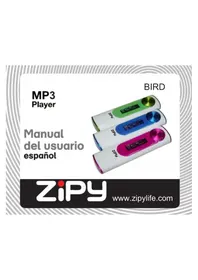
Bird - Mp3 player Zipy - Free user manual and instructions
Find the device manual for free Bird Zipy in PDF.



| Product Type | MP3 Player |
| Brand | Zipy |
| Model | Bird |
| Screen | LCD |
| Main Functions | Music playback, voice recording, FM radio (optional) |
| Connectivity | Mini USB port (charging and data transfer) |
| Power Supply | Rechargeable internal battery via USB |
| Initial charging time | At least 5 hours |
| PC Compatibility | Windows 2000, XP, Vista; 128 MB RAM, 500 MB disk space, USB port |
| Included accessories | Earphones, quick start guide |
| Transfer method | Drag and drop via Windows Explorer (removable disk) |
| Reset | Reset hole with a pointed object |
| Safety | Do not expose to water, excessive heat; use at moderate volume |
| Maintenance | Clean with a dry cloth, avoid moisture |
| Warranty | 2 years (1st year: manufacturing defects; 2nd year: upon proof of manufacturing defect) |
| Compliance | European directives, RoHS |
| Country of manufacture | China |
Frequently Asked Questions - Bird Zipy
User questions about Bird Zipy
0 question about this device. Answer the ones you know or ask your own.
Ask a new question about this device
Download the instructions for your Mp3 player in PDF format for free! Find your manual Bird - Zipy and take your electronic device back in hand. On this page are published all the documents necessary for the use of your device. Bird by Zipy.
USER MANUAL Bird Zipy
Waste management for all of your containers and domestic packagings that you deposit in the recycling bin
Do not deposit the device or the battery in the bin. Please, put it in a recycling bin
or carry it to your local nearby store
Whenever you want to use this menu, select the option that provides the best experience. Choose one of the options available for each menu.
CONDITIONS DE GARANTIE AID
When using the device, remember to follow the following precautions to prevent the deformation of the case, the breakage of the screen or glass, or also may cause loss of fluid.
All this causes a malfunction. Remember:
- Do not expose the device to water. The device is not waterproof.
- Be careful not to throw the device in a sink or other water container.
- Do not use the device in wet places or outside in bad weather, for example, if it rains or snows.
If you touch the device with wet hands or is placed in a wet garment, the device may get wet and cause a malfunction. - Be sure not to sit down with the device in your pocket.
- Do not expose the device to heat. The damage to the device may be irreversible and can cause an abnormal reaction in the battery: swelling or explosion.
- Do not bring the device to heat sources: radiators, heaters, etc..

MANUAL DEL USUARIO.
- Do not expose to high temperatures such as in direct sunlight or in a car parked in the sun.
- When you connect the headphones take care not to damage the connection port.
- When you disconnect the headphones from the device, try to hold the headphone plug. Pulling the headphone cord can damage it.
- Avoid listen at very high levels, because prolonged listening could damage your hearing.
- At high levels, the external sound can be inaudible and could be dangerous, especially driving a car or bicycle.
PRECAUTIONS AND MAINTENANCE
When using the device, remember to follow the following precautions to prevent the deformation of the case, the breakage of the screen or glass, or also may cause loss of fluid.
All this causes a malfunction. Remember:
- Do not expose the device to water. The device is not waterproof.
- Be careful not to throw the device in a sink or other water container.
- Do not use the device in wet places or outside in bad weather, for example, if it rains or snows.
If you touch the device with wet hands or is placed in a wet garment, the device may get wet and cause a malfunction. - Be sure not to sit down with the device in your pocket.
- Do not expose the device to heat. The damage to the device may be irreversible and can cause an abnormal reaction in the battery: swelling or explosion.
- Do not bring the device to heat sources: radiators, heaters, etc..
- Do not expose to high temperatures such as in direct sunlight or in a car parked in the sun.
- When you connect the headphones take care not to damage the connection port.
- When you disconnect the headphones from the device, try to hold the headphone plug. Pulling the headphone cord can damage it.
-
Avoid listen at very high levels, because prolonged listening could damage your hearing.
-
At high levels, the external sound can be inaudible and could be dangerous, especially driving a car or bicycle.
Quick start guide
Is there a manual?
You have a detailed user manual within the flash of the player.
Please download the manual from the flash of the player to your PC.
What's accessories in the box

Earphones

Quick start guide
What else you'll need.
A computer with:
Windows 2000, XP, Vista
128 MB RAM
500MB Hard Disk space
USB port
Internet connection (preferable)
Overview of controls and connections
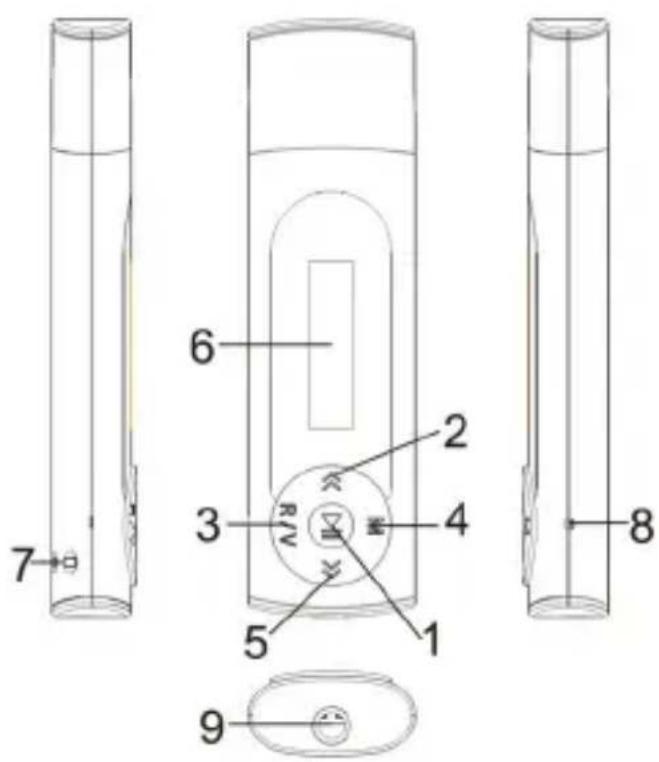
- 【▶】:Power on/off /Play/Pause button
- 【<】:Backward/Volume down
- 【R/V】: Record/volume
- 【M】: Menu button
- 【>>】: Forward/Volume up
- LCD
- Hang strip hole
- RESET hole/Microphone
- Earphone jack
1. Connect and charge
- Connect to PC
When you connect the player to the PC, it automatically charges.
- Before you use the player for the first time, charge it for at least 5 hours.
- Connect the supplied USB cable to the mini USB port of the player, the other end to your PC.
The player will start to charge as soon as it is connected to your PC.
NOTE When the batteries are almost empty, the "low battery" screen blinks. The player saves all settings and unfinished recordings and switches off in less than 60 seconds.
2. Transfer
The player appears as a USB mass storage device in Windows Explorer. You can organize files, and transfer music to your player during USB connection.
- Transfer music
- Click and highlight one or more songs to transfer between your player and your computer.
- Use drag and drop actions to complete your transfer.
3. Enjoy
Turn on and play
- To turn on, long press button to turn power on the player.
- To turn off, press and hold button.
Main menu
- Play Music Play your digital music tracks
- VOICE Play the recording file
FM Radio Listen to FM radio(Optional function) - Setting Customize the settings of your player
- Info System information
- Folder Browse files in the player
Navigate the menu
Your player has an intuitive menu navigation system to guide you through various settings and operations.
M button: Enter main menu, submenu or return.
Skip button [ / > > ] : Shift menus/fast backward/fast forward.
Play/Pause button : Play, Pause, or Confirm.
Adjust Volume
In MUSIC, VOICE, FM mode, short press [R/V] button and press [ / > ] to turn up/down the volume.
ZiPy MANUAL DEL USUARIO
MUSIC
Select "√" in main menu and press 【M】 button to enter.
Press【<</>>】buttons to select music files and press▶ to playback it, press▶ again to pause.
Troubleshooting
How do I reset my player?
Insert a small pin or other sharp object into the reset hole of the player.
Hold until the player shuts down.
Need help?
User Manual
See the user manual that came with your player.
VER:2.0
AID WARRANTY CONDITIONS
AID, in compliance with the Customer Protection Law (Ley 23/2003, July 10th, of Warranty in the Sale of Consumer Goods, BOE no. 165, 11/07/2003), offers Direct Warranty to Spain and Portugal customers for all our brands' products: ZIPY, MUSE, NEW ONE, AC-RAYAN, TNB, BARKAN, BRASFORMA, THE COMPLEMENTS, and GO BY ZIPY, under the following conditions:
A - Our products have a two year warranty. During the first year original defects that may be detected are repaired. In those cases stipulated by law, the buyer will be entitled to the replacement of the device by a new one, provided that the defects are not due to the negligence or exclusive fault of the buyer in handling the device. During the second year the buyer will need to prove that the malfunctioning of the device is due to a manufacturing defect. In both cases the warranty will apply provided that:
- The product has been used for its destined purpose alone.
- It was not opened, manipulated or altered in any way by someone other than the Official Technical Service.
- It has not undergone shock, flood, overheating, electric overcharge or any other external circumstance that may constitute a possible reason of INVALIDATING the warranty.
- The product will be returned to AID in proper packaging together with the receipt where the brand and type of product, the date of the purchase, the name and address of the shop that sold it and the reason for the malfunctioning should be clearly stated.
Any of the following circumstances invalidates the present warranty:
- Breaking the ports, the screen or the glass.
- Loss of liquid from the screen.
- Wearing out, obvious marks of incorrect manipulation, inappropriate use, ill-treatment, shock, falls, dirt, and so on.
- The data contained in the products are under no circumstances covered by any warranty whatsoever, nor are they to be considered during the physical repairing process of the products. AID guarantees absolute confidentiality of the data.
- AID does not cover the incorrect configuration or installation of the software / hardware on the part of the client, neither as a component nor as a peripheral, included prives / controllers included.
- The legislation on guarantees sets certain limits. "the guarantee does not cover additional components such as batteries, nor any elements that are subject to maintenance due to its use such as earphones". These accessories have a 6 months guarantee.
- Waterproof bags have a 48-hour trial period, such as indicated on the product itself, therefore once this time period is elapsed they will no longer be covered by any guarantee.
- Final users do not need to send us the device accessories, especially if they are not the original ones, since we will not be held responsible for them.
CASES:
- If the product is out our guarantee, the AID technical department will facilitate a budget for the repair by fax or e-mail. Said budget will need to be authorized in writing, sealed and signed, and the user will have to satisfy the repair fee as well as the freight.
- If the budget is not accepted a diagnosis fee will be charged. (6€)
- Repairs have a 90 days guarantee, provided that the breakdown is under the same concept and in the case of budgeted breakdowns alone.
B - All the freight costs for the product will be covered by AID using only the transportation company designed by AID following the authorization procedure.
The expenses derived from incorrect or unjustified returns on the part of the client will be covered by the client alone.
C - Any incidence detected at the moment of the reception of the merchandise must be immediately notified at the AID Post-Sales Department: maria@accessosdigital.com in compliance with Article 366 from the Code of Commerce, AID will not consider complaints about breakages, shocks or absence of boxes or pieces 24 hours after the delivery of the merchandise.
In the case of shipments originated in Canarias, Ceuta and Melilla, AID will not pay the customs tax nor any kind of reimbursable expenses.

MANUAL DEL USUARIO
DECLARATION OF CONFORMITY
ACCESORIOS INTELIGENTES DIGITAL S.A.
C/CARPINTEROS, 6, OF-13 VILLAVICIOSA DE ODON. 28670 MADRID
We declare under our sole responsibility that the product:
MP3: BIRD which belongs to the brand Zipy, made in China
Conforms with the requirements of the Directives below by compliance with the following standards listed:
EN55013:2001+A1:2003+A2:2006
EN55022:2006+A1:2007 (Class B)
EN61000-3-2:2006
EN61000-3-3:2008
EN55024:1998+A1:2001+A2:2003
EN55022:2007
In accordance with the provisions of the Directive 99/05/EC, European Parliament and Council on March 9, 1999, transposed into Spanish legislation by Royal Decree 1890/2000, of November 20, 2000.
Place and date of issue Signed by: Miguel Fauro
12th november 2010
MP3 ZIPY BIRD
- CONDITIONS DE GARANTIE AID
- PRECAUTIONS AND MAINTENANCE
- Quick start guide
- What else you'll need.
- Overview of controls and connections
- Connect and charge
- - Connect to PC
- Transfer
- - Transfer music
- Enjoy
- Turn on and play
- Main menu
- Navigate the menu
- Adjust Volume
- ZiPy MANUAL DEL USUARIO
- MUSIC
- Troubleshooting
- How do I reset my player?
- Need help?
- User Manual
- AID WARRANTY CONDITIONS
- CASES:
Brand : Zipy
Model : Bird
Category : Mp3 player