Bluetooth - Baby monitors Bébétel - Free user manual and instructions
Find the device manual for free Bluetooth Bébétel in PDF.



Frequently Asked Questions - Bluetooth Bébétel
User questions about Bluetooth Bébétel
0 question about this device. Answer the ones you know or ask your own.
Ask a new question about this device
Download the instructions for your Baby monitors in PDF format for free! Find your manual Bluetooth - Bébétel and take your electronic device back in hand. On this page are published all the documents necessary for the use of your device. Bluetooth by Bébétel.
USER MANUAL Bluetooth Bébétel
7.6 Pieptone (Signaltone)
11 Specifications 20
Chere cliente, cher client,
Contact d'alerte Fermé au repos (Normally closed = NC)
Garantie 2 ans
11.5 bébêtelTWIN®
Dimensions 114 x 58 x 21mm (LxPxA)
Matériau ABS
Poids 73 g (sans cable)
Pile 5,13
Compartment. .5
Remplacement.13
Test .13
1 Warranty. 2
2 Safety notes. 3
3 Set View/Functional elements 4
4 Installation 5
4.1 Setup Bluetooth-connection (Pairing) 5
5 Programming 6
5.1 Program the telephone number.. 6
5.2Programme PIN-Code / Bluetooth-Access-Code 6
6 Operation 7
6.1 Preparation 7
6.2 Switch on.. 7
6.3 Waiting period after switching on or after a call 7
6.4 Test call 8
6.5 Monitoring mode. 8
6.6 Telephone call 8
6.7 Connection 9
6.8 Call repetition/Call acknowledgement 9
6.9 Remote dial-in 10
6.10 Test Bluetooth connection.. 10
7 Frequently asked questions 11
7.1 Connection to ISDN or Internet telephony VoIP 11
7.2 Connection fee due to telephone call? 11
7.3 Examples for Bluetooth setup 12
7.4 Monitoring two rooms 12
7.5 Touch tone commands 13
7.6 Signals (beeps). 13
7.7 Battery check/replacement 13
7.8 Maintenance 13
8 Accessories 14
8.1 Telephone extension cord 14
8.2 Telephone adaptor set for use abroad 14
8.3 Smoke detector 14
8.4 Second monitoring unit bébételTWIN 14
8.5 Motion detector BBT-PIR-RJ45 (PIR-Set) 15
9 Special programming. 16
9.1 Factory setting 16
9.2 Call repetitions 16
9.3 Auto answer 17
10Trouble shooting. 18
10.1 Motion detector (PIR-Set) 19
11 Specification 20
11.1 Alarm unit BBT-10-EXT (bebeteLEXTRA ®) 20
11.2 Alarm unit BBT-10-BT (bebeteBLUETOOTH) 20
11.3 AC-adaptor BBT-DC12S-RJ45 20
11.4 Motion detector BBT-PIR-RJ45 (PIR-Set) 20
11.5 bébételWIN 20
12 Index 21
1 Warranty
Dear Customer
Congratulations. You have made a good choice. With bébétel® you get a reliable baby phone that supervises your sleeping child, while you are out of the room.
Please read these instructions carefully before installation and pay special attention to the safety notes.
Each bébétel® is manufactured and tested according to stringent quality rules. If you have any claim, Leitronic AG will guarantee additional to warranty against your vendor, to repair device without any labour or material costs, for two years after date of purchase. Warranty is only given if bébétel® has been handled according to the above instructions. Warranty will not be given under the following circumstances:
If there is no invoice or receipt with date of purchase, vendor's name and serial-no.
These documents have been changed or modified.
If serial-no on type label has been changed, cleared, removed or modified in any way.
- If any repair, modification or other adaptation has been carried out by unauthorised persons or companies.
- Damage due to tampering with device.
- Damage due to external influence (Lightening, water, fire).

Please contact us before returning a device on our INFO-Line +41 (0)56 648 40 40 or check our interactive troubleshooting pages on: www.bebetel.com. Defected units are very rare.
LEITRONIC AG
Engeloostr. 16
CH-5621 Zufikon
Switzerland
Tel. +41 (0)56 648 40 40
www.leitronic.ch
2 Safety notes
- bébétel © is only intended to be an aid and does in no way replace personal surveillance.
- It is important that you always remain at a distance from your child that allows you to attend to your child immediately if necessary.
- Please read these instructions carefully and pay attention to the notes.
- Check the operability and the correct phone number each time before use by test call.
- Regularly call bébétel® to ensure the telephone connection.
- The person in charge has to be readily available:
Do not pass phone calls on the receiving phone.
The call must not be answered by an answering machine or similar equipment, i.e. turn of the voice mail function of phone B.
Ensure that you have a good reception on your mobile phone and that it remains within range if you change location.
Ensure that your mobile phones (mobile A, phone B) are fully charged.
If possible connect the charger to mobile A during use.
Ensure that there is enough value on a prepaid card.
Ensure that loud noises do not prevent you from hearing the ringer.
- It is preferable to use the fixed landline instead of the Bluetooth connection.
- Leitronic does not guarantee the function of your mobile phone (mobile A, phone B) or of the landline or Bluetooth connection.
- Make sure that bébétel® and connecting cables are out of reach of the child.
- The voltage of this network (TVN=Telecommunication Network Voltage) is defined in directive EN41003. It is a telecommunication circuit that should not be touched.
- Replace the 9 V-battery as soon as the acoustic warning (three beeps) is generated when bébétel® is switched on. Disconnect the telephone cord before opening battery compartment. This is to avoid contact with dangerous telephone network voltage.
- Do not open bébétel
- Do not cover the bébétel.
- Do not bring bébétel® into contact with water.
3 Set View/Functional elements
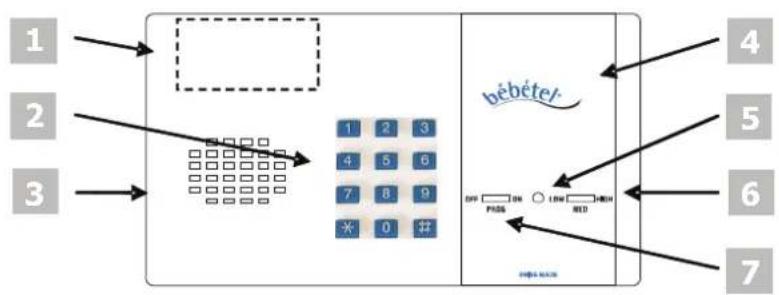
1 Battery compartment The battery compartment for 9 V-batteries is located on the rear side of the alarm unit. Battery replacement 7.7.
2 Keypad
The keypad is used for programming 5 and during operation 6.
bébétel®-keys are marked with 1 2 3 4 5 6 7 8 9 * 0 # in the coming sections. Keys of the answering telephone (phone B) are marked white:
1 2 3 4 5 6 7 8 9 0
3 Loudspeaker The loudspeaker is activated during test call and can be switched on during a telephone call if you want to talk to your child.
4 Microphone Registers the noise level in the room.
Indicator (LED)
| () | Colour changes every second | bébételBLUETOOTH® has not yet found a connection so far |
| Green | Landline detected, bébétel® waits 2 min, Waiting period 6.3 | |
| ✓ | Green flashing Landline detected, Monitoring mode 6.5 | |
| Blue | Bluetooth detected, bébétel® waits 2 min, Waiting period 6.3 | |
| ✓ | Blue flashing Bluetooth detected / Monitoring mode 6.5 | |
| Red | Connection mode 6.7 | |
6 Sensitivity switch 6.6.1
| HIGH | Highest sensitivity | Call after approx. 3 noises |
| MED | Medium sensitivity | Call after approx. 6 noises |
| LOW | Lowest sensitivity | Call after approx. 8 noises |
7 Function switch
| OFF | Device is turned off |
| PROG | Enter telephone number and/or access-code (PIN-Code) |
| ON | Device is in operation mode 6 |
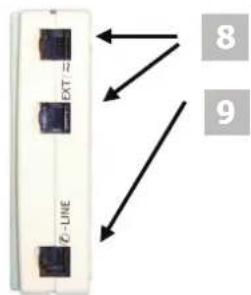
8EXTjacks
Here you can connect the power supply or optional accessories such as a motion-detector or the bébételTWIN®.
9 LINE Telephone jack
Here you can connect the landline cable 4.
4 Installation
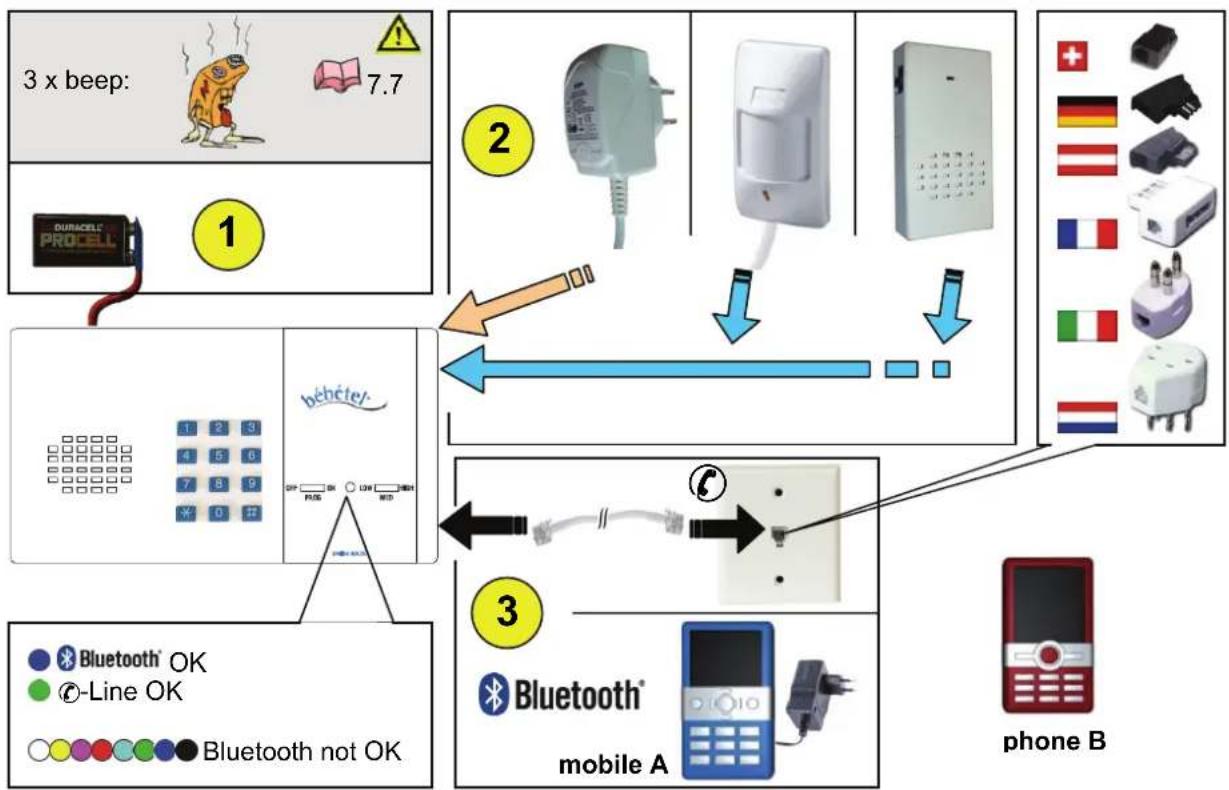
- Insert 9 V-battery into compartment on rear side of device.
- Plug the AC-adaptor into mains socket and the cable of any optional accessory (Motion detector 8.5 or bébételWIN 8.4) into one of the 8 EXT jacks.
- Set up the telephone connection, either landline or Bluetooth:
Landline mode: Plug enclosed cord into 9 -LINE jack and into the wall outlet using the country specific telephone adaptor 8.2.
Bluetooth mode: Pair with mobile A 4.1. To avoid waking you child during dialling 6.9 set mobile A to soundless.
- Set function switch to PROG and enter telephone number to be dialed (phone B).
- Set sensitivity switch to desired level (LOW/MED/HIGH) 6.6.1.
- Set function switch to ON bébétel is now in waiting period 6.3 ready to use.
4.1 Setup Bluetooth-connection (Pairing)
Follow the steps below to pair bébételBLUETOOTH® with mobile A. Please take a look at your mobile phone instructions on how to connect a Bluetooth device in detail.
- bébétel®: Set function switch to PROG.
- mobile A: Choose to add new Bluetooth-device.
Select „bebetel", mobile A prompts for passcode: enter PIN-Code: Factory setting 9797.
Notes:
Distance between mobile A and bebétel should not exceed 3 m.
mobile A: With some mobile phones (such as Nokia, Samsung), the connection has to be manually produced and/or authorized: "Automatically connect" i.e. to enable bébétel® to re-connect automatically.
Examples of setting up the Bluetooth connection 7.3.
Check the Bluetooth-connection between bébétel® and mobile A frequently 6.10.
To change the bébétel PIN 5.2.
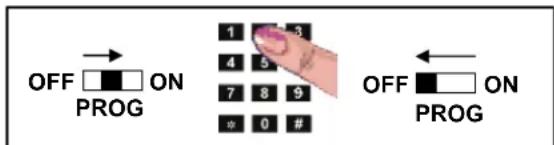
5.1 Program the telephone number
- Set function switch to PROG.
-
Enter telephone number where you can be reached (phone B). Each key stroke will be acknowledged by a beep (24 digits at most).
-
Set function switch to OFF.
Note:
- Check if the new telephone number is correct: 6.4.
- The telephone number remains stored even when bébétel® is switched off.
- If you use bébétel abroad, you have to add the country-code to the telephone number: i.e. 0044 for , 0041 for , 0047 for , 0049 for . Example if you are in a hotel: 0044 21 234 56 78.
Key * makes bébétel to hang up after 5 seconds.
If you key a wrong number set function switch to OFF and repeat steps 1 to 3.
Following notes are only relevant when you use a landline:
Key # introduces a dialling delay of 5 seconds between two digits: e.g. when you are at a hotel and you need to dial a number, often 0 or 9, in order to get an external line then a delay must be added after first digit (first digit + # + telephone number). Example: 0#021 234 56 78.
If your private exchange uses flash-pulse to start an internal call you can program as follows: 2 + # followed by internal telephone number. Example: 2#99.
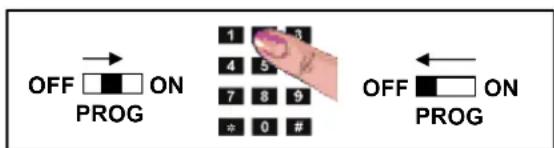
5.2 Programme PIN-Code / Bluetooth-Access-Code
The PIN-Code for remote dial-in to listen to your child 6.9 or Bluetooth-Access-Code 4.1 can be programmed as follows:
- Set function switch to PROG.
- Press key #
- Enter PIN-Code (4 to 7 digits).
- Press key #
- Enter PIN-Code again for confirmation.
- Press key #
- Set function switch to OFF.
Note:
- The PIN-code remains stored even when bébétel® is switched off.
- If PIN-code is re-entered correctly there is an acknowledgement beep at the end of input. Wrong re-entering of PIN-code will provoke two beeps. PIN-code will then not be stored so the old PIN-code remains active.
PIN-code must consist of min. 4 and max. 7 digits.
Factory setting of PIN-code is 9797. We recommend programming a personal PIN-code for safety reasons.
If you key a wrong number set function switch to OFF and repeat steps 1 to 7.
6.1 Preparation
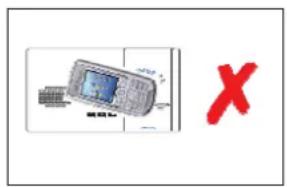
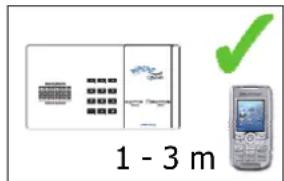
Place bébétel® out of reach to your baby (approx. 1 to 2 m).
Note:
In Bluetooth-Mode the paired mobile phone (mobile A) has to remain together with bébétel® in the child's room (1 - 3 m distance between mobile A 4 and bébétel®). The telephone to be dialled (phone B) you take with you.
To avoid interference, do not place mobile A on top of the bébétel®.
Check if the Bluetooth connection between bébétel® and mobile A remains stable 6.10.
Monitoring two rooms 7.4.
- To avoid false alarm close windows and diminish other noise sources.
6.2 Switch on
When bébétel® is switched to ON it checks the battery state and telephone-line condition. If one of these tests fails the user will be informed by beeps as follows:
3 beeps: Battery is low 7.7.
6 beeps: Landline mode: Idle tone not detected 10.
Bluetooth mode: Mobile A not detected 10.

If bébétel® is connected to the landline the colour of the indicator changes to green after approx. 5 seconds.
If no landline is detected, bébétel® tries to connect to mobile A. During the search the colour of the indicator changes every second until the Bluetooth connection is established. If so the indicator changes to blue.
If bébétel® detects neither landline nor Bluetooth connection, it will emit six beeps to alert you, that bébétel® is not ready to operate 10. As long as it remains in this state, the colour of the indicator will continue to change every second ( ).
Note:
- Please always wait until the colour of the indicator is permanently green (Landline mode) or blue (Bluetooth mode) every time you switch bébétel® on.
6.3 Waiting period after switching on or after a call
bétel remains inactive during a waiting period of two minutes so you can leave your room without triggering a call.
To avoid unnecessary calls, bebétel also remains inactive for two minutes after each alarm.

2Min.
Note:
- In landline mode the colour of the indicator during waiting period is permanently green.
- In Bluetooth mode the colour of the indicator during waiting period is permanently blue.
- You can skip the two minutes waiting period by pressing key 9 after the unit is turned on. This allows you to perform a test of the level of noise that is needed to activate the alarm call during the monitoring mode.
6.4 Test call
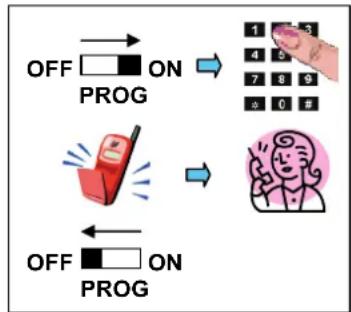
In order to check that the telephone number is entered correctly, you should perform a test call:
- Press any key.
The indicator colour changes to red during any connection.
- Wait until connection is established and speak.
- Terminate connection by pressing key 0 or switch to OFF.
Note:
- After ten minutes the connection will automatically be disconnected. You can hang up by pressing key 0 or stay connected by pressing 3 on your telephone (phone B).
6.4.1 Adjust hands-free volume
During voice connection you can increase volume by pressing key # or decrease by pressing key *. Level can be adjusted (spanning ten sound levels) and remains stored.
In Bluetooth mode the hands-free volume can be adjusted likewise using the toggle switch on the left or right side of the mobile phone.
6.5 Monitoring mode
After the waiting period bébétel® switches to monitoring mode. In this mode, the indicator LED flashes green or blue every four seconds and lights up when the noise level exceeds the level given by the sensitivity switch.
6.6 Telephone call
6.6.1 Call due to noise
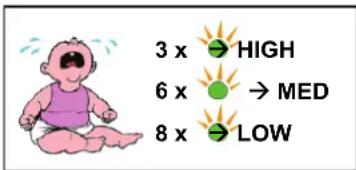
During monitoring mode bébétel® the indicator will light up (green or blue) if the noise level is exceeded. bébétel® will dial the programmed telephone number automatically (Colour of indicator changes to red).
| Position | Sensitivity | ||
| HIGH | Highest | sensitivity | Call after approx. 3 noises |
| MED | Medium | sensitivity | Call after approx. 6 noises |
| LOW | Lowest | sensitivity | Call after approx. 8 noises |
You can listen into the room while the loudspeaker remains silent 6.7.2.
6.6.2 Call due to motion detector activity
If the optional motion sensor (PIR-Set) is connected, bébétel® will dial the programmed telephone number automatically (Colour of indicator changes to red).
if any motion is detected.
if there is a mains power loss.
if the motion detector is connected or disconnected during operation.
You can listen into the room while the loudspeaker remains silent 6.7.2.
6.6.3 Call due to pressing any key on bébétel
An older child can call you by pressing any key. You can talk to your child in hands-free 6.7.3.
6.7 Connection
During any telephone connection the indicator is permanently red.
You can change the mode using keys of your handset (i.e. mobile B, must be touch tone compatible).
| Key → | bébétel® confirms with one beep |
| 0 | Disconnection/Call acknowledgment |
| 1 | Switch between listening-in and voice connection |
| 3 | Restart connection timer for two minutes and deactivate beeps |
| 7 | Deactivate the motion detector |
| 9 | Activate the motion detector |
6.7.1 Time-out
There is a timer running during listening-in and voice connection mode. Connection is kept up for two minutes in case of a telephone call, and ten minutes in case of test call. Ten seconds before disconnection you will hear four beeps in your handset (i.e. mobile B). You can restart timer by pressing 3 on your telephone.
6.7.2 Listening-in connection
Listening-in connection will be established in case of a call due to noise or motion activity. The cause of the telephone call will be signalled with repeated beeps (every 5 seconds) as follows:
| Number | Cause of telephone call |
| 1 Activation by noise | |
| 2 Activation by motion detector (no motion at the moment) | |
| 3 Activation by motion detector (motion still going on) | |
| 4 Connection time-out | |
6.7.3 Voice connection
Voice connection will be established automatically during test call or by pressing 1 on your telephone during listening-in connection. During this mode bebétel loudspeaker is activated and you can communicate with your child.

Voice connection must always be disconnected by pressing 0 on your telephone. Otherwise your child will be disturbed by a busy tone for a while.
6.8 Call repetition/Call acknowledgement
A call can be repeated until it is acknowledged by pressing 0 on your telephone. Call repetitions are programmed 9.2.
Note:
If calls are repeatedly made to an answering machine additional costs can be incurred.
You can risk disturbing someone if you have programmed an incorrect telephone number.
bébétel® calls you again, if your child continues to cry after the waiting period of two minutes.
If you use the motion detector we recommend setting call repetitions because it is possible that your child may cross the monitored section once only.
6.9 Remote dial-in
For peace of mind you can call bébétel from any telephone and listen to your child's room. Call bébétel over landline or mobile A. If bébétel recognizes the in-coming calling number identical to the programmed, you can listen to the room directly. Otherwise you will hear a beep to advice you to enter the PIN-Code within 15 seconds. Entering correct PIN code allows you to listen into the room 6.7.2.
Note:
If recognition does not work, you may delete your contact in mobile A and try again.
Set mobile A to „silent“, to avoid your child being woken up by incoming calls.
- Calling number recognition works only in Bluetooth mode, however is not guaranteed to work with every mobile phone type (mobile A) paired with bébétel® an in all GSM network.
- Factory setting of PIN-Code is 9797. We recommend programming a personal PIN-Code for safety reasons 5.2.
- In case you entered a wrong PIN-Code, bébétel® will disconnect after sending two beep call again and enter correct PIN-code.
- If the telephone you are using to dial (phone B) is not able to send touch tone commands 7.5 the remote access is not possible.
- Turn-off remote dial-in 9.3.
6.10 Test Bluetooth connection
- Mobile A (in graphic 4): Check, if there is a symbol i.e. head-set or another Bluetooth sign in the display of mobile A after Bluetooth connection is established = > bebétel (indicator is blue).
- bébétel®: Set function switch to OFF.
There should be a change visible on the display of mobile A showing that Bluetooth is disconnected. It may take a few seconds for this information to show in the display.
- bébétel®: Set function switch to ON. bébétel® changes to Bluetooth-search mode.
the colour of the indicator changes every second.
There should be a change in the display of mobile A, showing that Bluetooth is starting to re-connect. This info may be delayed for a few seconds.
As soon as the indicator is permanently blue, the Bluetooth connection between bebétel® and mobile A is established.
Check if the Bluetooth-connection is stable during Bluetooth mode or if bébétel® tries to reconnect indicated by a changing LED colour every second ( ). If Bluetooth connection is not stable you must use landline mode or try another mobile A.
For more information please visit our web-site: www.bebetel.com/bluetooth.
7 Frequently asked questions
On our homepage www.bebetel.com you will find:
Trouble shooting.
User manual in different languages.
7.1 Connection to ISDN or Internet telephony VoIP
bébetel® is designed to connect to the analogue telephone line, but can be used with ISDN or an analogue VoIP-terminal. Connect bébetel® the same way as you would connect a fax.
bébétel® has to be connected to one of the analogue ports.
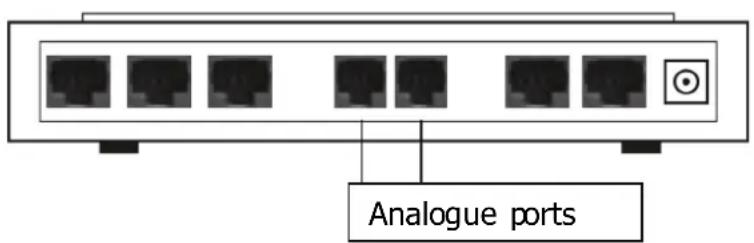
Port for analogue terminal equipment:
- ISDN: We recommend selecting a subscriber number (MSN) for the bébétel® other than the main-number manual of your adaptor.
- Voice over Internet protocol (VoIP): In case of mains power failure or internet breakdown there will be no telephone connection.
- If your private exchange does not support an analogue connection you probably can connect it to an analogue port of your terminal equipment (modem, telephone) or you have to buy an interface converter.
- If you cannot find an analogue port, you may use bébételBLUETOOTH® in Bluetooth mode.
7.2 Connection fee due to telephone call?
bébetel® only starts a call if an alarm situation is detected. Please note that you will incur costs for calls to your mobile or pager. These may vary according to certain factors such as time of day or day of the week and should therefore be confirmed by your individual service provider.
Note:
- Make sure that rejected calls are not diverted to an answering machine, i.e. turn off the voice mail function on phone B.
7.3 Examples for Bluetooth setup
Sony Ericsson K810i/W810i
MENU Settings+Select+Navigation key left Connectivity Bluetooth+Select My devices+Select New device+Add Device found bebetel+Select Passcode:
Sony Ericsson Satio U1
MENU Settings + Connectivity + Bluetooth + coupled devices + Options+ New coupled devices + Device found bebetel + Pass code:
Nokia 6021/6234
MENU Settings+Select Connectivity+Select Bluetooth+Select Search for audio enhancements+Select Devices found bebetel+Select Enter passcode:
Samsung Omnia (Windows Mobile 6.1)
MENU Settings + Connectivity + Bluetooth + new device + bebetel+select+continue Enter password+continue
Samsung SGH-D600E
MENU Settings+Select Bluetooth+Select My devices+Select Search new device+Select More devices bebetel+Select Bond with bebetel?+YES
Motorola V525
MENU Settings+Select Connection+Select Bluetooth Link+Select Hands-free+Select [Lock for new devices] ^+ Select Scan result bebetel+Select Bond with bebetel ^+ Yes Enter
Note:
If connection fails:
Delete all other paired Bluetooth-devices in mobile A and retry.
Activate Bluetooth on mobile A only 4, because bébétel® may be already connected to another mobile phone nearby.
In the main, each mobile phone with integrated Bluetooth should work with bébétel®. But Leitronic AG can not guarantee that each mobile phone can be paired.
More information regarding Bluetooth-connection can be found on our web-side: www.bebetel.com/bluetooth.
7.4 Monitoring two rooms
If you want to monitor two separate rooms, you can place optional bébételTWIN® in the second location and connect to the bébétel® unit (cable 8m). Loudspeaker and microphone are integrated in bébételTWIN® 8.4.
7.5 Touch tone commands
If you want to use bébétel® to its full potential, you need a touch tone pad at the hand set where telephone calls are to be answered. Most of today's telephone sets send touch tone signals also known as DTMF or tone dialling. Older telephone sets use pulse dialling. If you do not have any touch tone device you cannot execute touch tone commands 6.7.
7.6 Signals (beeps)
| Number | Message/Cause |
| 1 | Acknowledgement beep |
| 2 | Wrong re-entering of PIN-code, ringing cycle etc. |
| 3 | Battery_is_low 7.7 |
| 6 | Dial-tone missing |
Beeps in called telephone (phone B)
| Number | Message/Cause |
| 1 | Acknowledgement beep |
| 2 | PIN-code has been entered incorrectly or activation by motion detector (no motion at the moment) |
| 3 | Activation by motion detector (motion still going on) |
| 4 | Connection time-out 6.7.1 |
7.7 Battery check/replacement
If bébétel® emits three beeps when switched on battery must be replaced.

Disconnect the telephone-line before opening battery compartment. This is to avoid contact with dangerous telephone network voltage.
- Set function switch to OFF.
- Open battery compartment and remove old battery.
- Insert new battery and close battery compartment.
Note:
Always use faultless 9 V-batteries.
Recycle old batteries properly.
7.8 Maintenance
Set function switch to OFF and remove telephone cord. Clean bébétel® if necessary with a damp cloth and dry it afterwards. Note: Do not use cleaning agents or solvent.
8 Accessories
Below you will find a list of accessories. More items and detailed information are available on our homepage www.bebetel.com
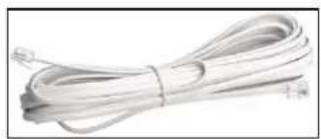
8.1 Telephone extension cord
If enclosed cord is not long enough (8 m) you can buy an extension cord.
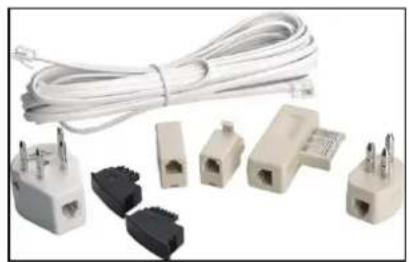
8.2 Telephone adaptor set for use abroad
bébetel® is approved for European countries (CTR-21) and for USA/Canada (FCC). It can be used worldwide. The only requirement is an analogue phone connection. Please note that there are different telephone-adapters for different countries. We recommend buying appropriate adaptor/s or a set before travel.
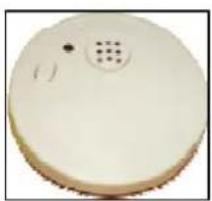
8.3 Smoke detector
The battery driven smoke detector has an integrated alarm siren. It can be installed on the ceiling. The alarm forwarding happens indirectly by the acoustic room monitoring.
- no wiring necessary.
stand-alone usable.
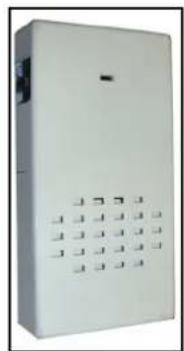
8.4 Second monitoring unit bébételTWIN
With bébételTWIN® connected to bébétel® you can monitor an additional child's room. It includes a loudspeaker and a microphone. (cable 8 m).
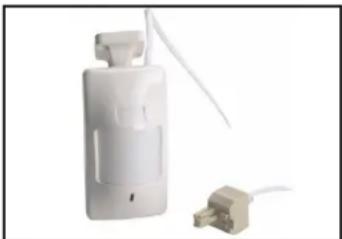
8.5 Motion detector BBT-PIR-RJ45 (PIR-Set)
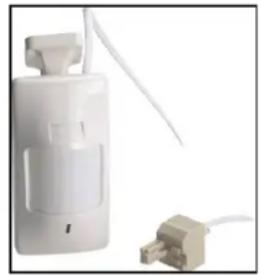
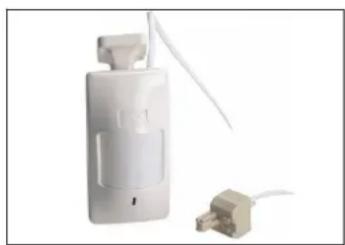
To receive a call even if the child leaves the room without making any noise, you can connect a motion detector. Connect the motion detector and the AC-adaptor to the EXT connectors. Direct the motion detector so that it monitors only the exit of the room.
8.5.1 Mounting
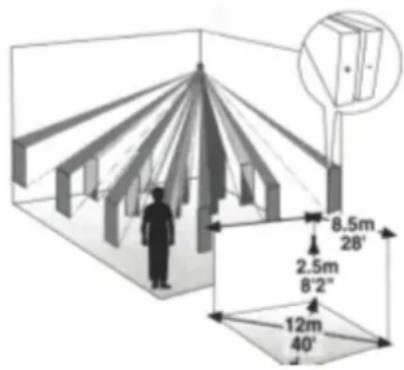
The motion detector should be located so that a child will cross the
infrared beam pattern. If the child is sleeping within the range, a movement of the child can cause a false alarm. Figure shows the different infrared beam patterns at a typical mounting height of 2.5m .
Note:
- Do not mount detector towards direct sunlight or near to heat sources.
- The landline telephone-cord must be disconnected before wiring of AC-adapter or motion detector can be carried out.
- Do not mount detector behind items like glass or curtains because the infrared-beam cannot penetrate them.
- Keep away pets like cats or dogs from the protected area.
8.5.2 Connection
Plug the cable of the motion detector to one of the 8 EXT
connectors of the bébétel®. The motion detector is powered by the AC-adaptor. Do not connect or disconnect motion detector cable while bébétel® is switched on, otherwise a alarm call will be triggered.
8.5.3 Warming up phase
Wait at least two minutes after applying power to let the motion detector stabilize. Walk through the entire area you want to be monitored and observe the red light on the motion sensor to ensure full coverage. Adjust swivel if necessary.
8.5.4 Adjustments
Disconnect motion detector before opening. Remove the front cover by twisting a flat screwdriver in the slot between the cover and the base at the bottom of the motion sensor.
9.1 Factory setting
bébetel® can be reset to default values as follows:
- Set function switch to position OFF.
- Keep 3 and # pressed simultaneously.
- Set function switch to ON.
- Release keys acknowledgement by a beep.
- Set function switch to OFF.
Note:
- If there is no beep at step 4, repeat steps 1 to 4.
9.2 Call repetitions
If you want to programme call repetitions you can proceed as follows:
- Set function switch to PROG.
- Press
- Enter 9 7 1 3 5 3
(n see table below). - Press
- Enter 9 7 1 3 5 3
once again for confirmation. - Press #
- If the number is entered correctly there will be one beep at the end of the input. Wrong re-entering will provoke two beeps. Incorrect number will not be stored so the former value remains active.
- Set function switch to OFF.
| <n> | Comment |
| 0 | bébétel®just dials once for each condition (default value) |
| 1..9 | bébétel®re-dials after the waiting period if a call was not acknowledged by pressing 0 on your telephone. The number of call repetitions is limited to the value of n. |
Note:
- If you use the motion detector we recommend setting call repetitions because it is possible that the child may cross the monitored section once only.
- If call recipient is "busy", the waiting period between two calls is 30 seconds, otherwise 2 minutes.
- If calls are repeatedly made to an answering machine additional costs can be incurred.
If you key a wrong number set function switch to OFF and repeat steps 1 to 7.
9.3 Auto answer
Landline mode: If you want to change the number of rings prior to answer, you can proceed as follows:
- Set function switch to PROG.
- Press
- Enter 9 7 1 3 4 7
(n see table below). - Press
- Enter 9 7 1 3 4 7
once again for confirmation. - Press #
- If the number is entered correctly there will be one beep at the end of the input. Wrong re-entering will provoke two beeps. Incorrect numbers will not be stored so the former value remains active.
- Set function switch to OFF.
| <n> | Comment |
| 2..9 | bébétel® answers call after n rings |
| 10 | bébétel® does not answer incoming calls |
Note:
- If you key a wrong number set function switch to OFF and repeat steps 1 to 7.
- Default value is 2 rings.
10 Trouble shooting
You can clear most faults checking the following list. If a problem cannot be resolved please check our interactive error handling on our homepage www.bebetel.com or contact Info: +41 (0)56 648 40 40.
| Problem Cause and/or remedy | |
| Indicator does not shine when switched on | • Battery low 7.7 and AC-adaptor not connected |
| Three beeps when switched on | • Battery low replace it 7.7 |
| Six beeps when switched on ( ): Indicator colour changes every second | • Bluetooth-connection to mobile A could not be established 4.1 • Bluetooth on mobile A NOT activated • 参数是 0, 可以不连接到手机的 analogue telephone line • Plug in telephone cord • PIN compatibility error (telephone cord <-> telephone line) 7.1 • Check telephone cord / adaptor • Telephone network is down • Line is already busy because a parallel telephone set is in use • Make a call with another telephone set |
| No connection during test call NO dialling tone present | |
| No Bluetooth-connection with mobile A) | • Bluetooth on mobile A not switched on • Delete all paired Bluetooth-devices in mobile A and re-start Bluetooth setup process 4.1 • PIN-Code does not match. Factory value for PIN: 9797 5.2 • You have to enter PIN-Code every time when 参数是 re-connects with your mobile => Manually re-connect: • You have to change options in you mobile A set-up, i.e., "automatically re-connect", "trusted device" • 参数是 0, 可以不连接到手机的 analogue telephone set |
| No connection during test call dial tone present | • Telephone number is incorrect • Called party does not pick up call |
| Poor hands-free quality during voice connection | • Use without AC-adaptor: replace 9 V-battery • Use with AC-Adaptor: Adapt hands-free volume with 参数是 keys * / # and check if volume of mobile A is on medium value (toggle switch on the left or right side of the mobile phone) |
| Remote dial-in does not work | • PIN-Code incorrect • re-program 5.2 • Used telephone (phone B) does not support touch tones • You do not have to enter PIN-Code if pro grammed number is identical to the number you want to dial in |
| Mode cannot be changed using touch tone commands 6.7 | • Used telephone set does not support touch tone or is in the wrong mode mobile phone ➔ for instance pulse-dialling or an ISDN-telephone • Set volume of mobile A to a medium value (to ggle switch on the left or right side of the mobile phone) |
| No activation | • After power on bébétel® remains inactive for two minutes so you can leave your room without triggering a call. Skip waiting period 6.3. • during the waiting period the indicator is permanently green/blue • A call will be triggered depending on position of sensitivity switch. As long as noise level is exceeded the indication LED shines 6.6.1. |
10.1 Motion detector (PIR-Set)
| Problem Cause and/or remedy | |
| WALK-test LED is on, but bébétel® does not call | Alarm unit is still in the inactive waitin g period after being switched on or after a callMotion detector is temporarily deactivated 6.7 |
| Call with three beeps without prior movement (WALK-test LED has been off all the time) | No voltage supplied to motion detector check cable, AC-adapter and mainsMotion detector has been connected or disconnected after the alarm unit had been switched on |
| Call with two or three beeps was triggered although the motion detector was temporarily deactivated | Voltage supply of motion detector interruptedFunction switch has been shifted to OFF or PROG after deactivation. |
11.1 Alarm unit BBT-10-EXT (bébételEXTRA®)
Supply voltage 9..16 VDC (through AC-adapter at EXT connectors)
Backup: 9 V-battery (Typical duration of operation: 80 h for alkaline)
Material ABS
Dimension 200× 110× 31mm (LxWxH)
Weight 320g without battery
Cord length 8 m
Calling method Tone dialling
Warranty 2 years
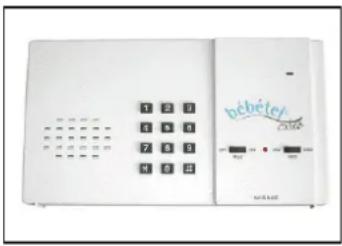
11.2 Alarm unit BBT-10-BT (bébételBLUETOOTH®)
Supply voltage 9..16 VDC (through AC-adapter at EXT connectors)
Backup: 9 V-battery (Typical duration of operation: 80h for alkaline)
Material ABS
Dimension 200× 110× 31mm (LxWxH)
Weight 320g without battery
Cord length 8 m
Calling method Tone dialling
Bluetooth-QDID: B013894 (BBT-10-BT)
Warranty 2 years
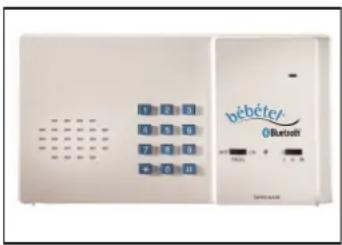
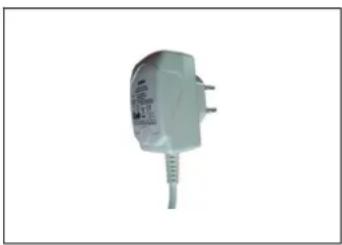
11.3 AC-adaptor BBT-DC12S-RJ45
Supply voltage 100 - 240 VAC 50Hz/60Hz 200 mA
Secondary voltage 12 VDC 500 mA
Dimension 60 × 70 × 32 ~mm (LxWxH)
Weight 103 g
Cord length 3 m
Warranty 2 years
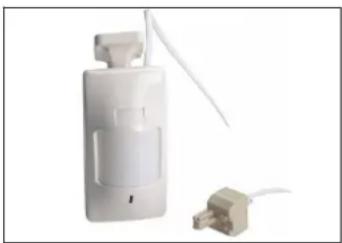
11.4 Motion detector BBT-PIR-RJ45 (PIR-Set)
Supply voltage 9..16 VDC (over AC-Adaptor)
Dimension 107× 58× 39mm (LxWxD) without swivel
Weight 75 g
Cord length 8 m RJ45
Detection type passive infrared (PIR)
Alarm contact Normally closed = NC
Warranty 2 years
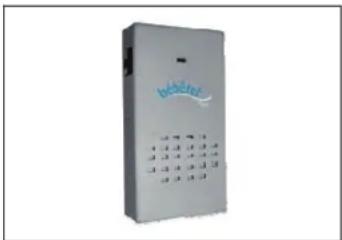
11.5 bébêtelTWIN®
Dimension 114× 58× 21mm (LxWxH)
Material ABS
Weight 73 g (without cable)
Cord length 8 m RJ45
Warranty 2 years
Changes to product and performance can be made at any time without announcement.
Copyright Leitronic AG 2008 - All rights reserved
Accessories 14
Adaptor 14
Battery 5, 13
Compartment 5
Check 13
Replacement 13
Beeps 13
Bluetooth 5,6,7,10,12
Call. 9
Call repetitions 16
Calling method 20
Connection. 9
Listening-in 9
Time-out. 9
Voice 9
Default setting. 16
Dialling delay. 7
DTMF 12
Exchange. 6
Dialling delay. 7
Flash-pulse. 6
Function switch 4
Hands-free Adjust hands-free volume.8
Indicator (LED) 4, 15
Installation. 5
Keypad 4
Listening-in connection. 9
Loudspeaker 4, 13
Microphone. 4
Mobil phone. 5, 7
Monitoring mode. 8
Motion Detector 5,9,15
PIN-Code. 6
Remot dial-in 10
Rings 16
Rings 16
Savety notes. 3
Sensitivity switch. 4
Smoke detector. 14
Speak. 9, 10
Noise level. 8
Switch Function 4
Sensitivity. 4
Telephone 3,9
Connection 4,5,11,14
Cord. 4, 5, 11, 14
Line 9
Plug 5
Telephone number 6
Test call 8
Time-out 9
Touch tone commands 12
Trouble shooting 18
Inhoudsopgave
Material behaviorizing ABS
Afmetingen 200× 110× 31mm (LxBxH)
Material behaviorizing ABS
Afmetingen 200× 110× 31mm (LxBxH)
Alarmcontact Normally closed = NC
Garantie 2 jaar
11.5 bébêtelTWIN®
Afmetingen 114 × 58 × 21 ~mm (LxBxH)
Material ABS
Praatverbinding. 9, 10
Geluidssterkte 8
Probleemoplosser. 18
Problemen en oplossingen 18
Rookmelder 14
Schakelaar
Gevoeligheid 4
Functie 4
Signalen 13
Telefoon. 3,9
Aansluiting. 4, 5, 11, 14
Kabel 4,5,11,14
Verbinding 9
Telefoocentrale 6
Kiespauze. 7
Telefoonnummer 6
Testoproep 8,10
Controle-oproep. 10