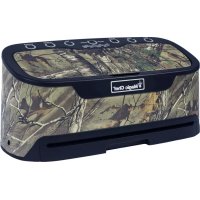
MCLVSRT - Vacuum packaging machines Magic Chef - Free user manual and instructions
Find the device manual for free MCLVSRT Magic Chef in PDF.



| Product Type | Vacuum Packaging Machine |
| Brand | Magic Chef |
| Model | MCLVSRT |
| Dimensions (H x L x W) | 404 mm x 168 mm x 183 mm (15.9" x 6.6" x 7.2") |
| Weight | Approximately 2.2 kg |
| Power Supply | 120 V ~ 60 Hz |
| Power | 190 W |
| Main Functions | Vacuum sealing, sealing, seal only, marinating, jar preservation |
| Settings | Speed (high/low), dry/moist foods |
| Maximum Bag Width | 30 cm (11.8") |
| Consecutive Sealing Capacity | 20 bags before mandatory pause |
| Cooling Time Between Cycles | Minimum 20 seconds |
| Safety Automatic Shut-Off | Yes, in case of overheating (25-minute pause) |
| Maintenance and Cleaning | Wipe with a damp cloth; removable suction chamber washable; do not immerse |
| Included Accessories | Jar tube, removable tray, built-in knife |
| Warranty | 1 year parts and labor |
| Usage | Household only |
| Color | White / Silver (estimate) |
Frequently Asked Questions - MCLVSRT Magic Chef
User questions about MCLVSRT Magic Chef
0 question about this device. Answer the ones you know or ask your own.
Ask a new question about this device
Download the instructions for your Vacuum packaging machines in PDF format for free! Find your manual MCLVSRT - Magic Chef and take your electronic device back in hand. On this page are published all the documents necessary for the use of your device. MCLVSRT by Magic Chef.
USER MANUAL MCLVSRT Magic Chef
PLEASE READ THIS MANUAL CAREFULLY BEFORE USING YOUR VACUUM SEALER AND KEEP IT FOR FUTURE REFERENCE.
Model MCLVSRT

PRODUCT REGISTRATION
Thank you for purchasing a Magic Chef® product. The first step to protect your new product is to complete the product registration on our website: www.mcappliance.com/register. The benefits of registering your product include the following:
- Registering your product will allow us to contact you regarding a safety notification or product update.
- Registering your product will allow for more efficient warranty service processing when warranty service is required.
- Registering your product could act as your proof of purchase in the event of insurance loss.
Once again, thank you for purchasing a Magic Chef product.
CONTENTS
PRODUCT REGISTRATION 2
IMPORTANT SAFETY INSTRUCTIONS 4
SPECIFICATIONS 5
PARTS AND FEATURES 6
BEFORE USE 7
OPERATINGINSTRUCTIONS 8
CARE AND MAINTENANCE 9
TROUBLESHOOTING 10
LIMITED WARRANTY 11
IMPORTANT SAFETY INSTRUCTIONS
This manual contains Safety Instructions, Installation and Operating Instructions, and Troubleshooting Tips. Please carefully read this manual before using your vacuum sealer for instructions on how to use and maintain the product properly. Be sure to follow the safety instructions to avoid injury or damage to the product. Keep this manual. When passing on/selling the device to a third party, the manual must be handed over along with the device.
Before calling for service, please make sure unit is installed and being used correctly, and read the troubleshooting section.
WARNING: When using your appliance, follow the precautions listed below:
NOTE: Specifications may change at any time without notice.
- Read all instructions.
- This appliance should not be operated by anyone that is not able to follow proper safety procedures or does not have experience with this type of equipment, unless under supervision.
- DO NOT allow children to operate or play with the vacuum sealer.
- DO NOT operate any appliance that has a damaged cord or plug; or if the unit is damaged or malfunctions in any way. Contact customer service or a service technician.
- DO NOT place on or near a hot burner or any other heat source; or in a heated oven.
- ALWAYS use the vacuum sealer on a dry, level surface.
- DO NOT immerse the appliance or power cord into water or any other liquids.
- DO NOT unplug your appliance by pulling on the power cord. ALWAYS grasp the plug firmly and pull it straight out from the outlet.
- DO NOT start or stop the unit by pulling the plug or turning the power on or off.
- DO NOT operate the unit or handle the plug with wet hands.
- ALWAYS turn off and unplug from outlet before servicing, changing accessories or cleaning the unit or when not in use.
- This appliance is for household use only. It is not intended for commercial applications.
- Allow unit to sit and rest for at least 25 minutes before resuming use after sealing 20 bags consecutively.
- If the appliance malfunctions in any way during use, shut down immediately and discontinue use. DO NOT attempt to open any part of the base to repair. This product has no user serviceable parts. Contact customer service for assistance.
NOTE: A short power-supply cord is provided to reduce the risks resulting from becoming entangled in or tripping over a longer cord. Extension cords may be used if care is exercised in their use. The marked electrical rating of the extension cord should be at least as great as the electrical rating of the appliance. The longer cord should be arranged so that it will not drape over the countertop or table top where it can be pulled on by children or tripped over.
READ AND FOLLOW THIS SAFETY INFORMATION CAREFULLY SAVE THESE INSTRUCTIONS
SPECIFICATIONS
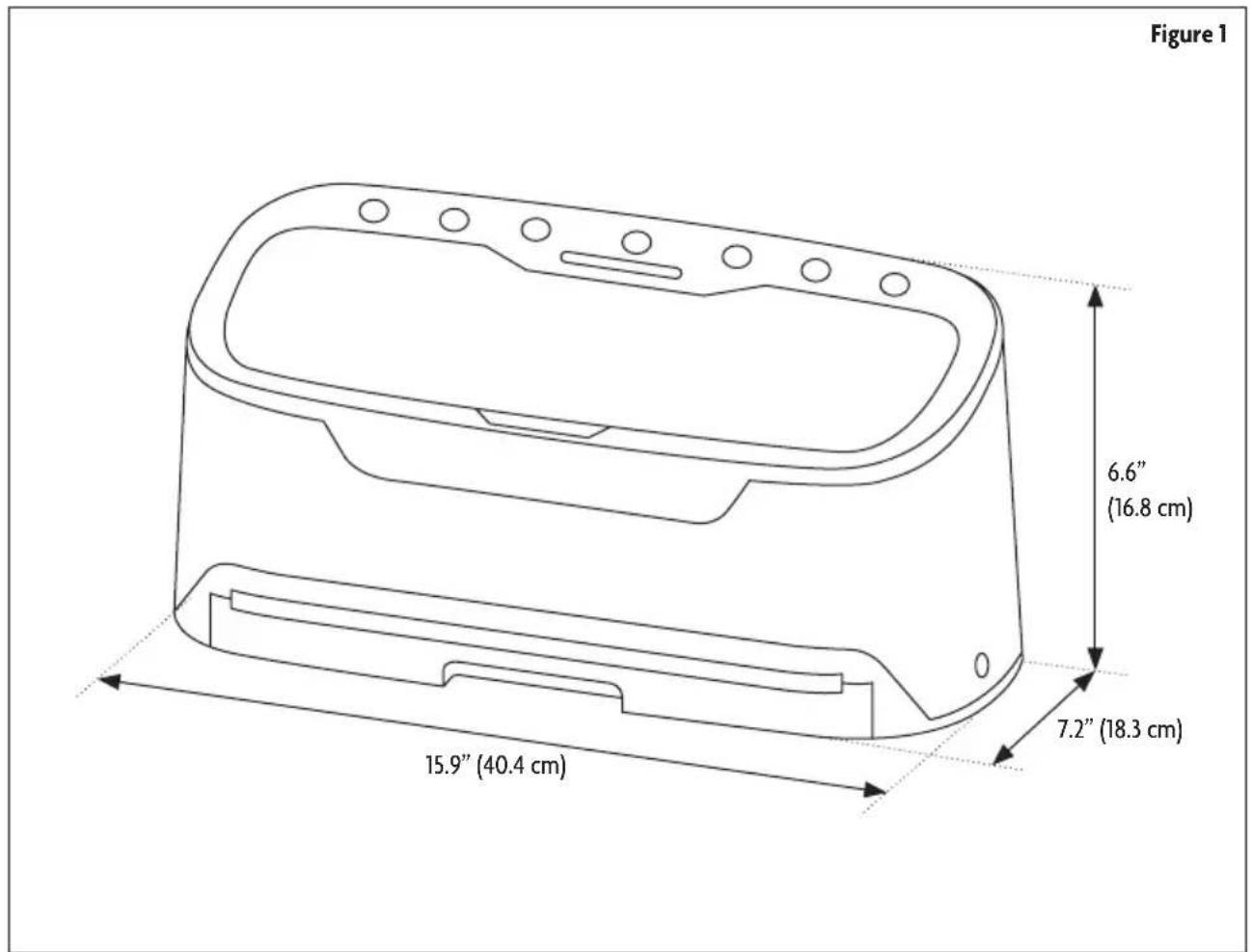
| Height 6.6" (16.8 cm) | |
| Width 15.9" (40.4 cm) | |
| Depth 7.2" (18.3 cm) | |
| Power Supply 120V ~ 60Hz | |
| Rated Power 190 W |
PARTS AND FEATURES
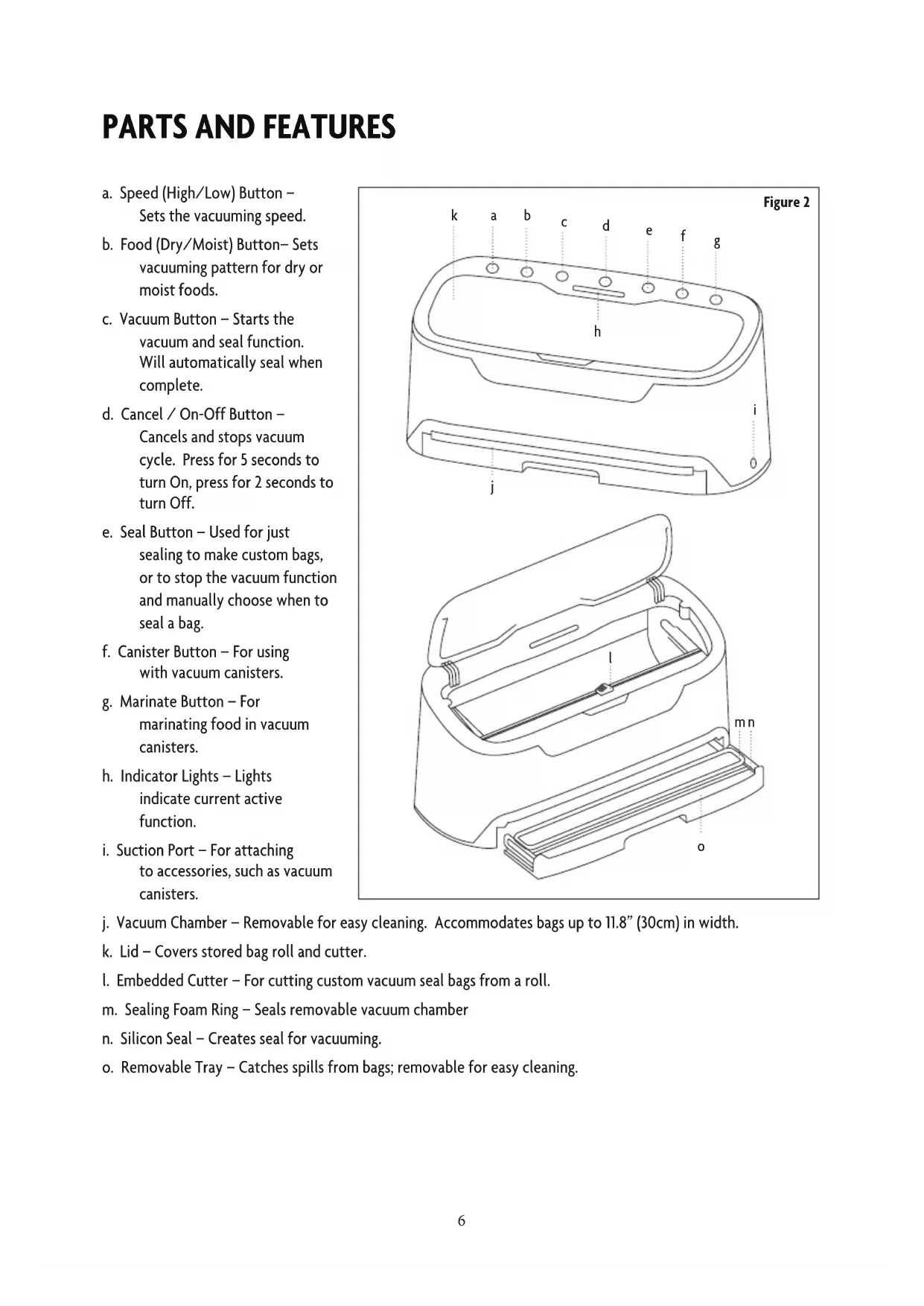
a. Speed (High/Low) Button - Sets the vacuuming speed.
b. Food (Dry/Moist) Button- Sets vacuuming pattern for dry or moist foods.
c. Vacuum Button - Starts the vacuum and seal function. Will automatically seal when complete.
d. Cancel / On-Off Button - Cancels and stops vacuum cycle. Press for 5 seconds to turn On, press for 2 seconds to turn Off.
e. Seal Button - Used for just sealing to make custom bags, or to stop the vacuum function and manually choose when to seal a bag.
f. Canister Button - For using with vacuum canisters.
g. Marinate Button - For marinating food in vacuum canisters.
h. Indicator Lights - Lights indicate current active function.
i. Suction Port - For attaching to accessories, such as vacuum canisters.
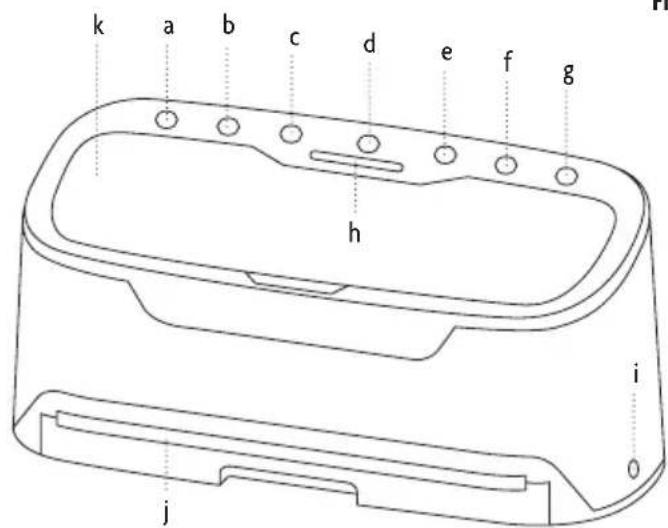
Figure 2

j. Vacuum Chamber - Removable for easy cleaning. Accommodates bags up to 11.8" (30cm) in width.
k. Lid - Covers stored bag roll and cutter.
I. Embedded Cutter - For cutting custom vacuum seal bags from a roll.
m. Sealing Foam Ring - Seals removable vacuum chamber
n. Silicon Seal - Creates seal for vacuuming.
o. Removable Tray - Catches spills from bags; removable for easy cleaning.
BEFORE USE
FOOD STORAGE AND SAFETY
For best results in extending the life of foods, it is important to only vacuum package fresh foods. Once food has begun to spoil, vacuum sealing may only slow the process. Vacuum sealing cannot prevent the growth of mold, and some disease causing microorganisms are still able to grow in low oxygen environments and may require further measures to be eliminated.
NOTE: Vacuum sealing is NOT a substitute for refrigeration or freezing. Any perishable foods that require refrigeration must still be refrigerated or frozen after vacuum packaging.
FOOD PREPERATION HINTS FOR AIRTIGHT VACUUM SEALING
Cooking, Thawing, and Reheating: You can reheat foods in the vacuum bags by placing them in water at a low simmer below 170^ (75^) . Simmering in a vacuum bag helps food retain its flavor and it helps with the clean up as well. When reheating food in the microwave using vacuum bags, ALWAYS puncture the bag to allow hot air to escape.
NOTE: ALWAYS thaw foods in either refrigerator or microwave - DO NOT thaw perishable foods at room temperature.
- Preparation Hints for Meat and Fish: Try pre-freezing meats and fish for 1-2 hours before vacuum sealing. This helps retain the juice and shape, and provides for a better seal. If you not able to pre-freeze, place a folded paper towel between the food and top of the bag, below the seal. Leave the paper towel in the bag to absorb excess moisture and juices during the vacuum packaging process.
- Preparation Hints for Cheeses: Seal cheese after each use. If you make the bag just a little longer than needed, you can re-seal it after each use.
NOTE: Due to the risk of anaerobic bacteria, soft cheeses should never be vacuum packaged.
- Preparation Guidelines for Vegetables: Blanching is a process that should be done before vacuum packaging vegetables. This process stops the enzymatic action that could lead to loss of flavor, color and texture. To blanch vegetables, place them in simmering water or in a microwave until they are cooked, but still crisp. Blanching times can range from 1 to 2 minutes for leafy greens and peas; 3 to 4 minutes for snap peas, sliced zucchini or broccoli; 5 minutes for carrots; and 7 to 11 minutes for corn on the cob. After boiling, immerse vegetables in cold water to stop the cooking process.
Vegetables are a great candidate for portion control. When storing vegetables, pre-freeze them for 1 to 2 hours and then separate them into meal portions within the vacuum bags. After they have been vacuum packaged, return them to the freezer.
NOTE: All vegetables (including broccoli, Brussels sprouts, cabbage, cauliflower, kale, turnips) naturally emit gases, during storage. Therefore, after blanching, it's best if they're stored in the freezer.
NOTE: Due to the risk of anaerobic bacteria, fresh mushrooms, onions & garlic should never be vacuum packaged.
Preparation Hints for Powdery Foods: When vacuum packaging powdery items like flour, it's best to use the original packaging inside of the vacuum bags. Powders could be sucked into the machine, causing damage and shortening the life of the sealer.
Preparation Hints for Liquids: Before you vacuum package liquid such as soup stock, pre-freeze in a casserole dish, loaf pan or ice cube tray. Seal the frozen liquid in the vacuum bags allowing them to be stacked for storage. When you're ready to use, just drop into water at a low simmer, below 170^ (75^) or cut corner of bag and heat in the microwave.
OPERATING INSTRUCTIONS
VACUUM SEALING WITH BAGS
- Place the item(s) to be sealed into the pre-cut or custom sized bag. Allow at least 2 inches between the contents and the top of the bag to allow for bag contraction.
- Turn the sealer on. The default setting for the unit is Vacuum mode, however, if you had set it on Seal mode to make a custom bag size, press the Vacuum button.
- Press the Speed and Food buttons to choose the desired settings.
NOTE: When vacuum sealing moist food or liquids choose low speed and moist food setting.
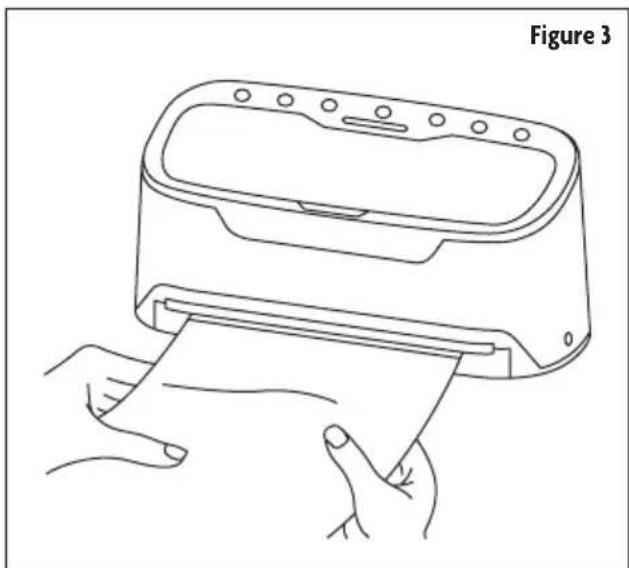
- Place the open end of the bag down into the vacuum chamber. Once the bag is inserted, the unit will sense it and start vacuuming the air out, and then seal the bag once air has been removed.
- Once the Vacuum indicator light turns off, remove the bag.
MAKING CUSTOM Sized BAGS
- Place a bag roll into the roll storage area.
- Raise the plastic arm holding the embedded cutter, and pull enough material to hold item to be sealed plus an additional 2 inches through. Lower the arm, and with one hand pressing down on the middle of it, slide the embedded cutter across the arm to cut desired bag length from bag roll. Make sure to cut in a straight line.
- Press the Seal button, and then place one end of the bag material into the vacuum chamber slot to seal. The unit will seal automatically when it senses the bag in the vacuum chamber.
- Once complete, the Seal indicator light will turn off.
- Bag is now ready for vacuum sealing.
CAUTION: Make sure you give the appliance time to cool down. Wait at least 20 seconds between seals. Under very heavy usage, appliance will shut off automatically to prevent overheating. If this happens, wait 25 minutes to allow appliance to cool off before continuing use.
VACUUM CANISTERS AND MARINATING FOODS
You can use the vacuum sealer with vacuum canisters and to marinate foods. Connect the tube for the canister or container to the suction port, and press either the Canister or Marinate button. Be sure to follow the instructions for the container or canister you are using.
The Marinate function will remove air in the container, hold the vacuum for 1 minute, then allow air back in. This will repeat for 30 minutes. If more time is needed, press the Marinate button again.
CARE AND MAINTENANCE
- ALWAYS unplug the unit before cleaning. Allow to cool if unit has been in use for a long period.
- Wipe the outer surface with a soft, damp cloth and soap in needed. DO NOT use abrasives to clean the unit.
- DO NOT immerse the vacuum sealer or the cord in water, or spray with any liquid.
- To clean the inside of the unit, wipe away any food or liquid with a paper towel.
- Dry all parts thoroughly before you plug in and operate the unit again.
- Vacuum chamber may trap liquids that were drawn from the bag; it can be removed and cleaned with mild dish soap and a warm, damp cloth. Dry thoroughly.
TROUBLESHOOTING
| Problem Cause | Remedy | |
| Nothing happens when the Vacuum button is pressed | Unit is not getting power. | Verify sure the unit is turned on. |
| Make sure the cord is plugged in correctly. | ||
| Verify the power cord is not damaged. If it is, contact customer service. | ||
| Check that the outlet is working and has power. | ||
| Bag is not properly inserted in vacuum chamber. | Make sure end of bag is being inserted straight into the vacuum chamber. | |
| Unit may be too hot. Allow the sealer to cool for 20 minutes. | ||
| Air is not being vacuumed from bag | Bag has gaps, holes, wrinkles or folds in it. Make sure bag has no holes and is smooth. | |
| Sealing gaskets are loose, worn, or damaged. | Check the gaskets. Make sure they are not worn or damaged, and are properly seated. | |
| Liquid touching sealing area of bag. | Make sure area being sealed is dry and free of any liquids. | |
| Bag is not properly inserted in vacuum chamber. | Make sure end of bag is being inserted straight into the vacuum chamber. | |
| Closed end of bag not correctly sealed. | Make sure the closed side of the bag is correctly sealed. | |
| Vacuum bag melting | Vacuum sealer is too hot. | If sealing multiple bags, allow at least 20 seconds between each sealing cycle. If bags are melting, let unit cool off for 25 minutes. |
| Air seeps back into bag after it has been sealed | Hole or wrinkle in seal. | Cut open bag and carefully reseal. Use new bag if necessary. |
| Moisture or liquid present in sealed area. | Cut open bag and carefully reseal. Use new bag if necessary. Liquids or wet food items should be at least partially frozen prior to sealing. | |
| Food with sharp or pointed edges made a hole in the bag. | Smooth or cover sharp edge and reseal in a new bag. | |
| Liquid touching or drawn into the sealing area of bag. | Make sure area being sealed is dry and free of any liquids. | |
| Sealing gaskets are loose, worn, or damaged. | Check the gaskets. Make sure they are not worn or damaged, and are properly seated. | |
| Bag will not seal | Pre-sealed edge has holes, gaps, or wrinkles. | Make sure sealed edge is smooth and fully sealed. Reseal or use new bag as needed. |
| Moisture or liquid present in sealed area. | Moisture in area to be sealed may prevent bag from sealing. Wipe area dry. | |
| Closed end of bag not correctly sealed. | Make sure the closed side of the bag is correctly sealed. | |

LIMITED WARRANTY
MC Appliance Corporation warrants each new Vacuum Sealer to be free from defects in material and workmanship, and agrees to remedy any such defect or to furnish a new part(s), at the company's option, for any part(s) of the unit that has failed during the warranty period. Parts and labor expenses are covered on this unit for a period of one year from the date of purchase. A copy of the dated sales receipt/invoice is required to receive warranty service, replacement or refund.
This warranty covers appliances in use within the contiguous United States, Alaska, Hawaii and Puerto Rico. This warranty does not cover the following:
-
Damages due to shipping damage or improper installation.
-
Damages due to misuse or abuse.
Content losses due to failure of the unit.
Repairs performed by unauthorized service agents.
Service calls that do not involve defects in material and workmanship such as instructions on proper use of the product or improper installation.
-
Replacement or resetting of house fuses or circuit breakers.
-
Failure of this product if used for other purposes than its intended purpose.
Disposal costs for any failed unit not returned to our factory.
Any delivery/installation costs incurred as the result of a unit that fails to perform as specified.
- Expenses for travel and transportation for product service if your appliance is located in a remote area where service by an authorized service technician is not available.
The removal and reinstallation of your appliance if it is installed in an inaccessible location or is not installed in accordance with published installation instructions.
Refunds for non repairable products are limited to the price paid for the unit per the sales receipt.
This warranty is non transferable. This warranty applies only to the original purchaser and does not extend to any subsequent owner(s).
Limitations of Remedies and Exclusions:
Product repair in accordance with the terms herein, is your sole and exclusive remedy under this limited warranty. Any and all implied warranties including merchantability and fitness for a particular purpose are hereby limited to one year or the shortest period allowed by law. MC Appliance Corporation is not liable for incidental or consequential damages and no representative or person is authorized to assume for us any other liability in connection with the sale of this product. Under no circumstances is the consumer permitted to return this unit to the factory without the prior written consent of MC Appliance Corporation.
Some states prohibit the exclusion or limitation of incidental or consequential damages, or limitations on implied warranties. This warranty gives you specific legal rights, and you may also have other rights which vary from state to state.
Model
Parts
Labor
Type of Service
MCLVSRT
One Year
One Year
Carry In
For Service or Assistance please call 888-775-0202 or visit us on the web at www.mcappliance.com to request warranty service or order parts.

CNA International, Inc. d/b/a MC Appliance Corporation. All rights reserved. Magic Chef® logo is a registered trademark of CNA International, Inc.
www.mcappliance.com Printed in China

Selladora al vacio
Manual del usuario
Modelo MCLVSRT
- PRODUCT REGISTRATION
- CONTENTS
- IMPORTANT SAFETY INSTRUCTIONS
- READ AND FOLLOW THIS SAFETY INFORMATION CAREFULLY SAVE THESE INSTRUCTIONS
- SPECIFICATIONS
- PARTS AND FEATURES
- BEFORE USE
- FOOD STORAGE AND SAFETY
- FOOD PREPERATION HINTS FOR AIRTIGHT VACUUM SEALING
- OPERATING INSTRUCTIONS
- VACUUM SEALING WITH BAGS
- MAKING CUSTOM Sized BAGS
- VACUUM CANISTERS AND MARINATING FOODS
- CARE AND MAINTENANCE
- TROUBLESHOOTING
- LIMITED WARRANTY
- Limitations of Remedies and Exclusions:
- Selladora al vacio
Brand : Magic Chef
Model : MCLVSRT
Category : Vacuum packaging machines