Inchiostro DT2035 - Watch Detomaso - Free user manual and instructions
Find the device manual for free Inchiostro DT2035 Detomaso in PDF.


| Product Type | Watch |
| Brand | Detomaso |
| Model | Inchiostro DT2035 |
| Power Supply | Battery (CR2032 type, replacement every 1 to 1.5 years) |
| Display | Digital with backlight |
| Functions | Time, date, month, year, day of week, backlight, 12/24h mode, clear/dark/alternating background |
| Water Resistance | 3 ATM (splash resistant, not suitable for swimming) |
| Case Material | Stainless steel |
| Glass Material | Mineral |
| Case Dimensions | Approx. 42 mm (estimate) |
| Weight | Approx. 80 g (estimate) |
| Warranty | 24 months on manufacturing defects |
| Maintenance | Avoid shocks, magnetic fields, heat, water; replace battery by specialist; check seals annually |
| Manual available in | FR, DE, EN, IT |
Frequently Asked Questions - Inchiostro DT2035 Detomaso
User questions about Inchiostro DT2035 Detomaso
0 question about this device. Answer the ones you know or ask your own.
Ask a new question about this device
Download the instructions for your Watch in PDF format for free! Find your manual Inchiostro DT2035 - Detomaso and take your electronic device back in hand. On this page are published all the documents necessary for the use of your device. Inchiostro DT2035 by Detomaso.
USER MANUAL Inchiostro DT2035 Detomaso
natural_image
Shield-shaped emblem with a central 'T' symbol (no text or numbers present)DETOMASO
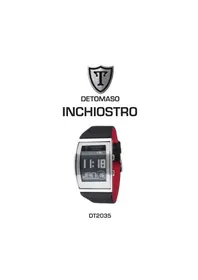
INCHIOSTRO
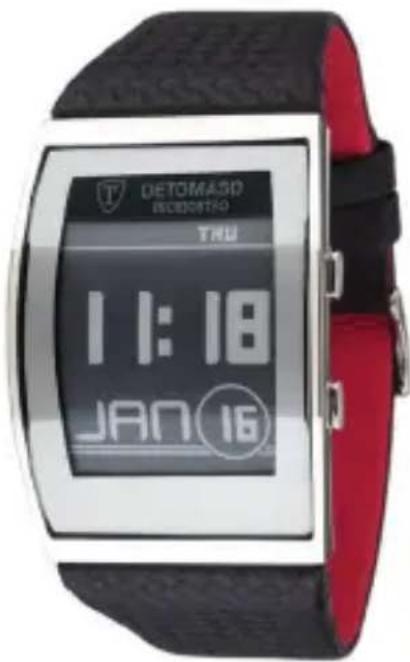
DT2035
Inhaltsverzeichnis
Vorwort 4
Wasserdichtigkeit 5
Pflegehinweise 6
Instructions for care 14
Operating instructions 15
24 months warranty 18
EN
Foreword
Congratulations on the purchase of your new DETOMASO watch. You are now the new owner of a high precision time keeper characterised by its innovative design.
We keep a long term stock of the most important spare parts for all our watches, guaranteeing repair over a period of many years.
In order to ensure that your new watch functions properly for many years, please read the following instructions carefully.
Waterproof properties
The water resistance of your DETOMASO watch has been tested to be 3 ATM.
This means that it is splashproof and that you may wash your hands with it. However, the watch is not to be worn in the shower or bath, when swimming or diving. Waterproofness is not a permanent characteristic; it should be tested annually and in particular before the watch is put under exceptional strain, as the seals deteriorate gradually in daily use. The seals are the important factor in guaranteeing the waterproofness of a watch. These age naturally and are also affected by perspiration and acids.
ISO 2281 stipulates which standards have to be met by a new watch. The level of waterproofness is given in atm and noted on the base of the casing. Your DETOMASO watch has been tested and has a water resistance of 3 ATM. The specification „3 ATM” is not to be confused with the diving depth; it is simply the definition of the inspection pressure. An inspection pressure of 3 ATM is reached at a depth of 30 m. You cannot go diving with this watch. In some cases a short-term higher pressure than the guaranteed inspection pressure may be enforced on the seals, for example when swimming or diving into water.
Watches are at particular risk when the wearer dives into water after sun-bathing. The combination of the impact pressure with the negative pressure caused by the sudden drop in temperature can quite easily cause damage. It is important to check and, if necessary, replace seals when the battery is replaced.
EN
Instructions for care
Your watch is a high precision electronic and mechanical masterpiece and should serve you well for a long time.
Please keep your watch away from magnetic fields, heat, water and chemicals. Do not submit it to sudden impact or abrasion. Watches should not be worn in bed.
If a battery operated watch stops or the low battery indicator shows, it should be taken to a specialist as soon as possible to prevent the battery from causing damage in the watch or to the environment.
Batteries should be replaced by a specialist at regular intervals of approx.
1 - 1 12 years. The seals can then be checked and, if necessary, replaced at the same time.
In the event of condensation forming underneath the glass (misting), the watch should be taken to a specialist as soon as possible to prevent the moisture from causing further damage.
The crown should always be firmly pressed in or screwed tight during use.
Operating instructions
EN
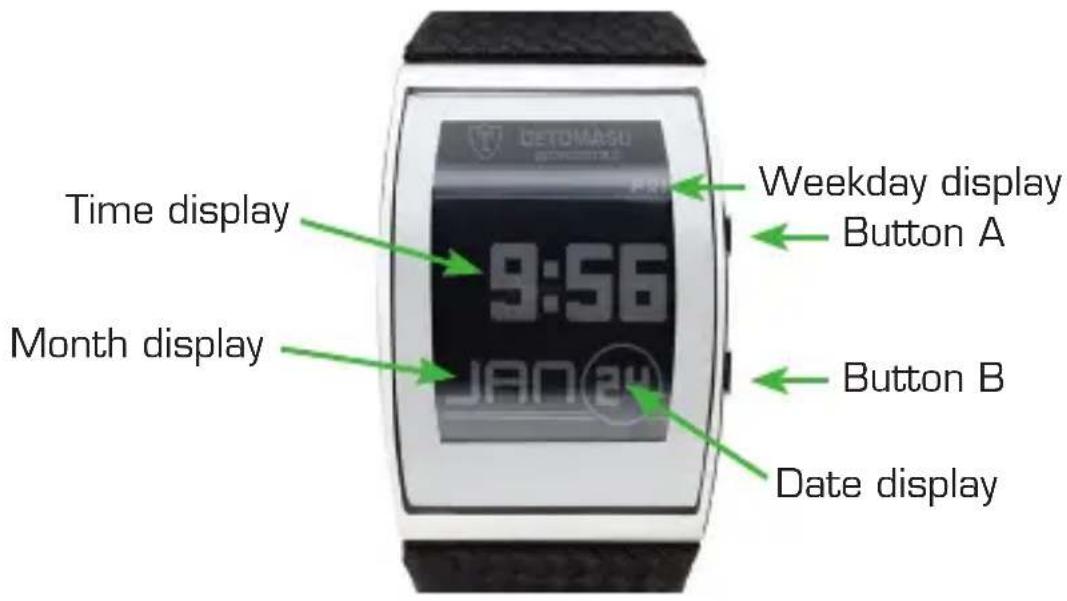
Buttons A and B
Buttons A and B are used to set the clock. Each button has a short and long hold function (about 2 seconds).
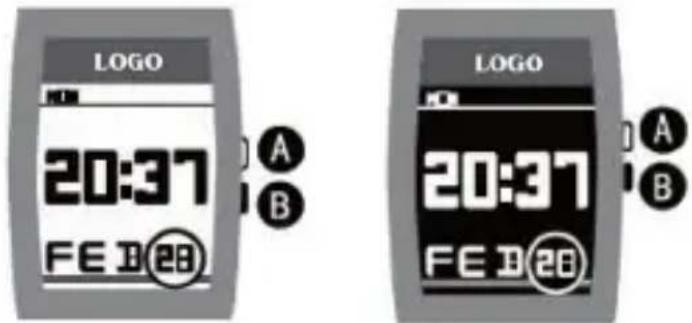
Button A: A short pressing of this button will switch on the illumination of the dial. Enter setup mode by holding for more than 2 seconds. Pressing briefly in setup mode allows you to change the value of the flashing display.
Button B: A short pressing of this button will let you switch from time display to annual display or vice versa. Holding for more than two seconds allows you to change the display background to either light or dark. You can change the value of the flashing
EN
Changing the background colour.
There are 3 display modes: White characters on a black background, black characters on a white background, as well as a alternating display mode. This means that from 6:00 until 18:00 white characters on a black background will be displayed, and from 18:00 until 6:00 black characters on a white background will be displayed. The default mode is black characters on a white background. Hold button B for 2 seconds to switch to white characters on a black background. Hold button B for a further 2 seconds to switch to alternating display mode.
Date display
Briefly pressing button B switches to the date display. After 10 seconds your clock will switch back automatically to time mode.
Setup mode
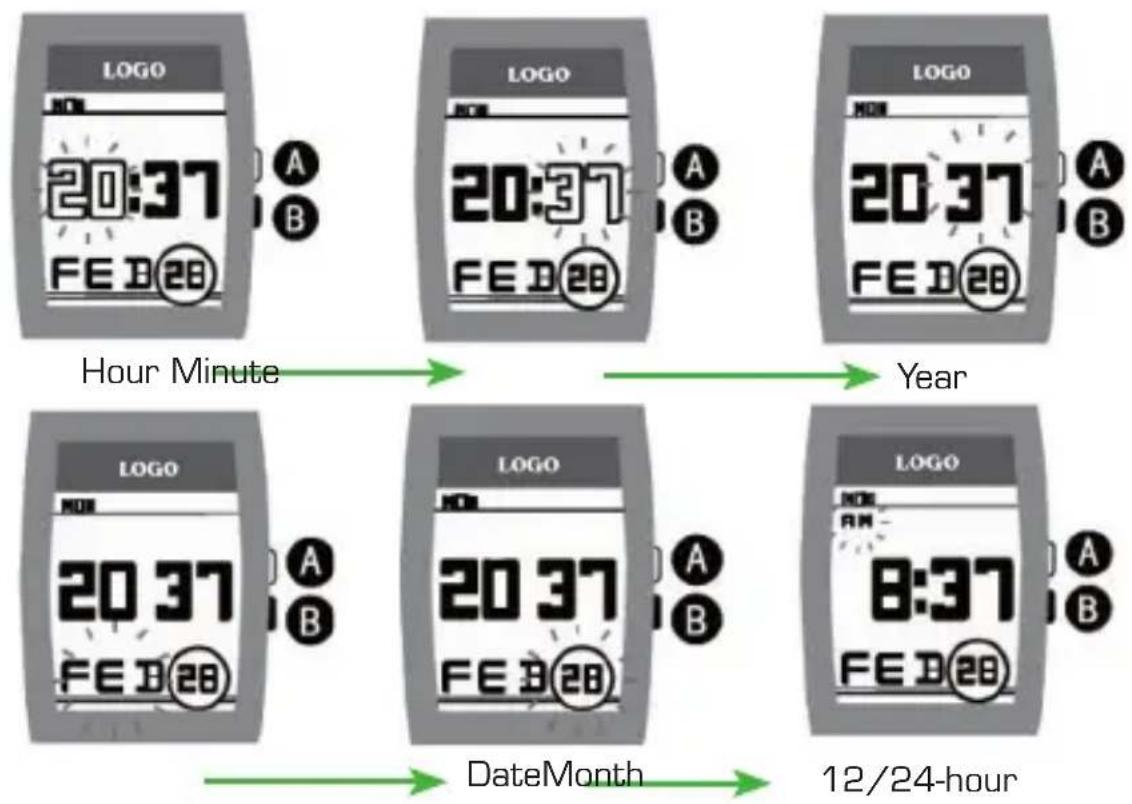
To set the time, hold button A for more than 2 seconds: The hour display begins to flash. Briefly pressing button A displays the next flashing hour digit, whilst briefly pressing button B displays the previous one. After setting the hour, hold button A for 2 seconds and the minutes will start to flash.
EN
After setting the hour, hold button A for 2 seconds and the year will start to flash. Proceed as before to set the month and date. The day of the week will be set automatically to correspond to the relevant date.
flowchart
graph LR
    A["LOGO 20:37 FE B28"] --> B["LOGO 20:37 FE D28"]
    B --> C["LOGO 20:37 FE D28"]
    C --> D["LOGO 20:37 FE D28"]
    D --> E["LOGO 20:37 FE D28"]
    E --> F["LOGO 20:37 FE D28"]
    F --> G["LOGO 20:37 FE D28"]
    G --> H["LOGO 20:37 FE D28"]
    H --> I["LOGO 20:37 FE D28"]
    I --> J["LOGO 20:37 FE D28"]
    J --> K["LOGO 20:37 FE D28"]
    K --> L["LOGO 20:37 FE D28"]
    L --> M["LOGO 20:37 FE D28"]
    M --> N["LOGO 20:37 FE D28"]
    N --> O["LOGO 20:37 FE D28"]
    O --> P["LOGO 20:37 FE D28"]
    P --> Q["LOGO 20:37 FE D28"]
    Q --> R["LOGO 20:37 FE D28"]
    R --> S["LOGO 20:37 FE D28"]
    S --> T["LOGO 20:37 FE D28"]
    T --> U["LOGO 20:37 FE D28"]
    U --> V["LOGO 20:37 FE D28"]
    V --> W["LOGO 20:37 FE D28"]
    W --> X["LOGO 20:37 FE D28"]
    X --> Y["LOGO 20:37 FE D28"]
    Y --> Z["LOGO 20:37 FE D28"]
    Z --> AA["LOGO 20:37 FE D28"]
    AA --> AB["LOGO 20:37 FE D28"]
    AB --> AC["LOGO 20:37 FE D28"]
    AC --> AD["LOGO 20:37 FE D28"]
    AD --> AE["LOGO 20:37 FE D28"]
    AE --> AF["LOGO 20:37 FE D28"]
    AF --> AG["LOGO 20:37 FE D28"]
    AG --> AH["LOGO 20:37 FE D28"]
    AH --> AI["LOGO 20:37 FE D28"]
    AI --> AJ["LOGO 20:37 FE D28"]
    AJ --> AK["LOGO 20:37 FE D28"]
    AK --> AL["LOGO 20:37 FE D28"]
    AL --> AM["LOGO 20:37 FE D28"]
    AM --> AN["LOGO 20:37 FE D28"]
    AN --> AO["LOGO 20:37 FE D28"]
    AO --> AP["LOGO 20:37 FE D28"]
    AP --> AQ["LOGO 20:37 FE D28"]
    AQ --> AR["LOGO 20:37 FE D28"]
    AR --> AS["LOGO 20:37 FE D28"]
    AS --> AT["LOGO 20:37 FE D28"]
    AT --> AU["LOGO 20:37 FE D28"]
    AU --> AV["LOGO 20:37 FE D28"]
    AV --> AW["LOGO 20:37 FE D28"]
    AW --> AX["LOGO 20:37 FE D28"]
    AX --> AY["LOGO 20:37 FE D28"]
    AY --> AZ["LOGO 20:37 FE D28"]
    AZ --> BA["LOGO 20:37 FE D28"]
    BA --> BB["LOGO 20:37 FE D28"]
    BB --> BC["LOGO 20:37 FE D28"]
    BC --> BD["LOGO 20:37 FE D28"]
    BD --> BE["LOGO 20:37 FE D28"]
    BE --> BF["LOGO 20:37 FE D28"]
    BF --> BG["LOGO 20:37 FE D28"]
    BG --> BH["LOGO 20:37 FE D28"]
    BH --> BI["LOGO 20:37 FE D28"]
    BI --> BJ["LOGO 20:37 FE D28"]
    BJ --> BK["LOGO 20:37 FE D28"]
    BK --> BL["LOGO 20:37 FE D28"]
    BL --> BM["LOGO 20:37 FE D28"]
    BM --> BN["LOGO 20:37 FE D28"]
    BN --> BO["LOGO 20:37 FE D28"]
    BO --> BP["LOGO 20:37 FE D28"]
    BP --> BQ["LOGO 20:37 FE D28"]
    BQ --> BR["LOGO 20:37 FE D28"]
    BR --> BS["LOGO 20:37 FE D28"]
    BS --> BT["LOGO 20:37 FE D28"]
    BT --> BU["LOGO 20:37 FE D28"]
    BU --> BV["LOGO 20:37 FE D28"]
    BV --> BW["LOGO 20:37 FE D28"]
    BW --> BX["LOGO 20:37 FE D28"]
    BX --> BY["LOGO 20:37 FE D28"]
    BY --> BZ["LOGO 20:37 FE D28"]
    BZ --> CA["LOGO 20:37 FE D28"]
    CA --> CB["LOGO 20:37 FE D28"]
    CB --> CC["LOGO 20:37 FE D28"]
    CC --> CD["LOGO 20:37 FE D28"]
    CD --> CE["LOGO 20:37 FE D28"]
    CE --> CF["LOGO 20:37 FE D28"]
    CF --> CG["LOGO 20:37 FE D28"]
    CG --> CH["LOGO 20:37 FE D28"]
    CH --> CI["LOGO 20:37 FE D28"]
    CI --> CJ["LOGO 20:37 FE D28"]
    CJ --> CK["LOGO 20:37 FE D28"]
12 and 24-hour display mode
Your clock has 12 and 24 hour display modes. To switch the display between 12 and 24 hour modes, hold button A for 2 seconds. Repeat the process 6 times until you have returned to the normal clock display and briefly press (within 10 seconds) button A. Afterwards PM or AM will appear in the display. You can switch the display between AM and PM by briefly pressing button B.
EN
24 month warranty
We guarantee that your watch is made of high quality materials. Extensive quality controls guarantee that the watch is checked before being released by the manufacturer.
Nevertheless, material faults cannot always be avoided. Should your new watch show any faults, please consult our customer service department within the valid warranty period.
We provide a 24 month warranty from date of purchase on all material faults and production errors. This manufacturer's warranty applies regardless of statutory warranty rights. The warranty covers the functioning of the clockwork and the flawless workmanship of the watch. Not covered are: batteries, wear and tear of the casing, glass or watch strap as well as damage caused by improper use (accident, broken glass, water damage, pulled-out crown).
We will repair manufacturing faults free of charge within the warranty period. Should the watch be irreparable it will be replaced by a comparable model.
To obtain warranty services please return the product to the place of purchase, together with a copy of your sales receipt or other proof of purchase that shows the date of purchase. Alternatively you may send the watch to the service centre listed on the back of this booklet.
FR
Table des matières
Préambule 20
Etanchéité 21
Disposal of Waste Electrical & Electronic Equipment of products for Household use (Applicable in the European Union only)
The symbol (crossed out wheeled-bin) on your product indicates that the product shall not be mixed or disposed with your household waste at their end of use.
This product shall be handed over to your local community waste collection point for the recycling of the product. For more information, please contact your Government Waste-Disposal department in your country. Incorrect waste handling could possibly have a bad effect on the environment and human health due to potential dangerous substances. With your cooperation in the correct disposal of this product, you contribute to reuse, recycle and recover the product and our environment will be protected.
Disposal of Waste Electrical & Electronic Equipment of products for business use
(Applicable in the European Union only)
For further information regarding the disposal of products for business handling, please contact your dealer or distributor in your country. This product shall not be mixed or disposed with commercial waste.

natural_image
Shield-shaped emblem with a central 'T' symbol (no text or numbers)DETOMASO
Service Center
Germany service@temporex.de

www.facebook.com/DetomasoWatches