MiniPRO - Self-balancing scooter NINEBOT - Free user manual and instructions
Find the device manual for free MiniPRO NINEBOT in PDF.



| Product Type | Electric self-balancing scooter |
| Brand | Ninebot by Segway |
| Model | MiniPRO |
| Dimensions (L x W) | 262 x 546 mm |
| Frame height | 611 - 866 mm (adjustable) |
| Net weight | 12.8 kg |
| Maximum user load | 20 - 100 kg |
| Recommended age | 18 - 50 years |
| User height | 120 - 200 cm |
| Maximum speed | 16 km/h (after deactivating the limiter) |
| Typical range | 30 km (at 70 kg, 25°C, 15 km/h) |
| Maximum climbing angle | 15° |
| Tire pressure | 45 - 50 psi |
| Battery: nominal voltage | 54.3 - 54.8 V DC |
| Battery: nominal capacity | 310 Wh (or 236 Wh depending on version) |
| Charger: input voltage | 100 - 240 V AC, 50/60 Hz |
| Charger: output voltage | 63 V DC, 1.8 A |
| Charging time | 3 to 4 hours |
| Motor: rated power | 2 × 400 W |
| Motor: maximum power | 2 × 800 W |
| Protection rating | IP54 |
| Connectivity | Bluetooth 4.0+ (Ninebot app) |
| Maintenance | Clean with a soft, damp cloth; store in a cool, dry place |
| Required safety equipment | Approved helmet and pads |
| Warranty | Limited warranty (consult dealer) |
Frequently Asked Questions - MiniPRO NINEBOT
User questions about MiniPRO NINEBOT
0 question about this device. Answer the ones you know or ask your own.
Ask a new question about this device
Download the instructions for your Self-balancing scooter in PDF format for free! Find your manual MiniPRO - NINEBOT and take your electronic device back in hand. On this page are published all the documents necessary for the use of your device. MiniPRO by NINEBOT.
USER MANUAL MiniPRO NINEBOT
Please visit the following link and choose your preferred language for electronic user manual: http://www.segway.com/usermanual.html
Go to www.segway.com to watch the safety video.
Original Instructions
You must first download the Ninebot by Segway App on your mobile device. The App will lead you through the New Hider Tutorial. For your safety, the MiniPICO will limit the max speed to 2 km/h until you have completed the New Hider Tutorial. After completing the New Hider Tutorial, the max speed will be limited to 10 km/h during the first 1 km, after which you will be allowed to console the speed limiter via the App and reach a max speed of 16 km/h.
Contents
1 Packing List 0
2Riding Safety 02
3 Diagram 03
4Dashboard Icns 04
5 Assembling Your miniPRO
6FirstRide 06
7Charging 07
B Learning to Ride 07
9 Warning C9
10 Remote Control (R/C) Mode
11 Lifting and Power Assist Mode 11
12 Maintenance 12
13 Specifications 13
14 Trademark and Legal Statement 14
15 After-sales Service 14
16 Certifications 15
Thanks for choosing the miniPRO!
Thanks for choosing the Nincbol by Segway miniPRO (horizoner related to as miniPRO) Your miniPRO is a revolutionary electronic balancing vehicle featuring a mobile device application Enjoy your ride!
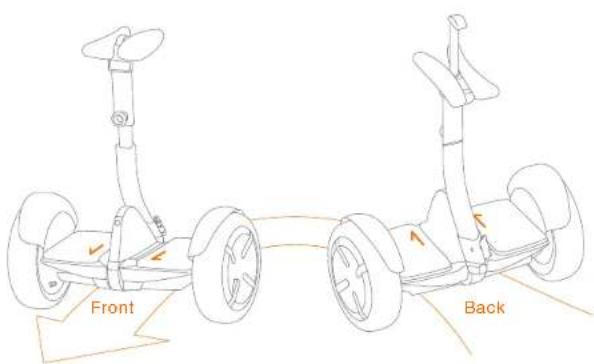
WARNING
Always step on/off from the back of the miniPRO.
Otherwisewyou riskfalls and/or collisions because the steering direction is reversed.
1 Packing List
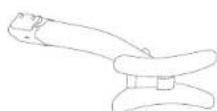
Steering Bar
User Materials

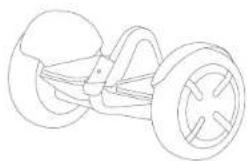
Mainframe
Accessories Box
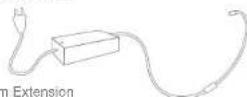
Accessories in the Box
Charger, Power Cord

When unpacking your minPRO, please verify that the above items are included in the package. If you are missing any components, please contact your local dealer or retailer first. After verifying that all components are present and in good condition, you can assemble your new minPRO.
Please rean the box and packaging material in case you need to ship your minPRO in the future.
Remnber to power off your minilto and unplug the charge cable before assembling, mounting accessories, or cleaning the manframe.
等
2 Riding Safety
- The miniPRO is a recreational product, which is different from motor vehicles driven on the road. Before mastering riding skills, you need to practice. Neither Nibeloo Inc. nor Sogway Inc. is responsible for any injuries or damage caused by a rider's inexperience or failure to follow the instructions in this document.
- Please understand that you can reduce the risk by following all the instructions and warnings in this manual, but you cannot eliminate all the risks. Remember that whenever you ride the miniPRO you risk injury or death from loss of control, collisions, and falls. When entering into public spaces always comply with the local laws and regulations. As with other vehicles, faster speeds require longer crossing distance. Sudden braking on smooth surfaces could lead to wheel slip, loss of balance, or falls. Be cautious and always keep a safe distance between you and other people or vehicles when riding. Be alert and slow down when onlering unfamiliar areas.
- Respect pedestrians by always yielding the right of way. Pass on the left whenever possible. When approaching a pedestrian from the front, stay to the right and slow down. Avoid startling pedestrians. When approaching from behind, announce yourself and slow down to walking speed when passing.
- In places without laws and regulations governing self-ancing electric vehicles, comply with the safety guidelines outlined in this manual. Neither Ninebot Inc nor Segway Inc. is responsible for any property damage, personal injury/health, accidents, or legal disputes caused by violations of the safety instructions.
- Do not allow anyone to ride the miniPRO on his/her own unless they have carefully read this manual, watched the safety video, and followed the New Rider Tutorial on the Ninebot by Sespy App. The safety of new riders is your responsibility. Spot new riders until they are comfortable with the basic operation of the miniPRO. Make sure each new rider wears a helmet and other protective gear.
- Before each rde check for loose festers, damaged components, and car tire pressure. If the miniPRO makes abnormal sounds or signals an alarm, immediately stop riding. Diagnose your miniPRO via the NinoBox by Sogway App and call your dealer/distributor for service.
- Always wear a helmet when riding. Use an approved bicycle or skateboard helmet that fits properly with the crown strap in place, and provides protection for the back of your head.
- Do not attempt your first time in any area where you might encounter children, pedestrians, pets, vehicles, bicycles, or other obstacles and potential hazards.
B. Be alert! Scan both far ahead and in front of your minPRO — your eyes are your best tool for safely avoiding obstacles and (ew) traction surfaces (including, but not limited to, wet ground, loose sand, loose gravel, and ice). -
To reduce risk of injury, you must read and follow all "CAUTION" and "WARNING" notices in this document. Do not ride at an unsafe speed. Under no circumstance should you ride on roads with motor vehicles. Always follow these safety instructions. A. The following people should not ride the minPRO:
-
Anyone under 16 years old or above 60 years old, Hiccers between 15-18 years old should not under adult supervision.
ii. Anyone under the influence of alcohol or drugs
iii. Anyone who suffers from disease that puts them at risk if they engage in strenuous physical activity.
iv. Anyone who has problems with balance or with motor skills that would interfere with their ability to maintain balance.
v. Anyone whose height or weight is outside the stated limits (see Specifications).
B. Comply with local laws and regulations when riding this product. Do not ride where prohibited by local laws.
C.To ride safely,you must be able to clearly see what is in front of you and you must be clearly visible to others.
D. Do not ride in the snow, in the rain, or on roads which are wet, muddy, loy, or that are slippery for any reason. Do not ride over obstacles (sand, loose gravel, or sticks). Doing so could result in a loss of balance or traction and could cause a fall.
E. Do not accelerate or decelerate suddenly. Do not accelerate when the miniPRO tilts back or aounces an alarm. Do not attempt to override the speed limiter.
- Do not insert the power cord if the charge port is wet.
- Use a surge protector when charging to help protect your miniHPO from damage due to power surges and voltage spikes. Only use the Ninebox by Segway supplied charger. Do not use a charger from any other product.
- Use only Nibelot by Segway approved parts and accessories. Do not modify your miniPRO. Modifications to your miniPRO could interfere with the operation of the miniPRO, could result in serious injury and/or damage, and could void the Limited Warranty.
- Do not sit on the stocring bar. Doing so could result in serious injury and/or damage to your minPRO.
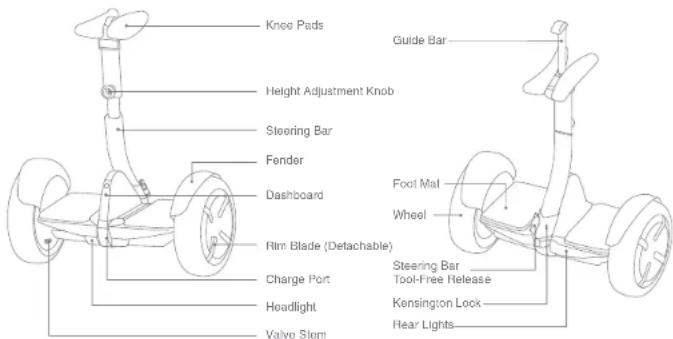
3 Diagram
4 Dashboard Icons
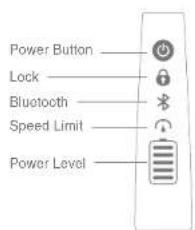
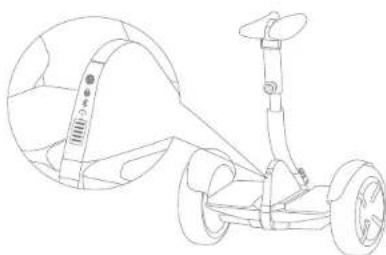

Power Button
Turn ON/OFF. The miniPRO will automatically power OFF when idle for 10 minutes, or when left down (horizontal) for over 30 seconds.

Lock
Enable Lock Mode via the App. The miniPRO will闪烁, flash its lights, and sound an alarm if anyone moves it. The App will also alarm. The miniPRO will not balance in Lock Mode.

Bluetooth
When Bluetooth is enabled but not connected to a smart phone, this icon will blink. When the Nibrotel by Seegway App is connected to the miniPRO, this icon will glow steadily.

Speed Limit
Enable and adjust Speed Limit Mode via the App. When the icon is illuminated the miniPRO is limited to 7 km/h. The speed limit can be adjusted in the App. As you approach the speed limit, the miniPRO hits back.

Indicates the remaining battery life. When the battery is nearly empty this icon blinks and the minipro beeps, indicating that you need to charge your minipro. When less than 30% , your minipro will gradually reduce the max speed limit. Use the App to read the remaining power and estimate remaining range.
分类
5 Assembling Your miniPRO
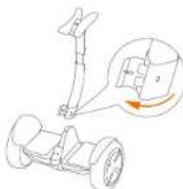
Install the steering bar
1 Open the tool-tree release as shown.
2 8et the steering deck into the mainframe steering socket
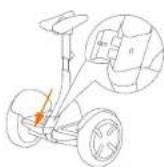
Choose the trial-time release to secure
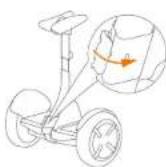
Check the Power ON/OFF status after assembly.
For your safety, your minPRO is not activated at this time and will becpocationally after Power ON. Unil activated, the minPRO maintains a very low riding speed and steering sensitivity, and should not be ridden. Install the Ninebot by Segway App on your mobile device (with Bluetooth 4.0 or above), connect to the minPRO with Bluetooth, and follow the App instructions to activate your minPRO and follow the training procedures.
Adjust the knee pad height
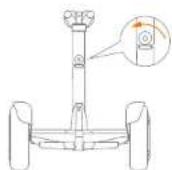
Notice height adjustment block counter-dissertation
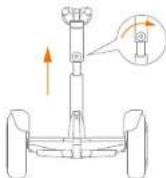
Lift the knee pads to desired height.
Poso height adjustment: knot blockwires to tighten.
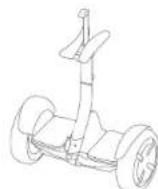
I lift the guide bar to help steer the miniPRO without a rider when powered on. Do not use it to carry the miniPRO.
6 First Ride


There are safety risks when learning to ride the minihop. You must read the Safety Instructions and follow the how Rider Tutorial in the Ninebot by Segway App before your first ride. Go to www.sogway.com to watch the safety video.
Use your mobile device (Android or iOS) to install the Ninebot by Skype Apo, read the Safety Instructions, then follow the New Ridor Tutorial before your first trip. Go to the Apple App Store (iOS) or the Google Play Store (Android) and search for "Ninebot" to download and install the App.
Scan to download the App (IOS 7.0 or above, Android 4.3 or above)
When your miniPHO intermittently sounds an alarm, stop riding and check the App for details.
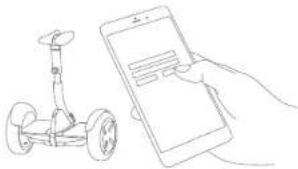
1 Install App and register login
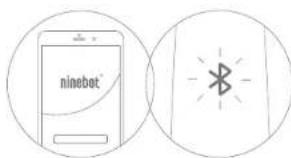
3 Click "Search device" to connect to your minPRO. The miniPRO will soon when the connection is successful. The Bluetooth icon will stop blinking and turn illuminated.
Follow the App instructions to learn how to ride safely. Have fun!
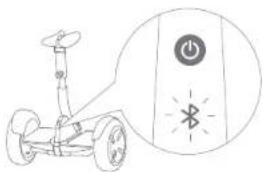
2. Power ON the minPRO. The Bluetooth icon blinking indicates the minPRO is waiting for a connection.
7 Charging
Do not connect the charger if the charge port or charge cable is wet.
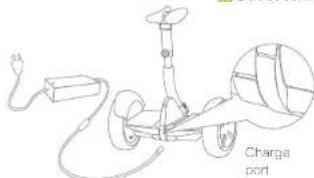

Lift up the cover

Open the rubber cap

Insert the plug into the socket
Your miniPRO is fully charged when the LED on the charger changes from red (charging) to green (thick charge).
8 Learning to Ride
WARNING Hider must weigh 40-100 kg and must be 130-200 cm tall.
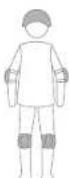
Wear an approved helmet and other protective gear to minimize any possible injury.
After activation, the App will load you through the New Follower Tutorial. Please follow the instructions in the App and In this manual.
NOI
You must first download the Nibelot by Segway App on your mobile device. The App will load you through the New Rider Tutorial.
For your salary, the MiniPRO will limit the max speed to 7 km/h until you complete the New Rider Tutorial. For the first 1 km after completing the New Rider Tutorial, the max speed will be limited to 10 km/h, after which you can disable the speed limiter via the Apo and reach a maximum speed of 10 km/h.
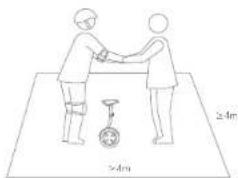
1. Go to a large open area and ask a friend to assist you on your first slide.
WARNING Always step on from the back of the miniPRO
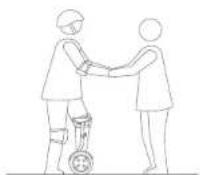
2. Place one foot on the foot mat, with your other foot still on the ground holding your weight. Do not press the steering bar with your leg.
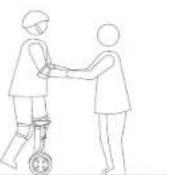
3 Slowly transfer your weight onto the miniPRO. This unit will bozo, indicating it is now in balance mode. Slowly step on with your other foot.

4 Stand with your weight evenly distributed on both feet and relax, leaning slightly ahead.
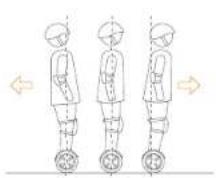
5 Gently can your body forward and backward to control your movement.
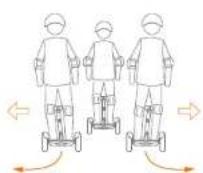
8 To turn, gently turn left or right against the steering bar.
9 Warning
You must read and understand the Warnings and Sale Rding Instructions in the imporial before abening to ride the miniply.
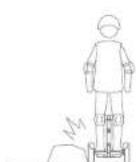
Avoid contacting obstacles with the tire/wheel.
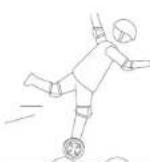
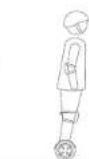
When traversing small jumps or uneven terrain, maintain a moderate speed 3-10 km/h and keep your knees bent. Do not go too slow or too fast otherwise you may lose control and fall.
Iumps or uneven
drates speed 3-10 mph
bent. Do not go too
write you may lose
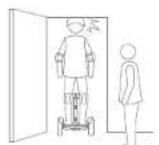
Watch your head when passing through doverways.
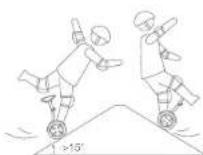
Avoid slopes steep than 15^ or you may lose traction.
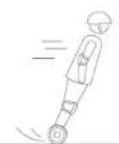
Do not accrclster or decelerate activity. Do not seem more than 5 or aceleratedecelerate faster than 4 km/hys.
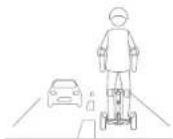
Do not ride on public roads motorways. highways, or streets.
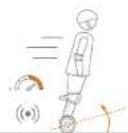
Do not accelerate when the minIPRO lifts back or sounds an alarm. Do not attempt to override the speed limiter.
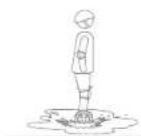
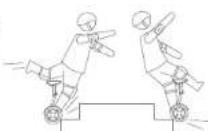
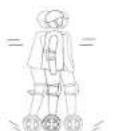

Do not ride through.
puddeles or other.
bodies of water.
Do not get wet.

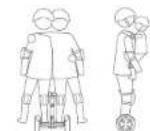
The miniPHO is for one rider only. Do not ride double or carry any passengers. Do not carry a child.

Do not eve ever holes,curbs, steps, or other obstacles.

Do not rock back and forth or shift your weight abruptly.

Warning (cont'd)
You must read and understand the Warnings and Sale Risk Instructions in this manual before attempting to ride the minitrail.
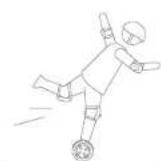

Do not attempt stunts of any kind. Always keep both foot, on the foot, mass
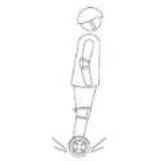
Maintain contact with the ground at all times. Do not jump or attempt slurbs.
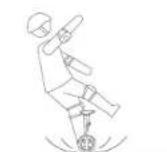
Do not rely on law tract constructions (including, but not limed to: wet ground, loose sand, loose gravel, and ice).

Remote Control (R/C) Mode
You can use the Ninebot by Segway Apo to drive your minifRO in RYC Mode.
1. Open the NetBox by Security App and connect to your minIPQ
2. Click on the HVC Icon (C)
3.1ug the virtual pystok (the dot inside the circle) to drive your min PRO
A
Do not use RIC mode in crowded areas or where there is a potential risk of endangering people or property if operated in an unsafe manner. Do not stand on the miniPRO vehicle in RIC mode. Doing so risks serious personal injury or damage to the miniPRO.
In R/C mode the default maximum speed is 7.0 km/h, but you can change the max speed in the Ninebot by Sageway App. The minHiO's bluetooth range is 30-50 feet (10-15 meters). If your Android or iOS device goes outside Bluetooth range, the minHiO will stop moving in R/C mode.

Lifting and Power Assist Mode

For your safety motor power is cut off when the minPRO is fitted off the ground in Balance Mode. When the minPRO is put back back it will begin balancing again. Do not lift the minPRO by the fenders or mainframe, you risk pinching or injuring your fingers/hands. Please use the steering pad as shown above.
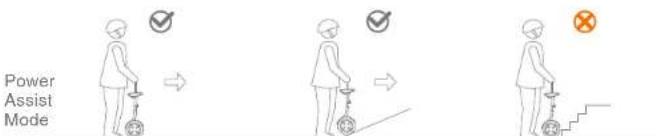
Pull up the guide bar to enter Power Assist Mode (powered on, with no rider). Steer the minPRO across smooth surfaces using the guide bar. Do not guide it up stairs, across potholes, over large cracks/under uneven surfaces, or over other obstacles. Guide your minPRO around the obstacle or carry it over the obstacle as shown in the previous section.
12 Maintenance
Cleaning and Storing Your miniPRO
Une a soft, wet cloth to the misriune cloth. Hard to remove dirt can be scrubbed with a toothbrush and toothpaste, then cleaned with a soft, wet cloth. Scratch on plastic parts can be polished with extra fine grit abrasive paper.
NOTE
Do not wash your minipro with alcohol, gasping acclute, or other correspive volutile solvents. Those substances may damage the appearance and internal structure of your minipro. Do not wash your minipro with a power washer or high pressure hose.
WARNING
Make sure the minIRDC is powered OFF, the energising cable is unplugged, and the rubber cap on the charge port is tightly sealed before coasting; otherwise you may expose yourself to electric shock or damage the electronic components.
Store your minPRO in a cool, dry place. Do not store it outdoors for extended periods of time. Exposure to sunlight and temperature extremes (both hot and cold) will accelerate the aging process of the plastic components and may reduce battery life.
Tine Pressure
Inifio tree to 45-50 psf. Inifio both trees equally,
Battery Pack Maintenance
Do not store or charge the battery at temperatures outside the stated limits (see Specifications) Do not discard or destroy the battery. For more battery information, refer to the sticker on the battery itself located on the bottom of the miniPRO. Refer to your local laws and regulations regarding battery recycling and/or disposal.
A wall maintained battery can perform well even after many miles of riding. Charge the battery after each ride and avoid draining the battery completely. When used at room temperature (25°C) the battery range and performance is at its best, whereas using it at temperatures below 40°C can decrease range and performance. Typically, at -20°C range can be half that of the same battery at 22°C.
Battery range will recover when temperature rises. More details are available in the App
Typically, a fully charged battery should retain charge for 120-150 days in Stanley Mode. A low-power battery should return charge for 30-60 days in Stanley Mode. Remember to charge the battery after each use. Completely draining the battery may cause permanent damage to the battery. Electronics inside the battery record the charge/discharge condition of the battery; damage caused by over-discharge or under-discharge will not be covered by the Limited Warranty.
A. 酶(PADH)
Risk of fire. No user serviceable parts. Do not attempt to disassemble the battery.
WARNING
We strongly recommend against riding when the ambient temperature is below -hPC because low temperature will limit the maximum power/ogorg. Doing so could cause personal injury or property damage due to slips or falls.
13 Specifications
| Index | Items | N3M320 Parameters | N3M260 Parameters |
| Dimension | L x W (mm) | 262x546 | |
| Mainframe H[1] (mm) | 611 ~ 866 | ||
| Weight | Payload | 20 ~ 100 kg | |
| Net | Approx. 12.8 kg | ||
| Rider Requirement | Applicable Age | 16 ~ 50 | |
| Applicable Height | 120 ~ 200 cm (3.9 ~ 6.6 ft) | ||
| Machine Parameter | Max.Speed | Approx. 18 km/h | Approx. 16 km/h |
| Typical Mileage[2] | Approx. 30 km | Approx. 22 km | |
| Max. Climbing Angle | Approx. 15° | ||
| Beginner Mode | Can be disabled or reset by App after 1km riding. accumulative riding can be reset by App | ||
| Applicable Terrier | Harden pavement, flat dirt pavement, down ramp < 15°, staircase < 1cm, groove width < 3cm | ||
| Operation Temp. | -10°C ~ +40°C (14°F ~ 104°F) | ||
| Storage Temp. | -20°C ~ +45°C (-4°F ~ 113°F) | ||
| IP grade | IP54 | ||
| Battery Pack | Nominal Voltage (V) | 54.3 — — | 54.8 — — |
| Max.Charging Voltage (V) | 63 — — | 63 — — | |
| Nominal Capacity (Wh) | 310 | 236 | |
| Smart BMS | Overvoltage/Undervoltage/Short Circuit/Overheating Protection, Auto-Sleep /Wake-up, detailed information of battery can be checked with Ninetobot App | ||
| Motor | Nominal Power(W) | 400x2 | 350x2 |
| Max.Power(W) | 800x2 | 700x2 | |
| Compliance | CCC, CE | ||
| Charger | Nominal Power(W) | 120 | |
| Nominal Input Voltage(V) | 100 ~ 240V ~ 50~60Hz | ||
| Nominal Output Voltage(V) | Approx. 63 — — | ||
| Nominal Output Current (A) | Approx. 1.9 | ||
| Compliance | CCC/CE/FCC/PSE/SAA/KC | ||
| Charging Time (H) | Approx. 4 | Approx.3 | |
[1] Mainframe height; refer to distance from ground to the highest end of mainframe
[2] Typical mileage refers to: test under riding in full power, 70kg load, 25^ (77^) environmental temperature, 15km / h average speed on-pavement.
14 Trademark and Legal Statement
Ninotefim™ and the shesio icon are trademarks of Nirebot Inc. Segeway is the registered trademark of Segeway Inc., home and iOS, that of Apple Inc.,Android,that of Google Inc.The respective covers reserve the right of their trademarks referred to in this manual.
Ninobot is the center or source of various patents relating to Ninobot personal transportation roolset, with other patents pending. This patent has been filed in 2015 and has been filed in 2016. The patent has been filed in 2017 and has been filed in 2018. This patent has been filed in 2019 and has been filed in 2020.
The min PRO is covered by U.S. and foreign patents. For patent information go to http://www.gayway.com. Ninebot (Tanim) Technology Co., Ltd. manufactures and sells the minPRO under a license from DEKA Products Limited Partnership.
We have attempted to isolate descriptions and instructions for all the functions of the minITRO at the time of printing, however, your system may still be able to access this document. Visit the App Store App Store (iOS) or the Google Play Store (Android) for download and install the Nootbot by Roggery App.
Please note that there are multiple Netibol by Segway modes with different functions, and some of the functions mentioned here may not be suitable for all modes. The man/sovereigner reserves the right to change the design and functionality of the minIFRO product and documentation without prior notice.
All rights reserved. Copyright Ninebot 2016.
15 After-sales Service
All products are delivered with a free of charge standard warranty that may vary depending on your region and product starting from this date of your purchase. Please make sure to keep your receipt in your identity and date. All after sales regulations shall be followed according to your regional/local laws and regulations. You will find the latest standard warranty terms and conditions, certifications, contacts of local after service centers at our website www.segasy.com. If you have any questions or inquiries, for quick and accurate information regarding your order (which you can find on the package and your product with format of a "A1BCD2345E000") and your receipt of purchase before contacting your local after service center. In case you need further assistance claiming warranty, please do not hesitate to contact us.
- legal after service centers
Please consult your unit will prove of delivery receipt or order confirmation to your local dealer or retailer. You can also check www.seway.com for local official distributor contacts.
- Segway Europe BV,
Hogehilweg 6,1101 CC Amsterdam, The Netherlands
E-mail:service@sojway.com
- Ninebat Inc.
1F A1 BLDG, ZGC DongSheng Science Park(Northern Territory), 68 Xbackou Rd, Haidian Diacl, Beijing, China
Tel:486-10-54828002Fax:+86-10-84828002-500
E-MAILSOLN@INTELCOM (CBP)TECHNOLOGY SERVICE COMPANY (ALIEN SERVICES CO.,LTD.)
Vaming
Product warranty shall be followed and regulated base on the local region laws and regulations.
Warranty shall start from the purchasing date with valid invoice and be issued within 30 days of the purchase. Unit with activation requirement needs to be properly activated before the warranty is


The manufacturer reserves the right to make changes to the miniPRO, release firmware updates, and update this manual at any time. Visit www.segway.com to download the latest user materials and watch the safety video. You must install the Ninebot by Segway App to follow the New Rider Tutorial, activate your miniPRO, and obtain the latest updates and safety instructions.
www.segway.com
EU201607-V1.0
Mode Telecommande (T/C)
HageniWag 8.1101 CC Amaranard, The Netherlands
Cannnnnne nnnnnnnnnnnnnnnnnnnnnnnnnnnnnnnnnnnnnnnnnnnnnnnnnnnnnnnnnnnnnnnnnnnnnnnnnnnnnnnnnnnnnnnnnnnnnnnnnnnnnnnnnnn
15A1LDPZGCnepnncnepnepnepnepnepnepnepnepnepnepnepnepnepnepnepnepnepnepnepnepnepnepnepnepnepnepnepnepnepnepnepnepnepnepnepnepnepnepnepnepnepnepnepnepnepnepnepnepnepnepn
T61:+35.10.84825002Fox:-35-10-84825002-800
Cannal. saeessmabetom [Consbation] aesieaeribetom (Sereae apria-
Averissment
Ursal 2014 w. soc, dss cans fandts zum Zeitpunkt der Dicliscagung des Brehmstums und als fogenen for all Forderungen in the pre-1960s and for the pre-1960s form part (potenzial) getinging in the hines of the market or a good deal from them. Before having seen the Apple Inc. IPO (see also the Bangle Pay Note (Merrill Lynch, 1987))
Bile, biehchn, d, s, 10
1F A1 ELOG ZOG DnqShng Ssce Park Nortem Tantory, 66 Xingkou Ed. Haiden, Ching
Tel:188-10-34920002Fax:188-10-4828002600
E-mail: sales@rincotech.com (Berat,ng) service#inepot.com [Kurundcrp]
Warning