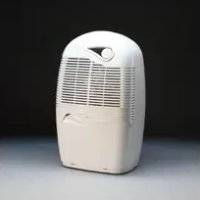
2650e - Humidifier EBAC - Free user manual and instructions
Find the device manual for free 2650e EBAC in PDF.



| Product type | Dehumidifier |
| Brand | Ebac |
| Model | 2650e |
| Power supply | 230 V / 50 Hz |
| Power consumption | 200 W (estimated) |
| Tank capacity | 2 L (approx.) |
| Operating temperature | 3 °C to 35 °C |
| Operating modes | Smart, Hygrostat, Continuous, 8h Max, Standby |
| Fan speed | 2 speeds (silent and normal) + continuous ventilation |
| Smart control | Automatic adjustment according to conditions and lifestyle |
| Adjustable hygrostat | Yes, with gradual adjustment |
| Defrost function | Automatic between 3 °C and 25 °C |
| Air filter | Washable monthly, replacement every 4 months |
| Drainage options | Permanent drainage possible (optional kit) |
| Optional accessories | High-performance filters, casters, drainage kit |
| Weight | 12 kg (estimated) |
| Dimensions (W x H x D) | 500 x 300 x 300 mm (estimated) |
| Electricity consumption | About 3 cents/hour |
| Noise level | Low (silent mode available) |
| Safety | Recommended 30 mA RCD protection; do not immerse |
| Full tank indicator | Red indicator light |
Frequently Asked Questions - 2650e EBAC
User questions about 2650e EBAC
0 question about this device. Answer the ones you know or ask your own.
Ask a new question about this device
Download the instructions for your Humidifier in PDF format for free! Find your manual 2650e - EBAC and take your electronic device back in hand. On this page are published all the documents necessary for the use of your device. 2650e by EBAC.
USER MANUAL 2650e EBAC
Aycliffe Business Park
Newton Aycliffe
County Durham
DL5 6SQ
United Kingdom
Tel: 08456341392 (GB)
0800638100(F)
0800 0229.229 (NL)
00800 322.246.36 (B) (D) (A) (CH)
+44 (0) 1388 605061 (ES) (IT)
Fax: +44 (0)1388 609 845
www.ebac.com

Aycliffe Business Park
Newton Aycliffe
County Durham
United Kingdom
DL5 6SQ
Tel: 08456341392 (GB)
0800638100(F)
0800 0229.229 (NL)
00800 322.246.36 (B) (D) (A) (CH)
+44 (0) 1388 605061 (ES) (IT)
Fax: +44 (0) 1388 609845
www.ebac.com
Aycliffe Business Park
Newton Aycliffe
County Durham
Verenigd Koninkrijk
DL5 6SQ
Tel: 08456341392 (GB)
0800638100(F)
0800 0229.229 (NL)
00800 322.246.36 (B) (D) (A) (CH)
+44 (0) 1388 605061 (ES) (IT)
Fax: +44 (0) 1388 609845
www.ebac.com
Aycliffe Business Park
Newton Aycliffe
County Durham
DL5 6SQ
Reino Unido
Tel: 08456341392 (GB)
0800638100(F)
0800 0229.229 (NL)
00800322.246.36(B)D)(A)(CH)
+44 (0) 1388 605061 (ES) (IT)
Fax: +44 (0)1388 609 845
www.ebac.com
Aycliffe Business Park
Newton Aycliffe
County Durham
DL5 6SQ
Regno Unito
Tel: 08456341392 (GB)
0800638100(F)
0800 0229.229 (NL)
00800 322.246.36 (B) (D) (A) (CH)
+44 (0) 1388 605061 (ES) (IT)
Fax: +44 (0) 1388609845
www.ebac.com
The first time you plug in your new Ebac dehumidifier, you'll begin to realise the difference it will make to your home. You'll be amazed at just how much water this quiet, yet powerful unit extracts and stores in its container. It'll get you thinking where it all comes from and where it's been going all those years.
Incredibly, the average family produces 20 pints/12 litres of moisture a day. However, that's one fact you needn't worry about now.
Your Ebac dehumidifier is designed to cope with everything you do that adds even more moisture to the British climate. Everything from showering to washing up, boiling a kettle to breathing – they all add moisture to the air.
This brochure will help you get the very best out of your Ebac and not only protect your home from the damaging effects of condensation and damp, but also improve the quality of your air.
It's surprising what an Ebac can do for your home
There's a lot more to your Ebac dehumidifier than preventing damp and condensation damage. It could actually improve your health.
Damp conditions provide the ideal breeding ground for dust mites. So, if you suffer from an allergy or asthma aggravated by dust mites, lower humidity levels may help. Also, sufferers of arthritis, bronchitis and rheumatism may also find relief from drier, warmer air.
Economy-wise, your Ebac dehumidifier costs typically 2p an hour to run. It can even lower your heating bills, as moist air absorbs heat. This is then removed and channelled back into the atmosphere to raise temperatures by up to 3^ . Plus, being light and portable, every room in the house can benefit too.

Made in Great Britain
Your Ebac dehumidifier has been specificallydesigned to cope with Britain's unique and unsettled climate by Europe's No.1 manufacturer of dehumidifiers.
Important
Your Ebac 2000 is packed in a plastic wrapping, please ensure that it is disposed of safely and where it will not be a danger to children.
This dehumidifier should not be used by children and by persons with reduced physical, sensory or mental capabilities, unless they have been given instructions on the safe use of the appliance and they understand the hazards involved. Children should not play with the dehumidifier and any maintenance or cleaning of the product should not be made by children.
Before operation
- Stand your dehumidifier upright for at least 2 hours prior to operating.
- Open the water container door, remove the water container - replace and close the door. This will reset the sensors which may have been activated during transit.
Getting the most from your Ebac 2000
- Ensure it is always connected to the mains.
- Ensure your Ebac 2000 Smart Control does not switch off for long periods of time due to an incorrect humidistat setting (if activated).
- Ensure internal doors are kept ajar where possible to allow air circulation.
- Ensure external doors and windows are kept closed as much as possible. This also saves wasting heat from your home.
- Ensure the unit is positioned on a flat, even surface.
Positioning your Ebac 2000
Your Ebac 2000 Smart Control is designed to be used wherever you have a condensation or dampness problem and can be easily moved to the desired location. To ensure that you get the best service from your Ebac 2000 Smart Control do not place the dehumidifier next to a radiator or other heat source as this will reduce the performance of your dehumidifier.
CONTROL PANEL
- Humidistat Increase
- Humidistat Decrease
- Fan Speed & Air Cleaning Control
4.ModeButton - Power On/Standby Indicator
- Red Container Full Indicator
- Fan Speed Indicator & Air Cleaning Indicator
- Humidistat Setting Indicator
- Smart Control Setting Indicator

Setting the controls
Smart Control
Your dehumidifier is fitted with both a traditional humidistat (see section For use via the Humidistat) and a patented intelligent Smart Control System. We recommend that all customers use the intelligent system, which automatically adjusts the running pattern of your Ebac according to changes in the weather and your lifestyle.
Smart control options.
- Auto Economy (indicated by one green light illuminated)
- Auto (indicated by two green lights illuminated)
- Continuous (indicated by all three lights illuminated)
- Off (no lights illuminated)
To activate Smart
To activate Smart Control, press the mode button until AUTO is displayed on the control panel. The unit should start in this mode when connected to the mains. The unit will now automatically adjust itself to work at the times needed to maintain the ideal conditions for your home. After starting to use the unit for the first time it normally takes 2-4 weeks to get the humidity in your home under control.
Once signs of excess moisture have gone we would recommend that you try switching to Economy mode by pressing the mode button until AUTO and ECON are displayed on the control panel. The unit will still work using the Smart Control but for less time each day.
NOTE: Economy mode may not be suitable for all homes and/or at certain times of the year. If signs of excess humidity return switch off economy by pressing the mode button until the control panel shows AUTO without ECON being lit.
Fan speed control
Adjusting the fan speed
You may wish to change the fan speed of your Ebac from time to time. Using the Normal setting will remove more moisture from the air compared to the Quiet setting thereby improving efficiency. When switched on, your dehumidifier will default to level 1.
Pressing the fan speed button will scroll through the settings below, after standby mode it will return to setting 1.
Setting
Function
1 Low setting for quiet operation
2 Normal setting
3 Continuous Fan Mode Quiet
4 Continuous Fan Mode Normal
5 Standby position
The speed of the fan is indicated by the green fan symbol - the higher the setting the faster this symbol rotates.
Air Cleaning: When fitted with one of our high performance filters, your dehumidifier may also be used as an air cleaner. To do this, press the Fan speed & Air cleaning button until the fan symbol turns yellow. Pressing the Fan speed & Air cleaning button again will increase the Fan speed for faster air filtration.
Standby: When selected, the dehumidifier will not operate. This allows the dehumidifier to be switched off without adjusting the humidistat setting. Standby mode is indicated by the power-on light turning yellow.
Boost Control: The boost control on your Dehumidifier allows the setting of the humidistat or Smart Control and fan speed to be overridden for a set period of time to maximise water extraction from the air. This is ideal for laundry drying etc.
To select this function press the mode button until MAX flashes on the control panel. The unit will now run on maximum fan speed and at full-power for a period of 8 hours. After this time the unit will return to the settings you had prior to activation.
Note: As the mode button changes a number of functions, the settings remembered are those made 10 seconds prior to boost being activated.
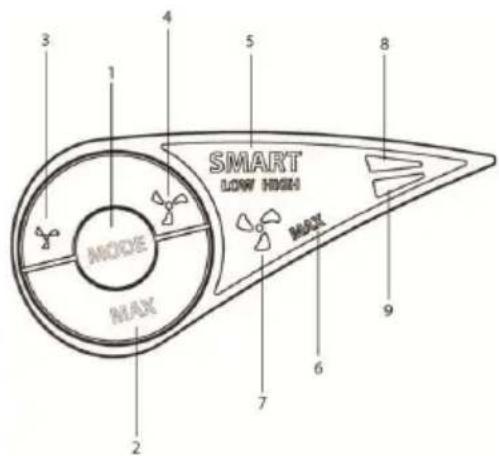
CONTROL PANEL
1.Mode Button
2. Max Continuous/8 Hour Run
3. Low/Quiet Fan Speed
4. Full Fan Speed
5. Smart Control Indicator
6. Continuous Run Indicator
7. Fan Speed and Air Cleaning Indicator
8. Amber Standby/Green Run
9. Red Container Full Indicator
Smart Control
Your dehumidifier is fitted with a patented intelligent Smart Control System. We recommend that all customers use the intelligent system, which automatically adjusts the running pattern of your Ebac according to changes in the weather and your lifestyle.
To activate Smart
To activate Smart Control, press the mode button(1) until SMART HIGH(5) is displayed on the control panel. The unit should start in this mode automatically when connected to the mains. The unit will now automatically adjust itself to work at the times needed to maintain the ideal conditions for your home. It normally takes 2-4 weeks to get the humidity in your home under control. Once signs of excess moisture have gone we would recommend that you switch to a lower setting by pressing the mode button(1) until SMART LOW(5) is displayed on the control panel. The unit will still work using Smart Control but for less time each day.
Every home is different and it is worth trying your unit on SMART LOW(5) which has lower running costs. There may be times when you need SMART HIGH(5) or even MAX(2) running because you are producing more excess moisture or outside conditions have worsened.
NOTE: SMART LOW(5) mode may not be suitable for all homes and /or at certain times of the year. If signs of excess humidity return switch off SMART LOW(5) by pressing the mode button(1) until the control panel shows SMART HIGH(5).
Fan speed control
Adjusting the fan speed
You may wish to change the fan speed of your Ebac from time to time. Using the Full Fan Speed Control Panel(4) will remove more moisture from the air compared to the Low/Quiet Control Panel(3) thereby improving efficiency. When switched on, your dehumidifier will default to fan speed setting A.
Pressing the Full Fan speed button(4) will scroll through the settings below.
Setting Function
A Low/Quiet setting - fan illuminated in green moving at low speed(7)
B Normal setting - fan illuminated in green moving at high speed(7)
C Continuous Fan Mode Quiet - fan illuminated in amber moving at low speed(7)
D Continuous Fan Mode Normal - fan illuminated in amber moving at high speed(7)
The speed of the fan is indicated by the green fan symbol - the higher the setting the faster this symbol rotates.
Standby: When selected, the dehumidifier will not extract water. Pressing Low Fan Speed(3) will instruct the unit to go into Standby Mode. Depending on the current fan speed, you may need to press this several times until Standby Mode is indicated by the power -on light turning amber(8). By pressing the Full Fan Speed Button(4) the unit will return to fan speed setting A.
Air Cleaning (Continuous Fan Mode): When fitted with one of our high performance filters, your dehumidifier may also be used as an air cleaner. To do this, press the Full Fan Speed(4) until the fan symbol(7) turns amber. Pressing the Full Fan speed(4) again will increase the Fan speed for faster air filtration.
Max Continuous/8 hour Run(2): The Max Continuous/8 hour run(2) on your Dehumidifier allows the setting of Smart Control and fan speed to be overridden maximising water extraction from the air. This is ideal for laundry drying etc.
To use this function select max(2) on your dehumidifier (refer to relevant control diagram) until MAX(6) illuminates on the control panel, then select normal setting (fan speed B) on your dehumidifier. The unit will now run on maximum fan speed continuously until standby or Smart is reselected.
Pressing the max(2) button again will cause the MAX(6) symbol to flash. The unit will now run on maximum fan speed continuously for a period of 8 hours. After this time the unit will return to the settings you had prior to activation.
Emptying the water container
The red light on the control panel will illuminate when the container is full. When this occurs water collection stops.
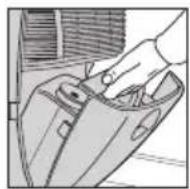
To empty, open the water container access door
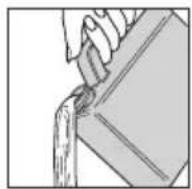
The container can then be removed and emptied as shown
Replace the container back into the dehumidifier with the outlet on the left hand side and gently close the door.
Cleaning the filter
Your Ebac 2000 Smart control has a filter to remove dust from the air.
This filter should be cleaned every month and replaced after 4 months. Failure to do this will reduce the performance of your dehumidifier and may over time lead to a permanent reduction in performance.
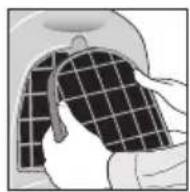
Remove the filter cartridge from the rear of the unit.

Clean the filter using a vacuum cleaner on a low power.
Replace the filter cartridge onto the rear panel.
Automatic defrost system
Your Ebac 2000 Smart Control will collect excess moisture either as condensed water or ice on the evaporator coil located behind the filter. Any accumulation of ice is cleared periodically automatically.
This maximises the efficiency of the unit at temperatures between 3^ (37^) and 25^ (77^) . Above 25^ no defrost is required.
Using the permanent draining facility
The Ebac 2000 Smart Control series can be used in unattended dwellings such as holiday homes, without emptying the water container. To use this facility you must order a permanent drainage kit. To order, please see the order form enclosed with this manual or contact your retailer.
Optional accessories
Your Ebac 2000 Smart Control has a full range of optional accessories available to ensure that you get the most out of your dehumidifier. These include high performance filters and castors. Please see the brochure included with your dehumidifier for further details.
If your Ebac 2000 fails to operate
Always check the following list before requesting service. Should a service call be requested and the fault be found to be detailed below, a charge may be made.
Power indicator light is not illuminated.
Check
- The unit is switched on at the mains. If necessary test the socket by plugging in another appliance.
- Check the fuse in the plug and if necessary replace with another fuse, (13 amp for 2650e and 2850e models. If you continue to have problems please see 'Requesting Service'.
If your Ebac 2000 fails to operate
Power indicator light is illuminated, but the unit is not collecting water.
Check
- The humidistat (if activated) may be set too low, increase the setting.
- The water container may be full, empty the container.
- The unit may have been set to standby mode - check the settings.
- Ensure the water container is fitted. If you continue to have problems please see 'Requesting Service'.
Fan operates continuously.
Check
- Check that the continuous fan operation is not selected. If you continue to have problems please see 'Requesting Service'.
Reduced water extraction.
Check
- The humidistat (if activated) may be set too low, if signs of condensation or dampness remain, increase the setting.
- The filter may be blocked. Remove, clean and refit.
- After being installed all dehumidifiers will collect less moisture as initial excess moisture is removed. This is normal.
- The dehumidifier may be positioned next to a heat source i.e. a radiator - reposition. If you continue to have problems see 'Requesting Service'.
Dehumidifier collects water but is not preventing condensation.
Check
- The humidistat (if activated) may be set too low, increase the setting.
- Increase the fan speed to NORMAL if set to QUIET.
- Outside temperatures have dropped suddenly. The dehumidifier may take a few days to get the problem back under control.
If you continue to have problems please see 'Requesting Service'.
If your Ebac 2000 fails to operate
Red water container light remains on all the time and the dehumidifier is not running (Normal when the water container is full).
Check
- Ensure the water container is not full.
If you continue to have problems see 'Requesting Service'.
Technical and safety information
Min Operating Temperature 3°C
Max Operating Temperature 35°C
- Do not use the machine if the power cord or cabinet are damaged.
- If the flexible power cord is damaged it must be replaced by an identical cord which is available from Ebac Limited or an Ebac authorised distributor.
- Do not poke objects into any grilles on the machine.
- Ebac has a policy of constant development and, therefore, reserves the right to change specifications without prior notice.
- Do not use the machine without the permanent drainage bung in place on the back of the machine.
- To protect against electrical shocks, do not immerse unit, plug or cord in water, or spray with liquids.
- Do not use an extension cord or double adapter.
- Ensure Power supply is RCD protected at 30mA .
- UK product is shipped with a fuse in the mains plug but EU product have no fuse.
For accessories such as the drainage kit, please see the order form enclosed or contact your local dealer.
Requesting service
Before requesting a service call please read the section "If your Ebac 2000 fails to operate correctly" and follow any advice this offers. If after following this advice you still experience problems please obtain the following information then contact our customer service department on 01388 602751(UK only)
- Model and serial numbers (located on a rating plate behind the water container).
- Your Name, Address, Postcode and Telephone Number.
- Where your dehumidifier was purchased.
- Date of purchase.
- If applicable, any valid guarantee extension.
In other countries please contact your national distributor or retailer.
For service or further information please contact your local Ebac office detailed below or contact your retailer
Ebac Limited
Ketton Way, Aycliffe Business Park, Newton Aycliffe, County Durham, DL5 6SQ United Kingdom
Tel: 08456341392 (GB)
0800638100(F)
0800 0229.229 (NL)
00800 322.246.36 (B) (D) (A) (CH)
+44 (0) 1388 605061 (ES) (IT)
Fax: +44 (0)1388 609845
www.ebac.com

Ebac Limited
Ketton Way, Aycliffe Business Park, Newton Aycliffe, County Durham, DL5 6SQ
United Kingdom
Tel: 08456341392 (GB)
0800638100 (F)
08000229.229 (NL)
00800322.246.36 (B) (D) (A) (CH)
+44 (O) 1388605061 (ES) (IT)
Fax: +44 (0)1388 609 845
www.ebac.com

Made in Great Britain



- It's surprising what an Ebac can do for your home
- Important
- Before operation
- Getting the most from your Ebac 2000
- Positioning your Ebac 2000
- CONTROL PANEL
- Setting the controls
- Smart Control
- Smart control options.
- To activate Smart
- Fan speed control
- Adjusting the fan speed
- Setting Function
- Emptying the water container
- Cleaning the filter
- Automatic defrost system
- Using the permanent draining facility
- Optional accessories
- If your Ebac 2000 fails to operate
- Check
- Technical and safety information
- Requesting service
Brand : EBAC
Model : 2650e
Category : Humidifier