
Star Trek (Playstation 3) - Game SONY - Free user manual and instructions
Find the device manual for free Star Trek (Playstation 3) SONY in PDF.


| Product Type | Video game |
| Platform | PlayStation 3 |
| Genre | Action-adventure, Science fiction |
| Format | Blu-ray Disc |
| Playable characters | Kirk and Spock (solo or local/online co-op) |
| Game mode | Single player, online multiplayer (co-op) |
| Special features | Auto-save, trophies, air support (Kirk), mind meld (Spock), stereoscopic 3D mode, DUALSHOCK3 motion control |
| Minimum system requirements | PlayStation 3 console with system software v3.30 or higher, HD-compatible display and high-speed HDMI cable (for HD output), active 3D glasses (for 3D mode), headset (for voice chat) |
| Safety notes | Precautions against photosensitive epilepsy seizures, eye fatigue, discomfort in 3D; recommendations for children under 6 years old |
| Disc handling | Do not bend, crush, expose to heat or moisture; clean with a soft cloth |
| Warranty | 90 days by Namco Bandai Games America Inc. (subject to conditions) |
| Customer service | support@namcobandaigames.com, website: support.namcobandaigames.com |
Frequently Asked Questions - Star Trek (Playstation 3) SONY
User questions about Star Trek (Playstation 3) SONY
0 question about this device. Answer the ones you know or ask your own.
Ask a new question about this device
Download the instructions for your Game in PDF format for free! Find your manual Star Trek (Playstation 3) - SONY and take your electronic device back in hand. On this page are published all the documents necessary for the use of your device. Star Trek (Playstation 3) by SONY.
USER MANUAL Star Trek (Playstation 3) SONY
A very small percentage of individuals may experience epileptic seizures or blackouts when exposed to certain light patterns or flashing lights. Exposure to certain patterns or backgrounds on a television screen or when playing video games may trigger epileptic seizures or blackouts in these individuals. These conditions may trigger previously undetected epileptic symptoms or seizures in persons who have no history of prior seizures or epilepsy. If you, or anyone in your family, has an epileptic condition or has had seizures of any kind, consult your physician before playing. IMMEDIATELY DISCONTINUE use and consult your physician before resuming gameplay if you or your child experience any of the following health problems or symptoms:
- dizziness - eye or muscle twitches - disorientation - any involuntary movement
- altered vision - loss of awareness - seizures
RESUME GAMEPLAY ONLY ON APPROVAL OF YOUR PHYSICIAN.
Use and handling of video games to reduce the likelihood of a seizure
- Use in a well-lit area and keep as far away as possible from the television screen.
- Avoid large screen televisions. Use the smallest television screen available
- Avoid prolonged use of the PlayStation®3 system. Take a 15-minute break during each hour of play.
- Avoid playing when you are tired or need sleep.
Stop using the system immediately if you experience any of the following symptoms: lightheadedness, nausea, or a sensation similar to motion sickness; discomfort or pain in the eyes, ears, hands, arms, or any other part of the body. If the condition persists, consult a doctor.
3D GAME NOTICE:
Some people may experience discomfort (such as eye strain, eye fatigue, or nausea) while watching 3D video images or playing stereoscopic 3D games on 3D televisions. If you experience such discomfort you should immediately discontinue use of your television until the discomfort subsides.
SCE recommends that all viewers take regular breaks while watching 3D video, or playing stereoscopic 3D games. The length and frequency of necessary breaks may vary from person to person — please take breaks that are long enough to allow any feelings of discomfort to subside. If symptoms persist, consult your doctor.
The vision of young children (especially those under six years old) is still under development. SCE recommends that you consult with a doctor (such as a pediatrician or eye doctor) before allowing a young child to watch 3D video images or play stereoscopic 3D games. Adults should supervise young children to ensure they follow the recommendations listed above. When using any 3D enabled device with your PlayStation®3 you should read the Instruction manual for that device and check www.us.playstation.com/support/3D for updated information.
Use caution when using the DUALSHOCK®3 wireless controller motion sensor function. When using the DUALSHOCK®3 wireless controller motion sensor function, be cautious of the following points. If the controller hits a person or object, this may cause accidental injury or damage. Before using, check that there is plenty of space around you. When using the controller, grip it firmly to make sure it cannot slip out of your hand. If using a controller that is connected to the PS3™ system with a USB cable, make sure there is enough space for the cable so that the cable will not hit a person or object. Also, take care to avoid pulling the cable out of the PS3™ system while using the controller.
WARNING TO OWNERS OF PROJECTION TELEVISIONS:
Do not connect your PS3™ system to a projection TV without first consulting the user manual for your projection TV, unless it is of the LCD type. Otherwise, it may permanently damage your TV screen.
HANDLING YOUR PS3^TM FORMAT DISC:
- Do not bend it, crush it or submerge it in liquids. - Do not leave it in direct sunlight or near a radiator or other source of heat. - Be sure to take an occasional rest break during extended play. - Keep this disc clean. Always hold the disc by the edges and keep it in its protective case when not in use. Clean the disc with a lint-free, soft, dry cloth, wiping in straight lines from center to outer edge. Never use solvents or abrasive cleaners.
NOTICES:
PS3™ system software v3.30 (or later), 3D display with compatible 3D active glasses and high-speed HDMI cable (all sold separately) required for 3D features. Visit www.us.playstation.com/support/3D for details.
Video output in HD requires cables and an HD-compatible display, both sold separately.
Voice chat requires a headset, sold separately. Compatible with most Bluetooth and USB wired headsets. Some limitations apply.
GETTING STARTED
PlayStation3 system
Starting a game: Before use, carefully read the instructions supplied with the PS3TM computer entertainment system. The documentation contains information on setting up and using your system as well as important safety information.
Check that the MAIN POWER switch (located on the system rear) is turned on. Insert the Star Trek disc with the label facing up into the disc slot. Select the icon for the software title under [Game] in the PS3™ system's home menu, and then press the × button. Refer to this manual for information on using the software.
Quitting a game: During gameplay, press and hold down the PS button on the wireless controller for at least 2 seconds. Then select "Quit Game" from the screen that is displayed.
Hint

To remove a disc, touch the eject button after quitting the game.
Trophies: Earn, compare and share trophies that you earn by making specific in-game accomplishments. Trophies access requires a PlayStation Network account.
Saved data for PS3^TM format software
Saved data for PS3^TM format software is saved on the system's hard disk.
The data is displayed under "Saved Game Utility" in the Game menu.

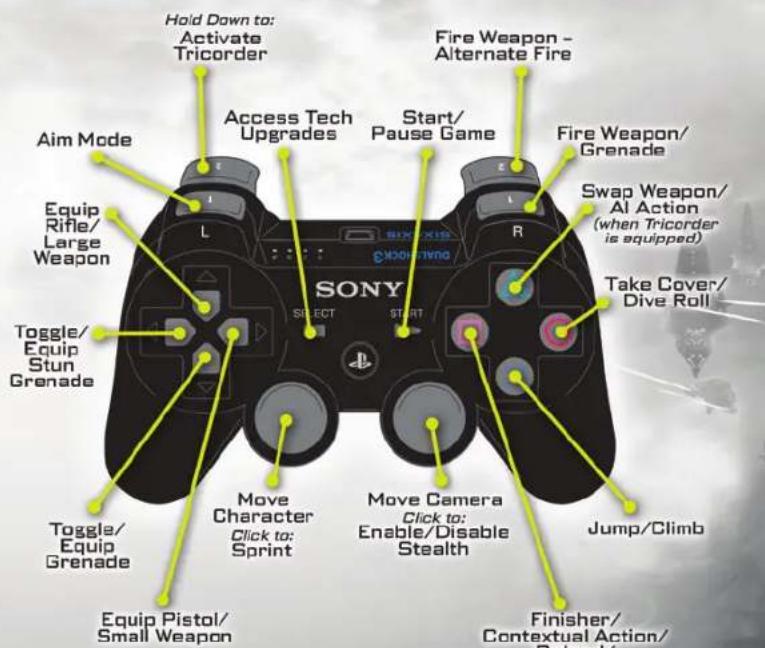
GAME CONTROLS

STARTINGUPGAMESCREEN
AUTOSAVE NOTIFICATION
This game supports an autosave feature. Do not turn off your PlayStation®3 system when you see the autosave icon.
Pressing START opens the Main Menu. You are presented with the following options:
New Game: Start a new game.
Chapters: Jump directly to previously completed game chapters.
Online: Start an online co-op game.
Options: Access the various options available in the game.
Use the R1 or L1 to access different sub-menus. In the Options Menu you can access the following:
- Turn on/off tutorials, subtitles, objectives
- Select difficulty level
- Select private or public game type
- Change display settings
- Remap/customize controller settings
- Change audio settings
View Downloadable Content
Credits: View game credits.
CHARACTER SELECTION
When starting a new game, you will be prompted to set the difficulty level. Once selected, you will decide which character you would like to control: Kirk or Spock. If you select Kirk, you will be able to call in aerial support from the U.S.S. Enterprise or shuttle at certain points in the game. If you select Spock, you will have the ability to mind-meld with characters at certain points in the game. Both characters have unique melee fi nishing moves and have different default phasers. Once you have selected, press × to confirm.

If you are playing solo, computer AI will control the character you do not select. If you are playing with a friend off line, the second player must press START at the character selection screen. The second player will automatically be assigned the remaining character.

Description of objective (when Tricorder is equipped)
Health and shield strength
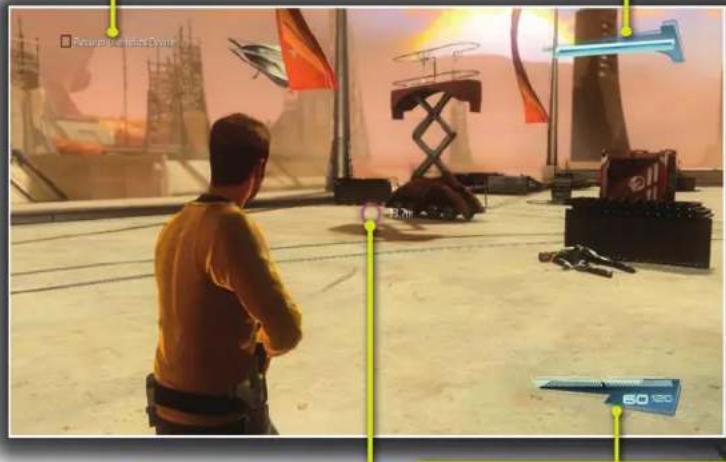
Indicates direction to objective
Weapon/Ammo gauge OR Scanned object info (when Tricarder is equipped)
AVERTISSEMENT:PHOTOSENSIBILITE/EPILEPSIE/CONVULSIONS
Before returning any defective materials to us, please contact us for a Return Merchandise Authorization (RMA) number. You can reach us at the address above, via e-mail at support@namcobandaigames.com or contact us at (408) 235-2222. Please note that any materials sent to us without an RMA number will be refused and returned. We highly recommend that you use a traceable and / or insured method of shipping the materials to us.
LIMITED WARRANTY
NAMCO BANDAI Games America Inc. warrants to the original purchaser that this NAMCO BANDAI Games America Inc. game pack shall be free from defects in material and workmanship for a period of ninety (90) days from the date of purchase. If a defect covered by this limited warranty occurs during this 90-day limited warranty period, NAMCO BANDAI Games America Inc. will repair or replace the defective game pack or component part, at its option, free of charge. This limited warranty does not apply if the defects have been caused by negligence, accident, unreasonable use, modification, tampering, or any other cause not related to defective material or workmanship.
LIMITATIONS ON WARRANTY
Any applicable implied warranties of merchantability and fitness for a particular purpose are hereby limited to ninety (90) days from the date of purchase and are subject to the conditions set forth herein. In no event shall NAMCO BANDAI Games America Inc. be liable for consequential or incidental damages resulting from the possession or use of this product. The provisions of the limited warranty are valid in the United States only. Some states do not allow limitations on how long an implied warranty last, or exclusion of consequential or incidental damages, so the above limitation or exclusion may not apply to you. This limited warranty provides you with specific legal rights. You may have other rights which vary from state to state.
Namco Bandai Games America Inc. Online: www.namcobandaigames.com. Visit our Website to get information about our new titles. Check out our online knowledgebase for answers to our mostFrequently Asked Questions! Available 24 hours a day, 7 days a week! http://support.namcobandaigames.com. To sign up for our online mailing list, go to: www.namcoreg.com.
NAMCO BANDAI Games America Inc.
ATTN: Customer Service
1740 Technology Drive, Suite 600
San Jose, CA 95110
GARANTIE LIMITEE
1740 Technology Drive, Suite 600
San Jose, CA 95110
"PlayStation", "PS3", "DUALSOHOD", and "SIXAXIS" are registered trademarks of Sony Computer Entertainment Inc. The ESRB rating icons are registered trademarks of the Entertainment Software Association.
© 2013 Paramount Pictures Corp. TM CBS Studios Inc. STAR TREK and related marks and logos are trademarks of CBS Studios Inc. All Rights Reserved. NAMCO BANDAI Games logo is a trademark of NAMCO BANDAI. Published and distributed by NAMCO BANDAI Games America Inc. Uses Bink Video. Copyright © 1997-2103 by RAD Game Tools, Inc. © 2013 NVIDIA Corporation. NVIDIA, the NVIDIA logo, PhysX, and the PhysX logo are trademarks and/or registered trademarks of NVIDIA Corporation in the U.S. and other countries. All rights reserved. This software product includes Autodesk® Beast™ software, © 2013 Autodesk, Inc. All rights reserved. Autodesk, Beast, HumanIK, and Scaleform are registered trademarks or trademarks of Autodesk, Inc., and/or its subsidiaries and/or affiliates in the USA and/or other countries. "PlayStation", "DUALSHOCK" and "SIXAXIS" are registered trademarks and "PS3" and the PlayStation Network logo are trademarks of Sony Computer Entertainment Inc.


CBS





- Use and handling of video games to reduce the likelihood of a seizure
- 3D GAME NOTICE:
- WARNING TO OWNERS OF PROJECTION TELEVISIONS:
- HANDLING YOUR PS3TM FORMAT DISC:
- NOTICES:
- GETTING STARTED
- PlayStation3 system
- Hint
- Saved data for PS3TM format software
- GAME CONTROLS
- STARTINGUPGAMESCREEN
- AUTOSAVE NOTIFICATION
- CHARACTER SELECTION
- AVERTISSEMENT:PHOTOSENSIBILITE/EPILEPSIE/CONVULSIONS
- LIMITED WARRANTY
- LIMITATIONS ON WARRANTY
- GARANTIE LIMITEE
- CBS
Brand : SONY
Model : Star Trek (Playstation 3)
Category : Game