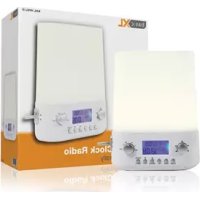
BXLWKL10 - Light therapy BASICXL - Free user manual and instructions
Find the device manual for free BXLWKL10 BASICXL in PDF.



| Product Type | Radio alarm clock with light therapy |
| Brand | basicXL |
| Model | BXLWKL10 |
| Input Power | 100-240 V~, 50/60 Hz, 0.3 A |
| Output Power | 6 V DC, 800 mA |
| Power Cord Length | 1.8 m |
| Dimensions (W x H x D) | 16.5 x 80 x 19 cm |
| Net Weight | 0.3 kg |
| Clock Function | Yes, display year, month, date, day, 12/24h time |
| Alarm | Yes, natural sounds (4), music (6) or radio |
| FM Radio | Yes, automatic frequency search |
| Wake-up Light (Sunrise) | Yes, adjustable gradual intensity (0 to 90 min) |
| Night Light (Sunset) | Yes, adjustable gradual decrease (0 to 90 min) |
| Light Intensity Adjustment | 10 levels |
| Snooze | Yes, up to 5 cycles |
| USB Port | Yes, for charging a phone |
| Controls | Volume, Alarm, Mode, Program, UP/DOWN, 12/24, Sound/Radio, Frequency, Light +/-, Set |
| Maintenance | Clean with a dry cloth, do not use solvents or abrasives |
| Precautions | Do not expose to water or humidity, do not look directly at the light, do not cover, keep at least 15 cm away from other objects |
| Warranty | Limited, no warranty in case of modification or incorrect use |
| General Information | Design and specifications subject to change without notice |
Frequently Asked Questions - BXLWKL10 BASICXL
User questions about BXLWKL10 BASICXL
0 question about this device. Answer the ones you know or ask your own.
Ask a new question about this device
Download the instructions for your Light therapy in PDF format for free! Find your manual BXLWKL10 - BASICXL and take your electronic device back in hand. On this page are published all the documents necessary for the use of your device. BXLWKL10 by BASICXL.
USER MANUAL BXLWKL10 BASICXL
Clock radio with light
ANLEITUNG (s. 5)
MANUAL DE USO (p. 18)
Radio reloj con luz
HASZNÁLATI UTMUTATO (o. 22.)
Orakijelzós rádio lámpával
KÄYTTOOHJE (s. 25)
Kelloradio valaisimella
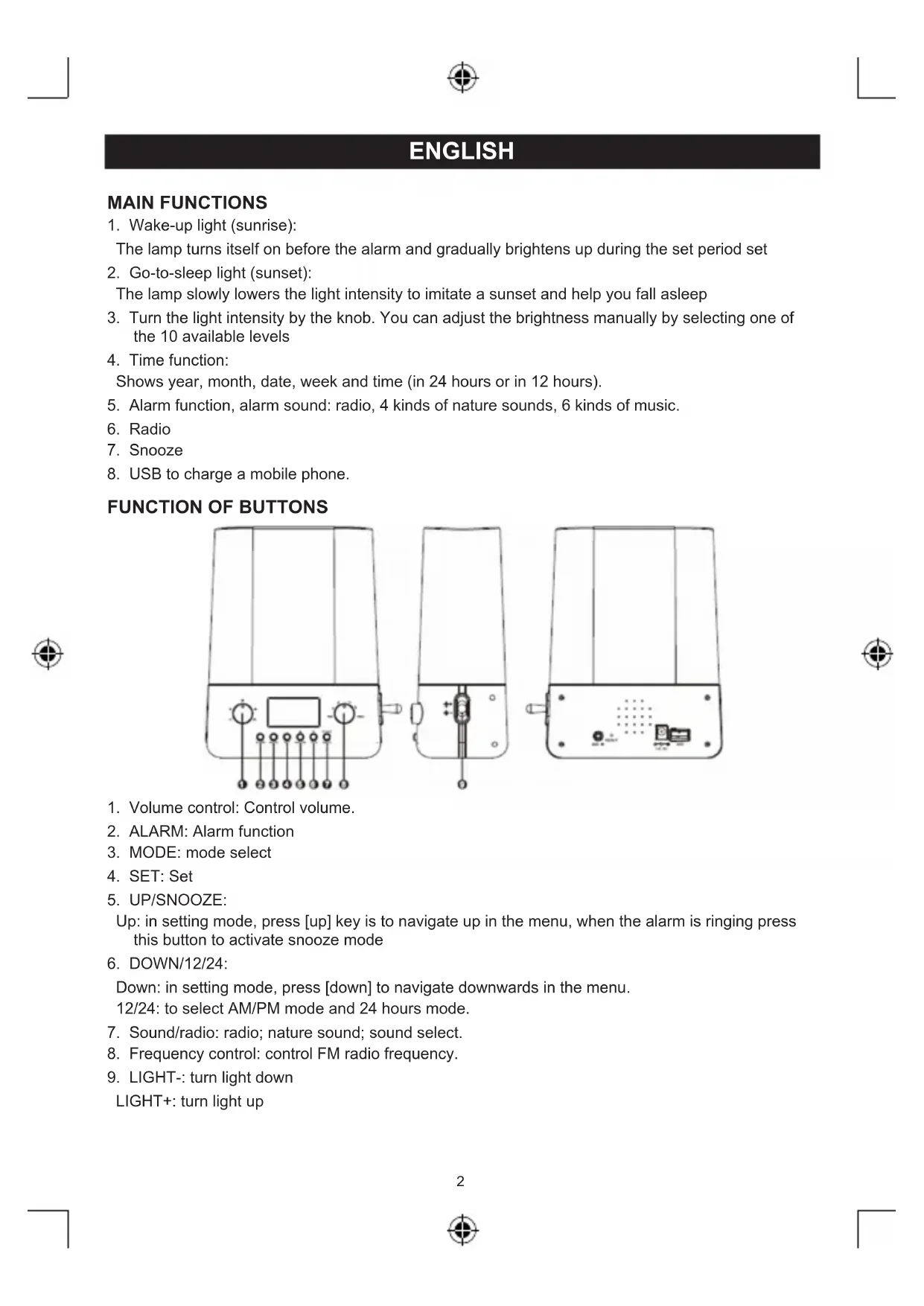
- Wake-up light (sunrise):
The lamp turns itself on before the alarm and gradually brightens up during the set period set
2. Go-to-sleep light (sunset):
The lamp slowly lowers the light intensity to imitate a sunset and help you fall asleep
- Turn the light intensity by the knob. You can adjust the brightness manually by selecting one of the 10 available levels.
- Time function:
Shows year, month, date, week and time (in 24 hours or in 12 hours).
- Alarm function, alarm sound: radio, 4 kinds of nature sounds, 6 kinds of music.
- Radio
- Snooze
- USB to charge a mobile phone.
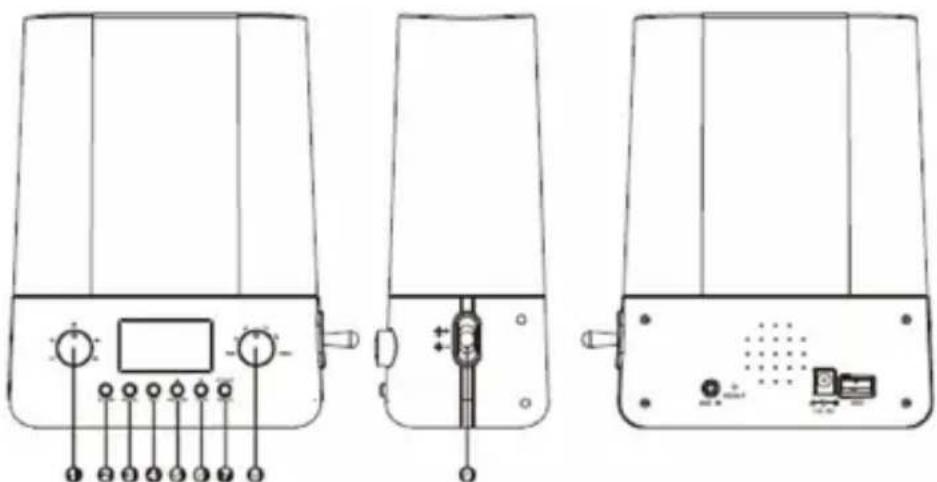
FUNCTION OF BUTTONS
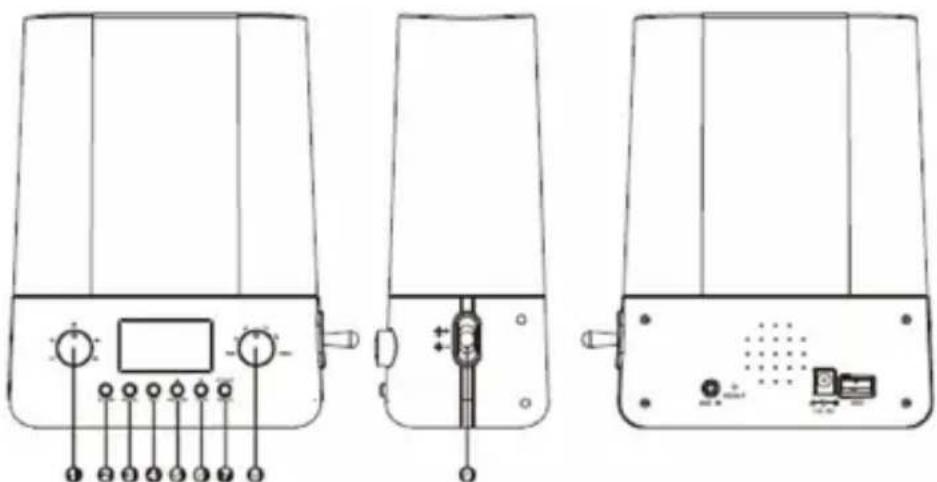
- Volume control; Control volume.
- ALARM: Alarm function
- MODE: mode select
- SET: Set
- UP/SNOOZE:
Up: in setting mode, press [up] key is to navigate up in the menu, when the alarm is ringing press this button to activate snooze mode
6.DOWN/12/24:
Down; in setting mode, press [down] to navigate downwards in the menu.
12/24: to select AM/PM mode and 24 hours mode.
- Sound/radio: radio; nature sound; sound select.
- Frequency control: control FM radio frequency.
- LIGHT-: turn light down
LIGHT+: turn light up
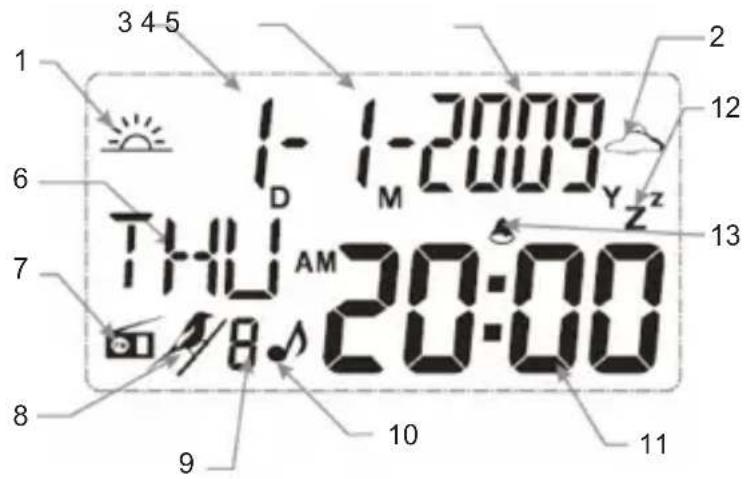
LCD ILLUSTRATION
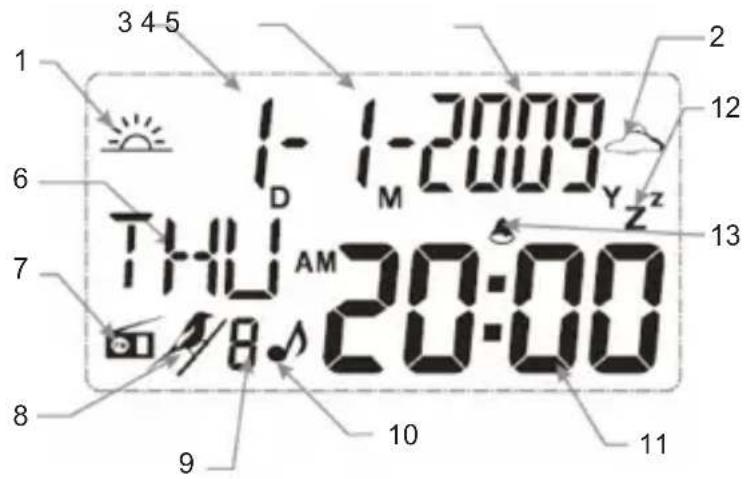
- sun rise
- sun set
- date
- month
- year
6.day - radio
- sound of nature
- order of sound sources
- music
- tine
- alarm
13.snooze
ACTIVATING THE SUNRISE LIGHT
- Setting the time:
SET year SET months SET day SET hour SET minute SET exit.
- Setting the alarm and turning the alarm on/off:
[ALARM] SET hour SET minute SET Radio [RADIO/SOUND] nature sound [RADIO/SOUND] select nature sound SET exit.
Note: When the alarm is set the alarm will ring every day. Switch off the alarm by pressing [ALARM] [DOWN].
- Pre-set light on (sunrise):
The lamp switches on before the alarm rings and gradually increases during the set time.
In the time mode, press MODE to display the current sunrise settings:
[SET] (sunrise icon and time flash) [AT] 0, 15, 30, 45, 60, 90, 0 SET exit. When the sunrise time is set to "0" the sunrise function is disabled and the sunrise icon will not be displayed. When the sunrise time is set to a setting other than "0" the sunrise function will be enabled and the sunrise icon is displayed.
Note: the sunrise function operates every day. Switch off by pressing [SET] close.
- Go-to-sleep light (sunset)
When the lamp is in the go-to-sleep mode the light gradually decreases during the set time. MODE sunset MODE sunset display the current sunset setting, [SET] (sunset icon and time flash) 0 , 15, 30, 45, 60, 90, 0 SET MODE.
Note: the light must be switched on for the sunset function. The sunset function will only be active for the set period of time, after that it will not automatically go off
- Radio and nature sounds
While in time mode, press the RADIO/SOUND button to open the radio menu. Press the frequency button to select the FM radio frequency. Press the RADIO/SOUND button again to enter the nature sounds menu, and use the UP/DOWN buttons to select the desired sound. Press the RADIO button again to return to time mode. The natural sound stops playing automatically after 20 minutes.
- Snooze function
When the alarm rings it can be stopped by pressing the [Alarm] button. When the alarm rings the snooze function is enabled: if no button is pressed the alarm rings for 1 minute, waits 5 minutes and then rings again. This cycle is repeated 5 times. However, when the radio has been selected as the alarm the radio continues to play. Turn off the alarm by pressing the RADIO/SOUND button.
- Light adjustment buttons
[LIGHT+]: turn light up
[LIGHT-]: turn light down
- Volume adjustment
Volume control: Adjust volume.
Note: When the Sunrise Light is in set mode it automatically returns to time mode when no buttons have been pressed for 10 seconds.
SPECIFICATIONS:
Voltage: AC 100-240 V
Frequency: 50/60 Hz
Input: AC 100-240 V 50/60 Hz 0.3 A
Output: DC 6 V 800 mA
Length of power cord: 1.8m
Dimensions: 16.5x80x19 cm
Net weight: 0.3 kg
CAUTION
- Do not expose to ultraviolet light.
- Make sure the power supply complies with the specifications mentioned above.
- To avoid the risk of injury to your eyes, do not look directly at the light for a long time.
- Do not use the appliance in an enclosed space. Keep the appliance at least 15cm from other objects, etc.
- Do not cover the lampshade.
- Do not allow the appliance to become wet. Keep vases, etc., away from the appliance.
Safety precautions:

To reduce risk of electric shock, this product should ONLY be opened by an authorized technician when service is required. Disconnect the product from mains and other equipment if a problem should occur. Do not
expose the product to water or moisture.
Maintenance:
Clean only with a dry cloth. Do not use cleaning solvents or abrasives.
Warranty:
No guarantee or liability can be accepted for any changes and modifications of the product or damage caused due to incorrect use of this product.
General:
Designs and specifications are subject to change without notice.
All logos brands and product names are trademarks or registered trademarks of their respective holders and are hereby recognized as such.
Keep this manual for future reference.
Attention:
This product is marked with this symbol. It means that used electrical and electronic products should not be mixed with general household waste. There is a separate collections system for these products.
DEUTSCH
HAUPTFUNKTIONEN
LCD-SCHERMILLUSTRATIE
PAINIKKEIDEN TOIMINNOT
down: I indstillingstilstand, tryk pa knappen [down] for at navigere ned i menuen.
12/24: for at vaelge AM/PM tilstand og 24 timers tilstand
- Sound/radio: radio; naturlyde, valg af lyd
- Frequency control: Kontrollere FM radiofrekvens
- LIGHT: sänke belysningen
Description: Clock radio with light