
BXL-CB60 - Coin and bill counter BASICXL - Free user manual and instructions
Find the device manual for free BXL-CB60 BASICXL in PDF.


| Product Type | Coin and Bill Counter |
| Brand | BASICXL |
| Model | BXL-CB60 |
| Dimensions (W x D x H) | Approx. 30 x 25 x 15 cm |
| Weight | Approx. 2.0 kg |
| Power Supply | AC adapter, 100-240V, 50/60Hz |
| Max Counting Speed | Up to 1500 coins/min, 1200 bills/min |
| Coin Hopper Capacity | Approx. 500 coins |
| Bill Feeder Capacity | Approx. 200 bills |
| Supported Currencies | Multiple preset currencies (USD, EUR, GBP, etc.) |
| Counting Functions | Batch, add, sort, value accumulation |
| Display | LCD, 2-line, backlit |
| Interface | Control buttons, reset key |
| Cleaning and Maintenance | Clean exterior with dry cloth; use cleaning card for rollers |
| Safety Features | Auto stop on jam, error detection, low power warning |
| Spare Parts Availability | Rollers, belts, sensors, AC adapter available from manufacturer |
| Repairability | Modular design; replaceable components; service manual available |
| Warranty | 1 year limited warranty |
Frequently Asked Questions - BXL-CB60 BASICXL
User questions about BXL-CB60 BASICXL
0 question about this device. Answer the ones you know or ask your own.
Ask a new question about this device
Download the instructions for your Coin and bill counter in PDF format for free! Find your manual BXL-CB60 - BASICXL and take your electronic device back in hand. On this page are published all the documents necessary for the use of your device. BXL-CB60 by BASICXL.
USER MANUAL BXL-CB60 BASICXL
MANUAL (p. 2)
Counting bank
MODE D'EMPLOI (p. 5)
MANUAL DE USO (p. 10)
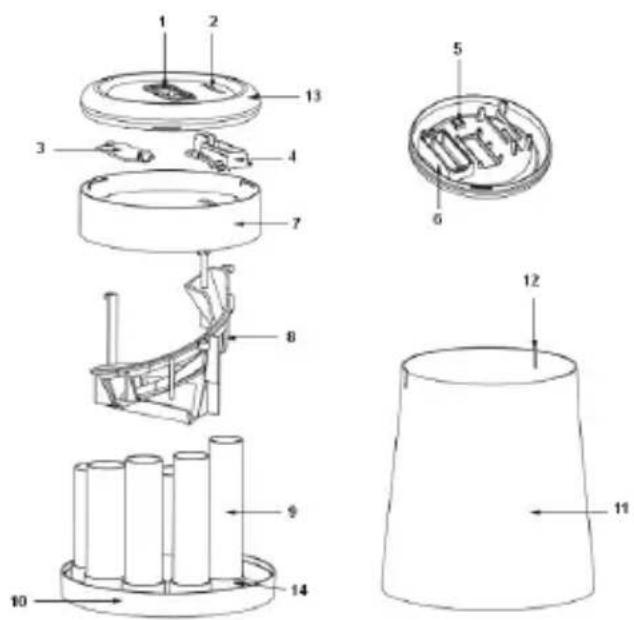
- LCD
- Coin Slot
- Battery Compartment Cover
- Slide Frame
- Reset Button
- Battery Case
- Cover Frame
- Coin Path
- Coin column
- Body
- Locating point
- Top Cover
- Column
Functions
- There is an inductor fixed in the coin slot that automatically identifies the coin value.
- First, the display will show the coin value, then the value will accumulate with the saving amount.
- Sorts the coins to different columns by recognizing the diameter of the coins.
- Please replace batteries within 8 seconds after removal. This way it will keep its memory.
- Identifies all Euro coins € 2.00, € 1.00, € 0.50, € 0.20, € 0.10, € 0.05, € 0.02 and € 0.01.
- Press RESET button (# 5 in picture) to return the total amount to zero.
Install or replace battery
- Remove the lid from the coin sorter;
- Remove the screw on the battery cover;
- Insert 2 "AAA" batteries in the battery compartment, as indicated;
- Secure battery cover with the screw.
Operate
Insert the coins into the slot of the sorter; the inserted coins will descend into the correct coin column automatically (# 9 in picture).
CAUTION:
- Be aware that the tubes are placed in the right columns.
- Works on two AAA batteries (not included).
Safety precautions:

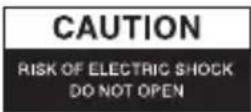

To reduce risk of electric shock, this product should ONLY be opened by an authorized technician when service is required. Disconnect the product from mains and other equipment if a problem should occur. Do not expose the product to water or moisture.
Maintenance:
Clean only with a dry cloth. Do not use cleaning solvents or abrasives.
Warranty:
No guarantee or liability can be accepted for any changes and modifications of the product or damage caused due to incorrect use of this product.
General:
Designs and specifications are subject to change without notice.
All logos brands and product names are trademarks or registered trademarks of their respective holders and are hereby recognized as such.
Keep this manual and packaging for future reference.
Attention:

This product is marked with this symbol. It means that used electrical and electronic products should not be mixed with general household waste. There is a separate collections system for these products.
DEUTSCH
Description: Counting bank


Brand : BASICXL
Model : BXL-CB60
Category : Coin and bill counter