TC507 - Waste press JENN-AIR - Free user manual and instructions
Find the device manual for free TC507 JENN-AIR in PDF.


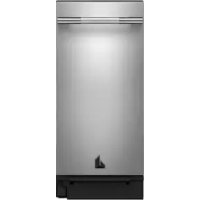
| Product Type | Waste Compactor (Trash Compactor) |
| Brand | Jenn-Air |
| Model | TC507 |
| Power Supply Voltage | 115 V AC |
| Frequency | 60 Hz |
| Recommended Circuit Amperage | 15 A or 20 A |
| Electrical Protection | Fuse or Time-Delay Circuit Breaker |
| Required Outlet | 3-Prong Grounded Outlet |
| Compaction Cycle Duration | Approximately 27 seconds |
| Waste Volume Reduction | Approximately 1/4 of original volume |
| Adjustable Height | From 34 1/4 in (87 cm) to 34 1/2 in (88 cm) |
| Installation Type | Under Counter |
| Exterior Material | Stainless Steel |
| Opening Mechanism | Pedal or Handle |
| Locking Device | Key Switch (Key Knob) |
| Air Freshener Compartment | Yes, for disc deodorizer (not included) |
| Decorative Panel | Removable, acrylic or custom options |
| Recommended Bags | Special compactor bags (part number available) |
| Warranty Parts and Labor | 1 year full, 2 years limited (parts) |
| Routine Maintenance | Clean with mild detergent, vacuum debris |
| Child Safety | Remove key and lock out of reach |
Frequently Asked Questions - TC507 JENN-AIR
User questions about TC507 JENN-AIR
0 question about this device. Answer the ones you know or ask your own.
Ask a new question about this device
Download the instructions for your Waste press in PDF format for free! Find your manual TC507 - JENN-AIR and take your electronic device back in hand. On this page are published all the documents necessary for the use of your device. TC507 by JENN-AIR.
USER MANUAL TC507 JENN-AIR
JENN-AIR COMPACTORS/COMPACTEURS
TC507
Use & Care Guide
For assistance, call: 1-800-688-1100.
Guide d'utilisation
et d'entretien
Pour assistance, composer le 1-800-688-1100.
Table of Contents/Table des matieres 2
TABLE OF CONTENTS
COMPACITOR SAFETY 3
INSTALLATION INSTRUCTIONS 4
Unpacking 4
Location Requirements. 4
Electrical Requirements 5
Undercounter Installation. 6
Air Freshener 7
Changing the Decorative Panel 7
COMPACTOR USE. 9
How Your Compactor Works. 9
Loading. 9
Starting Your Compactor. 10
Stopping Your Compactor 10
Removing a Filled Bag 10
Installing a New Bag 11
COMPACTOR CARE. 11
Cleaning. 11
TROUBLESHOOTING 12
RECYCLING WITH YOUR COMPACTOR 12
ASSISTANCE OR SERVICE. 13
In the U.S.A. 13
Accessories 13
WARRANTY 14
TABLE DES MATI RES
SECURITE DU COMPACTEUR 15
INSTALLATION DU COMPACTEUR 16
ASSISTANCE OU SERVICE 26
Your safety and the safety of others are very important.
a. p. m. mp. a. ma. ma. u a q. u app q A /aa . b. a

Fe Healta + mb - Feombait - u + ptntarazagitak - rutug - rtc A ≠ a ^ 2 m ^ 2 g ^ 2 + - [] a ^ 2 a ^ 2 mb _ 1 · · · · · · · · · · · · · · · · · · · · · · · · · · · · · DANGER ^ - . ARNING . F F F m ^ m:
DANGER
WARNING
You can be killed or seriously injured if you don't immediately follow instructions.
You can be killed or seriously injured if you don't follow instructions.
A a t m g 1 u p aht p taaza , -u - + u h k u , u .t - u
IMPORTANT SAFETY INSTRUCTIONS
WARNING: When using an electrical appliance, basic precautions should always be followed, including the following:
Read all instructions before using the compactor.
- Close supervision is necessary when used by or near children. Do not allow to be used as a toy, or to run unattended at any time. Lock Key Switch when not in use and store key out of reach of children.
Do not touch moving parts.
- Do not operate with a damaged cord set, plug, motor, or after damage in any manner. Have the compactor examined, repaired or adjusted by an authorized serviceperson.
Use only for intended use as described in this manual. Do not use other than manufacturer's recommended attachments.
- Do not compact toxic or volatile flammable material such as oily rags and insect sprays. Do not compact lighted cigarettes, cigars, or other hot or burning items. Do not overload the compactor.
- Do not take apart the compactor. Incorrect reassembly can cause electric shock when subsequently used.
- Handle a loaded trash bag with care. Sharp objects can pierce the bag and cause injury. Do not overload trash bag with heavy material such as glass.
This compactor is intended for household use only.
SAVE THESE INSTRUCTIONS
INSTALLATION INSTRUCTIONS
Installer: Leave Use and Care Guide with the homeowner.
Homeowner: Keep Use & Care Guide for future reference and for local electrical inspector's use, if required.
Unpacking
IMPORTANT:
■Do not grasp console to move compactor.
Begin in the room where the compactor will be located.
-
Remove compactor from shipping carton. Remove all protective packaging materials such as tape and shipping pads. Use a mild solution of liquid household cleaner and warm water to remove waxy residue caused by protective shipping material. Dry thoroughly with a soft cloth. For more information, see the "Cleaning" section.
-
Check to be sure the power cord is attached to the cord clip on the rear of the compactor.
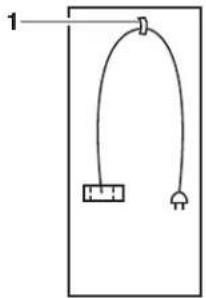
1. Cord clip
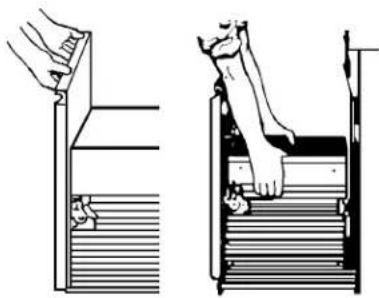
- Place the two corner posts from the carton on the floor near the compactor. Open the compactor drawer and remove any shipping materials or other items from the drawer. Do not remove the compactor bag. Grasp the handle and raise the front of drawer until it clears the drawer stops. Grasp sides of drawer and lift drawer out of compactor. Place the drawer on the two corner posts.
WARNING
Excessive Weight Hazard
Use two or more people to move and install compactor.
Failure to do so can result in back or other injury.
- Place the other two corner posts on the floor to the side of the compactor. Grasp the sides of the compactor cabinet and put compactor on its side on top of the corner posts. Remove the shipping base from the bottom of the compactor.
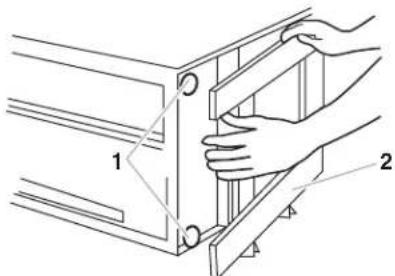
1. Leveling legs
2. Shipping base
Location Requirements
Product dimensions
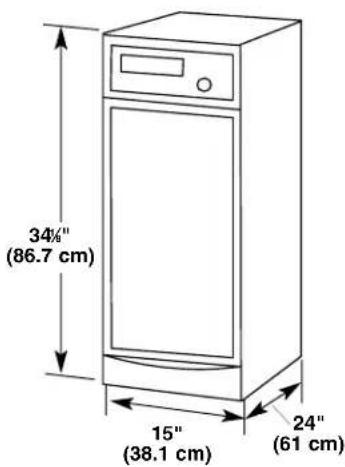
Cutout dimensions
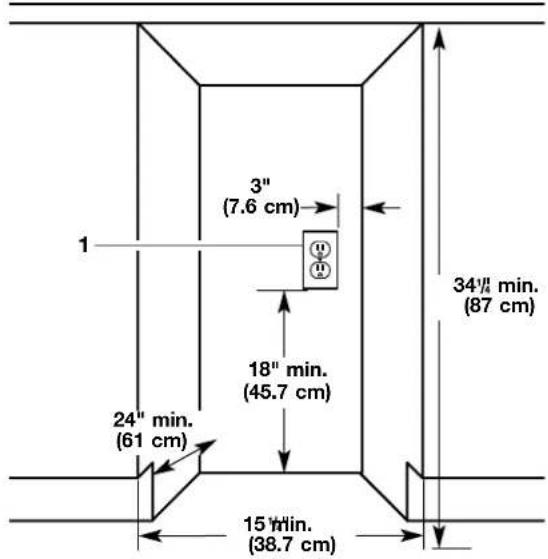
1. Grounded electrical outlet must be a minimum of 3 in. (7.6 cm) away from surrounding cabinets or nearby walls as shown. It can be placed either to the left or the right side of the product.
Clearance dimensions
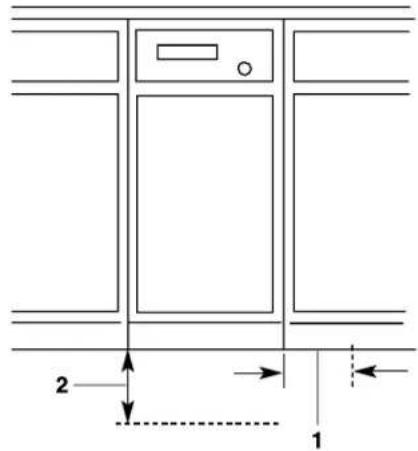
-
Leave 6 in. (15.2 cm) of clearance space to the right side of the compactor in order to remove the compactor bags.
-
Leave 23 in. (58.4 cm) of clearance in front of the compactor in order to fully open or remove the compactor drawer.
Electrical Requirements
WARNING

Electrical Shock Hazard
Plug into a grounded 3 prong outlet.
Do not remove ground prong.
Do not use an adapter.
Failure to follow these instructions can result in death, fire, or electrical shock.
Recommended Grounding Method
This compactor is for use on a single phase, 115-volt, 60Hz , AC only 15 or 20 ampere fused and properly grounded circuit and is equipped with a grounding plug as shown below. Time delay fuse or circuit breaker is recommended. It is recommended that a separate circuit serving only this appliance be provided. In the event of an electrical short circuit, grounding reduces the risk of electric shock by providing an escape wire for the electric current. Do not modify the plug attached to the compactor; use only with a grounded receptacle.
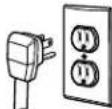
This compactor must be grounded while in use to reduce the risk of electric shock. The compactor is equipped with a three-conductor cord and three-prong grounding-type plug to fit the proper grounding-type receptacle. The green (or green and yellow) conductor in the cord is the grounding wire. Never connect the green (or green and yellow) wire to a live terminal. The outlet should be properly installed and grounded in accordance with the National Electrical Code and Local codes and ordinances. No adapter should be used with this appliance.
Undercounter Installation
NOTE: Proper installation is your responsibility. Make sure you have everything necessary for correct installation. It is the personal responsibility and obligation of the customer to contact a qualified installer to assure that electrical installation meets all national and local codes and ordinances.
Tools and materials needed for installation:
Level Phillips No. 2 Screwdriver
Tape Measure Flat-Head Screwdriver
Pliers
5 / 16 in. Hex-Head Socket Wrench
Scissors Utility Knife
IMPORTANT:
Do not grasp control panel to move compactor.
- To prevent damaging floor covering, slide compactor onto cardboard or hardboard before moving compactor across floor.
-Do not allow the rear frame of the compactor to touch the floor covering when lifting or moving compactor.
Undercounter Installation
- Measure the height of your cabinet opening. The top of the compactor should be at least 1/8 in. (3 mm) from the top of the cabinet opening.
The rear wheels are preset for a cabinet opening of 34% in. (87 cm). See Position A in picture following.
To adjust for other cabinet opening heights:
■Loosen self-tapping screw just enough to clear stud from hole in Position "A."
Move the rear wheel and stud to Position "B" or "C" as needed for your cabinet opening measurement: Position B: 34% in. to 34% in. (87 to 87.5 cm) Position C: 34% in. to 34% in. (87.5 to 88 cm) NOTE: To level the unit in position "C," you may need to add shims under the leveling legs.
Tighten screw. Repeat for other rear wheel.
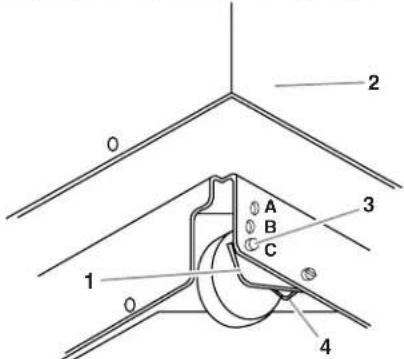
- Wheel bracket assembly
- Cabinet
- Locating stud
-
Self-tapping screw (pivot)
-
Use pliers to lower leveling legs away from cabinet. Adjust legs so there will be a 1/8 in. (3 mm) to 1/4 in. (6.4 mm) space between the top of the compactor and the top of the cabinet opening. Stand the compactor upright.
- Move the compactor close to its final position.
- Plug into a grounded 3 prong outlet.
- Determine if you want the compactor frame or drawer front flush with the cabinet front.
Using the two #8-18 x 5 / 16 in. screws, install the retaining brackets to cabinet top as needed:
If the compactor frame is to be flush with the cabinet front, place retaining bracket screws through "A."
If the compactor drawer front is to be flush with the cabinet front, place retaining bracket screws through "C."
If the compactor is to be midway between "A" and "C," place the retaining bracket screws through "B."
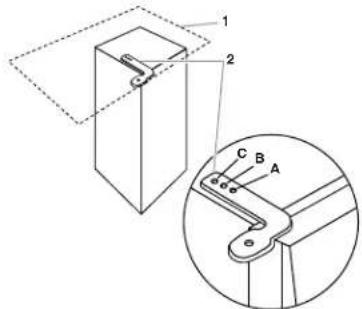
- Countertop
-
Retaining bracket
-
Carefully lift the front slightly and roll compactor into the cabinet opening.
Using the two #8-18 x ½ in. screws, fasten the retaining brackets to the countertop with the mounting screws.
If brackets cannot be attached to the underside of countertop, attach mounting clips to brackets. Fasten compactor to cabinet front with mounting screws through mounting clips.
Countertop Mounting
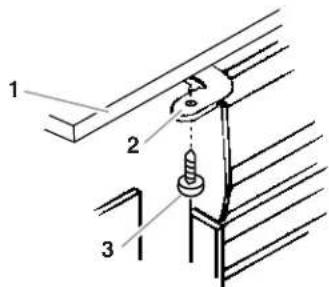
- Countertop
- Retaining bracket
- Mounting screw
Cabinet-front mounting
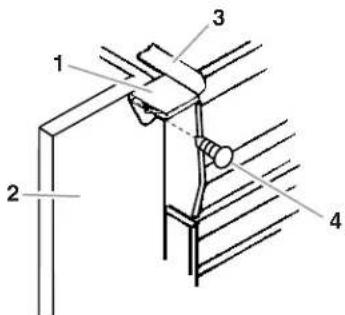
- Mounting clip
- Cabinet
- Retaining bracket
-
Mounting screw
-
Grasp sides of compactor drawer and place bottom of drawer into tracks. Lift at the handle so drawer will go over drawer stops. Close drawer. Check to see if drawer opens freely. If the toe plate rubs against floor, see "Adjusting the To e Plate" for further instructions.
Adjusting the Toe Plate
If the toe plate rubs the floor covering, the toe plate clearance may be changed as follows:
1. Mark on each side of the toe plate the amount of toe plate that rubs the floor covering.
2. Remove the drawer from the unit. (See Step 3 in the "Unpacking" section.)
3. Use a ruler and a pencil or chalk to draw a line between the marks on each side of toe plate.
4. Use scissors or utility knife to cut toe plate along line.
5. Replace drawer. If toe plate still rubs floor covering, repeat steps 1-4.
Air Freshener
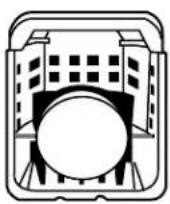
The solid air freshener system is designed to help control odors that might develop in the trash. An air freshener disc can be purchased in department stores (not sold with compactor). Place the disk-shaped solid air freshener into the air freshener compartment. The air freshener should last 4 to 6 weeks. It is used more rapidly when the temperature is high or the air is very dry.
Changing the Decorative Panel
There are three options for changing the decorative panel:
Order an acrylic panel
Create a custom panel for use with a trim kit
Create a custom panel for installation without trim
To order an acrylic panel or a trim kit, see the "Assistance or Service" section for information or call the toll-free number on the cover.
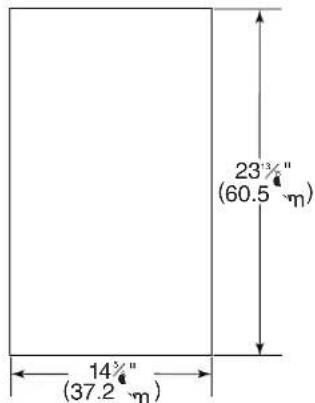
Trim kit panel dimensions
Use these dimension drawings to create a custom panel for use with a trim kit. Then, follow the installation instructions provided with the kit.
Flat panel: A 7/32 in. (5.6 mm) thick panel is required. This is the same thickness as a standard 1/4 in. plywood or paneling.
Raised panel: The outer section of panel must be 7 / 2 in. (5.6mm) thick to fit into trim. Design raised panel sections using dimensions shown above.
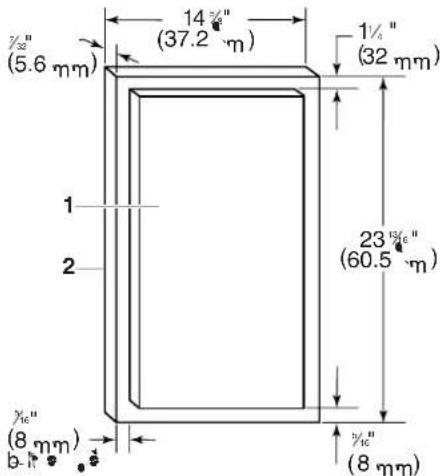
- Raised panel or decorative trim
- Outer section of panel
Trimless panel with handle
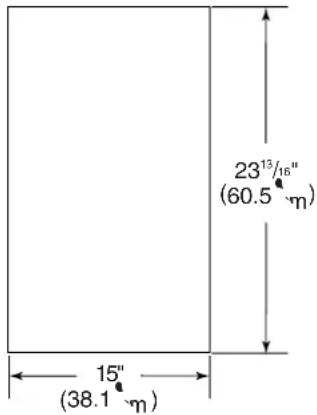
Dimensions
Use these dimension drawings to create a custom panel for use without a trim kit. The panel should be 1/2 in. to 5/8 in. (13 mm to 16 mm) thick.
NOTE: A thicker panel may need rounded front corners and a cut-out for access to the handle.
Installation
- Remove foot pedal, toe guard, and decorative panel.
- Align the top of the custom panel with the bottom of the handle.
- Secure the panel from the back using 4 - #8 x 1 in. wood screws as shown.
- Reinstall the toe guard using the existing screws and 1/2 in. washer. Then, reinstall the foot pedal.
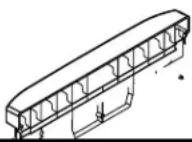
Trimless panel without handle
Dimensions
Use these dimension drawings to create a custom panel for use without a trim kit. The panel should be 1/2 in. (13 mm) min. thick.
Installation
- Remove foot pedal, toe guard, decorative panel, and handle.
- Align the bottom of the custom panel with the bottom of the drawer front.
- Secure the panel from the back using 4 - # 8 × 1 in. wood screws as shown.
- Attach a 15 in. x1/2 in. quarter-round filler along the top of the drawer front using glue or screws.
- Reinstall the toe guard using the existing screws and 1/2 in. washer. Then, reinstall the foot pedal.
COMPACTOR USE
How Your Compactor Works
The compacting ram is the part of the compactor which compresses the trash. The compacting ram does not go to the bottom of the drawer. You will not see compacting of trash the first few times you load the compactor.
NOTE: The compactor drawer should be more than 1/2 full before the compactor can begin to compress the load.
You may hear a noise when glass breaks. Strong glass bottles may not break at all. The trash in a full compactor bag will be about 1/4 the size of its original bulk.
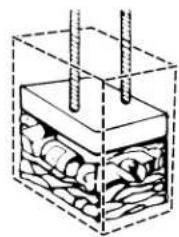
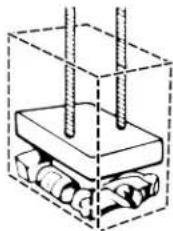
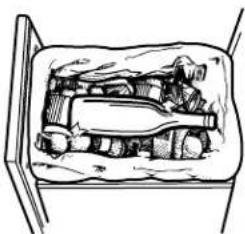
Load bulky trash, bottles, and cans in the center of the drawer. Bottles or cans not placed in the center may become caught between the ram and the drawer. The Analyzer Monitor Switch then senses a "misload" and causes the ram to return to the "up" position without compacting.
Loading
WARNING

Explosion Hazard
Do not compact any container, aerosol cans, or cloths which might contain insecticide, hair spray, engine starting fluid, paints, liquids, thinners, or any other poisonous or explosive products.
Doing so can result in death, explosion, or fire.
WARNING

Cut Hazard
Do not push items down into compactor with hands or feet.
Doing so can result in cuts.
NOTE: You will not see compacting of trash the first few times you load the compactor. The compactor drawer should be about 1/2 full before the compactor can begin to compress the load.
- Open the drawer. Lift and pull the handle or press the toe bar to open the drawer.
NOTE: Pressing the toe bar opens the container only 3 in. to 6 in. (7.6 cm to 15.2 cm), depending on the load.
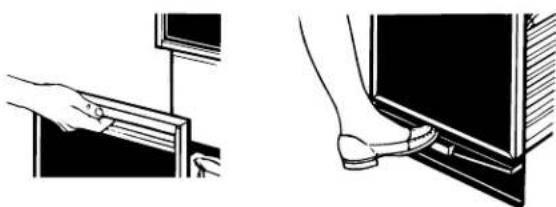
- Place trash in compactor.
Wrap or cover wet or messy trash.
- Do not compact items that may develop offensive odors such as raw meat, fish, grapefruit rinds, disposable diapers, or personal hygiene items.
- Load bottles or cans on their sides in the center of the drawer. Do not load bottles in an upright position.
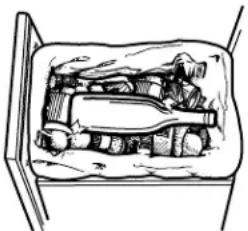
- Close the drawer.
Starting Your Compactor
- Turn the Control Knob to START. As soon as the compactor starts, release the Control Knob. The knob will then advance to the RUN position and begin the compacting cycle.
- A complete compacting cycle takes about 27 seconds. The compactor will automatically stop.
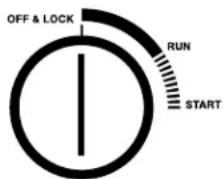
NOTE: When the compacting cycle is done, turn the Key-Knob to OFF & LOCK. Remove the Key-Knob and store it out of children's reach.
Stopping Your Compactor
- Turn the Control Knob to OFF & LOCK.
- Turn the Control Knob to RUN. This will raise the ram to its topmost position. The compactor will automatically advance to the end of the cycle and stop.
- You can open the drawer after the compactor stops.
Removing a Filled Bag
When the trash is compacted to the top of the drawer, remove the bag. If the bag is too heavy, compact less trash before emptying it in the future.
WARNING

Cut Hazard
Do not push items down into compactor with hands or feet.
Doing so can result in cuts.
- Pull the drawer completely open.
-
Remove top of bag from bag retainer buttons. Pull up all four bag cuffs. Close bag with twist tie provided.
-
Push Side-Lock Latch down and tilt drawer side open.
- Lift out bag.
Installing a New Bag
IMPORTANT:
Before installing a new bag, be sure:
The drawer side is securely locked.
The container is clean and free of debris.
Do not use any kind of bag other than those designed especially for use in your compactor. Order replacement compactor bags through your local dealer or by calling the toll-free number on the cover or in the "Assistance or Service" section.
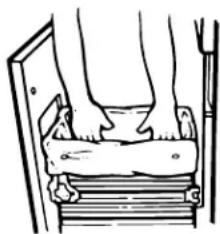
- Place folded bag into the drawer. Open bag and pull top edges over the drawer top.
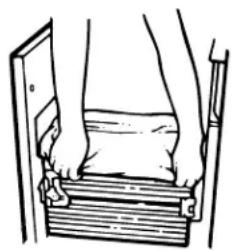
- Lock bag in place by pulling the four prepunched holes over the bag retainer buttons. Holes will expand over the buttons without damaging the bag.
- Press inside of bag against the drawer bottom, sides and corners for a smooth fit.
COMPACTOR CARE
Your new compactor is designed to give you many years of dependable service. However, there are a few things you are expected to do in order to maintain your compactor properly. This section will tell you how to clean and care for your compactor.
Cleaning
Before cleaning the compactor, turn the Key-Knob (or Key-Switch) to the OFF & LOCK position and remove it.
NOTE: Any services other than those outlined in this section should be performed by a designated service representative.
Cleaning Exterior Surfaces
- Wash exterior surfaces (including stainless steel) with a clean sponge or soft cloth and a mild detergent in warm water. Do not use abrasive or harsh cleaners. Rinse and dry thoroughly with a soft cloth.
- Wipe up spills right away. Some foods can damage the finish if left on the compactor surface.
Cleaning Inside theDrawer
NOTE: You may want to wear protective gloves as there may be bits of glass in the drawer.
- Remove the bag. (See the "Removing a Filled Bag" section.)
- Press down on the lever-action lock (or Side-Lock latch).
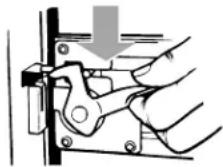
- Hold the lever-action lock down and tilt the side of the drawer out until the lock clears the drawer front.
NOTE: If desired, the drawer side can be removed by tilting it up, then lifting it out.
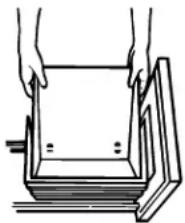
- Wash the interior of the drawer with a clean sponge or soft cloth and a mild detergent in warm water. Rinse and dry thoroughly with a soft cloth.
- If the drawer side was removed, slide it back into the tilted position.
- Press the lever-action lock (or Side-Lock Latch) down while pushing the drawer side to the upright position.
- Latch the drawer side by pushing up the lever-action lock (or Side-Lock Latch).
Cleaning Inside the Cabinet
NOTE: You may want to wear protective gloves as there may be bits of glass in the cabinet.
- Pull the drawer out until it stops.
NOTE: Look to see how the drawer rollers move in the tracks. It will be easier to replace the drawer when you are finished cleaning.
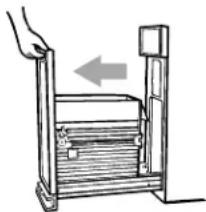
- Lift the front of the drawer to clear the stops.
-
Grasp the drawer on the sides and pull it out the rest of the way. Set the drawer down gently.
-
Vacuum the inside of the cabinet. Liquid spills or wet trash should be cleaned up by hand, or by using a vacuum designed to pick up liquids.
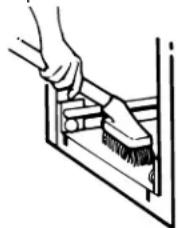
- Wash the inside of the cabinet with a clean sponge or soft cloth and a mild detergent in warm water. Rinse and dry thoroughly with a soft cloth.
- To replace the drawer, grasp it by the sides and insert the rollers onto the tracks.
- Lift the front of the drawer and push it in fully past the stops.
Cleaning the Ram
NOTE: You may want to wear protective gloves as there may be bits of glass on the ram cover.
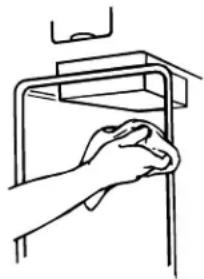
- Wipe glass particles off of the ram cover with a cloth or paper towels.
- Remove foods with a clean sponge or soft cloth and a mild detergent in warm water. Rinse and dry thoroughly with a soft cloth.
Cleaning Before a Vacation
If you will be away for more than a couple of days, remove the compactor bag. Remove the Key-Knob (or Key-Switch) and store it out of children's reach.
TROUBLESHOOTING
Try the solutions suggested here first in order to avoid the cost of an unnecessary service call.
Trash is not compacting
Is the drawer less than half full? Drawer must be more than half full before trash is compacted.
Your compactor won't operate
Is the power supply cord unplugged? Plug into a grounded 3 prong outlet.
Has a household fuse or circuit breaker tripped? Replace the fuse or reset the circuit breaker.
Is the drawer completely closed? Close the drawer firmly and start the compactor again.
Is the Key-Knob turned all the way to START? Turn the Key-Knob (Key-Switch) fully to START and release (on some models). See the "Starting the Compactor" section.
Did you press ON before pressing START? Press ON before pressing START (on some models). See the "Starting the Compactor" section.
The drawer won't open
■ Is the ram all the way up? Drawer will open only when ram is fully raised.
To raise the ram on models with a Key-Knob (or Key-Switch): Turn the Key-Knob (Key-Switch) to START and release. See the "Starting the Compactor" section.
To raise the ram on models with push button controls: Press OFF, and then press ON. See the "Starting the Compactor" section.
There is not enough compaction or force
Do you use the compacting cycle frequently enough?
Compacting works best when only a few items are loaded.
Bottles don't break
How often do you notice this? Bottles will not break every time. The thickness of the bottle's glass and the content of the trash load below it may prevent the bottle from breaking.
RECYCLING WITH YOUR COMPACTOR

PETE

HDPE

V

LDPE

PP

PS
These codes indicate which type of plastic was used in manufacturing the container. Your recycling program will confirm which codes are accepted for recycling.

OTHER
Plastics with this symbol cannot be recycled.

Items with this symbol can be recycled or were made from recycled materials.
A compactor makes recycling and landfill reduction efforts more effective and efficient.
Recycling Guidelines
Contact your community recycling program or local recycling organizations to find out which items are accepted for recycling and how they should be prepared and organized. These programs will provide essential recycling guidelines:
Method and frequency of collection—curbside collections and drop-off centers.
- Categories of recyclable items, and how to distinguish between them. Plastic containers are identified by codes on the bottom. Sort by the numbers inside the triangular arrows. For example, most plastic soda bottles and some cleaning bottles have code 1; most milk and water jugs, laundry and personal hygiene product containers have code 2. Paper and cardboard containers (paperboard) also have recycle symbols to indicate a container is recyclable.
Preparations of recyclable items. Most recycling programs provide specific guidelines on preparation. For example, aluminum cans and plastic containers need to be rinsed out, lids removed, but often labels can be left on.
IMPORTANT:
Some items, such as glass, should not be compacted.
Most recycling programs will not accept crushed glass.
■Check with your recycling program for specific guidelines on preparing recyclables.
Organizing the Recycling Workspace
Convenient recycle bins are made to fit in the compactor drawer. These bins, as well as plastic compactor bags, can be purchased in a variety of colors at hardware stores and supermarkets. Set up a system of color-coded bags in an area chosen for processing recyclables. Each color can represent a category of recyclable items, based on types specified by your recycling program. Separate recyclable items from non-recyclable items:
Recyclable items can be sorted using the color-coded bags. Prepare items according to guidelines provided by your recycling program.
Non-recyclable items should be compacted because compaction reduces trash volume to its original size: four bags of trash can be compacted into one bag. This contributes to reducing landfill volume and related waste transportation burdens.
REMEMBER: Do not expect items which contain minimal air, such as folded newspapers, to compact significantly.
Compacting Recyclable Items
Most recycling programs want the consumer to crush or flatten recyclable items such as plastics, cans, and paperboard. Compacting recyclable items consolidates volume and thereby reduces transportation costs—and also helps manage recycling workspace more effectively. The compactor is ideal for such a task. When a plastic bag is full enough to require compacting, place the bag in the drawer as shown in "Installing a New Bag." Then follow instructions in "Compactor Use." When the compacting cycle is complete, remove the plastic bag as shown in "Removing a Filled Bag" and return it to storage until it is full enough to recycle.
Remember, compacting both recyclables and non-recyclables means less solid waste and waste transportation costs—and a better environment for all.
Reduce - Reuse - Recycle
ASSISTANCE OR SERVICE
Before calling for assistance or service, please check "Troubleshooting." It may save you the cost of a service call. If you still need help, follow the instructions below.
When calling, please know the purchase date and the complete model and serial number of your appliance. This information will help us to better respond to your request.
In the U.S.A.
If the problem is not due to one of the items listed in the "Troubleshooting" section...
Call the dealer from whom your appliance was purchased, or call Maytag Appliance Sales Company, Jenn-Air Customer Assistance at 1-800-688-1100 or 1-423-472-3333 to locate an authorized service company. When calling, please know the purchase date and the complete model and serial number of your appliance. Be sure to retain proof of purchase to verify warranty status.
If the dealer or service company cannot resolve your problem, write to:
Jenn-Air Customer Service
Attn.: CAIR Center
P.O.Box 2370
Cleveland, TN 37320-2370
Web address: www.jennair.com
Or call: 1-800-688-1100.
U.S. customers using TTY for deaf, hearing impaired or speech impaired, call: 1-800-688-2080 (Monday-Friday, 8:00 a.m.-8:00 p.m. Eastern Time).
NOTE: When writing or calling about a service problem, please include the following information:
- Your name, address and daytime telephone number.
- Appliance model number and serial number.
- Name and address of your dealer or servicer.
- A clear description of the problem you are having.
- Proof of purchase (sales receipt).
All specifications are subject to change by manufacturer without notice.
Accessories
To order a color-matched trim kit for the installation of a custom-made panel, contact your local authorized dealer.
Replacement Bags - Call for Part Number
Trim Kits for Custom Front Panels:
Order Part #TCDW (white), TCDB (black), TCDQ (bisque) (Trim kit for custom made panel)
Order Part #TCDS (Stainless steel door panel)
JENN-AIR COMPACTOR WARRANTY
FULL ONE-YEAR WARRANTY
For one (1) year from the date of original retail purchase, any part which fails in normal home use will be repaired or replaced free of charge.
LIMITED TWO-YEAR WARRANTY
From the second year through the end of the third year following the date of original retail purchase, parts which fail in normal home use will be repaired or replaced free of charge for the part itself, with the owner paying all other costs, including labor, mileage and transportation.
PLE t t t t t t t t t t t t t t t t t t t t t t t t t t t t t t t t t t t t t t t t t t t t t t t t t t t t
CANADIAN RESIDENTS: These warranties cover only those compactors installed in Canada that have been listed with Canadian Standards Association unless the compactors are brought into Canada due to transfer of residence from the United States to Canada.
The specific warranties expressed above are the ONLY warranties provided by the manufacturer. These warranties give you specific legal rights, and you may also have other rights that vary from state to state.
What is Not Covered by These Warranties:
- Conditions and damages resulting from any of the following:
a. Improper installation, delivery or maintenance.
b. Any repair, modification, alteration or adjustment not authorized by the manufacturer or an authorized servicer.
c. Misuse, abuse, accidents or unreasonable use.
d. Incorrect electric current, voltage or supply.
e. Improper setting of any control.
- Warranties are void if the original serial numbers have been removed, altered or cannot be readily determined.
- Products purchased for commercial or industrial use.
- The cost of service or service call to:
a. Correct installation errors.
b. Instruct the user on proper use of the product.
c. Transport the appliance to the servicer.
- Consequential or incidental damages sustained by any person as a result of any breach of these warranties.
Some states do not allow the exclusion or limitation of consequential or incidental damages, so the above exclusion may not apply.
User's guides, service manuals and parts catalogs are available from Maytag Appliances Sales Company, Maytag Customer Assistance.
10/01
Keep this book and your sales slip together for future reference. You must provide proof of purchase or installation date for in-warranty service.
Write down the following information about your compactor to better help you obtain assistance or service if you ever need it. You will need to know your complete model number and serial number. You can find this information on the model and serial number label located on the inside wall of the compactor drawer.
Dealer name.
Address
Phone number
Model number
Serial number
Purchase date
S CURIT DU COMPACTEUR
ASSISTANCE OU SERVICE
Jenn-Air Customer Service
Attn.: CAIR Center
P.O.Box 2370
Cleveland, TN 37320-2370
Adresse internet: www.jennair.com


- JENN-AIR COMPACTORS/COMPACTEURS
- TABLE OF CONTENTS
- COMPACITOR SAFETY 3
- INSTALLATION INSTRUCTIONS 4
- COMPACTOR USE. 9
- COMPACTOR CARE. 11
- TROUBLESHOOTING 12
- RECYCLING WITH YOUR COMPACTOR 12
- ASSISTANCE OR SERVICE. 13
- WARRANTY 14
- TABLE DES MATI RES
- SECURITE DU COMPACTEUR 15
- INSTALLATION DU COMPACTEUR 16
- ASSISTANCE OU SERVICE 26
- DANGER
- WARNING
- IMPORTANT SAFETY INSTRUCTIONS
- SAVE THESE INSTRUCTIONS
- INSTALLATION INSTRUCTIONS
- UNPACKING
- IMPORTANT
- LOCATION REQUIREMENTS
- PRODUCT DIMENSIONS
- CUTOUT DIMENSIONS
- CLEARANCE DIMENSIONS
- ELECTRICAL REQUIREMENTS
- RECOMMENDED GROUNDING METHOD
- UNDERCOUNTER INSTALLATION
- TOOLS AND MATERIALS NEEDED FOR INSTALLATION
- COUNTERTOP MOUNTING
- CABINET-FRONT MOUNTING
- ADJUSTING THE TOE PLATE
- AIR FRESHENER
- CHANGING THE DECORATIVE PANEL
- TRIM KIT PANEL DIMENSIONS
- TRIMLESS PANEL WITH HANDLE
- DIMENSIONS
- INSTALLATION
- TRIMLESS PANEL WITHOUT HANDLE
- COMPACTOR USE
- HOW YOUR COMPACTOR WORKS
- LOADING
- EXPLOSION HAZARD
- CUT HAZARD
- STARTING YOUR COMPACTOR
- STOPPING YOUR COMPACTOR
- REMOVING A FILLED BAG
- INSTALLING A NEW BAG
- BEFORE INSTALLING A NEW BAG, BE SURE
- COMPACTOR CARE
- CLEANING
- CLEANING EXTERIOR SURFACES
- CLEANING INSIDE THEDRAWER
- CLEANING INSIDE THE CABINET
- CLEANING THE RAM
- CLEANING BEFORE A VACATION
- TROUBLESHOOTING
- TRASH IS NOT COMPACTING
- YOUR COMPACTOR WON'T OPERATE
- THE DRAWER WON'T OPEN
- THERE IS NOT ENOUGH COMPACTION OR FORCE
- BOTTLES DON'T BREAK
- RECYCLING WITH YOUR COMPACTOR
- RECYCLING GUIDELINES
- ORGANIZING THE RECYCLING WORKSPACE
- COMPACTING RECYCLABLE ITEMS
- ASSISTANCE OR SERVICE
- IN THE U.S.A
- IF THE PROBLEM IS NOT DUE TO ONE OF THE ITEMS LISTED IN THE "TROUBLESHOOTING" SECTION
- ACCESSORIES
- JENN-AIR COMPACTOR WARRANTY
- FULL ONE-YEAR WARRANTY
- LIMITED TWO-YEAR WARRANTY
- WHAT IS NOT COVERED BY THESE WARRANTIES
- S CURIT DU COMPACTEUR
- ASSISTANCE OU SERVICE
Brand : JENN-AIR
Model : TC507
Category : Waste press