Ace Combat Assault Horizon (PS3) - Game SONY - Free user manual and instructions
Find the device manual for free Ace Combat Assault Horizon (PS3) SONY in PDF.


| Product type | PlayStation 3 Video Game |
| Platform | Sony PlayStation 3 |
| Genre | Aerial Combat |
| Game Mode | Single-player (Campaign, Free Mission) and online multiplayer |
| Online Multiplayer | Up to 16 players (Deathmatch, Domination, etc.) |
| Disc Format | Blu-ray Disc |
| Compatible Controller | DUALSHOCK 3 (wired or wireless) |
| Controller Functions | Motion sensitivity, vibration |
| Data Storage | PS3 Hard Drive (game save) |
| Available Languages | French, English (subtitles and dialogue) |
| Video Resolution | HD (requires HD cable and compatible display) |
| Voice Chat | Requires a headset (Bluetooth or USB) |
| ESRB Rating | Not specified in the manual |
| Box Dimensions | Approximately 13.5 x 17 x 1.5 cm (standard PS3 case) |
| Weight | Approximately 100 g (disc+case) |
| Power | Requires a powered PS3 console |
| Maintenance | Clean the disc with a soft, lint-free cloth (from center outward) |
| Safety | Caution for epilepsy; take breaks; avoid playing when tired |
| Replacement Parts | Not applicable (complete game) |
| Warranty | 90-day limited (hardware and manufacturing defects) |
Frequently Asked Questions - Ace Combat Assault Horizon (PS3) SONY
User questions about Ace Combat Assault Horizon (PS3) SONY
0 question about this device. Answer the ones you know or ask your own.
Ask a new question about this device
Download the instructions for your Game in PDF format for free! Find your manual Ace Combat Assault Horizon (PS3) - SONY and take your electronic device back in hand. On this page are published all the documents necessary for the use of your device. Ace Combat Assault Horizon (PS3) by SONY.
USER MANUAL Ace Combat Assault Horizon (PS3) SONY
WARNING: PHOTOSENSITIVITY/EPILEPSY/SEIZURES
A very small percentage of individuals may experience epileptic seizures or blackouts when exposed to certain light patterns or flashing lights. Exposure to certain patterns or backgrounds on a television screen or when playing video games may trigger epileptic seizures or blackouts in these individuals. These conditions may trigger previously undetected epileptic symptoms or seizures in persons who have no history of prior seizures or epilepsy. If you, or anyone in your family, has an epileptic condition or has had seizures of any kind, consult your physician before playing. IMMEDIATELY DISCONTINUE use and consult your physician before resuming gameplay if you or your child experience any of the following health problems or symptoms:
-
dizziness
-
eye or muscle twitches
disorientation
-
any involuntary movement
-
altered vision
-
loss of awareness
seizures
or convulsion.
RESUME GAMEPLAY ONLY ON APPROVAL OF YOUR PHYSICIAN.
Use and handling of video games to reduce the likelihood of a seizure
- Use in a well-lit area and keep as far away as possible from the television screen.
- Avoid large screen televisions. Use the smallest television screen available.
- Avoid prolonged use of the PlayStation®3 system. Take a 15-minute break during each hour of play.
- Avoid playing when you are tired or need sleep.
Stop using the system immediately if you experience any of the following symptoms: lightheadedness, nausea, or a sensation similar to motion sickness; discomfort or pain in the eyes, ears, hands, arms, or any other part of the body. If the condition persists, consult a doctor.
NOTICE:
Use caution when using the DUALSHOCK®3 wireless controller motion sensor function. When using the DUALSHOCK®3 wireless controller motion sensor function, be cautious of the following points. If the controller hits a person or object, this may cause accidental injury or damage. Before using, check that there is plenty of space around you. When using the controller, grip it firmly to make sure it cannot slip out of your hand. If using a controller that is connected to the PS3™ system with a USB cable, make sure there is enough space for the cable so that the cable will not hit a person or object. Also, take care to avoid pulling the cable out of the PS3™ system while using the controller.
WARNING TO OWNERS OF PROJECTION TELEVISIONS:
Do not connect your PS3™ system to a projection TV without first consulting the user manual for your projection TV, unless it is of the LCD type. Otherwise, it may permanently damage your TV screen.
HANDLING YOUR PS3TM FORMAT DISC:
- Do not bend it, crush it or submerge it in liquids. - Do not leave it in direct sunlight or near a radiator or other source of heat. - Be sure to take an occasional rest break during extended play. - Keep this disc clean. Always hold the disc by the edges and keep it in its protective case when not in use. Clean the disc with a lint-free, soft, dry cloth, wiping in straight lines from center to outer edge. Never use solvents or abrasive cleaners.
TABLE OF CONTENTS
Getting Started 02
Game Controls 03
Main Menu 04
Game Screen 05
Pause Menu 05
Settings 06
How to Play 06
Customer Support & Warranty 07
Francais 09
Notes 16
Credits 17
NOTICES:
Video output in HD requires cables and an HD-compatible display, both sold separately. Voice chat requires a headset, sold separately. Compatible with most Bluetooth and USB wired headsets. Some limitations apply.
GETTING STARTED
PlayStation®3 system
Starting a game: Before use, carefully read the instructions supplied with the PS3™ computer entertainment system. The documentation contains information on setting up and using your system as well as important safety information.
Check that the MAIN POWER switch (located on the system rear) is turned on. Insert the Ace Combat® Assault Horizon disc with the label facing up into the disc slot. Select the icon for the software title under [Game] in the PS3™ system's home menu, and then press the × button. Refer to this manual for information on using the software.
Quitting a game: During gameplay, press and hold down the PS button on the wireless controller for at least 2 seconds. Then select "Quit Game" from the screen that is displayed.
TbImove a disc, touch the eject button after quitting the game.

Trophies: Earn, compareTaophisare trophies that you earn by making specific in-game accomplishments. Trophies access requires a PlayStation®Network account.
SAVED DATA FOR PS3™ FORMAT SOFTWARE
Saved data for PS3™ format software is saved on the system's hard disk. The data is displayed under "Saved Game Utility" in the Game menu.
GAME CONTROLS
Camera view right stick
Fire machine gun
Fire missile
Change weapon
Switch target
Throttle down
Throttle up
Yaw left
Yaw right R
Activate DFMI/ASMI L2 R2 Counter maneuver
Flares L3
Change view R3
Switch radar map display
Pause
BOMBER CONTROLS
Adjust targeting left stick
Flares , L3
Drop bomb
Switch target
Pause
ATTACK HELICOPTER CONTROLS
Forward/Backward left stick Strafe left/Strafe right
Turret and camera view up/ right stick down, turn left/right
Descend
Ascend
Change weapon
Obtain target L1, L2
Fire special weapon R1
Fire gun R2
Counter maneuver L1 R1
Reset camera L3
Change view R3
Switch radar map display SELECT
Pause
DOOR GUNNER/GUNSHIP CONTROLS
Adjust sight left stick! right stick
Change weapon (Gunship only)
Attack
Zoom sight (Door Gunner only)
Pause
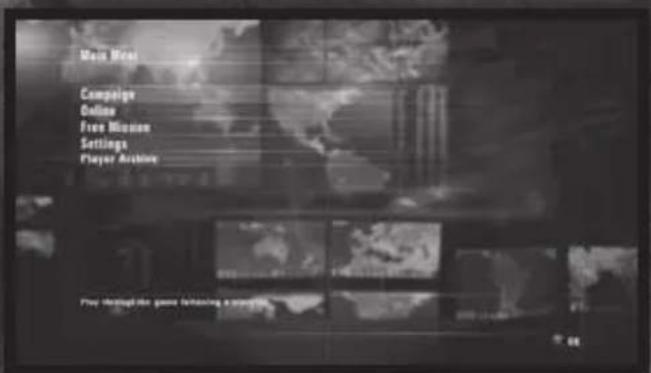
MAIN MENU
CAMPAIGN
Play through the game following a storyline.
Continue: Resume a campaign in progress.
New Game: Start a new campaign.
PLAYSTATION®3 NETWORK
Play with or against other players online over the PlayStation®Network. Choose between Co-Op, Domination, Deathmatch and Capital Conquest.
Quick Match: Search for matches without selecting session rules.
Custom Match: Select session rules to search for matches.
Create Session: Customize rules and settings to create a new online match.
Skill Sets: Equip an aircraft with skills to increase its performance in online, co-op, and free mission modes.
Stats: View your individual statistics.
Rankings: Browse online rankings.
NOTE: When you sign-in to PlayStation®Network, the game's play record will be uploaded to the "ACE COMBAT ASSAULT HORIZON Synchronized Website". Please visit http://www.acecombat.com for details on registering and using the Synchronized Website (registering and using the Synchronized Website is not a requirement to play the game).
*No personal information will be uploaded with the game's play record.
*If you do not register to the Synchronized Website, your game's play record will not be revealed.
FREE MISSION
Play through any missions completed in the single player campaign.
SETTINGS
Adjust various game settings.
PLAYER ARCHIVE
View stats, aircraft models, and credits, or replay movies.
Stats: View statistics based on both single player and online gameplay.
Aircraft Viewer: Examine the in-game models for any aircraft you have unlocked.
Credits: Watch the credits for Ace Combat Assault Horizon.
Replay Theater: View any saved replay movies.
SETTINGS
FLIGHT ASSIST: Turn the Flight Assist feature ON/OFF. When set to ON, Flight Assist automatically steers the plane out of danger if it is about to hit the ground and when it exits the mission area.
CONTROL SETTINGS: View and adjust the game controls.
Vibration: Turn controller vibration ON/OFF.
Aircraft: Adjust the controls for piloting an aircraft.
Attack Helicopter: Set the controls for piloting an attack helicopter.
Door Gunner/Gunship: Set controller preferences for manning a mounted gun.
SCREEN BRIGHTNESS: Modify the brightness levels in the game.
HUD MEASURE: Set in-game displays to show information in Knots & Feet or Meters.
SUBTITLES: Turn subtitle display ON/OFF.
SUBTITLE LANGUAGE: Choose the subtitle language.
AUDIO LANGUAGE: Select a language for the in-game dialog.
SOUND: Adjust the sound options for the game.
Music Volume: Set the music volume.
SE Volume: Set the volume level for the sound effects.
V0 Volume: Set the volume level for in-game voices.
HOW TO PLAY
LOCK-ON: Press the button to switch between available enemy targets, and follow the green arrow near the center of the screen to bring the target into view. Once the square targeting box turns red, a lock-on has been achieved, and missiles are more likely to hit the target.
DOGFIGHT MODE (DFM): While following a targeted enemy aircraft from behind, a green circle may appear around the targeting box. Press the L2 button and the R2 button to enter Dogfight Mode. In Dogfight Mode, you'll be in close pursuit of your targeted foe. Keep the enemy within the green Assault Circle to charge your missiles. When the Assault Circle turns red, your missiles have a much greater chance of hitting the enemy. To disengage from Dogfight Mode, press the button.
COUNTER MANEUVERS: A red circle follows the rear of your aircraft when an enemy attempts to engage in a Dogfight. To initiate a counter maneuver, slow down your aircraft until the red and green arrows align in the center of the screen, and then press the L2 button and the R2 button.
For Attack Helicopters, press the L2 button and the R2 button when the "Incoming Missile" warning appears on-screen to avoid incoming missiles.
Ever get stuck and just need that extra edge to beat the level?
Having problems getting your game to work properly?
Now you can get one-on-one help from NAMCO BANDAI Games America Inc.
using your web browser!
Simply go to livehelp.namco.com for more details.
Live Counselors available from 9am-5pm Monday-Friday Pacific Time.
NAMCO BANDAI Games America Inc.
ATTN: Customer Service
1740 Technology Drive, Suite 600
San Jose, CA 95110
Before returning any defective materials to us, please contact us for a Return Merchandise Authorization (RMA) number. You can reach us at the address above, via e-mail at support@namcobandaigames.com or contact us at (408) 235-2222. Please note that any materials sent to us without an RMA number will be refused and returned. We highly recommend that you use a traceable and / or insured method of shipping the materials to us.
Namco Bandai Games America Inc. Online:
www.namcobandaigames.com
Visit our Website to get information about our new titles.
LIMITED WARRANTY
NAMCO BANDAI Games America Inc. warrants to the original purchaser that this NAMCO BANDAI Games America Inc. game pack shall be free from defects in material and workmanship for a period of ninety (90) days from the date of purchase. If a defect covered by this limited warranty occurs during this 90-day limited warranty period, NAMCO BANDAI Games America Inc. will repair or replace the defective game pack or component part, at its option, free of charge.
This limited warranty does not apply if the defects have been caused by negligence, accident, unreasonable use, modification, tampering, or any other cause not related to defective material or workmanship.
LIMITATIONS ON WARRANTY
Any applicable implied warranties of merchantability and fi tness for a particular purpose, are hereby limited to ninety (90) days from the date of purchase and are subject to the conditions set forth herein. In no event shall NAMCO BANDAI Games America Inc. be liable for consequential or incidental damages resulting from the possession or use of this product.
The provisions of the limited warranty are valid in the United States only. Some states do not allow limitations on how long an implied warranty lasts, or exclusion of consequential or incidental damages, so the above limitation or exclusion may not apply to you. This limited warranty provides you with specific legal rights. You may have other rights which vary from state to state.
"PlayStation", "DUALSHOCK" and "SIXAXIS" are registered trademarks and "PS3" and the PlayStation Network logo are trademarks of Sony Computer Entertainment Inc. The ESRB rating icons are registered trademarks of the Entertainment Software Association.
AVERTISSEMENT:PHOTOSENSIBILITE/EPILEPSIE/CONVULSIONS
LEAD IN-GAME CINEMATIC ARTIST
Keita Imatomi
LEAD ENVIRONMENT ARTIST
Shinya Sorimachi
LEAD ANIMATOR
Naohiko Morimoto
LEAD CHARACTER MODELER
Shunichi Oe
SOUND DIRECTOR
Keiki Kobayashi
ORCHESTRAL PERFORMANCE
Seattle Music
EXECUTIVE DIRECTOR
Kazutoki Kono
NAMCO BANDAI
GAMES INC.
ASSOCIATE MEDIA MANAGER
Nicholas Kinling
ASSOCIATE MANAGER SOCIAL MEDIA
Jenny Park-Chan
COMMUNITY MANAGER
Richard Bantegui
SENIOR MANAGER
INTERACTIVE SERVICES
Ryan Grissom
MANAGER, INTERACTIVE
& SEO
Mariko Kato
WEB PRODUCER
Mark Templin
DIGITAL ANALYTICS
COORDINATOR
Hisako Ueno
DIRECTOR OF MARKETING COMMUNICATIONS
Kelly Loughlin
SENIOR PUBLIC RELATIONS MANAGER
Job Stauff er
MANAGER, EVENTS & MOBILE PR
Reory Howard
ASSOCIATE EVENTS MANAGER
Jason Cline
PUBLIC RELATIONS
SPECIALIST
Nick O'Leary
DIRECTOR, PARTNERSHIPS & CHANNEL
Kirby Fong
ASSOCIATE MANAGER CHANNEL MARKETING
Justin Lucas
E-COMMERCE & DIRECT SALES COORDINATOR
Abelina Villegas
DIRECTOR, MARKETING SERVICES & BRANDING
Michiko Wang
ART DIRECTOR
Mariano Fe de Leon
SENIOR GRAPHIC ARTIST
Corey Tran
GRAPHIC ARTIST
Misaki Kitamura
SENIORVIDEO EDITOR
Keisuke Kumiji
MARKETING SERVICES
COORDINATOR
Andrew Froilan
EUROPEAN PRODUCT MANAGER
Camille Vacelet
INTERNATIONAL MARKETING COORDINATOR
Atsuo Yoshimura
MARKETING & PUBLIC RELATIONS COORDINATOR
Rosa Elias
PACKAGING & ADDITIONAL DESIGN
PETROL
MANUAL LAYOUT AND TRANSLATION
Off Base Productions
VICE PRESIDENT OF SALES
Sue Taigen
VICE PRESIDENT OF FIELD SALES
Brett Robinson
DIRECTOR OF SALES
Melani Windham
SENIOR SALES OPERATIONS MANAGER
Terry Carlson
SENIOR REGIONAL SALES MANAGER
Jay Musolf
REGIONAL SALES MANAGERS
John Brien
Matt Robinson
REGIONAL SALES
TEAM - CANADA
Wayne Parkes
Ryan Gardner
SENIOR STRATEGIC PLANNING ANALYST
Charlie Chough
SALES ANALYST MANAGER
Derek Carlson
SALES OPERATIONS ANALYST
Jean Wong
LICENSE & IP ADMINISTRATOR
Sean McGilvray
QA MANAGER
Mike Red 5' Peterson
CQC SUPERVISOR
Damon 'The Red Comet' Bernal
PROJECT COORDINATOR
Jesse 'EL GUAPO' Mejia
DEPARTMENT COORDINATOR
Tereza Siegel
QA LEAD
Saiho 'Scream' Kwan
QA ASSISTANT LEADS
Daren 'Calico' Lim
Alisa 'Annihilator' Lin
QA TESTERS
Steve 'Mustang' Bies
Gustavo 'Proxy' Castro
Jonathan 'Pineapple' Drescher
Justinn 'Iceberg' Everitt
Lionel 'Warm gun' Hill
Enrique 'Many Times' Jacob
David 'Guamshady' Mendiola
Joel 'Urban Rain' Roman
Anthony 'Jamjamm' Tran
Jeremy 'Monster Man' Balling
James 'Nighthawk' Chen
Leticia Rawr' Duenas
Josh 'Golem' Helm
David Homstar'Hom
Sean 'Domino' Edwards
Micah 'Laegen' Geary
Matt 'Deus Jester' Warner
Mike 'The Producer' Mok
Brian 'White Warrior' Pfeiler
Brandon 'Philipino Delight' Morales
Richard 'Shadowfox' Navarro
Jeremy 'Ripple Effect' Lee
CUSTOMER SUPPORT
MANAGER
Jesus 'lesious' Barragan
CUSTOMER SUPPORT
Brian KrySeph'Ellak
Marco 'Ultimo' Mah
Kimo Pamintuan
Vilma Valdez
Special Thanks to the United
States Department of Defense
SPECIAL THANKS
Craig Sinel & team
David Robinson
Miriam Beltran
In-Joon Hwang
Maverick
GSD&M
Jim DeFelice
Andrew Conway
Jason Cantor
Paul Caparotta
Ryan MacDonald
ADDITIONAL INFORMATION
All trademarks and copyrights associated with the manufacturers, aircraft, models, trade names, brands and visual images depicted in this game are the property of their respective owners, and used with such permissions.
Produced under license from BAE Systems.

Produced under license from
Boeing Management Company.
AH-64 Apache Longbow, B-1, FIA-18
Super Hornet, F-15 Eagle, F-15
Strike Eagle, KC-10 are among the
trademarks owned by Boeing.
The MIRAGE 2000 and RAFALE are aircraft designed and manufactured by DASSAULT AVIATION. MIRAGE and RAFALE are registered trademarks of DASSAULT AVIATION used under License to NAMCO BANDAI Games Inc.
Typhoon is an aircraft and registered trademark of Eurofli ghter GmbH.
Produced in cooperation with Japan Air Self-Defense Force.
LOCKHEED MARTIN, AC-130U Spooky, F-117A Nighthawk, F-16CIF Fighting Falcon, F-22A Raptor, F-35B Lightning II, MC-130, associated emblems and logos, and body designs of vehicles are either registered trademarks or trademarks of Lockheed Martin Corporation in the USA and/or other jurisdictions, used under license by NAMCO BANDAI Games Inc.
Produced under a license from Northrop Grumman Systems Corporation.
A-10A Thunderbolt II, B-2 Spirit, and F-14D Super Tomcat are trademarks of Northrop Grumman Corporation.
RAF Roundel is a registered trade design of the Secretary of State for Defence and is used under license.
The Gripen C is an aircraft designed and manufactured by Saab AB.
Gripen C is a registered trademark of Saab AB used under License to NAMCO BANDAI Games Inc.
SIKORSKY, BLACK HAWK and the Black Hawk helicopter design are the trademarks of Sikorsky Aircraft Corporation. They are licensed throughout the world to NAMCO BANDAI Games Inc.
@GeoEye/JAPAN SPACE IMAGING CORPORATION
DigitalGlobe, Inc., All Rights Reserved. /Hitachi Solutions, Ltd.
© RYOBI LIMITED
Fonts used in-game are provided by Bitstream Inc. All rights reserved.
Lua Copyright © 1994-2008
Lua.org, PUC-Rio.
tolua++ Copyright © 2009
Ariel Manzur.
Dolby and the double-D symbol are registered trademarks of Dolby Laboratories.

DES CONSEILS MAINTENANT OFFERTS EN LIGNE!
1740 Technology Drive, Suite 600
San Jose, CA 95110

- WARNING: PHOTOSENSITIVITY/EPILEPSY/SEIZURES
- Use and handling of video games to reduce the likelihood of a seizure
- NOTICE:
- WARNING TO OWNERS OF PROJECTION TELEVISIONS:
- HANDLING YOUR PS3TM FORMAT DISC:
- TABLE OF CONTENTS
- NOTICES:
- GETTING STARTED
- PlayStation®3 system
- SAVED DATA FOR PS3™ FORMAT SOFTWARE
- GAME CONTROLS
- BOMBER CONTROLS
- ATTACK HELICOPTER CONTROLS
- DOOR GUNNER/GUNSHIP CONTROLS
- MAIN MENU
- CAMPAIGN
- PLAYSTATION®3 NETWORK
- FREE MISSION
- SETTINGS
- PLAYER ARCHIVE
- HOW TO PLAY
- NAMCO BANDAI Games America Inc.
- LIMITED WARRANTY
- LIMITATIONS ON WARRANTY
- AVERTISSEMENT:PHOTOSENSIBILITE/EPILEPSIE/CONVULSIONS
- LEAD IN-GAME CINEMATIC ARTIST
- LEAD ENVIRONMENT ARTIST
- LEAD ANIMATOR
- LEAD CHARACTER MODELER
- SOUND DIRECTOR
- ORCHESTRAL PERFORMANCE
- EXECUTIVE DIRECTOR
- NAMCO BANDAI
- GAMES INC.
- ASSOCIATE MEDIA MANAGER
- ASSOCIATE MANAGER SOCIAL MEDIA
- COMMUNITY MANAGER
- SENIOR MANAGER
- INTERACTIVE SERVICES
- MANAGER, INTERACTIVE
- WEB PRODUCER
- DIGITAL ANALYTICS
- COORDINATOR
- DIRECTOR OF MARKETING COMMUNICATIONS
- SENIOR PUBLIC RELATIONS MANAGER
- MANAGER, EVENTS & MOBILE PR
- ASSOCIATE EVENTS MANAGER
- PUBLIC RELATIONS
- SPECIALIST
- DIRECTOR, PARTNERSHIPS & CHANNEL
- ASSOCIATE MANAGER CHANNEL MARKETING
- E-COMMERCE & DIRECT SALES COORDINATOR
- DIRECTOR, MARKETING SERVICES & BRANDING
- ART DIRECTOR
- SENIOR GRAPHIC ARTIST
- GRAPHIC ARTIST
- SENIORVIDEO EDITOR
- MARKETING SERVICES
- EUROPEAN PRODUCT MANAGER
- INTERNATIONAL MARKETING COORDINATOR
- MARKETING & PUBLIC RELATIONS COORDINATOR
- PACKAGING & ADDITIONAL DESIGN
- MANUAL LAYOUT AND TRANSLATION
- VICE PRESIDENT OF SALES
- VICE PRESIDENT OF FIELD SALES
- DIRECTOR OF SALES
- SENIOR SALES OPERATIONS MANAGER
- SENIOR REGIONAL SALES MANAGER
- REGIONAL SALES MANAGERS
- DES CONSEILS MAINTENANT OFFERTS EN LIGNE!
Brand : SONY
Model : Ace Combat Assault Horizon (PS3)
Category : Game