Soul Calibur IV (PS3) - Game SONY - Free user manual and instructions
Find the device manual for free Soul Calibur IV (PS3) SONY in PDF.


| Product type | Video game |
| Platform | PlayStation 3 (PS3) |
| Format | Blu-ray disc (PLAYSTATION 3) |
| Language of manual | French |
| Number of players (offline) | 1 to 2 players |
| Number of players (online) | Up to 2 players via PLAYSTATION Network |
| Game modes | Story, Lost Souls Tower, Arcade, Training, Special Duel, Standard Duel, Online Match, Character Creation, Museum |
| Compatible controllers | SIXAXIS wireless controller (PS3) |
| Special functions | Soul Gauge, Critical Finish, Equipment Destruction, 8-Way Run, Guard Impact |
| Included characters | Standard characters and special Star Wars characters |
| Character creation | Yes, with customization of equipment, colors, fighting style |
| Health warning | Risk of epilepsy: take a 15-minute break per hour of play |
| Disc cleaning | Soft, lint-free cloth, from center to edge |
| Recommended storage | In its case, away from heat, direct light, and humidity |
| Warranty | 90 days limited (United States and Canada) |
| Technical support | Live chat at livehelp.namco.com (9 AM-5 PM PST) |
| Customer service | support@nancobandaigames.com or (408) 235-2222 |
| Publisher | NAMCO BANDAI Games America Inc. |
| Case dimensions (estimated) | Approximately 17 x 13.5 x 1.5 cm |
| Weight (estimated) | Approximately 100 g |
Frequently Asked Questions - Soul Calibur IV (PS3) SONY
User questions about Soul Calibur IV (PS3) SONY
0 question about this device. Answer the ones you know or ask your own.
Ask a new question about this device
Download the instructions for your Game in PDF format for free! Find your manual Soul Calibur IV (PS3) - SONY and take your electronic device back in hand. On this page are published all the documents necessary for the use of your device. Soul Calibur IV (PS3) by SONY.
USER MANUAL Soul Calibur IV (PS3) SONY
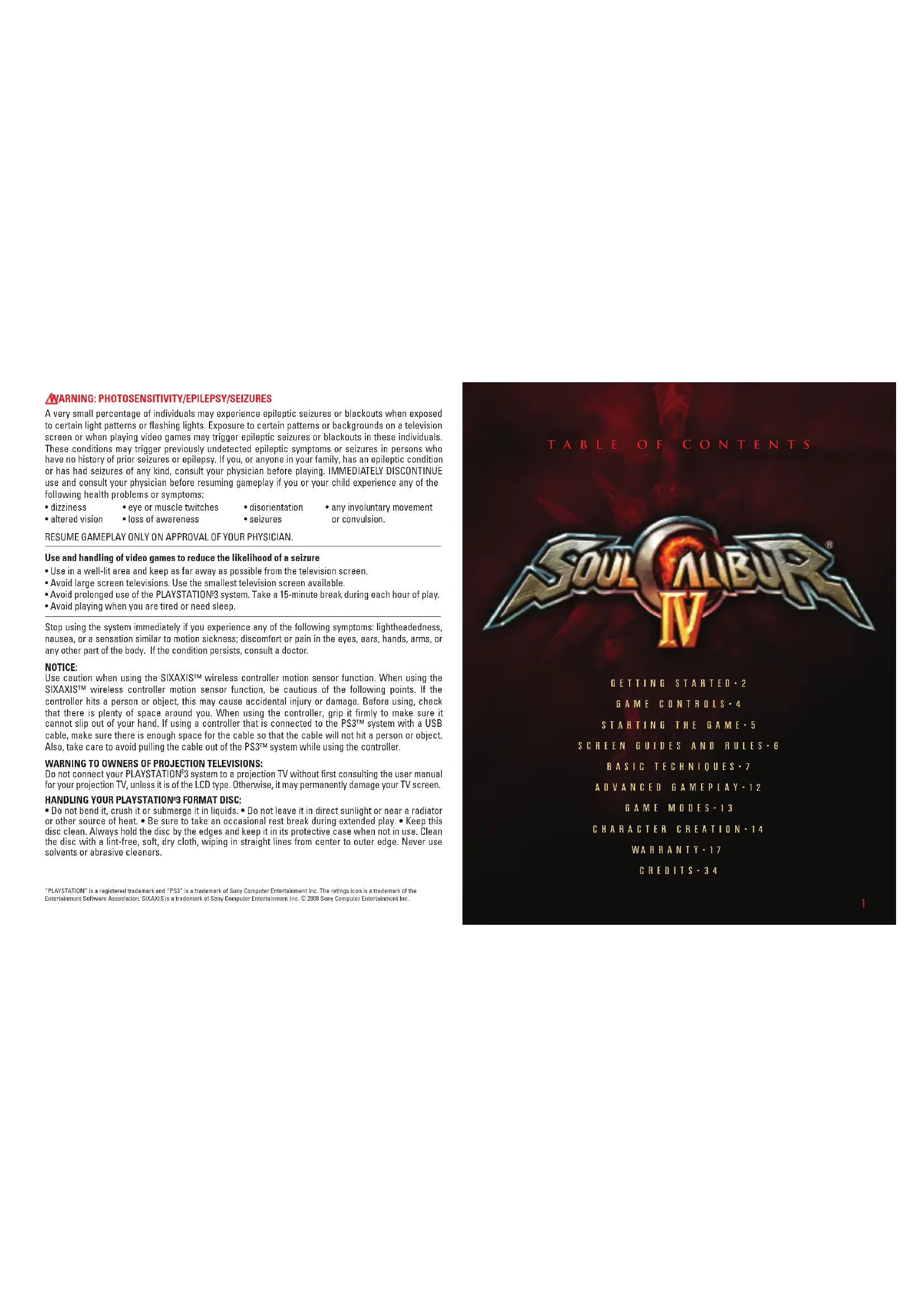
Fight and Explore in the World of Ninja! Demo Available From the PLAYSTATION® Store!

法定代表人:王
May contain content inappropriate for children. Visit www.esrb.org for rating information.
NABITO™: Ultimate Naja®; STORM software © 2004-2008 MAMCO BANDAI Gamer Inc. NABITO artwork and elements © 2002 MASASH KISHMOTO. All Rights Reserved, "PlayStation", "PLAYSTARWA" and "PS" Family logo are registered trademarks of Sony Computer Entertainment Inc. The rights issue is a registered trademark of the Entertainment Software Association. All other trademarks and trademarks are the properties of their respective owners.

PLAYSTATION.3

WARNING: PHOTOSENSITIVITY/EPILEPSY/SEIZURES
A very small percentage of individuals may experience epileptic seizures or blackouts when exposed to certain light patterns or flashing lights. Exposure to certain patterns or backgrounds on a television screen or when playing video games may trigger epileptic seizures or blackouts in these individuals. These conditions may trigger previously undetected epileptic symptoms or seizures in persons who have no history of prior seizures or epilepsy. If you, or anyone in your family, has an epileptic condition or has had seizures of any kind, consult your physician before playing. IMMEDIATELY DISCONTINUE use and consult your physician before resuming gameplay if you or your child experience any of the following health problems or symptoms:
- dizziness
- eye or muscle twitches
- disorientation
• any involuntary movement
- altered vision
- loss of awareness
- seizures
or convulsion.
RESUME GAMEPLAY ONLY ON APPROVAL OF YOUR PHYSICIAN.
Use and handling of video games to reduce the likelihood of a seizure
- Use in a well-lit area and keep as far away as possible from the television screen.
- Avoid large screen televisions. Use the smallest television screen available.
- Avoid prolonged use of the PLAYSTATION®3 system. Take a 15-minute break during each hour of play.
- Avoid playing when you are tired or need sleep.
Stop using the system immediately if you experience any of the following symptoms: lightheadedness, nausea, or a sensation similar to motion sickness; discomfort or pain in the eyes, ears, hands, arms, or any other part of the body. If the condition persists, consult a doctor.
NOTICE:
Use caution when using the SIXAXIST™ wireless controller motion sensor function. When using the SIXAXIST™ wireless controller motion sensor function, be cautious of the following points. If the controller hits a person or object, this may cause accidental injury or damage. Before using, check that there is plenty of space around you. When using the controller, grip it firmly to make sure it cannot slip out of your hand. If using a controller that is connected to the PS3™ system with a USB cable, make sure there is enough space for the cable so that the cable will not hit a person or object. Also, take care to avoid pulling the cable out of the PS3™ system while using the controller.
WARNING TO OWNERS OF PROJECTION TELEVISIONS:
Do not connect your PLAYSTATION®3 system to a projection TV without first consulting the user manual for your projection TV, unless it is of the LCD type. Otherwise, it may permanently damage your TV screen.
HANDLING YOUR PLAYSTATION 3 FORMAT DISC:
- Do not bend it, crush it or submerge it in liquids. - Do not leave it in direct sunlight or near a radiator or other source of heat. - Be sure to take an occasional rest break during extended play. - Keep this disc clean. Always hold the disc by the edges and keep it in its protective case when not in use. Clean the disc with a lint-free, soft, dry cloth, wiping in straight lines from center to outer edge. Never use solvents or abrasive cleaners.
"PLAYSTATION" is a registered trademark and "PS3" is a trademark of Sony Computer Entertainment Inc. The ratings icon is a trademark of the Entertainment Software Association. SIXAXIS is a trademark of Sony Computer Entertainment Inc. © 2008 Sony Computer Entertainment Inc.
GETTING STARTED
PLAYSTATION®3 system front
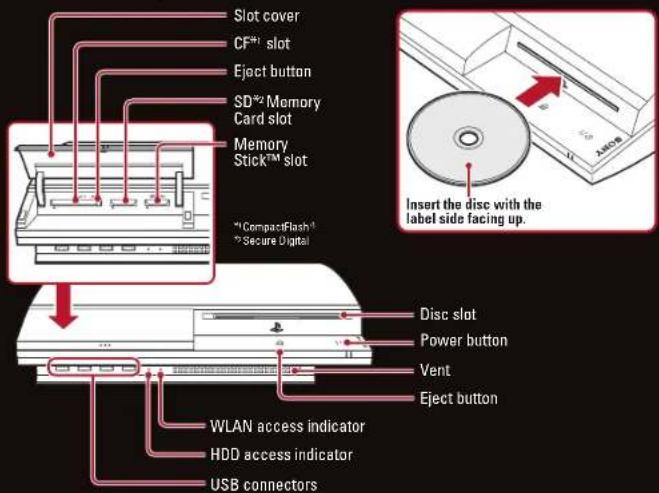
Note: Some models of the PLAYSTATION®3 system do not include media slots. For specific features included, refer to the instructions for use of your model of the PLAYSTATION®3 system.
Starting a game: Before use, carefully read the instructions supplied with the PLAYSTATION®3 computer entertainment system. The documentation contains information on setting up and using your system as well as important safety information.
Check that the MAIN POWER switch (located on the system rear) is turned on. Insert the (title name) disc with the label facing up into the disc slot. Select the icon for the software title under [Game] in the PLAYSTATION *3 system's home menu, and then press the S button. Refer to this manual for information on using the software.
Quitting a game: During gameplay, press and hold down the PS button on the wireless controller for at least 2 seconds. Then select "Quit Game" from the screen that is displayed.
Hint
To remove a disc, touch the eject button after quitting the game.
Using the SIXAXISTM wireless controller (for PLAYSTATION®3)
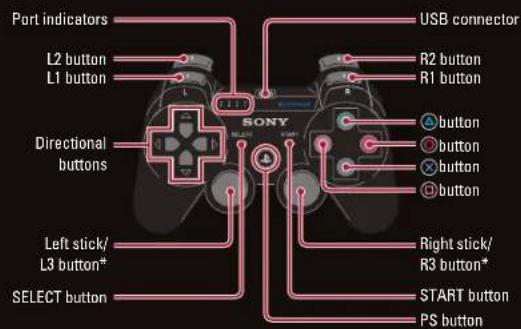
* The L3 and R3 buttons function when the sticks are pressed.
Note: To use the controller, you must first register or "pair" the controller with the PLAYSTATION°3 system and assign a number to the controller. For details, refer to the instructions supplied with the system.
Saved data for PLAYSTATION®3 format software
Saved data for PLAYSTATION®3 format software is saved on the system's hard disk. The data is displayed under "Saved Game Utility" in the Game menu.
GAME CONTROLS
DEFAULT CONTROLS
MENU CONTROLS
Select Menu Options ....Left Stick/Directional Buttons
Confirm selection.... button
Cancel menus and other selections...... button
GAME CONTROLS
Move Character....Left Stick/Directional Buttons
Horizontal Strike (A) button
Vertical Strike (B) button
Kick (K) button
Guard (G) button
Press A+B+K+G simultaneously..... L1 button
Press B+G simultaneously .... L2 button
SWT R1 button
Press A+B+K simultaneously.... R2 button
Pause game / open pause menu ....START button
STARTING THE GAME
Press START to go to the Mode Select Screen.
MODE SELECT SCREEN
SINGLE PLAYER MODES
The single player modes include Story, Tower of Lost Souls, Arcade, and Training.
VERSUS MODES
The modes in this section allow you to play against another player locally in either Special Versus or Standard Versus.
PLAYSTATION®NETWORK
The modes in this section allow you to play online against other players on the PLAYSTATION®Network in Special Versus.
Standard Versus or Friends Match. Here is where you also check your rankings.
CHARACTER CREATION
This mode allows you to create a new character for you to play as in SOULCALIBUR® IV. You can also edit standard characters here.
MUSEUM
View acquired illustrations and unlocked events. Here you can access Chain of Souls, Art Gallery, Event Theater, and Battle Records.
OPTIONS
Change settings for Install/Uninstall, Versus mode, controller, display, sound and stage music.
COMMANDES DE JEU
This game is presented in Dolby® Digital 5.1 surround sound. Connect your PLAYSTATION 3 to a sound system with Dolby Digital technology using a digital optical cable. Set the sound system for the optical input. From the system menu of the PLAYSTATION 3, select the Settings menu, then choose Sound Settings, Audio Output Settings, and select Optical Digital. Select Dolby Digital 5.1 ch. Press the right arrow button, and under the Output Format, Dolby Digital 5.1 Ch. should be listed. Press the ✗ button to save settings. Check the Options menu of each game and set it to output Dolby Digital.
SCREEN GUIDES AND RULES
These are the basic rules and viewing methods for in-battle screens. The rules and screens vary according to the mode. For details on this, please refer to the pages explaining each game mode.
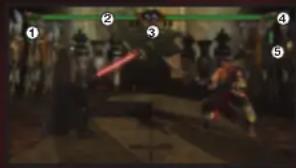
BASIC SCREEN GUIDE
1-CHARACTER NAMES: Displays the character's name.
2-HEALTH GAUGE: The green bar indicates how much health remains for the player's character. When the health gauge reaches zero, the player loses.
3-TIME: When the clock reaches zero, time is up for the match. The player with more health wins.
4-SOUL GAUGE: Shows how much Soul Charge you have stored. When it's full you can perform a Critical Finish after a SOUL CRUSH.
5-EQUIPMENT DESTRUCTION GAUGE: Shows the equipment that has been destroyed.
PAUSE MENU
When START is pressed during battle in each mode, a Pause Menu will be displayed. Select a submenu with the directional buttons or the left stick, and confirm your selection by pressing ✗ button. Note: In some portions of the game, there is no pause menu available (Character Creation and Options).
HOW TO WIN
Attain any one of the following conditions to win a single battle. Winning a match requires winning a varying number of battles. Adjust the number of battles required to win a match in Battle Count under the Options Menu in the Mode Select Menu. The Battle Count can only be changed for Versus modes.
KNOCK OUT: Opponent's health is reduced to zero.
RING OUT: Opponent is knocked out of the ring.
TIME'S UP: The character with more health when time runs out wins.
DRAW: When a double knock out or a double ring out occurs, a draw results. Both sides receive a point for the battle at this time.
GAME OVER: This occurs when a match is lost.
BASIC TECHNIQUES
This section provides an overview of basic moves in SOULCALIBUR 14 . All move commands and controls assume that the character is facing right (standing on the IP side).
BASIC CONTROL NOTATION
COMMAND SYMBOL CONTROLLER BUTTON MEANING
→ directional buttons or left stick....Hold direction
→ ....directional buttons or left stick....Press direction quickly
A button Horizontal Strike
B button Vertical Strike
K button Kick
G button Guard
*The arrows correspond to the up, down, left, and right directions of the directional buttons or left stick.
*The controller buttons are based on the default setup.
ATTACK ATTRIBUTE NOTATION
SYMBOL MEANING
H....High-level Attack
M......Mid-level Attack
Low-level Attack
U....Unblockable Attack
SM ....Special Mid-level Attack
SL....Special Low-level Attack
T....Throw
AT....Attack Throw
SP ....Special Movement
GB......Guard Break
IMP......Guard Impacts the opponent's attack
ST......Battle Stance
BASIC TECHNIQUES
8-WAY RUN
The 8-Way Run is a system that lets the player run in all directions, allowing for a wider array of movement. To do an 8-Way Run in the forward direction, enter → and the character will run while still facing the opponent. This can be used to dodge the opponent's attacks or to put the player in an advantageous position for combat. There are also moves that can only be executed during an 8-Way Run. Keep in mind, the left stick can be used to enter the same directional controls.
In order to use the directional buttons to move diagonally, press two directions at the same time, for instance, for the → direction, simultaneously press the → and directional buttons.
JUMP AND GUARD
In order to jump, hold G and ↘, ↑, or ↗. To guard while crouching, hold G and ↘, ↓, or ↗. The left stick can be used to enter the same directional controls.
STEP IN/BACK AND SIDE STEP
Players can Step In, Step Back, Left Side Step, and Right Side Step.
Step In....→
Step Back
Left Side Step....↑
Right Side Step....↓
Note: When the character is facing right (standing on the 1P side.)
THROW
Enter A+G or B+G while standing close to an opponent to throw them. In order to escape an opponent's throw, press A against an A+G throw, or B against a B+G throw just as the opponent starts the move.
BASIC TECHNIQUES
ATTACK ATTRIBUTES AND GUARD
HIGH-LEVEL ATTACK
Useful against standing opponents or opponents jumping towards the player. Use a Standing Guard to defend or Crouch to evade.
MID-LEVEL ATTACK
Useful against both standing and crouching opponents. Use a Standing Guard to defend, but not a Crouching Guard.
LOW-LEVEL ATTACK
Useful against both standing and crouching opponents. Use a Standing or Crouching Guard to defend.
Get up in place....Press G.
Rolling forward or backward to get up....Press ➞ (forward) or ← (backward) while on the ground
Rolling sideways to get up ....Press ↑ (towards the back) or ↓ (towards the front) while on the ground
Attacking while getting up....Press an attack button (A, B, K) while on the ground
STUN RECOVERY
Certain attacks can stun characters, causing them to lose their balance and temporarily be unable to move. In this situation, pressing the directional buttons, the left stick, or any of the A, B, K, G repeatedly speeds up recovery.
BASIC TECHNIQUES
BASIC TECHNIQUES
UKEMI
Certain powerful attacks can throw a character down onto the ground. Press G while going down to quickly recover and return to a ready position.
Forward Ukemi Enter → + G while going down.
Backward Ukemi....Enter ← + G while going down.
Side Roll Ukemi....Enter ↓ + G or ↑ + G while going down.
GUARD IMPACT
Use one of the following commands at the right moment to revel or parry an opponent's attack. This is called Guard Impact. When successful, both parties are momentarily stunned. The player who successfully used Guard Impact is able to move first, and will therefore have an advantage in the fight. Guard Impact is effective against almost every technique, but there are a few exceptions.
To repel High and Mid attacks....Press → + 6.
To repel Mid and Low attacks....Press + G.
To parry an opponent's High and Mid attacks....Press ← + 6.
To parry Mid and Low attacks....Press √ + 6.
REVERSE GUARD IMPACT
When an attack is repelled or parried by a Guard Impact, the player is in the disadvantageous position of being unable to attack or guard. However, if attacked while still immobile, the player can use Guard Impact against the opponent.
JUST IMPACT
When entering Guard Impact ← +G or → +G , if your timing perfectly matches that of your opponent's attack, it will become a Just Impact. If you land a hit with an attack after a Just Impact, it will be treated as a counter. Depending on the move, you can see a large damage increase.
THE RELATIONSHIP BETWEEN STRIKES AND 8-WAY RUN
In addition to the various attacks, defensive techniques, and special moves in SOULCALIBUR 14 IV, there is the tripartite relationship between the basic attacks (vertical strike, horizontal strike) and 8-Way Run.
8-WAY RUN
Use the 8-Way Run to dodge vertical strikes. Run behind opponents and follow up with a powerful attack.
HORIZONTAL STRIKE
Stop an opponent's 8-Way Run with a horizontal strike. Since the opponent is running, the likelihood of a Run Counter is high.
VERTICAL STRIKE
Vertical strikes have the ability to crush horizontal strikes. Match an opponent's horizontal strike with a strong vertical strike to gain the upper hand.
ADVANCED GAMEPLAY
GAME MODES
SOUL GAUGE
The Soul Gauge is located next to the HP Gauge. As the player blocks attacks it will gradually change from green to red and ultimately start flashing red. The Soul Gauge will restore to the initial green state and eventually the fully charged blue state, as a player's attacks hit the opponent.
SOUL CRUSH
When their Soul Gauge is flashing red, any further blocks against strong attacks or a Guard Impact by the opponent will put the player in a vulnerable defenseless state.
EQUIPMENT DESTRUCTION
Head, Upper Body, or Lower Body equipment will be destroyed depending on the type of attacks that put the character in a state of SOUL CRUSH. Continuous attack on one area will also result in an eventual destruction of equipment. Damage rate to that specific area will increase once the equipment is destroyed. Equipment condition is displayed on the Armor Indicator below the Soul Gauge.
CRITICAL FINISH
A Critical Finish can be executed by pressing the G+A+B+K buttons simultaneously when the opponent is in a state of SOUL CRUSH. Successful execution will end the battle in one fatal attack.

FORCE GAUGE
This gauge is a special addition used only for the guest STAR WARS® characters in SOUTCALIBOR®/V. The gauge is full at the beginning of the match and shows the amount of Force power available during the fight. The Force Gauge is drained as Force powers are used in gameplay and slowly replenishes over time and upon landing successful hits.
When the Force Gauge is overused and drained to zero, the character will become overcome by the Force and enter a state of dizziness, becoming temporarily uncontrollable.
SINGLE PLAYER MODES
STORY
Discover the legend of Soulcalibur as you progress through the story. Standard characters may be used to unlock unique storylines through text and cutscenes. While playing Story mode, players may earn money and equipment depending on the enemy they fight. Money may be used to buy upgrades such as armor and weapons.
TOWER OF LOST SOULS
A sixty-floor tower of opponents where the player can either Ascend or Descend. Choose to Ascend and you can capture the tower by defeating the boss. Choose to Descend and see just how many enemies you can defeat. Each battle presents a unique obstacle, as certain conditions and characteristics are manipulated to challenge the player to adapt and evaluate each fight carefully. If the player overcomes these challenges they will be rewarded greatly with new unlockables. Progress in the Tower of Lost Souls is saved after each set of floors and play may be resumed from any previous mission.
ARCADE
Arcade mode consists of eight consecutive stages. Players earn points based on how well they play and scores are ranked online.
TRAINING
Training mode is freeform and allows the player to hone their fighting skills without the worry of a competitive match.
VERSUS MODES
SPECIAL VERSUS
An offline match mode where players may use their fighters with customized armor, weapons, and skills.
STANDARD VERSUS
An offline match mode where players may use customized fighters but their customized skills will not affect their attributes.
PLAYSTATION®NETWORK
NOTE: Playing SOULCALIBUR® IV online is subject to your acceptance of the terms and conditions under the User Agreement. A full copy is available online at www.namcobandaigames.com/terms.
SPECIAL VERSUS
An online match mode where players may use their fighters with customized armor, weapons, and skills. Players may battle in both Ranked and Player Match modes.
STANDARD VERSUS
An online match mode where players may not use customized fighters. Players may battle in both Ranked and Player Match modes.
FRIENDS MATCH
Play against PlayStation®Network friends only. Choose from a Quick Match and join any Friend Match. Custom Search to find Friends Matches with certain criteria, or Create Session and make your own custom matches for your friends.
CHARACTER CREATION
Create your own original characters and edit the look of standard character parts such as hair and clothing. Use your own created character to play in other modes such as Versus modes, Single Player modes or through PlayStation Network.
CHARACTER SELECT
After selecting Character Creation from the Mode Select Menu you'll be taken to the Character Select screen. Here you can choose either to modify a current SOULCALIBUR®IV character or make a completely new character. To perform the latter, select the icon with two unknown characters.
CREATING A NEW CHARACTER
After selecting the new character icon from Character Select, pick a save slot to place your creation in. Unused slots are marked with a golden color. Next choose your characters gender and fighting style. The fighting style is based on the combat style of twenty five different SOULCALIBUR®IV standard characters.
TRAITS MENU
After selecting a fighting style, you'll be taken to a menu where you shape the personal and combat traits of your character. Decide if they'll have a particular combat trait under the Battle Trait selection, if they'll have an armor preference under Equipment Trait, and if they are evil, good, or normal under Alignment.
CHARACTER CREATION
CREATING A NEW CHARACTER (CONTINUED)
EDIT MENU
The Edit Menu is where you dive in and really customize your character. You have six main categories in your edit menu on the left. These are:
1-EQUIPMENT: Here you can change your character's attire. There are twelve options to choose from.
2-EQUIPMENT COLOR: Change the color of all clothing and accessories here. You can choose to change colors of items individually or all at once using the whole body icon at the top.
3-MODEL INFORMATION: This section allows you to change the physical aspects of your character. There are nine total options, which include body physique, voice, hair and face.
4-STYLE/WEAPON: Edit your character's selected fighting style and weapons.
5-SKILL SETTINGS: Customize your attacks and increase your combat statistics.
6-SYSTEM: Here you can finalize your edits, including character name, background selection and pose selection. You can also test your character in a mock battle.
STATISTICS MENU
On the right side of the screen is the Statistics Menu, which displays your characters combat and attack statistics. These stats are affected by some of the options you select in the Edit Menu.
CAMERA CONTROLS
It is possible to adjust the camera with the right stick or zoom in and out with L2, R2 buttons.
NOTES
Ever get stuck and just need that extra edge to beat the level? Having problems getting your game to work properly? Now you can get one-on-one help from NAMCO BANDAI Games America Inc. using your web browser! Simply go to livehelp.namco.com for more details. Live Counselors available from 9am-5pm Monday-Friday Pacific Time.
NAMCO BANDAI Games America Inc.
ATTN: Customer Service
4555 Great America Parkway, Suite 201
Santa Clara, CA 95054
Before returning any defective materials to us, please contact us for a Return Merchandise Authorization (RMA) number. You can reach us at the address above, via e-mail at support@namcobandaigames.com or contact us at (408) 235-2222. Please note that any materials sent to us without an RMA number will be refused and returned. We highly recommend that you use a traceable and / or insured method of shipping the materials to us.
NAMCO BANDAI Games America Inc. Online: www.namcobandaigames.com Visit our Website to get information about our new titles.
LIMITED WARRANTY: NAMCO BANDAI Games America Inc. warrants to the original purchaser that this NAMCO BANDAI Games America Inc. game pack shall be free from defects in material and workmanship for a period of ninety (90) days from the date of purchase. If a defect covered by this limited warranty occurs during this 90-day limited warranty period, NAMCO BANDAI Games America Inc. will repair or replace the defective game pack or component part, at its option, free of charge. This limited warranty does not apply if the defects have been caused by negligence, accident, unreasonable use, modification, tampering, or any other cause not related to defective material or workmanship.
LIMITATIONS ON WARRANTY: Any applicable implied warranties of merchantability and fitness for a particular purpose, are hereby limited to ninety (90) days from the date of purchase and are subject to the conditions set forth herein. In no event shall NAMCO BANDAI Games America Inc. be liable for consequential or incidental damages resulting from the possession or use of this product. The provisions of the limited warranty are valid in the United States only. Some states do not allow limitations on how long an implied warranty lasts, or exclusion of consequential or incidental damages, so the above limitation or exclusion may not apply to you. This limited warranty provides you with specific legal rights. You may have other rights which vary from state to state.
To register product online go to
WWW.NAMCOREG.COM
WARNING: PHOTOSENSITIVITY/EPILEPSY/SEIZURES
AVERTISSEMENT : PHOTOSENSIBILITÉ ET CRISES D'ÉPILEPSIEPHOTOSENSIBILITÉ ET CRISES D'ÉPILEPSIE
Coup horizontal (A).....Touche ☐
Coup vertical (B).....Touche △
Coup de pied (K).....Touche
Garde (G).....Touche ✗
TECHNIQUES DE BASE
IMPACT À POINT
CREDITS
CREDITS
SOULCAUOUR
NAMCO PRODUCTION STAFF
[Unreadable]
PRODUCER
Hiroaki Yotoriyama
DIRECTOR
Katsutoshi Sasaki
PROCESS MANAGER
Mitsuo Kashhwani
TECHNICAL MANAGER
Shinohu Nimura
CO-DIRECTOR
Katsuhiro Harada
MELOU TBR Jim Olshru
JIM OROOO
Mitunon Nagashima
Oaisuke Murano
LEAD GAME SYSTEM DESIGNER
Shuntaro Nitta
GAME SYSTEM DESIGNERS
Olivia Ikeda
Aduya houda Tomovski Sacomori
Tomoyuki Sasami
Kaname Boguchi
GAME CHARACTER DESIGNERS
Yoshihiko Uto
Okinari Ishimuchi
Bavaguku Okazaki
Hydunusuke okazaki Varkinori Taksbaski
Yoshimori Takamashi
Yulchi Matsuzawa
Yuichirou Tanaka
Shinji Takino
SCENARIO
Yoshihiro Nakagawa
Sohhei Kamuda
Summer Kansas
PRODUCT MANAGEMENT
Masashi Tomii
PROGRAMMING
Lead Programmer
Lego Programmiki Macaaki Kachino
Masburi Rosinho
PROGRAM SYSTEM AND
CHARACTER SELECT PROGRAMMER
Ken Matsumoto
VISUAL PROGRAMMERS
LEAD VISUAL PROGRAMMER
Yoshihito Iwanana
VISUAL PROGRAMMER
Sei Nakatani
GAME SYSTEM PROGRAMMERS
ARCADE AND VS MODE
PROGRAMMER
Makoto Watanabe
MUKOTU VENTAMADE
SAVE LOAD AND GRAPHIC
CONVERSION PROGRAMMED
CONVERSION PROGRAMMER Budjak Kely
Ryolich Raku
NETWORK PROGRAMMERS
Akira Kitahara
Uidonori luakiri
Rüchort Wakiri Tokoh Takeshokhi
Taxeki Taramosim
Shuji Takahashi
Tsuyoshi Takahashi
Takeshi Ono
CREATION MODE PROGRAMMER
Takashi Kumakura
EFFECT PROGRAMMERS
Ladashi Dhanna
Souta Kanuama
Santa Maria
SOUND PROGRAMMERS
Takavuki Kakinuma
Junii Hala
GAME EFFECTS PROGRAMMERS
PHYSICS PROGRAMMER
Ken Shimada
Rall Smithson
STAGE EFFECTS AND OPTIONS
PROGRAMMER
Kotam Mari
MIUSEUM AND TEXT SYSTEM
PROGRAMME
MODE SELECT AND BANKING
MODE PROGRAMMER
Mod. Phobhammam Koktake Grotah
Kombak Salon
SYSTEM SUPPORT
Ryunosuke Okazaki
NETWORK SUPPORT
Kazushine Watanabe
Kubasingo Votamado Shuji Takahashi
Shoji Takalas Hawiki Swanki
ART DIRECTOR
Masashi Kuhn
LEAD ON CHAIN DESIGNED
DESIGNER
Kazumasa Habu
CG CHARACTER ART DESIGNER
Tomnyuki Isnizaki
BONUS CHARACTER
ILLUSTRATION
(Anpul Fear) Mine Yoshizaki
(Angori Teal) Minie Yoshidaki (Hemikisimani) Hienowski Lim
(Kamikirnusi) Misayuki Airokano
(Shura) Hiroya Oku
(Ashlotte) Oh! Great
(Scheherazade) Yutaka Izubuchi
CHARACTER & WEAPON DESIGN
5.3.2016年9月2日
LEAD CHARACTER G
LEAD CHARACTER'S WEARDEN DESIGNER
WEAPON DISCIEMY Wider Vosbin
Hideo Yoshie
CHARACTER & WEAPON
DESIGNERS
Akiya Nakajima
Designers Risder, Dymen
Seidou Ozahra
Shinichi Ikeda COTSCENE DIRECTOR
- 2017年1月1日
CHARACTER CREATION DESIGNERS
Taichi Hinashino
Kouchi Mlatanaho
Kurish Vukumbe Chakbel Condo
Shimmer Selva
Shinya Murata
Yuuko Hirano
Ava Takemura
Kouhei Mannme
Rocchio Piagomo
BLOCKROUND ART
LEAD BACKGROUND ARTIST
Yaguwiki Kohur
Tosuyore Robor
BACKGROUND ARTISTS
Akiko Arima
Cisaki Kido
Chituki Kuo Chiko Kowai
Chimo Kasai APPLICATIONS ENGINEERS
Darsuke Kataoka
Hiroko Nagao
Jun Mimote
Keijichi Hirata
Achon Mirota Altegnio Malayama
Nutsuyu Nakayama
Rena Takanashi
Hyo Saida
Tama Uen
Tomoko Horii
VISUAL EFFECTS
LEAD VISUAL EFFECTS DESIGNER
Seidou Ozawa
VISUAL EFFECTS DESIGNER
Tomoaki Honma
20 GRAPHIC DESIGN
Hirodaka Kawakami
Instituto for Parcial Ugrav Valgushiliin
Urara Rakusimpin Kotruhica Imacko
Katsunisa Imauka
CUTSCENES
CUTSCENE DIRECTOR
Japhuun
CUTSCENE ANIMATORS
Tatsuya Ishiyama
Казим Yoshida
Kazujo Yosimba Nakuba Nömu
NODORO NIMURA
Katsuya Honda
CUTSCENE VISUAL DESIGNERS
Shinichi Katahira
Machan Hohama Machan Hohama
Masotsubu Torusavita Keilhotaka
Ker HOBARSA
APPLICATIONS ENGINEERS
LEAD APPLICATIONS ENGINEER
Byn Takabashi
APPLICATIONS ENGINEERS
Nantaka Kaneda
Kazuki Takahashi
GRAPHIC DESIGN
GRAPHIC DESIGNER
Takahuru Suzuki
Talcalanaro S2004
ANIMATION
2.2报告期末股东持股情况
LEAD ANIMATOR
Yusuke Shibata
SENIOR ANIMATORS
Hiroki Minami
Игари Санада
Isomio Jarmada
ANIMATORS
Tompe Hirata
Yui Malsumet
Kanni Sato
Kauri Saw Mangbu M
Manadu Mormoto
Keiko Saito
Yoshiyuki Nemoto
Hidekazu Shirai
Keichiro Yoshitake
Kochinre Yoshimato Yoshihiro Kanoka
Yosimiro Kaneko Milo Kowalski
Mika Kamalaki
Yoshitaka Morimune
Kosuke Sas
Rvuii Ikeda
Koli Motouwe
Mara Hanyi
Mased hand
FACIAL ANIMATOR
Sapri Oniva
each obj
MOTION CAPTURE
TECHNICAL STATE
In the first question
NU SOUND (COMMON LIBRARY)
CREDITS
CREDITS
CONSUMER SOFTWARE COMPANY INTERNATIONAL BUSINESS DEPT.
GENERAL MANAGER Takefumi Hyodo
ASSOCIATE LOCALIZATION PRODUCER Hidetoshi Nakatsukasa
LOCALIZATION SUPPORT Jeremy Clark Austin Keys Shoko Doi
MARKETING MANAGER (US & EUROPE) Tatsuya Kuhnta
MARKETING MANAGER (ASIA) Noriko Ichikawa
MARKETING MANAGER (KOREA) Youngmi Ahn
MARKETING SUPPORT Naruo Uchida Yuri Salto Jun Tauchi Rio Kataoka
CS PRODUCTION General Manager Ryuichi Osada
PRODUCERS Yoshitaka Goto Hirofumi Inagaki Michinori Ozawa Daisuke Uchiyama
CS PROMOTION
CS PROMOTION GENERAL MANAGER Hirotaka Watanabe
CS PROMOTION MANAGER Go Kurosawa
PROMOTION SUPPORT Satoshi Ikeda Shin Date Kohel Oishi Maiko Negishi
CONTENTS LICENSE DEPARTMENT Naoki Kudo Chuya Ishida Kei Umeki
Seita Ooshima Natsuko Kaneko
PATENT DEPARTMENT Kenichiro Minematsu
LEGAL SERVICES DEPARTMENT Rie Tanaka Takahiro Anzai
CS SALES
SALES GENERAL MANAGER Fuyuki Nishizawa
SALES TEAM Kazuhiro Takabayashi Hiroshi Saiki Naoki Kumada Daisuke Takahashi
Yoichiro Mogi Aya Morioka Tatsuaki Fujii Kenji Tsuchiya Hiroshi Onoder Shoya Yamazak Hirosi Matsuda Kenichi Toida Emoto Youhei Yoshiba Syouic Sakata Kelsuke Kilayama Megu Satoru Nishiba Harumi Noguchi
Anga Yumi Masatado Yogi Hideyuki Yamazaki Makiko Tamura Masaki Hoshiai Megumi Nozawa Wakako Hazama Hiroki Tomoko Asai Maki Itou Dalo Kikuchi Youhei
SPECIAL THANKS TO Hiroaki Kawagoe Kento Kojima Kiuchi Tsuyoshi Masataka Ishiguro Motoko Takahei Shintarou Hotta Yoshihisa Yaguchi Yuata Kama
Yoshinari Mizushima Taisuke Alhara Hiroyuki Kobola
Shigeya Muto Tetsuya Ohtaguro Ryutaro Osafune Masanori Yamada Takashi Suzuki Kei Kudo
Kouichirou Watanabe Takashi Imagine Shigeru Kitsutaka Koichiro Tsutsumi Kentaro Yamaguchi Masao Kasamatsu
Jun Imannya Morikazu Orikasa Keita Kiso Junichi Sakamoto
NAMCO BANDAI GAMES AMERICA INC.
PRESIDENT & CEO Genichi Ito
EXECUTIVE VP & COO Makoto Iwai
SENIOR VP & CFO Shuji Nakata
EXECUTIVE VP OF SALES & MARKETING Andrew Leichuk
DIRECTOR OF MARKETING AND PUBLIC RELATIONS Todd Thorson
SENIOR PRODUCT MARKETING MANAGER Dennis Lee
PRODUCT MARKETING MANAGER Wayne Shiu
ASSOCIATE PRODUCT MARKETING MANAGER Kristeen Kennedy
MARKETING TRANSLATOR Chiemi Kuroyanagi
SENIOR PUBLIC RELATIONS MANAGER Arne Cual-Pedroso
PUBLIC RELATIONS COORDINATOR Nick O'Leary
STRATEGIC BUSINESS MANAGER & GUEST CHARACTER CONCEPT Brian Schorr
DIRECTOR OF SALES Chris Lee
NATIONAL SALES MANAGER Terry Carlson
SENIOR BUSINESS DEVELOPMENT DIRECTOR Zack Karlsson
LEGAL COUNSEL Janna Smith
SENIOR OPERATIONS MANAGER Jennifer Tersigni
SENIOR QA MANAGER Iad Hirabayashi
OA SUPERVISOR Mike Peterson PRODUCT COORDINATOR Jesse Mejia
QA LEAD Kenrick Mah
QA ASSISTANT LEADS Damon Bernal
Nikolas Carey
CQC TESTERS Greg Anderson
Luis Castillo Ryan Danley
Billy Dal Porto
OA TESTERS Darren Ave
Josh Aguiar
Taylor Benson Stephen Chin
Mike Desenganio Leticia Duenas
Brian P. Harris
Robert Hart. Bryan Matsuha.
Boyce Moreno
Johnny Moya
Ross Nice Bicky Ortiz
Y Pham
Jared Rosmarin
Tim Schmitz Jim Stover He
Sonic Stoner-Holk Ricky P. Tran
Adrian Valbuena
Abelina Villegas
Alex Wagner Cameron Minipan
Shaun Woo
Gary Yamashita
Jhune Dela Cruz Tyler Knoot Mike Jackson Adam De Anda Wes Moots
VERY SPECIAL THANKS LucasArts
Ada Duan
Peter Hirschmann
Alsoku Matsunloto Darraph O'Farrell
Joey Macarthur
Kim Reininger
Haden Blackman
Brett Hector Kevin Kurti
Margaret 6
Adam Kahn
Douglas Reilly
Anne Marie Hawkins Kim Hoge
Kim Morgan
LUCAS LICENSING
Howard Hoffman
Stacy theregous Ieland Chee
Ashley Matheson
LUCASHILM
Bill Gannon
Pablo Hidalgo
EXECUTIVE PRODUCERS
Shukuo Ishikawa
Shin Onozawa Tokeshi Chai
Takashir Jiroji Makatani Hajiime
Yuji Tsunyuki
SPECIAL THANKS:
Fontworks Japan, Inc.
© 1995 2008 NAMCO BRANDS Games Inc.
LucasArts, the LucasArts logo, and the
STAR Withs characters, names and all point of infants are trademarks at E. 25
Ltd. G or TM as indicated. All rights
reserved. Used with permission.
THIS SOFTWARE USES FONTS BY FONT
NARNS JAPAYL INC. FORTAMARS JAPAYL
TORTWOMES AND THE TORT NAMES ARE THODRANS OF COVEYARIES, JAPAN, PAE
in 2019, 3/2 & 10/19/2018 in AC 195.
SOIL CALIBUR® N uses Hawk™
© Copyright 1959-2003. Irkok.com Inc.
(or its licensors). All Rights Reserved.
See WWW.JEANDB.COM for details.
Dally and the double-D symbol are
trademarks of Do by Laboratories.
DOLBY
DIGITAL


LUCASARTS
NOTES
NOTES
38
39
DES CONSEILS MAINTENANT OFFERTS EN LIGNE!
4555 Great America Parkway, Suite 201
Santa Clara, CA 95054 U.S.A.
To register product online go to
WWW.NAMCOREG.COM

- WARNING: PHOTOSENSITIVITY/EPILEPSY/SEIZURES
- USE AND HANDLING OF VIDEO GAMES TO REDUCE THE LIKELIHOOD OF A SEIZURE
- NOTICE
- WARNING TO OWNERS OF PROJECTION TELEVISIONS
- HANDLING YOUR PLAYSTATION 3 FORMAT DISC
- GETTING STARTED
- SAVED DATA FOR PLAYSTATION®3 FORMAT SOFTWARE
- GAME CONTROLS
- DEFAULT CONTROLS
- MENU CONTROLS
- STARTING THE GAME
- MODE SELECT SCREEN
- SINGLE PLAYER MODES
- CHARACTER CREATION
- MUSEUM
- OPTIONS
- COMMANDES DE JEU
- SCREEN GUIDES AND RULES
- BASIC SCREEN GUIDE
- PAUSE MENU
- HOW TO WIN
- BASIC TECHNIQUES
- BASIC CONTROL NOTATION
- COMMAND SYMBOL CONTROLLER BUTTON MEANING
- ATTACK ATTRIBUTE NOTATION
- SYMBOL MEANING
- 8-WAY RUN
- JUMP AND GUARD
- STEP IN/BACK AND SIDE STEP
- THROW
- ATTACK ATTRIBUTES AND GUARD
- HIGH-LEVEL ATTACK
- MID-LEVEL ATTACK
- LOW-LEVEL ATTACK
- STUN RECOVERY
- UKEMI
- GUARD IMPACT
- REVERSE GUARD IMPACT
- JUST IMPACT
- THE RELATIONSHIP BETWEEN STRIKES AND 8-WAY RUN
- HORIZONTAL STRIKE
- VERTICAL STRIKE
- ADVANCED GAMEPLAY
- GAME MODES
- SOUL GAUGE
- SOUL CRUSH
- EQUIPMENT DESTRUCTION
- CRITICAL FINISH
- FORCE GAUGE
- STORY
- TOWER OF LOST SOULS
- ARCADE
- TRAINING
- VERSUS MODES
- SPECIAL VERSUS
- STANDARD VERSUS
- PLAYSTATION®NETWORK
- FRIENDS MATCH
- CHARACTER SELECT
- CREATING A NEW CHARACTER
- TRAITS MENU
- CREATING A NEW CHARACTER (CONTINUED)
- EDIT MENU
- STATISTICS MENU
- CAMERA CONTROLS
- NOTES
- AVERTISSEMENT : PHOTOSENSIBILITÉ ET CRISES D'ÉPILEPSIEPHOTOSENSIBILITÉ ET CRISES D'ÉPILEPSIE
- TECHNIQUES DE BASE
- IMPACT À POINT
- CREDITS
- DES CONSEILS MAINTENANT OFFERTS EN LIGNE
Brand : SONY
Model : Soul Calibur IV (PS3)
Category : Game