Soul Calibur V (PS3) - Game SONY - Free user manual and instructions
Find the device manual for free Soul Calibur V (PS3) SONY in PDF.

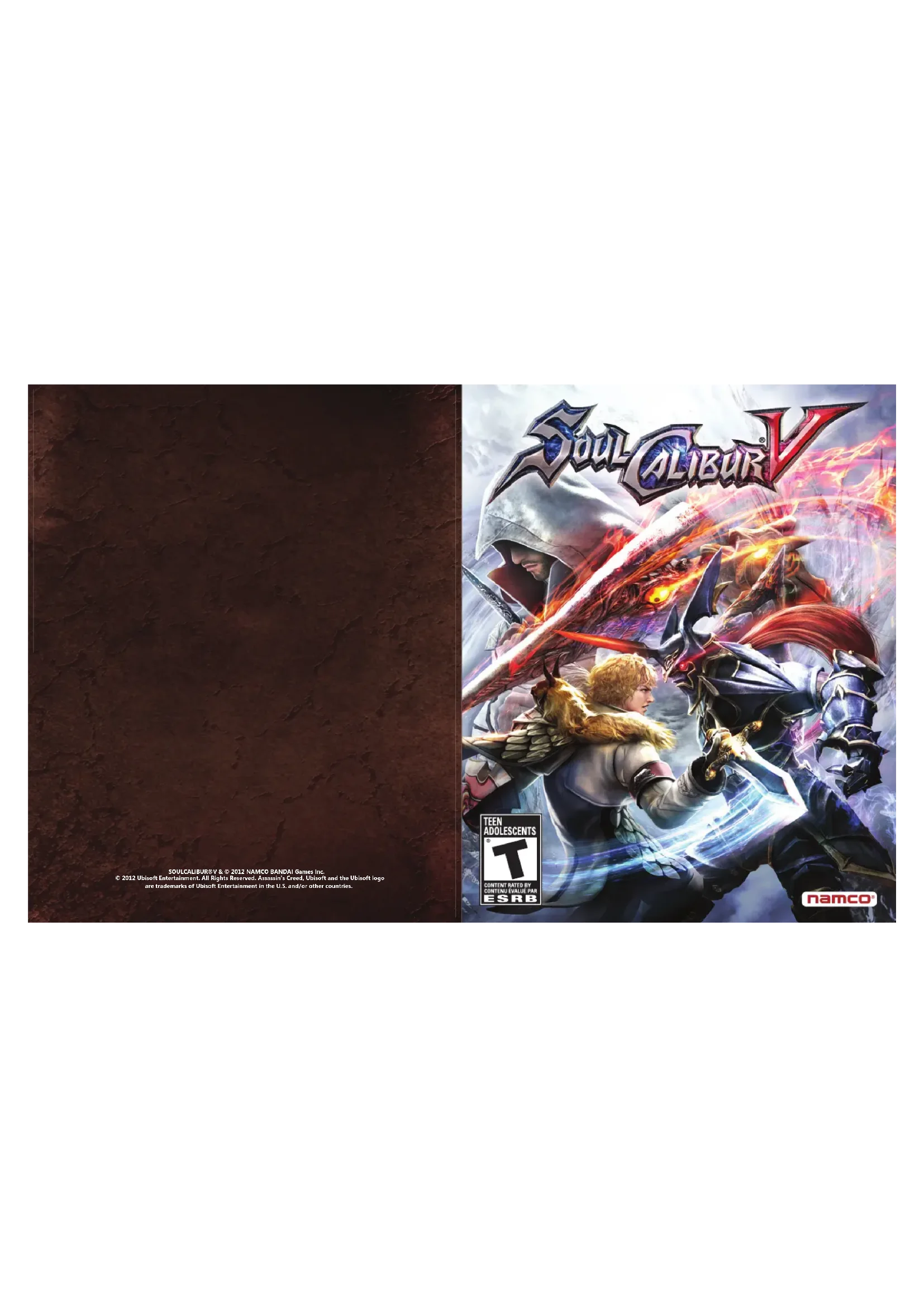

| Product type | Video game |
| Platform | PlayStation 3 |
| Genre | Fighting game |
| Publisher | Namco Bandai Games |
| Developer | Project Soul |
| Release date | 2012 |
| Number of players | 1-2 locally, up to 6 online (rooms), 100 in Global Colosseo |
| Languages | French (manual) |
| Box contents | 1 Blu-ray disc |
| Game modes | Story, Arcade, Quick Battle, Duel, Training, Legendary Souls, PlayStation Network |
| Compatible controllers | DUALSHOCK 3 wireless controller |
| HD video output | Yes (requires HD cables and display) |
| Voice chat | Yes (Bluetooth or USB headset) |
| Trophies | Yes (via PlayStation Network) |
| Save | Automatic, 13 MB free space required |
| Disc care | Clean with a soft dry cloth, from center to edge. Avoid solvents. |
| Safety warnings | Risk of photosensitive epilepsy, use at a distance from screen, take 15 min breaks per hour. |
| Case dimensions | Approximately 13.5 x 19 x 1.5 cm (standard DVD case) |
Frequently Asked Questions - Soul Calibur V (PS3) SONY
User questions about Soul Calibur V (PS3) SONY
0 question about this device. Answer the ones you know or ask your own.
Ask a new question about this device
Download the instructions for your Game in PDF format for free! Find your manual Soul Calibur V (PS3) - SONY and take your electronic device back in hand. On this page are published all the documents necessary for the use of your device. Soul Calibur V (PS3) by SONY.
USER MANUAL Soul Calibur V (PS3) SONY
WARNING: PHOTOSENSITIVITY/EPILEPSY/SEIZURES
A very small percentage of individuals may experience epileptic seizures or blackouts when exposed to certain light patterns or flashing lights. Exposure to certain patterns or backgrounds on a television screen or when playing video games may trigger epileptic seizures or blackouts in these individuals. These conditions may trigger previously undetected epileptic symptoms or seizures in persons who have no history of prior seizures or epilepsy. If you, or anyone in your family, has an epileptic condition or has had seizures of any kind, consult your physician before playing. IMMEDIATELY DISCONTINUE use and consult your physician before resuming gameplay if you or your child experience any of the following health problems or symptoms:
- dizziness - eye or muscle twitches - disorientation - any involuntary movement
- altered vision - loss of awareness - seizures or convulsion.
RESUME GAMEPLAY ONLY ON APPROVAL OF YOUR PHYSICIAN.
Use and handling of video games to reduce the likelihood of a seizure
- Use in a well-lit area and keep as far away as possible from the television screen.
- Avoid large screen televisions. Use the smallest television screen available.
- Avoid prolonged use of the PlayStation 3 system. Take a 15-minute break during each hour of play.
- Avoid playing when you are tired or need sleep.
Stop using the system immediately if you experience any of the following symptoms: lightheadedness, nausea, or a sensation similar to motion sickness; discomfort or pain in the eyes, ears, hands, arms, or any other part of the body. If the condition persists, consult a doctor.
NOTICE:
Use caution when using the DUALSHOCK 3 wireless controller motion sensor function. When using the DUALSHOCK 3 wireless controller motion sensor function, be cautious of the following points. If the controller hits a person or object, this may cause accidental injury or damage. Before using, check that there is plenty of space around you. When using the controller, grip it firmly to make sure it cannot slip out of your hand. If using a controller that is connected to the PS3 TM system with a USB cable, make sure there is enough space for the cable so that the cable will not hit a person or object. Also, take care to avoid pulling the cable out of the PS3 TM system while using the controller.
WARNING TO OWNERS OF PROJECTION TELEVISIONS:
Do not connect your PS3™ system to a projection TV without first consulting the user manual for your projection TV, unless it is of the LCD type. Otherwise, it may permanently damage your TV screen.
HANDLING YOUR PS3™ FORMAT DISC:
- Do not bend it, crush it or submerge it in liquids. • Do not leave it in direct sunlight or near a radiator or other source of heat. • Be sure to take an occasional rest break during extended play. • Keep this disc clean. Always hold the disc by the edges and keep it in its protective case when not in use. Clean the disc with a lint-free, soft, dry cloth, wiping in straight lines from center to outer edge. Never use solvents or abrasive cleaners.
CONTENTS
| Prologue | 01 | PlayStation*Network | 08 |
| Getting Started | 02 | Offline Play | 12 |
| Controls | 04 | Français | 14 |
| Game Screens | 05 | Credits | 28 |
| Actions | 06 | Limited Warranty | 29 |
Attempting to reproduce the techniques used in this game is extremely dangerous and can lead to serious incidents or accidents. Please to not attempt to reproduce these techniques
Prologue
"Chosen by history, a man becomes a warrior. Engraved into history, a warrior becomes a hero." -14th century Troubadour's song
"Transcending history and the world, a tale of souls and swords, eternally retold." \~Late medieval ballad, author unknown.
Soul Edge, the cursed sword which controls the minds of those who wield it and continues to consume the souls of mankind. Soul Calibur, the spirit sword destined to destroy Soul Edge.
The battle between these two swords has raised for thousands of years. At the end of the 16th century, the tension between the two swords grew to its peak and their wielders, Siegfried and Nightmare, were poised for a showdown. After a deadly battle, Siegfried destroyed Soul Edge within a portal to another dimension the cursed sword had opened. A battle which decided the world's fate – a fate which only Siegfried was aware of – had finally ended.
The two opposing swords disappeared, but the world was left with the remnants of Soul Edge's curse. There were many whose souls were poisoned by the sword. They were known as the "malicated" and were hated and persecuted by society.
During these years of chaos, two siblings, a brother and sister, found their fates intertwined with those of the two words. Patriklos, inheritor of the holy warrior heritage of his mother, Sophia, and Pyrrah, who was burdened to follow a harrowing pala just like her mother.
And so our story begins at the dawn of the 17th century, a time when a new chapter in history is about to unfold. A new generation of warriors prepares to face their destinies, while more battle-worn veterans prepare to stand their ground once again. As their battle begins, they will soon find each will have a part to play on the stage of history
NOTICES:
Video output in HD requires cables and an HD-compatible display, both sold separately. Voice chat requires a headset, sold separately. Compatible with most Bluetooth and USB wired headsets. Some limitations apply.
Getting Started
PlayStation®3 system

Starting a game
Before use, carefully read the instructions supplied with the PS3™ system. The documentation contains information on setting up and using your system as well as important safety information.
Check that the MAIN POWER switch (located on the system rear) is turned on. Insert the SOULCALIBUR V disc with the label facing up into the disc slot. Select the icon for the software title under [Game] in the PS3™ system's home menu, and then press the ✗ button. Refer to this manual for information on using the software.

Quitting a game
During gameplay, press and hold down the PS button on the wireless controller for at least 2 seconds. Then select "Quit Game" from the screen that is displayed.
Hint
To remove a disc, touch the eject button after quitting the game.

Trophies: Earn, compare and share trophies that you earn by making specific in-game accomplishments. Trophies access requires a PlayStation®Network account.

Saved data for PS3" format soft ware
Saved data for PS3 "format software is saved on the system's hard disk. The data is displayed under "Saved Game Utility" in the Game menu.
2
Astral Home
In the Astral Home you can select game modes from the menu and view player data. Press the Ⓐ button to display your own License and the START button to revise your License. You can check your Soul Link rivals by pressing the ⏻ button.
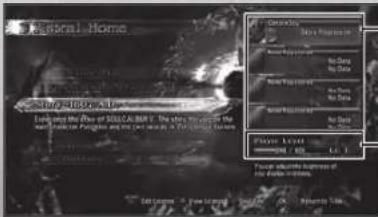
Player Information
Your own information (at the top) and information about your Soul Link rivals is displayed.
Player Level
This shows the player progress level.
Saving Game Data
Game progress will save automatically at the end of each mode or when the 'Options' settings are changed. To create a save game, there must be 13MB or more of available space.

Story-1607 A.D.
Experience the story of SOULCALIBUR V.

PlayStation®Network
Connect to PlayStation®Network to play against and interact with players around the world. You can also view rankings and replays.

Creation
In this mode you can change the weapons or equipment of existing characters and create original characters.

Off line Play
This mode allows offline play against the CPU (computer) or friends. Select the stages and characters to play against other players or practice your skills in Training mode.

Options
Adjust options such as control settings, screen settings, sound volume, etc.
3
Game Controls
DUALSHOCK®3 wireless controller
This is the basic control method (Type A) for manipulating the menu screens and characters. Change control Types or specific controls through 'Control Settings' in the 'Options' menu.
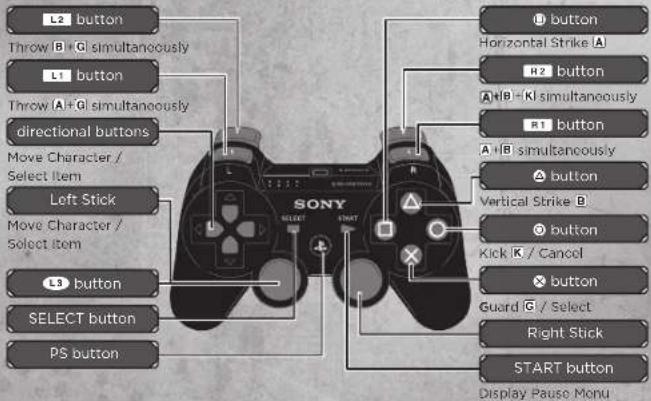
Command Symbols
The directions of the arrows indicate the direction to push the Left Stick or Directional buttons.
| Symbol Input Action | ||
| → | Press left stick / directional button quickly | — |
| → | Hold left stick / directional button | — |
| A | ● button Horizontal Strike | |
| B | ● button Vertical Strike | |
| K | ● button Kick | |
| G | ● button Guard | |
How to Read the Technique Tables
| Symbol Input | |
| A A | Press the buttons in sequence |
| B | Press the buttons simultaneously |
| A | Hold the button down |
| A B | Press the buttons in sequence quickly (slide input) |
| ★ | Return the left stick / directional button to the neutral position* Neutral position is where there is no input |
Game Screens
How to Read the In-match Screen
This section explains how to read the screen using 'VS Battle' as an example.
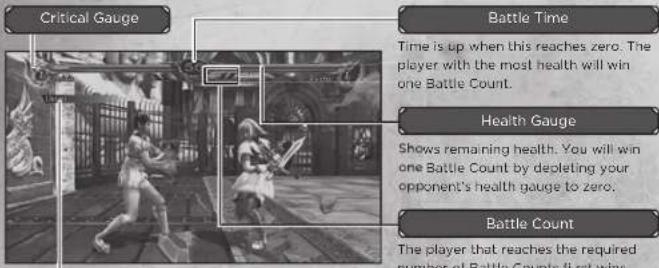
Battle Messages
Displays actions currently being performed such as 'Ukemi' or 'Counter'.

Critical Gauge
The Critical Gauge, located to the side of the Health Gauge, fills up as you strike your opponent or receive damage. Critical Gauge energy can be consumed to perform Brave Edge, Guard Impact, and devastating Critical Edge attacks. You may store a maximum of 2 bars of energy.
Please note: The screen display and rules differ depending on the mode.
Actions
Commands and controls assume the character is facing right. The control type is the default (Type A).
Basic Attacks
The 3 basic attack types are 'Horizontal Strike', 'Vertical Strike' and 'Kick'.

Horizontal Strike
A
Attacks quickly in a horizontal direction. The range is wide and the attack will also hit an opponent who is performing a left or right side step during an 8-Way Run, so it can be used to limit the movement of your opponent.

Vertical Strike
B
Attacks in a vertical direction, e.g., a thrust or upward swing. Generally does not hit an opponent standing to the left or right, but it yields a large amount of damage and can be used to launch or knock down an opponent.
• Some characters are able to strike in diagonal directions and can attack characters standing to the left or right.

Kick
K
Attacks with a kick. Lacks power, but the attack movement is quick, so it can be used to stop an opponent's action and can be followed up with another strike.
Th rows A+G/B+G
Perform a throw by pressing A+G or B+G while near an opponent. Guards are not effective against throws. When about to be thrown by an opponent, press A or B at the right timing to escape the throw. Use A to escape an A+G throw and press B to escape a B+G throw.
8-Way Run
← ↘ ↑ ↗ → ↘ ↓ ↙
Use any of ↔ → to run (8-Way Run) in the selected direction. During the 8-Way Run you can adjust your standing position or distance relative to an opponent. You can also use the 8-Way Run to sidestep to the left or right and avoid an opponent's vertical strike. By continuing to move to the left or right, you can switch position to the opponent's side or back

Step
← ↘ ↑ ↙ ↘ ↘
Use any of ⇔ → to make one step in the selected direction. This is effective for avoiding an opponent's attack while performing the minimum amount of movement.
Jump
G nor or
Jump by holding Ⓖ and pressing any of ↘ ↑ ↗ Jumps can be used to avoid low attacks by an opponent.
Quick Move
X2
Press any of ▼↑▼↓▼ quickly twice in the same direction to move further than a step. You can use Quick Move to transition quickly to an 8-Way Run and perform a powerful technique while avoiding an opponent's attack.
Guard
The 2 types of guard are Standing Guard and Crouching Guard.

Standing Guard
G
Hold G to perform a Standing Guard and defend against an opponent's High or Mid-level Strike.

Crouching Guard
G+or↓or
Press any of ↓ ↓ while holding G to perform a Crouching Guard. While in Crouching Guard, you can defend against a Low-level Attack or evade a High-level Attack, but it will not guard against a Mid-level Attack.
Just Guard
Press and quickly release G
Press and quickly release G at the moment that an opponent attacks to perform a Just Guard. If successfully performed, you can move faster than normal guard and obtain an advantage in the match. Also, you can use Just Guard to defend against Unblockable attacks.
Brave Edge
When the Critical Gauge is filled at least halfway, you can use a 'Brave Edge' technique, which has a yellow aura. The Brave Edge command and effect differs per character. There are powerful effects such as follow-up attacks and guard breaks, so check what is available beforehand using the Technique Tables.
Guard Impact
←A+B+K
When the Critical Gauge is filled at least halfway, a Guard Impact can be performed. Press ← A+B+K at the right moment just before an opponent's attack to repel the attack, regardless of the Attack Attribute of the attack. Guard Impact can not be used to repel Unblockable attacks, Throws or Critical Edge attacks.
Critical Edge
↓→↓→A+B+K
When the Critical Gauge has at least one full bar, you can use a 'Critical Edge', which can inflict a large amount of damage in one attack. All characters' Critical Edges are extremely powerful and can turn the tide of a match by catching an opponent off-guard.
PlayStation®Network
The PlayStation Network Menu Screen
The below menu is displayed when 'PlayStation®Network' is selected from the Astral Home while connected to PlayStation®Network. Select any menu item to proceed to the next screen.
| Ranked Match | Play an on line match, the outcome of which will affect your online ranking. |
| Player Match | Up to 6 players can join a room and enjoy battling or spectating. Match outcomes do not affect online rankings. |
| Global Colossoo | A lobby in which up to 100 players can participate and battle or communicate by text chat. |
| Rankings | View all types of ranking such as 'Arcade' mode clear times and online versus battle rankings. |
| Replay | Watch your own saved replays or downloaded replays. You can also upload your own replays for others to watch. |
8
Press the ▪ button to View Invite messages.
Saving Replays
Your 8 most recent online matches will be automatically saved as replays. The saved replays can be viewed by selecting 'Playback' in the Battle Log.
Online Rankings
Players are separated by ability into 25 ranks. There are 5 major rank categories of A to E and each of those is split into levels 5 (Weak) to 1 (Strong). Changes in rank are dependent on the outcome of Ranked Matches. Your current ranking and rank points obtained can be viewed in your License or Soul Link.
Ranking up and Ranking down
Your rank in 'Ranked Matches' will change based on rank points that are obtained in matches. Collect rank points to achieve a higher Rank level.
| Low Rank(Ranks D, E) |
| High Rank (Ranks A, B, C) |
Rank up / rank down occurs when Rank Points reach certain levels.
Rank up / rank down occurs when Rank Points reach certain levels and depending on match outcomes.
Please note: If your rank is C or higher, the rank of your opponent must also be C or higher in order for the match to qualify as a rank up match.

The Room Screen
In rooms, the top two players on the Player List battle in a knock-out match. Each player should press the button when ready. The match will begin when both players are ready. The losing player is moved to the bottom of the Player List to await their next match. Press the button to exit the lobby.
* Please note: The room will close if the Host exits
Room Screen Options
| Invite Friend | button Send a mail inviting a friend to the current room. | |
| View License | button | Press the 2 to display the License of a selected player. Replays cannot be downloaded from a Room |
| Text Chat | button Type a message for text chat. | |
| Switch Side | button Switch side from 1P to 2P or vice-versa. | |
| Room Information | start button View room information. | |
| Switch Log Display | button Switch your log display. | |
| Kick a Player from the Room | select button (Host only) | Kick the selected player from the room. |

Spectate Other Players' Matches
Players other than those in combat can spectate matches. While spectating, you may chat by text messages or view Licenses. Press the R1 button while spectating to set the spectating window to full screen.
Voice Chat
An PlayStation headset or PlayStation wireless headset may be used to voice chat while in the Lobby Screen or while battling. Using voice chat requires larger amounts of data communication than normal. In cases where the connection speed is insufficient, issues such as communication lag may impact the quality of the game and your gaming experience.
Please see the PlayStation® headset or PlayStation® wireless headset manual for details about how to connect or use these devices.
Global Colosseo
In the Global Colosseo, you can enjoy chatting and battling with many other players. You can create a Lounge (room) to invite like-minded players and test your skills against one another in tournaments. You can enter a Lobby by selecting your Area → Lobby (City Name).
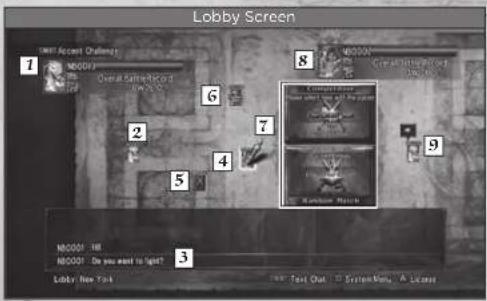
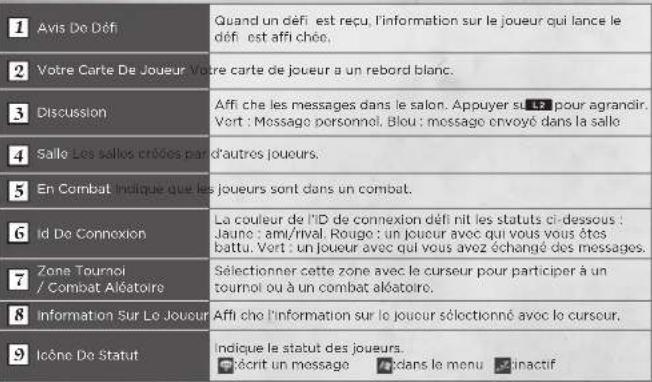
| 1 Challenge Notice | When a challenge is received, the information of the challenging player is displayed. |
| 2 Your Player Card Your Player card has a white frame. | |
| 3 Chat Log | Displays chat messages in the Lobby. Press the L2 button to expand. Green: Personal MessageBlue: Message sent in the Lounge |
| 4 Lounge Lounges (rooms) created by other players. | |
| 5 In-battle indicates that the players are fighting. | |
| 6 Online ID | The color of the Online ID signifies the below statuses.Yellow: Friend / Rival Red: A player you have foughtGreen: A player with whom you have swapped messages |
| 7 Tournament / Random Battle Zone | Select this zone with the cursor to participate in a Tournament or Random Battle. |
| 8 Player Information displays the information on the player selected by the cursor. | |
| 9 status Icon | Indicates the status of the players.Entering a messageA:Menu#adlo |

Chat / Send a Message
Press the L1 button or the keys on a USB keyboard while in a Lobby or Lounge to chat. Try talking to a nearby player. You can also move the cursor to a player card (other than your own) and press the Ⓧ button to select 'Send a Message' to send a message directly.
How to Battle
Move the cursor to the card of another player you wish to battle, press the button and select 'Challenge to a Match'. When the challenged player accepts the match, the match will begin. When you receive a challenge, information about the challenger will appear in the upper-left of the screen. Press R1 button to accept the challenge.
How to Participate in a Tournament / Random Battle
To participate in a tournament, move the cursor to the Tournament Zone in the center of the Lobby and press the ✉ button. Tournaments are held over a set period of time in which each player battles to achieve the highest number of victories. Follow the same process to participate in Random Battles. These will not be reflected in the rankings, but you can join a Random Battle at any time.
How to Create a Lounge and Gather Players
To create a Lounge (room) that you can name freely within the Lobby, move the cursor to your own player card and press the ✅ button. Gather like-minded players and enjoy chatting and versus battles.
Offline Play
Arcade
Battle through all 6 stages in this mode. Set a 'Route' and 'Difficulty,' then select a character to use from the Character Select screen and the match will begin. If 'Route' has been set to 'Ranking,' the clear time will become a ranking criteria.
ROUTES
| Standard This is the basic route. |
| Europe Only characters based in Europa will appear. |
| Asia Only characters based in Asia will appear. |
| Ranking This route is ranked on the online rankings. Diffi culty is set to 'Normal.' |
Quick Battle
In this mode, battle various characters of differing appearance, strength and fighting style. Upon selecting a character to use, you are able to choose from a list of opponents. If you are victorious, a title will be awarded which can be set in your License. You may open a list of search criteria to help choose whom to fight by pressing the button.
VS Battle
Select a character and stage and battle against the CPU, friends, or spectate a CPU vs CPU match. *Two controllers are required to fight against friends.
VS. BATTLE SETTINGS
| Player Shots from Player vs. Player, Player vs. CPU, CPU vs. Player, and CPU vs. CPU. | |
| Battle Count | Set the Battle Count number required to win from 1 to 5. |
| Battle Time | Select a Battle time for 30/45/60 seconds. |
| CPU Strength | Set the CPU strength to Easy, Normal, Hard, or Very Hard. |
Legendary Souls
In this mode, you battle against CPU opponents on high difficulty. You will be ranked on the time taken to complete all 7 stages.
Training
Press the START button in Training mode to set the training options. Set detailed conditions and practice against opponents. You may also set training objectives to display advice text at the bottom of the screen for more effective training.
AVERTISSEMENT: PHOTOSENSIBILITÉ/ÉPILEPSIE/CONVULSIONS
Course A 8 Directions
← ↘ ↑ ↗ → ↘ ↓ ↖
 |
The following table is in English:
A. 2017, H. 19, M. 10
A. 100% Mo. 250000000
Ср. 61 IX
M
Marathon (1980) & SEC
D. 101 A. 215 C. 2018
The image is too blurry to recognize any text content.
The following table is a simple diagram and cannot be accurately represented in the image.
M
E-Cumv-J & Dinkl Sol & Cunhong
SN: 194-5 P (m) = B0.0167 C (m)
(二) 2017年1月1日
Viv. Pecuha, 501
- [REVISION - 2014]
S. M. E. S. O. C. D. H. I. M. K. L.
SCHIN ROONION SALAD MANOZA
R. 2014, 56:35 M. 1998
Director of Procurement Services, CA
NRS-10000000000000000000000000000000000
2.1.1.1.1
C. 100%
- 2018年5月1日
BOLI TO WIN AMERICA INC
RICE TO WAR ANALES, INC.
1.2.1.20 Johnny Park
Of Tewness, Construction New Services
-
-
-
-
-
-
-
-
-
-
-
-
-
-
-
-
-
-
-
-
-
-
-
-
-
-
-
-
-
-
-
-
-
-
-
-
-
-
-
-
-
-
-
-
-
-
-
-
-
-
-
-
-
-
-
-
-
-
-
-
-
-
-
-
-
-
-
-
-
-
-
-
-
-
-
-
-
-
-
-
-
-
-
-
-
-
-
-
-
- 99.
-
-
-
-
-
-
-
-
-
-
-
-
-
-
-
-
-
-
-
-
-
-
-
-
-
-
-
-
-
-
-
-
-
-
-
-
-
-
-
-
-
-
-
-
-
-
-
-
-
-
-
-
-
-
-
-
-
-
-
-
-
-
-
-
-
-
-
-
-
-
-
-
-
-
-
-
-
-
-
-
-
-
-
-
-
-
-
-
[Unreadable]
20
[Unreadable]
M
1.2017 C.M.
A(0,1)
41.51.20
2014年1月8日
4.11.20
2014.12.31
The image is too blurry to recognize any text content.
24.10.01
H. 2017年
- 管理:A和B.
A-1 十二〇年六月
5.10.2019
V
2.11.
2016年5月1日
35000
1.2.3.
1
M
5.10
[Unreadable]
T
Davon Hovat
S. 10
A
(1) 2023年1月1日
S### T###
O. Box "K11" (10)
GKPC O
(3) 2017 YQ-1
Tin Ns
V. M. B.
ENGU SH VOICE OVER RECORDING
ΔR1 = 0.0257 J = 0.06194
NICKEL, ROSE, W
25.4 CL AS/ATL
C. NUTCH LINE
大
24 H R C R
C. 407 RODONSON
5) 400, 340
2013.5.19
-
-
-
- 3.
-
-
A. 10
A. 14289-14
4.10.28
DAVID VICKLE
TEK 2 WILDSO
LIMITED WARRANTY
GARANTIE LIMITEE
Ever get stuck and just need that extra edge to beat the level?Having problems getting your game to work properly?
Now you can get one-on-one help from NAMCO BANDAI Games America Inc. using your web browser!
Simply go to support.namcobandaigames.com for more details.
Live Counselors available from 9am-5pm Monday-Friday Pacific Time
NAMCO BANDAI Games America Inc. ATTN: Customer Support 1740 Technology Drive, Suite 600 San Jose, CA 95110
Before returning any defective materials to us, please contact us for a Return Merchandise Authorization (RMA) number. You can reach us at the address above, via e-mail at support@namcobandaigamcs.com or contact us at (408) 235-2222. Please note that any materials sent to us without an RMA number will be refused and returned. We highly recommend that you use a traceable and / or insured method of shipping the materials to us.
Namco Bandai Games America Inc. Online: www.namcobandaigames.com
Visit our Website to get information about our new titles
LIMITED WARRANTY
NAMCO BANDAI Games America Inc. warrants to the original purchaser that this NAMCO BANDAI Games America Inc. Game Card shall be free from defects in material and workmanship for a period of ninety (90) days from the date of purchase. If a defect covered by this limited warranty occurs during this 90-day limited warranty period, NAMCO BANDAI Games America Inc. will repair or replace the defective Game Card or component part, et its option, free of charge. This limited warranty does not apply if the defects have been caused by negligence, accident, unreasonable use, modification, tempering, or any other cause not related to defective material or workmanship.
LIMITATIONS ON WARRANTY
Any applicable implied warranties of merchantability and fitness for a particular purpose, are hereby limited to ninety (90) days from the date of purchase and are subject to the conditions set forth herein. In no event shall NAMCO BANDAI Games America Inc. be liable for consequential or incidental damages resulting from the possession or use of this product. The provisions of the limited warranty are valid in the United States only. Some states do not allow limitations on how long an implied warranty lasts, or exclusion of consequential or incidental damages, so the above limitation or exclusion may not apply to you. This limited warranty provides you with specific legal rights. You may have other rights which vary from state to state.
DES CONSEILS MAINTENANT OFFERTS EN LIGNE!
To register product online go to


- Warning: photosensitivity/epilepsy/seizures
- Use and handling of video games to reduce the likelihood of a seizure
- Notice
- Warning to owners of projection televisions
- Handling your PS3™ format disc
- Prologue
- Notices
- Getting started
- PlayStation®3 system
- Astral home
- Player information
- Player level
- Saving game data
- Game controls
- DUALSHOCK®3 wireless controller
- Command symbols
- How to read the technique tables
- Game screens
- How to read the in-match screen
- Battle messages
- Critical gauge
- Actions
- Basic attacks
- Th rows a+g/b+g
- 8-Way run
- ← ↘ ↑ ↗ → ↘ ↓ ↙
- Jump
- G nor or
- Quick move
- X2
- Guard
- Just guard
- Press and quickly release g
- Brave edge
- Guard impact
- ←A+b+k
- Critical edge
- ↓→↓→A+b+k
- Playstation®network
- The playstation network menu screen
- Saving replays
- Online rankings
- Ranking up and ranking down
- The room screen
- Spectate other players' matches
- Voice chat
- Global colosseo
- Chat / send a message
- How to battle
- How to participate in a tournament / random battle
- How to create a lounge and gather players
- Offline play
- Arcade
- Quick battle
- Vs battle
- Vs. battle settings
- Legendary souls
- Training
- Avertissement: photosensibilité/épilepsie/convulsions
- Course a 8 directions
- ← ↘ ↑ ↗ → ↘ ↓ ↖
- Des conseils maintenant offerts en ligne
Brand : SONY
Model : Soul Calibur V (PS3)
Category : Game