USER MANUAL GC 8640 PHILIPS
Using your steam generator 9
Filling the water tank 9
Heating up 10
Carry lock (specific types only) 11
Temperature and steam setting 11
Ironing 12
Putting down the iron during ironing 13
ECO mode 14
Ironing tips 14
Auto-off mode (specific types only) 15
Cleaning and maintenance 15
IMPORTANT - DESCALING 15
Dscaling the soleplate of the iron 17
Storage 18
Troubleshooting 20
Important
Read this user manual carefully before you use the appliance and save it for future reference.
Danger
- Never immerse the iron or the steam generator in water.
Warning
- Check if the voltage indicated on the type plate corresponds to the local mains voltage before you connect the appliance.
- Do not use the appliance if the plug, the mains cord, the supply hose or the appliance itself shows visible damage, or if the appliance has been dropped or leaks.
- If the mains cord or the supply hose is damaged, you must have it replaced by Philips, a service centre authorised by Philips or similarly qualified persons in order to avoid a hazard.
-
Never leave the appliance unattended when it is connected to the mains.
-
This appliance can be used by children aged 8 or above and by persons with reduced physical, sensory or mental capabilities or lack of experience and knowledge if they have been given instructions in safe use of the appliance or supervision to establish safe use and if they have been made aware of the hazards involved.
- Do not allow children to play with the appliance.
- Keep the iron and its mains cord out of the reach of children aged 8 or under when the appliance is switched on or cooling down.
- Children are not allowed to clean the appliance and perform the Calc-Clean procedure without supervision.
- Do not let the mains cord and supply hose come into contact with the hot soleplate of the iron.
- If steam or hot water droplets escape from under the EASY DE-CALC knob when the appliance heats up, switch off the appliance and let it cool down for 2 hours. Then reinsert the EASY DE-CALC knob. If steam continues to escape when the appliance heats up, switch off the appliance and contact a service centre authorised by Philips.
- Do not remove the EASY DE-CALC knob from the steam generator when the steam generator is still hot or under pressure.
- Do not use any other cap on the steam generator than the EASY DE-CALC knob that has been supplied with the appliance.
Caution
- Only connect the appliance to an earthed wall socket.
- Always place and use the steam generator on a stable, level and horizontal surface.
- Check the mains cord and the supply hose regularly for possible damage.
- Fully unwind the mains cord before you plug it in the wall socket.
- The iron platform and the soleplate of the iron can become extremely hot and may cause burns if touched. If you want to move the steam generator, do not touch the iron platform.
- Always switch off the appliance and remove the plug from the wall socket when you have finished ironing.
- Put the iron back on the iron platform, switch off the appliance and remove the mains plug from the wall socket:
- a. when you have finished ironing
- b. when you clean the appliance
- b. when you fill or empty the water tank
- c. when you leave the iron, even if it is only for a short while
- Descale the steam generator regularly according to the instructions in chapter 'Cleaning and maintenance'.
- This appliance is intended for indoor household use only.
Electromagnetic fields (EMF)
This Philips appliance complies with all standards regarding electromagnetic fields (EMF). If handled properly and according to the instructions in this user manual, the appliance is safe to use based on scientific evidence available today.
Disposal
- Do not throw away the appliance with the normal household waste at the end of its life, but hand it in at an official collection point for recycling. By doing this, you help to preserve the environment.
- To make recycling possible, the plastic parts used for this appliance have been coded. The cardboard packaging is made of 90 % recycled material and is fully recyclable.
Introduction
Thank you for buying this Philips steam generator.
-
The new Philips PerfectCare offers you an innovative way to iron your garments. We all know the fuss with traditional irons: choosing the right temperature for your tough and delicate fabrics, waiting for the iron to warm up and cool down to avoid the risk of damaging clothes with a too hot iron. Those hassles are things of the past with the new Philips PerfectCare.
-
In principle, wrinkle removal is done by transferring heat to fabric. Historically, this was done with a very hot soleplate. Then steam was added to enhance heat transfer, thus making ironing much faster. Our research confirmed that the best way to remove wrinkles effectively is a perfect combination of intense steam and optimal soleplate temperature. The key to effective wrinkle removal is the steam not the soleplate temperature. The soleplate temperature needs to be just above the steam temperature to remove any moisture. This is the optimal temperature.
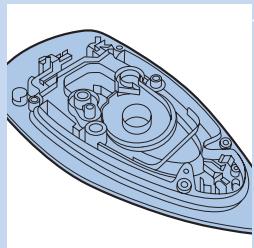
- In the past, high amount of steam at this optimal temperature would have led to water leakage. We developed a unique patented cyclonic chamber to maintain high-pressure steam that penetrates deep into the fabric for fast ironing with no risk of water leakage.
- Ironing is now truly simple - no temperature adjustment, no scorching, no waiting time on heating up and cooling down. It is faster, no matter who does the ironing. With this OptimalTemp technology, every single garment can be ironed effectively and safely.
- This iron has been approved by The Woolmark Company Pty Ltd for the ironing of wool only products provided that the garments are ironed according to the instructions on the garment label and those issued by the manufacturer of this iron. R1101. In United Kingdom, Eire, Hong Kong and India, the Woolmark trademark is a Certification trademark.
Product overview
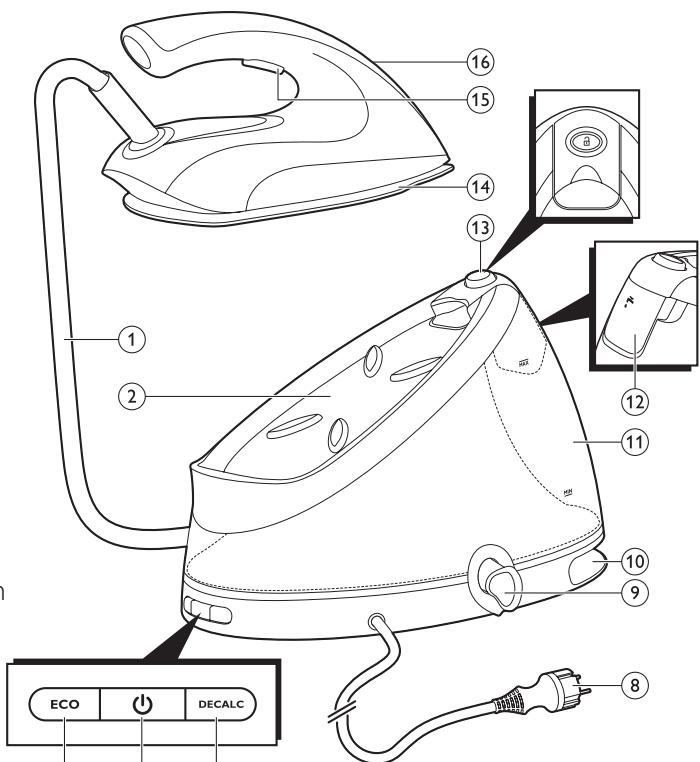
1 Steam supply hose
2 Iron platform
3 ECO button with light
4 On/off button with power-on light
5 EASY DE-CALC light
6 User manual
7 Worldwide guarantee leaflet
8 Mains cord with plug
9 EASY DE-CALC knob
10 Supply hose storage compartment
11 Water tank with water level indication
12 Filling funnel lid
13 Carry lock release button (specific types only)
14 Soleplate
15 Steam trigger/Steam boost
16 'Iron ready' light/
'Water tank empty' light
Before first use
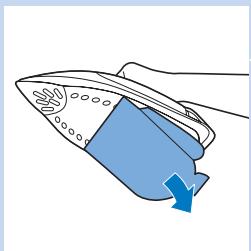
This steam generator is intended for ironing and refreshing fabrics only.
Remove all packaging material and stickers.
Remove the protective cover from the soleplate before you use the steam generator.
Always place the steam generator on a stable and horizontal surface.
Fill the water tank before every use (see chapter 'Using your steam generator', section 'Filling the water tank').
Using your steam generator
Filling the water tank
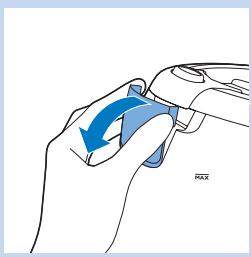
Fill the water tank before every use, when the water level in the water tank drops below the minimum level or when the 'water tank empty' light flashes quickly.
1 Open the filling funnel lid.
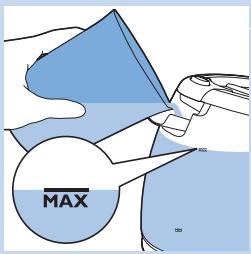
2 Fill the water tank with tap water up to the MAX indication.
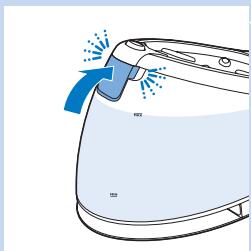
3 Properly close the filling funnel lid ('click').
Do not put hot water, perfume, vinegar, starch, descaling agents, ironing aids or other chemicals in the water tank, as the appliance has not been designed for this.
Note: Do not tilt or shake the steam tank when the water tank is full, otherwise water may escape from under the filling funnel lid.
Note: Do not fill the water tank beyond the MAX indication to avoid spillage. If you have overfilled the water tank, empty it until the water level drops below the MAX indication again.
Tip: Your appliance has been designed to be used with tap water. If you live in an area with very hard water, fast scale build-up may occur. Therefore, it is recommended to mix 50% distilled water and 50% tap water to prolong the lifetime of your appliance. Do not use distilled water only, as it is slightly acidic and may cause damage to your appliance. Do not put perfume, vinegar, starch, descaling agents, ironing aids or other chemicals in the water tank, as your appliance is not designed to work with these chemicals.
Heating up
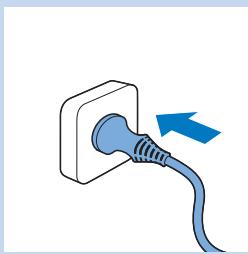
1 Put the plug in an earthed wall socket.
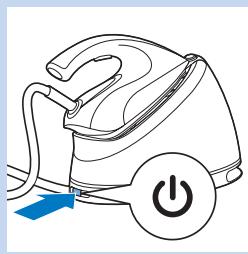
Press the on/off button to switch on the steam generator.
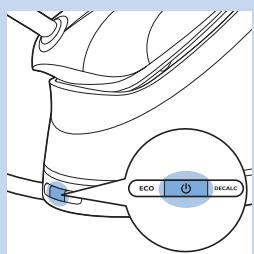
The blue power-on light goes on.
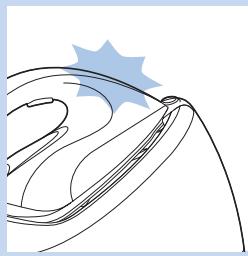
- The 'iron ready' light starts to flash slowly to indicate that the steam generator is heating up.
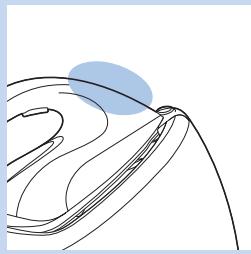
- When the steam generator is ready for use, the 'iron ready' light stops flashing and lights up continuously.
Note:Water is pumped into the boiler inside the steam generator, which causes the steam generator to produce a pumping sound. This is normal.
Carry lock (specific types only)
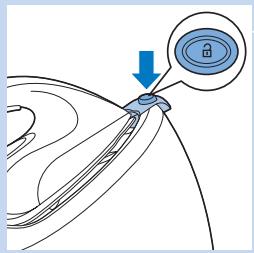
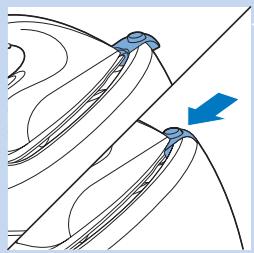
Press the carry lock release button to unlock the iron from the iron platform.
Temperature and steam setting
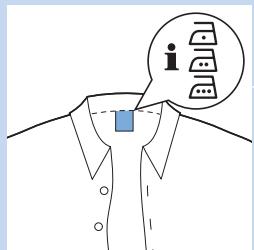
The OptimalTemp technology enables you to iron all types of ironable fabrics, in any order, without adjusting the iron temperature or steam setting.
Fabrics with these symbols are ironable, for example linen, cotton, polyester, silk, wool, viscose, rayon.
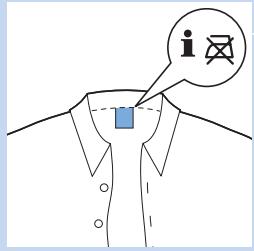
Fabrics with this symbol are not ironable. These fabrics include synthetic fabrics such as Spandex or elastane, Spandex-mixed fabrics and polyolefins (e.g. polypropylene), but also prints on garments.
Ironing
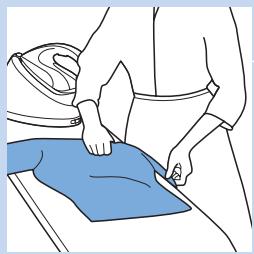
1 Unfold your ironing board and set it to the appropriate height.
Place the garment you want to steam iron on the ironing board.
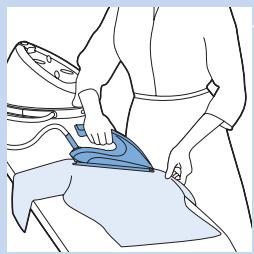
3 You can start ironing when the 'iron ready' light stops flashing and lights up continuously.
There are three ways to iron:
1 Ironing without steam
2 Steam ironing by using the steam trigger (see section 'Steam trigger' below).
3 Steam ironing by using the steam boost function (see section 'Steam boost function' below).
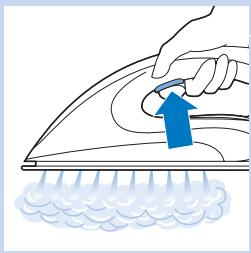
Steam trigger
- Press and hold the steam trigger to start steam ironing.
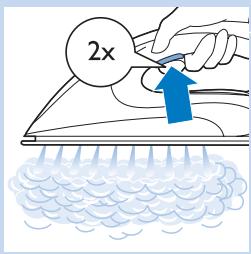
Steam boost function
- Press the steam trigger twice quickly and release it within 1 second to activate the steam boost function. In this mode, the system will deliver a high continuous steam output. This makes it unnecessary for you to press the steam trigger continuously, which improves your ironing experience.
Vertical steam ironing
Steam iron in vertical position to remove wrinkles from hanging clothes
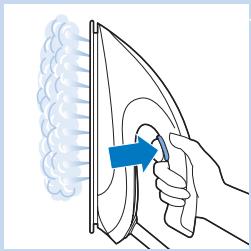
- Hold the iron in vertical position, press the steam trigger and touch the garment lightly with the soleplate.
Tip: Pull the garment with one hand to stretch it for more effective wrinkle removal.
Hot steam is emitted from the iron. Never attempt to remove wrinkles from a garment while someone is wearing it. Do not apply steam near your or someone else's body to prevent burns.
Note: Regularly water is pumped into the boiler inside the steam generator again, which causes the steam generator to produce a pumping sound. This is normal.
Putting down the iron during ironing
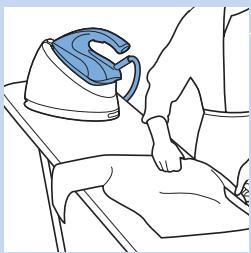
- When you put down the iron during ironing, put it on the iron platform.
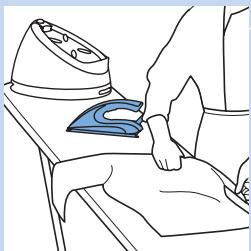
- You can also place the iron with its soleplate on the ironing board. If you put down the iron horizontally, this puts less stress on your wrist. Thanks to the OptimalTemp technology, the hot soleplate does not damage the ironing board.
ECO mode
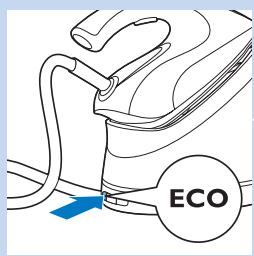
During ironing, you can use the ECO mode to save energy but still have sufficient steam to iron all your garments.
Note: For the best results, we advise you to use the 'OptimalTemp' mode.
Press the ECO button when the appliance is switched on. The light in the ECO button goes on.
2 To go back to the 'OptimalTemp' mode, press the ECO button again.
Ironing tips
Minimising wrinkles while drying
Start wrinkle removal early in the drying process by spreading out your laundry properly after washing and by putting garments on hangers to make them dry naturally with fewer wrinkles.
Best practice shirt ironing
Start with the time-consuming parts like collar, cuff links and sleeves. Next, iron the bigger parts like front and back to prevent wrinkling the bigger parts when you are busy ironing the time-consuming parts.
Collar: When you iron a collar, start on its underside and work from the outside (the pointy end) inwards. Turn over and repeat. Fold down the collar and press the edge for a more crisp finish.
Buttons: Iron on the reverse side of the buttons for more effective and faster ironing.
Auto-off mode (specific types only)
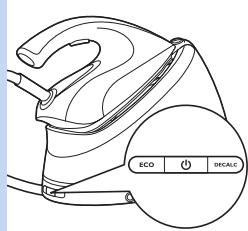
- To save energy, the steam generator switches off automatically when it has not been used for 10 minutes.
- To reactivate the steam generator, press the on/off button. The steam generator starts to heat up again.
Cleaning and maintenance
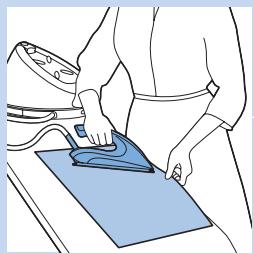
To properly maintain your appliance, clean the iron and the steam generator regularly.
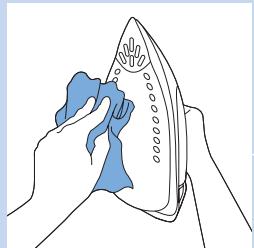
1 Clean the appliance with a moist cloth.
To easily and effectively remove stains, let the soleplate heat up and move the iron over a moist cloth.
Tip: Clean the soleplate regularly to ensure smooth gliding.
IMPORTANT - DESCALING
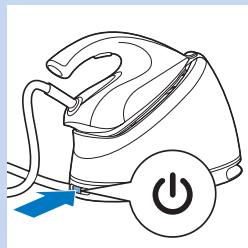
starts to flash.
The EASY DE-CALC light flashes after about a month or 10 ironing sessions to indicate that the steam generator needs to be descaled. Perform the following descaling procedure before you use the steam generator again.
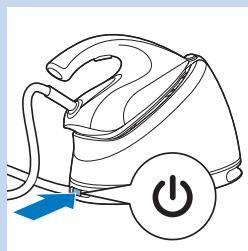
Press the on/off button to switch off the steam generator.
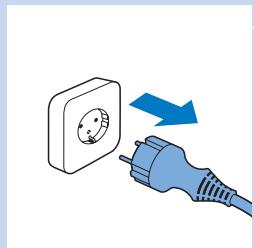
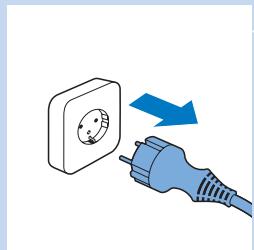
2 Remove the plug from the wall socket.
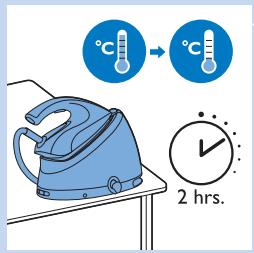
3 Let the steam generator cool down for 2 hours.
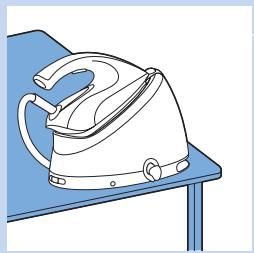
4 Place the steam generator on the edge of the table.
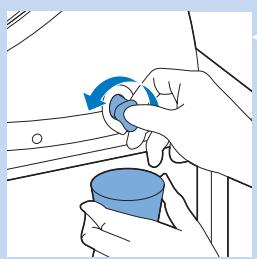
Hold a cup under the EASY DE-CALC knob and turn the knob anti-clockwise.
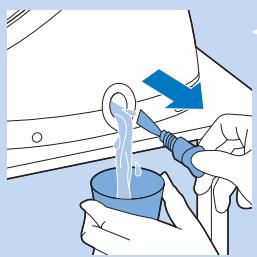
6 Remove the EASY DE-CALC knob and let the water with scale particles flow into the cup.
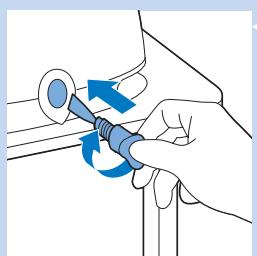
When no more water comes out of the steam generator, reinsert the EASY DE-CALC knob and turn it clockwise to tighten it.
Never remove the EASY DE-CALC knob when the steam generator is hot.
Make sure the EASY DE-CALC knob is properly tightened after descending.
Tip: You can also take the steam generator to a sink and place it in such a way that the EASY DE-CALC knob points towards the sink.
Note: This steam generator is specially designed to easily and effectively remove scale together with the water. It is not necessary to shake or tilt the steam generator.
Dscaling the soleplate of the iron
If you do not descale your steam generator regularly when the EASY DE-CALC light goes ON, scale starts building up inside the supply hose, the iron and the soleplate. This may cause brown spots on your clothes due to scale particles. You can still remove the scale by following the instructions below.
1 Clean the soleplate with a damp cloth.
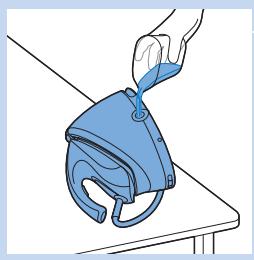
2 Tilt the steam generator and remove the EASY DE-CALC knob. Fill the water tank with 500ml distilled water and tighten the EASY DE-CALC knob.
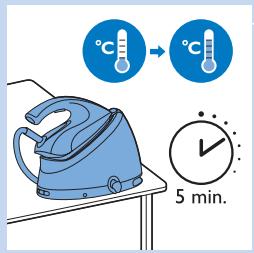
Press the on/off button to switch on the steam generator and wait for 5 minutes.
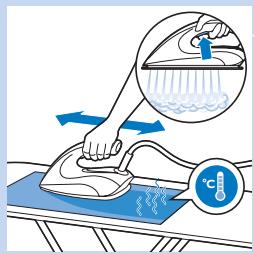
4 Press the steam trigger and keep it pressed while you iron a piece of thick cloth in a back-and-forth motion for 3 minutes.
Warning: Hot, dirty water comes out of the soleplate.
5 You can stop cleaning when no more water comes out of the soleplate or when steam starts coming out of the soleplate.
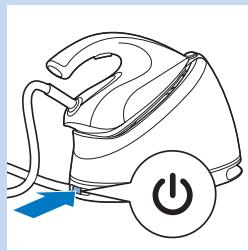
6 Press the on/off button to switch off the steam generator.
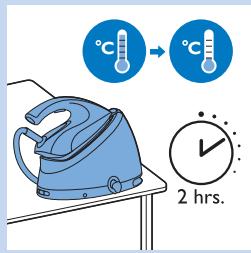
14 Let the steam generator cool down for 2 hours.
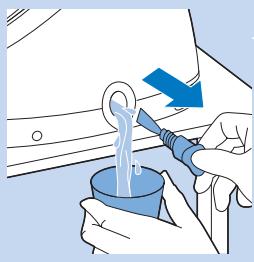
8 Remove the EASY DE-CALC knob and let the water flow into a cup.
Storage
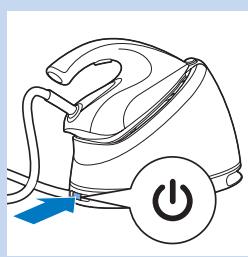
1 Switch off the steam generator.
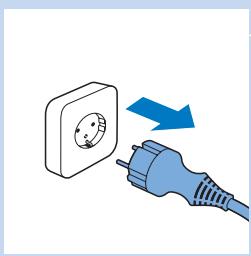
2 Remove the plug from the wall socket.
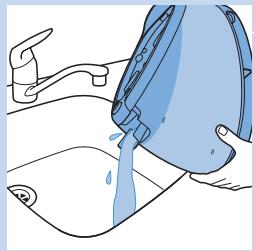
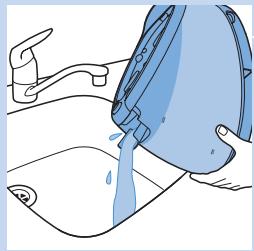
Pour the water out of the water tank into the sink.
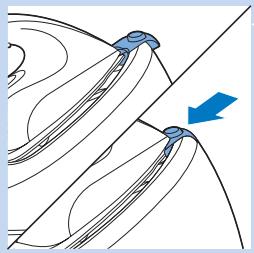
4 Specific types only: Lock the iron onto the iron platform.
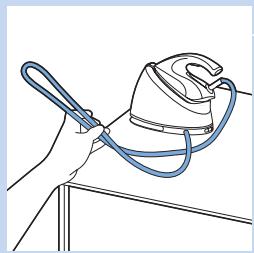
Fold the supply hose.
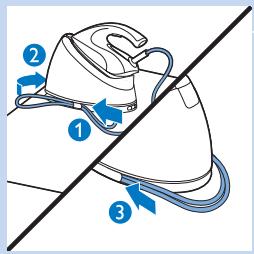
6 Pass the loop of the supply hose behind the storage hook (1) and insert it into the storage compartment (2). Push the rest of the supply hose into the storage compartment (3).
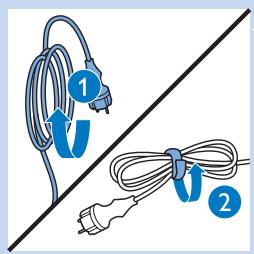
1 Fold the mains cord (1) and fasten it with the Velcro strip (2).
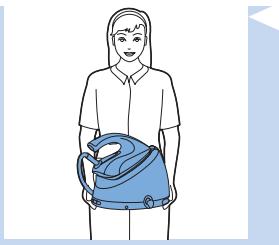
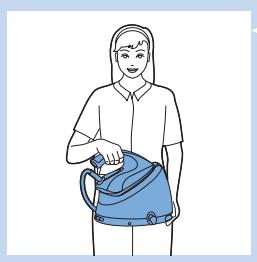
8 Carry the steam generator by holding it with both hands on either side.
9 Specific types only: Carry the steam generator by holding it by the handle of the iron with one hand and supporting the bottom with the other hand.
This only applies to types with carry lock.
Troubleshooting
This chapter summarises the most common problems you could encounter with the appliance. If you are unable to solve the problem with the information below, contact the Consumer Care Centre in your country.
| Problem | Possible cause | Solution |
| Dirty water and impurities come out of the soleplate or the soleplate is dirty. | Impurities or chemicals present in the water have deposited in the steam vents and/or on the soleplate. | Clean the soleplate with a damp cloth (see chapter 'IMPORTANT - DESCAL-ING', section 'Dscaling the soleplate of the iron'). |
| The ironing board cover becomes wet or there are water droplets on the garment during ironing. | This may be caused by steam condensing on the ironing board cover after a long ironing session. | Replace the ironing board cover if the foam material has worn out. You can also add an extra layer of felt material under the ironing board cover to prevent condensation on the ironing board. You can buy felt in a fabric shop. |
| You may have an ironing board cover that is not designed to cope with the high steam rate of the steam generator. | Put an extra layer of felt material under the ironing board cover to prevent condensation on the ironing board. You can buy felt in a fabric shop. |
| Water droplets come out of the soleplate. | The steam that was still present in the hose has cooled down and condensed into water. This causes water droplets to come out of the soleplate. | Point the steam flow away from the garment for a few seconds. |
| Steam and/or water escapes from under the EASY DE-CALC knob. | The EASY DE-CALC knob is not tightened properly. | Switch off the steam generator and wait for 2 hours for it to cool down. Unscrew the EASY DE-CALC knob and screw it back onto the steam generator properly. Note: Some water will escape when you remove the knob. |
| The rubber sealing ring of the EASY DE-CALC knob is worn. | Contact an authorised Philips service centre for a new EASY DE-CALC knob. |
| Too much scale and minerals have accumulated inside the steam generator. | Descale the steam generator regularly (see chapter 'IMPORTANT-DESCAL-ING'). |
| The iron leaves a shine or an imprint on the garment. | The surface to be ironed was uneven, for instance because you were ironing over a seam or a fold in the garment. | Perfect Care is safe on all garments. The shine or imprint is not permanent and will come off if you wash the garment. Avoid ironing over seams or folds or you can place a cotton cloth over the area to be ironed to avoid imprints at seams and folds. |
| The steam generator does not produce any steam. | There is not enough water in the water tank (the 'water tank empty' light flashes quickly). | Fill the water tank (see chapter 'Using your steam generator', section 'Filling the water tank'). |
| The steam generator is not hot enough to produce steam. | Wait until the 'iron ready' light on the iron lights up continuously. |
| You did not press the steam trigger. | Press the steam trigger and keep it pressed while you steam iron. |
| The steam generator is not switched on. | Insert the plug in the wall socket and press the on/off button to switch on the steam generator. |
| The steam generator has switched off. | The auto-off function is activated automatically when the steam generator has not been used for more than 10 minutes. | Press the power on/off button to switch on the steam generator again. |
| The steam generator produces a pumping sound. | Water is pumped into the boiler. This is normal. | If the pumping sound continues non-stop, switch off the steam generator and remove the plug from the wall socket. Contact an authorised Philips service centre. |
Indholdsfortegnelse
Vigtigt 23
Introduktion 26
Produktoversigt 27
VIGTIG - AFKALKNING 34
Sigma aata aTnOKeuong
1 AteevepyotoiOTe Tn Yevntpia atou.
AIOOuvEoTe oIc aI O TnV TpiCi.
3 Adefiote To vepo TnS degaevn6 OTo vepoxutn.