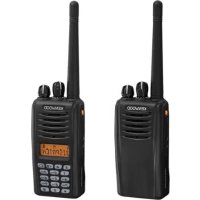
NX220 - Talkie Walkie KENWOOD - Free user manual and instructions
Find the device manual for free NX220 KENWOOD in PDF.



| Product Type | Two-way portable radio NX220, compatible with NXDN digital and analog |
| Dimensions (approx.) | 130 x 60 x 40 mm (without antenna or battery) |
| Weight (approx.) | 300 g with standard battery |
| Power Supply | Rechargeable Li-ion battery pack (optional) or 6 AA alkaline batteries (LR6) |
| Battery Life | Varies by usage; built-in battery saver to extend duration |
| Frequencies | VHF (professional band, depending on version) |
| Transmit Power | High and low (adjustable via programmable key) |
| Operating Modes | Analog conventional, NXDN conventional and trunking, analog trunking |
| Display | Type I: display + full keypad; Type II: display + 4 keys; Type III: no display |
| Main Functions | Transmission/reception, scanning (priority, reverse), group and individual calls, FleetSync (Selcall, status messages and short data), DTMF, VOX, scrambler, emergency, talk-around |
| Programming | Programmable keys by dealer (up to 50+ functions) |
| Signaling | QT/DQT, RAN (digital), optional signaling (2-tone, DTMF, FleetSync, NXDN ID) |
| Security Functions | Emergency call, activity detection, password, remote kill code |
| Maintenance | Clean with a dry cloth; do not immerse; have repairs done by a qualified technician |
| Usage Safety | Do not use in explosive atmospheres; avoid metal contact with terminals; follow battery warnings |
| Spare Parts and Accessories | Antenna, belt clip, connector cap, speaker microphone, headset, rechargeable battery, charger |
| Repairability | Designed to be repaired only by authorized KENWOOD centers |
| Warranty | Consult your dealer or the provided documentation |
| Standards | Complies with local regulations (license required) |
| Box Contents | Transceiver, antenna (NX-420 only), belt clip, connector cap, locking clip, stopper (depending on type), instruction manual |
Frequently Asked Questions - NX220 KENWOOD
User questions about NX220 KENWOOD
0 question about this device. Answer the ones you know or ask your own.
Ask a new question about this device
Download the instructions for your Talkie Walkie in PDF format for free! Find your manual NX220 - KENWOOD and take your electronic device back in hand. On this page are published all the documents necessary for the use of your device. NX220 by KENWOOD.
USER MANUAL NX220 KENWOOD
The AMBE+2™ voice coding Technology embodied in this product is protected by intellectual property rights including patent rights, copyrights and trade secrets of Digital Voice Systems, Inc. This voice coding Technology is licensed solely for use within this Communications Equipment. The user of this Technology is explicitly prohibited from attempting to extract, remove, decompile, reverse engineer, or disassemble the Object Code, or in any other way convert the Object Code into a human-readable form. U.S. Patent Nos. #6,199,037, #6,912,495, #8,200,497, #7,970,606, and #8,359,197.
THANK YOU
We are grateful you have chosen KENWOOD for your land mobile radio applications.
This instruction manual covers only the basic operations of your NEXEDGE portable radio. Ask your dealer for information on any customized features they may have added to your radio.
NOTICES TO THE USER
Government law prohibits the operation of unlicensed radio transmitters within the territories under government control.
Illegal operation is punishable by fine and/or imprisonment.
Refer service to quali ed technicians only.
Safety: It is important that the operator is aware of, and understands, hazards common to the operation of any transceiver.

ATTENTION:
The RBRC Recycle seal found on KENWOOD lithium-ion (Li-ion) battery packs indicates KENWOOD's voluntary participation in an industry program to collect and recycle Li-ion batteries after their operating life has expired. The RBRC program is an alternative to disposing Li-ion batteries with your regular refuse or in municipal waste streams, which is illegal in some areas.
For information on Li-ion battery recycling in your area, call (toll free) 1-800-8-BATTERY (1-800-822-8837).
KENWOOD's involvement in this program is part of our commitment to preserve our environment and conserve our natural resources.

ATTENTION:
The RBRC Recycle seal found on KENWOOD nickel metal hydride (Ni-MH) battery packs indicates KENWOOD's voluntary participation in an industry program to collect and recycle Ni-MH batteries after their operating life has expired. The RBRC program is an alternative to disposing Ni-MH batteries with your regular refuse or in municipal waste streams, which is illegal in some areas.
For information on Ni-MH battery recycling in your area, call (toll free) 1-800-8-BATTERY (1-800-822-8837).
KENWOOD's involvement in this program is part of our commitment to preserve our environment and conserve our natural resources.
TERMINAL DESCRIPTIONS
Speaker/ Microphone Jacks
You can use a resin-based cover for the Speaker/ Microphone jacks.
| No. | Name Description | Impedance | I/O | |
| 1 | PTT/RXD PTT input / Serial data input 10 k | Ω | I | |
| 2 | MIC MIC input 1.8 k | Ω | I | |
| 3 | MIC Output from internal MIC | - | O | |
| 4 | OPTDET Option Detect 74 k | Ω | I | |
| 5 | 50V 5V output | - | O | |
| 6 | AE Audio Earth GND | - | ||
| 7 | TXD Serial data output 6.8 k | Ω | O | |
| 8 | SPI To internal SP | 8 Ω (Load) | I | |
| 9 | SP0 AF power output | - | O |
Antenna Terminal
50 Ω impedance
One or more of the following statements may be applicable:
FCC WARNING
This equipment generates or uses radio frequency energy. Changes or modifi cations to this equipment may cause harmful interference unless the modifi cations are expressly approved in the instruction manual. The user could lose the authority to operate this equipment if an unauthorized change or modifi cation is made.
INFORMATION TO THE DIGITAL DEVICE USER REQUIRED BY THE FCC
This equipment has been tested and found to comply with the limits for a Class B digital device, pursuant to Part 15 of the FCC Rules. These limits are designed to provide reasonable protection against harmful interference in a residential installation.
This equipment generates, uses and can generate radio frequency energy and, if not installed and used in accordance with the instructions, may cause harmful interference to radio communications. However, there is no guarantee that the interference will not occur in a particular installation. If this equipment does cause harmful interference to radio or television reception, which can be determined by turning the equipment off and on, the user is encouraged to try to correct the interference by one or more of the following measures:
- Reorient or relocate the receiving antenna.
- Increase the separation between the equipment and receiver.
- Connect the equipment to an outlet on a circuit different from that to which the receiver is connected.
- Consult the dealer for technical assistance.
PRECAUTIONS
- Do not charge the transceiver and battery pack when they are wet.
- Ensure that there are no metallic items located between the transceiver and the battery pack.
- Do not use options not specified by KENWOOD.
- If the die-cast chassis or other transceiver part is damaged, do not touch the damaged parts.
- If a headset or headphone is connected to the transceiver, reduce the transceiver volume. Pay attention to the volume level when turning the squelch off.
- Do not place the microphone cable around your neck while near machinery that may catch the cable.
- Do not place the transceiver on unstable surfaces.
- Ensure that the end of the antenna does not touch your eyes.
- When the transceiver is used for transmission for many hours, the radiator and chassis will become hot. Do not touch these locations when replacing the battery pack.
- Always switch the transceiver power off before installing optional accessories.
- The charger is the device that disconnects the unit from the AC mains line. The AC plug should be readily accessible.

WARNING
Turn the transceiver power off in the following locations:
- In explosive atmospheres (infl ammable gas, dust particles, metallic powders, grain powders, etc.).
- While taking on fuel or while parked at gasoline service stations.
Near explosives or blasting sites. - In aircrafts. (Any use of the transceiver must follow the instructions and regulations provided by the airline crew.)
- Where restrictions or warnings are posted regarding the use of radio devices, including but not limited to medical facilities.
Near persons using pacemakers.
CAUTION
- Do not disassemble or modify the transceiver for any reason.
- Do not place the transceiver on or near airbag equipment while the vehicle is running. When the airbag inflates, the transceiver may be ejected and strike the driver or passengers.
- Do not transmit while touching the antenna terminal or if any metallic parts are exposed from the antenna covering. Transmitting at such a time may result in a high-frequency burn.
- If an abnormal odor or smoke is detected coming from the transceiver, switch the transceiver power off immediately, remove the battery pack from the transceiver, and contact your KENWOOD dealer.
- Use of the transceiver while you are driving may be against traffic laws. Please check and observe the vehicle regulations in your area.
- Do not expose the transceiver to extremely hot or cold conditions.
- Do not carry the battery pack with metal objects, as they may short the battery terminals.
- Danger of explosion if the battery is incorrectly replaced; replace only with the same type.
- When operating the transceiver in areas where the air is dry, it is easy to build up an electric charge (static electricity). When using an earphone accessory in such conditions, it is possible for the transceiver to send an electric shock through the earphone and to your ear. We recommend you use only a speaker/microphone in these conditions, to avoid electric shocks.
- When attaching a commercial strap to the transceiver, ensure that the strap is durable. In addition, do not swing the transceiver around by the strap; you may inadvertently strike and injure another person with the transceiver.
Information concerning the battery pack:
The battery pack includes fl ammable objects such as organic solvent. Mishandling may cause the battery to rupture producing fl ames or extreme heat, deteriorate, or cause other forms of damage to the battery. Please observe the following prohibitive matters.

DANGER
- Do not disassemble or reconstruct battery!
The battery pack has a safety function and protection circuit to avoid danger. If they suffer serious damage, the battery may generate heat or smoke, rupture, or burst into fl ame.
- Do not short-circuit the battery!
Do not join the + and - terminals using any form of metal (such as a paper clip or wire). Do not carry or store the battery pack in containers holding metal objects (such as wires, chain-Necklace or hairpins). If the battery pack is short-circuited, excessive current will flow and the battery may generate heat or smoke, rupture, or burst into fl ame. It will also cause metal objects to heat up.
- Do not incinerate or apply heat to the battery!
If the insulator is melted, the gas release vent or safety function is damaged, or the electrolyte is ignited, the battery may generate heat or smoke, rupture, or burst into fl ame.
- Do not leave the battery near fi res, stoves, or other heat generators (areas reaching over 80^/176^!
If the polymer separator is melted due to high temperature, an internal short-circuit may occur in the individual cells and the battery may generate heat or smoke, rupture, or burst into flame.
- Avoid immersing the battery in water or getting it wet by other means!
If the battery becomes wet, wipe it off with a dry towel before use. If the battery's protection circuit is damaged, the battery may charge at extreme current (or voltage) and an abnormal chemical reaction may occur. The battery may generate heat or smoke, rupture, or burst into fl ame.
DANGER
- Do not charge the battery near fi res or under direct sunlight!
If the battery's protection circuit is damaged, the battery may charge at extreme current (or voltage) and an abnormal chemical reaction may occur. The battery may generate heat or smoke, rupture, or burst into flame.
- Use only the specified charger and observe charging requirements!
If the battery is charged in unspecified conditions (under high temperature over the regulated value, excessive high voltage or current over regulated value, or with a remodelled charger), it may overcharge or an abnormal chemical reaction may occur. The battery may generate heat or smoke, rupture, or burst into flame.
- Do not pierce the battery with any object, strike it with an instrument, or step on it!
This may break or deform the battery, causing a short-circuit. The battery may generate heat or smoke, rupture, or burst into flame.
- Do not jar or throw the battery!
An impact may cause the battery to leak, generate heat or smoke, rupture, and/or burst into flame. If the battery's protection circuit is damaged, the battery may charge at an abnormal current (or voltage), and an abnormal chemical reaction may occur.
- Do not use the battery pack if it is damaged in any way!
The battery may generate heat or smoke, rupture, or burst into flame.
- Do not solder directly onto the battery!
If the insulator is melted or the gas release vent or safety function is damaged, the battery may generate heat or smoke, rupture, or burst into fl ame.
- Do not reverse the battery polarity (and terminals)!
When charging a reversed battery, an abnormal chemical reaction may occur. In some cases, an unexpected large amount of current may flow upon discharging. The battery may generate heat or smoke, rupture, or burst into fl ame.
DANGER
- Do not reverse-charge or reverse-connect the battery!
The battery pack has positive and negative poles. If the battery pack does not smoothly connect with a charger or operating equipment, do not force it; check the polarity of the battery. If the battery pack is reverse-connected to the charger, it will be reverse-charged and an abnormal chemical reaction may occur. The battery may generate heat or smoke, rupture, or burst into flame.
- Do not touch a ruptured and leaking battery!
If the electrolyte liquid from the battery gets into your eyes, wash your eyes out with fresh water as soon as possible, without rubbing your eyes. Go to the hospital immediately. If left untreated, it may cause eye-problems.
WARNING
- Do not charge the battery for longer than the specific ed time!
If the battery pack has not fi nished charging even after the regulated time has passed, stop it. The battery may generate heat or smoke, rupture, or burst into fl ame.
- Do not place the battery pack into a microwave or high pressure container!
The battery may generate heat or smoke, rupture, or burst into flame.
- Keep ruptured and leaking battery packs away from fire!
If the battery pack is leaking (or the battery emits a bad odor), immediately remove it from fl ammable areas. Electrolyte leaking from battery can easily catch on fi re and may cause the battery to generate smoke or burst into fl ame.
- Do not use an abnormal battery!
If the battery pack emits a bad odor, appears to have different coloring, is deformed, or seems abnormal for any other reason, remove it from the charger or operating equipment and do not use it. The battery may generate heat or smoke, rupture, or burst into fl ame.
CONTENTS
UNPACKING AND CHECKING EQUIPMENT 1
PREPARATION 2
ORIENTATION 6
PROGRAMMABLE AUXILIARY FUNCTIONS 10
BASIC OPERATIONS 12
SCAN 15
FleetSync: ALPHANUMERIC 2-WAY PAGING FUNCTION .....17
TRUNKING CALLS (ANALOG) 20
UNPACKING AND CHECKING EQUIPMENT
Note: These unpacking instructions are for use by your KENWOOD dealer, an authorized KENWOOD service facility, or the factory.
Carefully unpack the transceiver. If any items are missing or damaged, fi le a claim with the carrier immediately.
SUPPLIED ACCESSORIES
Antenna (NX-420 only) 1
Belt clip 1
Speaker/ microphone jacks cap. 1
Speaker/ microphone locking bracket 1
Stopper (types I and II only) 1
Instruction manual 1
Note: Inquire at your dealer for a stopper.
PREPARATION
INSTALLING/ REMOVING THE (OPTIONAL) BATTERY PACK
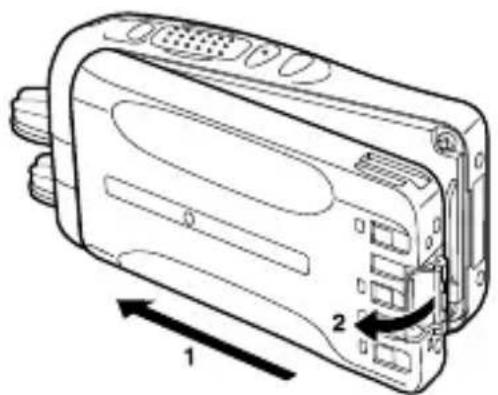
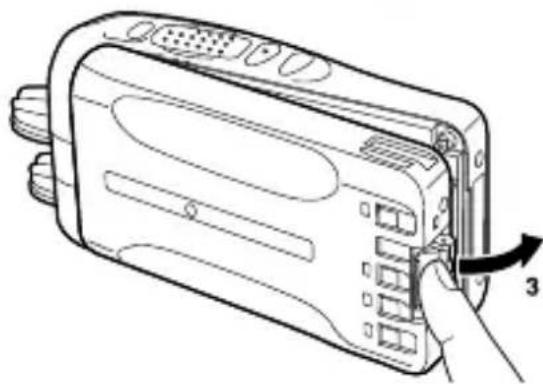
1 Match the guides of the battery pack with the grooves on the upper rear of the transceiver, then firmly press the battery pack in place.
2 Lock the safety catch to prevent accidentally releasing the battery pack.
3 To remove the battery pack, lift the safety catch, press the release latch, then pull the battery pack away from the transceiver.
Note:
For battery pack charging procedures and useag, refer to the battery charger Instruction Manual.
The battery pack is not charged at the factory; charge it before use.
Before charging a battery pack that is attached to the transceiver, ensure that the safety catch is firmly closed.
INSTALLING/ REMOVING ALKALINE BATTERIES (OPTIONAL BATTERY CASE)

WARNING
Do not install batteries in a hazardous environment where sparks could cause an explosion.
Never discard batteries in fire; extremely high temperatures can cause batteries to explode.
Do not short circuit the battery case terminals.
Do not use rechargeable batteries.
Note:
If you do not plan to use the transceiver for a long period, remove the batteries from the battery case.
This battery case has been designed for transmitting at a power of approximately 1 W (the low power setting on your transceiver). If you want to transmit a stronger signal (using the high power setting on your transceiver), use an optional rechargeable battery pack.
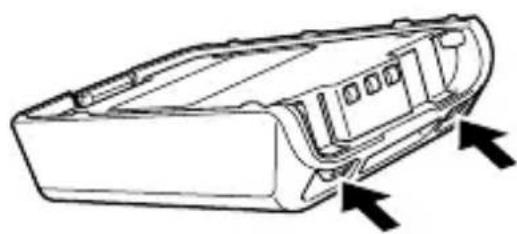
1 To open the battery case, press on the two tabs on the upper rear of the case, then pull the two halves apart.
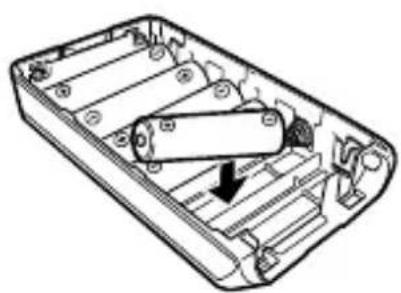
2 Insert 6 AA (LR6) Alkaline batteries into the battery case.
- Be sure to match the polarities with those marked in the bottom of the battery case.
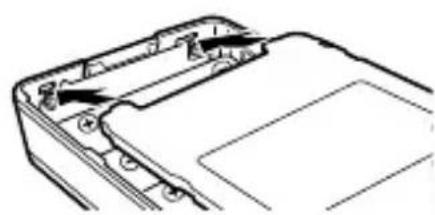
3 Align the tabs of the cover with the base, then push down on the cover until it locks in place.
INSTALLING THE ANTENNA
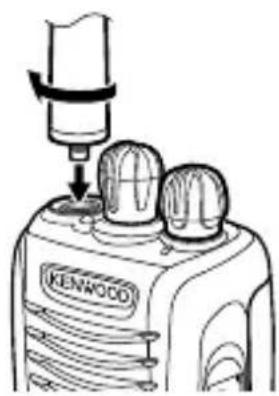
Screw the antenna into the connector on the top of the transceiver by holding the antenna at its base and turning it clockwise until secure.
INSTALLING THE BELT CLIP
Note: When first installing the belt clip, you must remove the battery pack from the rear of the transceiver.
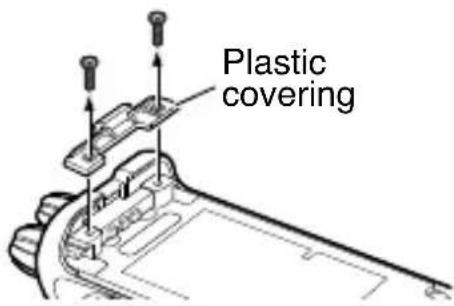
1 Remove the 2 screws from the rear of the transceiver, then remove the small, plastic black covering that was held in place.
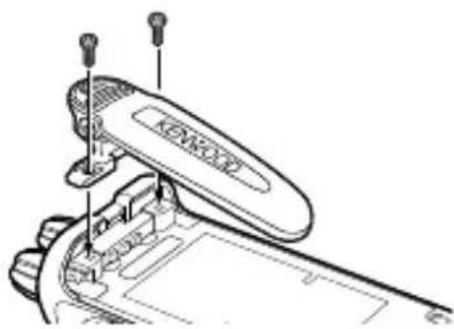
2 Insert the belt clip mount into the space on the rear of the transceiver.
3 Using the 2 screws, affix the belt clip in place.
CAUTION
- When the belt clip is not installed, leave the plastic covering in place.
- Do not use glue which is designed to prevent screw loosening when installing the belt clip, as it may cause damage to the transceiver. Acrylic ester, which is contained in these glues, may crack the transceiver's back panel.
Install the cap over the speaker/ microphone jacks when not using an optional speaker/ microphone.
Note: To keep the transceiver water resistant, you must cover the speaker/ microphone jacks with the supplied cap.
1 Place the cap over the jacks so that the locking tabs insert into the transceiver grooves.
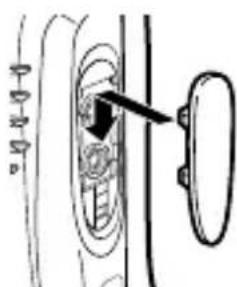
2 While holding the cap in place, push it towards the bottom of the transceiver until the tabs on the cap click into place.
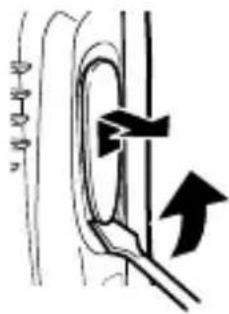
- To remove the cap, hold the top of the cap in place with your finger while inserting a 3 mm or smaller fl at blade screwdriver under the bottom of the cap. Slowly slide the screwdriver in until its tip touches the tab inside the cap, then gently pry the cap up (handle of screwdriver moving away from the transceiver) to remove the cap.
INSTALLING THE (OPTIONAL) SPEAKER/MICROPHONE
Note: The transceiver is not fully water resistant when using a speaker/ microphone or headset.
1 Insert the speaker/ microphone plugs into the speaker/ microphone jacks of the transceiver.
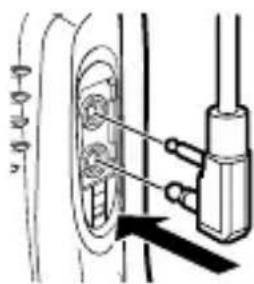
2 Place the locking bracket over the speaker/ microphone plugs so that the locking tabs insert into the transceiver grooves.
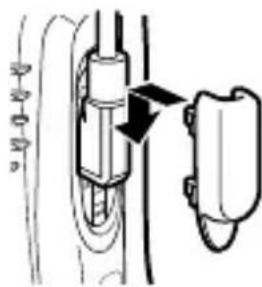
3 While holding the locking bracket in place, push it towards the bottom of the transceiver until the tabs on the bracket click into place.
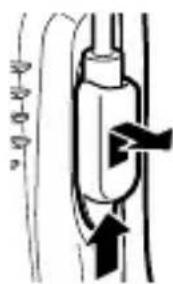
- To remove the locking bracket, push the bracket up from the base.
ORIENTATION
There are 3 types of transceivers available:
Type I: Equipped with a display and full keypad.
Type II
Type III: Basic model.
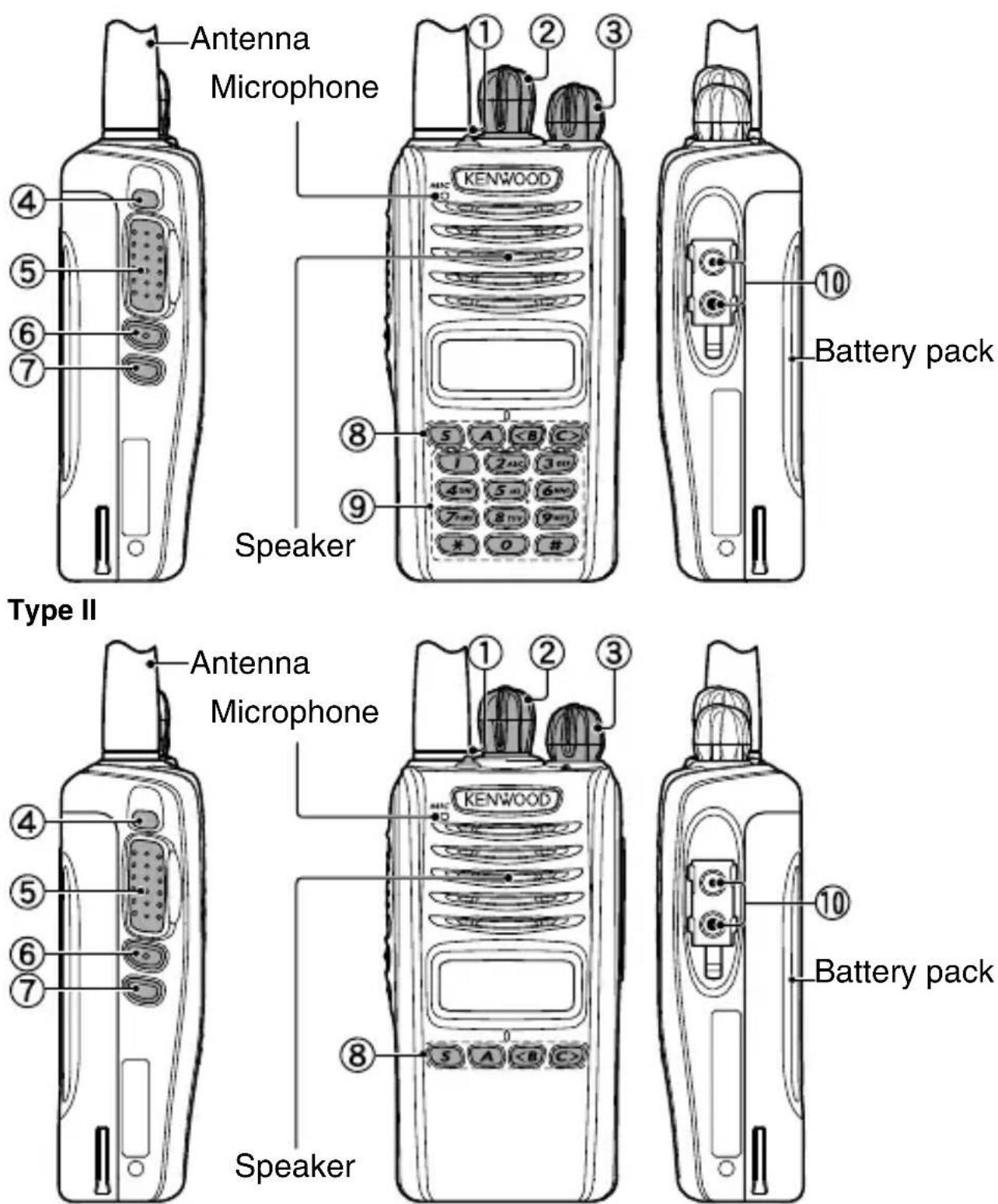
Type I
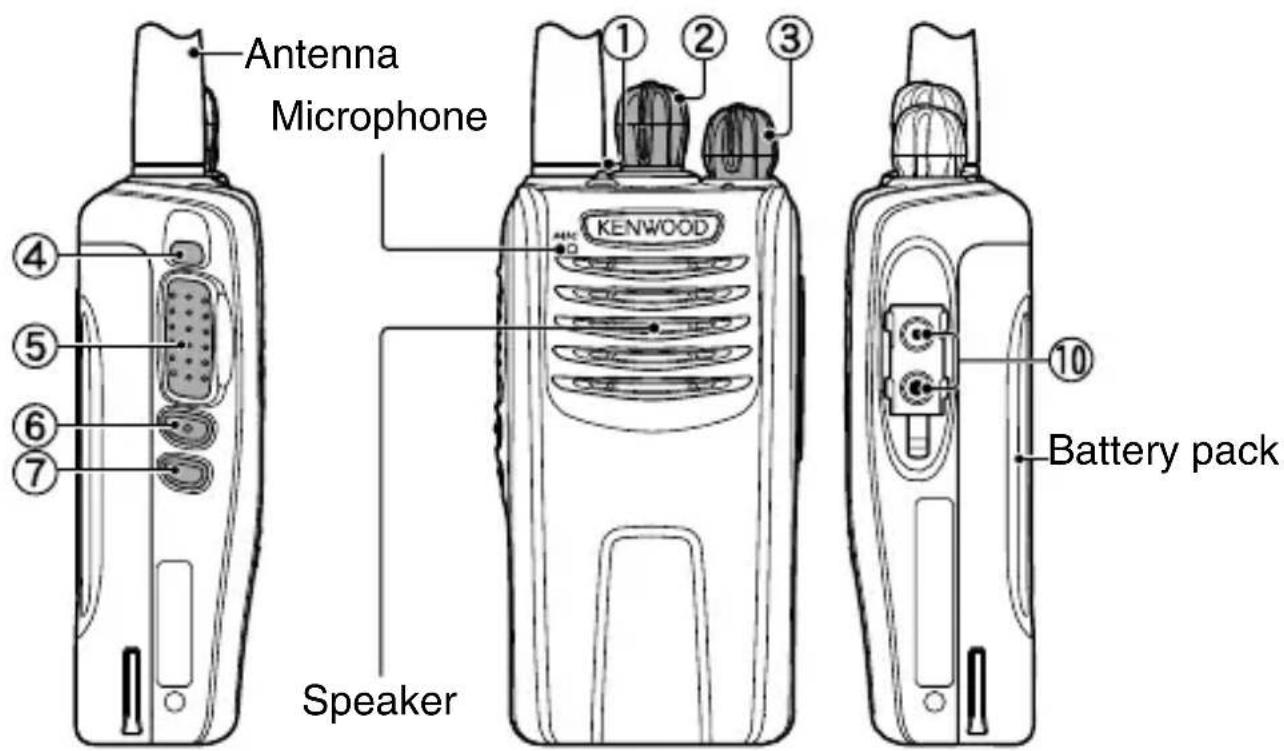
Type III
① Transmit/Receive/Battery low indicator
If enabled by your dealer, lights red while transmitting, green while receiving a call (Conventional channels only), and orange when receiving an optional signaling call. Blinks red when the battery power is low while transmitting.
② Selector knob
Rotate to select a zone or channel/group ID (default).
③ Power switch/ Volume control
Rotate to turn the transceiver ON/OFF and to adjust the volume.
④ Auxiliary (orange) key
Press to activate its programmable function {page 10}.
(5) PTT (Push-To-Talk) switch
Press and hold this switch, then speak into the microphone to call a station.
(6) Side 1 key
Press to activate its programmable function {page 10}. The default is [Squelch Off Momentary].
⑦ Side 2 key
Press to activate its programmable function {page 10}.
Types I and II: The default setting is [Backlight].
Type III: The default setting is [None] (no function).
S, A, keys (Types I and II only)
Press to activate their programmable functions {page 10}.
S key: The default setting is [None] (no function).
A key: The default setting is [None] (no function).
< B key: The default setting is [Zone Down].
C> key: The default setting is [Zone Up].
(9) Keypad (Type I only)
Press these keys to send DTMF tones. These keys can also be programmed with secondary functions {page 10} if a programmable function key is programmed as [Function].
10 Speaker/ Microphone jacks
Insert the Speaker/ Microphone or Headset plug into this jack {page 5}.
DISPLAY (TYPES I AND II ONLY)
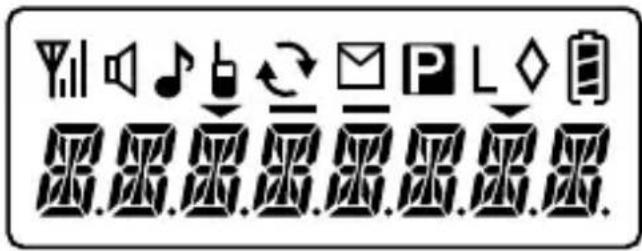
| Indicator Description | |
| Yill | Signal strength indicator {page 28}. |
| Monitor or Squelch Off is activated. | |
| Blinks when an incoming call matches your Optional Signaling. | |
| Talk Around is activated. | |
| Scan is in progress. Blinks while scan is paused. | |
| A message is stored in memory. Blinks when a new message has arrived. | |
| The current channel is a Priority channel. | |
| L | The channel is using low transmit power. |
| ◇ | Scrambler/ Encryption is activated. |
| B | Battery power indicator {page 27}. |
| The current zone (left icon) or CH/GID (right icon) is added to scan. | |
| VOX is activated. | |
| Not used. | |
The Selector, Auxiliary (orange), Side 1, Side 2, S, A,
None
2-tone 1, 10, 13
Activity Detection
Activity Reset
Autodial
Autodial Programming
- Auto Telephone
- Backlight
Battery Indicator
- Broadcast ^4
Call 1\~6
- CH/GID Down
- CH/GID Recall
CH/GID Select
CH/GID Up
- Channel Entity
CW Message
- Direct CH/GID 1 ~ 5
- Direct CH/GID Select 1 ~ 5
Display Format
Emergency
Fixed Volume
- Forced Search
Function
GPS Position Display
- Group ID/Channel Entry
Group 1,6
- Group + Short Message 1,8
Group + Status 1,8
Home CH/GID
Home CH/GID Select
Individual 1,8
- Individual + Short Message 1,8
- Individual + Status 1,8
Key Lock
Lone Worker
- Low Transmit Power
- Maintenance
Monitor
Monitor Momentary
Operator Selectable Tone (OST) 1, 10
Priority-channel Select
- Scan
- Scan Delete/Add
- Scrambler/ Encryption
Selcall 1,12
- Selcall + Short Message 1, 12
- Selcall + Status 1, 12
- Send the GPS data
Short Message
- Site Down
Site Lock
- Site Select
Site Up
Squelch Level
Squelch Off
- Squelch Off Momentary 10
- Stack
Status
Talk Around
Telephone Disconnect
Transceiver Password
- VOX11
Zone Delete/Add
Zone Down
Zone Select
Zone Up
Available only for Types I and II.
2 Available only for Analog Trunking operation.
3 Available only for Type III.
4 Available only for NXDN Trunking operation.
5 Can be programmed only on the Selector.
^6 Available only for NXDN Conventional operation.
7 Can be programmed only on the Auxiliary (orange) key.
8 Available only for NXDN Conventional and NXDN Trunking operation.
9 Available only for Analog Conventional, Analog Trunking, and NXDN Conventional operation.
10 Available only for Analog Conventional operation.
11 Available only for Analog Conventional and NXDN Conventional operation.
12 Available only for Analog Conventional and Analog Trunking operation.
13 Available only for NX-220/ NX-320.
BASIC OPERATIONS
SWITCHING POWER ON/OFF
Turn the Power switch/ Volume control clockwise to switch the transceiver ON.
Turn the Power switch/ Volume control counterclockwise fully to switch the transceiver OFF.
Transceiver Password (Types I and II Only)
If your transceiver is password protected, you must first enter the password before you can use the transceiver.
1 Rotate the Selector to select the first digit of the password.
2 Press the S or *key to accept the entry and move to the next digit.
- Press the A or # key to delete an incorrect digit.
3 Repeat steps 1 and 2 to enter the entire password.
- The password can contain a maximum of 6 digits.
4 Press the S or key to confirm the entered password.
- If you enter an incorrect password, an error tone sounds and the transceiver remains locked.
ADJUSTING THE VOLUME
Rotate the Power switch/ Volume control to adjust the volume. Clockwise increases the volume and counterclockwise decreases it.
SELECTING A ZONE AND CHANNEL/GROUP ID
Select the desired zone using the key programmed as [Zone Select] or [Zone Up/Down]. Each zone contains a group of channels.
Select the desired channel/group ID using the Selector knob (default). Each channel/group ID is programmed with settings for transmitting and receiving.
TRANSMITTING
1 Select the desired zone and channel/group ID.
2 Press the key programmed as [Monitor] or [Squelch Off] to check whether or not the channel is free.
- If the channel is busy, wait until it becomes free.
3 Press the PTT switch and speak into the microphone.
Release the PTT switch to receive.
- For best sound quality, hold the transceiver approximately
1.5 inches (3 4cm) from your mouth.
Making Group Calls (Digital) (Types I and II Only)
If a key has been programmed with [Group], you can select a group ID from the list to make a call to those parties on a Conventional channel.
To select a group ID:
1 Press the key programmed as [Group].
2 Press the <B or C> key to select a group ID/name from the list.
3 Press and hold the PTT switch to make the call.
- Speak into the transceiver as you would during a normal transmission.
Making Individual Calls (Digital) (Types I and II Only)
If a key has been programmed with [Individual], you can make calls to specific persons.
1 Press the key programmed as [Individual].
2 Press the <B or C> key to select a unit ID from the list.
- On Type I models, you can enter a unit ID directly.
3 Press and hold the PTT switch to make the call.
- Speak into the transceiver as you would during a normal transmission.
RECEIVING
Select the desired zone and channel. If signaling has been programmed on the selected channel, you will hear a call only if the received signal matches your transceiver settings.
Note: Signaling allows your transceiver to code your calls. This will prevent you from listening to unwanted calls. Refer to "SIGNALING" on page 24 for details.
Receiving Group Calls (Digital)
When you receive a group call on a Conventional channel and the received group ID matches the ID set up on your transceiver, you can hear the caller's voice.
When you receive a group call on a Trunking channel, the transceiver automatically switches to the communications channel to receive the call.
Receiving Individual Calls (Digital)
When you receive an individual call, a ringing tone will sound and the caller's ID will appear on the display (types I and II only). To respond to the call, press and hold the PTT switch and speak into the transceiver as you would during a normal transmission.
SCAN
Scan monitors for signals on the transceiver channels. While scanning, the transceiver checks for a signal on each channel and only stops if a signal is present.
To begin scanning, press the key programmed as [Scan].
The indicator appears (types I and II only).
- The LED blinks green (type III only).
- When a signal is detected on a channel, Scan pauses at that channel. The transceiver will remain on the busy channel until the signal is no longer present, at which time Scan resumes.
To stop scanning, press the [Scan] key again.
Note: To use Scan, there must be at least 2 channels in the scan sequence.
TEMPORARY CHANNEL LOCKOUT
During scan, you can temporarily remove specific channels from the scanning sequence by selecting them and pressing the key programmed as [Scan Delete/Add].
- The channel is no longer scanned. However, when scanning is ended and restarted, the channels are reset and deleted channels will again be in the scanning sequence.
PRIORITY SCAN
If a Priority channel has been programmed, the transceiver will automatically change to the Priority channel when a call is received on that channel, even if a call is being received on a normal channel.
- The Indicator appears when the selected channel is the Priority channel (depending on dealer setting) (types I and II only).
SCAN REVERT
The Scan Revert channel is the channel selected when you press the PTT switch to transmit during scan. Your dealer can program one of the following types of Scan Revert channels:
- Selected: The last channel selected before scan.
- Selected + Talkback: Same as "Selected", plus you can respond to calls on the channel at which scan is paused.
- Priority: The Priority channel.
- Priority + Talkback: Same as "Priority", plus you can respond to calls on the channel at which scan is paused.
- Last Called + Selected: The last channel on which you receive a call.
SCAN DELETE/ADD
You can add and remove zones and/or channels/group IDs to and from your scan list.
1 Select your desired zone and/or channel/group ID.
2 Press the key programmed as [Zone Delete/Add] (to add/remove zones) or [Scan Delete/Add] (to add/remove channels/group IDs) (types I and II only).
- You can also press and hold the key programmed as [Scan Delete/Add] to add/remove zones.
FleetSync: ALPHANUMERIC 2-WAY PAGING FUNCTION
FleetSync is an Alphanumeric 2-way Paging Function, and is a protocol owned by JVC KENWOOD Corporation.
Note: This function is available only in analog operation.
SELCALL (SELECTIVE CALLING)
A Selcall is a voice call to a station or group of stations.
Transmitting (Types I and II Only)
1 Select your desired zone and channel.
2 Press the key programmed as [Selcall] to enter Selcall mode.
3 Press the <B or C> key to select the station you want to call.
- If Manual Dialing is enabled, you can directly enter the station ID (type I only).
4 Press the PTT switch and begin your conversation.
Receiving
An alert tone will sound and the transceiver will enter Selcall mode. The calling station's ID will appear when a Selcall is received (types I and II only). You can respond to the call by pressing the PTT switch and speaking into the microphone.
Identification Codes
An ID code is a combination of a 3-digit Fleet number and a 4-digit ID number. Each transceiver has its own ID.
- Enter a Fleet number (100 ~ 349) to make a group call.
- Enter an ID number (1000 ~ 4999) to make an individual call in your fl eet.
- Enter a Fleet number to make a call to all units in the selected fleet (Fleet call).
STATUSMESSAGE(TYPESIANDIIONLY)
You can send and receive 2-digit Status messages which may be decided in your talk group. Messages can contain up to 16 alphanumeric characters. Status messages range from 10 to 99 (80 ~ 99 are reserved for special messages).
A maximum of 15 received messages (combined status messages and short messages) can be stored in the stack memory of your transceiver.
Transmitting
1 Select your desired zone and channel.
2 Press the key programmed as [Status] to enter Status mode (proceed to step 5) or [Selcall + Status] to enter Selcall mode (proceed to step 3).
3 Press the <B or C> key to select the station you want to call.
- If Manual Dialing is enabled, you can enter a station ID by using the DTMF keypad, or by using the Selector. When using the Selector, cycle through the digits to select a digit, then press the S key to set the digit and move the cursor to the right. Repeat this process until the entire ID is entered.
4 Press the S or *key to enter Status mode.
5 Press the <B or C> key to select the status you want to transmit.
- If Manual Dialing is enabled, you can enter a status ID by using the DTMF keypad, or by using the Selector (refer to step 3, above).
6 Press the PTT switch or Side 2 key to initiate the call.
- "COMPLETE" appears on the display when the status has been successfully transmitted.
Receiving
A calling ID or text message will appear when a Status call is received. Press any key to return to normal operation.
Reviewing Messages in the Stack Memory
1 Press the key programmed as [Stack], or press and hold the key programmed as [Selcall], [Status], or [Selcall + Status] to enter Stack mode.
- The last received message is displayed.
2 Press the <B or C> key to select the desired message.
- Message types are identified as follows:
ID: Caller ID, ST: Status Message, ME: Short Message
- Press and hold the S key for 1 second to cycle the display information as follows:
ID Name > Status/Short Message > CH/GID
3 Press the Side 1 key to return to normal operation.
- To delete the selected message, press the A key. To confirm the deletion, press the S key.
- To delete all messages, press and hold the A or # key for 1 second. To confirm the deletion, press the S or key.
SHORT MESSAGES
This transceiver can receive short data messages which contain a maximum of 48 characters.
- Received short messages are displayed the same as Status messages. A maximum of 15 received messages (combined status messages and short messages) can be stored in the stack memory of your transceiver.
GPS REPORT
To send your location data, you must first connect a GPS unit to the transceiver. GPS data can be manually transmitted by pressing the key programmed as [Send the GPS data]. If set up by your dealer, GPS data may be automatically transmitted at a preset time interval.
TRUNKING CALLS (ANALOG)
PLACING A DISPATCH CALL
1 Select the desired zone and group ID using the selector and the Zone or CH/GID keys.
2 Press and hold the PTT switch.
3 If the "PTT Proceed" tone sounds, communication is possible; start speaking into the microphone. Release the PTT switch to receive.
- For best sound quality at the receiving station, hold the microphone approximately 1.5 inches (3 ~ 4 cm) from your mouth.
- Your dealer can deactivate the Proceed PTT tone, if necessary. Ask your dealer for details.
RECEIVING A DISPATCH CALL
1 When a dispatch call is received, the transceiver will automatically change to the correct group ID and you will hear the call.
2 Readjust the volume as necessary.
PLACING A TELEPHONE CALL
1 Select the desired zone and group ID using the selector and the Zone or CH/GID keys.
- Alternatively, you can press the key programmed as [Auto Telephone] to automatically search for a Telephone Repeater.
2 Press and hold the PTT switch for approximately 1 second to ensure a connection.
- Confirm that there is a dial tone after you release the PTT switch.
3 Place the call, following the instructions for making a DTMF call, starting on page 22.
4 When the called party responds, press the PTT switch and speak into the microphone. Release the PTT switch to receive.
- Only one person can speak at a time.
5 To end the call, press and hold the PTT switch, then press the # key or the key programmed as [Telephone Disconnect].
RECEIVING A TELEPHONE CALL
1 When a telephone call is received, the transceiver will automatically change to the correct group ID and you will hear the call.
- A ringer tone will sound when a call is received.
2 Press and hold the PTT switch to speak, and release it to receive.
- Only one person can speak at a time.
3 To end the call, press and hold the PTT switch, then press the # key or the key programmed as [Telephone Disconnect].
DTMF (DUAL TONE MULTI FREQUENCY) CALLS
Making a DTMF Call (Types I and II Only)
Manual Dialing (Type I Only)
1 Press and hold the PTT switch.
2 Enter the desired digits using the DTMF keypad.
- If you release the PTT switch, transmit mode will end even if the complete number has not been sent.
- If the Keypad Auto PTT function has been enabled by your dealer, you do not need to press the PTT switch to transmit; you can make the call simply by pressing the DTMF keys.
Store & Send
1 Press the key programmed as [Autodial].
2 Enter up to 30 digits using the DTMF keypad.
- Alternatively, you can enter digits by using the Selector.
3 Press the PTT switch to make the call.
Autodial (Types I and II Only)
Autodial allows you to quickly call DTMF numbers that have been programmed onto your transceiver.
1 Press the key programmed as [Autodial].
- The first entry in the Autodial list appears on the display.
2 Press the <B or C> key to select your desired Autodial list number, or enter the list number directly (01 ~ 32).
- The stored entry appears on the display.
3 Press the PTT switch to make the call.
Stun Code
This function is used when a transceiver is stolen or lost. When the transceiver receives a call containing a stun code, the transceiver becomes disabled. The stun code is cancelled when the transceiver receives a call with a revive code.
EMERGENCY CALLS
If your transceiver has been programmed with the Emergency function, you can make emergency calls.
1 Press and hold the key programmed as [Emergency].
- Ask your dealer for the length of time necessary to hold this key before the transceiver enters Emergency mode.
- When the transceiver enters Emergency mode, it will change to the Emergency channel and begin transmitting based on how it is set up by your dealer.
2 To exit Emergency mode, press the [Emergency] key again.
- If the Emergency mode completes a preset number of cycles, Emergency mode will automatically end and the transceiver will return to the zone and channel that was in use before Emergency mode was entered.
Note:
Your dealer can set the transceiver to emit a tone when transmitting in Emergency mode.
Your dealer can set the transceiver to emit tones and received signals as normal, or mute the speaker during Emergency operation.
Activity Detection
Press the key programmed as [Activity Detection], to toggle Activity Detection ON and OFF. If an event occurs while Activity Detection is enabled, the transceiver enters Emergency mode.
Note:
When Activity Detection has been turned off, and the transceiver power is then turned off and back on, Activity Detection is automatically enabled.
When using this function, verify that it operates before taking the transceiver.
Activity Reset
While Activity Detection is active, press the key programmed as [Activity Reset] to reset the Activity Detection countdown timer. This will allow you to remain in a tilted or stationary position, etc., without the Emergency mode activating unnecessarily.
SCRAMBLER
Press the key programmed as [Scrambler/ Encryption], to switch the transceiver to secure (encrypted) transmission.
- Pressing the PTT switch after the Scrambler function has been turned ON encrypts the transmitted signal.
SIGNALING
Quiet Talk (QT)/ Digital Quiet Talk (DQT)
Your dealer may have programmed QT or DQT signaling on your transceiver channels. A QT tone/ DQT code is a sub-audible tone/code which allows you to ignore (not hear) calls from other parties who are using the same channel.
Operator Selectable Tone (Types I and II Only)
If a key has been programmed with [OST], you can reprogram the QT/DQT settings on each of your channels.
1 Select your desired channel.
2 Press and hold the key programmed as [OST] for 1 second.
3 Press the <B or C> key to select your desired tone or code.
- Your dealer can set up to 40 tones/codes.
4 Press the S or key to save your new setting.
5 When you have finished operating using OST, press the [OST] key again to turn the OST function OFF.
Radio Access Number (RAN)
RAN is a signaling system designed for digital radio communications.
When a channel is set up with a RAN, squelch will only open when a call containing a matching RAN is received. If a call containing a different RAN is made on the same channel you are using, you will not hear the call. This allows you to ignore (not hear) calls from other parties who are using the same channel.
■ Optional Signaling
Your dealer may also program several types of optional signaling for your transceiver channels.
2-tone Signaling: 2-tone Signaling opens the squelch only when your transceiver receives a call containing matching 2 tones (available only for NX-220/ NX-320).
DTMF Signaling: DTMF Signaling opens the squelch only when the transceiver receives a call containing a matching DTMF code.
FleetSync Signaling: Refer to "SELCALL (SELECTIVE CALLING)" on page 17.
NXDN ID Signaling: NXDN ID is an optional signaling system available only for digital communications.
VOICE OPERATED TRANSMISSION (VOX)
VOX can be activated or deactivated by your dealer. VOX operation allows you to transmit hands-free.
Note: To operate VOX, you must use an optional headset.
■ VOX Gain Level (Types I and II Only)
1 Connect the headset to the transceiver.
2 Press the key programmed as [VOX].
- The current VOX Gain level appears on the display.
3 Press the <B or C> key to increase or decrease the VOX Gain level.
- The VOX Gain can be adjusted from levels 1 to 10.
4 While adjusting the level, speak into the headset microphone to test the sensitivity level. (Your voice is not transmitted during this test procedure.)
- When sound is recognized, the LED lights orange.
5 Press the S or *key to save the setting.
Vox Operation
1 Connect the headset to the transceiver.
2 Press and hold the key programmed as [VOX] for 2 seconds.
3 To transmit, simply speak into the microphone.
- The transceiver recognizes sound levels depending on the VOX Gain level. If it is too sensitive, it will transmit when there is noise in the background. If it is not sensitive enough, it will not pick up your voice when you begin speaking.
4 When you finish speaking, transmission ends.
5 To turn the VOX function OFF, press and hold the [VOX] key again, for 2 seconds.
Note: If a speaker/ microphone is connected to the transceiver while VOX is ON, and the VOX Gain Level is set to a sensitive level, louder received signals may cause the transceiver to transmit.
Your dealer can activate a variety of transceiver functions to perform without any additional operation on your part.
TIME-OUT TIMER (TOT)
The Time-out Timer prevents you from using a channel for an extended duration. If you continuously transmit for a preset time, the transceiver will stop transmitting and an alert tone will sound. Release the PTT switch.
BATTERY Saver
The Battery Saver can be activated only on Conventional channels. This function decreases the amount of power used when a signal is not being received and no operations are being performed.
KEY LOCK
Press the key programmed as [Key Lock] to lock and unlock the transceiver keys.
- The following keys still function when Key Lock is activated: Emergency, Backlight, Monitor, Monitor Momentary, Squelch Off, Squelch Off Momentary, Function, Key Lock, and PTT.
LOW BATTERY WARNING
■ Battery Power Icon (Types I and II Only)
Your dealer can set an alert tone to sound and the LED indicator to blink red when the battery power is low. The battery power icon displays the battery power remaining, as described in the table below. When the battery power is very low, recharge or replace the battery pack.
| High Sufficient Low Very low | |||
■ Battery Indicator (Type III Only)
Press the key programmed as [Battery Indicator]. The LED lights for 2 seconds, displaying the battery power remaining, as described in the table below. When the battery power is very low, recharge or replace the battery pack.
| Lights Green | Lights Orange | Lights Red Blinks Red | |
| High Suffi cients Low Very low | |||
SIGNAL STRENGTH INDICATOR (TYPES I AND II ONLY)
The signal strength indicator displays the strength of received calls. No icon appears when no signal is available.
| YII | YIII | YIV | V |
| Strong Sufficient Weak Very weak | |||
flashes when out of range (NXDN Trunking only).
COMPANDER
If programmed by your dealer for a channel, the compander will remove excessive noise from transmitted signals, to provide higher clarity of signals.
Note: The compander is used only in analog operation.
BUSY CHANNEL LOCKOUT (BCL)
On Conventional channels, if BCL is set up by your dealer, you will be unable to transmit if the channel is already in use. Use a different channel or wait until the channel becomes free.
If BCL Override has been programmed, you can transmit over the current signal:
1 Press and hold the PTT switch.
- If the channel is already in use, a warning tone will sound.
2 Quickly release and then press the PTT switch again.
3 Speak into the transceiver as you would during a normal call.
CONTROL CHANNEL HUNT
On digital Trunking channels, the transceiver automatically searches for a control channel.
- While searching for a control channel, the antenna icon will flash (types I and II only) and no signals can be received.
PTT ID
PTT ID is the transceiver unique ID code which is sent each time the PTT switch is pressed and/or released.
Note: PTT ID can be made only in analog operation.
VOICE ANNUNCIATION
When changing the zone, channel, and/or group, an audio voice will announce the new zone, channel and group number.
TRANSMIT POWER
Each channel is programmed with either high or low transmit power. On high transmit power channels, press the key programmed as [Low Transmit Power] to change the transmit power to low power (you cannot change low transmit power channels to use high power).
- The Indicator appears while using low transmit power (types I and II only).
ÉMETTEUR-RéCEPTEUR NUMÉRIQUE VHF
NX-220
ÉMETTEUR-RéCEPTEUR NUMÉRIQUE UHF
NX-320
ÉMETTEUR-RéCEPTEUR NUMÉRIQUE 800MHz
NX-420
MODE D'EMPLOI
POSE/ DEPOSE DU BLOC-PILES (EN OPTION)
POSE/ DEPOSE DES PILES ALCALINES (BOITIER PILES EN OPTION)

AVERTISSEMENT
MISE SOUS/ HORS TENSION
Transmission (Types I et II uniquely)
Composition manuelle (Type I uniqueness)
QT (Quiet talk)/DQT (Digital quiet talk)
TRANSCEPTOR DIGITAL UHF
NX-320
TRANSCEPTOR DIGITAL 800MHz
NX-420
LLAMADAS TRUNKING (ANALOGICAS)
© 2015 JVCKENWOOD Corporation
