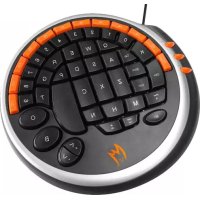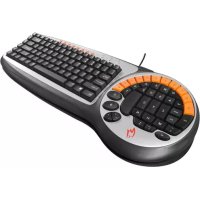
K2 - Keyboard Zykon - Free user manual and instructions
Find the device manual for free K2 Zykon in PDF.


| Product type | Gaming keyboard |
| Brand | Zykon |
| Model | K2 |
| Dimensions (approx) | 450 x 150 x 30 mm |
| Weight (approx) | 800 g |
| Power supply | USB (hub port) |
| Number of keys | 40 gaming keys + 8 internet shortcut keys |
| Special keys | Double Ctrl keys, vertical spacebar |
| Water resistance | Yes, highly reliable design |
| Lifespan | Up to 50 million presses |
| Actuation force | 55 ± 12.5 g |
| Total travel | 3.5 ± 0.3 mm |
| Operating temperature | 10 °C to 50 °C |
| Storage temperature | -30 °C to 60 °C |
| Operating humidity | 20% RH to 90% RH |
| Storage humidity | < 95% RH (at 60 °C) |
| Supported operating systems | Windows 98/ME/2000/XP/Vista |
| Certifications | CE, FCC |
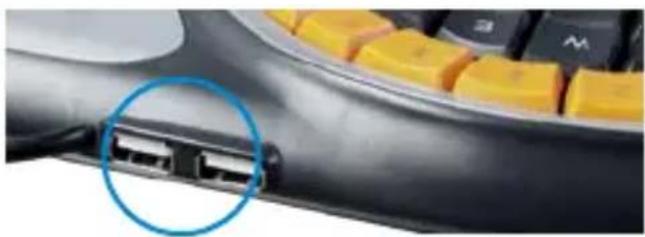
| Additional USB ports | 2 additional ports on the keyboard |
| Maintenance and cleaning | Clean with a dry cloth; avoid liquids |
| Safety | Do not expose to liquids; avoid extreme temperatures |
| Spare parts and repairability | Not available separately; contact customer service |
| General information | Ergonomic design for FPS games; includes user manual |
Frequently Asked Questions - K2 Zykon
User questions about K2 Zykon
0 question about this device. Answer the ones you know or ask your own.
Ask a new question about this device
Download the instructions for your Keyboard in PDF format for free! Find your manual K2 - Zykon and take your electronic device back in hand. On this page are published all the documents necessary for the use of your device. K2 by Zykon.
USER MANUAL K2 Zykon
Telephone network : D-Telekom
www.zykon.com
ZYKON® is a registered trademark of ZYKON GAMEWARE GmbH. All
other trademarks are owned by their respective companies. ZYKON®
Thank you for purchasing the ZYKON Gamer Keyboard K2.
NOTICE
Before using the product please read this manual carefully. Use of the product implies that you have read the manual and accepted all of this provisions.
INSTALLATION
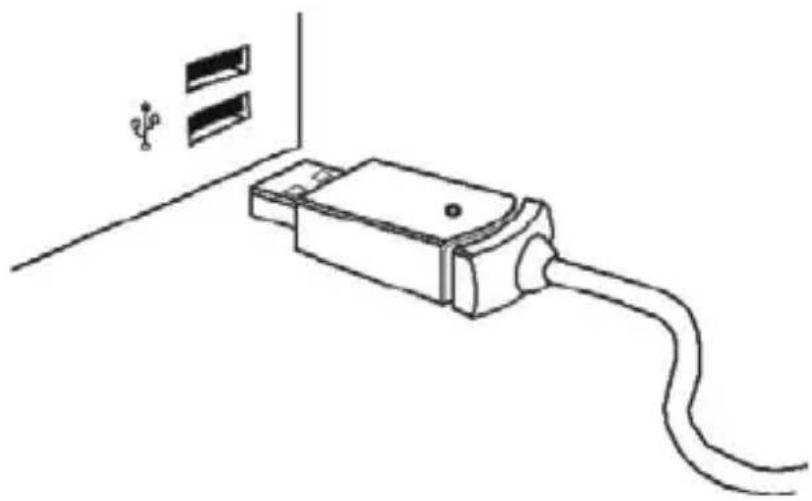
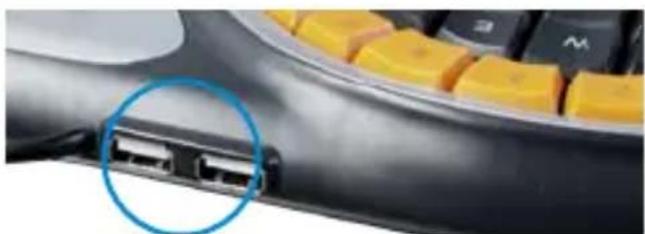
Plug the Gamer Keyboard USB adapter into your computer's USB Hub, as shown in the picture.
EXCLUSIVE INNOVATIVE DESIGN OF THE ZYKON GAMER KEYBOARD K2
- Ergonomic design principles have been applied to the special placement of 40 keys and controls commonly used in FTP games. This design enable quicker, more efficient and comfortable control of the game.
- Novel upright pace key gives the player a better sense of grabbing during game play
- Unique double "Crtl" key enable intuitive movement and silent operations.
FEATURES OF THE ZYKON GAMER KEYBOARD K2
- Compact and Stylish integrated two-keyboards-in-one layout
- One of Kind Ergonomic design enable maximum control and comfort
- Keyboard life span is rated at 50 million keystrokes
- Durable and reliable anti-splash design
- Flexible 3 layer Silicon membrane for quiet key operation
- Precision weighted board provides stability and quite operation
- USB Interfaces with Hot plug support
- 8 internet hot keys for convenient web access
- Applicable operating systems: WIN98/ME, WIN2000, WINXP, WINVista
- CE and FCC certified
GB
USING THE ZYKON GAMER KEYBOARD K2
- Every key designed and manufactured to meet the highest quality standards. Ergonomic design principles have been applied to enable One-handed control with maximum control and comfort. Keys vary in size or location to facilitate a break through in gaming keyboard design.
- The gaming area consists of 40 keys and controls which are uniquely ergonomically arranged to enable quicker, more efficient and comfortable control of FPS games.
- The 8 Internet hot keys in the standard keyboard area allow for convenient Internet access.
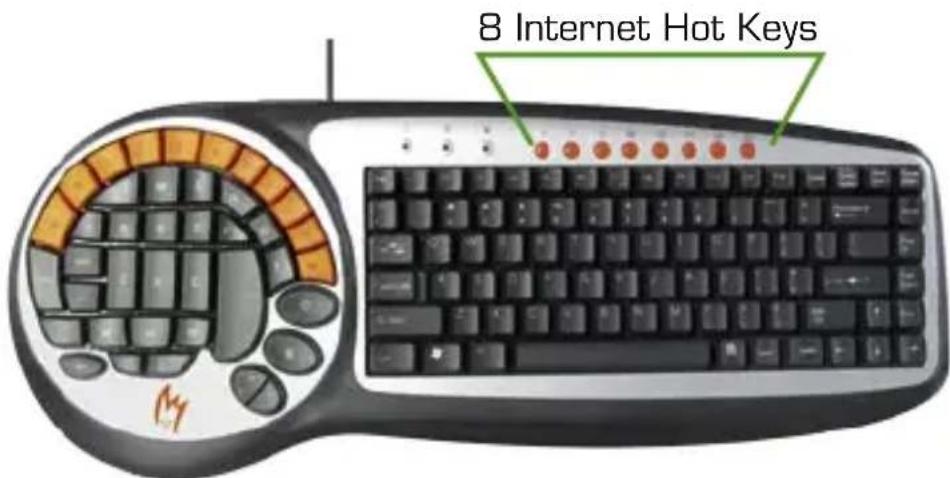
- Let's use the game of Counter-Strike as an example to introduce the layout of the keys in the left gaming area of the keyboard.
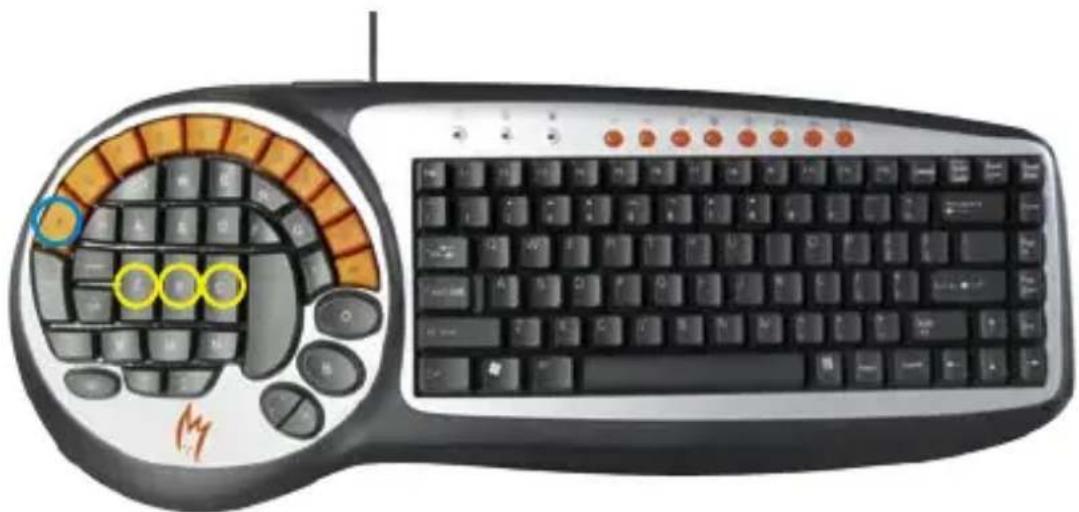
4.1 Communication keys:
K [Voice Communication]
Z, X, C [Radio Terminology]
Convenient and efficient design enable user to get in touch with teammates and other players in the short time.
GB
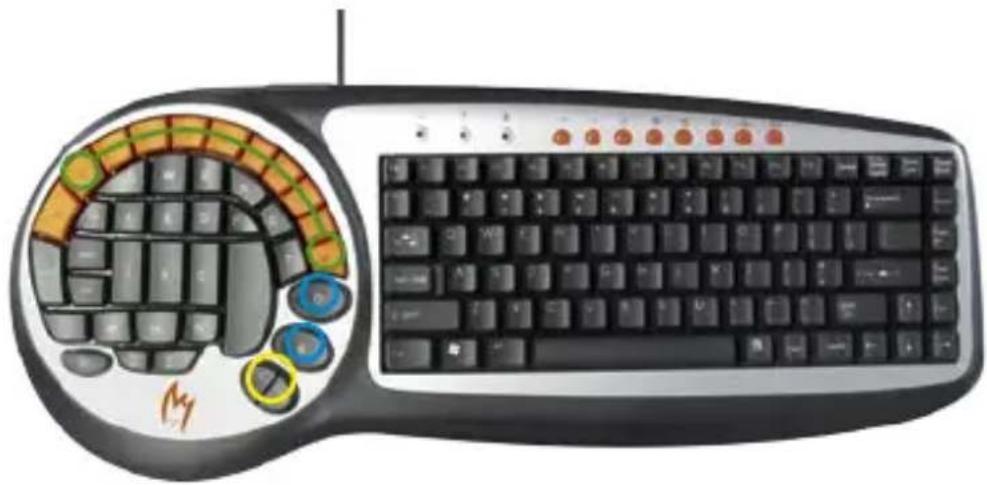
4.2 Moving key:
W, S, A, D [Forward, Reverse, Left, Right]
Ctrl [Squat]
Shift [Muffler Walking]
Space [Jump]
Unique key structure layout enable players to control their direction more accurately and to enable actions to be more agile.

4.3 Purchasing key:
O, B [Purchasing Menu]
< .> [Purchasing Ammunition]
0-9 [Purchasing Items]
Convenient key layout dramatically accelerates players' purchasing speed using one hand.
4.4 Auxiliary keys:
Q [Switch Arms]
Tab [Achievement Column]
M [Select Crew]
~ [Console]
Alt [User-defined]
H [Help]
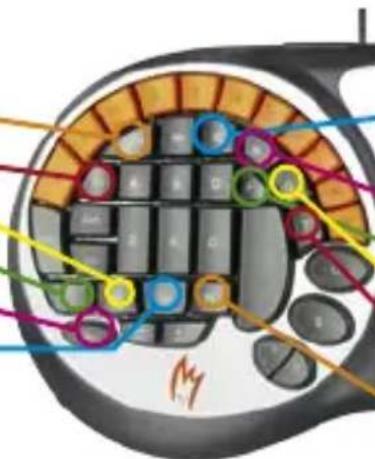
E [Bring Hostage, Switch, Dismantle Bomb]
R [Load Bomb]
F [Flash Light]
G [Throw Away Arms]
T [Spurt Personal Symbol]
N [Night Viewing Apparatus]
Individual settings can be reconfigured according to particular player preferences.
4.5 2 USB-Hubs:
RELATED PARAMETERS OF ZYKON GAMER KEYBOARD K2
- Key-pressing silicone adhesive operating pressure: 55 ± 12.5 gf
- Full key-press stroke: 3.5 ± 0.3 mm
- Key-press drawing force: >1.2 ~kg
- Operating temperature: 10^ 50^
- Storage and transportation temperature: -30^ 60^
- Operating humidity: 20% RH 90% RH
- Storage and transportation humidity: <95% (60°C)
SUGGESTIONS ON THE USE OF THE— ZYKON GAMER KEYBOARD K2 —
Frequent use of "Crtl+space" key is common in FPS games. It is recommended to avoid the setting of the shortcut key before starting game.
HEALTH CONSIDERATIONS
- Prolonged use of a keyboard during computer gaming may your palms, arms, shoulder, neck or other parts of the body occasionally uncomfortable. It is suggested that you take frequent breaks, and do some simple exercises such as stretching, neck rotation, and eye massage to help prevent or alleviate discomfort.
- Another important consideration is the proper selection and ergonomic of the computer, monitor, chair and desk.
- Regular exercise is recommended to help improve overall health enhancement mental fitness.
ZYKON GAMER KEYBOARD K2 PACKING LIST
- One piece of gaming keyboard
- One set of user's guide
PRÉFACE
RECOMMANDATIONS DE SANTÉ
Tabulator [Praestationskolonne]
M [Vaelg mandskab]
[Konsol]
Alt [Brugerdefineret]
H[[Hjaelp]
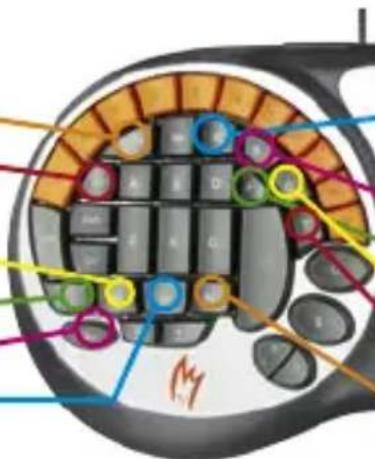
E [Hent gidsel, Skift,
[Demoner bombe]
R [Pálaes bombe]
F [Blinklys]
G [Smid vəbner]
BO3MOXHOCTN INPPOBOI KJABNATYPbI K2
- KomпаКТнаги CTиьнаги ИТеррацья DBYX KЛаВиТуРВ OДНОI
- YHnKaJIbHbI 3pROHOMuHbI dN3aH dJa MaKcImaJIbHOJ nPoCTOTbI UnpaBJIeHn I MaKcImaJIbHOrO yDo6CTBa
- CpOK cnVxkbbl KnaBnATypbl COCTABJRE50 MUNINOHOB HaKaTNI KnaBnI
- PpOuHbI N HaJeKbI KOpNyc, C 3aUnToI O T 6pbI3r
- Ingkoe TpexcnoHoe cnlnkoHOoe nokpbItne dny TxOy pa6Otbl KnaBn
- ToHb BbIbepeHHa KOHcTpyKznaBnAtypbl cncO6CTByeT ctaBnHOJ THXo pa6ote.
-USB-nHTeppeic c noDepkKoI onepaTHBHO IOKIOUeHn8 INTepHet-KnaBn6bICTporO DoCTyna, ynpououne doctyn B nHTepHeT
-ПодержиBaembieОперационьie cnCTeMbI:WIN98/ME,WIN2000,WINXRWINVista - CepTnΦnIupoBaHO CoBToM EbpOnbI N ΦeIepaJIbHOJ KOMnCCnei Cua nO CBra3n
W, S, A, D [Bnpei, Ha3aI, HaneBO, HanpaBO]
Ctrl [PnceCTb]
Shift [Becwymhoe nepemeueHne]
Пробен [Прьжok]
YHnKaIbHa paKlaJa Ka KnaBnI NO3BOJraT rPoKaM ToUHee ynpaBnIb CBOIMN nepemeueHnMa N Do6Ntbc4 BoJIbWei NOBHXHOCTN.
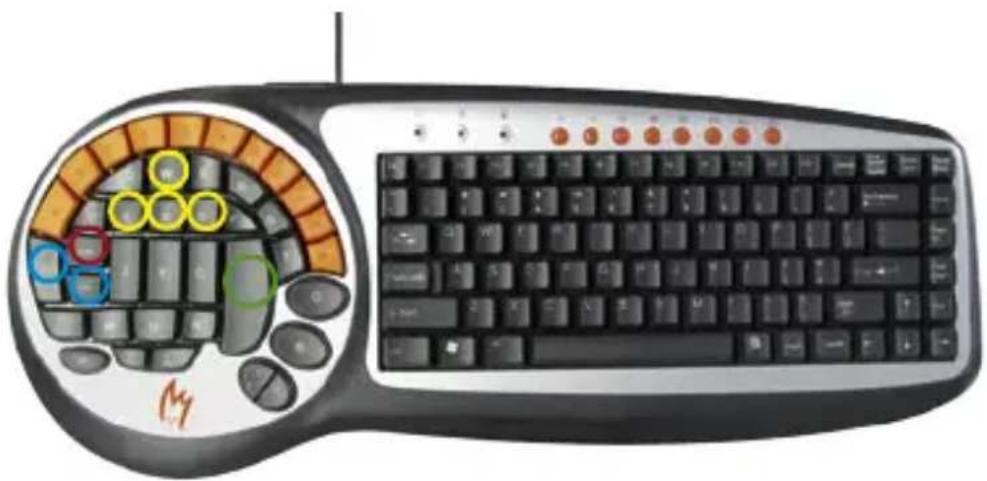
4.3 Knabni nokynk:
0,B [MeHIO nOKynoK]
[Покунka boe npinaocВ]
0-9 [Pokynka Bezei]
YdO6Ha paKnaIka KnaBn 3NaHTeNbHbIM o6pa3OM yCKOpReT CKOpocTb, C KOtOpO INrPOKn NOKyNAOT BCE Heo6XODnMOe, IcNoJIb3yra TOnIbKO Ondy pykY.
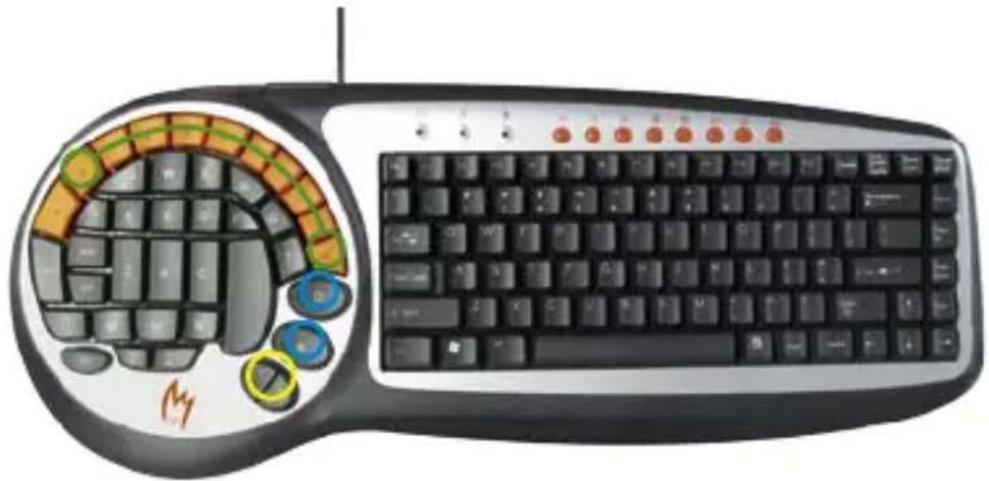
4.4 BcnoMOraTeIbHbIe KnaBnI:
Q [PepeknueHne opyxna]
Tab [OoctnkeHn]
M [BbIbpaTb KOMaHny]
\~[KoHcoJIb]
Alt [OnpeidenreTc
noJIb3OBAteJeM]
H [CnpaBka]
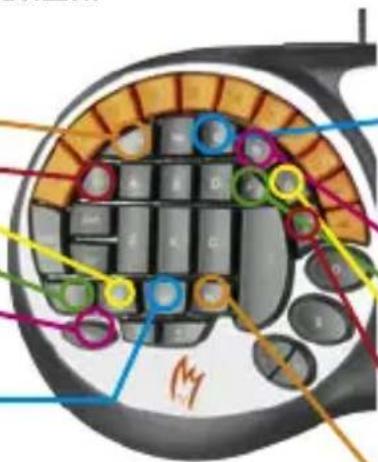
E [PnBecTn 3aIOxHnKa,
IpeeknouHTb, O6e3BpeDHTb
6om6y]
R [3aapn7b 6om6y]
F [ФонариK]
G[BbIbIpoCnTb opyXne]
T [HapncObaT co6cTBeHHbI
CIMBON]
N [Pn6op HouHoro BnDEHn]
B COOTBeTCTBnC nepcoHaJIbHbIMN Tpe6oBaHnA Mm NrpoKOB MOryT 6blTb HAcTpoEhbl Co6CTBeHHbIe packNaAdKn.
4.52 USB-pa3bema:
- IAPAMETPbI INPPOBOI KJIABNATypBi K2 ZYKON
- Pa6oyee daBneHne haxaTnKnaBn: 55 ± 12,5 rc
-Полныхов Нжатая Клавши:3,5±0,3 MM - Tányúza cīna hǎxatný klnabùn: >1,2 Kr
- Pa6o7a TeMnepaTpa: 10^ 50^
- Tempepatya xpaHeHnI n TpaHcnpTnpOBKn: -30°C ~ 60°C
- Pa6oyaBlaXHocTb: 20% ~ 90% OTH. BlaXHocTb
- BnaXnoctb xpaHene n TpaHcnpTnpOBkn: <95% [60°C]