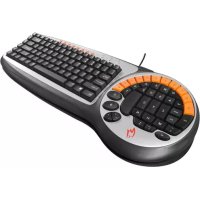
K1 - Keyboard Zykon - Free user manual and instructions
Find the device manual for free K1 Zykon in PDF.


User questions about K1 Zykon
0 question about this device. Answer the ones you know or ask your own.
Ask a new question about this device
Download the instructions for your Keyboard in PDF format for free! Find your manual K1 - Zykon and take your electronic device back in hand. On this page are published all the documents necessary for the use of your device. K1 by Zykon.
USER MANUAL K1 Zykon
natural_image
Close-up of a computer keyboard with orange keys and a black handle, placed on a hexagonal grid background (no text or symbols visible)Hotline Number
+49 18 05 / 99 9115
€0,12 / minute
Telephone network : D-Telekom
www.zykon.com
natural_image
Line drawing of a cable connector inserted into a wall socket (no text or symbols)PATENTIERTES INNOVATIVES DESIGN DES ZYKON GAMER KEYBOARD K1
natural_image
Close-up of a black circular keyboard with orange and black segments, no visible text or symbols2.3 Einkauftasten:
0, B [Kaufmenüs]
,<.> [Munition kaufen]
2.4 Zusatztasten:
Thank you for purchasing the ZYKON Gamer Keyboard K1.
NOTICE
Before using the product please read this manual carefully. Use of the product implies that you have read the manual and accepted all of this provisions.
INSTALLATION
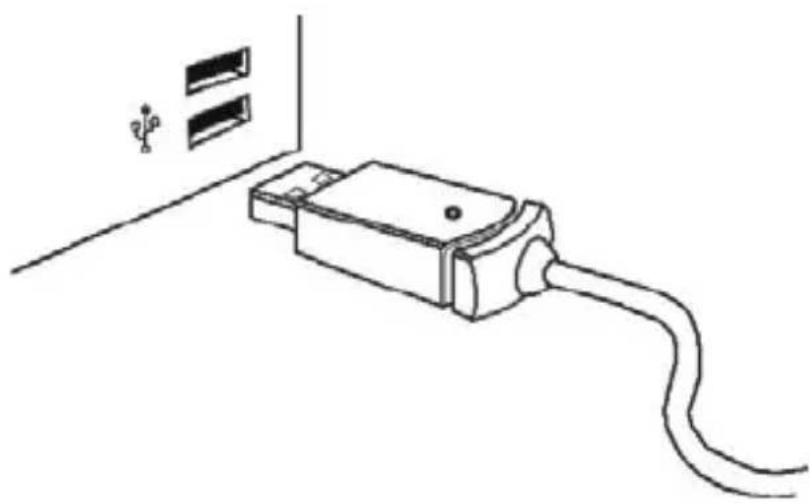
Plug the Gamer Keyboard USB adapter into your computer's USB Hub, as shown in the picture.
natural_image
Line drawing of a cable connector inserted into a wall socket (no text or symbols)PATENTED INNOVATIVE DESIGN OF THE — ZYKON GAMER KEYBOARD K1 —
- Ergonomic design principles have been applied to the special placement of 55 keys and controls of the game.
- Innovative compact design enables convenient transportation.
- Multimedia pressing keys are added which enable the players to tune the volume at random in gaming manipulation.
- Novel upright "space" key gives the player a better sense of grabbing during game play
- Unique double "Crtl" key enable intuitive movement and silent operations.
FEATURES OF THE ZYKON GAMER KEYBOARD K1
- Compact, palm sized design for convenient transportation
- One of Kind Ergonomic design enable maximum control and comfort
- Multimedia pressing key enable you to tune the volume conveniently
- Keyboard life span is rated at 10 million keystrokes
- Durable and reliable anti-splash design
- Flexible 3 layer Silicon membrane for quiet key operation
- USB Interfaces with Hot plug support
- Applicable operating systems: WIN98/ME, WIN2000, WINXP, WIN Vista
- CE and FCC certified
GB
USING THE ZYKON GAME KEYBOARD K1
- Every key is designed and manufactured to meet the highest quality standards.
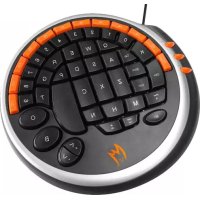
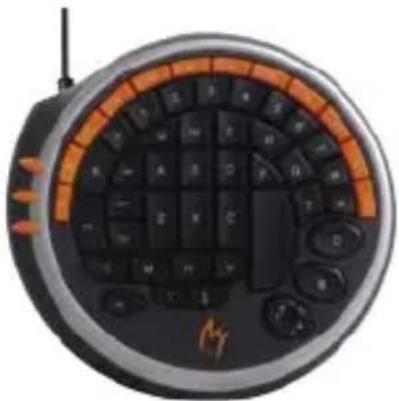
The Gaming area consists of 55 keys and controls which are uniquely arranged to enable quicker, more efficient and comfortable control of FPS games. Ergonomic design principles have been applied to enable one-handed control with maximum control and comfort. Keys vary in size or location to facilitate a break through in gaming pad design.
natural_image
Close-up of a black circular keyboard with orange and black segments, no visible text or symbols- Lets use the game of Counter-Strike as an example to introduce the layout of the keys in the left gaming area of the keyboard.
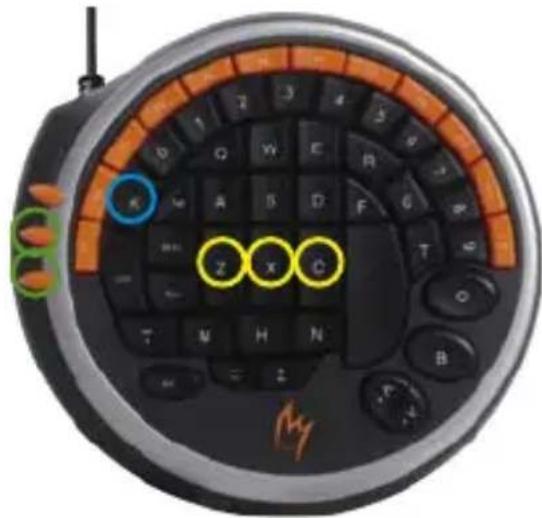
2.1 Communication keys:
K [Voice Communication]
Z, X, C [Radio Terminology]
V+, V- [Tuning The Volume]
Convenient and efficient design enable user to get in touch with teammates and other players in the short time.
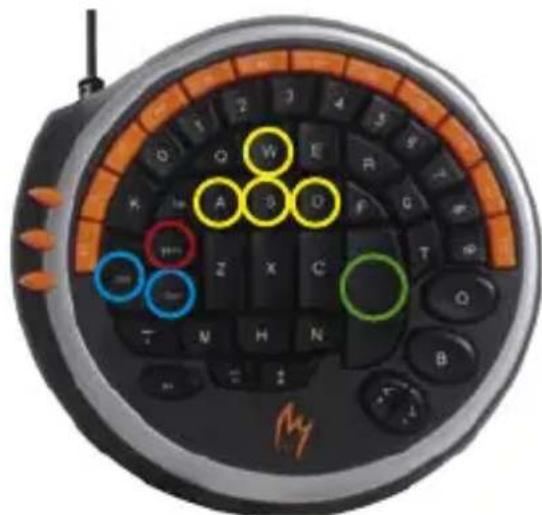
2.2 Moving Key:
W, S, A, D [Forward, Reverse, Left, Right]
Ctrl [Squat]
Shift [Muffler Walking]
Space [Jump]
Unique key structure layout enable players to control their direction more accurately and to enable actions to be more agile.
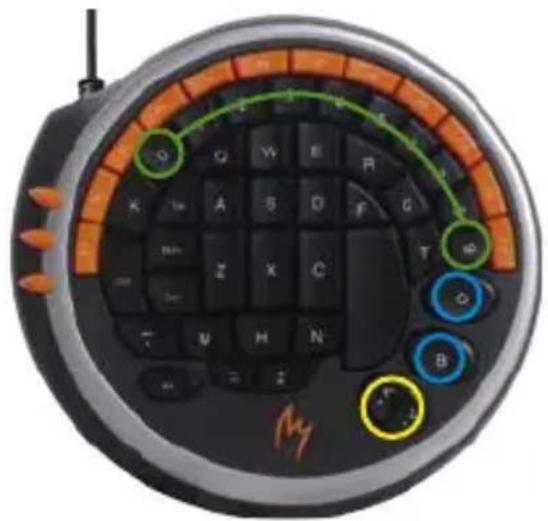
2.3 Purchasing key:
O, B [Purchasing Menu]
,<.> [Purchasing Ammunition]
0 - 9 [Purchasing Items]
Convenient key layout dramatically accelerates players' purchasing speed using one hand.
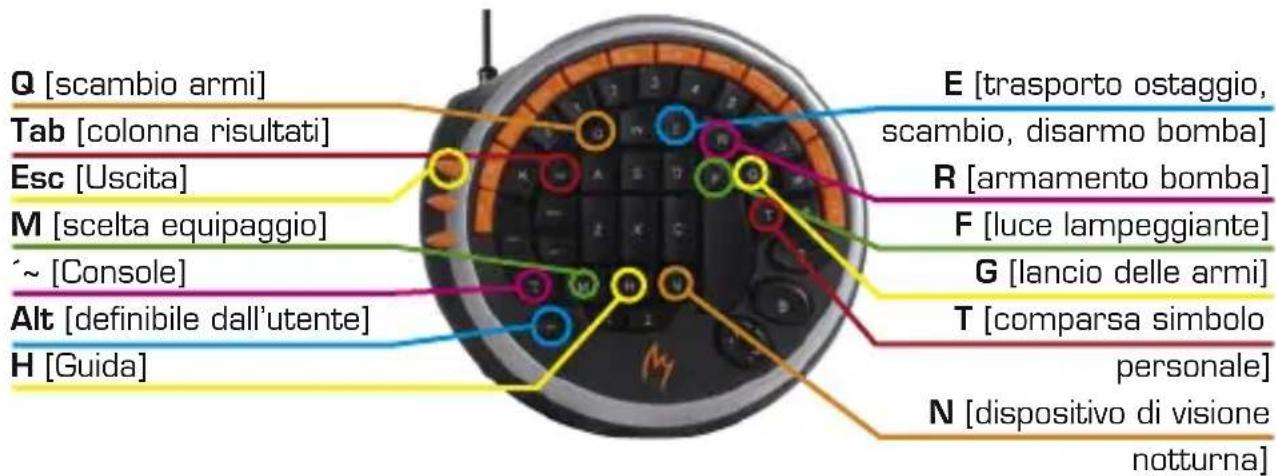
2.4 Auxiliary keys:
![Q [Switch Arms] Tab [Achievement Column] Esc [Quit] M [Select Crew] ~ [Console] Alt [User-defined] H [[Help]] E [Bring Hostage, Switch, Dismantle Bomb] R [Load Bomb] F [Flash Light] G [Throw Away Arms] T [Spurt Personal Symbol] N [Night Viewing Apparatus]](/content/2026/02/368480/images/eafdbed783c3e46ced4f518100dc45a0a7f58951e186bcf625c7609b96314047.jpg)
Individual settings can be reconfigured according to particular player preferences.
RELATED PARAMETERS OF GAMING KEYBOARD
- Key-pressing silicone adhesive operating pressure: 58 ± 8gf
- Full key-press stroke: 3.0 ± 0.3mm
- Key-press drawing force: >1.2 kg
- Operating temperature: -20°C \~ 60°C
- Storage and transportation temperature: -20°C \~ 70°C
- Operating humidity: 20% RH \~ 90% RH
- Storage and transportation humidity: <95% RH
SUGGESTIONS ON THE USE OF THE — ZYKON GAMER KEYBOARD K1 —
Frequent use of "Crtl+space" key is common in FPS games. It is recommended to avoid the setting of the shortcut key before starting game.
HEALTH CONSIDERATIONS
- Prolonged use of a keyboard during computer gaming may your palms, arms, shoulder, neck or other parts of the body occasionally uncomfortable. It is suggested that you take frequent breaks, and do some simple exercises such as stretching, neck rotation, and eye massage to help prevent or alleviate discomfort.
- Another important consideration is the proper selection and ergonomic of the computer, monitor, chair and desk.
- Regular exercise is recommended to help improve overall health enhance mental fitness.
ZYKON GAMING KEYBOARD K1 PACKING LIST
-
One piece of gaming keyboard
-
One set of user's guide
PRÉFACE
natural_image
Line drawing of a cable inserted into a socket with two connectors (no text or symbols)LES PARTICULARTÉS DU CLAVIER DE JEU ZYKON GAMER KEYBOARD K1
natural_image
Close-up of a black circular electronic device with a grid of keys and orange accent bands (no visible text or symbols)2.4 Touches auxiliaires:
Q [changer d'arme]
RECOMMANDATIONS DE SANTÉ
natural_image
Close-up of a black circular electronic device with a grid of keys and orange accent bands (no visible text or symbols)2.2 Movimiento:
W,S,A,D [Adelante, Atrás, Izquierda, Derecha]
Ctrl. [Agachar]
Shift [Caminar]
Space [Saltar]
2.3 Comprar:
2.4 Asistencia:
Q [Cambiar arma]
Tab [Resultados]
Esc [Salir]
E [Tomar rehén, Abrir y cerrar, Desarmar bomba]
R [Cargar]
F [Linterna]
G [Botar arma]
T [Rociar icono]
N [Visión nocturna]
natural_image
Line drawing of a cable inserted into a socket with two connectors (no text or symbols)IT
IL BREVETTATO DESIGN INNOVATIVO DELLA ZYKON GAMER KEYBOARD K1
natural_image
Close-up of a black circular keyboard with orange and black segments, no visible text or symbols2.4 Tasti ausiliari:
natural_image
Line drawing of a cable inserted into a terminal block with two connectors (no text or symbols)PATENTBESKYTTET INNOVATIVT DESIGN FRA ZYKON GAMER KEYBOARD K1
natural_image
Close-up of a black circular electronic device with orange and black keys arranged in a semi-circular pattern (no visible text or symbols)2.3 Indkøbstast:
O, B [Indkøbsmenu]
,<.> [Købe ammunition]
0-9 [Indkøbsdele]
DK
2.4 Hjælpetaster:
Q [Indikatorarme]
E [Hent gidsel, Skift,
Demonter bombe]
R [Pålæs bombe]
F [Blinklys]
G [Smid våbner]
ZYKON GAMING KEYBOARD K1 INDEHOLDER:
natural_image
Line drawing of a cable connector inserted into a wall socket (no text or symbols)SE
DEN PATENTERADE, INNOVATIVA DESIGNEN AV ZYKON GAMER KEYBOARD K1
natural_image
Close-up of a black circular electronic device with orange and black keys arranged in a curved grid pattern (no visible text or symbols)2.3 Köpknapp:
O, B [Köpmeny]
,<.> [Köpa ammunition]
0-9 [Artiklar]
2.4 Ytterligare knappar:
Q [Byt vapen]
Tab [Resultatkolumn]
Esc [Avsluta]
M [Välj manskap]
\~ [Konsol]
natural_image
Line drawing of a cable inserted into a terminal block with two connectors (no text or symbols)RU
natural_image
Close-up of a black circular keyboard with orange and black segments, no visible text or symbolsRU
E [Привести заложника,