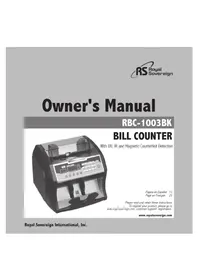
RBC1003BK - Coin and bill counter Royal Sovereign - Free user manual and instructions
Find the device manual for free RBC1003BK Royal Sovereign in PDF.


| Product Type | Bill Counter with Counterfeit Detection |
| Brand | Royal Sovereign |
| Model | RBC1003BK |
| Dimensions (L × W × H) | 270 × 250 × 195 mm |
| Net Weight | 4.6 kg |
| Power Supply | 100-240 V, 50/60 Hz |
| Power Consumption | Less than 50 W |
| Counting Speed | 1200 bills/min |
| Accepted Bill Size | 110 × 50 mm to 185 × 90 mm |
| Display | 4 digits (counting) + 3 digits (preset) |
| Hopper Capacity | Approximately 150 bills (estimate based on dimensions) |
| Counterfeit Detection | UV, magnetic (MG), dimension (DD) with sensitivity adjustment |
| Counting Modes | Single, batch (1-999), cumulative addition |
| Start Modes | Automatic (detection) and manual (button) |
| Thickness Adjustment | Bill thickness dial (under the cover) |
| Error Codes | E01-E08, EA0-EA3, EC4 |
| Warranty | 1 year (parts and labor) |
| Operating Temperature | 0 to 40 °C |
| Maintenance | Unplug before cleaning; use the provided brush; do not use liquids or aerosols |
| Safety | Do not expose to water; do not disassemble; use only the supplied cord; avoid high temperatures and humidity |
| Box Contents | Counter, power cord, cleaning brush |
Frequently Asked Questions - RBC1003BK Royal Sovereign
User questions about RBC1003BK Royal Sovereign
0 question about this device. Answer the ones you know or ask your own.
Ask a new question about this device
Download the instructions for your Coin and bill counter in PDF format for free! Find your manual RBC1003BK - Royal Sovereign and take your electronic device back in hand. On this page are published all the documents necessary for the use of your device. RBC1003BK by Royal Sovereign.
USER MANUAL RBC1003BK Royal Sovereign
With UV, IR and Magnetic Counterfeit Detection

Págin en Espanol 13
Page en Francais 25
Please read and retain these instructions
To register your product, please go to
www.royalsovereign.com -customer support- registration.
www.royalsovereign.com
Royal Sovereign International, Inc.
BILL COUNTER
With UV, IR and Magnetic Counterfeit Detection
SAFETY INSTRUCTIONS
Warning
When using this machine follow these basic safety precautions to reduce risk of fire, electric shock or injury.
Do not place the machine in area where it may be exposed to water or other liquids.
Before cleaning the machine always unplug the machine from the wall. Do not use liquid or aerosol cleaners on the machine.
To reduce the risk of electrical shock, do not take apart the machine. When service or repair work is needed bring it to a qualified service repair technician.
Only use the power cord that comes with the machine. Using a different power cord may result in electric shock, fire or cause serious damage to machine.
Do not use the machine in areas with high temperature or high humidity. This may result in the machine not working properly.
Caution
When unplugging the power plug, grip the plug to pull it out. Pulling the cord may result in electric shock, fire or damage to the machine.
Do not use the machine if the power cord is damaged. This may result in electric shock, fire or other hazards.
Do not place objects on the power cord and do not bend it excessively. This may result in electric shock, fire or other hazards.
When not using the machine for long periods of time, unplug the power cord from the outlet.
CONTENTS
Box Contents 5
Parts 5
Controls 6
Features 7
Operation 9~10
Error Code Displays 11
Specifications 11
Warranty 12
Contact Information 12
Pagina en Espanol 13
Page en Francais 25
BOX CONTENTS
Bill Counter, Power Cord, Cleaning Brush
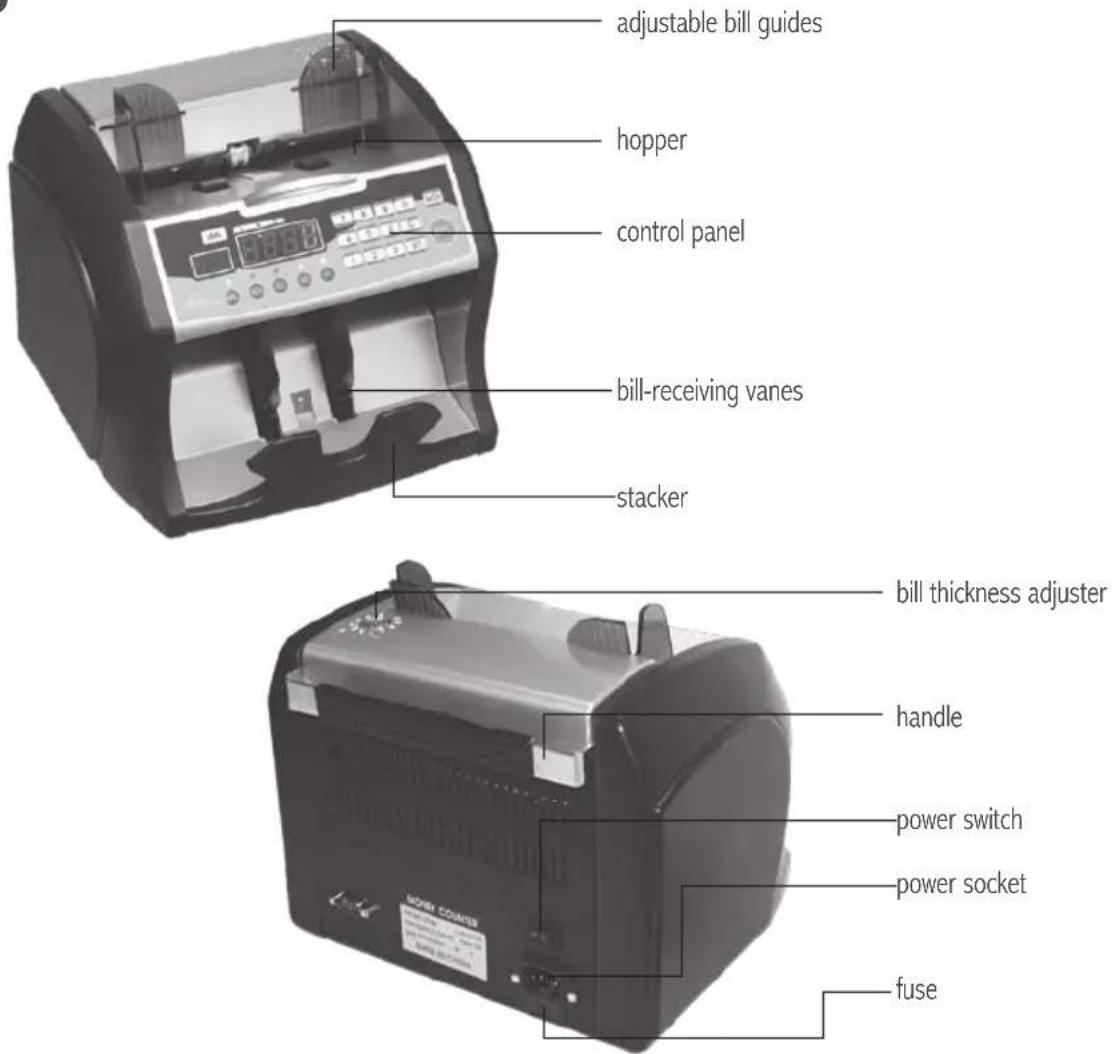
PARTS
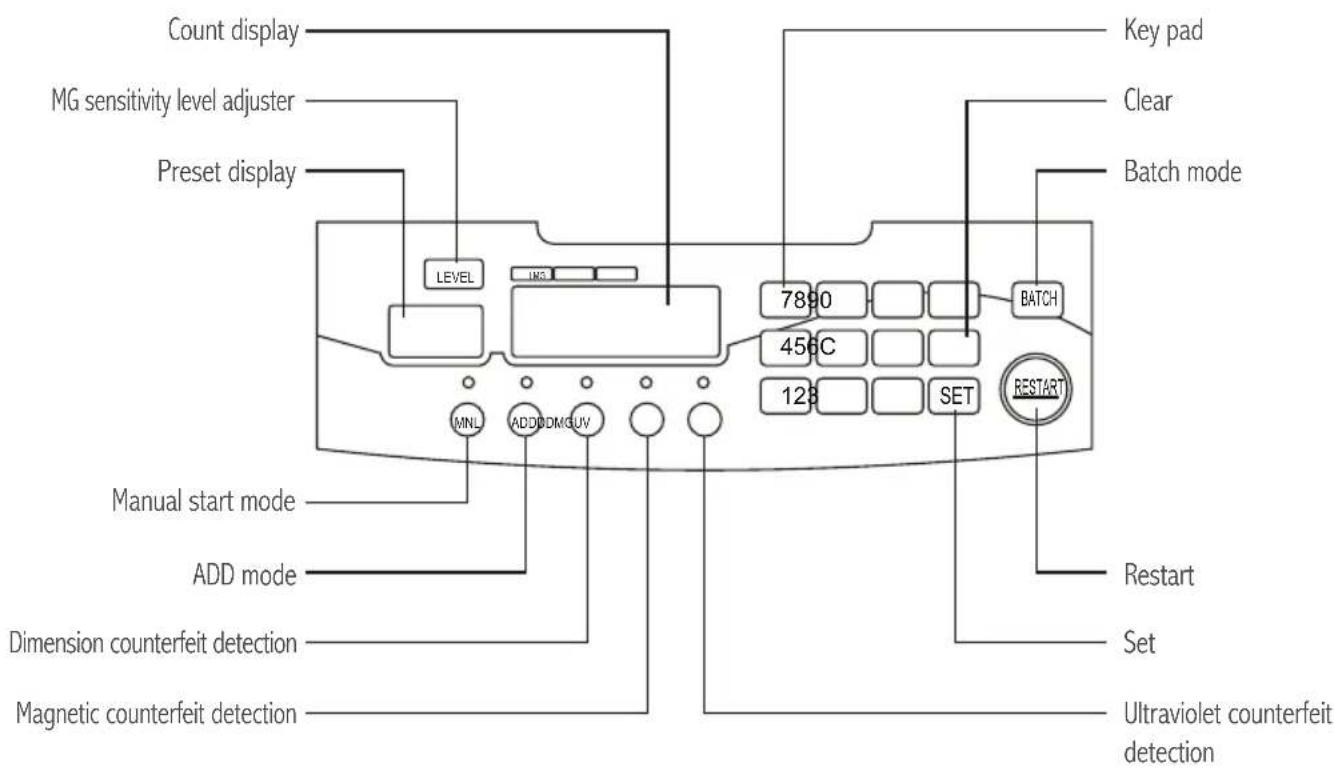
CONTROLS
FEATURES
Front Loading
The sophisticated front loading system provides easy access to hopper, allows larger hopper capacity, and is more durable than a back loading system.
Automatic Self-Test
The machine will automatically perform a self-test when it is turned on. If there is a problem, the preset display will show an error code. (See ERROR CODE DISPLAYS.)
Auto and Manual Start Modes
The machine is preset to automatically start counting bills once placed into the hopper. To change to the manual start mode, press MNL, insert the bills into the hopper, and press START.
UV Counterfeit Detection
Counterfeit bills often use white or bleached paper, which will glow under ultraviolet light. To use ultraviolet counterfeit detection, press UV. When the UV detector finds a counterfeit bill, the machine will stop counting to allow removal of the counterfeit bill and display the error code on the preset display. To resume counting, simply press START.
Magnetic Counterfeit Detection
If the magnetic detector does not find the presence of magnetic components that are standard in authentic bills, the machine will stop counting to allow removal of the counterfeit bill and display the error code on the preset display. To use magnetic counterfeit detection, press MG. To adjust magnetic sensitivity level, press LEVEL for low, medium, and high. To resume counting, simply press START.
Dimension Detection
The dimension detector measures the width of the center of each bill by using infrared light. If the detector finds an odd-sized bill, the machine will stop counting to allow removal of the bill and display the error code on the preset display. To use dimension counterfeit detection, press DD. The dimension (DD) counterfeit detection sensitivity level is preset on level 1 (highest level). To adjust width sensitivity level, press SET and select 1-5, 1 for highest, 5 for lowest.
To adjust width sensitivity level, press SET and select 1-5, 1 for lowest, 5 for highest.
Common and Batch Counting Modes
The machine is preset to common counting mode, which automatically counts all bills placed into the hopper. To count bills in batches, press BATCH. Batching is preset to 100 bills. To change batch amount, press C to clear, and use the keypad to enter a batch number between 1 and 999. Press SET to save the setting.
Add Mode
The ADD mode displays cumulative total of all bills counted. To turn ADD mode on, press ADD.
Memory Settings
The machine will save counterfeit detection and counting mode settings when power is turned off and on.
The machine will save counterfeit detection settings, manual, and add mode settings when power is turned off and on.
Bill Counting Mode
This machine is preset to stop counting when a counterfeit or irregular bill is detected and include these bills in the master count (shown on the count display). This preset setting is type 2, which can be accessed by pressing SET twice (preset display will show "F" and count display will show "2"). This setting is ideal for a user who does not require counterfeit detection and is sitting nearby to push START as necessary.
This preset counting mode may be changed to:
- not count counterfeit or irregular bills and stop counting to allow removal of bill(s) in question, and allow re-insertion of all bills into hopper to restart counting from zero. To set counting mode to this type, press SET twice. Preset display will show "F". Use the keypad to select "1", then press SET to save the setting. This setting is ideal for a user who requires counterfeit bills be excluded from the master count.
- count counterfeit or irregular bills and continue counting, unless there is a jam error (either EA2, two or more bills counted as one, or EA3, part of one bill overlapping another bill), in which case the count may be inaccurate. In this case, bill(s) in question are counted, and the machine will stop to allow re-insertion of all bills into hopper to restart counting from zero. To set counting mode to this type, press SET twice. Preset display will show "F". Use the keypad to select "3", then press SET to save the setting. This setting is ideal for a user who does not require counterfeit detection and is requires fully automated, hands-free counting.
OPERATION
- Plug in power cable and turn power switch on.
- Select counterfeit detection mode.
To use ultraviolet (UV), magnetic (MG), and/or dimension (DD) counterfeit detection while counting, press the corresponding buttons on the control panel.
The dimension (DD) counterfeit detection sensitivity level is preset on level 1 (highest level). To adjust the sensitivity level, press SET.
Preset display window will display "SE". Use the keypad to select a level from 1-5, 1-highest, 5-lowest. Press SET to store the setting.
- Select bill counting settings.
Bill Counting Mode
The bill counting mode is preset on type 2. To adjust the counting mode, press SET twice. Preset display window will display "F". Use the keypad to select a type 1-3. Type 1 will not count counterfeit or irregular bills and stop counting to allow removal of bill(s) in question, and allow re-insertion of all bills into hopper to restart counting from zero. Type 2 will stop counting when a counterfeit or irregular bill is detected and include these bills in the master count (shown on the count display). Type 3 will count counterfeit or irregular bills and continue counting, unless there is a jam error (either EA2, two or more bills counted as one, or EA3, part of one bill overlapping another bill), in which case the count may be inaccurate. In this case, bill(s) in question are counted, and the machine will stop to allow re-insertion of all bills into hopper to restart counting from zero.
Add Mode
To continuously add totals for a cumulative total when counting several batches of bills, press ADD. The ADD indicator light will turn on.
Batching Mode
The machine is preset to common counting mode, which automatically counts all bills placed into the hopper. To count bills in batches, press BATCH. Batching is preset to 100 bills. To change batch amount, press C to clear, and use the keypad to enter a batch number between 1 and 999. Press set to save the setting.
Auto/Manual Start Modes
The machine is preset to automatically start counting bills once placed into the hopper. To change to the manual start mode, press MNL, insert the bills into the hopper, and press START.
4. Test Run
Test the machine to set it to count your currency. Prepare at least five bills to test the machine. Place the bills on the hopper and run the machine. If the machine counts the bills and there are no errors, it is ready to accept your currency.
If:
- The bills are deformed
- The machine is considerably slow
- Error message is lit frequently
The hopper tension is too tight. To loosen this tension, please turn the Bill Thickness Adjuster one notch to the right (+). Place the bills back into the hopper to test the machine again. If errors occur, adjust as necessary.
H
- The bills are flying out
- The display shows a miscount
- Error message is lit frequently
The hopper tension is too loose. To tighten this tension, please turn the Bill Thickness Adjuster one notch to the left (-). Place he bills back into the hopper to test the machine again. If errors occur, adjust as necessary.
When the machine is running without any errors, it is ready to accept your currency.
- Insert bills into the hopper to begin counting.
ERROR CODE DISPLAY
When an error code appears in the preset display window and the machine stops, please refer to the following chart for an explanation.
| Error code Reason | |
| E01 Left counting sensor | |
| E02 Right counting sensor | |
| E03 Left double-notes sensor | |
| E04 Right double-notes sensor | |
| E05 Note-receiving sensor | |
| E06 Note-feeding sensor | |
| E07 Width sensor | |
| E08 UV sensor | |
| EA0 Half sheet. Eliminate the note. Press START and count continuously. | |
| EA1 Different width or different version notes. Press START and count continuously. | |
| EA2 | Double-notes. Put the notes from the stacker onto the hopper again, press START to count again. If EA2 often appears, please adjust the position of the bill thickness adjuster. |
| EA3 | Joined notes. Put the notes from the stacker onto the hopper again, press START to count again. |
| EC4 UV Fake note or questionable note. Eliminate this note, press START and count continuously. | |
If you are receiving error codes E01-E08 check the machine for dust. If you continue to receive error codes, please contact Royal Sovereign's Service Center at 1-800-397-1025.
SPECIFICATIONS
| Model RBC-1003BK | |
| Power single-phase 100~240V 50/60Hz(1±5%) | |
| Power consumption <50W | |
| Surroundings temperature of usage 32~104°F / 0~40°C | |
| Counting speed 1200pcs/min. | |
| Note-feeding size 4.3" × 2.0" ~ 9.8" × 7.7" / 110 × 50~185 × 90(mm) | |
| Display range four digits counting display, three digits preset display | |
| Cubage 10.6" × 9.8"" × 7.7" / 270 × 250 × 195(mm) | |
| Net Weight 10.1 lbs / 4.6kg |
LIMITED ONE YEAR WARRANTY
This warranty applies to repair or replacement of product found to be defective in material or workmanship for one year from the date of the original purchase. This warranty is extended only to the original purchaser.
This warranty does not apply to damage resulting from abuse, misuse, or improper maintenance of damage that is attributable to acts of nature. Royal Sovereign International, Inc. (and its affiliated companies) is not liable for incidental or consequential damages of any nature. This limitation would not apply if you live in those areas that do not permit the exclusion or limitation of incidental or consequential damages.
Defective products for warranty repair or replacement cannot be returned without a Return Authorization number. Please go to www.royalsovereign.com USA-Customer Support Tab to make a request for an Office Product Return Authorization
Defective products must be returned to Royal Sovereign International Consumer Return Department, freight prepaid, with proof of purchase and Return Shipping and Handling payment (check or money order). Upon repair or replacement the product will be returned to the customer.
Return defective product to the following address with a detailed description of the problem. If possible, pack in original carton. Please prepay shipping charges.
For out of warranty service or frequently asked questions please go to www.royalsovereign.com USA- Customer Support Tab.
For sales of product, parts or accessories please visit us at www.royalfullfillmentcorp.com.
For service or sales please contact your local Royal Sovereign Office:
ROYAL SOVEREIGN INTERNATIONAL, INC. RS CANADA INC.
2 Volvo Drive Rockleigh, NJ 07647 USA 164 Oakdale Road, Toronto, Ontario M3N 2S5 CANADA
TEL: +1) 800-397-1025 FAX: +1) 201-750-1022 TEL: +1) 416-741-8400 FAX: +1) 416-741-8185
www.royalsovereign.com
Espanol
www.royalsovereign.com
Royal Sovereign International, Inc.
www.royalsovereign.com

www.royalsovereign.com
Royal Sovereign International, Inc.
COMPTEUR DE BILLETS
www.royalsovereign.com
- BILL COUNTER
- SAFETY INSTRUCTIONS
- Warning
- Caution
- CONTENTS
- BOX CONTENTS
- FEATURES
- Front Loading
- Automatic Self-Test
- Auto and Manual Start Modes
- UV Counterfeit Detection
- Magnetic Counterfeit Detection
- Dimension Detection
- Common and Batch Counting Modes
- Add Mode
- Memory Settings
- Bill Counting Mode
- OPERATION
- Test Run
- ERROR CODE DISPLAY
- SPECIFICATIONS
- LIMITED ONE YEAR WARRANTY
- COMPTEUR DE BILLETS
Brand : Royal Sovereign
Model : RBC1003BK
Category : Coin and bill counter