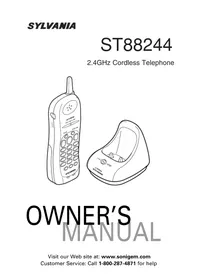
ST88244 - Telephone SYLVANIA - Free user manual and instructions
Find the device manual for free ST88244 SYLVANIA in PDF.


| Product Type | 2.4 GHz Cordless Phone |
| Brand | Sylvania |
| Model | ST88244 |
| Technology | 2.4 GHz Extended Range, Automatic 20-Channel Scanning |
| Base Power Supply | 9V DC, 210mA AC Adapter (provided) |
| Handset Power Supply | Ni-Cd Rechargeable Battery Pack 3.6V DC, 600mAh (Model BT-905) |
| Talk Time | 7 hours |
| Number Memory | 10 Memory Locations for Speed Dial |
| Convenience Features | Auto Communication (Auto Answer/Hang-up), Redial, Ringer Mute, Paging/Handset Locator |
| Volume Control | Adjustable Ringer and Receiver Volume |
| Compatibility | Compatible with Hearing Aid Devices |
| Security | Random Digital Security Code (Over 260,000 Codes) |
| Base Dimensions (approx.) | 20 x 15 x 10 cm |
| Handset Weight (approx.) | 200 g |
| Maintenance | Clean charging contacts with a soft cloth once a month |
| Replacement Parts | BT-905 Battery Pack, Optional Headset (Ref. 91000B) |
| Warranty | 1 year (phone) |
Frequently Asked Questions - ST88244 SYLVANIA
User questions about ST88244 SYLVANIA
0 question about this device. Answer the ones you know or ask your own.
Ask a new question about this device
Download the instructions for your Telephone in PDF format for free! Find your manual ST88244 - SYLVANIA and take your electronic device back in hand. On this page are published all the documents necessary for the use of your device. ST88244 by SYLVANIA.
USER MANUAL ST88244 SYLVANIA
2.4GHz Cordless Telephone
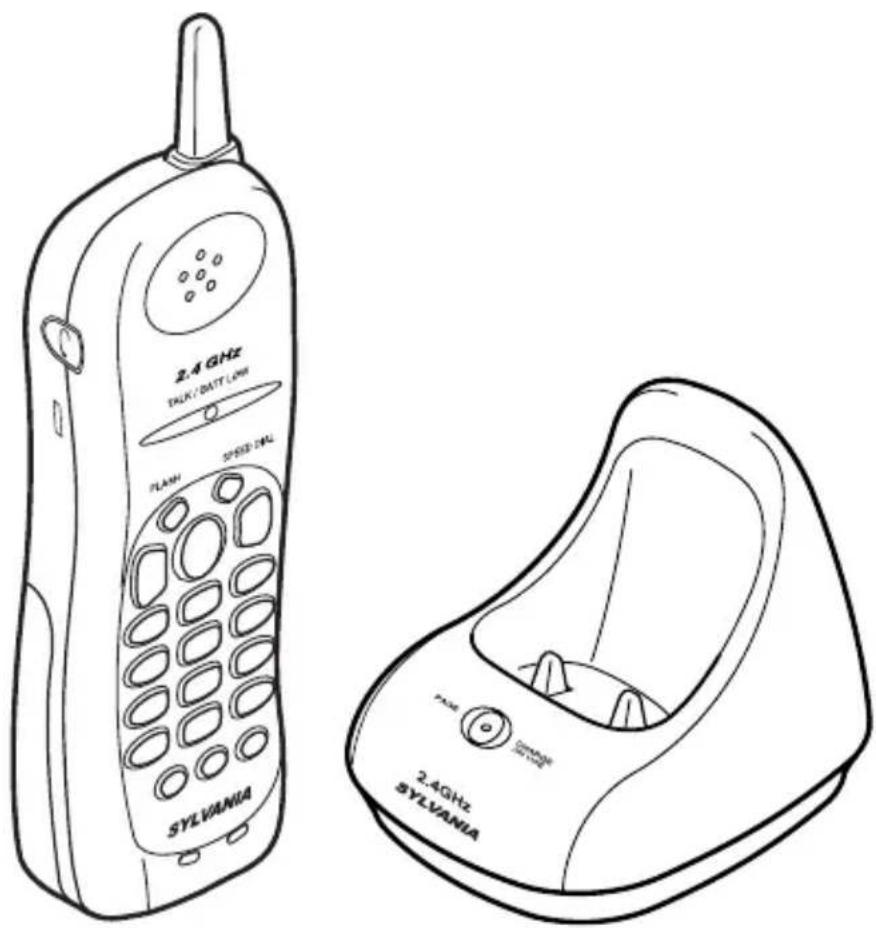
OWNER'S MANUAL
Introduction ......2
Features 2
Included in Your Package ....2
Controls and Functions ....3
Installation ....4
- Charging the Battery Pack ....4
Charging the Handset....4
Low Battery Indicator ....4
Cleaning the Battery Contacts ....4
- Selecting a Location ....4
- Choose the Dialing Mode ....4
- Installing the Base ....5
On a Desk Top 5
On a Wall Plate or Wall....5
- Installing the Optional Beltclip....5
Setting Up Your Phone ....6
- Adjusting Ringer Controls ....6
Ringer Tone and Volume ......6
Setting the Handset Earpiece Volume ..6
Ringer Mute 6
Using Your Phone ......6
- Making and Receiving Calls ......6
- Storing a Number in Memory ....7
- Entering a Pause in Memory Dialing .....7
- Storing Mixed Tone/Pulse Numbers ......7
- Dialing a Stored Number ....7
• One-touch Dialing (SPEED DIAL) .....8
- Chain Dialing....8
- Erasing a Stored Number ....8
- Selecting a Different Channel......8
- Using the Flash Button ....8
• Using the Page Feature ....8
- Traveling Out-of-Range......8
Troubleshooting 9
Changing the Digital Code Security .....9
Headset Installation 9
Important Safety Instructions ....10
I.C. Notice....11
SYLVANIA TELEPHONE WARRANTY
Introduction
The ST88244 2.4GHz cordless phones are designed and engineered to exacting standards for reliability, long life, and outstanding performance.
▼Features
• 2.4GHz Extended Range Technology
• 20 Channel Autoscan
• 10-Number Memory Dialing
- Speed Dial
- Tone/Pulse Dialing
- Handset Volume Control
• 24 Digit Redial
• Page
• Automatic Call Connection
• Automatic Call Completion
• 7 Hours Talk Time
• Hearing Aid Compatible
The ST88244 features include Automatic Call Connection and Automatic Call Completion. Automatic Call Connection allows you to answer a call by just removing the handset from the base so you don't have to waste time pushing buttons.
Automatic Call Completion allows you to hang up by simply returning the handset to the base.
The Clear Digi Sound true compander circuitry virtually eliminates background noise. This innovative technology provides you with the best possible reception during all your conversations.
To protect you against misbilled calls which might result from your phone being activated by other equipment, the ST88244 automatically selects one of over 260,000 digital security codes for the handset and base. Also, the Digital Security System feature electronically locks your phone when the handset is in the base.
To get the most from your phone, please read this reference guide thoroughly.
▼Included in Your Package
- Base
- Handset
- Rechargeable Battery (BT-905)
• AC Adapter (AD-0001) - Telephone Cord
• This Owner's Manual
NOTE: To get the most from your phone, please read this owner's manual thoroughly.
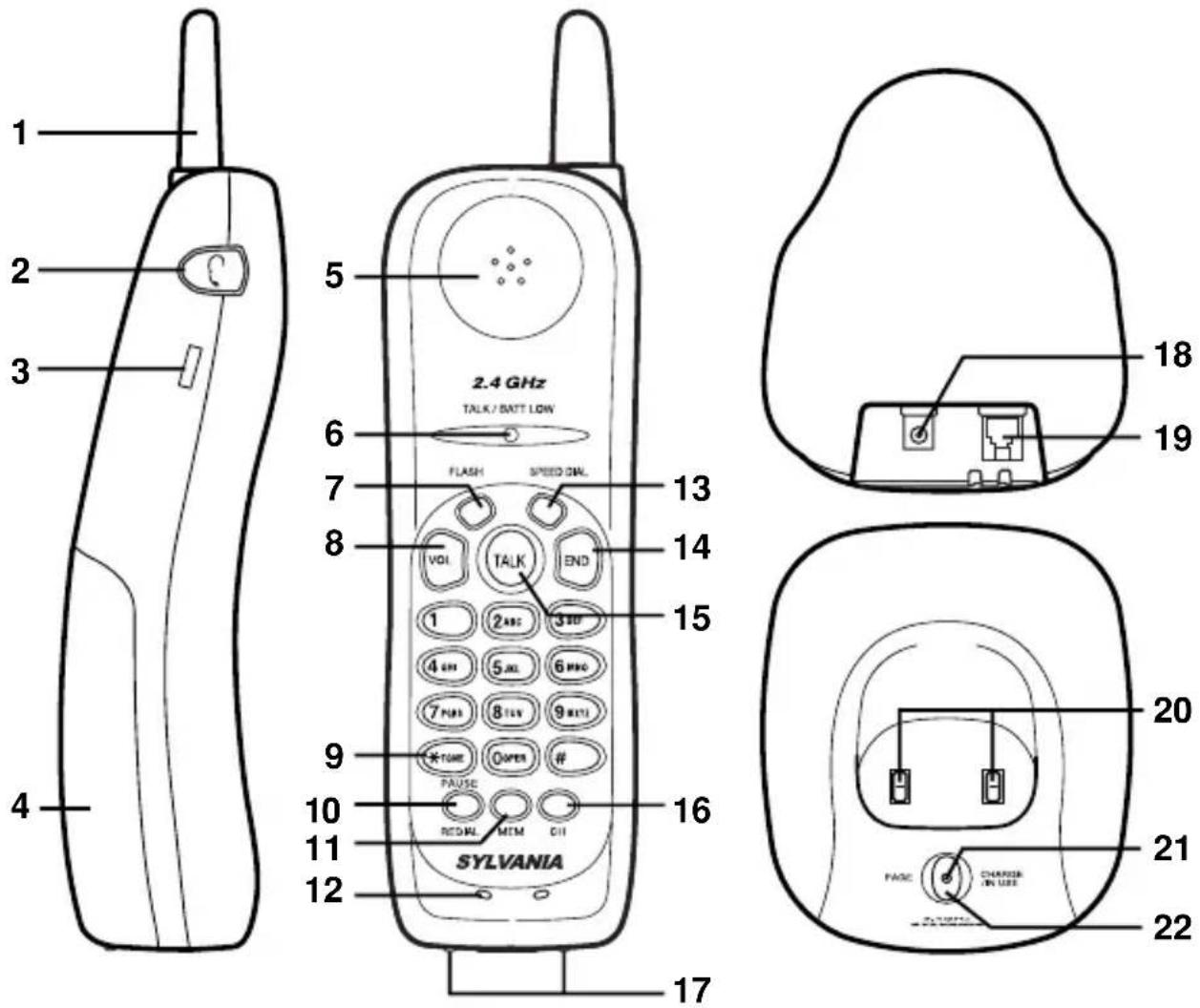
- Handset Antenna
- Headset Jack
- Beltclip Holes
- Handset Battery compartment
- Handset Earpiece
- TALK/BATT LOW LED - indicates when phone is in use or the battery is low
- FLASH - accesses call waiting (if available)
- VOL - sets the ringer tone and earpiece volume
- */TONE - switches to tone dialing in pulse dial mode
- PAUSE/REDIAL - redials the last number / adds a timed pause in a memory dialing sequence
-
MEM - enters or recalls numbers in memory
-
Handset Microphone
- SPEED DIAL - accesses stored numbers in speed dial location for one-touch dialing
- END - hangs up / mutes the ringing tone temporarily
- TALK - answers or places calls
- CH - selects another channel for clearer reception
- Battery Charge Contacts
- DC Power Input
- Phone Line Jack
- Base Contacts
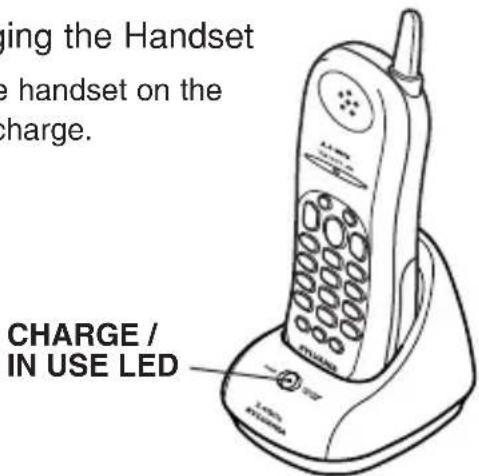
- CHARGE/IN USE LED - indicates the phone is in use or the handset is charging
- PAGE - locates the handset
Charging the Battery Pack
The rechargeable Nickel-Cadmium battery pack must be fully charged before using your phone for the first time. Before plugging the phone line into your new phone, you must charge the battery for approximately 15-20 hours without interruption.
- Remove the handset battery cover.
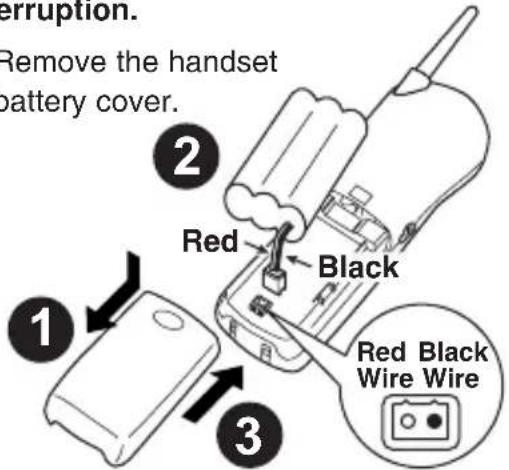
- Plug the battery's cable into the handset.
NOTE: The plastic connectors will fit together only one way. Make sure the battery's connector is properly aligned. Use only the battery pack (model BT-905) supplied with your phone.
- Replace the battery cover.
▼Charging the Handset
Place the handset on the base to charge.
▼Low Battery Indicator
When the battery pack in the handset is low and needs to be charged, the TALK/BATT LOW
LED flashes every 3 seconds.
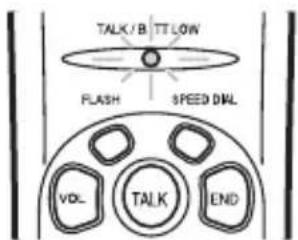
If this occurs while you are on the phone, you will hear a tone. Complete your call as quickly as possible, and return the handset to the base for charging.
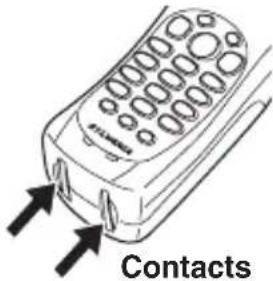
▼Cleaning the Battery Contacts
To maintain a good charge, it is important to clean all battery contacts on the handset about once a month. Use a damp cloth.
Do not use any liquids or solvents.
Selecting a Location
Before choosing a location for your new phone, read the "Important Safety Instructions".
NOTE: • Do not place the power cord in an area where it may create a trip hazard or become chafed and create a fire or electrical hazard.
- If your home has specially wired alarm equipment connected to the telephone line, be sure that installing the system does not disable your alarm equipment. If you have questions about what will disable your alarm equipment, contact your telephone company or a qualified installer.
Choose the Dialing Mode
-
Press and hold FLASH until you hear a confirmation tone.
-
To set the dial mode for pulse dialing, press #.
Or to set the dial mode for tone dialing, press */TONE. A confirmation tone sounds to indicate the setting is complete.
NOTE: Make sure your battery pack is fully charged before choosing the dial mode.
Installing the Base
▼On a Desk Top
-
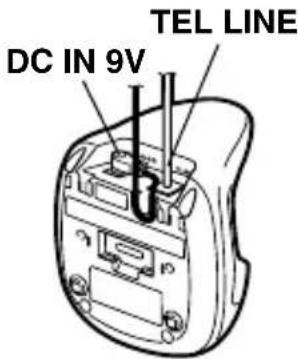
Plug one end of the supplied modular cord into the TEL LINE jack on the back of the base.
-
Insert the supplied AC adapter's barrel plug into the DC IN 9V jack on the back of the base and route the adapter's cord through the strain relief slot on the base.
-
Plug the other end of the modular cord into a modular phone line jack.
-
Plug the adapter into a standard AC outlet.
CAUTION:
You must use a Class 2 power source that supplies 9V DC and delivers at least 210 mA. Its center tip must be set to positive and its plug must fit the phone's DC IN 9V jack. The supplied adapter meets these specifications. Using an adapter that does not meet these specifications could damage the phone or the adapter.
▼On a Wall Plate or Wall
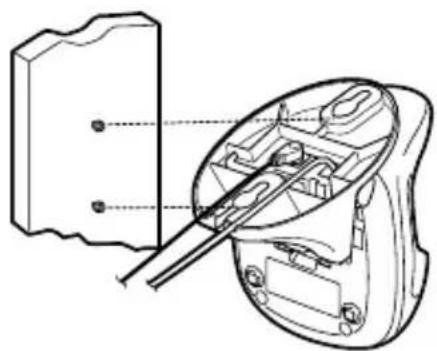
To mount the phone directly on a wall, you need two screws (not supplied) with heads that fit into the keyhole slots on the base. Drill two holes 3 15/16 inches apart. Thread a screw into each hole, letting the heads extend about 1/8 inch.
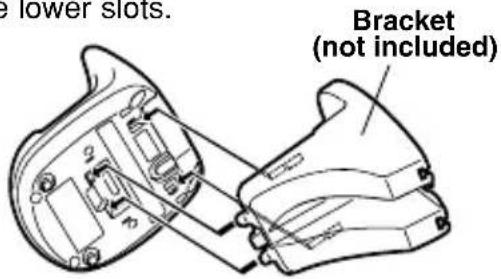
- Insert the two of upper tabs of the optional bracket (not included) into the base's upper tab slots.
Then slide down the bracket so that two of the lower tabs would be inserted into the lower slots. Bracket
-
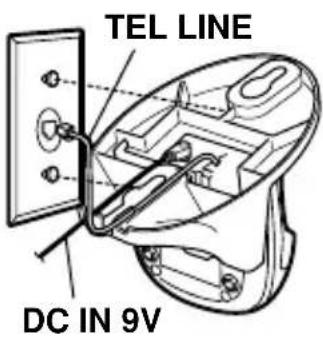
Plug one end of the supplied modular cord into the TEL LINE jack on the base's back.
-
Plug the supplied AC adapter's barrel plug into the DC IN 9V jack.
-
Route the adapter and modular cords through the bracket's grooves.
-
For a wall plate, align the bracket's keyhole slots with the wall plate studs and slide the base downward to secure it.
For direct wall mounting, align the bracket's keyhole slots with the mounting screws and slide the base downward to secure it.
natural_image
Technical line drawing of a mechanical component with a close-up view showing internal structure (no text or symbols)- Plug the adapter into a standard AC outlet. And plug the modular cord's other end into a modular phone line jack.
Installing the Optional Beltclip (not included)
▼To attach the beltclip
Insert the beltclip into the holes on each side of the handset. Press down until it clicks.
▼To remove the beltclip
Pull both sides of the beltclip to release the tabs from the holes.
Adjusting Ringer Controls
▼Ringer Tone and Volume
- While the phone is not in use, press VOL.
- The phone has four ringer tone and volume combinations. Press VOL again until you hear the ringer tone you want.
▼ Setting the Handset Earpiece Volume
- While you are on a call, press VOL.
- The phone has three receiver volume levels, Low, Medium and High. Press VOL repeatedly until you hear the volume level you want. When you hang up, the phone keeps the last volume setting selected.
▼Ringer Mute
The END key can be used temporarily to mute the ringer tone. When the handset is off the base and the phone is ringing, press END and the ringer tone will be temporarily silenced. The ringer tone will return to normal starting with the next incoming call.
Using Your Phone
Making and Receiving Calls
| Handset On Base | Handset Off Base | |
| Answer call | When the phone rings, remove the handset from the base.(Automatic Call Connection) | Press TALK, any number key,*/TONE, or #.(Automatic Call Connection) |
| Make call | 1. Remove the handset from the base and press TALK.2. The TALK/BATT LOW LED flashes and lights.3. Listen for the dial tone.4. Dial the number. | 1. Pick up the handset and press TALK.2. The TALK/BATT LOW LED flashes and lights.3. Listen for the dial tone.4. Dial the number. |
| Hang up | Press END, or return the handset to the base(Automatic Call Completion). | |
| Redial | 1. Remove the handset from the base and press TALK.2. Listen for the dial tone.3. Press PAUSE/REDIAL to dial the last dialed number. | 1. Pick up the handset and press TALK.2. Listen for the dial tone.3. Press PAUSE/REDIAL to dial the last dialed number. |
| Ringer Mute | None | Press END when ringing. |
Storing a Number in Memory
Your ST88244 phone has 10 memory locations for storing important telephone numbers.
- Remove the handset from the base and press MEM. The TALK/BATT LOW LED flashes.
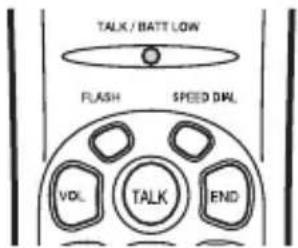
NOTE: You have 30 seconds after pressing MEM to enter the number you wish to store. Otherwise, an error tone will sound.
-
Enter the phone number you want to store (up to 20 digits).
-
Press MEM and enter a number (0-9) on the keypad for the memory location or SPEED DIAL you want to use.
You hear a long beep and the TALK/BATT LOW LED goes out indicating the number has been stored successfully.
If you enter a number in a location that has a previously stored number, it will overwrite the existing number without warning.
Entering a Pause in Memory Dialing
The pause feature is useful for long distance calling, credit card dialing, or sequences that require a pause between digits.
To use this function, press PAUSE/REDIAL on the handset in the phone number
sequence at steps 1 and 2 in "Storing a Number in Memory".
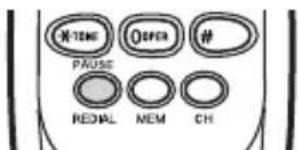
NOTE: Remember, the phone number you wish to store cannot have more than 20 digits, including the pause. (The PAUSE button counts as one digit.)
Follow step 3 in the "Storing a Number in Memory" section to complete the operation.
Storing Mixed Tone/Pulse Numbers
If your phone is set up for pulse dialing, you can store a mixed mode number (up to 20 digits) to easily access long distance services.
-
Remove the handset from the base and press MEM. The TALK/BATT LOW LED flashes.
-
Enter the number to be dialed in pulse mode.
-
Press the */TONE button on the handset. The */TONE button counts as one digit and enters a pause.
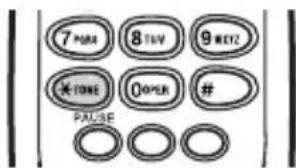
-
Enter the number(s) to be dialed in tone mode.
-
Press MEM and a number (0-9) on the keypad for the memory location you wish to use. You hear a long beep and the TALK/BATT LOW LED goes out.
Dialing a Stored Number
To dial a phone number stored in memory, press TALK, then press MEM and the memory location (0-9). Your phone will dial the stored number.
NOTE: If you select a memory location that does not have a stored number, the handset will beep rapidly and the phone will not dial.
One-touch Dialing (SPEED DIAL)
Your phone is equipped with "One-touch SPEED DIAL" for instant dialing. It is used to dial the phone number stored in speed memory location.
(See "Storing a Number in Memory".)
To instantly dial the phone number stored in speed memory location, simply press SPEED DIAL. (There is no need to press TALK. The phone will automatically dial.)
If you press SPEED DIAL and a phone number is not stored in speed memory location, the phone will beep rapidly and will not dial.
Chain Dialing
After dialing a number you may be requested to enter a special access code, for example, when performing a banking transaction.
- Dial the main number.
- Press MEM and the memory location number (0-9) where the access code has been stored.
Erasing a Stored Number
- Remove the handset from the base.
- Press MEM twice.
- Press the memory location number (0-9) or SPEED
DIAL you want to clear. You hear a long beep confirming that you have erased the number.
Selecting a Different Channel
If you encounter interference while using your phone, you can manually change the phone's channel for clear operation. Interference can come from appliances or other phones in your home. This function works only when the phone is in use.
The CH button on the handset allows you to choose between 20 factory set channels. During the course of a conversation, if you hear static or noise which makes it difficult to hear, press CH. The TALK/BATT LOW LED flashes, indicating the phone is changing to another channel.
Using the Flash Button
Use FLASH for accessing services such as call waiting. (You must subscribe to Call Waiting Service from your phone company to use this feature.) If you receive a call during your conversation, press FLASH on the handset. Press FLASH again to return to the previous call.
Using the Page Feature
The Page feature sends a signal from the base to the handset causing it to beep. This is useful for locating the handset when it is away from the base. To use this feature, press PAGE on the base.
The handset beeps for 60 seconds.
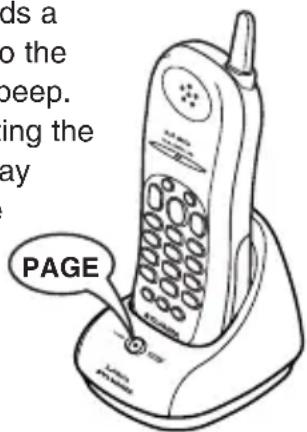
NOTE: Paging is also cancelled when incoming call is received.
To end the page, press any key on the handset or PAGE on the base, or return the handset to the base.
Traveling Out-of-Range
As you begin to move too far from the base unit, you hear a clicking sound. As you travel further, the noise increases. If you travel out-of-range, your call terminates within one minute.
If your ST88244 cordless telephone is not performing to your expectations, please try these simple steps.
If you still unable to resolve the problems, please call SYLVANIA toll free Customer Service; 1-800-287-4871 Monday-Friday 8:30 a.m. - 5:00 p.m. (EST).
Caution: Do not attempt to service this unit yourself. Servicing must be performed by qualified personnel.
| Problem Suggestion | |
| CHARGE/IN USE LEDwon’t come on when handset •is placed in the base. • Make sure | • Make sure the AC adapter is plugged into the base and wall outlet.Make sure the handset is properly seated in the base.ure that the charging contacts on the handset are clean. |
| The audio sounds weak • Moveand/or scratchy. objects or appliances and try again.• Press CH to help eliminate background noise. | |
| Can’t make or receive calls. • Check both ends of the telephone line cord.• Make sure the AC adapter is plugged into the base and a wall outlet.• Disconnect the AC adapter for a few minutes, then reconnect it.• Change the digital security code.• Make sure that the handset is not too far from the base. | |
| Handset doesn’t ring or • The Nickel-Cadmium battery pack may be weak.receive a page. Charge the battery for 15-20 hours.• The handset may be too far away from the base.• Change the digital security code.• Place the base away from appliances or metal objects. |
Changing the Digital Code Security
The digital security code is an identification code used to connect the handset and the base unit. Normally, setting the code is not necessary.
The first time you charge your handset, the security code is automatically set. In the rare situation that you suspect another cordless telephone is using the same security code, you can change the code.
- Remove the handset from the base unit. Press and hold PAGE on the base.
- While holding PAGE, place the handset on the base unit. Leave the handset on the base for more than 5 seconds. A new random security code is set.
NOTE: If the handset battery pack is completely discharged or the battery pack is removed, the digital security code will be lost. If this happens, a new security code is set automatically next time the battery pack is charged.
Headset Installation
Your phone may be used with an optional headset, Parts # 91000B. To use this feature, insert the headset plug into the headset jack. Your phone is ready for hands-free conversations. (Headset may be purchased by calling SYLVANIA Customer Hotline (1-800-287-4871).)
When using your telephone equipment, these basic safety precautions should always be followed to reduce the risk of fire, electrical shock, and injury to persons:
- Read and understand all instructions.
- Follow all warnings and instructions marked on the product.
- Unplug this product from the wall outlet before cleaning. Use a dry cloth for cleaning without liquid or aerosol cleaners.
- Do not use this product near water; for example, near a bath tub, wash bowl, kitchen sink or laundry tub, in a wet basement, or near a swimming pool.
-
Do not place this product on an unstable cart, stand, or table. The telephone may fall, causing serious damage to the unit.
-
Slots and openings in the cabinet and the back or bottom are provided for ventilation. To protect the product from overheating, these openings must not be blocked or covered. This product should never be placed near or over a radiator or heat register. This product should not be placed in a built-in installation unless proper ventilation is provided.
-
This product should be operated only from the type of power source indicated on the marking label. If you are not sure of the type of power supply to your home, consult your dealer or local power company.
-
Do not allow anything to rest on the power cord. Do not locate this product where the cord will be damaged by persons walking on it.
-
Do not overload wall outlets and extension cords, as this can result in the risk of fire or electrical shock.
-
Never push objects of any kind into this product through cabinet slots, as they may touch dangerous voltage points or short out parts that could result in a risk of fire or electric shock. Never spill liquid of any kind on the product.
-
To reduce the risk of electric shock, do not disassemble this product. Take it to qualified service personnel when service or repair work is required. Opening or removing covers may expose you to dangerous voltages or other risks. Incorrect reassembly can cause electric shock when the appliance is subsequently used.
-
Unplug this product from the wall outlet and refer servicing to qualified service personnel under the following conditions:
A. When the power supply cord is damaged or frayed.
B. If liquid has been spilled into the product.
C. If the product has been exposed to rain or water.
D. If the product does not operate normally when following the operating instructions. (Adjust only those controls that are covered by the operating instructions. Improper adjustment of other controls may result in damage and will often require extensive repair work by a qualified technician.)
E. If the product has been dropped or the cabinet has been damaged.
F. If the product exhibits a distinct change in performance.
- Do not use the telephone to report a gas leak in the vicinity of the leak.
▼Safety Instructions for Batteries – Handset Battery Pack
CAUTION:
Use only a SYLVANIA phone approved battery pack in the handset of your Cordless Telephone. When handling the batteries, be careful not to short the battery with conducting materials such as rings, bracelets, and keys. The battery or conducting material may overheat and cause burns. To reduce the risk of fire or injury, always do the following when replacing, discarding or charging batteries.

CONTAINS NICKEL CADMIUM BATTERY. MUST BE RECYCLED OR DISPOSED OF PROPERLY.
A. Use only the following type and size battery in the cordless phone: Self contained 3-cell Nickel-Cadmium rechargeable battery supply, BT-905 DC 3.6V 600mAh
B. Do not dispose of the battery pack in a fire. The cell may explode. Check with local codes for possible special disposal instructions.
C. Do not attempt to open or mutilate the battery pack. The chemicals are dangerous and may cause damage to the eyes or skin, and may be toxic if swallowed.
D. Follow the charging instructions outlined in this manual.
Nickel-cadmium cells are used in the battery pack. Please take your used nickel-cadmium battery packs to a store that recycles nickel-cadmium batteries.
I.C. NOTICE
TERMINAL EQUIPMENT
Notice: This equipment meets the applicable Industry Canada Terminal Equipment Technical Specifications.
This is confirmed by the registration number. The abbreviation, IC, before the registration number signifies that registration was performed based on a Declaration of Conformity indicating that Industry Canada technical specifications were met. It does not imply that Industry Canada approved the equipment.
Notice: The Ringer Equivalence Number (REN) for this terminal equipment is marked on the equipment itself. The REN assigned to each terminal equipment provides an indication of the maximum number of terminals allowed to be connected to a telephone interface. The termination on an interface may consist of any combination of devices subject only to the requirement that the sum of the Ringer Equivalence Numbers of all the devices does not exceed five.
RADIO EQUIPMENT
The term "IC:" before the radio certification number only signifies that Industry Canada technical specifications were met.
Operation is subject to the following two conditions: (1) this device may not cause interference, and (2) this device must accept any interference, including interference that may cause undesired operation of the device. "Privacy of communications may not be ensured when using this telephone".
SYLVANIA TELEPHONE WARRANTY
We appreciate your purchase of a SYLVANIA Telephone product. We take pride in the quality of our products and have manufactured your new Telephone unit to exacting quality standards. We feel confident that in normal use, it will provide you with satisfactory performance. However, should you experience difficulty, you are protected under the provisions of this warranty.
SYLVANIA Telephone products are warranted against manufacturing defects in materials and workmanship in normal use for the following period from the date of purchase by the original user, and is conditional upon the unit being installed and used as directed in the instruction manual.
PRODUCT PARTS AND LABOUR
Cordless Telephone 1 Year
Corded Telephone 1 Year
Telephone Headset 1 Year
SYLVANIA's obligation under this warranty shall be limited to the repair, including all necessary parts and the cost of the labour connected therewith, or at our option the exchange of any Telephone product which shows evidence of a manufacturing defect within the warranty period.
Replacement parts, furnished in connection with this warranty shall be warranted for a period equal to the unexpired portion of the original equipment warranty.
CUSTOMER OBLIGATIONS
This warranty applies to the product from the original date of purchase at retail. Therefore, the owner must provide a copy of the original, dated bill of sale. No warranty service will be performed without a bill of sale. Transportation to and from the service depot is the responsibility of the owner.
WARRANTY EXCLUSIONS
This warranty is extended to SYLVANIA Telephone products purchased and used in Canada. This warranty shall not apply to appearance or accessory items including but not limited to: antenna, cabinet, cabinet parts, knobs, batteries, connecting cables, cassette tapes, compact discs. This warranty shall, in addition, not apply to damages due to handling, transportation, unpacking, set-up, installation, customer adjustments that are covered in the instruction book, repair or replacement of parts supplied by other than the SYLVANIA authorized service depot, any malfunction or failure caused by or resulting from abnormal environmental conditions, improper unauthorized service, improper maintenance, modifications or repair by the consumer, abuse, misuse, neglect, accident, fire, flood, or other Acts of God, and incorrect line voltage.
This Telephone product is only warranted to the original retail purchaser. This warranty becomes void in the event of commercial or rental use. This warranty becomes void in the event serial numbers are altered, defaced or removed.
SYLVANIA reserves the right to make changes in design or to make additions to or improvements upon this product without incurring any obligation to install the same on products previously manufactured. The foregoing is in lieu of all other warranties expressed or implied and SYLVANIA neither assumes nor authorizes any person to assume for it any other obligation or liability in connection with the sale or service of this product. In no event shall SYLVANIA or its SYLVANIA dealers be liable for special or consequential damage arising from the use of this product, or for any delay in the performance of this warranty due to cause beyond our control.
The purchaser may have other rights under existing provincial or federal laws, and where any terms of this warranty are prohibited by such laws, they are deemed null and void, but the remainder of the warranty shall remain in effect.
HOW TO OBTAIN SERVICE
Should this product require service, you may obtain specific information on how to obtain service by contacting the SYLVANIA Dealer from whom this product was purchased, or by contacting us directly:
SYLVANIA SERVICE
300 Alden Road
Markham, Ontario
L3R 4C1
PHONE: (905) 940-5089 FAX: (905) 940-2303
1-800-287-4871
ST88244
- Bloc-piles rechargeable (BT-905)
- Adaptateur CA (AD-0001)
- Fil téléphonique
Charger le bloc-piles
natural_image
Technical line drawing of a mechanical component with a close-up view of its base plate (no text or symbols)PRODUIT PIÈCES ET MAIN-D'OEUVRE
Téléphones sans fil 1 an
OBLIGATIONS DU CLIENT
EXCLUSIONS DE LA GARANTIE
300 Alden Road, Markham, Ontario L3R 4C1
TÉLÉPHONE: (905) 940-5089 FAX: (905) 940-2303
1-800-287-4871

- OWNER'S MANUAL
- Introduction ......2
- Controls and Functions ....3
- Installation ....4
- Setting Up Your Phone ....6
- Using Your Phone ......6
- Troubleshooting 9
- Changing the Digital Code Security .....9
- Headset Installation 9
- Important Safety Instructions ....10
- I.C. Notice....11
- SYLVANIA TELEPHONE WARRANTY
- Introduction
- ▼Features
- ▼Included in Your Package
- Charging the Battery Pack
- Selecting a Location
- Choose the Dialing Mode
- Installing the Base
- ▼On a Desk Top
- CAUTION:
- ▼On a Wall Plate or Wall
- Installing the Optional Beltclip (not included)
- ▼To attach the beltclip
- ▼To remove the beltclip
- Adjusting Ringer Controls
- ▼Ringer Tone and Volume
- ▼ Setting the Handset Earpiece Volume
- ▼Ringer Mute
- Using Your Phone
- Storing a Number in Memory
- Entering a Pause in Memory Dialing
- Storing Mixed Tone/Pulse Numbers
- Dialing a Stored Number
- One-touch Dialing (SPEED DIAL)
- Chain Dialing
- Erasing a Stored Number
- Selecting a Different Channel
- Using the Flash Button
- Using the Page Feature
- Traveling Out-of-Range
- Changing the Digital Code Security
- Headset Installation
- CONTAINS NICKEL CADMIUM BATTERY. MUST BE RECYCLED OR DISPOSED OF PROPERLY.
- I.C. NOTICE
- TERMINAL EQUIPMENT
- RADIO EQUIPMENT
- PRODUCT PARTS AND LABOUR
- CUSTOMER OBLIGATIONS
- WARRANTY EXCLUSIONS
- HOW TO OBTAIN SERVICE
- ST88244
- Charger le bloc-piles
- PRODUIT PIÈCES ET MAIN-D'OEUVRE
- OBLIGATIONS DU CLIENT
- EXCLUSIONS DE LA GARANTIE
Brand : SYLVANIA
Model : ST88244
Category : Telephone