ManualGo.com
ES8228 - Shaver PANASONIC - Free user manual and instructions
Find the device manual for free ES8228 PANASONIC in PDF.



Download the instructions for your Shaver in PDF format for free! Find your manual ES8228 - PANASONIC and take your electronic device back in hand. On this page are published all the documents necessary for the use of your device. ES8228 by PANASONIC.
USER MANUAL ES8228 PANASONIC
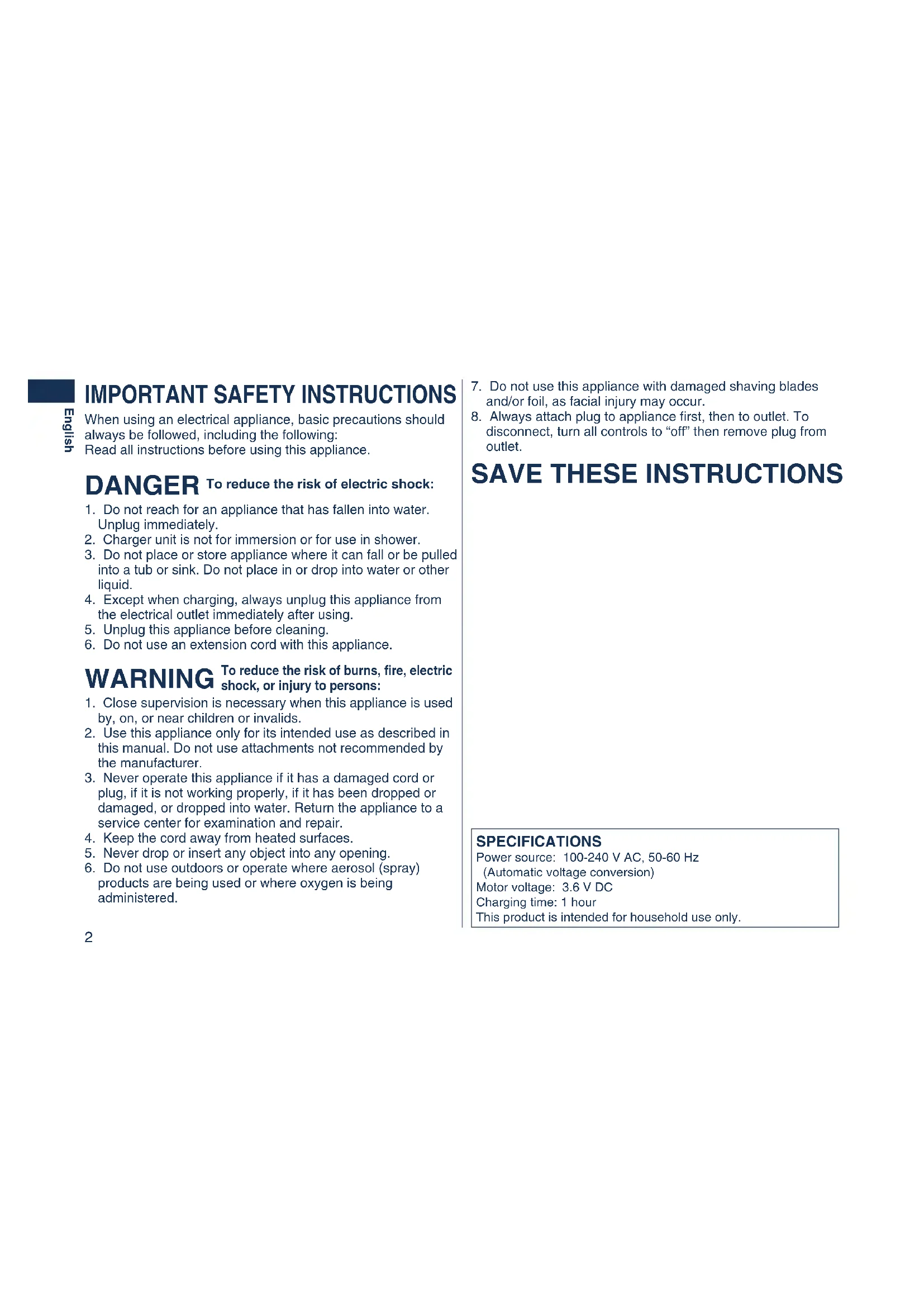
1. Close supervision is necessary when this appliance is used
by, on, or near children or invalids.
2. Use this appliance only for its intended use as described in
this manual. Do not use attachments not recommended by the manufacturer.
3. Never operate this appliance if it has a damaged cord or
plug, if it is not working properly, if it has been dropped or damaged, or dropped into water. Return the appliance to a service center for examination and repair.
4. Keep the cord away from heated surfaces.
5. Never drop or insert any object into any opening.
6. Do not use outdoors or operate where aerosol (spray)
products are being used or where oxygen is being administered.
IMPORTANT SAFETY INSTRUCTIONS
When using an electrical appliance, basic precautions should always be followed, including the following: Read all instructions before using this appliance. DANGER
1. Do not reach for an appliance that has fallen into water.
2. Charger unit is not for immersion or for use in shower.
3. Do not place or store appliance where it can fall or be pulled
into a tub or sink. Do not place in or drop into water or other liquid.
4. Except when charging, always unplug this appliance from
the electrical outlet immediately after using.
5. Unplug this appliance before cleaning.
6. Do not use an extension cord with this appliance.
WARNING To reduce the risk of burns, fire, electric shock, or injury to persons: To reduce the risk of electric shock:
SAVE THESE INSTRUCTIONS
7. Do not use this appliance with damaged shaving blades
and/or foil, as facial injury may occur.
8. Always attach plug to appliance first, then to outlet. To
disconnect, turn all controls to “off” then remove plug from outlet. SPECIFICATIONS Power source: 100-240 V AC, 50-60 Hz (Automatic voltage conversion) Motor voltage: 3.6 V DC Charging time: 1 hour This product is intended for household use only. ES8228_USA.indb 2 2006/08/21 15:51:353 English Important Before use This Wet/Dry shaver can be used for wet shaving with shaving lather or for dry shaving. You can use this watertight shaver in the shower and clean it in water. The following is the symbol of Wet shaver. The symbol means that hand-held part may be used in a bath or shower. Treat yourself to wet lather shaves for at least three weeks and notice the difference. Your Panasonic Wet/Dry shaver requires a little time to get used to because your skin and beard need about a month to adjust to any new shaving method. Using the shaver Caution - The outer foil is very thin and can be damaged if not used correctly. Check that the foil is not damaged before using the shaver. Do not use the shaver if the foil etc. is damaged as you will cut your skin. Charging the shaver Only use the supplied power cord and recharger to charge the shaver. Plug in the adaptor into a household outlet where there is no moisture and handle it with dry hands. The shaver and the recharger may become warm during use and charging. However, this is not a malfunction. Do not charge the shaver where it will be exposed to direct sunlight or other heat sources. Hold the adaptor when disconnecting it from the household outlet. If you tug on the power cord, you may damage it. Contact an authorized service center if the power cord gets damaged. The adaptor is intended to be correctly oriented in a vertical or floor mount position. Cleaning the shaver Disconnect the power cord from the shaver before cleaning it to prevent electric shock. Keep both the inner blades inserted. If only one of the inner blades is inserted, the shaver may be damaged. If you clean the shaver with water, do not use salt water or hot water. Do not soak the shaver in water for a long period of time. Wipe it with a cloth dampened with soapy water. Do not use thinner, benzine or alcohol. Storing the shaver Disconnect the power cord when storing the shaver. Do not bend the power cord or wrap it around the shaver. Do not leave this shaver within the reach of small children. Keep these operating instructions in a safe place. Self-cleaning recharger Do not clean the adaptor or the self-cleaning recharger in water as it will damage them or cause an electric shock. Do not remove the shaver from the self-cleaning recharger while using a course that includes the “Dry” function. A heater is used so the area around the blades becomes extremely hot and you may burn yourself. Place the self-cleaning recharger on a level and stable surface. Otherwise the cleaning liquid may spill and discolor leather products or other surfaces. Wipe it immediately. The self- cleaning recharger cleans the inner blades and the system outer foil. Wash with water to remove beard trimmings in other areas. ES8228_USA.indb 3 2006/08/21 15:51:354 English Parts identification
Self-cleaning recharger (Referred to as the “Recharger”.) Detergent cartridge Water tank Socket Water tank cap Clean lamp Dry lamp Charge lamp Status lamp Select button Cleaning tray Feed water line Operating temperature: 15-35 °C (59-95 °F) Operating humidity: Less than 95%
- If you use the self-cleaning recharger in temperatures outside the above range, the following problems may occur. - The time it takes to charge the shaver increases. - The recharger stops functioning. - The lifespan of the rechargeable battery shortens. (Only when you use the recharger in lower temperatures.) In this case the backlight of the LCD panel will blink twice every second.
- If and the backlight of the LCD panel does not glow, wait for a short while until it glows.
- Depending on the environment, the shaver may not dry even if you select a course that includes the “Dry” function. In this case, wipe off any drops of water with a dry cloth. Operating environment for the self-cleaning recharger ES8228_USA.indb 4 2006/08/21 15:51:375 English Charging with the self-cleaning recharger Thoroughly wipe off any drops of water on or around the recharger so that it is dry before charging it. You can charge without the recharger.
Charge Attach the detergent cartridge and the water tank to the self-cleaning recharger. Page 7 Insert the appliance plug. Plug in the adaptor. Remove the protective cap and then attach the shaver.
- Turn the shaver off before attaching.
- Check that the outer foil is not deformed or damaged when you are attaching the shaver.
- The backlight of the LCD panel glows and charging starts.
- Charging is completed when the backlight of the LCD panel blinks. (Max. 1 hour later)
- You can keep the shaver attached to the recharger, or connected to the adaptor, when not using it to maintain full battery capacity. You cannot overcharge the shaver.
- A special plug adaptor may be required in some areas. Charging without the self-cleaning recharger
1. Insert the appliance plug into
2. Plug in the adaptor into a
household outlet. ES8228_USA.indb 5 2006/08/21 15:51:386 English Using the trimmer About the LCD panel 10 minutes after charging is completed The backlight of the LCD panel blinks once every 2 seconds. After charging is completed The backlight of the LCD panel blinks once every second. While charging The backlight of the LCD panel glows. During use The battery capacity is low when “10%” appears and blinks.
- A full charge will supply enough power for approx. 14 shaves of 3 minutes each.
You can shave 1 to 2 times after “10%” appears. (This will differ depending on usage.) Using the shaver Shave Press the On/Off switch. Hold the shaver as illustrated above and shave.
- Start out shaving by applying gentle pressure to your face. Stretch your skin with your free hand and move the shaver back and forth in the direction of your beard. You may gently increase the amount of pressure as your skin becomes accustomed to this shaver. Applying excessive pressure does not provide a closer shave. Use to select “SOFT” (soft) or “LOCK” (lock). You can change the pivot action whether the shaver is turned on or off. SOFT LOCK Pivot action selector Slide the trimmer handle up. Place at a right angle to your skin and move downwards to trim your sideburns. The LCD panel shows the remaining battery capacity from 0% to 100%, in 10% increments. ES8228_USA.indb 6 2006/08/21 15:51:397 English Preparing the self-cleaning rechargerRemove the shaver and the appliance plug from the self-cleaning recharger.
Cleaning with the self-cleaning recharger Care Remove the water tank and then open the water tank cap.Wash away the old cleaning liquid and then rinse the water tank.Pour tap water up to the feed water line.• Do not let the tap water rise above the feed water line. This may cause the cleaning liquid to spill.Securely close the water tank cap and then attach the tank.Peel off the seals from the new detergent cartridge. (2 seals)• Hold the detergent cartridge horizontally. (The detergent may spill if the detergent cartridge is tilted too much.)Attach the detergent cartridge. Replace the HydraClean™ Shaving System Solution Cartridge when the status lamp is illuminated. Use the below chart as a guide. Shaving Cleaning Reusability1 time/day1 time/day approx. 30-40 times1 time/3 days approx. 10-14 times1 time/week approx. 4-6 timesThe expiration date of the cleaning liquid is 6 months after it is opened. If you do not use the cleaning liquid for more than 6 months, throw away the detergent cartridge and the cleaning liquid. • Only use self-cleaning recharger special detergent for Panasonic shavers.• Always change the detergent cartridge and the cleaning liquid in the water tank at the same time. Adding water, or changing just the detergent cartridge or the water, will result in deteriorated cleaning functions.• If you operate the self-cleaning recharger, the concentrated detergent in the detergent cartridge dilutes and the water inside the tank will become a cleaning liquid. ES8228_USA.indb 7 2006/08/21 15:51:408 English Cleaning the shaver
- Each time you press [SELECT], the course changes from “Clean/ Dry/Charge”“Clean/Dry”“Dry/Charge”“Dry”“Charge”.
- The courses start approximately 6 seconds after they are selected.
- The course will be aborted if the power is cut off. In this case, perform the course again from the beginning.
- Do not detach the detergent cartridge or the water tank as the cleaning liquid may spill causing a malfunction.
SELECTCLEAN DRY CHARG STATUS Insert the appliance plug. Plug in the adaptor. Remove the protective cap and then attach the shaver.
- Turn the shaver off before attaching.
- Check that the outer foil is not deformed or damaged when you are attaching the shaver. Press [SELECT] to select the course. Course Course selection indications
Course completion summary On recharger Changeable course halfway through On recharger On shaver Time required (guide) [In the low temperature] clean dry charge clean dry charge Backlight Charge
Blinks 1 hour Clean/Dry/Charge Blinks 2 hours [+30 min] Clean/Dry – 1 hour [+30min ] Dry/Charge Blinks 2 h 40 min Dry – 1 h 40 min *The lamp goes out in 6 seconds.
- Remove any soap or water on the shaver if it has been washed with hand soap or any other detergent. ES8228_USA.indb 8 2006/08/21 15:51:429 English Cleaning with the self-cleaning recharger (continued) Do the following if the status lamp blinks or glows during the “Clean/Dry/Charge” course or the “Clean/Dry” course. Blinks Correctly set the detergent cartridge and then restart a course. If the status lamp goes out Continue a course. Glows Remove the shaver from the self-cleaning recharger and then check that the [CLEAN] lamp has gone out. (Be careful as the blade may be hot or wet.) Check that the water tank is correctly attached, the water tank cap is securely closed and the self- cleaning recharger is placed horizontally. When an abnormality has been corrected Press and hold [SELECT] for approximately 2 seconds to turn off the status lamp and then restart a course. When no abnormality was found It is time to replace the detergent cartridge and cleaning liquid inside the water tank. Drain the old cleaning liquid inside the water tank and then refill it with water. Replace the old detergent cartridge and then restart the course. When the status lamp goes out Continue a course. When the status lamp glows again Contact an authorized service center. Cleaning the shaver without the self-cleaning recharger
We recommend to clean your shaver with the self-cleaning recharger or the “sonic” vibration cleaning when appears in the LCD panel.
1. Disconnect the power cord
2. Apply some hand soap to the
3. Press the On/Off switch for
more than 2 seconds to activate the turbo mode for “sonic” vibration cleaning.
- appears in the LCD panel.
- After about 20 seconds, it will be automatically turned off, or you can turn it off by pressing the On/Off switch.
4. Remove the system outer foil
and press the On/Off switch for more than 2 seconds to activate the turbo mode for “sonic” vibration cleaning and clean it with running water.
5. Wipe off any drops of water
6. Remove the system outer foil
to allow it to dry completely. ES8228_USA.indb 9 2006/08/21 15:51:4310 English Cleaning the self-cleaning recharger
1. Be sure to remove the water tank and the appliance plug from the self-cleaning recharger.
Be careful not to spill the cleaning liquid.2. Gently wipe off any beard trimmings attached to the inside of the cleaning tray with a cloth or tissue paper dampened with water.• Clean the corners and uneven parts of the cleaning tray with a cotton swab dampened with water.
Beard trimmings may become attached to the cleaning tray of the self-cleaning recharger. Follow the steps below to remove them. We recommend doing this each time you change the detergent cartridge.• Do not pull hard on the rubber blade protector at the bottom of the cleaning tray. The rubber may come off if you pull hard on it. It is only necessary to pull it up slightly.• Warning - Do not wash or apply water to the adaptor or self-cleaning recharger. Failure to observe this may cause electric shock or result in short circuits. Replacing the system outer foil and the inner blades. 1. Press the buttons and lift upwards as illustrated.2. Remove the inner blades one at a time as illustrated.• Do not touch the edges (metal parts) of the inner blades to prevent injury to your hand.3. Insert the inner blades one at a time until they click as illustrated.4. Insert the system outer foil by pushing it downwards until it clicks.
system outer foil once every yearinner blade once every two years Caution for turbo mode
- Shaving in turbo mode may damage your skin. Turn the shaver off and then on again to cancel turbo mode.• Do not place your fingers on the On/Off switch while using the shaver. This may cause the shaver to turn off or enter turbo mode. Place your fingers on the finger rest while using the shaver. ES8228_USA.indb 10 2006/08/21 15:51:4411 English Removing the built-in rechargeable battery Remove the built-in rechargeable battery before disposing of the shaver. Do not dismantle or replace the battery so that you can use the shaver again. This could cause fire or an electric shock. Replace it at an authorized service center.
1. Disconnect the power cord
from the shaver when removing the battery.
2. Remove the screw and
remove the bottom cover.
3. Slide the trimmer handle up and remove the screw and
4. Remove the upper rear panel .
5. Remove the screws and remove the back panel.
6. Remove the lower rear panel .
7. Remove the screws and remove the housing .
8. Lift the battery and remove it.
When the water does not drain from the cleaning tray Beard trimmings may clog the drain at the bottom of the cleaning tray. In this case, you cannot clean or dry the shaver. Push the beard trimmings down through the drain with a tooth pick etc. FOR YOUR CONVENIENCE, WE HAVE ESTABLISHED A TOLL- FREE (IN USA ONLY) NATIONAL ACCESSORY PURCHASE HOT LINE AT 1-800-332-5368. IN CANADA, CONTACT PANASONIC CANADA INC. AT THE ADDRESS OR TELEPHONE NUMBER ON THE BACK PAGE. ATTENTION: A Lithium-ion battery that is recyclable powers the product you have purchased. Please call 1-800-8-BATTERY for information on how to recycle the battery. R B R CL i - i o n T M WARNING for Lithium Battery: Fire, explosion, and severe burn hazard. Do not crush, disassemble, heat above 100°C (212°F), or incinerate. drain ES8228_USA.indb 11 2006/08/21 15:51:4512 Français
Parpadea 1 hora Clean/Dry/Charge Parpadea 2 horas [+30 min] Clean/Dry – 1 hora [+30min ] Dry/Charge Parpadea 2 h 40 min Dry – 1 h 40 min *The lamp goes out in 6 seconds.