
ES8101 - Razor PANASONIC - Free user manual and instructions
Find the device manual for free ES8101 PANASONIC in PDF.

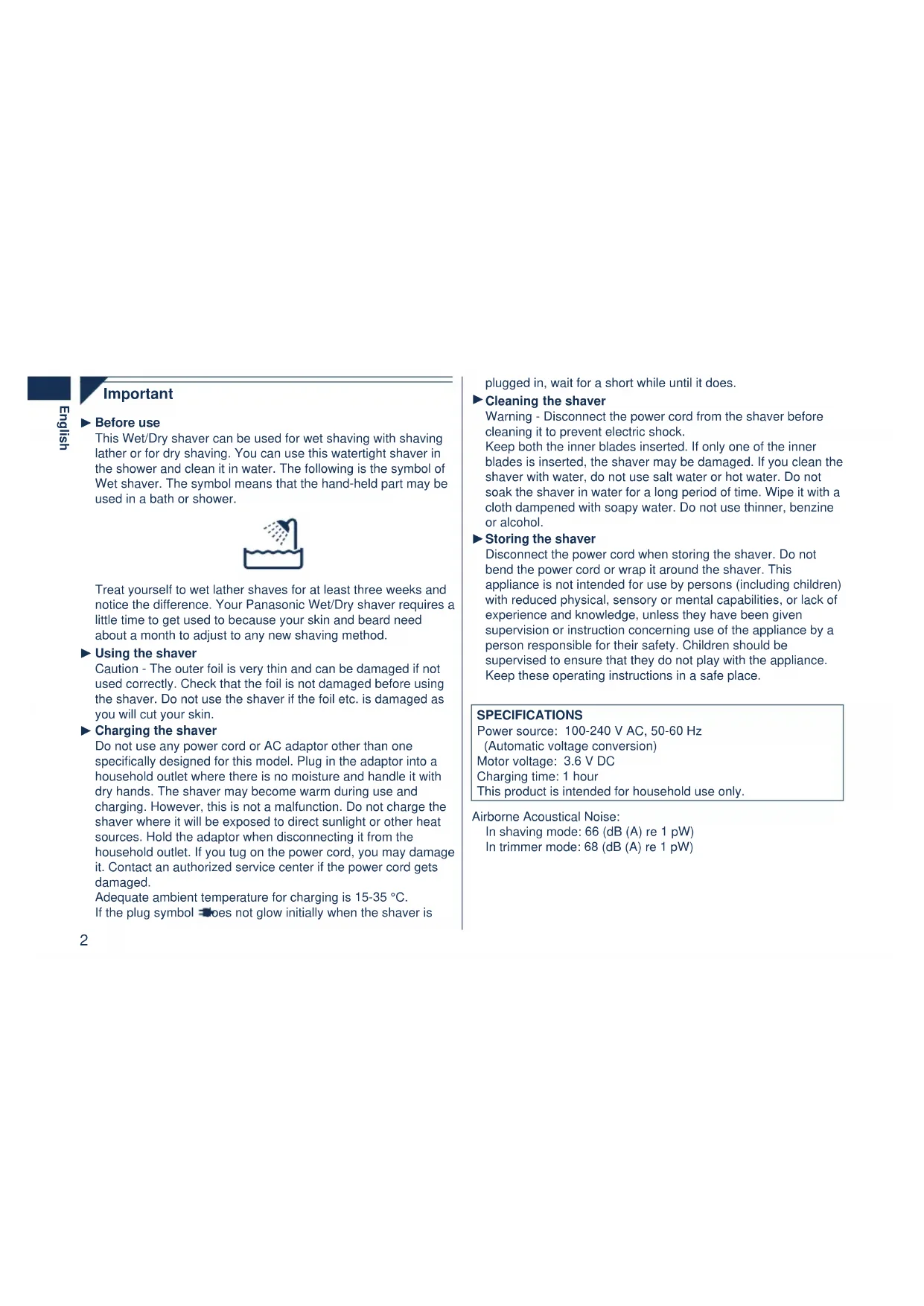


| Product type | Dry/Wet shaver |
| Brand | Panasonic |
| Model | ES8101 |
| Dimensions (L x W x H) | 6.4 cm × 15.7 cm × 4.3 cm |
| Weight | 170 g |
| Power supply | 100-240 V AC, 50/60 Hz (automatic conversion) |
| Motor voltage | 3.6 V DC |
| Charging time | 1 hour |
| Battery life | Approx. 14 shaves of 3 minutes |
| Usage | Dry shaving or in the shower with gel |
| Action selector | Pivot with SOFT and LOCK modes |
| Trimmer | Built-in, lever-operated |
| LED display | Charge and low battery indicator |
| Cleaning | With soapy water and sonic vibration turbo mode |
| Lubrication | Recommended with supplied oil |
| Foil replacement | Every year |
| Blade replacement | Every two years |
| Battery | Built-in rechargeable lithium-ion |
| Noise level (shaving) | 66 dB(A) |
| Noise level (trimmer) | 68 dB(A) |
| Included accessories | Adapter (RE7-40), power cord, cleaning brush, oil, case |
| Safety | Automatic stop in turbo mode, disconnect before cleaning |
Frequently Asked Questions - ES8101 PANASONIC
User questions about ES8101 PANASONIC
0 question about this device. Answer the ones you know or ask your own.
Ask a new question about this device
Download the instructions for your Razor in PDF format for free! Find your manual ES8101 - PANASONIC and take your electronic device back in hand. On this page are published all the documents necessary for the use of your device. ES8101 by PANASONIC.
USER MANUAL ES8101 PANASONIC
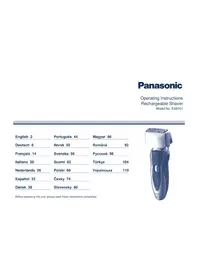
Operating Instructions
Rechargeable Shaver
Model No. ES8101
Before operating this unit, please read these instructions completely.
Important
▶ Before use
This Wet/Dry shaver can be used for wet shaving with shaving lather or for dry shaving. You can use this watertight shaver in the shower and clean it in water. The following is the symbol of Wet shaver. The symbol means that the hand-held part may be used in a bath or shower.

Treat yourself to wet lather shaves for at least three weeks and notice the difference. Your Panasonic Wet/Dry shaver requires a little time to get used to because your skin and beard need about a month to adjust to any new shaving method.
▶ Using the shaver
Caution - The outer foil is very thin and can be damaged if not used correctly. Check that the foil is not damaged before using the shaver. Do not use the shaver if the foil etc. is damaged as you will cut your skin.
▶ Charging the shaver
Do not use any power cord or AC adaptor other than one specifically designed for this model. Plug in the adaptor into a household outlet where there is no moisture and handle it with dry hands. The shaver may become warm during use and charging. However, this is not a malfunction. Do not charge the shaver where it will be exposed to direct sunlight or other heat sources. Hold the adaptor when disconnecting it from the household outlet. If you tug on the power cord, you may damage it. Contact an authorized service center if the power cord gets damaged.
Adequate ambient temperature for charging is 15-35 °C. If the plug symbol does not glow initially when the shaver is
plugged in, wait for a short while until it does.
▶ Cleaning the shaver
Warning - Disconnect the power cord from the shaver before cleaning it to prevent electric shock.
Keep both inner blades inserted. If only one inner blade is inserted, the shaver may be damaged. If you clean the shaver with water, do not use salt water or hot water. Do not soak the shaver in water for a long period of time. Wipe it with a cloth dampened with soapy water. Do not use thinner, benzine, or alcohol.
Storing the shaver
Disconnect the power cord when storing the shaver. Do not bend the power cord or wrap it around the shaver. This appliance is not intended for use by persons (including children) with reduced physical, sensory, or mental capabilities, or lack of experience and knowledge, unless they have been given supervision or instruction concerning use of the appliance by a person responsible for their safety. Children should be supervised to ensure that they do not play with the appliance. Keep these operating instructions in a safe place.
SPECIFICATIONS
Power source: 100-240 V AC, 50-60 Hz
(Automatic voltage conversion)
Motor voltage: 3.6 V DC
Charging time: 1 hour
This product is intended for household use only.
Airborne Acoustical Noise:
In shaving mode: 66 (dB (A) re 1 pW)
In trimmer mode: 68 (dB (A) re 1 pW)
Parts identification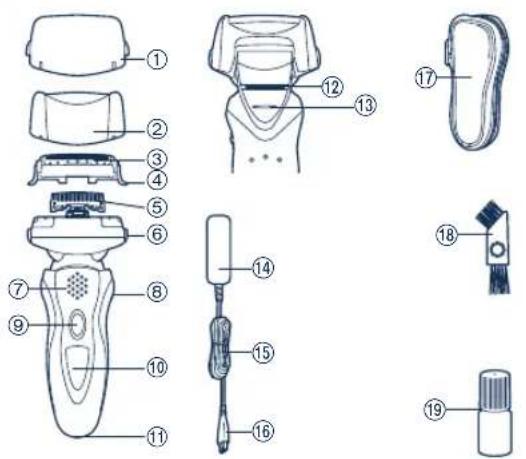
1. Protective cap 2. Foil frame 3. System outer foil 4. System outer foil release buttons 5. Inner blades 6. Foil frame release buttons 7. Finger rest 8. Pivot action selector 9. OFF/ON switch
⑩ LED display ⑪ Appliance socket ⑫ Trimmer ⑬ Trimmer handle ⑭ Adaptor (RE7-40) ⑮ Power cord ⑯ Appliance plug ⑰ Soft case ⑱ Cleaning brush ⑲ Oil
Charge
Charging
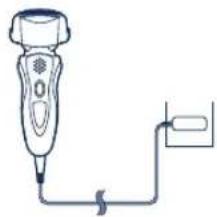
1 Insert the appliance plug into the shaver.
2 Plug in the adaptor into a household outlet.
- glows and charging starts.
- Charging is completed when blinks.
(Max. 1 hour later)
About the lamp
While charging
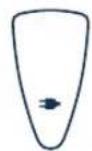
Glows red.
After charging is completed
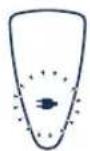
Blinks red once every second.
10 minutes after charging is completed
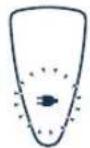
Blinks red once every 2 seconds.
When the battery capacity is low
- You can shave 1 to 2 times after <blinks. (This will differ depending on usage.)
blinks.
- A full charge will supply enough power for approx. 14 shaves of 3 minutes each.
▶ Using the trimmer
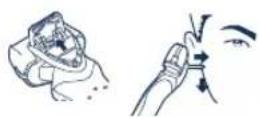
Slide the trimmer handle up. Place at a right angle to your skin and move downwards to trim your sideburns.
Shave
Using the shaver
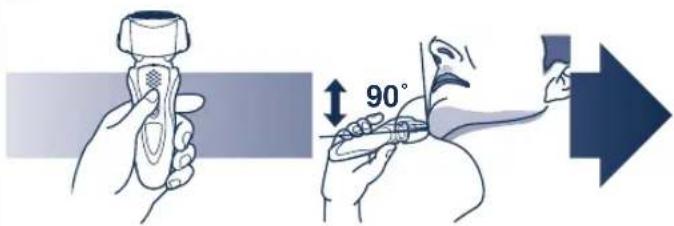
1 Press the OFF/ON switch.
2 Hold the shaver as illustrated above and shave.
- Start out shaving by applying gentle pressure to your face. Stretch your skin with your free hand and move the shaver back and forth in the direction of your beard. You may gently increase the amount of pressure as your skin becomes accustomed to this shaver. Applying excessive pressure does not provide a closer shave.
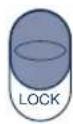
▶ Pivot action selector
Use to select "SOFT" (soft) or "LOCK" (lock).
You can change the pivot action whether the shaver is turned on or off.
Clean
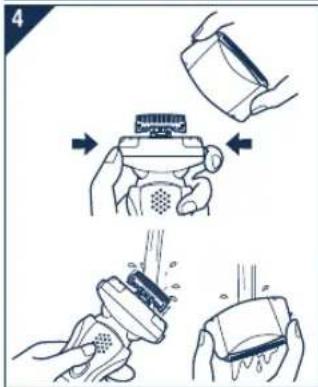
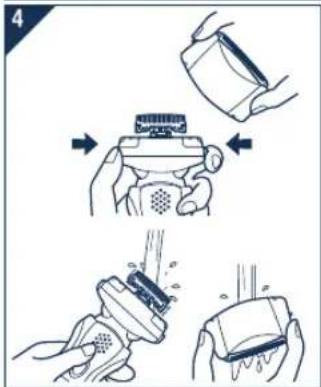
Cleaning
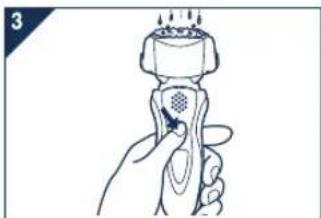
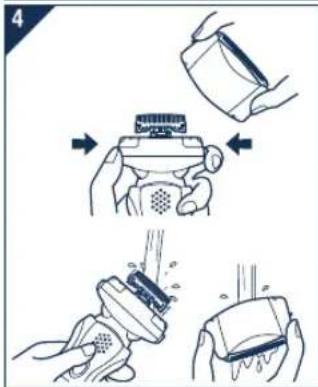
- Disconnect the power cord from the shaver.
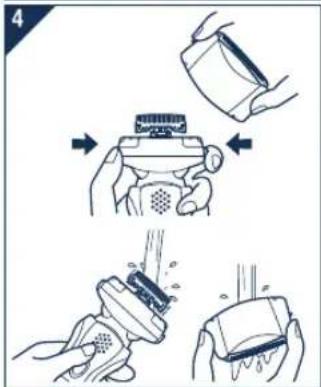
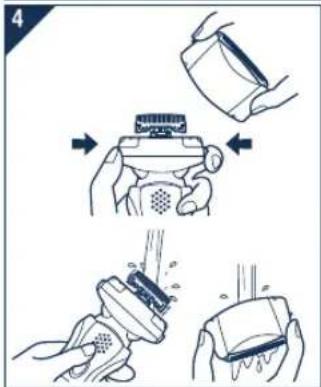
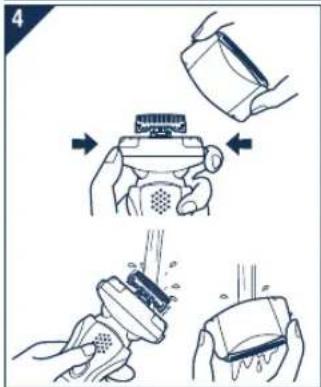
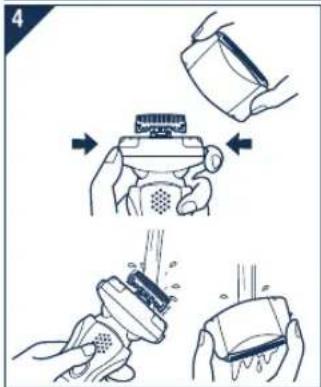
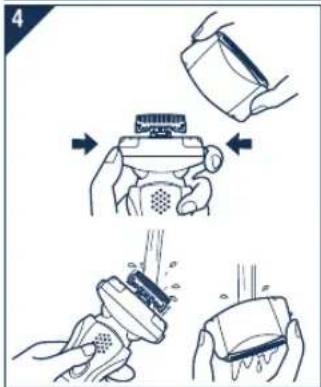
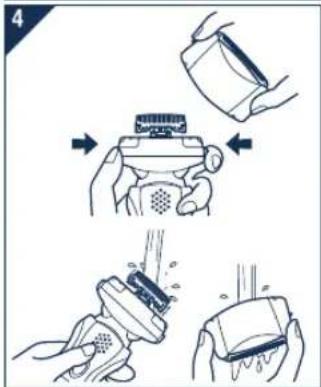
- Apply some hand soap and some water to the outer foil.
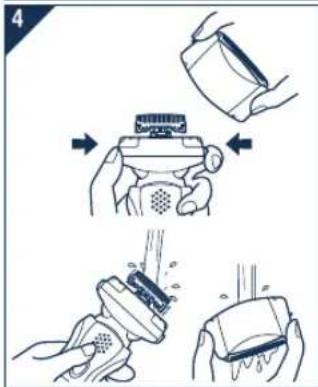
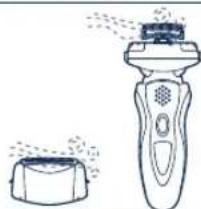
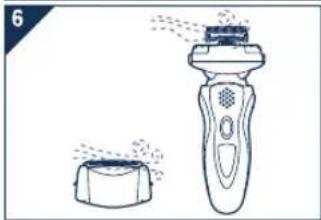
- Press the OFF/ON switch for more than 2 seconds to activate the turbo mode for "sonic" vibration cleaning. • or flash around randomly. • After about 20 seconds, it will be automatically turned off, or you can turn it off by pressing the OFF/ON switch.
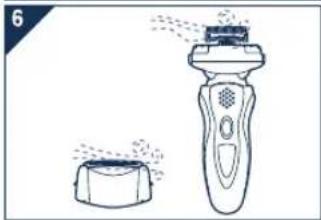
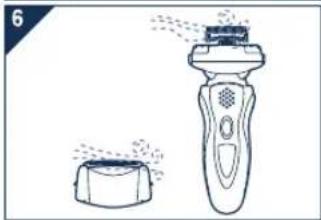
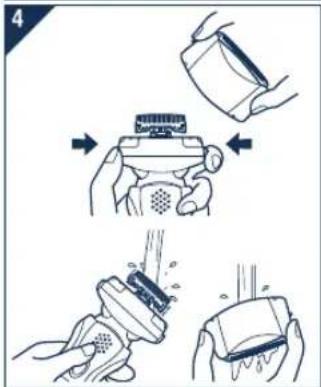
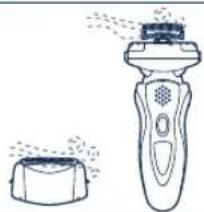
- Remove the system outer foil and press the OFF/ON switch for more than 2 seconds to activate the turbo mode for "sonic" vibration cleaning and clean it with running water.
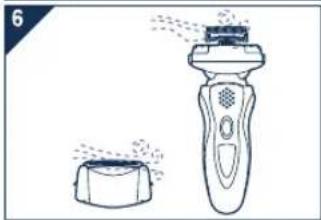
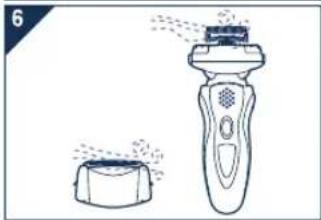
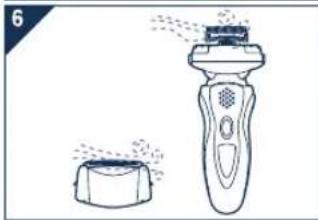
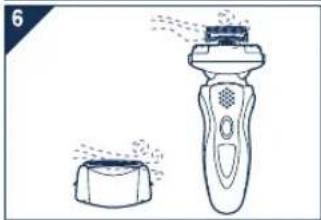
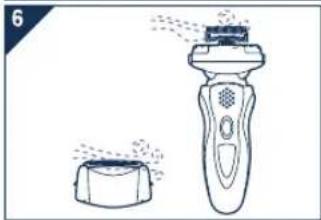
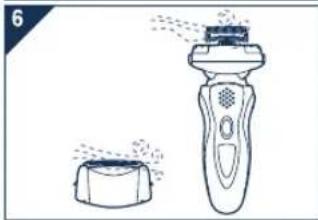
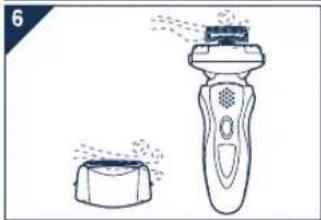
- Wipe off any drops of water with a dry cloth.
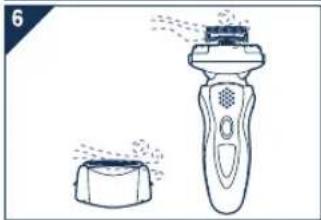
- Remove the system outer foil and the foil frame to allow them to dry completely.
Caution for turbo mode
- Shaving in turbo mode may damage your skin. Turn the shaver off and then on again to cancel turbo mode.
- Do not place your fingers on the OFF/ON switch while using the shaver. This may cause the shaver to turn off or enter turbo mode. Place your fingers on the finger rest while using the shaver.
Lubrication
To maintain shaving comfort for a long time, it is recommended that the oil provided with the shaver is used.
- Switch off the shaver.
- Apply one drop of oil to each of the outer foils.
- Raise the trimmer and apply a drop of oil.
- Switch the shaver on, and run it for approximately five seconds.
- Switch off the shaver, and wipe off any excess oil from the outer foils with a soft cloth.
Replacing the system outer foil and the inner blades
system outer foil once every year
inner blade once every two years
▶ Replacing the system outer foil
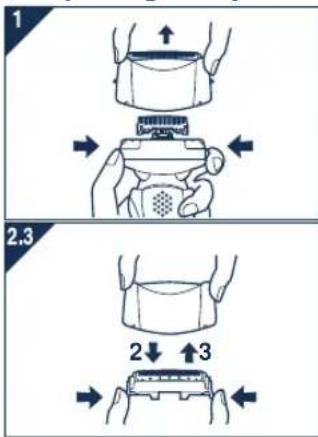
- Press the foil frame release buttons and lift the system outer foil upwards as illustrated.
- Press the system outer foil release buttons and pull down the system outer foil as illustrated.
- Insert the system outer foil until it clicks.
• Always attach the system outer foil in proper direction. • Always insert the system outer foil to the foil frame when attaching to the shaver.
Replacing the inner blades
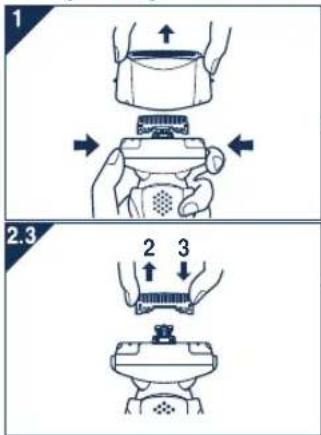
- Press the foil frame release buttons and lift the system outer foil upwards as illustrated.
- Remove the inner blades one at a time as illustrated.
- Do not touch the edges (metal parts) of the inner blades to prevent injury to your hand.
- Insert the inner blades one at a time until they click as illustrated.
Cleaning with the brush
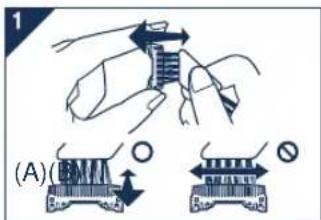
- Clean the inner blades using the short brush by moving it in direction (A).
Clean the system outer foil, the shaver body and the trimmer using the long brush.
- Do not move the short brush in direction (B) as it will damage the inner blades and affect their sharpness.
- Do not use the short brush to clean the outer foils.
Removing the built-in rechargeable battery
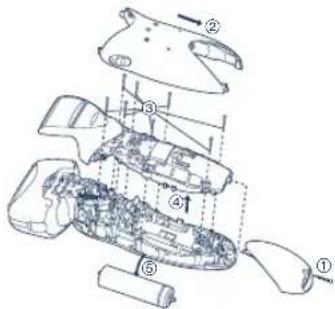
Remove the built-in rechargeable battery before disposing of the shaver. Please make sure that the battery is disposed of at an officially designated location if there is one. Do not dismantle or replace the battery so that you can use the shaver again. This could cause fire or an electric shock. Replace it at an authorized service center.
- Disconnect the power cord from the shaver when removing the battery.
- Perform steps ① to ⑤ and lift the battery, and then remove it.
For environmental protection and recycling of materials
This shaver contains a Lithium-ion battery. Please make sure that the battery is disposed of at an officially assigned location, if there is one in your country.
Information on Disposal for Users of Waste Electrical & Electronic Equipment (private households)

This symbol on the products and/or accompanying documents means that used electrical and electronic products should not be mixed with general household waste. For proper treatment, recovery and recycling, please take these products to designated collection points, where they will be accepted on a free of charge basis.
Alternatively, in some countries you may be able to return your products to your local retailer upon the purchase of an equivalent new product.
Disposing of this product correctly will help to save valuable resources and prevent any potential negative effects on human health and the environment which could otherwise arise from inappropriate waste handling. Please contact your local authority for further details of your nearest designated collection point. Penalties may be applicable for incorrect disposal of this waste, in accordance with national legislation.
For business users in the European Union
If you wish to discard electrical and electronic equipment, please contact your dealer or supplier for further information.
Information on Disposal in other Countries outside the European Union
This symbol is only valid in the European Union. If you wish to discard this product, please contact your local authorities or dealer and ask for the correct method of disposal.
Important
About the light
During charging
Lights red.
under barbering: 66 (dB (A) re 1 pW)
under trimming: 68 (dB (A) re 1 pW)
About the lights
During charging
Lights red.
About the lights
During charging
Lights up red.
Under barbering: 66 (dB (A) re 1 pW)
Under trimming: 68 (dB (A) re 1 pW)
About the lamp
About the lamp
Description of the lamps
During charging
Lights up red.

Indicator
During charging
Lights up red.
About the indicator
About the indicator light
During charging
Lights up red.
Charging indicator
During charging
6
About the lamp
During charging
About the indication
During charging
6
Panasonic Electric Works Wanbao (Guangzhou) Co., Ltd. Wanbao Base Shiguang Road, Panyu District, Guangdong, 511495 CHINA


- IMPORTANT
- BEFORE USE
- USING THE SHAVER
- CHARGING THE SHAVER
- CLEANING THE SHAVER
- STORING THE SHAVER
- SPECIFICATIONS
- CHARGE
- CHARGING
- ABOUT THE LAMP
- USING THE TRIMMER
- SHAVE
- PRESS THE OFF/ON SWITCH
- HOLD THE SHAVER AS ILLUSTRATED ABOVE AND SHAVE
- PIVOT ACTION SELECTOR
- CLEAN
- CLEANING
- CAUTION FOR TURBO MODE
- LUBRICATION
- REPLACING THE SYSTEM OUTER FOIL AND THE INNER BLADES
- REPLACING THE SYSTEM OUTER FOIL
- REPLACING THE INNER BLADES
- CLEANING WITH THE BRUSH
- REMOVING THE BUILT-IN RECHARGEABLE BATTERY
- FOR ENVIRONMENTAL PROTECTION AND RECYCLING OF MATERIALS
- INFORMATION ON DISPOSAL FOR USERS OF WASTE ELECTRICAL & ELECTRONIC EQUIPMENT (PRIVATE HOUSEHOLDS)
- FOR BUSINESS USERS IN THE EUROPEAN UNION
- INFORMATION ON DISPOSAL IN OTHER COUNTRIES OUTSIDE THE EUROPEAN UNION
- ABOUT THE LIGHT
- ABOUT THE LIGHTS
- DESCRIPTION OF THE LAMPS
- INDICATOR
- ABOUT THE INDICATOR
- ABOUT THE INDICATOR LIGHT
- CHARGING INDICATOR
- ABOUT THE INDICATION
Brand : PANASONIC
Model : ES8101
Category : Razor