LS360W - Dashcam DOD - Free user manual and instructions
Find the device manual for free LS360W DOD in PDF.


| Product type | Dashcam (car camera) |
| Brand | DOD |
| Model | LS360W |
| Maximum video resolution | 1080p Full HD (1920x1080) - options 720p, 720 60FPS, WVGA, VGA |
| Screen | TFT 2.7 inches |
| Power supply | Car charger 12V (included), integrated rechargeable battery |
| Main functions | Loop recording (2/3/5 min), motion detection, G-sensor, WDR, optional GPS, time-lapse, emergency lock (SOS), plate overlay |
| External storage | Micro SDHC card Class 6 or higher (not included) |
| Connectivity | HDMI, AV out, USB, GPS port, GPS mouse connector |
| Audio | Built-in microphone, speaker, audio can be disabled |
| Firmware update | Yes, via DOD Tech website (http://www.dod-tech.com) |
| Safety | Use original charger, do not obstruct airbag, avoid high temperatures |
| Maintenance | Clean windshield before installation, avoid shocks and humidity |
| Spare parts and repairability | Car charger, mount, USB cable, integrated battery (non-user-replaceable), repair by authorized distributor |
| General information | Automatic recording when engine starts, date/time correction via GPS, speed display and overspeed alert (GPS), image rotation, screen saver |
Frequently Asked Questions - LS360W DOD
User questions about LS360W DOD
0 question about this device. Answer the ones you know or ask your own.
Ask a new question about this device
Download the instructions for your Dashcam in PDF format for free! Find your manual LS360W - DOD and take your electronic device back in hand. On this page are published all the documents necessary for the use of your device. LS360W by DOD.
USER MANUAL LS360W DOD
Copyright ©2014 DOD Tech
All Rights Reserved
CONTENTS
IMPORTANT SAFETY INSTRUCTION 3
PACKAGE CONTENTS 4
CONTROLS AND FUNCTIONS 5
INSTALLATION AND CONNECTION 7
GETTING START 8
INTRODUCTION OF OTHER FUNCTIONS 14
ON-SCREEN DISPLAY (OSD) MENUS 16
ADDITIONAL INFORMATION 18
TABLE DES MATIÈRES
IMPORTANT INSTRUCTIONS DE SECURITE 20
CONTENU DE L'EMBALLAGE 21
COMMANDES ET FONCTIONS 22
INSTALLATION ET CONNEXION 24
DÉMARRER 25
INTRODUCTION AUX AUTRES FONCTIONS 31
MENUS A L'ECRAN (OSD) 33
INFORMATIONS COMPLEMENTaires 35
IMPORTANT SAFETY INSTRUCTION
About the Product
- Please do not install the product in places that may cause interference while driving
- Please do not install the product in a highly humid environment.
- Due to high temperatures during summer, please do not expose the product to long period of time, because it may reduce the product's lifespan.
- Please avoid fierce impact upon the product.
- If the unit is damaged or malfunctions, don't open it and don't attempt to repair it. Please contact DOD or DOD authorized local dealer.
About the car charger
- Only use the car charger provided by manufacture, others might cause malfunctions or danger.
- To avoid damage, please do not constantly plug in and remove the car charger.
- Ensure it is connected to a proper power source. The voltage requirements are described on the car charger.
- Please do not touch the car charger with wet hands. If the car charger is damaged, it should be replaced immediately. Please do not try to fix it on your own.
About the Battery
- Only use the battery approved by the manufacturer.
There is a built-in battery, please avoid usage in high-temperature environments. - Please keep the device dry and store it at lower temperature if it is not in use. When the device couldn't be turned on, please connect to power supply for a few minutes before turn on the device.
PACKAGE CONTENTS
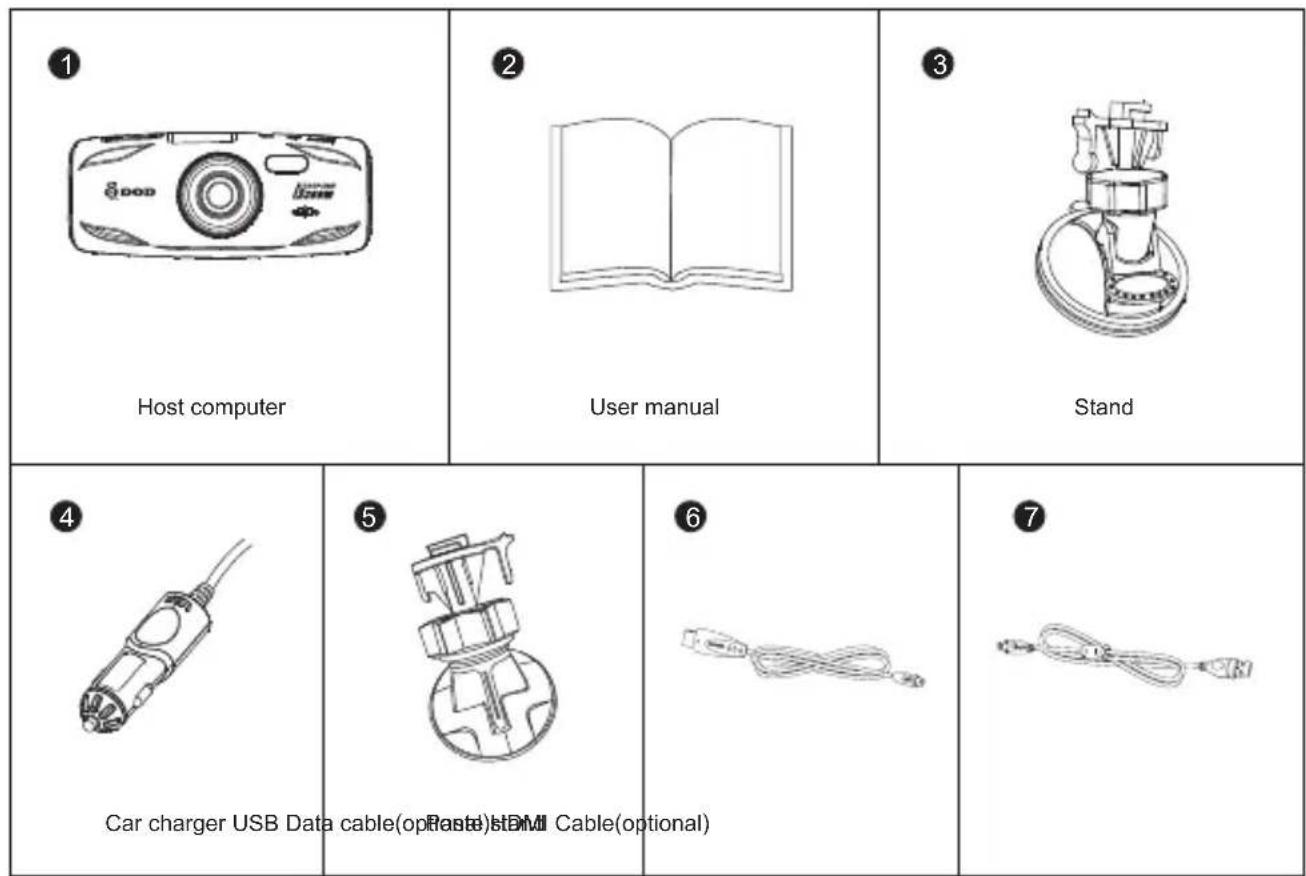
*Supplied accessories may vary by region.
CONTROLS AND FUNCTIONS
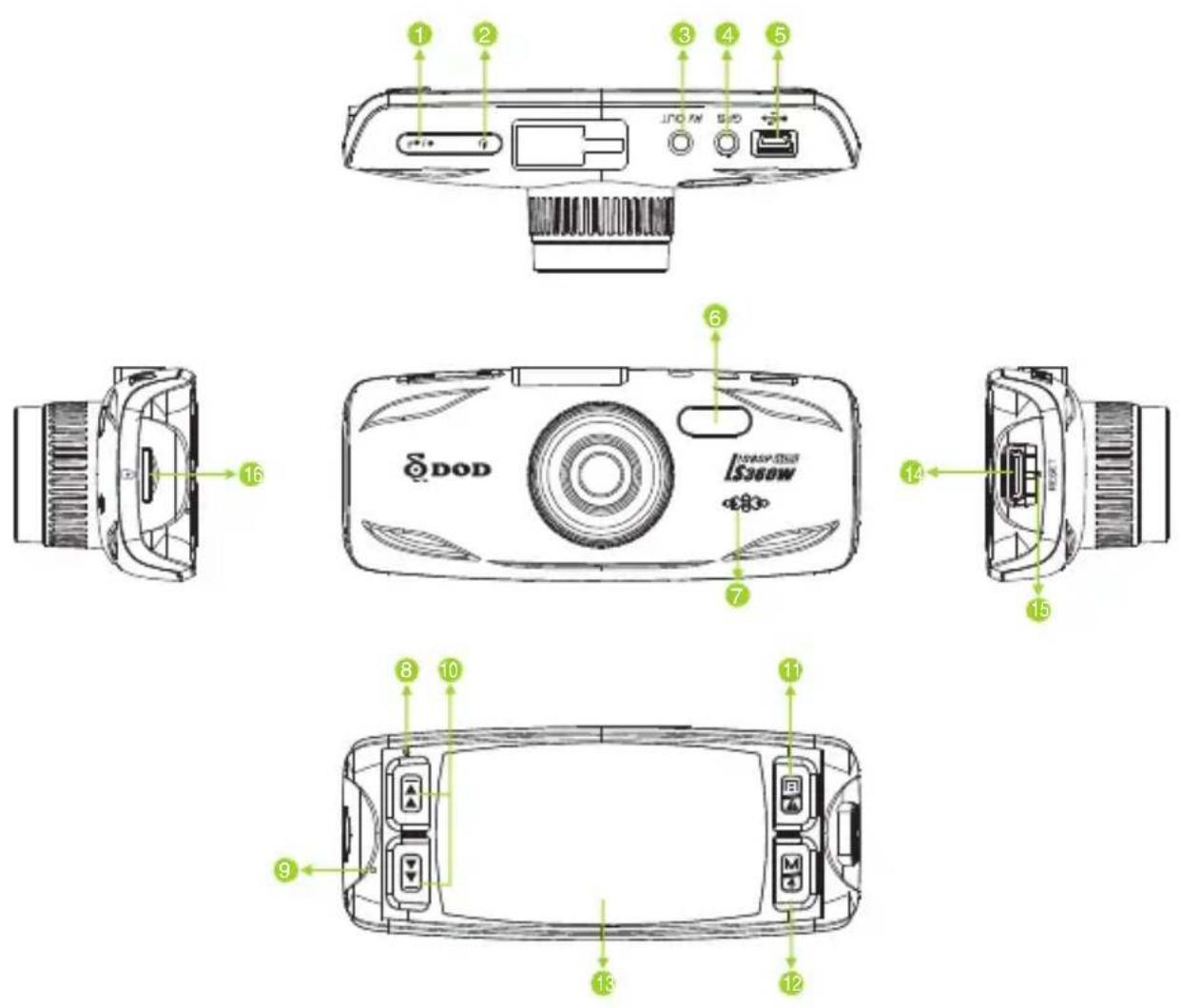
CONTROLS AND FUNCTIONS
1 Record/Shutter/OK/[·/
When the unit is on Recording, press it for stop Recording.
When it is at Camera Mode, press it for photo- shooting.
When it is at Playback Mode, press it for playback pause and play.
When it is at Menu Setting, press it for activating the selected OSD menu item.
2 Power/ [U]
Turn on/off the unit.
3 AV Output Port
GPS IN
Connect with the G-mouse (optional).
USB Port
6 LED Lamp
7 Speaker
Light Indicator
- Steady blue - Unit is powered off and is charging.
- Steady pink - Unit is Standby Mode, Camera Mode or Playback Mode.
- Steady red - Unit is at Standby Mode but not charging.
- Flashing red - Unit is on Recording but not charging.
- Flashing between blue and pink - Unit is on Recording and charging.
9 Microphone
10 Arrow Keys/[|←], [▶]
When the On-Screen Display (OSD) menu is activated, it is used as directional arrows to select the desired menu items.
11 Menu/SOS Emergency File Lock/[回A]
Turns on the On-Screen Display (OSD) menu, Exits and saves menu setting. It is not activated when the unit is on recording.
Please press [ / + ] to stop recording and back to Standby Mode.
When the unit is on recording, press it for file lock.
12 Mode/Mute/[M3]
It is not activated when the unit is on recording. Please press [ / ] to stop recording and back to Standby Mode.
Toggle the unit among "Camera Mode" "Playback Mode" and "Standby Mode".
Press and hold [MD] until icon appears during recording, the record audio turns off.
When the unit is on recording, Press [MD] once to turn off the screen; Press any buttons to wake up the screen.
13 2.7" TFT Display Screen
14 HDMI Output Slot
15 Reset Key
Reset to Manufacture Settings.
16 Micro USB Port
Required a micro SDHC card, class 6 or above Support 8~32GB.
INSTALLATION AND CONNECTION
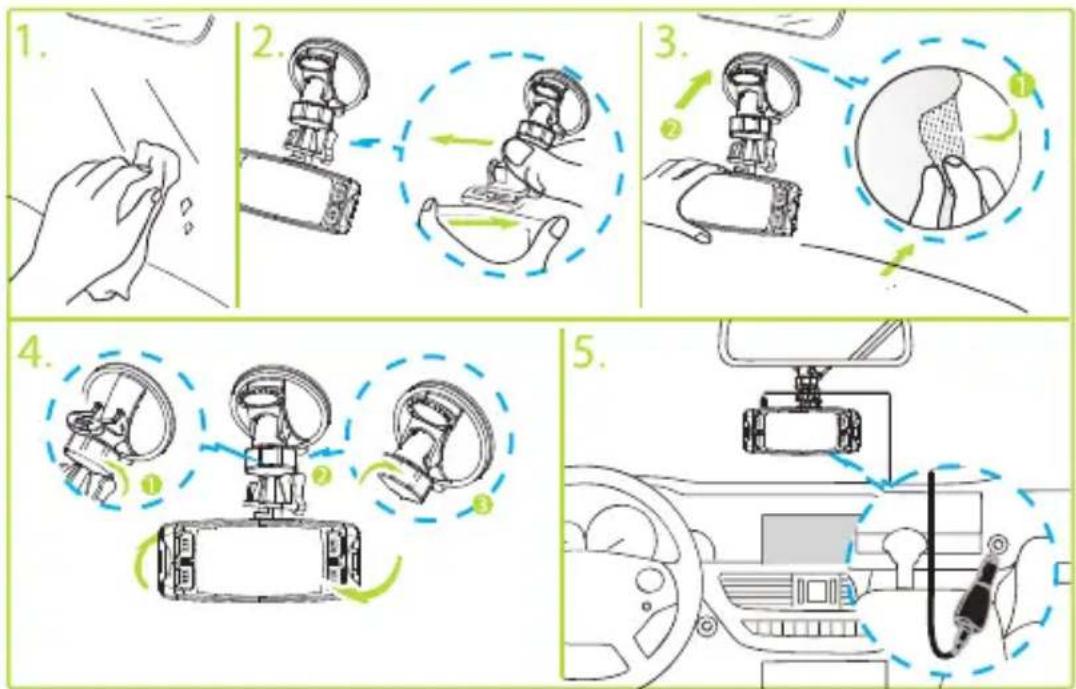
NOTE:
- Assemble the unit on to the bracket and mount the bracke on to the windshield glass.
- Only use the car charger provided by manufacture, others might cause malfunctions or danger.
- Please cautiously select the location where the unit will be mounted, do not mount the unit in places that may obstruct the driver's view or affect the normal operation of the airbag.
- If grease, fingerprints, or blots are found on the external/internal windshield of the car, please wipe it clean or install the unit on an unaffected area. Blots may worsen the recording quality or may cause the bracket to be unstable.
GETTING START
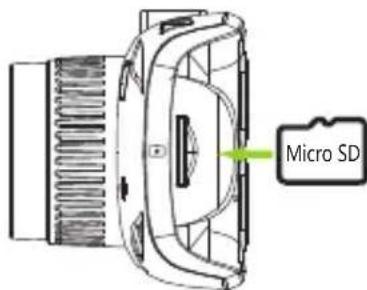
1. Insert a memory card (sold separately)
- Please insert a micro SDHC card with class 10 or above, into the slot located on the side of the unit.
- Be sure to format the SD card before the initial use. Press [ ] to enter System Settings, [ ] to Format, and press [ ] to start format.
- This Camera supports to 32GB Micro SD Card. Please contact with your local deal for purchase information.
- Do not remove the memory card during recording and firmware update.
2. Turning the power on / off
-
Press [ ] button to turn the unit on.
To turn the unit off, press the [ button again. -
After the unit has been installed in your car, connect the car power adapter and start the engine. The unit will automatically turn on.
GETTING START
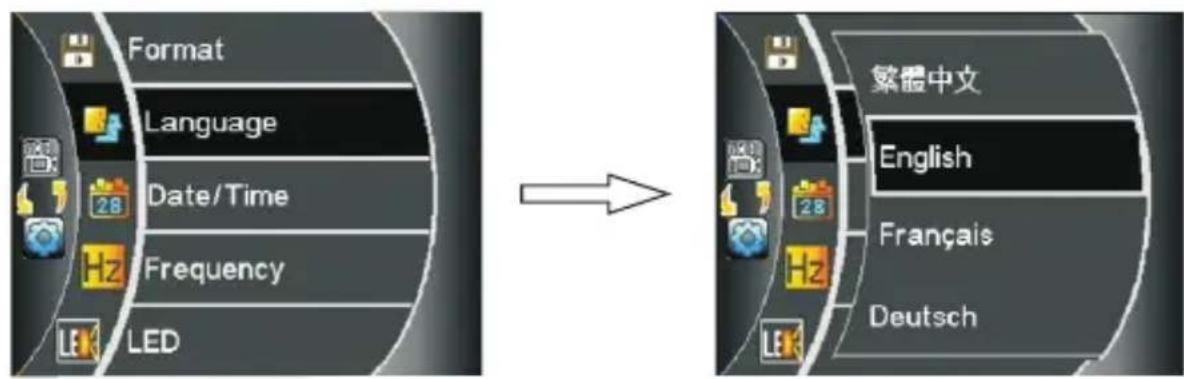
3. Select language
- Press[ ] twice to enter system settings, [ ] Language.
- Press[0/].
- Press [or] to move to Language, and then press [ / ] to select the desired language.
- [回] is not activated when the unit is on Recording Mode, please press [●/←] to stop recording and return to Standby Mode.
GETTING START
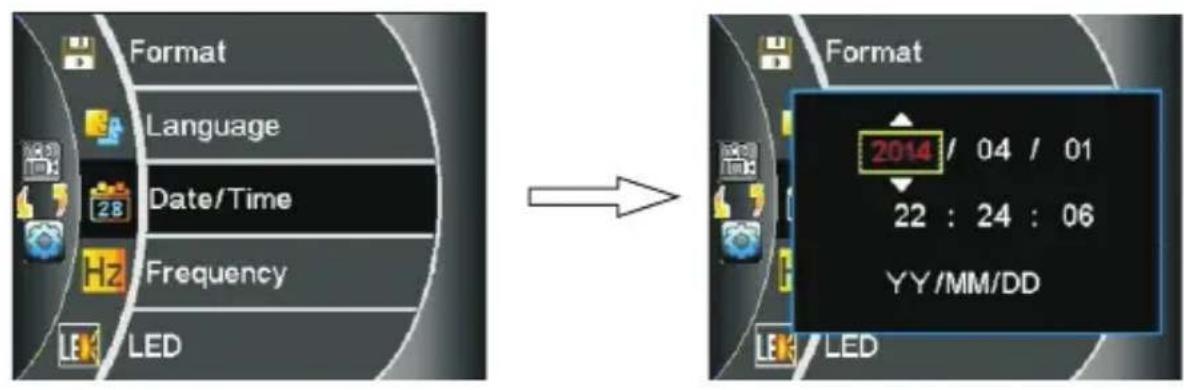
4. Setting the date and time
- Press [回回] Twice to enter System settings, [▶▶] to Date/Time.
- Press [ / + ] .
- Press [[ ] / [ ] , then select [ /] to set Year, Month, Day, Time, and Format fields.
-
Press [ / + ]
-
Automatically time calibration once GPS signal connected. (Activated by GPS mouse)
GETTING START
5. Video Recording
- When the car engine is started, the unit will automatically start video recording (it is mandatory to insert a micro SDHC class 10 memory card)
- When it is not connected to the car charger, press [O] button to turn on the unit, and press [ / 一 ] button to start video recording.
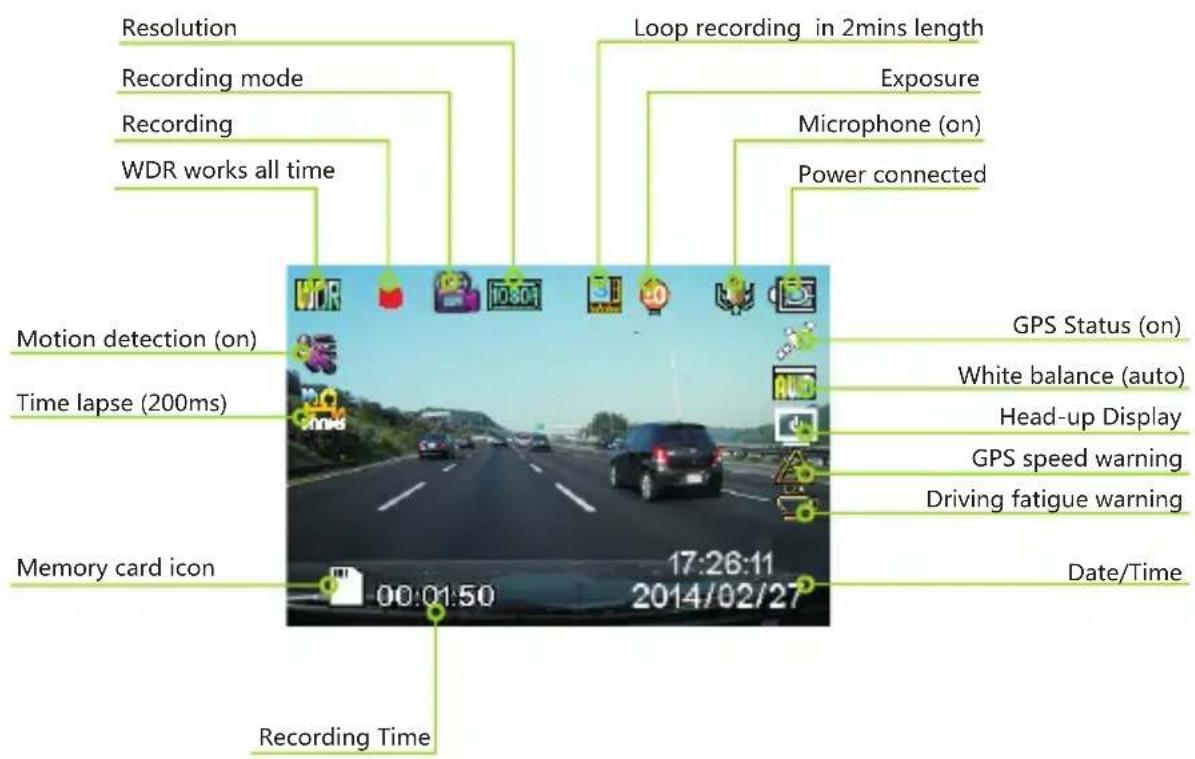
- The blinking satellite logo means GPS signal lost. The Standby speed display and GPS speed Warning functions are only available when connect GPS signal.
GETTING START
6. Taking Photos
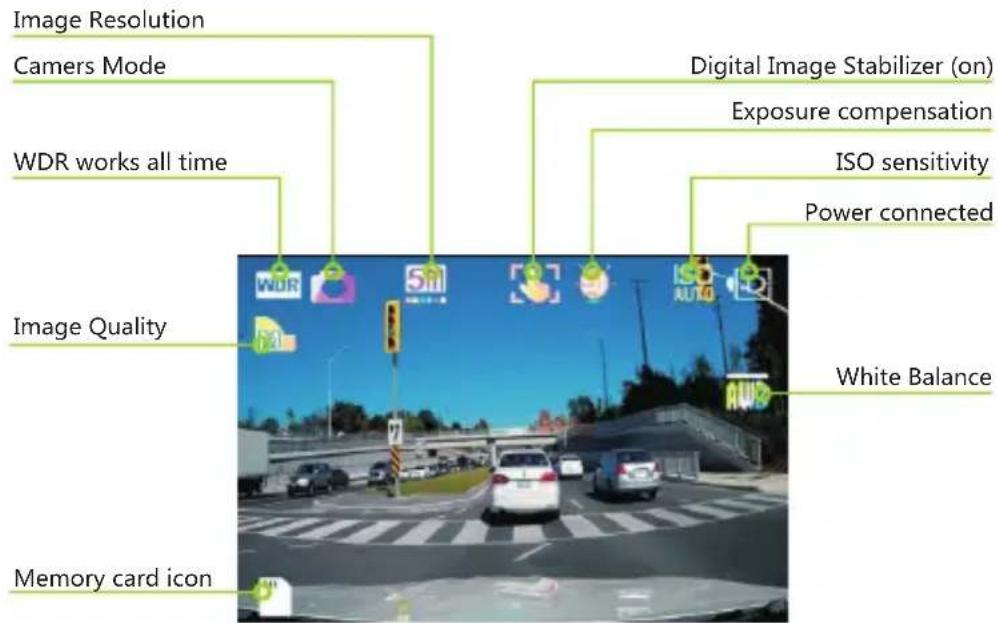
- Press [W] once to Camera Mode.
- Press [ / ] to take a picture.
- [M] cannot be activated when the unit is on Recording Mode, please press [ / ] to stop recording and return to Standby Mode.
GETTING START
7.Playback Mode
- Select the preview/next photo/movie.
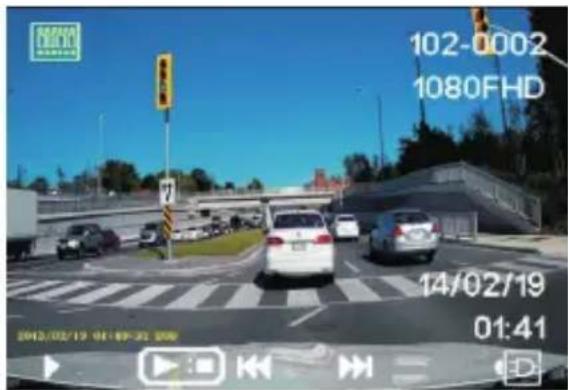
Press [M] twice to enter Playback Mode.
Press [▶] / [▶] to select the photo or movie clip you want to playback.
- Starting movie playing back.
Press [ / - ] to playback.
Press [ ] and [ ] button to navigate.
Press [ / ] to pause it.
Press [M] to return to the Playback Mode.
- Delete, Protect and Slide Show.
Press [回]
Press [▶] / [▶] to select Delete, Protect, Slide Show.
Press [ / + ] to confirm.
Press [to] to exit menu.
- The SOS locked video files will be deleted if the user selects "Format Card".
INTRODUCTION OF OTHER FUNCTIONS
- Loop Recording (default)
Loop Recording can be set at 2/3/5 minutes, it means that the video clip intervals will be set at 2/3/5 minutes long and after memory card is full, the oldest video clips will be deleted and new video clips will take its place.
If Loop Recording is turned off, it will stop recording when the memory card is full.
G-Sensor (default at Middle)
When the internal G-Sensor detects situations like an impact, intense bumps or hard brakes during Recording Mode, the unit will automatically lock the current recording to avoid being replaced by loop recording.
Motion Detection
In Motion Detection Mode, the surrounding of where the car is parked will be recorded taking the least amount of storage space. Recording will automatically be turned off after 10 seconds if nothing happens during the monitor mode. Once there is movement, the unit will start recording immediately.
- The Motion Detection Mode requires the camera to be connected to a constant power supply.
When Motion Detection Mode is activated, Monitor Mode/Emergency Recording Mode and the G-Sensor function will automatically be turned off.
Plate Stamp
Enter your license plate number or desired input, and it will be displayed on the video footage.
INTRODUCTION OF OTHER FUNCTIONS
GPS Track (only available when connect with GPS signal)
Display the driving route with Google Maps.
- Password settings
It allows password owner to restrain drivers or others from operating settings, modifying or deleting the video and picture data files.
- Head Up Display (only available when connect with GPS signal)
Current speed and compass of the vehicle will be displayed on the screen once the GPS signal is detected.
GPS Speed Warning (only available when connect with GPS signal)
When the car speed exceeds a preset speed limit, the warning signal is shown to alert the drivers to slow down the driving speed.
-
GPS Speed Warning is only activated under the "Standby Speed Display" turns on.
-
Image Rotation
This feature will flip the screen 180 degree allowing for other recording opions.
Time-Lapse Photography
To capture a frame every 200mS / 500mS / 1 seconds/5 seconds.
- It requires the camera to be connected a constant power supply.
ON-SCREEN DISPLAY (OSD) MENUS
| Main Options Sub Menu | |||
| [MODE] [UP]/[DOW NURDBOW N]-[OK] | |||
| Standby Mode | Recording Setting | WDR On | |
| Resolution 1080FHD/720P/720 | 60FPS/WVGA/VGA | ||
| Exposure | +3/+2/+1/0/-1/-2/-3 | ||
| White Balance Auto/Daylig ht/Cloudy/Tungsten/Fluorescent | |||
| Record Audio Off/On | |||
| Date Stamp Off/On | |||
| Loop Recording off/2 Minutes/3 Minutes/5 Minutes | |||
| Gsensor Off/High/Middle/Low | |||
| Motion Detecion Off/On | |||
| Plate Stamp | |||
| Driver Fatig ue Warning Off/1H/2H/3H/4H | |||
| GPS Track Off/On | |||
| Standby speed display | Off/15 Seconds/1 Minute/3 Minutes | ||
| GPS Speed Warning | Off/40/60/80/100/120 | ||
| World Time Zone | |||
| Password Setting | |||
| Speed Unit | KMH/MPH | ||
| Image rotation Off/On | |||
| Time Lapse Off/200MS/500M$/1S/5S | |||
| System Setting | Format | Micro-SD Card | |
| Language | Support Multiply Language | ||
| Date/Time | |||
| Frequency | 50Hz/60Hz | ||
| LED | Off/On | ||
| Beep Sound | Off/On | ||
| Screen Saver | Off/3 Minutes/5 Minutes/10 Minutes | ||
| TV Mode | PAL/NTSC | ||
| Speed Stamp | Off/On | ||
| Version | firmware Version | ||
| Default Setting | Retur menu setting to defaults-Cancel/OK | ||
ON-SCREEN DISPLAY (OSD) MENUS
| Main Menu Sub Menu Options | |||
| [MODE] [UP]/[DOWN]-[OK] [UP]/[DOWN]-[OK] | |||
| Camers Mode | Camera Setting | WDR On | |
| Image Size 12M/10M | 8M/5M/3M/2MHD/VGA/1.3M | ||
| Color Normal/Black & White | |||
| Anti-Shaking Off/On | |||
| Capture Mode Single | 2S Timer/5S Timer/10S Timer | ||
| White Balance Auto/ | Daylight/Cloudy/Tungsten/Fuorescent | ||
| ISO Auto/100/200/400 | |||
| Exposure | +3/+2/+1/0/-1/-2/-3 | ||
| Date Stamp Off,Date | Date/Time | ||
| Quality | Fine/Normal/Economy | ||
| Sharpness | Strong/Normal/Soft | ||
| Playback Mode | Delete | Delete Current/Delete All | |
| Protect | Lock Current/Unlock Current/Lock All/Unlock All | ||
| Slide Show | 2 Seconds | ||
ADDITIONAL INFORMATION
HOW TO PLAYBACK ON COMPUTER
If the camera you purchased with GPS logger, please download the DOD GPS player with the CD-ROM (included), or go to http://www.dod-tec.com/ to download and install the DOD GPS player.
If the camera you purchased without GPS logger, please go to http://www.videolan.org/vlc/ to download and install the VLC PLAYER.
HOW TO PLAYBACK ON OTHER DEVICES
There are AV OUT and HDMI OUT slots on the unit for Playback Mode Please plug the AV or HDMI cable to the unit and connect the other end to the video/ audio equipment.
- It requires the camera to be connected to a constant power supply.
FIRMWARE UPGRADE
Please visit DOD Tech official website (http://www.dod-tec.com) to download the latest firmware for your unit. Before download the updated firmware, please navigate to the System Menu and select "Version" to view the current firmware version.
- Connect the micro SD card into the computer.
- Access DOD Tech website (http://www.dod-tec.com) to download the latest software to the SD Card.
- Insert the micro SD card to the unit
- Connect the unit with the external power supply*. The unit will automatically turn on, and running about 40 seconds for firmware upgrading.
- The unit will automatically reboot once finished the firmware update.
- Be sure to format the SD memory card once finished firmware update.
- Recommend connecting the unit with the external power supply instead of using the built-in battery, it might cause the firmware update failure due to power interruption.