153512O - Calculator Milan - Free user manual and instructions
Find the device manual for free 153512O Milan in PDF.



Frequently Asked Questions - 153512O Milan
User questions about 153512O Milan
0 question about this device. Answer the ones you know or ask your own.
Ask a new question about this device
Download the instructions for your Calculator in PDF format for free! Find your manual 153512O - Milan and take your electronic device back in hand. On this page are published all the documents necessary for the use of your device. 153512O by Milan.
USER MANUAL 153512O Milan
ELECTRONIC CALCULATOR WITH THREE - LINE DISPLAY
MAIN KEY FEATURES:
ON/AC: ON/All clear
C.CE: Clear/Clear error
COST: Cost entry
SELL: Sales price entry
MARGIN: Margin entry
RECALL TAX- Price excluding tax / Tax rate recall
SET TAX+ Price including tax / Tax amount / Tax rate set
CHANGE: Change key
HMS: Time operation
GT: GRAND TOTAL Recall / GRAND TOTAL Clear
LOCAL: Local Currency entry / Exchange Rate Set
Foreign Currency / Exchange Rate Recall
MRC: Memory Recall / Memory Clear
M- : Memory Minus
M+ : Memory plus
: Right Shift key
% Percent key
+:/: Sign change key
: Square root
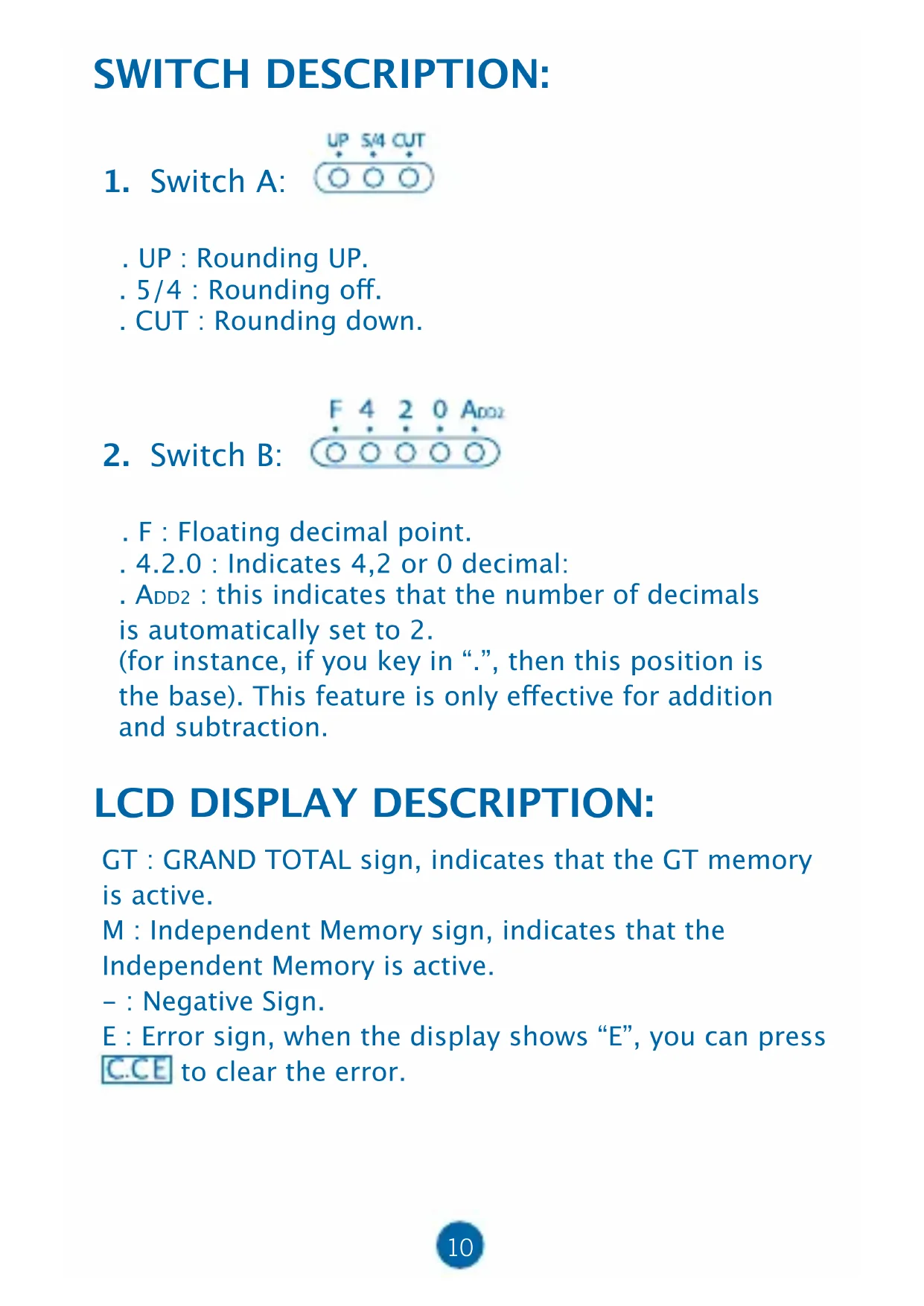
SWITCH DESCRIPTION:
1. Switch A:
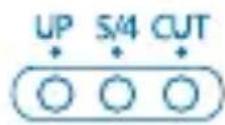
UP:Rounding UP.
. 5 / 4 : Rounding off.
. CUT : Rounding down.
2. Switch B:
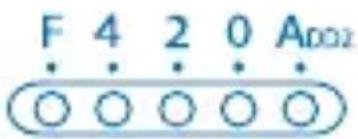
. F : Floating decimal point.
4.2.0 : Indicates 4,2 or 0 decimal:
. ADD2 : this indicates that the number of decimals is automatically set to 2 .
(for instance, if you key in ".", then this position is the base). This feature is only effective for addition and subtraction.
LCD DISPLAY DESCRIPTION:
GT : GRAND TOTAL sign, indicates that the GT memory is active.
M : Independent Memory sign, indicates that the Independent Memory is active.
- : Negative Sign.
E: Error sign, when the display shows "E", you can press C.CE to clear the error.
CALCULATION EXAMPLE:
1. COMMON CALCULATIONS
| EXAMPLE OPERATION DESCRIPTION | DESCRIPTION | ||
| 12+3=15 +15-30=-25 -10 | ON/AC | 0. | Clear all |
| 12 3 | GT 15 | 12+3=15, the result is accumulated in the GT memory | |
| 5 30 | GT -25 | 5-30=-25, the result is accumulated in the GT memory | |
| GT | GT -10 | Recall the GT memory, the result is -10 | |
| GT | -10 | Clear the memory GT | |
| 5x6 +132-6 -36+17 3 | ON/AC | 0. | Clear all |
| 5 6 M+ | M 30. | 5x6=30, the result is stored in the Independent memory | |
| 32 6 M+ | M 26. | 32-6=26, Plus the memory, the result is 56 | |
| 36 17 M- | M 53. | 36+17=53, Minus the memory, the result is 3 | |
| MRC | M 3. | Recall the independent memory | |
2. Tax calculation
| OPERATION DISPLAY | |
| ON/AC | 0. |
| (TAX+)(Recall the rate, the sign & number wink) | TAX % 0. |
| 5 (sign & number wink) | TAX % 5. |
| (TAX+)(TAX % 5. | TAX % 5. |
| OPERATION DISPLAY | |
| ON/AC | 0. |
| 100 TAX+ (Tax amount is 5, tax-including price is 105) | 100 TAX 5. TAX+ 105. |
- Currency Exchange: (The exchange rate is show on the upper line).
(1) Set rate: for example: 1 foreign currency = 6.55957 local currency
(2) Recall Exchange rate: for example: 1 foreign currency = 6.55957 local currency
| OPERATION DISPLAY | |
| ON/AC | 0. |
| RATE LOCAL 1. 6.55957. |
(3) Currency exchange calculation: for example: 1 foreign currency = 6.55957 local currency
| OPERATION DISPLAY | |
| ON/AC | 0. |
| 100. | RATE 6.55957. LOCAL 100. 655.957. |
| 100. LOCAL | RATE 0.15244901723. 15.2449017237. LOCAL 100. |
- Cost, Sell, Margin calculation:
| OPERATION | DESCRIPDISLAY | |
| ON/AC | 0. | Cost = 100, Selling Price = 125, Margin = 20% |
| 100 | 100. | |
| COST | COST 100.100. | |
| 125 | COST 100.125. | |
| SELL | COST 100.125. | |
| SELL 20% | ||
| ON/AC | 0. | Selling Price = 125, Margin = 20%, Cost = 100, Profits = 25, |
| 125 | 125. | |
| SELL | SELL 125.125. | |
| 20 | SELL 125.20. | |
| MARGIN | 125.20%100. | |
| MARGIN | MARGIN 20%.25. | |
| ON/AC | 0. | Cost = 100, Margin = 20%Selling Price = 125, |
| 115 | 115. | |
| COST | COST 115.115. | |
| 30 | COST 115.30. | |
| MARGIN | COST 115.MARGIN 30.%= 164.285714285 |
- Change calculation: For example: the goods cost 2800, pay 5000, how much is the change?
| OPERATION DISPLAY | |
| ON/AC | 0. |
| 2800 | GT=2'800. |
| 5000 CHANGE | PRICE2'800.PAY5'000.GT=2'200. |
For example: the price is 1000 local currency, if the customer gives 10 foreign currency, how much is the chance? (1 foreign currency = 103 local currency, see page 13 for setting exchange rate).
| OPERATION DISPLAY | |
| ON/AC 1000 10 CHANCE | PRICE 1'000. PAY 1'030. GT = 30. |
Time calculation: Salary = 1200/hour, if you work for 7 hours and 30 minutes, how much is the salary?
| OPERATION DISPLAY | |
| ON/AC | 0. |
| 1200 x | x 1'200. |
| 7 HMS | x 7-4" |
| 30 HMS HMS HMS | x 7,5. |
| GT 9'000. |
HOW TO CHANCE THE BATTERY:
- This machine is equipped with two power sources.
a) Solar energy b) Battery (1,5)
- When the display becomes blurred, this indicates that the battery power is nearly gone. You can use solar energy for power or replace the battery to make the display clear again.
- To replace the battery:
(1) Loosen the screw from the back cover and carefully remove it.
(2) Use a screwdriver or an adequate tool to push out the battery.
(Note: follow the exit direction in pushing out) *Be careful not to damage the circuit.
EXIT
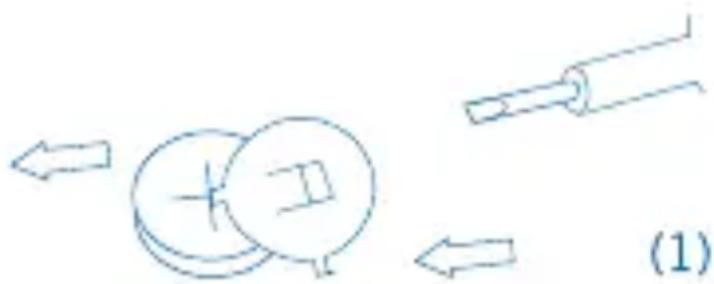
(3) Push in the new battery in the opposite direction (please note that battery in the + polarity should face up)
(4) Put the cover back and tighten the screw (do not overdo).
(5) Auto power-off: After approximately 8 minutes.
DESCRÉÂO DO ECRA LCD:
GT : Sinal de GRAN TOTAL, indica que a memória GT está activa.
DESCRIERE A ECRANULUI LCD:
GT : Simbolul de Memorie Independiente, indicaça Memoria Independiente este activa.
M : Simbolul de Memorie Independiente, indicaça Memoria Independiente este activa.
- : Simbolul negativ.
HOGYAN CSERÉLJE KI AZ ELEMENT:
Hannpimep: ceHa coCTaBnaeT 1000 MeCTHOJ MOHeT, ecn KJIneHT daet 10 nHOCTpaHHbIX MOHeT, cKOJIbKO cDaun HUxHo BepHyTb? (1 nHOCTpaHHa JMOHeTa = 103 meChbIe MPHeTbl, CM. CTp. 117 dJa yCTaHOBKn pOoceHt a OMeHa BaJIOT).
| ДЕΙCTВЕ ΞΚΡΑΗ | |
| ON/AC 1000 =10 CHANGE | PRICE 1'000. PAY 1'030. GT = 30. |
PENPIΓPAΦH THE OΘONHΞ LCD:
MILAN since 1918, SPAIN