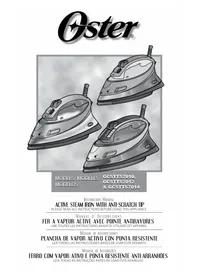
GCSTTS7012 - Iron OSTER - Free user manual and instructions
Find the device manual for free GCSTTS7012 OSTER in PDF.



| Product Type | Clothes Iron |
| Brand | Oster |
| Model | GCSTTS7012 |
| Soleplate | Ceramic with micro holes |
| Tip | Scratch-resistant, hard anodized |
| Control Type | Manual control buttons (dials) |
| Water Tank | Transparent |
| Power Cord | 360° swivel, tangle-free, 2.5 meters long |
| Power | Approximately 1500 W (estimated) |
| Power Supply | 120/127 V, polarized |
| Steam Functions | Continuous steam, spray, steam burst, vertical steam burst |
| Anti-scale System | Yes, permanent |
| Self-Cleaning | Yes, dedicated button |
| Anti-Drip | Yes |
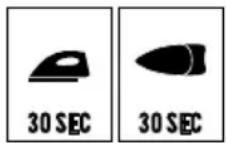
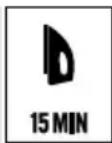
| Auto Shut-Off | Smart motion detection: 30 s horizontal, 15 min vertical |
| Indicator Lights | On/Off/Standby/Ready (red/green) |
| Handle | Comfortable, non-slip |
| Included Accessories | Filling cup |
| Maintenance | Soleplate cleaning, monthly self-cleaning, descaling cleaning |
| Warranty | 1 year limited |
Frequently Asked Questions - GCSTTS7012 OSTER
User questions about GCSTTS7012 OSTER
0 question about this device. Answer the ones you know or ask your own.
Ask a new question about this device
Download the instructions for your Iron in PDF format for free! Find your manual GCSTTS7012 - OSTER and take your electronic device back in hand. On this page are published all the documents necessary for the use of your device. GCSTTS7012 by OSTER.
USER MANUAL GCSTTS7012 OSTER
PLEASE READ ALL INSTRUCTIONS BEFORE USING THIS APPLIANCE
MANUAL D'INSTRUCTIONS
FER A VAPEUR ACTIVE AVEC POINTE ANTIRAYURES
LIRE TOUTES LES INSTRUCTIONS AVANT D'UTILISER CET APPAREIL
When using electrical appliances, basic safety instructions should always be followed, including the following:
1 READ ALL INSTRUCTIONS BEFORE USING THE STEAM IRON. PLEASE MAKE SURE TO REMOVE ALL STICKERS FROM THE PRODUCT BEFORE USING THE IRON.
2 Use iron only for its intended use.
3 To protect against risk of electric shock, do not immerse iron in water or other liquids.
4 The Fabric Select and Steam Dials/Buttons (for model GCSTTS7014 only) should always be turned to off O/ before plugging or unplugging from outlet. Never yank cord to disconnect from outlet; instead, grasp plug and pull to disconnect.
5 DO NOT allow cord to touch hot surfaces. Let iron cool completely before putting away. Loop cord loosely around iron when storing.
6 Always disconnect iron from electrical outlet when filling with water or emptying and when not in use.
7 DO NOT operate iron with a damaged cord or if the iron has been dropped or damaged. To avoid the risk of electric shock, do not disassemble the Iron. Take it to an Oster Authorized Service Center for examination and/or repair. Incorrect reassembly can cause a risk of electric shock when the iron is used.
8 DO NOT leave Iron unattended while plugged in or turned on or on an ironing board.
9 Burns can occur from touching hot metal parts, hot water or steam. Use caution when you turn a steam iron upside down - there may be hot water in the Reservoir.
10 If the Iron is not operating normally, disconnect from the power supply and have the Iron serviced by an Oster® Authorized Service Center.
11 Your Oster® iron is designed to rest on the heel rest. DO NOT leave the Iron unattended. DO NOT set iron on an unprotected surface, even if it is on its heel rest.
12 This is a high wattage appliance. To avoid a circuit overload, do not operate another high wattage appliance on the same circuit.
13 If an extension cord is absolutely necessary a cord with the same amperage should be used. Cords rated for less amperage may overheat. Care should be taken to arrange the extension cord so that it cannot be pulled or tripped over.
14 This appliance is not intended for use by persons (including children) with reduced physical, sensory or mental capabilities, or lack of experience and knowledge, unless they have been given supervision or instruction concerning use of the appliance by a person responsible for their safety. Children should be supervised to ensure that they do not play with the appliance.
15 Close supervision is necessary when any appliance is used by or near children, or incapacitated individuals.
SAVE THESE INSTRUCTIONS
(For 120 & 127 Volts with two flat pins only) To reduce the risk of electrical shock, this appliance has a polarized plug (one blade is wider than the other). This plug fits a polarized outlet only one way. This is a safety feature intended to help reduce the risk of electrical shock. If the plug does not fit fully into the outlet, reverse the plug. If it still does not fit, contact a qualified electrician. Do not attempt to defeat this safety feature.
WELCOME
Congratulations on your purchase of an Oster® Steam Iron!
We have designed your Iron to provide the utmost in quality, ease of use and convenience. Your Steam Iron offers the following features:
| Oster | 7010 | 7012 | 7014 |
| Anti-Scratch Tip Resistant hard anodized anti-scratch tip for greater durability. | ∅ | ∅ | ∅ |
| Active Steam Active Steam feature provides powerful and continuous steam that deeply penetrates the fabrics to easily remove stubborn wrinkles. | ∅ | ∅ | ∅ |
| Ceramic Soleplate Ceramic soleplate for a smooth glide and superior resistance. Anti-Scratch Resistant tip for durability. | ∅ | ∅ | |
| Non-Stick Soleplate Non-stick soleplate with resistant hard anodized anti-scratch tip for greater durability. | ∅ | ||
| Manual Controls Manual controls to provide easy and precise ironing settings. | ∅ | ∅ | |
| Digital Controls Digital controls to provide easy and precise ironing settings. | ∅ | ||
| Smart Auto-Off Motion smart auto-off turns iron off if left unmoved for a determined amount of time based on its position. | ∅ | ∅ | ∅ |
DESCRIPTION OF THE APPLIANCE
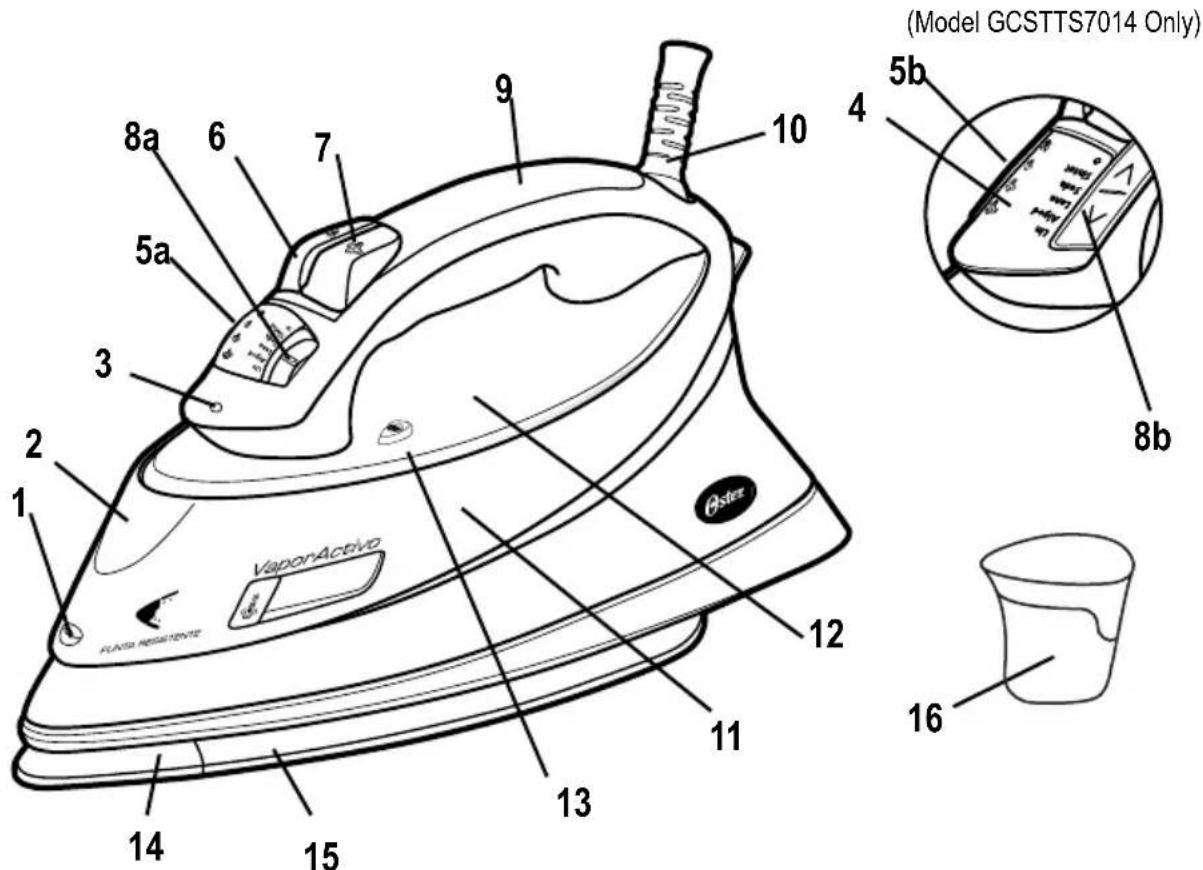
- Spray Mist Release
- Covered Water Fill Hole
- Auto-Off Indicator/Wait/Ready Light
- Digital Electronic Display (model GCSTTS7014 only)
- a. Active Steam Selection Dial (models GCSTTS7010 & GCSTTS7012 only)
b. Active Steam Selection Buttons (model GCSTTS7014 only) - Spray Mist Button
- Shot of Steam Button
- a. Fabric Select Dial (models GCSTTS7010 & GCSTTS7012 only)
b. Fabric Select Buttons (model GCSTTS7014 only)
-
Soft Grip Handle (models GCSTTS7012 & GCSTTS7014 only)
-
360^ Tangle-Free Swivel Cord
- Anti-Calcium System
- See-Through Water Reservoir
- Self-Clean Button
- Resistant Hard Anodized Anti-Scratch Tip
- Non-Stick Soleplate with micro holes (model GCSTTS7010 only)
Ceramic Soleplate with micro holes (models GCSTTS7012 & GCSTTS7014 only)
- Water cup included
INSTRUCTIONS FOR USE
BEFORE FIRST USE
- When using the iron for the first time, test it on a piece of cloth to be sure that the soleplate and the water reservoir are clean.
It is possible that the iron will discharge some smoke and release some odor during its first use. This is due to the initial heating of the materials used. This is completely normal and will stop shortly afterwards.
FILLING WITH WATER
You must fill the water reservoir with water to use the Shot of Steam and Spray Mist features and to get steam out of your iron.
TIP: Each iron is tested at the factory to ensure that they function correctly. The test may leave a small, harmless amount of water within the water reservoir.
Before you fill the water reservoir, please consider the following:
- This iron was designed for use with tap water, very hard water. Since the Anti-Calcium System is a permanent system located inside the water reservoir. This system removes calcium from the water and reduces calcium build-up on the soleplate. Therefore your iron accepts tap water eliminating the need of keeping distilled water on hand for ironing.
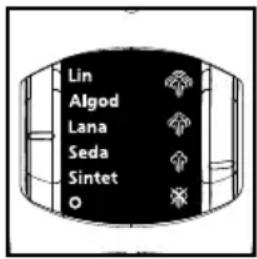
IMPORTANT: When not ironing, always set the Steam Lever to the closed position "and the Fabric Select Dial to the off position "O".
To fill the water reservoir:
- Lift the water fill hole cover.
- Make sure the iron is unplugged. Set the Steam Dial/Buttons (for model GCSTTS7014 only) to closed position " and the Fabric Select Dial/Buttons (for model GCSTTS7014 only) to off position "O".
- Fill water cup with water. Pour water into iron's water reservoir. Do not fill water reservoir beyond maximum fill level "MAX".
Model GCSTTS7014
WARNING: To prevent the risk of burns, be careful when filling a hot iron with water. Hot metal parts, hot water and steam can cause injuries.
SELECTING FABRIC SETTINGS
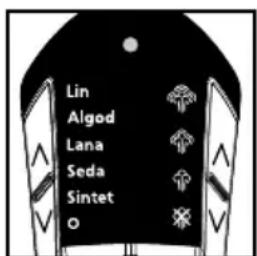
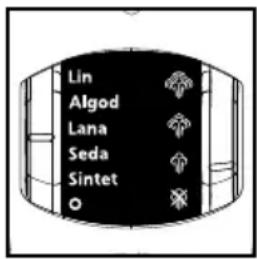
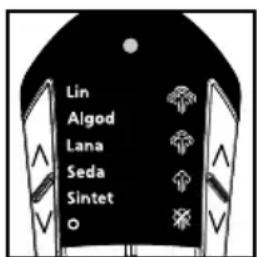
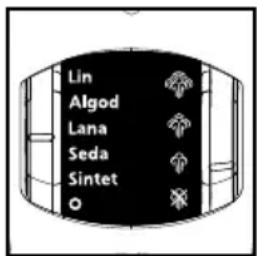
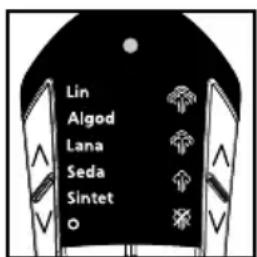
To select a fabric setting, turn the Fabric Select Dial/Press the "√" Buttons (for model GCSTTS7014 only) to the desired fabric selection. The wait light will glow red while the iron heats up. The light will then change to green indicating that the iron is ready to be used.
DRY IRONING
- Make sure the Steam Dial/Buttons (for model GCSTTS7014 only) is turned to the closed position "
- Plug the cord into the appropriate outlet.
- Turn the Fabric Select Dial/Buttons (for model GCSTTS7014 only) to the fabric setting you desire (Silk "Seda" or Synthetics "Sintet").
Allow the iron to heat for 2 minutes. While the iron is heating, make sure it is sitting on its heel rest on a stable, protected surface.
NOTE: While the Steam Dial/Button (for model GCSTTS7014 only) is turned to the closed position " you may still use the Shot of Steam or Spray Mist features. Please make sure the water reservoir is 1/4 full of water.
TIP: Refer to the "Ironing Guide" for the recommended setting for your fabric.
Model GCSTTS7014
STEAM IRONING
- Follow the instructions for "Filling With Water".
- Plug the cord into the outlet. The power indicator light will illuminate.
- Turn the Fabric Select Dial/Buttons (for model GCSTTS7014 only) to the steam ironing fabric setting you desire (Linen "Lin", Cotton "Algod", Wool "Lana" or Silk "Seda") and allow iron to heat for 2 minutes. While the iron is heating, make sure it is sitting on its heel rest on a stable, protected surface.
TIP: Refer to the "Ironing Guide" for the recommended setting for your fabric.
- After the iron has heated (2 minutes), turn the steam dial/button (for model GCSTTS7014) to the desired steam setting.
Model GCSTTS7014
IMPORTANT: When not ironing, always set the Steam Dial/Buttons (for model GCSTTS7014 only) to closed position and the Fabric Select Dial/Buttons (for model GCSTTS7014 only) to off position "O".
IRONING TIPS
Always read garment labels and follow the manufacturer's ironing instructions.
- Sort the articles to be ironed according to the type of fabric.
- You should first iron garments requiring low temperature (e.g., silks and synthetics) to avoid damaging them with an iron that is too hot.
- If you are unsure of the fabric content of the garment, test a small area, such as a seam or facing, before ironing a visible area. Start with a low temperature and gradually increase the heat to find the best setting.
- When changing the temperature from a high setting to a low setting, allow approximately 5 minutes for the lower temperature to be reached.
- When steam ironing, use long, slow passes over the fabric. This will allow the steam to penetrate the fabric while allowing the heat of the soleplate to dry out the moisture.
- To iron linens, turn garment inside out. Be careful not to use an iron that is too hot because the lining may melt or stick to the soleplate.
- To iron zippers, use an ironing cloth or make sure the zipper is closed and iron over the flap. Never iron directly over an unprotected zipper.
Use the "Ironing Guide" to select the best setting and method for the fabric you plan to iron.
IRONING GUIDE
| Suggested Fabric Select Fabric Steam Setting Dial/Buttons Ironing Recommendations | ||
| Acrylic Synthetic "Sintet" Iron garment inside out. | ||
| Acetate Synthetic "Sintet" Iron garment inside out while still damp. | ||
| Silk Silk "Seda" Iron garment inside out. Use an ironing cloth* to prevent shine marks. | ||
| Viscose used under garment manufacturer's instructions. | Silk "Seda" | Mainly dry iron; steam may be |
| Nylon damp. | Silk "Seda" Iron garment inside out while still | |
| Polyester | Synthetic "Sintet" | Iron garment inside out while still damp. |
| Rayon | Synthetic "Sintet" | Iron garment inside out. |
| Wool ironing cloth.* | Wool "Lana" | Iron garment inside out or use an iron |
| Wool Blends ironing cloth.* | Wool "Lana" | Iron garment inside out or use an iron |
| Cotton Blends | Cotton "Algod" | Follow garment manufacturer's instructions. Use setting for the fiber requiring the lowest setting. |
| Corduroy ironing cloth* and then brush the garment with your hand to raise the texture of the fabric. | Cotton "Algod" | Iron garment inside out or use an iron |
| Cotton | Cotton "Algod" | Iron dark fabrics inside out to prevent shine marks. |
| Linen ironing cloth* to prevent shine marks (especially on dark fabrics). | Linen "Lin" | Iron garment inside out or use an iron |
| Denim | Linen "Lin" | Iron dark fabrics inside out to prevent shine marks. |
- An ironing cloth is made with cotton, dry-cleaned cloth that you place over the garment you are ironing to prevent the fabric from looking shiny.
Note: Use the Spray Mist and/or the Shot of Steam feature for deeper penetration to remove wrinkles.
Note: Some fabrics may require more steam than others. Your iron has the capability to adjust steam as needed.
We have designed your steam iron to provide the utmost in quality, ease of use and convenience. Your steam iron offers the following special features:
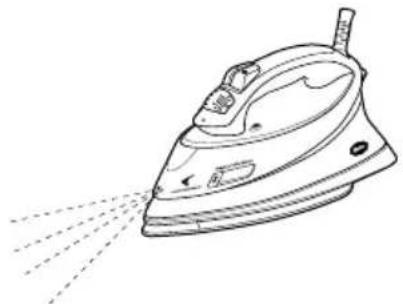
Spray Mist Feature
The Spray Mist is a powerful water spray mist that dampens the fabric to aid in removing wrinkles from heavy fabrics and for setting creases.
To use the Spray Mist Feature:
Press the Spray Mist button firmly applying water in the desired area. Iron over the fabric to dry.
Shot of Steam Feature

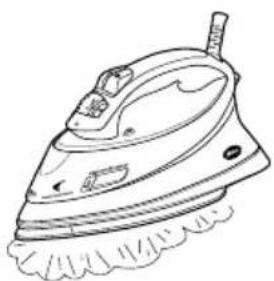
The Shot of Steam feature provides an extra burst of steam for deep penetration of stubborn wrinkles. You can use this feature while Dry or Steam ironing, but the water reservoir must at least 14 full of water.
To use the Shot of Steam Feature:
Place the iron on top of the wrinkly and press the Shot of Steam button each time you would like an extra burst of steam. The Shot of Steam feature may be used continuously with just three-second intervals between shots.
Vertical Shot of Stea, D
The vertical steam feature allows your iron to function as a garment steamer.
Tip: When using the vertical shot of steam on clothing, hang the clothing on a clothes hanger for best results. Hanging curtains and drapes may also be steamed.
How to use Vertical Steam:
- Allow iron to warm up (2 minutes)
- Hold the iron in a vertical position, with the iron close to but not touching the fabric you want to steam.
- With your other hand, pull the fabric tight.
- Press the Shot of Steam button in approximately 3-second intervals as you move the iron across the wrinkled area.
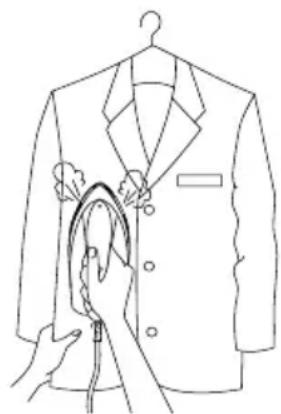
WARNING: To prevent the risk of burns, keep your hand away from the area being steamed.
WARNING: DO NOT steam garments while wearing them; this may result in injuries.
3-Way Motion Smart Auto-Off Feature
When the iron is plugged in, the power indicator will light steadily, indicating there is power to the iron. If you leave the iron:
- In a horizontal position without moving it, or accidentally tip the iron over, it will automatically stop heating after 30 seconds. The off selection on the digital display (model GCSTTS7014 only) and the red wait light will blink to let you know that the iron has stopped heating.
- In a vertical position (on its heel rest) without moving it, the iron will automatically turn off after 15 minutes. The off selection on the digital display (model GCSTTS7014 only) and the red wait light will blink to let you know that the iron has stopped heating.
IMPORTANT: The off selection on the digital display (model GCSTTS7014 only) and the red wait light will continue to blink for 5 minutes, then turn totally off.
To reset the iron:
- Move the iron back and forth. The off selection on the digital display (model GCSTTS7014 only) and the red wait light will stop blinking and the iron will start heating again (allow it to reheat for 2 minutes); the iron is now ready to use.
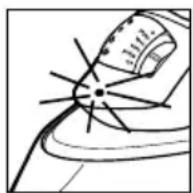
WARNING: Motion smart auto-off is a safety feature, not a recommended means for turning your iron off. See "Caring for Your Iron After Use" for information on turning off your iron and storing it safely between uses.
Wait/Ready Light
Indicates when your iron reaches the desired temperature. When a fabric setting has been selected, the red wait light will illuminate. Once the iron heats up to the desired fabric selection, the light will change from red (Wait) to green (Ready). This occurs each time the fabric setting is changed. It will also occur when the iron has been reset after the Auto-Off is deactivated.
Anti-Calcium System

The Anti-Calcium System is a permanent system located inside the water reservoir. This system removes calcium from the water and reduces calcium build-up on the soleplate. Therefore your iron accepts tap water eliminating the need of keeping distilled water on hand for ironing.
Self-Cleaning
Prevents mineral build up that can reduce the life of your iron. See the "Caring For Your Iron" section for instructions on how to use this feature.
Anti-Drip
Produces steam without dripping, spitting, or leaking through the soleplate, even at low temperatures.
Ceramic Soleplate
Provides a smooth glide for quick and easier ironing and a superior resistance (models GCSTTS7012 & GCSTTS7014 only).
Anti-Scratch Tip
The resistant hard anodized anti-scratch tip provides greater durability.
Micro Holes
The micro holes in the soleplate grant more concentrated steam diffusion.
360^ Tangle-Free Swivel Cord
Keeps the power cord off of the fabric and out of your way, whether you are right or left-handed.
Longer Power Cord
Provides 2.5 meters (8 feet) of power cord to give you added flexibility when ironing.
Soft Grip Handle
Provides a comfortable grip and helps eliminate slipping (models GCSTTS7012 & GCSTTS7014 only).
CARING FOR YOUR IRON AFTER USE
- Turn the fabric selector dial/press the button (for model GCSTTS7014 only) until the light turns off. Unplug the iron from the power source.
WARNING: NEVER yank the power cord when unplugging the Iron. This can damage the cord.
CLEANING THE SOLEPLATE
Clean the soleplate if starch or other residue accumulates.
To clean the soleplate:
- Allow the iron to cool and then wipe it with a soft, damp cloth.
WARNING: DO NOT use abrasive cleansers, scouring pads or vinegar to clean the soleplate. This will damage the finish.
- Run the iron over an all-cotton cloth to remove any residue.
USING THE SELF-CLEANING FEATURE
You should use the Self-Cleaning feature to maintain the optimal performance of your iron. The Self Cleaning feature will clean the water reservoir and steam vents of accumulated minerals, dust and lint.
To use the Self-Cleaning feature:
- Move the Steam Dial/Buttons (for model GCSTTS7014 only) back and forth several times to remove debris and minerals from the steam valve. This keeps water flowing into the steam chamber.
- Fill the water reservoir with tap water to the "MAX" line.
- Plug in the iron and move the fabric select dial/press the button (for model GCSTTS7014 only) to linen position "Lin", and allow the iron to heat until the wait/ready light turns green.
- Unplug the iron.
- Hold the iron over a sink in a horizontal position.
WARNING: Be careful not to touch the iron's hot surfaces.
- Press the Self-Clean button and hold. Water will begin dripping from the steam vents. Slowly rock the iron side-to-side and front to back for 30 seconds. When rocking the iron, dip the nose of the iron slightly below the rear to make certain the water circulates completely.
- Turn the iron upside down and allow the remaining water to flow out of the fill hole.
- Dry the soleplate with a towel.
- Plug in the iron and turn the Fabric Select Dial/press the Button (for model GCSTTS7014 only) to the linen position "Lin". Let the iron heat until the wait light turns green and dry out the iron completely.
- Turn the fabric select dial/press the button (for model GCSTTS7014 only) to the off position "O". The light will go out, indicating that the iron has turned itself off. Unplug the iron and allow it to cool before storing.
CLEANING THE ANTI-CALC SYSTEM
Your Steam Iron houses an Anti-Calc Filter in the Reservoir, which eliminates impurities from the water.
To prolong the efficiency of this filter:
- Unplug the iron and allow it to cool.
- Locate the water cup that accompanied the iron. Fill it with water to the Max Fill mark. Add 1 teaspoon of salt to the water and fill the water reservoir with this solution.
- Leave the solution in the water reservoir for 15 minutes, then empty it.
- Fill the water reservoir a second time with the salt-water solution and empty it again after 15 minutes.
- Fill the reservoir with fresh water to rinse and empty. The Anti-Calc System should be cleaned approximately once a month.
STORING YOUR IRON
- Allow the iron to cool.
- If you do not use your iron on a daily basis, empty the water reservoir after each use for a longer iron life. To do so, unplug the Iron, turn the iron upside down, open the fill hole cover, and allow water to flow from the fill hole. Shake the iron gently to remove trapped water drops.
- Loosely loop the power cord around the heel rest and store the Iron on its heel rest.
IMPORTANT: Wrapping the cord around the Iron too tightly can damage the cord.
TIP: When not ironing, always set the steam dial/button (for model GCSTTS7014 only) to closed position "and the fabric select dial/button (for model GCSTTS7014 only) to off position "O".
MESURES PREVENTIVES IMPORTANTES
©2010 Sunbeam Products, Inc. All rights reserved. Distributed by Sunbeam Latin America, LLC, 5200 Blue Lagoon Drive, Suite 470, Miami, FL 33126.
One year limited warranty - please see insert for details.

- SAVE THESE INSTRUCTIONS
- WELCOME
- Congratulations on your purchase of an Oster® Steam Iron!
- DESCRIPTION OF THE APPLIANCE
- INSTRUCTIONS FOR USE
- BEFORE FIRST USE
- FILLING WITH WATER
- SELECTING FABRIC SETTINGS
- DRY IRONING
- STEAM IRONING
- IRONING TIPS
- IRONING GUIDE
- Spray Mist Feature
- To use the Spray Mist Feature:
- Shot of Steam Feature
- To use the Shot of Steam Feature:
- Vertical Shot of Stea, D
- How to use Vertical Steam:
- 3-Way Motion Smart Auto-Off Feature
- To reset the iron:
- Wait/Ready Light
- Anti-Calcium System
- Self-Cleaning
- Anti-Drip
- Ceramic Soleplate
- Anti-Scratch Tip
- Micro Holes
- 360° Tangle-Free Swivel Cord
- Longer Power Cord
- Soft Grip Handle
- CARING FOR YOUR IRON AFTER USE
- CLEANING THE SOLEPLATE
- USING THE SELF-CLEANING FEATURE
- To use the Self-Cleaning feature:
- CLEANING THE ANTI-CALC SYSTEM
- To prolong the efficiency of this filter:
- STORING YOUR IRON
- MESURES PREVENTIVES IMPORTANTES
Brand : OSTER
Model : GCSTTS7012
Category : Iron