SC 7600 - Sphygmomanometer HAMA - Free user manual and instructions
Find the device manual for free SC 7600 HAMA in PDF.


| Product type | Automatic upper arm blood pressure monitor |
| Brand | Hama |
| Model | SC 7600 |
| Measurement method | Oscillometric |
| Pressure measurement range | 20 to 300 mmHg |
| Pulse measurement range | 40 to 200 beats/min |
| Pressure accuracy | ±3 mmHg |
| Pulse accuracy | ±5% |
| Memory | 2 memories of 50 values each (systolic, diastolic, pulse, date/time) |
| Power supply | 4 LR6 (alkaline) batteries or optional mains adapter |
| Display | LCD screen |
| Automatic shutdown | Approximately 2 minutes after last action |
| Compatible arm circumference | 22 to 32 cm |
| Operating temperature | +10°C to +40°C |
| Storage temperature | -10°C to +50°C |
| Main functions | Irregular heartbeat detection, WHO classification via color band, Fuzzy logic for automatic pressure adjustment |
| Maintenance and cleaning | Clean the device with a soft dry cloth; clean cuff with a damp cloth and mild soap solution, do not wash |
| Safety | Do not modify medical treatment; consult a doctor in case of arrhythmia; do not open the device; recycle used batteries |
| Warranty | 2 years |
| Standards | CE0197, compliant with EU directives, IEC 60601-1, EN 1060-1 to 1060-3 |
Frequently Asked Questions - SC 7600 HAMA
User questions about SC 7600 HAMA
0 question about this device. Answer the ones you know or ask your own.
Ask a new question about this device
Download the instructions for your Sphygmomanometer in PDF format for free! Find your manual SC 7600 - HAMA and take your electronic device back in hand. On this page are published all the documents necessary for the use of your device. SC 7600 by HAMA.
USER MANUAL SC 7600 HAMA
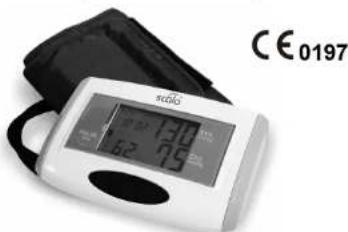
Upper Arm Blood Pressure Monitor
SC 7600
with 2 person memory
GB
Instructions for use
Contents
| page | |
| Introduction | 3 |
| Features of the SC 7600 | 3 |
| Safety instructions | 3 |
| WHO-Interpretation of blood pressure readings | 4 |
| Device Description | 5 |
| Instructions for measuring the blood pressure | 6 |
| How to put the SC 7600 into operation / Changing the batteries | 6 |
| Setting the clock | 7 |
| The blood pressure measurement | 8 |
| Irregular heartbeat | 9 |
| Aborting a measurement | 9 |
| The memory function | 10 |
| Delete a blood pressure value from the memory | 10 |
| Delete all blood pressure values in the memory | 10 |
| Troubleshooting and remedies | 11 |
| Care and maintenance | 12 |
| Periodic re-calibration | 12 |
| Referenced norms | 13 |
| Disposal note | 13 |
| Warranty | 13 |
| Specifications | 14 |

SCALA Electronic GmbH
Ruhlsdorfer StraBe 95
D-14532 Stahnsdorf, Germany
Service firm
SES GmbH
Ruhlsdorfer Straße 95
D-14532 Stahsdorf, Germany
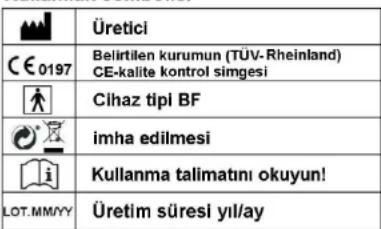
Explanation of symbols
| Manufacturer | |
| CE 0197 | CE-sign of a notified body (TÜV Rheinland) |
| Product type BF | |
| Disposal notes | |
| Read the instruction manual | |
| LOT. MMJJ | Production period (MM/YY) |
Rev.12/04/2011/CB
Specifications
Measuring method: Oscillometric, fuzzy logic
Measuring range: Pressure: 20 to 300 mmHg
Heart rate: 40 to 200 / min
Measuring accuracy: stat. pressure: +/- 3 mmHg Heart rate: +/- 5%
Measuring value memory: 2 memories each with 50 locations for systolic / diastolic / heart rate, date and time
Display: LC display
Pressure pick-up: Semi-conductor pressure sensor
Automatic switch-off: after approx. 2 minutes of inactivity
Voltage supply: 4 x LR6 (alkali batteries)
Working temperature range: +10°C to +40°C
Storage temperature range: - 10°C to +50°C
Cuff length: for upper arm circumference from 22 cm to 32 cm
Specifications may change as technical improvements take place
Introduction
Thank you for deciding for the blood pressure monitor SC 7600 from SCALA. Electronic GmbH. To be able to utilise all advantages of the blood pressure monitor to the fullest, you should carefully read these instructions before using the monitor. Keep the instruction leaflet in a safe place.
Features of the SC 7600
The SC 7600 is a fully automatic digital blood pressure monitor for blood pressure measurement on the upper arm. The measuring algorithm is state-of-the-art.
-
The blood pressure monitor has fuzzy logic to identify the pumping pressure. If the pumping pressure set in the factory (approx. 190mmHg ) is not sufficient, the instrument identifies this and continues pumping.
-
The instrument has 2 selectable memories each with 50 memory locations.
-
The date and time are displayed and stored together with every blood pressure value.
-
Additional WHO-Interpretation of blood pressure readings with coloured LED band (red: hypertension; yellow: high normal; green: normal blood pressure)
-
If your heartbeat is not regular, an icon (see page 9) appears in the LCD.
-
If the battery icon is displayed, the batteries are discharged and the device cannot be used until new batteries are inserted.
-
The cuff is suitable for upper arms with a circumference between 22 and 32cm
Safety instructions
The blood pressure monitor SC 7600 enables you to monitor your blood pressure regularly. However, you should never change the treatment which your doctor has prescribed. Self
measurement means monitoring, it does not imply diagnosis or treatment.
Discuss unusual values with your doctor. Do not change the medication prescribed by your doctor. The heart rate is not a useful indicator of the frequency of a cardiac pacer maker. Patients with cardiac arrhythmia should use the blood pressure monitor only after consulting a doctor.
WHO-Interpretation of blood pressure readings
29:12:2007
| Meaning Systolic / mmHg Diastolic / mmHg | ||
| optimum < 120 < 80 | ||
| normal < 130 < 85 | ||
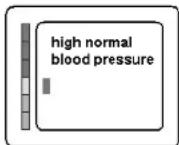
| high-normal 130 - 139 85 - 89 | ||
| mildly hypertonic 140 - 159 90 - 99 | ||
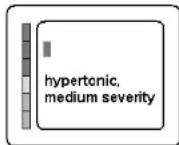
| hypertonic, medium severity 160 - 179 | 79 100 - 109 | |
| severely hypertonic > 180 | > 110 | |
The World Health Organization (WHO) recommends medical treatment, when the blood pressure value exceeds 140/90 mmHg
Examples:
Referenced norms
The device has been certified in accordance with DIRECTIVE 93/42/EU of 14th June 1993 relating to medicinal products.
For registration, a defined number of blood pressure monitors was subjected to stringent clinical testing. These monitors used the same program for blood pressure measurement as your monitor uses. Thus, this program is also regarded as clinically tested.
The manufacture of the blood pressure monitor complies with the European norms for blood pressure monitors: EN 60601-1, EN 1060-1 to EN 1060-3.
Electromagnetic compatibility: The blood pressure monitor complies with the requirements of European norm EN 60601-1-2.

Disposal note
The disposal of batteries is regulated. Spent batteries are collected at collection points provided by battery dealers and the communities. Disposse of the blood pressure monitor as prescribed, i.e., at a collection point for electrical scrap.
Warranty
We grant a warranty of two years for the blood pressure monitor SC 7660. Within this period, defects of the BP monitor will be repaired free of charge. You can also have your BP monitor repaired by our customer service after the warranty period. We will provide you with a free cost estimate for the repair.
The warranty does not cover damage due to improper handling, accident, natural wear and tear (cuff), non-compliance with the instructions for use or unauthorized modifications of the monitor. Not covered by the warranty are the packaging, batteries and the instructions for use.
wrong application of the cuff, use of wrong batteries or use of a rechargeable battery. Repeat a measurement not earlier than after 5 minutes. If the error occurs again, call the customer service at +49 3329 604315.
Care and maintenance
- Avoid extreme temperatures, moisture, dust and the direct exposure to sunlight.
- The cuff incorporates a sensitive, air-tight bubble. Please avoid any stress by turning or bending it.
Clean the instrument with a soft, dry cloth. Never use petrol, thinner, or similar solvents. Stains on the cuff can be gently removed with a wet cloth and soap.
Do not wash the cuff!
Do not drop the instrument or treat it violently in any other way.
- Never attempt to open the instrument, as the calibration set by the manufacturer will become invalid.
Periodic re-calibration
We recommend re-calibrating the pressure display regularly every 2 years.
Device Description
The device
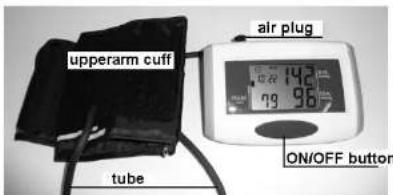
Fig. 1
The rear side
memory area
select button
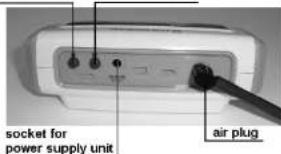
Fig. 2
The LC display

Fig. 3
Instructions for measuring the blood pressure
In order to obtain comparable values, always measure the blood pressure under the same conditions, i.e. in a relaxed atmosphere, not after the consumption of alcohol, not during a meal and not after being exposed to physical or nervous stress. If possible, make the measurement while being seated at a table.
How to put the SC 7600 into operation / changing the batteries
Put the supplied batteries in the compartment as indicated on the back of the instrument. Use only alkali batteries (LR6). Most low-price zinc-carbon batteries (R6) cannot be used for more than 20 or 30 measurements. If the batteries are flat, an empty battery will be displayed at the LC display above left:
(see Fig. 3). The battery needs urgent replacement because you cannot use the monitor with depleted batteries.
Caution: Do not dispose of depleted batteries with the household waste. Also see disposal note.
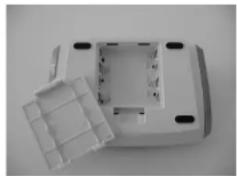
Fig. 4
Alternatively to battery operation, the SC 7600 may also be operated with a special power supply unit, which is also available from Customer Services. Use of a power supply unit not approved by the manufacturer will destroy the blood pressure monitor
Troubleshooting and remedies
Possible errors which can occur during a measurement are listed in the table below.
| Message Error description Correction | ||
| LL Err | Pressure is not build up in the cuff. Cuff not applied tightly enough or leaky. | Apply cuff again and measure again. Consult customer service if necessary |
| UU Err | Pressure is built up very quickly at the sensor. The cuff is too tight or the bubble sticks. | Apply cuff again and measure again. Consult customer service if necessary |
| P Err | Pump defective or pumping error | Contact customer service |
| rrErr | The pressure can not be measured due to signal noise. | Please take the measurement on the left upper arm. Make sure of the correct seat of the cuff. Repeat measurement. |
| HI | The pumping pressure is higher than 300mmHg. | Contact customer service |
| or no display | Low batteries. | Please check and replace the batteries if necessary. Do not use Ni-Cd or NiMH rechargeable batteries |
From many years of experience we know that most faults are the consequence of wrong use. The most frequent causes of faults are excessive movement during the measurement,
The memory function
The SC 7600 saves up to 50 measurements in every memory area. Together with each measurement (systolic, diastolic and heart rate), the date and time are also saved. The measurement with the longest residence time in the memory is assigned number 1. All other measurements increment by one until number 50. Then the memory is full. The next measurement occupies memory location 50. The measurement formerly at location 50 changes to location 49 (etc., 48 → 47 ..., 2 → 1 ). The oldest measurement formerly at location 1 is lost.
Delete a blood pressure value from the memory
Press the MEMORY key to view the blood pressure value you want to delete. Pressing the POWERR key instantly (and holding it for at least 4 secs.) displays DEL (for "delete") and the number of the memory location. Press the POWERR key instantly and the value will be deleted.
Delete all blood pressure values in the memory
Remove the batteries for about 5 minutes to delete all memory entries, the time and date settings.
Or: Press the MEMORY key to display any blood pressure value. Pressing the POWRER key instantly (and holding it for at least 4 secs.) displays dEL (for "delete") and the number of the memory location Press the MEMORY key instantly and the LCD displays dEL (for "delete") and ALL (for all memory locations).
Press the POWER key instantly and all values will be deleted. Time and date are not deleted.
Setting the clock
After you have inserted the two batteries, you should set the clock. It starts with year "2009". 1/1" (for the 1st month / 1st day) and "12:00" o'clock after every battery change.
To set the clock, hold the MEMORY button (see Fig. 2) pressed for about 5 seconds. The year 2009 blinks in the top left corner of the display.
Set the year with the ON/OFF (see Fig.1) button.
When the correct year is set, press the MEMORY button again. Now the 1 blinks in the top left corner of the LCD. It stands for the month.
Set the month with the ON/OFF button.
Another press of the MEMORY button sets another 1 blinking. It stands for the first day in the month.
Set the day with the ON/OFF button.
Another press of the MEMORY button takes you to the clock setting - the hours blink. As earlier, set the clock with the ON/OFF button.
Pressing the MEMORY button advances to the minutes setting.
Set the minutes with the ON/OFF button.
A final press of the MEMORY button completes the setting of the date and time
The blood pressure measurement
Now connect
the cuff with the instrument by plugging the air plug at the tube of the cuff into the socket on the back side of the instrument (see Figs. 1 and 2). Put the cuff around your left upper arm in such a way that the tube is directed towards the bend of the elbow, with the lower cuff edge ending about 2-3 cm above the bend of the elbow.
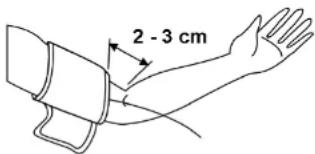
Fig. 5
The cuff should be reasonably tight.
Before switching on the instrument, select "your" memory area with the select button, which you want to use and in which you want to store your blood pressure values by pressing the MEMORY button. (The BP monitor has 2 different memory areas each with 50 memory locations. The other memory area can be used by family member or other person.)
After you press the button for selecting the memory area, the word USER 1 is displayed. Another press of the select button displays the word USER 2. So select "your" USER memory. Then wait for 5 seconds until the display disappears. The monitor has adopted your data and is now ready for taking measurements. Pressing the ON/OFF button starts the automatic measurement. The cuff inflates to approx. 190mmHg pressure.
The automatic deflation starts the measurement. After about 3 seconds, a heart icon starts blinking in the LC display. If a Korotkoff's sound is detected already at that time, it means a systolic pressure of more than 150mmHg . Then the monitor re-inflates (to about 220 mmHg).
At the end of the measurement, the result is displayed in the LCD and the cuff deflates and the measuring value is entered in the selected memory area.
Irregular heartbeat
If your heartbeat is not regular (irregular), the intervals between pulses are different. If this happens while you are taking a measurement, the icon appears in the LC display.
Reasons for irregular heartbeat: (not complete)
Not a cause for concern.
- Sport activity, sauna, stress
- Measuring error such as loose cuff, wrong posture during measurement Cause for concern: (not complete)
Cardiac arrhythmia
If irregular heartbeat is displayed regularly, consult your doctor.
Aborting a measurement
You can stop the measurement at any time by pressing the ON/OFF button. The BP monitor deflates the cuff instantly.
scala
Ruhlsdorfer Straße 95
D-14532 Stahsdorf
Ruhlsdorfer Straße 95
D-14532 Stahnsdorf
Kullanilan semboller
Rev.15/04/2011/TR
Teknik veriler
Ölçüm yontemi: osilometrik/Fuzzy-Logic
Olcum arali: Basin gostergesi: 20 ile 300 mmHgarasinda
Nabiz: 40 ile 200/dak,arasinda
Olcum hassasi: Stat.basing:+-3mmHg,Nabiz:+-%5
- CONTENTS
- EXPLANATION OF SYMBOLS
- SPECIFICATIONS
- INTRODUCTION
- FEATURES OF THE SC 7600
- SAFETY INSTRUCTIONS
- MEASUREMENT MEANS MONITORING, IT DOES NOT IMPLY DIAGNOSIS OR TREATMENT
- EXAMPLES
- REFERENCED NORMS
- DISPOSAL NOTE
- WARRANTY
- CARE AND MAINTENANCE
- PERIODIC RE-CALIBRATION
- DEVICE DESCRIPTION
- THE REAR SIDE
- THE LC DISPLAY
- INSTRUCTIONS FOR MEASURING THE BLOOD PRESSURE
- HOW TO PUT THE SC 7600 INTO OPERATION / CHANGING THE BATTERIES
- TROUBLESHOOTING AND REMEDIES
- THE MEMORY FUNCTION
- DELETE A BLOOD PRESSURE VALUE FROM THE MEMORY
- DELETE ALL BLOOD PRESSURE VALUES IN THE MEMORY
- SETTING THE CLOCK
- THE BLOOD PRESSURE MEASUREMENT
- SCALA
- KULLANILAN SEMBOLLER
- TEKNIK VERILER
Brand : HAMA
Model : SC 7600
Category : Sphygmomanometer