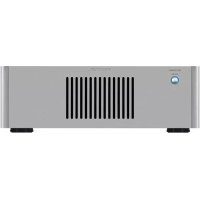
RB1552 MkII - Receiver ROTEL - Free user manual and instructions
Find the device manual for free RB1552 MkII ROTEL in PDF.



| Product Type | Stereo Power Amplifier |
| Brand | Rotel |
| Model | RB1552 MkII |
| Output Power (per channel) | 130 W (8 ohms, both channels driven) |
| Frequency Response | 10 Hz - 100 kHz (+0.5 / -3 dB) |
| Damping Factor | 450 (20 Hz - 20 kHz, 8 ohms) |
| Minimum Speaker Impedance | 4 ohms |
| Signal-to-Noise Ratio | 120 dB (IHF A) |
| Input Impedance (Unbalanced) | 12 kOhms |
| Input Sensitivity (Unbalanced) | 1.5 V |
| Input Impedance (Balanced) | 100 kOhms |
| Input Sensitivity (Balanced) | 2.5 V |
| Gain (Unbalanced) | 26.5 dB |
| Gain (Balanced) | 22.5 dB |
| Power Supply | 120 V / 60 Hz (USA) or 230 V / 50 Hz (Europe) |
| Power Consumption | 400 W |
| Dimensions (W x H x D) | 431 x 144 x 339 mm |
| Weight | 12.4 kg |
| Audio Inputs | RCA unbalanced and XLR balanced |
| Speaker Outputs | Screw terminals (2 pairs per channel, accept bare wire, spade, banana) |
| Special Features | 12 V trigger (input/output), input selector, thermal and overcurrent protection circuit |
| Cleaning | Dry cloth or vacuum cleaner |
| Safety | Double insulation (symbol), automatic shutdown in case of overheating, internal fuse not user-replaceable |
Frequently Asked Questions - RB1552 MkII ROTEL
User questions about RB1552 MkII ROTEL
0 question about this device. Answer the ones you know or ask your own.
Ask a new question about this device
Download the instructions for your Receiver in PDF format for free! Find your manual RB1552 MkII - ROTEL and take your electronic device back in hand. On this page are published all the documents necessary for the use of your device. RB1552 MkII by ROTEL.
USER MANUAL RB1552 MkII ROTEL
RB-1552MKII / RB-1582MKII
Stereo Power Amplifiers
Important Safety Instructions
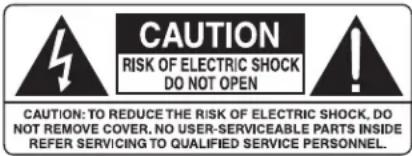
WARNING: There are no user serviceable parts inside. Refer all servicing to qualified service personnel.
WARNING: To reduce the risk of fire or electric shock, do not expose the unit to moisture or water. Do not expose the unit to dripping or splashing. Do not place objects filled with liquids, such as vases, on the unit. Do not allow foreign objects to get into the enclosure. If the unit is exposed to moisture, or a foreign object gets into the enclosure, immediately disconnect the power cord from the wall. Take the unit to a qualified service person for inspection and necessary repairs.
Read all the instructions before connecting or operating the component.
Keep this manual so you can refer to these safety instructions.
Heed all warnings and safety information in these instructions and on the product itself. Follow all operating instructions.
Clean the enclosure only with a dry cloth or a vacuum cleaner.
Do not use this unit near water.
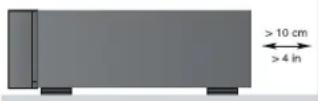
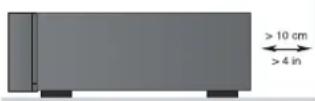
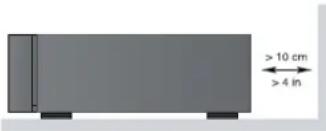
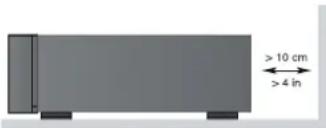
You must allow a minimum 10 cm or 4 inches of unobstructed clearance around the unit.
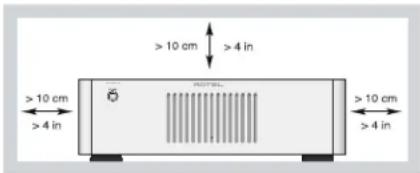
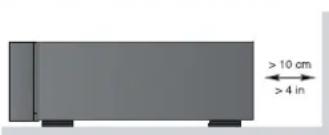
Do not place the unit on a bed, sofa, rug, or similar surface that could block the ventilation openings. If the unit is placed in a bookcase or cabinet, there must be ventilation of the cabinet to allow proper cooling.
Keep the component away from radiators, heat registers, stoves, or any other appliance that produces heat.
WARNING: The rear panel power cord connector is the mains power disconnect device. The device must be located in an open area that allows access to the cord connector.
The unit must be connected to a power supply only of the type and voltage specified on the rear panel. (USA: 120V/60Hz, EC: 230V/50Hz)
Connect the component to the power outlet only with the supplied power supply cable or an exact equivalent. Do not modify the supplied cable. A polarized plug has two blades, with one wider than the other. A grounding plug has two blades plus a third grounding prong. These are provided for your safety. Do not defeat grounding and/or polarization safety provisions. If the supplied plug does not fit your outlet, please consult an electrician for replacement of the obsolete outlet. Do not use extension cords.
The main plug of the power cordset is a disconnect device of the apparatus. In order to completely disconnect the apparatus from the supply mains, the main plug of the power cordset should be unplugged from the mains (AC) outlet. The stand-by LED indicator will not be lit up to show the power cord is unplugged. The disconnect device shall remain readily operable.
Do not route the power cord where it will be crushed, pinched, bent, exposed to heat, or damaged in any way. Pay particular attention to the power cord at the plug and where the cord exits the back of the unit.
The power cord should be unplugged from the wall outlet during a lightning storm or if the unit is to be left unused for a long period of time.
This apparatus shall be connected to a main socket outlet with a protective earth connection.
Use only accessories specified by the manufacturer.
Use only with a cart, stand, rack, bracket or shelf system recommended by Rotel. Use caution when moving the unit in a stand or rack to avoid injury from a tip-over.

Use Class 2 wiring for speaker connections to ensure proper insulation and minimize the risk of electric shock.
Immediately stop using the component and have it inspected and/
or serviced by a qualified service agency if:
- The power supply cord or plug has been damaged
- Objects have fallen or liquid has been spilled into the unit
• The unit has been exposed to rain
• The unit shows signs of improper operation
• The unit has been dropped or damaged in any way
| APPLICABLE FOR USA, CANADA OR WHERE APPROVED FOR THE USAGE |
| CAUTION: TO PREVENT ELECTRIC SHOCK, MATCH WIDE BLADE OF PLUG TO WIDE SLOT. INSERT FULLY. |
| ATTENTION: POUR EVITER LES CHOCS ELECTRIQUES, INTRODUIRE LA LAME LA PLUS LARGE DE LA FICHE DANS LA BORNE CORRESPONDANTE DE LA PRISE ET POUSSER JUSQU AU FOND. |
Rotel products are designed to comply with international directives on the Restriction of Hazardous Substances (RoHS) in electrical and electronic equipment and the disposal of Waste Electrical and Electronic Equipment (WEEE). The crossed wheelie bin symbol indicates compliance and that the products must be appropriately recycled or processed in accordance with these directives.

For RB-1552MKII only:
This symbol means that this unit is double insulated. An earth connection is not required.
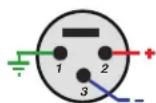
Pin Assignments
Balanced Audio (3 pole XLR):
Pin 1: Ground / Screen
Pin 2: In phase / +ve / Hot
Pin 3: Out of phase / -ve / Cold

Figure 1: Controls and Connections
Commandes et Branchements
Bedienelemente und Anschlüsse
Controles y Conexiones
Bedieningselementen en aansluitingen
Controlli e connessioni
Kontroller och anslutningar
Органы управления и разъемы
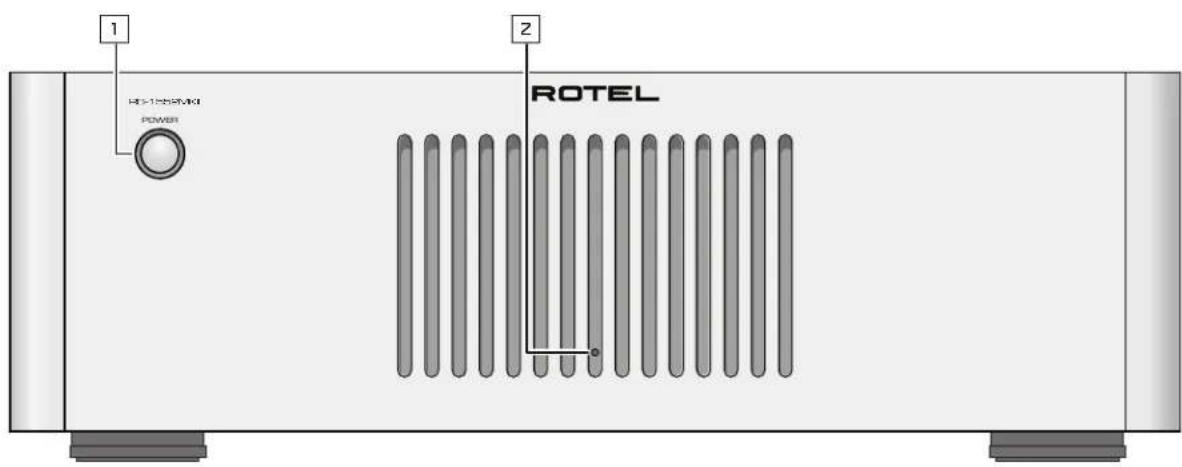
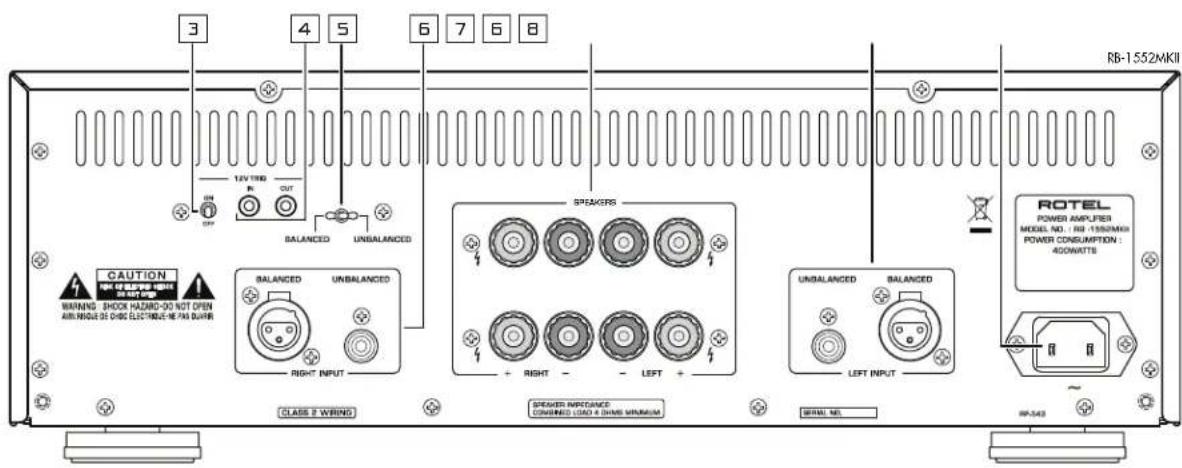
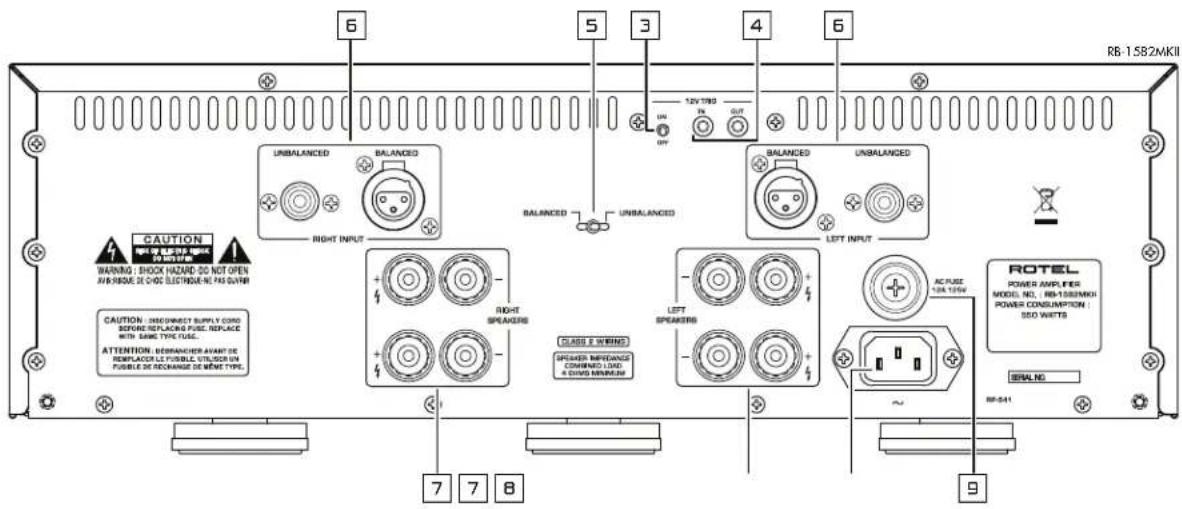
Figure 2: Analog Inputs and Speaker Output Connections
Figure 3: Balanced (XLR) Inputs
When making connections be sure to:
√ Turn off all the components in the system before hooking up any components, including loudspeakers.
√ Turn off all components in the system before changing any of the connections to the system.
It is also recommended that you:
√ Turn the volume control of the amplifier all the way down before the amplifier is turned on or off.
Remarques importantes
Important Safety Instructions 2
Figure 1: Controls and Connections 3
Figure 2: Analog Inputs and Speaker Output Connections 4
Figure 3: Balanced (XLR) Inputs 5
Important Notes 6
About Rotel....7
A Word About Watts....7
Getting Started....7
A Few Precautions 8
Placement 8
AC Power and Control 8
AC Power Input 8
Power Switch and Power Indicator 1 8
Trigger ON/OFF Mode Selector 3 8
12 Volt Trigger Input and Output 4 8
Protection Circuitry 2 8
Input Signal Connections 6 9
Input Selector Switch 5 9
Speaker Connection 9
Speaker Selection 9
Speaker Wire Selection 9
Polarity and Phasing 9
Speaker Connections 7 9
Troubleshooting....10
Power Indicator Is Not Illuminated 10
Fuse Replacement 9 10
No Sound 10
Protection Indicator is Illuminated 10
Specifications....10
About Rotel
Our story began over 50 years ago. Over the decades, we have received hundreds of awards for our products and satisfied hundreds of thousands of people who take their entertainment seriously - like you!
Rotel was founded by a family whose passionate interest in music led them to manufacture high-fidelity components of uncompromising quality. Through the years, that passion has remained undiminished and the family goal of providing exceptional value for audiophiles and music lovers, regardless of their budget, is shared by all Rotel employees.
Rotel's engineers work as a close team, listening to, and fine tuning, each new product until it reaches their exacting musical standards. They are free to choose components from around the world in order to make that product the best they can. You are likely to find capacitors from the United Kingdom and Germany, semiconductors from Japan or the United States, while toroidal power transformers are manufactured in Rotel's own factory.
We all have concerns about our environment. And, as more and more electronics are produced and later discarded, it is especially important for a manufacturer to do all it can to engineer products that have a minimum negative impact on landfill sites and water tables.
At Rotel, we are proud to do our part. We have reduced the lead content in our electronics by using special ROHS solder, while our new Class D (not digital) amplifiers are up to five times more efficient than our legacy designs and still deliver power and performance. These products run cool, give minimum wasted energy, are good for the environment and give better sound too.
Finally, we have printed this brochure on recycled paper stock.
While we understand that these are small first steps, they are still important ones. And we continue to pursue new methods and materials for a cleaner and greener manufacturing process.
All of us at Rotel thank you for buying this product. We are sure it will bring you many years of enjoyment.
A Word About Watts
The RB-1552MKII power output is quoted as 130 watts for each channel, and the RB-1582MKII power output is quoted as 200 watts for each channel, when both channels are operating together at full power.
Rotel has chosen to specify the power output in this way because, in Rotel's experience, it gives the truest value of the receiver or amplifier's power capability.
When comparing specifications for different products, you should be aware that power output is often specified in other ways, so you may not be comparing like with like.
For example, the power output may be quoted with only one channel operating, giving a higher maximum figure. The high performance power supplies of the Rotel amplifiers ensure that they will produce the full specified power output to one or both channels.
A loudspeaker's impedance rating indicates the electrical resistance or load it offers when connected to the amplifier, usually 8 ohms or 4 ohms. The lower the impedance, the more power the speaker will need. In effect, a 4 ohm speaker will require twice as much power as an 8 ohm speaker.
However, Rotel amplifiers are designed to work into any speaker impedance between 8 and 4 ohms, and with all the channels working up to their full power. Because the Rotel design is optimized for use with all channels operating together, Rotel is able to specify the true power output for both channels.
This can be important for your enjoyment, too. When watching movies, it's nice to have the amplifier able to reproduce full power into all the channels at the same time, especially in the case of a volcano exploding!
Getting Started
Thank you for purchasing the Rotel RB-1552MKII or RB-1582MKII Stereo Power Amplifier. When used in a high-quality music or home theater system, your Rotel product will provide years of musical enjoyment.
The RB-1552MKII and RB-1582MKII are high-power amplifiers, providing the highest level of audio performance. Discrete output devices, a massive power supply, premium components, and Rotel's Balanced Design ensure
superb sound quality. High current capability allow the RB-1552MKII and RB-1582MKII to drive the most demanding loudspeakers.
Be aware that the RB-1552MKII and RB-1582MKII are capable of high power levels, in excess of 130 watts and 200 watts respectively per channel. Make sure that your speakers can handle the power of the amplifier. If in doubt about your speakers, ask your local Rotel audio dealer for advice.
These amplifiers are straightforward in their installation and operation. If you have experience with other stereo power amplifiers, you shouldn't find anything perplexing. Simply plug in the associated components and enjoy.
A Few Precautions
WARNING: To avoid potential damage to your system, turn off ALL the components in the system when connecting or disconnecting the loudspeakers or any associated components. Do not turn the system components back on until you are sure all the connections are correct and secure. Pay particular attention to the speaker wires. There must be no loose strands that could contact the other speaker wires, or the chassis of the amplifier.
Please read this manual carefully. In addition to installation and operating instructions, it provides valuable information on various system configurations as well as general information that will help you get optimum performance from your system. Please contact your authorized Rotel dealer for answers to any questions you might have. In addition, all of us at Rotel welcome your questions and comments.
Save the shipping carton and all enclosed packing material for future use. Shipping or moving the amplifier in anything other than the original packing material may result in severe damage that is not covered by the warranty.
If included in the box please fill out and send in the owner's registration card. Also be sure to keep the original sales receipt. It is your best record of the date of purchase, which you will need in the event warranty service is required.
Placement
The RB-1552MKII and RB-1582MKII generate heat as part of its normal operation. The heat sinks and ventilation openings in the amplifier are designed to dissipate this heat. The ventilation slots in the top cover must be open. There should be 10 cm (4 inches) of clearance around the chassis, and reasonable airflow through the installation location, to prevent the amplifier from overheating.
Remember the weight of the amplifier when you select an installation location. Make sure that the shelf or cabinet can support it. We recommend installing the unit in furniture designed to house audio components. Such furniture is designed to reduce or suppress vibration which can adversely affect sound quality. Ask your authorized Rotel dealer for advice about component furniture and proper installation of audio components.
AC Power and Control
AC Power Input ☐
Your amplifier is configured at the factory for the proper AC voltage in the country where you purchased it, either 120 volts or 230 volts. The AC line configuration is noted on a decal on the back panel.
NOTE: Should you move your amplifier to another country, it may be possible to reconfigure it for use on a different line voltage. Do not attempt to perform this conversion yourself. Opening the enclosure of the amplifier exposes you to dangerous voltages. Consult a qualified service person or the Rotel factory service department for information.
NOTE: Some products are intended for sale in more than one country and as such are supplied with more than one AC cord. Please only use the one appropriate for your country/region.
Because of its high power rating, the amplifier can draw considerable current. Therefore, it should be plugged directly into a wall outlet. The RB-1582MKII must be plugged into a 3-pin polarized outlet. The RB-1552MKII may be plugged into either a 2-pin or a 3-pin outlet. Do not use an extension cord. A heavy duty multi-tap power outlet strip may be used if it (and the wall outlet) is rated to handle the current demanded by the amplifier and all the other components connected to it.
Be sure the POWER SWITCH 1 on the front panel of the amplifier is turned off (in the "out" position). Then, connect the supplied power cord to the Power Connector 8 on the rear of the unit and the AC power outlet.
If you are going to be away from home for an extended period of time such as a month-long vacation, it is a sensible precaution to unplug your amplifier (as well as other audio and video components) while you are away.
Power Switch and Power Indicator 1
The power switch is located on the front panel of your amplifier. To turn the amplifier on, push the switch in. The ring around the switch will light up, indicating that the amplifier is turned on. To turn the amplifier off, push the button again and return it to the "out" position.
NOTE: Place the self adhesive ring over the light surrounding the power switch if the blue light is too bright.
Trigger ON/OFF Mode Selector ☐
The amplifier provides the option for manual or automatic power on/off operation. These modes are selectable using a toggle switch on the back panel.
With the switch in the +12V TRIGGER ON position, the amplifier is turned on automatically when a 12V trigger signal is present at the 3.5 mm Jack of TRIGGER IN on the rear panel. The amplifier will go into standby mode if the +12V signal is not present. The front panel POWER SWITCH overrides this function. It must be ON for the +12V trigger to work. Turning the switch OFF cuts power to the amplifier, regardless of whether or not a trigger signal is present.
12 Volt Trigger Input and Output 4
The jack labeled IN is for connecting the 3.5mm Plug/Cable carrying a +12 volt trigger signal to turn the amplifier on and off. To use this feature the toggle switch must be set to the ON position. This input accepts any control signal (AC or DC) ranging from 3 volts to 30 volts.
The jack labeled OUT is for connecting another 3.5mm plug/cable to provide a 12V trigger signal to other components. The 12V output signal is available whenever a +12 volt trigger signal is applied to the IN connector.
Protection Circuitry ☐
The RB-1552MKII and RB-1582MKII feature thermal and over-current protection circuits that protect against potential damage in the event of extreme or faulty operating conditions. Unlike many designs, these protection
circuits are independent of the audio signal and have no impact on sonic performance. Instead, the protection circuits monitor the temperature of the output devices and the current they are handling and shut down the amplifier if operating conditions exceed safe limits.
Most likely, you will never see this protection circuitry in action. However, should a faulty condition arise, the amplifier will stop playing and the LED indicator on the front panel will light up.
If this happens, turn the amplifier off, let it cool down for several minutes, and attempt to identify and correct the problem. When you turn the amplifier back on, the protection circuit will automatically reset and the indicator LED should go out.
In most cases, the protection circuitry activates because of a fault condition such as shorted speaker wires, or inadequate ventilation leading to an overheating condition. In very rare cases, highly reactive or extremely low impedance speaker loads could cause the protection circuit to engage.
If the protection circuitry triggers repeatedly and you are unable to isolate and correct the faulty condition, contact your authorized Rotel dealer for assistance in troubleshooting
Input Signal Connections 6
See figure 2 and 3
NOTE: To prevent loud potentially damaging noises, make sure the amplifier is turned off when you make any changes to the input signal configuration.
The RB-1552MKII and RB-1582MKII have conventional RCA type input connectors, the type found on nearly all audio equipment, and accept Balanced (XLR) input connectors.
Select high quality audio interconnect cables. Connect each of the outputs from the preamplifier or signal processor to the corresponding input of the amplifier.
Input Selector Switch 5
A toggle switch in the rear panel selects the type of input signal to use. Select the correct inputs to use with this flip switch.
NOTE: You should choose only one method of ananlog connection from a source component to the amplifier. Do not connect both the RCA and XLR outputs of a source component to the same amplifier at the same time.
Speaker Connection
Speaker Selection
We recommend using loudspeakers with a nominal impedance of 4 ohms or higher with the RB-1552MKII and RB-1582MKII. You should exercise some caution in driving multiple pairs of speakers in parallel configuration, because the effective impedance the amplifier sees is cut in half. For example, when driving two pair of 8 ohm speakers, the amplifier sees a 4 ohm load. When driving multiple speakers in parallel, it is recommended that you select speakers with a nominal impedance of 8 ohms or higher. Speaker impedance ratings are less than precise. In practice, very few loudspeakers
will present any problems for the RB-1552MKII or RB-1582MKII. See your authorized Rotel dealer if you have any questions.
Speaker Wire Selection
Use insulated two-conductor stranded wire to connect the amplifier to the speakers. The size and quality of the wire can have an audible effect on the performance of the system. Standard speaker wire will work, but can result in lower output or diminished bass response, particularly over longer distances. In general, heavier wire will improve the sound. For best performance, you may want to consider special high-quality speaker cables. Your authorized Rotel dealer can help in the selection of cables for your system.
Polarity and Phasing
The polarity – the positive/negative orientation of the connections – for every speaker and amplifier connection must be consistent so all the speakers will be in phase. If the polarity of one connection is reversed, bass output will be very weak and stereo imaging degraded. All wire is marked so you can identify the two conductors. There may be ribs or a stripe on the insulation of one conductor. The wire may have clear insulation with different color conductors (copper and silver). There may be polarity indications printed on the insulation. Identify the positive and negative conductors and be consistent with every speaker and amplifier connection.
Speaker Connections 7
NOTE: The following text describes both binding post and plug-in connections. DO NOT use both connection methods in combination to connect multiple speakers.
Turn off all the components in the system before connecting the speakers. The RB-1552MKII and RB-1582MKII have four pairs of color coded binding posts, two for each channel. These connectors accept bare wire, connector lugs, or dual banana type connectors (except in the European Community countries where their use is not permitted).
Route the wire from the amplifier to the speakers. Give yourself enough slack so you can move the components to allow access to the speaker connectors.
If you are using dual banana plugs, connect them to the wires and then plug into the backs of the binding posts. The thumbscrews of the binding posts should be screwed in all the way (clockwise).
If you are using terminal lugs, connect them to the wires. If you are attaching bare wires directly to the binding posts, separate the wire conductors and strip the insulation from the end of each conductor. Be careful not to cut into the wire strands. Unscrew (turn counterclockwise) the binding post. Place the connector lug or wire around the binding post shaft. Turn the binding post clockwise to clamp the connector lug or wire firmly in place.
NOTE: Be sure there are no loose wire strands that could touch adjacent wires or connectors.
Troubleshooting
Most difficulties in audio systems are the result of incorrect connections, or improper control settings. If you encounter problems, isolate the area of the difficulty, check the control settings, determine the cause of the fault and make the necessary changes. If you are unable to get sound from the amplifier, refer to the suggestions for the following conditions:
Power Indicator Is Not Illuminated
No main power to the amplifier. Check the front panel power switch. Make sure that it is set to the on position. Check AC power connections at the amplifier and the AC outlet.
Fuse Replacement 9
RB-1582MKII Only
If everything checks out correctly and you still cannot get the amplifier to turn on, check for a blown fuse. Disconnect the AC from the wall and remove the fuse holder 9 on the back panel. If the fuse is blown, replace with a new fuse and try again.
NOTE: Make sure that the power cord is disconnected from the wall before checking or replacing the fuse. Replace only with the identical size and type fuse (3AG 125V 12A for U.S. version or 5ST6.3 for European version).
The RB-1552MKII has an internal fuse. If you suspect the fuse is blown take the amplifier to an authorized Rotel service agency to have it checked. Do not attempt to do this yourself. Opening the enclosure of the amplifier exposes you to dangerous voltages
No Sound
If the amplifier is getting AC power, but is producing no sound, check the Protection indicator on the front panel. If it is illuminated, see below. If not, check all of your connections and control settings on associated components.
Protection Indicator is Illuminated
The front panel PROTECTION INDICATOR lights when the amplifier protection circuits have shut off the amplifier. Typically, this occurs only when the ventilation openings are blocked, when there is faulty speaker wiring, or after a period of extreme use. Turn off the system and wait for the amplifier to cool. Then push the front panel power switch in and out to reset the protection devices. If the problem is not corrected or reoccurs, there is a problem with the system or the amplifier itself.
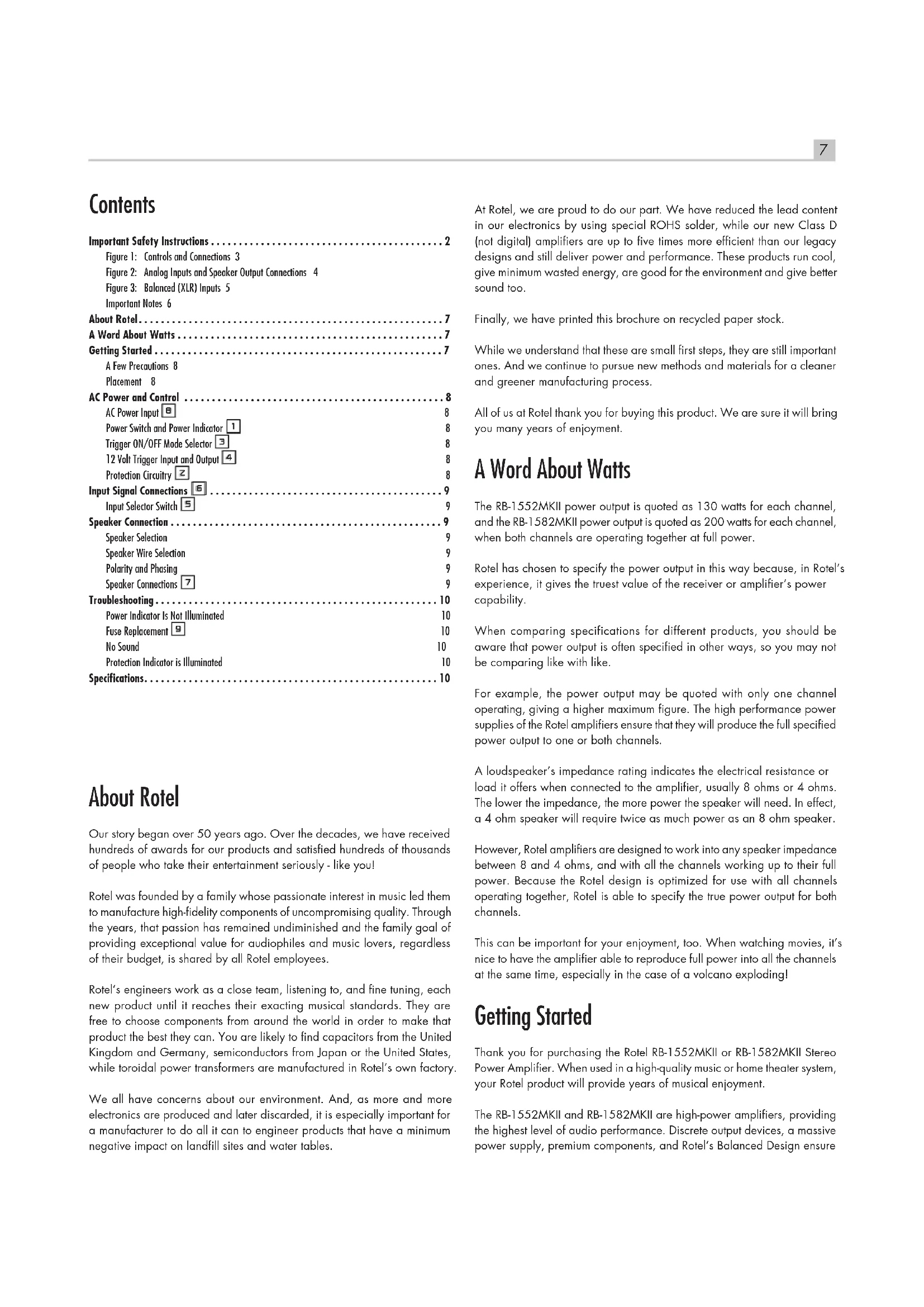
Specifications
RB-1552MKII
Continuous Power Output 130 watts/channel
(20-20kHz, < 0.03%, 8 ohms)
Total Harmonic Distortion (20Hz-20kHz, 8 ohms) < 0.03%
Intermodulation Distortion (60Hz : 7kHz, 4:1) < 0.03%
Frequency Response (±0.5dB) 10Hz - 100kHz
Damping Factor (20-20,000Hz, 8 ohms) 450
Speaker Impedance 4 Ohms minimum
Signal to Noise Ratio (IHF A network) 120 dB
Input Impedance/Sensitivity
Unbalanced 12k Ohms/1.5 volt
Balanced 100k Ohms/2.5 volt
Gain
Unbalanced 26.5 dB
Balanced 22.5 dB
Power Requirements
U.S. version 120 Volts, 60 Hz
European version 230 Volts, 50 Hz
Power Consumption 400 Watts
Dimensions
Width x Height x Depth 431 x 144 x 339 mm
17×5 7/8 ×13 3 /8 ins.
3U / 132.6mm / 5 1/4 ins.
Front Panel Height
12.4kg / 27.27 lbs.
Weight (net)
RB-1582MKII
Continuous Power Output 200 watts/channel,
(20-20kHz, < 0.03%, 8 ohms)
Total Harmonic Distortion (20Hz-20kHz, 8 ohms) < 0.03%
Intermodulation Distortion (60Hz: 7kHz, 4:1) < 0.03%
Frequency Response (±0.5dB) 10Hz - 100kHz
Damping Factor (20-20,000Hz, 8 ohms) 800
Speaker Impedance 4 ohms minimum
Signal to Noise Ratio (IHF A network) 116 dB
Input Impedance/Sensitivity
Unbalanced 12k Ohms/1.9 volt
Balanced 100k Ohms/3.0 volt
Gain
Unbalanced 26.5 dB
Balanced 22.5 dB
Power Requirements
U.S. version 120 Volts, 60 Hz
European version 230 Volts, 50 Hz
Power Consumption 550 Watts
Dimensions
Width x Height x Depth 431 x 144 x 407 mm
17 x 5 7/8 x 16 ins.
Front Panel Height
3U / 132.6mm / 5 1/4 ins.
Weight (net)
17.6kg / 38.80 lbs.
All specifications are accurate at the time of printing.
Rotel reserves the right to make improvements without notice.
Rotel and the Rotel HiFi logo are registered trademarks of The Rotel Co, Ltd., Tokyo, Japan.
(prise XLR 3 broches) :
Pin 1 : Masse/Terre
(20-20 kHz, < 0.03%, 8 ohms)
Distorsion harmonique totale (20Hz-20kHz, 8 ohms) < 0.03%
Distorsion d'intermodulation (60 Hz : 7 kHz, 4 : 1) < 0.03%
(20-20 kHz, < 0.03%, 8 ohms)
Distorsion harmonique totale (20Hz-20kHz, 8 ohms) < 0.03%
Distorsion d'intermodulation (60 Hz : 7 kHz, 4 : 1) < 0.03%
Specifications....34
Over Rotel
Balanserat 100 kohm/3,0 V
Gain
Obalanserat 26,5 dB
Balanserat 22,5 dB
Strömförsörjning
Europeisk version 230 volt, 50 Hz
USA-version 110 volt, 60 Hz
2-11-4, Nakane, Meguro-ku,
Tokyo, 152-0031
Japan
Rotel of America
54 Concord Street
North Reading, MA 01864-2699
USA
Phone: +1 978-664-3820
Fax: +1 978-664-4109
Rotel Europe
Dale Road
Worthing, West Sussex BN11 2BH
England
Phone: + 44 (0)1903 221 761
Fax: +44 (0)1903 221 525
Rotel Deutschland
- RB-1552MKII / RB-1582MKII
- IMPORTANT SAFETY INSTRUCTIONS
- WHEN MAKING CONNECTIONS BE SURE TO
- IT IS ALSO RECOMMENDED THAT YOU
- REMARQUES IMPORTANTES
- ABOUT ROTEL
- A WORD ABOUT WATTS
- GETTING STARTED
- A FEW PRECAUTIONS
- PLACEMENT
- AC POWER AND CONTROL
- AC POWER INPUT ☐
- POWER SWITCH AND POWER INDICATOR 1
- TRIGGER ON/OFF MODE SELECTOR ☐
- 12 VOLT TRIGGER INPUT AND OUTPUT 4
- PROTECTION CIRCUITRY ☐
- INPUT SIGNAL CONNECTIONS 6
- INPUT SELECTOR SWITCH 5
- SPEAKER CONNECTION
- SPEAKER SELECTION
- SPEAKER WIRE SELECTION
- POLARITY AND PHASING
- SPEAKER CONNECTIONS 7
- TROUBLESHOOTING
- POWER INDICATOR IS NOT ILLUMINATED
- FUSE REPLACEMENT 9
- NO SOUND
- PROTECTION INDICATOR IS ILLUMINATED
- SPECIFICATIONS
- RB-1552MKII
- INPUT IMPEDANCE/SENSITIVITY
- GAIN
- POWER REQUIREMENTS
- DIMENSIONS
- RB-1582MKII
- OVER ROTEL
- STRÖMFÖRSÖRJNING
- ROTEL OF AMERICA
- ROTEL EUROPE
- ROTEL DEUTSCHLAND
Brand : ROTEL
Model : RB1552 MkII
Category : Receiver