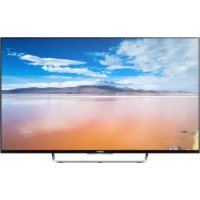
USER MANUAL Bravia KDL65W855C SONY
Parts and Controls .... 7
Controls and Indicators 7
Inputs and Outputs ....8
Using Remote Control ..... 10
Remote Control Parts Description.....10
Installing the TV to the Wall ..... 12
Troubleshooting.... 13
Troubles and Solutions ....13
Specifications 14
Introduction
Thank you for choosing this Sony product.
Before operating the TV, please read this manual thoroughly and retain it for future reference.
Note
- Before operating the TV, please read "Safety information" (page 3).
- Images and illustrations used in Startup Guide and this manual are for reference only and may differ from actual product appearance.
Location of the identification label
Labels for the Model No., Production Date (year/month) and Power Supply rating are located on the rear of the TV or package.
WARNING
TO PREVENT THE
SPREAD OF FIRE, KEEP CANDLES OR OTHER OPEN
FLAMES AWAY FROM THIS
PRODUCT AT ALL TIMES.

NOTICE FOR CUSTOMERS IN THE UNITED KINGDOM
A moulded plug complying with BS1363 is fitted to this equipment for your safety and convenience.
Should the fuse in the plug supplied need to be replaced with the same rating of fuse approved by ASTA or BSI to BS 1362 (i.e., marked with ☑ or ) must be used.
If the plug supplied with this equipment has a detachable fuse cover, be sure to attach the fuse cover after you change the fuse. Never use the plug without the fuse cover. If you should lose the fuse cover, please contact your nearest Sony service station.
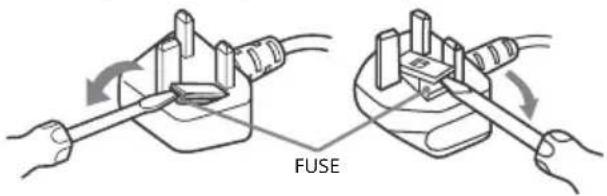
How to replace the fuse
Open the fuse compartment with a blade screwdriver, and replace the fuse.
Please refer to the illustration that actually equipped with the product.
IMPORTANT NOTICE
This product has been manufactured by or on behalf of Sony Corporation, 1-7-1 Konan Minato-ku Tokyo, 108-0075 Japan. Inquiries related to product compliance based on European Union legislation shall be addressed to the authorized representative, Sony Belgium, bijkantoor van Sony Europe Limited, Da Vincilaan 7-D1, 1935 Zaventern, Belgium. For any service or guarantee matters, please refer to the addresses provided in the separate service or guarantee documents.
Notice for Wireless Signal
Hereby, Sony Corporation declares that this unit is in compliance with the essential requirements and other relevant provisions of Directive 1999/5/EC.
For details, please access the following URL: http://www.compliance.sony.de/
Notice for customers: the following information is only applicable to equipment sold in countries applying EU directives.
TV wireless system may be operated in following countries:
AT, BE, HR, CY, CZ, DK, EE, FI, FR, DE, GR, HU, IE, IT, LV, LT, LU, MT, NL, PL, PT, SK, SI, ES, SE, GB, IS, LI, NO, CH, BG, RO, TR, AL, BA, MK, MD, RS, ME, Kosovo
This equipment can be operated in other non-European countries.
WARNING
Batteries must not be exposed to excessive heat such as sunshine, fire or the like.
Installation/Set-up
Install and use the TV set in accordance with the instructions below in order to avoid any risk of fire, electrical shock or damage and/or injuries.
Installation
- The TV set should be installed near an easily accessible mains socket.
- Place the TV set on a stable, level surface to avoid it from falling down and cause personal injury or damage to the TV.
- Only qualified service personnel should carry out wall installations.
- For safety reasons, it is strongly recommended that you use Sony accessories, including: Wall-Mount Bracket
— SU-WL450 (except KDL-75W855C)
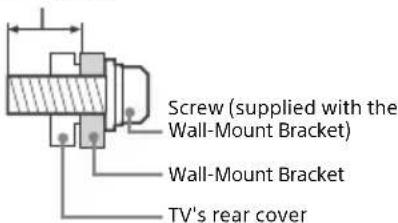
- Be sure to use the screws supplied with the Wall-Mount Bracket when attaching the Wall-Mount Bracket to the TV set. The supplied screws are designed as indicated by illustration when measured from the attaching surface of the Wall-Mount Bracket. The diameter and length of the screws differ depending on the Wall-Mount Bracket model.
Use of screws other than those supplied may result in internal damage to the TV set or cause it to fall, etc.
8 mm - 12 mm
Transporting
- Before transporting the TV set, disconnect all cables.
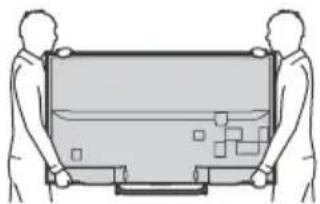
- Two or three people are needed to transport a large TV set.
- When transporting the TV set by hand, hold it as shown below. Do not put stress on the LCD panel and the frame around the screen.
natural_image
Two human figures holding a large rectangular object with internal geometric patterns (no text or symbols)
- When transporting the TV set, do not subject it to jolts or excessive vibration.
- When transporting the TV set for repairs or when moving, pack it using the original carton and packing material.
Ventilation
- Never cover the ventilation holes or insert anything in the cabinet.
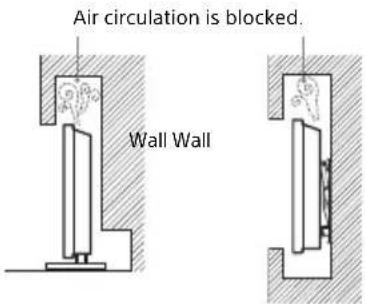
- Leave space around the TV set as shown below.
- It is strongly recommended that you use a Sony Wall-Mount Bracket in order to provide adequate air circulation.
Installed on the wall
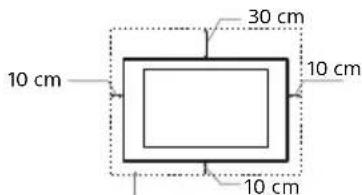
Leave at least this space around the set.
Installed with stand
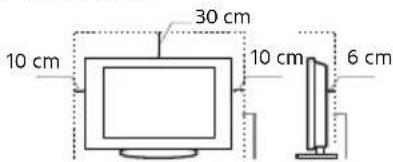
Leave at least this space around the set.
• To ensure proper ventilation and prevent the collection of dirt or dust:
— Do not lay the TV set flat, install upside down, backwards, or sideways.
— Do not place the TV set on a shelf, rug, bed or in a closet.
— Do not cover the TV set with a cloth, such as curtains, or items such as newspapers, etc.
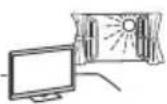
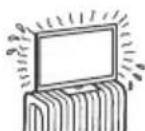
— Do not install the TV set as shown below.
Mains lead
Handle the mains lead and socket as follows in order to avoid any risk of fire, electrical shock or damage and/or injuries:
— Use only mains leads supplied by Sony, not other suppliers.
— Insert the plug fully into the mains socket.
— Operate the TV set on a 220 V - 240 V AC supply only.
— When wiring cables, be sure to unplug the mains lead for your safety and take care not to catch your feet on the cables.
- Disconnect the mains lead from the mains socket before working on or moving the TV set.
- Keep the mains lead away from heat sources.
- Unplug the mains plug and clean it regularly. If the plug is covered with dust and it picks up moisture, its insulation may deteriorate, which could result in a fire.
Note
- Do not use the supplied mains lead on any other equipment.
- Do not pinch, bend, or twist the mains lead excessively. The core conductors may be exposed or broken.
- Do not modify the mains lead.
- Do not put anything heavy on the mains lead.
- Do not pull on the mains lead itself when disconnecting the mains lead.
- Do not connect too many appliances to the same mains socket.
- Do not use a poor fitting mains socket.
Prohibited Usage
Do not install/use the TV set in locations, environments or situations such as those listed below, or the TV set may malfunction and cause a fire, electric shock, damage and/or injuries.
Locations:
- Outdoors (in direct sunlight), at the seashore, on a ship or other vessel, inside a vehicle, in medical institutions, unstable locations, near water, rain, moisture or smoke.
Environments:
- Places that are hot, humid, or excessively dusty; where insects may enter; where it might be exposed to mechanical vibration, near flammable objects (candles, etc.). The TV set shall not be exposed to dripping or splashing and no objects filled with liquids, such as vases, shall be placed on the TV.
Situations:
- Use when your hands are wet, with the cabinet removed, or with attachments not recommended by the manufacturer. Disconnect the TV set from mains socket and aerial during lightning storms.
• Install the TV so that it sticks out into an open space. This may result in injury or damage from a person or object bumping into the TV.
- Place the TV in a humid or dusty space, or in a room with oily smoke or steam (near cooking tables or humidifiers). Fire, electric shock, or warping may result.
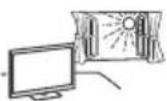
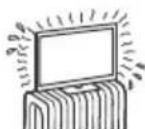
• Install the TV in places subject to extreme temperature such as in direct sunlight, near a radiator or a heating vent. The TV may overheat in such condition which can cause deformation of the enclosure and/or TV malfunction.
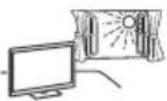
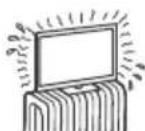
- If the TV is placed in the changing room of a public bath or hot spring, the TV may be damaged by airborne sulfur, etc.
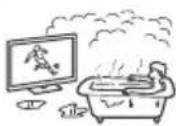
- For best picture quality, do not expose the screen to direct illumination or sunlight.
- Avoid moving the TV from a cold area to a warm area. Sudden room temperature changes may cause moisture condensation. This may cause the TV to show poor picture and/or poor colour. Should this occur, allow moisture to evaporate completely before powering the TV on.
Broken pieces:
- Do not throw anything at the TV set. The screen glass may break by the impact and cause serious injury.
- If the surface of the TV set cracks, do not touch it until you have unplugged the mains lead. Otherwise electric shock may result.
When not in use
- If you will not be using the TV set for several days, the TV set should be disconnected from the mains for environmental and safety reasons.
- As the TV set is not disconnected from the mains when the TV set is just turned off, pull the plug from the mains to disconnect the TV set completely.
• However, some TV sets may have features that require the TV set to be left in standby to work correctly.
For children
- Do not allow children to climb on the TV set.
- Keep small accessories out of the reach of children, so that they are not mistakenly swallowed.
If the following problems occur...
Turn off the TV set and unplug the mains lead immediately if any of the following problems occur.
Ask your dealer or Sony service centre to have it checked by qualified service personnel.
When:
— Mains lead is damaged.
— Poor fitting of mains socket.
— TV set is damaged by being dropped, hit or having something thrown at it.
— Any liquid or solid object falls through openings in the cabinet.
About LCD Monitor Temperature
When the LCD Monitor is used for an extended period, the panel surrounds become warm. You may feel hot when touching there by the hand.
Precautions
Viewing the TV
- Some people may experience discomfort (such as eye strain, fatigue, or nausea) while watching 3D video images or playing stereoscopic 3D games. Sony recommends that all viewers take regular breaks while watching 3D video images or playing stereoscopic 3D games. The length and frequency of necessary breaks will vary from person to person. You must decide what works best. If you experience any discomfort, you should stop watching the 3D video images or playing stereoscopic 3D games until the discomfort ends; consult a doctor if you believe necessary. You should also review (i) the instruction manual of any other device or media used with this television and (ii) our website (www.sony.eu/support) for the latest information. The vision of young children (especially those under six years old) is still under development. Consult your doctor (such as a pediatrician or eye doctor) before allowing young children to watch 3D video images or play stereoscopic 3D games. Adults should supervise young children to ensure they follow the recommendations listed above.
- Do not use, store, or leave the 3D Glasses or in places with a high temperature, e.g., in direct sunlight, or in sun-heated cars.
- View the TV in moderate light, as viewing the TV in poor light or during long period of time, strains your eyes.
- When using headphones, adjust the volume so as to avoid excessive levels, as hearing damage may result.
LCD Screen
- Although the LCD screen is made with high-precision technology and 99.99% or more of the pixels are effective, black dots may appear or bright points of light (red, blue, or green) may appear constantly on the LCD screen. This is a structural property of the LCD screen and is not a malfunction.
- Do not push or scratch the front filter, or place objects on top of this TV set. The image may be uneven or the LCD screen may be damaged.
- If this TV set is used in a cold place, a smear may occur in the picture or the picture may become dark. This does not indicate a failure. These phenomena disappear as the temperature rises.
- Ghosting may occur when still pictures are displayed continuously. It may disappear after a few moments.
- The screen and cabinet get warm when this TV set is in use. This is not a malfunction.
- The LCD screen contains a small amount of liquid crystal. Follow your local ordinances and regulations for disposal.
Handling and cleaning the screen surface/cabinet of the TV set
Be sure to unplug the mains lead connected to the TV set from mains socket before cleaning.
To avoid material degradation or screen coating degradation, observe the following precautions.
- To remove dust from the screen surface/cabinet, wipe gently with a soft cloth. If dust is persistent, wipe with a soft cloth slightly moistened with a diluted mild detergent solution.
- Never spray water or detergent directly on the TV set. It may drip to the bottom of the screen or exterior parts and enter the TV set, and may cause damage to the TV set.
- Never use any type of abrasive pad, alkaline/acid cleaner, scouring powder, or volatile solvent, such as alcohol, benzene, thinner or insecticide. Using such materials or maintaining prolonged contact with rubber or vinyl materials may result in damage to the screen surface and cabinet material.
- Periodic vacuuming of the ventilation openings is recommended to ensure to proper ventilation.
- When adjusting the angle of the TV set, move it slowly so as to prevent the TV set from moving or slipping off from its table stand.
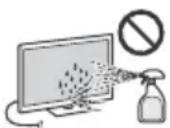
Optional Equipment
- Keep optional components or any equipment emitting electromagnetic radiation away from the TV set. Otherwise picture distortion and/or noisy sound may occur.
- This equipment has been tested and found to comply with the limits set out in the EMC Directive using a connection signal cable shorter than 3 meters.
Recommendation of F-type plug
Projection of the inner wire from the connection part must be less than 1.5 mm.
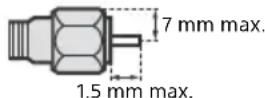
(Reference drawing of the F type plug)
Wireless Function of the unit
- Do not operate this unit near medical equipment (pacemaker, etc.), as malfunction of the medical equipment may result.
- Although this unit transmits/receives scrambled signals, be careful of unauthorised interception. We cannot be responsible for any trouble as a result.
Caution about handling the remote control
- Observe the correct polarity when inserting batteries.
- Do not use different types of batteries together or mix old and new batteries.
- Dispose of batteries in an environmentally friendly way. Certain regions may regulate the disposal of batteries. Please consult your local authority.
- Handle the remote control with care. Do not drop or step on it, or spill liquid of any kind onto it.
- Do not place the remote control in a location near a heat source, a place subject to direct sunlight, or a damp room.
Disposal of the TV set
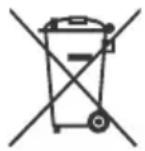

Disposal of Old Electrical & Electronic Equipment (Applicable in the European Union and other European countries with separate collection systems)
This symbol on the product or on its packaging indicates that this product shall not be treated as household waste. Instead it shall be handed over to the applicable collection point for the
recycling of electrical and electronic equipment. By ensuring this product is disposed of correctly, you will help prevent potential negative consequences for the environment and human health, which could otherwise be caused by inappropriate waste handling of this product. The recycling of materials will help to conserve natural resources. For more detailed information about recycling of this product, please contact your local Civic Office, your household waste disposal service or the shop where you purchased the product.

Disposal of waste batteries (applicable in the European Union and other European countries with separate collection systems)
This symbol on the battery or on the packaging indicates that the battery provided with this
product shall not be treated as household waste. On certain batteries this symbol might be used in combination with a chemical symbol. The chemical symbols for mercury (Hg) or lead (Pb) are added if the battery contains more than 0.0005% mercury or 0.004% lead. By ensuring these batteries are disposed of correctly, you will help prevent potentially negative consequences for the environment and human health which could otherwise be caused by inappropriate waste handling of the battery. The recycling of the materials will help to conserve natural resources. In case of products that for safety, performance or data integrity reasons require a permanent connection with an incorporated battery, this battery should be replaced by qualified service staff only. To ensure that the battery will be treated properly, hand over the product at end-of-life to the applicable collection point for the recycling of electrical and electronic equipment. For all other batteries, please view the section on how to remove the battery from the product safely. Hand the battery over to the applicable collection point for the recycling of waste batteries. For more detailed information about recycling of this product or battery, please contact your local Civic Office, your household waste disposal service or the shop where you purchased the product.
Parts and Controls
Controls and Indicators
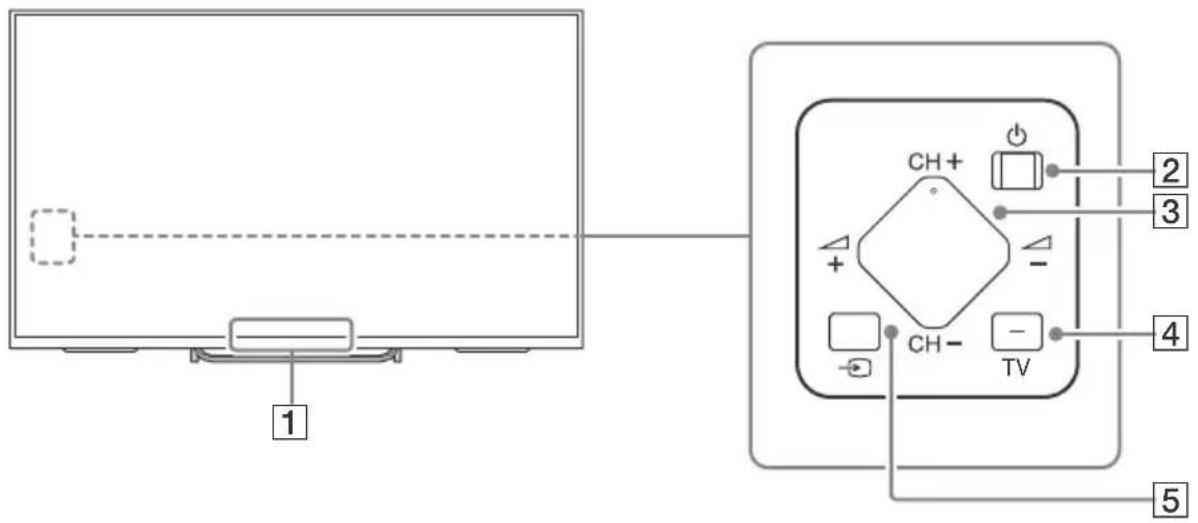
1 Remote Control sensor ^1 / Light sensor ^1 / Illumination LED / 3D Sync Transmitter ^*1
The Illumination LED lights up or blinks according to the status of the TV.
- White
When turning on the TV/picture off mode/software update, etc.
• C y a n
When connecting with a mobile device wirelessly.
• P i n ^2 k *
Recording mode.
- Amber
Timer is set.
2 ⏻ (Power)
3 CH +/- (Channel)
$$
\triangle + / - (\text { Volume })
$$
4 TV
Switch to a TV channel or input from other applications.
5 → (Input select)
Display and select the input source.
*1 Do not place anything near the sensor.
*2 Only on limited region/country/TV model.
flowchart
graph TD
    A["Component In"] -->|1| B["LED Unit"]
    A -->|2| C["Digital Audio Out (Optical)"]
    A -->|3| D["13-18 V mm 0.15 A"]
    A -->|4| E["LAN"]
    A -->|5| F["13-18 V mm 0.15 A"]
    A -->|6| G["13-18 V mm 0.15 A"]
    A -->|7| H["HDD REC 100 mA MAX 3"]
    A -->|8| I["HDMI IN 4"]
    A -->|9| J["Audio OUT 5V MAX 100 mA MAX 1"]
    A -->|10| K["Audio OUT 5V MAX 100 mA MAX 1"]
    A -->|11| L["MHL 5V MAX 1"]
    A -->|12| M["ARC 4"]
    A -->|13| N["ARC 3"]
    A -->|14| O["ARC 2"]
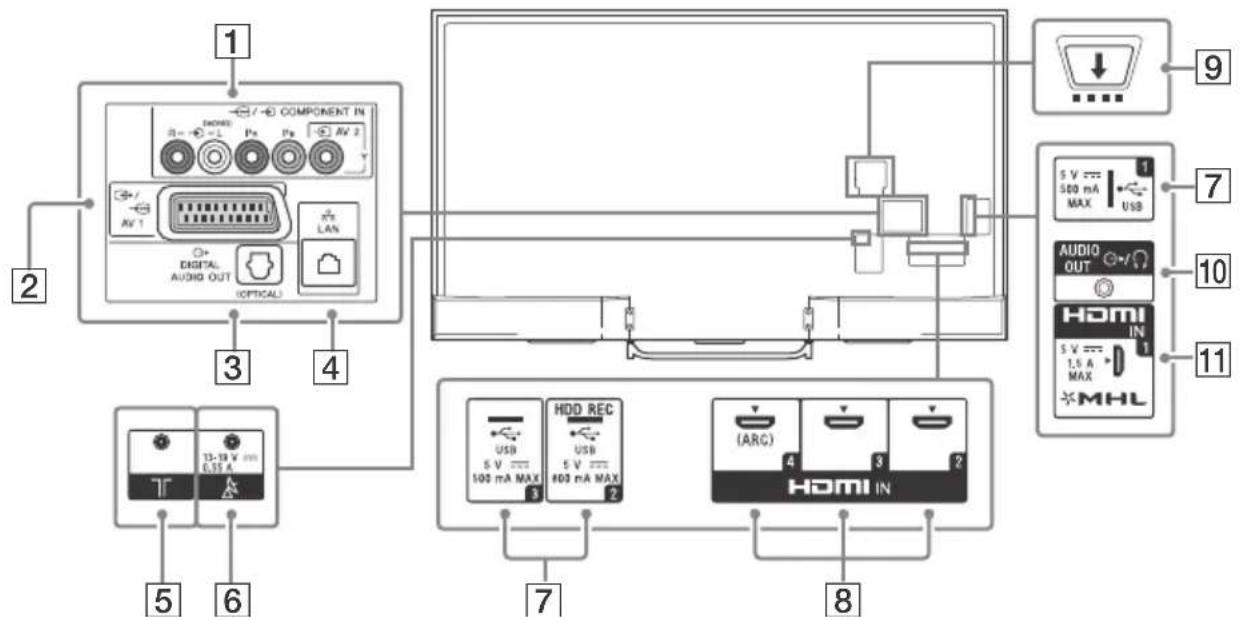
1 → AV 2, → COMPONENT IN
- For a composite connection:
Use → AV 2, and → (L/R) of → ⬇/→ COMPONENT IN *1.
- For a component connection: Use Y, PB, PR, and (L/R).
2 ↩ /→ ⋯ A V 1
Connect with a SCART cable. When you connect an analogue decoder, the TV tuner outputs scrambled signals to the decoder, and the decoder unscrambles the signals before outputting them.
3 DIGITAL AUDIO OUT (OPTICAL)
4 LAN
Connect to your cable or antenna (aerial).
Connect to your satellite antenna (aerial).
7 USB 1/2 (HDD REC)\* ^2*3 /3
- Connecting a large USB device may interfere with other connected devices beside it.
- When connecting a large USB device, connect to the USB 1 jack.
8 HDMI IN 2/3/4
If connecting a digital audio system that is compatible with Audio Return Channel (ARC) technology, use HDMI IN 4. If not, an additional connection with DIGITAL AUDIO OUT (OPTICAL) is necessary.
9 CAM (Conditional Access Module)
- Provides access to pay TV services. For details, refer to the instruction manual supplied with your CAM.
- Do not insert the smart card directly into the TV CAM slot. It must be fitted into the Conditional Access Module provided by your authorised dealer.
• CAM is not supported in some countries/areas. Check with your authorised dealer.
- A CAM message may appear when you switch to a digital programme after using the Internet video.
10 AUDIO OUT
To listen to the TV's sound through the connected equipment, press HOME. Select [Settings] → [Sound] → [Headphone/Audio Out] and then select the desired item.
11 HDMI IN 1/MHL
You can connect your MHL (Mobile High-definition Link) device using an HD quality MHL cable.
*1 When connecting mono equipment, connect to the L (MONO) audio jack (socket).
*2 Only on limited region/country/TV model.
*3 HDD REC function will be available within 2015. You will receive HDD REC function automatically as a software upgrade. Make sure your TV is connected to the Internet. If you do not have a network connection, you will be able to download the software from the Sony support website using your PC. For details on how to upgrade, please visit the Sony support website. To stay informed about the exact release date, please subscribe at http://www.sony.eu/support/2015tvnetworkupdate.
Using Remote Control
Remote Control Parts Description
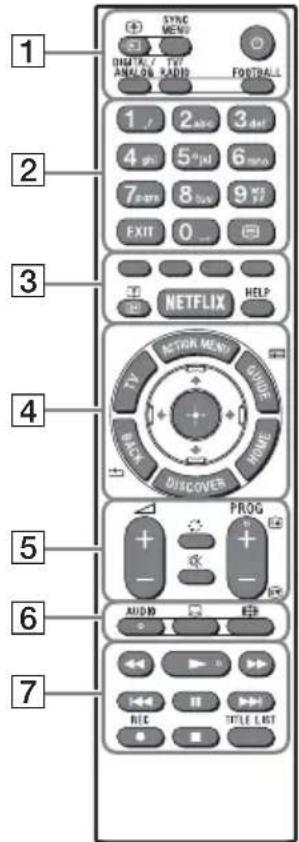
1 → /Input select/Text hold)
In TV mode: Display and select the input source.
In Text mode: Hold the current page.
(TV standby)
Turn on or turn off the TV (standby mode).
DIGITAL/ANALOG
Switch between digital and analogue mode.
TV/RADIO
Switch between TV or RADIO broadcasts.
Display the BRAVIA Sync Menu.
Turn Live Football Mode on or off (when the feature is available).
EXIT
Return to the previous screen or exit from the menu. When an Interactive Application service is available, press to exit from the service.
(Text)
Display text information.
Execute correspondent function at that time.
i+/? ( I n f o / T e x t r e
Display information.
NETFLIX\*1
Access the "NETFLIX" online service.
HELP
Display Help Menu.
Display a list of contextual functions.
TV
Switch to a TV channel or input from other applications.
GUIDE/ ^* 1
Display the digital programme guide.
BACK/←
Return to previous screen.
HOME
Display the TV Home Menu.
DISCOVER
Bring up the Content Bar to search for content.
//// (Item select/Enter)
5 ∠ +/- (Volume)
Adjust the volume.
(Jump)
Jump back and forth between two channels or inputs. The TV alternates between the current channel or input and the last channel or input that was selected.
※ (Muting)
Mute the sound. Press again to restore the sound.
PROG +/-/▲/▼
In TV mode: Select the channel.
In Text mode: Select the next (▲) or previous (▼) page.
6 AUDIO
Change the language for the programme currently being viewed.
(Subtitle setting)
Turn subtitles on or off (when the feature is available).
(Wide mode)
Change the screen format.
7 ◀◀/▶/▶▶/◀◀/||/▶▶/■
Operate media contents on TV and connected BRAVIA Sync compatible device.
● REC\*1\*2
Record the current programme with the USB HDD recording function.
TITLE LIST\*1
Display the Title list.
*1 The location, availability and function of remote control button may vary depending on your country/region/TV model.
*2 HDD REC function will be available within 2015. You will receive HDD REC function automatically as a software upgrade. Make sure your TV is connected to the Internet. If you do not have a network connection, you will be able to download the software from the Sony support website using your PC. For details on how to upgrade, please visit the Sony support website. To stay informed about the exact release date, please subscribe at http://www.sony.eu/support/2015tvnetworkupdate.
Installing the TV to the Wall
This TV's instruction manual only shows the steps on preparing the installation of the TV before installing to the wall.
To Customers:
For product protection and safety reasons, Sony strongly recommends that installation of your TV be performed by Sony dealers or licensed contractors. Do not attempt to install it yourself.
To Sony Dealers and Contractors:
Provide full attention to safety during the installation, periodic maintenance and examination of this product.
Sufficient expertise is required for installing this product, especially to determine the strength of the wall for withstanding the TV's weight. Be sure to entrust the attachment of this product to the wall to Sony dealers or licensed contractors and pay adequate attention to safety during the installation. Sony is not liable for any damage or injury caused by mishandling or improper installation.
Use the Wall-Mount Bracket SU-WL450 (not supplied) (KDL-65W859C/65W858C/65W857C/65W855C) to install the TV to the wall.
When installing the Wall-Mount Bracket, also refer to the Operating Instructions and Installation Guide supplied with the Wall-Mount Bracket.
Note
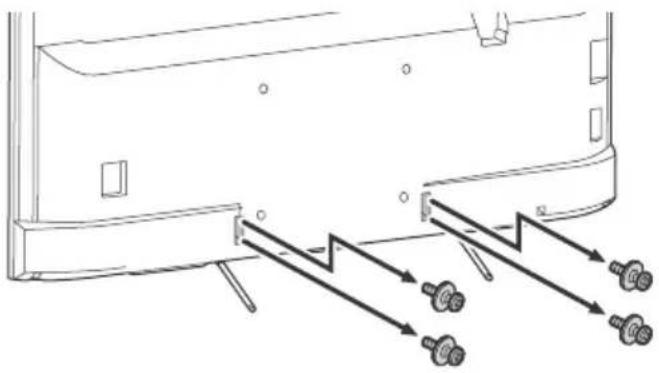
- Be sure to store the removed screws in a safe place, keeping them away from children.
To detach the Table-Top Stand from the TV
natural_image
Technical line drawing of a mechanical component with bolts and directional arrows indicating movement (no text or symbols)

For instructions on Wall-Mount Bracket installation of your TV model, refer to the following website: www.sony.eu/tv/wall-mount-bracket-manual
Troubleshooting
In order to keep your TV software up-to-date, it is necessary to download the latest software information via the digital broadcasting system or Internet and to update the software. Select [Update Now] to start a software update. The illumination LED flashes white while the software is updating. Do not unplug the AC power cord during the software update. If you do, the software update may not finish completely, and it may cause a software malfunction. Software updates can take up to 30 minutes. If you do not wish to update the software automatically, press HOME and select [Help] → [System software update] → [Automatic software download] → [Off].
When you plug in TV, the TV may not be able to turn on for a while even if you press the power button on the remote control or the TV, because it takes time to initialize the system. Wait for about one minute, then operate it again. When you turn on by pressing the power button on the remote control or the TV, it takes some time to turn on the illumination LED and for the remote control to be functional.
When the illumination LED is flashing in red, count how many times it flashes (interval time is three seconds).
If the illumination LED flashes red, reset the TV by disconnecting the mains lead for two minutes, then turn on the TV.
If the problem persists, contact your dealer or Sony service centre with the number of times the Illumination LED flashes red (interval time is three seconds). Disconnect the mains lead, and inform your dealer or Sony service centre.
When the illumination LED is not flashing, check the items as follows.
You can also refer to [Troubleshooting] in the Help Guide or perform self-diagnosis by selecting [Help] → [Self Diagnostics]. If the problem persists, have your TV serviced by qualified service personnel.
Troubles and Solutions
GB
There is no picture (screen is dark) and no sound.
- Check the antenna (aerial)/ cable connection.
- Connect the TV to mains lead, and press ⏻ on the TV or ⏻ on the remote control.
Some programmes cannot be tuned.
- Check the antenna (aerial)/ cable connection or dish.
- The satellite cable might be short-circuited or there might be connection problems of the cable. Check the cable connection and then turn the TV off with the Mains power On/Off switch, and turn it on again.
- The frequency that you entered is out of range. Consult the received satellite broadcasting company.
There is no Cable TV services (programmes) found.
- Check the cable connection or tuning configuration.
- Attempt the [Digital Auto Tuning] by selecting [Antenna] instead of [Cable].
The remote control does not function.
- Replace the batteries.
The [Parental lock] password has been forgotten.
- Enter 9999 for the PIN code. (PIN code 9999 is always accepted.)
The TV surrounds become warm.
- When the TV is used for an extended period, the TV surrounds become warm.
You may feel hot when touching there by the hand.
- Perform a simple reset of the TV by unplugging the mains lead for two minutes, then plug it in again.
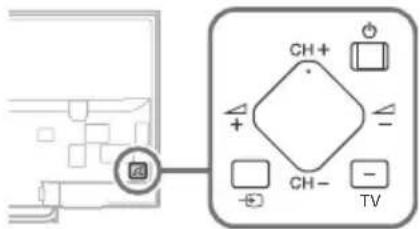
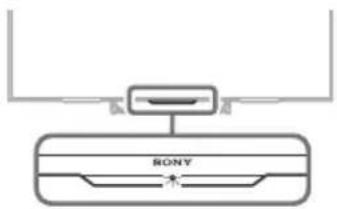
The ⏻, CH+/-, △+/-, ➡ and TV buttons cannot be located on the TV.
• See below illustration for location of the buttons on the TV.
Rear of TV
The illumination LED is turned on.
- If you do not wish to light up the illumination LED, you can turn it off.
Press HOME, then select [Settings] → [Illumination LED] → [Off].
Cannot connect to a wireless router by WPS (Wi-Fi Protected Setup).
- If you use WEP security, select [Easy] [Wi-Fi] [Connect by scan list].
Then, select the network name (SSID) you want to connect.
Cannot find the required network name in network setup.
- Select [[Manual entry]] and press ⏻ to enter network name.
Specifications
System
Panel system
LCD (Liquid Crystal Display) Panel, LED Backlight
TV system
Depending on your country/area selection
Analogue: B/G, D/K, L, I
Digital: DVB-T/DVB-C
DVB-T2
Satellite: DVB-S/DVB-S2
Colour/video system
Analogue: PAL, SECAM, NTSC3.58 (Video only), NTSC4.43 (Video only)
Digital: Refer to the Help Guide.
Channel coverage
Analogue: UHF/VHF/Cable, Depending on your country/area selection.
Digital: UHF/VHF/Cable, Depending on your country/area selection.
Satellite: IF Frequency 950-2,150 MHz
Sound output
10 W + 10 W
Wireless technology
Protocol IEEE802.11a/b/g/n
Bluetooth Version 4.1
Antenna (aerial) cable
75 ohm external terminal for VHF/UHF
Satellite antenna
Female F-Type Connector IEC169-24, 75 ohm.
DiSEqC 1.0, LNB 13 V/18 V & 22 kHz tone, Single
Cable Distribution EN50494.
↔ /→...AV1
21-pin SCART connector (CENELEC standard)
including audio/video input, RGB input and TV audio/video output.
/
COMPONENT
YP _B PR (Component Video): 1080p (50, 60 Hz), 1080i (50, 60 Hz), 720p (50, 60 Hz), 576p, 576i, 480p, 480i
Audio input (Phono pin jack)
AV2
Video input (common phono pin with Y input)
HDMI IN 1, 2, 3, 4
Video (2D): 1080p (30, 50, 60 Hz), 1080/24p, 1080i (50, 60 Hz), 720p (30, 50, 60 Hz), 720/24p, 576p, 576i, 480p, 480i, PC Formats
Video (3D):
Frame Packing: 1080p (30 Hz), 1080/24p, 1080i (50, 60 Hz), 720p (30, 50, 60 Hz), 720/24p
Side-by-Side: 1080p (50, 60 Hz), 1080/24p, 1080i (50, 60 Hz), 720p (50, 60 Hz)
Over-Under: 1080p (30, 50, 60 Hz), 1080/24p, 1080i (50, 60 Hz), 720p (50, 60 Hz)
Audio: 5.1 channel linear PCM: 32, 44.1, 48, 88.2, 96, 176.4 and 192 kHz, 16, 20 and 24 bits, Dolby Digital and DTS
ARC (Audio Return Channel) (HDMI IN 4 only)
MHL (common with HDMI IN 1)
Video (2D): 1080p (30 Hz), 1080/24p, 1080i (50, 60 Hz), 720p (30, 50, 60 Hz), 720/24p, 576p, 576i, 480p, 480i
Video (3D):
Side-by-Side: 1080/24p, 1080i (50, 60 Hz), 720p (50, 60 Hz)
Over-Under: 1080p (30 Hz), 1080/24p, 1080i (50, 60 Hz), 720p (50, 60 Hz)
Audio: 5.1 channel linear PCM: 32, 44.1, 48, 88.2, 96, 176.4 and 192 kHz, 16, 20 and 24 bits, Dolby Digital and DTS

DIGITAL AUDIO OUT (OPTICAL)
Digital optical jack (Two channel linear PCM, Dolby Digital, DTS)
Headphone, Audio output, Subwoofer

(HDD REC) ^4 3
USB HDD device port (2 only), USB port

CAM (Conditional Access Module) slot
LAN
10BASE-T/100BASE-TX connector (Depending on the operating environment of the network, connection speed may differ. 10BASE-T/100BASE-TX communication rate and communication quality are not guaranteed for this TV.)
Others
Optional accessories
Touchpad Remote Control: RMF-TX100E
Wall-Mount Bracket: SU-WL450
(except KDL-75W855C)
Wireless Subwoofer: SWF-BR100
MHL Cable: DLC-MC10, DLC-MC20
Active 3D Glasses: TDG-BT500A
Operating temperature
0^ C - 40^ C
Operating humidity
10% - 80% RH (non-condensing)
Power and others
Power requirements
220 V - 240 V AC, 50 Hz
Energy Efficiency Class
KDL-75W855C / FWL-75W855C: A+
KDL-65W859C: A+
KDL-65W858C: A+
KDL-65W857C: A+
KDL-65W855C / FWL-65W855C: A+
Screen size (measured diagonally) (Approx.)
KDL-75W855C / FWL-75W855C:
189.3 cm / 75 inches
KDL-65W859C: 163.9 cm / 65 inches
KDL-65W858C: 163.9 cm / 65 inches
KDL-65W857C: 163.9 cm / 65 inches
KDL-65W855C / FWL-65W855C:
163.9 cm / 65 inches
Power consumption
in [Standard] mode
KDL-75W855C / FWL-75W855C: 163 W
KDL-65W859C: 123 W
KDL-65W858C: 123 W
KDL-65W857C: 123 W
KDL-65W855C / FWL-65W855C: 123 W
in [Vivid] mode
KDL-75W855C / FWL-75W855C: 297 W
KDL-65W859C: 230 W
KDL-65W858C: 230 W
KDL-65W857C: 230 W
KDL-65W855C / FWL-65W855C: 230 W
Average annual energy consumption ^* 1
KDL-75W855C / FWL-75W855C: 226 kWh
KDL-65W859C: 171 kWh
KDL-65W858C: 171 kWh
KDL-65W857C: 171 kWh
KDL-65W855C / FWL-65W855C: 171 kWh
Standby power consumption ^23 0.50 W (12 W in software/EPG update mode)
Display resolution
1,920 dots (horizontal) × 1,080 lines (vertical)
Dimensions (Approx.) (w × h × d)
with Table-Top Stand
KDL-75W855C: 167.7 x 101.6 x 33.0 cm
KDL-65W859C: 145.5 x 89.1 x 26.5 cm
KDL-65W858C: 145.5 x 89.1 x 26.5 cm
KDL-65W857C: 145.5 x 89.1 x 26.5 cm
KDL-65W855C: 145.5 x 89.1 x 26.5 cm
without Table-Top Stand
KDL-75W855C: 167.7 x 96.9 x 7.9 cm
KDL-65W859C: 145.5 x 84.3 x 7.8 cm
KDL-65W858C: 145.5 x 84.3 x 7.8 cm
KDL-65W857C: 145.5 x 84.3 x 7.8 cm
KDL-65W855C: 145.5 x 84.3 x 7.8 cm
Mass (Approx.)
with Table-Top Stand
KDL-75W855C: 34.9 kg
KDL-65W859C: 24.5 kg
KDL-65W858C: 24.5 kg
KDL-65W857C: 24.5 kg
KDL-65W855C: 24.5 kg
without Table-Top Stand
KDL-75W855C: 33.7 kg
KDL-65W859C: 23.4 kg
KDL-65W858C: 23.4 kg
KDL-65W857C: 23.4 kg
KDL-65W855C: 23.4 kg
*1 Energy consumption per year, based on the power consumption of the television operating 4 hours per day for 365 days. The actual energy consumption will depend on how the television is used.
*2 Specified standby power is reached after the TV finishes necessary internal processes.
*3 Standby power consumption will increase when your TV is connected to the network.
*4 Only on limited region/country/TV model.
Note
- Do not remove the dummy card from TV CAM (Conditional Access Module) slot other than to insert a smart card fitted in CAM.
- Optional accessories availability depends on countries/region/TV model/stock.
- Design and specifications are subject to change without notice.
• This TV set incorporates MHL 2.
Notes on Digital TV function
- Any functions related to Digital TV ( )DV3 will only work in countries or areas where DVB-T/DVB-T2 (MPEG-2 and H.264/MPEG-4 AVC) digital terrestrial signals are broadcast or where you have access to a compatible DVB-C (MPEG-2 and H.264/MPEG-4 AVC) cable service. Please confirm with your local dealer if you can receive a DVB-T/DVB-T2 signal where you live or ask your cable provider if their DVB-C cable service is suitable for integrated operation with this TV.
- Your cable provider may charge a fee for their services, or require you to agree to its terms and conditions of business.
- This TV set complies with DVB-T/DVB-T2 and DVB-C specifications, but compatibility with future DVB-T/DVB-T2 digital terrestrial and DVB-C digital cable broadcasts are not guaranteed.
- Some Digital TV functions may not be available in some countries/areas and DVB-C cable may not operate correctly with some providers.
- The terms HDMI and HDMI High-Definition Multimedia Interface, and the HDMI Logo are trademarks or registered trademarks of HDMI Licensing LLC in the United States and other countries.
- Manufactured under license from Dolby Laboratories.
Dolby and the double-D symbol are trademarks of Dolby Laboratories.
- "BRAVIA" and BareTrademarks of Sony Corporation.
- Gracenote, Gracenote eyeQ, Gracenote VideoID, Gracenote Video Explore, the Gracenote logo and logotype, and the "Powered by Gracenote" logo are either registered trademarks or trademarks of Gracenote in the United States and/or other countries.
- Opera® Devices SDK from Opera Software ASA. Copyright 1995-2014 Opera Software ASA. All rights reserved.
- Wi-Fi, Wi-Fi Direct, Miracast and Wi-Fi Protected Setup are trademarks or registered trademarks of Wi-Fi Alliance.
- MHL, Mobile High-Definition Link and the MHL Logo are trademarks or registered trademarks of MHL Licensing, LLC.
- For DTS patents, see http://patents.dts.com. Manufactured under license from DTS, Inc.
DTS, the Symbol, & DTS and the Symbol together are registered trademarks, and DTS Digital Surround is a trademark of DTS, Inc. © DTS, Inc. All Rights Reserved.
- Designed with UEI Technology™
Under License from Universal Electronics Inc. Portions © UEI 2000 – 2014
- The Bluetooth® word mark and logos are owned by the Bluetooth SIG, Inc. and any use of such marks by Sony Corporation is under license. Other trademarks and trade names are those of their respective owners.
- DiSEqC™ is a trademark of EUTELSAT. This TV supports DiSEqC 1.0. This TV is not intended for controlling motorized antennas.
- TUXERA is a registered trademark of Tuxera Inc. in the US and other countries.
Table des matières
AVIS IMPORTANT....2
AT, BE, HR, CY, CZ, DK, EE, FI, FR, DE, GR, HU, IE, IT, LV, LT, LU, MT, NL, PL, PT, SK, SI, ES, SE, GB, IS, LI, NO, CH, BG, RO, TR, AL, BA, MK, MD, RS, ME, Kosovo
natural_image
Two people holding a large rectangular object with internal compartments (no text or symbols visible)
3 DIGITAL AUDIO OUT (OPTICAL)
4 LAN
5 7 (Entrée RF)
natural_image
Technical line drawing of a mechanical component with arrows indicating motion or force direction (no text or symbols)

- / - C O M P O N E N T I
YP _B PR (Vidéo composante) : 1080p (50, 60 Hz), 1080i (50, 60 Hz), 720p (50, 60 Hz), 576p, 576i, 480p, 480i
DIGITAL AUDIO OUT (OPTICAL)
- Opera® Devices SDK from Opera Software ASA. Copyright 1995-2014 Opera Software ASA. All rights reserved.
- Designed with UEI Technology™
Under License from Universal Electronics Inc. Portions © UEI 2000 – 2014
AT, BE, HR, CY, CZ, DK, EE, FI, FR, DE, GR, HU, IE, IT, LV, LT, LU, MT, NL, PL, PT, SK, SI, ES, SE, GB, IS, LI, NO, CH, BG, RO, TR, AL, BA, MK, MD, RS, ME, Kosovo
natural_image
Two human figures holding a large rectangular object with internal geometric patterns (no text or symbols)
3 DIGITAL AUDIO OUT (OPTICAL)
4 LAN
5 7 (Entrada RF)
Conecte un cable o una antena.
natural_image
Technical line drawing of a mechanical component with arrows indicating motion or force direction (no text or symbols)

DIGITAL AUDIO OUT (OPTICAL)
Toma digital óptica (PCM lineal de dos canales, Dolby Digital, DTS)
AUDIO OUT Ⓥ (minitoma estéreo)
Auriculares, salida de audio, subwoofer

(HDD RE ^4 C)ψ3
- Opera® Devices SDK from Opera Software ASA. Copyright 1995-2014 Opera Software ASA. All rights reserved.
- Wi-Fi, Wi-Fi Direct, Miracast y Wi-Fi Protected Setup son marcas comerciales o marcas comerciales registradas de Wi-Fi Alliance.
- Designed with UEI Technology™
Under License from Universal Electronics Inc. Portions © UEI 2000 – 2014
AT, BE, HR, CY, CZ, DK, EE, FI, FR, DE, GR, HU, IE, IT, LV, LT, LU, MT, NL, PL, PT, SK, SI, ES, SE, GB, IS, LI, NO, CH, BG, RO, TR, AL, BA, MK, MD, RS, ME, Kosovo
natural_image
Two human figures holding a rectangular object with internal compartments (no text or symbols visible)
3 DIGITAL AUDIO OUT (OPTICAL)
4 LAN
5 TR (RF-ingang)
natural_image
Technical line drawing of a mechanical component with mounting holes and bolts (no text or symbols)

De verlichtings-LED is ingeschakeld.
-∅/→C O M P O N E N T I
YP _B PR (Componentvideo): 1080p (50, 60 Hz), 1080i (50, 60 Hz), 720p (50, 60 Hz), 576p, 576i, 480p, 480i
DIGITAL AUDIO OUT (OPTICAL)
- Opera® Devices SDK from Opera Software ASA. Copyright 1995-2014 Opera Software ASA. All rights reserved.
- Designed with UEI Technology™
Under License from Universal Electronics Inc. Portions © UEI 2000 – 2014
AT, BE, HR, CY, CZ, DK, EE, FI, FR, DE, GR, HU, IE, IT, LV, LT, LU, MT, NL, PL, PT, SK, SI, ES, SE, GB, IS, LI, NO, CH, BG, RO, TR, AL, BA, MK, MD, RS, ME, Kosovo
natural_image
Two figures holding a large rectangular object with internal geometric patterns (no text or symbols)
natural_image
Illustration of a person reacting to a TV screen and a small bowl on a table (no text or symbols)
3 DIGITAL AUDIO OUT (OPTICAL)
4 LAN
5 TR (RF-Eingang)
natural_image
Technical line drawing of a vehicle rear panel with mounting fixtures and directional arrows indicating motion (no text or symbols)

DIGITAL AUDIO OUT (OPTICAL)
AT, BE, HR, CY, CZ, DK, EE, FI, FR, DE, GR, HU, IE, IT, LV, LT, LU, MT, NL, PL, PT, SK, SI, ES, SE, GB, IS, LI, NO, CH, BG, RO, TR, AL, BA, MK, MD, RS, ME, Kosovo
natural_image
Two human figures holding a large rectangular object with internal compartments (no text or symbols visible)
natural_image
Illustration of a person reacting to a TV screen and a small object on a stand (no text or symbols)
3 DIGITAL AUDIO OUT (OPTICAL)
4 LAN
5 7 (Entrada RF)
natural_image
Technical line drawing of a mechanical component with mounting holes and directional arrows indicating motion (no text or symbols)

MHL (normal com HDMI IN 1)
Vídeo (2D): 1080p (30 Hz), 1080/24p, 1080i (50, 60 Hz), 720p (30, 50, 60 Hz), 720/24p, 576p, 576i, 480p, 480i
Vídeo (3D):
Lado-a-lado: 1080/24p, 1080i (50, 60 Hz), 720p (50, 60 Hz)
Uma sobre a outra: 1080p (30 Hz), 1080/24p, 1080i (50, 60 Hz), 720p (50, 60 Hz)
Áudio: PCM linear do canal 5,1: 32, 44,1, 48, 88,2, 96, 176,4 e 192 kHz, 16, 20 e 24 bits, Dolby Digital e DTS

DIGITAL AUDIO OUT (OPTICAL)
Tomada digital ótica (PCM linear de dois canais, Dolby Digital, DTS)
AUDIO OUT Ⓞ (Minitomada estétero)
AT, BE, HR, CY, CZ, DK, EE, FI, FR, DE, GR, HU, IE, IT, LV, LT, LU, MT, NL, PL, PT, SK, SI, ES, SE, GB, IS, LI, NO, CH, BG, RO, TR, AL, BA, MK, MD, RS, ME, Kosovo
natural_image
Two human figures standing behind a rectangular object, possibly a monitor or display unit, with no visible text or symbols.
natural_image
Illustration of a person reacting to a TV screen and a small object on a table with a teapot (no text or symbols)
3 DIGITAL AUDIO OUT (OPTICAL)
4 LAN
5 (Ingresso RF)
natural_image
Technical line drawing of a mechanical component with arrows indicating assembly or force direction (no text or symbols)

Frame Packing: 1080p (30 Hz), 1080/24p,
1080i (50, 60 Hz), 720p (30, 50, 60 Hz), 720/24p
Fianco a fianco: 1080p (50, 60 Hz),
1080/24p, 1080i (50, 60 Hz), 720p (50, 60 Hz)
Sotto-sopra: 1080p (30, 50, 60 Hz),
1080/24p, 1080i (50, 60 Hz), 720p (50, 60 Hz)
Audio: PCM lineare 5,1 canali: 32, 44,1, 48, 88,2, 96, 176,4 e 192 kHz, 16, 20 e 24 bit, Dolby Digital e DTS
ARC (Audio Return Channel) (solo HDMI IN 4)
Video (2D): 1080p (30 Hz), 1080/24p,
1080i (50, 60 Hz), 720p (30, 50, 60 Hz),
720/24p, 576p, 576i, 480p, 480i
Video (3D):
Fianco a fianco: 1080/24p, 1080i (50, 60 Hz),
720p (50, 60 Hz)
Sotto-sopra: 1080p (30 Hz), 1080/24p,
1080i (50, 60 Hz), 720p (50, 60 Hz)
Audio: PCM lineare 5,1 canali: 32, 44,1, 48, 88,2,
96, 176,4 e 192 kHz, 16, 20 e 24 bit, Dolby Digital e DTS
DIGITAL AUDIO OUT (OPTICAL)
AT, BE, HR, CY, CZ, DK, EE, FI, FR, DE, GR, HU, IE, IT, LV, LT, LU, MT, NL, PL, PT, SK, SI, ES, SE, GB, IS, LI, NO, CH, BG, RO, TR, AL, BA, MK, MD, RS, ME, Kosovo
natural_image
Two human figures holding a rectangular object with internal compartments (no text or symbols visible)
3 DIGITAL AUDIO OUT (OPTICAL)
4 LAN
5 TR (RF-ingång)
natural_image
Technical line drawing of a vehicle rear bumper with mounting fixtures and directional arrows indicating motion (no text or symbols)

natural_image
Diagram of a Sony air conditioner unit with no text or symbols
DIGITAL AUDIO OUT (OPTICAL)
Dimension (Cirka) (b × h × d)
med bordsstativ
KDL-75W855C: 167,7 × 101,6 × 33,0 cm
KDL-65W859C: 145,5 × 89,1 × 26,5 cm
KDL-65W858C: 145,5 × 89,1 × 26,5 cm
KDL-65W857C: 145,5 × 89,1 × 26,5 cm
KDL-65W855C: 145,5 × 89,1 × 26,5 cm
utan bordsstativ
KDL-75W855C: 167,7 × 96,9 × 7,9 cm
KDL-65W859C: 145,5 × 84,3 × 7,8 cm
KDL-65W858C: 145,5 × 84,3 × 7,8 cm
KDL-65W857C: 145,5 × 84,3 × 7,8 cm
KDL-65W855C: 145,5 × 84,3 × 7,8 cm
Vikt (Cirka)
med bordsstativ
KDL-75W855C: 34,9 kg
KDL-65W859C: 24,5 kg
KDL-65W858C: 24,5 kg
KDL-65W857C: 24,5 kg
KDL-65W855C: 24,5 kg
utan bordsstativ
KDL-75W855C: 33,7 kg
KDL-65W859C: 23,4 kg
KDL-65W858C: 23,4 kg
KDL-65W857C: 23,4 kg
KDL-65W855C: 23,4 kg
PRODUKTET SKAL HOLDES VÄEK FRA

AT, BE, HR, CY, CZ, DK, EE, FI, FR, DE, GR, HU, IE, IT, LV, LT, LU, MT, NL, PL, PT, SK, SI, ES, SE, GB, IS, LI, NO, CH, BG, RO, TR, AL, BA, MK, MD, RS, ME, Kosovo
natural_image
Two human figures holding a rectangular object with internal compartments (no text or symbols visible)
natural_image
Illustration of a person reacting to a TV screen and cooking on a stove (no text or symbols present)
3 DIGITAL AUDIO OUT (OPTICAL)
4 LAN
5 (RF-indgang)
natural_image
Technical line drawing of a vehicle rear panel with mounting fixtures and directional arrows indicating motion (no text or symbols)

Over-under: 1080p (30, 50, 60 Hz), 1080/24p,
1080i (50, 60 Hz), 720p (50, 60 Hz)
Lyd: 5,1-kanals lineær PCM: 32, 44,1, 48, 88,2, 96,
Video (2D): 1080p (30 Hz), 1080/24p,
1080i (50, 60 Hz), 720p (30, 50, 60 Hz), 720/24p,
576p, 576i, 480p, 480i
Video (3D):
Side om side: 1080/24p, 1080i (50, 60 Hz),
720p (50, 60 Hz)
Over-under: 1080p (30 Hz), 1080/24p,
1080i (50, 60 Hz), 720p (50, 60 Hz)
Lyd: 5,1-kanals lineær PCM: 32, 44,1, 48, 88,2, 96,
DIGITAL AUDIO OUT (OPTICAL)
Digitalt optisk stik (to-kanals lineær PCM, Dolby Digital, DTS)
AUDIO OUT (Mini-stereostik)
Hovedtelefon, lydudgang, subwoofer
1, (HDD REC)^*^4, 3
USB HDD-enhedsport (kun 2), USB-port

CAM (Conditional Access Module)-holder
LAN
10BASE-T/100BASE-TX-stik
AT, BE, HR, CY, CZ, DK, EE, FI, FR, DE, GR, HU, IE, IT, LV, LT, LU, MT, NL, PL, PT, SK, SI, ES, SE, GB, IS, LI, NO, CH, BG, RO, TR, AL, BA, MK, MD, RS, ME, Kosovo
natural_image
Two people holding a large rectangular object with scattered geometric shapes inside (no text or symbols visible)
3 DIGITAL AUDIO OUT (OPTICAL)
4 LAN
5 7 (RF-tulo)
natural_image
Technical line drawing of a vehicle rear bumper with mounting fixtures and directional arrows indicating motion (no text or symbols)

natural_image
Diagram of a Sony TV studio setup with two speakers and a central screen (no text or symbols)
DIGITAL AUDIO OUT (OPTICAL)
Sony Corporation erklærer herved at
NL, PL, PT, SK, SI, ES, SE, GB, IS, LI, NO, CH, BG, RO, TR, AL, BA, MK, MD, RS, ME, Kosovo
natural_image
Two human figures holding a rectangular object with internal geometric patterns (no text or symbols)
- Ikke utsett TV-apparatet for støt eller sterke vibrasjoner när du flytter det.
3 DIGITAL AUDIO OUT (OPTICAL)
4 LAN
5 (RF-inngang)
Vis TV-ens home-meny.
DISCOVER
(Teksting-innstilling)
natural_image
Technical line drawing of a vehicle rear panel with mounting fixtures and directional arrows indicating motion (no text or symbols)

Over-under: 1080p (30, 50, 60 Hz), 1080/24p,
1080i (50, 60 Hz), 720p (50, 60 Hz)
Lyd: 5,1 kanal lineær PCM: 32, 44,1, 48, 88,2, 96,
Over-under: 1080p (30 Hz), 1080/24p,
1080i (50, 60 Hz), 720p (50, 60 Hz)
Lyd: 5,1 kanal lineær PCM: 32, 44,1, 48, 88,2, 96,
DIGITAL AUDIO OUT (OPTICAL)
Digital optisk kontakt (tokanals lineær PCM, Dolby Digital, DTS)
AUDIO OUT Ⓞ (stereomini-kontakt)
Hodetelefon, lydutgang, subwoofer
1, (HDD REC)^*^4, 3
The Heights, Brooklands
Weybridge, Surrey, KT 13 0XW
United Kingdom.
AT, BE, HR, CY, CZ, DK, EE, FI, FR, DE, GR, HU, IE, IT, LV, LT, LU, MT, NL, PL, PT, SK, SI, ES, SE, GB, IS, LI, NO, CH, BG, RO, TR, AL, BA, MK, MD, RS, ME, Kosovo
natural_image
Two human figures holding a large rectangular object with internal geometric patterns (no text or symbols)
3 DIGITAL AUDIO OUT (OPTICAL)
4 LAN
5 (Wejście RF)
natural_image
Technical line drawing of a mechanical component with arrows indicating motion or force direction (no text or symbols)

- / - C O M P O N E N T I
YP _B PR (wideo komponentowe): 1080p (50, 60 Hz), 1080i (50, 60 Hz), 720p (50, 60 Hz), 576p, 576i, 480p, 480i
Wideo (2D): 1080p (30 Hz), 1080/24p,
1080i (50, 60 Hz), 720p (30, 50, 60 Hz), 720/24p, 576p, 576i, 480p, 480i
Wideo (3D):
Obok siebie: 1080/24p, 1080i (50, 60 Hz), 720p (50, 60 Hz)
Nad i pod: 1080p (30 Hz), 1080/24p, 1080i (50, 60 Hz), 720p (50, 60 Hz)
DIGITAL AUDIO OUT (OPTICAL)
AT, BE, HR, CY, CZ, DK, EE, FI, FR, DE, GR, HU, IE, IT, LV, LT, LU, MT, NL, PL, PT, SK, SI, ES, SE, GB, IS, LI, NO, CH, BG, RO, TR, AL, BA, MK, MD, RS, ME, Kosovo
natural_image
Two figures holding a large rectangular object with internal geometric patterns (no text or symbols)
3 DIGITAL AUDIO OUT (OPTICAL)
4 LAN
5 7 (Vstup RF)
natural_image
Technical line drawing of a vehicle rear panel with mounting fixtures and directional arrows indicating motion (no text or symbols)

DIGITAL AUDIO OUT (OPTICAL)
AT, BE, HR, CY, CZ, DK, EE, FI, FR, DE, GR, HU, IE, IT, LV, LT, LU, MT, NL, PL, PT, SK, SI, ES, SE, GB, IS, LI, NO, CH, BG, RO, TR, AL, BA, MK, MD, RS, ME, Kosovo
natural_image
Two figures holding a large rectangular object with internal geometric patterns (no text or symbols)
3 DIGITAL AUDIO OUT (OPTICAL)
4 LAN
5 7 (Vstup RF)
natural_image
Technical line drawing of a vehicle rear bumper with mounting fixtures and directional arrows indicating motion (no text or symbols)

DIGITAL AUDIO OUT (OPTICAL)
natural_image
Two silhouetted figures holding a rectangular object with internal geometric patterns (no text or symbols)
3 DIGITAL AUDIO OUT (OPTICAL)
4 LAN
5 TR (RF-bemenet)
natural_image
Technical line drawing of a vehicle rear panel with mounting fixtures and directional arrows indicating motion (no text or symbols)

DIGITAL AUDIO OUT (OPTICAL)
INFORMATIE IMPORTANTĂ 2
AT, BE, HR, CY, CZ, DK, EE, FI, FR, DE, GR, HU, IE, IT, LV, LT, LU, MT, NL, PL, PT, SK, SI, ES, SE, GB, IS, LI, NO, CH, BG, RO, TR, AL, BA, MK, MD, RS, ME, Kosovo
natural_image
Two silhouettes of people holding a rectangular object, no text or symbols visible
natural_image
Illustration of a person reacting to a TV screen and cooking on a stove (no text or symbols present)
3 DIGITAL AUDIO OUT (OPTICAL)
4 LAN
5 7 (intrare RF)
natural_image
Technical line drawing of a mechanical component with mounting holes and bolts (no text or symbols)

Analogic: B/G, D/K, L, I
Digital: DVB-T/DVB-C
DVB-T2
Satelit: DVB-S/DVB-S2
Sistem color/video
Analogic: PAL, SECAM, NTSC3.58 (Numai video), NTSC4.43 (Numai video)
Alăturate: 1080p (50, 60 Hz), 1080/24p, 1080i (50, 60 Hz), 720p (50, 60 Hz)
Suprapuse: 1080p (30, 50, 60 Hz), 1080/24p, 1080i (50, 60 Hz), 720p (50, 60 Hz)
Alăturate: 1080/24p, 1080i (50, 60 Hz), 720p (50, 60 Hz)
Suprapuse: 1080p (30 Hz), 1080/24p, 1080i (50, 60 Hz), 720p (50, 60 Hz)
DIGITAL AUDIO OUT (OPTICAL)
natural_image
Two figures holding a large rectangular object with scattered geometric shapes inside (no text or symbols visible)
3 DIGITAL AUDIO OUT (OPTICAL)
4 LAN
5 TR (RF вход)
natural_image
Technical line drawing of a mechanical component with arrows indicating assembly or force direction (no text or symbols)

ARC (Audio Return Channel) (camo HDMI IN 4)
DIGITAL AUDIO OUT (OPTICAL)
natural_image
Two human figures holding a rectangular object with internal components, no text or symbols visible
3 DIGITAL AUDIO OUT (OPTICAL)
4 LAN
5 Γ (Είσοδος RF)
natural_image
Technical line drawing of a vehicle rear panel with mounting fixtures and directional arrows indicating motion (no text or symbols)

natural_image
Diagram of a Sony TV studio setup with a central logo and two curved connectors (no text or symbols)
- / - C O M P O N E N
YP _B PR (Bívtεο Component): 1080p (50, 60 Hz), 1080i (50, 60 Hz), 720p (50, 60 Hz), 576p, 576i, 480p, 480i
DIGITAL AUDIO OUT (OPTICAL)
natural_image
Two human figures holding a rectangular object with internal compartments (no text or symbols visible)
1-7-1 Konan, Minato-ku,
Tokyo 108-0075 Japan
Telefon: (+81 3) 6748 2111
3 DIGITAL AUDIO OUT (OPTICAL)
4 LAN
5 TR (RF girişi)
natural_image
Technical line drawing of a mechanical component with arrows indicating assembly or movement (no text or symbols)

natural_image
Simple line drawing of a Sony air conditioner unit with no text or symbols
Kare Paketleme: 1080p (30 Hz), 1080/24p,
1080i (50, 60 Hz), 720p (30, 50, 60 Hz), 720/24p
Yan Yana: 1080p (50, 60 Hz), 1080/24p,
1080i (50, 60 Hz), 720p (50, 60 Hz)
Alt Alta: 1080p (30, 50, 60 Hz), 1080/24p, 1080i
(50, 60 Hz), 720p (50, 60 Hz)
Video (2D): 1080p (30 Hz), 1080/24p,
1080i (50, 60 Hz), 720p (30, 50, 60 Hz),
720/24p, 576p, 576i, 480p, 480i
Video (3D):
Yan Yana: 1080/24p, 1080i (50, 60 Hz),
720p (50, 60 Hz)
Alt Alta: 1080p (30 Hz), 1080/24p,
1080i (50, 60 Hz), 720p (50, 60 Hz)
DIGITAL AUDIO OUT (OPTICAL)
Kulaklık, Ses Çıkışı, Subwoofer
1, 2 (HDD RE ^4 C) 3
dts®
Digital Surround

Bluetooth®
DiSEqC 1.0
TUXERA