WGD7300DW - Tumble drier WHIRLPOOL - Free user manual and instructions
Find the device manual for free WGD7300DW WHIRLPOOL in PDF.


| Product Type | Electric Dryer |
| Brand | Whirlpool |
| Model | WGD7300DW |
| Height | 109 cm (43 in) |
| Width | 69 cm (27 in) |
| Depth | 76 cm (30 in) |
| Weight | 54 kg (120 lb) |
| Power Supply | 240 V, 30 A, 60 Hz |
| Drum Capacity | 7.0 cu ft (198 L) |
| Automatic Dry Programs | Mixed, Casuals, Towels, Delicates, Bulky/Sheets |
| Sanitize Cycle | Yes (extended high heat) |
| Steam Refresh Cycle | Yes (on steam models) |
| Wrinkle Shield™ Option | Yes (up to 150 minutes of tumbling, steam option) |
| Static Reduce Option | Yes (steam models only) |
| Damp Beep Option | Yes (adjustable low, medium, high, off) |
| Dryness Level | Less to More (for automatic cycles) |
| Vent Type | 4 in (102 mm) rigid metal duct |
| Lint Screen | Clean before each load; washable in hot water every 6 months |
| Drum Maintenance | Clean with mild detergent and hot water |
| Warranty | 1 year parts and labor |
| Available Spare Parts | 10W bulb, water inlet hose, lint screen |
| Repairability | User-accessible bulb replacement (1/4 in screw) |
Frequently Asked Questions - WGD7300DW WHIRLPOOL
User questions about WGD7300DW WHIRLPOOL
0 question about this device. Answer the ones you know or ask your own.
Ask a new question about this device
Download the instructions for your Tumble drier in PDF format for free! Find your manual WGD7300DW - WHIRLPOOL and take your electronic device back in hand. On this page are published all the documents necessary for the use of your device. WGD7300DW by WHIRLPOOL.
USER MANUAL WGD7300DW WHIRLPOOL
If you have any problems or questions, visit us at www.whirlpool.com
Your safety and the safety of others are very important.
We have provided many important safety messages in this manual and on your appliance. Always read and obey all safety messages.

This is the safety alert symbol.
This symbol alerts you to potential hazards that can kill or hurt you and others.
All safety messages will follow the safety alert symbol and either the word "DANGER" or "WARNING."
These words mean:
DANGER
You can be killed or seriously injured if you don't immediately follow instructions.
WARNING
You can be killed or seriously injured if you don't follow instructions.
All safety messages will tell you what the potential hazard is, tell you how to reduce the chance of injury, and tell you what can happen if the instructions are not followed.
WARNING - "Risk of Fire"
- Clothes dryer installation must be performed by a qualified installer.
- Install the clothes dryer according to the manufacturer's instructions and local codes.
- Do not install a clothes dryer with flexible plastic venting materials or flexible metal (foil type) duct. If flexible metal duct is installed, it must be of a specific type identified by the appliance manufacturer as suitable for use with clothes dryers. Flexible venting materials are known to collapse, be easily crushed, and trap lint. These conditions will obstruct clothes dryer airflow and increase the risk of fire.
- To reduce the risk of severe injury or death, follow all installation instructions.
- Save these instructions.
IMPORTANT SAFETY INSTRUCTIONS
When discarding or storing your old clothes dryer, remove the door.
SAVE THESE INSTRUCTIONS
IMPORTANT SAFETY INSTRUCTIONS
WARNING: To reduce the risk of fire, electric shock, or injury to persons when using the dryer, follow basic precautions, including the following:
Read all instructions before using the dryer.
- Do not place items exposed to cooking oils in your dryer. Items contaminated with cooking oils may contribute to a chemical reaction that could cause a load to catch fire.
- Do not dry articles that have been previously cleaned in, washed in, soaked in, or spotted with gasoline, dry-cleaning solvents, or other flammable or explosive substances as they give off vapors that could ignite or explode.
- Do not allow children to play on or in the dryer. Close supervision of children is necessary when the dryer is used near children.
Before the dryer is removed from service or discarded, remove the door to the drying compartment.
Do not reach into the dryer if the drum is moving.
- Do not install or store the dryer where it will be exposed to the weather.
Do not tamper with controls.
- Do not repair or replace any part of the dryer or attempt any servicing unless specifically recommended in this Use and Care Guide or in published user-repair instructions that you understand and have the skills to carry out.
- Do not use fabric softeners or products to eliminate static unless recommended by the manufacturer of the fabric softener or product.
- Do not use heat to dry articles containing foam rubber or similarly textured rubber-like materials.
Clean lint screen before or after each load. - Keep area around the exhaust opening and adjacent surrounding areas free from the accumulation of lint, dust, and dirt.
The interior of the dryer and exhaust vent should be cleaned periodically by qualified service personnel.
See "Electrical Requirements" located in the installation instructions for grounding instructions.
SAVE THESE INSTRUCTIONS
WARNING: For your safety, the information in this manual must be followed to minimize the risk of fire or explosion, or to prevent property damage, personal injury, or death.
- Do not store or use gasoline or other flammable vapors and liquids in the vicinity of this or any other appliance.
-
WHAT TO DO IF YOU SMELL GAS:
-
Do not try to light any appliance.
- Do not touch any electrical switch; do not use any phone in your building.
- Clear the room, building, or area of all occupants.
- Immediately call your gas supplier from a neighbor's phone. Follow the gas supplier's instructions.
-
If you cannot reach your gas supplier, call the fire department.
-
Installation and service must be performed by a qualified installer, service agency, or the gas supplier.
WARNING: Gas leaks cannot always be detected by smell.
Gas suppliers recommend that you use a gas detector approved by UL or CSA.
For more information, contact your gas supplier.
If a gas leak is detected, follow the "What to do if you smell gas" instructions.
State of California Proposition 65 Warnings:
WARNING: This product contains one or more chemicals known to the State of California to cause cancer.
WARNING: This product contains one or more chemicals known to the State of California to cause birth defects or other reproductive harm.
Check Your Vent System For Good Air Flow
WARNING
Fire Hazard
Use a heavy metal vent.
Do not use a plastic vent.
Do not use a metal foil vent.
Failure to follow these instructions can result in death or fire.
Good air flow
Along with heat, dryers require good air flow to efficiently dry laundry. Proper venting will reduce your drying times and improve your energy savings. See Installation Instructions.
The venting system attached to the dryer plays a big role in good air flow. Blocked or crushed vents as well as improper venting installation will reduce air flow and dryer performance.
Service calls caused by improper venting are not covered by the warranty and will be paid by the customer, regardless of who installed the dryer. To clean or repair venting, contact a venting specialist.
Maintain good air flow by:
- Cleaning your lint screen before each load.
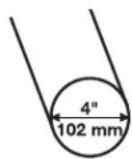
Replace plastic or foil vent material with 4^ (102 mm) diameter heavy, rigid vent material.
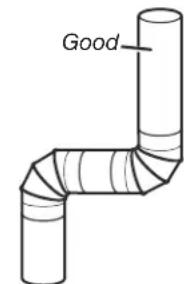
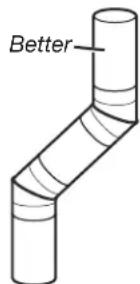
Remove lint and debris from the exhaust hood.
- Remove lint from the entire length of the vent system at least every 2 years. When cleaning is complete, be sure to follow the Installation Instructions supplied with your dryer for final product check.
Clear away items from the front of the dryer.
What To Dry and How To Dry? for better fabric care and energy savings.
By answering these questions, you can achieve the most energy savings and enhanced fabric care from your dryer. Using these automatic cycles, the drying air temperature and moisture levels are sensed in the load. This sensing process occurs throughout the entire drying cycle and turns off once the load reaches your selected dryness level. Using a dryness level between Less and More provides the optimal energy savings.
If Timed Dry is your answer, the dryer runs for the amount of time you select, which sometimes results in shrinkage, wrinkling, and static due to overdrying. Use Timed Dry for the occasional damp load that needs a little more drying time or when using the drying rack.
Tips for getting the best performance from your steam dryer (on some models)
Results may vary depending on fabric. 100% cotton garments with wrinkle-free finish may yield better results than those without. 100% cotton items may require additional touching up after cycles that use steam.
Use of fabric softener sheet is not recommended with cycles that use steam. It may cause temporary staining on clothes.
Cycles that use steam are not recommended for items that have been starched. Wash any starched or new garments prior to using a cycle that uses steam.
The Steam Refresh Cycle is best for smoothing out wrinkles and reducing odors from loads consisting of dry items of wrinkle-free cotton, cotton-polyester blend, common knits, and synthetics.
Control Panel and Features
Not all features and cycles are available on all models.
STEAM MODELS
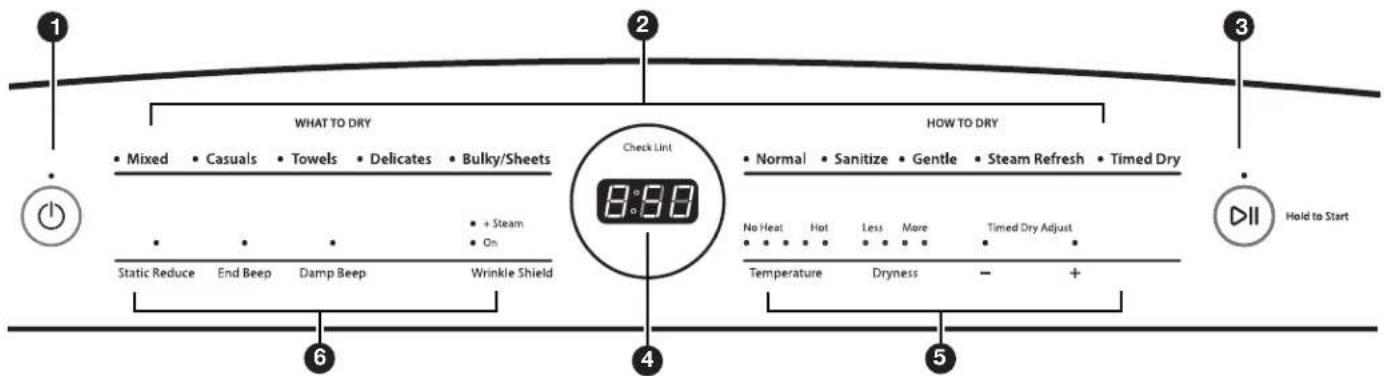
NOTE: The control panel features a sensitive surface that responds to a light touch of your finger. To ensure your selections are registered, touch the control panel with your finger tip, not your fingernail. When selecting a setting or option, simply touch its name.
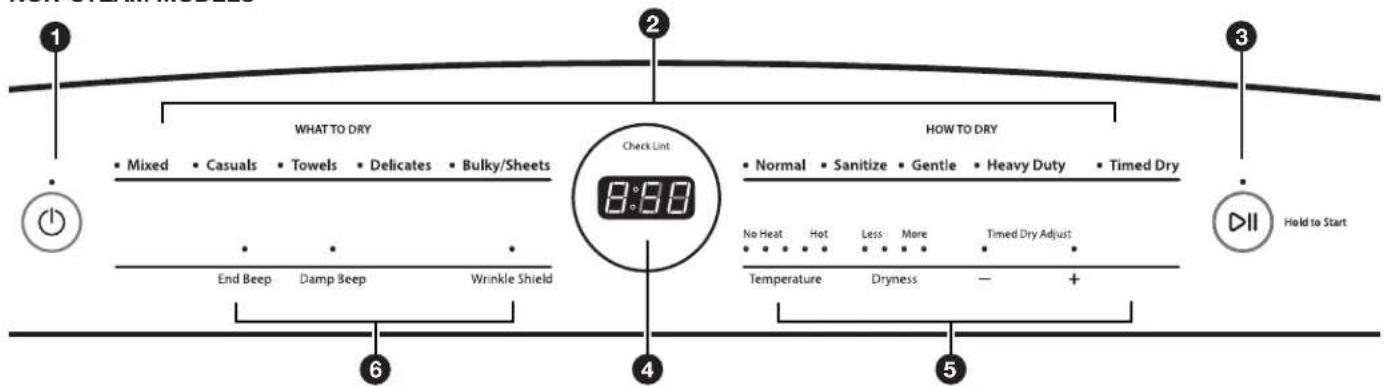
NON-STEAM MODELS
1 POWER
Touch to turn the dryer on and off. Touch to stop/cancel a cycle at any time.
WHAT TO DRY/HOW TO DRY
First select a cycle from the "What to Dry" (Automatic cycles) and then select the "How to Dry" to get the best combination cycle available for the type of items you are going to dry. See "Cycle Guide" for cycle details.
3 START/PAUSE
Touch and hold until the LED comes on to start a cycle, or touch once while a cycle is in process to pause it.
4 LED DISPLAY
When you select a cycle, its default settings will light up and the Estimated Time Remaining (for Automatic Cycles) will vary depending on "What to Dry" and "How to Dry" selections or actual time remaining for Timed Dry cycles (for Manual Cycles) will be displayed.
5 MODIFIERS
Use to select available modifiers for your dryer. Not all cycles and options are available on all models.
Temperature
When using Timed Dry Cycle, you may select a dry temperature based on the type of load you are drying. Use the warmest setting safe for the garments in the load. Follow garment label instructions.
NOTE: Automatic Cycles will give you up to 3 temperatures to adjust and it varies, depending on the "What to Dry" or "How to Dry" selections that have been made.
Dryness
You may adjust the Dryness on Automatic Cycles (except for the Sanitize cycle), if desired.
NOTE: Dryness is for use with Automatic Cycles only.
+ Timed Dry Adjust
Touch ^ 十 or - with Timed Dry cycle to increase or decrease the length of the cycle.

OPTIONS
Use to select available options for your dryer. Not all cycles and options are available on all models.
Static Reduce (steam models only)
Touch to add the Static Reduce option to selected Automatic cycles. The dryer will automatically tumble, pause, and introduce a small amount of moisture into the load to help reduce static. This option adds approximately 8 minutes to the total cycle time.
End Beep
Use this to turn the signal indicating the end of a drying cycle to low, medium, high, or off.
NOTE: You may also turn off the tones that sound when a feature, setting, or option is touched. Touch and hold End Beep for about three seconds to turn sounds to low, medium, high, or off.
Damp Beep
Touch to select the Damp Beep signal. You may adjust the signal to low, medium, high, or off. When selected, a series of beeps will sound when the load is damp, but not completely dry. This will allow you to take clothes out of the load that do not need to dry completely. This option is available on some cycles. The Damp Beep signal is selected as a default for the Bulky/Sheets cycle, as a reminder to manually reposition bulky loads midway through the cycle.
Wrinkle Shield™ Option
If you will be unable to remove a load immediately, touch Wrinkle Shield to add up to 150 minutes of periodic tumbling to help reduce wrinkling. You may select the ^+ Steam setting (on some models) to add a short steam cycle after 60 minutes to help smooth out wrinkles.
Steam Refresh (steam models only)
This cycle is best for reducing wrinkles and odors from dry items. Cycle time will increase depending on number of items.
NOTE: When using the Steam Refresh cycle with a single item, it is recommended to throw a towel in the dryer to prevent damp spots.
Cycle Guide - Steam Model
The Whirlpool® dryer has a unique user interface to help you select the best cycle you need for your load. The "What to Dry" "How to Dry" layout guides you to the optimal cycle in two easy steps:
First determine what items are in the load that you are trying to dry. Use that to guide your "What to Dry" selection. Then determine how you want the dryer to dry them by selecting the appropriate "How to Dry" selection.
To get the most energy savings and enhanced fabric care from your dryer, use the Automatic cycles. These cycles measure the drying air temperature and moisture levels to turn the dryer off once the load reaches the selected dryness level. Dryer performance and results may vary with service voltage less than 240.
For best fabric care, choose the cycle that best fits the load being dried.
R - Recommended Cycle
a - Alternate Cycle
Blank - Cycle is available but not optimal.
| How do you want to dry? | ||||
| "How to Dry" Cycle Selection | ||||
| Normal San | tize* Gentle | SteamRefresh | TimedDry | |
| RegularAutomaticSensor Cyclestops whendryness levelis reached. | Hot High HeatUsed to kill99.9% of3 commonbacteria. | Lower HeatAutomaticSensor Cyclestops whendryness levelis reached. | Steam Cycle toremove wrinklesand odors. | Set amount ofdry timeDryer runs forthe amount oftime selected. |
| R | ||||
| a | R | |||
| R | ||||
| R | ||||
| R | ||||
| R | ||||
| R | ||||
| R | ||||
| R | ||||
| R | ||||
| R | ||||
| R | ||||
For best fabric care, choose the cycle that best fits the load being dried.
R - Recommended Cycle
a - Alternate Cycle
Blank - Cycle is available but not optimal.
| How do you want to dry? | ||||
| "How to Dry" Cycle Selection | ||||
| Normal San | tize* Gentle | SteamRefresh | TimedDry | |
| RegularAutomaticSensor Cyclestops whendryness levelis reached. | Hot High HeatUsed to kill99.9% of3 commonbacteria. | Lower HeatAutomaticSensor Cyclestops whendryness levelis reached. | Steam Cycle toremove wrinklesand odors. | Set amount ofdry time.Dryer runs forthe amount oftime selected. |
| R | a | |||
| a | R | |||
| R | ||||
| R | ||||
| R | ||||
| a | R | |||
| R | ||||
| a | R | |||
| a | R | |||
| R | ||||
| \( R^† \) | ||||
| \( R^† \) | ||||
| \( R^† \) | ||||
| R | ||||
| \( R^† \) | ||||
| R | ||||
| R | ||||
| R | ||||
| R | ||||
| R | ||||
| R | ||||
| R | ||||
| R | ||||
*Extended high-heat drying cycle intended to help sanitize items such as sheets and towels. This cycle is not recommended for all fabrics. For best results, this cycle should be run to completion to ensure sanitization and do not interrupt cycle.
For best results, change the Temperature and Dryness levels to their highest settings.
Air Only is not a "What to Dry" cycle selection. To get Air Only, select Timed Dry and set Temperature to No Heat.
Cycle Guide - Non-Steam Model
The Whirlpool® dryer has a unique user interface to help you select the best cycle you need for your load. The “What to Dry”
"How to Dry" layout guides you to the optimal cycle in two easy steps:
First determine what items are in the load that you are trying to dry. Use that to guide your "What to Dry" selection. Then determine how you want the dryer to dry them by selecting the appropriate "How to Dry" selection.
To get the most energy savings and enhanced fabric care from your dryer, use the Automatic cycles. These cycles measure the drying air temperature and moisture levels to turn the dryer off once the load reaches the selected dryness level. Dryer performance and results may vary with service voltage less than 240.
For best fabric care, choose the cycle that best fits the load being dried.
R - Recommended Cycle
a - Alternate Cycle
Blank - Cycle is available but not optimal.
| How do you want to dry? | ||||
| "How to Dry" Cycle Selection | ||||
| Normal San | tize* Gentle | Heavy Duty | Timed Dry | |
| RegularAutomaticSensor Cyclestops whendryness levelis reached. | Hot High HeatUsed to kill99.9% of3 commonbacteria. | Lower HeatAutomaticSensor Cyclestops whendryness levelis reached. | High Heat longercycleAutomaticSensor Cyclestops whendryness levelis reached. | Set amount ofdry timeDryer runs forthe amount oftime selected. |
| R | ||||
| a Ra | ||||
| R | ||||
| R | ||||
| R | ||||
| R | ||||
| R | ||||
| R | ||||
| R | ||||
| R | ||||
| R | ||||
| a a R | ||||
| R | ||||
| R | ||||
| R | ||||
| a | R | |||
| R | ||||
| R | ||||
| R | ||||
| R | ||||
| R | ||||
| a | R | |||
| R | ||||
For best fabric care, choose the cycle that best fits the load being dried.
R - Recommended Cycle
a - Alternate Cycle
Blank - Cycle is available but not optimal.
| What do you want to dry? | "What to Dry" Cycle Selection | ||||
| Blankets | Bulky/Sheets | R | |||
| Coats & Jackets | R | ||||
| Comforters | R | ||||
| Fabric Rugs | R | ||||
| Heavy Drapes | R | ||||
| Pet Bedding | R | ||||
| Pillows - Fiber Fill | R | ||||
| Sheets | R | ||||
| Sleeping Bags | R | ||||
| Stuffed Animals | R | ||||
| Feather Pillows | Air Only†(available only on Timed Dry cycle) | R | |||
| Plastic Shower Curtains | R | ||||
| Rubber and Rubber backed rugs and mats | R | ||||
| Vinyl Table Cloths | R |
| How do you want to dry? | ||||
| "How to Dry" Cycle Selection | ||||
| Normal San | tize* Gentle | Heavy Duty | Timed Dry | |
| RegularAutomaticSensor Cyclestops whendryness levelis reached. | Hot High HeatUsed to kill99.9% of3 commonbacteria. | Lower HeatAutomaticSensor Cyclestops whendryness levelis reached. | High Heat longercycleAutomaticSensor Cyclestops whendryness levelis reached. | Set amount ofdry timeDryer runs forthe amount oftime selected. |
| R | ||||
| R | ||||
| R | ||||
| R | ||||
| R | ||||
| R | ||||
| R | ||||
| R | ||||
| R | ||||
| R | ||||
| R | ||||
| R | ||||
| R | ||||
| R | ||||
*Extended high-heat drying cycle intended to help sanitize items such as sheets and towels. This cycle is not recommended for all fabrics. For best results, this cycle should be run to completion to ensure sanitization and do not interrupt cycle.
Air Only is not a "What to Dry" cycle selection. To get Air Only, select Timed Dry and set Temperature to No Heat.
Using Your Dryer
WARNING
Explosion Hazard
Keep flammable materials and vapors, such as gasoline, away from dryer.
Do not dry anything that has ever had anything flammable on it (even after washing).
Failure to follow these instructions can result in death, explosion, or fire.
WARNING: To reduce the risk of fire, electric shock, or injury to persons, read the IMPORTANT SAFETY INSTRUCTIONS before operating this appliance.
1. Clean the lint screen
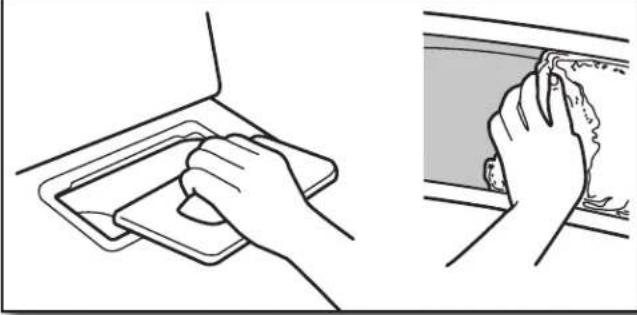
Clean the lint screen before each load. Pull the lint screen out of its holder. Roll lint off the screen with your fingers. Do not rinse or wash screen to remove lint. Push the lint screen firmly back into place.
For additional cleaning information, see "Dryer Care."
2. Load the dryer
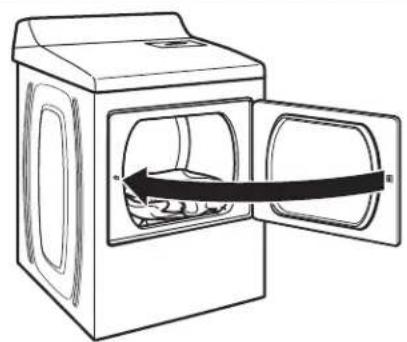
Open the door by pulling on the handle. Place laundry in the dryer. Add a dryer sheet to wet load, if desired. Close the door.
IMPORTANT: Do not tightly pack the dryer. Items need to tumble freely. Tightly packing can lead to poor drying performance and may increase wrinkling and tangling.
WARNING
Fire Hazard
No washer can completely remove oil.
Do not dry anything that has ever had any type of oil on it (including cooking oils).
Items containing foam, rubber, or plastic must be dried on a clothesline or by using an Air Cycle.
Failure to follow these instructions can result in death or fire.
3. Touch POWER
Touch POWER to turn on the dryer.
4. Select type of load to dry
WHAT TO DRY
- Mixed - Casuals - Towels - Delicates - Bulky/Sheets
HOW TO DRY
Normal Sanitize Gentle Steam Refresh Timed Dry
First select a cycle from the "What to Dry" (Automatic cycles) and then select the "How to Dry" to get the best combination cycle available for the type of items you are going to dry. See "Cycle Guide" for cycle details. Not all cycles are available on all models.
Automatic Cycles:
You can select a different dryness level, depending on your load. Touch DRYNESS to scroll from Less to More. Selecting Less to More automatically adjusts the dryness level at which the dryer will shut off. Dryness level can be changed in the first 5-8 minutes of the cycle.
Automatic Cycles give the best drying in the shortest time. Drying time varies based on fabric type, load size, and dryness setting.
NOTE: Automatic Cycles will give you up to 3 temperatures to adjust and it varies, depending on the "What to Dry" or "How to Dry" selections that have been made.
TIMED DRY Cycle:
When you select Timed Dry, the default time appears in the display. Touch + and - to increase or decrease the time in 1 minute increments. Touch and hold to change the time in 5 minute increments.
The default temperature may be changed by touching Temperature until the desired dry temperature is lit.
Steam Refresh Cycles (on some models):
Select Steam Refresh to reduce odors and light wrinkles in dry loads consisting of wrinkle-free cotton, cotton-polyester blends, common knits, and synthetics. If you will be unable to remove a load immediately, touch Wrinkle Shield to add up to 150 minutes of periodic tumbling. You may select the + Steam setting to add a short steam cycle after 60 minutes to help smooth out wrinkles.
5. Adjust cycle modifiers, if desired

You may adjust different settings, depending on what you are drying and how you are going to dry the item. See the "Cycle Guide" for detailed information.
NOTE: Not all options and modifiers are available with all cycles. Not all cycles are on all models.
6. Select any additional options

Add additional options such as Static Reduce, End Beep, and/or Wrinkle Shield (on some models) by touching that option. If you will be unable to remove the load promptly, select Wrinkle Shield before touching START/PAUSE. You may select the “+ Steam” setting (on some models) to add a short steam cycle after 60 minutes to help smooth out wrinkles.
NOTE: Not all options and settings are available with all cycles.
7. Touch and hold START/PAUSE to begin cycle
Hold to Start
Touch and hold START/PAUSE to begin the cycle.
8. Remove garments promptly after cycle is finished
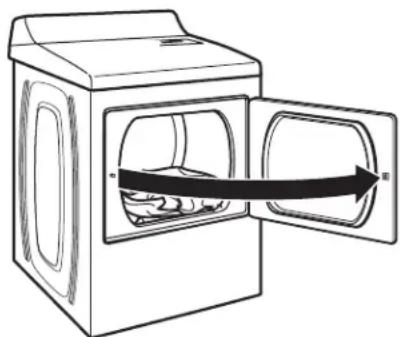
Promptly remove garments after cycle has completed to reduce wrinkling.
Changing the Automatic Cycle settings to increase or decrease drying time
If all your loads on all Automatic Cycles are consistently less dry or more dry than you would like, you may change the default settings to increase or decrease the default dryness level.
Your automatic drying settings can be adjusted to adapt to different installations, environmental conditions, or personal preference. This change is retained and will affect all of your Automatic Cycles, not just the current cycle/load. There are 5 drying settings, which are displayed using the time display:
0 Much wetter clothes, 30% less drying time.
1 Slightly wetter clothes, 15% less drying time.
2 Factory preset dryness level.
3 Slightly drier clothes, 15% more drying time.
4 Much drier clothes, 30% more drying time.
To change the drying settings:
NOTE: The settings cannot be changed while the dryer is running or paused. The dryer must be in standby mode (power is off) to adjust the default settings.
- Before starting a cycle, touch and hold DRYNESS for 6 seconds.
- Touch DRYNESS to select the dryness level shown in the time display: 0, 1, 2, 3, or 4.
- Touch START/PAUSE to save the new dryness level setting.
Dryer Care
Keep dryer area clear and free from items that would block the air flow for proper dryer operation. This includes clearing piles of laundry in front of the dryer.
WARNING
Explosion Hazard
Keep flammable materials and vapors, such as gasoline, away from dryer.
Place dryer at least 18 inches (460 mm) above the floor for a garage installation.
Failure to do so can result in death, explosion, or fire.
CLEANING THE DRYER INTERIOR
To clean dryer drum
- Use a mild hand dish detergent mixed at a low concentration with very warm water, and rub with a soft cloth.
- Rinse well with a wet sponge or towel.
- Tumble a load of clean clothes or towels to dry drum OR
Use a microfiber cloth and hot water in a spray bottle to clean the drum and a second microfiber towel to dry.
NOTE: Garments that contain unstable dyes, such as denim blue jeans or brightly colored cotton items, may discolor the rear of the dryer interior. These stains are not harmful to your dryer and will not stain future loads of clothes. Dry unstable dye items inside out to avoid transfer of dye.
REMOVING ACCUMULATED LINT
From Inside the Dryer Cabinet
Lint should be removed every 2 years, or more often, depending on dryer usage. Cleaning should be done by a qualified appliance servicer or ventilation system cleaner.
From the Exhaust Vent
Lint should be removed every 2 years, or more often, depending on dryer usage.
CLEANING THE LINT SCREEN
Every load cleaning
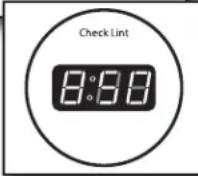
The lint screen is located in the top of the dryer. The control panel has an indicator light "Check Lint" to remind you to clean the lint screen after each load. A screen blocked by lint can increase drying time.
To clean:
- Pull the lint screen out of its holder. Roll lint off the screen with your fingers. Do not rinse or wash screen to remove lint. Wet lint is hard to remove.
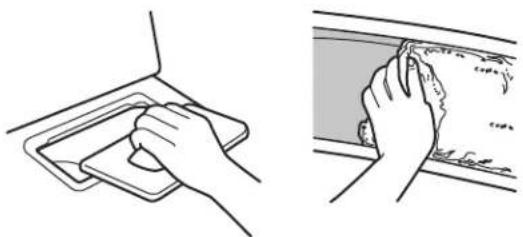
- Push the lint screen firmly back into place.
IMPORTANT:
- Do not run the dryer with the lint screen loose, damaged, blocked, or missing. Doing so can cause overheating and damage to both the dryer and fabrics.
If lint falls off the screen into the dryer during removal, check the exhaust hood and remove the lint. See "Venting Requirements" in the Installation Instructions.
As needed cleaning
Laundry detergent and fabric softener residue can build up on the lint screen. This buildup can cause longer drying times for your clothes, or cause the dryer to stop before your load is completely dry. The screen is probably clogged if lint falls off while the screen is in the dryer.
Clean the lint screen with a nylon brush every 6 months, or more frequently, if it becomes clogged due to a residue buildup.
To wash:
- Roll lint off the screen with your fingers.
- Wet both sides of lint screen with hot water.
- Wet a nylon brush with hot water and liquid detergent. Scrub lint screen with the brush to remove residue buildup.
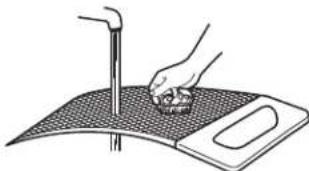
- Rinse screen with hot water.
- Thoroughly dry lint screen with a clean towel. Reinstall screen in dryer.
NON-USE, STORAGE, AND MOVING CARE
Steam models only: Install and store your dryer where it will not freeze. Because some water may stay in the hose, freezing can damage your dryer. If storing or moving your dryer during freezing weather, winterize it.
Non-Use or Storage Care
Operate your dryer only when you are at home. If you will be on vacation or not using your dryer for an extended period of time, you should:
- Unplug dryer or disconnect power.
- Clean lint screen. See "Cleaning the Lint Screen."
- Turn off the water supply to the dryer. This helps to avoid unintended flooding (due to a water pressure surge) while you are away.
Moving Care
For power supply cord-connected dryers:
- Unplug the power supply cord.
- Gas models only: Close shut-off valve in gas supply line.
- Gas models only: Disconnect gas supply line pipe and remove fittings attached to dryer pipe.
- Gas models only: Cap the open fuel supply line.
- Steam models only: Shut off water faucet.
- Disconnect the water inlet hose from faucet, then drain the hose. Transport hose separately.
- Make sure leveling legs are secure in dryer base.
- Use tape to secure dryer door.
WARNING
Electrical Shock Hazard
Disconnect power before servicing.
Replace all parts and panels before operating.
Failure to do so can result in death or electrical shock.
For direct-wired dryers:
- Disconnect power.
- Disconnect wiring.
- Steam models only: Shut off water faucet.
- Steam models only: Disconnect the water inlet hose from faucet; then drain the hose. Transport hose separately.
- Make sure leveling legs are secure in dryer base.
- Use tape to secure dryer door.
Reinstalling the Dryer
Follow the Installation Instructions to locate, level, and connect the dryer.
SPECIAL INSTRUCTIONS FOR STEAM MODELS
Water Inlet Hose
Replace inlet hose and hose screen after 5 years of use to reduce the risk of hose failure. Periodically inspect and replace inlet hose if bulges, kinks, cuts, wear, or leaks are found.
When replacing your inlet hose, record the date of replacement.
To Winterize the Dryer
- Unplug dryer or disconnect power.
- Shut off water faucet.
- Disconnect water inlet hose from faucet and drain.
To Use the Dryer Again
- Flush water pipes. Reconnect water inlet hose to faucet. Turn on water faucet.
- Plug in dryer or reconnect power as described in the Installation Instructions.
Changing the drum light (on some models)
- Unplug dryer or disconnect power.
- Open the dryer door. Locate the light bulb cover on the back wall of the dryer. Using a 1/4'' nut driver or socket wrench, remove the screw located in the lower right-hand corner of the cover. Remove the cover.
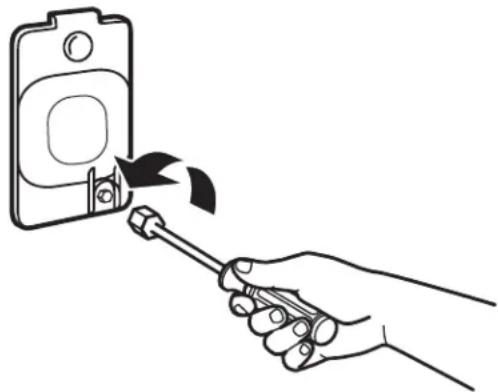
- Turn bulb counterclockwise. Replace the bulb with a 10-watt appliance bulb only. Replace the cover and secure with the screw.
- Plug into a grounded outlet or reconnect power.
Troubleshooting
| First try the solutions suggested here or visit our website at www.whirlpool.com/product_help-In Canada www.whirlpool.ca for assistance and to possibly avoid a service call. | ||
| If you experience Posible Causes Solution | ||
| Dryer Operation | ||
| Dryer will not run Door not | closed completely. Make sure the drye | door is closed completely. |
| START/PAUSE touched with fingernail. | Touch START/PAUSE with pad of finger. | |
| Household fuse is blown or circuit breaker has tripped. | There may be 2 household fuses or circuit breakers for the dryer. Check that both fuses are intact and tight, or that both circuit breakers have not tripped. Replace the fuses or reset the circuit breaker. If the problem continues, call an electrician. | |
| Incorrect power supply. Electric dryers | require 240-volt power supply. Check with a qualified electrician. | |
| Wrong type of fuse. Use a time-delay fuse. | use. | |
| Dryer will not heat Household fuse is blown or circuit breaker has tripped. | The drum may be turning, but you may not have heat. Electric dryers use 2 household fuses or circuit breakers. Replace the fuses or reset the circuit breaker. If the problem continues, call an electrician. | require 240-volt power supply. Check with a qualified electrician. |
| Incorrect power supply. Electric dryers | ||
| Supply line valve not open. For gas dryers, make sure that the valve on the gas supply line is open. | ||
| Unusual Noise | ||
| Humming or whining noise with Steam cycle selected | Water pump on dryer is running. The water pump on the dryer is used during the Steam function. If the dryer has just been installed or unused for an extended period, the pump may be louder and run longer. This is normal. | Water pump on the dryer is used during the Steam function. If the dryer has just been installed or unused for an extended period, the pump may be louder and run longer. This is normal. |
| Thumping noise | Dryer hasn't been used in a while. | This is normal. The thumping sound should diminish after a few minutes of use. |
| Rattling or vibrating noise A small object caught between the edges of dryer drum. | Check the front and rear edges of the drum for small objects. Clean out pockets before laundering. | Check the front and rear edges of the drum for small objects. Clean out pockets before laundering. |
| Dryer isn't properly leveled. The dryer may vibrate if not properly installed. See the Installation Instructions. All four dryer feet should be in firm contact with the floor. | may vibrate if not properly installed. See the Installation Instructions. All four dryer feet should be in firm contact with the floor. | |
| Clothing is balled up in dryer. When balled up, the load will bounce, causing the dryer to vibrate. Separate the load items and restart the dryer. | ||
| Clicking noise | Gas valve operating. | On gas dryers, you may hear the gas valve clicking as it opens and closes. This is normal. |
| Dryer Results | ||
| Drying times are too long and clothes are not getting dry | Lint screen is clogged with lint. | Clean lint screen before each load. |
| The exhaust vent or outside exhaust hood is clogged with lint, restricting air movement. | Run the dryer for 5-10 minutes. Hold your hand under the outside exhaust hood to check air movement. If you do not feel air movement, clean exhaust system of lint or replace exhaust vent with heavy metal or flexible metal vent. See the Installation Instructions. | |
| The exhaust vent is not the correct length. | Check that the exhaust vent is not too long or has too many turns. Long venting will increase drying times. See the Installation Instructions. | |
| The exhaust vent diameter is not the correct size. | Use 4" (102 mm) diameter vent material. | |
| The dryer is not level. | Clothes not contacting the moisture sensors during Automatic cycles. See "Level Dryer" in the Installation Instructions. | |
| The No Heat temperature setting has been selected. | Select the correct temperature for the types of garments being dried. See "Cycle Guide." | |
Troubleshooting
| First try the solutions suggested here or visit our website at www.whirlpool.com/product_help - In Canada www.whirlpool.ca for assistance and to possibly avoid a service call. | ||
| If you experience Posible Causes Solution | ||
| Dryer Results (cont.) | ||
| Drying times are too long and clothes are not getting dry (cont.) | The load is too large and heavy to dry quickly. | Separate the load to tumble freely. |
| Fabric softener sheets are blocking the grille. | Check that the air outlet grille is not blocked by a fabric softener sheet. Use only one fabric softener sheet, and use it only once. | |
| The dryer is located in a room with temperature below 45°F (7°C). | Proper operation of dryer cycles requires temperatures above 45°F (7°C). | |
| The dryer is located in a closet. Closet | doors must have ventilation openings at the top and bottom of the door. The front of the dryer requires a minimum of 1" (25 mm) of airspace, and, for most installations, the rear of the dryer requires 5" (127 mm). See the Installation Instructions. | |
| Clothes are getting over or under dried | The Automatic Cycle settings are too high or too low. | See "Changing the Automatic Cycle settings to increase or decrease drying time" to adjust your dryer settings. |
| Cycle time is too short The | load may not be contacting the sensor strips on Automatic Cycles. | Level the dryer. See the Installation Instructions. All four dryer feet should be in firm contact with the floor. |
| The automatic cycle is ending early. Change | change the dryness level setting on Automatic Cycles. Increasing or decreasing the dryness level will change the amount of drying time in a cycle. If loads are consistently ending too early, see also "Changing the Automatic Cycle settings to increase or decrease drying time." | |
| Lint on load Lint screen is clogged with lint. Clean lint screen before each load. | ||
| Damp spots on load Clothes are coming out of the Steam Refresh cycle with damp or wet spots. | Under certain environmental or installation conditions, you may experience underdrying. | |
| When using Steam Refresh cycle for a single item, it is recommended to throw a towel in the dryer to prevent damp spots. | ||
| Stains on load Improper use of fabric softener. Add dryer fabric softener sheets at the beginning of the cycle. Fabric softener sheets added to a partially dried load can stain your garments. Do not use fabric softener sheets with steam cycles. | ||
| Stains on drum Loose dyes in clothes. Drum stains are caused by dyes in clothing (usually blue jeans). These will not transfer to other clothing. | ||
| Loads are wrinkled The load was not removed from dryer at the end of the cycle. | Select Steam Refresh cycle to tumble the load with water and heat. This cycle is best for smoothing out wrinkles and reducing odors from dry loads consisting of wrinkle-free cotton, cotton-polyester blends, common knits, and synthetics. NOTE: Refer to garment care label instructions. Dry-clean-only garments are not recommended. | |
| The dryer was tightly packed. Dry smaleroads that can tumble freely. Results may also vary depending on fabric type. | ||
| For steam cycles, the water is not properly connected with the dryer. Make sure water is connected to the dryer. Check that water inlet hose is connected to both the faucet and dryer's water inlet valve. Check that the water supply is turned on. | ||
| Odors | Recent painting, staining, or varnishing in the area where your dryer is located. | Ventilate the area. When the odors or fumes are gone from the area, rewash and dry the clothing. |
Troubleshooting
| First try the solutions suggested here or visit our website at www.whirlpool.com/product_help - In Canada www.whirlpool.ca for assistance and to possibly avoid a service call. | |||
| If you experience Possible Causes Solution | |||
| Dryer Results (cont.) | |||
| Odors (cont.) For steam cycles | cycles, the water is not properly connected with the dryer. | Make sure water is connected to the dryer. Check that water inlet hose is connected to both the faucet and dryer's water inlet valve. Check that the water supply is turned on. | |
| Odors are left in garments after wearing. | To remove odors left in garments after wearing, select Steam Refresh. This cycle is best for reducing wrinkles and odors from dry loads consisting of wrinkle-free cotton, cotton-polyester blends, common knits, and synthetics. | ||
| Load too hot Load removed | d before cooldown portion of cycle complete. | Allow the dryer to complete the cooldown portion of the cycle before removing the load. | |
| Using Timed Dry cycle with a high temperature setting. | Select an Automatic Cycle with a lower heat setting to avoid overdrying the load. | ||
| Dryer Displaying Code Message or Indicator Is Lit | |||
| “PF” (power failure) The drying cycle has been interrupted by a power failure. | Touch and hold START to restart the dryer cycle or touch power to clear the display. | ||
| “L2” Diagnostic Code (low or no line voltage condition) | There may be a problem with your home power supply, keeping the dryer’s heater from turning on. | The dryer will continue to run when this diagnostic code is present. Touch any pad to clear the code from the display and return to the estimated time remaining. NOTE: This error will only show during the initial installation. Try the following: · Check to see if a household fuse has blown or circuit breaker has tripped. Electric dryers use two household fuses or breakers. Replace the fuse or reset the circuit breaker. · Confirm that the power cord is properly installed. Refer to the Installation Instructions for details. · Select a Timed Dry heated cycle, and restart the dryer. If the message persists, consult a qualified electrician. | |
| “F# E#” (F1 E1, F3 E1, etc.) variable service codes. | The dryer is in need of service. If a code beginning with an “F” appears in the display, alternating between F# and E#, the dryer control has detected a problem that requires service. Call for service. | ||
WHIRLPOOL® LAUNDRY LIMITED WARRANTY
ATTACH YOUR RECEIPT HERE. PROOF OF PURCHASE IS REQUIRED TO OBTAIN WARRANTY SERVICE.
Please have the following information available when you call the Customer eXperience Center:
Name, address, and telephone number
Model number and serial number
A clear, detailed description of the problem
Proof of purchase including dealer or retailer name and address
IF YOU NEED SERVICE:
- Before contacting us to arrange service, please determine whether your product requires repair. Some questions can be addressed without service. Please take a few minutes to review the Troubleshooting or Problem Solver section of the Use and Care Guide, scan the QR code on the right to access additional resources, or visit https://www.whirlpool.com/product_help.
- All warranty service is provided exclusively by our authorized Whirlpool Service Providers. In the U.S. and Canada, direct all requests for warranty service to:

https://www.whirlpool.com/product_help
Whirlpool Customer eXperience Center
In the U.S.A. call 1-800-253-1301. In Canada call 1-800-807-6777.
If outside the 50 United States and Canada, contact your authorized Whirlpool dealer to determine if another warranty applies.
ONE YEAR LIMITED WARRANTY
WHAT IS COVERED
For one year from the date of purchase, when this major appliance is installed, operated, and maintained according to instructions attached to or furnished with the product, Whirlpool Corporation or Whirlpool Canada LP (hereafter "Whirlpool") will pay for Factory Specified Replacement Parts and repair labor to correct defects in materials or workmanship that existed when this major appliance was purchased, or at its sole discretion replace the product. In the event of product replacement, your appliance will be warranted by the remaining term of the original unit's warranty period.
YOUR SOLE AND EXCLUSIVE REMEDY UNDER THIS LIMITED WARRANTY SHALL BE PRODUCT REPAIR AS PROVIDED HEREIN. Service must be provided by a Whirlpool designated service company. This limited warranty is valid only in the United States or Canada and applies only when the major appliance is used in the country in which it was purchased. This limited warranty is effective from the date of original consumer purchase. Proof of original purchase date is required to obtain service under this limited warranty.
WHAT IS NOT COVERED
- Commercial, non-residential, multiple-family use, or use inconsistent with published user, operator, or installation instructions.
- In-home instruction on how to use your product.
- Service to correct improper product maintenance or installation, installation not in accordance with electrical or plumbing codes, or correction of household electrical or plumbing (i.e. house wiring, fuses, or water inlet hoses).
- Consumable parts (i.e. light bulbs, batteries, air or water filters, preservation solutions, etc.).
- Defects or damage caused by the use of non-genuine Whirlpool parts or accessories.
- Conversion of your product from natural gas or L.P. gas or reversal of appliance doors.
- Damage from accident, misuse, abuse, fire, floods, acts of God, or use with products not approved by Whirlpool.
- Repairs to parts or systems to correct product damage or defects caused by unauthorized service, alteration, or modification of the appliance.
- Cosmetic damage including scratches, dents, chips, and other damage to appliance finishes unless such damage results from defects in materials and workmanship and is reported to Whirlpool within 30 days.
- Discoloration, rust, or oxidation of surfaces resulting from caustic or corrosive environments, including but not limited to, high salt concentrations, high moisture or humidity, or exposure to chemicals.
- Pick-up or delivery. This product is intended for in-home repair.
- Travel or transportation expenses for service in remote locations where an authorized Whirlpool servicer is not available.
- Removal or reinstallation of inaccessible appliances or built-in fixtures (i.e. trim, decorative panels, flooring, cabinetry, islands, countertops, drywall, etc.) that interfere with servicing, removal, or replacement of the product.
- Service or parts for appliances with original model/serial numbers removed, altered, or not easily determined.
The cost of repair or replacement under these excluded circumstances shall be borne by the customer.
DISCLAIMER OF IMPLIED WARRANTYES
IMPLIED WARRANTY, INCLUDING ANY IMPLIED WARRANTY OF MERCHANTABILITY OR IMPLIED WARRANTY OF FITNESS FOR A PARTICULAR PURPOSE, ARE LIMITED TO ONE YEAR OR THE SHORTEST PERIOD ALLOWED BY LAW. Some states and provinces do not allow limitations on the duration of implied warranties of merchantability or fitness, so this limitation may not apply to you. This warranty gives you specific legal rights, and you also may have other rights that vary from state to state or province to province.
DISCLAIMER OF REPRESENTATIONS OUTSIDE OF WARRANTY
Whirlpool makes no representations about the quality, durability, or need for service or repair of this major appliance other than the representations contained in this Warranty. If you want a longer or more comprehensive warranty than the limited warranty that comes with this major appliance, you should ask Whirlpool or your retailer about buying an extended warranty.
LIMITATION OF REMEDIES; EXCLUSION OF INCIDENTAL AND CONSEQUENTIAL DAMAGES
YOUR SOLE AND EXCLUSIVE REMEDY UNDER THIS LIMITED WARRANTY SHALL BE PRODUCT REPAIR AS PROVIDED HEREIN. WHIRLPOOL SHALL NOT BE LIABLE FOR INCIDENTAL OR CONSEQUENTIAL DAMAGES. Some states and provinces do not allow the exclusion or limitation of incidental or consequential damages, so these limitations and exclusions may not apply to you. This warranty gives you specific legal rights, and you also may have other rights that vary from state to state or province to province.
R - Programme recommende
a - Programme alternative
Normal Sanitize Gentle Steam Refresh Timed Dry

https://www.whirlpool.ca/product_help
Assistance or Service
Before calling for assistance or service, please check "Troubleshooting" or visit www.whirlpool.com/help. It may save you the cost of a service call. If you still need help, follow the instructions below.
When calling, please know the purchase date and the complete model and serial number of your appliance. This information will help us to better respond to your request.
If you need replacement parts or to order accessories
We recommend that you use only FSP® Factory Specified Parts.
These parts will fit right and work right because they are made with the same precision used to build every new WHIRLPOOL® appliance.
To locate FSP replacement parts, assistance in your area, or accessories:
Whirlpool Corporation Customer eXperience Center 1-800-253-1301 www.whirlpool.com
Whirlpool Canada LP stomer eXperience Centre
1-800-442-9991 (Accessories) www.whirlpool.com/accessories
1-800-807-6777 www.whirlpool.ca
or call your nearest designated service center or refer to your Yellow Pages telephone directory.
Our consultants provide assistance with
In the U.S.A.
In the U.S.A. and Canada
Features and specifications on our full line of appliances.
■Installation information.
■Specialized customer assistance (Spanish speaking, hearing impaired, limited vision, etc.).
Use and maintenance procedures.
■Accessory and repair parts sales.
Referrals to local dealers, repair parts distributors, and service companies. Whirlpool designated service technicians are trained to fulfill the product warranty and provide after-warranty service, anywhere in the United States and Canada.
You can write with any questions or concerns at:
Whirlpool Corporation
Customer eXperience Center
553 Benson Road
Benton Harbor, MI 49022-2692
Customer eXperience Centre
Whirlpool Canada LP
Unit 200-6750 Century Ave
Mississauga, Ontario L5N 0B7
Please include a daytime phone number in your correspondence.