SHX7PT55UC - Dishwasher BOSCH - Free user manual and instructions
Find the device manual for free SHX7PT55UC BOSCH in PDF.


| Product type | Built-in dishwasher |
| Brand | Bosch |
| Model | SHX7PT55UC |
| Dimensions (H x W x D) | 86.1 x 59.9 x 56 cm |
| Weight | Approx. 50 kg |
| Electrical supply | 120 V, 60 Hz, 15 A |
| Capacity | 14 place settings |
| Noise level | 42 dBA |
| Wash programs | Heavy, Auto, Glass, Normal, Express, Rinse |
| Options | Delay start, Speed Perfect, Half Load, Delicate, Sanitize |
| Tub material | Stainless steel |
| Cutlery basket | Duo-Flex (removable) |
| Third rack | Yes (3rd Rack) |
| Filtration system | Washable filters, clean regularly |
| Spray arms | Removable for cleaning |
| Built-in water softener | Yes, with hardness adjustment |
| Intensive drying | Yes (Extra Dry) |
| Safety | Door lock, auto shut-off |
| Warranty | 1 year, extension available (5 years electronics, 5 years racks, lifetime against rust) |
| After-sales service | Contact Bosch at 1-800-944-2904 |
Frequently Asked Questions - SHX7PT55UC BOSCH
User questions about SHX7PT55UC BOSCH
0 question about this device. Answer the ones you know or ask your own.
Ask a new question about this device
Download the instructions for your Dishwasher in PDF format for free! Find your manual SHX7PT55UC - BOSCH and take your electronic device back in hand. On this page are published all the documents necessary for the use of your device. SHX7PT55UC by BOSCH.
USER MANUAL SHX7PT55UC BOSCH
Dishwasher
Lave Vaisselle

BOSCH
en Operating instructions
9000838753 Rev. A (9302)
Dear Valued Customer,
Thank you for selecting a Bosch® dishwasher. You have joined the many consumers who demand quiet and superior performance from their dishwashers.
This manual was written with your safety and convenience in mind, and the information contained herein is very important. We highly recommend that you read this manual before using your dishwasher for the first time.
To learn more about your dishwasher and available accessories, as well as many other top quality Bosch appliances, visit our web site at:
www.bosch-home.com/us (USA)
or
www.bosch-appliances.ca (Canada)
While there, don't forget to register your new dishwasher by clicking on the Customer Support tab or filling out the product registration card enclosed with your new unit.
If you have any questions or comments, please contact us by phone at: 1-800-944-2904
or write us at:
BSH Home Appliances Corporation
1901 Main Street
Irvine, CA 92614
Table of Contents
Important Safety Instructions....3-5
Dishwasher Components....5-6
Dishware Materials....6-7
Loading the Dishwasher....7-8
Loading the Silverware Basket......9
Rack Accessories....9-11
Adding Detergent, Rinse Aid and Salt......11-14
Dishwasher Cycles and Options....15
Wash Cycle Information....16
Operating the Dishwasher....17-19
Care and Maintenance....20-21
Self Help....22-25
Customer Service....25
Statement of Limited Product Warranty......26-27
IMPORTANT SAFETY INSTRUCTIONS: Please READ and SAVE this information

WARNING
Misuse of the dishwasher can result in serious injury or death. Do not use the dishwasher in any way not covered in this manual or for any purpose other than those explained in the following pages.

Severe product damage and/or injury could result from the use of unqualified service technicians or non-original replacement parts. All repairs must be performed by a qualified service technician using only original equipment factory replacement parts.

Electrical shock or fire could result if the electrical supply for the dishwasher covered in this manual is incorrectly installed or if the dishwasher has been improperly grounded. Do not use the dishwasher covered in this manual unless you are certain the electrical supply has been correctly installed or the dishwasher has been properly grounded.

Never use harsh chemicals to clean your dishwasher. Some chloride-containing products can damage your dishwasher and may present health hazards!

Only sanitizing cycles have been designed to meet the requirements of 6 for soil removal and sanitation efficacy. There is no intention, either directly or indirectly, to imply that all cycles on a certified machine have passed the sanitization performance test.
NOTICE
Never use steam cleaning products to clean your dishwasher. The manufacturer will not be liable for the possible damages or consequences.

It is highly recommended for the end user to become familiar with the procedure to shut off the incoming water supply and the procedure to shut off the incoming power supply. See the Installation Instructions or contact your installer for more information.

NSF/ANSI 184 Certified residential dishwashers are not intended for licensed food establishments.

WARNING: To reduce the risk of fire, electrical shock, or serious injury, observe the following:
1 This dishwasher is provided with Installation Instructions and this Use and Care Manual. Read and understand all instructions before using the dishwasher.
2 This appliance must be grounded to a metal, permanent wiring system, or an equipment grounding conductor must be run with the circuit conductors and connected to the equipment grounding terminal or lead on the dishwasher. See the Installation Instructions included with this dishwasher for more information on electrical requirements.
3 Use this dishwasher only for its intended function, which is the washing of household dishware and kitchenware.
4 Use only detergents or rinsing agents recommended for use in a dishwasher, and keep them out of the reach of children.
5 When loading items to be washed:
- Locate sharp items so they are not likely to damage the door seal.
- Load knives and other sharp utensils with their HANDLES UP to reduce the risk of cut-type injuries.
- Do not wash plastic items unless they are marked “dishwasher safe” or the equivalent. For plastic items not so marked, check the manufacturer’s recommendations.
- Do not operate your dishwasher unless all enclosure panels are in place.
- Do not tamper with or override controls and interlocks.
6 Do not abuse, sit or stand on the door or dish racks of the dishwasher.
7 To reduce risk of injury, do not allow children to play in or on the dishwasher.
8 When children become old enough to operate the appliance, it is the legal responsibility of the parents/legal guardians to ensure the children are instructed in safe practices by qualified persons.
9 Under certain conditions, hydrogen gas may be produced in a hot water system that has not been used for two weeks or more. Hydrogen gas is explosive. Before using a dishwasher that is connected to a hot water system that has been unused for two weeks or longer, turn on all hot water faucets and let the water flow from each for several minutes. This will release any accumulated hydrogen gas. As the gas is explosive, do not smoke or use an open flame during this time.
10 Remove the dishwasher door to the washing compartment when removing an old dishwasher for service or discarding.
11 To avoid floor damage and possible mold growth, do not allow wet areas to remain around or under the dishwasher.
12 Protect your dishwasher from the elements. Protect against freezing to avoid possible damage to the fill valve. Damage caused by freezing is not covered by the warranty.
13 This appliance must be grounded. In the event of a malfunction or breakdown, grounding will reduce the risk of electric shock by providing a path of least resistance for electric current. This appliance is equipped with a cord having an equipment-grounding conductor.
- Improper connection of the equipment-grounding conductor can result in risk of electric shock. Check with a qualified electrician or service representative if you are in doubt whether the appliance is properly grounded.
State of California Proposition 65 Warnings:
WARNING: This product contains one or more chemicals known to the State of California to cause cancer.
WARNING: This product contains one or more chemicals known to the State of California to cause birth defects or other reproductive harm.
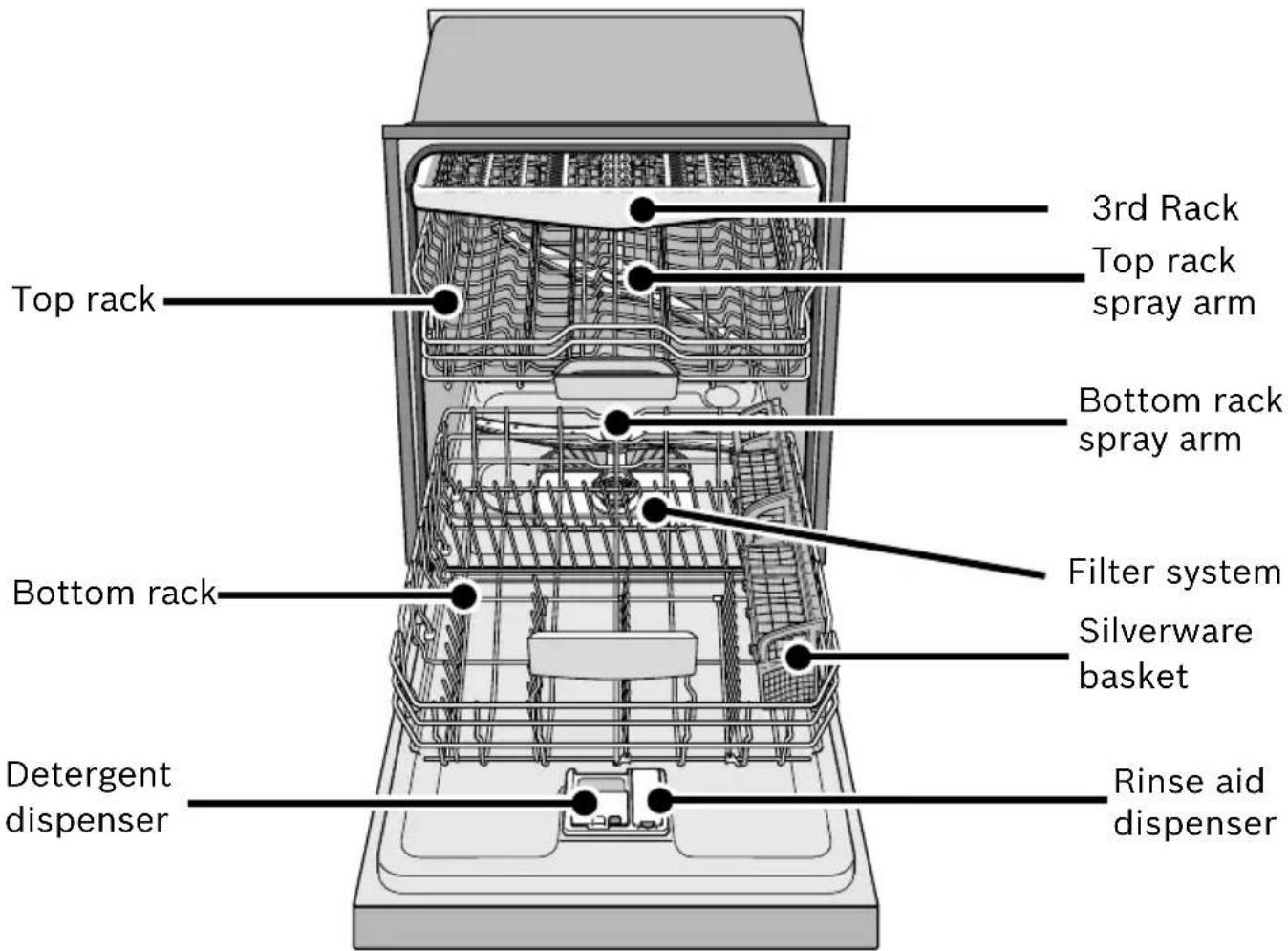
Dishwasher Components
| Wash Cycles | |
| Model Heavy Auto Glass Normal Express Rinse | |
| SHE7PT5xUC* | |
| SHE8PT55UC | |
| SHP7PT55UC | ● ● ● ● ● ● |
| SHV7PT53UC | |
| SHX7PT55UC | |
| SHX8PT55UC | |
| Additional Features | |||||||
| Model Delay | Speed PerfectTM | Half Load | Delicate Sanitize | 3rd Rack | Time Light® | ||
| SHE7PT5xUC*SHX8PT55UC | ● | ● | ● | ● | ● | ● | |
| SHE8PT55UC | |||||||
| SHP7PT55UCSHV7PT53UC | ● | ● | ● | ● | ● | ● | ● |
| SHX7PT55UC | |||||||
* "x" can be any number or letter
Dishware Materials
Note: Before using your dishwasher for the first time, check the information in this section. Some items are not dishwasher safe and should be hand washed; others require special loading.
Recommended
Aluminum: Colored anodized aluminum may fade over time. Minerals in your water may cause the aluminum to darken or spot. This can usually be removed with a soap-filled steel wool pad.
China, Crystal, Stoneware: Some hand-painted utensils may discolor, fade or spot. Hand wash these utensils. Position fragile glassware so that it will not topple over or come in contact with other utensils during the wash cycle.
Glass: Milk glass may discolor or become yellow.
Non-stick Coatings: Apply a light coating of vegetable oil to non-stick surfaces after drying.
Plastics: Make sure the plasticware is dishwasher safe.
Stainless Steel, Sterling Silver and Silver Plates: Load these so they do not come in contact with other metals.
Not Recommended
Acrylic: Crazing or small cracks throughout the acrylic, may occur.
Adhesive-Joined Pieces: Adhesives that join materials such as plastic, wood, bone, steel copper, tin, etc. may loosen.
Bone-Handled Utensils: Handles may separate.
Iron: Iron will rust. Hand wash and dry immediately.
Non-Dishware Items: Your dishwasher is intended for use in cleaning ONLY standard household dishware and kitchenware.
Pewter, Brass, Bronze: These items will tarnish. Hand wash and dry immediately.
Tin: Tin will stain. Hand wash and dry immediately.
Wood: Wooden bowls, wooden utensils and utensils with wooden handles can crack, warp and lose their finish.
Loading the Dishwasher
Do not pre-wash items with loosely attached soiling. Remove all food particles, bones, toothpicks and excessive grease. Items having burned-on, baked-on or starchy soils may require some pretreatment. Refer to the Dishware Materials section for more information about dishware suitability. Load only dishwasher safe items into the dishwasher. Load dishes in the dishwasher racks so the insides of bowls, pots and pans are facing the spray arms. Avoid nesting and contact points between dishes. Separate items of dissimilar metals.
Loading the Top Rack
Ensure items do not protrude through the bottom of the racks and block the spray arms.
Note: When pushing the top rack into the dishwasher, push it until it stops against the back of the tub so the top rack spray arm connects to the water supply at the back of the tub. Do not push racks in using the door.
Loading the Bottom Rack
Place large items in the bottom rack. Load pots, pans and bowls upside down. Do not block vent with tall baking sheets. Load these items on the left side of the dishwasher.
Unloading the Dishwasher
When unloading the dishwasher it is best to unload the bottom rack first.
Next, unload the silverware basket followed by the top rack.
NOTICE
To avoid dishwasher damage, do not load the dishwasher with paper products, plastic bags, packing materials or anything other than normal, dishwasher safe dishware and kitchenware.
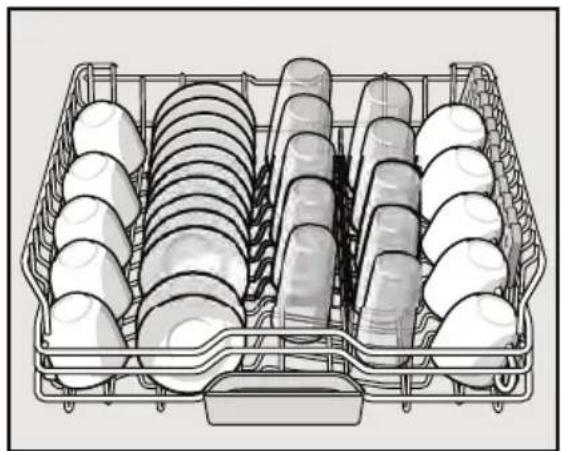
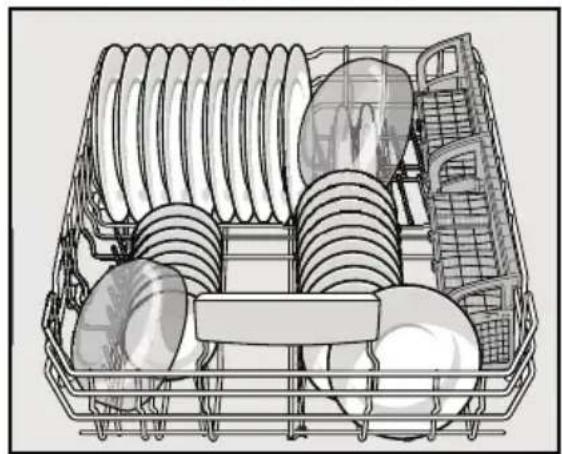
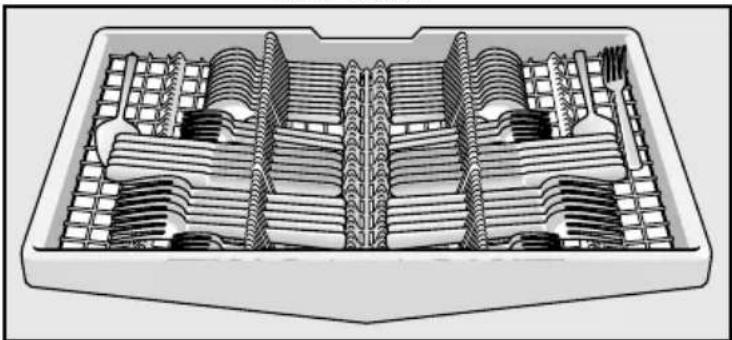
Suggested Loading Pattern
Top Rack
natural_image
Line drawing of a multi-tiered rack with multiple circular components arranged in rows (no text or symbols)Bottom Rack
natural_image
Illustration of a multi-tiered kitchen appliance with plates and racks (no text or symbols)3rd Rack
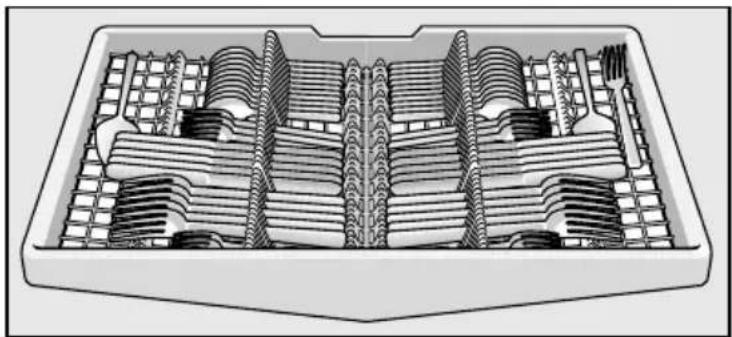
natural_image
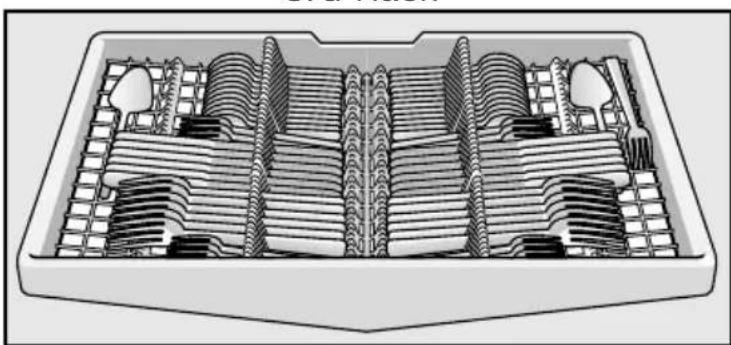
Cross-sectional diagram of a mechanical component with internal gear-like structures (no text or labels)Additional Loading Pattern
Top Rack
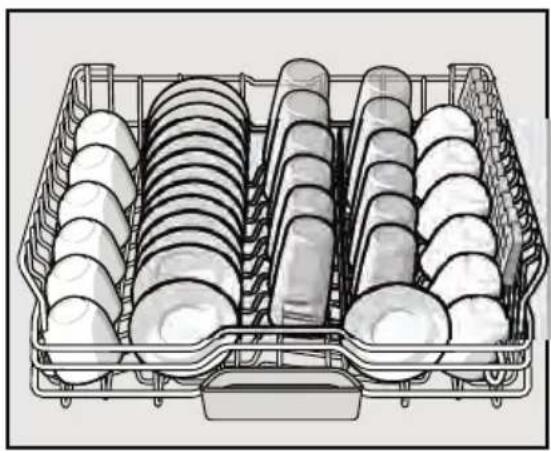
natural_image
Illustration of a multi-tiered kitchen appliance rack with multiple circular units and mesh grids (no text or symbols)Bottom Rack
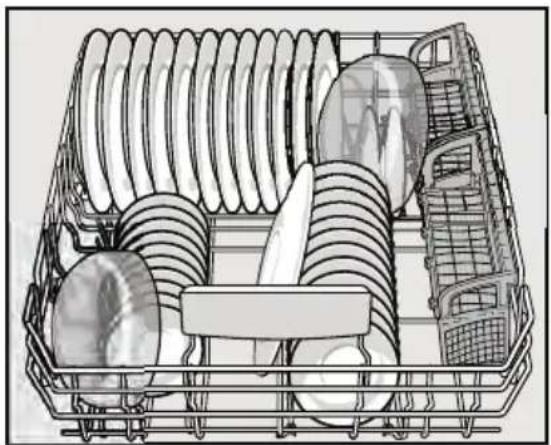
natural_image
Line drawing of a multi-tiered kitchen appliance with plates, buckets, and a rack (no text or symbols)3rd Rack
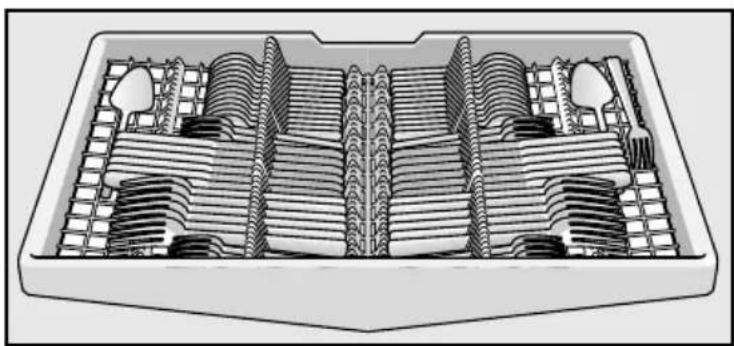
natural_image
Cross-sectional diagram of a mechanical component with internal layered structure (no text or symbols)Loading the Silverware Basket
Place knives and sharp utensils with their HANDLES UP and forks and spoons with their handles down. If large or oddly-shaped items are loaded in the silverware basket, be sure they do not nest together.

WARNING
The sharp points and edges of knives and other sharp utensils can cause serious injury. Load knives and other sharp utensils with edges down. Do not allow children to handle or play near knives and sharp utensils.
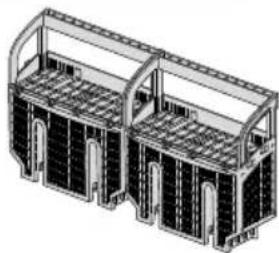
The Duo-Flex Silverware Basket
This basket splits along its length, resulting in two halves that may be placed in a variety of positions in the lower rack, greatly increasing the lower rack's loading versatility. The basket snaps together either back to back or end to end as shown.
To split the Duo-Flex Silverware Basket
Grasp the basket and slide the two halves in opposite directions as shown at right and then pull the two halves apart.
natural_image
Technical line drawing of a dual-arch structure with structural beams and supports (no text or symbols)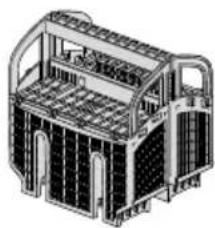
natural_image
Technical line drawing of a vehicle chassis with structural panels and cabinetry (no text or symbols)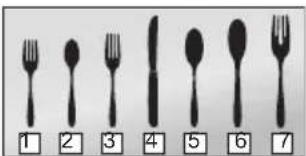
Loading pattern for Duo-Flex Silverware Basket
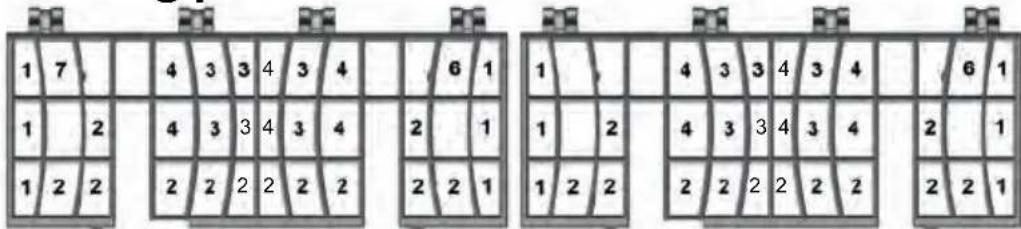
The basket lid may also be snapped to the handle in order to leave the basket open.
1- salad fork
2- teaspoon
3- dinner fork
4- knife
5 - tablespoon
6 - serving spoon
7 - serving fork
Figure 1
Rack Accessories
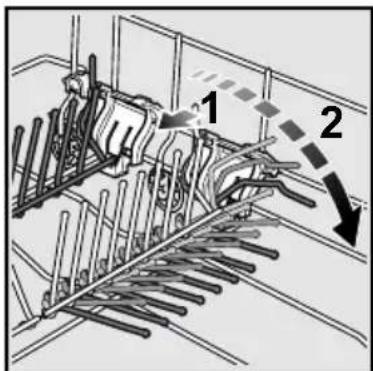
Flip Tines
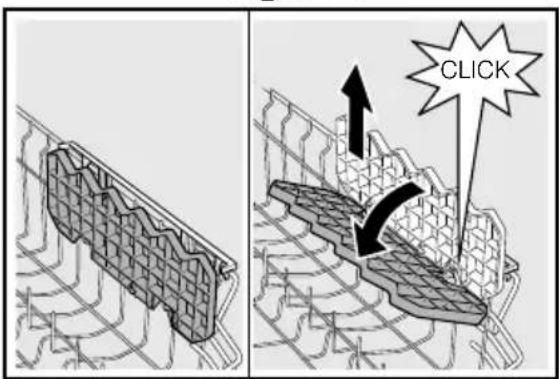
The racks consist of tines that can be folded down depending on what you may need to load in the rack. To fold down, grasp the folding tine and release from notch. Push folding tine downward to desired position as shown in Figure 1.
3-Step RackMatic®
The height of the upper rack can be adjusted in 3 steps to create more space.
1 Pull the top rack out of the dishwasher until it stops.
2 To lower the rack, push the lever inward.
3 To raise the rack, hold the basket on the sides of the upper rack and lift up.
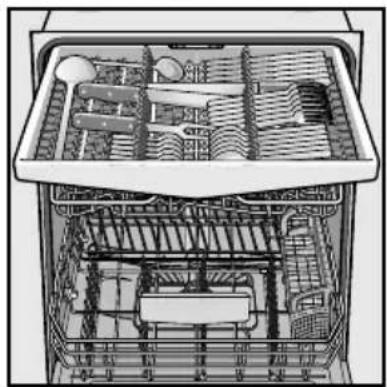
3rd Rack
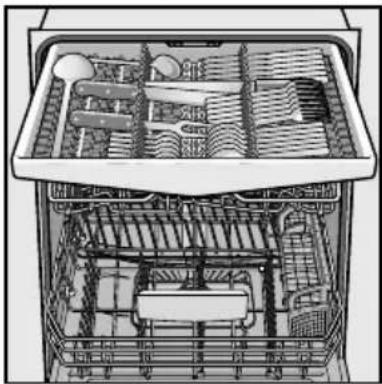
The 3rd Rack horizontally positions knives, spatulas and other oversized tools for improved cleaning and easier loading and unloading. Arrange cutlery in 3rd Rack as illustrated in Figure 3.
Figure 2
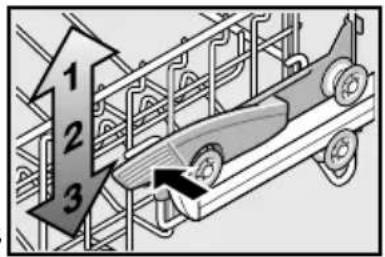
Figure 3
natural_image
Cross-sectional diagram of a multi-level kitchen appliance showing internal compartments and fixtures (no text or labels)Figure 4
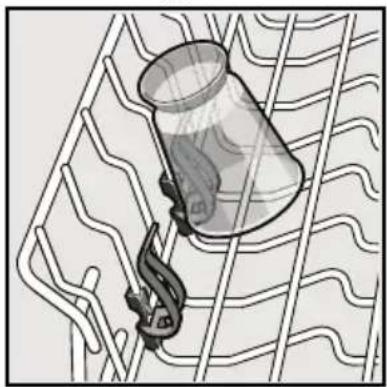
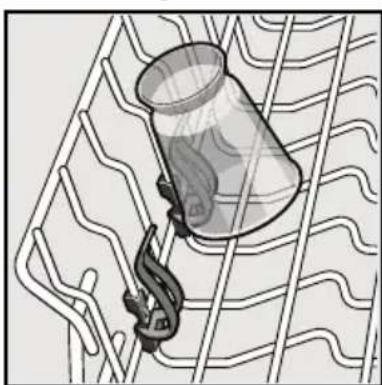
Plastic Item Clips
Light-weight plastic accessories (cups, lids, etc.) can be held securely by the plastic item clips. See Figure 4.
natural_image
Illustration of a container with a hook attached to a grid-like structure (no text or symbols)Figure 5
Cup Shelves
The shelf and the space underneath can be used for small cups or for larger serving utensils.
Extra Tall Item Sprinkler
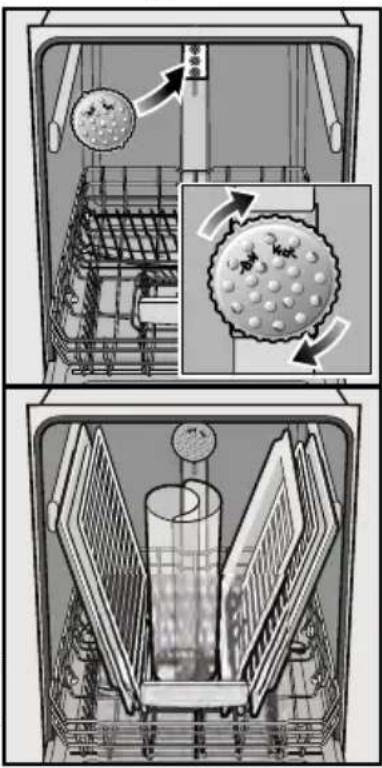
If an item is too tall to be placed in the bottom rack even with the top rack in the raised position, remove the empty top rack by pulling it out of the dishwasher until it stops. Pull the front of the rack upward and outward until the rollers are completely free of the roller guides.
Set the top rack aside and push the roller guides back into the dishwasher. Insert the Extra Tall Item Sprinkler into the top rack spray outlet and turn the sprinkler clockwise to lock into position. See Figure 6.
Note: Keep the vent on the tub's right side clear by placing tall items such as plastic cutting boards and tall baking sheets on the bottom rack's left side or center.
NOTICE
To avoid dishwasher damage, do not reinstall the top rack without removing the Extra Tall Item Sprinkler.
Figure 6
Adding Detergent, Rinse Aid and Salt Detergent
Use only detergent specifically designed for dishwashers. For best results, use fresh powdered dishwashing detergent or detergent tabs.
NOTICE
To avoid dishwasher damage, do not use hand dishwashing products in your dishwasher.
To avoid dishwasher damage, do not use too much detergent if your water is soft. Using too much detergent with soft water may cause etching in glassware.
This dishwasher uses less water than most, therefore, less detergent is required. With soft water, 1 tablespoon (15ml) of detergent will clean most loads. The detergent dispenser cup has lines that measure detergent to 1 tablespoon (15ml) and 1.75 tablespoons (25ml). 3 tablespoons (45ml) of detergent will completely fill the detergent dispenser.
Note: If you do not know the hardness of your water supply, use 15ml of detergent. Increase the amount if necessary to the least amount required to get your kitchenware clean.
Use the measuring lines in the detergent dispenser cup as a guide to measure the amount of detergent recommended in Table 1.
Adding Detergent
• 1 tablespoon (15ml) will clean most loads.
- Do not over fill the detergent dispenser.
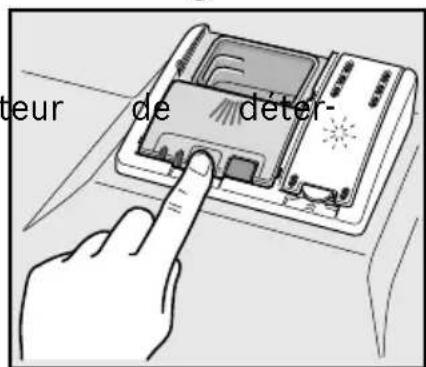
- When using detergent tabs, lay them such that they do not come in contact with the cover.
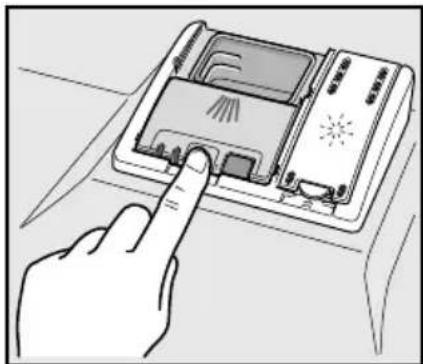
To Close
- Place finger as shown in Figure 8.
- Slide door closed and press down firmly until it clicks.
To Open
- Push the button as shown in Figure 9. Cover will slide open.
Table 1 - Recommended Detergent Amount
| Wash Cycle | Hard Water/ Heavy Soil | Medium Water/ Medium Soil | Soft Water/ Little Soil |
| Heavy | 45ml (3tbsp) | 45ml (3tbsp) | 25-45ml (1.75-3tbsp) |
| Auto | 25-45ml (1.75-3tbsp) | 25ml (1.75tbsp) | 15-25ml (1-1.75tbsp) |
| Glass | 25ml (1.75tbsp) | 15-25ml (1-1.75tbsp) | 15ml (1tbsp) |
| Normal | 25-45ml (1.75-3tbsp) | 25ml (1.75tbsp) | 15-25ml (1-1.75tbsp) |
| Express | 25ml (1.75tbsp) | 15-25ml (1-1.75tbsp) | 15ml (1tbsp) |
Rinse none none none
Rinse Aid
To achieve proper drying, always use a liquid rinse aid, even if your detergent contains a rinse aid or drying additive.
Note: The dishwasher indicates low rinse aid by turning on the “Add Rinse Aid” indicator light. If this light is on, you need to refill the rinse aid dispenser by following the directions below.
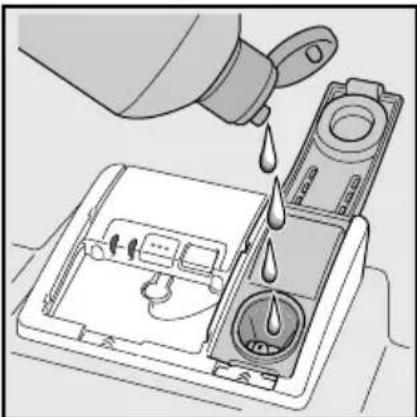
Adding Rinse Aid
1 Add liquid rinse aid to the dispenser until it is full (see Figure 10).
2 Close the lid. Lid must be fully closed until it clicks in order to seal.
3 Wipe up any excess rinse aid that may have puddled when the dispenser reservoir is full.
The indicator light will go out a few moments after the dishwasher door is shut. See below for instruction on how to adjust the amount of rinse aid dispensed.
Figure 7
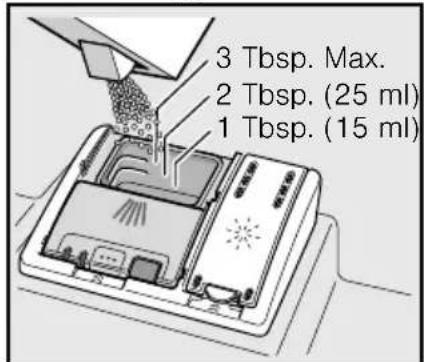
Figure 8
natural_image
Hand pressing a button on a device with a magnifying glass (no text or symbols visible)Figure 9
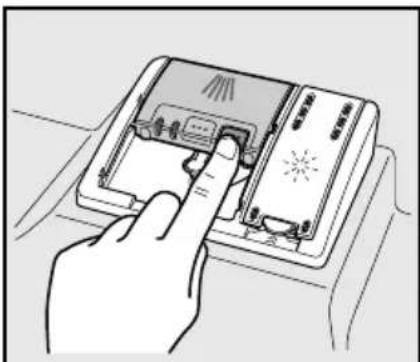
Figure 10
natural_image
Illustration of a container being poured into a washing machine (no text or symbols visible)Setting the amount of rinse aid used
The amount of rinse aid dispensed can be set from "r:00" to "r:06".
1 Press the [On/Off] button.
2 Hold down the “A” button (see page 17) and press [Start] until the display indicates “d:00”. Release both buttons.
3 Press the "A" button until the display shows "r:05".
4 Press the "C" button to select the desired setting.
$$ \begin{array}{l} " \mathbf {r}: \mathbf {0 0}" = \text { dispenser is OFF } \quad " \mathbf {r}: \mathbf {0 4}" = \text { medium / high setting } \ \text { "r:01" } = \text { lowest setting } \quad \text { "r:05" } = \text { high setting } \ \text { "r:02" } = \text { low setting } \quad \text { "r:06" } = \text { highest setting } \ " \mathbf {r}: 0 3" = \text { medium setting } \ \end{array} $$
5 Press [Start] to save the setting.
Note: Using rinse aid and setting the dispenser to "r:00" may result in longer cycle times.
Salt
Your dishwasher requires soft water to ensure proper washing results and is equipped with an internal water softening system. However, if you have a household water softening system, the internal system provided is not needed.
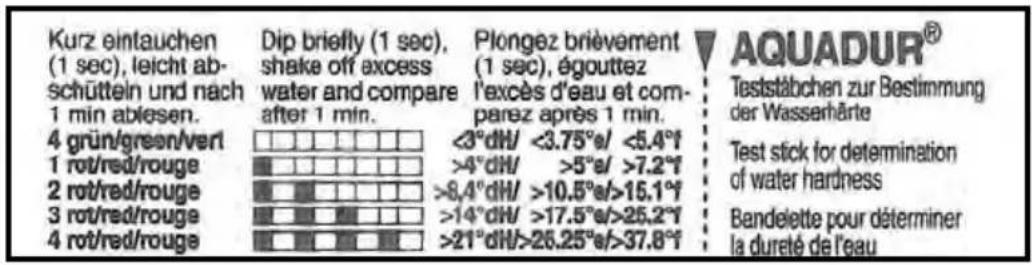
For the water softening system to function properly, it will need to use the dishwasher water softening salt. The amount of salt dispensed can be set from “H:00” to “H:07”. Salt is not required at H:00 (this is the default factory setting). The amount of salt required depends on the degree of hardness of your tap water. See Hard Water and your Dishwasher Table on next page. To use the provided water hardness test strip see below.
1 Hold down the “A” button (see page 17) and press [START] until the display indicates “d:00”.
2 Release both buttons. Press the "C" button to select the desired setting.
3 Save the selected setting by pressing [START].
| Hard Water and your Dishwasher | |||||||
| Your water hardness level directly impacts your dishwasher's performance. Hard water will increase spotting and reduce detergent performance. Some dishwasher models are equipped with a water softener that uses a special salt to adjust the water hardness to obtain optimal performance. The dishwasher salt is added to the salt chamber located under the lower dishwasher rack. The amount of salt that is dispensed is based on your home water hardness. The home water hardness can be determined by using the water hardness test strip included in your manual set (or from your local hardware store). The dishwasher water softener setting must be adjusted to match your water hardness. | |||||||
| Instructions for use of included "Water Hardness Test Strip" | |||||||
| • Only use salt designed for automatic dishwashers. Never use household water softener salt or table salt.• Follow the instructions below for the included test strip (If purchasing a different test strip, follow manufacturers instructions).Step 1 - Run the water at the kitchen sink for 5 minutes.Step 2 - Dip the end of the test strip with the colored squares into the tap water for 1 second and shake off excess water.Step 3 - After one minute, compare the test strip to the chart below and determine the Dishwasher Water Softener setting.Step 4 - Adjust the dishwasher Water Softener setting. Consult your Use and Care manual for details.Step 5 - If required, add salt to the dishwasher salt chamber as shown. | |||||||
| Adjusting the Water Softener Setting of your Dishwasher (select models) | |||||||
| Using the Test Strip included with your dishwasher (Purchased Test Strips May have a Different Scale) | Dishwasher Water Softener setting | Add salt to dishwasher salt chamber | Water Hardness Conversion Chart (Only necessary if you purchase a different Test Strip) | ||||
| ppm | Grains/gallon (gpg) | °dH | |||||
 | H:00 No 0 | 116 0 6 0 6 | |||||
 | H:01 Yes | 117 152 7 8 7 8 | |||||
 | H:02 Yes | 153 188 9 10 9 10 | |||||
| H:03 Yes | 189 223 11 13 | 11 | 12 | ||||
 | H:04 Yes | 224 294 14 17 | 13 | 16 | |||
| H:05 Yes | 295 383 18 22 | 17 | 21 | ||||
 | H:06 Yes | 384 544 23 31 | 22 | 30 | |||
| H:07 Yes | 545 890 32 52 | 31 | 50 | ||||
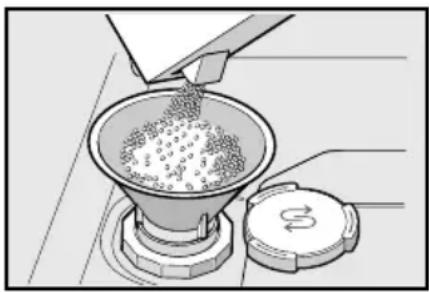
Refill the salt container, using a funnel to pour, right before turning on the unit to ensure that salt overflow is immediately washed away. This prevents corrosion. See Figure 11.
1 Open the screw cap of the salt container.
2 Fill the container with water (only required when turning on the unit for the first time).
3 Add dishwasher salt until the was is displaced and runs out.
4 Refill with salt as soon as the salt refill indicator is lit.
Warning: Never fill the salt dispenser with detergent. It will destroy the water softening system. To prevent corrosion, refill with salt and immediately begin any cycle.
Note: Refill salt only when the “Refill Salt” LED or the salt refill symbol is lit (model dependent).
Do not use salt tablets or any salt other than dishwasher water softening salt.
For more information about ordering salt please contact Customer Service.
Figure 11
natural_image
Illustration of a funnel pouring granular material into a conical container with a lid (no text or symbols)Dishwasher Cycles and Options
Wash Cycles
Heavy: Best for cleaning items with baked-on food or grease. These dishes would normally require soaking.
Auto: With our most complex soil sensing capability, this cycle is perfect for use with mixed loads of dishware and varying amounts of food soil. This is the most flexible cycle and is a good choice for everyday use.
Glass: A cycle for lightly soiled dishes, ideal for temperature sensitive items or cutlery. In this cycle the temperature is reduced to help prevent dishes from becoming damaged. It is especially helpful to reduce a cloudy or etched appearance on glasses.
Note: Some glasses are more prone to etching due to glass manufacturing processes.
Normal: Thoroughly cleans a full load of normally soiled dishes.
Note: The Energy Guide Label was based on this soil sensing cycle with all available options turned off. As prescribed in the energy test procedure, the unit was tested without any Rinse Aid in the Rinse Aid dispenser. A single dose of detergent was used in the Detergent Dispenser, with no detergent used in the prewash. For models with a 3rd rack, the test was conducted with the upper rack in the middle position.
Express: Cleans lightly soiled dishes and reduces overall wash time. Use this cycle to clean glasses and dessert dishware that may need to be reused at the same event.
Rinse: Allows you to rinse food soil off of a partial load and hold the dishes in the dishwasher until you are ready to run a full load. Do not use detergent in this cycle.
Wash Cycle Options
Delay: Allows you to delay the start time of your dishwasher up to 24 hours.
SpeedPerfect™: The Speed Perfect option is available with Heavy, Auto, Eco and Normal cycles.
Half Load: The Half Load option can reduce the energy and water consumption when washing small, lightly soiled loads that fill approximately half of the dishwasher's capacity.
Delicate: The Delicate option is available only in the Heavy, Auto and Nomral cycles. This cycle is best used for lightly soiled items with easy to remove food soils.
Sanitize: The Sanitize feature is available only in the Heavy, Auto and Normal cycles. Select one of these cycles, press the “Sanitize Option” button and then press Start to activate the Sanitation features. The sanitize LED will light when sanitation requirements are met. The technical sanitation measures may also improve the drying results.
Note: The dishwasher automatically defaults to Auto Wash when turned off and back on. If you used the sanitize option in your last cycle, the dishwasher will default to Auto Wash with the Sanitize option selected when you turn it on.
Wash Cycle Information
To save energy, this dishwasher has EcoSense® where the sensors in the dishwasher automatically adjust the cycle length, temperature and water changes based on the amount of food soil and the incoming water temperature. The “Smart Control” makes decisions that can cause the cycle time and water usage to adjust intermittently. Wash cycle times are based on 120°F water supply. If your household water supply is different than 120°F, your dishwasher’s cycle times may be impacted.
Note: Only sanitizing cycles have been designed to meet the requirements of 6 for soil removal and sanitization efficacy. There is no intention, either directly or indirectly, to imply that all cycles have passed sanitization performance tests.
Table 2 - Wash Cycle Information
| Heavy Auto Glass Normal Express Rinse | ||||||
| cycle time | 110-135 min | 105-129 min | 80-85 min | 130-135 min | 30 min 9 min | |
| water cons. | 18.6-24.2 L 4.9-6.4 gal | 13.1-24.5 L 3.5-6.5 gal | 9.3-14.5 L 2.5-3.8 gal | 8.8-20.8 L 2.4-5.5 gal | 10.5 L 2.8 gal | 4.1 L 1.1 gal |
| wash temp. | 66-71°C 150-160°F | 53-66°C 127-150°F | 45-50°C 113-122°F | 45-55°C 113-131°F | 45°C 113°F | incoming |
| rinse temp. | 72°C 162°F | 67°C 153°F | 62°C 144°F | 60-69°C 140-156°F | 50°C 122°F | incoming |
| Speed PerfectTM | ||||||
| cycle time | 95-110 min | 75-90 min | 60-70 min | 95-105min n/a | n/a n/a | |
| water cons. | 16.3-20.5 L 4.3-5.5 gal | 16.1-20 L 4.3-5.3 gal | 13.3 L 3.5 gal | 16.6-21.1 L 4.4-5.6 gal | n/a n/a | |
| Half Load | ||||||
| cycle time | 115 min | 95-105 min | 75-80 min | 90-99 min | n/a n/a | |
| water cons. | 17.9 L 4.8 gal | 10.2-16.5 L 2.7-4.4 gal | 9.3-12.5 L 2.5--3.3 gal | 10.8-13.9 L 2.8-3.7 gal | n/a n/a | |
| Delicate | ||||||
| cycle time | 105-110 min | 90-105 min | n/a | 100-120 min | n/a n/a | |
| water cons. | 18.6-24.2 L 4.9-6.4 gal | 13.1-24.5 L 3.5-6.5 gal | n/a | 8.8-20.8 L 2.4-5.5 gal | n/a n/a | |
| Sanitize | ||||||
| cycle time | 130-150 min | 125-150 min | n/a | 135-155 min | n/a n/a | |
| water cons. | 18.6-24.2 L 4.9-6.4 gal | 13.1-24.5 L 3.5-6.5 gal | n/a | 8.8-20.8 L 2.4-5.5 gal | n/a n/a | |
Operating the Dishwasher
SHE7PT5xUC*
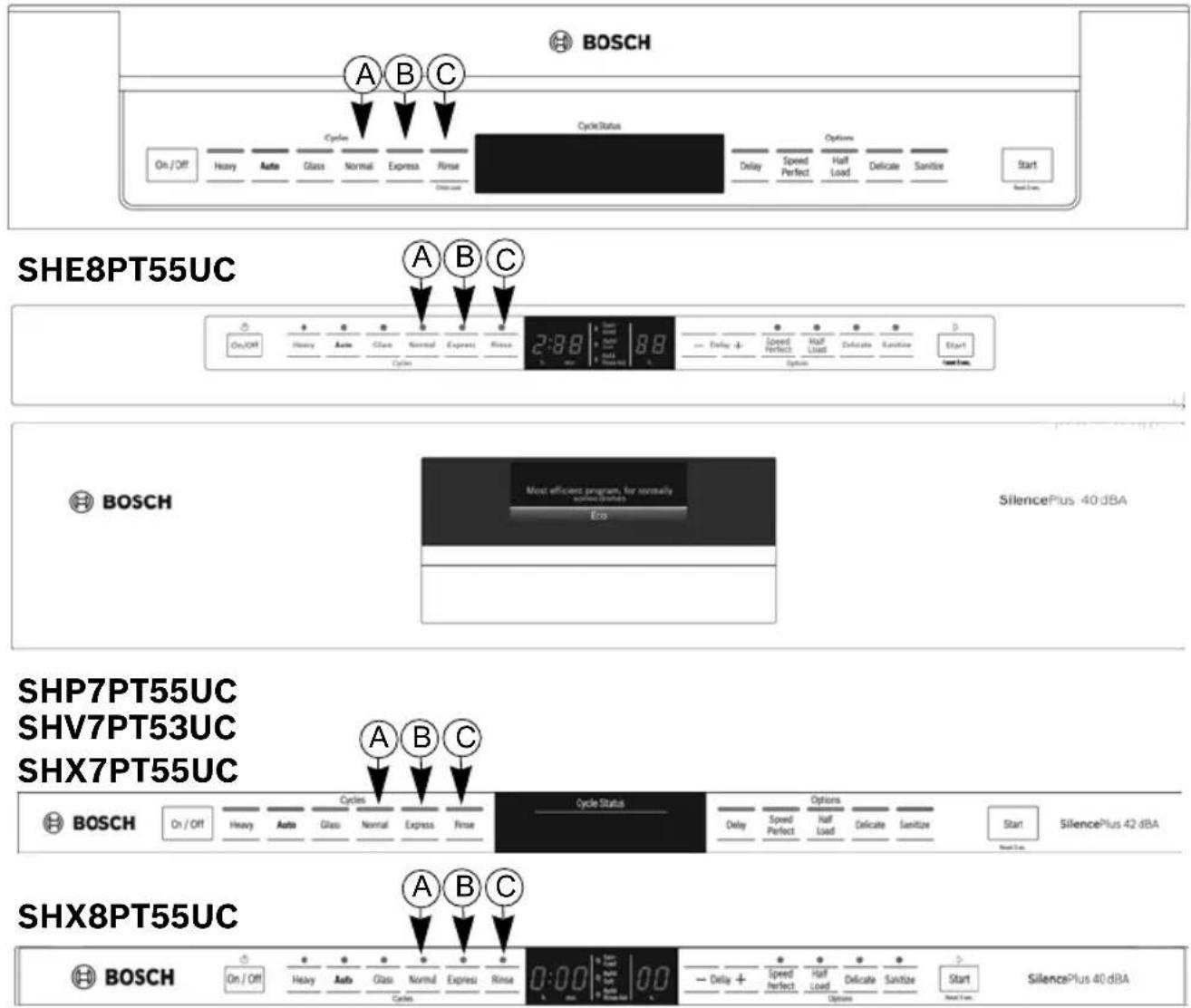
* "x" can be any number or letter
NOTE: For models with hidden controls, the door must be opened before changing settings and closed after changing settings.
Buttons are sensitive and should be touched gently. Avoid any grease or food particals resting on the buttons as they could activate the dishwasher. Wiping and cleaning can also activate the dishwasher. For best results, use bare, clean hands when touching the buttons.
NOTICE: Use caution when opening door during a running cycle. Hot water may splash out. Open door slowly.
Start the dishwasher
1 Press the [On/Off] button. The LED of the last selected cycle flashes.
2 Select a cycle and desired options and press [Start].
Cancel a cycle
1 Press and hold the [Start] button for approximately 3 seconds until the display reads "0:01".
2 Wait about 1 minute while the dishwasher drains.
3 Open the door and press the [On/Off] button.
Interrupt a cycle
1 Press the [On/Off] button to turn the unit off.
2 To resume the cycle, press the [On/Off] button again.
Delay Start
You can delay the start of the cycle in one hour increments up to 24 hours.
To set delay start:
1 Press the [On/Off] button. Select a cycle.
2 Press the [Delay] button until the displayed time corresponds with your requirements and press [Start] to activate delay start.
h:01 = 1 hour delay h:24 = 24 hour delay
To cancel delay start:
1 Press the [Delay] button until "h:00" is indicated on the digital display.
2 Press [Start] to save setting.
Cycle Completion Signal
1 Open the door and press the [On/Off] button.
2 Hold down the "A" button (see page 17) and press [Start] until the display indicates "d:00". Release both buttons.
3 Press the "A" button until the display shows "b:02".
4 Press the "C" button to increase or decrease the tone "b:00" = OFF and "b:03" = LOUDEST and press [Start] to save setting and close the door.
Intensive Drying
The final rinse uses a higher temperature which improves the drying results. The running time may increase slightly.
To turn intensive drying on:
1 Press the [On/Off] button.
2 Hold down the "A" button and press [Start] until the display indicates "d:00". Release both buttons
3 Press the "A" button until the display shows "d:00".
4 Press the "C" button to turn intensive drying on or off. "d:01" = ON and "d:00" = OFF and press [Start] to save setting.
Auto Power Off
To save energy, the dishwasher is turned off 1 minute after the wash cycle ends. Auto Power Off can be adjusted from P:00 to P:02.
To change the factory setting (P:01):
1 Press the [On/Off] button.
2 Hold down the "A" button and press [Start] until the display indicates "d:00". Release both buttons.
3 Press the "A" button until the display indicates "P:01".
4 Press the "C" button until the display corresponds with your requirements.
P:00 = dishwasher does not turn off automatically
P:01 = dishwasher turns off automatically after 1 minute
P:02 = dishwasher turns off automatically after 120 minutes (2 hours)
5 Press [Start] to save the setting.
Language
To change the language of the display following these instructions.
1 Open the door and press the [On/Off] button.
2 Hold down the "A" button and press [Start] until the display indicates "d:00".
3 Release both buttons. Press the "A" button until the display shows "L:01".
4 Press the “C” button until the display corresponds with your requirements.
$$ \mathbf {L}: \mathbf {0 2} = \text { English } $$
$$ \mathbf {L}: \mathbf {0 3} = \text { French } $$
$$ \mathbf {L}: \mathbf {0 7} = \text { Spanish } $$
5 Press [Start] to save and close the door.
Time Light®
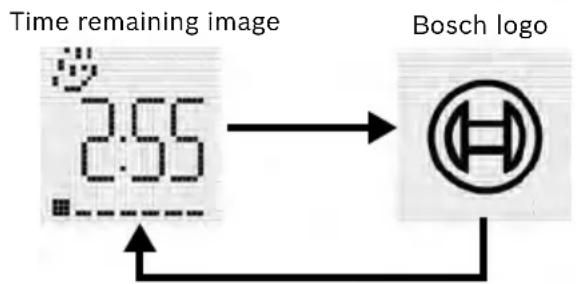
Our dishwashers offer a convenient time remaining indicator light that projects cycle status and time remaining on the kitchen floor.
Note: If the appliance is installed at eye-level, the time remaining information is not visible.
In the default setting (S:01) the time remaining shows on the floor alternating with the Bosch® logo (about 5 seconds per image).
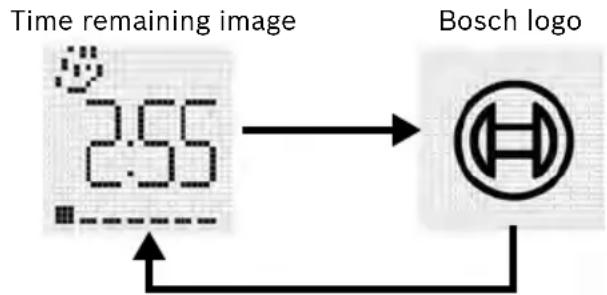
flowchart
graph LR
    A["Time remaining image"] --> B["Bosch logo"]
    B --> C["2.55"]
To change setting:
1 Press the [On/Off] button.
2 Hold down the "A" button and press [Start] until the display indicates "d:00".
3 Release both buttons. Press the "A" button until the display shows "S:01".
4 Press the “C” button to switch between “S:00” = OFF, “S:01” and “S:02” = Time Light ON
5 Press [Start] to save the setting.
Care and Maintenance
A regular inspection and maintenance of your machine will help to prevent faults. This saves time and prevents future problems.
Overall condition of the machine
Never use a steam cleaner to clean your dishwasher. The manufacturer is not liable for any resulting damage.
Regularly wipe the front of the appliance with a damp cloth - water and a small amount of liquid soap is adequate. Do not use sponges as they could scratch the surfaces.
Stainless steel appliances: To prevent corrosion, do not use sponges.
Clean the outer edges of the inside door panel regularly to remove debris that may collect from normal loading. If spots begin to appear on the stainless steel, make sure the rinse agent is full and functioning properly.

WARNING
Use caution when removing parts for cleaning as some debris may be sharp.
Filters
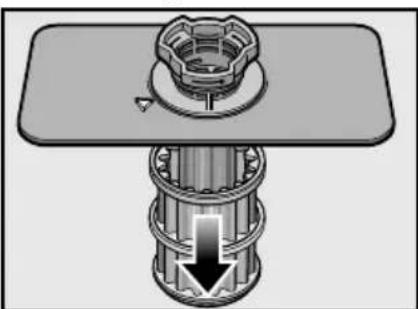
The filter system consists of a coarse filter, a flat fine filter and a micro filter. The filters keep large foreign objects in the rinsing water away from the pump. Foreign objects may occasionally block the filters.
Check the filters for residue by:
- Unscrew the filter cylinder as illustrated in Fig. 11-12 and take out the filter system.
- Remove any residue and clean filters under running water.
- Reinstall filter system in reverse sequence and ensure that the arrow marks are facing each other after locking it into place.
Spray Arms
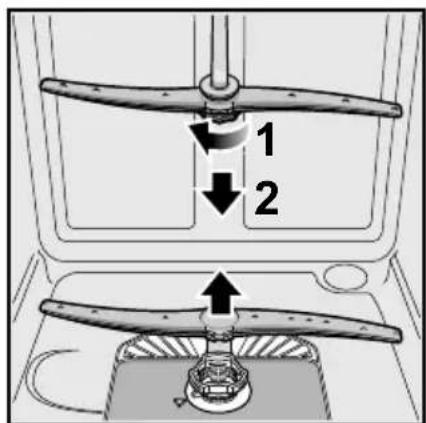
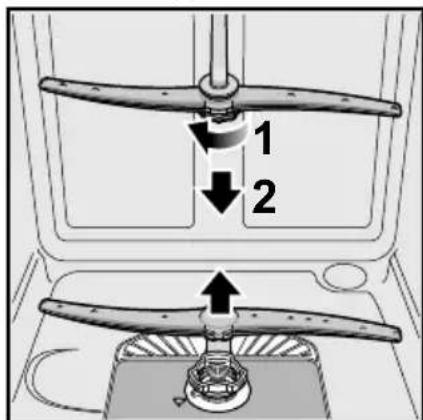
Check spray arms for grease and limescale deposits.
If you find such deposits:
- Fill detergent dispenser with detergent and start the appliance without utensils in the cycle with the highest rinsing temperature (see wash cycle information table).
- Clean the appliance with detergents/ appliance cleaners which are particularly suitable for use with dishwashers.
- Unscrew the spray arms and inspect as shown in Figure 13.
Figure 11
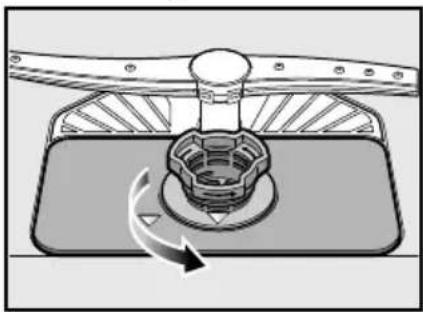
natural_image
Diagram of a mechanical component with a rotating arrow indicating rotation (no text or symbols)Figure 12
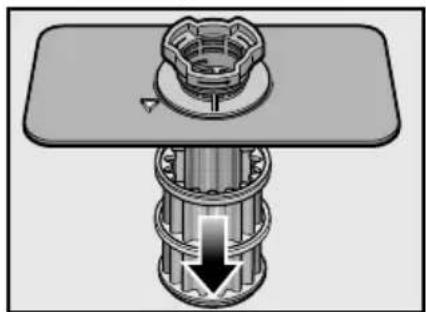
natural_image
Mechanical assembly diagram showing a bolt and shaft assembly with no visible text or symbolsFigure 13
Waste water pump
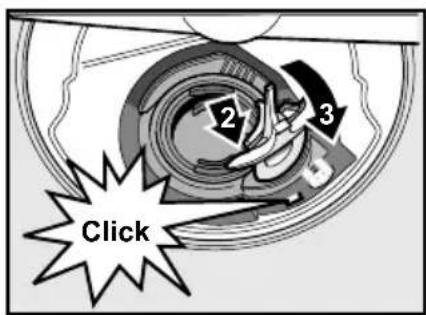
Large food remnants in the rinsing water not retained by the filters may block the waste water pump.
In this case:
- Disconnect the appliance from the power supply.
- Remove the filters (see Figures 11-12).
- Scoop out standing water - use a sponge if necessary.
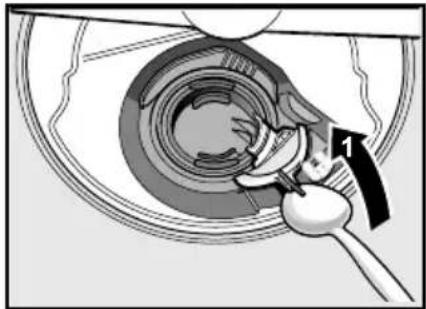
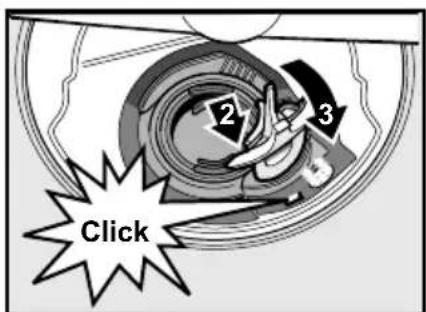
- Using a spoon, pry off the pump cover (see Figure 14-15) until it clicks, then grip the cover and pull upward until it resists and then pull forward.
- Check inner compartment and remove any foreign objects.
- Place cover in the original position, press down and engage. Reinstall filters.
Figure 14
natural_image
Mechanical assembly diagram showing a hand turning a circular component with a tool, no text or symbols presentFigure 15
Preparing your unit for vacation
Before leaving for vacation during warmer weather, besides turning off the main valve, also turn off water supply at the nearest point to the dishwasher. During colder weather, please follow the instructions for winterizing your unit below.
Winterizing your unit
If your dishwasher will be unused for an extended period of time in a location that experiences freezing temperatures (holiday home or through a vacation period), have your dishwasher winterized by an authorized professional service.
Self Help
Dishwashers may occasionally exhibit problems that are unrelated to a malfunction of the dishwasher itself. The following information may help you with a dishwasher problem without involving a repair professional.
Problem Cause Action
| Dishwasher does not start | 1. Door may not be properly latched2. Unit may not be turned on3. Unit not reset or previous cycle not completed4. Delay start engaged5. Interruption of electrical power supply to dishwasher or blown fuse.6. The door may have been closed without first selecting a cycle7. Water supply may not be turned on | 1. Shut the door completely until you hear a click2. Press the main power switch to turn unit on3. To reset, refer to “Cancel a Cycle” section in this manual4. To reset, refer to “Delay Start” section in this manual5. Check circuit breaker6. Select a cycle and close the door (for hidden controls only).7. Check and turn on water supply |
| Display does not illuminate | 1. A fuse may have been blown or circuit breaker tripped2. Door not closed or latchedNote: For models with controls on top of the door, the display only illu-minate when the door is opened and controls are visible. | 1. Check the fuse or circuit breaker box and replace the fuse or reset the breaker if necessary2. Ensure door is properly latched and completely closed |
| Dishwasher seems to run a long time | 1. Incoming water is not warm enough2. Cycle time can vary due to soil and water conditions3. Rinse aid dispenser is empty4. Dishwasher connected to cold water supplyNote: Refer to “Wash Cycle Information” section in this manual for typical cycle lengths | 1. Before starting a cycle, run hot water faucet at the sink closest to the dishwasher2. Sensors in the dishwasher automatically increase the cycle time to ensure a good wash when heavy soil is detected3. Add rinse aid4. Verify dishwasher is connected to hot water supply plumbing |
| Detergent dispenser cover will not shut | 1. Improper operation of detergent cover2. Previous cycle has not been fin-ished or rest or cycle or inter-rupted | 1. Refer to “Adding Detergent and Rinse Aid” section of the manual for instructions on opening and closing the dispenser2. Refer to the “Operating the Dish-washer” section of the manual |
| Unable to select desired cycle | 1. Previous cycle has not finished 1. | Refer to the “Operating the Dish-washer” section of the manual |
Problem Cause Action
| Dishes are not getting clean enough | 1. Spray arm movement obstructed2. Spray arm nozzles clogged3. Improper use of detergents4. Filters could be clogged5. Dishes are nested or loaded too close together6. Selected wash cycle is not suitable for food soil conditions | 1. Ensure that spray arm movement is not blocked by hand rotating spray arms before starting cycle2. Remove the spray arms and clean according to the “Care and Maintenance” section of the manual3. Increase or decrease detergent depending on the water hardness (refer to Table 1)4. Clean the filters according to the “Care and Maintenance” section of the manual5. Rearrange load such that water spray can reach all items in the dishwasher - see “Loading the Dishwasher” section of the manual6. Refer to “Wash Cycle Information” section of the manual |
| Streaks on glassware or residue on the dishes | 1. Incorrect rinse aid setting 1. Depending on the hardness of water, adjust the rinse agent dispenser. Refer to “Adding Detergent and Rinse Aid” section in the manual | |
| Dishes are not getting dry enough | 1. Rinse aid dispenser is empty2. Improper loading of dishesNote: Plastic or Teflon do not typically dry as well as other items due to their inherent properties | 1. Add rinse aid - the use of rinse agent improves drying2. Rearrange load to ensure items are not nesting (see “Loading the Dishwasher” section of the manual)Note: Select models offer an extra heating option to improve drying performance. |
| Odor 1. Food debris is present at the bottom of the dishwasher2. Food particles are present near the door seal3. Residual water is present at the bottom of the dishwasher4. Drain hose is obstructed | 1. Remove the filters and clean according to the “Care and Maintenance” section of the manual2. Refer to “Care and Maintenance” section of the manual3. Ensure the unit has completely drained from the last cycle4. Remove any obstructions from the drain hose by calling qualified personnel. Note: If odor still persists, run the Normal/Regular cycle until it flushes and interrupt the cycle and place an 8oz. cup of distilled white vinegar solution on the top rack and then finish the cycle. | |
Problem Cause Action
| Dishwasher not filling with water or “Check water supply” display lights up | 1. Restriction in the water supply system2. Previous wash cycle was not completed3. Delay start is active4. Household water supply turned off | 1. Ensure that the water supply valve (typically located under kitchen sink) is open and check that the water supply line has no kinks or clogs2. Refer to the “Operating the Dish-washer” section of the manual.3. Cancel the delay start or wait until delay start time completes4. Turn on water supply |
| Fascia panel discolored or marked | 1. Abrasive cleaner used 1. Use mild detergents with soft damp cloth | |
| Water leaks 1. Suds2. Door seal could be pulled away from track3. Condensation vent is blocked4. Improper installation | 1. Wrong type of detergent results in suds and leaks - use only dishwasher detergents. If suds still persist, add one tablespoon of vegetable oil at the bottom of the dishwasher and run the desired cycle.2. Ensure the door seal is in the track3. Ensure that condensation vent is not blocked4. Have proper installation verified by qualified personnel (water supply, drain system, leveling, plumbing) | |
| Tub stains 1. Stains on the dishwasher interior are due to water hardness2. Silverware in contact with tub | 1. Concentrated lemon juice can reduce the build up of hard water stains. Run Normal cycle until it flushes and interrupt the cycle and then place an 8oz. cup of the concentrated lemon solution on the top rack and finish the cycle. This can be done periodically to avoid build up.2. Ensure that silverware does not make contact with the tub while running a cycle. | |
| Noise during wash cycle | 1. Dishes may not be arranged properly | 1. Water circulation sound is normal, but if you suspect items are banging into each other or into the spray arms, refer to the “Loading the Dish-washer” section of the manual for optimal arrangement. |
Problem Cause Action
Touch sensitive "but-tons" not activating easily or activating without being touched
- Water or other liquid on the surface.
-
"Buttons" not being activated properly.
-
Wiping the fascia may cause unwanted activation. Dry clean when possible. If you must use a damp cloth to clean, dry immediately. Never pour water on the controls.
- Press the center of the "button" with the flat area of your fingertip. A beep will sound to indicate that the selection has been made. Touching the "buttons" lightly should work. Note: There is a built in delay to prevent someone from launching several actions at once by accidentally wiping their hand (or a cleaning cloth) across the control panel.
Customer Service
Your Bosch® dishwasher requires no special care other than that described in the Care and Maintenance section of this manual. If you are having a problem with your dishwasher, before calling for service please refer to the Self Help section of the manual. If service is necessary, contact your dealer or installer or an authorized service center. Do not attempt to repair the appliance yourself. Any work performed by unauthorized personnel may void the warranty. If you are having a problem with your Bosch dishwasher and are not pleased with the service you have received, please take the following steps until the problem is corrected to your satisfaction:
1 Call us at 1-800-944-2904
2 Contact Customer Service from our web site:
www.bosch-home.com/us or www.bosch-appliances.ca
3 Contact your installer or the Bosch Authorized Service Contractor in your area.
4 Write us: BSH Home Appliances Corporation
1901 Main Street
Irvine, CA 92614
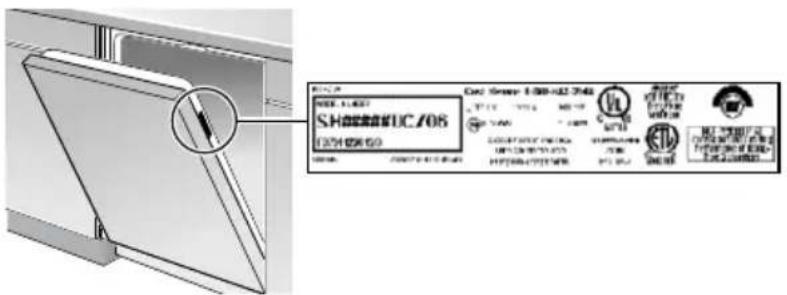
Please be sure to include your model information as well as an explanation of the problem and the date it started. You will find the model and serial number information on the label located on the edge of the dishwasher door. Please make a copy of your invoice and keep it with this manual. The customer must show proof of purchase to obtain warranty service.
Statement of Limited Product Warranty
What this Warranty Covers & Who it Applies to: The limited warranty provided by BSH Home Appliances Corporation (BSH) in this Statement of Limited Product Warranty applies only to Bosch® dishwashers (“Product”) sold to you, the first using purchaser, provided that the Product was purchased: (1) for your normal, household (non-commercial) use, and has in fact at all times only been used for normal household purposes; (2) new at retail (not a display, “as is”, or previously returned model), and not for resale, or commercial use; and (3) within the United States or Canada, and has at all times remained within the country of original purchase. The warranties stated herein apply only to the first purchaser of the Product and are not transferable.
- Please make sure to return your registration card; while not necessary to effectuate warranty coverage, it is the best way for BSH to notify you in the unlikely event of a safety notice or product recall.
How Long the Warranty Lasts: BSH warrants that the Product is free from defects in materials and workmanship for a period of three hundred sixty five (365) days from the date of purchase. The foregoing timeline begins to run upon the date of purchase, and shall not be stalled, tolled, extended, or suspended, for any reason whatsoever. Labor and shipping costs are included in this basic coverage.
Extended Limited Warranty: BSH also provides these additional limited warranties:
- 5 Year Limited Warranty on Electronics: BSH will repair or replace any BSH microprocessor or printed circuit board if it proves to be defective in materials or workmanship (excludes labor charges).
- 5 Year Limited Warranty on Dish Racks: BSH will replace the upper or lower dish rack (excluding rack components), if the rack proves defective in materials or workmanship (excludes labor charges).
- Lifetime Warranty against Stainless Steel Rust Through: BSH will replace your dishwasher with the same model or a current model that is substantially equivalent or better in functionality, if the inner liner should rust through (excludes labor charges).
- BSH will replace the stainless steel door if the door should rust through (excludes labor charges). The foregoing timeline begins to run upon the date of purchase, and shall not be stalled, tolled, extended, or suspended, for any reason whatsoever.
Repair/Replace as Your Exclusive Remedy: During this warranty period, BSH or one of its authorized service providers will repair your Product without charge to you (subject to certain limitations stated herein) if your Product proves to have been manufactured with a defect in materials or workmanship. If reasonable attempts to repair the Product have been made without success, then BSH will replace your Product (upgraded models may be available to you, in the sole discretion of BSH, for an additional charge). All removed parts and components shall become the property of BSH at its sole option. All replaced and/or repaired parts shall assume the identity of the original part for purposes of this warranty and this warranty shall not be extended with respect to such parts. BSH's sole liability and responsibility hereunder is to repair manufacturer-defective Product only, using a BSH-authorized service provider during normal business hours. For safety and property damage concerns, BSH highly recommends that you do not attempt to repair the Product yourself, or use an unauthorized servicer; BSH will have no responsibility or liability for repairs or work performed by a non-authorized servicer. If you choose to have someone other than an authorized service provider work on your Product, THIS WARRANTY WILL AUTOMATICALLY BECOME NULL AND VOID. Authorized service providers are those persons or companies that have been specially trained on BSH products, and who possess, in the opinion of BSH, a superior reputation for customer service and technical ability (note that they are independent entities and are not agents, partners, affiliates or representatives of BSH). Notwithstanding the foregoing, BSH will not incur any liability, or have responsibility, for the Product if it is located in a remote area (more than 100 miles from an authorized service provider) or is reasonably inaccessible, hazardous, threatening, or treacherous locale, surroundings, or environment; in any such event, if you request, BSH would still pay for labor and parts and ship the parts to the nearest authorized service provider, but you would still be fully liable and responsible for any travel time or other special charges by the service company, assuming they agree to make the service call.
Out of Warranty Product: BSH is under no obligation, at law or otherwise, to provide you with any concessions, including repairs, pro-rates, or Product replacement, once this warranty has expired.
Warranty Exclusions: The warranty coverage described herein excludes all defects or damage that are not the direct fault of BSH, including without limitation, one or more of the following: (1) use of the Product in anything other than its normal, customary and intended manner (including without limitation, any form of commercial use, use or storage of an indoor product outdoors, use of the Product in conjunction with air or water-going vessels); (2) any party's will-ful misconduct, negligence, misuse, abuse, accidents, neglect, improper operation, failure to maintain, improper or negligent installation, tampering, failure to follow operating instructions, mishandling, unauthorized service (including self-performed "fixing" or exploration of the appliance's internal workings); (3) adjustment, alteration or modification of any kind; (4) a failure to comply with any applicable state, local, city, or county electrical, plumbing and/or building codes, regulations, or laws, including failure to install the product in strict conformity with local fire and building codes and regulations; (5) ordinary wear and tear, spills of food, liquid, grease accumulations, or other substances that accumulate on, in, or around the Product; and (6) any external, elemental and/or environmental forces and factors, including without limitation, rain, wind, sand, floods, fires, mud slides, freezing temperatures, excessive moisture or extended exposure to humidity, lightning, power surges, structural failures surrounding the appliance, and acts of God. In no event shall BSH have any liability or responsibility whatsoever for damage to surrounding property, including cabinetry, floors, ceilings, and other structures or objects around the Product. Also excluded from this warranty are scratches, nicks, minor dents, and cosmetic damages on external surfaces and exposed parts; Products on which the serial numbers have been altered, defaced, or removed; service visits to teach you how to use the Product, or visits where there is nothing wrong with the Product; correction of installation problems (you are solely responsible for any structure and setting for the Product, including all electrical, plumbing or other connecting facilities, for proper foundation/flooring, and for any alterations including without limitation cabinetry, walls, floors, shelving, etc.); and resetting of breakers or fuses.
TO THE EXTENT ALLOWED BY LAW, THIS WARRANTY SETS OUT YOUR EXCLUSIVE REMEDIES WITH RESPECT TO PRODUCT, WHETHER THE CLAIM ARISES IN CONTRACT OR TORT (INCLUDING STRICT LIABILITY, OR NEGLIGENCE) OR OTHERWISE. THIS WARRANTY IS IN LIEU OF ALL OTHER WARRANTIES, WHETHER EXPRESS OR IMPLIED. ANY WARRANTY IMPLIED BY LAW, WHETHER FOR MERCHANTABILITY OR FITNESS FOR A PARTICULAR PURPOSE, OR OTHERWISE, SHALL BE EFFECTIVE ONLY FOR THE PERIOD THAT THIS EXPRESS LIMITED WARRANTY IS EFFECTIVE. IN NO EVENT WILL THE MANUFACTURER BE LIABLE FOR CONSEQUENTIAL, SPECIAL, INCIDENTAL, INDIRECT, "BUSINESS LOSS", AND/OR PUNITIVE DAMAGES, LOSSES, OR EXPENSES, INCLUDING WITHOUT LIMITATION TIME AWAY FROM WORK, HOTELS AND/OR RESTAURANT MEALS, REMODELLING EXPENSES IN EXCESS OF DIRECT DAMAGES WHICH ARE DEFINITIVELY CAUSED EXCLUSIVELY BY BSH, OR OTHERWISE. SOME STATES DO NOT ALLOW THE EXCLUSION OR LIMITATION OF INCIDENTAL OR CONSEQUENTIAL DAMAGES, AND SOME STATES DO NOT ALLOW LIMITATIONS ON HOW LONG AN IMPLIED WARRANTY LASTS, SO THE ABOVE LIMITATIONS MAY NOT APPLY TO YOU. THIS WARRANTY GIVES YOU SPECIFIC LEGAL RIGHTS, AND YOU MAY ALSO HAVE OTHER RIGHTS WHICH VARY FROM STATE TO STATE. No attempt to alter, modify or amend this warranty shall be effective unless authorized in writing by an officer of BSH Home Appliances Corporation.
How to Obtain Warranty Service: TO OBTAIN WARRANTY SERVICE FOR YOUR PRODUCT, YOU SHOULD CONTACT THE NEAREST BSH AUTHORIZED SERVICE CENTER, OR CALL 1-800-944-2904.
natural_image
Illustration of a multi-tiered kitchen appliance with multiple circular cutlamps arranged in rows (no text or symbols)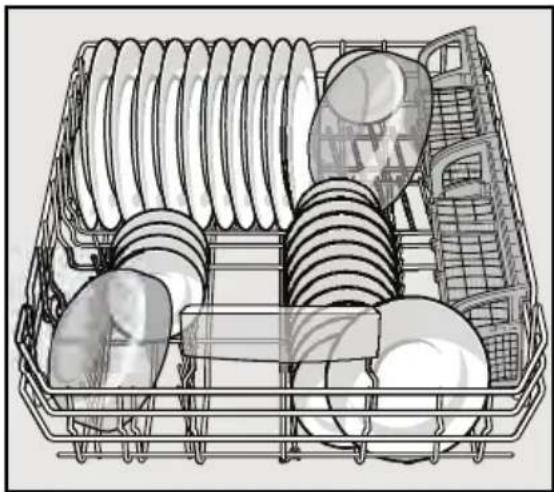
natural_image
Line drawing of a multi-tiered kitchen appliance basket with plates and fixtures (no text or symbols)3rd Rack
natural_image
Cross-sectional diagram of a mechanical or electrical component with layered internal structures (no text or symbols)natural_image
Illustration of a multi-tiered kitchen appliance rack with multiple circular components (no text or symbols)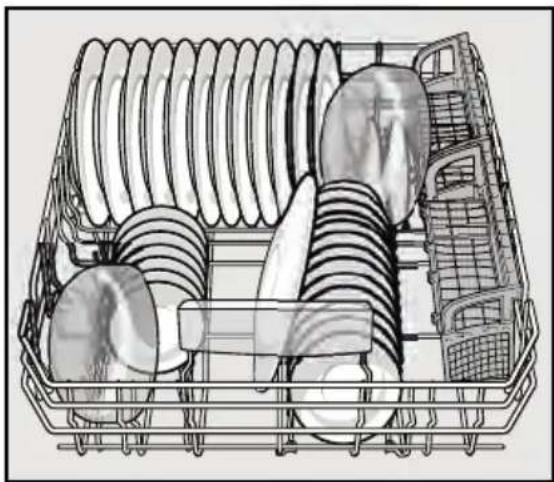
natural_image
Illustration of a multi-tiered kitchen appliance with plates and racks (no text or symbols)3rd Rack
natural_image
Cross-sectional diagram of a mechanical or electrical component with layered internal structure (no text or symbols)natural_image
Technical line drawing of a dual-arch industrial structure with structural framework (no text or symbols)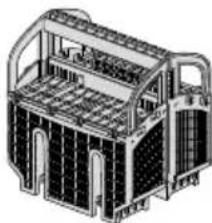
natural_image
Technical line drawing of a multi-level industrial or warehouse structure with structural panels and doorways (no text or symbols)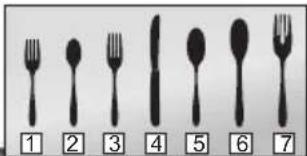
1- salad fork
2- teaspoon
3- dinner fork
4- knife
5 - tablespoon
6 - serving spoon
7 - serving fork
Figure 2
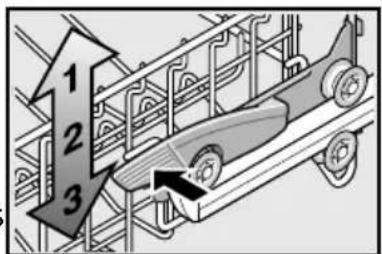
Figure 3
natural_image
Cross-sectional diagram of an open refrigerator showing internal compartments and dish arrangement (no text or labels)Figure 4
natural_image
Illustration of a container with liquid being lifted by a hook, placed on a grid-like surface (no text or symbols)Figure 4
Tablettes tasse
AVIS
Figure 8
Agent de rinçage
natural_image
Illustration of a water droplet being poured into a device with a container (no text or symbols)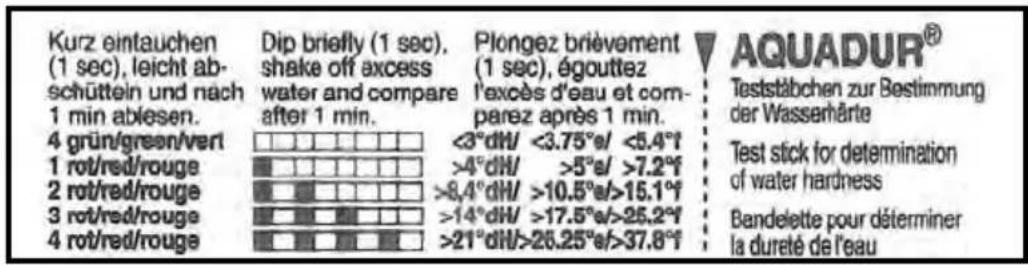
natural_image
Illustration of a cooking step with a bowl of granular material being added to a pot, and a lid on a stove (no text or symbols visible)Glass: A cycle for lightly soiled dishes, ideal for temperature sensitive items or cutlery. In this cycle the temperature is reduced to help prevent dishes from becoming damaged. It is especially helpful to reduce a cloudy or etched appearance on glasses.
* “x” can be any number or letter
Buttons are sensitive and should be touched gently. Avoid any grease or food particals resting on the buttons as they could activate the dishwasher. Wiping and cleaning can also activate the dishwasher. For best results, use bare, clean hands when touching the buttons.
NOTICE: Use caution when opening door during a running cycle. Hot water may splash out. Open door slowly.
Our Star-Sapphire ^® dishwashers offer a convenient time remaining indicator light that projects cycle status and time remaining on the kitchen floor.
Note: If the appliance is installed at eye-level, the time remaining information is not visible.
In the default setting (S:01) the time remaining shows on the floor alternating with the Bosch logo (about 5 seconds per image).
flowchart
graph LR
    A["Time remaining image"] --> B["Bosch logo"]
    B --> C["2:55"]
    C --> D["Timeline Display"]
To change setting:
1 Press the [On/Off] button.
2 Hold down the "A" button and press [Start] until the display indicates "d:00".
3 Release both buttons. Press the "A" button until the display shows "S:01".
4 Press the "C" button until to switch between "S:00" = OFF, "S:01" and "S:02" = Time Light ON
5 Press [Start] to save the setting.
natural_image
Diagram of a mechanical component with a rotating arrow indicating rotation (no text or symbols)Figure 13
natural_image
Mechanical assembly diagram showing a bolted joint with a central hub and a downward arrow indicating motion (no text or symbols)Figure 14
Pompe d'eau usée
natural_image
Mechanical assembly diagram showing a hand operating a tool within a circular component (no text or symbols visible)Figure 16
BSH reserves the right to change specifications or design without notice. Some models are certified for use in Canada. BSH is not responsible for products which are transported from the United States for use in Canada. Check with your local Canadian distributor or dealer.