6413CTB - TV SYLVANIA - Free user manual and instructions
Find the device manual for free 6413CTB SYLVANIA in PDF.


| Product type | Color television |
| Brand | Sylvania |
| Model | 6413CTB (13 inches) |
| Screen size | 13 inches (diagonal) |
| TV system | Standard NTSC-M |
| Tuning | 181 channels (VHF/UHF/CATV) with phase-locked loop synthesizer |
| Channel access | Direct access keypad (keys 0-9, +100), programmable up/down scanning |
| Remote control | Infrared, all functions including mute, return, display, sleep timer, game |
| Sleep timer | Yes, adjustable from 10 to 90 minutes |
| Closed caption decoder | Yes, compliant with FCC §15.119, modes S1/S2 and T1/T2 |
| Parental control (V-Chip) | Yes, with MPAA and TV ratings |
| Auto power off | Yes, after 15 minutes without antenna signal |
| Game function | Yes, simultaneously activates game mode and external input |
| On-screen display | Yes, menus and settings in English or French |
| Power supply | 120 V, 60 Hz AC |
| Maximum power consumption | 53 watts |
| Audio output power | 1 watt, 8 ohms |
| Antenna input | 75 ohms unbalanced, F-type |
| Video input | 1 x RCA |
| Audio input | 1 x RCA |
| Headphone jack | 3.5 mm mono |
| Dimensions (H x W x D) | 323 mm x 358 mm x 355 mm |
| Weight | 8.5 kg (19 lb) |
| Included accessories | Remote control (N0108UD or N0132UD), 2 AA batteries, wire antenna, owner's manual |
| Display language | English, French (selectable via menu) |
Frequently Asked Questions - 6413CTB SYLVANIA
User questions about 6413CTB SYLVANIA
0 question about this device. Answer the ones you know or ask your own.
Ask a new question about this device
Download the instructions for your TV in PDF format for free! Find your manual 6413CTB - SYLVANIA and take your electronic device back in hand. On this page are published all the documents necessary for the use of your device. 6413CTB by SYLVANIA.
USER MANUAL 6413CTB SYLVANIA
We appreciate your purchase of a SYLVANIA Home Entertainment product. We take pride in the quality of our products and have manufactured your new Home Entertainment unit to exacting quality standards. We feel confident that in normal use, it will provide you with satisfactory performance. However, should you experience difficulty, you are protected under the provisions of this warranty.
SYLVANIA Home Entertainment products are warranted against manufacturing defects in materials and workmanship in normal use for the following periods from the date of purchase by the original user, and is conditional upon the unit being installed and used as directed in the instruction manual.
Product
Colour Tel
Remote Control
B/W Televisions
Part
1 Year
s 90 Day
s 1 Year
Picture Tube
3 Years
1 Year
SYLVANIA's obligation under this warranty shall be limited to the repair, including all necessary parts and the cost of the labour connected therewith, or at our option the exchange of any Home Entertainment product which shows evidence of a manufacturing defect within the warranty period. Replacement parts, furnished in connection with this warranty shall be warranted for a period equal to the unexpired portion of the original equipment warranty.
CUSTOMER OBLIGATIONS
This warranty applies to the product from the original date of purchase at retail. Therefore, the owner must provide a copy of the original, dated bill of sale. No warranty service will be performed without a bill of sale. Transportation to and from the service depot is the responsibility of the owner.
WARRANTY EXCLUSIONS
This warranty is extended to SYLVANIA Home Entertainment products purchased and used in Canada. This warranty shall not apply to appearance or accessory items including but not limited to antenna, cabinet, cabinet parts, knobs, batteries, connecting cables. This warranty shall, in addition, not apply to damages due to handling, transportation, unpacking, set-up, installation, customer adjustments that are covered in the instruction book, repair or replacement of parts supplied by other than the SYLVANIA authorized service depot, any malfunction or failure caused by or resulting from abnormal environmental conditions, improper unauthorized service, improper maintenance, modifications or repair by the consumer, abuse, misuse, neglect, accident, fire, flood, or other Acts of God, and incorrect line voltage. This Home Entertainment product is only warranted to the original retail purchaser. This warranty becomes void in the event of commercial or rental use. This warranty becomes void in the event serial numbers are altered, defaced or removed. SYLVANIA reserves the right to make changes in design or to make additions to or improvements upon this product without incurring any obligation to install the same on products previously manufactured. The foregoing is in lieu of all other warranties expressed or implied and SYLVANIA neither assumes nor authorizes any person to assume for it any other obligation or liability in connection with the sale or service of this product. In no event shall SYLVANIA or its SYLVANIA dealers be liable for special or consequential damage arising from the use of this product, or for any delay in the performance of this warranty due to cause beyond our control. The purchaser may have other rights under existing provincial or federal laws, and where any terms of this warranty are prohibited by such laws, they are deemed null and void, but the remainder of the warranty shall remain in effect.
HOW TO OBTAIN SERVICE
Should this product require service, you may obtain specific information on how to obtain service by contacting the SYLVANIA Dealer from whom this product was purchased, or by contacting us directly:
SONIGLM SERVICE
300 Alden Road
Markham, Ontario
L3R4C1
PHONE: (905) 940-5089 FAX: (905) 940-2303
1-800-287-4871
Owner's Manual
SYLVANIA
COLOR TELEVISION
6413CTB (13 inch)
6419CTB (19 inch)
FEATURES
Tinted, Bright Black Matrix Picture Tube
-
181 Channel Selection- All VHF/UHF channels plus up to 125 cable channels.
-
PLL Frequency Synthesized Tuning- The latest PLL frequency synthesized electronic tuning system provides free and easy channel selection, and lets you tune directly to any channel using the channel number buttons (0~9 and +100-key) on the remote control.
-On-Screen Function Display.
Full-Function Remote Control
Sleep Timer
- Closed Caption Decoder- You may view specially labeled (cc) TV programs, movies, news, prerecorded tapes, etc. with either a dialogue caption or text display added to the program.
- Auto Shut Off Function- If there is no air signal input from the antenna terminal and no operation for 15 minutes, the TV will turn itself off automatically.
V-CHIP- Enables parents to prevent their children from watching inappropriate material on TV.
PRECAUTION
- Place your TV in a room with adequate ventilation.
- Keep your TV set away from sources of direct heat, such as heat registers or direct sunlight.
Do not place your TV on soft surfaces, such as rugs or blankets. - Leave enough room for air to circulate around the bottom, top and back of the set.
NOTE: CHANNEL SET UP MUST BE COMPLETED BEFORE THE SET WILL FUNCTION PROPERLY. SEE INSIDE FOR PROCEDURE.
The serial number of this product may be found on the back of the TV. No others have the same serial number as yours. You should record the number and other vital information here and retain this book as a permanent record of your purchase to aid identification in case of theft.
| Date of Purchase | Dealer Phone No. | ||
| Dealer Purchase from | Model No. | ||
| Dealer Address | Serial No. |
This Owner's Manual is made of recycled paper.
IF YOU NEED ADDITIONAL ASSISTANCE FOR SET-UP OR OPERATING AFTER READING OWNER'S MANUAL, PLEASE CALL TOLL FREE 1-800-287-4871.
0EMN01839 Printed in China
L1354CE****
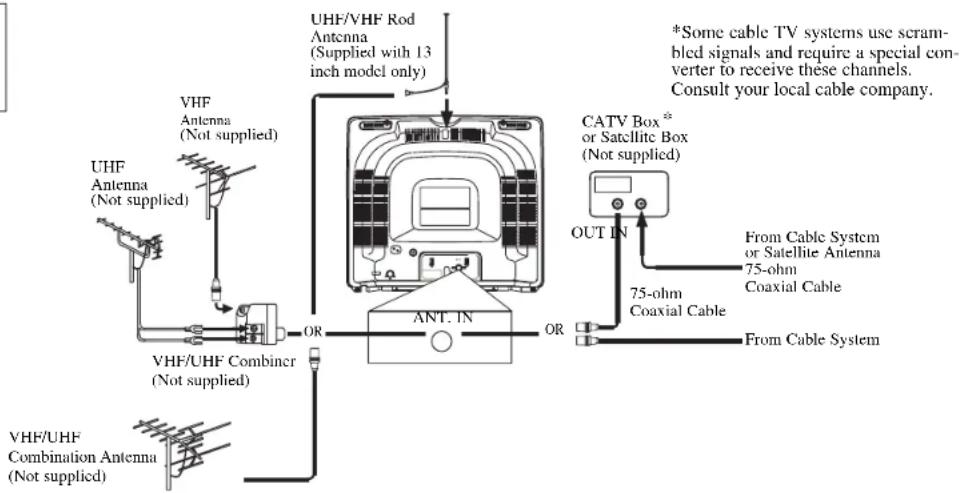
ANTENNA/CABLE CONNECTIONS
CAUTION: TO PREVENT ELECTRIC SHOCK, MATCH WIDE BLADE OF PLUG TO WIDE SLOT, FULLY INSERT.
Before plugging the UIIF/VIF Rod
Antenna into the ANT(enna). IN jack, check that the pin is not bent. If it is bent, straighten the pin as illustrated, then plug the pin into the ANT(enna). IN jack.
(Rod Antenna is included in 13 inch model only)
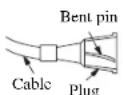
(Needs to be straightened)
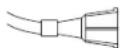
(Straight pin)
CLOSED CAPTION
This TV can receive C1 and C2 of Caption and Text.
Caption Mode
(1) Characters can be displayed on the TV screen when the received broadcast signal contains the Caption Signals.
(2) Paint-on mode: Displays input characters on the screen immediately.
Pop-on mode: Once characters are stored in memory, it is displayed all at once.
Roll-up mode: Displays the characters continuously by scrolling (max. 4 lines)
Note: If the CAPTION C1 or C2 is selected but the caption signal is not included, characters will not be displayed.
Text Mode
(1)Displays the text on the screen by scrolling (max. 7 lines)
(2) If the received broadcast signal does not contain the caption or text signal, no change will occur.
Notes:
(1) When your TV receives a special effects playback signal (i.e., Search, Slow, Still) from a VCR's video output channel (CH3 or CH4), your TV may not display the correct caption or text.
(2)Captions and texts may not match the TV voice exactly.
(3)Interference may cause the closed caption system not to function properly.
(4)The caption or text characters will not be displayed while the menu display or function's display is shown.
(5)If you see this screen!!

If your TV displays a black box on the screen, this means that your TV is set to TEXT mode. To clear screen, select CAPTION C1, C2 or CAPTION [OFF].
WARNING:
TO REDUCE THE RISK OF FIRE OR ELECTRIC SHOCK,DO NOT EXPOSE THIS APPLI
ANCE TO RAIN OR MOISTURE

CAUTION
RISK OF ELECTRIC SHOCK DO NOT OPEN

CAUTION: TO REDUCE THE RISK OF ELECTRIC SHOCK,DO NOT REMOVE COVER (OR BACK)NO USER SERVICEABLE PARTS INSIDE.REFER SERVICING TO QUALIFIED SERVICE PERSONNEL
The important note is located on the rear of the cabinet.

THIS SYMBOL INDICATES THAT DANGEROUS VOLTAGE CONSTI-TUTING A RISK OF ELECTRIC SHOCK IS PRESENT WITHIN THIS UNIT.

THIS SYMBOL INDICATES THAT THERE ARE IMPORTANT OPERATING AND MAINTENANCE INSTRUCTIONS IN THE LITERATURE ACCOMPANYING THE APPLIANCE.
IMPORTANT SAFEGUARDS
- Read instructions-All the safety and operating instructions should be read before the appliance is operated.
- Retain Instructions-The safety and operating instructions should be retained for future reference.
- Heed Warnings: All warnings on the appliance and in the operating instructions should be adhered to.
- Follow Instructions-All operating and use instructions should be followed.
- Cleaning-Unplug TV from the wall outlet before cleaning. Do not use liquid cleaners or aerosol cleaners. Use a damp cloth for cleaning.
EXCEPTION: A product that is meant for uninterrupted service and, that for some specific reason, such as the possibility of the loss of an authorization code for a CATV converter, is not intended to be unplugged by the user for cleaning or any other purpose, may exclude the reference to unplugging the appliance in the cleaning description otherwise required in item 5.
- Attachments-Do not use attachments not recommended by the TV manufacturer as they may cause hazards.
- Water and Moisture-Do not use this TV near water, for example, near a bath tub, wash howl, kitchen sink, or laundry tub, in a wet basement, or near a swimming pool, and the like.
- Accessories-Do not place this TV on an unstable cart, stand, tripod, bracket, or table. The TV may fall, causing serious injury to someone, and serious damage to the appliance. Use only with a cart, stand, tripod, bracket, or table recommended by
the manufacturer, or sold with the TV. Any mounting of the appliance should follow the manufacturer's instructions and should use a mounting accessory recommended
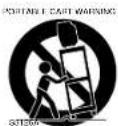
by the manufacturer. An appliance and cart combination should be moved with care. Quick stops, excessive force, and uneven surfaces may cause the appliance and cart combination to overturn.
9. Ventilation-Slots and openings in the cabinet and the back or bottom are provided for ventilation and to ensure reliable operation of the TV and to protect it from overheating, these openings must not be blocked or covered. The openings should never be blocked by placing the TV on a bed, sofa, rug, or other similar surface. This TV should never be placed near or over a radiator or heat register. This TV should not be placed in a built-in installation such as a bookcase or rack unless proper ventilation is provided or the manufacturer's instructions have been adhered to.
10. Power Sources-This TV should be operated only from the type of power source indicated on the marking label. If you are not sure of the type of power supply to your home, consult your appliance dealer or local power company. For TVs intended to operate from battery power, or other sources, refer to the operating instructions.
11. Grounding or Polarization This TV is equipped with a polarized alternating-current line plug (a plug having one blade wider than the other). This plug will fit into the power outlet only one way. This is a safety feature. If you are unable to insert the plug fully into the outlet, try reversing the plug. If the plug should still fail to fit, contact your electrician to replace your obsolete outlet.
Do not defeat the safety purpose of the polarized plug. 12. Power-Cord Protection-Power-supply cords should be routed so that they are not likely to be walked on or pinched by items placed upon or against them, paying particular attention to cords at plugs, convenience receptacles, and the point where they exit from the appliance.
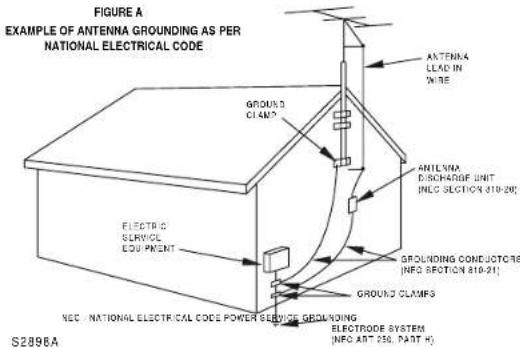
- Outdoor Antenna grounding-If an outside antenna or cable system is connected to the TV, be sure the antenna or cable system is grounded so as to provide some protection against voltage surges and built-up static charges. Article 810 of the National Electrical Code, ANSI/NFPA No. 70, provides information with respect to proper grounding of the mast and supporting structure, grounding of the lead-in wire to an antenna discharge unit, size of grounding conductors, location of antenna-discharge unit, connection to grounding electrodes, and requirements for the grounding electrode. (Fig. A)
- Lightning-For added protection for this TV receiver during a lightning storm, or when it is left unattended and unused for long periods of time, unplug it from the wall outlet and disconnect the antenna or cable system. This will prevent damage to the TV due to lightning and power-line surges.
- Power Lines-An outside antenna system should not be located in the vicinity of overhead power lines or other electric light of power circuits, or where it can fall into such power lines or circuits. When installing an outside antenna system, extreme care should be taken to keep from touching such power lines or circuits as contact with them might be fatal.
- Overloading-Do not overload wall outlets and extension cords as this can result in a risk of fire or electric shock.
-
Object and Liquid Entry- Never push objects of any kind into this TV through openings as they may touch dangerous voltage points or short out parts that could result in a fire or electric shock. Never spill liquid of any kind on the TV.
-
Servicing-Do not attempt to service this TV yourself as opening or removing covers may expose you to dangerous voltage or other hazards. Refer all servicing to qualified service personnel.
- Damage Requiring Service Unplug this TV from the wall outlet and refer servicing to qualified service personnel under the following conditions:
a. When the power supply cord or plug is damaged or frayed.
b. If liquid has been spilled, or objects have fallen into the TV.
c. If the TV has been exposed to rain or water.
d. If the TV does not operate normally by following the operating instructions. Adjust only those controls that are covered by the operating instructions, as improper adjustment of other controls may result in damage and will often require extensive work by a qualified technician to restore the TV to its normal operation.
e. If the TV has been dropped or damaged in any way. f. When the TV exhibits a distinct change in perfor
mancc-thiindicates a need for service.
20. Replacement Parts-When replacement parts are required, be sure the service technician uses replacement parts specified by the manufacturer that have the same characteristics as the original part. Unauthorized substitutions may result in fire, electric shock, injury to persons or other hazards.
21. Safely Check-Upon completion of any service or repairs to this TV, ask the service technician to perform routine safety checks to determine that the TV is in proper operating condition.
22. Heat-This TV product should be situated away from heat sources such as radiators, heat registers, slaves, or other products (including amplifiers) that produce heat.
This manual covers 13" and 19". The operation of the two models are exactly the same except the appearance. 19" model is illustrated in this manual.
OPERATING CONTROLS AND FUNCTIONS
-FRONT PANEL--REAR PANEL-
-REMOTE CONTROL -
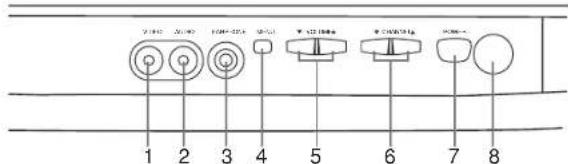
1.VIDEO (in) jack-Connect to the video output jack of a video camera or VCR.
2. AUDIO (in) jack- Connect to the audio output jack of a video camera or VCR.
3. EARPHONE jack- To connect earphone (not supplied) for personal listening.
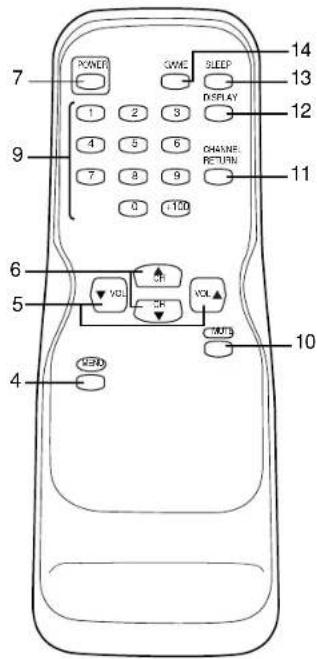
4. MENU button- Press to display the menu on the TV screen.
5. VOLUME / buttons- Press to control the volume level. Press to determine a setting mode from the menu on the TV screen. (only the VOL button)
Press to select or adjust from a particular menu. (for example: Language Selection, Channel Presetting, Closed Caption Selection, Picture Adjustment, V-CHIP Set Up)
6.CHANNEL / 一 buttons- Press to select memorized channel. NOTE:CHANNEL SET UP MUST BE COMPLETED BEFORE THE SET WILL FUNCTION PROPERLY.SEE INSIDE FOR PROCEDURE.
Press to select a setting mode from the menu on the TV screen. Press to select item you want to adjust in the picture control mode.
7. POWER button- Press to turn the TV ON and OFF.
8. Infrared Sensor Window- Receives the infrared control signals from the remote control unit.
9.CHANNEL NUMBER button- Press two digits to directly access the desired channel. Remember to press a "0" before a single digit channel.
+100 button- Press to select cable channels which are equal or greater than number 100.
10.MUTE button- Press the MUTE button to turn off the sound portion of the TV program. (Volume level display turns LIGHT RED from LIGHT BLUE.) Press the MUTE button again or press the VOL(umc) or▼ button to restore sound.
11.CHANNEL_RETURN button- Press this button to go back to the previously viewed channel. For example, pressing the CHANNEL RETURN button once will change channel display from CH 3 (present channel) to CH 10 (previously viewed channel), and pressing it a second time will return from CH 10 to CH 3.
12.DISPLAY button- Press to display the channel number on the screen. If you press it again, the channel number will disappear.
13.SLEEP button- Press the SLEEP button to display the sleep timer and start the function. The shut off time can be determined by the number of times you press the button. (0, 10, 20, 30...90, 0 minutes)
14.GAME button- Press to set the Game mode and external input mode at the same time. Press the GAME button again to exit this mode.
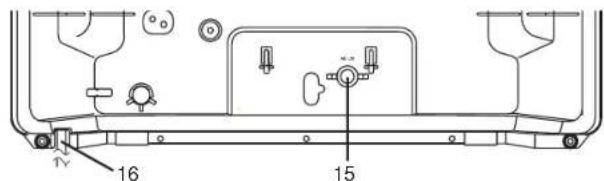
15.ANT(enna). IN jack- Connect to an antenna, cable system, or satellite system.
16.AC cord- Connect to a standard AC outlet (120V/60Hz).
NOTE: Remove the AC cord from the hook to avoid breaking a wire before you connect to a standard AC outlet.
INSTALLING THE BATTERIES
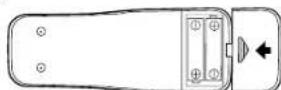
Slide the battery compartment cover on the remote unit.
2
Insert 2 "AA" penlight batteries into battery compartment in the direction as indicated by the polarity (+ / -) markings. Batteries installed with incorrect polarity may damage the remote unit.
3
Replace the cover.
LANGUAGE SELECTION
If you want to change the language of the on-screen menu, follow the procedure below.
T
Connect the power cord to a standard AC outlet.
Note: If some digits appear in the corner of the screen, press the POWER button without unplugging the power
2
Press the POWER button to turn on the TV.
3
Press the MENU button so that the menu display appears on the TV screen.
4
Press the CH(ancl) or button to point to [ENGLISH].
5
Select "ENGLISH" or "FRANÇAIS" = French by using the VOL(ume) ▲or ▼button.
6
Press the MENU button to exit the menu.
CHANNEL PRESETTING
NOTE: CHANNEL SET UP MUST BE COMPLETED BEFORE THE SET WILL FUNCTION PROPERLY.
To preset a channel or to change a preset channel, follow the procedure below.
T
Press the POWER button to turn on the TV.
2
Press the MENU button so that the menu display appears on the TV screen.
3
Press the CH(annel) or button to point to "CHANNEL SET".
Then, press the VOL(ume) button.
PICTURE CHANNEL SET [ENGLISH/FRANCAIS V-CHIP SET UP CAPTION (OFF)
PICTURE
CHANNEL SET
ENGLISH FRANCAIS
V-CHIP SETUP
CAPTION [OFF]
PICTURE CHANNEL SET [ENGLISH]FRAN V-CHIP SET UP CAPTION (OFF)
PICTURE CHANNEL SET [ENGLISH]FRANCAIS V-CHIP SET UP CAPTION[OFF]
OPERATIONS

Press the CH(annel) or button to point to "AUTO MEMO".
Then, press the VOL(ume) button.
The tuner scans and memorizes all active channels in
your area.
The TV distinguishes between standard TV channels and cable channels.
When AUTO MEMO action is completed, the lowest
memorized channel reappears on the screen.
When you press the CH(annel) or button after selecting AUTO MEMO, the tuner will stop at the memorized channels only.
The TV may recognize TV channels to be CATV channels by the receiving conditions. In this case, try AUTO MEMO action again in the fine receiving conditions.
[ADD/DELETE FUNCTION]
1)Press the MENU button so that the menu display appears on the TV screen.
2) Press the CH(annel) or button to point to "CHANNEL SET". Then, press the VOL(ume) button.
3)Press the VOL(ume) button so that "ADD/DELETE" is selected.
4) Use the CH(annel) or button to select the
channel you wish to put into memory or to erase from memory. Note: The display will return to the screen in about 10 seconds. Perform "ADD/DELETE" function while this display appears on the
Press the VOL(ume) or button to light up the channel number in LIGHT BLUE if you wish to add the channel into memory.
- Press the VOL(ume) or button to light up the channel number in LIGHT RED if you wish to erase the channel from memory.
5)Press the MENU button to exit the menu.
![SYLVANIA 6413CTB - [ADD/DELETE FUNCTION] - 1](/content/2026/02/394489/images/c0a94dd2b8abcd640dfc3af10fd50c6e17e570641b1ca4f695f9dee359e82d25.jpg)
PICTURE CHANNEL SET [ENGLISH]FRANÇAIS V-CHIP SET UP CAPTION[OFF]
ADDB:DELETE AUTO MOTO
RESUME FUNCTION
If the power fails or is disconnected while the TV is powered on, the TV will turn on automatically when the power resumes.
WATCHING A TV PROGRAM
1)Press the POWER button to turn on the TV.
2) Select the desired channel with the CH(annel) or button.
3) Adjust the volume to the desired listening level using the VOL(ume) or button.
4)Adjust picture controls for a natural looking image. (See "PICTURE ADJUSTMENT".)
SETTING THE SLEEP TIMER
The sleep timer function enables you to shut off the power without pressing the POWER button after a desired time period.
1)Press the POWER button to turn on the TV and press the SLEEP button on the remote control.
2) You may change the sleep time with pressing the SLEEP
button on the remote control repeatedly. The timer is set up to 90 minutes, 10 minutes each time the SLEEP button is pushed. (The timer display counts up and sleep timer will be displayed on the screen when you press the SLEEP button on remote control.)
Note: When you disconnect the unit from the AC outlet, or if you have a power failure, the sleep time will be lost.
SLEEP 10
To cancel the sleep timer: Press the SLEEP button repeatedly until "SLEEP 0" is displayed.
CLOSED CAPTION SELECTION
You may view specially labeled (cc) TV programs, movies, news, prerecorded tapes, etc. with either a dialogue caption or text display added to the program.
1)Press the MENU button so that the menu display appears on the TV screen.
2) Press the CH(annel) or button to point to "CAPTION".
3) Press the VOL(ume) or button to select the mode you wish.
4) When done, press the MENU button to exit the menu.


PICTURE ADJUSTMENT
1)Press the MENU button so that the menu display appears on the TV screen.
2)Press the VOL(ume) button so that "PICTURE" is selected.
3) Select the feature you wish to adjust with the CH(annel) or button and adjust it with the
VOL(ume) ▲or▼button.
GAME MODE
Set to the most suitable position for TV
GAME.
[+]: ON
BRIGHT
Adjust until the whitest parts of the picture are as bright as you prefer.
[+] : increase brightness
[ ] : decrease brightness
CONTRAST
Adjust to increase or decrease contrast.
[+] : increase contrast
-:decrease contrast
COLOR
Adjust to be brilliant or pale color.
[+] : be brilliant color
- : be pale color
TINT
Adjust to obtain natural skin tones.
[+] : greenish tone
-: reddish tone
Notes:
In the above steps, the picture adjustment display will disappear from the TV screen after about 10 seconds unless you press any buttons, even though you may not be finished. Press the MENU and VOL(ume) button so that "PICTURE" is selected. Then, press the CH(annel) or button repeatedly until the display returns to the screen.
- If you adjust the other Picture control after you set the Game mode to [ON], the Game mode is set to [OFF] automatically.
[USING THE GAME BUTTON]
You may also set the Game mode and external input mode at the same time by pressing the GAME button on the remote control. "GAME" appears on the TV screen.
To exit the Game mode and external input mode, press the GAMH button on the remote control again.
To cancel the Game mode only, adjust the picture control. In this case, "VIDEO" instead of "GAME" appears on the TV screen.
- When you press the GAME button if the TV is off, the TV turns on and will be in the Game mode and external input mode automatically.
![SYLVANIA 6413CTB - [USING THE GAME BUTTON] - 1](/content/2026/02/394489/images/9f74bbf6fd2abe663aff863a957396a780368f5f6ed89170a23738834728d3a3.jpg)
V-CHIP SET UP
V-CHIP enables parents to prevent their children from watching inappropriate material on TV. V-CHIP reads the ratings for programming (except for news and sports programs, unedited movies on premium cable channels, and Emergency Broadcast System signals), then denies access to programming if the program's rating meets the limitations you select. In this case, "PROTECTED PROGRAM by ..." message appears on the TV screen.
To block ratings, follow the steps below.
- Programming may be rated by the Motion Picture Association of America (MPAA) or according to the Television Parental Guidelines. In order to block any inappropriate programming, set your limits in both places (MPAA RATING and TV RATING).
- You cannot access the menu when the "PROTECTED PROGRAM by ..." message appears. In this case, change to the unblocked channel, then press the MENU button.
[MPAA RATING SET UP]
1
Press the MENU button so that the menu display appears on the TV screen.
2
Press the CH(annel) or button to point to "V-CHIP SET UP". Then, press the VOL(ume) button.
3
Press the CH(annel) or button to point to "MPAA RATING". Then, press the VOL(ume) button.
4
Press the CH(annel) or button to point to your desired item. Then, press the VOL(ume) button to select [BLOCK] or [VIEW].
| Selection> | Rating Category Explanations> |
| G: | General Audience |
| PG: | Parental Guidance suggested. |
| PG-13: | Unsuitable for children under 13 |
| R: | Restricted; under 17 requires accompanying parent or adult guardian |
| NC-17: | No one under 17 admitted |
| X: | Mature audience only |
- When you select the rating category and turn it [BLOCK], the higher rating will turn [BLOCK] automatically. Also, the lower rating will turn [VIEW] automatically.
-
When you turn "G" to [BLOCK] or [VIEW], the all ratings will turn to [BLOCK] or [VIEW] automatically.
-
When you turn "X" to [VIEW], the all ratings will turn to [VIEW] automatically.
5
Press the MENU button to exit the menu.
TROUBLESHOOTING GUIDE
Sometimes a performance problem can be easily solved by checking seemingly apparent but often overlooked possibilities. Before arranging for service, check these items. It could save your time and money.
| POSSIBLE REMEDY | |||||||||||
| Try a new channel, if OK, then possible station trouble. | Remote Control Doesn't Work | Bars On Screen | Picture Displayed | Picture Rolls Vertically | No Color | Poor Reception on Some Channels | Weak Picture | Lines of Steads in Picture | Ghosts in picture | Picture Blurred | Sound OK, Picture Poor |
| Is TV plugged in? | × | × | |||||||||
| Power at outlet? | |||||||||||
| Is TV's POWER button on? | × | ||||||||||
| Is antenna connected to terminal on the back of the set? | × × × | × | × | × | |||||||
| If outside antenna is being used, check for broken wire. | × × | × × × | × × | × × | × × | × × | × × | × × | × × | ||
| Check for local interference. | × | × | × | × | × × | × × | × × | × × | × × | ||
| Turn off with POWER button and then turn it on after about a minute. | × × | ||||||||||
| Adjust COLOR control. | × | ||||||||||
| Adjust CONTRAST & BRIGHT control. | × | × | |||||||||
| Check batteries in Remote Control. | × | ||||||||||
| Closed Caption Problem | Possible Remedy |
| My TV is showing captions that are misspelled. | You are watching a live broadcast and spelling errors made by the closed captioning production company may pass through uncorrected. A prerecorded program will not show any misspelled words because of the normal time available for editing the captions. |
| My TV will not show the text in its entirety or there is a delay of what is being said. | Captions that are delayed a few seconds behind the actual dialogue are common for live broadcasts. Most captioning production companies can display a dialogue to a maximum of 220 words per minute. If a dialogue exceeds that rate, selective editing is used to insure that the captions remain up-to-date with the current TV screen dialogue. |
| My captions are scrambled with white boxes on the TV screen. | Interference caused by building, power lines, thunderstorms, etc. may cause scrambled or incomplete captions to appear. |
| My program guide listed a TV show as being closed captioned but none of the captions were displayed. | Broadcasters may at times use a time compression process to the actual program so that additional advertising time can be given. Since the decoder cannot read the compressed information, captions will be lost. |
| My prerecorded videotape does not show any captions. The tape box mentions it being closed captioned. | The videotape was either an illegal copying or the tape duplicating company accidentally left out the captioning signals during the copying process. |
| My TV screen shows a black box on certain channels. | You are in the TEXT mode. Select CAPTION mode or CAPTION [OFF]. |
[TV RATING SET UP]
Press the MENU button so that the menu display appears on the TV screen.
2
Press the CH(annel) or button to point to "V-CHIP SET UP".
Then, press the VOL(ume) button.
3
Pres the CH(annel) or button to point to "TV RATING".
Then, press the VOL(ume) button.
4
Press the CH(annel) or button to point to your desired item.
Then, press the VOL(ume) button to select [BLOCK] or [VIEW].
| Selection> | Rating Category Explanations> |
| TV-Y: | Appropriate for all children |
| TV-Y7: | Appropriate for children seven and older |
| TV-G: | General Audience |
| TV-PG: | Parental Guidance suggested. |
| TV-14: | Unsuitable for children under 14 |
| TV-MA: | Mature audience only |
- When you select the rating category and turn it [BLOCK], the higher rating will turn [BLOCK] automatically. Also, the lower rating will turn [VIEW] automatically.
- When you turn "TV-Y" to [BLOCK] or [VIEW], the all ratings will turn to [BLOCK] or [VIEW] automatically.
- When you turn "TV-MA" to [VIEW], the all ratings will turn to [VIEW] automatically.
When you select TV-Y7, TV-PG, TV-14, or TV-MA and you press the VOL(ume) button, the sub-ratings will appear on the TV screen.
If you select the rating category (example: TV-PG) and turn it [BLOCK] or [VIEW], the sub-ratings (example: V for Violence) will turn [BLOCK] or [VIEW] automatically.
You can set the sub-ratings to [BLOCK] or [VIEW] individually when the rating category is set to [BLOCK]. To set the sub-ratings individually, follow the steps below.
- When you select [TV-Y7]:
Press the CII(anal) or button to select "FV" (Fantasy Violence). Then, press the VOL(ume) button to select [BLOCK] or [VIEW].
When you select [TV-PG], [TV-14] or [TV-MA]:
Press the CH(annel) or button to select "D"(Suggestive Dialog), "L"(Coarse Language), "S"(Sexual Situation), or "V"(Violence). Then, press the VOL(ume) button to select [BLOCK] or [VIEW].
Note: When you select [TV-MA], "D" does not appear on the TV screen.
- The sub-ratings which set to [BLOCK] appears next to the rating category in the TV RATING menu.
5
Press the MENU button to exit the menu.
| TV-Y7 | [BLOCK] |
| FV | [BLOCK] |
| TV-PG | [BLOCK] |
| D | [BLOCK] |
| L | [BLOCK] |
| S | [BLOCK] |
| V | [BLOCK] |
| TV-Y | [VIEW] |
| TV-Y7 ( | [VIEW] |
| TV-G | [BLOCK] |
| TV-PG (DLSV)[BLOCK] | |
| TV-14 (DLSV)[BLOCK] | |
| TV-MA (LSV)[BLOCK] | |
MAINTENANCE
CABINET CLEANING
- Wipe the front panel and other exterior surfaces of the TV with a soft cloth immersed in lukewarm water and wrung dry.
- Never use a solvent or alcohol. Do not spray insecticide liquid near the TV. Such chemicals may cause damage and discoloration to the exposed surfaces.
PICTURE TUBE CLEANING
Wipe the picture tube of the TV with a soft cloth. Before cleaning the picture tube, disconnect the power cord.
SPECIFICATIONS
GENERAL SPECIFICATIONS
Television system: NTSC-M TV Star
Closed Caption
System: §15.119
Channel coverage
VHF:2-13
UHF:14\~69
CATV:2-13,A-W,
W+1-W+84
A-5-A-1.5A
Tuning System 181 channel
frequency synthesized
tuning system
Channel access: Direct access keyboard,
programmable
scan and up/down
Terminals
Antenna input: VHF/UHF/CATV
75 ohm unbalanced
(F-type)
Video input: RCA connector x 1
Audio input: RCA connector x 1
Earphone: 1/8" monaural (3.5mm)
ELECTRICAL SPECIFICATIONS
Sound output: 1W, 8 ohm
SUPPLIED ACCESSORIES
Remote control unit (N0108UD or N013
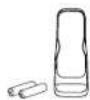
Batteries ("AA" x 2)
Rod Antenna (OEMN00673 or OEMN01599)
Owner's manual

OTHER SPECIFICATIONS
Remote control:
Digital encoded
infrared light system
Operating
0
5^ to 40^
(41°F~104°F)
Power requirements: AC120V, 60Hz
[13 inch model]
Power consumption
(Maximum): 53W
Picture tube: 13
Dimensions: H:12-3/4"(323mm)
W:14-1/8"(358mm)
D:13-15/16"(355mm)
Weight: 19 lbs. (8.5kg)
[19 inch model]
Power consumption
(Maximum): 72W
Picture tube:
Dimensions: II:16-3/4"(428mm)
W:18-3/4"(475mm)
D:18"(454mm)
Weight: 37.5 lbs. (17kg)
-
Designs and specifications are subject to change without notice and without our legal obligation.
-
If there is a discrepancy between languages, the default language will be English.
GARANTIE D'UN APPAREIL DE DIVERTISSEMENT SYLVANIA
OBLIGATIONS DU CLIENT
EXCLUSIONS DE LA GARANTIE
COMMENT OBTENIR LES SERVICES OU REPARATIONS
PICTURE CHANNEL SET ENGLISH/FRANCAIS V-CHIP SET UP CAPTION[OFF]
PICTURE CHANNEL SET [ENGLISH]FRANCAIS V-CHIP SET UP CAPTION[OFF]
PROGRAMMATION DES CANAUX EN MEMOIRE

- CUSTOMER OBLIGATIONS
- WARRANTY EXCLUSIONS
- HOW TO OBTAIN SERVICE
- Owner's Manual
- SYLVANIA
- FEATURES
- PRECAUTION
- NOTE: CHANNEL SET UP MUST BE COMPLETED BEFORE THE SET WILL FUNCTION PROPERLY. SEE INSIDE FOR PROCEDURE.
- ANTENNA/CABLE CONNECTIONS
- CAUTION: TO PREVENT ELECTRIC SHOCK, MATCH WIDE BLADE OF PLUG TO WIDE SLOT, FULLY INSERT.
- CLOSED CAPTION
- Caption Mode
- Text Mode
- WARNING:
- CAUTION
- RISK OF ELECTRIC SHOCK DO NOT OPEN
- IMPORTANT SAFEGUARDS
- OPERATING CONTROLS AND FUNCTIONS
- INSTALLING THE BATTERIES
- LANGUAGE SELECTION
- CHANNEL PRESETTING
- OPERATIONS
- [ADD/DELETE FUNCTION]
- RESUME FUNCTION
- WATCHING A TV PROGRAM
- SETTING THE SLEEP TIMER
- CLOSED CAPTION SELECTION
- PICTURE ADJUSTMENT
- BRIGHT
- CONTRAST
- COLOR
- TINT
- [USING THE GAME BUTTON]
- V-CHIP SET UP
- [MPAA RATING SET UP]
- TROUBLESHOOTING GUIDE
- [TV RATING SET UP]
- MAINTENANCE
- CABINET CLEANING
- PICTURE TUBE CLEANING
- SPECIFICATIONS
- GENERAL SPECIFICATIONS
- ELECTRICAL SPECIFICATIONS
- SUPPLIED ACCESSORIES
- OTHER SPECIFICATIONS
- GARANTIE D'UN APPAREIL DE DIVERTISSEMENT SYLVANIA
- OBLIGATIONS DU CLIENT
- EXCLUSIONS DE LA GARANTIE
- COMMENT OBTENIR LES SERVICES OU REPARATIONS
- PROGRAMMATION DES CANAUX EN MEMOIRE
Brand : SYLVANIA
Model : 6413CTB
Category : TV