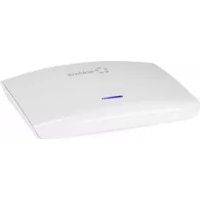
RenkCast TV - Media player Renkforce - Free user manual and instructions
Find the device manual for free RenkCast TV Renkforce in PDF.


| Product type | Media player (RenkCast TV) |
| Brand | Renkforce |
| Model | RenkCast TV |
| Power supply | 5 V/DC via USB power adapter (included) |
| Operating current | 1.5 A |
| Protection type | IP20 |
| Compatible operating systems | iOS 8, Android 4.2 or later; Windows 7/8.1, Mac OS 10.9 or later |
| Operating conditions | -20 °C to +50 °C, relative humidity 10% to 90% (non-condensing) |
| Storage conditions | -30 °C to +60 °C, relative humidity 10% to 90% (non-condensing) |
| Connectivity | HDMI, Ethernet 10/100 Mbps, Wi-Fi |
| Wireless protocols | Miracast, DLNA, AirPlay |
| Main functions | Media streaming (photos, videos, music), Office/PDF document viewing, web browsing, internet radio (1000+ stations), EZChannel (cloud TV channels) |
| LED display | Red: no connection; Purple-blue: Wi-Fi OK; Turquoise: Wi-Fi and Ethernet OK |
| Scope of delivery | RenkCast TV, power adapter (USB port), micro USB cable, HDMI cable, user manual |
| Maintenance and cleaning | Clean with a dry, soft cloth; do not use harsh detergents |
| Safety | Protection class II; do not expose to liquids; do not open; keep out of reach of children |
| Interface | HDMI Out, Ethernet, Micro USB (power) |
| Software installation | EZCast app to download (iOS, Android, Windows, Mac) |
Frequently Asked Questions - RenkCast TV Renkforce
User questions about RenkCast TV Renkforce
0 question about this device. Answer the ones you know or ask your own.
Ask a new question about this device
Download the instructions for your Media player in PDF format for free! Find your manual RenkCast TV - Renkforce and take your electronic device back in hand. On this page are published all the documents necessary for the use of your device. RenkCast TV by Renkforce.
USER MANUAL RenkCast TV Renkforce
- Introduction 19
- Explanation of symbols 20
- Intended use 21
- Scope of delivery 22
- Safety information 23
- Product overview 27
a) Connection configuration at the TV 27
b) Installation of the Associated EZ Cast App.....29
c) LED-display at the renkCast TV. 29
- Operating notes on use of the cast function.....30
- Advice on use of the EZ Cast App 31
- Maintenance and cleaning 33
- Disposal 33
- Technical data 34
1. Introduction
Dear Customer,
thank you for purchasing this product.
This product complies with the statutory national and European requirements.
To maintain this status and to ensure safe operation, you as the user must observe these operating instructions!

operating instructions are part of this product. They contain important notes on commissioning and handling. Also consider this if you pass on the product to any third party. Therefore, retain these operating instructions for reference!
All company names and product names are trademarks of their respective owners. All rights reserved.
HDMI® is a registered brand of HDMI Licensing L.L.C.
If there are any technical questions, please contact:
International: www.conrad.com/contact
United Kingdom: www.conrad-electronic.co.uk/contact
2. Explanation of symbols
The symbol with a lightning bolt in a triangle is
used where there is a health hazard, e.g. from electric shock.

This symbol indicates special danger during handling, use or operation.
The "arrow" symbol indicates special advice and operating information.
3. Intended use
This renkCast TV product is based on the popular EZ Cast App.
You can use the renkCast TV to stream or transfer multimedia files such as images, video or audio files, onto your TV. PDF or any Office documents can be displayed with it as well.
Furthermore, a web browser that makes the TV internet-capable by connection of the Cast Box to a LAN network with internet connection has been integrated. Apart from this, a 10Mbit/100Mbit Ethernet interface has been installed to offer a stable connection and simple configuration.
A number of WiFi transmission standards such as Miracast, DLNA or AirPlay are supported.
With the new EZ Channel Tool, you can save and change specific cloud TV channels.
Read the operating instructions precisely and keep them. Only pass the product on to any third parties together with the operating instructions. The products comply with the statutory national and European requirements.
4. Scope of delivery
- renkCast TV
- Plug-in mains adapter (USB-connection)
- Micro-USB-cable
HDMI cable - Operating instructions
Up-to-date operating instructions:
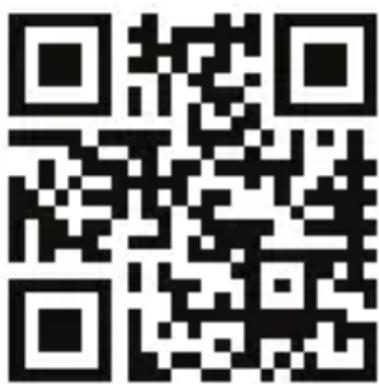
1.0penwww.conrad.com/downloads in a browser or scan the displayed QR code.
2. Select document type and language and enter the item number into the search field. After submitting the query you can download displayed records.
5. Safety information
rarty/guarantee will expire if damage is incurred resulting from non-compliance with these operating instructions. We do not assume any liability for consequential damage!
not assume any liability for property damage and personal injury caused by improper use or non-compliance with the safety instructions. In such cases the guarantee/warranty will expire!
DearCustomer,
this safety information serves not only to protect the product, but also your own safety and the safety of other persons. Therefore, read this chapter very carefully before taking the product into operation!
-
The unauthorized conversion and/or modification of the product is inadmissible for safety and approval reasons (CE).
-
The mains unit is constructed pursuant to protection category II.
- The mains socket for the plug-in mains unit or the USB connection for voltage supply must be close to the device and easily accessible.
product and the plug-in mains adapter are only suitable for dry, closed inner rooms. Do not expose these product parts to any direct sunlight, heat, cold, dampness or wetness; otherwise, they will be damaged.
The plug-in mains adapter also poses danger to life from an electric shock!
-
Do not pull the plug-in mains unit from the mains socket by pulling the cable.
-
If the mains adapter is damaged, do not touch it. Danger to life from electric shock! First deactivate all sides of the mains socket to which the mains adapter is connected (e.g. switch off the respective fuse or turn out the fuse. Then deactivate the associated FI protection switch). Only then pull the plug-in mains adapter from the mains socket and take the product to a specialist workshop.
and do not place any containers filled with liquids (e.g. vases) on them. There is great danger of fire or potentially fatal electric shock. If this is the case, first power down the respective mains socket (e.g. switch off circuit breaker) and then pull the mains cable from the socket. Disconnect all cables from the device. Do not operate the product anymore afterwards, but take it to a specialist workshop.
- Do not place any open sources of fire, such as burning candles, on the device.
- The product and the plug-in mains adapter are maintenance-free for you. Servicing or repair must only be carried out by a specialist or specialist workshop. The product contains no parts that require servicing by you. Therefore, do not open it.
- Protect the product and the plug-in mains adapter from direct solar radiation, strong heat (>60^) , cold (< -20^) , vibrations or mechanical stress.
product is not a toy and must be kept out of the reach of children. The product contains small parts and batteries.
ot leave packaging material unattended. It may become a dangerous toy for children.
-
Handle the product with care. It can be damaged by impact, blows or when dropped even from a low height.
-
If there are any questions that are not answered in this operating manual, contact our technical support or another expert.
- Never pour out fluids above or next to the product. Never place containers containing liquids, e.g. vases or plants, on or next to the device. Liquids may get into the housing and impair electrical safety.
If you are not sure about the correct connection or operation, or if there are any questions that are not covered by the operating instructions, do not hesitate to contact our technical support or another specialist.
6. Product overview
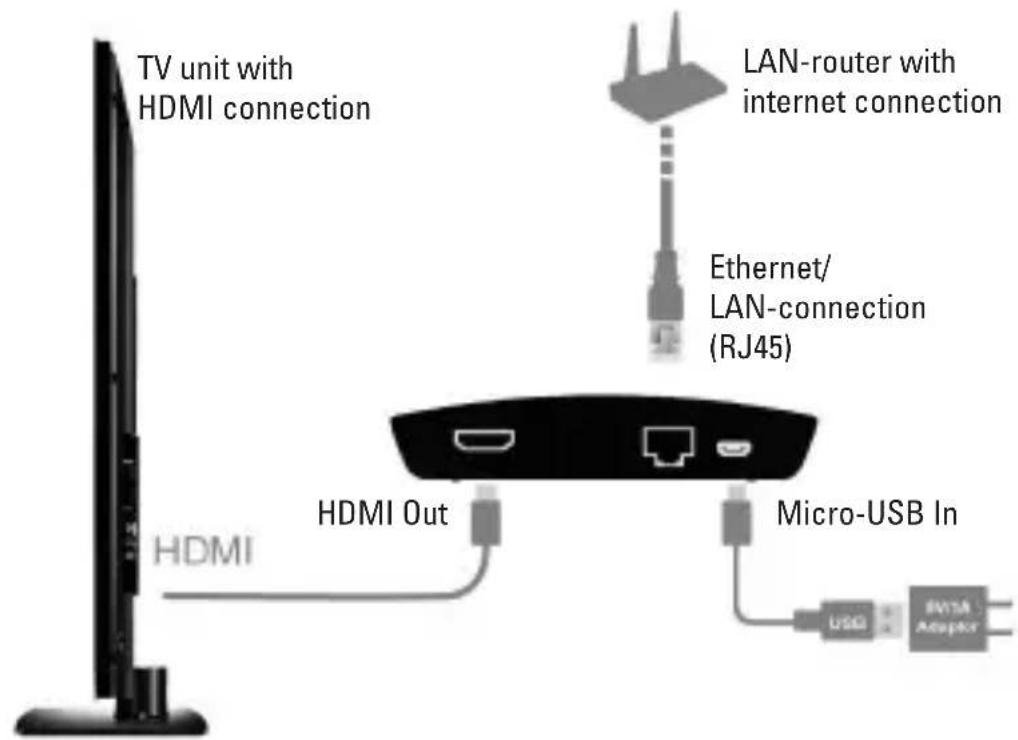
a) Connection configuration at the TV
The HDMI cable shown in the connection configuration, as well as the USB Micro-USB cable and the presented USB plug-in mains unit are enclosed in the scope of delivery.
The plug-in mains unit serves only to supply the renkCast TV with power.
Connect the HDMI cable with a free HDMI input of your TV starting from the HDMI Out of the box.
To make the TV-device internet-capable and to be able to use many additional features, connect an RJ45 cable between the renkCast TV (Ethernet/LAN-connection) and the network router with already-established internet connection. This simplifies the entire setting process, which you perform according to the configuration shown on your TV unit, at the beginning. Select the correct input source, i.e. the HDMI connection used at the TV, via the remote control.
b) Installation of the Associated EZ Cast App iOS and Android users:
- Please search Apple's App Store or Google Play for the app "EZCast" and install it.
Supports iOS8, Android 4.2 and newer versions.
Windows and Mac OS users:
- Please download the app from the website: www.iezcast.com
Supports Windows 7/8.1, Mac OS10.9 and newer versions.
c) LED-display at the renkCast TV
The status display of the renkCast TV consists of the three following colours of the LED display:
- Red: WiFi-connection has failed and there is no Ethernet/LAN connection
- Violet-blue: Wifi standby/working ok
- Turquoise: WiFi and Ethernet/LAN-connection work properly
7. Operating notes on use of the cast function
1.) Open the WiFi settings of your notebook, PC, Smartphone or tablet.
2.) Activate WiFi and scan for the SSID renkTV. Establish a connection with this network.
3.) Open the already-installed EZCast App on your device.
4.) There are several icons on the home page of the App:
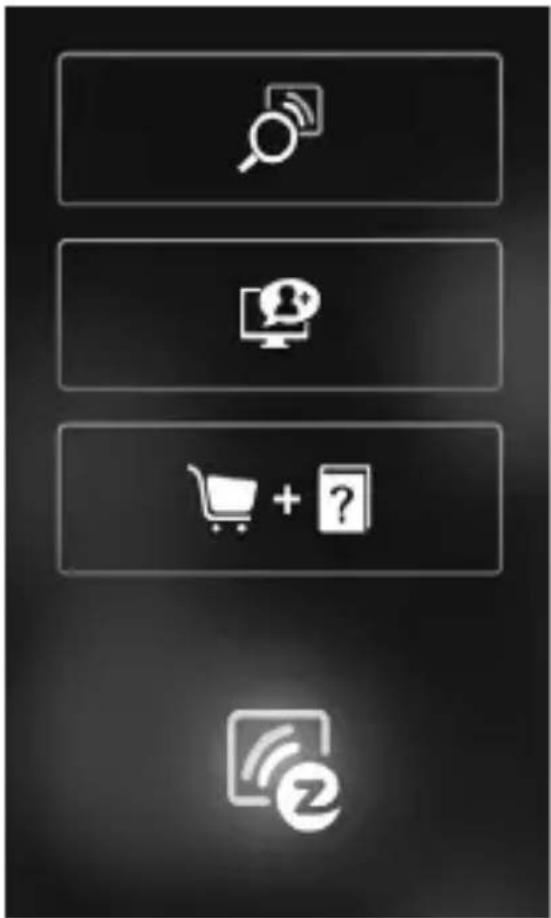
Regular operating mode
EZ channel function
Demo & help function
EZ Cast Display
8. Advice on use of the EZCast App
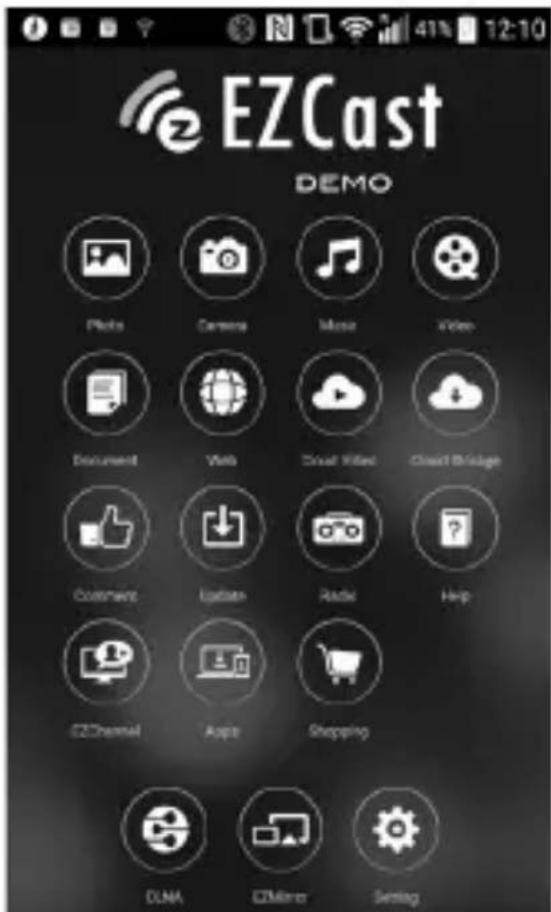
- The EZCast App can be used to transfer or cast multimedia data wirelessly via WiFi. Some functions, such as cloud video transfers or use of the web browser, require a stable internet connection.
- Go to the Setting/settings menu. There, you can make your settings for the internet connection to your network router. You may also directly connect the Ethernet/LAN cable via the corresponding connection.
-
To call more diverse contents, e.g. including those your friends have shared, you need to connect your end device to the EZChannel.
-
Please note: EZMirror (Miracast) separates the current WiFi connection at use. Therefore, you need to connect your device to WiFi or mobile internet again, e.g. 3G/4G, to continue to maintain an internet connection.
Short overview of the most important app functions:
- Photo
Video
Music
Video - Document (illustration of PDF/Office documents)
Web (use of an internet browser)
Cloud Video (use of online video services) - Cloud Storage (storage of data in a cloud)
- Comment (evaluation of the app)
- Update (update of the app software)
Radio
The radio function has more than 1000 radio transmitters integrated. A specific transmitter for any taste in music is included.
- Help (help function)
- EZChannel (saving or changing Cloud TV channels)
9. Maintenance and cleaning
Servicing or repair must only be carried out by a specialist or specialist workshop. There are no components in the product that need to be serviced by you. Therefore, never open it!
A dry, soft and clean cloth is sufficient for cleaning the outside.
Never use any aggressive cleaning agents, alcohol or other chemical solutions that would damage the casing (discolouration).
10. Disposal
The product does not belong in the household waste!
Dispose
of the product according to the applicable statutory provisions at the end of its service life.
11. Technical data
Operating voltage. 5 V/DC provided via USB plug-in mains unit or USB connection
Operating current. 1.5 A
Protection type housing..IP 20
Suitable operating systems.....iOS8,Android 4.2 and newer Windows7/8.1,Mac OS10.9 and newer
Operating conditions. -20 °C to +50 °C, 10% to 90% relative humidity, non-condensing
Storage conditions. -30 °C to +60 °C, 10% to 90% relative humidity, non-condensing
Dimensions (L x W x H) 108 x 80 x 20 mm
Weight. 100 g
Page
Chere cliente, cher client,
France (email): technique@conrad-france.fr
Chere cliente, cher client,
90%, sans condensation
Dimensions (L x I x h) 108 x 80 x 20 mm
Poids. 100 g
Pagina
Copyright 2016 by Conrad Electronic SE.
GB Legal Notice
This is a publication by Conrad Electronic SE, Klaus-Conrad-Str. 1, D-92240 Hirschau (www.conrad.com).
All rights including translation reserved. Reproduction by any method, e.g. photocopy, microfilming, or the capture in electronic data processing systems require the prior written approval by the editor. Reprinting, also in part, is prohibited. This publication represent the technical status at the time of printing.
Copyright 2016 by Conrad Electronic SE.
F Information legales
Copyright 2016 by Conrad Electronic SE.
NL Colofon
Copyright 2016 by Conrad Electronic SE. V6_0216_02/VTP


- Introduction
- Explanation of symbols
- Intended use
- Scope of delivery
- Up-to-date operating instructions:
- Safety information
- Product overview
- b) Installation of the Associated EZ Cast App iOS and Android users:
- Windows and Mac OS users:
- c) LED-display at the renkCast TV
- Operating notes on use of the cast function
- Advice on use of the EZCast App
- Short overview of the most important app functions:
- Maintenance and cleaning
- Disposal
- Technical data
- Page
- Pagina
- GB Legal Notice
- F Information legales
- NL Colofon
Brand : Renkforce
Model : RenkCast TV
Category : Media player