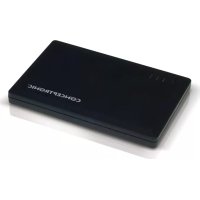
CPOWERB1500 - Power bank CONCEPTRONIC - Free user manual and instructions
Find the device manual for free CPOWERB1500 CONCEPTRONIC in PDF.



| Product type | Portable battery |
| Brand | Conceptronic |
| Model | CPOWERB1500 |
| Battery capacity | 1500 mAh |
| Output voltage | 5 V DC |
| Input connector | USB (for charging) |
| Output connector | 5V DC socket |
| Charging time | Up to 4 hours |
| LED indicators | 3 capacity LEDs, 1 charging LED (orange/green) |
| Included accessories | DC-to-USB cable, DC-to-DC cable, 7 charging tips, carrying pouch |
| Compatibility | Portable devices (phones, iPod, PSP, etc.) |
| Estimated weight | Approximately 100 g |
| Estimated dimensions | Approximately 10 x 5 x 2 cm |
| Power source | Computer USB port or USB adapter |
| Maintenance | Clean with a dry cloth |
| Safety | Do not expose to moisture or excessive heat |
| Repairability | No user-serviceable parts |
| Warranty | 2 years (standard) |
| Main functions | Universal portable charging |
Frequently Asked Questions - CPOWERB1500 CONCEPTRONIC
User questions about CPOWERB1500 CONCEPTRONIC
0 question about this device. Answer the ones you know or ask your own.
Ask a new question about this device
Download the instructions for your Power bank in PDF format for free! Find your manual CPOWERB1500 - CONCEPTRONIC and take your electronic device back in hand. On this page are published all the documents necessary for the use of your device. CPOWERB1500 by CONCEPTRONIC.
USER MANUAL CPOWERB1500 CONCEPTRONIC
Conceptronic CPOWERB1500
Gebruiksaanwijzing
Congratulations on the purchase of your Conceptronic Universal Power Bank 1500mAh.
This User Manual gives you a step-by-step explanation how to install and use the Conceptronic Universal Power Bank.
When you need more information or support for your product, we advise you to visit our Service & Support website at www.conceptronic.net/support and select one of the following options:
- FAQ : Frequently Asked Questions database
- Downloads : Manuals, Drivers, Firmware and more downloads
- Contact : Contact Conceptronic Support
For general information about Conceptronic products visit the Conceptronic website at www.conceptronic.net.
1. Package contents
The following items are present in the package of the Conceptronic Universal Power Bank:
- Conceptronic Universal Power Bank 1500mAh (CPOWERB1500)
DC-to-USB power cable
DC-to-DC power cable - 7 different charging tips for mobile devices (see Appendix A at the end of this manual)
- Travel pouch
- This Multilanguage user manual
- Warranty card & CE declaration booklet
2. Product features
- Recharge your portable devices (1500mAh).
- Universal: can be used for many different portable devices.
- Led status indicator.
3. Device explanation
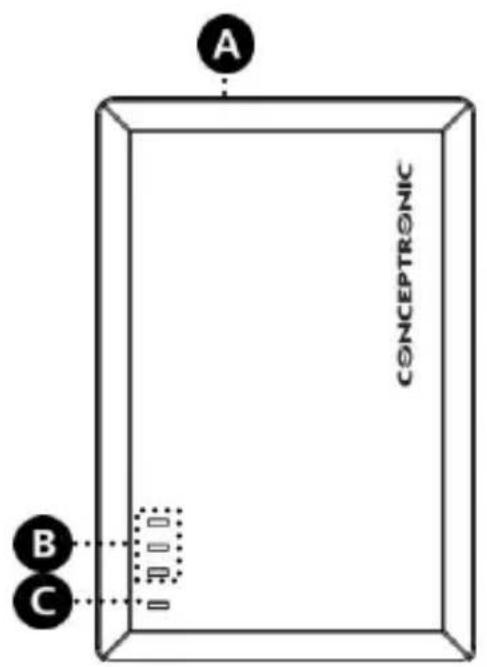
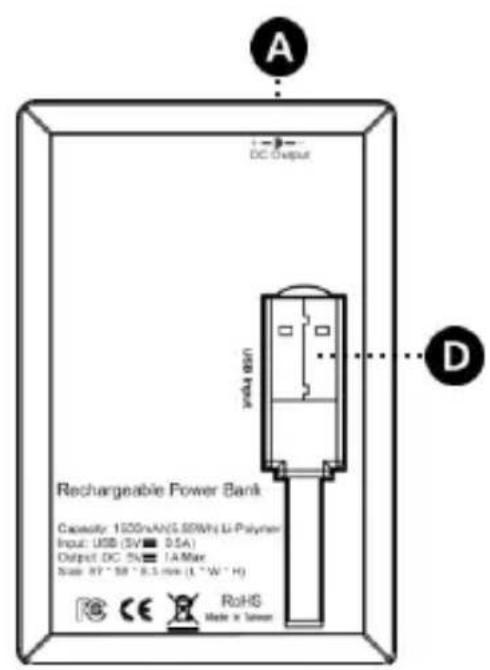
The device explanation picture below describes all elements of the power bank:
| Nr | Description | |
| A. | DC Output: | 5 volt DC output connection to connect to your mobile device. |
| B. | Capacity LEDs: | 3 LEDs to show the capacity of the power bank. |
| Off | The power bank is not in use/charging. | |
| On | The power bank is in use/charging and showing the capacity. | |
| C. | Charging LED: | Shows the charging status. |
| Off | The power bank is not charging. | |
| On - Orange | The power bank is charging. | |
| On - Green | The power bank is charged. | |
| D. | USB connector: | USB connector to charge the power bank through the USB port of your computer. |
4.Using your power bank
4.1 Charging the power bank
You need to charge the power bank before you can use it. You can charge the power bank through the USB port on your computer, or through a USB power adapter, like the Conceptronic CUAPTFOLD or CUAPTTRAV.
Pull the USB connector [D] from the bottom of the power bank.
- Connect the USB connector to a free USB port on your computer, or to a free USB port on your USB power adapter.
The charging LED [C] will turn orange, indicating that the power bank is charging. The capacity LEDs [B] show the capacity of the power bank. When all 3 capacity LEDs are lit and the charging LED is green, the power bank is fully charged.
Note: A full charge of the power bank can take up to 4 hours.
- Disconnect the USB connector from your computer, or from your USB power adapter.
- Put the USB connector back in the storage place on the bottom of the power bank.
4.2 Using the power bank
When the power bank is charged, you can use it to charge your mobile devices, like your mobile phone, iPod, PSP, etc. Before you can charge your mobile device, you need to pick the correct tip which fits your mobile device.
- Pick the correct tip from the 7 included tips and connect the tip to the DC-to-DC power cable.
Note: If the tip you need is not included, but you have a USB charging cable for your mobile device, you can use this USB charging cable in combination with the DC-to-USB power cable which is included with the power bank. - Connect the DC-to-DC power cable or the DC-to-USB power cable to the DC output [A] of the power bank.
- Connect the tip to your mobile device.
ENGLISH
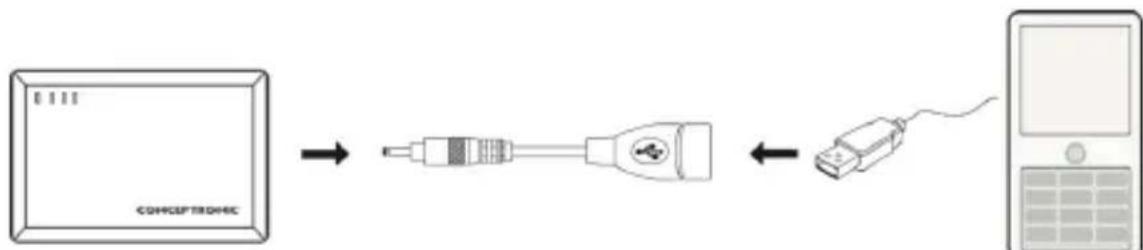
[Connection example with DC-to-USB power cable]
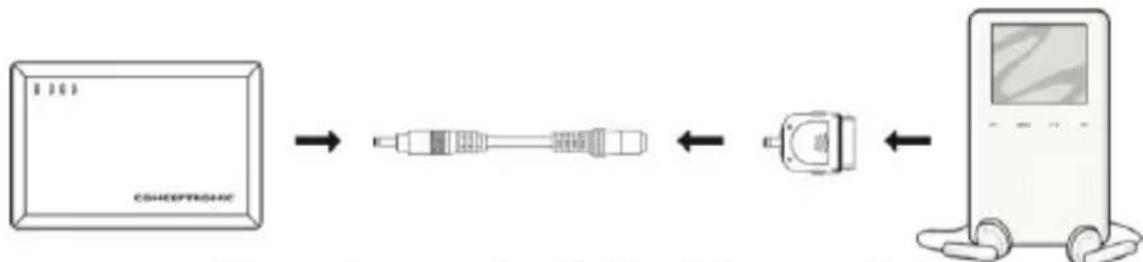
[Connection example with DC-to-DC power cable]
Your mobile device will now be charged by the power bank. As long as the power bank is in use, the capacity LEDs will be burning.
During usage, the capacity LEDs will turn off one by one, indicating that the power capacity of the power bank is decreasing. When all capacity LEDs turn off during use, the power bank is empty and needs to be recharged, as described in chapter 4.1.
Enjoy the use of your Conceptronic Universal Power Bank!
CPOWERB1500 de Conceptronic
Manual de usuario
| Powercable picture | Powercable description |
| DC-to-USB power cable | |
| DC-to-DC power cable |
| Tip | Tip Picture | Compatible devices |
| A | All mobile devices with Micro-USB charging port, like Nokia N85, Nokia 6500, Motorola V70, Motorola V8. | |
| B | MP3 / MP4 / PDA / PMP, Digital Camera: Kyocera/Casio/Canon/Casio/Kodak/Minolta/Olympus/Pentax/Samsung | |
| C | SONY PSP, MP3 / MP4 / PDA / PMP, Digital Camera: Canon/Casio/Fujitsu/Kodak/Nikon/Olympus/Panasonic | |
| D | Nokia: 1600/2300/2310/2600/2610/2626/2652/3100/3120/3220/3230/3300/3310/5140/6020/6021/6030/6060/6100/6170/6230/6230i/6600/6610i/6670/6680/6820/7260/7270/7280/7610/7710/8800/9300/E70 | |
| E | Nokia: 1325/1650/2112/2255/2310/2505/2610/2630/2660/2760/3125/3250/3500/3610/5070/5120/5200/5300/5500/5310/5610/5700/6060/6070/6085/6101/6103/6110/6111/6120/6125/6131/6151/6233/6235/6267/6270/6280/6288/6290/6300/6500/7360/7370/7373/7380/7390/7500/7900/E50/E61/E65/N70/N71/N73/N76/N77/N80/N81/N82/N90/N91/N93/N93i/N95 | |
| F | All mobile devices with Mini-USB charging port, like HTC Diamond2, HTC Snap, Blackberry, Motorola ROKR series, PDA, GPS adapters. | |
| G | Apple iPhone, Apple iPod |
Appendix B. Technical specifications
| Capacity | : 1500mAh, Li-Ion Polymer |
| Output | : DC 5V/1A (Max) |
| Input | : USB 5V/0.5A |
| Cycle life | : 500 Times |
| Charging time | : 3.5 ~ 4 hours |
| Dimensions | : 87(L) x 58(W) x 8.3(D) mm |
| Net weight | : 50g |
| Operating temperature | : 0 ~ 40c (32 ~ 104 F) |
| Protective function | : Over current / Over discharge / Over charge / Short circuit protection |