F6842 - Watch FESTINA - Free user manual and instructions
Find the device manual for free F6842 FESTINA in PDF.


User questions about F6842 FESTINA
0 question about this device. Answer the ones you know or ask your own.
Ask a new question about this device
Download the instructions for your Watch in PDF format for free! Find your manual F6842 - FESTINA and take your electronic device back in hand. On this page are published all the documents necessary for the use of your device. F6842 by FESTINA.
USER MANUAL F6842 FESTINA
USANDO EL CRONÓGRAFO
USANDO EL CRONÓGRAFO

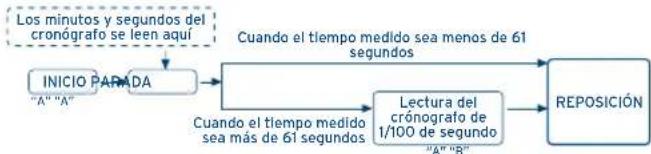
[MEDICION ESTANDAR]
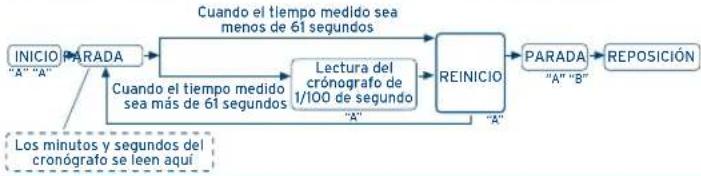
[MEDICION DEL TIEMPO TRANSCURRIDO ACUMULADO]
IFMOS90
REPOSEICION DEL CRONOGRAFO (incluuso après de reemplazar la piía)
Displays and buttons 12
Setting the time 13
Setting the date 13
Using the chronograph 14
Chronograph reset (incl. after replacing battery) 17
DISPLAYS AND BUTTONS
IFMOS90
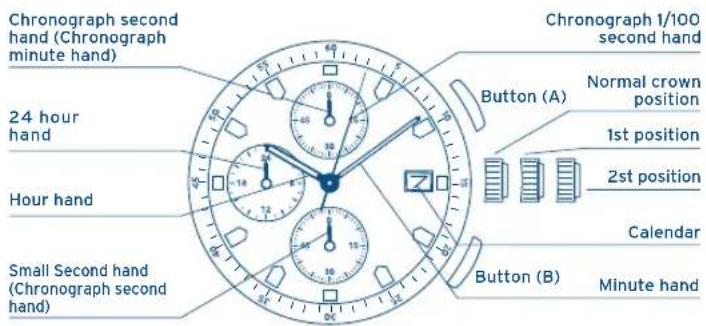
IFMOS90
SETTING THE TIME
- Pull the crown out to the 2nd position.
- Turn the crown to set hour and minute hands.
- When the crown is pushed back to the normal position, small second hand begins to run.
SETTING THE DATE
- Pull the crown out to the 1st position.
- Turn the crown counter-clockwise to set the date.
*If the date is set between the hours of around 9:00 PM and 1:00 AM, the date may not change on the following day. - After the date has been set, push the crown back to the normal position.
IFMOS90
USING THE CHRONOGRAPH
The chronograph is able to measure and display time in 1/100 second united up to maximum of 59 minutes 59 seconds 99.
[The chronograph 1/100 second hand]
- The chronograph 1/100 second hand moves for 61 seconds after measurment is started, after which time it will stop at O position. After that time, it then changes to demonstration operation, making one revolution every minute.
[To start the chronograph]
- Press button A.
- The small second hand will advance to the zero position at the same time the chronograph starts, and then begin to run as the chronograph second hand.
Passed at 1 minute and 1 second after the chronograph has been started:
- The chronograph second hand will change over to running as the chronograph minute hand.
IFMOS90
USING THE CHRONOGRAPH
[To stop the chronograph]
- Press button A.
- When the measured time is less than 61 seconds, the chronograph minute, second and 1/100 second hands will stop at the measured time.
- When the measured time is over 61 seconds, the chronograph minute and second hands will stop at measured time. The chronograph 1/100 second hand will remain stopped at the zero position. Read the seconds and minutes from the chronograph at this time. Next, press button A again to advance the chronograph 1/100 second hand to the measured time. Read the time in 1/100 seconds from the chronograph at this time.
[To reset the chronograph]
Press button B.
- The chronograph second hand will change over to running as the second hand for current time. The other chronograph hands are returned to the zero position.
USING THE CHRONOGRAPH

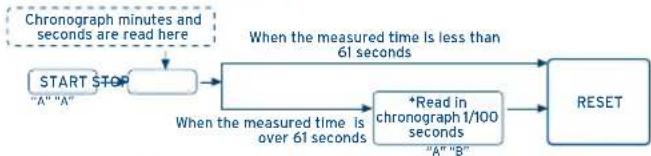
[STANDARD MEASUREMENT]
[ACCUMULATED ELAPSED TIME MEASUREMENT]
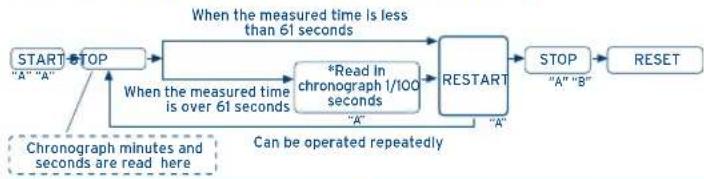
IFMOS90
CHRONOGRAPH RESET (incl. after replacing battery)
This procedure should be performed when the chronograph 1/100 second hand and the chronograph second hand do not return to zero position after the chronograph has been reset, and including after the battery has been replaced.
- Pull the crown out to the 2nd position.
- Press button "A" to set the chronograph 1/100 second hand to zero position.
- Press button "B" to set the chronograph second hand at 6 o'clock to zero position. The chronograph hands can be advanced rapidly by continuously pressing button "A" or "B".
-
Once the hands have been zeroed, return the crown to the normal position.
-
Do not push the crown to the normal position while the chronograph 1/100 second hand and the chronograph second hand return to zero position. Each hands stop on the way when crown are returned to the normal position and these positions are recognized as zero position.
IFMOS90
IFMOS90
MANUEL D'INSTRUCTION
CHRONOMETRE

By virtue of the regulations pursuant to the handling of waste products deriving from electronic and electrical equipment, end of lifecycle watch
making products must be selectively collected for processing. You may therefore dispose of your quartz watch making products at any of our retail outlets or any other authorized collection point. The selective collection, processing, rating and recycling of these products helps contribute to safeguarding the environment and protecting our health.
INDICATIONS ET BOUTONS
IFMOS90
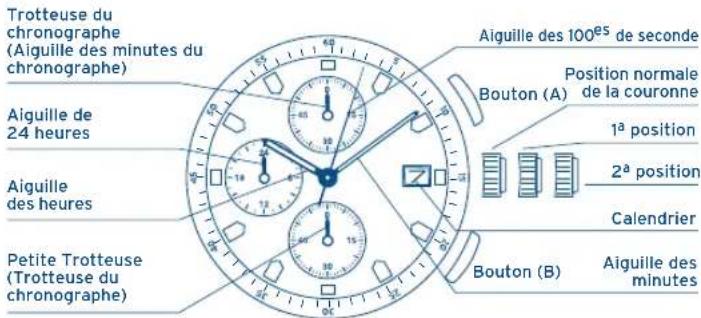
IFMOS90
REGLAGE DE L'HEURE
[Pourmettrelechronographene marche]
![FESTINA F6842 - [Pourmettrelechronographene marche] - 1](/content/2026/02/390330/images/5e8ba5ff2824fdc464b1298ce903fe192b49110d3563061e46ca9e221d1967af.jpg)
[ACCUMULATED ELAPSED TIME MEASUREMENT]