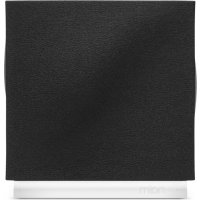
Muso Qb - Speaker NAIM - Free user manual and instructions
Find the device manual for free Muso Qb NAIM in PDF.



| Product Type | Wireless connected speaker |
| Brand | Naim |
| Model | Mu-so Qb |
| Dimensions (approx.) | 210 x 220 x 120 mm |
| Weight (approx.) | 4.5 kg |
| Power supply | Mains, power cable included |
| Wireless connectivity | Wi-Fi, Bluetooth, AirPlay 2, built-in Chromecast |
| Supported streaming services | Spotify Connect, Apple AirPlay, Google Chromecast |
| Control app | Naim App (iOS and Android) |
| Physical inputs | 1 x optical input, 1 x USB (service) |
| Multiroom | Yes, compatible with other Naim speakers |
| Audio features | Built-in amplification, full-range speakers |
| Care and cleaning | Wipe with a soft, dry cloth. Do not use abrasive products. |
| Safety | Do not expose to moisture or heat sources. Use only the supplied adapter. |
| Spare parts and repairability | For any repairs, contact an authorized Naim service center. No user-serviceable parts. |
| General information | User manual downloadable from notice-facile.com |
Frequently Asked Questions - Muso Qb NAIM
User questions about Muso Qb NAIM
0 question about this device. Answer the ones you know or ask your own.
Ask a new question about this device
Download the instructions for your Speaker in PDF format for free! Find your manual Muso Qb - NAIM and take your electronic device back in hand. On this page are published all the documents necessary for the use of your device. Muso Qb by NAIM.
USER MANUAL Muso Qb NAIM
Mu-so Qb. 2nd Generation.

bar
| Category | Value | |---|---| | Category 1 | 100 | | Category 2 | 100 | | Category 3 | 100 | | Category 4 | 100 | | Category 5 | 100 | | Category 6 | 100 | | Category 7 | 100 | | Category 8 | 100 | | Category 9 | 100 | | Category 10 | 100 | | Category 11 | 100 | | Category 12 | 100 | | Category 13 | 100 | | Category 14 | 100 | | Category 15 | 100 | | Category 16 | 100 | | Category 17 | 100 | | Category 18 | 100 | | Category 19 | 100 | | Category 20 | 100 | | Category 21 | 100 | | Category 22 | 100 | | Category 23 | 100 | | Category 24 | 100 | | Category 25 | 100 | | Category 26 | 100 | | Category 27 | 100 | | Category 28 | 100 | | Category 29 | 100 | | Category 30 | 100 | | Category 31 | 100 | | Category 32 | 100 | | Category 33 | 100 | | Category 34 | 100 | | Category 35 | 100 | | Category 36 | 100 | | Category 37 | 100 | | Category 38 | 100 | | Category 39 | 100 | | Category 40 | 100 | | Category 41 | 100 | | Category 42 | 100 | | Category 43 | 100 | | Category 44 | 100 | | Category 45 | 100 | | Category 46 | 100 | | Category 47 | 100 | | Category 48 | 100 | | Category 49 | 100 | | Category 50 | 100 | | Category 51 | 100 | | Category 52 | 100 | | Category 53 | 100 | | Category 54 | 100 | | Category 55 | 100 | | Category 56 | 100 | | Category 57 | 100 | | Category 58 | 100 | | Category 59 | 100 | | Category 60 | 100 | | Category 61 | 100 | | Category 62 | 100 | | Category 63 | 100 | | Category 64 | 100 | | Category 65 | 100 | | Category 66 | 100 | | Category 67 | 100 | | Category 68 | 100 | | Category 69 | 100 | | Category 70 | 100 | | Category 71 | 100 | | Category 72 | 100 | | Category 73 | 100 | | Category 74 | 100 | | Category 75 | 100 | | Category 76 | 100 | | Category 77 | 100 | | Category 78 | 100 | | Category 79 | 100 | | Category 80 | 100 | | Category 81 | 100 | | Category 82 | 100 | | Category 83 | 100 | | Category 84 | 100 | | Category 85 | 100 | | Category 86 | 100 | | Category 87 | 100 | | Category 88 | 100 | | Category 89 | 100 | | Category 90 | 100 | | Category 91 | 100 | | Category 92 | 100 | | Category 93 | 100 | | Category 94 | 100 | | Category 95 | 100 | | Category 96 | 100 | | Category 97 | 100 | | Category 98 | 100 | | Category 99 |What's in the box Get to know Mu-so Qb
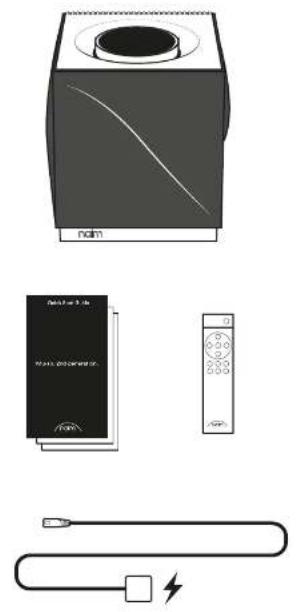
natural_image
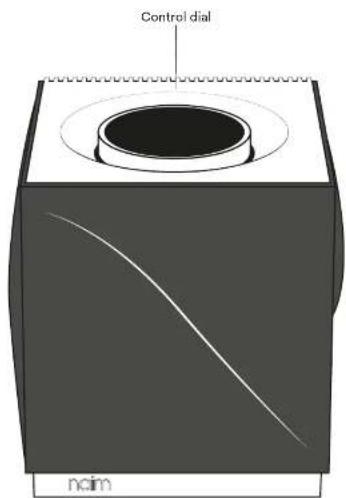
Illustration of a portable air conditioner unit with a battery, control panel, and cable (no text or symbols)Front view Back view
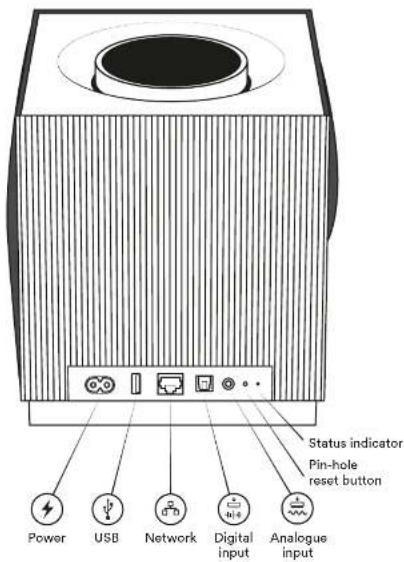
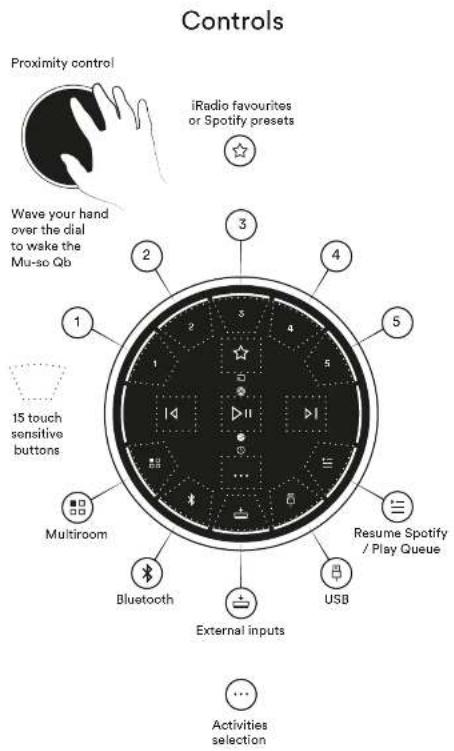
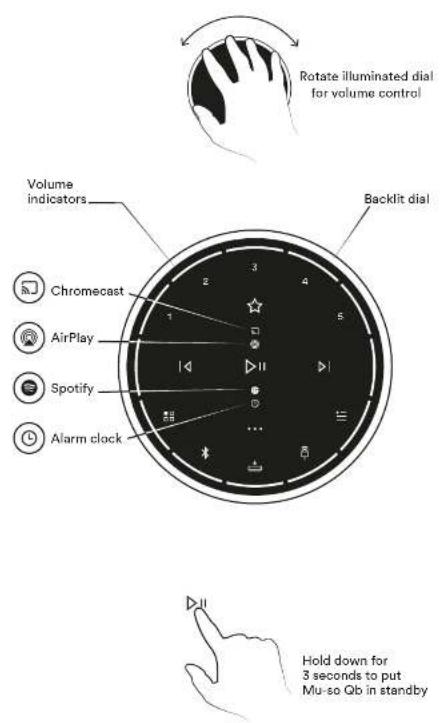

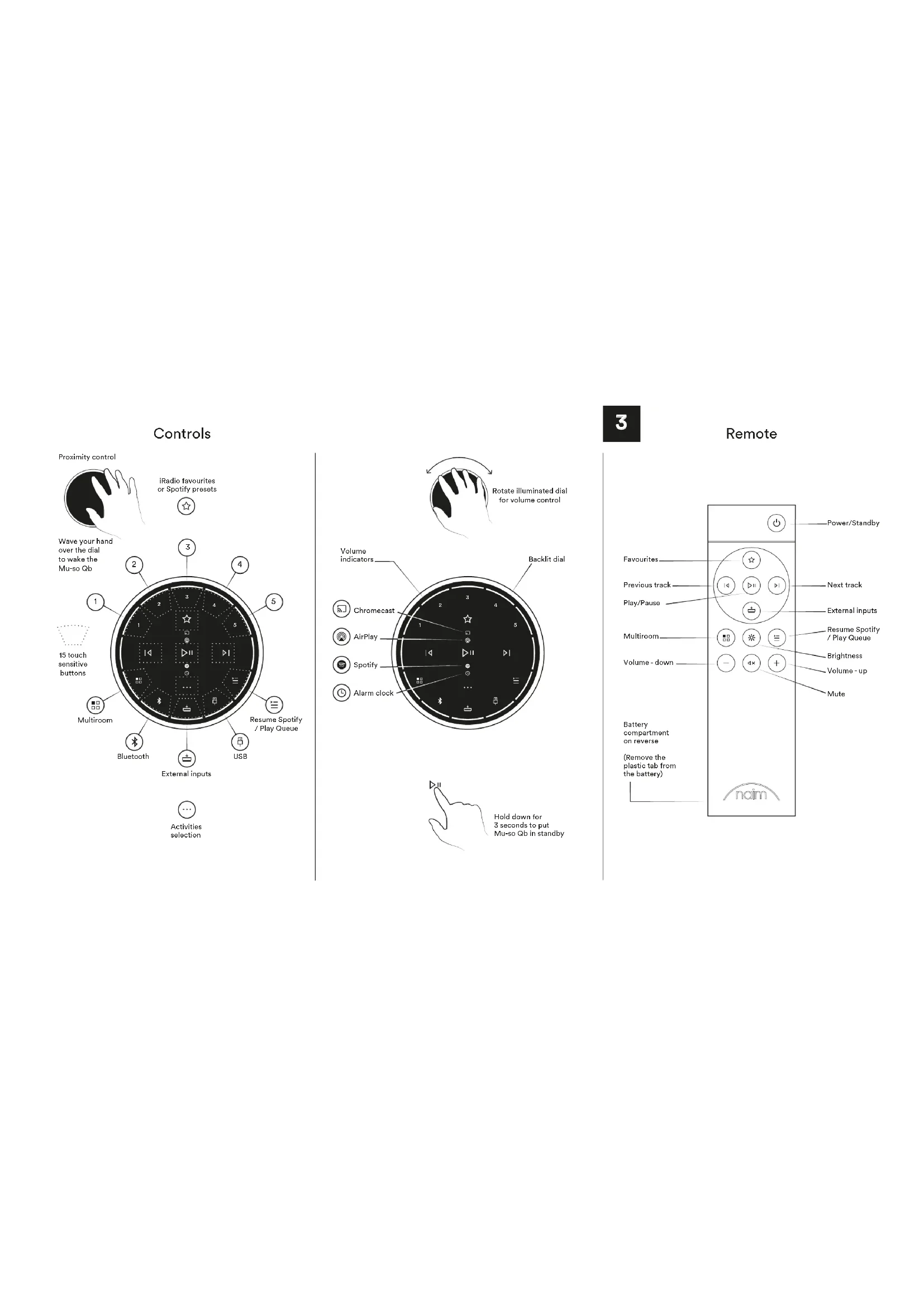
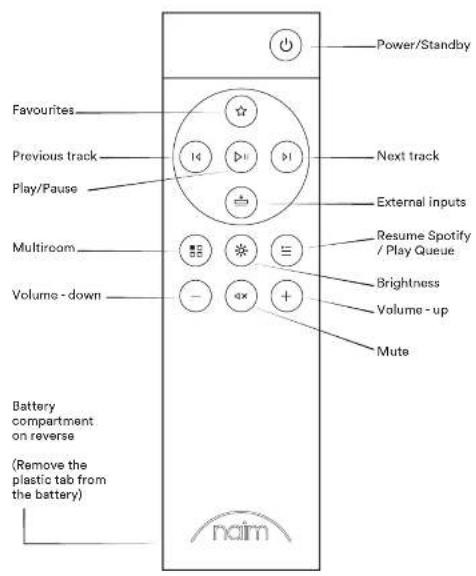
Remote
Playing music
Naim App
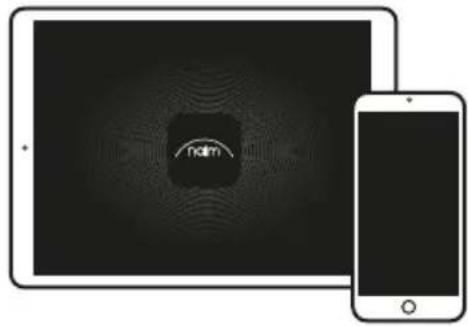
Use the Naim App to set up and control your Mu-so Qb. Look for 'Naim' on the Apple App Store or Google Play Store to download and install. Launch the app and follow the setup instructions to configure your Mu-so Qb and learn about its features.

flowchart
graph TD
    A["Download on the App Store"] --> B["Noim"]
    C["Google Play"] --> D["Download Icon"]
    B --> E["Table Screen with 'nom' icon"]
    D --> E
Other ways to listen to your music

Listen out loud with Spotify Connect
(1) Connect your Mu-so Qb to your wi-fi network. (2) Open up the Spotify app on your phone, tablet or laptop using the same wi-fi network. (3) Play a song and select Devices Available. (4) Select your Mu-so Qb and start listening.

AirPlay
AirPlay is an Apple technology designed to control home audio systems and speakers in any room from your iPhone, iPad, HomePod or Apple TV.

To setup AirPlay 2 use the Home app on an iOS device running software 11.4 or later. Open the Home app and tap the button to add it as an Accessory. You can also enable AirPlay from macOS via the Mu-so Qb's webpage by navigating to its IP address in your browser.

Chromecast built-in
Stream your favourite music from your phone, tablet or laptop to your Mu-so Q b. To use Chromecast built-in to cast audio to your Mu-so Q b, you must first configure it using the Google Home app. You can set up Chromecast groups with other products in the Devices screen.
Lecture de musique
Naim App
Download on the App Store
GET IT ON Google Play

natural_image
Two devices: a tablet and a smartphone, both displaying abstract digital patterns with no visible text or symbols.ال Mortgage Chromecast جهاز
.Μυ-so Qb النقل بث أغنيك الفضلة من الهانف أو الك Diversity LinkedInي "الثابت" أو الك Diversity الحموّل "الباب توب" إلى نظام Google المدمة لارسال صويت إلى Chromecast .Υς μυ-so Qb .Υς μυ-so .Υς μυ-so .Υς μυ-so .Υς μυ-so .Υς μυ-so .Υς μυ-so .Υς μυ-so .Υς μυ-so .Υς μυ-so .Υς μυ-so .Υς μυ-so .Υς μυ-so .Υς μυ-so .ΥΣ μυ-so .ΥΣ μυ-so .ΥΣ μυ-so .ΥΣ μυ-so .ΥΣ μυ-so .ΥΣ μυ-so .ΥΣ μυ-so .ΥΣ μυ-so .ΥΣ μυ-so .ΥΣ μυ-so .ΥΣ μυ-so .ΥΣ μυ-so .ΥΣ μυ-SO .ΥΣ μυ-SO .ΥΣ μυ-SO .ΥΣ μυ-SO .ΥΣ μυ-SO .ΥΣ μυ-SO .ΥΣ μυ-SO .ΥΣ μυ-SO .ΥΣ μυ-SO .ΥΣ μυ-SO .ΥΣ μυ-SO .ΥΣ μυ-SO .ΥΣ μυ-SO .Υ Σμικότε εعداد مجموعات Chromecast (م grants أخرى في شاشة الاجهزة).

Further help and FAQs
Visit the Naim website for further support, interactive setup and support guides.
www.naimaudio.com/mu-so-support

Contact
mu-sosupport@naimaudio.com
Support helpline: +44 (0) 333 321 9923 (UK) +1 800 961 5681 (USA and Canada)
Warranties
Peace of mind guaranteed
We are confident your new Mu-soQb wireless music system will bring you a deeper connection with music. You will be listening to even more music than ever before, discovering new artists and rediscovering old classics. In the unlikely event that something does go wrong you are covered by a two-year warranty* backed by Naim Audio and our international distributors that is redeemable via your retailer with valid proof of purchase.
*For full terms and conditions visit www.naimaudio.com/mu-so-warranty
Register your new Mu-so Qb
Register your Mu-so with us online to join our vibrant online community of music lovers. You will get exclusive access to the latest Naim news and content from our independent record label.
naimaudio.com/mu-so-registration
Acknowledgements
Mu-so® is a registered trademark of Naim Audio Ltd. Registered in the United Kingdom and other countries.

Works with
Apple AirPlay
Use of the Works with Apple badge means that an accessory has been designed to work specifically with the technology identified in the badge and has been certified by the developer to meet Apple performance standards.
Apple, AirPlay, iPad, iPod, iPhone, Apple TV and HomePod are trademarks of Apple Inc., registered in the U.S. and other countries. The trademark "iPhone" is used in Japan with a license from Aiphone K.K.

Chromecast built-in
The Chromecast built-in badge is a trademark of Google Inc.

Spotify

The Spotify software is subject to third party licences found here: www.spotify.com/connect/third-party-licenses.

TIDAL
HIGH FIDELITY MUSIC STREAMING

The music player for music lovers

Bluetooth®
The Bluetooth® word mark and logos are registered trademarks owned by Bluetooth SIG, Inc. and any use of such marks by Naim Audio Ltd. is under licence. Other trademarks and trade names are those of their respective owners.
Wi-Fi® logo is a registered trademark of Wi-Fi Alliance.

UPnP ^TM is a trademark of the UPnP ^TM Forum.

bar
| Category | Value | |---|---| | Category 1 | 100 | | Category 2 | 100 | | Category 3 | 100 | | Category 4 | 100 | | Category 5 | 100 | | Category 6 | 100 | | Category 7 | 100 | | Category 8 | 100 | | Category 9 | 100 | | Category 10 | 100 | | Category 11 | 100 | | Category 12 | 100 | | Category 13 | 100 | | Category 14 | 100 | | Category 15 | 100 | | Category 16 | 100 | | Category 17 | 100 | | Category 18 | 100 | | Category 19 | 100 | | Category 20 | 100 | | Category 21 | 100 | | Category 22 | 100 | | Category 23 | 100 | | Category 24 | 100 | | Category 25 | 100 | | Category 26 | 100 | | Category 27 | 100 | | Category 28 | 100 | | Category 29 | 100 | | Category 30 | 100 | | Category 31 | 100 | | Category 32 | 100 | | Category 33 | 100 | | Category 34 | 100 | | Category 35 | 100 | | Category 36 | 100 | | Category 37 | 100 | | Category 38 | 100 | | Category 39 | 100 | | Category 40 | 100 | | Category 41 | 100 | | Category 42 | 100 | | Category 43 | 100 | | Category 44 | 100 | | Category 45 | 100 | | Category 46 | 100 | | Category 47 | 100 | | Category 48 | 100 | | Category 49 | 100 | | Category 50 | 100 | | Category 51 | 100 | | Category 52 | 100 | | Category 53 | 100 | | Category 54 | 100 | | Category 55 | 100 | | Category 56 | 100 | | Category 57 | 100 | | Category 58 | 100 | | Category 59 | 100 | | Category 60 | 100 | | Category 61 | 100 | | Category 62 | 100 | | Category 63 | 100 | | Category 64 | 100 | | Category 65 | 100 | | Category 66 | 100 | | Category 67 | 100 | | Category 68 | 100 | | Category 69 | 100 | | Category 70 | 100 | | Category 71 | 100 | | Category 72 | 100 | | Category 73 | 100 | | Category 74 | 100 | | Category 75 | 100 | | Category 76 | 100 | | Category 77 | 100 | | Category 78 | 100 | | Category 79 | 100 | | Category 80 | 100 | | Category 81 | 100 | | Category 82 | 100 | | Category 83 | 100 | | Category 84 | 100 | | Category 85 | 100 | | Category 86 | 100 | | Category 87 | 100 | | Category 88 | 100 | | Category 89 | 100 | | Category 90 | 100 | | Category 91 | 100 | | Category 92 | 100 | | Category 93 | 100 | | Category 94 | 100 | | Category 95 | 100 | | Category 96 | 100 | | Category 97 | 100 | | Category 98 | 100 | | Category 99 |Model (型号 / 型號 / 모델명): Mu-so Qb 2nd Gen

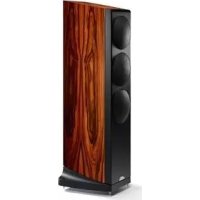

Brand : NAIM
Model : Muso Qb
Category : Speaker