
AI220120 - Range hood GAGGENAU - Free user manual and instructions
Find the device manual for free AI220120 GAGGENAU in PDF.



| Product type | Extractor hood |
| Brand | Gaggenau |
| Model | AI220120 |
| Category | Hood |
| Dimensions (minimum height) | 580 mm |
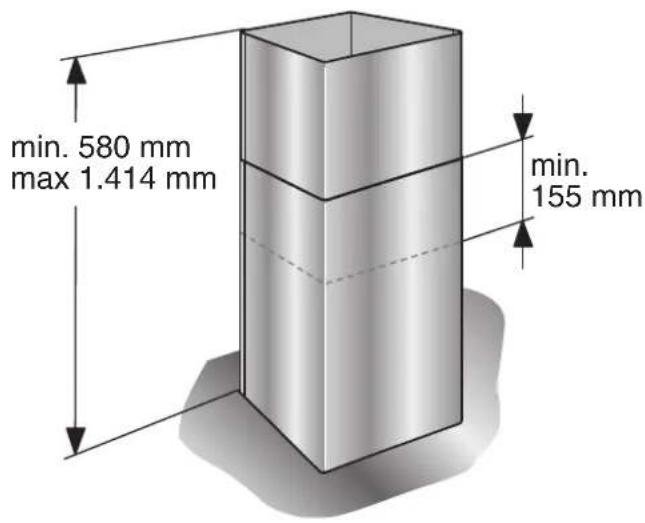
| Dimensions (maximum height in extraction mode) | 1414 mm |
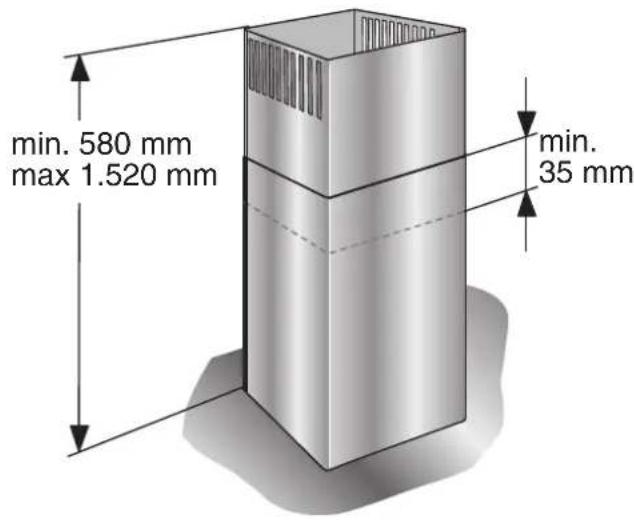
| Dimensions (maximum height in recirculation mode) | 1520 mm |
| Power supply | Electrical, connection cable 1.30 m |
| Suction power levels | 3 speeds + intensive level (Int) |
| Special functions | Delayed shut-off (10 min), intermittent ventilation, saturation indicator F |
| Lighting | Halogen or incandescent bulbs, brightness adjustment |
| Grease filters | Metal, dishwasher-safe or hand-washable |
| Activated carbon filter | Replace approximately 2 times per year (recirculation mode) |
| Minimum safety distance (electric cooking) | 550 mm |
| Minimum safety distance (gas cooking) | 650 mm |
| Extraction mode | Air extraction or air recirculation |
| Exhaust duct diameter | 150 mm recommended, minimum 120 mm |
| Maximum ceiling load | 50 kg |
| Number of pages in manual | 116 pages |
| Original manual country | France (FR) |
Frequently Asked Questions - AI220120 GAGGENAU
User questions about AI220120 GAGGENAU
0 question about this device. Answer the ones you know or ask your own.
Ask a new question about this device
Download the instructions for your Range hood in PDF format for free! Find your manual AI220120 - GAGGENAU and take your electronic device back in hand. On this page are published all the documents necessary for the use of your device. AI220120 by GAGGENAU.
USER MANUAL AI220120 GAGGENAU
natural_image
Diagram showing a checkmark over a circular icon next to an industrial process diagram with pipes and a flame (no text or symbols)natural_image
Pure technical diagram showing a cylindrical component mounted on a base with a circular cross symbol (no text or labels)BRANDGEFAHR
natural_image
Simple line icon of a house with an arrow and crossed door (no text or symbols)natural_image
Symbolic icon of a shield with crossed arrows and a cross, representing protection or hazard (no text present)natural_image
Illustration of hands using a computer to interact with a screen (no text or symbols visible)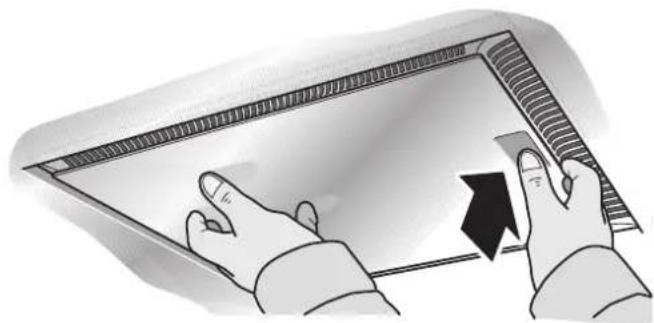
natural_image
Illustration of hands interacting with a digital display panel (no text or symbols visible)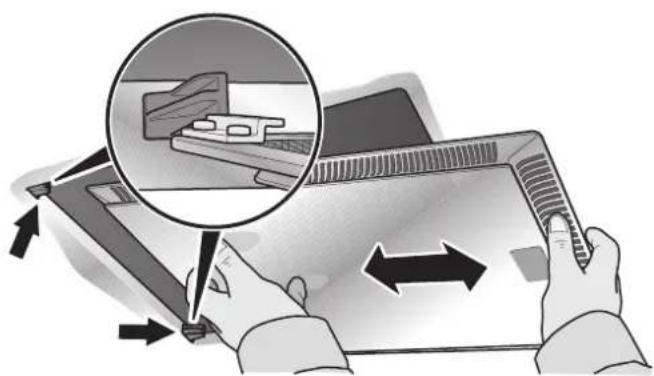
natural_image
Illustration of hands using a tablet device to interact with a laptop, showing a magnified view of the screen (no text or symbols present)natural_image
Illustration of a hand holding a tablet over a grid-patterned surface, with arrows indicating direction (no text or symbols)natural_image
Illustration of hands using a tool to adjust or install a mechanical component (no text or symbols visible)natural_image
Illustration of hands holding a small object with a metallic bowl in the background (no text or symbols)natural_image
Hand holding a light bulb inside a white enclosure (no text or symbols visible)natural_image
Stack of parallel metallic cylindrical objects with curved surfaces (no text or symbols)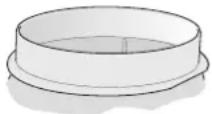
natural_image
Technical illustration of a mechanical assembly with a 4x magnified view showing two screws inserted into a housing (no text or symbols present)natural_image
Diagram of a mechanical device with internal components and directional arrows indicating flow or movement (no text or symbols)natural_image
Technical illustration of a mechanical device with a screw and cylindrical component (no text or symbols)natural_image
3D diagram of a mechanical component with directional arrows indicating flow or movement (no text or symbols)Table of contents
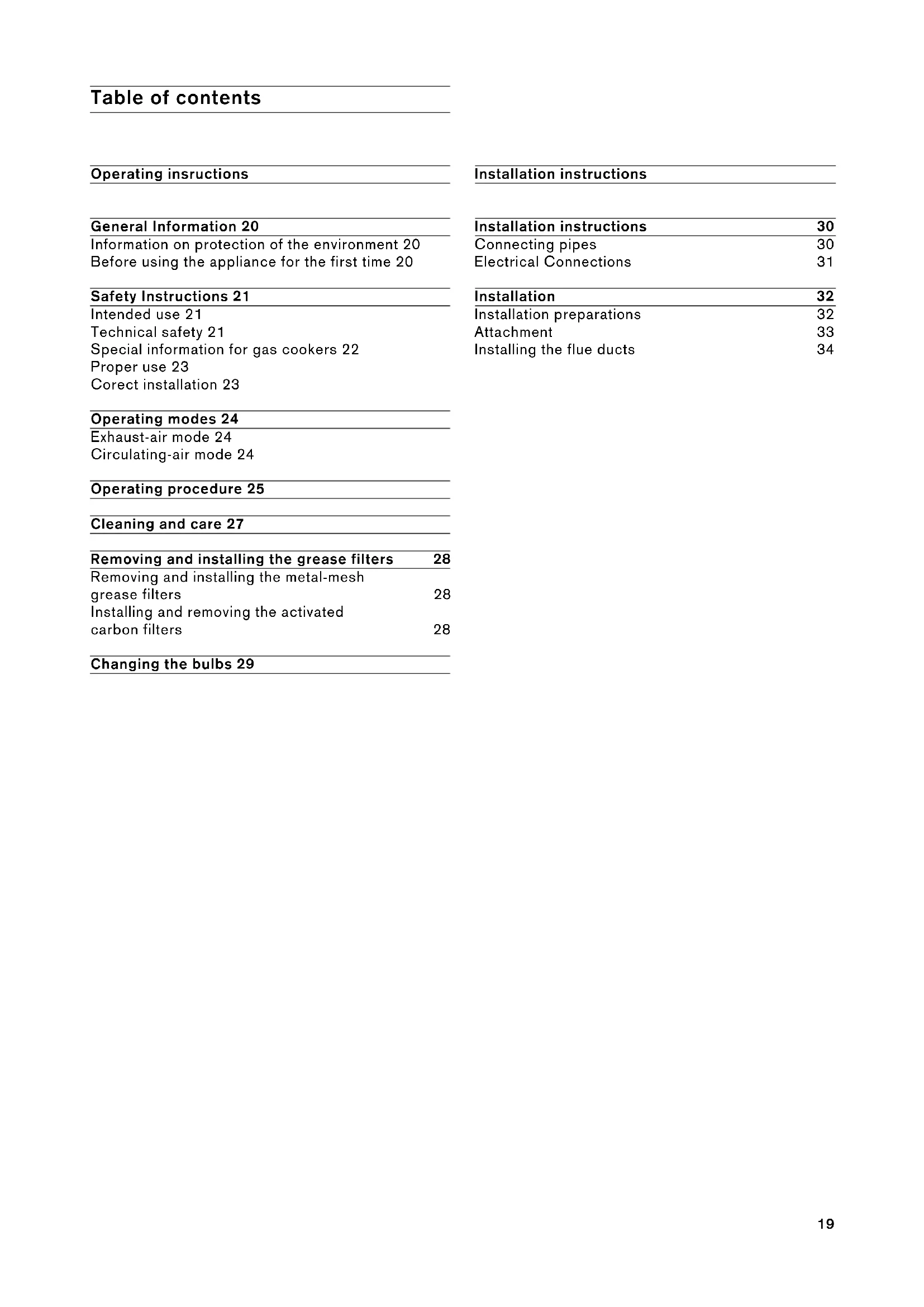
Operating instructions
General Information 20
Information on protection of the environment 20
Before using the appliance for the first time 20
Safety Instructions 21
Intended use 21
Technical safety 21
Special information for gas cookers 22
Proper use 23
Corect installation 23
Operating modes 24
Exhaust-air mode 24
Circulating-air mode 24
Operating procedure 25
Cleaning and care 27
| Removing and installing the grease filters | 28 |
| Removing and installing the metal-mesh grease filters | 28 |
| Installing and removing the activated carbon filters | 28 |
Changing the bulbs 29
Installation instructions
| Installation instructions | 30 |
Connecting pipes 30
Electrical Connections 31
| Installation | 32 |
Installation preparations 32
Attachment 33
Installing the flue ducts 34
Information on protection of the environment
Disposal of transport packaging
Your new appliance was sent to you in protective packaging. All utilised materials are environmentally safe and recyclable. Please help us by disposing of the packaging in an environmentally friendly manner.
RISK OF INJURY
Packaging parts can be hazardous for children. Therefore keep them outside the reach of children.
Disposal of the old appliance
Old appliances are not worthless rubbish. Valuable raw materials can be reclaimed by recycling old appliances.
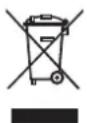
This appliance is identified according to the European Directive 2002/96/EC on waste electrical and electronic equipment - WEEE). The directive specifies the
framework for an EU-wide valid return and re-use of old appliances.
Before disposing of your old appliance, render it unusable.
Never treat your old appliance as non-recyclable waste!
Please ask your dealer or inquire at your local authority about current means of disposal.
Ensure that the old appliance is kept childproof until it is disposed of.
Before using the appliance for the first time
Note: These operating instructions apply to several appliance models It is possible that individual features are described which do not apply to your appliance.
Before switching on your new appliance, please read the operating instructions carefully. They contain important information on safety and how to use and look after the appliance.
Keep the operating and instructions in a safe place and pass them on to any subsequent owner of the appliance.
Faults
If an F appears in the display:
See "Operating procedure" Section.
If is not possible to operate the extractor hood:
- Disconnect the extractor hood from the mains electricity supply by pulling out the plug or switching it off at the main fuse box. Wait for approx. 1 minute and then switch it on again.
Please contact customer service regarding any queries or faults.
(See list of customer service centres).
When calling, please quote:
E-no.
FD
The numbers can be found on the rating plate, after removal of the grease filter, inside the extractor hood.
Enter the numbered in the above fields.
Intended use
- This extractor hood complies with the stipulated safety regulations. Improper use may result in injury or damage.
- The extractor hood may be used in the household only. The manufacturer is not liable for damage which is caused by improper use or incorrect operation.
- The manufacturer cannot be made responsible for damage which can be attributed to non-observance of the safety instructions.
RISK OF INJURY
Do not allow children to play with the extractor hood! Adults and children must never operate the appliance unsupervised
- if they are not physically or mentally capable of doing so,
- or if they do not have the knowledge and experience to operate the appliance correctly and safely.
Technical safety
- The extractor hood left the factory in perfect condition. Nevertheless check the appliance for visible damage before installation. If it is damaged, do not switch it on!
- If the power cord of the extractor hood is damaged, it must be replaced by the manufacturer, his customer service or a similarly qualified person to prevent hazardous situations.
-
Only a qualified technician may install (including electrical connection), service or repair the extractor hood. Always isolate the extractor hood by pulling out the mains plug or switching off the fuse!
-
If the appliance is improperly installed, serviced or repaired, the user may be placed in considerable danger for which the manufacturer is not liable.
- Changes to the electrical or mechanical installation are dangerous and must not be undertaken! They may also cause the extractor hood to malfunction.
Simultaneous operation of the extractor hood with a heating appliance which is dependent on ambient air
- Heating appliances which are dependent on ambient air, e.g. gas, oil, wood, or solid-fuel heaters, instantaneous water heaters, hot water boilers, hobs or ovens, and which draw combustion air out of the installation room and whose exhaust gases are conveyed to the exterior by a flue.
RISK OF POISONING
If the extractor hood is operated at the same time as a heating appliance which is dependent on ambient air, there is a risk of poisoning due to combustion gases being drawn back in.
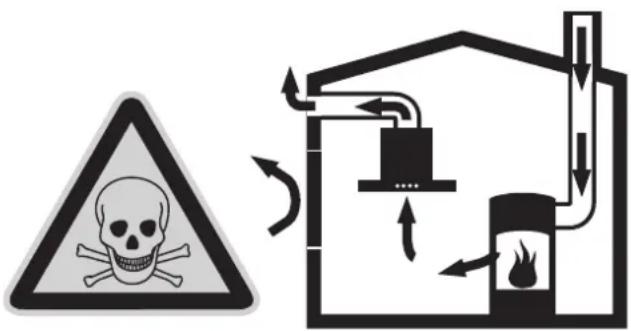
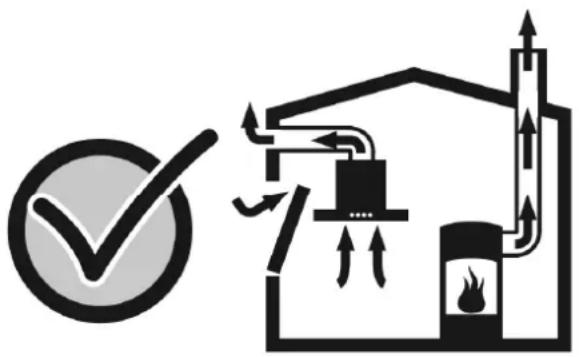
- Safe operation is possible provided the low pressure in the installation room of the heating appliance does not exceed 4Pa (0.04mbar). This can be achieved if the combustion air can flow through non-closable openings, e.g. in doors, windows, in conjunction with air intake/exhaust air wall boxes or by other technical measures.
natural_image
Diagram showing a checkmark over a circular icon next to an industrial process diagram with pipes, tanks, and a flame (no text or symbols)- Adequate intake air must therefore always be provided.
- An intake/exhaust air wall box alone does not ensure compliance with the limit value.
Note: When making your evaluation, always consider the entire ventilation system in the home. Include the advice of a competent heating engineer when making your evaluation.
- If the extractor hood is used in circulating air mode only, it can be operated without any restrictions.
Special information for gas cookers
- When installing the extractor hood above gas hobs, observe the appropriate national statutory regulations (e.g. in Germany: Technische Regeln Gasinstallation TRGI).
- Observe the currently valid installation regulations and instructions of the gas appliance manufacturer.
- During installation, ensure that only one side of the extractor hood is situated directly next to a high-sided unit or a wall. Otherwise, there is a risk of heat build-up. The gap between the extractor hood and the wall or high-sided unit must be at least 50 mm.
RISK OF BURNS
Do not operate more than 2 gas cooking areas simultaneously over a period of max.
15 minutes at maximum thermal load. Due to the effect of the heat there is a risk of burns if the surfaces of the housing are touched!
Note that one large burner of more than 5 kW (Wok) is equivalent to the power of 2 gas burners.
- The extractor hood may be damaged by the intense heat.
- Never operate a gas cooking area without a cooking utensil on it. Regulate the flame in such a way that it does not project over the cooking utensil.
Proper use
- Clean the extractor hood thoroughly before using for the first time.
- Before cleaning and servicing the extractor hood, isolate it from the power supply by pulling out the mains plug or switching off the fuse.
- Bulbs (especially halogen bulbs) become very hot during operation. Even some time after the appliance has been switched off, there is still a risk of burns!
- Before changing bulbs, isolate the extractor hood from the power supply and leave the bulbs to cool down!
- Do not operate the extractor hood without bulbs inserted.
● Always switch on the extractor hood if a hotplate is being used. If the extractor hood is not switched on, condensation may form. As a result, the appliance may corrode.
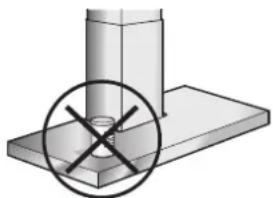
- Do not place any objects on the extractor hood.
natural_image
Mechanical assembly diagram showing a cylindrical component mounted on a base with a circular cross symbol (no text or labels)RISK OF FIRE
Do not flambé under the extractor hood or work with a naked flame. When switched on, the extractor hood draws flames into the filter. There is a risk of fire due to deposits on the grease filter!
- Do not leave pans, frying pans or deep-fat fryers unattended if you are cooking food with oils or fats, e.g. chips. Overheated oils or fats can easily ignite!
- A risk of fire can be prevented by cleaning the grease filters regularly and changing the activated-carbon filter in good time.
- Never operate the extractor hood without grease filters.
Correct installation
- Check the manufacturer's specifications for the cooker to determine whether an extractor hood can be operated over it.
- If the manufacturer of the cooker has not specified any significant safety distances, the following minimum distances apply
- 550 mm between electric hob and the lower edge of the extractor hood, Fig. 1.
- 650 mm between gas hob (upper edge of pan support) and the lower edge of the extractor hood, Fig. 1.
- If various cookers are used, the greatest indicated distance applies.
- The width of the extractor hood must correspond to the width of the cooking area.
- The extractor hood must not be installed over a solid fuel heating appliance which may be a fire risk (e.g. flying sparks) unless the heating appliance has a closed, non-detachable cover and the country-specific regulations are observed. This restriction does not apply to gas cookers and gas hobs.
- To avoid damaging the hob, cover it when installing the extractor hood.
Operating modes
- The extractor hood can be used in exhaust air and circulating air mode. The standard setting is exhaust air mode.
Exhaust-air mode

natural_image
Simple line icon of a house with arrows indicating direction and a cross symbol inside (no text or labels)The air which is drawn in is cleaned by the grease filters and conveyed to the exterior by a pipe system.
Appliance dimensions Exhaust air
Circulating-air mode

natural_image
Symbolic icon of a shield with crossed arrows and a cross, representing protection or defense (no text present)The air which is drawn in is cleaned by the grease filters and an activated carbon filter and conveyed back into the kitchen.
An activated carbon filter must be installed to bind odours in circulating-air mode (see "Removing and installing the grease filters").
The complete installation set as well as the replacement filters are available from specialist outlets, customer service or the Online Shop. The accessory number can be found at the end of the operating instructions.
The socket must be attached at least 170 mm below the ceiling.
Appliance dimensions Circulating air
Operating procedure
The most effective method of removing vapours produced during cooking is to:
- Switch the ventilator ON as soon as you begin cooking.
- Switch the ventilator OFF a few minutes after you have finished cooking.
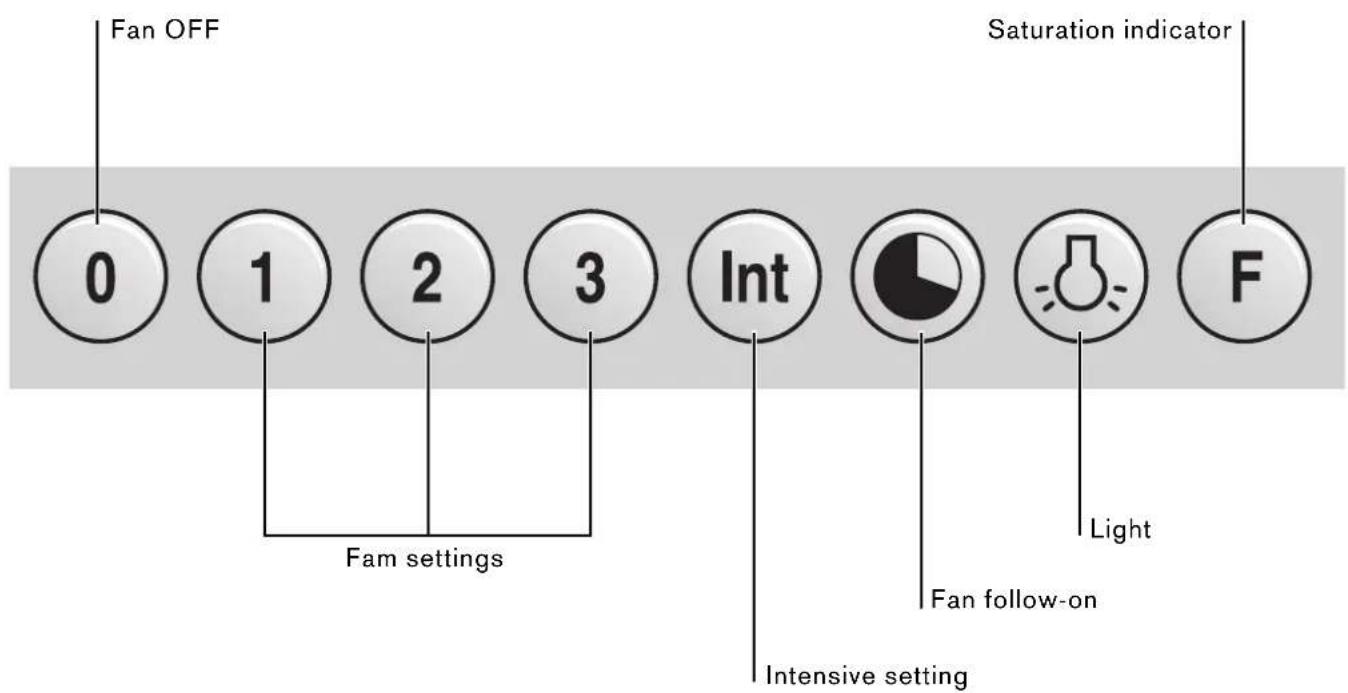
Maximum power is obtained at the intensive setting. It is only required for short intervals.
- The Int key for the intensive level should be pressed when browning and frying in an open pan.
If you have switched on the hood by selecting the intensive level, it will be switched off again automatically after 5 minutes. - If you press the Int key while the hood is running at fan level 1, 2 or 3, the electronic control will switch back automatically to the previously selected fan level after 5 minutes.
- If you would like to end the intensive level before the five minutes have elapsed, press the 0 key ("Motor off") or select a different level. It is possible to switch off the extraction function at any time by pressing the 0 key (motor "off").
Special functions
Intensive time:
- You can set the intensive level running time to 3, 5 or 10 minutes by simultaneously pressing the Int key and the 1, 2 or 3 key and you can store this setting. When delivered, the appliance is set to five minutes, i.e. the combination of the Int key and the key 2.
Fan follow-on:
- Delayed shut-off is possible at any level. First press the required key 1, 2, 3 or Int and then press the key.
The delayed shut-off time for all levels is ten minu-tes. After these ten minutes, the ventilation switches off, but the lighting stays on.
Interval ventilation:
- Interval ventilation is a special feature of this appliance which periodically activates the fan for five minutes every hour. You can activate this function by simultaneously pressing the 0 key and, depending on the required extraction capacity, the 1, 2 or 3 key.
This mode of operation is indicated by alternating illumination of the key together with the corresponding fan level indicator.
You can switch off interval ventilation by pressing the 0 key.
Lighting:
- Briefly press the button to switch the light on and off.
- The light can be switched on at any time, even though the fan is switched off.
- Adjusting the brightness: Hold down the button until the desired brightness is obtained.
Saturation indicator: F
- The grease filter saturation display F flashes after an operating time of 30 hours to you indicate to you that you should clean the grease filter. The grease filters can of course be cleaned at any time, even if the grease filter saturation display has not started to flash.
- To cancel the display, press the F button.
RISK OF INJURY
Suitable cleaning agents and care products for your appliance can be purchased via the Hotline or from the Online Shop (see cover page).
Appliance surfaces
Note: Observe the warranty regulations in the enclosed service booklet.
- The appliance surfaces and controls are scratch-sensitive. Therefore observe the following cleaning instructions:
- Avoid cleaning the extractor hood with dry cloths, abrasive sponges, scouring agents, cleaning agents containing sand, soda, acid, chlorine or any other aggressive substances.
- Clean the appliance surfaces and controls with a soft, damp cloth, washing-up liquid or a mild window cleaner only.
- Do not scrape off dried dirt, but moisten with a damp cloth.
- Clean carefully in the area of the controls to avoid liquid from getting into the electronics.
Note: Clean the stainless steel surfaces in the direction of the ground surface only! Do not use stainless steel cleaner for the control buttons!
Looking after the appliance
- Suitable cleaning agents and care products for your appliance can be purchased via the Hotline or from the Online Shop (see cover page).
Metal-mesh grease filters
- The metal-mesh grease filters absorb the grease particles from the kitchen fumes.
● The filter mats consist of fire-proof metal.
RISK OF FIRE
As the filters become more saturated with greasy residue, the flammability increases. The function of the extractor hood may also be impaired.
- The risk of fire is prevented by cleaning the metal-mesh grease filters in good time.
- When cleaning the grease filters, also remove grease deposits from the accessible parts of the housing with a damp cloth.
Cleaning the metal-mesh grease filters ...
- Under normal operation (daily 1 to 2 hours), the metal-mesh grease filters must be cleaned 1x month.
... in the dishwasher
- The metal-mesh grease filters can be cleaned in the dishwasher. Slight discolouration may occur but this will not affect the function of the grease filters.
- The filters must be placed loosely in the dishwasher. They must not be wedged in.
Note: Do not clean heavily saturated metal-mesh grease filters together with utensils.
... by hand
- When cleaning by hand, soak the grease filters in a hot detergent solution, brush off the dirt, rinse thoroughly and leave to dry.
- Do not use any aggressive, acidic or alkaline cleaning agents.
- If dirt is particularly stubborn, we recommend using a special grease solvent spray. This can be ordered via the Online Shop.
Removing and installing the grease
filter
RISK OF INJURY
Before removing and installing the grease filters, always follow the instructions and warnings in the chapter entitled "Safety instructions"!
Removing and installing the metal-mesh grease filters
1 Open the lock and fold down the grease filters. In doing so, hold the underside of the grease filters with your other hand.
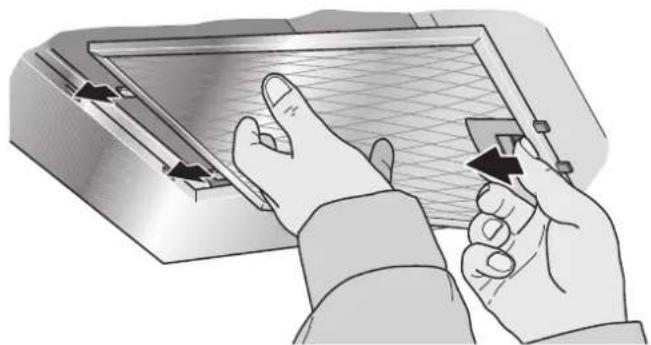
natural_image
Illustration of hands using a tool to interact with a screen or tablet device (no text or symbols visible)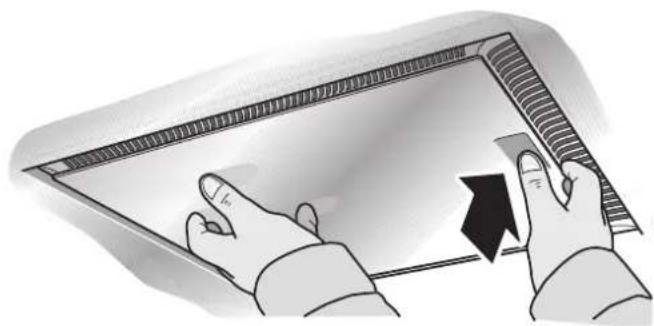
natural_image
Illustration of hands interacting with a digital tablet device (no text or symbols visible)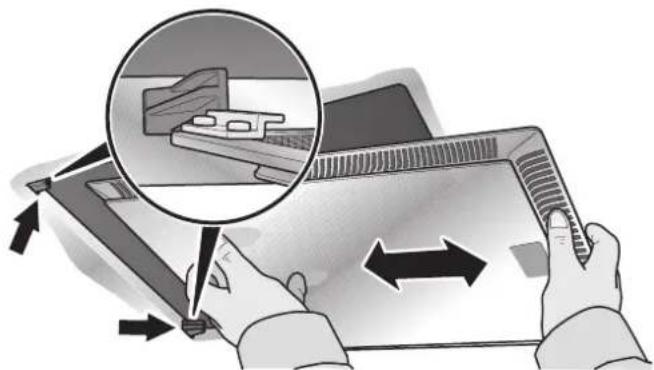
natural_image
Illustration of hands using a tablet device to interact with a laptop, showing a magnified view of the screen (no text or symbols present)(for appliances with edge extraction)
2 Clean the grease filters.
3 Reinsert the cleaned grease filters.
Activated carbon filter
- Activated carbon filters bind the odours in circulating-air mode.
● Under normal operation (daily 1 to 2 hours) the activated carbon filters must be replaced approximately 2x year. - The activated carbon filter is available from specialist outlets, customer service or the Online Shop (see Optional accessories). Use original filters only.
- Activated carbon filters do not contain any pollutants. They can be disposed of in the household refuse.
Installing and removing the activated carbon filters
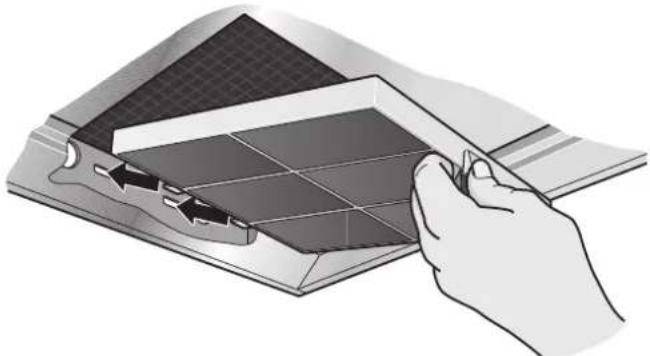
1 Remove the grease filters (see Removing and installing the metal-mesh grease filters).
natural_image
Illustration of a hand holding a rectangular object over a grid-patterned surface, with arrows indicating direction (no text or symbols)2 Insert the activated carbon filter.
3 Lock the catch.
4 Reinsert the grease filters (see Removing and installing the metal-mesh grease filters).
Changing the bulbs
Before changing the bulbs, always follow the instructions and warnings in the chapter entitled "Safety instructions"!
● The description of changing the bulbs applies to several appliance models.
Note: Observe the warranty regulations in the enclosed service booklet.
Changing the halogen bulbs
RISK OF INJURY
Halogen bulbs become very hot during operation. Even some time after the appliance has been switched off, there is still a risk of burns!
● Defective bulbs should be replaced immediately to avoid overloading the remaining bulbs.
Before changing the halogen bulbs, ensure that they have cooled down fully.
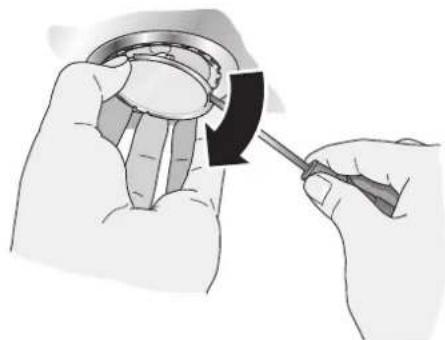
1 Carefully remove the bulb ring with a suitable tool.
natural_image
Illustration of hands using a tool to adjust or install a mechanical component (no text or symbols visible)2 Replace the defective bulb with a new one of the same type and equivalent power (see rating plate).
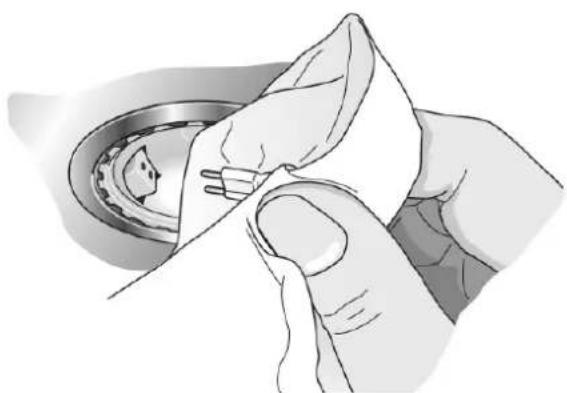
natural_image
Illustration of hands holding a ball bearing, no text or symbols presentNote: When inserting halogen bulbs, do not touch the glass tube. Therefore use a clean cloth when inserting the bulb.
3 Reinsert the bulb cover.
4 Restore the power supply by inserting the mains plug or switching on the fuse.
Changing the filament bulbs
RISK OF INJURY
Filament bulbs become very hot when switched on. Even some time after filament bulbs have been switched off, there is still a risk of burns!
● Before changing filament bulbs, wait until they have completely cooled down.
1 Lift the bulb cover slightly.
2 Push the bulb cover towards the middle of the appliance.
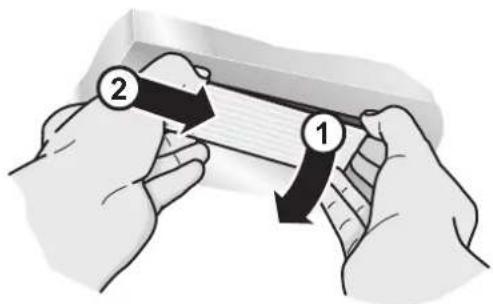
natural_image
Illustration of two hands holding a rectangular object with arrows indicating direction (no text or symbols)3 Replace the defective bulb with a new one of the same type and equivalent power (see rating plate).
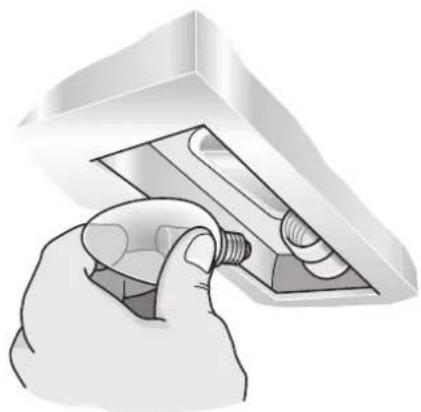
natural_image
Hand inserting a bulb into a light bulb inside a 3D printer (no text or symbols visible)4 Reinsert the bulb cover.
5 Restore the power supply by inserting the mains plug or switching on the fuse.
Note: If the light does not function, check whether the bulbs have been inserted correctly.
Installation instructions
- Prior to installation, always follow the instructions and warnings in the chapter entitled "Safety instructions"!
Exhaust-air mode
- The exhaust air is conveyed upwards via a ventilation shaft or directly through the outer wall to the exterior.
Note: The exhaust air must not be conveyed into a functioning smoke or exhaust gas flue or into a shaft which is used to ventilate installation rooms which contain heating appliances.
- Before conveying the exhaust air into a non-functioning smoke or exhaust gas flue, obtain the consent of the appropriate heating engineer.
- Discharge exhaust air in accordance with the official and statutory regulations (e.g. regional building laws).
- If the exhaust air is conveyed through the outer wall, a telescopic wall box should be used.
To ensure optimum performance, the extractor hood requires:
- a short, straight exhaust air pipe and
- the largest possible pipe diameter.
- If pipe bends cannot be avoided, ensure the largest possible radii.
Note: If long, rough exhaust air pipes, a lot of pipe bends or pipe diameters less than 150 mm are used, the air capacity will be less than optimum and there will be an increase in noise.
- Use only pipes or hoses made of non-combustible material for installation of the exhaust air duct.
- The manufacturer of the extractor hoods is not responsible for complaints which can be attributed to planning and design of the pipework.
Connecting pipes
- The diameter of the exhaust air pipes should not be less than 150 mm.
Round pipes: We recommend an inner diameter of 150 mm, however at least 120 mm. - Flat ducts must have the same inner cross-section as round pipes. There should be no sharp bends. Ø 150 mm approx. 177 cm 2 Ø 120 mm approx. 113 cm 2
- If pipe diameters differ: Use sealing strips.
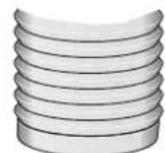
Connection of 150 mm ∅ exhaust air pipe (recommended size)
- Attach exhaust air pipe directly to the air-pipe connector and seal appropriately. If using an aluminium pipe, smooth the connection area beforehand.
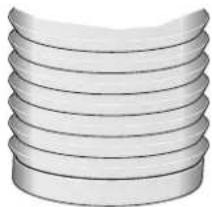
natural_image
Stack of parallel cylindrical objects with curved surfaces (no text or symbols)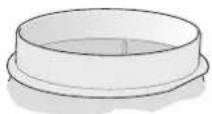
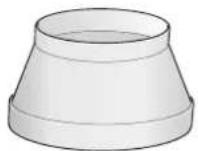
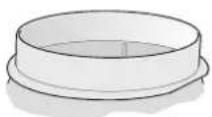
Connection of 120 mm ∅ exhaust air pipe
- Attach reducing connector directly to the air-pipe connector.
- Attach exhaust air pipe to the reducing connector.
Seal both joints appropriately.
Electrical connection
- Before connecting the appliance to the power supply, always follow the instructions and warnings in the chapter entitled "Safety instructions"!
- The extractor hood may only be connected by a qualified electrician who is familiar with the regulations of the relevant electricity supply company.
RISK OF INJURY
- If the power cord of the extractor hood is damaged, it must be replaced by the manufacturer, his customer service or a similarly qualified person to prevent hazardous situations.
- The extractor hood may be connected to a correctly installed earthed socket only.
- Attach the earthed socket as directly as possible behind the flue duct.
- The earthed socket should be connected via its own circuit.
- If the earthed socket is no longer accessible following installation of the extractor hood, a disconnector must be fitted as for a permanent connection.
If a permanent connection is required
- A disconnector must be provided on the installation side. Switches with a contact opening of more than 3 mm and all-pole disconnection are regarded as disconnectors. This includes LS switches, fuses and contactors.
Electrical specifications
The required connection data can be found on the rating plate inside the appliance when the grease filters have been removed.
Length of the power cord: approx. 1.30 m.
This extractor hood complies with the EC interference suppression regulations.
Installation
The extractor hood is designed for installation on the kitchen ceiling or on a rigid suspended ceiling.
- During installation, optional accessories may also require fitting.
- Observe the minimum distance between hob and extractor hood (see "Safety instructions")!
- Avoid damaging the sensitive surfaces!
Preparing the ceiling
RISK OF INJURY, DAMAGE TO PROPERTY
Before drilling the holes for the designated installation location, check for concealed electrical cables and other lines.
● The ceiling must be level and horizontal.
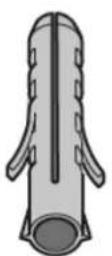
- The enclosed screws and wall plugs are suitable for concrete and natural stone. Use the appropriate fasteners for other ceiling structures.
Ensure that the ceiling has adequate load bearing capacity.
- Ensure that the depth of the drilled holes corresponds with the length of the screws.
- Ensure that the wall plugs are secure.
Max. weight: 50 kg.
Design subject to modification in line with technical development.
Installing the upper support frame
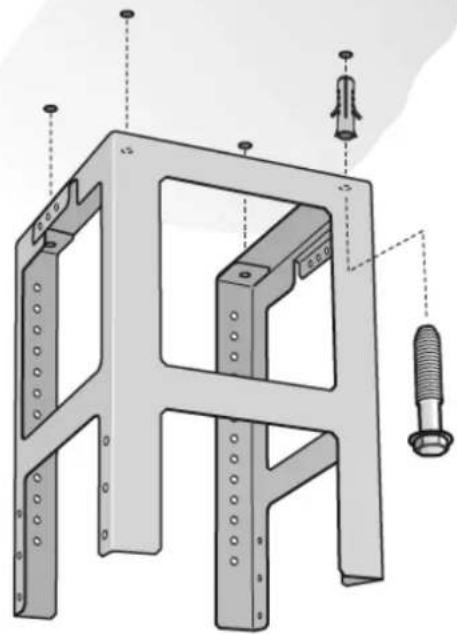
1 Specify the total height of the support frame before installation and mark the screw holes. The height of the support frame can be adjusted in 20 mm steps.
The total height is measured from the height of the ceiling, the height of the worktop and the corresponding distances between the hob and extractor hood.
2 On the ceiling mark the centre point of the extractor hood.
3 Using the enclosed template, mark the positions for the screws on the ceiling.
4x
natural_image
Technical diagram of a metal frame structure with bolt and nut assembly (no text or labels)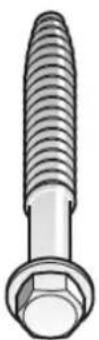
4x
4 Drill 4x 8 ∅ mm holes and press in wall plugs flush with the ceiling.
5 Attach the upper part of the support frame to the ceiling with 4 screws.
6 Ensure that the support frame is in the correct position. The middle bracket defines the preferred side. It must be facing the hob control.
Installing the lower support frame
- Attach upper and lower parts of the support frame at the specified total height with 10 screws (preferred hole selection, see diagram).
- Ensure that the lower support frame is in the correct position. The open side must be facing the hob control.
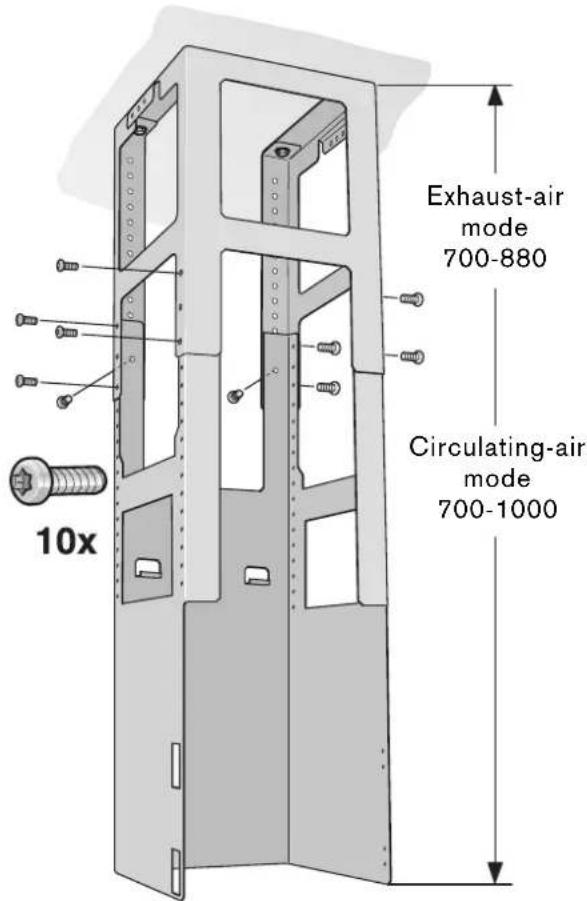
NOTE: The support frame can be aligned subsequently by loosening the fastening screws on the ceiling.
Installing the extractor hood
1 Hook the extractor hood from below into the support frame.
Do not trap the power cord!
2 Attach the extractor hood to the support frame with 2 securing screws.
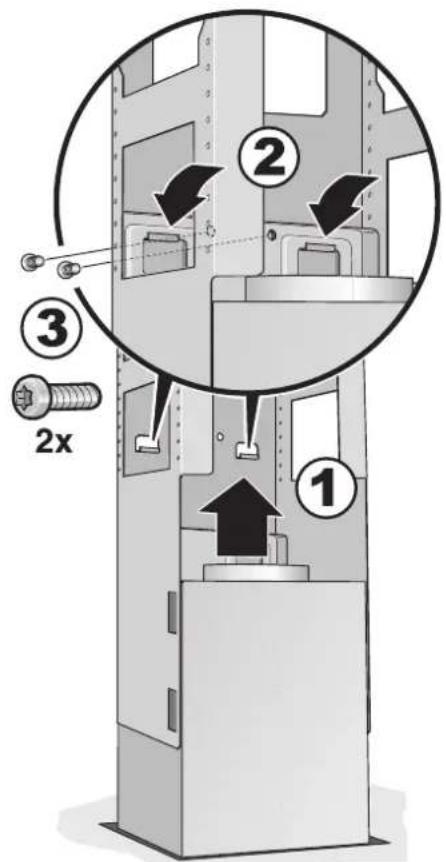
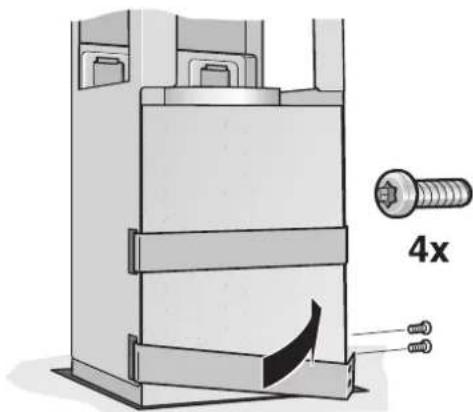
3 Hook in retaining clip and screw tight.
natural_image
Technical illustration of a mechanical assembly with a 4x magnified view of a bolt (no text or symbols present)4 Connect the pipes.
5 Connect the power supply.
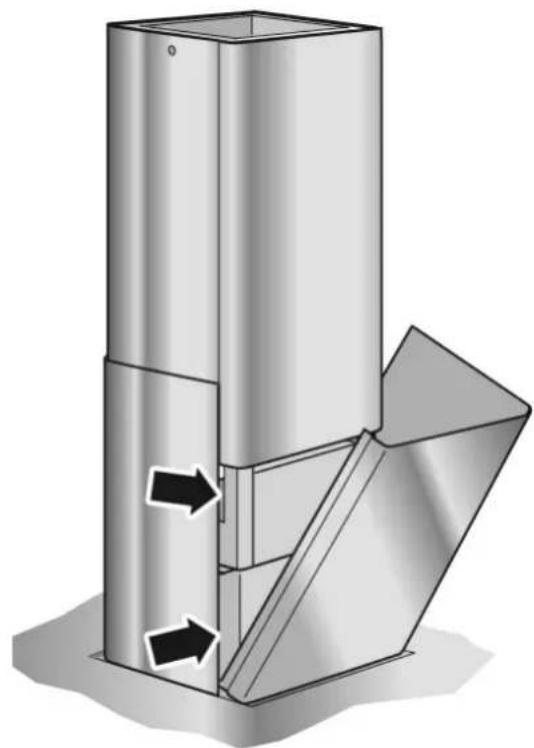
Installing the flue ducts
RISK OF INJURY
The insides of the flue ducts may have sharp edges. We recommend wearing protective gloves during installation.
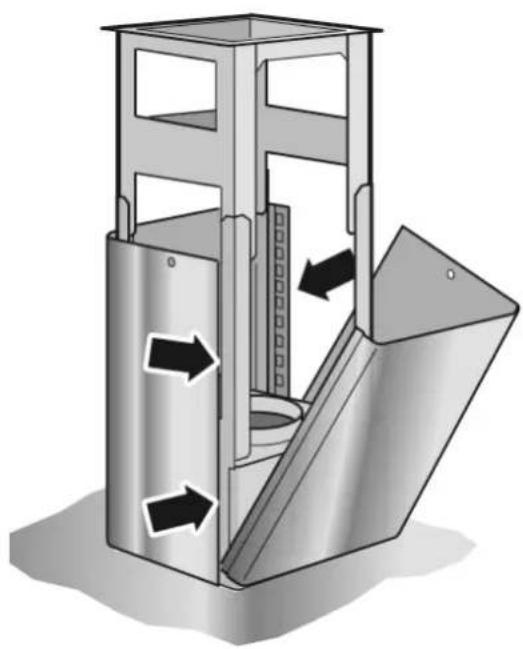
1 Separate the flue ducts. To do this, remove the adhesive tape.
2 Remove the protective film from both flue ducts.
3 Attach both parts of the upper flue to the extractor hood und push together.
NOTE: Protect the extractor hood from damage. Avoid scratching the sensitive surfaces.
natural_image
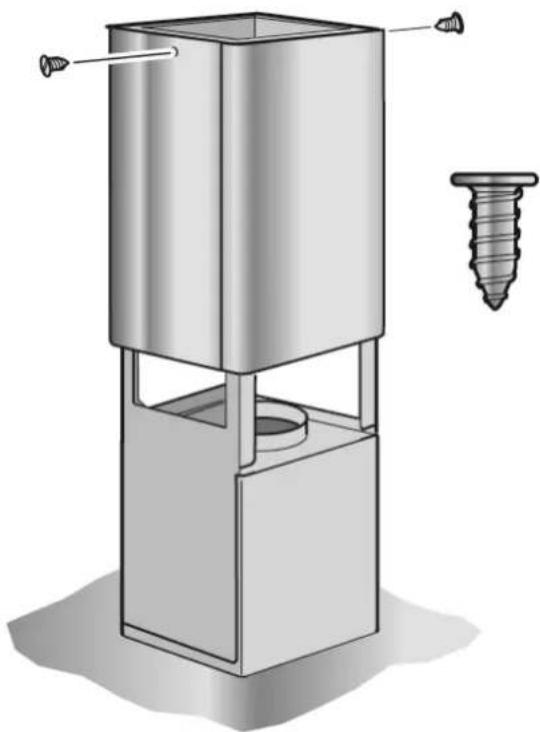
Diagram of a metal storage or lifting device with directional arrows indicating flow or movement (no text or symbols present)4 Push up the upper flue part and secure with 2 screws.
natural_image
Technical illustration of a mechanical press or lift device with a screw and cylindrical component (no text or symbols)5 Insert the two lower parts of the flue and push together.
natural_image
3D diagram of a mechanical component with directional arrows indicating flow or movement (no text or symbols)Tabel de matières
Mode d'emploi
natural_image
Diagram showing a checkmark over a circular icon next to an industrial process with airflow and heat transfer (no text or symbols)natural_image
Pure technical diagram showing a crosshair symbol on a mechanical base (no text or labels)RISQUE D'INCENDIE
natural_image
Simple line icon of a house with an arrow and crossed-out X symbol (no text or numbers)natural_image
Symbolic icon of a house with crossed doors and arrows, representing a hazard or safety symbol (no text present)Ventilation intensive
Ventilation intermittent:
natural_image
Illustration of hands using a computer to interact with a screen (no text or symbols visible)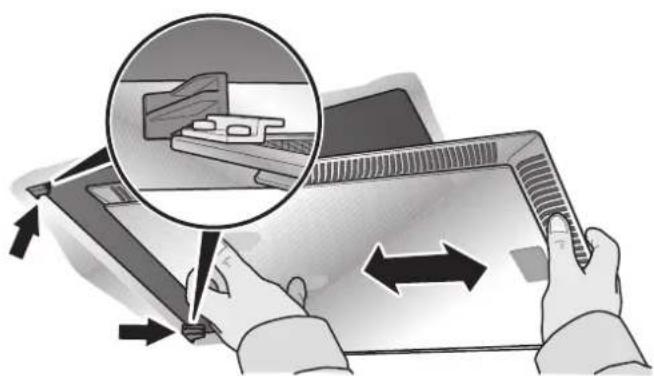
natural_image
Illustration of hands using a tablet device to interact with a magnified inset showing a mechanical component (no text or symbols present)natural_image
Illustration of a hand holding a tablet over a grid-patterned surface, with arrows indicating direction (no text or symbols)natural_image
Illustration of hands using a screwdriver to adjust a mechanical component (no text or symbols visible)natural_image
Illustration of hands holding a piece of bread next to a bowl (no text or symbols)natural_image
Hand holding a light bulb inside a ceiling fixture (no text or symbols visible)natural_image
Stack of three parallel cylindrical objects with curved surfaces (no text or symbols)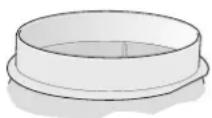
natural_image
Technical illustration of a mechanical assembly with labeled parts (no text or symbols present)natural_image
Technical illustration of a mechanical assembly with a 4x magnified detail showing a bolt and two screws (no text or symbols present)natural_image
Diagram of a metal storage or lifting device with directional arrows indicating flow or movement (no text or symbols present)natural_image
Technical illustration of a mechanical press or lift device with a screw and cylindrical component (no text or symbols)natural_image
3D diagram of a mechanical component with directional arrows indicating flow or movement (no text or symbols)Inhoudsopgave
Gebruiksaanwijzing
natural_image
Diagram showing a checkmark over a circular icon next to an industrial process diagram with pipes and a flame (no text or symbols)natural_image
Pure technical diagram showing a cylindrical component mounted on a base with a circular cross symbol overlay (no text or labels)BRANDGEVAAR
natural_image
Simple line icon showing a house with an arrow and a cross symbol inside, representing a home or utility (no text or numbers)natural_image
Symbolic icon of a shield with crossed arrows and a cross, representing protection or hazard (no text present)natural_image
Illustration of hands operating a computer monitor with a grid screen (no text or symbols visible)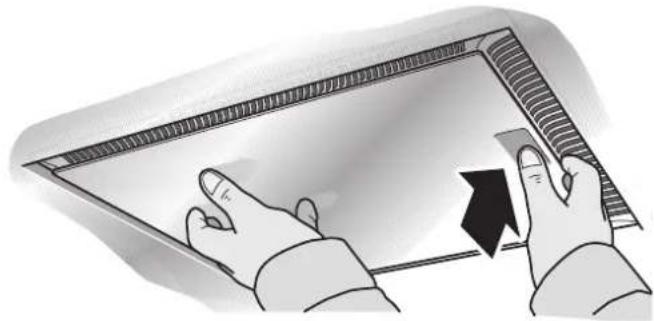
natural_image
Illustration of hands interacting with a curved electronic device (no text or symbols visible)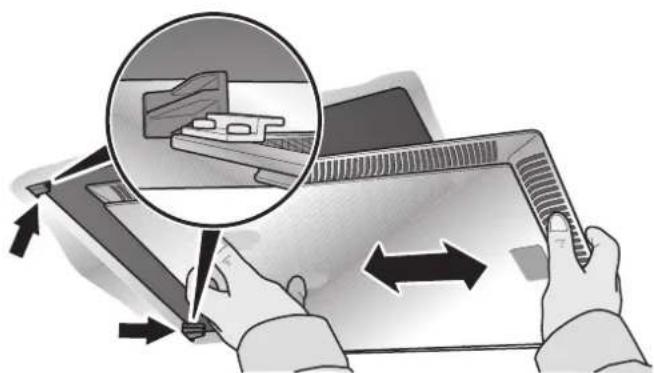
natural_image
Illustration of hands using a tablet device to interact with a laptop, showing a magnified view of the screen (no text or symbols present)natural_image
Illustration of a hand holding a rectangular object over a grid-patterned surface, with no visible text or symbols.natural_image
Illustration of hands using a screwdriver to adjust a mechanical component (no text or symbols visible)natural_image
Illustration of hands holding a small object with a tool, no text or symbols presentnatural_image
Illustration of two hands holding a rectangular object with arrows indicating direction (no text or symbols)natural_image
Hand inserting a bulb into a light bulb inside a ceiling fixture (no text or symbols visible)4 Breng de lampafscherming weer aan.
natural_image
Stack of three parallel cylindrical objects with curved surfaces (no text or symbols)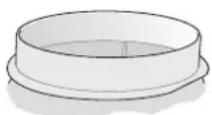
natural_image
Technical illustration of a metal bracket assembly with four views (4x), showing bolt, nut, and threaded components without any text or symbols.natural_image
Technical illustration of a mechanical assembly with a 4x magnified view of a bolt (no text or symbols present)natural_image
3D diagram of a metal enclosure with internal structure and directional arrows indicating flow or movement (no text or symbols)natural_image
Technical illustration of a mechanical press or lift device with a screw and cylindrical component (no text or symbols)natural_image
3D diagram of a mechanical component with directional arrows indicating flow or movement (no text or symbols)Indice
Istruzioni d'uso
and electronic equipment- WEEE).
natural_image
Diagram showing a checkmark over a circular icon next to an industrial process diagram with pipes, tanks, and a flame (no text or symbols)natural_image
Pure mechanical diagram showing a cylindrical component mounted on a base with a circular cross symbol (no text or labels)PERICOLO D'INCENDIO
natural_image
Simple line icon of a house with an arrow and a cross symbol inside, no text or labels present.natural_image
Symbolic icon of a shield with crossed arrows and a cross, representing protection or hazard (no text present)natural_image
Illustration of hands using a computer to interact with a screen (no text or symbols visible)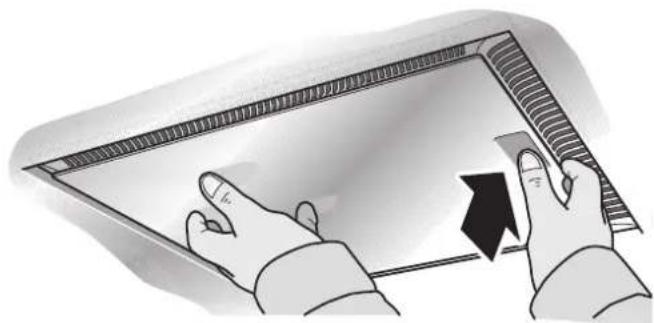
natural_image
Illustration of hands interacting with a digital display panel (no text or symbols visible)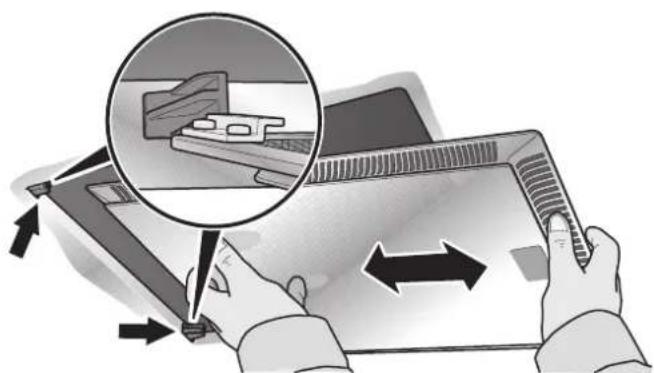
natural_image
Illustration of hands using a tablet device to interact with a laptop, showing a magnified view of the screen (no text or symbols present)natural_image
Illustration of a hand holding a tablet with a grid overlay, no text or symbols presentnatural_image
Illustration of hands using a tool to adjust or install a mechanical component (no text or symbols visible)natural_image
Illustration of hands holding a small object with a tool, partially covered by a metallic bowl (no text or symbols visible)natural_image
Hand holding a bulb inserted into a light bulb inside a rectangular enclosure (no text or symbols visible)natural_image
Stack of five parallel cylindrical objects with rounded ends, no text or symbols visible
natural_image
Technical diagram of a metal frame structure with bolt and nut assembly (no text or labels)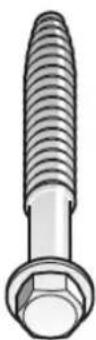
4x
natural_image
Technical illustration of a mechanical assembly with a 4x magnified view of a bolt (no text or symbols present)natural_image
Diagram of a mechanical device with internal components and directional arrows indicating flow or movement (no text or symbols)natural_image
Technical illustration of a mechanical press or lift device with a screw and cylindrical component (no text or symbols)natural_image
3D diagram of a mechanical component with directional arrows indicating flow or movement (no text or symbols)Contenido
natural_image
Diagram showing a checkmark over a circular icon next to an industrial process diagram with pipes, tanks, and a flame (no text or symbols)natural_image
Simple 3D diagram of a cylindrical object mounted on a base with a crosshair overlay (no text or symbols)⚠️ PELIGRO DE INCENDIO
natural_image
Simple line icon of a house with an arrow and a cross symbol inside, no text or labels present.natural_image
Symbolic icon of a shield with crossed arrows and a cross, representing protection or hazard (no text present)natural_image
Illustration of hands operating a computer monitor with a grid screen (no text or symbols visible)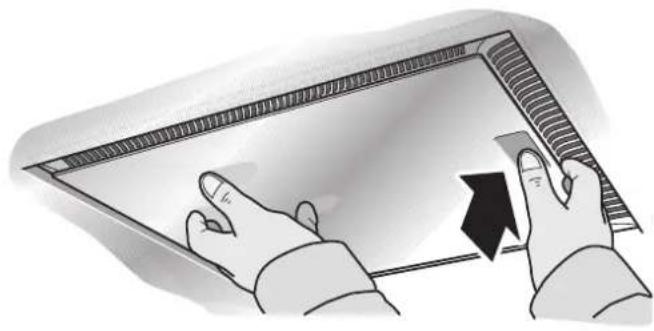
natural_image
Illustration of hands interacting with a digital display panel (no text or symbols visible)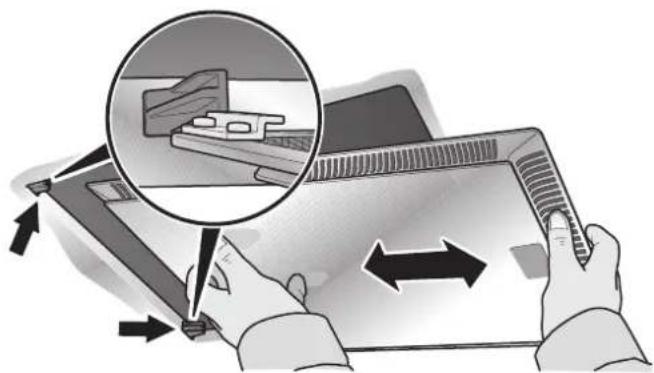
natural_image
Illustration of hands using a tablet device to interact with a laptop, showing a magnified view of the screen (no text or symbols present)natural_image
Illustration of a hand inserting a card into a grid notebook (no text or symbols visible)natural_image
Illustration of hands using a tool to adjust or install a mechanical component (no text or symbols visible)natural_image
Illustration of hands holding a small object with a pen, partially covered by a metallic bowl (no text or symbols visible)natural_image
Hand holding a bulb inserted into a ceiling fixture (no text or symbols visible)natural_image
Stack of three parallel cylindrical objects with curved surfaces (no text or symbols)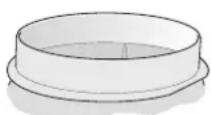
natural_image
Technical diagram of a metal frame structure with bolt and nut assembly (no text or labels)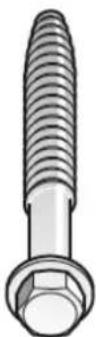
4x
natural_image
Technical illustration of a mechanical assembly with a 4x magnified view of a bolt (no text or symbols present)natural_image
3D diagram of a mechanical device with internal components and directional arrows indicating flow or movement (no text or symbols)natural_image
Technical illustration of a mechanical press or lift device with a screw and cylindrical component (no text or symbols)natural_image
3D diagram of a mechanical component with directional arrows indicating flow or movement (no text or symbols)Índice
natural_image
Diagram showing a checkmark over a building with airflow and heat transfer symbols (no text or labels)natural_image
Pure mechanical diagram showing a cylindrical component mounted on a base with a crosshair overlay (no text or symbols)⚠️ PERIGO DE INCÊNDIO
natural_image
Simple line icon of a house with an arrow and crossed door (no text or symbols)natural_image
Symbolic icon of a shield with crossed arrows and a cross, representing protection or hazard (no text present)natural_image
Illustration of hands operating a computer monitor with a grid screen (no text or symbols visible)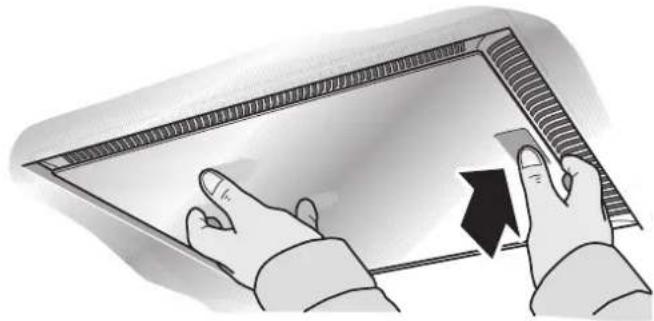
natural_image
Illustration of hands holding a rectangular object with a black arrow pointing to it (no text or symbols present)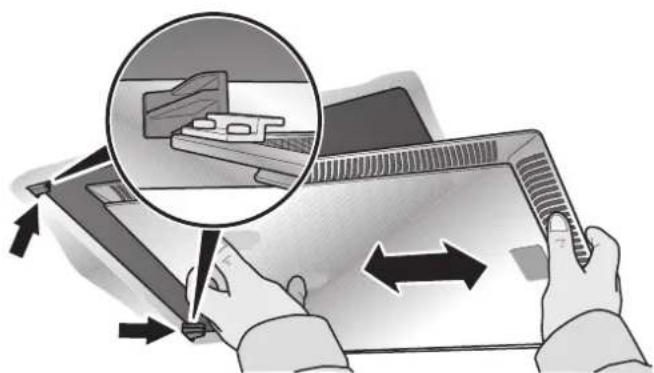
natural_image
Illustration of hands using a tablet device to interact with a laptop, showing a magnified view of the screen (no text or symbols present)natural_image
Illustration of a hand holding a tablet over a grid-patterned surface (no text or symbols)natural_image
Illustration of hands using a tool to adjust or install a mechanical component (no text or symbols visible)natural_image
Illustration of hands holding a small object with a metallic bowl in the background (no text or symbols)natural_image
Hand holding a light bulb inside a white ceiling fixture (no text or symbols visible)natural_image
Stack of parallel cylindrical objects with curved ends, no text or symbols visible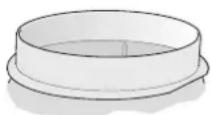
natural_image
Technical diagram of a metal frame structure with bolt and nut assembly (no text or labels)natural_image
Technical illustration of a mechanical assembly with a 4x magnified view of a bolt and screw (no text or symbols)natural_image
3D diagram of a metal enclosure with internal structure and directional arrows indicating flow or movement (no text or symbols)natural_image
Technical illustration of a mechanical device with a screw and cylindrical component (no text or symbols)natural_image
3D diagram of a mechanical component with directional arrows indicating flow or movement (no text or symbols)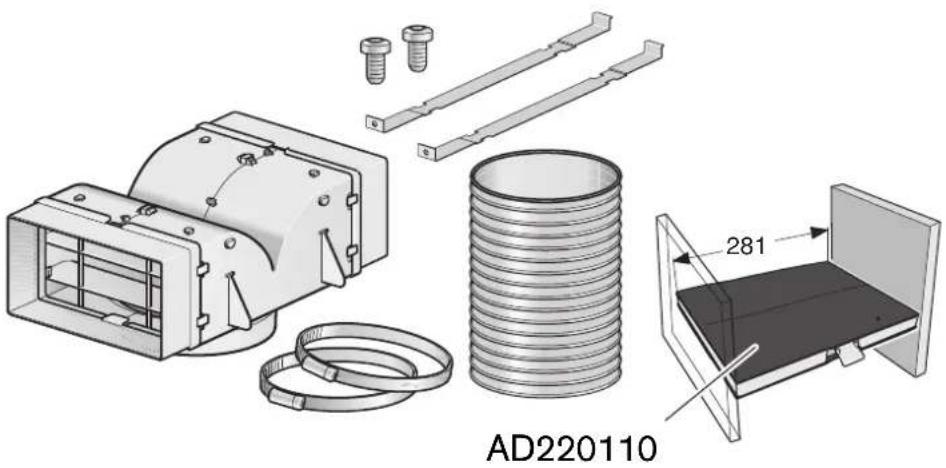 | AD220186 | |||
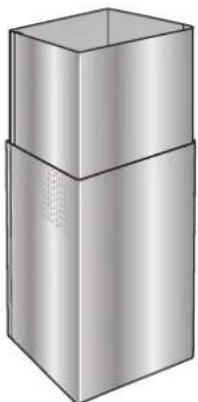 | AD220316 | AD22032 | 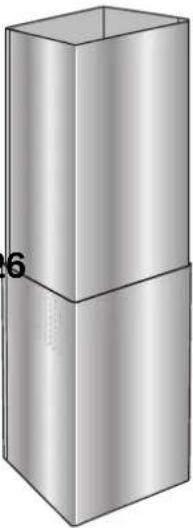 | |
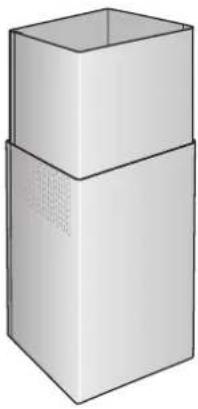 | AD221316 | AD22132 | 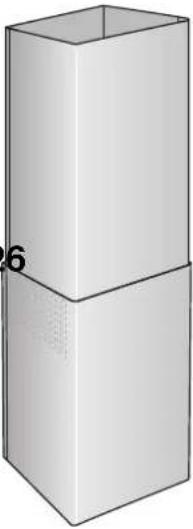 | |
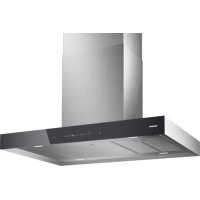
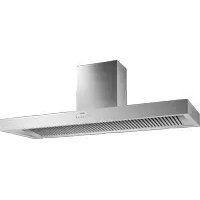
- BRANDGEFAHR
- Table of contents
- Operating instructions
- General Information 20
- Safety Instructions 21
- Operating modes 24
- Operating procedure 25
- Cleaning and care 27
- Changing the bulbs 29
- Installation instructions
- Information on protection of the environment
- Disposal of transport packaging
- RISK OF INJURY
- Disposal of the old appliance
- Before using the appliance for the first time
- Faults
- If an F appears in the display:
- If is not possible to operate the extractor hood:
- Intended use
- Technical safety
- Simultaneous operation of the extractor hood with a heating appliance which is dependent on ambient air
- RISK OF POISONING
- Special information for gas cookers
- RISK OF BURNS
- Proper use
- RISK OF FIRE
- Correct installation
- Operating modes
- Operating procedure
- Special functions
- Intensive time:
- Fan follow-on:
- Interval ventilation:
- Lighting:
- Saturation indicator: F
- Appliance surfaces
- Looking after the appliance
- Metal-mesh grease filters
- Cleaning the metal-mesh grease filters ...
- ... in the dishwasher
- ... by hand
- Removing and installing the grease
- filter
- Removing and installing the metal-mesh grease filters
- Activated carbon filter
- Installing and removing the activated carbon filters
- Changing the bulbs
- Changing the halogen bulbs
- Changing the filament bulbs
- Exhaust-air mode
- To ensure optimum performance, the extractor hood requires:
- Connecting pipes
- Connection of 150 mm ∅ exhaust air pipe (recommended size)
- Connection of 120 mm ∅ exhaust air pipe
- Electrical connection
- If a permanent connection is required
- Electrical specifications
- Length of the power cord: approx. 1.30 m.
- Installation
- RISK OF INJURY, DAMAGE TO PROPERTY
- Installing the upper support frame
- Installing the lower support frame
- Installing the extractor hood
- Installing the flue ducts
- Tabel de matières
- Mode d'emploi
- RISQUE D'INCENDIE
- Ventilation intensive
- Ventilation intermittent:
- Inhoudsopgave
- Gebruiksaanwijzing
- BRANDGEVAAR
- Indice
- Istruzioni d'uso
- PERICOLO D'INCENDIO
- Contenido
- ⚠️ PELIGRO DE INCENDIO
- Índice
- ⚠️ PERIGO DE INCÊNDIO
Brand : GAGGENAU
Model : AI220120
Category : Range hood