MBZE45NFBAR - Washing machine Ariston Thermo - Free user manual and instructions
Find the device manual for free MBZE45NFBAR Ariston Thermo in PDF.



| Product type | Combined refrigerator-freezer |
| Brand | Ariston Thermo |
| Model | MBZE45NFBAR |
| Power supply | 220-240 V, 150 W |
| Climate class | Not specified |
| Cooling system | No Frost |
| Main functions | Super Cool, Super Freeze, Eco, Ice Party, Ever Fresh, Integrated bar |
| Refrigerator temperature range | +2°C to +8°C |
| Freezer temperature range | -18°C to -26°C |
| Freezing capacity | 4 kg/24h (maximum) |
| Autonomy in case of power failure | 9-14 hours |
| Interior lighting | Bulb max 10 W |
| Odor filter | Activated carbon, replacement recommended 6-8 months after activation |
| Maintenance and cleaning | Warm water and baking soda, do not use solvents. Clean the Ever Fresh suction nozzle with a dry cloth |
| Included accessories | Ever Fresh boxes, ice tray, Ice Party cooler, odor filter |
| Safety | Motor protection, open door alarm, Ever Fresh safety stop |
| Spare parts and repairability | Contact authorized after-sales service. Use only original parts |
| Country of origin | Not specified |
Frequently Asked Questions - MBZE45NFBAR Ariston Thermo
User questions about MBZE45NFBAR Ariston Thermo
0 question about this device. Answer the ones you know or ask your own.
Ask a new question about this device
Download the instructions for your Washing machine in PDF format for free! Find your manual MBZE45NFBAR - Ariston Thermo and take your electronic device back in hand. On this page are published all the documents necessary for the use of your device. MBZE45NFBAR by Ariston Thermo.
USER MANUAL MBZE45NFBAR Ariston Thermo
Positioning and connection
Bar compartment
Description of the appliance, 17-18
Control panel
Overall view
Accessories, 19
Refrigerator compartment
Freezer compartment
Display, 20-21
Display description
Using the display
Start-up and use, 22-24
Starting the appliance
Chiller system
Using the refrigerator to its full potential
Using the freezer to its full potential
Ever Fresh
Maintenance and care, 25
Switching the appliance off
Cleaning the appliance
Ever Fresh
Avoiding mould and unpleasant odours
Replacing the light bulb
Changing the odour filter
Precautions and tips, 26
General safety
Disposal
Respecting and conserving the environment
Troubleshooting, 27
Assistance, 28
GB
GB
Before operating your new appliance please read these instructions carefully. They contain important information for safe use, installation and care of the appliance.
! Please keep these operating instructions for future reference. Pass them on to possible new owners of the appliance.
Positioning and connection
Positioning
- Place the appliance in a well-ventilated, dry room.
- Do not obstruct the rear fan grills. The compressor and condenser give off heat and require good ventilation in order to operate correctly and save energy.
- Leave a space of at least 10cm between the top part of the appliance and any furniture above it, and at least 5cm between the sides and any furniture/side walls.
- Ensure the appliance is kept well away from any sources of heat (direct sunlight, electric stove, etc.).
Levelling
- Install the appliance on a level and sturdy floor.
- If the floor is not perfectly horizontal, adjust the refrigerator by tightening or loosening the front feet.
Electrical connections
After transportation of the appliance, carefully place it in an upright position and wait at least 3 hours before connecting it to the electricity mains. Before inserting the plug into the electrical socket ensure the following:
- The appliance is earthed and the plug is compliant with the law.
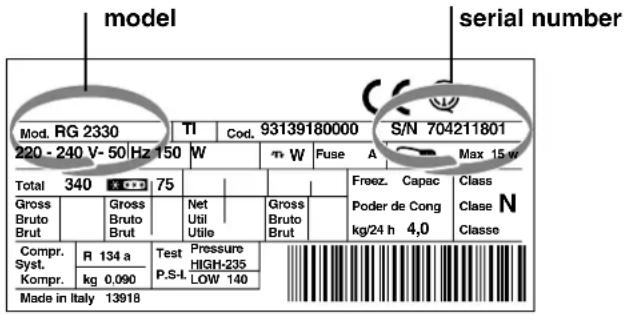
- The socket can withstand the maximum power of the appliance (this is indicated on the data plate in the bottom left section of the refrigerator compartment), for example 150 W).
- The voltage is in the range of values indicated on the data plate located on the bottom left section (e.g. 220-240V).
- The socket is compatible with the plug of the appliance. If the socket is incompatible with the plug, ask an authorised technician to replace it (see Assistance). Do not use extension cords or multiple sockets.
! Once the appliance has been installed, the power supply cable and the electrical socket must be easily accessible.
! The cable must not be bent or compressed.
! The cable must be checked regularly and replaced by authorised technicians only (see Assistance).
! The manufacturer declines any liability should these safety measures not be observed.
Bar compartment
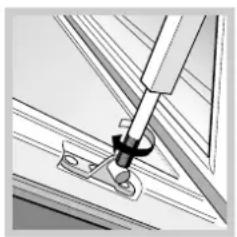
The stiffness of the door opening/closing movement for the bar compartment may be adjusted. When you are in front of the appliance, turn the two lateral rods to the left if you wish to stiffen the movement, or to the right if you wish to loosen the movement.
! The two brackets must be adjusted to the same stiffness level. Turn each rod the same number of times, in the same direction.
Control panel
GB
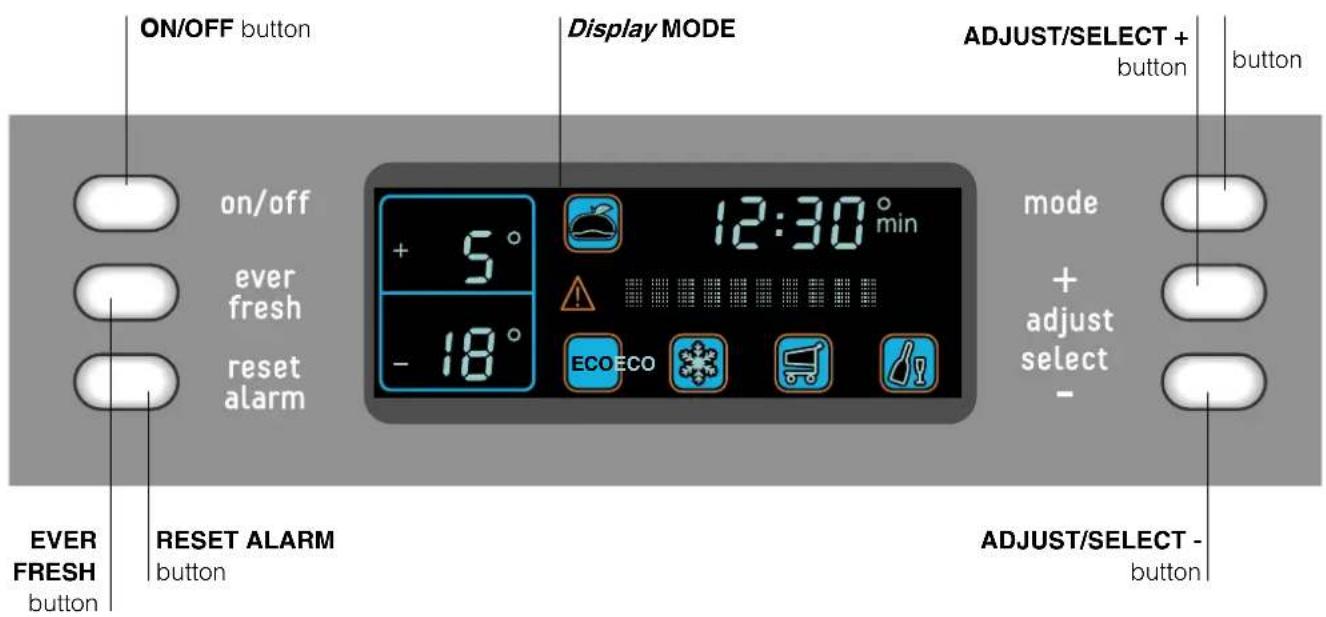
ON/OFF button switches the whole appliance on and off (refrigerator compartment and freezer compartment). Press and hold for at least 2 seconds. See Start-up and use and Maintenance and care.
- EVER FRESH button activates and deactivates the EVER FRESH function.
- RESET ALARM button switches off the sound alarm (press once) and deletes the alarm messages from the scrolling text on the display (press a second time). See Troubleshooting.
- MODE button selects the various display settings and functions. See Display and Start-up and use.
- ADJUST/SELECT + button activates the functions and modifies the temperature, time, date and language settings. See Display and Start-up and use.
- ADJUST/SELECT - button deactivates the functions and modifies the temperature, time, date and language settings. See Display and Start-up and use.
- Display programmes the appliance and controls its operation. See Display.
Description of the appliance
GB
Overall view
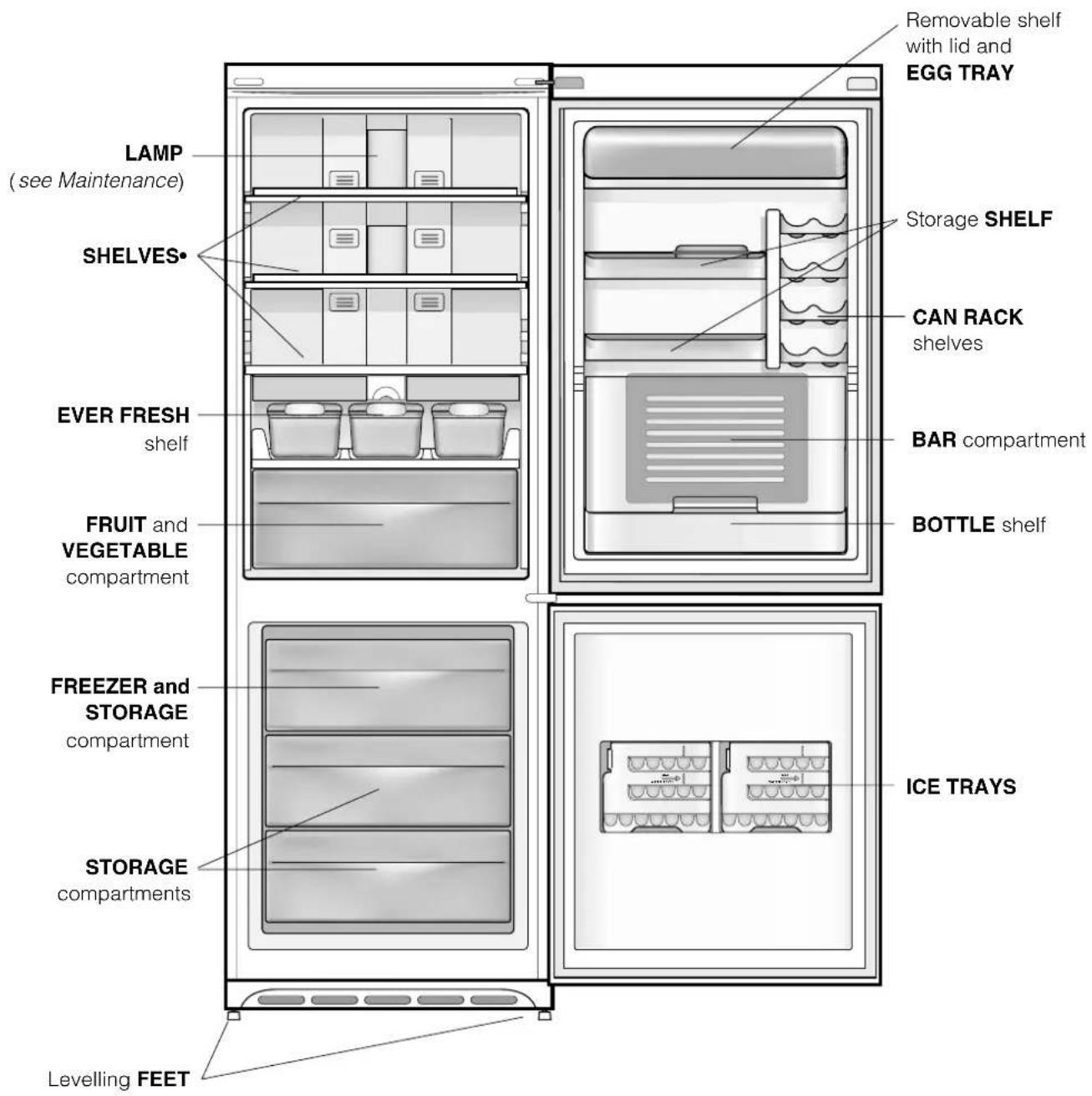
Number and/or position may vary.
Refrigerator compartment
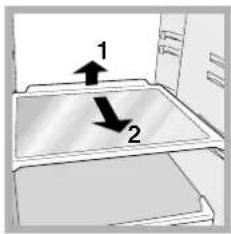
SHELVES: the shelves are removable and their height may be adjusted thanks to special rails (see diagram), allowing easy storage of large containers and bulky food. The height may be adjusted without removing the shelf completely.
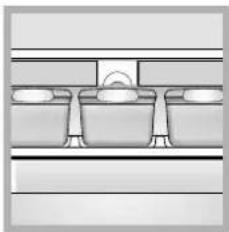
EVER FRESH: shelf dedicated to storing food in vacuum-packed containers. Food keeps for longer when stored in the containers provided.
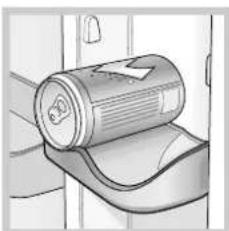
CAN RACK shelf: stores cans horizontally (see diagram).
Yoghurt, butter or general containers may also be stored here.
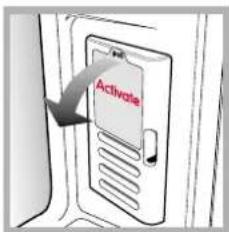
ODOUR FILTER*: some models are fitted with a new active carbon odour filter, which ensures better air quality inside the refrigerator. The filter is located on the bottom right-hand side, inside the ventilation opening. To activate it, remove the sticker from the opening (see diagram).
BAR COMPARTMENT:
Drinks stay cold and are easy to reach. The compartment is designed to enable you to obtain bottles without having to open the door of the refrigerator. It also provides a handy surface when the door is open (maximum load 10 kg). The bottle shelf cover ensures the temperature inside the refrigerator does not rise too quickly.
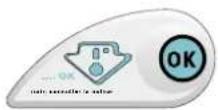
TEMPERATURE Indicator light: identifies the coldest area in the refrigerator.
- Check that OK appears clearly on the indicator light (see diagram).
Number and/or position may vary.
* Available only in certain models.
- If the indicator light is completely black it means that the temperature is too high: set the temperature of the refrigerator compartment to a lower figure (see Using the display) and wait approximately 10 hours for the air inside the compartment to reach this temperature.
- Check the indicator light again: if necessary, readjust it following the above process. The indicator may also be completely black when large quantities of food are placed inside or when the door is opened repeatedly. If this is the case, set the temperature again (see Using the display).
! Any further adjustments to the temperature should be carried out at 10 hour intervals, as this is the amount of time needed for the temperature inside the refrigerator to stabilise.
Freezer compartment
ICE TRAYS: for making ice.
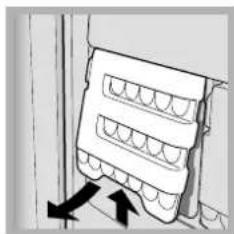
- Take out the tray by pushing it up and then outwards (see diagram).
Check that the tray is completely empty and fill it with water using the opening provided.
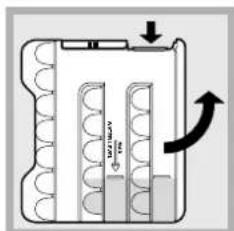
- Take care not to exceed the level indicated (MAX WATER LEVEL). Excess water prevents the ice cubes from being dispensed (if this happens, wait for the ice to melt and empty the tray).
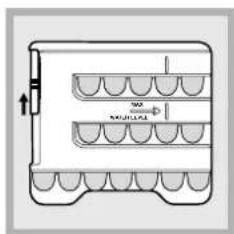
- Turn the tray 90^ : the water fills up the moulds (see diagram). Close the opening with the lid and replace. When the ice has formed (minimum time approximately 8 hours), knock the tray against a hard surface.
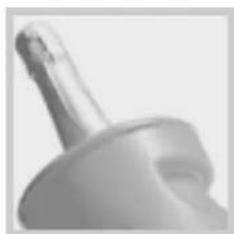
ICE PARTY: ensures bottles of sparkling wine or champagne reach the right temperature. Place the bottle in the bucket provided inside the FREEZER and STORAGE compartment. The bucket may be used to serve the bottle and keeps it cool outside the appliance.
GB
GB
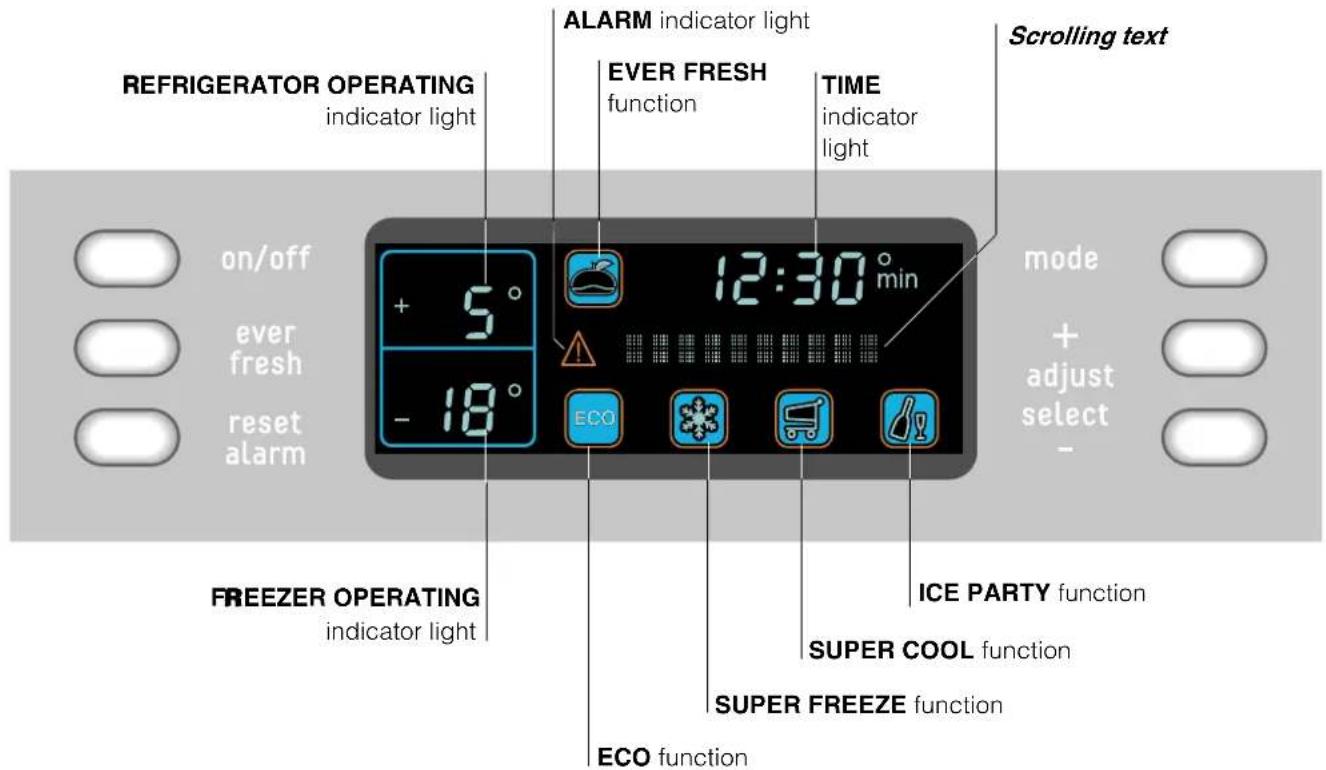
Display description
- REFRIGERATOR OPERATING indicator light: displays the set temperature (static digit) or the temperature that is being set (flashing digit) for the refrigerator compartment. OFF indicates that the compartment is off.
- ALARM indicator light: when this switches on a critical situation is indicated (door open, high temperature). See Troubleshooting.
- ECO function: displays the function status. Automatically sets the optimal temperature for food storage while minimizing energy consumption.
- TIME indicator light: displays the time. This is also used to set the date and time.
- Scrolling text displays information on the status of the appliance and on how to use the display. It is also used to set the language.
-
FREEZER OPERATING indicator light: displays the set temperature (static digit) or the temperature that is being set (flashing digit) for the freezer compartment. OFF indicates that the compartment is off.
-
SUPER COOL function: displays the function status. This is the rapid cooling function of the refrigerator compartment. It deactivates automatically. See Start-up and use.
- SUPER FREEZE function: displays the function status. This is the rapid cooling function of the freezer compartment. It deactivates automatically. See Start-up and use.
- EVER FRESH function: displays the function status. The central position of the special shelf enables air to be sucked out of the containers provided.
ICE PARTY function: displays the function status. It reduces the temperature of the freezer for the period of time required to cool a bottle. A buzzer sounds when the correct temperature has been reached. See Accessories.
! The function symbols light up in various ways to indicate their status (deactivated, selected or activated).
Using the display
Setting the temperature
When the appliance is switched on, the standard storage temperatures are automatically set:
- +5^ C for the refrigerator compartment
- 18^ C for the freezer compartment.
The temperatures may be set in the following ranges:
- between +2^ and +8^ for the refrigerator compartment
- between -18°C and -26°C for the freezer compartment
To set the temperature:
- Press the MODE button until the value flashes on the refrigerator or freezer compartment display.
- To increase the temperature, press the ADJUST/SELECT+ button.
To decrease the temperature, press the ADJUST/SELECT- button.
Each time the button is pressed, the value increases or decreases by 1^ .
3. Confirm the choice by pressing the MODE button within ten seconds: the value will stop flashing: If the choice is not confirmed, the previous set temperature will appear on the display.
! The ECO function reduces the possible adjustments: from +4^ to +6^ for the refrigerator and from -18^ to -20^ for the freezer.
Function status

function activated
(green symbol with blue inside lights up)

function selected
(green symbol with red border lights up)

function deactivated
(green symbol only lights up)
Activating and deactivating the SUPER COOL, ECO, SUPER FREEZE, ICE PARTY functions.
- Press the MODE button until the desired function is selected.
- To activate it, press the ADJUST/SELECT + button.
To deactivate it, press the ADJUST/SELECT - button. - Confirm the choice by pressing the MODE button within ten seconds. If the choice is not confirmed, the previously set function will appear on the display. Once the operation has finished, the red border switches off.
If the function has been activated: the green symbol with blue inside lights up. If the function has been deactivated: only the green symbol lights up.
Setting the date and time
The settings are in series and it is not possible to adjust the date if the time has not been set before
- Press the MODE button repeatedly until SET TIME [+ / - ] appears on the scrolling text.
- To scroll forward one hour press the ADJUST/ SELECT+ button. To scroll back one hour press the ADJUST/SELECT- button.
- Confirm the choice by pressing the MODE button within ten seconds. If the choice is not confirmed, the previously set time will appear on the display.
Once the hours have been set, the minutes, days, months and years can be set by following steps 1-3.
Setting the language
- Press the MODE button repeatedly until the language setting screen appears on the scrolling text display.
- To scroll forward, press the ADJUST/SELECT + button.
To scroll back, press the ADJUST/SELECT - button.
3. Confirm the choice by pressing the MODE button within ten seconds. If the choice is not confirmed, the previously set language will appear on the display.
! The first time the appliance is switched on, the language setting request screen appears automatically on the display: follow the above procedure.
Switching off the audio and visual alarms
Press the RESET ALARM button: by pressing it once, the audio alarms are switched off; by pressing it a second time, the alarm messages are deleted from the scrolling text on the display.
! The open door alarm stops automatically when the door is closed. (See Troubleshooting).
! If DEMO MODE appears on the display, the appliance is in exhibition mode, i.e. it does not cool despite the fact that the display and the internal lamp are on. To exit this mode, press the MODE, ADJUST/ SELECT+ and ADJUST/SELECT- buttons and hold for at least three seconds.
GB
Starting the appliance
! Before starting the appliance, follow the installation instructions (see Installation).
! Before connecting the appliance, clean the compartments and accessories well with lukewarm water and bicarbonate of soda.
! The appliance comes with a motor protection control system which means that the compressor starts up approximately 8 minutes after being switched on. The compressor also starts each time the power supply is cut off, whether voluntarily or involuntarily (power cut/ blackout).
Insert the plug into the electrical socket and, if OFF appears on both indicator displays (refrigerator and freezer), switch the appliance on by holding the ON/OFF button down for at least two seconds:
- the refrigerator will be set at a temperature of +5^ - the freezer will be set at a temperature of -18^ .
To cool the two compartments more rapidly, activate the SUPER COOL and SUPER FREEZE functions (see Display).
Chiller system
The appliance is fitted with the following chiller system:
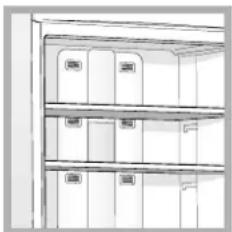
No Frost
This system can be recognised by the aeration cells located on the back walls of each compartment.
The No Frost system circulates cold air continuously to collect humidity and prevent ice and frost formation. The system
maintains an optimal humidity level in the compartment, preserving the original quality of the food, preventing the food from sticking together and making defrosting a thing of the past.
! Do not block the aeration cells by placing food or containers in direct contact with the refrigerating back panel.
! Close bottles and wrap food tightly.
Using the refrigerator to its full potential
- Adjust the temperature using the display.
- Activate the SUPER COOL function to lower the temperature quickly, for example, when you place a large number of new food items inside a fridge and the internal temperature rises slightly. This function quickly cools the groceries by temporarily reducing the temperature until it reaches the ideal level.
- Place only cold or lukewarm foods in the compartment, never hot foods (see Precautions and tips).
- Remember that cooked foods do not last longer than raw foods.
- Do not store liquids in open containers: they will increase the level of humidity in the refrigerator and cause condensation to form.
Food hygiene
- After buying food, throw away any external paper or cardboard packaging that could introduce dirt or bacteria into the refrigerator.
- Protect foods (especially easily perishable substances and food that gives off a strong odour) by ensuring they do not come into contact with each other. Not only does this stop germs and bacteria from spreading, but it also prevents certain odours from lingering in the refrigerator.
- Position foods so that air may circulate freely between them.
- Keep the inside of the refrigerator clean but do not use oxidising or abrasive agents.
- Throw away any food that has exceeded its use-by date.
- To ensure they keep well, foods that spoil easily (cheese, raw fish, meat etc...) should be placed in the coldest part of the refrigerator, above the vegetable compartment.
Using the freezer to its full potential
- Adjust the temperature using the display.
- When you wish to freeze a lot of food at once, activate the SUPER FREEZE function. The function is automatically disabled after 24 hours or once the optimal temperature has been reached.
- Do not refreeze food that has been defrosted or that is defrosting; this food must be eaten within 24 hours or may be frozen again after it has been cooked.
- Fresh food that needs to be frozen must not come into contact with food that has already been defrosted. Fresh food must be packed in the top FREEZER compartment where the temperature drops below -18^ and guarantees rapid freezing.
- Do not place glass bottles containing liquids or bottles that are corked or hermetically sealed in the freezer as they may break.
- The maximum quantity of food that may be frozen each day is indicated on the plate containing the technical properties located on the bottom left side of the refrigerator compartment (for example: Kg/24h 4).
! Do not open the door during the freezing process.
! Do not open the freezer door if there is a power cut or malfunction. This will help maintain the temperature inside the freezer, ensuring that foods are conserved for at least 9 -14 hours.
Ever Fresh
The absence of air inside the containers ensures that food is preserved for longer periods of time while maintaining its original appearance, taste and nutritional characteristics.
Food
In
normal
conditions
With
EVER
FRESH*
General cooked dish 2 days 10 days
Ready-made rice or pasta dish 2 days 10 days
Fresh fish 2-3 days 4-5 days
Fresh raw meat 3 days 9 days
Hard cheese 15 days 60 days
Raw vegetables 5 days 21 days
Fresh fruit 10 days 21 days
Dry biscuits 180 days 365 days
Pastries with cream/custard 2 days 10 days
Other desserts/pastries 5 days 20 day
- The above table is indicative and refers to food storage in the refrigerator at temperatures ranging between 3^ and 5^ . The length of time food lasts for will, however, depend on the initial freshness of the products, preparation and storage methods, and correct use of the Ever Fresh function.
The food's tendency to spoil and use-by date must always be borne in mind when using the Ever Fresh food storage system. This method of storing food does not change any of the characteristics of the food.
! Use only the containers that come with the product to store food in the Ever Fresh system. Do not use any other type of container.
Ever Fresh system
The Ever Fresh system is activated and deactivated by means of a button on the refrigerator shelf, an external button on the display and a knob on the cover of each container.
! There is a pump in the centre of the Ever Fresh shelf which sucks the air out of the containers.
Activating and deactivating Ever Fresh
- Fill the container. Make sure that the food inside leaves room for the container to be closed properly.
- Put the lid on the container.
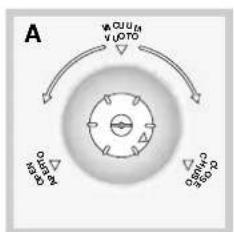
- Close the handles on either side of the container and turn the knob on the lid of the container all the way to the CLOSE position. Then turn the knob anticlockwise to the VACUUM position (see figure A).
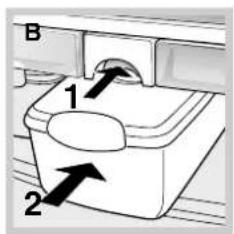
- Press the button on the shelf and place the container in the central position (see figure B).
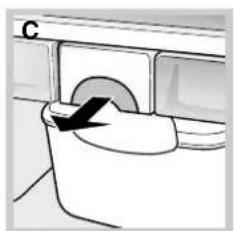
- Lock the container into position by pulling the button on the shelf (see figure C).
- Activate the Ever Fresh function by pressing the relevant button on the external display (the Ever Fresh icon will light up).
A slight noise can be heard while the Ever Fresh system is in operation.
GB
- Wait for the signal that the operation has finished (the Ever Fresh icon will switch off).
- Unlock the container from its position by pressing the button on the shelf.
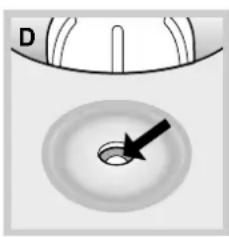
- Take it out of the refrigerator and turn the knob clockwise to the CLOSE position to avoid accidental opening (see figure A). The absence of air inside the container is indicated by the valve at the bottom (see figure D).
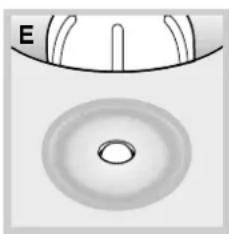
- To open the container, turn the knob anticlockwise to the OPEN position (see figure A). This will allow air to enter the container and make it easy to open. The valve will move upwards as air enters the container (see figure E).
! The lid of the container is provided with a circular valve. When the valve is low (figure D) there is no air inside the container. When the valve is high (figure E) air is present inside the container.
! If, after you have created a vacuum (instructions 1-9), the valve moves upward (see figure E ) within three days, check the lid has been put on the container properly and/or that the container is intact. Check the storage status of the food before repeating the vacuum storage operation.
! The Ever Fresh function is equipped with a safety device that switches off the pump in case of malfunction (if the container is missing or incorrectly positioned, for example). If the safety device is activated, the RESET ALARM button must be pressed twice to restore normal operation.
Using Ever Fresh to its full potential
The following information is a guide on how to get the best from the Ever Fresh system and the food it stores.
Ever Fresh containers
- The maximum fill level marked on the container must be respected when storing liquids of any kind. Vacuuming actual liquid from the container may damage the Ever Fresh pump.
- Repeated opening of the vacuumed containers may disturb the storage conditions of the food inside.
- Before using the system, make sure there is no visible damage on any part of the container.
- The container valve has a built-in security system. If, after you have created a vacuum, the valve moves upward within three days, check the lid has been put on the container properly and/or that the container is intact. Check the storage status of the food before repeating the vacuum storage operation. See Activating and deactivating Ever Fresh.
- The containers were designed to come into direct contact with food.
- Do not use the containers for any type of cooking (in the microwave or oven, on an electric plate, over a flame, etc.).
- Do not put the containers in the freezer.
- Do not clean the lids in a dishwasher.
Vacuum storage
- Pre-packed foods stored using the vacuum system must still be consumed before the use-by date.
- Repeatedly storing these vacuum-packed foods does not change their natural tendency to spoil.
- Do not store defrosted foods using the vacuum system unless they have been cooked already.
- Stored food should be prepared while fresh (chopped, sliced, peeled, cooked) and should be in perfect condition.
- Perishable foods stored using the vacuum system must still be stored inside the refrigerator.
Cooked foods must be left to cool before being stored using the vacuum system.
Switching the appliance off
During cleaning and maintenance it is necessary to disconnect the appliance from the electricity supply:
- Hold the ON/OFF button down for more than two seconds until OFF appears on both indicator displays (refrigerator and freezer).
- Pull the plug out of the socket.
If this procedure is not followed, the alarm may sound. This alarm does not indicate a malfunction. To restore normal operation, hold the ON/OFF button down for more than two seconds. To disconnect the appliance, follow points 1 and 2 above.
Cleaning the appliance
- The external and internal parts and the rubber seals may be cleaned using a sponge that has been soaked in lukewarm water and bicarbonate of soda or neutral soap. Do not use solvents, abrasive products, bleach or ammonia.
- The removable accessories may be soaked in warm soapy water or dishwashing liquid. Rinse and dry them carefully.
- The back of the appliance may collect dust. This can be removed by carefully using the hose of a vacuum cleaner set on medium power. The appliance must be switched off and the plug disconnected from the electricity mains before it is cleaned.
Ever Fresh
- Use a clean dry cloth to clean the opening of the vacuum system in the centre of the Ever Fresh shelf. Do not use water or solvents.
- The opening in the centre of the Ever Fresh shelf should not come into contact with water or any other liquids.
- Wash and dry the containers before using them.
- Do not clean the lids in a dishwasher.
- Before closing the containers make sure that the edges are clean. Traces of dirt may affect the sealing process and consequently the length of time food may be stored.
- If the knob on the cover needs to be cleaned, turn it anticlockwise until it comes off and wash it using water and neutral detergent. After drying it thoroughly, screw it back on.
- If you wish to take the Ever Fresh shelf out and clean it, you must first disconnect the tube at the back of the shelf. Make sure it is reattached properly in order to avoid blockages and system malfunctions. The Ever Fresh shelf should not come into contact with water or other liquids as these may damage the system.
Avoiding mould and unpleasant odours
- The appliance is manufactured with hygienic, odour free materials. Food should be wrapped well and containers closed properly in order to maintain this hygiene. This will also prevent the formation of stains.
If you wish to switch the appliance off for an extended period of time, clean the inside and leave the doors open.
Replacing the light bulb
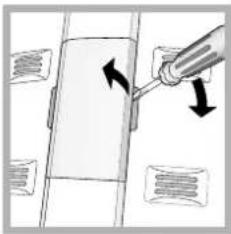
To replace the light bulb in the refrigerator compartment, disconnect the plug from the electricity mains.
Access the light bulb as shown (see diagram) and replace it with a similar light bulb, the power of which should not exceed 10 W.
Changing the odour filter
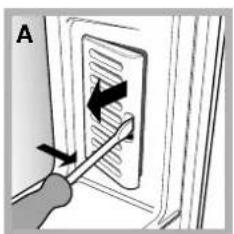
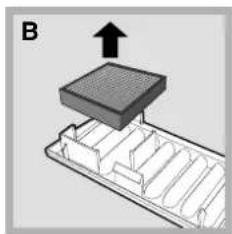
The filter should be replaced approximately 6-8 months after it has been activated. This period may vary depending on the type of food stored inside the refrigerator. For information on where a replacement filter may be purchased, contact Assistance (see Assistance). To replace the filter, follow the instructions (see diagrams A and B).
GB
The appliance was designed and manufactured in compliance with international safety standards. The following warnings are provided for safety reasons and must be read carefully.
This appliance complies with the following European Community Directives:
- 73/23/EEC dated 19/02/73 (Low Voltage) and subsequent amendments;
-89/336/EEC dated 03.05.89 (Electromagnetic Compatibility) and subsequent amendments.
General safety
- The appliance was designed for domestic use inside the home and is not intended for commercial or industrial use.
- The appliance must be used by adults only to store and freeze food products according to the instructions in this manual.
- The appliance must not be installed outdoors, even in covered areas. It is extremely dangerous to leave the appliance exposed to rain and storms.
- Do not touch the appliance when barefoot or with wet or damp hands and feet.
- Do not touch the internal cooling elements: this could cause skin abrasions or frost/freezer burns.
- When unplugging the appliance always pull the plug from the mains socket, do not pull on the cable.
- Always switch the appliance off and disconnect it from the electrical supply before cleaning it or carrying out maintenance work. It is NOT sufficient to hold the ON/OFF button down for more than two seconds to eliminate all electrical contact.
- In case of malfunction, under no circumstances should you attempt to repair the appliance yourself. Repairs carried out by inexperienced persons may cause injury or further malfunctioning of the appliance.
- Do not use devices or tools inside the compartments other than the special scraper provided.
- Do not put ice cubes taken directly from the freezer into your mouth.
- Do not allow children to tamper with the controls or play with the appliance. Under no circumstances should they be allowed to sit on the bins or to hang from the door.
- Keep packaging material out of reach of children.
Disposal
- Observe local environmental standards when disposing of packaging material as some of this material may be recycled.
- Observe existing legislation and make use of the services provided by local authorities, ensuring that the pipes are not damaged.
Refrigerants such as isobutane and cyclopentane are located in the cooling zones and the isolation system of the refrigerator and freezer.
- Make the appliance unusable by cutting off the cable and removing any door catches before disposal.
Respecting and conserving the environment
- Install the appliance in a cool, well-ventilated room. Ensure that it is protected from direct sunlight and do not place it near sources of heat.
- Try to avoid keeping the door open for long periods. A significant amount of energy is used every time the door is opened.
- Do not over-fill the appliance: cold air must circulate freely for food to be preserved properly. If air circulation is impeded, the compressor will work continuously.
- Do not place hot food in the refrigerator. The internal temperature will increase, forcing the compressor to work harder and consume more energy.
- Regularly check the door seals and wipe clean to ensure they are free of debris and to prevent cold air from escaping (see Maintenance).
If the appliance does not work, before calling for Assistance (see Assistance), check for a solution from the following list.
Malfunctions:
Possible causes / Solutions:
The display is off.
- The plug has not been inserted into the electrical socket, or not far enough to make contact, or there is no power in the house.
The motor does not start.
- The appliance is equipped with a motor protection control system (See Start-up and use).
The display is on but it is dim.
- Pull the plug out and check it before putting it back in the socket.
The alarm sounds and the lamp in the refrigerator compartment flashes.
- The refrigerator door has been open for more than two minutes. The buzzer stops when the door is closed or when the RESET ALARM button is pressed. It could also be that the correct switching-off procedure was not followed (see Maintenance).
The alarm sounds and a message appears on the scrolling text of the display.
The temperature of the freezer is too high. The freezer will maintain a temperature of around 0^ so that the food will not refreeze, allowing you to eat it within 24 hours or to refreeze it after it has been cooked.
The alarm sounds and a message appears on the scrolling text of the display.
- The temperature of the freezer is dangerously high: the food inside must not be eaten. The freezer will return to a temperature of -18^ . To switch off the buzzer, press the RESET ALARM button. Press again to delete the message on the display and restore normal operation.
The alarm icon flashes, the Ever Fresh icon switches off and a message appears on the display.
- The Ever Fresh safety lock has intervened during prolonged use of the vacuum pump. To restore normal operation, check the ever Fresh system and press the Reset Alarm button twice (see Display).
The refrigerator and the freezer do not cool well.
- Make sure that the tube at the back of the Ever Fresh shelf is connected to the base of the refrigerator unit correctly.
The food inside the refrigerator is beginning to freeze.
- The doors do not close properly or the seals are damaged.
The motor runs continuously.
- The doors have been opened too frequently.
The set temperature is too high (see Start-up and use).
The appliance makes a lot of noise.
- The refrigerator or freezer has been over-filled.
The set temperature is too low (see Start-up and use).
The functions end earlier than they should.
The SUPER COOL and/or SUPER FREEZE and/or ICE PARTY functions have been activated.
The door is not closed properly or has been open continuously.
- The ambient temperature outside the appliance is very high.
- The appliance has not been installed on a level surface (see Installation).
- The appliance has been installed between cabinets that vibrate and make noise.
- The internal refrigerant gas makes a slight noise even when the compressor is off. This is not a defect, it is normal.
- There is electrical network disturbance or the power supply has been interrupted briefly.
Before calling for Assistance:
- Check if the malfunction can be solved on your own (see Troubleshooting).
- If after all the checks, the appliance still does not operate or the problem persists, call the nearest Service Centre
Communicating:
- type of malfunction
- appliance model (Mod.)
- serial number (S/N)
This information can be found on the data plate located on the bottom left side of the refrigerator compartment.
Never call on unauthorized technicians and always refuse spare parts which are not originals.

GBI

Italiano, 1 François, 29 English, 15

E
Deutsch, 43
Espanol, 57
MBZE 45 NF BAR
Sommaire
Installation, 30
Recipients Ever Fresh

- Description of the appliance, 17-18
- Accessories, 19
- Display, 20-21
- Start-up and use, 22-24
- Maintenance and care, 25
- Precautions and tips, 26
- GB
- Positioning and connection
- Positioning
- Levelling
- Electrical connections
- Bar compartment
- Control panel
- Description of the appliance
- Overall view
- Refrigerator compartment
- BAR COMPARTMENT:
- Freezer compartment
- Using the display
- Setting the temperature
- Function status
- Activating and deactivating the SUPER COOL, ECO, SUPER FREEZE, ICE PARTY functions.
- Setting the date and time
- Setting the language
- Switching off the audio and visual alarms
- Starting the appliance
- ! Before starting the appliance, follow the installation instructions (see Installation).
- Chiller system
- No Frost
- Using the refrigerator to its full potential
- Food hygiene
- Using the freezer to its full potential
- Ever Fresh
- Food
- Ever Fresh system
- Activating and deactivating Ever Fresh
- Using Ever Fresh to its full potential
- Ever Fresh containers
- Vacuum storage
- Switching the appliance off
- Cleaning the appliance
- Avoiding mould and unpleasant odours
- Replacing the light bulb
- Changing the odour filter
- General safety
- Disposal
- Respecting and conserving the environment
- Malfunctions:
- Possible causes / Solutions:
- Before calling for Assistance:
- Communicating:
- Sommaire
- Installation, 30
- Recipients Ever Fresh
Brand : Ariston Thermo
Model : MBZE45NFBAR
Category : Washing machine