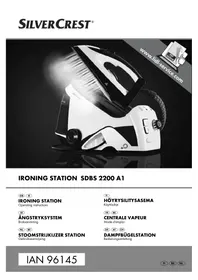
USER MANUAL SDBS 2200 A1 SILVERCREST
Operating instructions
SE
ANGSTRYKSYSTEM
Bruksanvisning
NL BE
STOOMSTRIJKIJZER STATION
Gebruiksaanwijzing
F
HOYRYSILITYSASEMA
Kayttoohje
FR BE
CENTRALE VAPEUR
Mode d'emploi
DE
AT CH
DAMPFBÜGELSTATION
Bedienungsanleitung
IAN 96145
GB IE
Before reading, unfold the page containing the illustrations and familiarise yourself with all functions of the device.
H
GB/IE Operating instructions Page 1
| FI | Käytöohje | Sivu | 21 |
| SE | Bruksanvisning | Sidan | 41 |
| FR/BE Mode d'emploi Page 61 |
| NL/BE Gebruiksaanwijzing Pgina 81 |
| DE/AT/CH Bedienungsanleitung Seite | 101 | | |
Contents
Introduction 2
Information concerning these operating instructions 2
Copyright 2
Intended use. 2
Warning notes 2
Safety 3
Basic safety guidelines 3
Operating components 9
Setting up and connecting 10
Safety guidelines 10
Package contents and transport inspection 10
Unpacking 10
Disposal of packaging materials 11
Set-up location requirements. 11
Electrical connection 11
Handling and operation 11
Before initial use. 11
Filling the water tank. 12
Ironing without steam 13
Steam ironing 14
Vertical steam ironing 15
Refilling the water 15
Cleaning 16
Safety guidelines 16
Cleaning the appliance 16
Troubleshooting 17
Safety guidelines 17
Fault causes and rectification 17
Storage/disposal 18
Storage. 18
Disposal of the appliance 18
Appendix 19
Notes on the Declaration of Conformity 19
Technical data 19
Warranty 20
Service 20
Importer 20
Introduction
Congratulations on the purchase of your new appliance.
You have selected a high-quality product. The operating instructions are part of this product. They contain important information on safety, usage and disposal. Before using the product, familiarise yourself with all handling and safety guidelines. Use the product only as described and for the range of applications specified. Please also pass these operating instructions on to any future owner(s).
Copyright
This documentation is protected by copyright.
Any copying or reproduction, including in the form of extracts, or any reproduction of images (even in a modifi ed state), is permitted only with the written authorisation of the manufacturer.
Intended use
This appliance is intended for the dry or steam ironing of all types of garments, curtains and fabrics (also hanging). It is not intended for any other use or use beyond that specified. This appliance is not intended for use in commercial or industrial environments.
The manufacturer accepts no responsibility for damage caused by failure to observe these instructions, improper use or repairs, unauthorised modifications or the use of unapproved replacement parts. The operator bears sole liability.
Warning notes
The following warnings are used in these operating instructions:

DANGER
A warning at this hazard level indicates an imminently hazardous situation.
If the hazardous situation is not avoided, it could result in death or serious physical injury.
Follow the instructions in this warning to prevent a fatality or serious personal injury.
WARNING
A warning at this hazard level indicates a potentially hazardous situation.
Failure to avoid this hazardous situation could result in physical injury.
Follow the instructions in this warning to prevent physical injury.
CAUTION
A warning at this hazard level indicates potential property damage.
Failure to avoid this situation could result in property damage.
Follow the instructions in this warning to prevent property damage.
NOTE
A note provides additional information that will assist you in using the appliance.
Safety
In this section, you will find important safety instructions for using the appliance.
The appliance complies with the statutory safety regulations. Improper use may result in personal injury and property damage.
Basic safety guidelines
To ensure safe operation of the appliance, follow the safety guidelines set out below:
The appliance may not be used if it has been dropped, exhibits visible damage or is leaking.
- To prevent accidents, have defective plugs and/or power cables replaced immediately by an authorised specialist technician or our Customer Service department.
This appliance may be used by children aged 8 years or more and by persons with reduced physical, sensory or mental capabilities or lack of experience and/or knowledge if they are supervised, or have been instructed in the safe use of the appliance and have understood the potential risks. The appliance must not be used as a plaything by children. Cleaning and user maintenance must not be carried out by children unless they are supervised.
Children must not use the appliance as a plaything.
All repairs must be carried out by authorised specialist companies or by the Customer Service department. Failure to make proper repairs can put the user at risk. It will also invalidate any warranty claim.
Repairs to the appliance during the warranty period may only be carried out by a customer service department authorised by the manufacturer. Otherwise no warranty claims can be considered for subsequent damage.
Defective components must always be replaced with original replacement parts. Compliance with safety requirements can only be guaranteed if original replacement parts are used.
- Do not place any objects on the appliance, especially not on the connecting hose between the base station and the iron.
- Do not operate or place the appliance close to an open flame (e.g. candles).

RISK OF ELECTRIC SHOCK!
The appliance should only be connected to correctly installed and earthed mains power sockets. Ensure that the rating for your local power supply corresponds with the details on the rating plate of the appliance.
- Arrange for Customer Services to repair or replace connecting cables and/or appliances that are not functioning properly or have been damaged.
Discontinue use of the appliance if the anti-kink protection on the power cable is damaged!
- When it is switched on or cooling down, the steam iron and its connecting cable must be kept out of the reach of children who are younger than 8 years old.
- Never immerse the appliance in water. Wipe it only with a slightly damp cloth.
- Do not expose the appliance to rain, and never use it in a humid or wet environment.
Always remove the mains cable from the mains socket by pulling the plug - do not pull the cable itself.
- Never touch the power cable or the plug with wet hands.
- Do not place the appliance itself, furniture items or similar objects on the power cable and make sure it cannot become jammed or trapped in any way.
- Ensure that the connecting cable never becomes wet or moist during operation.
- Do not open the appliance housing or attempt to repair or modify the appliance. If the housing is opened or improper modifi cations are made, you run the risk of receiving a potentially fatal electric shock and the warranty will be void.

RISK OF ELECTRIC SHOCK!
- Protect the appliance from drips or splashes of water. Do not place any water-fi lled vessels (e.g. fl over vases) on or near the appliance.
- After fi nishing ironing, and before any cleaning and prior to fi lling the water tank, remove the plug from the wall socket.

RISK OF ELECTRIC SHOCK!
Always put the iron on the base station stand. Pull the plug out of the mains socket if you take a break from ironing.

DANGER OF SCALDING OR BURNING!
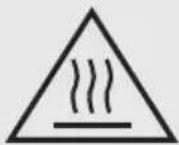
Caution! Hot surface!
The soleplate remains very hot while the iron is turned on and a few minutes after the power is turned off. Never touch the soleplate.
- When the steam iron is hot, hold it only by the handle.
Children should be supervised to ensure that they do not play with the appliance.
Do not aim the steam jet at people or animals!
- Never open the steam pressure container during use. There is a risk of burns from hot steam.
- Never iron or steam clothes or other fabrics while they are being worn or held by others.
WARNING! PROPERTY DAMAGE
A warning at this hazard level indicates potential property damage.
Failure to avoid this situation could result in property damage.
The steam iron may never be left unattended while it is connected to the mains power supply.
- Do not use carbonated water in the appliance.
- Never use the appliance without water as otherwise the pump could burn out.
- Ensure that neither power cable nor the connecting hose come into contact with the hot soleplate.
- Do not scratch the soleplate. Avoid contact between the soleplate and metal parts such as buttons or zips.
- Operate the steam iron and the base station only on a stable, level and flat surface.
NOTES
The steam iron station is equipped with a safety valve which regulates the build-up of excess pressure in the pressure vessel during the heating-up phase, and vents excess steam through the steam outlets on the underside of the ironing station. This means that there may be a slight escape of steam after switching on. This is normal behaviour and lasts just a few seconds. It does not indicate a defect in the steam iron station.
- If steam or hot water droplets escape from the Calc / Lock / Safe screw cap during heating, switch off the appliance and let it cool down. Turn the Calc / Lock / Safe screw cap clockwise and tighten it. If steam or water droplets continue to leak out, switch off the appliance and contact Customer Service.
- Under no circumstances should you try to unscrew the Calc / Lock / Safe screw cap while the steam unit is hot and under pressure. The Calc / Lock / Safe screw cap can only be unscrewed when the appliance has cooled down.
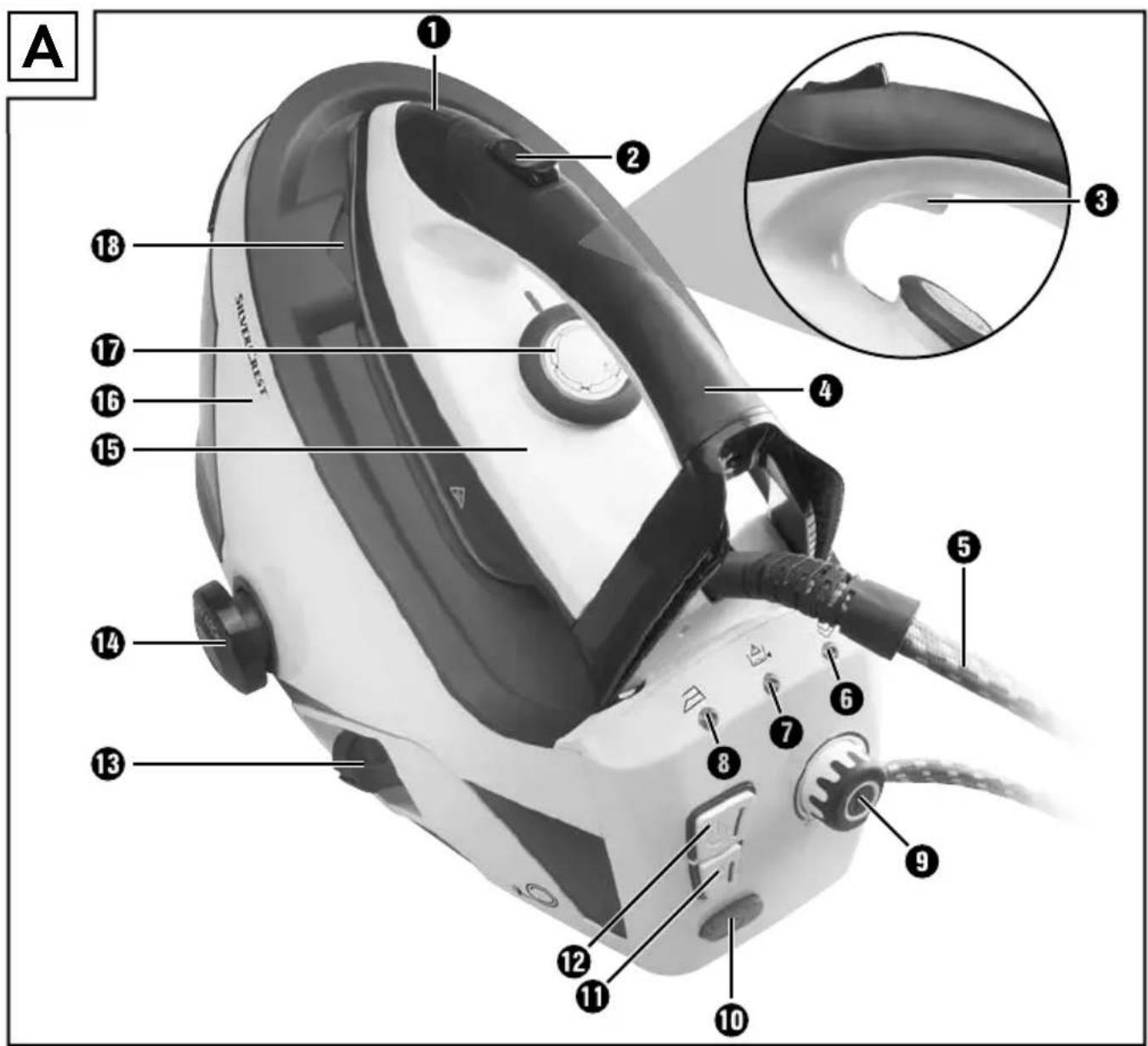
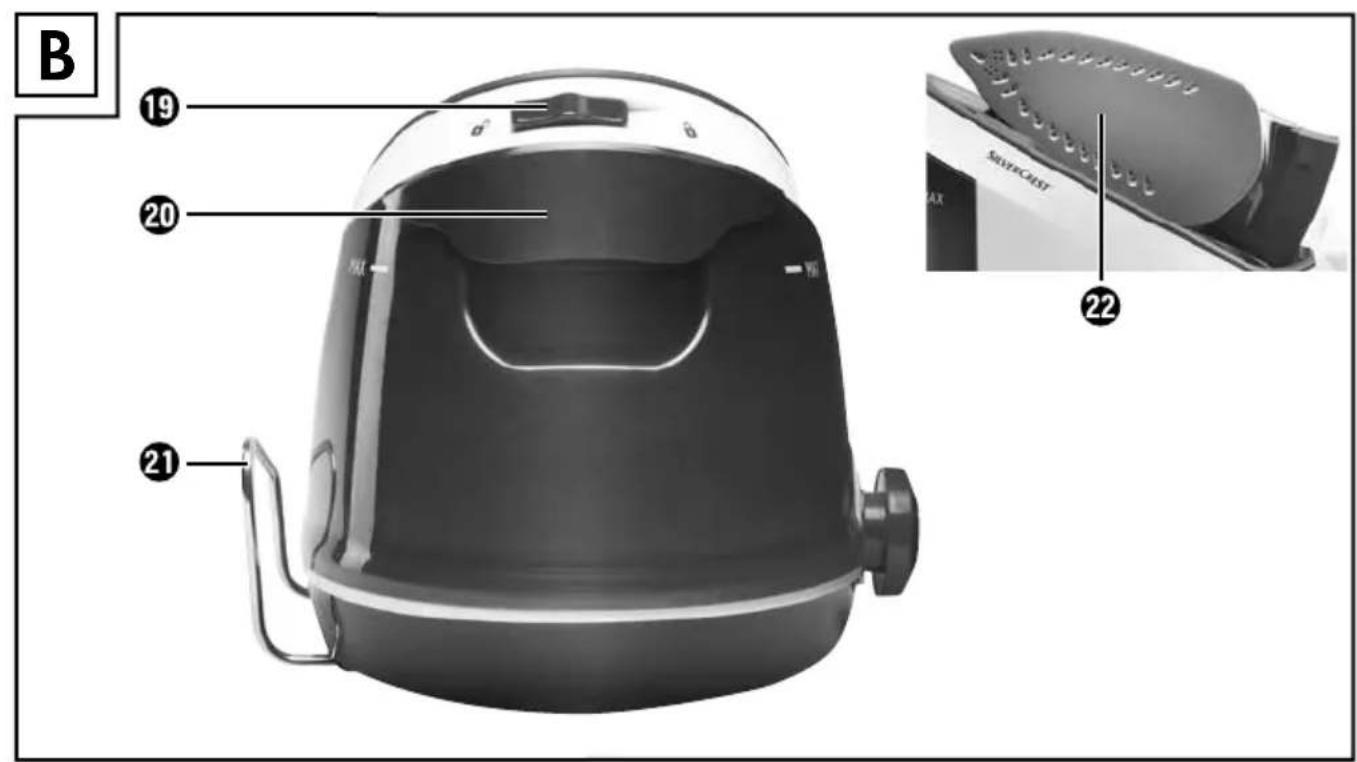
Operating components
(For illustrations see the fold-out page)
1 Temperature display
Steam blast button
3 Steam stop button (and a short steam blast)
Iron handle
5 Connecting hose
"Steam ready" indicator
"Water tank empty" indicator
"Iron dry" indicator
Steam control
10 Cable retractor button
1 "Boiler" button
12 ON/OFF button
13 Power cable with plug
Calc / Lock / Safe screw cap
15 Iron
16 Base station
17 Temperature control
Catch for the iron
Catch release
20 Water tank
21 Rest for connecting hose
2 Soleplate
Setting up and connecting
Safety guidelines
WARNING
During the first use of the appliance there is a risk of injury and/or damage to property!
To avoid risks, observe the following safety instructions:
- Packaging material must not be used as a plaything. Risk of suffocation.
- Please follow the instructions regarding the electrical connection of the appliance to avoid damage to property.
Package contents and transport inspection
The appliance is supplied with the following components as standard:
- Ironing Station
- Operating instructions
NOTE
- Check the package for completeness and for signs of visible damage.
- If the consignment is incomplete or damaged due to defective packaging or carriage, contact the Service hotline (see the section Service).
Unpacking
Remove all parts of the appliance and the operating instructions from the box.
Remove all packaging material.
Disposal of packaging materials
The packaging protects the appliance from damage during carriage.
The packaging materials have been selected for their environmental friendliness and ease of disposal, and are therefore recyclable.
Returning the packaging to the materials cycle conserves raw materials and reduces the amount of waste that is generated. Dispos of packaging materials that are no longer needed in accordance with applicable local regulations.
NOTE
If possible, keep the original packaging of the appliance during the warranty period so that the appliance can be packed properly for returning in the event of a warranty claim.
Set-up location requirements
The surface on which you set up the base station must be stable, level and heat resistant.
Electrical connection
Plug the mains cable plug into a properly connected and earthed AC power outlet which delivers the voltage given in the "Technical Data" section.
Handling and operation
This section provides you with important information on handling and using the appliance.
Before initial use
Clean the soleplate with a slightly damp cloth.
To remove any production residues, iron several times over an old, clean cloth.
NOTE
The appliance is equipped with a safety valve which regulates the build-up of excess pressure in the pressure vessel during the heating-up phase, and vents excess steam through the steam outlets on the underside of the ironing station. This can lead to a slight escape of steam after switching on. This is normal behaviour and lasts just a few seconds. It does not indicate a defect in the steam iron station.
Filling the water tank
NOTE
Use only tap water or distilled water.
If the tap water in your locality is rated as hard, it is a good idea to mix the tap water with some distilled water. Otherwise, lime scale build-up could impair the functionality of the appliance.
Mix the tap water with distilled water as described in the table below:
| Water hardness | Ratio of distilled water to mains water |
| very soft/soft 0 | |
| medium 1:1 | |
| hard 2:1 | |
| very hard 3:1 | |
Water with additives (such as starch, perfume, conditioner or other chemicals) may not be put into the water tank 20. These could damage the appliance as residues can form in the steam chamber. The residues could contaminate clothing if they come out of the steam outlets.
Reach into the recess on the water tank and press the release catch upwards with your fingertips.
Pull the water tank20 forwards and out.
Fill the tank only up to the maximum limit.
Push the water tank20 back onto the base station 10 until it clicks into place. If necessary, press a little harder on the upper part of the water tank 2 to ensure that it has clicked into place and is securely connected to the base station 16
NOTE
Do not tip or swing the steam station when it has a full water tan. Otherwise the water may spill out of the flling hole.
- Fill the water tank 20 before first use and as soon as the "Water tank empty" indicator lights up.
Ironing without steam
NOTE
Always set the temperature control 17 and the steam control 9b the lowest level before you switch on the appliance. The symbols on the temperature control 17 correspond to the following settings:
Synthetics - lowest temperature (70 - 120ircC)
- Wool, silk - medium temperature (100 - 160°C)
Cotton, linen - highest temperature (140 - 210°C)
Press the on/off button to switch on the appliance. The indicator in the button as well as the "Iron dry" indicator right up.
NOTE
If the "Iron dry" indicator 8 does not light up, the boiler button 11 pressed. Press this button to switch off the boiler function.
Turn the temperature control to set the desired ironing temperature.
The temperature indicator lights up while the appliance is heating up. As soon as the temperature indicator goes out, the set temperature has been reached and you can start ironing.
If the iron is fixed to the base station using the catch, push the catch release into the position. Now you can remove the iron from the base station
After ironing, place the iron on the base station stand 16 Set the temperature control "MIN".
Press the on/off button to switch off the appliance. The indicator in the On/off button and the "Iron dry" indicator go out. To avoid tripping hazards, place the connecting hose the holder provided, pull the mains plug out of the socket and press the cable refractor button
To fix the iron back onto the base station push the catch release into the position. Then you can carry the appliance in just one hand using the iron handle if you have previously placed the connecting hose in the holder provided (to avoid a tripping hazard).
Steam ironing
Press the on/off button to switch on the appliance. The indicator in the On/off button and the "Iron dry" indicator light up.
Press the boiler button to activate steam ironing mode. The indicator in the boiler button lights up, and the "Iron dry" indicator goes out.
NOTE
The boiler is located in the bottom of the appliance and is automatically supplied with water from the water tank by means of a pump. During heating up and refi lling the boiler, the pump switches on for a few seconds. This causes a humming noise and you will feel the appliance vibrate. This is normal and is not a reason for complaints.
After a few minutes, the "Steam ready" indicator lights up.
Turn the temperature control to set the desired ironing temperature.
NOTE
For steam ironing you must set at least the medium temperature on the temperature control 17.
The temperature indicator lights up while the appliance is heating up. As soon as the temperature indicator goes out, the set temperature has been reached and you can start steam ironing.
Set the steam control to the desired steam setting. Turn the control clockwise to increase the amount of steam. Turn it in the opposite direction to reduce the amount of steam.
If the iron is fixed to the base station using the catch push the catch release into the position. Now you can remove the iron from the base station
While ironing, you can press the steam blast button to give a continuing blast of steam from the soleplate into the clothes. Press the Steam stop button to stop the steam output.
NOTE
If you only want a short steam blast, press the Steam stop button 3 briefly and then release it. The steam only comes out of the soleplate 2s long as you hold down the button and stops when you release it.
NOTE
To switch to dry ironing while you are steam ironing, press the boiler button 10 to release it. The "Iron dry" indicator will light up and the indicator in the boiler button 11 and then, a little later, the "Steam ready" indicator go out. You can now iron without steam.
After ironing, place the iron ⑤ on the stand of the base station 16 Set the temperature control "MIN".
Press the boiler button to deactivate steam ironing mode. The indicator in the boiler button goes out.
Press the on/off button to switch off the appliance. All indicators go out. To avoid tripping hazards, place the connecting hose the holder provided, pull the main plug out of the socket and press the cable retractor button
To fix the iron back onto the base station push the catch release into the position. Then you can carry the appliance in just one hand using the iron handle if you have previously placed the connecting hose in the holder provided (to avoid a tripping hazard).
Vertical steam ironing
Hang the item to be ironed on a coat hanger that you hold firmly in one hand.
Hold the iron in a vertical position with the other hand and press the steam blast button
Touch the fabric lightly with the soleplate to remove creases.
Press the Steam stop button to stop the steam output.
Refi lling the water
NOTE
As soon as the "Water tank empty" indicator ① lights up, you must add more water. See the section "Filling the water tank".
Put the iron 15 on the stand of the base station 16.
Refi II the water as described in the section "Filling the water tank".
Cleaning
Safety guidelines

WARNING! DANGER TO LIFE DUE TO ELECTRIC SHOCK!
Risk of injury when cleaning the appliance!
To avoid risks, observe the following safety instructions:
Before cleaning the appliance, disconnect the plug from the mains power socket!
If necessary, allow the appliance to cool down before cleaning it.
Never immerse the appliance in water to clean it.
CAUTION
Damage to the appliance!
- To avoid irreparable damage to the appliance, ensure that no moisture gets into it during cleaning.
- Do not use aggressive scouring cleaners or solvents, or a wire brush or other abrasive objects, to clean the surfaces.
Cleaning the appliance
Clean the surfaces of the iron 15 and the base station 16 with a soft, damp cloth only.
Remove the water tan20 and empty it.
■ Unscrew the Calc / Lock / Safe screw cap anticlockwise out of the thread in the boiler.
NOTE
The Calc / Lock / Safe screw cap can only be unscrewed once the appliance has cooled down.
Empty the remaining water out of the boiler into a sink.
Pour around 150ml of vinegar (approx. 5 - 6% acidity) into the boiler.
Screw the Calc / Lock / Safe screw cap anticlockwise into the thread in the boiler.
- Swirl the liquid in the base station around a couple of times and then set down the appliance on a level flat surface.
After about 15 to 30 minutes, unscrew the Calc / Lock / Safe screw cap again and tip the vinegar into a sink.
Use a funnel to add some water to the boiler and rinse it through several times.
After you have emptied the boiler again, screw the Calc / Lock / Safe screw cap back into the thread and tighten it hand-tight.
Troubleshooting
This section contains important information on fault identifi cation and rectifi cation. Observe the instructions in order to avoid risks and damage.
Safety guidelines
WARNING
Observe the following safety information to avoid risks and property damage:
- Repairs to electrical appliances should only be carried out by specialists trained by the manufacturer. Improper repairs can cause considerable risks to users and damage to the appliance.
Fault causes and rectification
The following table will help to identify and rectify minor faults:
| Fault Possible cause Remedy | |
| The appliance is not working. | Fault with the power supply. Check whether the mains plug 13 is fi rmly in the socket. |
| The appliance is not switched on. Switch the appliance on using the on/off switch 12. |
| The appliance produces no/too little steam. | There is not enough water in the water tank 20. Fill the water tank 20 with water. |
| The appliance is not suffi ciently hot. Wait until the "Steam ready" indicator 6 lights up. |
| The steam control 9 is set to minimum. Turn the steam control 9 clockwise. |
| If the steam ironing is briefl y interrupted, the cooling steam condenses in the connecting hose ⑤. This can lead to drips. | This is normal. Hold the iron over a cloth or container and press the steam blast button ②After a few seconds, steam will come out of the soleplate ②stead of water. Then you can continue ironing. |
| The set temperature is too low for steam ironing. | Set a temperature suitable for steam ironing (at least ● ●). |
| Wet patches occur on the items being ironed. | Such patches may occur due to steam condensing on the ironing board. |
| The water tank ②is fi lled but the "Water tank empty" indicator ①eeps lighting up. | The water tank ②not fi rmly attached to the appliance. |
NOTE
If you are unable to resolve the problem by applying any of the aforementioned methods, please contact the Customer Service department.
Storage/disposal
Storage
If you plan not to use the appliance for a long period, store it in a clean, dry place away from direct sunlight.
Disposal of the appliance
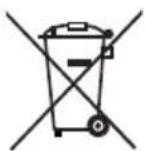
Under no circumstances should you dispose of the appliance with the normal household waste. This product is subject to the provisions of European Directive 2012/19/EU-WEEE (Waste Electrical and Electronic Equipment).
Dispose of the appliance via an approved waste disposal company or your municipal waste disposal facility. Please observe applicable regulations. Please contact your waste disposal facility if you are in any doubt.
Appendix
This appliance complies with the essential requirements and other relevant provisions of the European Electromagnetic Compatibility Directive 2004/108/EC, the Low Voltage Directive 2006/95/EC and the Ecodesign Directive 2009/125/EC (Ordinance 1275/2008 Annex II, No. 1) as well as the RoHS directive 2011/65/EU.
The complete Declaration of Conformity, in its original form, is available from the importer.

Technical data
| Steam iron station |
| Voltage supply 220 - 240 V | ~ / 50/60 Hz |
| Power consumption 2200 - 2400 W | |
| Max. fill level of the water tank 1.6 l | |
| Steam production (max.) approx. 90 g / min. +/- 10% | |
| Heating time 2.5 min. | |
| Boiler pressure 4.5 bar | |
| Operating temperature +15 to +40°C | |
| Humidity (no condensation) 5 to 75% | |
| Dimensions (W x H x D) 45 x 29 x 33 cm | |
| Weight approx. 5500 g | |
Warranty
You are provided a 3-year warranty on this appliance, valid from the date of purchase. This appliance has been manufactured with care and inspected meticulously prior to delivery.
Please retain your receipt as proof of purchase. In the event of a warranty claim, please contact your Customer Service unit by telephone. This is the only way to guarantee free return of your goods.
NOTE
The warranty only covers claims for material and manufacturing defects, not for damage sustained during carriage, components subject to wear and tear or damage to fragile components such as switches or batteries.
This appliance is intended solely for private use and not for commercial purposes. The warranty shall be deemed void in cases of misuse or improper handling, use of force and interventions which have not been carried out by one of our authorised Service centres.
Your statutory rights are not restricted by this warranty. The warranty period is not prolonged by repairs effected under the warranty. This also applies to replaced and repaired components.
Any damage and defects present at the time of purchase must be reported immediately after unpacking, but no later than two days after the date of purchase. Repairs carried out after expiry of the warranty period shall be subject to charge.
Service
GB Service Great Britain
Tel.: 0871 5000 720 (£ 0.10/Min.)
E-Mail: kompernass@lidl.co.uk
IAN 96145
IE Service Ireland
Tel.: 1890 930 034
(0,08 EUR/Min., (peak))
(0,06 EUR/Min., (off peak))
E-Mail: kompernass@lidl.ie
IAN96145
Hotline availability: Monday to Friday 08:00 - 20:00 (CET)
Importer
KOMPERNASS HANDELS GMBH
BURGSTRASSE 21
44867 BOCHUM
GERMANY
www.kompernass.com
Sisällysluettelo
Johdanto 22
KOMPERNASS HANDELS GMBH
BURGSTRASSE 21
44867 BOCHUM
GERMANY
www.kompernass.com
KOMPERNASS HANDELS GMBH
BURGSTRASSE 21
44867 BOCHUM
GERMANY
www.kompernass.com
Table des matieres
Introduction 62
Installation et raccordement
KOMPERNASS HANDELS GMBH
BURGSTRASSE 21
44867 BOCHUM
GERMANY
www.kompernass.com
Inhoud
Inleiding 82
KOMPERNASS HANDELS GMBH
BURGSTRASSE 21
44867 BOCHUM
GERMANY
www.kompernass.com
Inhaltsverzeichnis
Einführung 102
KOMPERNASS HANDELS GMBH
BURGSTRASSE 21
44867 BOCHUM
GERMANY
www.kompernass.com
KOMPERNASS HANDELS GMBH
BURGSTRASSE 21
44867 BOCHUM
DEUTSCHLAND/GERMANY
www.kompernass.com
Last Information Update dot Tietojen tila dot Informationsstatus
Version des informations dot Stand van de informatie dot Stand der Informationen:
12/2014·Ident.-No.:SDBS 2200A1-042014-3