DECT baby monitor - Baby products DUUX - Free user manual and instructions
Find the device manual for free DECT baby monitor DUUX in PDF.


| Product type | DECT Baby Monitor |
| Brand | Duux |
| Model | DECT baby monitor |
| Frequency band | 1.9 GHz (DECT) |
| Number of channels | 120 (automatic selection) |
| Outdoor range | 300 meters |
| Indoor range | Up to 50 meters |
| Parent unit power supply | 5V DC 400mA mains adapter or 2 rechargeable AAA batteries (pre-installed) |
| Baby unit power supply | 5V DC 400mA mains adapter or 2 non-rechargeable AAA batteries (max 800 mAh) |
| Parent unit battery life (on batteries) | 10 to 15 hours |
| Parent unit charging time | Approximately 8 hours (in deactivated mode) |
| Box contents | 1 parent unit, 1 baby unit, 2 stands, 2 adapters, user guide, quick guide, 2 rechargeable AAA batteries |
| Main features | Audio monitoring, nightlight, pulsating nightlight, 5 lullabies, talk back, volume control (5 levels), VOX, microphone sensitivity (5 levels) |
| Parent unit display | LCD screen with status icons |
| Warranty | 2 years (24 months) after online registration |
| Cleaning | Dry cloth, disconnect adapter before cleaning |
| Safety | Use only supplied adapters, do not immerse, keep out of reach of children, do not open the housing (except battery compartment) |
| Spare parts | Stands and adapters available at point of purchase |
| Operating temperature | 10 °C to 40 °C |
| Storage temperature | 10 °C to 40 °C |
| Technology | Interference-free DECT |
| Certifications | RoHS, WEEE |
Frequently Asked Questions - DECT baby monitor DUUX
User questions about DECT baby monitor DUUX
0 question about this device. Answer the ones you know or ask your own.
Ask a new question about this device
Download the instructions for your Baby products in PDF format for free! Find your manual DECT baby monitor - DUUX and take your electronic device back in hand. On this page are published all the documents necessary for the use of your device. DECT baby monitor by DUUX.
USER MANUAL DECT baby monitor DUUX
Duux DECT baby monitor
congratulations!
Congratulations on the purchase of your Duux product! To use our online service, please register your product and warranty on www.duux.com/register
Duux develops reliable baby electronics with a beautiful design and maximum ease of use to make life a lot easier for parents with newborns so they can enjoy this special time. The Duux DECT baby monitor allows you to monitor your baby 24 hours a day without noise or interference. You can remotely control the nightlight, play lullabies, talk to your baby and much more besides. Read this manual carefully to get the most out of your monitor!
table of contents
1 Product overview 4
Box contents 4
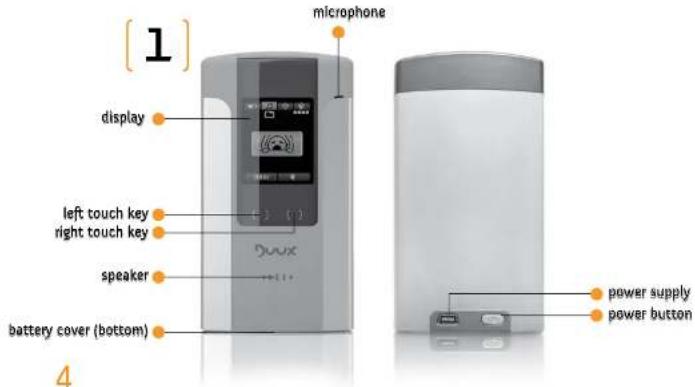
Parent Unit
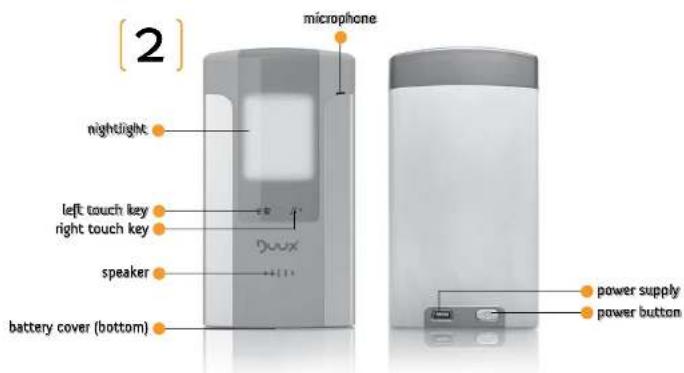
Baby Unit 5
Technical specifications 7
General 8
Installation g
Use g
Environment g
1
Baby Unit:
Warning
U5
Connect
Placement 12
5 Functions 13
Parent Unit 13
Monitor Mode 13
Menu Page 16
Baby Unit 22
Nightlight / pulsating nightlight 22
Lullabies 22
Default settings 23
6 Maintenance 24
Cleaning 24
Replacement 24
Batteries - baby unit 24
Batteries - parent unit 25
Adapters 9 cradles 25
7 Warranty & Service 26
8 FAO 28
1 product overview
The box contains the following parts:
- Parent unit (1x)
- Baby unit [
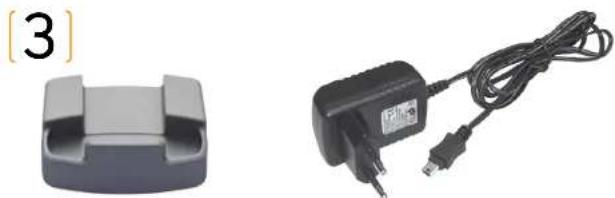
3.Cradle (2x) - Adapter [2]
- User guide (1x)
- Quick guide (1x)
-
Rechargeable AAA battery (2x)
-
pre installed to be used in parent unit
[4]

5
6

technical specifications


Operating temperature range: 10-40 °C
Storage temperature range: 10-40 °C
Frequency band: 1.gGhz (DECT)
Automatic channel selection
Number of channels: 120
Charging time: 8 hours
Operating time for batteries: 10 - 15 hours
Adapter input: 100 - 240V AC ~ 50/60Hz 0.10A
Adaptet output:5V DC = = = 4 comA
Adapter details: Keen Ocean Industrial - type S01-005-0050-00400
Box dimensions: 190 x 190 x 190 mm (W x H x D)
2 year warranty
2002/95/EC (RoHS) - Restriction of Hazardous Substances
2002/g6/EC (WEEE) - Waste Electrical and Electronic Equipment

If the unit is to be replaced or disposed of, hand it back to your supplier and they will arrange environmentally friendly disposal. Faulty or spent batteries from the baby monitor should be taken directly to your local depot for small chemical waste or dedicated battery collection points. NEVER dispose of them in household waste.

Read these instructions carefully before using the device. Please keep this user guide for future reference.
General
The baby monitor may be used only in accordance with these instructions.
The baby monitor is designed to help. It is not a substitute for proper supervision by adults and should not be used as such.
Use only the supplied adapters
Do not immerse any part of the baby monitor in water or other liquid.
Do not use the baby monitor in a humid environment or near water.
Use and store the device at a temperature between 10°C and 40°C .
While charging, keep the device out of reach of children and persons who may not be able to safely operate the baby monitor.
Ensure good outflow of heat. Do not cover the baby monitor and never use it next to a heat source. Do not expose to direct sunlight.
Make sure the adapter cord does not get damaged and avoid tripping or falling over this cord.
Repairs may only be performed by a qualified electrician. Do not try to repair the device yourself. Always return to the point of sale in the event of defects or damage.
Only use accessories that are recommended by the supplier. Use of other accessories may cause damage to the baby monitor and pose a risk to the user.
Supervise children to prevent them from playing with the appliance.
Installation
Do not install the baby monitor during a thunderstorm.
Only connect or disconnect the adapter to the baby monitor when removed from the AC power supply.
Only use the provided adapters listed in this user guide. Check if the voltage indicated on the adapters and chargers matches the local voltage before connecting to the baby monitor.
Use
Test the baby monitor before use. Become familiar with its functions and features.
Do not place the baby unit in the bed or playpen.
Only use the baby monitor in an upright position (preferably in the included cradles). A lying position may result in signal loss.
Never open the casing of the baby unit and parent unit, except the battery boxes, to prevent electric shocks. Opening the casing will invalidate the warranty.
Always remove the plug from the cord when the baby monitor is not being used.
Do not place near other electrical equipment to prevent static interference.
Environment
The outer packaging of this baby monitor can be returned as waste paper. However, we recommend keeping all packaging, so that the unit can be transported safely, in the appropriate packaging.
3 installation
Note: Duux recommends that you always use rechargeable batteries in the units. If they have to be replaced, we strongly recommend the use of approved batteries. For the installation and replacement of batteries, please read the section on "Maintenance", Parent unit batteries are pre-installed.
Note: Both units will also operate without batteries, as long as they are connected to the mains.
baby unit
Note: The baby unit has no charging function so the batteries will not charge when connected to AC power. When the batteries are completely spent, the unit will switch off automatically and disconnect from the parent unit.
Note: If the baby unit is operated on batteries it will have limited functionality in terms of preventing battery drain. It will only be able to monitor and talk back to the baby and it will not be possible to turn on a nightlight or play any lullabies.
Switch the baby unit on and off by pressing and holding the power button for 3 seconds.
You can use the baby unit with the included adapter to connect to the mains. Try to keep the baby unit connected to AC power as much as possible, so the baby unit will also continue working if the batteries run down.
parent unit
Note: The parent unit has a charging function and rechargeable batteries are automatically recharged when connected to AC power. Fully charge the batteries of the parent unit (approximately 10 hours in off mode) before first use and when the unit indicates that the batteries are running out (battery icon flashes on display and the unit gives a signal). The parent unit provides a signal approximately 15 to 30 minutes before the batteries are completely spent. When the batteries are completely spent, the unit will switch off automatically and disconnect from the baby unit.
Switch the parent unit on and off by pressing and holding the power button for 3 seconds.
Note that new batteries will not reach full capacity until they have been in use for a few days. Fully discharging the batteries once a week helps them to last as long as possible. If not connected to AC power, the parent unit will last up to 8-10 hours on fully charged batteries (depending on the settings).
The parent unit can also be used with the included adapter connected to the mains. Try to use the parent unit on AC power as much as possible, so it will continue to work if the batteries run down.
Warning!
Carefully check to ensure that the batteries used in the parent unit are rechargeable before connecting to the mains.
Charging non-rechargeable batteries in the parent unit can cause irreparable damage to the device!
4 use
Connect
When both units are turned on they will automatically connect.
Placement
- Ensure that the units are at least 2 metres apart.
- Make sure the baby unit is at least 1 metre away from the baby and ensure that it is not within reach of the baby.
Note: The range of the baby monitor is approximately 300 metres in the open. This range may be limited by one or more interference factors such as cardboard, glass, wood, stone, concrete, metal and aluminium within the area between the two units. The range for indoor use is up to 50 metres. Always place the units in the supplied cradles for optimum coverage.
parent unit
5 functions
Monitor mode (main screen)
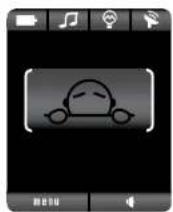
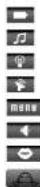
battery status
Jullaby
nightlight
signal strength
menu
parent unit volume
talkback function (if baby alarm)
no alarm
battery

battery level 1

battery level 2

battery level 3

full battery

battery charging

full battery (on charge)

battery almost spent (icon flashes & 'low battery' alarm sounds)
ullabies baby alarm

no lullaby

lullaby 1 playing

tullaby2playing

tullaby 3 playing

lullaby 5 playing

all lullabies playing

no alarm

alarm level 1

alarm level 2
alarm level 3 (max)


nightlight off
nightlight on
pulsating nightlight on (automatically stops after 7 minutes)

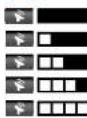
no signal
'bad' signal strength
average' signal strength
good' signal strength
'optimal' signal strength


go to menu
adjust parent unit volume (standard)
talkback function (only visible in case of baby alarm)
Menu page
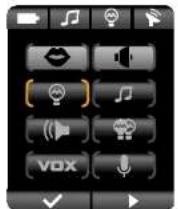
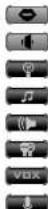
talkback function
parent unit volume
nightlight
lullaby
baby unit volume
pulsating nightlight
VOX
microphone sensitivity
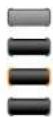
parent unit setting
baby unit setting
selected menu
non selected menu

select menu (in menu overview) / confirm (inside menu)
next menu (in menu overview) / change settinglevel (inside menu)

talkback function
This feature allows you to talk to your baby in a soothing way
Tip: when the baby alarm is indicated on the main screen, the right touch key automatically changes into the talkback icon ( ). By pressing this you can immediately talk back to your baby without going through the whole menu first.
Note: When using the talkback function you will not be able to hear the baby until this function is disabled.
- Go to menu on the main screen
- Select the first menu ( ) with the key
- Talkback will automatically activate
- To disable the function and return to the menu overview, press the key

parent unit volume
Here you can adjust the volume of the parent unit to listen to your baby through this unit.
This function can also be controlled from the main screen by pressing the right touch key [ ] Every press turns up the volume with 1 level till a maximum of 5 levels.
- Go to on the main screen
- Navigate with the key to the 2nd menu item ( ) and select with the key
- With the key you can adjust the volume (5 levels)
- Confirm your volume level with the key and you will automatically return to the menu overview.

nightlight
This menu allows you to turn the nightlight on the baby unit on and off
Tip: You can also enable this feature from the baby unit. Please refer to the baby unit functions later on in this section. You can see the status of the nightlight on the main screen (3rd icon in the top bar).
- Go to on the main screen
- Navigate with the key to the 3rd menu item [ ] and select with the key
- By pressing the key once, you will switch on the nightlight
- By pressing the key again, you will switch off the night
- Confirm your choice with the key and you will automatically return to the menu overview.

lullabies
From this function you can play lullabies on the baby unit. There are 5 different lullabies that you can play individually or in sequence.
Tip: You can also enable this feature from the baby unit. Please refer to the baby unit functions later on in this section. You can see the status of the lullaby on the main screen (and icon in the top bar).
- Go to on the main screen
- Navigate with the key to the 4th menu item ( ) and select with the key
- Press the key once to play lullaby 1
- Press the key 2 times to play lullaby 2
- Press the key 3 times to play lullaby 3
- Press the key 4 times to play lullaby 4
-
Press the key 5 times to play lullaby 5
-
Press the key 6 times to play all lullabies in sequence
- Press the key 7 times to turn off all lullabies
- Confirm your choice by pressing the key and you will automatically return to the menu overview.

baby unit volume
This function allows you to adjust the volume of the baby unit.
Tip: You can also enable this feature from the baby unit. Please refer to the baby unit functions later on in this section.
- Go to on the main screen
- Navigate with the key to the 5th menu item ( ) and select with the key
- With the key you can adjust the volume of the baby unit (s levels)
- Confirm your choice with the key and you will automatically return to the menu overview.

pulsating nightlight
This menu allows you to turn the pulsating nightlight on baby unit on and off
Note: The pulsating nightlight will automatically turn off after 7 mins.
Tip: You can also enable this feature from the baby unit. Please refer to the baby unit usage later on in this section. You can see the status of the nightlight on the main screen (3rd icon in the top bar).
- Go to on the main screen
- Navigate with the key to the 6th menu item and select with the key
- Press the key once to turn on the pulsating nightlight
- Press the key again to turn off the pulsating nightlight
- Confirm your choice by pressing the key and you will automatically return to the menu overview.
Vox
Vox
In this menu you can switch between an open channel connection (VOX=off) and a voice-operated connection (VOX=on). Please note that it takes 1-3 seconds to activate the speaker when a sound is detected.
Note: if the VOX is turned off (open connection) it will affect the battery lifetime. To save battery, please turn on VOX.
Note: because the VOX function is a wake-up system it needs a few seconds to 'wake up' and detect the sound properly.
- Go to on the main screen
- Navigate with the key to the 7th menu item {vex} and select with the key
- Use the key to turn VOX on and off
- Confirm your choice by pressing the key and you will automatically return to the menu overview.

microphone sensitivity
Here you can set the desired microphone sensitivity.
Note: If the level of the microphone sensitivity is set too high, this may lead to the capture of more (in) sounds. This will send a signal to the unit more often, resulting in a higher power consumption.
- Go to on the main screen
- Navigate with the key to the 8th menu item ( ) and select with the key
- Press the key to set the microphone sensitivity (5 levels)
- Confirm your choice by pressing the key and you will automatically return to the menu overview.
baby unit

highlight / pulsating nightlight
- Press once to switch on the nightlight
- Press twice to switch on the pulsating nightlight
- Press 3 times to switch off
ltabies
Tip: When a fullbaby is played, press the key to adjust the speaker volume of the baby unit
- Press once to play lullaby 1
- Press 2 times to play lullaby 2
- Press 3 times to play lullaby 3
- Press 4 times to play lullaby 4
- Press 5 times to play lullaby 5
- Press 6 times to play all lullabies
- Press 7 times to switch off the lullabies
default settings
Parent unit volume: level 2/5
Nightlight: off
Lullabies: off
Baby unit volume: level 2/5
Pulsating nightlight: off
VOX: on
Microphone sensitivity: level 2 / 5
6 maintenance
Cleaning
Disconnect the adapter before cleaning.
Only clean the units with a dry cloth, do not use chemical cleaners.
Make sure the cleaned unit(s) are dry before placing on AC.
The adapters and cradles can be cleaned with a dry cloth.
Battery installation and replacement
#
2
3
#
6
#
Batteries - Baby Unit
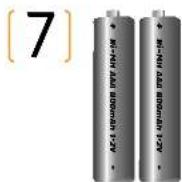
Replace non-rechargeable batteries in the baby unit with 2 non-rechargeable AAA batteries with a maximum of 800 mAh
- Remove the cover from the bottom of the baby unit
- Place the batteries in the baby unit (pay attention to the + and -poles)
- Replace the cover.
- Plug the mini USB into the baby unit and connect the plug to the power supply.
- Press the power button on the back
"The nightlight lights up briefly and the 2 LED indicators below remain on" - Place the baby unit in the supplied cradle to obtain the optimal signal.
Batteries - Parent unit
Replace the rechargeable batteries of the parent unit with a rechargeable AAA batteries with a maximum power of 800 mAh
- Remove the cover from the bottom of the parent unit
- Insert the rechargeable batteries in the parent unit (pay attention to the + and - poles)
- Replace the cover.
- Plug the mini USB into the parent unit and connect the plug to the power supply.
- Press the power button on the back
The welcome tune is played and the display shows a lightning symbol in the
battery icon to indicate that the parent unit is on charge. - Place the parent unit in the supplied cradle to obtain the optimal signal.
Caution! Risk of explosion if batteries are replaced with the incorrect type
A
Note: If the unit is being replaced or disposed of, please hand it back to your supplier, who will arrange environmentally friendly disposal. Faulty or spent batteries from the baby monitor should be taken directly to your local depot for small chemical waste or dedicated battery collection points. Never dispose of batteries in household waste.
Adapters & Cradies
Spare parts such as cradles and adapters can be requested at the point of purchase.
7 warranty and service
Register your warranty on www.duux.com/register
The Duex DECT Baby Monitor has a warranty of 24 months after the date of purchase. During this period we guarantee the repair of defects caused by material and manufacturing defects. This must be assessed by the distributor in the country concerned.
In the event of a defect please first consult your user manual and the online FAQ (frequently updated on www.duux.com) at all times. If no solution is offered, you are requested to contact your supplier. If the supplier is unable to repair the defect, they will contact Duux customer service.
Warranty period
The warranty period will not be extended, even in the event of repairs being made.
The warranty provides a right to have a product repaired but not to exchange or return a product.
Duux's obligation under this warranty is limited to the repair or replacement of defective parts as deemed necessary and as covered under this warranty.
Duux reserves the right to improve the design of any product without assuming any obligation to modify the previously manufactured products.
The warranty may only be invoked if you provide Duux with the original purchase receipt along with the defective product. Your warranty registration must be on file when warranty service is required.
No warranty will be provided in the following circumstances:
If you have made or arranged for modifications or repairs to be made without written permission first having been received from Duux or the retailer.
Normal wear and tear or damage due to accident, carelessness, lack of maintenance, misapplication, improper use or use of accessories and parts which are not manufactured by Duux, as well as altered and/or disassembled components.
Defects resulting from any use or maintenance other than that indicated in the user guide.
Important
This warranty period commences upon purchase of the product and is validated by registering online at www.duux.com.
In the event of any dispute regarding product warranty, Duux reserves the right to take all final decisions on warranty.
8 FAQ
This section lists the questions most frequently asked about the appliance. We will frequently update this FAQ online with the latest issues, so please keep an eye on our website www.duux.com!
Why don't both the power-on light on the baby unit and the display on the parent unit come on when I press the on/off buttons of the units?
- You may have to hold the button for a longer time before releasing it (3 - 5 seconds)
- The rechargeable batteries in the parent unit may be low and the parent unit may not be in the plugged-in charger. Insert the small mini-USB plug into the unit, connect the adapter of the charger to the power supply and place the parent unit in the cradle. Then press the on/off button to establish a connection with the baby unit.
The non-rechargeable batteries in the baby unit may be low and the baby unit may not be connected to the mains supply. Replace the non-rechargeable batteries or connect the baby unit to the mains supply. Then press the on/off button to establish a connection with the parent unit.
Why does the signal icon at the upper right corner of the parent unit display flash continuously (meaning that no connection has been established between the parent unit and the baby unit)?
The baby unit and the parent unit are out of range of each other. Move the parent unit closer to the baby unit, but not closer than 1 metre/3 feet.
The baby unit may be switched off. Switch on the baby unit.
Why does the battery symbol flash on the display on the parent unit?
The rechargeable batteries in the parent unit are running low. Connect the parent unit to the mains supply to recharge the batteries.
Why does the baby unit beep and the power-on light flash?
(beep = low battery sound) -> The batteries in the baby unit are running low. Replace the batteries or connect the baby unit to the mains supply (see the section on 'Maintenance').
Why does the parent unit beef?
- (beep = low battery sound in combination with a flashing battery icon)→ The batteries in the parent unit are running low. Replace the batteries or connect the unit to the mains supply (see the section on 'Maintenance').
- (beep = disconnecting sound- in combination with a flashing signal-Icon)>
The baby unit and the parent unit are out of range of each other and are disconnected. Move the parent unit closer to the baby unit, but not closer than 1 metre/3 feet. If there is still no established connection, turn off both units and press the on/off button to re-connect.
- [beep = disconnecting sound-in combination with a flashing signal icon]
The non-rechargeable batteries of the baby unit may be low and the baby unit may not be connected to the power supply. Replace the non-rechargeable batteries or connect the baby unit to the mains supply. Then press the on/off button to establish a connection with the parent unit.
(beep = disconnecting sound- in combination with a flashing signal-icon) The baby unit may be switched off. Switch on the baby unit.
Why does the device produce a high-pitched noise?
The units may be too close to each other. Make sure the parent unit and the baby unit are at least 1 metre/3 feet away from each other.
The volume of the parent unit may be set too high. Decrease the volume of the parent unit
Why don't I hear a sound? Why can't I hear my baby cry?
The volume of the parent unit may be set too low. Increase the volume of the parent unit.
The microphone sensitivity level of the baby unit may be set too low. Set the microphone sensitivity to a higher level in the menu on the parent unit.
The baby unit and the parent unit may be out of range of each other. Reduce the distance between the units.
Why does the parent unit react too quickly to other sounds?
The baby unit also picks up other sounds than those of your baby. Move the baby unit closer to the baby (but observe the minimum distance of 1 metre/3 feet).
The microphone sensitivity level of the baby unit may be set too high. Decrease the microphone sensitivity level in the menu on the parent unit.
Why does the parent unit react slowly to the baby's crying?
The microphone sensitivity level of the baby unit may be set too low. Increase the microphone sensitivity level of in the menu on the parent unit.
Why do the non-rechargeable batteries in the baby unit run down quickly?
The microphone sensitivity level of the baby unit may be set too high, which causes the baby unit to transmit more often. Decrease the microphone sensitivity level in the menu on the parent unit.
The volume of the baby unit may be set too high, which causes the baby unit to consume a lot of energy. Decrease the volume of the baby unit.
You may have switched on the (pulsating) nightlight. If you want to use the (pulsating) nightlight, we advise you to run the baby unit from the mains power supply.
The specified operating range of the baby monitor is 330 metres / 1000 feet. Why does my baby monitor cover a much smaller distance than that?
The specified range is only valid outdoors in the open air. Inside your house, the operating range is limited by the number and type of walls and/or ceilings in between. Inside the house, the operating range is up to 50 metres/150 feet.
Why is the connection lost every now and then? Why are there sound interruptions?
The baby unit and the parent unit are probably close to the outer limits of their operating range. Try a different location or decrease the distance between the units.
What happens during a power failure?
If the parent unit is sufficiently charged, it continues to operate during a power failure, whether or not it is connected to the mains supply. If there are batteries in the baby unit, it also continues to operate during a power failure.
Is my baby monitor secure from eavesdropping and interference?
The DECT technology of this baby monitor guarantees no interference from other equipment and no eavesdropping.
The operating time of the parent unit is supposed to be at least 8 hours. Why is the operating time of my parent unit shorter?
The volume of the parent unit may be set too high, which causes the parent unit to consume a lot of energy. Decrease the volume of the parent unit
The microphone sensitivity level of the baby unit may be set too high, which causes the parent unit to consume a lot of energy. Decrease the microphone sensitivity level in the menu on the parent unit.
- VOX may be turned off, which causes the parent unit to consume a lot of energy.
Turn on VOX to increase battery life.
Why are the touch controls not reacting to my finger presses?
Use the full surface of your inner fingertip to control the touch keys.
The key may be processing a previous action. Press the other key or wait a few seconds to use the key again.

gefeliciteerd!
∴ m = 3/11
2
- Functions
Ouder Unit
Monitor
Menu Pagena
Baby Unit
Nachlampje
pulserend nachtlampje
Slaapliedjes
Standaard instellingen
6 Onderhoud
Schoonmak
Vervanging
Battenjen - baby unit
Batterijen- parent unit
Adapters & cradles
Garantie e
3 Veel gestalde vragen
1 product overzicht
2002/95/EC (RgHS) - Restriction of Hazardous Substances
2002/g6/EC (WEEE) - Waste Electrical and Electronic Equipment

Switch the parent unit on and off by pressing and holding the power button for 3 seconds.
microphone sensitivity
∴ m = 3/11 ;
133
134
134
134
Whenever you want to use this function, please use the following functions:
- Inside this function, you can use the functions debe and bebe.
- Inside this function, you can use the functions debe and bebe.
- Inside this function, you can use the functions debe and bebe.
- Inside this function, you can use the functions debe and bebe.
Duux DECT baby monitor
Manufactured, distributed or sold by Duux Europe BV, owner of DUUX and the DUUX logo and other DUUX trademarks. DUUX and the DUUX logo are registered trademarks. All other product or service names are the property of their respective owners.
Duux International BV 2010. All rights reserved.
Version 1.0


Printed in P.R.C.
The features & specifications described in this user guide are subject to change without prior notice.
- CONGRATULATIONS
- TABLE OF CONTENTS
- 1 PRODUCT OVERVIEW
- TECHNICAL SPECIFICATIONS
- GENERAL
- INSTALLATION
- USE
- ENVIRONMENT
- 3 INSTALLATION
- BABY UNIT
- PARENT UNIT
- WARNING
- 4 USE
- CONNECT
- PLACEMENT
- 5 FUNCTIONS
- MONITOR MODE (MAIN SCREEN)
- BATTERY
- ULLABIES BABY ALARM
- MENU PAGE
- NIGHTLIGHT
- LULLABIES
- BABY UNIT VOLUME
- PULSATING NIGHTLIGHT
- VOX
- MICROPHONE SENSITIVITY
- HIGHLIGHT / PULSATING NIGHTLIGHT
- LTABIES
- DEFAULT SETTINGS
- 6 MAINTENANCE
- CLEANING
- BATTERY INSTALLATION AND REPLACEMENT
- 2
- 3
- 6
- BATTERIES - BABY UNIT
- BATTERIES - PARENT UNIT
- A
- ADAPTERS & CRADIES
- 7 WARRANTY AND SERVICE
- WARRANTY PERIOD
- NO WARRANTY WILL BE PROVIDED IN THE FOLLOWING CIRCUMSTANCES
- IMPORTANT
- 8 FAQ
- GEFELICITEERD
- 1 PRODUCT OVERZICHT
- DUUX DECT BABY MONITOR
Brand : DUUX
Model : DECT baby monitor
Category : Baby products