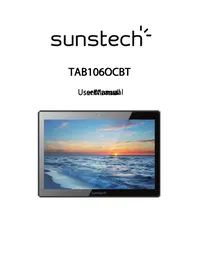
Tab 106 OCBT - Tablet Sunstech - Free user manual and instructions
Find the device manual for free Tab 106 OCBT Sunstech in PDF.



| Product Type | Touchscreen Tablet |
| Brand | Sunstech |
| Model | Tab 106 OCBT |
| Screen Size | 10.1 inches |
| Screen Type | IPS capacitive multipoint (5 points) |
| Screen Resolution | 1280 x 800 pixels |
| Processor | Octa-core 1.8 GHz (A83T) |
| Operating System | Android 4.4.2 |
| RAM Memory | 2 GB |
| Expandable Storage | microSD card reader up to 32 GB |
| Front Camera | 2.0 megapixels |
| Rear Camera | 5.0 megapixels |
| Battery | 5500 mAh, lithium-ion |
| Wi-Fi Connectivity | 802.11 b/g/n |
| Bluetooth | Version 4.0 |
| Ports | USB 2.0 (OTG supported) |
| Supported Audio Formats | MP3, APE, WMA, WAV, FLAC, OGG, AAC, 3GP |
| Supported Video Formats | MP4, MKV, MOV, AVI, FLV, 3GP, H.264 |
| Supported Image Formats | JPEG, BMP, GIF, PNG |
| Power Supply | AC adapter 240V/5V 2.4A |
| Approximate Weight | 500 g |
| Warranty | 2 years (European) |
Frequently Asked Questions - Tab 106 OCBT Sunstech
User questions about Tab 106 OCBT Sunstech
0 question about this device. Answer the ones you know or ask your own.
Ask a new question about this device
Download the instructions for your Tablet in PDF format for free! Find your manual Tab 106 OCBT - Sunstech and take your electronic device back in hand. On this page are published all the documents necessary for the use of your device. Tab 106 OCBT by Sunstech.
USER MANUAL Tab 106 OCBT Sunstech
Safety Instructions 1
Main Functions 13
Basic Operations 14
Home screen 15
Install the APK application 17
Uninstall the APK application 18
Movies.19.
Camera 20
Music 20
Regular Settings 21
Common Issues 23
SAFETYANDPPRECAUITCONWWAARNINGSS
| SAR www.sar-tick.com | ThisproductcanbeadjustedtotheSARnationallimitsof2W/Kg.The specificSARmaximumvaluesareintheinformationsectionofthis guide. Whenyouholdtheproductoruseitonyourbody,maintainadistance of1.5cmfromyourbodytoensuretheradiofrequencyexposure standards. |
ThisdeviceofferscommunicationandentertainmentservicesthatfollowSUNSTECH 'shighstandardsand technologicalexperience.
- Thecontentmaydifferfromthefinalproductofthesoftwareprovidedbythesuppliersofservicesor transmittersanditissubjecttoalterationwithoutpriornotice.
- The elementsthat comewiththedevicandanyavailableaccessorymayvaryaccordngtotheregionorsupplieroftheservices.
- Theelementsprovidedaredesigneduniquelyforthisdeviceandmaynotbecompatiblewithotherdevices.
- You may purchase additional accessories at your local SUNSTECH distributor. Ensure that they are compatible with the device before you purchase them.
- Otheraccessoriesmaynotbecompatabledewiththedevic.
- SUNSTECH is no theeld responsible for problems of insufficient return or any change to the operations system software. Any attempt to personalize the operations system may cause the device overhe applicationsto function incorrectly.
Instructional
|  | Warningsituationthatcausinjury,yourselfhird parties. |
|  | Precaution:Situationsthatcacausedamagestothedeviceor otherequipment. |
|  | Note:Notes,recommendationsofuseoradditionalinformation. |
Copyright
Copyright © 2013Afexsuns,S.A.
Thisguideisprotectedbyinternationalcopyrightlaws.
Reproduction,distribution,translationortransmissionofanypartofthisguideisnotallowedunderany circumstancesorthroughanymeans,beitelectronicromechanic.Thisincludesphotocopies,recordsorstorage
inanyinformationretrievalandstoragesystems,withoutpreviouswrittenauthorizationfromAfexSuns,S.A.
Safety information
This section contains safety information for modifiable devices. Some of the content may apply to your device. In order to avoid injury to yourself or third parties, read the device's safety information before you use it.

Warning
If you couldnt commply with ththesse safety nesgulbations amod wearinps, you may suflier serious injury correewdbeath.
Do not use damaged power connectors or connectors or loose sockets. Unsafe connections may cause anelectric discharge or fire.
Don't touch the power cord diff your handels are watt and don't pull the cord to disconnect the changer. If youdoso, you may beelectrocuted.
Do not send or damagnet the power cord. If you doso, this may cause anelectric discharge.
Don't cause a short circuit in the changes or the device. If youdoso, this may cause anelectric discharge or the device may not function correctly.
Use battenies, chargers, accessions and suppiltes that havelbeam approved by the manufacturer.
- Theuseofgenericbatteriesorchargersmayshortentheusefullifeofthedevicerecauseincorrect functioning.Itmayalsocauseafireorthothebatterymayexplode.
- OnlyusebatteriesorchargersthathavebeenapprovedbySUNSTECH,specificallydesignedforthe device. Anyoncompatiblebatteriesandchargersmaycauseseriousphysicalinjuriesordamagethe device.
- SUNSTECHwillnotbeheldresponsibleforthesafetyoftheuserwheneveraccessorsupspliesthat havenotbeenapprovedbythebrandareused.
Do nattcutordhupthe dhangerorthe obexive.
When thambling cordisposing of the device aumb charger doos with cautium.
- Neverthrowthebatteryorthedevicetimetothefire.Neverplacethebatteryorthedevicemonanysources ofheat,suchas,ovens,microwaves,glasshousesorradiators,etc.lfitoverheats,thedevicemayexplode. Followallocalregulationswithregardstodisposingoftheusedbatteryordevice.
- Donotsquashthedevicereormakeholesinit.
- Avoid exposing the device to high pressure because this may cause an internal short-circuit and overheating.
Protect the device, battery and charger in order to stop them from getting damaged.
- Avoid exposing the device and battery tovery high or low temperatures.
- Extremetemperaturesmaydamagethedeviceandreducechechargingcapacityandthedurationofthe deviceandbattery.
- Avoid the battery entering into contact with metal objects because this may cause a connection between the positive and negative terminals. Also, if the battery is damaged, it will temporarily or permanently be replaced by a new one.
- Neverusedamagedchargersorbatteries.
Donnt stoe the obexieinoor mearhneaters,miowwaeess,heatedkifteehn eqipomentto high pessunecontainess.
- Thebattery may have leakages.
- Thedevicemayoverheatandcauseafire.
Donatuseorstorethedtexteinplaceswithalodofclustormaterialltransportedbyair.
Dustorforeignmaterialsmaycausethedevicetomalfunctionandmayresultinafireoranelectricdischarge.
Safetyinformation
Donmat botte carssukk the obwke corthe bottey.
- Thismaydamagethedevicerecauseanexplosionorafire.
Childrenandanimalsmaychokeonsmallpieces. - When childrenusethedevicere,ensurethattheydosocorrectly.
DonatInsertthe devicecorthe accessoriesprovidiblntoyour eyes,earsormaith.
If youdoso, you make chokeors suffer serious injuries.
Don't touch the damagedllithium ion batteries or batteries that showewildence offleakage.
To disposeof lithium-ionbatteriessafely,contactyourclosestauthorizedservicecenter.
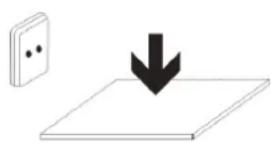
PLUGGABLEEQUIPMENT:tthescondcctoutbetsblallbdeinsstalkedmeartheequipmentamod shall be easailyacceessible.

Precaution
If you do not comply with these regulations and warnings, you may suffer injuries cor
cause material damage.
Donnuttussetthe devicenear other electronic devices.
- Mostelectronicdevicesuseradiofrequencysignals.Thedevicemayinterferewithotherelectronic devices.
- If you use a LTE dataconnection, this may cause an interference with other devices, such as audio equipment and telephones.
Donat use the dwekeihia hospital, pIane corcar that may be affected by interferencce caused by radiofrequency.
- Ifpossible,avoidusingthedeviceatanydistancelowerthan15cmfrommapacemaker,because the devicemaycauseinterferenceswithin.
To minimize anypossibleinterferencewithapacemaker,usethedevicemonlyontheoppositesideofth bodyinrelationtothepositionofthepacemaker. - Ifyouusemedicalequipment,contactthemanufacturerofthequipmentbeforeusingthedevicein ordertoascertainwhethertheequipmentwillbeaffectedbytheradiofrequencymittedbythedevic.
- Ifelectronicdevicesareusedonaplane,thesemayinterferewiththeelectricnavigationinstruments. Ensurethatthedevicesturnedoffduringtake-offandlanding.Aftertake-offyoumayusethedevicemon "airplanemode"aslongasthisisallowedbythecabincrew.
The electronic devices in your carmaylfunctionduetotheradiointerferenceofthedevic. Contact themanufactureror further information.
Donnte expoosse tthe dweiue to ssmkeor sthongemaanatons.
If youdoso, you may damage the outside part of the device or cause its malfunctioning.
If you use hearing devices, contact the manufacturer for further information about radio interference. Theradiofrequencythatthedevicemitsmayinterferewithsomehearingdevices.Beforeusingthedevicet, contactthemanufacturerinordertoascertainwhetherthehearingdevicewillbeaffectedbytheradio frequencyemittedbythedevic.
Dornatuse the device near other devices or apparatus that eemit raibofrequency, such as sound systems or radiottowers.
Radiofrequencymaycausethemalfunctioningofthedevic.
Turnoffthe deviceimpotentallyexplosiveatmospheres.
- Turnoffthedevicesteenthofremovingthebatteryinpotentiallyexplosiveatmospheres.
- Alwaysrespectthestandards, instructionsand warningsignsinpotentiallyexplosiveatmospheres.
- Donotusethedevicepinpetrolstationsornearfuelorchemicalsorindemolitionareas.
- Donotstoreortransportflammableliquids, gasesorexplosivematerialinthesamecompartmentin whichthedevic,itspartsoraccessoriesare.
If you dae come away of tble device or the batteny letting offstange cobsourts scif If you see smake oq liquid coning out of tble dideoeor batteny, stop using tble dideeirimmediately amd take it to rana aubioizeed service Centre.
If youdonotdoso, this may cause a fire or an explosion.
Complywith all the safety regulations and warnings related to the use of mobile devices when driving a vehicle. Whendriving, your main responsibility is to control the vehicles safely. If the law does not allow mobile phone use when driving, donot use themobiledevice. For your and others 'safetyuseyourcommon senseand remember the following advice:
- Gettoknownthedeviceanditsoperatingfunctions,likespeedddiallingandrecallsystem.Thesefunctions
allowthetinenecessaryytomakeandreceivevecstoberduced.
- Putthedeviceinaplacewhereitiseasytoreach.Makesurethatyoucanaccessstweiressdevice withouttakingyoureyesofftheroad.Ifyoureceiveatelephonecallatinconvenienttime,let voice-mailanswerit.
- Stopphonecallswhenthereisheavytrafficorwhenthereareadverseclimateconditions.Rain,sleet, snow,iceandheavytrafficcanbeverydangerous.
- Donotjotdownorlookfortelephonenumbers.Jottingdownatakorlookingatourcalendarmay distractyoufromyourmainresponsibility,whichistodrivesafely.
- Dialcarefully and classessthestateofthetraffic.Makephonecallswhenyouarenotmovingorbefore hittingtraffic.Trytoschedulephonecallswhenthecarisparked.
- Donothaveverystressfuloremotionalphonecallssthatmaydistractyou.Tellthepersonthatyouare speakingtothatyouaredrivingandendanyconversationsthatmaytakeawayyourattentionfromthe road.
Correctuseandmaimtemamceoffthermobiledevite.
Keeptheedtavitredry.
- Humidityandliquidsmaydamagethepartsortheelectricircuitsofthedevic.
- Donotturnonthedevicefitiswet.lfitisalreadyturnedon,turnitoffandtakethebatteryout immediately(ifyoucannotturnitoffortakethebatteryout,justleaveitasitis).Afterthis,drythedevice withatowelandtakeittotheservicecentre.
- Liquidswill changethecolourofthelabelwhichindicateshedamagecausedbythewaterinsidethe device. The damage caused by the water in the device may cancel the manufacturer's warranty.
Placetthe deviceonlyconfllfat sunfaccs.
Ifiddrops, the devicemaygetdamaged.
Domotstore the device inweeyhfoort coldples.its isrecommenbedtthat you uset the device attemperatures between 55a add 335°
- Donotstorethedevicepinplaceswithveryhightemperatures,suchasinsideacarinthesummer.Ifyou doso,youmaycausethescreentomalfunction,thedevicemaygetdamagedorthobatterymay explode.
- Donotexposethedevicetodirectsunlightforlongperiodsofttime(forexample,onthedashboardofcar).
- Storethebatteryattemperaturesbetween 0^ and 45^ .
Dornstnne thee obexie with mertellcbjects, suthaass ccaims, Keys armed meekhtaness.
- Thedevicemaygets scratchesorstopworkingproperly.
-If the battery terminals come into contact with metal objects, afire may occur.
Domot stone the device narnmagnetic fiibbs.
- Itispossibleforthedevicetostartmalfunctioningandforthebatterytolosepowerduetobeing exposedtothesesefields.
- Cardswithmagneticstripe, such as credit cards, telephone cards, travel passes may get damaged due to themagnetic fields.
If the device covers threats, stop using it and its applications. If you are a while
Prolongedskinexposuretoahotdevicemaycausesymptomsofburningwithlowtemperature,suchasred spotsandpigmentation.
Don't use the device if the back covers not in place.
Thebatterymaycomeoutofthedevicewhichcausedamageormalfunctioning.
If the device has a lamp, cora camera flash, do not use it near people's or animal's eyes.
This may cause atemporary loss of vision ordamagetheeyes.
Becarefull when exposing yourself to intermittent light.
- Whenyouusethedevice,leavesomelightturnedonthebedroommanddonothavethescreentoo closetoyoureyes.
- Convulsionsorfaintingmayoccurduetoexposuretointermittentlightwhenlookingatvideosor playinggameswithintermittentlightsforprolongedperiodsoftime.Ifyoufeelunwell,stopusingthe deviceimmediately.
- Ifanyoneclosetoyousufferedfromconvulsionsorfaintingwhenusingasimilardevice,visitadoctor beforeusingthedevic.
Ifyoufeeldiscomfort,suchasmusclecrampsoryoufeeldisoriented,stopusingthedevicemimmediately andvisitadoctor.
To avoideyefatigue,havefrequentsbreakswhenusingthedevic.
Reducethe risk of injurycausedbyrepeatedewmowements.
When you carry out repeated actions, such as pressing keys, drawing characters on the touchscreen or playing a game, you may feel discomfort in your hands, neck, shoulders or other parts of the body. When you use the device during prolonged periods of time, hold it with relaxed hands, touch the keys slightly and rest frequently. If you continue feeling discomfort during or after taking these steps, stop using the device and visit a doctor.
When you use eamphomes,protat your thearling amd your ears.
| •Excessiveexposureoloudsoundscancausedamagetohearing. •Exposureoloudsoundswith you are walking may distract you and cause an accident. |
- Alwayslowerthesoundbeforeconnectingtheearphonestoanaudiosourceandusetheminimum amountofvolumenecessaryarytolistentomusicorhaveconversation.
- Indryenvironments,staticelectricitymayaccumulateinthearphones.Avoidusingearphonesindry environmentsortouchmetalobjectstodischargethestaticelectricitybeforeconnectingthearphones tothedevic.
- Donotuseanearphonewhileyouaredrivingorridingvehicle.Ifyoudosoyoumaygetdistractedand causeanaccidentoryoumaybesubjecttolegalion,dependingonthareawhereyouaredriving.
Use the device with caution while you are walking around.
- Alwayspayattentiontowhatishappeningaroundyouavoidphysicalinjurytoyourselfandothers.
- Makesuretheearphonecorddoesngetentangledroundyourarmsnearbyobjects.
Youmaygetinjuredordamagethedevicifitfalls.
Donatppaintyourdwelkecorpuatamystldekerscomit.
- Paintandstickerscanobstructthemobilepartsandstopthedevicefromworkingproperly.
- Ifyouareallergictopaintortothemetalpartsofthedevic,youmaygetastingyfeeling,eczemaon swelling.Ifthishappens,stopusingthedevicandvisitadoctor.
Donnus the dweiifthes sennis nckedor bokem.
Thebrokenglasscancausehandandfaceinjuries.Takethedevicetoanauthorizedservicecentretogetit repaired.
Installthe mddle obwices amththe eapipment withcaution.
- Makesurethatthewholemobiledevicereorrelatedequipmentthatisinstalledinyourvehicleis assembledafely.
- Avoidplacing the device and the accessories where the airbag is on next to it. Any wireless equipment installed incorrectly can cause serious injuries when the airbags inflate quickly.
Don't allow the product to fall off. Obes subject to strong impacts.
- Thedevicemaygetdamagedormalfunction.
- If you bendordeformittedevicemaygetdamagedanditspartsmaymalfunction.
Guarantee of the maximum duration of the battery and charger.
- Avoidcharging the device for overawek, because overcharging can reduce the battery 'sservicelife.
- Withtime, the device will run out of battery (even when it is not being used) and you will need to recharge it into again.
-
Disconnectthechargerfromthepowersourceswhenitisnotbeingused.
-Usethebatteryonlyforthepurposeforwhichtwasdesigned. -
If youdonotusethebatteryforalongtime, you may reduceitsservice life and performance. You may alsocausethemalfunctioningorexplosionofthebatteryorafire.
- Followalltheinstructionsinthismanualoguaranteethelongestservicelifepossibleforyourdevice andbattery. Anydamageoroperatingproblemscausedbynotcomplyingwiththewarningsand instructionsmaycancelthemanufacturer 'swarranty.
- Withtime, the devicemaywearout. Some parts and repairs are recovered under the warranty during the validity period; however, the damages order deterioration caused by the use of accessories not approved by the brand are not covered.
Takethefollowinginformationintoaccountwhenusingthedevic.
- Useitaverticalposition,asyouwouldattraditionaltelephone.
- Speakdirectlyintothemicrophone.
- Donotcovertheantennaareawithyourhandsorotherobjects.Thismaycauseconnectionproblemscausethebatterytorundown.
Donnattunassembleb,changeorreapirttheckewice.
- Anyalteration or change to the device may cancel the manufacturer's warranty. If you need to repair the device, take it to an authorized service centre.
- Donotdisassembleormakeholesinthebattery, this may cause anexplosionorafire.
- Turnoffthedevicebeforeeremovingthebattery.Ifyouremovethebatterywhilethedevicewisstillturned on, this maycausemalfunctioning.
Take the following information into account when dealing with the device.
- Useatowelarurubberclothtocleanthedeviceandthecharger.
Cleanthebatteryterminalswithcottonorwithatowel. - Donotusechemicalssubstancesordetergents.Ifyoudoso,youmaycausediscolorationorcorrosionof theoutsidepartofthedevicereyoumaycauseanelectricdischargeorafire.
Donntusseitffaranycotherpounposceothertthentheoneiitwascbesignedffor.
Thedevicemaymalfunction.
When you use the device in public, they must do disturb others.
Only allow qualified professionals to carry out the maintenance of your device.
Itispossiblefordamagestooccurandthemanufacurerpersonneltocarryoutthemaintenanceofthedevic.
'swarrantycancelledifyouallownonqualified
Becareful when handlingSIM cards, memory cards or cables.
- When inserting acardor connecting acabletothe device, makesurethecardisinsertedcorrectly or that the cable is connected ontheright side.
- Donottakethecardoutwhenthedevicewisetransferringinformationorithasaccessstoit,becauseyou maylosedataaanddamagethecardorthedevic.
- Protectthecardsfromstrongdischarges,staticelectricityandnoisegeneratedfromotherelectronic devices.
- Donottouchthecontactsorthegoldterminalswithyourfingersorwithmetalobjects.Ifthecardis dirtycleanitwithasoftcloth.
- If you insert a card or connectable forcefully or incorrectly you may cause damage to the multifunctional socket or other part of the device.
Make sure you have access to the internet.
Itispossiblethatinsomeareasorcircumstancesyoumaynotbeabletomakeemergencyphonecalls.Before travellingoremeareasordevelopingcountries,plananalternativeformofcommunicatingwiththe emergencieservices.
Protectycour personal data and avoidconfidemial information from losing speed and corusse idmconnectly.
- Whenyouusethedevicemakesureoumakeback-upcopiesofimportantdata.SUNSTECHwillnotbe heldresponsibleforanylossofdata.
- When you dispose of the device, make a back-upcopy of all the data and afterre-establish the device to avoid personal information from being used inappropriately.
- Readthelicensescreenecarfullywhenyoudownloadapplications.Beespeciallycarefulwith applicationsthathavecaccessovariousfunctionsorsignificantamountofyourpersonalinformation.
- Control your accounts frequently to avoid any suspicious or non-authorized use. If you find any indication of your personal information not being used appropriately, contact your servicesupplier to delete or change the information in your account.
- Ifyoulosethedevicereitisstolen,changethepasswordsofyouraccountstoprotectyourpersonal information.
- Avoid using applications from unknown sources and block the device with a pattern, a password or PIN.
Donatodistributematerialprotectedwithacopyright.
Donotdistributematerialprotectedwithcopyrightwithouttheauthorizationofthecontentowners.Ifyoudoso, youmayviolatecopyrightlaws.Themanufacturerwillnotbeheldresponsibleforanylegalproblemcausedby illegaluseofmaterialprotectedbytheuser.
Malware and whuss
Follow these suggestions to protect the device against malware and virus. If you had to stop it, you may cause damages or loss of data that may not be covered under the warranty.
-
Donotdownloadunknownnapplications.
-
Donotuseunreliablewebsites.
-Deleteanysuspicioustextmessagereserralsfromunknownssenders. - Createapestwordandchangeitregularly.
- Deactivatethewirelessfunctions,suchasBluetooth,whenyouarenotusingthem.
-Ifthedevicbehavesstrangely,executeantivirusprogramtodetectapossibleinfection. - Executeantivirusprogramonthedevicebeforestartingapplicationsandfilesthatyoujust downloaded.
- Installanti-virusprogramsonyourcomputerandexecutethemregularlytodetectanypossible infections.
- Donoteditheregistrationadjustmentsorchangethedevic e 'soperatingsystem.
Information about the identification of the Specific Acidorption Rate (SAIR).
THIS DEXIXE FROILOWSS INTERNATNONVAIL SSTAANDAARIDSOFF EXPOURURE TIO PRADIDOWAXES.
Yourmobiliedevicisaradiotransmitterandreceiver.Itwasdesignedtonotexceedthelimitsofexposure to radiowaves(electromagneticfieldsofradiofrequency)recommendedbyinternationalstandards.Thestandards weredevelopedbainindependentscientificorganization(ICNIRP)andincludeasubstantialsaftymargin designedtoensurethesafetyofallpeople,regardlesssotheirageorstateofhealth.
TheexpositoradiowavestandssuseameasurementunitknownastheSpecificAbsorptionRate,SAR.The SARlimitformobiledevicesis2W/Kg.TheSARtestsarecarriedoutusingstandardoperationpositionswith the devicetransmittingatitsmaximuncertifiedenergylevelinallfrequencybands.ThehighestSARamountsunder theICNIRPstandardsforthisdevicemodelare:
| MaximumSARforthismodelandconditionsunderwhichitregistered | |
| SARffor ppossession@256.0001.0000.0000.0000.0000.0000.0000.0000.0000.0000.0000.0000.0000.0000.0000.0000.0000.0000.0000.0000.0000.000 | |
| SARffor ppossession@256.0001.0000.0000.0000.0000.0000.0000.0000.0000.0000.0000.0000.0000.0000.0000.0000.0000 | |
Duringtheuse,therealSARvaluesforthisdeviceareusuallyalotlowerfromthevaluesindicatedpreviously.This isdetomaximizingthesystem 'sefficiencyandtominimidetheinterferencewiththenetwork,theoperation capacityofyourmobiledevicereducesautomaticallywhenthemaximumpowerisnotneededforthecall.The lowerthamountofenergyleavingthedevicethelowertheSARamountwillbe.
ASRestwascarriedoutwiththeventcnthbodwtalistanceof.5m.
To comply with the radio
frequencyexposurerquirements,whileusingthedevicemonthebody,thedeviceshallhavetobeatleast1.5cm awayfromthebody.
Someorganizations,liketheWorldHealthOrganizationortheFoodandDrugAdministrationoftheUnitedStates suggestthatifuserswanttoreduceexposure,theycanuseahandsfreecaccessorytomainthewirelessdevicefar awayfromtheheadandbodywheninuse,orreducethemamountoftimespentusingthedevic.
Correct disposals of this prooeduct.
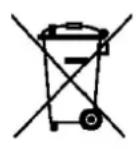
(Electronicdevicewaste)
(Thisappliesin countrieswhererecollectionsystemshappenseparately).
Thepresenceofthissymbolontheproduct,accessorsorinformationmaterial indicates that neither the product nor it selects electronic accessories (such as, the charger,helmets,USBcable) should be disposed of with other household waste.
To avoidanypossibledamagetothenvvironmentmentorhumanhealthcausedbyuncontrolleddisposalofwaste, separatetheseproductsfromotherwasteandrecyclethem.Thisway,youarepromotingthesustainablereuseof materialresources.
Individualuserscancontacttheestablishmentweretheypurchasedtheproductortherelevantlocal authoritiestogetinformationaboutwhereandwhentheycantakeitinordertosubmitittoecologicalandsafe recycling.
Businessuserscancontacttheirsupplierandcheckthepurchasecontractconditions.Thisproductandits electronicaccessoriesshouldnotbedisposedofwithothercommercialwaste.
Correctdisposaaloffthisprooabutt'sbatttenies
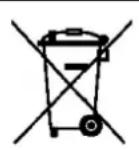
(Thisappliesin countrieswhererecollectionsystemshappenseparately).
Thepresenceofthismarkonthebatteries,manualorproductpackaging indicates that whentheservice life of the batteries has ended they should not be disposed of with other household waste. The chemicals symbols Hg, Cd and Pb indicate that the battery has mercury, cadmium or lead levels along higher than thereference values admitted by the 2006/6 Directive of the European Union.
If the batteries are not disposed of correctly, the substances may cause personal injury or damage the environment.
To protect natural resources and promote recycling, separate the batteries from other waste and recycle them through the free collectionservicein your area.
Exemptionffommnsponsibilityctausse
Partofthecontentandservicesestwhichyouobtainaccesssthroughthisdevicebelongtothirdpartiesandare protectedundercopyright,patent,registeredtrademarkand/orotherintellectualpropertylaws.Thiscontent andservicesareonlyforpersonaluseandnotcommercialuse.Itispossiblethatthecontentortheservices cannotbeusedifnotauthorizedbythecontentownerorthesupPLIERoftheservices.Withoutprejudicetothe aforementionedinformation,exceptwhenexpresslyauthorizedbythecontentownerorservicesupplier,you cannotchange,copy,reedit,charge,publish,transmit,translate,sell,createderivativeworks,exploreordistribute inanywayorbyanymeansthecontentortheservicesshowthroughthisdevice.
"THECONTENTANDTHESERVICESOFTHIRDPARTIESAREPROVIDED "A\(S".SUNSTECHDOESNOTGUARANTEE THECONTENTORTHESERVICESPROVIDED,EITHEREXPRESSLYORIMPLICITLY,FORMOPURPOSE.SUNSTECH EXPRESSLYRENOUNCESANYIMPLICITGUARANTEES,INCLUDINGBUTNOTLIMITEDTO,MERCHANTABILITYOR SUITABILITYGUARANTEESFORAPURPOSEINPARTICULAR.SUNSTECHDOESNOTGUARANTEETHEVERACITY, VALIDITY, REPRODUCTION, LEGALITYORINTEGRITYOFANYTYPEOFCONTENTORSERVICEPROVIDEDTHROUGH THISDEVICEANDUNDERNOCIRCUMSTANCES, INCLUDINGNEGLIGENCE, WILLSUNSTECHBEHILDRESPONSIBLE.
BOTHINTERMSOFCONTRACTORPREJUDICETOANYDIRECTORINDIRECT,ACCIDENTAL,SPECIALOR CONSEQUENTIALDAMAGES,LIWYERS 'FEES,EXPENSESORANYOTHERYPEOFDAMAGEFROMINRELATION TOANYTYPEOFINFORMATIONINCLUDEDNORASARESULTOFTHEUSEOFANYTYPEOFCONTENTOR SERVICEBYYOURSELFORATHIRDPARTY,THEPOSSIBILITYOFTHEREFERREDDAMAGESISKnownN."
TheservicesofthirdpartiesmayceaseorbeinterruptedatanytimeandSUNSTECHdoesncarryout representationsorguaranteesinrelationtotheavailabilityofcontentorserviceforanyperiodoftime.The contentanderviceartransmittedbyhirdpartiesthroughnetworkandtransmissionocclusionsoverwhich SUNSTECHhasnocontrol.Withoutlimitingthegeneralityofthisclause,SUNSTECHexpresslyrenouncesany responsibilityforanyinterruptionorsuspensionofcontentorserviceprovidedthroughthisdevice.
SUNSTECH notes responsible for customer service regarding content and services Any question or request for serviceregardingcontentorservices should besent directly totheservicesandcontentsuppliers.
Main Functions
- WithWiFiformmobileinternetbrowsing
OS:Android4.4.2
Supportsmultipleaudioandvideo formats
Built-inmicrophone,superlongtimerecording - Freesetofenergy-savingssettings,displaybrightness,the interfacebackground
SupportsE-bookreading,bookmarks,automaticallybrowsing,horizontalandverticalscscreen,switching function
SupportTFcardandOTGfunction,scalablestoragespace
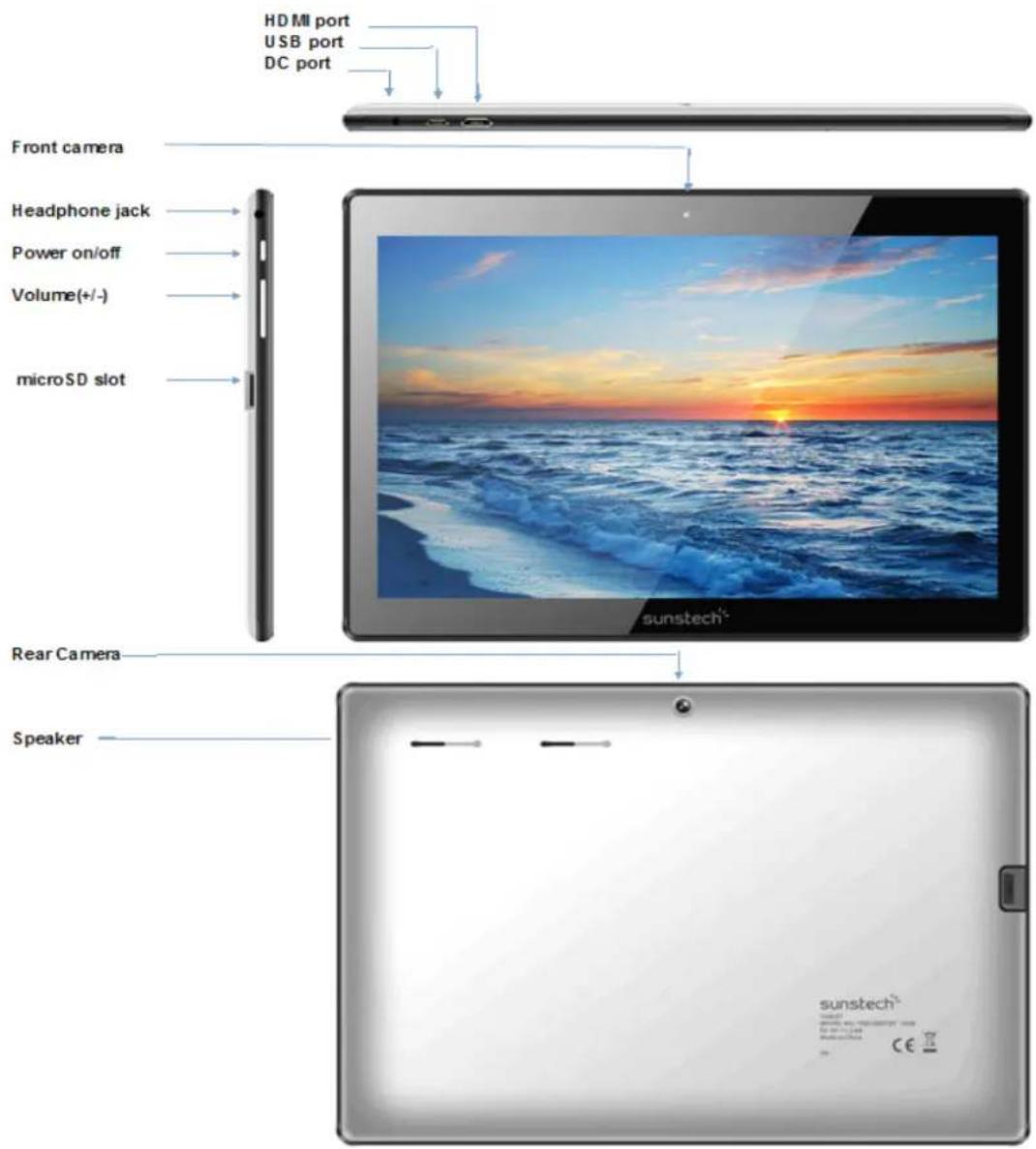
Appearance:
Basic Operations
1.Turnen
Alongpressonthepowerbottomturnsonthedevic
2. Tummoff
Inthenormalstate,longpresssthepowerbuttonoshutdown,select"OK"whenpickupwhethertoshutdown theinquirybox.
3. Power Reserveett
CrashesmayocurreddintheprocessofusingduetoSmartoperatingsystem.TaptheRESETbuttonforce shutdownandthenrebootifoccurred.
4. Sorensen Swaver
Pressthepowerbutton,turnoffthescreenintothescreensaverstate,ifyouwanttoactivatescreen,pressthe powerbuttonagaintoenterthescreenlockstate,thenslidethelockbuttontounlock.
5.Bardiktoithhecbsktopp
Tapthebottomlowerleftsideofthscreen,Homeicon"
"canreturntothedesktopunderanyinterface
6. Back to the previousrintenface
TaptheBackicon" "lowerleftsideofthescreenbottomcanreturntothepreviousdesktopunderany interface
7.S8titiggs
Tapthe" "controlsupper-rightofthescreenaccesstotheapplicationbar,tapthe"Settings"icontothesetmenulistinterface
8.Changjing
PlugtheDCconnectorofadapterintotheDC-inofdevice.PlugtheadapterintoACpowersocket.Whilecharging, thedevicemayheatup.Thisisnormalandshouldnotaffectyourdevice 'slifespanorperformance.Whenthe batteryisfullycharged(thechargingiconisolongermoving),unplugtheadapter,driverfromthedevicand thenfromthepowersocket.
9-Wineless 88.Networrk:
Wi-Fi::PressWi-FitoturnON/OFF
Wi-Fisittings:
PressWi-Fisettings,thenthedevicewillautomaticallysearchtheavailable
Wi-Fisignals.
Selectthenetworkyouwanttoconnectwith.
10-Commmestion Bluetooth:
-Select"settings"
-SelectBluetoothandslideON/OFF
-AlldetectedBluetoothdeviceinareawillbelisted,taptoselectthedevicereconnection.
TOHEILIPINSSURREEAHAHEALUTHYYBASTTHERRY.
-Makesurethemachineonasingchargeonceamonthandthenshutdownbeforestoringitwithoutlonguse afterfullycharged.
-Tips:usingauthorizedaccessoriescanenjoyadequatesecuritytoguaranteethemaintenanceservices.
Before using the device for the first time, you should charge the battery. The power adapter (charger) is a key component of the device and plays vital role in protecting it work properly and your safety.
Unauthorizedchargerscancausebatteriestoexplodeordamageyourdevice. Anydamagecausedbymisuseis notcoveredbywarranty.
Homess
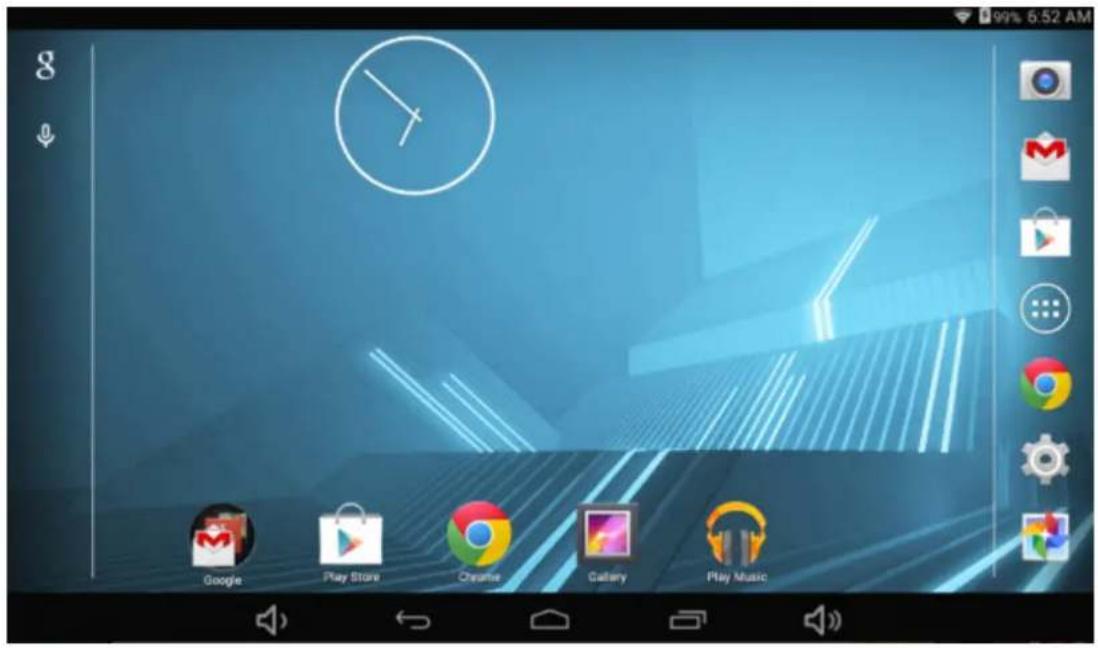
1.(Bydefault, the homescreen can open multiple pages; implied icons are "Browser" and "Camera", etc. Sliding left/right switch desktop display.
2. Sattwallpaper
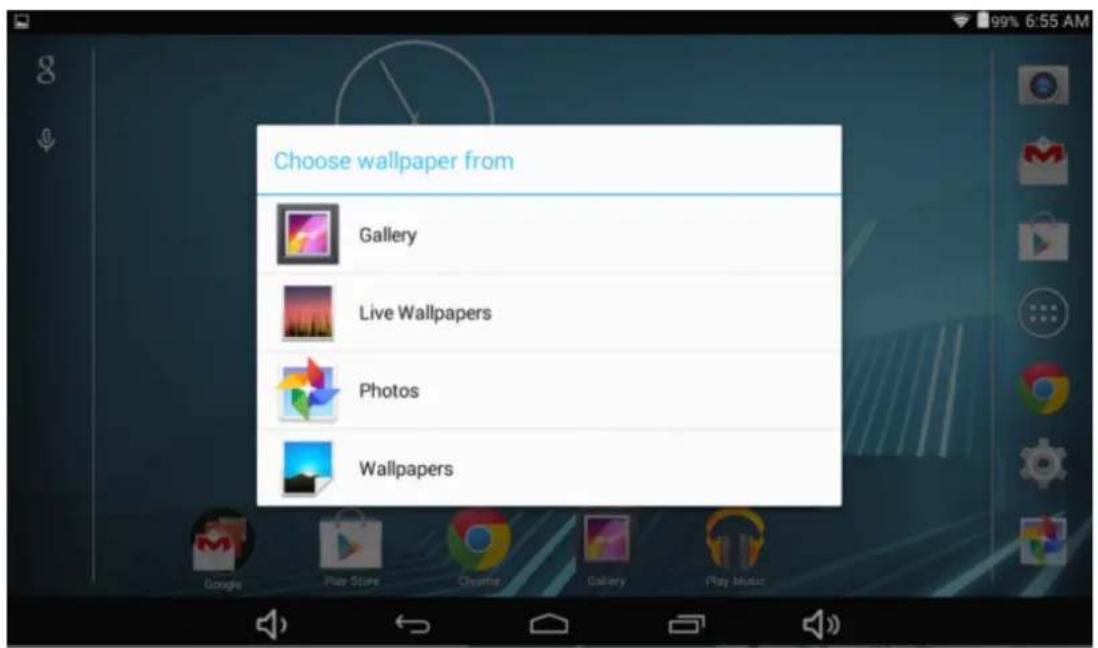
Longpresstheblankspaceofthehomescreenandthenappear"SelectWallpaperfrom
Chooseanimageacccordingtothecategories.
3. Diplay all applications
Allinstalledapplicationswillbedisplayediftap"

controlupperrightofthescreenunderthemaininterface.
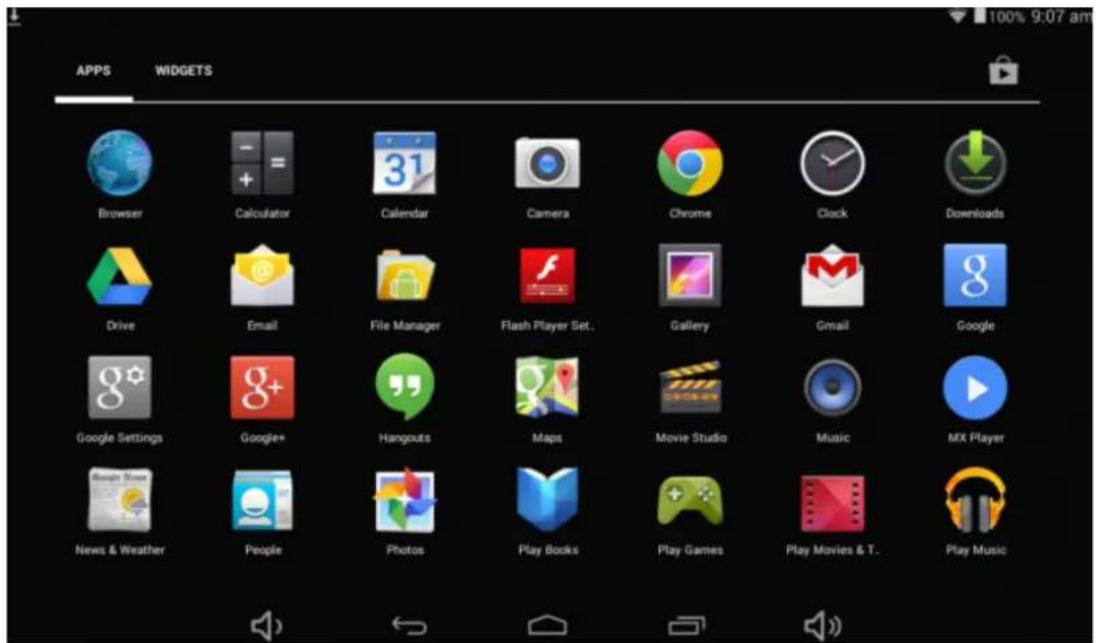
4. Nootification<|im_start|>
Underthemaininterface,tapthestatusbaricon,suchasUSBconnectiontothenotificationspanel,whichcan displaythecurrentstatusoftheUSB,TFcardstatusandtherunningapplicationandstatus.
5.WatbIbeDesktqipbcn
Underthehomescreen, longpresstheapplicationicononthehomescreen, thenyoucanmovetheselected iconaftertheiconisselected.
6. Delete the desktoppiston
Underthehomescreen, longpresstheapplicationicononthomescreen, movetheselectedicontothetrash caniconupperofthescreenshotaftertheiconisenlarged, thenstoppressingwhentheiconareadplaysorange andthedesktopiccanbedeleted.
InstalltheAPPKapplicaiton
1.Copytheneeded APKformatapplicationintothedevicereorTFcard.
2.Tap"FileManager"tofindtheAPKformatapplicatiyyouwanttoinstall.
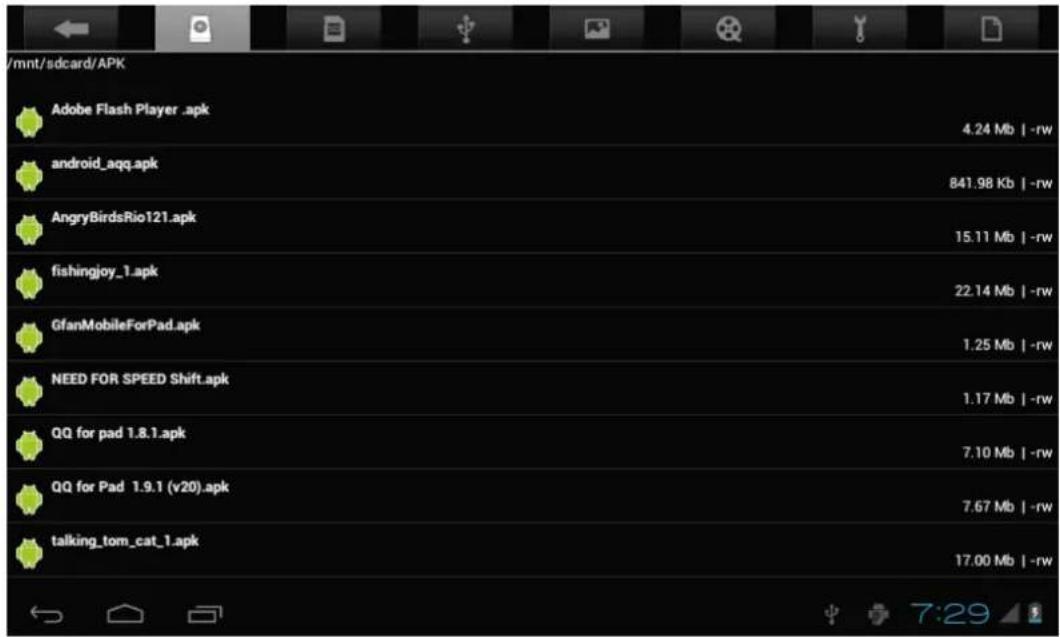
3.TaptheAPKformatapplicationyouwanttoinstall, and then you will see amessagethats says "Doyouwantto installthisapplication?"
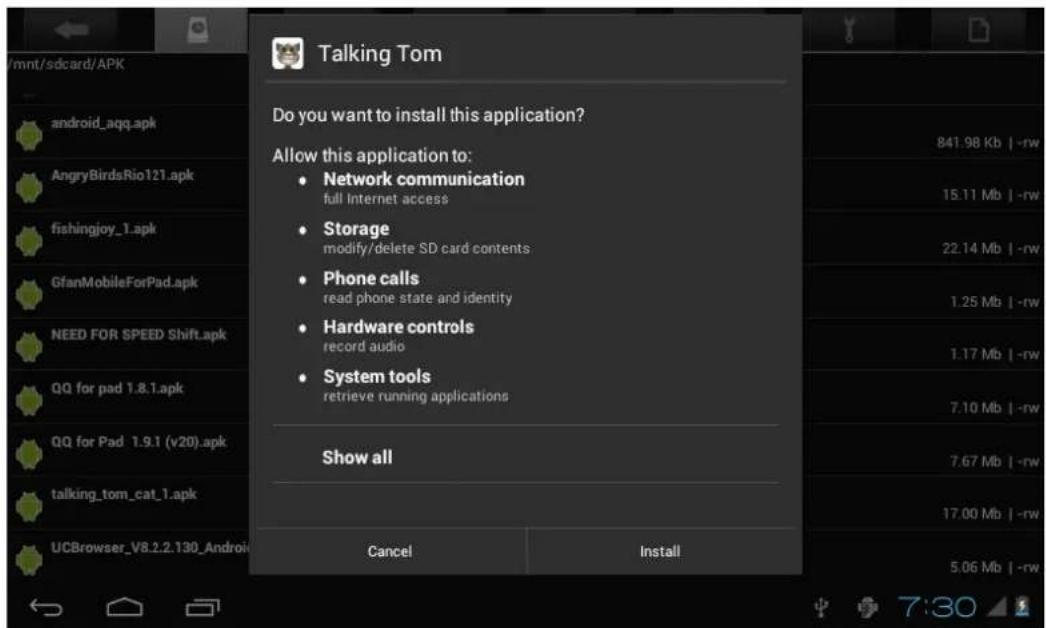
4.Tap"Install"tobegintheinstallationofAPKapplication
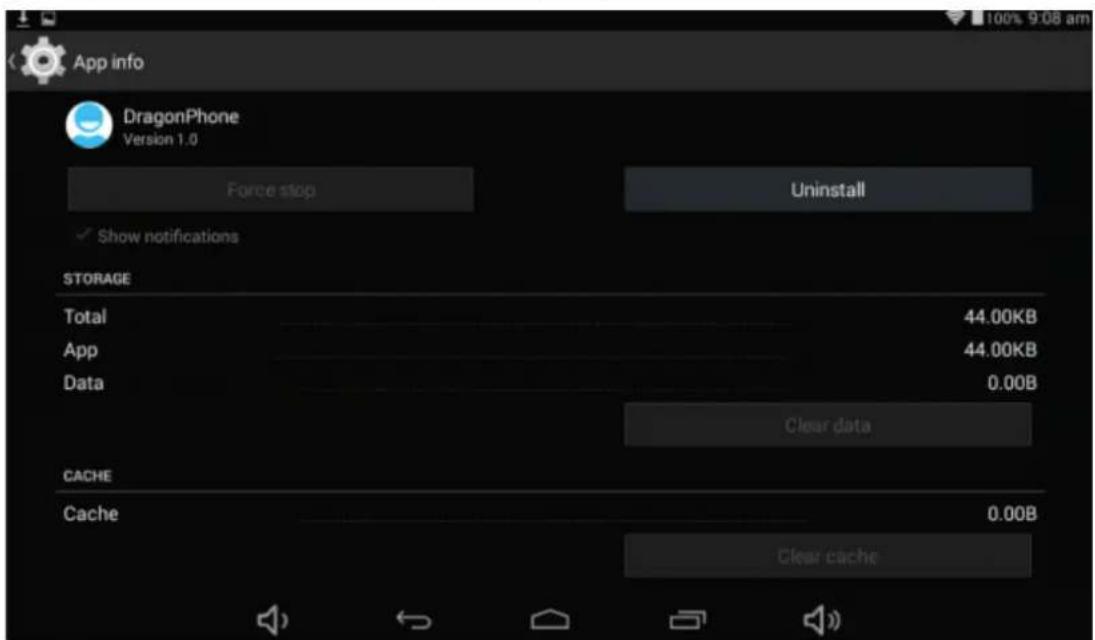
UninstallAPPKapplication
1.Tap"controlsapSettingsIntosettingsmenuthertap'Apps'sanddisplayinstalledapplicationist.
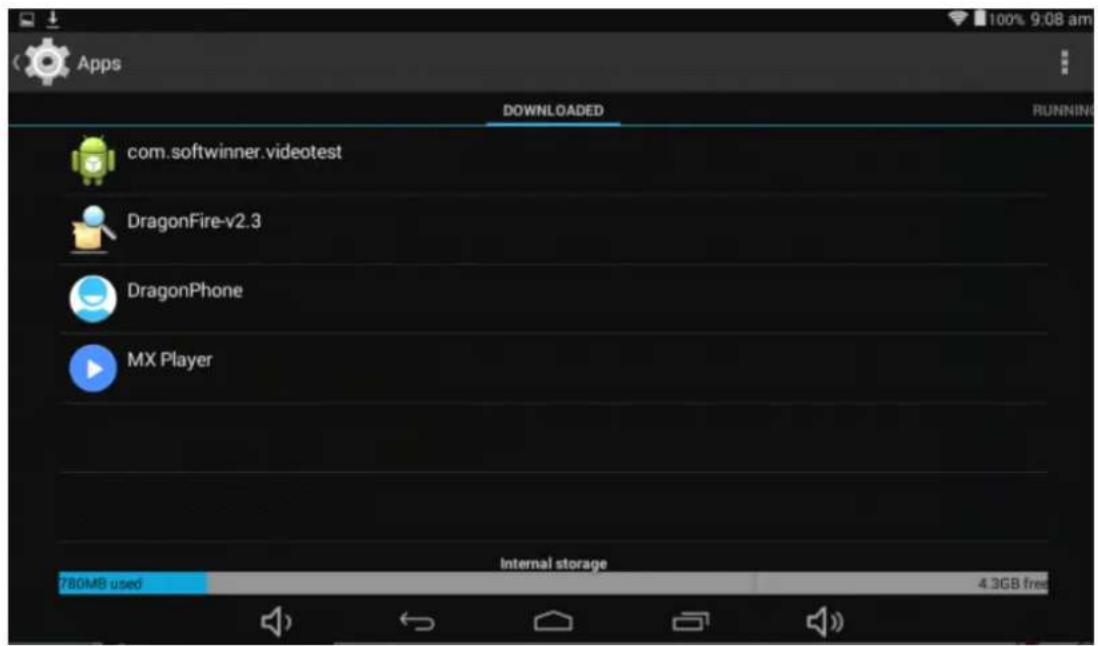
2.Taptheapplicationyouwanttouninstallalpopulationwillpromptuninstallboxes
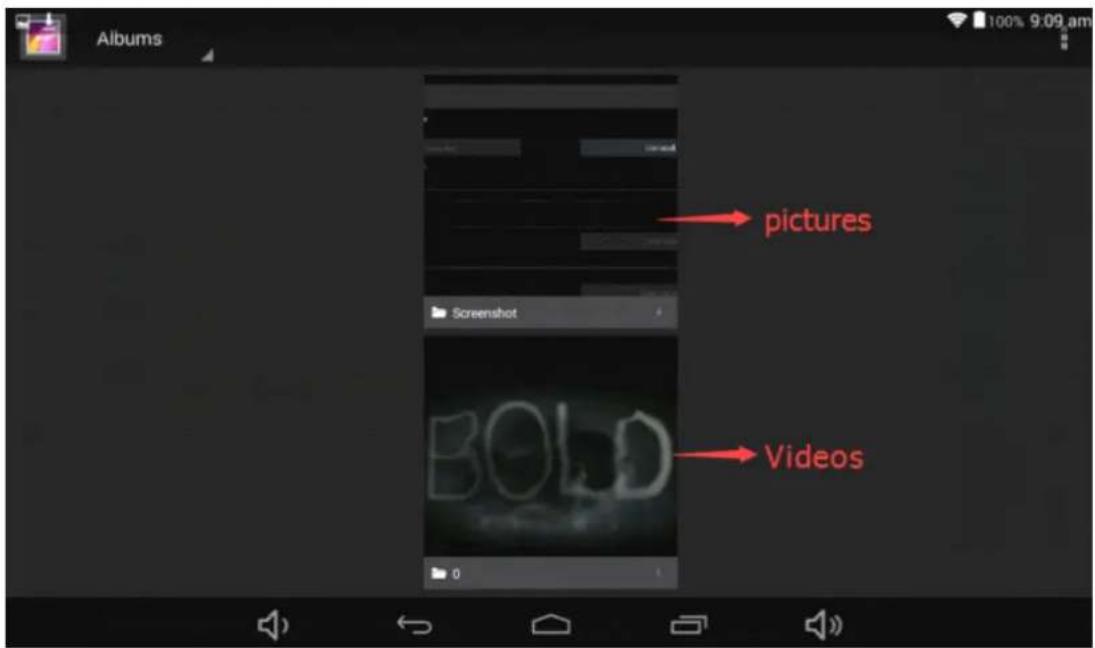
PicturesandMboxiness
1.Tap"Gallery"inthehomescreentoaccessdomediainterfac
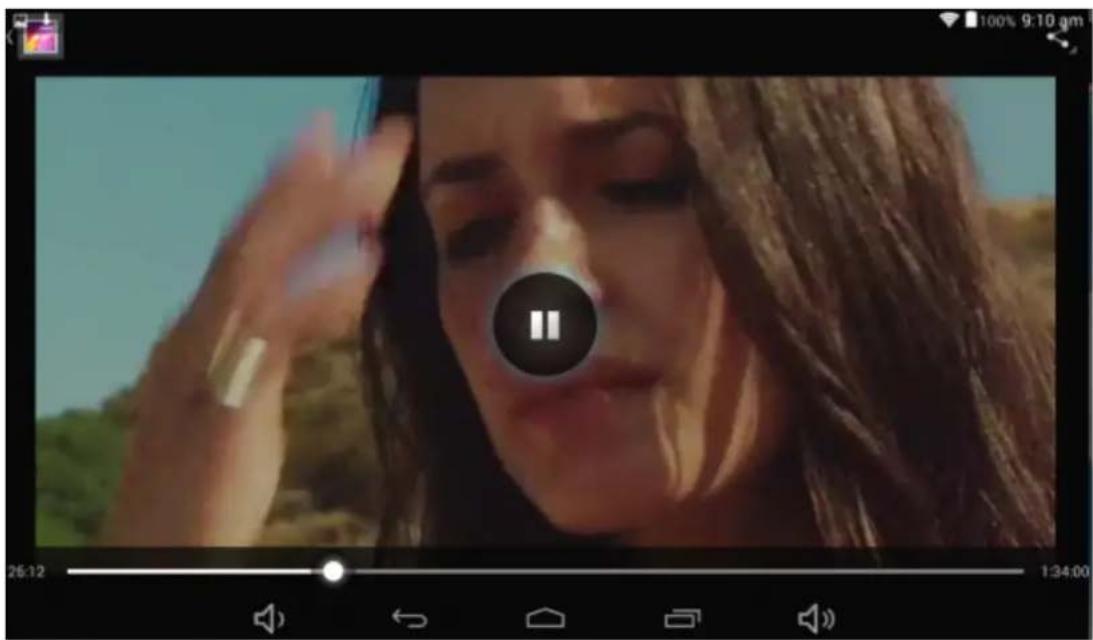
2.Thentapabovethevideoyouwanttowatch
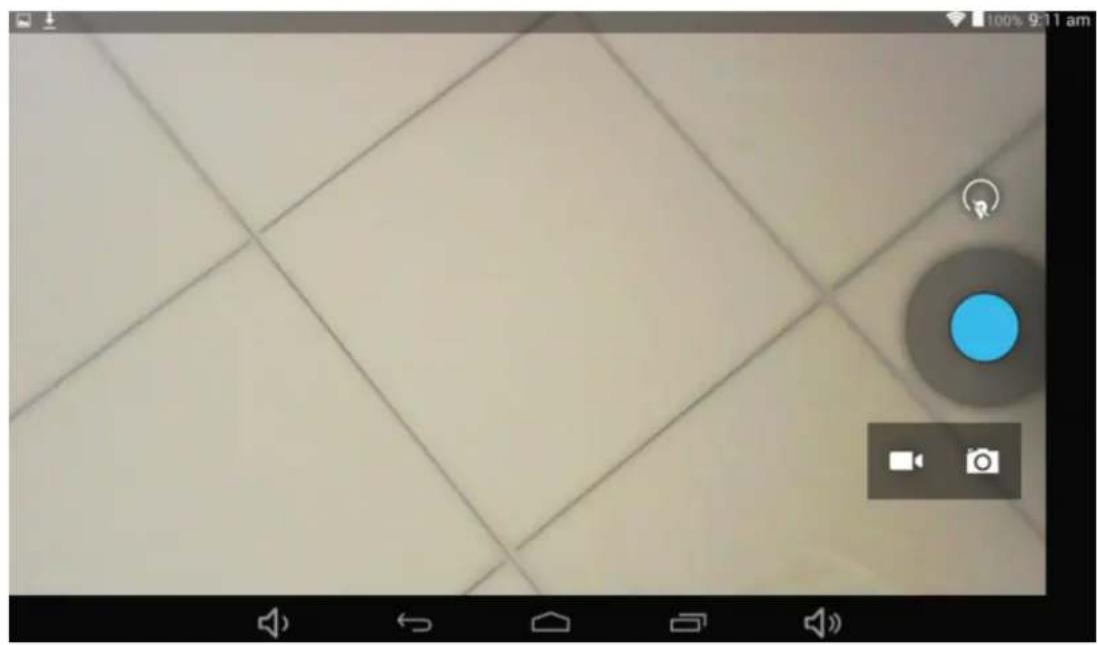
Camera
1.Built-incameratotakephotosandvideo
Tap"camera"totakephotosandvideo," "statusoftakingphotos,tap""totakephotosandpreserve automatically,""srebrdingvideo,tap""tostart,tap""againtopause
Music

1.Tap"Playmusic"apktoaccessostomusicfilelistscreen.
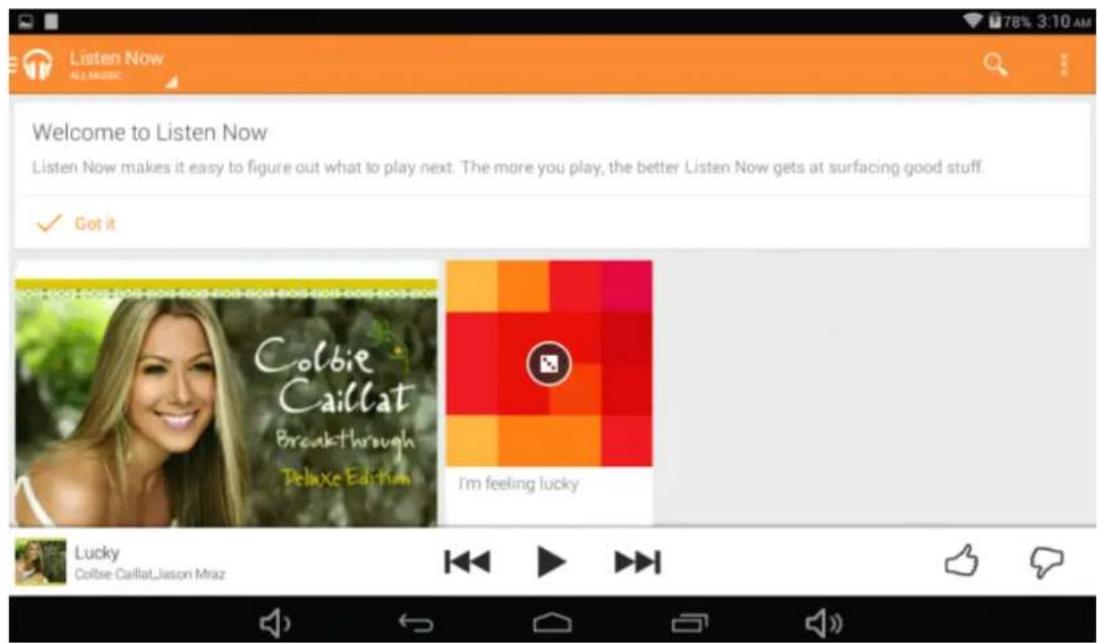
Files:tapthemusicyouselectedandplaymusic
RegularSettings
- Select "settings" after access into application bartosetlistinterface.
2.WIRELESS&NETWORKS
Wi-Fifunctiononoroff
Wi-Fisittingssetupandmanageanetworkconnection.
3. Shaun'd
Volume:adjustthevolumelevelforcallringtones,musicandvideos,alarmringtones,devicesystem,and notifications.
DefaultNotification:Selecttheapplicationwhichyouwantdefaultnotice.
Touchsounds:Setthedevicetosoundwhenyouunlockthetouchscreen.
Screenlocksounds:Sethedevicetosoundwhenyoulockthetouchscreen.
4. Display
Brightness:Setthebrightnessofthedisplay.
Wallpaper:Selectwallpaperforthehomescreen
Auto-rotatescreen:viewinginportraitorlordscape,adjustingautomaticallytyftheneworientation
Sleep:setsleepingtime
Fontsize=setthesizeofthefont
Accelerometercoordinatesystem:settheaccelerometercoordinatesystem
Screenadaptation:usedtoadjustpartofgames'screenshotize.
5.Stooge
DisplaythememorycardandUSBstoragesettingsofavailablestoragespace
6.Battery
Displaysthebatterylevelorchargingstatus
Caution: Riskofexplosionifbatteryisreplacedbyanincorrecttype.Disposeofusedbatteriesaccordingtothe instructions
7. Appos
View"DOWNLOADED","ONSDCARD","RUNNING"and "ALL"applicationslist,etc.
8.Uskers
Settingyourpersonalinformation
9. Location
Settousethe"GoogleLocationreportingtogatherandusedatebasedonyourlocation
10. Security
Screenlock:setscreenlockwayandownerinformationwhichcandisplayonthelockscreen
Encrypttablet:setapasswordwhichwillrequiredapasswordwhenyoupowerontablet.
Passwords:makepasswordsvisibleorinvisible
Device administrators:viewordeactivatedeviceadministrators
Unknownsources:allowinstallationofappfromunknownsources
Verifyapps:Disalloworwarnbeforeinstallationofappsthatmaycauseharm
Trustedcredentials:displaytrustedCAcertificates
Storatype:softwareonly
InstallfromSDcard:InstallcertificatesfromSDcard
Clearcredentials:removeallcertificates
11. Language &&import
Language: Selectadisplaylanguageforallmenusandapplications.
Personaldictionary: AddawordbytouchingtheAdd(+)button
KEYBOARD&INPUTMETHODS:setkeyboardandinputmethods
SPEECH:Setthevoicesearchandtext-to-Speech(TTS)output
MOUSE/TRACKPAD: setpointerspeed
12. Badkuppanneessatt
BackupmydatatoGoogleservers.
Factorydatareset:Erasesalldataontabletandrestoretofactorydefault
Systemupgrade:RebootintothesysteminRecoveryModecanclearthedataorsystemupgrade
13.Date &time
Setdateandtime
14. Accessibility
TalkBack:Setturnnon/offTalkBack
Largetext:displaylargetext
Auto-rotatescreen
Touch&holddelay:setthetimeoftouchandholddelay
Installwebscripts:setwhethertoallowtheinstallationofwebscripts.
15.Printitiggg:suppoottcdoudbprint
16.DeDepepepersoptions
USBDebugging:debugmodewhenUSBisconnected
DevelopmentdeviceID:displaydevelopmentdeviceID
Stayawake:screenwillnotsleepwhilecharging
Allowmocklocations
HDCPchecking:useHDCPcheckingforDRMcontentonly
Desktopbackuppassword:Setthefulldesktopbackuppassword.
Strictmodeenabledflashscreenwhenappoperatingldongoperationsomainthread
Pointerlocation:screenoverlayshowingcurrenttouchdata
Show touches:showvisualfeedbackfortouches
Showscreenupdates:flashareasofscreenwhentheyupdate
ShowCPUusage:screenoverlayshowingcurrentCPUusage
ForceGPUrendering:Use2Dhardwareaccelerationinapplications
Windowanimationscale:animationscale1x
Transitionanimalsscale:animationscale1x
Don'tkeepactivities:Closesallactivitiesassoonastheuserleavesit
Backgroundprocesslimit:standardlimit
ShowallANRs:showAppNotRespondingdialogforbackgroundapps
17.AlbouttabletTAABBN06QCBIT
Touchpanel10.1"capacitive5points
CPU:A83TOcta-Core1,8GHZ
OS:Android4.4.2
Resolution:1280*800IPS
RAM:2GB
MainadaptorAC240V/DC5V2.4A
Usermanual
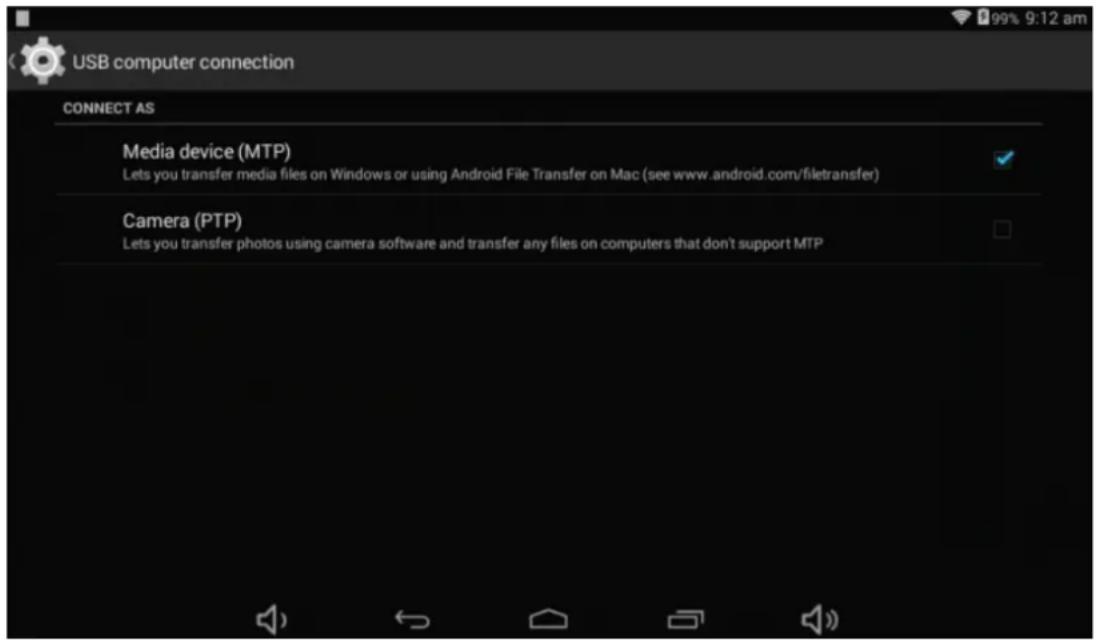
Connect computer
ThedevicecanconnecttoPCviaUSBwirefodatacopyanddelete.
1 Connected the devicetoPCportviaUSBwire, "USBconnected "onPCscreenwillbeshown
2.Tap"USBconnected"option,select"openUSBstoragesetting",thenyoucanseemovablehardwareiconwhich canbeoperatedlikeusingUSB.
Common Issues
1. The unit doesn't respond.
Checkthebatteriestoseewhateritneedstobechargedornot.
Checktoseifthepoweradapterisconnected.
Ifitstillcannotturnonaftercharging,pleasecontactthecustomerservicecenter.
2NoNowoiceeimthteessaphone
Makesurethevolumeisnotturneddownaltheway
Unplugtheheadsetandthenplugitinagain.Makesureyoupushconnectorallthewayin.
3.Chaoghggissss
Pleasemakesurethesettingofthechargerisaccordngwiththedevic.
Please don'tusethefrontUSBportsforcharging
4. Download load data issues
MakesureitconnectedtothePCproperly.
It'sbetternottousethefrontUSBporttoconnecttoPC.
5.Why sponne offbtaown boaded wibceos cann mout pabay mormmally?
Thedeviceiscompatiblewithmostofvideoof fileformat,buttherestillhavesomedifferencesinformat,encoded mode,Resolutionandcoderateetc.itcouldresultthatsomeofthevideoscannotplayorhaveplayissues.oursuggestionisthatusetethethirdpartyadapterssoftwaretotransforminginthePCthencopytothedevic.
6.Devilacegrashedorcamttturncon
Oncedevicereashedduringtherunningtime,itcanberestartedviataptheRESETbuttonatthesideofdevice.
MadeinChina
-RecoverymodeFunction.TAB1060CBIT
How to enter recovery table.
Pleasefollowthesesteps.
1-To enterintherecoverymodefirstyoushouldpoweroffthedevic,
Thenlong-pressthe"OSSOFF" keyand"WDL+”keyatthesametimeuntiltheAndroiddollhasappeared,plstryit.
2-With"wol - "keyselect"wipeipedata//fataoxyreaset" thenpress"Poever" andthenselect"YesYesdeteailluser data"withthe"vol-"key.
3-Thenpress"power"again.Theunitwillthenbegintherecoverymode.
4-Whenitfinisheselect"reboxootsysmnnow" pressthe"ppowerer"buttonandtheunitwillre-startitself.(this processmaylastforafewminutes)
How to download the software using the unit.
IMPORTANT:Whenanyoudtownloadthetessosfware,allchataawillbacteetedasphotos,vldesaaandAppstthatyou haveloemimstellkcd.
Donotinterruptthisprocesspleasemakesurethebatteryisfullycharged.
Please, follow the steps.
1-Openbrowserandsearchandopenthislink:
2-Selectthemodelofthetablethatyouhaveanddownloadthesoftware.(ThissoftwareisinstalledIn theINTERNALSD).
3-Whenitfinishedthedownload,selecttheApp"SunstSunchstechupdate"inyourunit.
4-Select"LocalUpdate", "download".
5-Selectthesoftwareandwaituntiltheprocessisfinished.
WARRANTYCAHRD
EUROPEANWARRANY
1.General
This warrantyis granted without prejudice andinadditiontotherecognizedrightsforthecusomer vis-à-visthesellerprovidedintheRoyalLegislativeDecreeof16November,approvingtherestatedtext oftheGeneralLawfortheProtectionofConsumersandUsersandothercomplementarylegislation. Therefore,therecognizedlegalrightsforthecusomerarenotlimitedoreexcludedacddordingtotherelevantRegional,NationalorEuropeanlegislation.
ThiswarrantyshallbevalidinaltheEuropeanUnionMemberStateswiththelimitationsthatlegally correspondinthecountryinwhichtheyareintendedtobeimplementedinaccordancewiththeir implementinglegislation.
Notwithstanding the foregoing, SUNSTECH shall respect the rights and limitations related to the product warranty that legally correspond each of the States listed in the Attachment in accordance with their implementing legislation for any product provided that it is intended for the Umarket and has been purchased or used by the consumer or user within the EEA.
2.LegalWarranty
ThisSUSTECHproducthasatwo(2)yearwarrantycountingfromthedateofdeliveryand/orpurchase. Duringtheabove timeframe,SUNSTECHshallbeheldresponsibleforanylackofconformityof the productinrelationtothecontractinaccordancewiththeprovisionsoftheLawfortheProtection of ConsumersandUsers,thatshallentitlethecconsumertorequesttherepairorreplacementoftheproduct, unlessoneoftheseoptionsisobjectivelyimpossibleordisportionate.
Accordingly, theremy (i.e. therepairorreplacement) shallbedeemedtobedisproportionateifit imposesunreasonablecostsontheseller.Inordertodeterminethis, the followingshallbeconsidered: (i) thevalueoftheproductiftherewerenolackofconformity; (ii)therelevaneofthelackofconformity; and (iii)iftheotherformofremedycouldbcarriedoutwithoutmajorinconveniencetotheconsumer anduser.
To determinewhethertcostsareunreasonable,thecostsincurredbyoneformofremedymust besignificantlyhigherthanthecostscorrespondingtotheotherformofremedy.
Inaddition, the consumer may choose between requesting reduction in the price or terminating the contract, if he is not entitled to demand thereupon. The product and whenever these actions would not be completed within reasonable time frame and would cause more inconvenience to the consumer and user. However, the termination shall not take place where the lack of conformity is minor.
Boththerepairandthereplacementoftheproductasresultoftheproduct slackofconformityshallbefreeofchargefortheconsumeranduser,includinglabourandmaterials.
Inanycase, repairs under warranty shall be carried out by SUNSTECH 's Official Technical Assistance Service orits authorized distributors.
3 CONDITIONSforthewarantytoxbee exercised
To exercisethelegalandcommercialwarranty,itisnecessaryytosubmitdocumentaryevidencesshowing thedeliveryand/orpurchasedateoftheproduct,whethertheinvoice,receipt,deliverysliporsealedand datedwarrantycard.Documentswithhaveentamperedwithorthalsifiedwillnotbeaccepted.
TheconsumershallcontactSUNSTECH 'sCustomerServiceTeamusingthewebsite(underthesupport section)andwillbeinformedaboutwhatactiontotake.Atthattime,theconsumershallhavetoprovide acleardescriptionofthemalfunctionorthelackofconformityoftheproductwiththecontract.
Inanycase, repairsunderthewarranty shall be carried out by SUNSTECH 's Official Technical Assistance Servicesoritsauthorizeddistributorssothat SUNSTECH can beheld responsible underthelegal and/or commercial warranty.
4. Exceptions
Thewartrydoesn'tforeseeorincludeperiodicmaintenanceorproductinstallationrevisions.
Inaddition, the product will not be considered as lacking conformity in relation to the contract and therefore, it will not be recovered by the legal or commercial warranty when:
- Thelackofconformitycorrespondstoadiscrepancywiththesafetystandardsorthelocalornational techniquesofadifferentcountrytotheoneitwasoriginallydesignedandproducedin;
- Thisproductoranyofitsidentificationfeatures(numberofseries,etc.)havebeenpartiallyor completelyopened,assembled,unassembled,handledand/orrepairedbyaperson notpartof SUNSTECH'sOfficialTechnicalAssistanceServicesteamoritsauthorizedistributors
- Thelackofconformityisresultofanincorrectinstallation(exceptiftheinstallationhasbeen carriedoutbyoneofSUNSTECH 'sauthorizedsellorsorunderitsresponsibility,orbytheconsumer followingSUNSTECH 'installationinstructions)oranabusiveorinadequateuseoftheproduct, includingbutnotlimitedto,ausagethatisnotinaccordancetothenormalpurposeoftheproduct orthedirectionsforuseandmaintenance,asdefinedbySUNSTECH;
Thackfonformityabeenausedgomputevirusactionmanipulationf passwords,softwareinstallation,manipulationorreinstallation,etc.;
- Thelackofconformityisduetotheseuseofaccessories,chargersorconsumablesthatarenot SUNSTECHoriginalsandthereforeanotdesignedforthatproduct;
- Thelackofconformityisduetotheuseofanythirdpartysoftwareorapplicationthatmodifies, changesoradaptsthesoftwarethatwasapprovedand/orincludedbySUNSTECHintheproduct;
- Thelackofconformityisaresultofdownloadingorusingthirdpartymultimedia servicesand/or contentsavailableoraccessiblethroughtheproduct;
Damagesinorthroughthebattery,whichareduetoitbeingovercharged,areproduced; - Any of the box seals or battery cells have been damaged, or there is clear evidence that showsthes were handled; and/or
The product damages are caused by any unforeseeable or forcemajeurcumstances, especially, lightning, water, fire, applying incorrect voltage or any other cause that is not dueto the product manufacturing ordesign.
UndernocircumstanceswillSUNSTECHbeheldresponsibleforthelossofanydatastorthedheproduct.The consumerwillbeheldresponsibleforanyback-upcopiesandtheprotectionofanydatafromloss,damageor destruction.
Noneofthewarrantiesincludedherecoverthereplacementofparts,duetowareorruptureofmechanisms, rubber,boxesand/orplastic,aswellasanyaestheticdamageresultingfromthenormaluseoftheproduct,for example,ifthescreenlosesitsshinenwiththeuseoftheproduct.lnthesameway,thewarrantiesdonotcover anytypeofdamageproducedduringthetransportationoftheproduct(includingbutnotlimitedtoaesthetic damage,blows,lines,scratches,stains,dents,etc.)inwhichcasetheapplicableprovisionsunderSUNSTECH generalcontractconditionswillapply.
S
For further information gotowww.sunstech.es
You can also contact:
AFEXSUNS,S.A.
Pallars,189-191
08005BARCELONA
DECLARATIONOFCONFORMITY
CouncilDirective(s)towhichconformityisdeclared:
Directive(1999/5/EC)-R&TTE/EMC/LVD
Directive(2011/65/EU)-RoHS
ApplicationoftheStandards:
EN60950-1:2006+A11:2009+A1:2010+A12:2011
Manufacturer'saddress:
C/Pallars189,08005Barcelona
Typeofequipment:
TABLET
Trade:
SUNSTECH
Modelno.:
TAB106OCBT
We, the undersigned, hereby declare under our sole responsibility that the specified equipment is in conformity with the above Directive(s) and Standard(s)
Place:Barcelona
(Signature)
Date:3-April-2015
VICTOR Planas Bas
(Full name)
General Manager
(Position)
sunstech
TAB106OCBT
Manualdeusssuaio
e
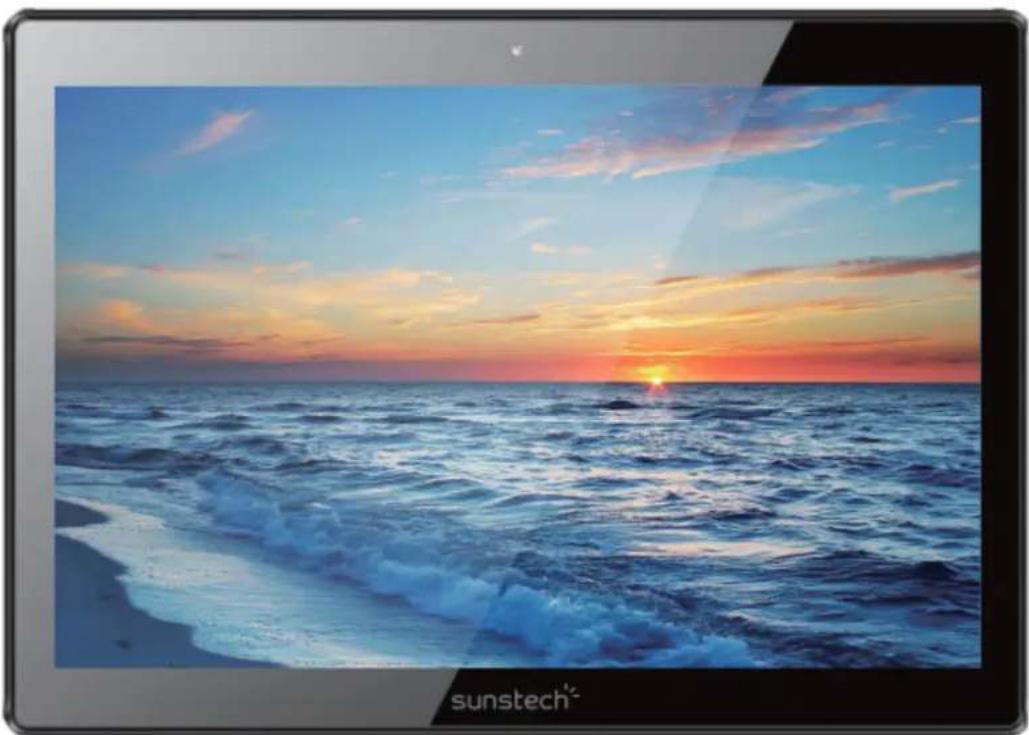
GUIA DE USUARIO
Directorio
Copyright © 2013Afexsuns,S.A.
No distrbuiy maierial plooteegi to poor obeneed hoss cbe auroir
Nodistribuyasmaterialprotegidoporlasyesdederechodeautorsinelpermisodelospropietariosdel contentido.Alhaceresto,podriaviolarlasyesdederechosdeautor.Elfabricantenoserresponsablede ningunproblemalegalprovocadoporelusoilegaldematerialprotegidoporpartedelusuario.
Malwarexwinus
Sigalasssiguiertesssugereciasaairfincteppegeereelippsitiroocountaamnaeayvivus.SsindoIohace,prodria provocardahosodapperedadctdatos,loscaulesporthannoestarubiendosporlagaramta
TalkBack:Configurarconectar/desconectarTalkBack
Textolargo:ensenartextolargo
Directive(1999/5/EC)-R&TTE/EMC/LVD Directive(2011/65/EU)-RoHS
Copyright © 2013Afexsuns,S.A.
Stockage:16GoNandFlash
Directive(1999/5/EC)-R&TTE/EMC/LVD
Directive(2011/65/EU)-RoHS
Applicationdesnormes:
EN60950-1:2006+A11:2009+A1:2010+A12:2011
Copyright © 2013Afexsuns,S.A.
Permitirlocalizations"mock"
HDCPicking:utilizeverificacaoHDCPapenasparaconuDoDRM
Directive(1999/5/EC)-R&TTE/EMC/LVD Directive(2011/65/EU)-RoHS
Aplicações Normas:
EN60950-1:2006+A11:2009+A1:2010+A12:2011


- SAFETYANDPPRECAUITCONWWAARNINGSS
- Copyright
- Safety information
- Warning
- Precaution
- Correctuseandmaimtemamceoffthermobiledevite.
- Keeptheedtavitredry.
- Placetthe deviceonlyconfllfat sunfaccs.
- Domotstore the device inweeyhfoort coldples.its isrecommenbedtthat you uset the device attemperatures between 55a add 335°
- Dornstnne thee obexie with mertellcbjects, suthaass ccaims, Keys armed meekhtaness.
- Domot stone the device narnmagnetic fiibbs.
- Reducethe risk of injurycausedbyrepeatedewmowements.
- When you use eamphomes,protat your thearling amd your ears.
- Malware and whuss
- (Electronicdevicewaste)
- Correctdisposaaloffthisprooabutt'sbatttenies
- Exemptionffommnsponsibilityctausse
- Main Functions
- Basic Operations
- 1.Turnen
- Tummoff
- Power Reserveett
- Sorensen Swaver
- 5.Bardiktoithhecbsktopp
- Back to the previousrintenface
- 7.S8titiggs
- 8.Changjing
- 9-Wineless 88.Networrk:
- 10-Commmestion Bluetooth:
- TOHEILIPINSSURREEAHAHEALUTHYYBASTTHERRY.
- Homess
- Sattwallpaper
- Diplay all applications
- Nootification<|im_start|>
- 5.WatbIbeDesktqipbcn
- Delete the desktoppiston
- InstalltheAPPKapplicaiton
- UninstallAPPKapplication
- PicturesandMboxiness
- Camera
- Music
- RegularSettings
- Shaun'd
- Display
- 5.Stooge
- 6.Battery
- Appos
- 8.Uskers
- Location
- Security
- Language &&import
- Badkuppanneessatt
- 13.Date &time
- Accessibility
- 15.Printitiggg:suppoottcdoudbprint
- 16.DeDepepepersoptions
- 17.AlbouttabletTAABBN06QCBIT
- Connect computer
- Common Issues
- The unit doesn't respond.
- 2NoNowoiceeimthteessaphone
- 3.Chaoghggissss
- Download load data issues
- WARRANTYCAHRD
- EUROPEANWARRANY
- 1.General
- 2.LegalWarranty
- CONDITIONSforthewarantytoxbee exercised
- Exceptions
- DECLARATIONOFCONFORMITY
- Directive(1999/5/EC)-R&TTE/EMC/LVD
- Directive(2011/65/EU)-RoHS
- We, the undersigned, hereby declare under our sole responsibility that the specified equipment is in conformity with the above Directive(s) and Standard(s)
- sunstech
- TAB106OCBT
- GUIA DE USUARIO
- No distrbuiy maierial plooteegi to poor obeneed hoss cbe auroir
- Malwarexwinus
- Directive(1999/5/EC)-R&TTE/EMC/LVD Directive(2011/65/EU)-RoHS
Brand : Sunstech
Model : Tab 106 OCBT
Category : Tablet