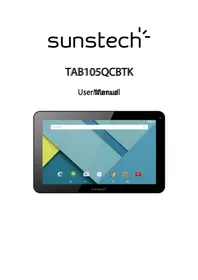
Tab 105 QCBTK - Tablet Sunstech - Free user manual and instructions
Find the device manual for free Tab 105 QCBTK Sunstech in PDF.



| Product Type | Touchscreen Tablet |
| Brand | Sunstech |
| Model | Tab 105 QCBTK |
| Operating System | Android 5.0 |
| Screen | 10.1-inch capacitive 5-point, resolution 1024×600 IPS |
| Processor | Octa-Core A33 |
| Memory | Not specified, expandable via microSD up to 32 GB |
| Front camera | 0.3 MP |
| Rear camera | 2.0 MP |
| Connectivity | Wi-Fi 802.11 b/g/n, Bluetooth 4.0, USB 2.0, OTG |
| Battery | 5500 mAh Lithium-ion |
| Power supply | Mains adapter 240V AC / 5V DC, 2 A |
| Dimensions (estimated) | 240 × 170 × 10 mm |
| Weight (estimated) | 500 g |
| Supported audio formats | MP3, WMA, WAV, FLAC, OGG, AAC, APE, 3GP |
| Supported video formats | RMVB, MKV, WMV, MOV, MP4, PMP, MPG, FLV, 3GP, H.264 |
| Main functions | Internet browsing, multimedia playback, camera, audio recording, Bluetooth, expandable memory |
| Maintenance and cleaning | Clean with a soft, dry cloth. Do not use chemicals or detergents. |
| Safety | Do not expose to water, extreme temperatures, magnetic fields. Use only the supplied charger. |
| Spare parts and repairability | Non-removable battery. Repairs only by a SUNSTECH approved center. |
| General information | 2-year European warranty. Made in China. |
Frequently Asked Questions - Tab 105 QCBTK Sunstech
User questions about Tab 105 QCBTK Sunstech
0 question about this device. Answer the ones you know or ask your own.
Ask a new question about this device
Download the instructions for your Tablet in PDF format for free! Find your manual Tab 105 QCBTK - Sunstech and take your electronic device back in hand. On this page are published all the documents necessary for the use of your device. Tab 105 QCBTK by Sunstech.
USER MANUAL Tab 105 QCBTK Sunstech
Safety Instructions 1
Main Functions 12
Basic Operations 13
Home screen. 14
Install the APK application. 15
Uninstall the APK application. 15
Movies.16.
Camera. 17
Music 18
Regular Settings 19
Common Issues 22
| SAR www.sar-tick.com | ThisproductcanbeadjustedtotheSARnationallimitsof2W/Kg.The specificSARmaximumvaluesareintheinformationsectionofthis guide. Whenyouholdtheproductoruseitonyourbody,maintainadistance of1.5cmfromyourbodytoensuretheradiofrequencyexposure standards. |
ThisdeviceofferscommunicationandentertainmentservicesthatfollowSUNSTECH technologicalexperience.
'shighstandardsand
- Thecontentmaydifferfromthefinalproductofthesoftwareprovidedbythesuppliersofservicesor transmittersanditissubjecttoalterationwithoutpriornotice.
- The elementsthat comewiththedevicelandanyavailableaccessorymayvaryaccordingtotheregionorsupPLIERoftheservices.
The elements provided are designed uniquely for this device and may not be compatible with other devices. - You may purchase additional accessories at your local SUNSTECH distributor. Ensure that they are compatible with the device before you purchase them.
- Otheraccessoriesmaynotbecompatabledewiththedevic.
- SUNSTECH is no theeld responsible for problems of sufficient return or the operations system software. Any attempt to personalize the operations system may cause the device or the applicationsto function incorrectly.
Instructionalcons
| ! | WarningSituationthatcausesinjury,yourselfthird parties. |
| Precaution:Situationthatcauseddamagestothedeviceorotherequipment. | |
| Note:Notes,recommendationsofuseoradditionalinformation. |
Copyright
Copyright © 2013Afexsuns,S.A.
Thisguideisprotectedbyinternationalcopyrightlaws.
Reproduction,distribution,translationortransmissionofanypartofthisguideisnotallowedunderany circumstancesorthroughanymeans,beitelectronicormechanic.Thisincludeshotocopies,recordsorstorage inanyinformationretrievalandstoragesystems,withoutpreviouswrittenauthorizationfromAfexSuns,S.A.
Safety information
This section contains safety information for modifiable devices. Some of the content may apply to your device. In order to avoid injury to your self, fourth parties could damage to the device, read the device's safety information before you purchase it.

Warning
If you could not comply with the cheese saffetyngulations aod wannings, you may suffer serious injury.
Donatuse damaged powercords or connectorsor louse sckets.
Unsafecconnectionsmaycauseanelectricdischargeorafire.
Don't touch the power cord diff your handels are watt and cb to pull the cord to disconnect the changer. If youdoso, you may beelectrocuted.
Donntbndorddarnagretthepwewerccwdl. Ifyouso, this may cause anelectric dischar
Don't cause a short circuit in the changing or the device. If youdoso, this may cause anelectric discharge or the device may not function correctly.
Usebanties,chargers,accssionles and supplicles that havelbeam approved bythemaftacturer.
- Theuseofgenericbatteriesorchargersmayshortentheusefullifeofthedevicerecauseincorrect functioning.Itmayalsocauseafireorthothebatterymayexplode.
- OnlyusebatteriesorchargersthathavebeenapprovedbySUNSTECH,specificallydesignedforthe device.Anynoncompatiblebatteriesandchargersmaycauseseriousphysicalinjuriesordamagethe device.
- SUNSTECHwillnotbeheldresponsibleforthesafetyoftheuserwheneveraccessorsupsuppliesthat havenotbeenapprovedbythebrandareused.
Donnatautordchuptheaangororthedevise.
When harnbling cor disposing of the device aand charger doos with cautium.
- Neverthrowthebatteryorthedevicetothefire.Neverplacethebatteryorthedevicemonanysources ofheat,suchas,ovens,microwaves,glasshousesorradiators,etc.Ifitoverheats,thedevicemayexplode. Followallocalregulationswithregardstodisposingoftheusedbatteryordevice.
- Donotsquashthedevicereormakeholesinit.
- Avoid exposing the device to high pressure because this may cause an internal short-circuit and overheating.
Protect the device, battery and charger in order to stop them from getting damaged.
- Avoid exposing the device and battery to very high or low temperatures.
- Extremetemperaturesmaydamagethedeviceandreducethecharginqcapacityandthedurationofthe
deviceandbattery.
- Avoid the batteryenteringintocontactwithmetalobjectsbecausethismaycauseaconnection betweenthepositiveandnegativeveterinalsofthebatteryanddamageittemporarilypermanently.
- Neverusedamagedchargersorbatteries.
Donat store the device inoorheaters, milowaves, Heated kitchen equipment or high pressure containers.
Thebatterymayhaveleakages.
Thedevicemayoverheatandcauseafire.
Donnusr sotree thoeoviein plesss with aodt oofdust cr material ttnansponted by air.
Dustorforeignmaterialsmaycausethedevicetomalfunctionandmayresultinafireoranelectricdischarge.
Safetyinformation
Donnnt bttte corssudktthe obtwite cortthe battenty.
- Thismaydamagethedevicerecauseanexplosionorafire.
Childrenandanimalsmaychokeonsmallpieces. - When childrenusethedevicere,ensurethatttheydosocorrectly.
Don't insert the device on the accessories provided by your eyes, ears or mouth.
If youdoso,youmakechokeorsufferseriousinjuries.
Donnthandle dhamaggedlithiumimbataieriescorbatteriesstthatshowewidemceoffkaage.
To disposeof lithium-ionbatteriessafely,contactourclosestauthorizedservicecentre.
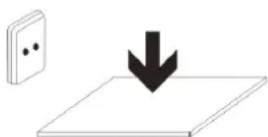
PLUGGABLEEQUIPMENT:tthesocketeoutlets shallbeinsstalledneartheequipmentand shall be easily accessible.

Precaution
If you do not comply with these regulations and warnings, you may suffer injuries or cause material damage.
Donatuse the device near other electronic devices.
- Mostelectronicdevicesuseradiofrequencysignals.Thedevicemayinterferewiththerelectronic devices.
- If you use a LTE dataconnection, this may cause an interference with other devices, such as audio equipment and telephones.
Do not use the device in a hospital, please or card that may be affected by interference caused by radiofrequency.
-Ifpossible,avoidusingthedevicatanydistancelowerthan15cmfromapacemaker,because the
devicemaycauseinterferenceswithinit.
- To minimize anypossibleinterferencewithapacemaker,usethedevicemonlyontheoppositesideofth bodyinrelationtothepositionofthepacemaker.
- If you use medical equipment, contact them manufacturer of the equipment before using the device in order to ascertain whether the equipment will be affected by their radio frequency emitted by the device.
- Ifelectronicdevicesareusedonaplane,thesemayinterferewiththeelectricnavigationinstruments. Ensurethatthedevicesturnedoffduringtake-offandlanding.Aftertake-offyoumayusethedevicemon "airplanemode"aslongasthisisallowedbythecabincrew.
- Theelectronicdevicesinyourcarmaymalfunctionduetotheradiointerferenceofthedevic. Contact themanufacturerorforfurtherinformation.
Donnsepeosse theobewiccttosmokeor sthongemannatios.
If youdoso, you may damage the outside part of the device or cause its malfunctioning.
If you use linesening obiewices, contat the manuftactunerfforflntheri inifomation atbautnaxdiointefference.
Theradiofrequencythatthedeviceemitsmayinterferewithsomehearingdevices.Beforeusingthedevic, contactthemanufacurinordertoascertainwhetherthearingdevicewillbeaffectedbytheradiofrequency emittedbythedevice.
Dorntusset the device near cothdweess oarappaaatusest that eemittraiaedieepaeuy,ssbaassounldsysmsoor radiottowers.
Radiofrequencymaycausethemalfunctioningofthedevic.
Turnoffthechiewiceimpartentiallyexphosiveaattmoxpharees.
- Turnoffthedevicesteenthadofremovingthebatteryinpotentiallyexplosiveatmospheres.
- Alwaysrespectthestandards, instructionsand warningsignsinpotentiallyexplosiveatmospheres.
- Donotusethedevicineinpetrolstationsornearfuelorchemicalsorindemolitionareas.
- Donotstoreortransportflammableliquids, gasesorexplosivematerialinthesamecompartmentin whichthedevic,itspartsoraccessoriesare.
If you dae come away oftbleedowieortbtebaateryletbingoffstrangeoutabouscoursoudscoif ifyouassssmukoeor liquid cconngogoutoftbleededeideoarbationy,stopusingtbdeedeeirmmendatelyandtakeitotanaunbozred serviceCentree.
If youdonotdoso, this may cause a fire or an explosion.
Comply with all the safety regulations and warnings related to the use of mobile devices when driving a vehicle.
Whendriving,yourmainresponsibilityistocontrolthevehiclesafely.lfthelawdoesnotallowmobilephoneuse whendriving,donotusethemobiledevice.Foryourandothers ' safetyuseyourcommonsenseandremember thefollowingadvice:
- Gettoknownthedevicereanditsoperatingfunctions,likespeededdiallingandrecallsystem.Thesefunctions allowthetimenecessarytomakeandreceivecallstoberduced.
-
Putthedeviceinaplacewhereitiseasystoreach.Makesurethatyoucanaccessstweiressdevice withouttakingyoureyesofftheroad.Ifyoureceiveatelephonecallatinconvenienttime,let voice-mailanswerit.
-
Stopphonecallswhenthereisheavytrafficorwhenthereareadverseclimateconditions.Rain,sleet, snow,iceandheavytrafficcanbeverydangerous.
- Donotjotdownorlookfortelephonenumbers.Jottingdownatakorkoookingatourcalendarmay distractyoufromyourmainresponsibility,whichistodrivesafely.
- Dialcarefully andassessthestateofthetraffic.Makephonecallswhenyouarentmovingorbefore hittingtraffic.Trytoschedulephonecallswhenthecarisparked.
- Donothaveverystressfuloremotionalphonecallssthatmaydistractyou.Tellthepersonthatyouare speakingtothatyouaredrivingandendanyconversationsthatmaytakeawayyourattentionfromthe road.
Correctusaeandimaintemamoeofthermobiledevite.
Keeptheedwixuedhy.
- Humidityandliquidsmaydamagethepartsortheelectroniccircuitsofthedevic.
- Donoturnonthedevicefitiswet.lfitisalreadyturnedon,turnitoffandtakethebatteryout immediately(ifyoucannotturnitoffortakethebatteryout,justleaveitasitis).Afterthis,drythedevicewithatowelandtakeitttotheservicecentre.
- Liquidswillchangethecolourofthelabelwhichindicateshedamagecausedbythewaterinsideth device. The damage caused by the water in the device may cancel the manufacturer's warranty.
Placethe deviceonlyconfllfat sunfaccs.
Ifitdrops, the devicemaygetdamaged.
Dormatsstorethe deviceinveeyHotortoldplaces.Itsirecommenbedthatyouussethe deviceattemperatures between558add335°.
- Donotstorethedevicepinplaceswithveryhightemperatures,suchasinsideacarinthesummer.Ifyou doso,youmaycausethescreentomalfunction,thedevicemaygetdamagedorthobatterymay explode.
- Donotexposethedevicetodirectsunlightforlongperiodsoftime(forexample,onthedashboardofcar).
- Storethebatteryattemperaturesbetween 0° and 45° .
Dornstote the deviue with metal objects, suith as caiims, koyas amd mckkhaes.
- Thedevicemaygetscratchesorstopworkingproperly.
-Ifthebatteryterminalscome intocontactwithmetalobjects,afiremayoccur.
Dornstote the dalsnear marnatflebs.
- Itispossibleforthedevicetostartmalfunctioningandforthebatterytolosepowerduetobeing exposedtothesesefields.
- Cardswithmagneticstripe, such as credit cards, telephone cards, travelpasses may get damaged due to themagnetic fields.
If the device covers heaats, stop using it tarnldits applicationsfonnaawhile.
Prolongedskinexposuretoahotdevicemaycausesymptomsofburningwithlowtemperature,suchasred spotsandpigmentation.
Donnntussetthe deviceifthetbuckcoxerisnottingplace.
Thebatterymaycomeoutofthedevicewhichcauseddamageormalfunctioning.
If the obtwite haaa lampp oana cammnaaffash, doo mout uusit nmean ppeple'sor animall'seyess.
This may cause atemporary loss of vision ondamagetheeyes.
Becarefullwhenneposipingsyourselltoimtemmittllghtt.
- Whenyouusethedevic,leavesomelightsturnedoninthebedroommanddonothavethescreentoo closetoyoureyes.
- Convulsionsorfaintingmayoccurduetoexposuretointermittentlightwhenlookingatvideoosor playinggameswithintermittentlightsforprolongedperiodsoftime.Ifyoufeelunwell,stopusingthe deviceimmediately.
- Ifanyoneclosetoyousufferedfromconvulsionsorfaintingwhenusingasimilardevice,visitadoctor beforeusingthedevic.
- Ifyoufeeldiscomfort,suchasmusclecrampsoryoufeeldisoriented,stopusingthedevicemimmediately andvisitadoctor.
To avoideeyfatigue,havefrequentsbreakswhenusingthedevic.
Reducetthe riskfijnjurycausedbyrepeftibiewnewenements.
When you carry out repeated actions, such as pressing keys, drawing characters on the touchscreen or playing a game, you may feel discomfort in your hands, neck, shoulders or other parts of the body. When you use the device during prolonged periods of time, hold it with relaxed hands, touch the keys lightly and rest frequently. If you continue feeling discomfort during or after taking the steps, stop using the device and visit a doctor.
When you use the example, produce a your henshining and your ears.

- Alwayslowerthesoundbeforeconnectingtheearphonestoanaudiosourceandusetheminimum amountofvolumenecessaryarytolistentomusicorhaveconversation.
- Indryenvironments,staticelectricitymayaccumulateinthearphones.Avoidusingearphonesindry environmentsortouchmetalobjectstodischargethestaticelectricitybeforeconnectingthearphones tothedevic.
- Donotuseanearphonewhileyouaredrivingorridingvehicle.Ifyoudosoyoumaygetdistractedand causeanaccidentoryoumaybesubjecttolegalion,dependingontheareawhereyouaredriving.
Use the device with caution. White you are walking comixing.
- Alwayspayattentiontowhatishappeningaroundyoutoavoidphysicalinjurytoyouselfandothers.
- Makesuretheearphonecorddoesnotgetentangledroundyourarmsnearbyobjects.
Donnattake dweasih yourfficnt paackets corunsmdyour walst.
Youmaygetinjuredordamagethedevicifitfalls.
Donnnt paainttyaourdtexire corpputamy stickens comit.
- Paintandstickerscanobstructthemobilepartsandstopthedevicefromworkingproperly.
- Ifyouareallergictopaintortothemetalpartsofthedevic,youmaygetastingyfeeling,eczmaor swelling.lfthishappens,stopusingthedevicandvisitadoctor.
Donat use the device if the sreemils cracked or broken.
Thebrokenglasscancausehandandfaceinjuries.Takethedevicetoanauthorizedservicecentretogetit repaired.
Install the mobile device and the equipment with caution.
- Makesurethatthewholemobiledevicereorrelatedequipmentthatisinstalledinyourvehicleis assembledafely.
- Avoidplacing the device and the accessories where the airbag is on next to it. Any wireless equipment installed incorrectly can cause serious injuries when the airbags inflate quickly.
Don't allow the product to fall on odd subjects to strong impacts.
- Thedevicemaygetdamagedormalfunction.
- If you bendordeformittedevicemaygetdamagedanditspartsmaymalfunction.
Guarantee of the maximum duration of the battery and charger.
- Avoidcharging the device for overawek, because overcharging can reduce the battery 'servicelife.
- Withtime, the device will run out of battery (even when it is not being used) and you will need to recharge it out again.
- Disconnectthechargerfromthepowersourceswhenitisnotbeingused.
- Use the battery only for the purpose for which it was designed.
- If youdonotusethebatteryforalongtime, you may reduceitsservice life and performance. You may alsocausethemalfunctioningorexplosionofthebatteryorafire.
- Followalltheinstructionsinthismanualoguaranteethelongestservicelifepossibleforyourdevice andbattery. Anydamageoroperatingproblemscausedbynotcomplyingwiththe warningsand instructionsmaycancelthemanufacurer 'swarranty.
- Withtime, the devicemaywearout. Some parts and repairs are recovered under the warranty during the validity period; however, the damages or deterioration caused by the use of accessories not approved by the brand are not covered.
Takethefollowinginformationintoaccountwhenusingthedevic.
-
Useitaverticalposition,asyouwouldattraditionaltelephone.
-
Speakdirectlyintothemicrophone.
- Donotcovertheantennaareawithyourhandsorotherobjects.Thismaycauseconnectionproblemsor causethebatterytorundown.
Donnattunassamblet,change correpairthe dkevice.
- Anyalteration or change to the device may cancel the manufacturer's warranty. If you need to repair the device, take it to an authorized service centre.
- Donotdisassembleormakeholesinthebattery, this may cause anexplosionorafire.
- Turnoffthedevicebeforeeremovingthebattery.Ifyouremovethebatterywhilethedevicewisstillturned on, this maycausealfunctioning.
Take the following information into account when dealing with the device.
- Useatowelararubberclothtocleanthedeviceandthecharger.
Cleanthebatteryterminalswithcottonorwithatowel. - Donotusechemicalssubstancesordetergents.Ifyoudoso,youmaycausediscolorationorcorrosionof theoutsidepartofthedevicereoryoumaycauseanelectricdischargeorafire.
Thedevicemaymalfunction.
When you use the daxite in public, ity mttodistuncothers.
Only allow qualified professionals to carry out the maintenance of your device.
Itispossiblefordamagestooccurandthemanufacturererpersonneltocarryoutthemaintenanceofthedevic.
'swarrantycancelledldifyouallownonqualified
BecarefullwhennHaunblinggSIMcaorbs,memanycanotsorncaltles.
- When inserting acardorconnectingacabletothedevicemakesurethecardisinsertedcorrectlyorthat the cable is connected ontherightside.
- Donottakethecardoutwhenthedevicewisetransferringinformationorithasaccessstoit,becauseyou maylosadataaanddamagethecardorthedevice.
- Protectthecardsfromstrongdischarges,staticelectricityandnoisegeneratedfromotherelectronic devices.
- Donottouchthecontactsorthegoldterminalswithyourfingersorwithmetalobjects.Ifthecardis dirtycleanitwithasoftcloth.
- If you insert a card or connect a cable forcefully or incorrectly you may cause damage to the multifunctional socket or other parts of the device.
Make sure you have access to emergency services.
Itispossiblethatinsomeareasorcircumstancesyoumaynotbeabletomakeemergencyphonecalls.Before travellingoremteareasordevelopingcountries,plananalternativeformofcommunicatingwiththe emergencieservices.
Protectycour personal data and avoidconfidential information from being spread or used incorrectly.
- Whenyouusethedevicemakesureyoumakeback-upcopiesofimportantdata.SUNSTECHwillnot be heldresponsibleforanylossofdata.
- When you dispose of the device, make a back-upcopy of all the data and afterre-establish the device to avoid personal information from being used inappropriately.
- Readthelicensescreencarefullywhenyoudownloadapplications.Beespeciallycarefulwith applicationsthathaveaccessvariousfunctionsorsignificantamountofyourpersonalinformation.
- Control your accounts frequently to avoid any suspicious or non-authorized use. If you find any indication of your personal information not being used appropriately, contact your servicesuppliesto delete or change the information in your account.
- Ifyoulosethedevicereoritisstolen,changethepasswordsofyouraccountstoprotectyourpersonal information.
- Avoid using applications from unknown sources and block the device with a pattern, a password or PIN.
Donnnt dtributtemateriallproctetcdwithccopyrightt.
Donotdistributematerialprotectedwithcopyrightwithouttheauthorizationofthecontentowners.Ifyoudoso, youmayviolatecopyrightlaws.Themanufacturerwillnotbeheldresponsibleforanylegalproblemcausedby illegaluseofmaterialprotectedbytheuser.
Malware and viruss
Follow this assuggationst to protect the device againt smalware aand wiruss. If you cbo nut do sso, you may cause damages or loss of data that may not be covered under the warranty.
- Donotdownloadunknownnapplications.
- Donotuseunreliablewebsites.
-Deleteanysuspicioustextmessageiremailsfromunknownssenders. - Createapassworddandchangeitregularly.
-Deactivatethewirelessfunctions,suchasBluetooth,whenyouarenotusingthem.
-Ifthedevicbehavesstrangely,executeantivirusprogramtodetectapossibleinfection. - Executeantivirusprogramonthedevicebeforestartingapplicationsandfilesthatyoujust downloaded.
- Installanti-virusprogramsonyourcomputerandexecutethemregularlytodetectanypossible infections.
- Donoteditheregistrationadjustmentsorchangethedevic e 'soperatingsystem.
Information about the certification of the Spesific Absorption Rate (SSAR).
THIS ID DEVICE FOLLOWS INTERNATIONAL STANDARDS OF EXPOSURE TDK RAIDOWAVES.
Yourmobildeviceisarodiatransmitterandreceiver. Itwasdesignedtonotexceedthelimitsofexposureto radiowaves(electromagneticfieldsofradiofrequency)recommendedbyinternationalstandards.Thestandards weredevelopedependentcientificiorganization(CNIRP)anhcludeubstantialafetymargin
designedtoensurethesafetyofallpeople,regardlessoftheirageorstateofhealth.
TheexpositoretadiowavestandssuseameasurementunitknownastheSpecificAbsorptionRate,SAR.The SARlimitformobiledevicesis2W/Kg.TheSARtestsarecarriedoutusingstandardoperationpositionswith the devicetransmittingatitsmaximumcertifiedenergylevelinalfrequencybands.ThehighestSARamountsunder theICNIRPstandardsforthisdewicemodelare:
| MaximumSARforthismodelandconditionsunderwhichitregistered | |
| SARfforpositiomsnearthehead.0.285W/Kg | |
| SARfforpositiomsnearthebody.0.0399W/Kg | |
Duringtheuse,therealSARvaluesforthisdeviceareusuallyalotlowerfromthevaluesindicatedpreviously.This isdetumaximizingthesystem 'sefficiencyandtominimidetheinterferencewiththenetwork,theoperation capacityofyourmobiledevicereducesautomaticallywhenthemaximumpowerisnotneededforthecall.The lowerthemamountofenergyleavingthedevicethelowertheSARamountwillbe.
ASARtestwascarriedoutwiththedevicenthebodywithadistanceof1.5cm. To complywith the radiofrequencyexposurerquirements,whileusingthedevicenthebody,thedeviceshallhavetobeatleast 1.5cmawayfromthebody.
Someorganizations,liketheWorldHealthOrganizationortheFoodandDrugAdministrationoftheUnitedStates suggestthatifuserswanttoreduceexposure,theycanuseahandsfreeaccessorytomainthewirelessdevicefar awayfromtheheadandbodywheninuse,orreducethemamountoftimespentusingthedevic.
Correctedisppasalfoftthisppooboutt.
| (Electronicdevicewaste) (Thisappliesin countrieswhereerecollectionsystemshappenseparately). Thepresenceofthissymbolontheproduct,accessoriesorinformationmaterial indicatesthatneithertheproductnoritselectronicaccessories(suchas,the charger,helmets,USBcable)shouldbedisposedofwithotherhouseholdwaste. |
To avoidanypossibledamagetothenvvironmentmentorhumanhealthcausedbyuncontrolleddisposalofwaste, separatetheseproductsfromotherwasteandrecyclethem.Thisway,youarepromotingthesustainablereuseof materialresources.
Individualuserscancontacttheestablishmentweretheypurchasedtheproductortherelevantlocal authoritiestogetinformationaboutwhereandwhentheycantakeitinordertosubmitittoecologicalandsafe recycling.
BusinessuserscancontacttheirsupplierandcheckthepurchasecontractconditionsThisproductandits electronicaccessoriesshouldnotbedisposedofwithothercommercialwaste.
If the batteries are not disposed of correctly, the substances may cause personal injury or damage the environment.
To protect natural resources and promote recycling, separate the batteries from other waste and recycle them through the free collectionservicein your area.
Exemptionffommrespspmisbllitycblausse
Partofthecontentandservicesistemwhichyouobtainaccesssthroughthisdevicebelongtothirdpartiesandare protectedundercopyright,patent,registeredtrademarkand/orotherintellectualpropertylaws.Thiscontent andservicesareonlyforpersonaluseandnotcommercialuse.Itispossiblethatthecontentortheservices cannotbeusedifnotauthorizedbythecontentownerorthesupplieroftheservices.Withoutprejudicetothe aforementionedinformation,exceptwhenexpresslyauthorizedbythecontentownerorservicesupplier,you cannotchange,copy,reedit,charge,publish,transmit,translate,sell,createderivativeworks,exploreordistribute inanywayorbyanymeansthecontentortheservicesshowthroughthisdevice.
"THECONTENTANDTHESERVICESOFTHIRDPARTIESAREPROVIDED "A\(S".SUNSTECHDOESNOTGUARANTEE THECONTENTORTHESERVICESPROVIDED,EITHEREXPRESSLYORIMPLICITLY,FORNOPRPOSE.SUNSTECH EXPRESSLYRENOUNCESANYIMPLICITGUARANTEES,INCLUDINGBUTNOTLIMITEDTO,MERCHANTABILITYOR SUITABILITYGUARANTEESORPURPOSPARTICULARSUNSTECHDOESNOTGUARANTEETH/ERACITY, VALIDITY,REPRODUCTION,LEGALITYORINTEGRITYOFANYTYPEOFCONTENTORSERVICEPROVIDTEDROUGH THISDEVICEANDUNDERNOCIRCUMSTANCES,INCLUDINGNEGLIGENCE,WILLSUMSTECHBEHELDRESPONSIBLE. BOTHTERMSEGONTRACORREJUDICEANDIRECORDIRECTACCIDENTASPECIAOR CONSEQUENTIALDAMAGES,LAWYERS'FEES,EXPENSESORANYOTHERTYPEOFDAMAGEFROMORINRELATION TOANYTYPOFINFORMATIONINCLUDEDNORASARESULTOTHEUSEOFANYTYPOFCONTENTOR SERVICBYOURSELFORTHIRDPARTY,THPOSSIBILITYOFTHREFERRDDAMAGESKKNOWN."
TheservicesofthirdpartiesmayceaseorbeinterruptedatanytimeandSUNSTECHdoesncarryout representationsorguaranteesinrelationtotheavailabilityofcontentorserviceforanypiodoftime.The contentandservicesaretransmittedbythirdpartiesthroughnetworksandtransmissionlocationoverwhich SUNSTECHhasnocontrol.Withoutlimitingthegeneralityofthisclause,SUNSTECHexpresslyrenouncesany responsibilityforanyinterruptionorsuspensionofcontentorserviceprovidedthroughthisdevice.
SUNSTECHis notresponsibleforcustomerserviceregardingcontentandservices.Anyquestionorrequest for serviceregardingcontentorservicesshouldbesentdirectlytotheservicesandcontentsuppliers.
Main Functions
- With WIFI for mobile internet browsing
OS:Android 5.0
Supports multiple audio and video formats
Built-in microphone, super long time recording
Free set of energy-saving settings, display brightness, the - interface background
Support E-book reading bookmarks, automatically browsing, horizontal and vertical screen switching function
Support TF card and OTG function
Appearance :
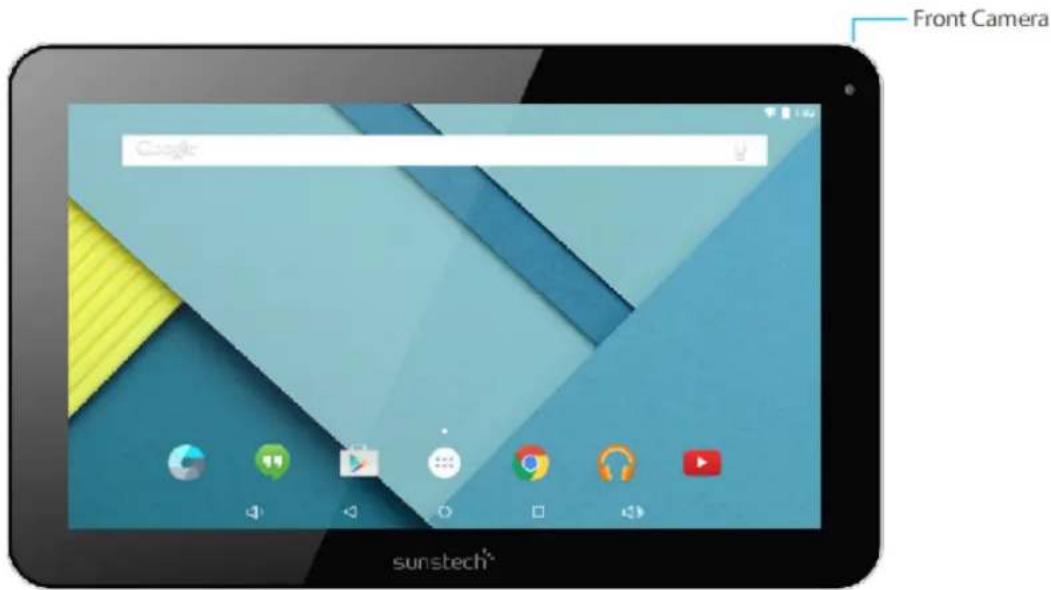
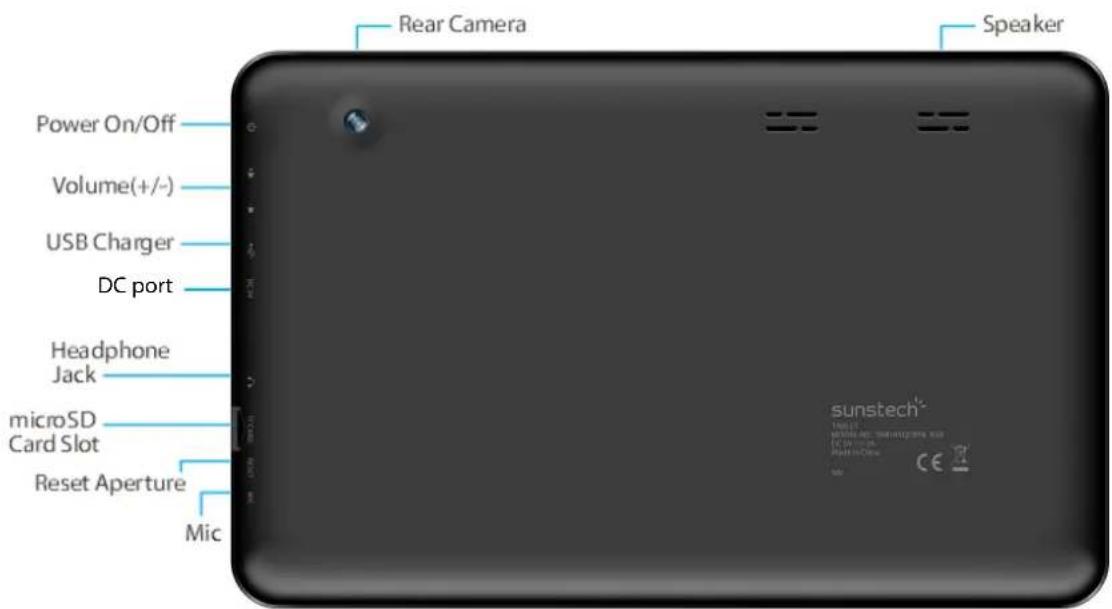
Basic Operations
1.Turnon
Alongpressonthepowerbottomturnsonthedevic
2.Turnoff
Inthenormalstate,longpresssthepowerbuttonoshutdown,select"OK"whenpopuwhethertoshutdown theinquirybox.
3.PowererResatit
CrashesmaybeoccurredintheprocessofusingduetoSmartoperatingsystem.TaptheRESETbuttonforce shutdownandthenrebootifoccurred.
- Sceem Saver
Pressthepowerbutton,turnoffthescreenintothescreensaverstate,ifyouwanttoactivatescreen,pressthe powerbuttonagaintoenterthescreenlockstate,thenslidethelockbuttontounlock.
5. Back to the desktop
Tapthebottomlowerleftsideofthescreen,Homeicon"

"canreturntothedesktopunderanyinterface
6. Back to the previous button face
TaptheBackicon"

"lowerleftsideofthescreenbottomcanreturntothepreviousdesktopunderany
interface
7.Sedtlings
Tapthe"

"icontoaccesstotheapplicationlist,tapthe"Settings"iconintothesetmenulistinterfac
8.Changjing
PlugtheDCconnectorofadapterintotheDC-inofdevice.PlugtheadapterintoACpowersocket.Whilecharging, thedevicemayheatup.Thisisnormalandshouldnotaffectyourdevice 'slifespanorperformance.Whenthe batteryisfullycharged(thechargingiconisolongermoving),unplugtheadapter,driverfromthedeviceland thenfromthepowersocket.
9-Wingless 88, INktoomik:
Wi-Fi::PressWi-FitoturnON/OFF
Wi-Fisittings:
PressWi-Fisettings,thenthedevicewillautomaticallysearchtheavailable
Wi-Fisignals.
Selectthenetworkyouwanttoconnectwith.
10-Connection Bluteoth:
-Select"settings"
-SelectBluettothandslideON/OFF
-AlldetectedBluetoothdeviceinareawillbelisted,taptoselectthedevicereconnection.
TOHELPINSUREAHEALTHYBATTERY.
*.Makesurethemachineonasinglechargeonceamonthandthenshutdownbeforestoringit
Withoutlonguseafterfullycharged.
Tips:usingauthorizedaccessoriescanenjoyadequatesecuritytoguaranteethemaintenanceservices.
Beforeusingthedeviceforthefirsttime,youshouldchargethebattery.Thepoweradapter(charge)isakey
componentofthedevicelandplaysavitalroleinprotectingitworkproperlyandyoursafety.
Unauthorizedchargerscacausebatteriestoexplodeordamageyourdevice. Anydamagecausedbymisuseis
notcoveredbywarranty.
Homessss
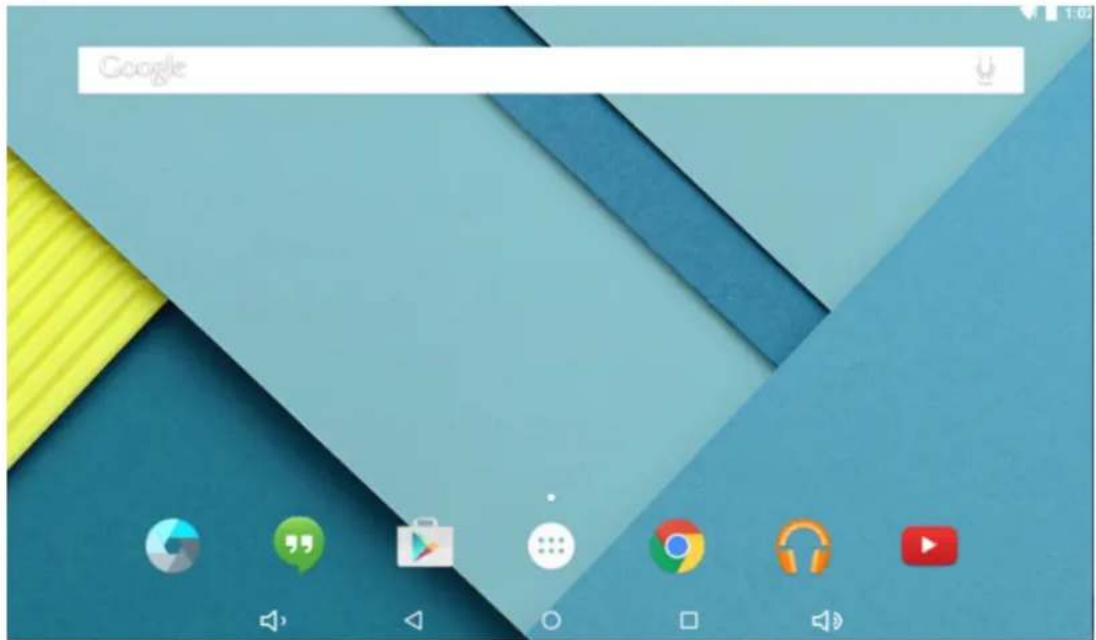
1.Bydefault, the homescreen can open multiple pages, Slidingleft/rightcanswitch desktop display.
2.SsTwwellppper
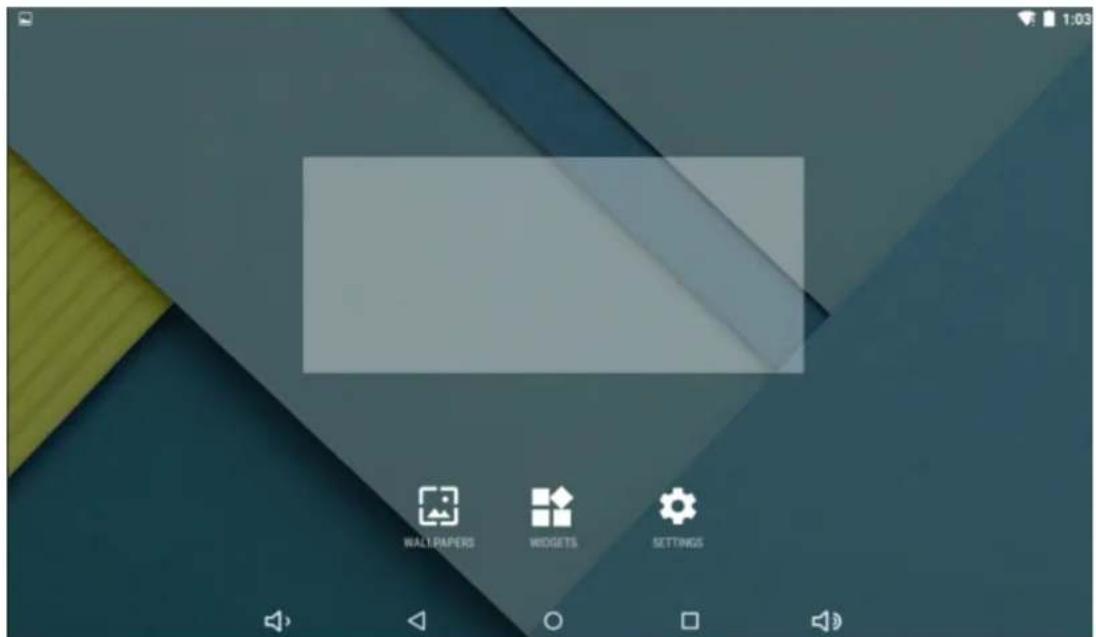
Longpresstheblankspaceofthehomescreenandthenappear"Selectwallpaperfrom 'tochooseanimageas youlikeaswallpaper.
3. Diplay all appilications
Allinstalledapplicationswillbedisplayediftap"

4. Nootificationkbaer
Underthemaininterface,tapthestatusbaricon,suchasUSBconnectioninttothenotificationspanel,whichcan displaythecurrentstatusoftheUSB,TFcardstatusandtherunningapplicationandstatus.
5.WwowweDdasktoppioconn
Underthehomescreen,longpresstheapplicationicononthehomescreen,thenyoucanmovetheselected iconaftertheiconisselected.
6.Delte theckopcom
Underthehomescreen, longpresstheapplicationicononthehomescreen, movetheselectediconto the deleteicon "x", then stoppressing, the desktopicon can be deleted.
InstalltheAPPKapplicaiton
1.CopytheneededAPKformatapplicationintothedeviceorTFcard.
2.Tap"FileManager"tofindtheAPKformatapplicationyouwanttoinstall.
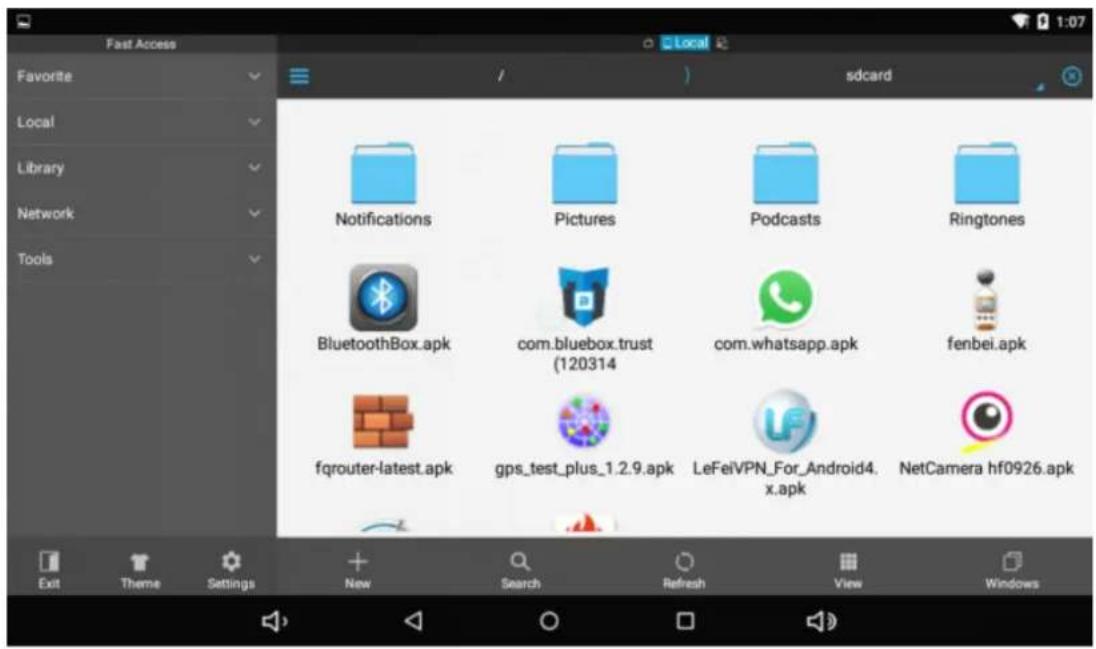
3.TaptheAPKformatapplicationyouwanttoinstallthenappear"Doyouwanttoinstallthisapplication?"
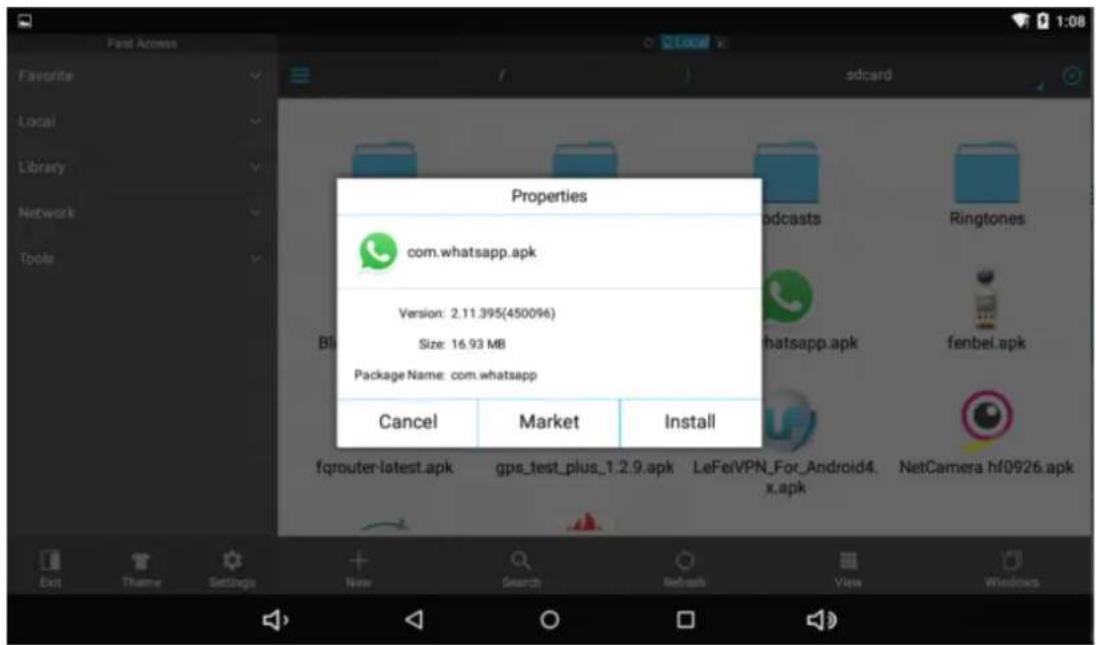
4.Tap"Install"tobegintheinstallationofAPKapplication

1.Tap" "controlstab"SettingsIntoSettingsmenuthertap"Apps"anddisplayinstalledapplicationlist.
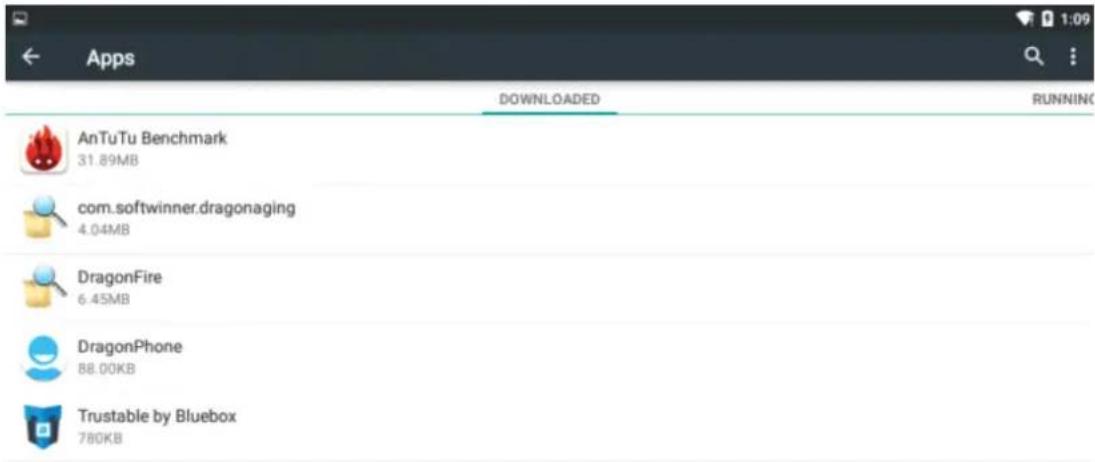

2.Taptheapplicationyouwanttouninstallalpopuppromptuninstallboxes
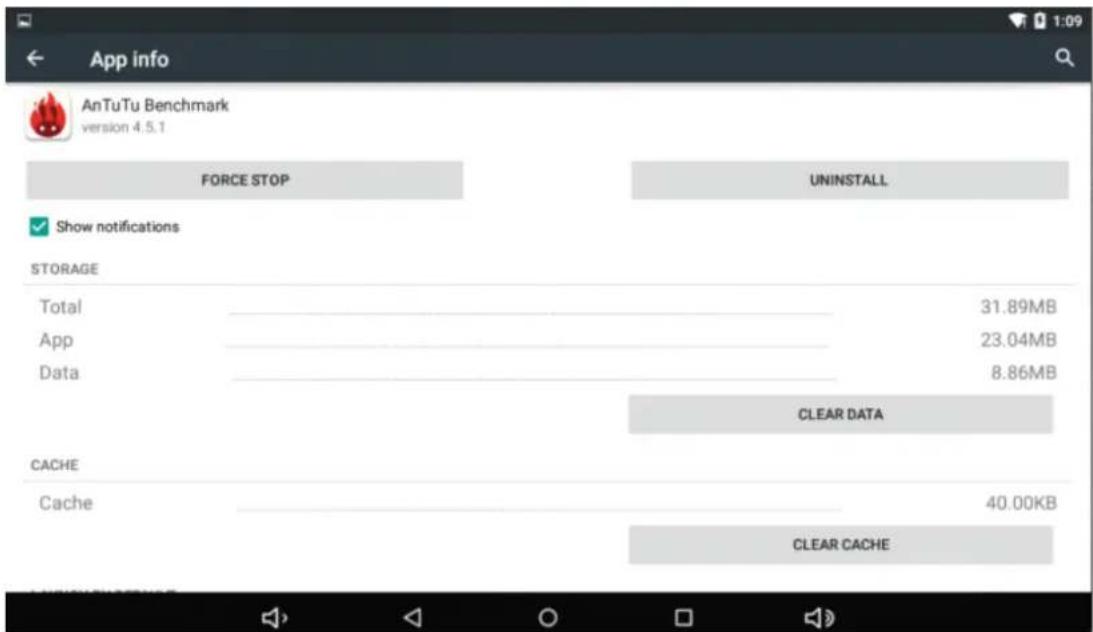
Pictures and Wixies
1.Tap"Gallery"inthehomescreenentoaccessdomaiinterface.
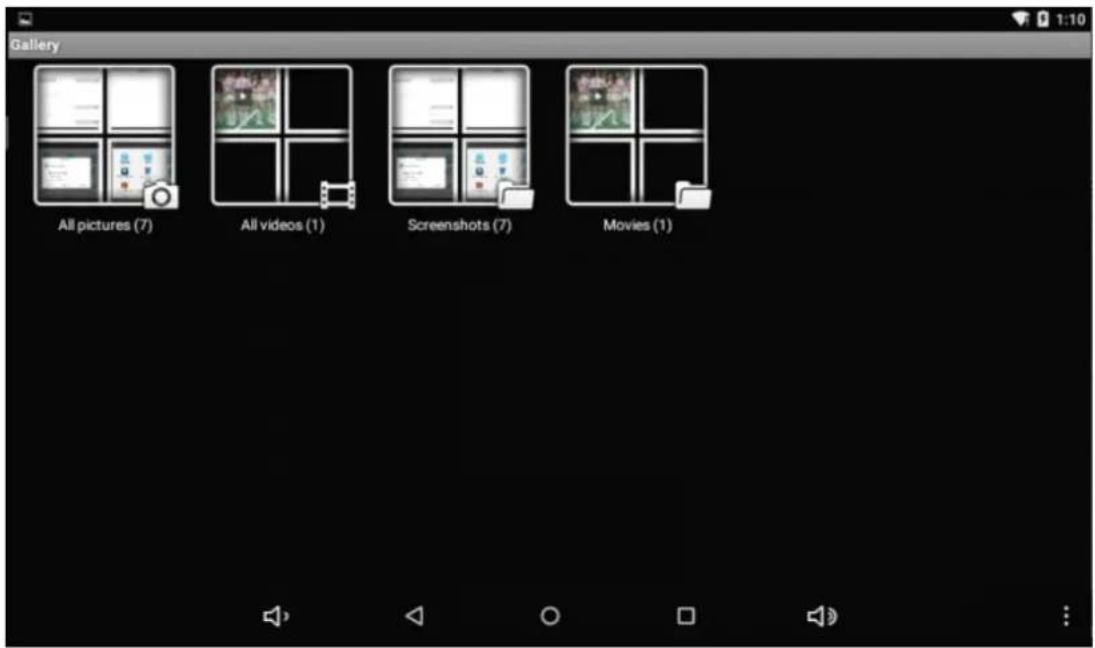
2.Thentapabovethevideoyouwanttowatch
Camera
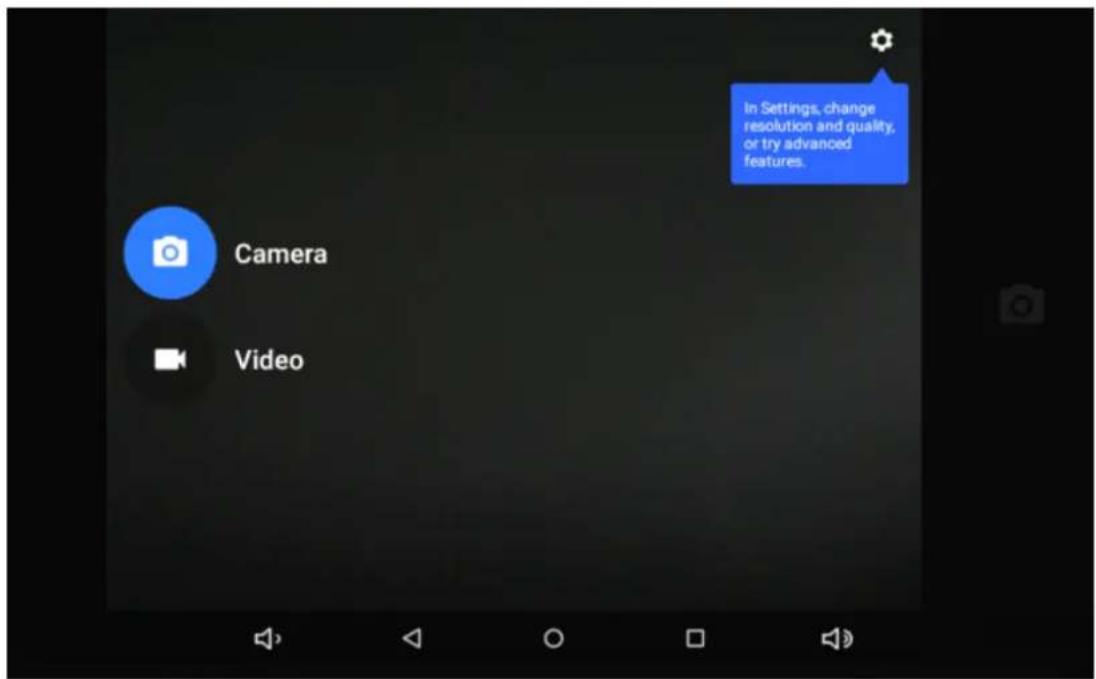
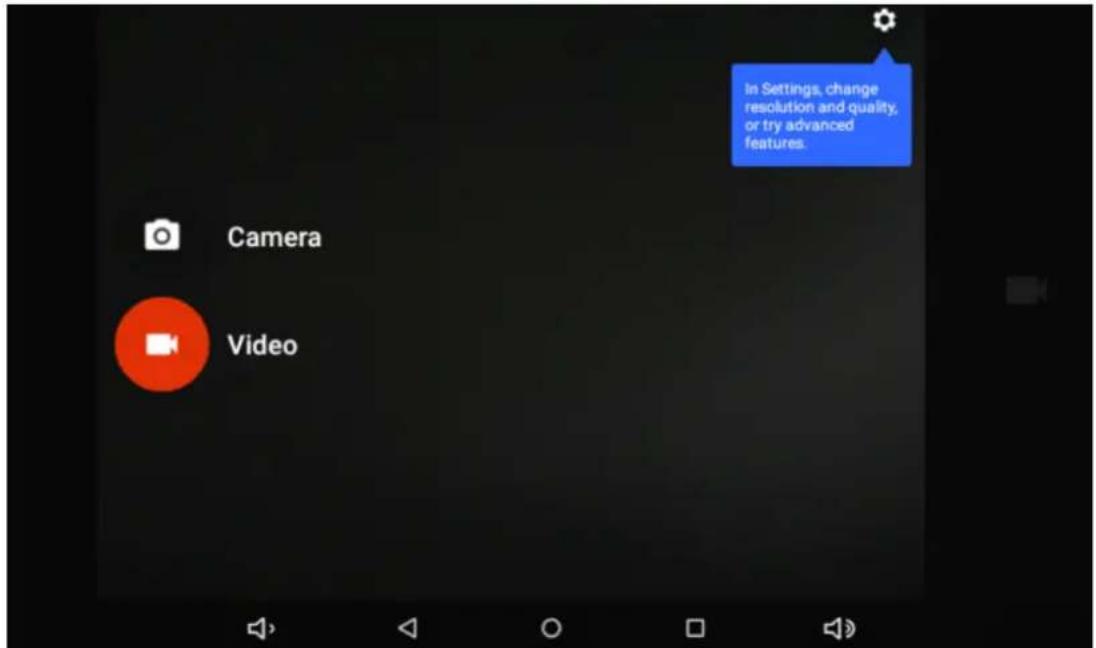
1.Built-incameratotakephotosandvideo
Tap"camera" totakephotosandvideo,""isstatusoftakingphotos,tapittotakephotosand preserveautomatically,""rdingvideo,tapittostart.
Music
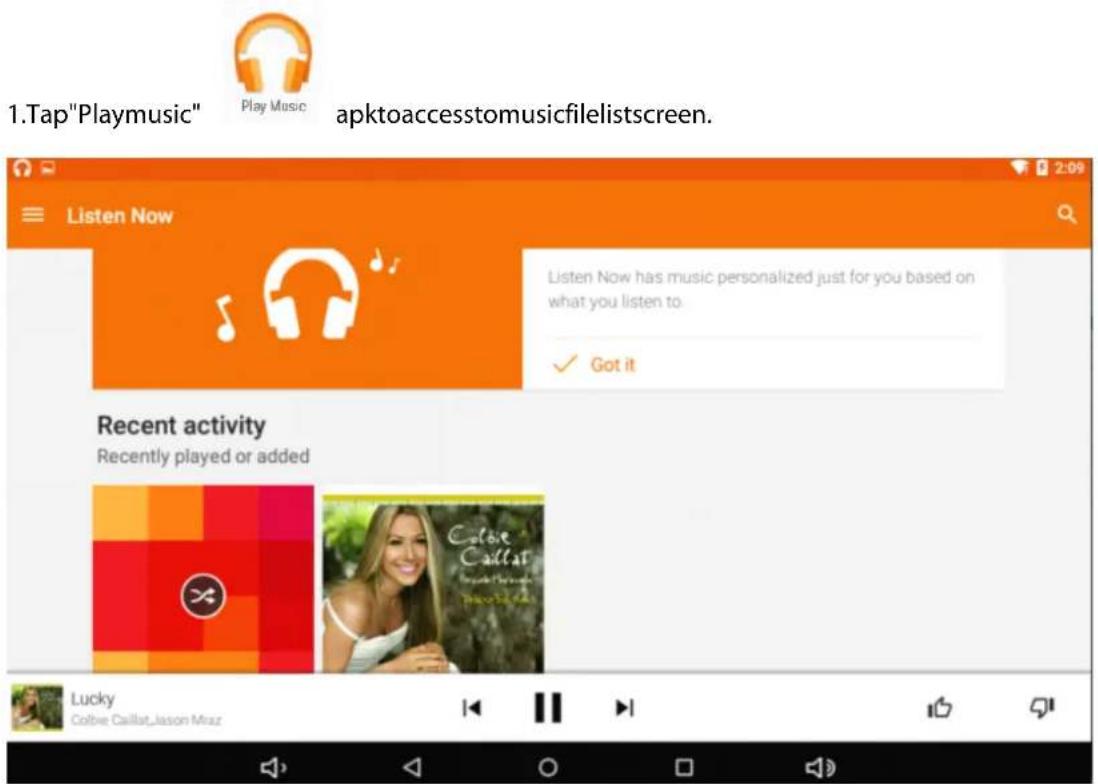
Files:Tapthemusicyouselectedandplaymusic
OTapb tohomescreen,taptogoback i previousscreen.
Regular Settings
- Select "settings" after access into application bartosetlistinterface.
2.WIRELESS&NETTWORKS
Wi-Fifunctiononoroff
Bluetoothfunctiononoroff
Datausage:Showingapksusage
3. Dispelay
4.Soumudi88roothfication
5.Storing
6.Baithery
7.Apps
8.LoxCartikom
9. Security
Brightness:Setthebrightnesssoftthedisplay.
Wallpaper:Selectwallpaperforthehomescreen
Auto-rotatescreen:viewingimporttraitorlandscape,adjustingautomaticallytytofittheneworientation
Sleep:setsleepingtime
Fontsize:setthesizeofthefont
Accelerometercoordinatesystem:settheaccelerometercoordinatesystem
Screenadaptation:usedtoadjustpartofgames'screenshotize.
Volume:adjustthevolumelevelforcallringtones,musicandvideos,alarmingtones,devicesystem,and notifications.
DefaultNotification:Selecttheapplicationwhichyouwantdefaultnotice.
Touchsounds:Sethedevicetosoundwhenyouunlockthetouchscreen.
Screenlocksounds:Sethedevicetosoundwhenyouunlockthetouchscreen.
DisplaysthemememorycardandUSBstoragesettingsofavailablerestorage space
Displaysthebatterylevelorchargingstatus
Caution:Riskofexplosionifbatteryisreplacedbyanincorrecttype.Disposeofusedbatteriesaccordingtothe instructions
View"DOWNLOADED","ONSDCARD","RUNNING"and "ALL"applicationslist,etc.
Settousethe"GoogleLocationreportingtogatherandusedatebasedonyourlocation
Screenlock:setscreenlockwayandownerinformationwhichcandisplayonthelockscreen Encrypttablet:setupasswordwhichrequireddapasswordwhenyoupowerontablet.
Passwords:makepasswordsvisibleorinvisible Device administrators:view deactivateddevice administrators
Unknownsources:allowinstallationofappfromunknownsources
Verifyapps:Disalloworwarnbeforeinstallationofappsthatmaycauseharm
Trustedcredentials:displaytrustedCAcertificates
Storatype:softwareonly
InstallfromSDcard:InstallcertificatesfromSDcard
Clearcredentials:removeallcertificates
10. Accounts: Setting email accounts
11.Lamnguaagge&&impputt
Language: Selectadisplaylanguageforallmenusandapplications.
Personaldictionary: AddawordbytouchingtheAdd (+) button
KEYBOARD&INPUTMETHODS:setkeyboardandinputmethods
SPEECH:Setthevoicesearchandtext-to-Speech(TTS)output
MOUSE/TRACKPAD:setpointerspeed
12.Back up and reset
BackupmydatatoGoogleservers.
Factorydatabreset:Erasesalldataontabletandrestoretofactorydefault
Systemupgrade:RebootintothesysteminRecoveryModecanclearthedataorsystemupgrade
13. Datte &time
Setdateandtime
14. Accessibility
TalkBack:Setturnon/offTalkBack
Largetext:displaylargetext
Auto-rotatescreen
Touch&holddelay:setthetimesoftouchandholddelay
Installwebscripts:setwhethertoallowtheinstallationofwebscripts.
15.PPritigg: supportcloudprint
16.DeDepepepersoptions
USBDebugging:debugmodewhenUSBIsconnected
DevelopmentdeviceID:displaydevelopmentdeviceID
Stayawake:screenwillnotsleepwhilecharging
Allowmocklocations
HDCPchecking:useHDCPcheckingforDRMcontentonly
Desktopbackuppassword:Setthefulldesktopbackuppassword.
Strictmodeenableflashscreenwhenappoperatingldongoperationsormainthread
Pointerlocation:screenoverlayshowingcurrenttouchdata
Show touches:showvisualfeedbackfortouches
Showscreenupdates:flashareasofscreenwhentheyupdate
ShowCPUusage:screenoverlayshowingcurrentCPUusage
ForceGPUrendering:Use2Dhardwareaccelerationinapplications
Windowanimationscale:animationscale1x
Transitionanimalsscale:animationscale1x
Don'tkeepactivities:Closeallactivitiesassoonastheuserleavesit
Backgroundprocesslimit:standardlimit
ShowallANRs:showAppNotRespondingdialogforbackgroundapps
17.AbonttttbeB
Touchpanel10.1"capacitive5points
CPU:A33Quadcore
OS:Android5.0
Resolution:1024*600
Storage:8GBNandflash/1GBRAM
MicrocardreaderMax:32GB
USBport2.0
Digitalcamera0,3MPfront,2.0MPrearcamera
Bluetooth:V4.0
WIFI802,11b/g/n
Supportedformatst:
Picturefile.jpeg.jpg,bmp,gif.png
Audiomp3.mp2,ape,wma,wav,flac,ogg,aac,3gp
Videoarmvb,mkv,wmv,mov,mp4,pmp,mpeg,mpg,flv,3gp,mpg,h,264
Battery:5500mAh
Accessoriesincluded
MainadaptorAC240V/DC5V2A
Usermanual
Connect computer
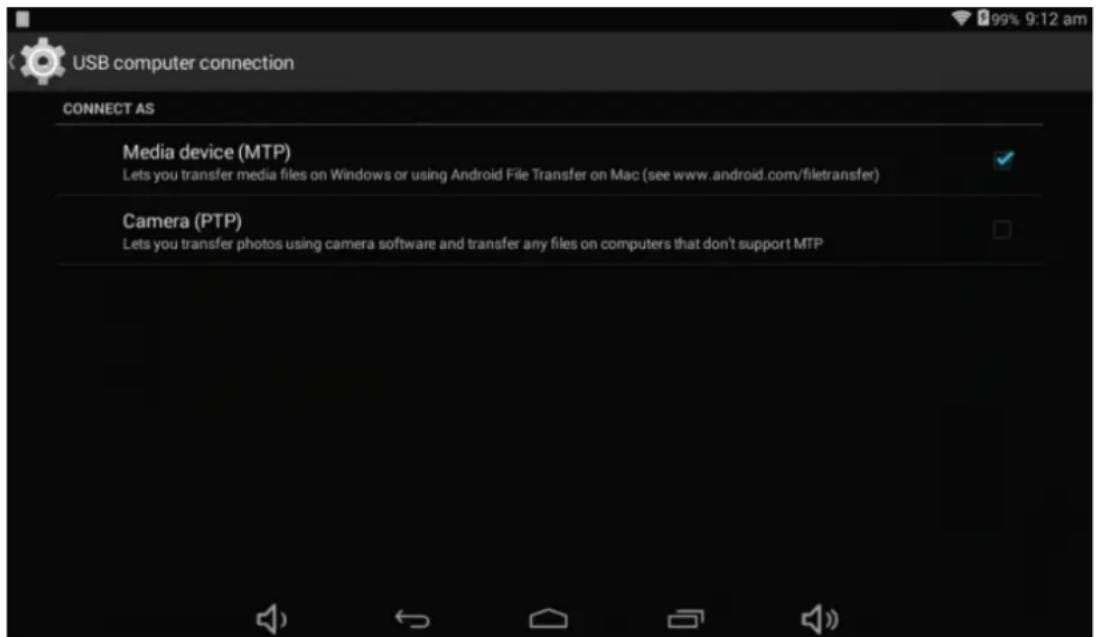
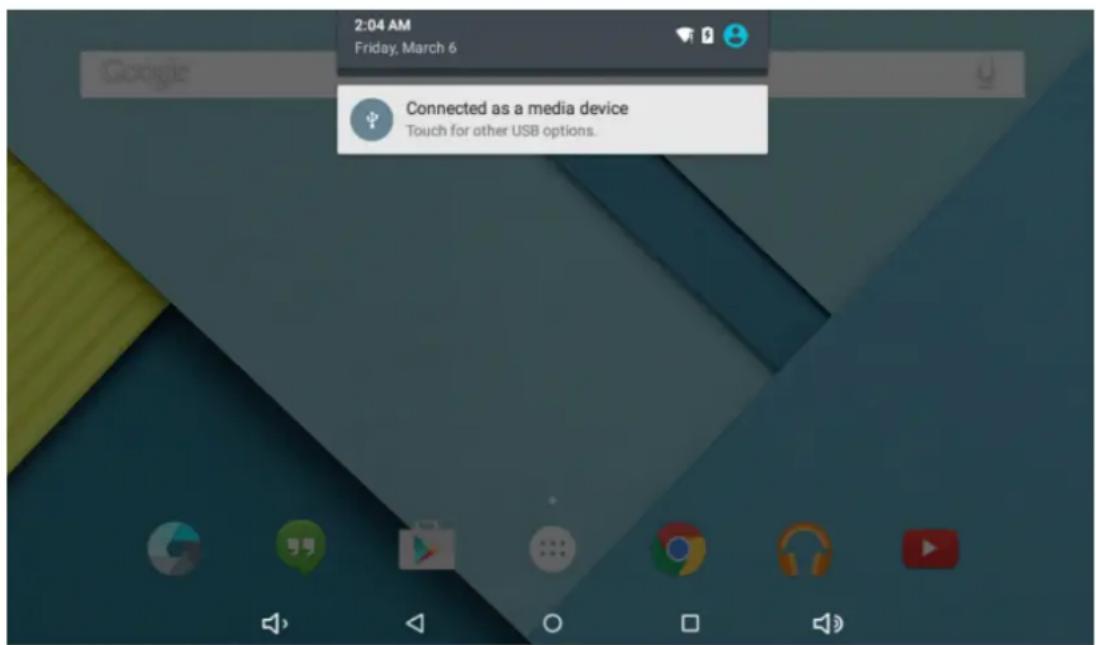
ThedevicecanconnecttoPCviaUSBwirefodatacopyanddelete.
1 Connected the devicetoPCportviaUSBwire, "USBconnected "onPCscreenwillbeshown.
2.Tap"USBconnected"option,select"openUSBstoragesetting",thenyoucanseemovablehardwareiconwhich canbeoperatedlikeusingUSB.
BLUETOOTHKEMBOBARD
How painimngaa Taibkettwiththe Btkeybowand 3300
- TurnontheswitchthetkeyboardpowerkeytoON, the powerindicator"Power Power"lamplightsfor2seconds.
- Press keyboardconnectkeytopairingtheBTlampstarttoflicker
3.TurnonBTfunctionofyourtablestandstarttosearch'Bluetooth3.0Keyboard 'underavailabledevices.When thetabletdetectedthekeyboarddisplayedacodenumberofpairing.
4.Usingthekeyboard,typeintherequestedcodetopairingwhichappearedinyourtableandpressEnter.
Charginginstuction:
1-Theunitstarttoflickerthe"PowRoper"Indicatorwhenthepowerbatteryislow.
2-ConnectUSBcabletohemicrousbportofkeyboardandanothersideof cableconnecttoacomputer
3.Thechargerindicatorlitup,after3-4hoursthechargingslampwillautogoutwhenchargingenough.
Sleepmoude tto sawwe powerr emergency:
TheBTkeyboardwillautoentersleepmodetasavepowerenergywhenitdoesn 'tworkforafewminutes,but pressinganykeycanwakeitupwithin3seconds.
Commentissses:
Can'tconnectwithtablet;
1.Makesurretpowerkeyto 'ON'
2.MakesurethedistancebetweeBTkeyboardandtabletiswithin10m
3.Makesurekeyboardandtablethaveenoughpower
Common Issues
1.Theunitdioesm'treepoond.
Checkthebatteriestosewetheritneedstobechargedornot.
Checktoseifthepoweradapterisconnected.
Checkingaftergetconnectedtothepoweradapter.
Ifitstillcannotturnonaftercharging,pleasecontactthecustomerservicecenter.
2NoNowiaeimtheessaphome
Makesurethevolumeisnotturneddowntalltheway
Unplugtheheadsetandthenplugitinagain.Makesureyoupushconnectorallthewayin.
3.C6heggiggiiuus
Please makesurethesettingofthechargerisaccordngwiththedevic.
Please don'tusethefrontUSBportsforcharging
- Downdlkiadissses
MakesureitconnectedtothePCproperly.
It'sbetternottousethefrontUSBporttoconnecttoPC.
- Why some of the down loaded witeos can not play normally?
Thedeviceiscompatiblewithmostofvideoofileformat,buttherestillhavesomedifferencesinformat,encoded mode,Resolutionandcoderateetc.itcouldresultthatsomeofthevideoscannotplayorhaveplayissues.oursuggestionisthatusetethethirdpartyadaptersoftwareotransforminginthePCthencopytothedevic.
6.DevilgecreashedorGamltturncon
Oncedevicereashedduringtherunningtime,itcanberestartedviataptheRESETbuttonatthesideofdevice.
MadeimChina
-Recoverymodeffunction.
Howto toenterin inereoverymnda.
Pleasefollowthesesteps.
1-To enterintherecoverymodefirstyoushouldpoweroffthedevic,
Thenlong-pressthe"OSSINGFF" keyand"W2DL++" keyatthesametimeuntiltheAndroiddollhasappeared.
2-With"vol="keyselect"wippedata//factoryreset" thenpress"Proveer" andthenselect"YYesdeletealluser data"withthe"vol="key.
3-Thenpress"power" again.Theunitwillthenbegintherecoverymode.
4-Whenitfinisheselect"rebeootsystemnow"pressthe"povor"buttonandtheunitwillre-startitself.(this processmaylastforafewminutes)
How to download the software using the unit.
IMPORTANT: Wwenn you obwnbtaaht blessoare, aill cna wlll bae cbeed aspootos, widess saad Aappstthatyou have been installed.
Donotinterruptthisprocesspleasemakesurethebatteryisfullycharged.
Please, follow the steps.
1-Openbrowserandsearchandopenthisislink:
www.sunstech.es/download/
2-Selectthemodelofthetabletthatyouhaveanddownloadthesoftware.(ThissoftwareisinstalledIn theINTERNALSD).
3-Whenitfinishedthedownload,selecttheApp"Sunsthstechupdate"inyourunit.
4-Select"LocalUpdate","download".
5-Selectthesoftwareandwaituntiltheprocessisfinished.
WARRANTYCAHRD
EUROPEANWAWARANTY
1.General
This warrantyis granted without prejudice andinadditiontotherecognizedsrightsforthecusomer vis-à-visthesellerprovidedintheRoyalLegislativeDecreeof16November,approvingtherestatedtext oftheGeneralLawfortheProtectionofConsumersandUsersandothercomplementarylegislation. Therefore,therecognizedslegalrightsforthecusomerarenotlimitedorexcludedaccordinglytherelevantRegional,NationalorEuropeanlegislation.
ThiswarrantyshallbevalidinaltheEuropeanUnionMemberStateswiththelimitationsthatlegally correspondinthecountryinwhichtheyareintendedtobeimplementedinaccordancewiththeir implementinglegislation.
Notwithstanding the foregoing, SUNSTECH shall respect other rights and limitations related to the product warranty that legally correspond each of the States listed in the Attachment in accordance with their implementing legislation for any product provided that it is intended for the Umarket and has been purchased or used by the consumer or user within the EEA.
2.LegalWarranty
ThisSUSTECHproducthasatwo(2)yearwarrantycountingfromthedateofdeliveryand/orpurchase. Duringtheabove timeframe,SUNSTECHshallbeheldresponsibleforanylackofconformityofthe productinrelationtothecontractinaccordancewiththeprovisionsoftheLawfortheProtection of ConsumersandUsers,thatshallentitlethecconsumertorequesttherepairorreplacementoftheproduct, unlessoneoftheseoptionsisobjectivelyimpossibleordisportionate.
Accordingly,theremedy(i.e.therepairorreplacement)shallbedeemedtobedisproportionateifit imposesunreasonablecostsontheseller.Inordertodeterminethis,thefollowingshallbeconsidered:(i) thevalueoftheproductiftherewerenolackofconformity;(ii)therelevaneofthelackofconformity; and(iii)iftheotherformofremedycouldbcarriedoutwithoutmajorinconveniencetotheconsumer anduser.
To determinewhetherthecostsareunreasonable,thecostsincurredbyoneformofremedymust besignificantlyhigherthantheocstscorrespondingtotheotherformofremedy.
Inaddition, the consumer may choose between requesting a reduction in the price or terminating the contract, if he is not entitled to demand thereupon. The product and whenever these actions would not be completed within areasonable timeframe and would cause more inconvenience to the consumer and user. However, the termination shallnot take place where the lack of conformity is minor.
Boththerepairandthereplacementoftheproductasresultoftheproduct slackofconformityshallbefreeofchargefortheconsumeranduser,includinglabourandmaterials.
Inanycase, repairsunderwarranty shall be carried out by SUNSTECH 's Official Technical Assistance Service orits authorized distributors.
3 CONDITIONSforthewarrantytobee exercised
To exercisethelegalandcommercialwarranty,itisnecessaryytosubmitdocumentaryevidenceshowing thedeliveryand/orpurchasedateoftheproduct,whethertheinvoice,receipt,deliverysliporsealedand datedwarrantycard.Documentswithhavebeentamperedwithorthalsifiedwillnotbeaccepted.
TheconsumershallcontactSUNSTECH 'sCustomerServiceTeamusingthewebsite(underthesupport section)andwillbeinformedaboutwhatactiontotake.Atthattime,theconsumershallhavetoprovide acleardescriptionofthemalfunctionorthelackofconformityoftheproductwiththecontract.
Inanycase, repairsunderthewarranty shall be carried out by SUNSTECH 's Official Technical Assistance Servicesoritsauthorizeddistributorssothat SUNSTECH can beheld responsible underthelegal and/or commercial warranty.
4. Exceptions
Thewartrydoesn'tforeseeorincludeperiodicmaintenanceorproductinstallationrevisions.
Inaddition, the product will not be considered as lacking conformity in relation to the contract and therefore, it will not be recovered by the legal or commercial warranty when:
- Thelackofconformitycorrespondstoadiscrepancywiththesafetystandardsorthelocalornational techniquesofadifferentcountrytotheoneitwasoriginallydesignedandproducedin;
- Thisproductoranyofitsidentificationfeatures(numberofseries,etc.)havebeenpartiallyor completelyopened,assembled,unassembled,handledand/orrepairedbyapersonnotpartof SUNSTECH'sOfficialTechnicalAssistanceServicesteamoritsauthorizedistributors
- Thelackofconformityisaresultofanincorrectinstallation(exceptiftheinstallationhasbeen carriedoutbyoneofSUNSTECH 'sauthorizedsellorsorunderitsresponsibility,orbytheconsumer followingSUNSTECH 'installationinstructions)oranabusiveorinadequateuseoftheproduct, includingbutnotlimitedto,ausagethatisnotinaccordancetothenormalpurposeoftheproduct orthedirectionsforuseandmaintenance,asdefinedbySUNSTECH;
- Thelackofconformityhasbeenancausedbyacomputervirus,anactionoramanipulationof passwords,softwareinstallation,manipulationorreinstallation,etc.;
- Thelackofconformityisduetotheseuseofaccessories,chargersorconsumablesthatarenot SUNSTECHoriginalsandthereforeanotdesignedforthatproduct;
- Thelackofconformityisduetotheuseofanythirdpartysoftwareorapplicationthatmodifies, changesoradaptsthesoftwarethatwasapprovedand/orincludedbySUNSTECHintheproduct;
- Thelackofconformityisaresultof downloadingorusingthirdpartymultimedia servicesand/or contentsavailableoraccessiblethroughtheproduct;
Damagesinorthroughthebattery,whichareduetoitbeingovercharged,areproduced; - Any of the box seals or battery cells have been damaged, or there is clevidence that showsthes were handled; and/or
The product damages are caused by any unforeseeable or force circumstances, especially, lightning, water, fire, applying incorrect voltage or any other cause that is not due to the product manufacturing design.
UndernocircumstanceswillSUNSTECHbeheldresponsibleforthelossofanydatastorthedheproduct.The consumerwillbeheldresponsibleforanyback-upcopiesandtheprotectionofanydatafromloss,damageor destruction.
Noneofthewarrantiesincludedhererecoverthereplacementofparts,duetowareorruptureofmechanisms, rubber,boxesand/orplastic,aswellasanyaestheticdamageresultingfromthenormaluseoftheproduct,for example,ifthescreenlosesitsshinenwiththeuseoftheproduct.Inthesameway,thewarrantiesdonotcover anytypeofdamageproducedduringthetransportationoftheproduct(includingbutnotlimitedtoaesthetic damage,blows,line,scratches,stains,dents,etc.)inwhichcasetheapplicableprovisionsunderSUNSTECH generalcontractconditionswillapply.
S
Forfurtherinformationgotowww.sunstech.es
You can also contact:
AFEXSUNS,S.A.
Pallars,189-191
08005BARCELONA
DECLARATIONOFCONFORMITY
CouncilDirective(s)towhichconformityisdeclared:
Directive(1999/5/EC)-R&TTE/EMC/LVD
Directive(2011/65/EU)-RoHS
ApplicationoftheStandards:
EN60950-1:2006+A11:2009+A1:2010+A12:2011
Manufacturer'saddress:
C/Pallars189,08005Barcelona
Typeofequipment:
TABLET
Trade:
SUNSTECH
Modelno.:
TAB105QCBTK
We, the undersigned, hereby declare under our sole responsibility that the specified equipment is in conformity with the above Directive(s) and Standard(s)
Place:Barcelona
(Signature)
VICTOR Planas Bas
(Full name)
Date:3-April-2015
General Manager
(Position)
sunstech
TAB105QCBTK
Manualdeusuanio
GUIA DE USUARIO
Directorio
Copyright © 2013Afexsuns,S.A.
No distrbuiy maierial poteegi to poor obeneed hoss daaort
Nodistribuyasmaterialprotegidoporlasleyesdederechodeautorsinelpermisodelospropietariosdel contentido.Alhaceresto,podriaviolarasleyesdederechosdeautor.Elfabricantenoseraresponsabledeningun problemalegalprovocadoporelusoilegaldematerialprotegidoporpartedelusuario.
Malwareywinus
Sigalasssiguiereessugaeerrniasafinindalepprotegerelcdipspostivcoonntaannahvareyyvius.Ssinodolhaee,prodria provocardanosodapperdidadctatos,loscaalespothriannoestarubbertosporlagarantla
TalkBack:Configurarconectar/desconectarTalkBack
Mododreepoosppaeeathomareemergia:
2NoNosecooyeermahauricular
Asegurequeelvolumnoestádeshabilitado
Desconnectelosauricularesyvuelvaaconectar.Asegurequeempujaelconctorhastaalfinal.
3.Cuestionesamilwelddecatga
Directive(1999/5/EC)-R&TTE/EMC/LVD Directive(2011/65/EU)-RoHS
Nepontez paaas appannaiis obans woos prnchss obe beveantou aunuour oube wotree taitle.
PlugtheDCconnectorofadapterintotheDC-inofdevice.PlugtheadapterintoACpowersocket.Whilecharging, thedevicemayheatup.Thisisnormalandshouldnotaffectyourdevice 'slifespanorperformance.Whenthe batteryisfullycharged(thechargingiconisolongermoving),unplugtheadapter,driverfromthedeviceand thenfromthepowersocket.
9-Windless 8&Nektoswornik:
Wi-Fi::PressWi-FitoturnON/OFF
Wi-Fisettings:
PressWi-Fisettings,thenthedevicewillautomaticallysearchtheavailable
Wi-Fisignals.
Selectthenetworkyouwanttoconnectwith.
10-Connectionist Bluetooth:
-Select"settings"
-SelectBluettothandslideON/OFF
-AlldetectedBluetoothdeviceinareawillbelisted,taptoselectthedevicereconnection.
8Change
Installure application APPK
1Copiezl'applicationdeformatAPKvouluedans'l'appareiloulacartemicroSD.
Stockage:8GoNandFlash/RAM:1Go
Instructional Change Management:
QuestionsdBecommnmentaive:
Impossibledeseconnceteraveclatable;
Directive(1999/5/EC)-R&TTE/EMC/LVD
Directive(2011/65/EU)-RoHS
Applicationdesnormes:
EN60950-1:2006+A11:2009+A1:2010+A12:2011
Copyright © 2013Afexsuns,S.A.
2.SHEWWHCOSSEEHEDHES
FuncaoWi-Filigadaoudesligada
ComoappareharrumttalbllkctccomcottedtBBT3.0
1.Ligueinterruptordotecladopara"ON"ealuzdoindicador"Power Power"acende-sedurante2segundos.
2.PrimaatecladeligacaoodotecladoparaemparelharatéquealampadadoBTfiqueintermitente
3.LigueafuncaoBTnoseutabletecomeaceaprocurar"Bluetooth3.0Keyboard"nosaparelhosdisponiveis.
Quandootabletfordeteted,otecladomoaurnúmerodecódigoproaemparelhar.
4.Usandooteclado,escrevaocódigosolicitadoparaemparelharqueaparecenotableteprimaENTER.
Directive(1999/5/EC)-R&TTE/EMC/LVD Directive(2011/65/EU)-RoHS
Aplicações Normas:
EN60950-1:2006+A11:2009+A1:2010+A12:2011


- COPYRIGHT
- SAFETY INFORMATION
- WARNING
- PRECAUTION
- CORRECTUSAEANDIMAINTEMAMOEOFTHERMOBILEDEVITE
- REDUCETTHE RISKFIJNJURYCAUSEDBYREPEFTIBIEWNEWENEMENTS
- WHEN YOU USE THE EXAMPLE, PRODUCE A YOUR HENSHINING AND YOUR EARS
- DONNATTAKE DWEASIH YOURFFICNT PAACKETS CORUNSMDYOUR WALST
- DONNNT PAAINTTYAOURDTEXIRE CORPPUTAMY STICKENS COMIT
- DONAT USE THE DEVICE IF THE SREEMILS CRACKED OR BROKEN
- INSTALL THE MOBILE DEVICE AND THE EQUIPMENT WITH CAUTION
- DON'T ALLOW THE PRODUCT TO FALL ON ODD SUBJECTS TO STRONG IMPACTS
- GUARANTEE OF THE MAXIMUM DURATION OF THE BATTERY AND CHARGER
- MALWARE AND VIRUSS
- CORRECTEDISPPASALFOFTTHISPPOOBOUTT
- EXEMPTIONFFOMMRESPSPMISBLLITYCBLAUSSE
- MAIN FUNCTIONS
- APPEARANCE
- BASIC OPERATIONS
- BACK TO THE DESKTOP
- BACK TO THE PREVIOUS BUTTON FACE
- 7.SEDTLINGS
- 8.CHANGJING
- 10-CONNECTION BLUTEOTH
- TOHELPINSUREAHEALTHYBATTERY
- HOMESSSS
- 2.SSTWWELLPPPER
- DIPLAY ALL APPILICATIONS
- NOOTIFICATIONKBAER
- 5.WWOWWEDDASKTOPPIOCONN
- 6.DELTE THECKOPCOM
- INSTALLTHEAPPKAPPLICAITON
- PICTURES AND WIXIES
- CAMERA
- MUSIC
- REGULAR SETTINGS
- 2.WIRELESS&NETTWORKS
- DISPELAY
- 4.SOUMUDI88ROOTHFICATION
- 5.STORING
- 6.BAITHERY
- 7.APPS
- 8.LOXCARTIKOM
- SECURITY
- 12.BACK UP AND RESET
- DATTE &TIME
- ACCESSIBILITY
- 15.PPRITIGG: SUPPORTCLOUDPRINT
- 16.DEDEPEPEPERSOPTIONS
- 17.ABONTTTTBEB
- CONNECT COMPUTER
- BLUETOOTHKEMBOBARD
- HOW PAINIMNGAA TAIBKETTWITHTHE BTKEYBOWAND 3300
- CHARGINGINSTUCTION
- SLEEPMOUDE TTO SAWWE POWERR EMERGENCY
- COMMENTISSSES
- COMMON ISSUES
- 6.DEVILGECREASHEDORGAMLTTURNCON
- MADEIMCHINA
- WARRANTYCAHRD
- EUROPEANWAWARANTY
- 1.GENERAL
- 2.LEGALWARRANTY
- 3 CONDITIONSFORTHEWARRANTYTOBEE EXERCISED
- EXCEPTIONS
- DECLARATIONOFCONFORMITY
- DIRECTIVE(1999/5/EC)-R&TTE/EMC/LVD
- DIRECTIVE(2011/65/EU)-ROHS
- SUNSTECH
- TAB105QCBTK
- MANUALDEUSUANIO
- GUIA DE USUARIO
- NO DISTRBUIY MAIERIAL POTEEGI TO POOR OBENEED HOSS DAAORT
- MALWAREYWINUS
- MODODREEPOOSPPAEEATHOMAREEMERGIA
- 2NONOSECOOYEERMAHAURICULAR
- 3.CUESTIONESAMILWELDDECATGA
- DIRECTIVE(1999/5/EC)-R&TTE/EMC/LVD DIRECTIVE(2011/65/EU)-ROHS
- 9-WINDLESS 8&NEKTOSWORNIK
- 10-CONNECTIONIST BLUETOOTH
- 8CHANGE
- INSTALLURE APPLICATION APPK
- INSTRUCTIONAL CHANGE MANAGEMENT
- QUESTIONSDBECOMMNMENTAIVE
- 2.SHEWWHCOSSEEHEDHES
Brand : Sunstech
Model : Tab 105 QCBTK
Category : Tablet