
iK150 - Loudspeaker KICKER - Free user manual and instructions
Find the device manual for free iK150 KICKER in PDF.


| Brand | Kicker |
| Model | iK150 |
| Product Type | Speaker with iPod/iPhone dock and alarm clock |
| Color | Not specified |
| Dimensions | Not specified |
| Weight | Not specified |
| Power supply | AC adapter (included) |
| Amplifier power | 20 W |
| Sound technology | DSP system, enhanced bass response (Tuned Port enclosure) |
| Audio sources | iPod/iPhone dock (4G and later), FM/AM radio, 3.5 mm auxiliary input |
| Main functions | Dual alarm, wake up by iPod/radio/buzzer, sleep timer (5-120 min), 12 station presets, display with 10 brightness levels |
| Headphone jack | Yes, 3.5 mm |
| Antennas | Coaxial FM antenna and AM loop antenna supplied |
| Audio controls | Adjustable bass and treble |
| Time format | 12 h / 24 h |
| Care and cleaning | Use a dry cloth only. Do not use detergent. |
| Safety | Do not expose to water, liquids, or heat sources. Maintain at least 10 cm ventilation around the device. |
| General information | User manual available for PDF download. Support and questions via notice-facile.com. |
Frequently Asked Questions - iK150 KICKER
User questions about iK150 KICKER
0 question about this device. Answer the ones you know or ask your own.
Ask a new question about this device
Download the instructions for your Loudspeaker in PDF format for free! Find your manual iK150 - KICKER and take your electronic device back in hand. On this page are published all the documents necessary for the use of your device. iK150 by KICKER.
USER MANUAL iK150 KICKER
DIGITALSTEREOSYSTEMwith ALARM
English Version
Version Espanol
SISTEMA ESTEREO DIGITAL con ALARMA
- iPod/iPhone Dock—Works with any 4th Gen and newer iPod/iPhone
- Powerful 20-Watt Integrated Amplifier—Digital Signal Processing delivers rich, full-range audio performance
Enhanced Bass Response—tuned-port speaker enclosure - Easy Set-up—simple front control panel with push-n-turn navigation knob
- Dual Alarm—wake to iPod, Radio, or Alarm
- Ten Display Brightness Levels
1/8" (3.5mm) Headphone Jack
24-Hour Time and Alarm Back-up—settings are saved when power is removed - Auxiliary Input—listen to other portable media players or computers
12 Radio Presets - 5-120 Minute Sleep Timer—fall asleep to iPod, Radio, or Aux-in
12 or 24 Hour Time Display
FRONT PANEL CONTROLS
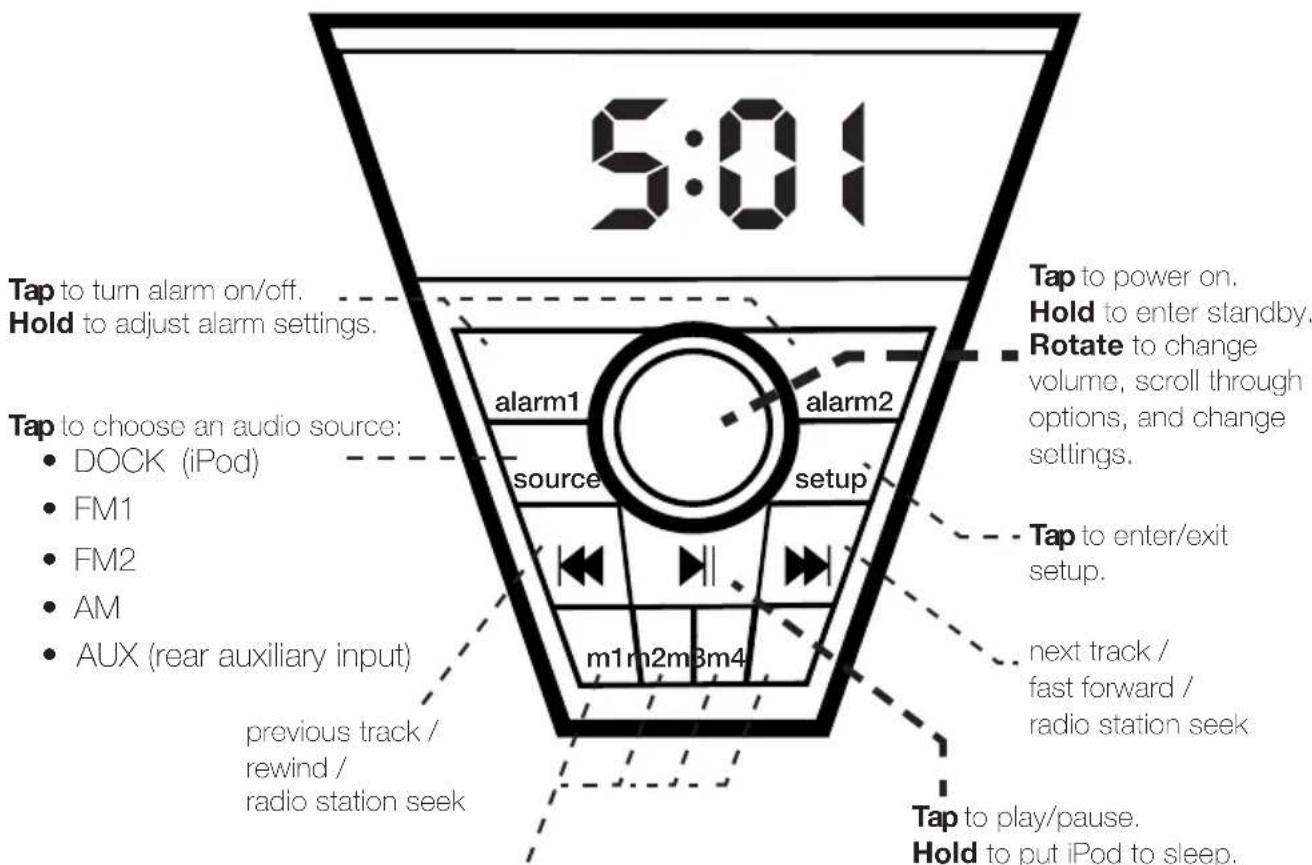
Hold to store current radio station in memory (4 locations per FM1, FM2, and AM). Tap to recall the station.
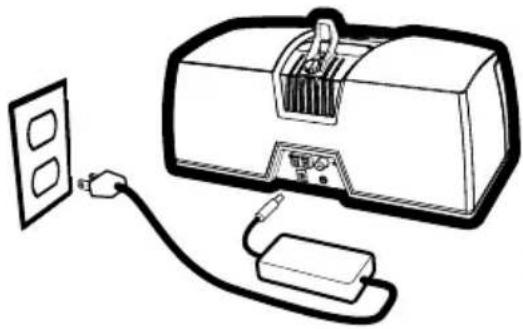
QUICKSTART | Playing your iPod
1. plug in power adapter & attach iPod/iPhone isolation bracket
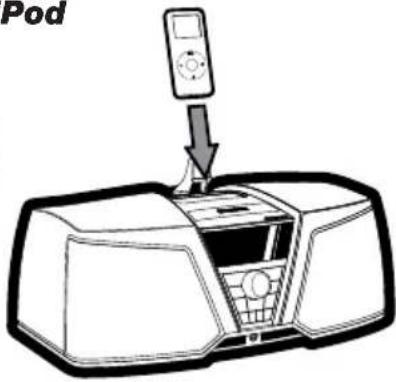
2. insert iPod/iPhone
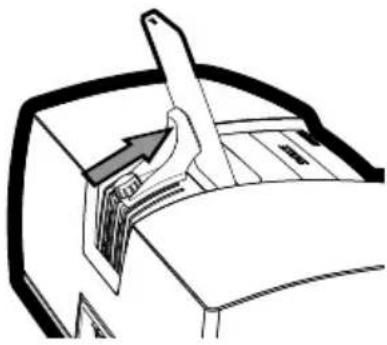
3. adjust iPod/iPhone isolation bracket

4. turn on iK150

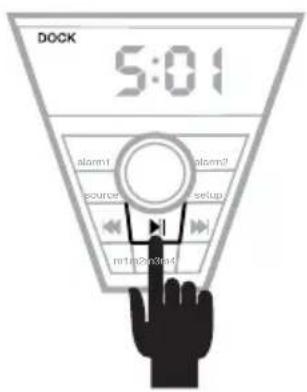
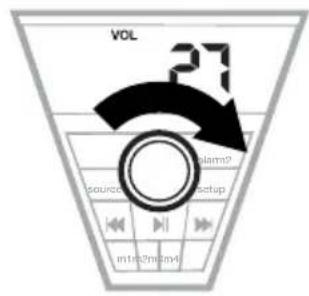
6. press play enjoy.5. select tunes
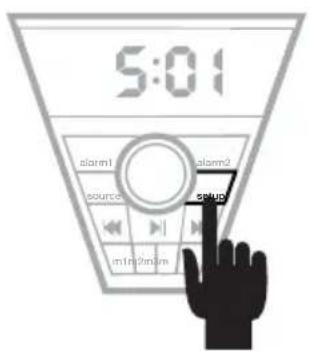
QUICKSTART | Setting the time
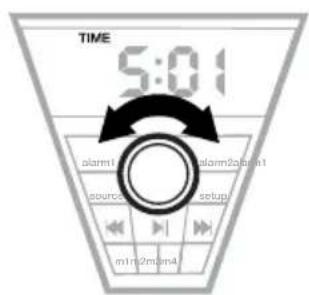
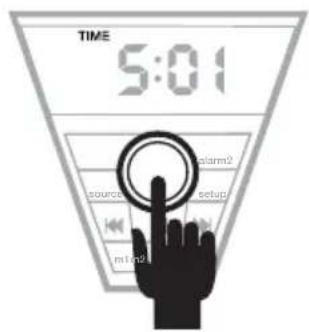
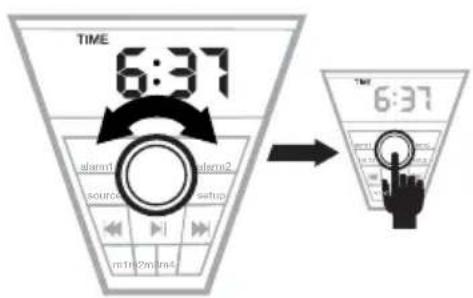
1. press setup 2. scroll to TIME 3. press navigation knob
4. adjust time, then press navigation knob to save
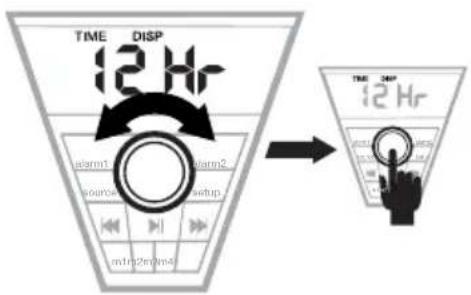
5. choose time format, then press navigation knob to save
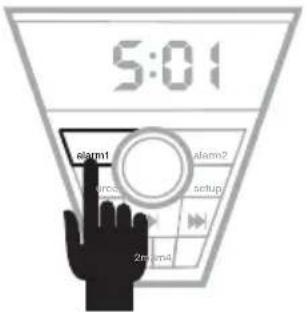
1. hold alarm1 or alarm2 button
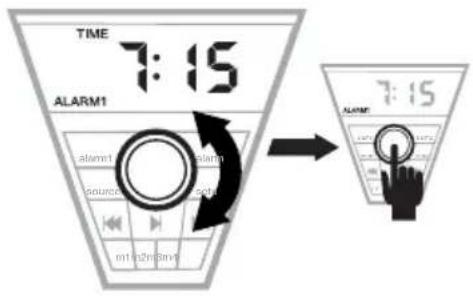
2. adjust alarm time, then press navigation knob to save
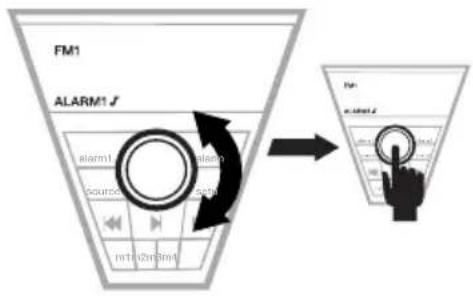
3. select an alarm source, then press navigation knob to save
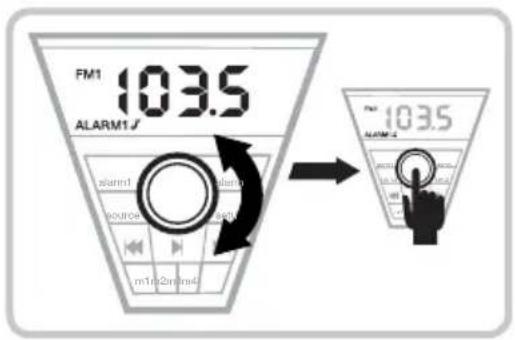
OPTIONAL: if you selected a radio alarm source, choose a radio station, then press the navigation knob to save
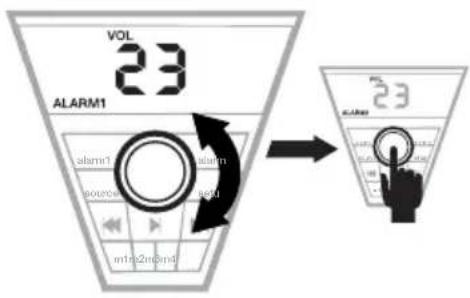
4. adjust alarm volume, then press navigation knob to save
SELECTING AN AUDIO SOURCE
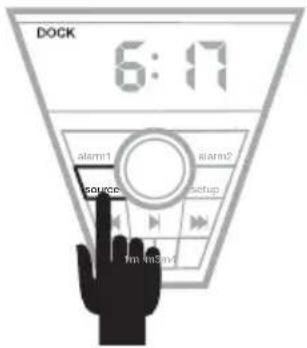
Repeatedly tap source button to scroll through listening modes:
- iPod Dock
EM1
FM2
AM - Auxiliary Input (on rear of unit)
USING YOUR iPod WITH THE iK150
- Insert your iPod into the iK150 dock before turning on the iK150.
- Turn off the iPod's SoundCheck option for optimal sound quality.
- The use of a dock adapter plate with your iPod is not required. Installing an adapter plate along with the included isolation bracket will provide a more secure fit for your iPod, reducing vibration.
- Third Gen and older iPods work by connecting their headphone output to the auxiliary input on the rear of the iK150.
- Tap the SNOOZE button to mute/unmute.
USING THE ALARMS
- Tap the alarm1 or alarm2 button to turn each alarm on and off.
- Use the quickstart on page 5 for instructions on how to set an alarm.
- You can set the alarm source to DOCK, FM1, FM2, AM, or buzzer.
- When an alarm goes off, hit the SNOOZE button to silence the alarm for 9 minutes.
USING THE RADIO
To improve FM/AM radio reception, connect the included FM antenna to the coaxial jack on the rear of the iK150 and/or the included AM Loop antenna to the AM terminals on the rear of the iK150. You may need to experiment with antenna angle/position for optimal reception.
- Source to FM1, FM2, or AM (see page 5 for instructions).
- Tap the navigation knob to display radio station; rotate the knob to adjust radio frequency.
- Use the and buttons to seek to the next strongest station.
- Store the current station in memory by holding any of the m1-m4 buttons.
- Recall a stored station by tapping the m1-m4 memory button to which it is assigned.
- Tap the SNOOZE button to mute/unmute.
Setting the Radio Region
- Press setup then source within one second.
- Rotate the navigation knob to select between Region 1 and 2.
- Press the navigation knob to save.
Region 1: All countries except North America and the Caribbean
Region 2: North America (USA & Canada) and the Caribbean
CHANGING SETTINGS
Tap the setup button to enter setup mode. You can tap the setup button again to exit setup mode, discarding any unsaved changes.
- Rotate the navigation knob to scroll through settings while in setup mode.
- Select a setting to edit by pressing the navigation knob.
- Edit the setting by rotating the navigation knob.
- Save the setting by pressing the navigation knob.
- Settings appear in the following order:
DISPLAY
Adjusts the display brightness.
SLEEP
Choose length of play time for the sleep timer from 5-120 minutes. The sleep timer is activated once you save a value other than zero. Once activated, the sleep timer plays audio for the period of time you selected then puts the iK150 into standby.
TREBLE
Boost or cut treble.
BASS
Boost or cut bass.
TIME
Adjust the time with the navigation knob. Press the knob to save and advance to TIME FORMAT.

TIME
FORMAT
Choose between 12-hour and 24-hour time formats.
TROUBLESHOOTING
No sound:
- make sure the iK150 is connected to a power outlet that is known to work.
- make sure the iK150 is turned on and not in standby (tap the navigation knob).
- make sure the iK150 is set to the proper audio source (see page 5).
- try turning the navigation knob clockwise to increase volume.
- if using the auxiliary input, make sure the connected device is playing and turned up.
- try re-docking your iPod.
- use the auxiliary input with your 3rd Gen and older iPod.
- the iK150 may be muted; try tapping the SNOOZE button.
- try unplugging/re-plugging the power.
No radio reception:
- make sure the proper radio region is selected (see page 6).
- connect an antenna and try different angles, positions, and placements within your home/building.
No display/Dim display:
- make sure the iK150 is connected to a power outlet.
- make sure the iK150 is turned on and not in standby (tap the navigation knob).
- increase the display brightness (see previous section).
- try unplugging/re-plugging the power.
The DOCK icon flashes continuously: This means your iPod/Phone has failed to authenticate.
Remove your iPod/iPhone, wait 5 seconds, then re-dock your iPod/iPhone.
IMPORTANT SAFETY INSTRUCTIONS
Read and follow all the instructions listed in this manual. Follow all safety and procedural recommendations to prevent damage to your self, your KICKER product, or your portable media device.
The iK150 should not be used near water or in an environment where exposure to liquids is possible. This includes but is not exclusive to areas where splashing, dripping, leaks, spills, and exposure to rain can occur.
Liquid containers should not be placed on or near the iK150.
The iK150 should not be cleaned with liquid cleaners. Use only a dry cloth to clean the iK150.
Only use the iK150 in areas with adequate open ventilation allowing at least 4" of space on all sides of the iK150. Do not set the iK150 on any surface or cover the iK150 with any object that could impede the airflow to and from the iK150.
The iK150 should not be placed near any source of heat. This includes but is not limited to stoves, radiators, heating elements, electronic heat sources, and areas where excessive solar heat can be generated. Do not install the iK150 near any flame or place any flammable objects near the device.
The power outlet used to provide power to the iK150 should be accessible at all times. The polarized 2-prong electrical plug has a wide blade and narrow blade that should fit into the corresponding wide and narrow receiving connections of your electrical outlet. Do not force the plug into the outlet. If the plug provided with the unit does not fit, consult with an electrician to upgrade the electrical outlet accordingly.
The power cord should be situated in a way that protects it from being pinched, walked on, tripped over, or accidentally pulled from the electrical outlet or the electrical input on the iK150. Do not run the cable through doorways or underneath objects that could damage the wire or tear the insulating material surrounding the wire.
Only use the manufacturer supplied power supply with the iK150.
We recommend using a surge protector/power conditioner and unplugging the iK150 during any electrical storms or situations that could cause voltage fluctuations in the electrical system.
HOME LIMITED WARRANTY
KICKER warrants this product to be free from defects in material and workmanship under normal use for a period of ONE (1) YEAR from date of original purchase with the original receipt from an Authorized KICKER Dealer. Should service be necessary under this warranty for any reason due to manufacturing defect or malfunction during the warranty period, KICKER will repair or replace (at its discretion) the defective merchandise with equivalent merchandise at no charge. Warranty replacements may have cosmetic scratches and blemishes. Discontinued products may be replaced with more current equivalent products.
This warranty is valid only for the original purchaser and is not extended to owners of the product subsequent to the original purchaser. Any applicable implied warranties are limited in duration to a period of the express warranty as provided herein beginning with the date of the original purchase at retail, and no warranties, whether express or implied, shall apply to this product thereafter. Some states do not allow limitations on implied warranties; therefore these exclusions may not apply to you. This warranty gives you specific legal rights; however you may have other rights that vary from state to state.
WHAT TO DO IF YOU NEED WARRANTY OR SERVICE:
Defective merchandise should be returned to your local Authorized KICKER Dealer for warranty service. Assistance in locating an Authorized Dealer can be found at www.kicker.com or by contacting KICKER directly.
If it becomes necessary for you to return defective merchandise directly to Stillwater Designs (KICKER), call the KICKER Customer Service Department at (405) 624-8510 for a Return Merchandise Authorization (RMA) number. Package all defective items in the original container or in a package that will prevent shipping damage, and return to:
Stillwater Designs, 3100 North Husband, Stillwater, OK 74075
The RMA number must be clearly marked on the outside of the package. Include a copy of the original receipt with the purchase date clearly visible, and a "proof-of-purchase" statement listing your name and return shipping address, the Dealer's name and invoice number, and product purchased. Warranty expiration on items without proof-of-purchase will be determined from the type of sale and manufacturing date code. Freight must be prepaid; items sent freight-collect, or COD, will be refused.
WHAT IS NOT COVERED?
This warranty is valid only if the product is used for the purpose for which it was designed. It does not cover:
o Damage due to improper use.
o Damage due to improper installation of components or audio/video devices.
o Subsequent damage to other components or audio/video devices.
o Damage caused by exposure to moisture, excessive heat, chemical cleaners, and/or UV radiation.
o Damage through negligence, misuse, food, fire, earthquake, accident, or abuse. Repeated returns for the same damage may be considered abuse.
o Items previously repaired or modifi ed by any unauthorized repair facility or person.
o Return shipping on non-defective items.
o Products with tampered or missing barcode labels.
o Products returned without a Return Merchandise Authorization (RMA) number.
o Freight Damage.
o The cost of shipping product to KICKER.
o Service performed by anyone other than KICKER.


HOW LONG WILL IT TAKE?
KICKER strives to maintain a goal of 48-hour service for all electronics (speakers, crossovers, speaker docks, etc.) returns. Delays may be incurred if lack of replacement inventory or parts is encountered. Failure to follow these steps may void your warranty. Any questions can be directed to the KICKER Customer Service Department at (405) 624-8510. Contact your International KICKER dealer or distributor concerning specific procedures for your country's warranty policies.
Note: All specifications and performance figures are subject to change. Please visit www.kicker.com for the most current information. Please allow two weeks of break-in time for the speakers to reach optimum performance.
Dispositivo de acoplamento para iPod® / iPhone®
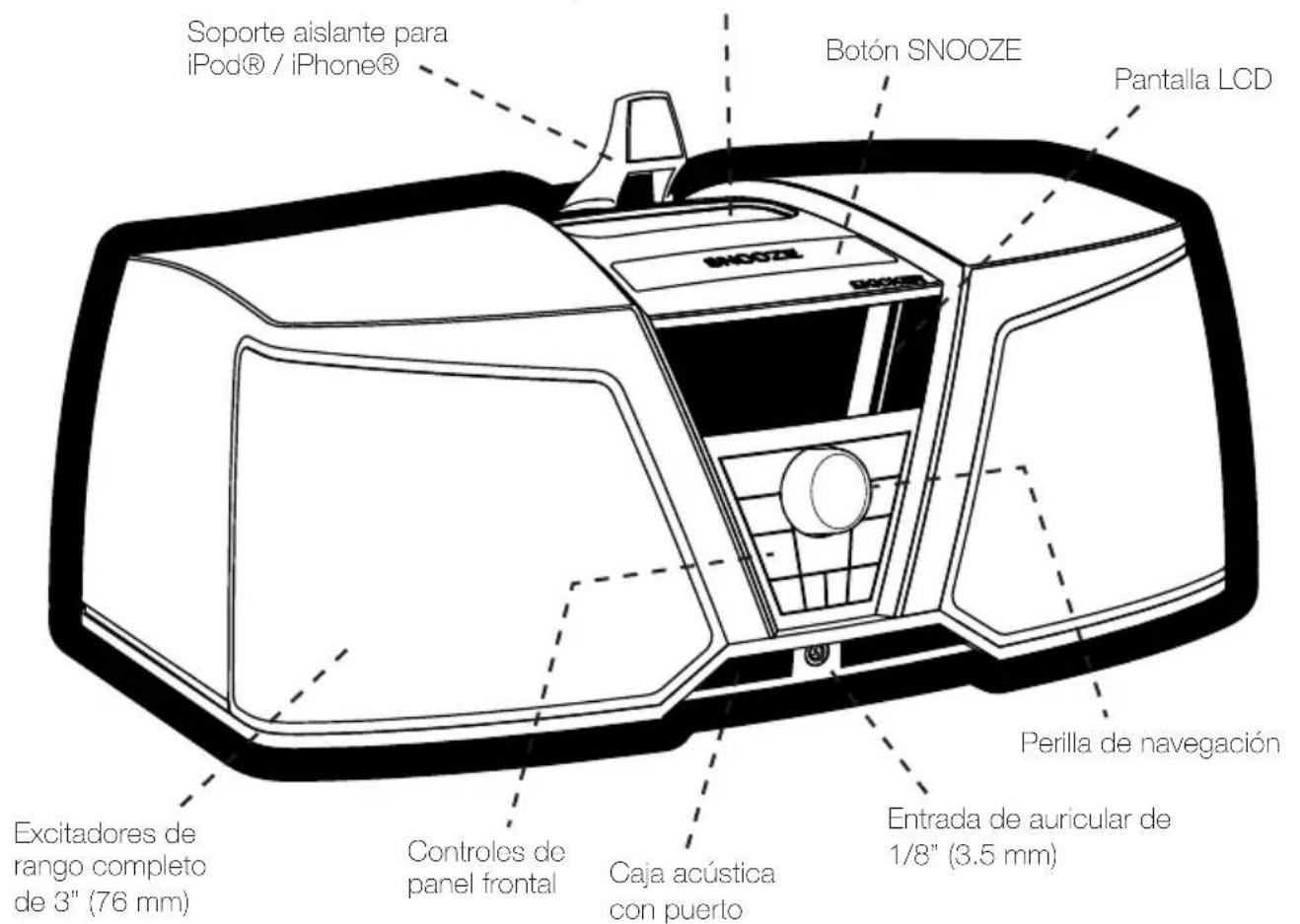
PANorama GENERAL
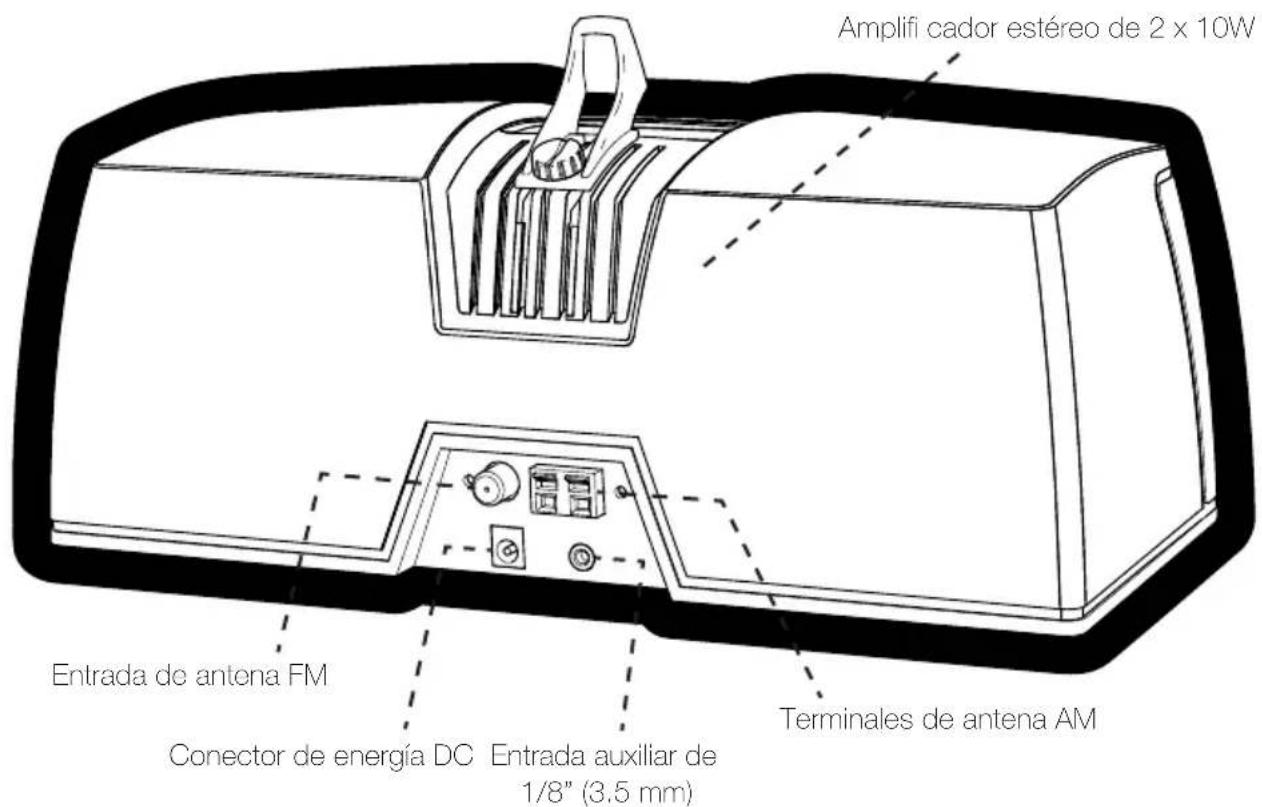
FUNCTIONES

- SELECTING AN AUDIO SOURCE
- USING YOUR iPod WITH THE iK150
- USING THE ALARMS
- USING THE RADIO
- Setting the Radio Region
- CHANGING SETTINGS
- DISPLAY
- SLEEP
- TREBLE
- BASS
- TIME
- FORMAT
- TROUBLESHOOTING
- No sound:
- No radio reception:
- No display/Dim display:
- IMPORTANT SAFETY INSTRUCTIONS
- HOME LIMITED WARRANTY
- WHAT TO DO IF YOU NEED WARRANTY OR SERVICE:
- WHAT IS NOT COVERED?
- HOW LONG WILL IT TAKE?
- FUNCTIONES
Brand : KICKER
Model : iK150
Category : Loudspeaker