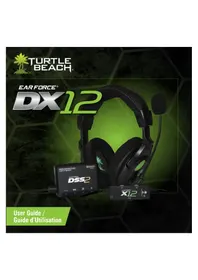
Earforce DX12 - Earphones TURTLE BEACH - Free user manual and instructions
Find the device manual for free Earforce DX12 TURTLE BEACH in PDF.


| Brand | Turtle Beach |
| Model | Earforce DX12 |
| Product Type | Gaming headset with Dolby surround sound |
| Audio Processor | DSS2 Surround Sound Processor |
| Audio Inputs | Optical digital, auxiliary analog, USB |
| Outputs | Headset, USB for power and audio |
| Main Features | Dolby Digital 5.1 surround sound, adjustable surround angles, equalizer with 7 preset settings, talkback function for Xbox 360 |
| Power Supply | Via USB port (5 V) |
| Estimated Weight | Approximately 300 g (headset + processor) |
| Cable Length | Approximately 3 m (optical and USB cables included) |
| Frequency Response | 20 Hz - 20 kHz |
| Impedance | 32 ohms |
| Transducer | 50 mm dynamic |
| Compatibility | Xbox 360, Xbox One, PlayStation 4, PC, Mac |
| Safety Instructions | Lower volume before putting on headset; increase gradually; avoid prolonged exposure to high volume |
| Maintenance | Clean with a soft dry cloth; do not use chemicals |
| Spare Parts and Repairability | Consult TurtleBeach.com/support for warranty and support |
| General Information | Compliant with ICES-003 Class B; RF information available on Industry Canada website |
Frequently Asked Questions - Earforce DX12 TURTLE BEACH
User questions about Earforce DX12 TURTLE BEACH
0 question about this device. Answer the ones you know or ask your own.
Ask a new question about this device
Download the instructions for your Earphones in PDF format for free! Find your manual Earforce DX12 - TURTLE BEACH and take your electronic device back in hand. On this page are published all the documents necessary for the use of your device. Earforce DX12 by TURTLE BEACH.
USER MANUAL Earforce DX12 TURTLE BEACH
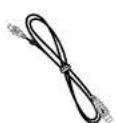
USB Cable/ Cable USB
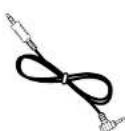
Xiao 360^ Talkback Cable / Cable de response XBOX Cable

Turtle Beach Sticker / AutoCADlott Turtle Beach
System Requirements / Configuration require
Xbox 360® game console with one of the following Xiaox cables to support digital audio output:
- Component AV cable
*VGA AO cable
SvidyaNc
Advand SCART
HDM audio acaptig cable
Compositie A/V cable with digital output
PC/stop with either on-board or external sound card with digital optical output and Dolby Digital Live Installed.
Available USB port
Console deieuxXbox360avecsortieoptiqueou'unedcables suillantspoursuchsortieoptique:
Cable adaptor audio HDMI
Cable AV HU component
Cable S.Vicay
Cable AV composites ayer sartie numnirias
·CohyAVVPA
CibnAUSCAETm
C:years cieae on inerse on vioe at riei nioe mnnriny
Sequlated use allimentation USB
-
Chat Volume
-
Game Volume
3.MicMutaLED
-
M
-
Bass Boost
FRANCAIS
- Chat Volume
2 Game Volume
-
Mic Mute LED
-
Metrix Mic Mute
-
Amplification variable de basses
DEUTSCH
- Chat Bard
2 Game Bank
-
Chatta Volym
-
SpoI Volym
-
Mic Mute LED
-
Mic Mute amkopplare
-
Jesterbar has
DANSK
-
Chat Bind
-
Game Bind
-
Mic Muta LED
-
Mic Mute Switch
-
Justerhar bas
NEDERLANDS
1.Dael Chat
2.Dael Game
3.MicMuteLED
-
USB Output
-
Headphone Output Jack
-
Volume Control
-
Digital Input LED
-
Dolby Digital LED
-
Surround Sound LED
7.PowerLED
-
Equizer Button
-
Surround Angeles Button
-
Surround Sound 0a/Off
FRANCAIS
-
LED audio surround
-
LED access
-
Tasta Equalizer (EquaIzcatrge)
-
Tasta Surround Angelas (Ango)
JaZione surround
- Audio surround Dv/Off
ESPANOL
1.Salida USB
- LED can sondo cvolve
7.LED de ancandido
-
Boton equalization
-
Botin de angulos evolumentes
-
for anatio/Anuata do rando
-
Etchondrosis Aegyptid
DANSK
NOTE: Older Xbox 360 models require an Xbox 360 HDMI Audio Adapter Cable for optical audio output (solid separately). If your HDMI has a optical AUDIO OUT jack, you can use it to connect the optical cable to the DSS2 and feed sound from the gaming console to the DSS2.
XBOX 360 Setup / Configuration XBOX 360 XBOX 360 Chat Setup / Conf
FRANCAIS
-
Branchezle cable optique
-
Branches le cable USB 3. Mottel: D0006
-
Martinez USS2 en 4. Branchede les casque
- Sla p DSS2
- Anlut head detector
OBSI Aldrie Xbox 360-modeller kraver Xbox 360 MPD Audio Adapter Cable for optisik ludutag (siali separat). din HDTV hat er optisik AUDIO OUT-attag kan du anvanda der for an auslats die optisika kahilen till DSS2 och mata [dulet frem spekonsellen till DSS2.
DANSK
- Forbind det optiske kabel
- Forbind USB-kahlet 3. Tandamir P600
- 建立 for USS2
- Forbind because
BEMERK. /Eidre X30 368-tembler kruev et Xeros 350 HDMI hydralacetapkabel for optisk hydralgengsallig [seigs separate]. Hvis dT HDV that eoptik AUVO100002, kuo du broug dei t sordone de optisk Kapil t DSS2 oleg diy hau fsiellekroksollenii t DSS2
NEDERLANDS
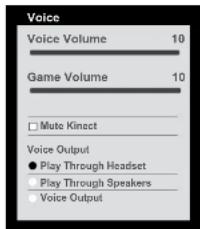
- Connect the XBOX 360 Talkback Cable.
- In the XBOX 360 System Settings, select "Preferences" > "Voice" > "Play Through Headset"
FRANCAIS
Settings > Audio > Accessory Settings > Audio Device Settings Set the "Digital Output" to "Dobly Digital 5.1"
ESPANOL
1: If your PC or Mac does not include a digital optical output, then you will need to purchase an "Optical SpDIF Adaplur". Turtle Beach offers the "Audio Advantage" Micro II which is available on our website.
2: Most games will eat a input dial by 5. I unless your computer is running Dolby Digital Live. You will hear enhanced stereo radio unless Dolby Digital Live is installed.
3: A 2.5mm extender cable is available on our website if the X12 pink mic connector will not reach the microphone input on your computer.
Press the Surround Angles button to cycle through 6 different surround sound angles.
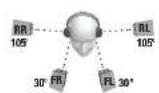
Surround Sound Angle Presets:
13 Front Angle: 30 degrees
Rear Angle: 105 degrees
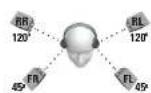
Front Angle: 45 degrees
Rasa Angle: 120 degrees
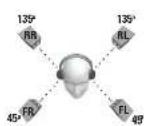
Front Angle; 45 degrees Rear Angle; 135 degrees
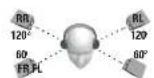
46F Front Angle: 60 degrees Rear Angle: 120 degrees
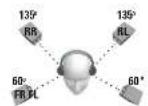
Front Angle: 50 degrees Raar Angle: 135 degrees
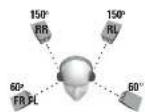
From Angle: 60 degrees Rear Angle: 150 degrees
FRANCAIS
Press the Equalizer button to cycle through the EQ pressis. Double press the button to turn off the press.
EQ Presets:
- Flat
- Bass Boost
- Aggressive Bass Boost
- Treble Baost
- Aggressive Treble Boost
- Bass + Treble Bous
- Aggressive Bass + Treibl Boost
- Mid-Range Boost
- Aggressive Mid-Range Boost
FRANCAIS
A
Aggressiveness in unregistered budac
DANSK
Fabricsinstellingen voor dc equalizer
Druk op de knoep Equalizar voor het doorlopen ven zof fabriekstaln-glen. Dubhelleik op de knoep om de fabriekstaln-gen uit te zieten
1 Plat
2Extra base geluid
3. Zweur hospital
4. Extra base top-up
5.2.2.1.3.1.1.1.1.1.1.1.1.1.1.1.1.1.1.1.1.1.1.1.1.1.1.1.1.1.1.1.1.1.1.1.1.1.1.1.1.1.1.1.1.1.1.1.1.1.1.1.1.1.1.
5.2009-10
4. Extra basgues + huge when
7.2Ward basgnd + exa hoge tonch
8. Extra middenbereik
9. Zwaar middenbereik
NEDERLANDS
Fabrieksinstellungen voor de equalizer
Druk op do kroep Equalizer voor het doorlooper van zots fabrikinstellungen. Duheleiklik op die kroop om de fabrikinstellungen uit te zeege
1. Plat
2. Extra basquelid
3.Zyearbasculid
4Extra base toppan
5.Zaer hoge tonan
6Extra hasaeld.hage topen
7.Zwarg hargliud+extra hong kong
Euruludshorn
2.2.1.1.1.1.1.1.1.1.1.1.1.1.1.1.1.1.1.1.1.1.1.1.1.1.1.1.1.1.1.1.1.1.1.1.1.1.1.1.1.1.1.1.1.1.1.1.1.1.1.1.
To avoid potential damage to the device, always disconnect all cables before transporting it
WARNING: Permanent hearing damage can occur if a headset is used at high volumes for extended periods of time, so it is important
to keep the volume at a safe level. Over time, your ears adapt to loud volume levels, so a level that may not cause initial discomfort can still damage your hearing. If you are uncomfortable hearing in your ears after listening with the headsets, it means the volume is not too loud.
The lowe the volume is, the less time it takes to affect your hearing. So, please take care to listen or moderate levels
- Before placing a headset on your ears, turn the volume down completely.
then slowly increase it to a comfortable level.
Turn down the volume if you can't hear people speaking near you. - Avoid turning up the volume to block out noisy surroundings.
FRANÇAIS
Xbox 360 Does Not Have Digital Output
Oleer Xbox 360 models don't include an digital optical output. If this is the case with your Xbox 360, then you will have to purchase a cable that includes a digital output jack on the connector. Here are the Xbox 360 cables that support digital output:
- Component AV cable
VGA AV cable
S-Video AV cable
Advanced SCARTAV cable
HDMI audio adapter cable
- Compa nse R/V cane with digital output
If you are using #DMI and your Xbox A/V cable does not have a digital output, then you can alternatively connect the DSS2 digital optical cable to a digital audio output on your HDTV (if your HDTV has a digital optical output).
No Audio When Using a BluRay Player
Ensure the audio settings in the BluRay player are configured to play Dolby Digital. The DSS2 is not DTS compatible. If the DSS2 is connected to a digital source with a DTS signal, then the DSS2 will not receive audio.
No Sound When Using a Digital Connection
Ensure the digital cable is connected properly and receiving a signal. When connected to a console, PC, etc., that is powered on, carefully check to see if a red light is being emitted from the end of the digital optical cable. Also be sure that the protective covers have been removed from the ends of the digital optical cable.
No Surround Sound on PC
Most games will not output Dolby 5.1 unless your computer is running Dolby Digital Live. You will hear enhanced audio stereo unless Dolby Digital Live is installed.
Analog Input isn't Working
The DSS2 analog input will automatically shut off whenever the digital input is active. To hear the analog input signal, either disconnect the optical cable from the digital input on the DSS2, shut off the device connected to the optical cable (e.g. Xbox 360) to disable the digital audio signal, or connect to the auxiliary input.
Technical Specifications
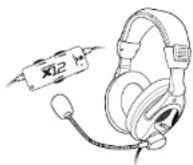
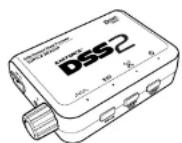
X12 Headset
- 50mm diameter speakers
- Speaker Frequency Response: 20Hz - 20kHz, >120dB SPL @ 1kHz
- Condenser Microphone Frequency Response: 50Hz - 15kHz
Cable length: 16 ft. [4.87m]
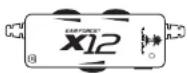
X12 Amplifier
- Headphone Amplifier: Stereo DC-coupled, 35mW/ ch. THD <1%, Frequency Response: DC - 30kHz
Bass Boost:Variable up to 112dB@150Hz - Mic mute switch
Maximum analog input level with volume control on maximum setting: 2Vpp (700mV rms)
-3.5mm plug for line input
-3.5mm plug for mic output
2.5mmXbox360talkbackcablejack
USB connector for power 15WDC x60 mA max
DSS2 Surround Sound Processor
Game audio frequency response: 20Hz - 20kHz, >120dB SPL @ 1kHz
Headphone amplifier: Stereo 35mW/ch, THD <1%
Digital Audio Input TOSLINK connector compatible with 48kHz Digital Audio Streams
Maximum Analog Input: 2Vpp [700mV rms]
Manufacturer: Voyetra Turtle Beach
Product Name: Far Force X12
Type of Product: Wired Headset
Model Number(s): TB300-2255-01
Year of Manufacture: 2011
Manufacturers Address:
150 Clearbrook Rd. Suite 162, Elmsford, NY 10523
We, Voyetra Turtle Beach, Inc., of Elmsford, New York, declare under our own responsibility that the above-referenced product complies following directives and standards:
Low Voltage Directive 2006/95/EC
EN 50332-2:2003
EMC Directive 2004/108/EC
EN 55022:2005+A1:2007.Class B
EN 55024:1998+A1:2001+A2:2003
All test reports have been reviewed and approved with a Positive Opinion from the following Notified Bodies:
SGS Taiwan Ltd
No.134.Wu Kung Road, Wuku Industrial Zone,
Taipei County, Taiwan, R.O.C.
Tel: +886-2-2299-3279, Fax: +886-2-2298-0488, Web: tw.sgs.com
Shenzhen EBO Technology Co., Ltd.
No.710, Yihua Building, Futian District
Shenzhen, China 518040
Tel: 186-512-62515088, Fax: 186-512-62515098, Web: quietek.com
The technical documentation required by this Directive is maintained at the corporate headquarters of
Voyetra Turtle Beach, 150 Clearbrook Road. Suite 162, Elmsford, New York, 10562
Authorized Person:

Printed Name: Frederick Romano
Title: Executive Vice President
Date: 10/05/11
FCC Declaration of ConformityEC Declaration of Conformity
Product Name: EAB FORCE X12
Model Number(s): TB300-2255-01
FCC Rules: FCC Part 15:2010, Subpart B, CLASS B
Operating Environment: GENERAL OFFICE AND HOME USE
FEC COMPLIANT STATEMENT
This device complies with part 15 of the FCC rules. Operation is subjected to the following conditions:
[1] This device may not cause harmful interference, and
[2] This device must accept any interference received including interference that may cause undesired operation.
INFORMATION TO USER
This equipment has been tested and found to comply with the limits for a Class B digital device, pursuant to Part 15 of FCC rules.
These limits are designed to provide reasonable protection against harmful interference in a residential installation. This equipment
generates, uses and can radiate radio frequency energy and, if not installed and used in accordance with the instructions, may cause harmful inter
fence to radio communications. However, there is no guarantee that interference will not occur in a particular installation. If this equipment does
cause harmful interference to radio or television reception, which can be determined by turning the equipment off and on, the user is encouraged to try to correct the interference by one or more of the following measures:
1) Recorient or relocate the receiving antenna.
2) Increase the separation between the equipment and receiver.
3) Connect the equipment into an outlet on a circuit different from that to which the receiver is connected.
4 Consult the dealer or an experienced radioTV technician for help
The user's manual or instruction manual for an intention or unintentional radiator shall caution the user that the changes or modifications not expressly approved by the party responsible for compliance could void the user's authority to operate the equipment.
WARNING: Changes or modifications made to this equipment not expressly approved by VOYETRA TURTLE BEACH, INC. may void user's authority to operate this equipment.

EC Declaration of Conformity
Manufacturer: Vayetra Turtle Beach
Product Name: Ear Force DSS2
Type of Product: Dolby Surround Sound Adapter
Model Number(s): TB300-2200-01
Year of Manufacture: 2011
Manufacturers Address:
150 Clearbrook Rd. Suite 162, Elmsford, NY 10523
We, Voyetra Turtle Beach, Inc. of Emsford, New York, declare under our own responsibility that the above-referenced product complies in accordance with following directives:
EMC Directive 2004/108/EC EN 55022:2006+A1:2007, Class B EN 55024:1998+A1:2001+A2:2003
All test reports have been reviewed and approved with a Positive Opinion from the following Notified Body:
Bay Area Compliance Laboratories,
No.59 Pulong Village, Puxinhu Industry Zone Tangxia, China
Tel:+85-769-8685 8888,Fax:+86-769-8685 8891,Web:baccorp.com
The technical documentation required by this Directive is maintained at the corporate headquarters of Voyetra Turtle Beach, 150 Cleabrook Road, Suite 162, Elmsford, New York, 10562.
Authorized Person:
Date: 10/28/11
Printed Name: Frederick Romano
Title: Executive Vice President
FCC Declaration of Conformity
Product Name: EAR FORCE DSS2
Model Number(s): TB300-2200-01
FCC Rules: FCC Part 15 Subpart B CLASS B
Operating Environment: GENERAL OFFICE AND HOME USE
FCC COMPLIANT STATEMENT
This device complies with part 15 of the FCC rules. Operation is subjected to the following conditions:
111 This device may not cause harmful interference, and
[2] This device must accept any interference received including interference that may cause undesired operation.
INFORMATION TO USER
This equipment has been tested and found to comply with the limits for a Class B digital device, pursuant to Part 15 of FCC rules. These limits are designed to provide reasonable protection against harmful interference in a residential installation. This equipment generates, uses and can radiate radio frequency energy and, if not installed and used in accordance with the instructions, may cause harmful interference to radio communications. However, there is no guarantee that interference will not occur in a particular installation. If this equipment does cause harmful interference to radio or television reception, which can be determined by turning the equipment off and on, the user is encouraged to try to correct the interference by one or more of the following measures:
1) Reorient or relocate the receiving antenna.
2) Increase the separation between the equipment and receiver.
3) Connect the equipment into an outlet on a circuit different from that to which the receiver is connected.
4 Consult the dealer or an experienced radioTV technician for help.
The user's manual or instruction manual for an intention or unintentional radiator shall caution the user that the changes or modifications not expressly approved by the party responsible for compliance could void the user's authority to operate the equipment.
WARNING: Changes or modifications made to this equipment not expressly approved by VOYETRA TURTLE SEACH, INC. may void user's authority to operate this equipment.
Limited Warranty for Turtle Beach Products
Voyetrae Turbe Beach, Inc. (VTB) warrants to the original end-user purchaser (Purchaser) that the retail Turtle Beach hardware product herein (Product) will be free of defects in materials and workmanship for a period of one year from the date of purchase by the Purchaser (Warranty Period). Any Extended Warranty or Service Plans purchased through a Retail store are not honored by VTB. The Warranty refers to the repair/ replacement of a defective product during this period and not a refund.
This limited warranty extends only to the Purchaser and is not transferrable or assignable to any subsequent purchaser. This limited warranty is applicable only in the country or territory where the Product was purchased from an authorized VTB retailer and does not apply to a Product that has been purchased as used or refurbished (except refurbished by VTB) or was included as part of a non-VTB product. WARRANTY SERVICE
In the USA and CANADA Warranty Service is provided by our TURTLE BEACH OFFICES and in all other Countries it is provided by our local International Distributors.
VTB does not warrant uninterrupted or error-free operation of the Product and is under no obligation to support the Product for all computer operating systems or future versions of such operating systems.
If a defect should occur during the Warranty Period, Purchaser must contact VTB to obtain a Return Merchandise Authorization ("RMA") number. Purchaser will be responsible for shipping costs incurred in returning the defective Product due to an authorized VTB service center, or to the repair facility located at VTB's corporate headquarters. A copy of the dated proof of purchase and a description of the problem must be included with the defective Product VTB will not be responsible for other products or accessories included with the defective Product sent to VTB. The RMA number must be clearly indicated on the outside of the package. Packages without an RMA number will be refused by VTB or its representatives and returned to sender at the sender's expense.
In the event of a defect, Purchaser's sale and exclusive remedy, and VTB's sole liability, is expressly limited to the correction of the defect by adjustment, repair, or replacement of the Product at VTB's sole option and expense. VTB owns all Products it has replaced and all parts removed from repaired Products. VTB uses new and reconditioned parts made by various manufacturers in performing warranty repairs and building replacement products. If VTB repairs or replaces a product, the original Warranty Period is not extended, however, VTB warrants that repaired or replacement parts will be free from defects in material and workmanship for a period of thirty (30) days from the date of repair or replacement, or for the remainder of the Warranty Period, whichever is greater.
This warranty does not apply to any Product that has had its serial number altered, removed or defaced, or any Product damage caused by shipping, improper storage, accident, problems with electrical power, abuse, misuse, neglect, ordinary wear, acts of God (e.g. flood), failure to follow directions, improper maintenance, use not in accordance with product instructions, unauthorized modification or service of the Product or damage resulting from the use of the Product with hardware, software or other products not provided by or specifically recommended by VTB.
THIS LIMITED WARRANTY IS PURCHASED'S OLE AND EXCLUSIVE REMADE AND IS IN LEIEU OF ALL OTHER WARRANTYES, EXPRESS OR IMplied. TO THE EXTENT PERMITTED BY APPLICABLE LAW, VTB HEREBY DISCLAIMS THE APPLICABILITY OF ANY IMPLIED WARRANTY OF MERCHANT-ABILITIES, FITNESS FOR A PARTICULAR PURPOSE OR USE FOR THE PRODUCT. IF SUCH A DISCLAIMER IS PROHIBITED BY APPLICABLE LAW, THE IMPLIED WARRANTY IS LIMITED TO THE DURATION OF THE FOLLOWING LIMITED WRITTEN WARRANTY.
IN NO EVENT SHALL VTB BE LIABLE FOR ANY INDIRECT, INCIDENTAL SPECIAL, PUNITIVE OR CONSEQUENTIAL DAMAGES, OR DAMAGES, INCLUDING BUT NOT LIMITED TO ANY LOSST PROFITS, DATA OR LOSS OF USE, ANY THIRD PARTY CLAIMS, AND ANY INJURY TO PROPERTY OR BODILY INJURY (INCLUDING DEATH) TO ANY PERSON, ASING FROM OR RELATING TO THE USE OF THIS PRODUCT OR ASING FROM BREACH OF THE WARRANTY, BREACH OF CONTRACT, NEGLIGENCE, FORT, OR STRICT LIABILITY, EVEN IF VTB HAS BEEN ADVISED OF THE POSSIBILITY OF SUCH DAMAGES.
This warranty supersedes all prior agreements or understandings, oral or written, relating to the Product, and no representation, promise or condition not contained herein will modify these terms. Some states do not allow the exclusion or limitation of incidental or consequential damages, so the above exclusion or limitation may not apply to you. This warranty gives you specific legal rights. You may also have other rights, which vary from state to state. Any action or lawsuit for breach of warranty must be commenced within eighteen (18) months following the purchase of the Product.
EXCLUSIONS FROM LIMITED WARRANTY:
This Limited Warranty shall not apply and VTB has no liability under this Limited Warranty if the Turtle Beach Product
is used for commercial purposes such as LAN Centers (including rental or lease); is modified or tampered with;
- is damaged by Acts of God, power surge, misuse, abuse, negligence, accident, wear and tear.
mishandling, misapplication, or other causes unrelated to defective materials or workmanship: serial number is dated, altered or removed:
- is not used in accordance with the documentation and use instructions; or
- is repaired, modified or altered by other than authorized repair centers.
- product is no longer available because it was discarded.
Federal Communications Commission Interference Statement
This equipment has been tested and found to comply with the limits for a Class B digital device, pursuant to part 10 of the FCC Rules. These limits are designed to provide reasonable protection against harmful interference in a residential installation. This equipment generates, uses and can radiate radio frequency energy, and if not installed and used in accordance with the instructions, may cause harmful interference to radio communications. However, there is no guarantee that interference will not occur in a particular installation. If this equipment does cause harmful interference to radio or television reception, which can be determined by turning the equipment off and on, the user is encouraged to try to correct the interference by one or more of the following measures:
- Recipient or relocate the receiving antenna.
- Increase the separation between the equipment and receiver.
Connect the equipment into an outlet on a circuit different from that to which the receiver is connected. - Consult the dealer or an experienced radiiTV technician for help.
FCC Caution
Any changes or modifications not expressly approved by the grantee of this device could void the user's authority to operate the equipment.
CANADA INDUSTRY CANADA (IC)NOTICES
This Class B digital apparatus complies with Canadian ICES-003. Operation is subject to the following two conditions: (1) this device may not cause interference, and (2) this device must accept any interference, including interference that may cause undesired operation of the device.
Radio Frequency (RF) Exposure Information:
This device has been certified for use in Canada. Status of the listing in the Industry Canada's REL (Radio Equipment List) can be found at the following web address: http://www.igc.gc.ca/app/sirt/retell/scrsh/wvRdsRsh.do?lang=en
Additional Canadian information on RF exposure also can be found at the following web address: http://www.ic.gc.ca/eic/site/smt-gst-rns/eng/ st08792.html
Canada, avis d'Industry Canada (IC)
This product is CE marked according to the provisions of the Low Voltage Directive (2006/55/EC) and EMC Directive (2004/108/EC).

DESIGNED AND ENGINEERED BY TURTLE BEACH IN NEW YORK, USA
Copyright © 2012 Vayetta Turtle Beach, Inc. (IVTB, Inc.) AI rights reserved. No part of this user guide may be reproduced without permission. Turtle Beach, the Turtle Beach Logo, Vayetta, Ear Force, and Engineered for Gaming are either trademarks or registered trademarks of VTB, Inc. XBOX, XBOX 360 and XBOX LIVE are registered trademarks of Microsoft Corporation. Manufactured under license from Dolby Laboratories. Dolby and the double-D symbol are trademarks of Dolby Laboratories. All other trademarks are properties of their respective companies and are hereby acknowledged. Assembled in China.

For more products, accessories and general product information, please visit TurtleBeach.com
For warranty information and product support, please visit TurtleBeach.com/support
FRANCAIS
ENGINEERED FOR GAMING





- System Requirements / Configuration require
- FRANCAIS
- DEUTSCH
- DANSK
- NEDERLANDS
- ESPANOL
- XBOX 360 Setup / Configuration XBOX 360 XBOX 360 Chat Setup / Conf
- EQ Presets:
- FRANÇAIS
- Xbox 360 Does Not Have Digital Output
- No Audio When Using a BluRay Player
- No Sound When Using a Digital Connection
- No Surround Sound on PC
- Analog Input isn't Working
- Technical Specifications
- X12 Headset
- X12 Amplifier
- DSS2 Surround Sound Processor
- SGS Taiwan Ltd
- Shenzhen EBO Technology Co., Ltd.
- FCC Declaration of ConformityEC Declaration of Conformity
- FEC COMPLIANT STATEMENT
- INFORMATION TO USER
- EC Declaration of Conformity
- FCC Declaration of Conformity
- FCC COMPLIANT STATEMENT
- Limited Warranty for Turtle Beach Products
- EXCLUSIONS FROM LIMITED WARRANTY:
- Federal Communications Commission Interference Statement
- FCC Caution
- CANADA INDUSTRY CANADA (IC)NOTICES
- Radio Frequency (RF) Exposure Information:
- Canada, avis d'Industry Canada (IC)
- DESIGNED AND ENGINEERED BY TURTLE BEACH IN NEW YORK, USA
- ENGINEERED FOR GAMING
Brand : TURTLE BEACH
Model : Earforce DX12
Category : Earphones