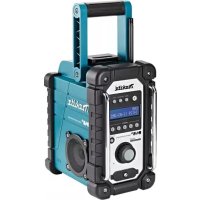
BMR105 - Radio MAKITA - Free user manual and instructions
Find the device manual for free BMR105 MAKITA in PDF.


| Product Type | DAB/DAB+ and FM Radio |
| Brand | Makita |
| Model | BMR105 |
| Dimensions (W x H x D) | 280 x 302 x 163 mm |
| Weight | 4 kg (without battery) |
| Power Supply | AC adapter 12 V DC 1 A (included) or Makita battery 7.2 V - 18 V (slide) or 9.6 V - 18 V (sliding) |
| FM Frequency Range | 87.50 - 108 MHz |
| DAB/DAB+ Frequency Range | 174.928 - 239.200 MHz (Band III 5A-13F) |
| Output Power | Variable depending on battery voltage: 0.5 W x 2 (7.2 V) to 3.5 W x 2 (18 V) |
| Speaker | 3 inches, 8 ohms, stereo |
| Display | Large LCD screen with backlight |
| Audio Inputs | 2 AUX IN jacks (3.5 mm): front and battery compartment |
| USB Port | Micro-USB for software update |
| Antenna | Flexible curved rod antenna for DAB/FM |
| Protection Rating | IPX4 (splash-proof) |
| Presets | 5 stations per band (DAB and FM) |
| Additional Features | Manual tuning/scan/preset, DRC control, station order, brightness adjustment, system reset, information display (name, radio text, etc.) |
| Maintenance and Cleaning | Clean with a soft dry cloth. Do not use solvents (gasoline, benzene, thinner, alcohol) |
| Safety | Follow safety instructions for batteries and power supply. Do not expose to water or rain. Unplug during storms or prolonged non-use. |
| Spare Parts and Repairability | Use only accessories specified by Makita. Software updates available on Makita website. |
Frequently Asked Questions - BMR105 MAKITA
User questions about BMR105 MAKITA
0 question about this device. Answer the ones you know or ask your own.
Ask a new question about this device
Download the instructions for your Radio in PDF format for free! Find your manual BMR105 - MAKITA and take your electronic device back in hand. On this page are published all the documents necessary for the use of your device. BMR105 by MAKITA.
USER MANUAL BMR105 MAKITA
GB Job Site DAB Radio/ Instruction manual Job Site DAB • DAB+ Radio
F Radio De Chantier DAB/ Manuel d'instructions Radio De Chantier DAB • DAB+
natural_image
Technical line drawing of a mechanical device with no visible text or symbols
2
3
4
5
6
7
8
9
10 11
12
ENGLISH (Original instructions)
Symbols
The following show the symbols used for the equipment. Be sure that you understand their meaning before use.

Cd Ni-MH Li-Ion
Read instruction manual.
Only for EU countries
Do not dispose of electric equipment or battery pack together with household waste material!
In observance of European Directive 2002/96/EC on waste electric and electronic equipment, 2006/66/EC on batteries and accumulators and waste batteries and accumulators and their implementation in accordance with national laws, electric equipment and battery pack that have reached the end of their life must be collected separately and returned to an environmentally compatible recycling facility.
IMPORTANT SAFETY INSTRUCTIONS
WARNING:
When using electric tools, basic safety precautions should always be followed to reduce the risk of fire, electric shock, and personal injury, including the following:
- Read this instruction manual and the charger instruction manual carefully before use.
- Clean only with dry cloth.
- Do not install near any heat sources such as radiators, heat registers, stoves, or other apparatus (including amplifiers) that produce heat.
- Only use attachments/accessories specified by the manufacturer.
- Unplug this apparatus during lighting storms or when unused for long periods of time.
- A battery operated radio with integral batteries or a separate battery pack must be recharged only with the specified charger for the battery. A charger that may be suitable for one type of battery may create a risk of fire when used with another battery.
- Use battery operated radio only with specifically designated battery packs. Use of any other batteries may create a risk of fire.
- When battery pack is not in use, keep it away from other metal objects like: paper clips, coins, keys, nails, screws, or other small metal objects that can make a connection from one terminal to another. Shorting the battery terminals together may cause sparks, burns, or a fire.
- Avoid body contact with grounded surfaces such as pipes, radiators, ranges and refrigerators. There is an increased risk of electric shock if your body is grounded.
- Under abusive conditions, liquid may be ejected from the battery; avoid contact. If contact accidentally occurs, flush with water. If liquid contacts eyes,
additionally seek medical help. Liquid ejected from the battery may cause irritation or burns.
- The MAINS plug is used as the disconnect device, and it shall remain readily operable.
SAVE THESE INSTRUCTIONS
IMPORTANT SAFETY INSTRUCTIONS
FOR BATTERY CARTRIDGE
- Before using battery cartridge, read all instructions and cautionary markings on (1) battery charger, (2) battery, and (3) product using battery.
- Do not disassemble battery cartridge.
- If operating time has become excessively shorter, stop operating immediately. It may result in a risk of overheating, possible burns and even an explosion.
-
If electrolyte gets into your eyes, rinse them out with clear water and seek medical attention right away. It may result in loss of your eyesight.
-
Do not short the battery cartridge:
(1) Do not touch the terminals with any conductive material.
(2) Avoid storing battery cartridge in a container with other metal objects such as nails, coins, etc.
(3) Do not expose battery cartridge to water or rain. A battery short can cause a large current flow, overheating, possible burns and even a breakdown.
-
Do not store the tool and battery cartridge in locations where the temperature may reach or exceed 50^ C ( 122^ F).
-
Do not incinerate the battery cartridge even if it is severely damaged or is completely worn out. The battery cartridge can explode in a fire.
-
Be careful not to drop or strike battery.
-
Do not use a damaged battery.
Features:
- FM/DAB or DAB+
• Large LCD display with illumination - Manual/Preset/Scan tuning
- Rotary tuning and volume control
- 5 preset stations for each band
- Micro USB port for software upgrade
- Stereo speaker for rich sound performance
- Ultra rugged design
• Water resistant to IPX 4 - Powered by both Makita battery pack and supplied power adaptor
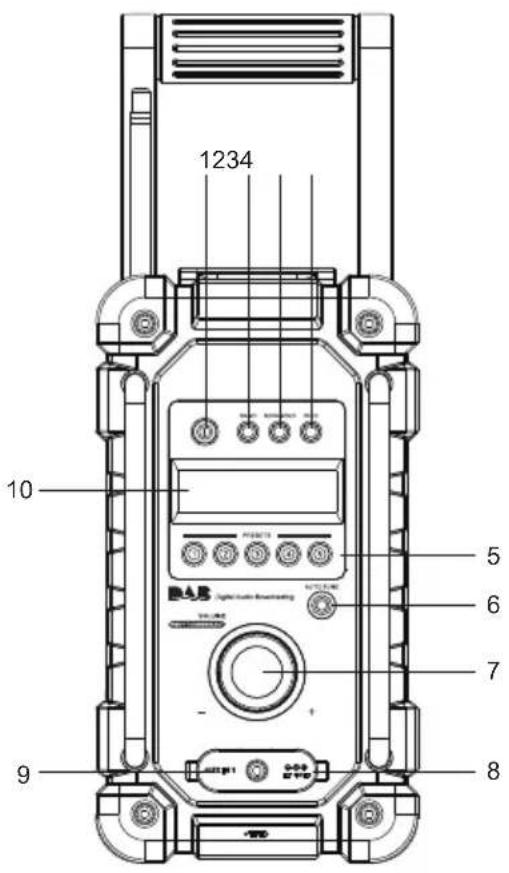
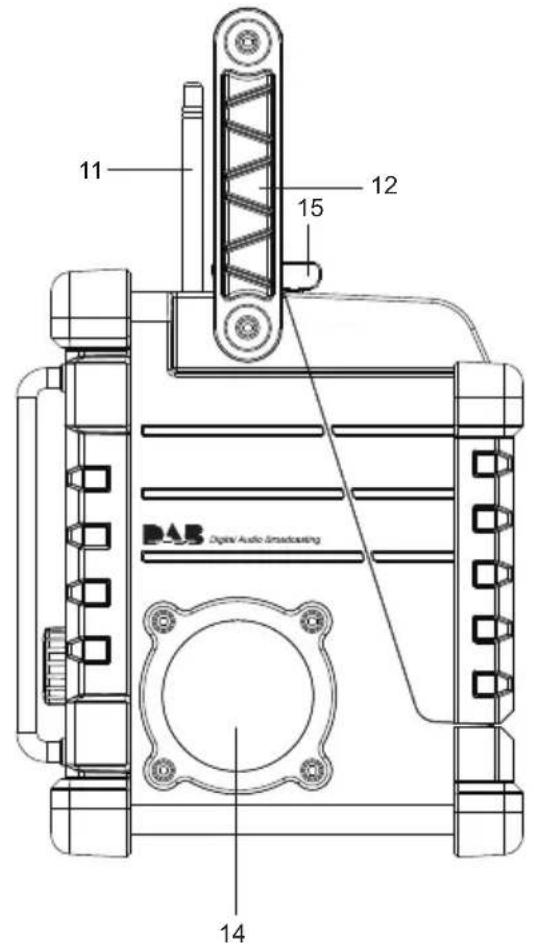
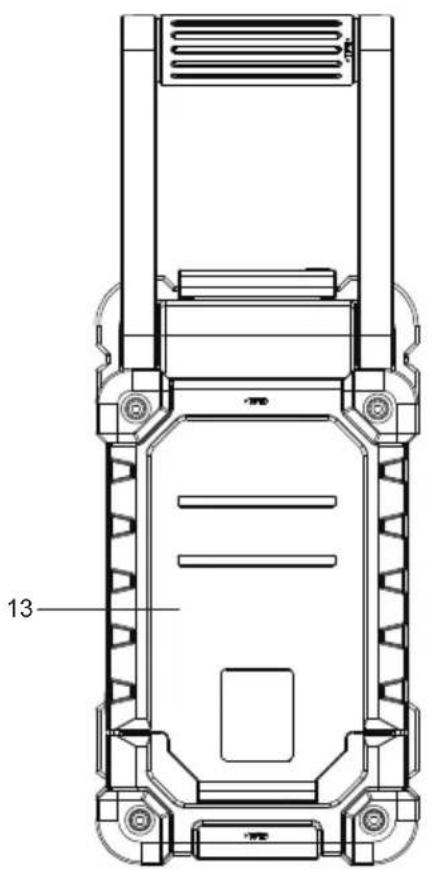
Explanation of general view
Controls
- Power button
- Band button
- Advanced setting button
- Info button
- Preset button
-
Auto tune button
-
Volume/Tuning Control/Select knob
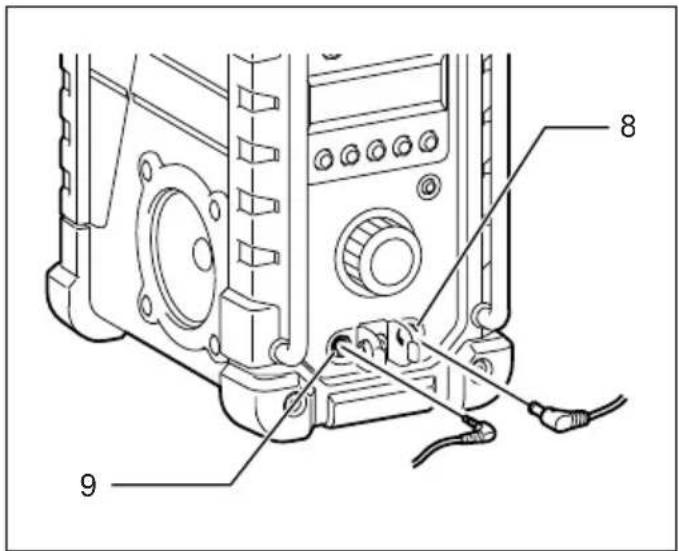
- DC IN socket
- AUX IN 1
- LCD display
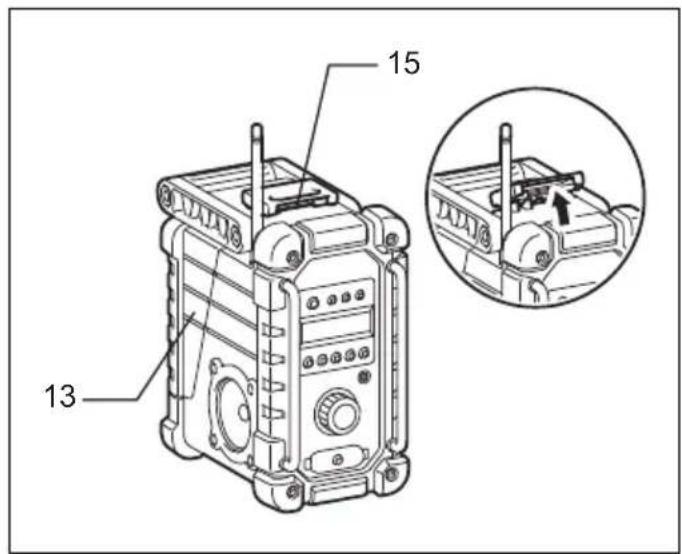
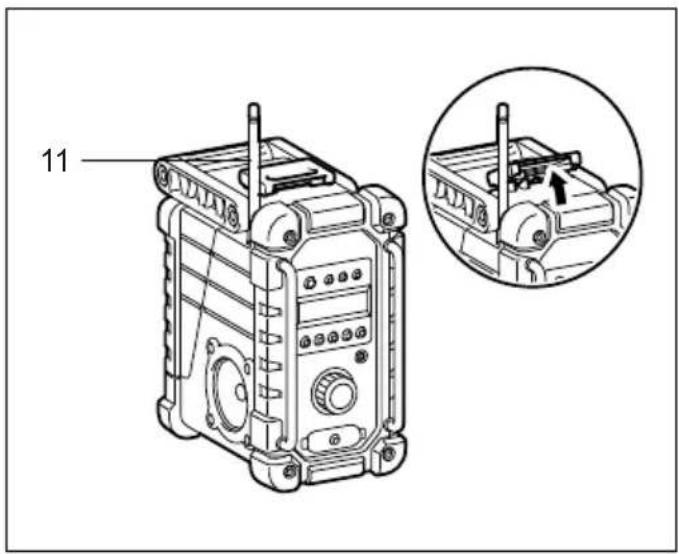
- Soft bended rod antenna
- Handle
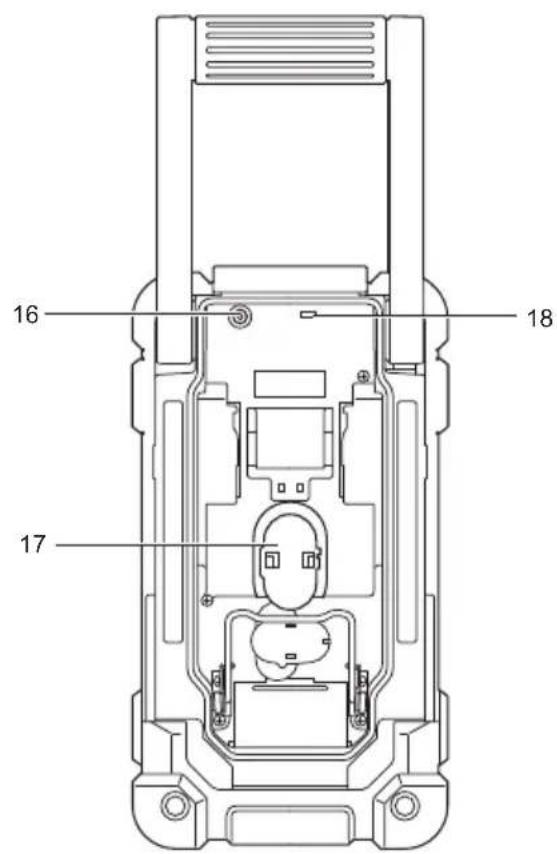
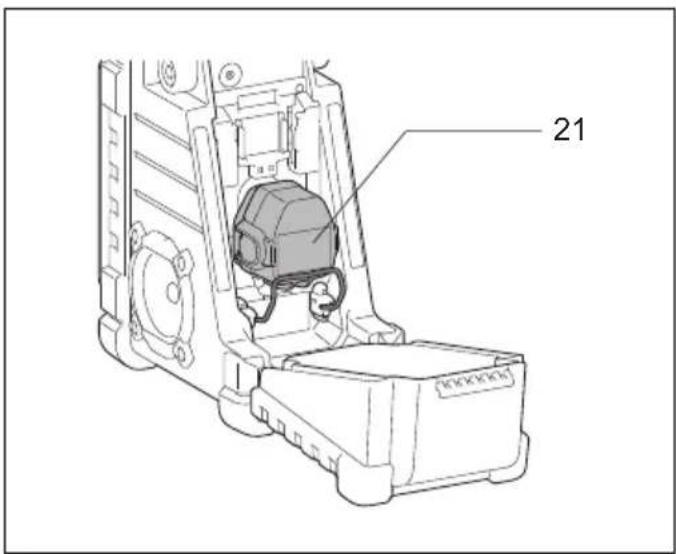
- Battery compartment (covering main battery pack)
- Speaker
- Battery compartment locker
- Input terminal (AUX IN 2)
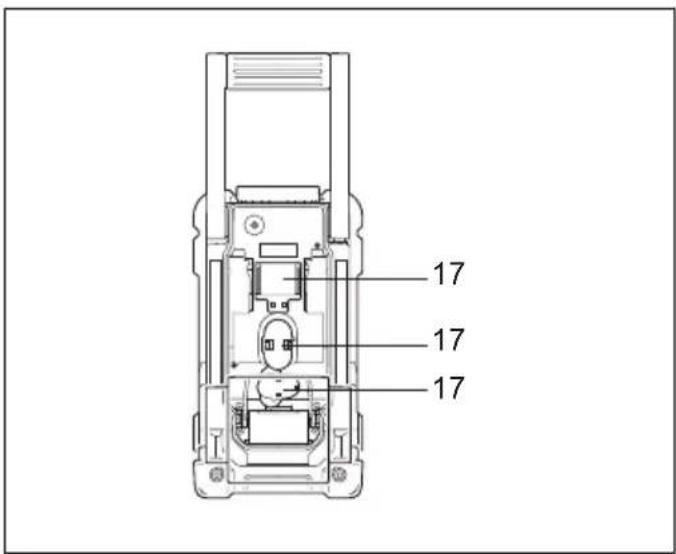
- Main battery compartment
- Micro USB port for software upgrade
- Red indicator
- Button
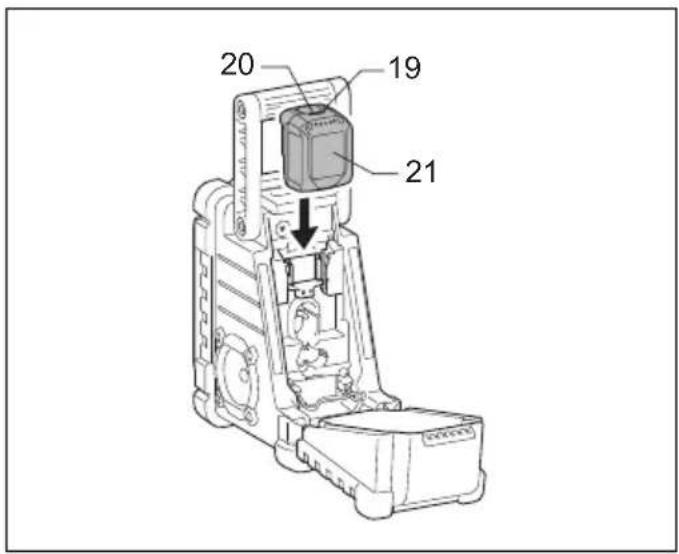
- Battery cartridge
- Supporting bar
The following tables indicate the operating time on a single charge.
| Battery Cartridge Voltage AT SPEAKER | OUTPUT = 50mW + 50mW unit: Hour | |||||
| 7.2 V 9.6 V | 10.8 V 12 V 14 | 4 V 18 V | ||||
| BL7010 Approx 4.5 | ||||||
| PA09 PA12 | PA14 PA18 | Approx. 6.5 | ||||
| 9050 1250 | 1450 | 1850 | ||||
| 9051 1251 | 1452 | 1852 | ||||
| 9100 1200 | 1420 | BL1815 | ||||
| 9120 | BL1013 | 1220 | BL1415 | |||
| 9100A | 1200A | |||||
| 9102 1202 | 1422 | 1822 | Approx. 10.0 | |||
| 9122 1222 | BH1420 | |||||
| 9102A | 1202A | |||||
| BH9020 | BH1220 | |||||
| BH9020A | BH1220C | |||||
| 9134 1234 | 1434 | 1834 Approx. 14.5 | ||||
| BH1427 | Approx. 15.0 | |||||
| 9135 1235 | 1435 | 1835 | Approx. 17.0 | |||
| 1435F | BL1830 | |||||
| 1235F | BL1430 | |||||
| BH9033 | BH1233 | BH1433 | Approx. 18.0 | |||
| BH9033A | BH1233C | |||||
□: Cluster battery
: Slide battery

WARNING:
Do not use two main batteries at the same time.
3-1. Installing or removing Slide battery cartridge (Fig. 4)
- To install the battery cartridge, align the tongue on the battery cartridge with the groove in the housing and slip it into place. Always insert it all the way until it locks in place with a little click.
- If you can see the red indicator on the upper side of the button, it is not locked completely. Install it fully until the red indicator cannot be seen. If not, it may accidentally
fall out of the tool, causing injury to you or someone around you.
- Do not use force when installing the battery cartridge. If the cartridge does not slide in easily, it is not being inserted correctly.
- To remove the battery cartridge, slide it from the tool while sliding the button on the front of the cartridge or pressing the buttons on both sides of the cartridge.

WARNING:
Do not use two main batteries at the same time.
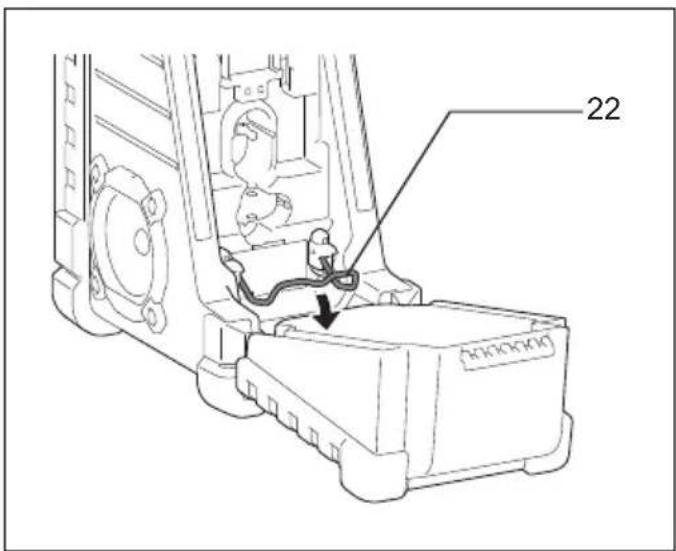
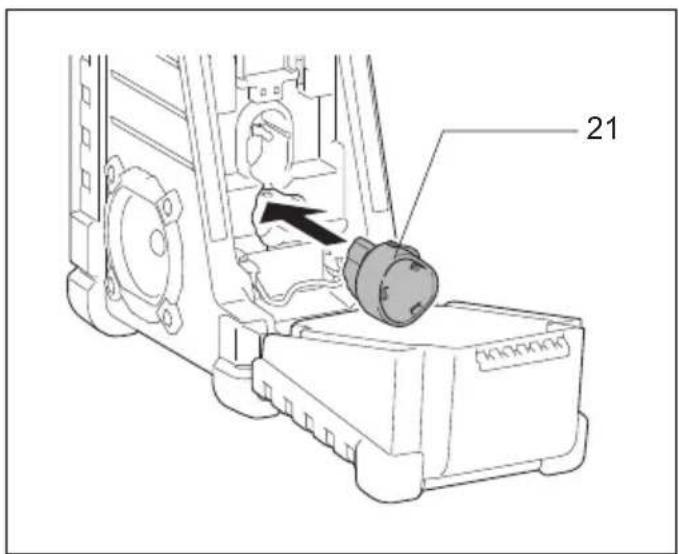
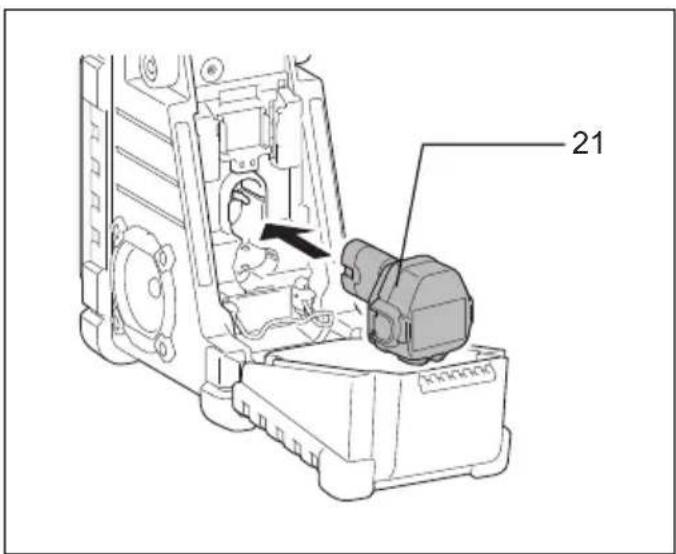
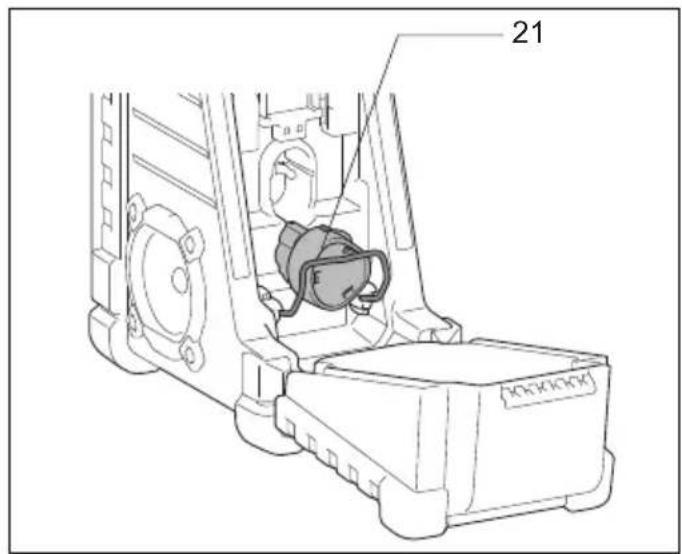
3-2. Installing or removing Cluster battery cartridge (Fig. 5-9)
- Pull the supporting bar to allow the battery to insert to the terminal.
- To insert the battery cartridge, align the tongue on the battery cartridge with the groove in the housing and slip it into place.
- Release the supporting bar.
- To remove the battery cartridge, pull the supporting bar and take the battery out of the terminal.
- Return the battery compartment locker to the original position.
- Reduced power, distortion and a "stuttering sound" are the signs that the main battery pack needs to replace.
Note:
The battery pack can't be charged via the supplied AC power adaptor.
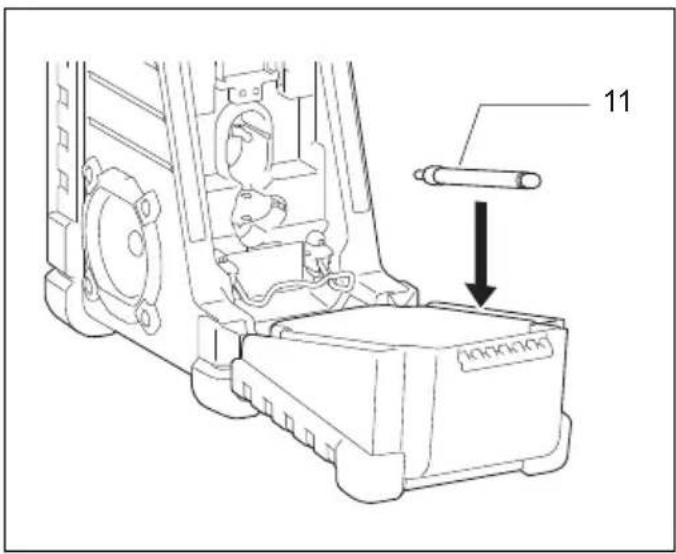
Installing the soft bended rod antenna (Fig. 10-11)
Install the soft bended rod antenna as shown in the figure.
Note:
There is a click in the battery compartment designed to store the removed antenna.
Using supplied AC power adaptor (Fig. 12)
Remove the rubber protector and insert the adaptor plug into the DC socket on the front side of the radio. Plug the adaptor into a standard mains socket outlet. Whenever the adaptor is used, the battery pack is automatically disconnected. The AC adaptor should be disconnected from the main supply when not in use.
Operating the radio
This radio has three tuning methods- Scan tuning, Manual tuning and Memory presets recall.
Selecting a station – DAB
- Press the Power button to switch on your radio.
- Select the DAB mode by pressing the Band button.
- Press the Advanced setting button and rotate the Volume/Tuning Control/Select knob until "Station List" is flashing on the screen. Press the Volume/Tuning Control/Select knob to enter the list of the stations.
- Rotate the Volume/Tuning Control/Select knob to scroll through the list of available stations. Press the knob to select the station.
- Adjust the desired volume by rotating the Volume/Tuning Control/Select knob.
Display modes – DAB
Your radio has a range of display options in the DAB mode:
Press the Info button to cycle through the various options shown in the following letters (a. to g.).
a. Station name Indicates the station name being listened to.
b. Program type Indicates the type of station being listened to. E.g. Pop, Classics, News, etc.
c. Multiplex name Indicates the name of the DAB multiplex to which the current station belongs.
d. Time & date Indicates the current time and date.
e. Frequency and channel
Indicates the frequency and channel number for the currently tuned DAB station.
f. Bit rate/Audio type
Indicates the digital audio bit rate and audio type for the currently tuned DAB station.
g. Signal strength Indicates the signal strength for the currently tuned DAB station.
Finding new stations – DAB
From time to time, new DAB radio stations may become available. Or you may have moved to a different part of the country. In this case you may need to activate your radio to scan for new stations.
To allow the radio to find the available stations, it is recommended to carry out a full scan of the entire DAB Band III frequencies.
- Press the Auto tune button.
- Your radio will perform a full scan of the DAB frequencies. As new stations are found, the station counter on the left side in the display will increase and stations will be added to the list.
Manual tuning – DAB
Manual tuning allows you to tune your radio to a particular DAB frequency in Band III. This function can also be used to assist the positioning of the antenna or the radio so as to optimize reception for a specific channel or frequency.
-
Press the Advanced setting button and rotate the Volume/Tuning Control/Select knob until "Manual Tune" shown on the display. Press the Volume/Tuning Control/Select knob to enter the manual tuning mode.
-
Rotate the Volume/Tuning Control/Select knob to select the desired DAB channel. Press Volume/Tuning Control/Select knob to confirm the chosen frequency.
Dynamic Range Control (DRC) - DAB
DRC feature can make quieter sounds easier to hear when your radio is used in a noisy environment by reducing the dynamic range of the audio signal.
There are three levels of compression: DRC 0 No compression applied.
DRC 1/2 Medium compression applied.
DRC 1 Maximum compression applied.
- Press the Power button to switch on your radio.
- Press the Band button to select the DAB band.
- Press the Advanced setting button and rotate the Volume/Tuning Control/Select knob until "DRC Value"
shown on the display. Then press the Volume/Tuning Control/Select knob to enter the setting. The display will show the current DRC value.
- Rotate the Volume/Tuning Control/Select knob to select desired DRC setting.
- Press the Volume/Tuning Control/Select knob to confirm the setting.
Station order setup – DAB
Your radio has 3 station order settings from which you can choose. The station order settings are alphanumeric, ensemble and valid station.
- Press the Advanced setting button.
- Rotate the Volume/Tuning Control/Select knob until "Station order" appearing on the display, then press the Volume/Tuning Control/Select knob to enter the setting.
- Rotate the Volume/Tuning Control/Select knob to select the following options and press the knob to confirm the setting.
Alphanumeric Sorts the station list alpha-numerically 0...9 A...Z
Ensemble Organizes the station list by DAB multiplex
Valid Shows only those stations for which a signal can be found
Scan Tuning – FM
- Press the Power button to turn on the radio.
- Select the desired waveband by pressing the Band button. Make sure the soft bended rod antenna has been well placed for best FM reception. Try to avoid operating the radio next to a computer screen and other equipment which will cause interference to the radio.
- Press the Auto tune button and the radio will search and stop automatically when it finds a radio station. The radio will continue searching for the next available station unless the operator presses the Auto tune button to stop the scanning.
- Rotate the Volume/Tuning Control/Select knob to get the desired sound level. The LCD display will show sound level changes.
Note:
In order to use the Volume/Tuning Control/Select knob to find your desired station, press and hold the Volume/Tuning Control/Select knob to switch to the tuning control mode.
- To turn off the radio, press the Power button.
FM scan zone
When using FM mode, your radio can be set to scan either local stations or to scan all stations including distant radio stations.
Manual Tuning – FM
-
Press the Power button to turn on the radio.
-
Press the Band button to select desired waveband. Adjust the antenna as described above.
- Rotate the Volume/Tuning Control/Select knob will change the frequency in the following increment: FM: 50 or 100 kHz
In order to use the Volume/Tuning Control/Select knob to find your desired station, press and hold the Volume/Tuning Control/Select knob to switch to the tuning control mode. - Keep rotating the Volume/Tuning Control/Select knob until desired frequency is shown on the display.
- Rotate the Volume/Tuning Control/Select knob to get the desired sound level.
- To turn off the radio, press the Power button.
Note:
Display modes – FM
Your radio has a range of display options for FM radio mode:
Repeat pressing the Info button to cycle through the different options.
a. Program station Indicates the name of the station being listened to.
b. Radio text Indicates text message such as new items, etc.
c. Program type Indicates the type of station being listened to such as Pop, Classic, News, etc.
d Time & date Indicates the current time and date.
e. Frequency Indicates the frequency of the FM signal.
Storing stations in preset memories (DAB and FM)
There are 5 memory presets for each waveband.
- Press the Power button to turn on the radio.
- Tune to the desired station using one of the methods previously described.
- Press and hold the desired Preset button until the preset number shown on the display, for example, "P2 Saved". The station is then stored in the selected Preset button.
- Repeat this procedure for the remaining presets.
- Stations stored in the preset memories can be overwritten by following the procedures described above.
Recall stations from the preset memories (DAB and FM)
- Press the Power button to turn on the radio.
- Press the Band button to select your desired waveband.
- Press the desired Preset button momentarily. The preset number and station frequency will appear in the display.
Language options (only available in BMR105)
There are four language options available in the radio: English, German, Italian and French.
- Press Advanced setting button.
- Rotate the Volume/Tuning Control/Select knob until "Language" shown on the display. Press the Volume/Tuning Control/Select knob to enter the setting.
- Rotate the Volume/Tuning Control/Select knob to choose your desired language. Press the Volume/Tuning Control/Select knob to confirm your setting.
Brightness control
The backlight of the display can be adjusted.
- Press the Advanced setting button.
- Rotate the Volume/Tuning Control/Select knob until "Backlight" shown on the display. Press the Volume/Tuning Control/Select knob to enter the setting.
- Rotate the Volume/Tuning Control/Select knob to choose to enable or disable the backlight function, then press the Volume/Tuning Control/Select knob to confirm the setting.
System reset
If your radio fails to work correctly, or some digits on the display are missing or incomplete, carry out the following procedure.
- Press the Advanced setting button.
- Rotate the Volume/Tuning Control/Select knob until "Factory Reset" shown on the display. Press the Volume/Tuning Control/Select knob to enter the setting.
- Rotate the Volume/Tuning Control/Select knob to choose "Yes". Press the Volume/Tuning Control/Select knob to confirm the setting and a full reset will be performed.
Software version
- Press the Advanced setting button.
- Rotate the Volume/Tuning Control/Select knob until "SW Version" shown on the display. Press the Volume/Tuning Control/Select knob to view the software version installed in the radio.
Micro USB port for software upgrade
Software updates for your radio may be available in the future.
As software updates become available software and information on how to update your radio can be found at Makita website.
How to play other audios
CAUTION:
Unplug this apparatus before connecting other audios.
- There are 2 AUX IN sockets. AUX IN 1 is located on the front panel, and AUX IN 2 is located in the battery compartment.
- Connect a stereo or mono source (i.e. iPod, MP3, or CD player) to either AUX IN 1 or AUX IN 2 by audio cord.
- Repeatedly press and release the Band button until "AU1" or "AU2" is displayed, then AUX function is activated.
MAINTENANCE
CAUTION:
- Never use gasoline, benzine, thinner, alcohol or the like. Discoloration, deformation or cracks may result.
Specifications:
Power requirements
AC power adaptor DC12 V 1A, center pin positive
Battery Cluster battery: 7.2 V - 18 V
Slide battery: 9.6 V - 18 V
Frequency coverage FM 87.50 - 108 MHz
DAB/DAB+ 174.928 - 239.200 MHz
DAB/DAB+ Channel block
DAB (Band III) 5A-13F
Compatible standard DAB (BMR104)
DAB/DAB+ (BMR105)
Circuit feature
Loudspeaker 3 inches 8 ohm
Output power 7.2 V: 0.5 W x 2, 9.6 V: 1 W x 2
10.8 V: 1.2 W x 2, 12 V: 1.5 W x 2
14.4 V: 2.2 W x 2, 18 V: 3.5 W x 2
Input terminal 3.5 mm dia. (AUX IN1/AUX IN2)
Antenna system DAB/FM: soft bended rod antenna
Dimension (W x H x D) in mm
280 × 302 × 163
Weight 4 kg (without battery)
Dynamic Range Control (DRC) - DAB
a. Program station (Sendername)
Dynamic Range Control (DRC) - DAB
DAB (Band III) 5A-13F
Standard compatibile DAB (BMR104)
DAB/DAB+ (BMR105)
Circuito
Casse 3 pollici 8 ohm
Tensione 7,2 V: 0,5 W x 2, 9,6 V: 1 W x 2
DAB (Band III) 5A-13F
Compatibele norm DAB (BMR104)
DAB/DAB+ (BMR105)
Circuitfunctie
Luidspreker 3 inch, 8 ohm
Uitgangsvermogen 7,2 V: 0,5 W x 2, 9,6 V: 1 W x 2
Afmetingen (b x h x d) in mm
280 × 302 × 163
DAB (Banda III) 5A-13F
Gjelder bare for EU-land
Kast aldri elektriske produkter eller batterier i husholdningsavfallet!
Manuell innstilling – DAB
Manuell innstilling – FM
-
Trykk på På/Av-knappen for å slå på radioen.
-
Trykk knappen for bändfrekvens for å velge ønsket bändfrekvens. Juster antennen som beskrevet ovenfor.
- Én enkelt dreining av volum-/innstillingskontroll-/valgknappen vil endre frekvensen i følgende intervaller:
FM: 50 eller 100 kHz
Merk:

- ENGLISH (Original instructions)
- Symbols
- IMPORTANT SAFETY INSTRUCTIONS
- WARNING:
- SAVE THESE INSTRUCTIONS
- FOR BATTERY CARTRIDGE
- Features:
- Explanation of general view
- Controls
- Note:
- Installing the soft bended rod antenna (Fig. 10-11)
- Using supplied AC power adaptor (Fig. 12)
- Operating the radio
- Selecting a station – DAB
- Display modes – DAB
- Finding new stations – DAB
- Manual tuning – DAB
- Dynamic Range Control (DRC) - DAB
- Station order setup – DAB
- Scan Tuning – FM
- FM scan zone
- Manual Tuning – FM
- Display modes – FM
- Storing stations in preset memories (DAB and FM)
- Recall stations from the preset memories (DAB and FM)
- Language options (only available in BMR105)
- Brightness control
- System reset
- Software version
- Micro USB port for software upgrade
- How to play other audios
- CAUTION:
- MAINTENANCE
- Specifications:
- Power requirements
- Circuit feature
- Circuito
- Circuitfunctie
- Manuell innstilling – DAB
- Manuell innstilling – FM
- Merk:
Brand : MAKITA
Model : BMR105
Category : Radio