52TA4415 - Television ARISTONA - Free user manual and instructions
Find the device manual for free 52TA4415 ARISTONA in PDF.



| Product Type | CRT Television |
| Brand | Aristona |
| Model | 52TA4415 |
| Category | Color television |
| Power supply | 220-240 V, 50 Hz |
| Remote control batteries | 2 R6 (AA) batteries |
| TV standards | PAL/SECAM (L, BG, I depending on country) |
| Channel search | Automatic and manual |
| Program memory | Up to 99 programs (renumbering possible) |
| Teletext | Yes, with pages and subpages |
| Sleep timer | Yes, adjustable from 0 to 240 minutes |
| Automatic volume control (AVL) | Yes (on stereo versions) |
| Stereo sound/NICAM | Yes (depending on version) |
| Scart sockets | 1 or 2 (EXT1/EXT2) depending on version |
| Headphone input | Yes (depending on version), impedance 32-600 ohms |
| Front connections | Audio/video inputs (depending on version) |
| Picture settings | Brightness, colour, contrast, sharpness, tint, contrast+ |
| Sound settings | Balance, treble, bass, AVL (stereo versions) |
| Safety | Do not cover, leave at least 5 cm clearance, avoid water splashes |
| Recycling | Compliant with WEEE directive, recyclable materials |
Frequently Asked Questions - 52TA4415 ARISTONA
User questions about 52TA4415 ARISTONA
0 question about this device. Answer the ones you know or ask your own.
Ask a new question about this device
Download the instructions for your Television in PDF format for free! Find your manual 52TA4415 - ARISTONA and take your electronic device back in hand. On this page are published all the documents necessary for the use of your device. 52TA4415 by ARISTONA.
USER MANUAL 52TA4415 ARISTONA
natural_image
Diagram of a computer monitor with labeled dimensions (no text or symbols present)natural_image
Illustration of a computer monitor connected to a power cord with antenna (no text or symbols)② Raccordements
natural_image
3D illustration of a remote control device with a small inset component (no text or symbols visible)③ Télécommande
natural_image
Simple line drawing of a hand holding a curved object (no text or symbols)④ Mise en marche
Magnétoscope (seul)
natural_image
Diagram showing a server connected to a device via cable (no text or symbols visible)natural_image
Illustration of a computer monitor connected to headphones and a handheld device (no text or symbols present)natural_image
Hand holding a small object with circular elements, no visible text or symbolsnatural_image
Illustration of a vintage CRT monitor with a circular top and control buttons (no text or symbols)Thank you for purchasing this television set.
This handbook has been designed to help you install and operate your TV set. We would strongly advise you read it thoroughly:
Tuning in to the TV channels 2
Using other menus 4
Remote control keys 5
Teletext 6
Peripherals 7
The keys on the television set 8
Tips 8
Installing your television set
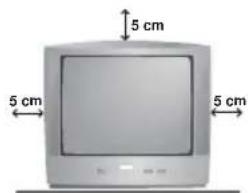
① Positioning the television set
Place your TV on a solid, stable surface, leaving a space of at least 5 cm around the appliance.
To avoid accidents, do not put anything on the set such as a cloth or cover, a container full of liquid (vase) or a heat source (lamp). The set must not be exposed to water.
natural_image
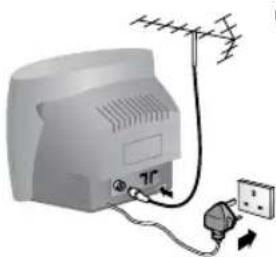
Illustration of a portable air conditioner connected to an electrical outlet via a power plug (no text or symbols)② Connections
- Insert the aerial plug into the 7F socket at the rear of the set.
Smaller sets are equipped with an internal aerial. Under certain conditions, reception can be poor. You can improve it by repositioning the aerial. If the reception remains unsatisfactory, an external aerial should be used.
- Insert the mains plug into a wall socket (220-240 V / 50 Hz).
natural_image
3D illustration of a remote control device with a handle and internal compartments, showing a transformation from a single drive to a closed panel (no text or symbols present)③ Remote control
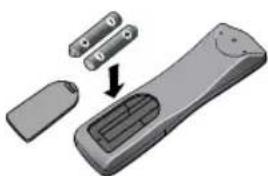
Insert the two R6-type batteries (supplied) making sure that they are the right way round.
The batteries supplied with this appliance do not contain mercury or nickel cadmium. Please do not discard your used batteries if you have access to a recycling facility (if in doubt, consult your dealer). When the batteries are replaced, use the same type.
natural_image
Hand pointing at a curved object (no text or symbols visible)④ Switching on
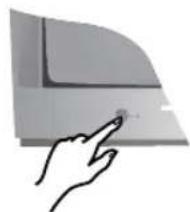
To switch on the set, press the on/off key.
A red indicator comes on and the screen lights up.
Go straight to the chapter Quick installation on the following page. If the television remains in standby mode, press P ⊕ on the remote control.
The indicator flashes when you use the remote control.
Tuning in to channels
Quick installation (first use)
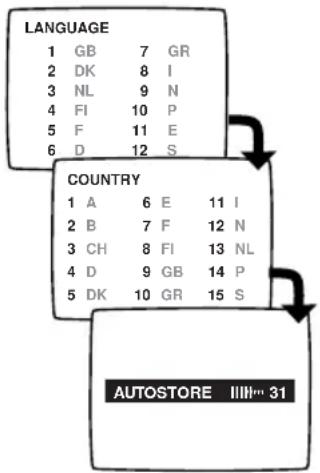
The first time you switch on the television, a menu appears on the screen. This menu asks you to choose the language of the other menus.
If the menu does not appear, hold down the PROGRAM- and PROGRAM+ keys (or △- and P-) on the set for 4 seconds to bring it up.
① Use the keys numbered from ① to ⑨ on the remote control to choose your language (for English, press ①). Another menu appears.
② Select your country (for GB, press ⑨).
3 As soon as your country is entered, tuning in starts automatically. The operation takes a few minutes. A display shows the search status and the number of programmes found. When it has finished, the menu disappears and the last programme is displayed.
If no programmes are found, refer to the chapter entitled Tips on p. 8.
4 If the transmitter or the cable network broadcasts the automatic sort signal, the programmes will be correctly numbered.
5 If not, the programmes found will be numbered in descending order starting at 99, 98, 97, etc. (or 79, 78, ...).
Use the SORT menu to renumber them.
Some transmitters or cable networks broadcast their own sort parameters (region, language, etc.). Where this is the case, make your choice using the ⏻ keys and confirm with ⚙.
To renumber the programmes found
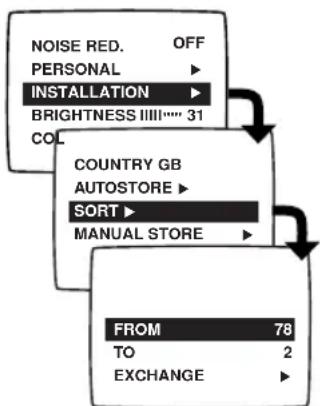
① Press the Ⓜ key. The main menu is displayed.
2 Press ⏱ once to select INSTALLATION, then press ⏰. The INSTALLATION menu appears. The LANGUAGE option is activated.
3 Press ⏻ 3 times to select SORT then press ⬇.
The SORT menu appears. The FROM option is activated.
4 Select the programme you wish to renumber using keys ◯ or 0 to 9. Example: to renumber programme 78 as 2, press ⑦ ⑧.
5 Select option A (key ⏻) and enter the new number with keys ⏱ or Ⓞ to Ⓣ (for the example given, enter 2)
6 Select EXCHANGE (key ⏻) and press ⬇. The message EXCHANGED appears, the exchange takes place (∘ to cancel). In our example, programme 78 is renumbered as 2 (and programme 2 as 78).
⑦ Select the option FROM (key ⏻) and repeat stages ④ to ⑥ as many times as there are programmes to renumber.
8 To exit from the menus, press ⓘ.
Manual tuning
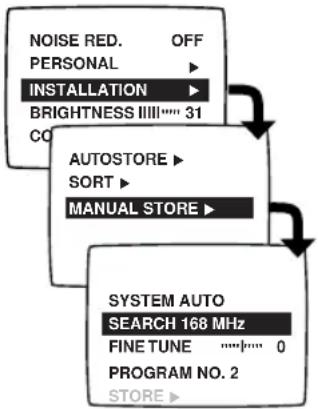
flowchart
graph TD
    A["NOISE RED. OFF PERSONAL"] --> B["INSTALLATION"]
    B --> C["BRIGHTNESS III 31"]
    C --> D["AUTOSTORE"]
    D --> E["SORT"]
    E --> F["MANUAL STORE"]
    F --> G["SYSTEM AUTO SEARCH 168 MHz"]
    G --> H["FINE TUNE 0 PROGRAM NO. 2 STORE"]
This menu allows you to store the programmes one by one.
① Press Ⓜ.The main menu comes up on the screen.
② Press ◇ once to select INSTALLATION then press ◇.
③ Select MANUAL STORE (☐) and press ☐. The MANUAL STORE menu appears.
4 Select SYSTEM (only available on certain models). Use ▶ to choose UK (standard I), FRANCE (standard LL') or WEST-EU (standard BG reception).
5 Select SEARCH and press ⬇. The search begins. As soon as a programme is found, the search will stop. If you know the frequency of the programme required, simply enter its number using keys ① to ⑨. If no programme is found, refer to the Tips chapter on p. 8.
6 If reception is unsatisfactory, select FINE TUNE and press ◯ or ◯ to fine tune.
⑦ Select PROGRAM NO. and enter the required programme number using ◯ or ① to ⑨.
8 Select STORE and press ◯. The message STORED appears. The programme has been stored.
⑨ Repeat steps ⑤ to ⑧ as many times as there are programmes to store. To exit the menus, press ⓘ+.
Other settings on the INSTALLATION menu
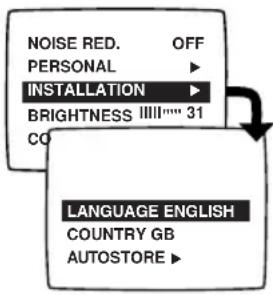
① Press Ⓜ.The main menu is displayed on-screen.
2 Press △ once to select INSTALLATION and press ◯.The INSTALLATION menu appears.
③ Use ◯ to select a setting and ◯ to adjust.
- LANGUAGE: to change the menu language.
- COUNTRY: to select the country you are in (GB for Great Britain). This setting affects the automatic programme sort.
- AUTOSTORE: press ⬇ to begin storing. The operation takes a few minutes. When it is complete, the INSTALLATION menu reappears automatically.
For more information, see the Quick Installation chapter, steps 3 to 5 on the previous page.
To exit or interrupt the search, press Ⓜ
- EXTERNAL: press ⬇ to bring up the menu. You have access to a series of names which allow you to customise the names of the external sockets. When you next select an external socket, its chosen name will be displayed for a few seconds.
4 To exit from the menus, press ⓘ.
Using other menus
To adjust a menu:

1
Display the menu.

2
Select a setting.
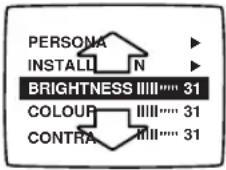

3
Adjust.
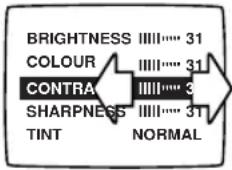
Note: the menus disappear automatically after 30 seconds if no further adjustments are made.
To exit from the menus, press ⓘ+ (or ⓂMENU to come back to the previous stage).
Adjusting the picture
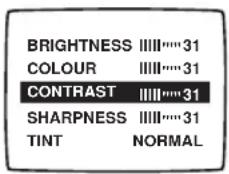
Press Ⓜ. You can adjust: BRIGHTNESS, COLOUR, CONTRAST, SHARPNESS, TINT, CONTRAST+ and NOISE RED..
- SHARPNESS: alters the crispness of the image,
- TINT: alters the colour balance. There are 3 options: COLD (blue tint), NORMAL (balanced) or WARM (red tint).
- CONTRAST+: automatically adjusts the image contrast according to content (the darkest part of the image is always black).
- NOISE RED.: alleviates fuzziness (snowy picture). This setting is useful when reception is difficult.
Adjusting the sound (for stereo models only)
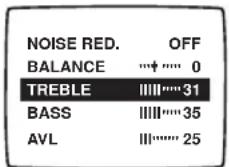
Press Ⓜ.You can adjust for stereo models only, BALANCE, TREBLE, BASS and AVL
- AVL (Automatic Volume Leveller): automatic volume control used to avoid sudden increases in volume, particularly when changing programme or during advertisements.
Storing settings
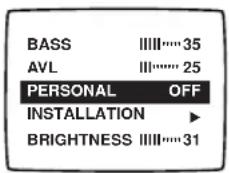
You can store your own sound and picture settings.
① First carry out your menu settings.
② Next, select PERSONAL and press ⬇. The message STORED is displayed. The settings are stored.
Note: volume is automatically stored and do not need to be stored in the PERSONAL menu.
The keys on the remote control
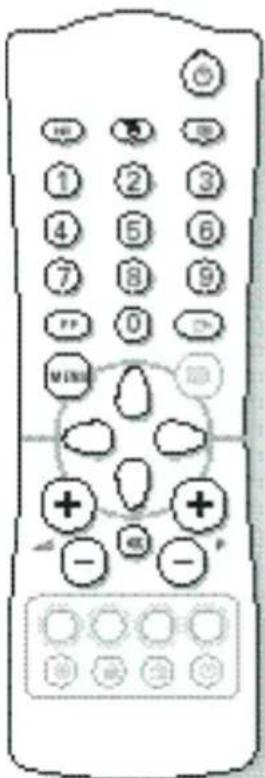
Depending on the model, there are 2 different versions of the remote control.
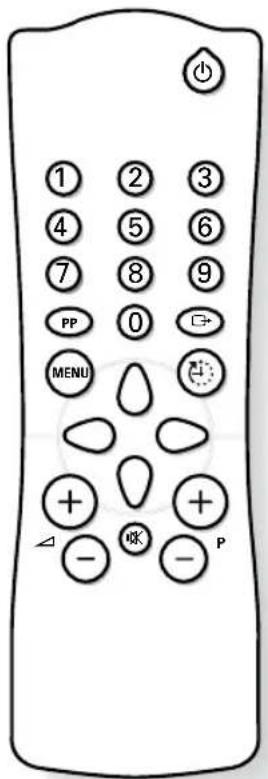
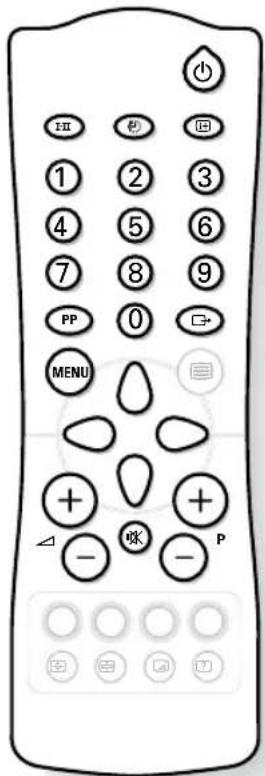
Press:

Standby

Select Programme
Numerical Keys

Volume

Mute

Menu

Personal Preferences

Select EXT sockets

Timer

Screen Format (available only on certain models)

Sound Mode (stereo models only

Screen Information (stereo models only
To obtain:
To set the TV to standby mode. The red indicator lights up. To switch the set back on, press P ⊖, P ⊕ or ① to ⑨.
Brings up the previous or following programme.
For direct access to programmes. For a 2-digit programme number, the second digit must be entered before the dash disappears. On certain programmes, the title of the programme is displayed for a few seconds at the bottom of the screen.
To adjust the sound level.
To disable or enable the sound.
To call up or exit from the menus. Use 🔧 and 🔧 to adjust. The menus disappear automatically after 30 seconds if no further command is given.
Press this key several times to restore the settings made in the PERSONAL menu (see page 4) or the factory settings.
Press several times to select EXT sockets (see p.9).
To select an automatic standby period (from 0 to 240 minutes).
The ⏰ key allows the picture to be enlarged vertically to get rid of the black bands around cinema-format films. The ⏰ key allows the picture to be compressed vertically (16:9 format).
To switch from STEREO (and NICAM STEREO) programmes to MONO or, for bilingual transmissions, to choose between DUAL I and DUAL II (and NICAM DUAL I, NICAM DUAL II and mono). NICAM is a process by which sound is transmitted as a digital quality.
Hold down for 5 seconds to permanently display the programme number. Press quickly to display or remove the programme number and the sound mode.
Teletext (available only on certain models)
Teletext is an information system, broadcast by certain channels, which can be read like a newspaper. It also provides subtitles for people with hearing difficulties or those who are unfamiliar with the language in which a particular programme is being broadcast (cable networks, satellite channels, etc.).
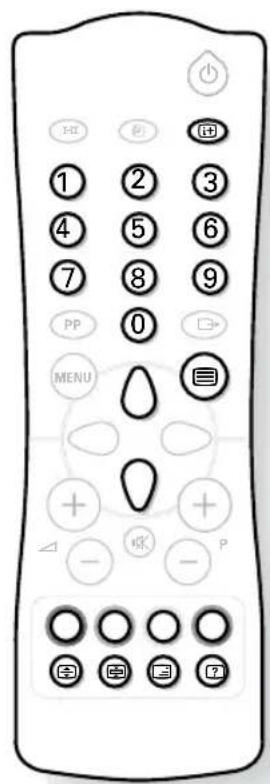
Press: To obtain:

Switch teletext on/off

Selecting a teletext page



Table of contents
Direct access to subject headings

Page enlargement

Stop the sequence of sub-pages

Overlaying text on the TV picture

Reveal
To call up or exit from teletext.At first, the main index page appears with a list of the items available. Each page has a corresponding 3-figure number. If the selected channel does not broadcast teletext, 100 will appear and the screen will remain blank (in this case, exit from teletext and choose another channel).
Use keys ① to ⑨ or ⏱ to enter the page number required. For example: for page 120, press ① ② ③. The number is displayed in the top left-hand corner, the page counter starts searching and the page is displayed.
Repeat the procedure to consult another page. If the counter continues searching, this means that the selected page is not broadcast. Choose another number.
To return to the table of contents (normally page 100).
Coloured zones are displayed at the bottom of the screen. The 4 coloured keys give access to the corresponding subjects or pages. The coloured zones flash when the subject or the page is not yet available.
Press this key to display the upper, then lower part of the screen, and then to return to the normal page size.
Some pages contain sub-pages which follow on automatically from one another. This key allows sub-page sequence to be enabled or disabled. The ☐ sign appears in the top left hand corner.
To activate or deactivate screen overlay.
Use this key to reveal/conceal hidden information (answers to puzzles).
Connecting other appliances
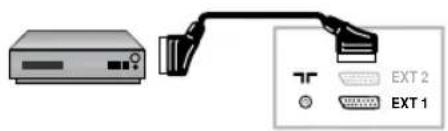
Depending on the model, the TV is equipped with 1 or 2 euroconnector sockets, EXT1 and EXT2.
The EXT1 socket controls audio video input/output and RGB input.
The EXT2 socket (if available) controls audio video input/output and S-VHS input.
Video recorder
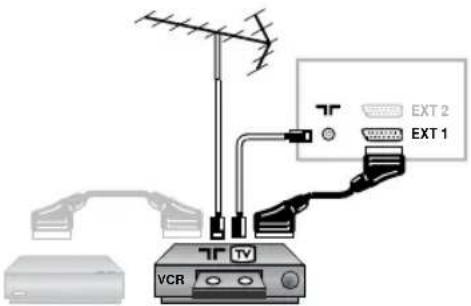
Video recorder (only)
Connect as shown using a good quality euroconnector cable.
If your video recorder does not have a euroconnector socket, the only connection possible is via the aerial cable. You will therefore need to tune in your video recorder test signal and assign it programme number 0 (see manual store, p. 3). To reproduce the video recorder picture, press ①.
Video recorder with decoder
Connect the decoder to the second euroconnector on the video recorder. You can then record scrambled transmissions.
Other equipment
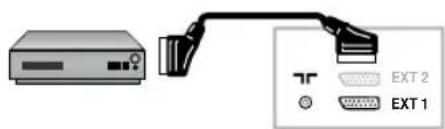
Satellite receiver, decoder, DVD, games, etc.
For sets equipped with two euroconnector sockets, it is best to connect the equipment which produces RGB signals (digital decoder, DVD drives, games, etc.) to EXT1 and the equipment which produces S-VHS signals (S-VHS and Hi-8 video recorders) to EXT2.
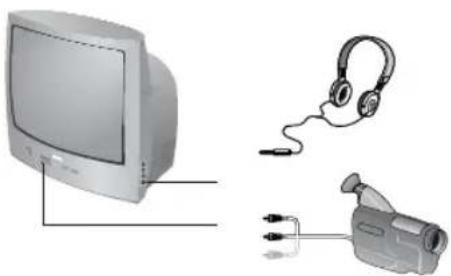
Front panel connections
natural_image
Illustration of a vintage computer monitor, headphones, and a surveillance camera with cable connectors (no text or symbols)(available only on certain models)
Depending on the model, sockets are on the front (sometimes under a flap) or on the right-hand side of the set.
Headphones (only on certain models)
When the earphones are plugged in, the sound on the set is cut off. Adjust the volume using the ⏻ ∠ + keys.
The headphones must have an impedance of between 32 & 600 ohms.
Camcorder
Certain models are equipped with AUDIO/VIDEO connections. You will find 1 video input + 1 sound input (mono versions) or 2 sound inputs left (L) and right (R) on stereo versions. Make the connections, then use the key to select EXT (or EXT2 for models with 2 euroconnector sockets). The switch between the front and rear sockets is automatic with priority on front sockets.
For a monophonic camera, connect the sound signal to the AUDIO L input. Use the I-II key to reproduce the sound through the left and right TV speakers.
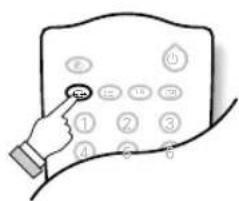
To select connected equipment
Press ☐ to select EXT(1) and, on models with 2 euroconnector sockets: EXT2 and Y/C2 (S-VHS signal on EXT2).
The switch is automatic on most appliances (decoders, etc.).
The keys on the TV set
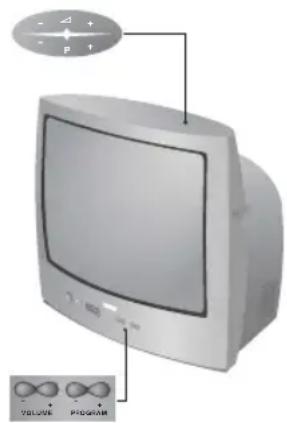
The television set has 4 keys which are located on the front or the top of the set depending on the model.
The VOLUME - + (-△+) keys are used to adjust the sound level.
The PROGRAM - + (- P +) keys are used to select the required programmes.
To access the menus, hold down the VOLUME - and VOLUME + keys simultaneously. Then use the PROGRAM - + keys to select an adjustment and the VOLUME - + keys to make the adjustment.
To exit from the menu, hold down the VOLUME - and VOLUME + keys for a few seconds.
Tips
Poor reception or no picture
The proximity of mountains or high buildings can cause ghost pictures, echoing or shadows. If this is the case, try tuning the picture using FINE TUNE (p. 4).
Do you have the right system (p. 4)?
Check that the aerial plug or euroconnector plug is properly connected.
Check also that your aerial is capable of receiving broadcasts in this frequency range (UHF or VHF).
Adjusting the picture
In case of bad reception (fuzzy picture), set the NOISE RED to ON: p.5.
The picture is in black and white
To read a video cassette, check that it is recorded in the same format as that of the video recorder (PAL, SECAM or NTSC).
No sound
If certain programmes have a picture but no sound, this is because you do not have the correct TV system (see p. 4).
Standby
The set switches automatically to standby if it receives no signals for a period of 15 minutes.
When it is in standby mode, the set uses energy. To save electricity, we advise you to switch it off using the on-off button.
Still having problems?
If the set breaks down, never try to repair it yourself. Consult your after-sales service department instead.
Recycling
The materials used in your set are either reusable or can be recycled. To minimise environmental waste, specialist companies collect used appliances and dismantle them after retrieving any materials that can be used again (ask your dealer for further details).

Inleiding
natural_image
Illustration of a TV power adapter connected to an antenna and a socket (no text or symbols)② Verbindingen
natural_image
3D rendering of a remote control device with an arrow indicating assembly (no text or symbols visible)③ Afstandsbediening
natural_image
Hand pointing at a curved surface (no text or symbols visible)④ Inschakelen
Andere apparaten
natural_image
Diagram showing a device connected to an external network interface with EXT 1 and EXT 2 labels (no text or symbols on the device itself)Videorecorder (alleen)
natural_image
Illustration of a vintage computer monitor, headphones, and a surveillance camera with cable connectors (no text or symbols)Camcorder
natural_image
Diagram of a computer monitor connected to an antenna and a power outlet (no text or symbols present)② Collegamenti
natural_image
3D illustration of a remote control device with battery and tag components (no text or symbols)③ Telecomando
natural_image
Hand pointing at a curved interface element (no text or symbols visible)④ Accensione
natural_image
Illustration of a vintage computer monitor, headphones, and a handheld device (no text or symbols)Telecamera
natural_image
Illustration of a computer monitor connected to a power cord with an antenna (no text or symbols visible)② Conexiones
natural_image
3D illustration of a remote control device with a small inset component (no text or symbols visible)③ Mando a distancia
natural_image
Simple line drawing of a hand pressing down on a curved surface (no text or symbols)④ Puesta en marcha
Pulse : Obtendrá :

Standby

Pulse : Obtendrá :

Vídeo (solo)
natural_image
Diagram showing a server connected to a network device with ports and connectors (no text or symbols visible)natural_image
Illustration of a desktop computer connected to headphones and a handheld device (no text or symbols visible)natural_image
Hand holding a white object with circular icons, no visible text or symbolsnatural_image
Illustration of a vintage CRT computer monitor with an attached circular component (no text or symbols visible)
- ② Raccordements
- ③ Télécommande
- ④ Mise en marche
- Magnétoscope (seul)
- Installing your television set
- ① Positioning the television set
- ② Connections
- ③ Remote control
- ④ Switching on
- Tuning in to channels
- Quick installation (first use)
- To renumber the programmes found
- Manual tuning
- Other settings on the INSTALLATION menu
- Using other menus
- To adjust a menu:
- Adjusting the picture
- Adjusting the sound (for stereo models only)
- Storing settings
- The keys on the remote control
- Press:
- To obtain:
- Teletext (available only on certain models)
- Press: To obtain:
- Connecting other appliances
- Video recorder
- Video recorder (only)
- Video recorder with decoder
- Other equipment
- Front panel connections
- Camcorder
- To select connected equipment
- The keys on the TV set
- Tips
- Poor reception or no picture
- The picture is in black and white
- No sound
- Standby
- Still having problems?
- Recycling
- Inleiding
- ② Verbindingen
- ③ Afstandsbediening
- ④ Inschakelen
- Andere apparaten
- Videorecorder (alleen)
- ② Collegamenti
- ③ Telecomando
- ④ Accensione
- Telecamera
- ② Conexiones
- ③ Mando a distancia
- ④ Puesta en marcha
- Pulse : Obtendrá :
- Vídeo (solo)
Brand : ARISTONA
Model : 52TA4415
Category : Television